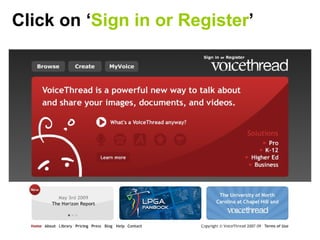
Click on ‘ Sign in or Register ’
Add your details and click ‘ register ’
Now you have a Voicethread account.  Click on ‘ Voicethread solutions ’.
Click on  K-12 ,  Then, click on  apply   under ‘Free Educator’
Fill in your details and submit Follow the instructions to complete
Click on your  email address   then ‘ My Identities ’ Click on  edit  next to your name and select an image from ‘my pictures’ to represent you.
Now click on  add identity  and add each child in you class- you can add pics they choose later. Now you’re ready to make your voicethread…  Click on the  Create  tab to begin.

Voicethread Presentation

  • 1.
    Click on ‘Sign in or Register ’
  • 2.
    Add your detailsand click ‘ register ’
  • 3.
    Now you havea Voicethread account. Click on ‘ Voicethread solutions ’.
  • 4.
    Click on K-12 , Then, click on apply under ‘Free Educator’
  • 5.
    Fill in yourdetails and submit Follow the instructions to complete
  • 6.
    Click on your email address then ‘ My Identities ’ Click on edit next to your name and select an image from ‘my pictures’ to represent you.
  • 7.
    Now click on add identity and add each child in you class- you can add pics they choose later. Now you’re ready to make your voicethread… Click on the Create tab to begin.