Finding out the card balance
It is up to the cardholder to know the balance on their
Visa Prepaid card. They can check the balance any
time using the Issuer’s 1-800 number or website found
on the back of the card.
Embossed and unembossed cards
Visa Prepaid cards can be embossed, with raised
characters, or unembossed, meaning they’re flat and
smooth. On unembossed cards,you’ll see the words
ELECTRONIC USE ONLY, which means transactions
should be processed at an electronic terminal that
allows for automatic authorization.
Personalized and non-personalized cards
Visa Prepaid cards can be personalized with the
cardholder’s name or they may be non-personalized —
for example, they could have a generic title or no name
instead of the cardholder’s name. Both types of card
are processed the same way.
Processing returns and refunds
A cardholder returning an item must present the
Visa Prepaid card used to make the purchase along
with the original sales receipt. Crediting funds to the
card may take three to seven business days. If the
customer does not have the Visa Prepaid card, refer
to your store return policy. If the card has expired,
the refund can still be credited to the Visa Prepaid
card account; the cardholder must then contact the
card Issuer and request a new card or a cheque for
the refunded amount.
Voiding transactions
Purchases on Visa Prepaid cards can be voided
the same way they would be with Visa credit cards.
Similar to returns, it may take three to seven business
days to complete the void process and credit the
funds to the card.
Signatures
Like all Visa cards, Visa Prepaid cards contain a
signature panel on the back and must be signed
by the cardholder in order to be valid.
Expired cards
All Visa Prepaid cards have an expiry date, located on
the front of the card directly below the 16-digit account
number. While expired cards cannot be used to make
purchases, they can be credited with refunds; the
cardholder must then contact the Issuer to have a new
card or a cheque issued for the refunded amount.
Online transactions
Visa Prepaid cards must be registered before making
online purchases; cardholders can do this with the card
Issuer via the Internet or over the phone — the Issuer’s
1-800 number or website are on the back of the card.
	 1
	Jason Praw, Gift Cards are Here to Stay — J.C. Williams Group, 2004
	 2,3
	Opportunities for the Public and Private Sectors in the Canadian Prepaid Market — Mercator Advisory Group, September 2007
	 *	Visa claim based upon global number of general purpose cards, number of transactions and purchase volume.
1405SE'09-09
Tips for processing Visa Prepaid cards
visit visa.ca
more people go with Visa.*
visitez visa.ca
plus de gens disent go avec Visa.*
Visa®
Prepaid cards
Store Manager’s Guide
Keep this guide handy to quickly answer any questions
about Visa Prepaid cards from your staff or customers
1405 Prepaid StoremanagersGuideEng-Sep18.indd 1 9/18/09 1:19:24 PM
What is a Visa Prepaid card?
Visa Prepaid cards are pre-loaded with funds that
cardholders can spend anywhere Visa cards are
accepted. They can be used to make purchases
in store, online, by mail, and by phone at millions
of merchants worldwide. Visa Prepaid cards are
secure and convenient and are processed just like
a Visa credit card with a magnetic stripe.
The growth of Visa Prepaid cards
The growth of Visa Prepaid cards can be attributed
in part to the increased recognition of the benefits
of this form of payment to merchants, businesses,
governments and consumers, as well as its capability
to meet a diverse range of payment needs such as:
	 > Gift card
	 > Travel card
	 > General purpose card
	 > Youth card
	 > Employee/channel incentive card
	 > Promotional/rebate card
	 > Payroll card
	 > Government benefits card
	 > Healthcare card
	 > Insurance claims card
The benefits of Visa Prepaid cards
Visa Prepaid cards make it easy to give and receive
money and they can help increase merchant sales.
Research indicates that many consumers spend
more than the original face value of their gift cards —
often nearly twice as much.1
And because they’re
more difficult to counterfeit than paper certificates
or vouchers, prepaid cards can help protect against
fraud and theft.2
The flexibility and easy processing of prepaid cards
as a form of payment have made them increasingly
popular among merchants. According to a Statistics
Canada study, the number of large merchants offering
gift cards grew from 53% in 2003 to 82% in 2005.3
Who issues Visa Prepaid cards?
There are now several Issuers of Visa Prepaid cards
in Canada, including Citizens Bank of Canada/Vancity,
Peoples Trust Company, Royal Bank of Canada
and Scotiabank.
About Visa Prepaid cards
For more information
To download an electronic version of this guide and learn more about Visa Prepaid cards visit www.visa.ca/prepaidformerchants
or contact your Corporate Office. Upload this guide to your intranet today for easy sharing with your staff.
visit visa.ca
more people go with Visa.*
visitez visa.ca
plus de gens disent go avec Visa.*
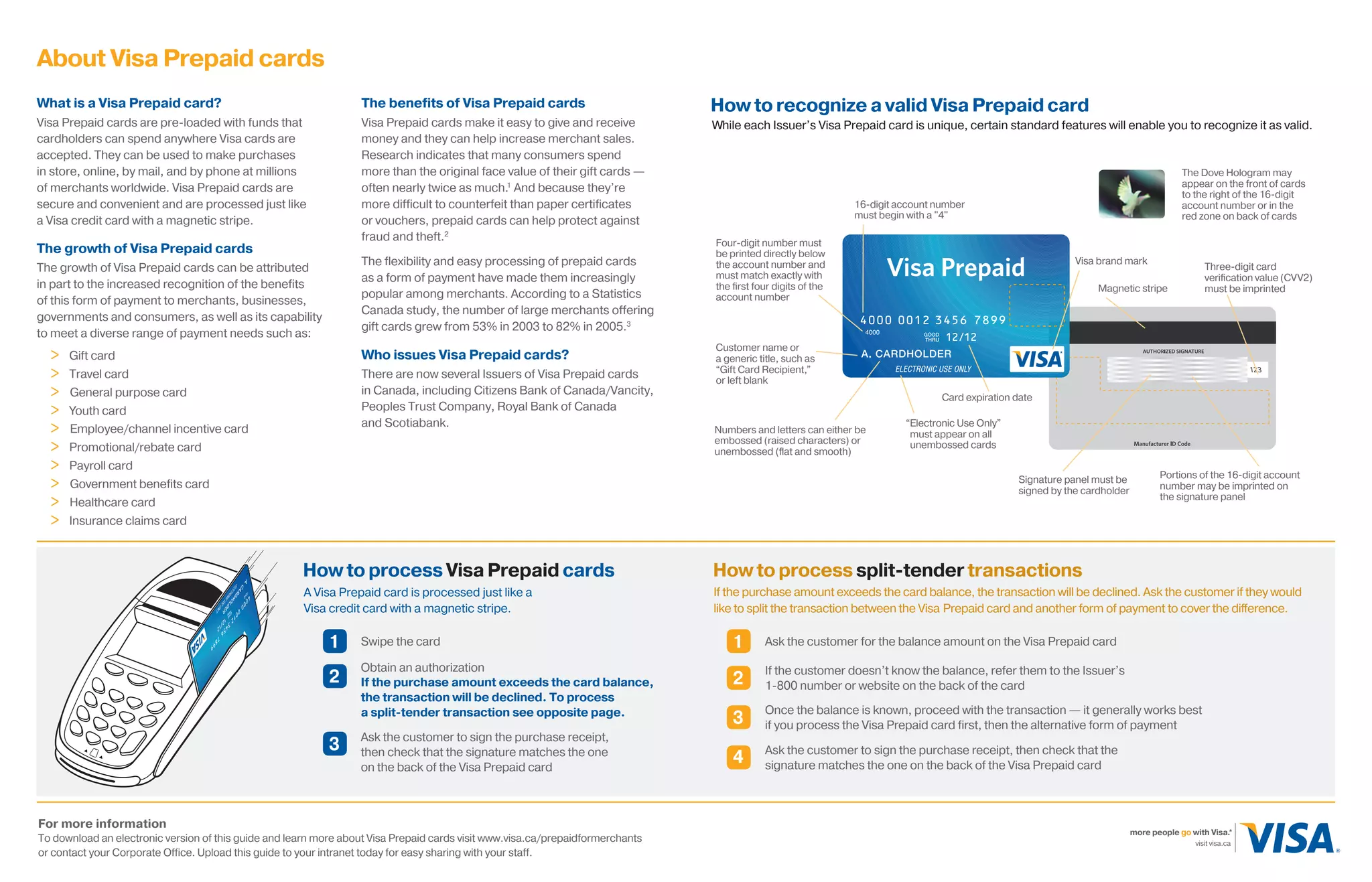
How to recognize a valid Visa Prepaid card
While each Issuer’s Visa Prepaid card is unique, certain standard features will enable you to recognize it as valid.
Customer name or
a generic title, such as
“Gift Card Recipient,”
or left blank
Signature panel must be
signed by the cardholder
Three-digit card
verification value (CVV2)
must be imprintedMagnetic stripe
Four-digit number must
be printed directly below
the account number and
must match exactly with
the first four digits of the
account number
16-digit account number
must begin with a "4"
Portions of the 16-digit account
number may be imprinted on
the signature panel
Visa brand mark	
	
Numbers and letters can either be
embossed (raised characters) or
unembossed (flat and smooth)
Card expiration date
The Dove Hologram may
appear on the front of cards
to the right of the 16-digit
account number or in the
red zone on back of cards
“Electronic Use Only”
must appear on all
unembossed cards
How to process Visa Prepaid cards
A Visa Prepaid card is processed just like a
Visa credit card with a magnetic stripe.
Swipe the card1
2
Obtain an authorization
If the purchase amount exceeds the card balance,
the transaction will be declined. To process
a split-tender transaction see opposite page.
Ask the customer to sign the purchase receipt,
then check that the signature matches the one
on the back of the Visa Prepaid card
3
Ask the customer for the balance amount on the Visa Prepaid card1
If the customer doesn’t know the balance, refer them to the Issuer’s
1-800 number or website on the back of the card2
Once the balance is known, proceed with the transaction — it generally works best
if you process the Visa Prepaid card first, then the alternative form of payment3
Ask the customer to sign the purchase receipt, then check that the
signature matches the one on the back of the Visa Prepaid card
4
How to process split-tender transactions
If the purchase amount exceeds the card balance, the transaction will be declined. Ask the customer if they would
like to split the transaction between the Visa Prepaid card and another form of payment to cover the difference.
1405 Prepaid StoremanagersGuideEng-Sep18.indd 2 9/18/09 1:19:39 PM

Visa Prepaid Card

  • 1.
    Finding out thecard balance It is up to the cardholder to know the balance on their Visa Prepaid card. They can check the balance any time using the Issuer’s 1-800 number or website found on the back of the card. Embossed and unembossed cards Visa Prepaid cards can be embossed, with raised characters, or unembossed, meaning they’re flat and smooth. On unembossed cards,you’ll see the words ELECTRONIC USE ONLY, which means transactions should be processed at an electronic terminal that allows for automatic authorization. Personalized and non-personalized cards Visa Prepaid cards can be personalized with the cardholder’s name or they may be non-personalized — for example, they could have a generic title or no name instead of the cardholder’s name. Both types of card are processed the same way. Processing returns and refunds A cardholder returning an item must present the Visa Prepaid card used to make the purchase along with the original sales receipt. Crediting funds to the card may take three to seven business days. If the customer does not have the Visa Prepaid card, refer to your store return policy. If the card has expired, the refund can still be credited to the Visa Prepaid card account; the cardholder must then contact the card Issuer and request a new card or a cheque for the refunded amount. Voiding transactions Purchases on Visa Prepaid cards can be voided the same way they would be with Visa credit cards. Similar to returns, it may take three to seven business days to complete the void process and credit the funds to the card. Signatures Like all Visa cards, Visa Prepaid cards contain a signature panel on the back and must be signed by the cardholder in order to be valid. Expired cards All Visa Prepaid cards have an expiry date, located on the front of the card directly below the 16-digit account number. While expired cards cannot be used to make purchases, they can be credited with refunds; the cardholder must then contact the Issuer to have a new card or a cheque issued for the refunded amount. Online transactions Visa Prepaid cards must be registered before making online purchases; cardholders can do this with the card Issuer via the Internet or over the phone — the Issuer’s 1-800 number or website are on the back of the card. 1 Jason Praw, Gift Cards are Here to Stay — J.C. Williams Group, 2004 2,3 Opportunities for the Public and Private Sectors in the Canadian Prepaid Market — Mercator Advisory Group, September 2007 * Visa claim based upon global number of general purpose cards, number of transactions and purchase volume. 1405SE'09-09 Tips for processing Visa Prepaid cards visit visa.ca more people go with Visa.* visitez visa.ca plus de gens disent go avec Visa.* Visa® Prepaid cards Store Manager’s Guide Keep this guide handy to quickly answer any questions about Visa Prepaid cards from your staff or customers 1405 Prepaid StoremanagersGuideEng-Sep18.indd 1 9/18/09 1:19:24 PM
  • 2.
    What is aVisa Prepaid card? Visa Prepaid cards are pre-loaded with funds that cardholders can spend anywhere Visa cards are accepted. They can be used to make purchases in store, online, by mail, and by phone at millions of merchants worldwide. Visa Prepaid cards are secure and convenient and are processed just like a Visa credit card with a magnetic stripe. The growth of Visa Prepaid cards The growth of Visa Prepaid cards can be attributed in part to the increased recognition of the benefits of this form of payment to merchants, businesses, governments and consumers, as well as its capability to meet a diverse range of payment needs such as: > Gift card > Travel card > General purpose card > Youth card > Employee/channel incentive card > Promotional/rebate card > Payroll card > Government benefits card > Healthcare card > Insurance claims card The benefits of Visa Prepaid cards Visa Prepaid cards make it easy to give and receive money and they can help increase merchant sales. Research indicates that many consumers spend more than the original face value of their gift cards — often nearly twice as much.1 And because they’re more difficult to counterfeit than paper certificates or vouchers, prepaid cards can help protect against fraud and theft.2 The flexibility and easy processing of prepaid cards as a form of payment have made them increasingly popular among merchants. According to a Statistics Canada study, the number of large merchants offering gift cards grew from 53% in 2003 to 82% in 2005.3 Who issues Visa Prepaid cards? There are now several Issuers of Visa Prepaid cards in Canada, including Citizens Bank of Canada/Vancity, Peoples Trust Company, Royal Bank of Canada and Scotiabank. About Visa Prepaid cards For more information To download an electronic version of this guide and learn more about Visa Prepaid cards visit www.visa.ca/prepaidformerchants or contact your Corporate Office. Upload this guide to your intranet today for easy sharing with your staff. visit visa.ca more people go with Visa.* visitez visa.ca plus de gens disent go avec Visa.* How to recognize a valid Visa Prepaid card While each Issuer’s Visa Prepaid card is unique, certain standard features will enable you to recognize it as valid. Customer name or a generic title, such as “Gift Card Recipient,” or left blank Signature panel must be signed by the cardholder Three-digit card verification value (CVV2) must be imprintedMagnetic stripe Four-digit number must be printed directly below the account number and must match exactly with the first four digits of the account number 16-digit account number must begin with a "4" Portions of the 16-digit account number may be imprinted on the signature panel Visa brand mark Numbers and letters can either be embossed (raised characters) or unembossed (flat and smooth) Card expiration date The Dove Hologram may appear on the front of cards to the right of the 16-digit account number or in the red zone on back of cards “Electronic Use Only” must appear on all unembossed cards How to process Visa Prepaid cards A Visa Prepaid card is processed just like a Visa credit card with a magnetic stripe. Swipe the card1 2 Obtain an authorization If the purchase amount exceeds the card balance, the transaction will be declined. To process a split-tender transaction see opposite page. Ask the customer to sign the purchase receipt, then check that the signature matches the one on the back of the Visa Prepaid card 3 Ask the customer for the balance amount on the Visa Prepaid card1 If the customer doesn’t know the balance, refer them to the Issuer’s 1-800 number or website on the back of the card2 Once the balance is known, proceed with the transaction — it generally works best if you process the Visa Prepaid card first, then the alternative form of payment3 Ask the customer to sign the purchase receipt, then check that the signature matches the one on the back of the Visa Prepaid card 4 How to process split-tender transactions If the purchase amount exceeds the card balance, the transaction will be declined. Ask the customer if they would like to split the transaction between the Visa Prepaid card and another form of payment to cover the difference. 1405 Prepaid StoremanagersGuideEng-Sep18.indd 2 9/18/09 1:19:39 PM