Level up your coding skills with
the C++ Standard Template
Library (STL):
Vector
BY JOYJIT CHOUDHURY
Vector
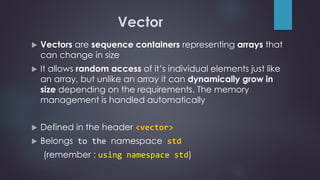
 Vectors are sequence containers representing arrays that
can change in size
 It allows random access of it’s individual elements just like
an array, but unlike an array it can dynamically grow in
size depending on the requirements. The memory
management is handled automatically
 Defined in the header <vector>
 Belongs to the namespace std
(remember : using namespace std)
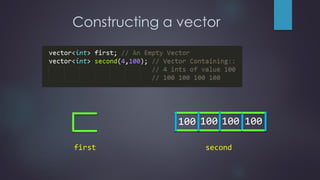
Constructing a vector
first
100 100 100 100
second
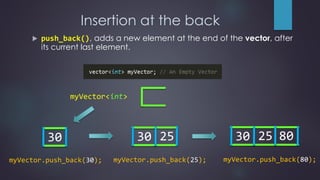
Insertion at the back
30
myVector.push_back(30);
30
myVector.push_back(25);
25 30
myVector.push_back(80);
25 80
myVector<int>
 push_back(), adds a new element at the end of the vector, after
its current last element.
Deletion from the back
30 25 80
30 25
myVector.pop_back();
30
myVector.pop_back();
 pop_back(), removes the last element of the vector, reducing it’s
size by one.
myVector<int>
Size
 size(), returns the number of elements in a vector.
30 30 25 80
myVector.size() = 0 myVector.size() = 1 myVector.size() = 3
myVector<int> myVector<int> myVector<int>
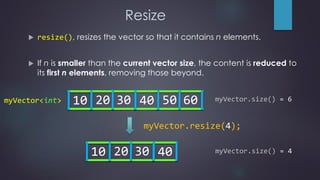
Resize
 resize(), resizes the vector so that it contains n elements.
 If n is smaller than the current vector size, the content is reduced to
its first n elements, removing those beyond.
10 20 30 40 50 60 myVector.size() = 6
10 20 30 40 myVector.size() = 4
myVector.resize(4);
myVector<int>
Resize
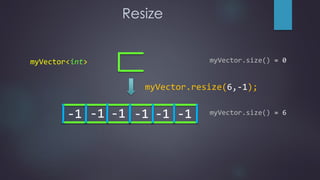
 If n is greater than the current vector size, the content is expanded
by inserting at the end as mush elements as needed to attain the
size n. The new elements as initialised with copies of the value val
(passed as an argument to resize(n,val)), otherwise they are
value-initialised.
10 20 30 0 0 0
myVector.size() = 3
10 20 30
myVector.size() = 6
myVector.resize(6);
myVector<int>
Resize
-1 -1 -1 -1 -1 -1
myVector.size() = 0
myVector.size() = 6
myVector.resize(6,-1);
myVector<int>
Random access of elements
 The operator[] allows random access of the element at position n of the
vector (0 indexed). It returns a reference to the requested element.
 If the requested index n lies after the last element of the vector,
i.e. n > size-1, it causes undefined behaviour. NEVER DO THAT.
myVector<int>
[0] [1] [2] [3] [4] [5] [6] [7] [8]
myVector.size()=9
0 ≤ 𝑛 < (𝑠𝑖𝑧𝑒 = 9)
cout<<myVector[0]; //10 cout<<myVector[5]; //60
Random access of elements
myVector<int>
[0] [1] [2] [3] [4] [5] [6] [7] [8]
[0] [1] [2] [3] [4] [5] [6] [7] [8]
2D Vector
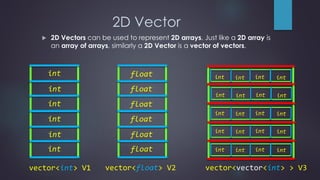
 2D Vectors can be used to represent 2D arrays. Just like a 2D array is
an array of arrays, similarly a 2D Vector is a vector of vectors.
vector<int> V1 vector<float> V2
int
int
int
int
int
int
float
float
float
float
float
float
int int int int
int int int int
int int int int
int int int int
int int int int
vector<vector<int> > V3
2D Vector
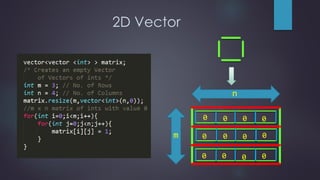
0 0 0 0
0
00
00
00
0
n
m
2D Vector
1 1 1 1
1111
1111
matrix[0]
matrix[1]
matrix[2]
[0] [1] [2] [3]
[0][0] [0][1] [0][2] [0][3]
[1][0] [1][1] [1][2] [1][3]
[2][0] [2][1] [2][2] [2][3]
 That’s not all. There are many other functions
and techniques that could come in handy.
Read about them on cplusplus.com or
cppreference.com or somewhere else. Just
google it !
Vector

Vector

  • 1.
    Level up yourcoding skills with the C++ Standard Template Library (STL): Vector BY JOYJIT CHOUDHURY
  • 2.
    Vector  Vectors aresequence containers representing arrays that can change in size  It allows random access of it’s individual elements just like an array, but unlike an array it can dynamically grow in size depending on the requirements. The memory management is handled automatically  Defined in the header <vector>  Belongs to the namespace std (remember : using namespace std)
  • 3.
  • 4.
    Insertion at theback 30 myVector.push_back(30); 30 myVector.push_back(25); 25 30 myVector.push_back(80); 25 80 myVector<int>  push_back(), adds a new element at the end of the vector, after its current last element.
  • 5.
    Deletion from theback 30 25 80 30 25 myVector.pop_back(); 30 myVector.pop_back();  pop_back(), removes the last element of the vector, reducing it’s size by one. myVector<int>
  • 6.
    Size  size(), returnsthe number of elements in a vector. 30 30 25 80 myVector.size() = 0 myVector.size() = 1 myVector.size() = 3 myVector<int> myVector<int> myVector<int>
  • 7.
    Resize  resize(), resizesthe vector so that it contains n elements.  If n is smaller than the current vector size, the content is reduced to its first n elements, removing those beyond. 10 20 30 40 50 60 myVector.size() = 6 10 20 30 40 myVector.size() = 4 myVector.resize(4); myVector<int>
  • 8.
    Resize  If nis greater than the current vector size, the content is expanded by inserting at the end as mush elements as needed to attain the size n. The new elements as initialised with copies of the value val (passed as an argument to resize(n,val)), otherwise they are value-initialised. 10 20 30 0 0 0 myVector.size() = 3 10 20 30 myVector.size() = 6 myVector.resize(6); myVector<int>
  • 9.
    Resize -1 -1 -1-1 -1 -1 myVector.size() = 0 myVector.size() = 6 myVector.resize(6,-1); myVector<int>
  • 10.
    Random access ofelements  The operator[] allows random access of the element at position n of the vector (0 indexed). It returns a reference to the requested element.  If the requested index n lies after the last element of the vector, i.e. n > size-1, it causes undefined behaviour. NEVER DO THAT. myVector<int> [0] [1] [2] [3] [4] [5] [6] [7] [8] myVector.size()=9 0 ≤ 𝑛 < (𝑠𝑖𝑧𝑒 = 9) cout<<myVector[0]; //10 cout<<myVector[5]; //60
  • 11.
    Random access ofelements myVector<int> [0] [1] [2] [3] [4] [5] [6] [7] [8] [0] [1] [2] [3] [4] [5] [6] [7] [8]
  • 12.
    2D Vector  2DVectors can be used to represent 2D arrays. Just like a 2D array is an array of arrays, similarly a 2D Vector is a vector of vectors. vector<int> V1 vector<float> V2 int int int int int int float float float float float float int int int int int int int int int int int int int int int int int int int int vector<vector<int> > V3
  • 13.
    2D Vector 0 00 0 0 00 00 00 0 n m
  • 14.
    2D Vector 1 11 1 1111 1111 matrix[0] matrix[1] matrix[2] [0] [1] [2] [3] [0][0] [0][1] [0][2] [0][3] [1][0] [1][1] [1][2] [1][3] [2][0] [2][1] [2][2] [2][3]
  • 15.
     That’s notall. There are many other functions and techniques that could come in handy. Read about them on cplusplus.com or cppreference.com or somewhere else. Just google it !