Download to read offline


![Examples
<<scripting:component doc:name="Script">
<scripting:script engine="Groovy"><![CDATA[
throw new IllegalArgumentException('bad arg')
]]></scripting:script>
</scripting:component>
This example demonstrates throwing Exception with Groovy](https://image.slidesharecdn.com/usinggroovycomponent-160901210514/85/Using-groovy-component-5-320.jpg)
![Examples
<<scripting:component doc:name="Script">
<scripting:script engine="Groovy"><![CDATA[
Thread.sleep(60000)
]]></scripting:script>
</scripting:component>
This example demonstrates how to use Groovy to make the Thread sleep for 1 munute.](https://image.slidesharecdn.com/usinggroovycomponent-160901210514/85/Using-groovy-component-6-320.jpg)


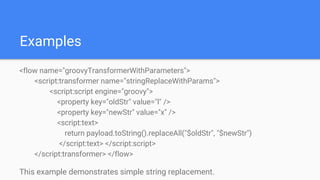
The Groovy component allows developers to add Groovy scripts to applications without reengineering legacy code. It can intercept messages and alter property values as messages flow through. The component supports directly entering script text, referencing an external script file, or using a Java bean. Examples demonstrate string replacement using parameters, throwing exceptions, and making a thread sleep.


