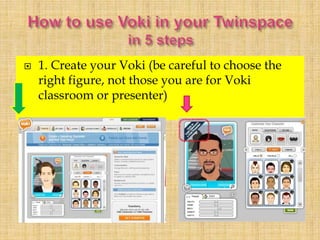
 1. Create your Voki (be careful to choose the
right figure, not those you are for Voki
classroom or presenter)
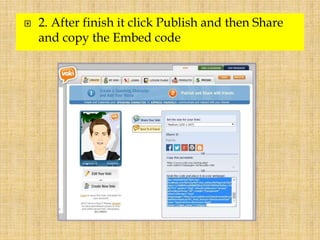
 2. After finish it click Publish and then Share
and copy the Embed code
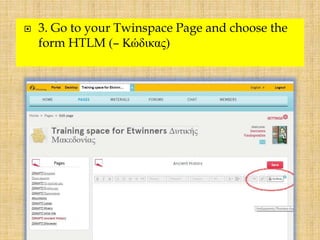
 3. Go to your Twinspace Page and choose the
form HTLM (– Κώδικας)
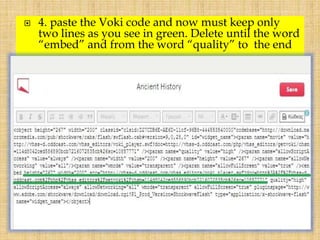
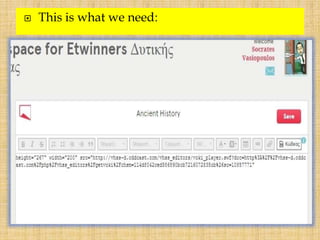
 4. paste the Voki code and now must keep only
two lines as you see in green. Delete until the word
“embed” and from the word “quality” to the end
 This is what we need:
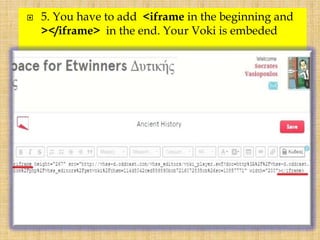
 5. You have to add <iframe in the beginning and
></iframe> in the end. Your Voki is embeded
Use voki in your twinspace

Use voki in your twinspace

  • 1.
     1. Createyour Voki (be careful to choose the right figure, not those you are for Voki classroom or presenter)
  • 2.
     2. Afterfinish it click Publish and then Share and copy the Embed code
  • 3.
     3. Goto your Twinspace Page and choose the form HTLM (– Κώδικας)
  • 4.
     4. pastethe Voki code and now must keep only two lines as you see in green. Delete until the word “embed” and from the word “quality” to the end
  • 5.
     This iswhat we need:
  • 6.
     5. Youhave to add <iframe in the beginning and ></iframe> in the end. Your Voki is embeded