1
upday: easy to use
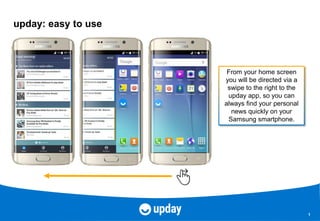
From your home screen
you will be directed via a
swipe to the right to the
upday app, so you can
always find your personal
news quickly on your
Samsung smartphone.
2
All content in one place!
First you tell upday
what you‘re interested
in, so that we can
personalise your news
feed. Afterwards all the
relevant top global
news and tailored news
content for you will be
shown in your home
screen.
3
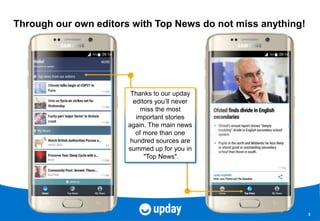
Through our own editors with Top News do not miss anything!
Thanks to our upday
editors you’ll never
miss the most
important stories
again. The main news
of more than one
hundred sources are
summed up for you in
"Top News".
4
Customized and personalized according to its interests!
Tell upday what is
important to you! upday
learns what you’re
interested in based on
your behaviour and fits
the stream to you. Find
your personal news
under
"My News".
5
Tell us and your friends what you like!
Use the share button to
recommend an article
to your friends, or tell
us which article you like
so that upday gets to
know you.
6
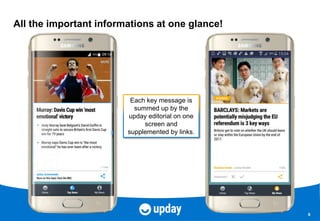
All the important informations at one glance!
Each key message is
summed up by the
upday editorial on one
screen and
supplemented by links.
7
Intuitive and simple operation!
On the top right under
"More" you'll find your
settings and more
information in a small
menu.
When you swipe, you
move along the vertical
stream from article to
article.

upday tutorial English 2016

  • 1.
    1 upday: easy touse From your home screen you will be directed via a swipe to the right to the upday app, so you can always find your personal news quickly on your Samsung smartphone.
  • 2.
    2 All content inone place! First you tell upday what you‘re interested in, so that we can personalise your news feed. Afterwards all the relevant top global news and tailored news content for you will be shown in your home screen.
  • 3.
    3 Through our owneditors with Top News do not miss anything! Thanks to our upday editors you’ll never miss the most important stories again. The main news of more than one hundred sources are summed up for you in "Top News".
  • 4.
    4 Customized and personalizedaccording to its interests! Tell upday what is important to you! upday learns what you’re interested in based on your behaviour and fits the stream to you. Find your personal news under "My News".
  • 5.
    5 Tell us andyour friends what you like! Use the share button to recommend an article to your friends, or tell us which article you like so that upday gets to know you.
  • 6.
    6 All the importantinformations at one glance! Each key message is summed up by the upday editorial on one screen and supplemented by links.
  • 7.
    7 Intuitive and simpleoperation! On the top right under "More" you'll find your settings and more information in a small menu. When you swipe, you move along the vertical stream from article to article.