Prepared By : Prof. Amit Rathod
MASTER OF COMPUTER APPLICATIONS (MCA)
SEMESTER: II
1
Subject Name: Programming in Python
Subject Code : MCA11510
Prepared By : Prof. Amit Rathod
Functions
Prepared By : Prof. Amit Rathod
Introduction
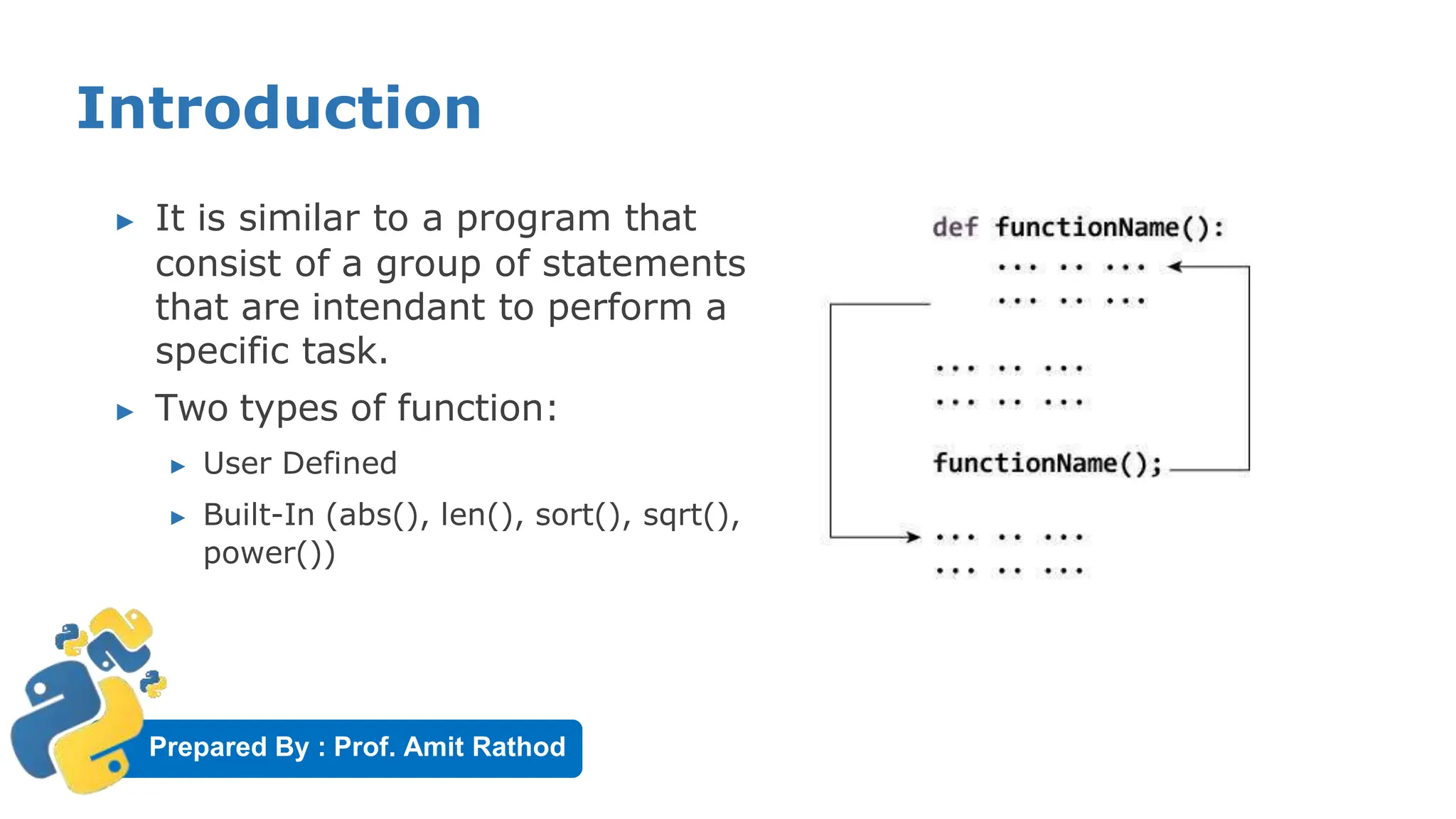
▶ It is similar to a program that
consist of a group of statements
that are intendant to perform a
specific task.
▶ Two types of function:
▶ User Defined
▶ Built-In (abs(), len(), sort(), sqrt(),
power())
Prepared By : Prof. Amit Rathod
Advantages of Functions:
▶ Used to process data, make calculations ,
perform task.
▶ Function as Reusable code
▶ Function provides Modularity
▶ Code maintenance is easy because of functions
Prepared By : Prof. Amit Rathod
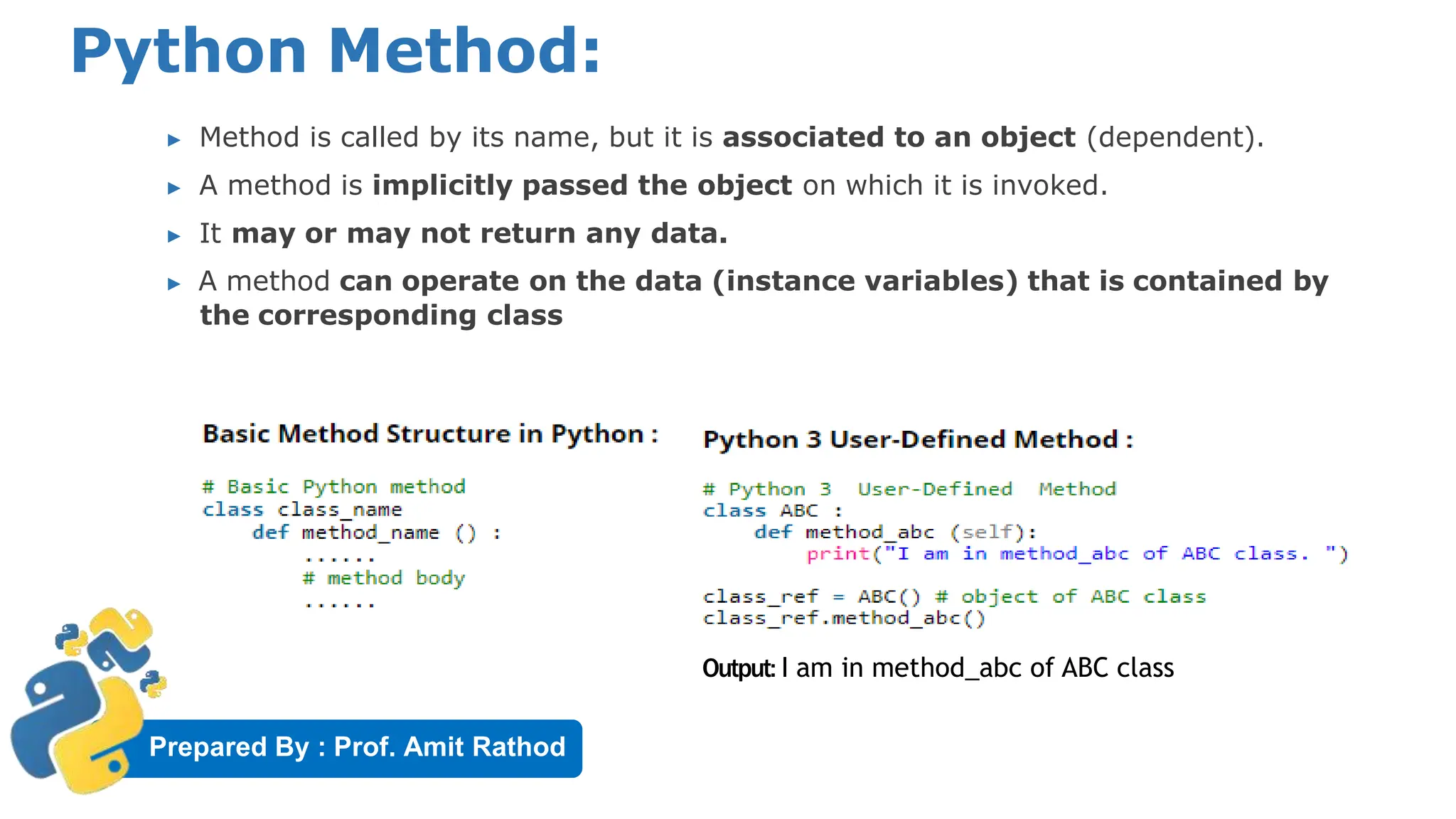
Python Method:
▶ Method is called by its name, but it is associated to an object (dependent).
▶ A method is implicitly passed the object on which it is invoked.
▶ It may or may not return any data.
▶ A method can operate on the data (instance variables) that is contained by
the corresponding class
Output: I am in method_abc of ABC class
Prepared By : Prof. Amit Rathod
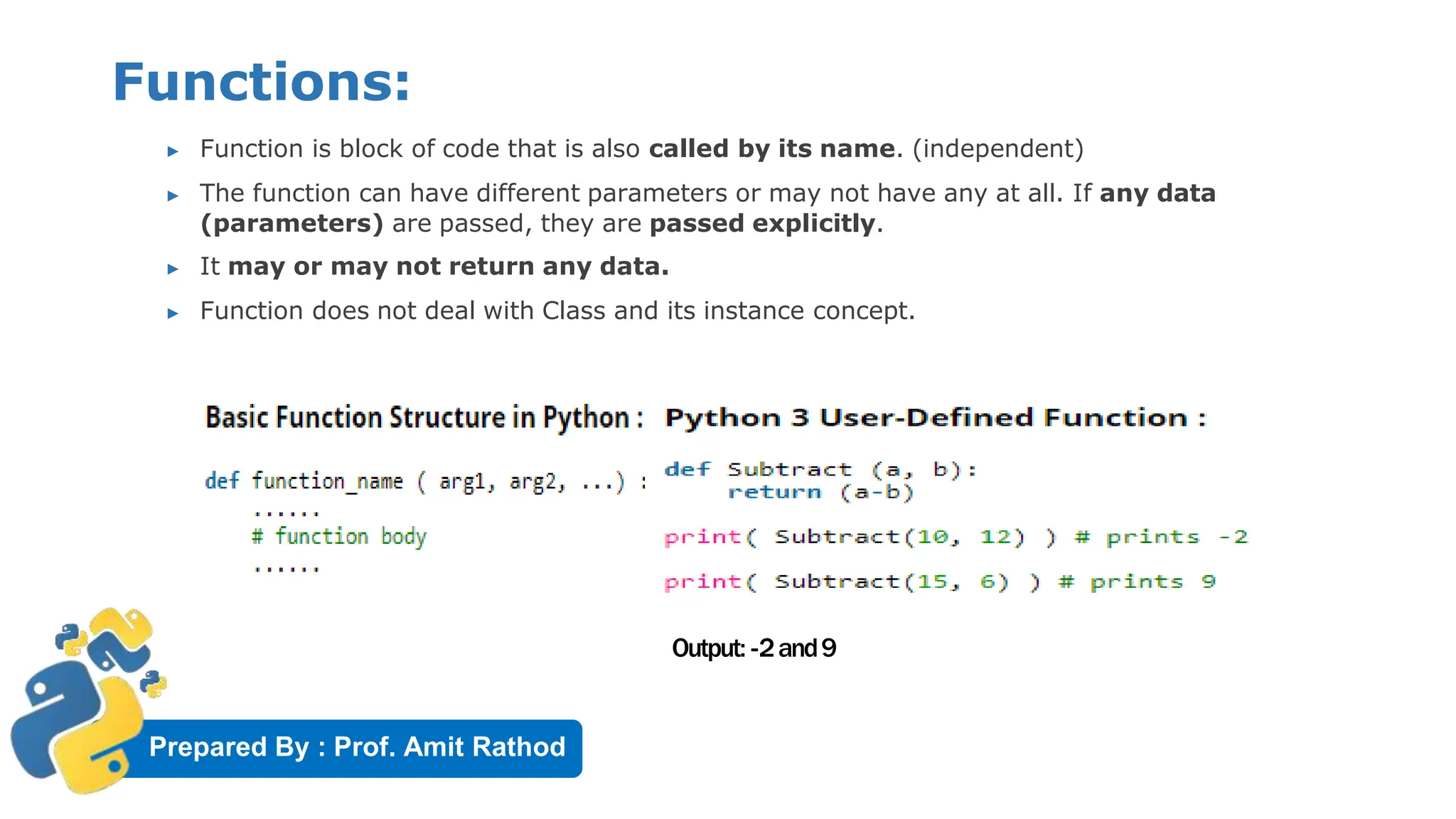
Functions:
▶ Function is block of code that is also called by its name. (independent)
▶ The function can have different parameters or may not have any at all. If any data
(parameters) are passed, they are passed explicitly.
▶ It may or may not return any data.
▶ Function does not deal with Class and its instance concept.
Output: -2and9
Prepared By : Prof. Amit Rathod
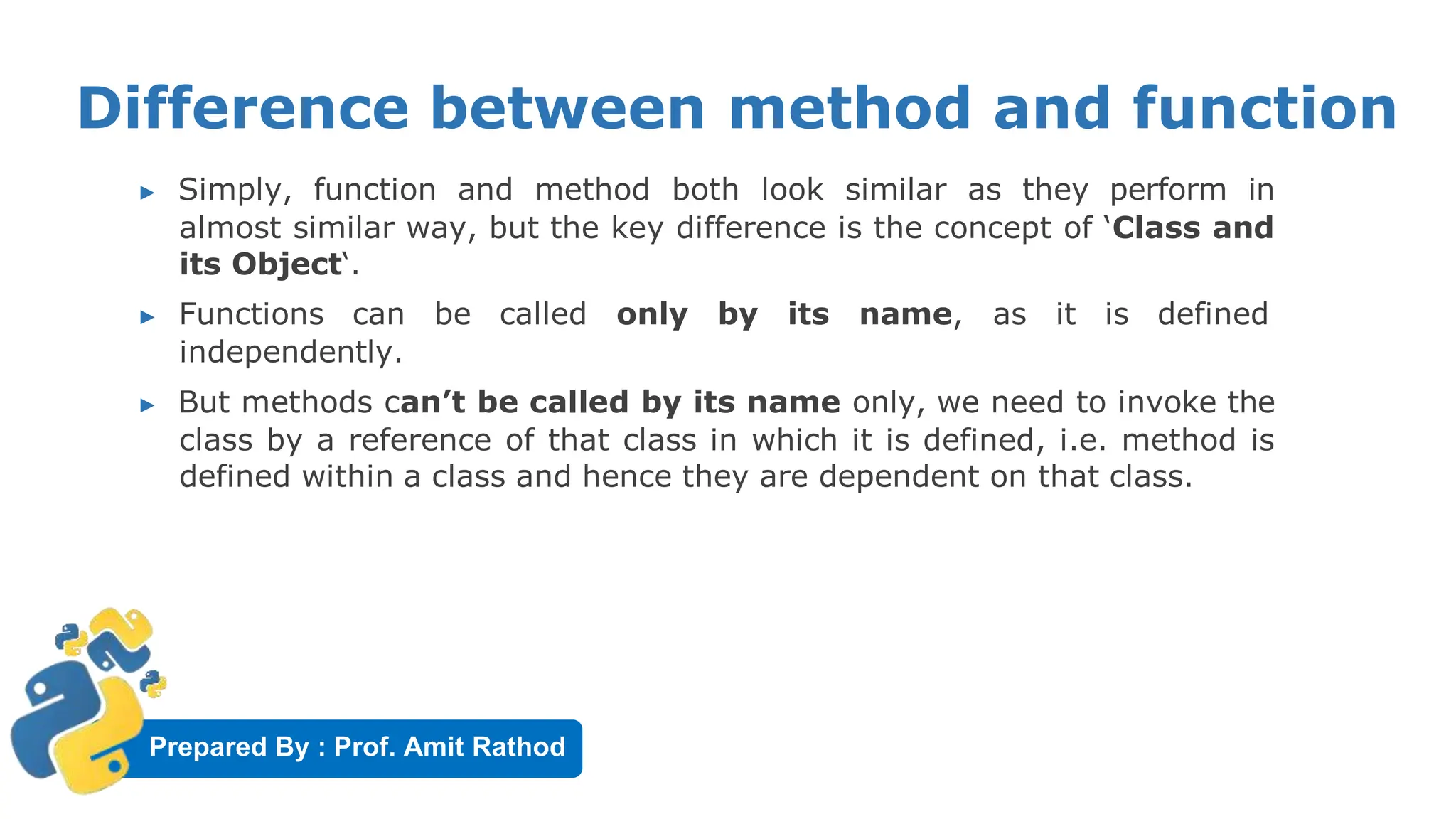
Difference between method and function
▶ Simply, function and method both look similar as they perform in
almost similar way, but the key difference is the concept of ‘Class and
its Object‘.
▶ Functions can be called only by its name, as it is defined
independently.
▶ But methods can’t be called by its name only, we need to invoke the
class by a reference of that class in which it is defined, i.e. method is
defined within a class and hence they are dependent on that class.
Prepared By : Prof. Amit Rathod
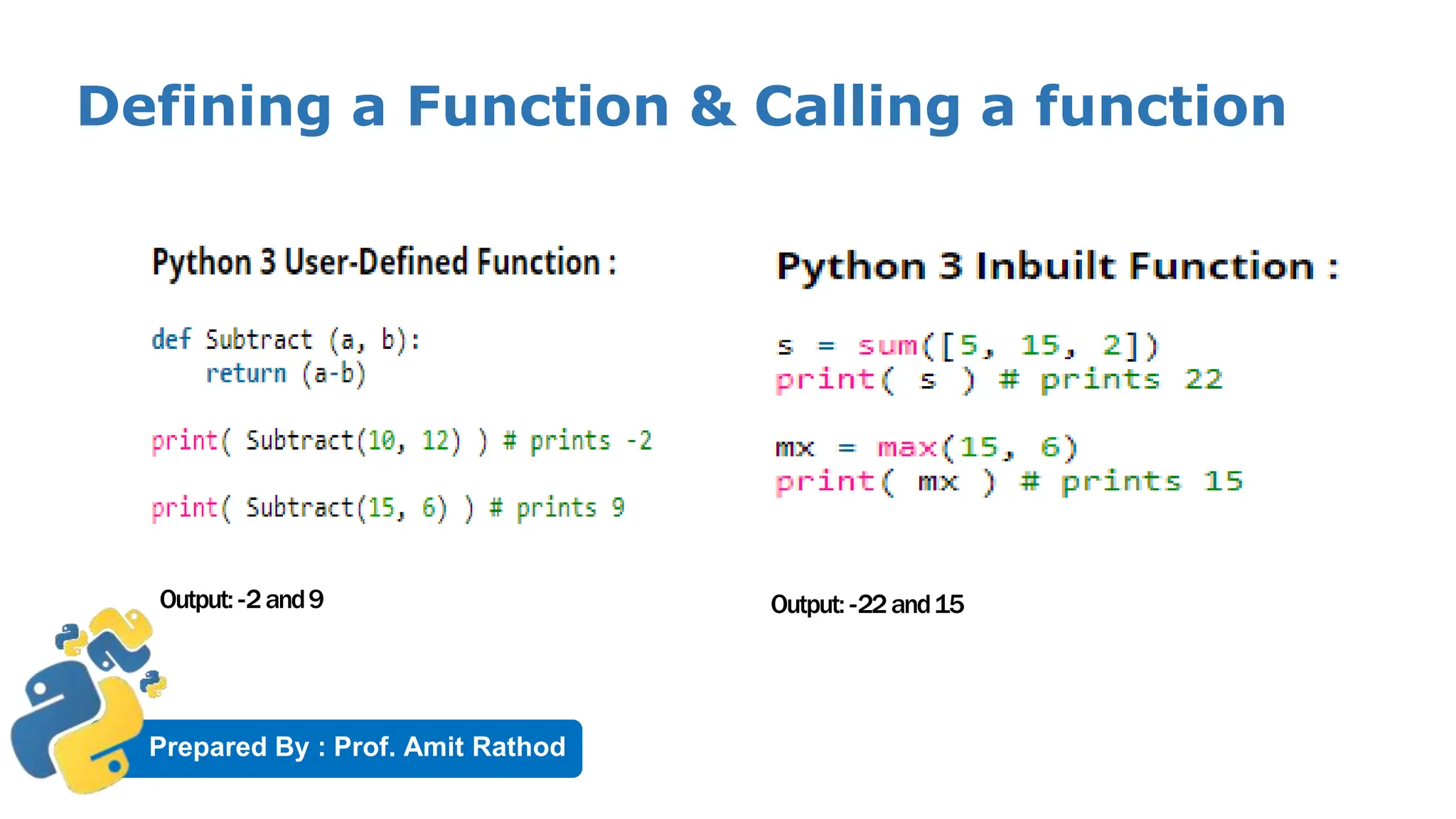
Defining a Function & Calling a function
Output: -2and9 Output: -22and15
Prepared By : Prof. Amit Rathod
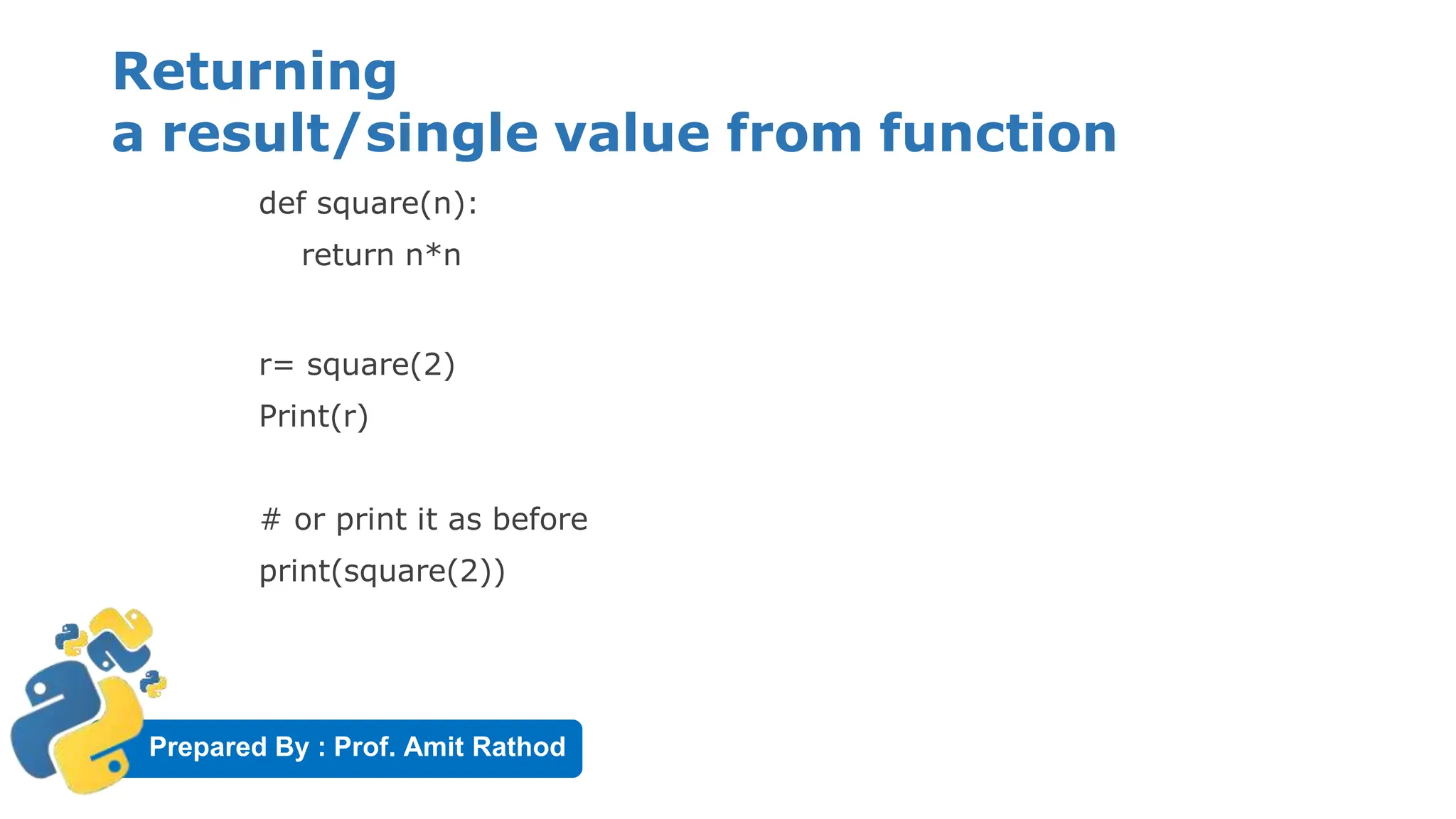
Returning
a result/single value from function
def square(n):
return n*n
r= square(2)
Print(r)
# or print it as before
print(square(2))
Prepared By : Prof. Amit Rathod
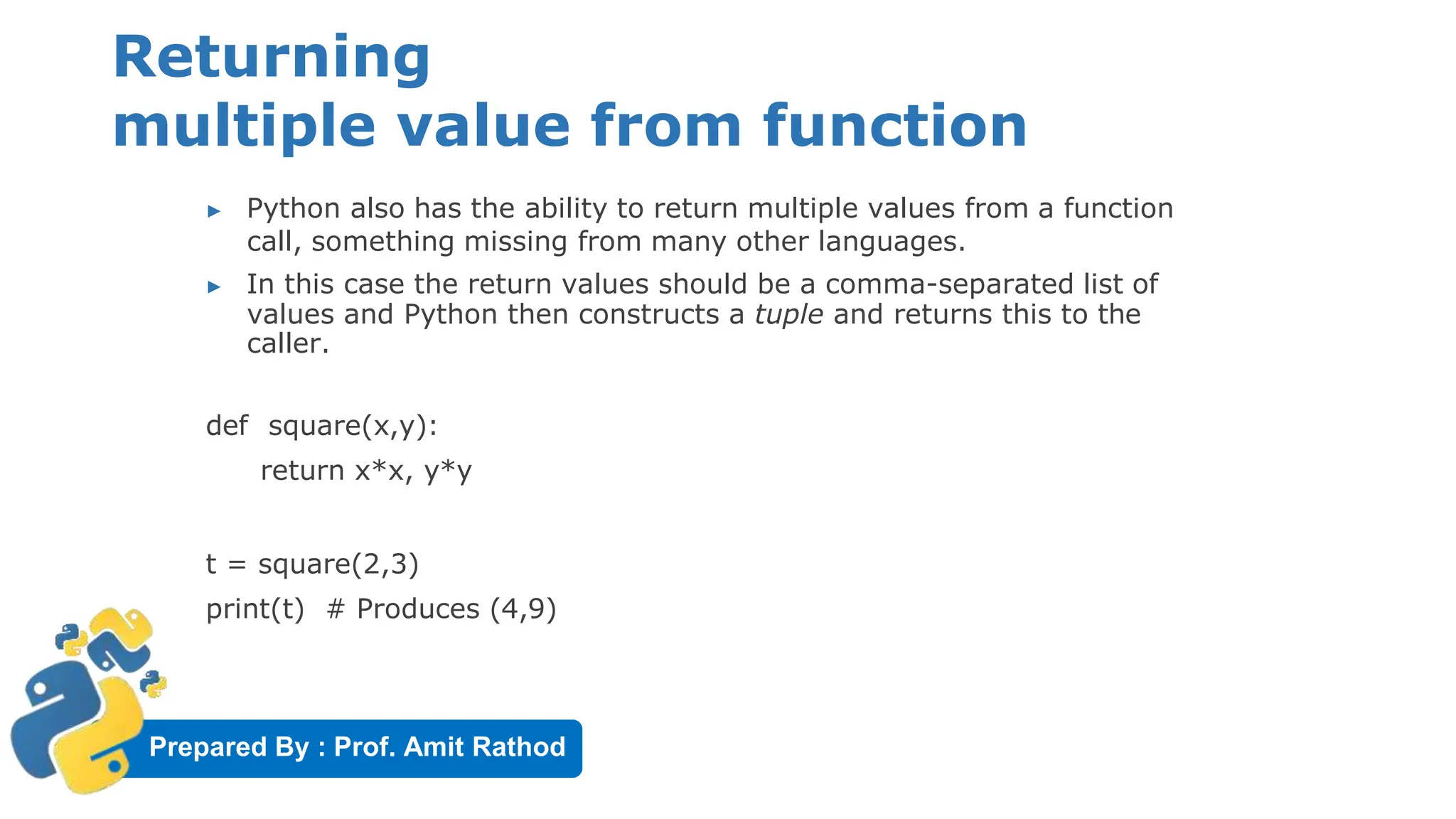
Returning
multiple value from function
▶ Python also has the ability to return multiple values from a function
call, something missing from many other languages.
▶ In this case the return values should be a comma-separated list of
values and Python then constructs a tuple and returns this to the
caller.
def square(x,y):
return x*x, y*y
t = square(2,3)
print(t) # Produces (4,9)
Prepared By : Prof. Amit Rathod
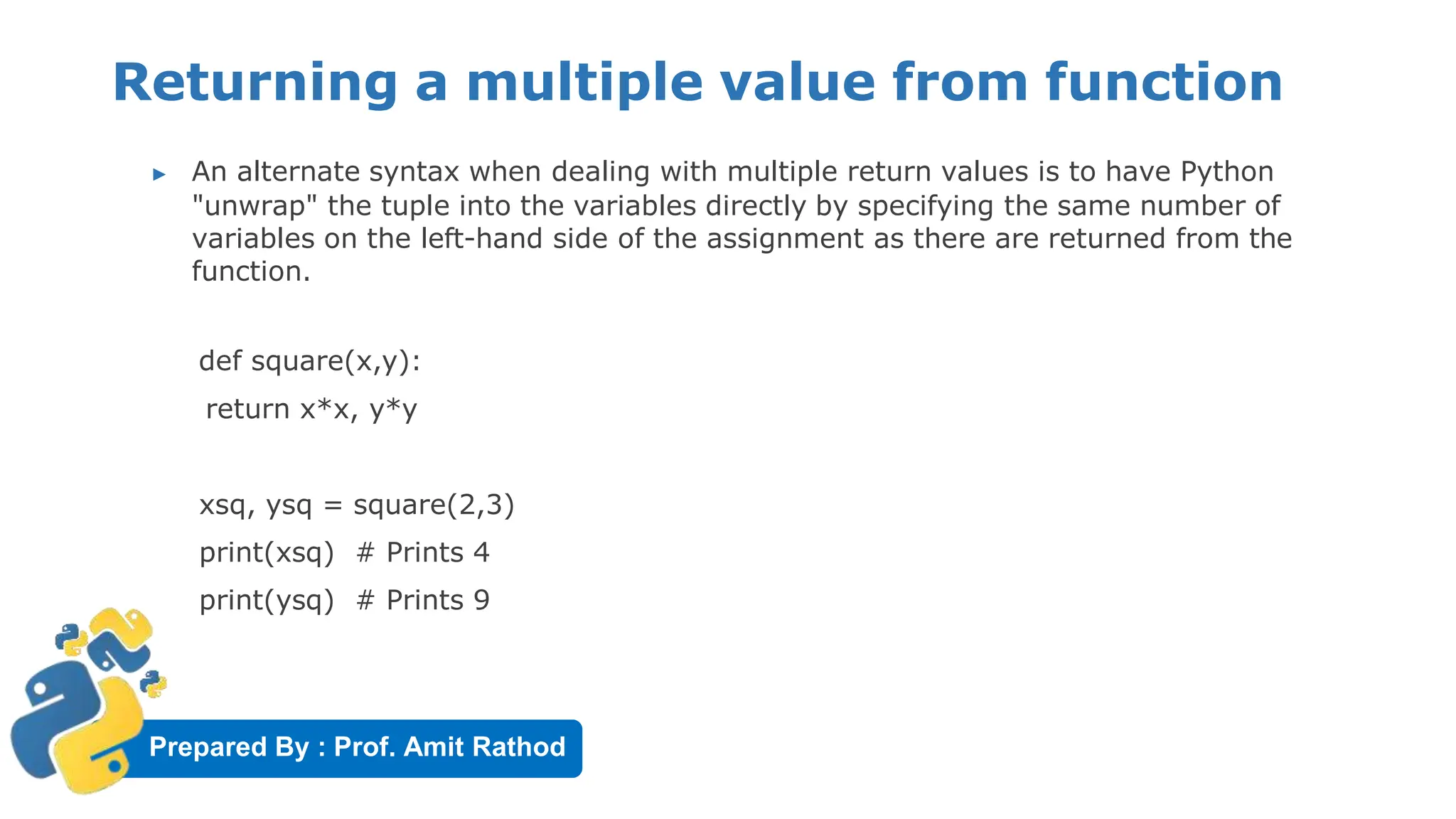
Returning a multiple value from function
▶ An alternate syntax when dealing with multiple return values is to have Python
"unwrap" the tuple into the variables directly by specifying the same number of
variables on the left-hand side of the assignment as there are returned from the
function.
def square(x,y):
return x*x, y*y
xsq, ysq = square(2,3)
print(xsq) # Prints 4
print(ysq) # Prints 9
Prepared By : Prof. Amit Rathod
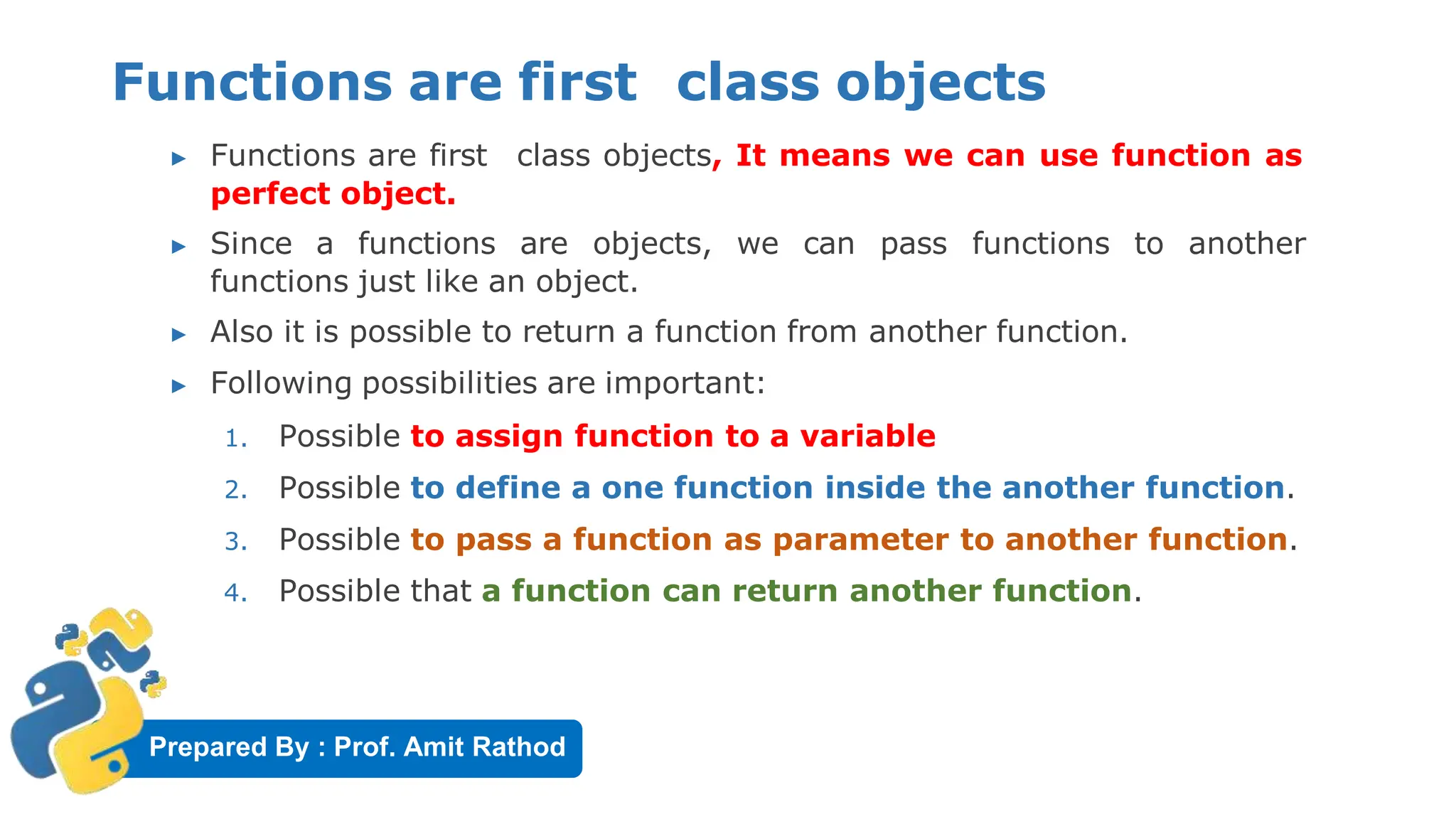
Functions are first class objects
▶ Functions are first class objects, It means we can use function as
perfect object.
▶ Since a functions are objects, we can pass functions to another
functions just like an object.
▶ Also it is possible to return a function from another function.
▶ Following possibilities are important:
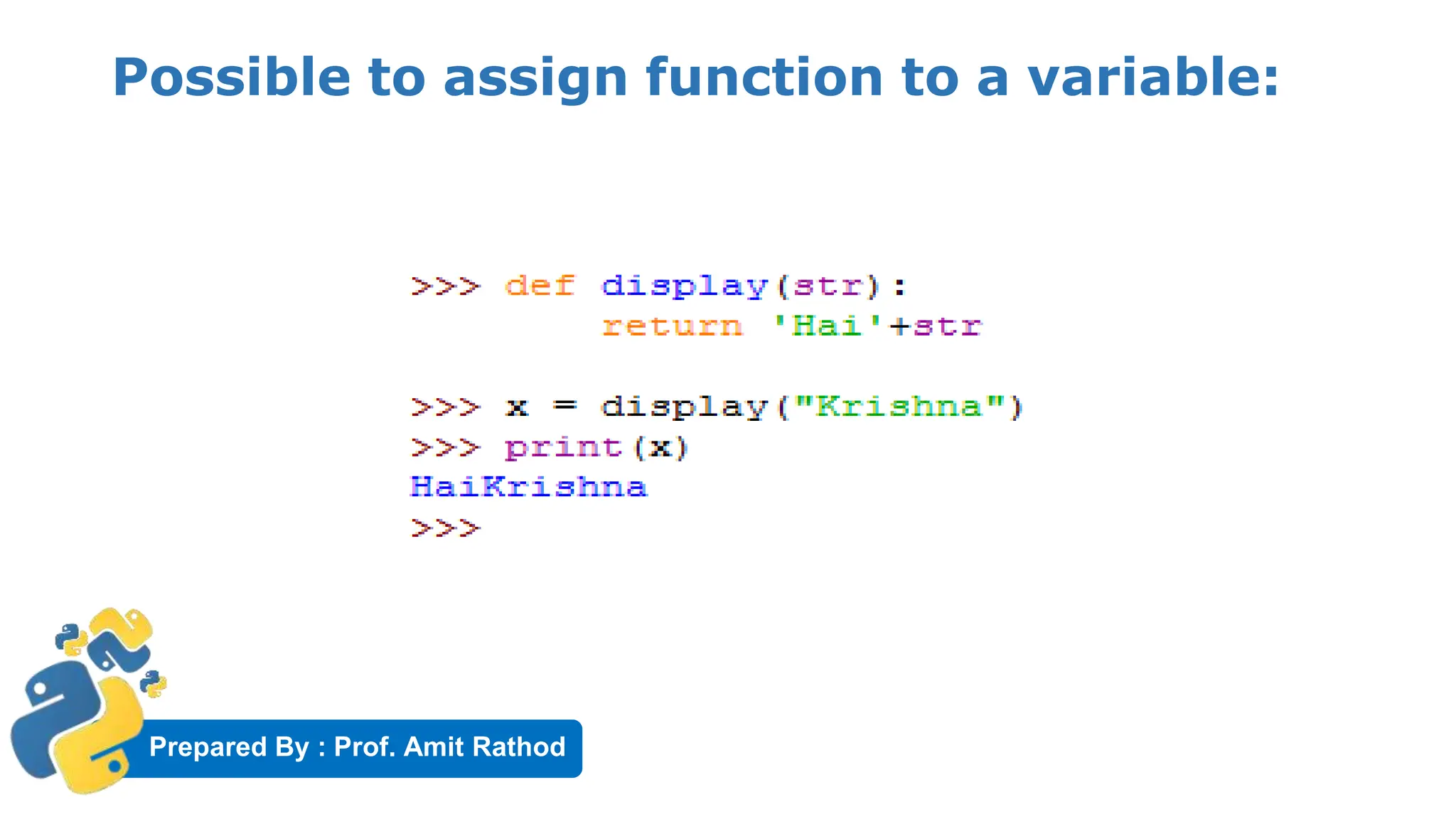
1. Possible to assign function to a variable
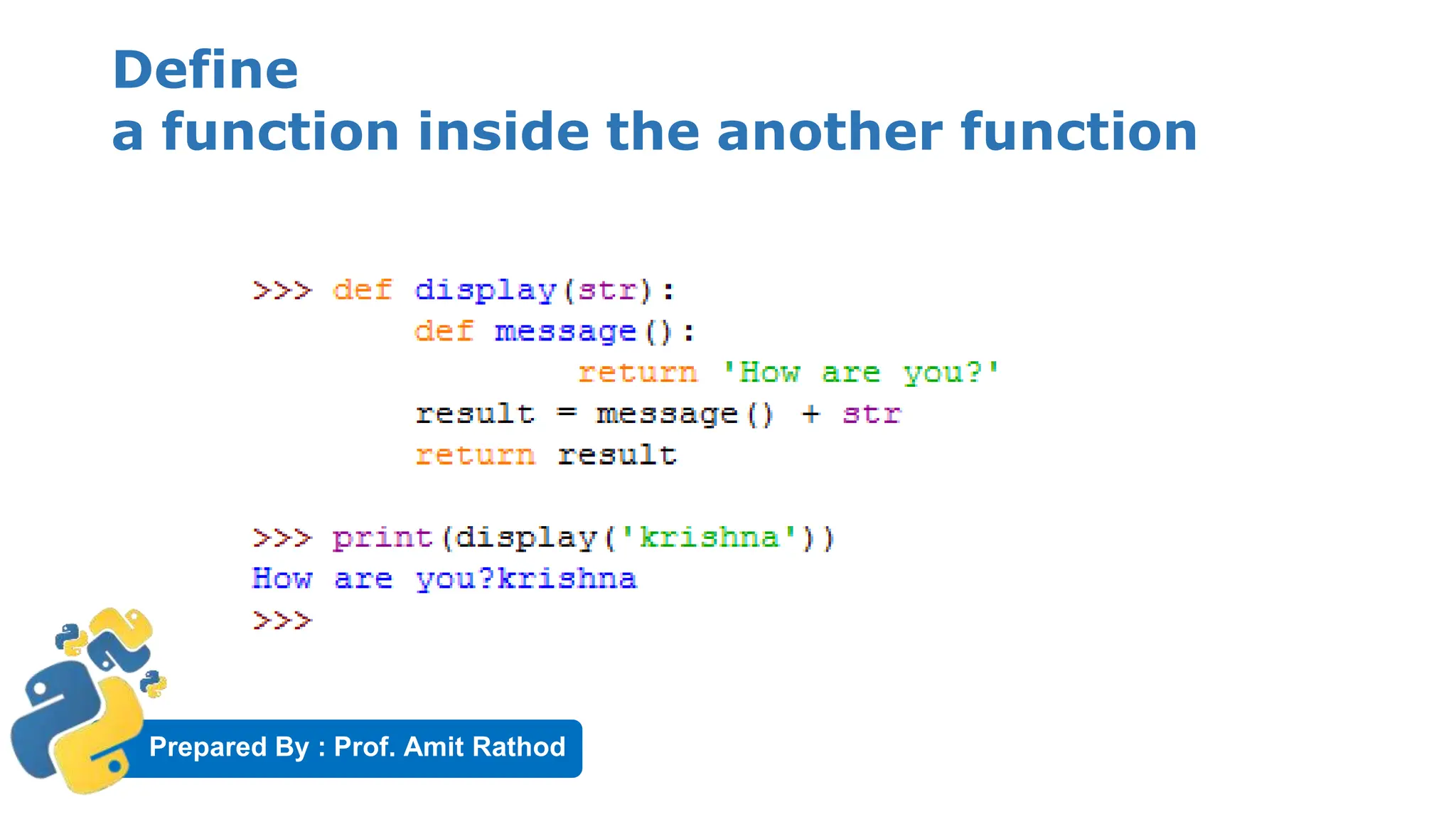
2. Possible to define a one function inside the another function.
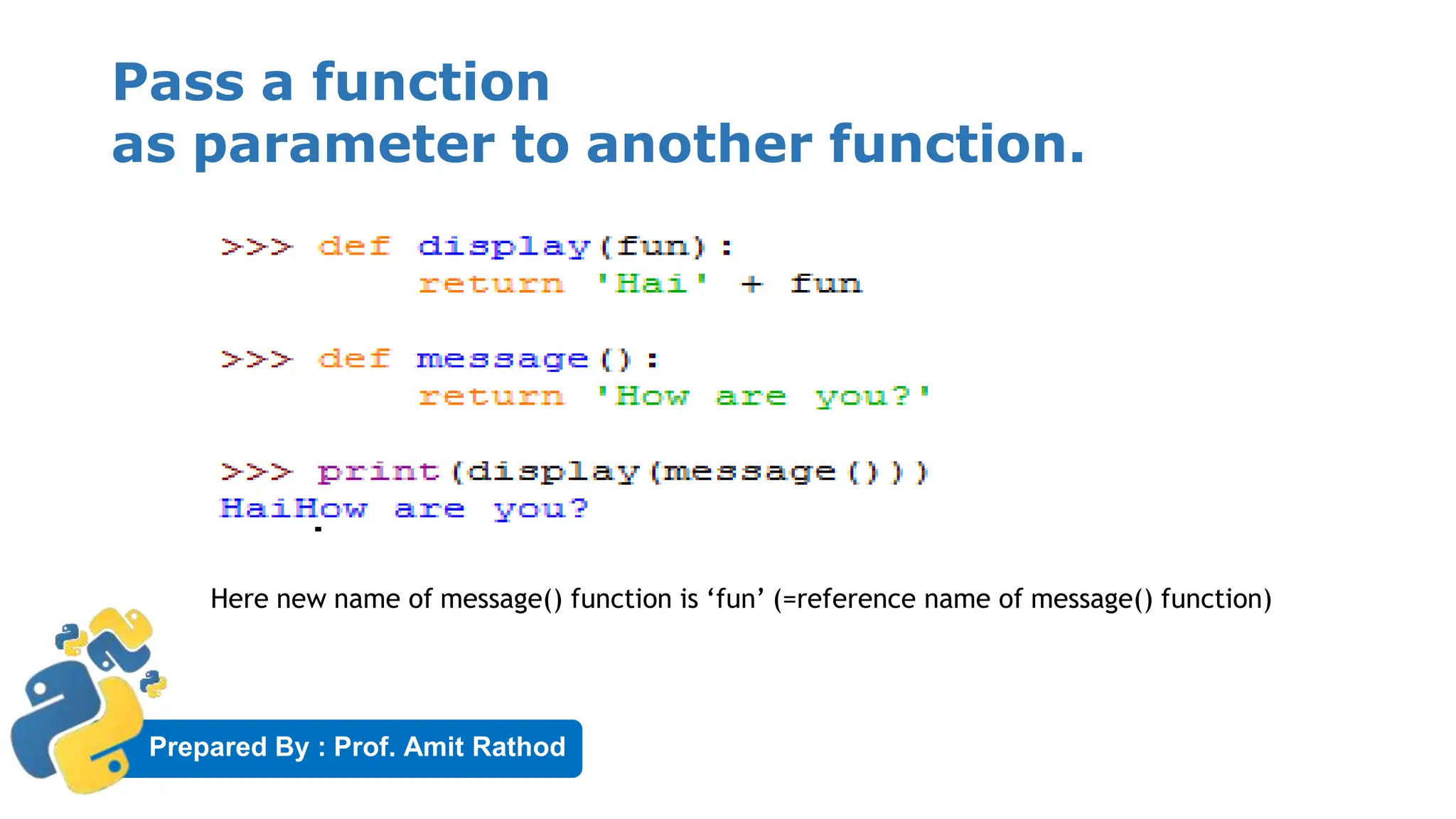
3. Possible to pass a function as parameter to another function.
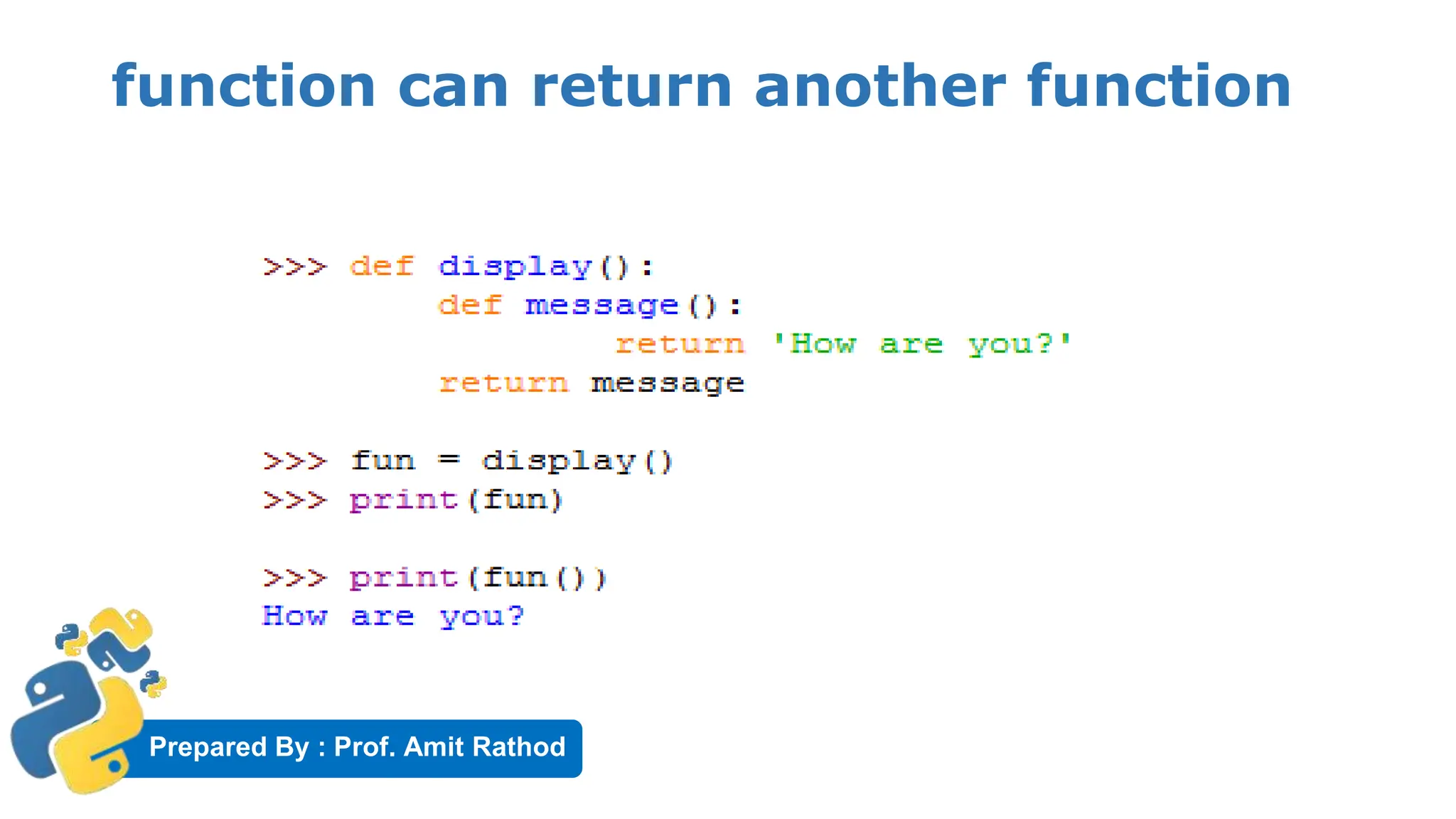
4. Possible that a function can return another function.
Prepared By : Prof. Amit Rathod
Possible to assign function to a variable:
Prepared By : Prof. Amit Rathod
Define
a function inside the another function
Prepared By : Prof. Amit Rathod
Pass a function
as parameter to another function.
Here new name of message() function is ‘fun’ (=reference name of message() function)
Prepared By : Prof. Amit Rathod
function can return another function
Prepared By : Prof. Amit Rathod
Pass by Object Reference
▶ In function when we pass values, we can think of this two way.
▶ Pass by value or call by value
▶ Pass by reference or call by reference
▶ Pass by value represents that a copy of variable is passed to the
function and modification to that value will not reflect
outside of function.
▶ Pass by reference represents sending the reference or memory
address of the variable to the function.
▶ Neither of this two concepts are applicable to Python.
Prepared By : Prof. Amit Rathod
Pass by Object Reference
▶ In a python, values are sent to function by means of Object Reference.
▶ We know everything is considered as object in python.
▶ All numbers, strings, datatypes (like tuples, lists, dictionaries)
are object in python.
▶ In python an object can be imagined as memory block where we
can store some value.
▶ For example x=10 , here in python 10 is object and x is the
name or tag given to it.
Prepared By : Prof. Amit Rathod
Pass by Object Reference
▶ To know the location of the an object in heap, we can use id()
function that gives an identity number of an object.
▶ X = 10
▶ id(x)
▶ Output= 1154899390
▶ This number may change computer to computer
Prepared By : Prof. Amit Rathod
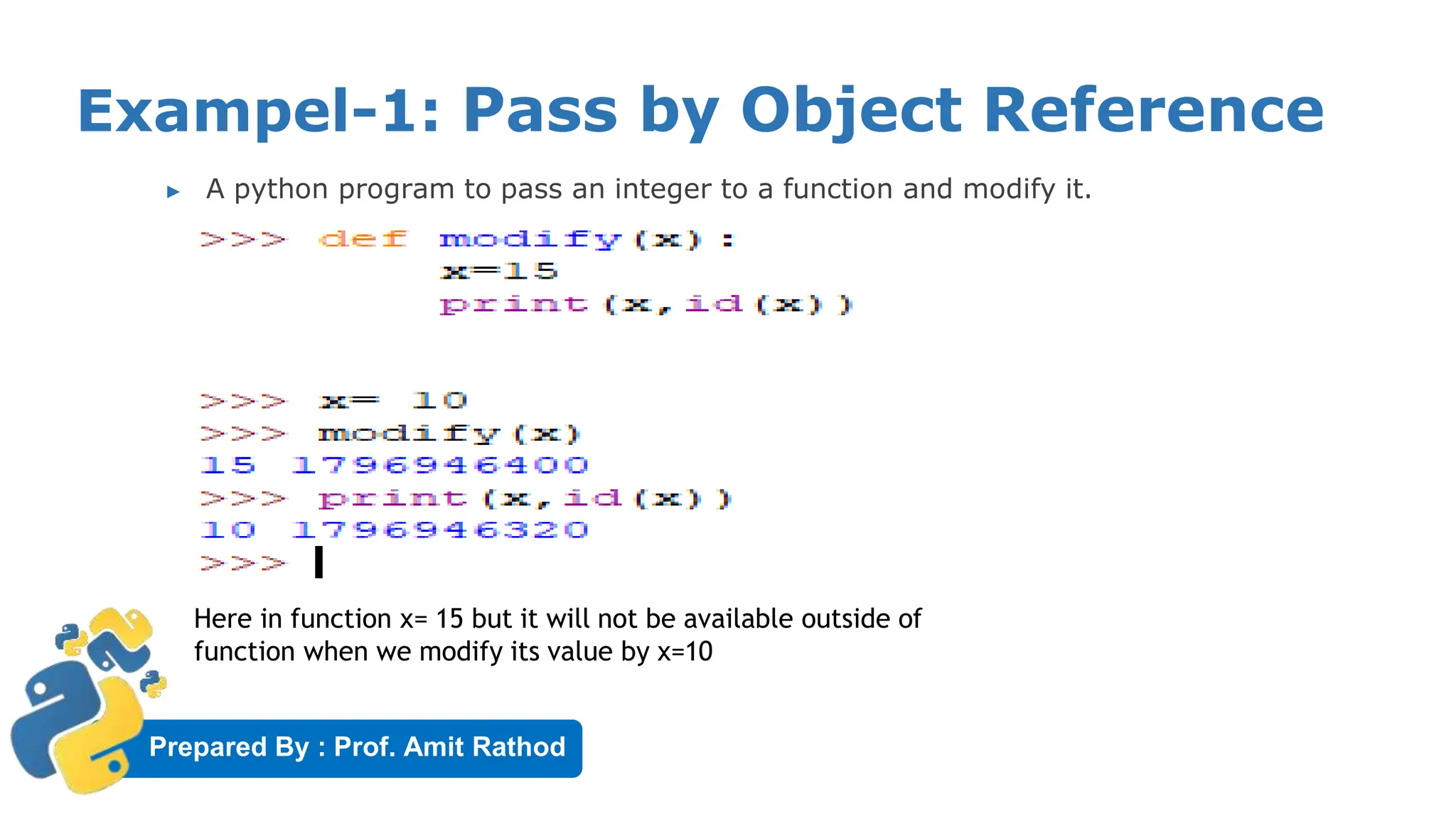
Exampel-1: Pass by Object Reference
▶ A python program to pass an integer to a function and modify it.
Here in function x= 15 but it will not be available outside of
function when we modify its value by x=10
Prepared By : Prof. Amit Rathod
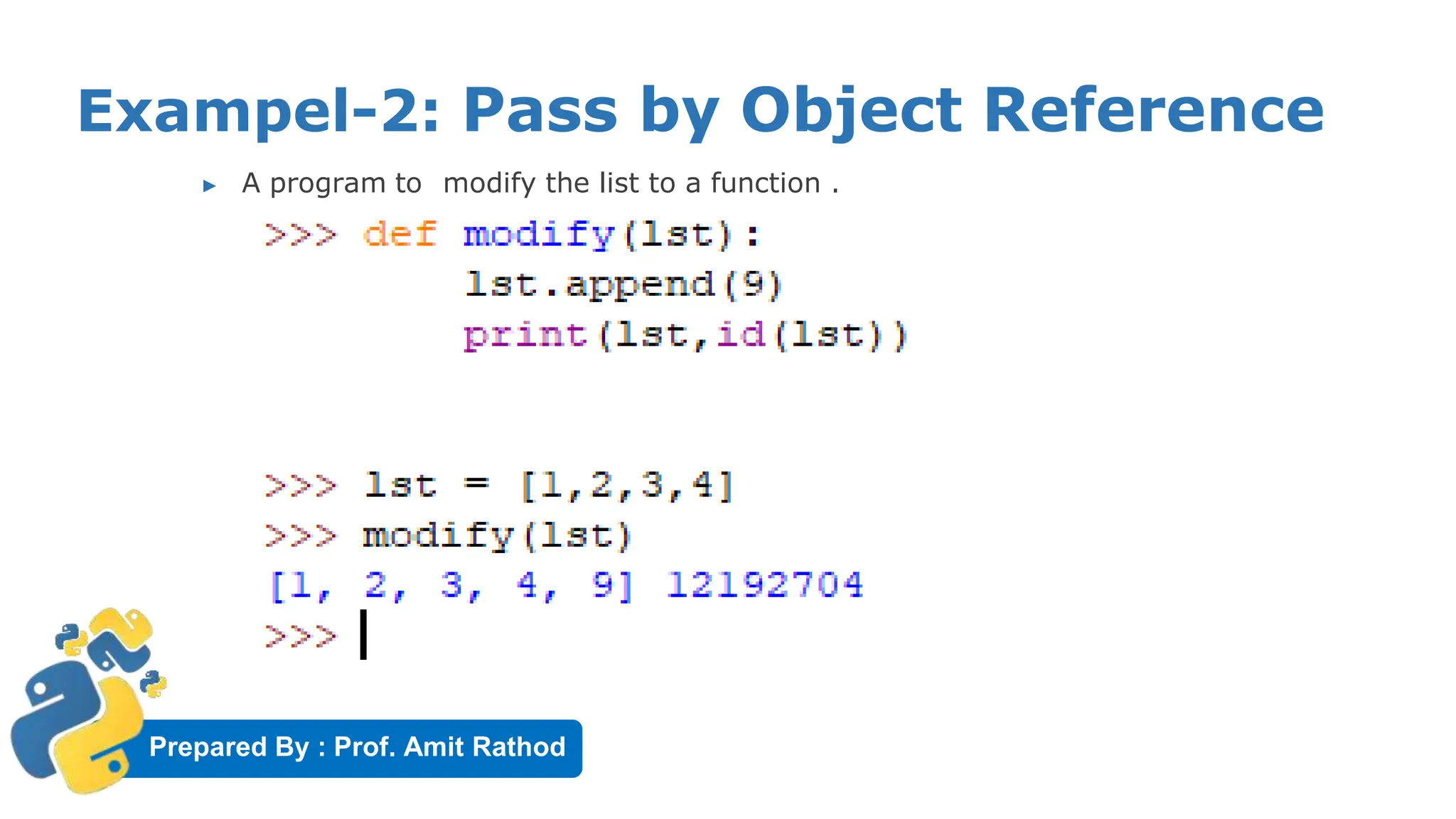
Exampel-2: Pass by Object Reference
▶ A program to modify the list to a function .
Prepared By : Prof. Amit Rathod
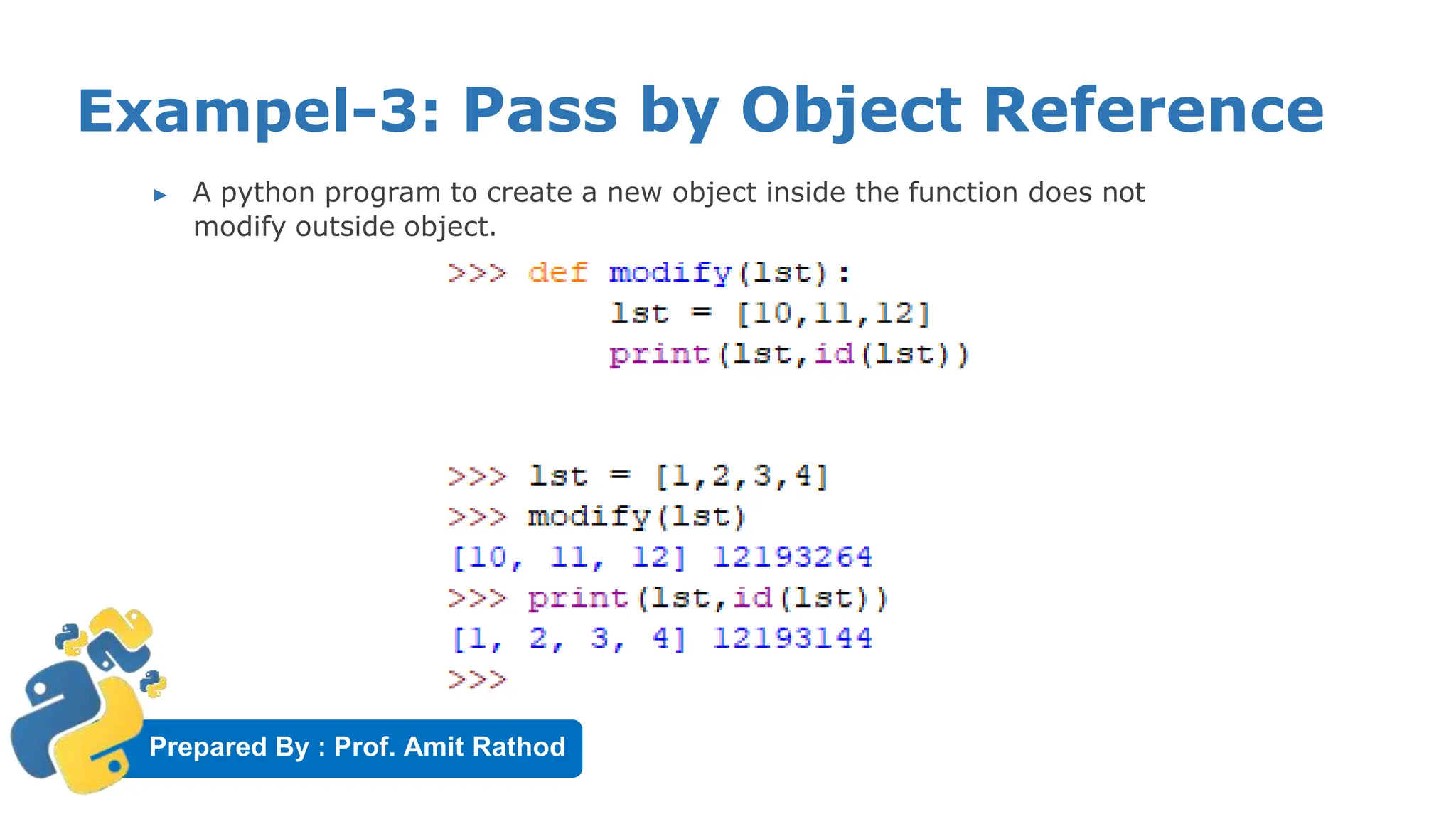
Exampel-3: Pass by Object Reference
▶ A python program to create a new object inside the function does not
modify outside object.
Prepared By : Prof. Amit Rathod
Formal and actual argument
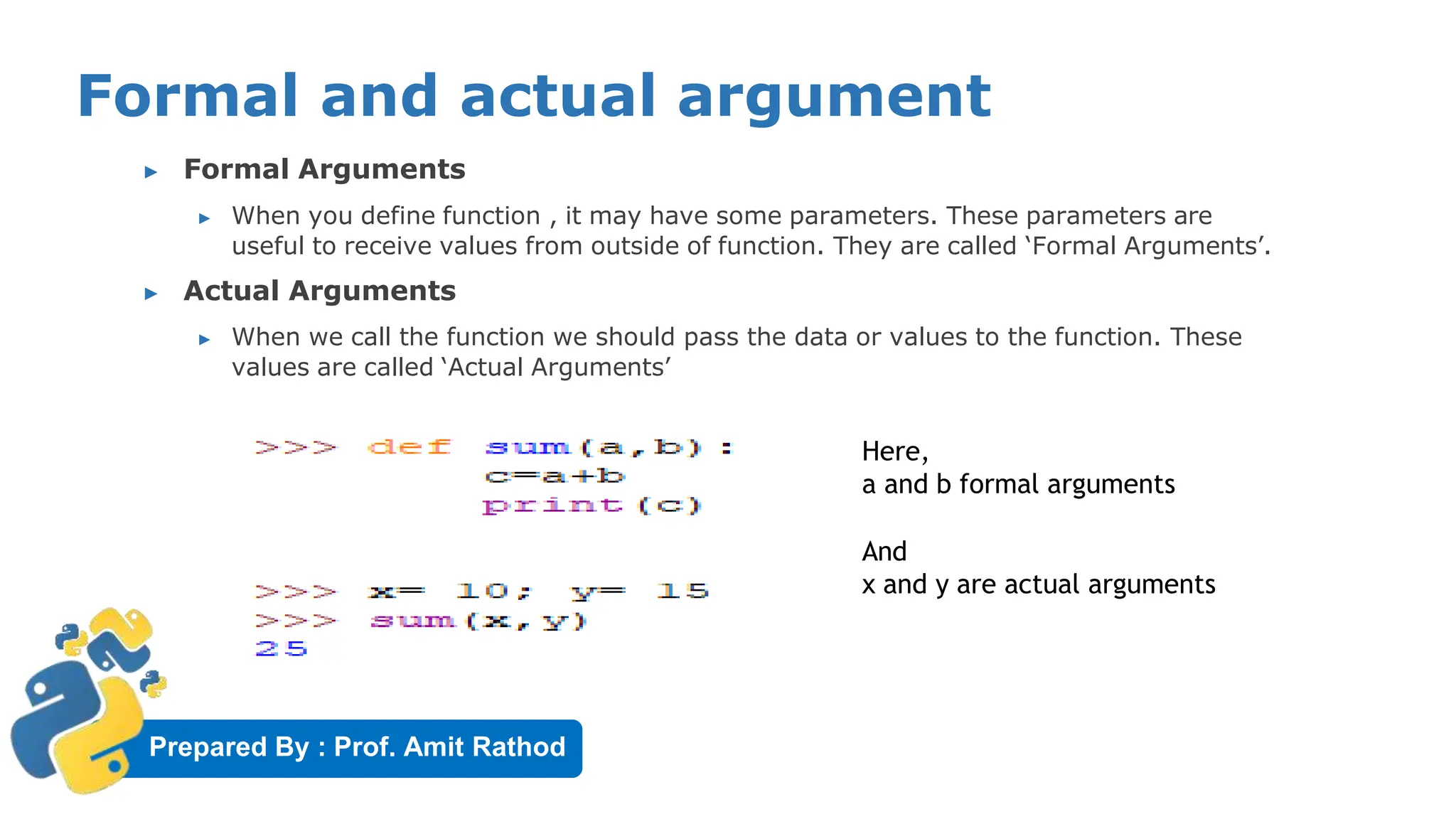
▶ Formal Arguments
▶ When you define function , it may have some parameters. These parameters are
useful to receive values from outside of function. They are called ‘Formal Arguments’.
▶ Actual Arguments
▶ When we call the function we should pass the data or values to the function. These
values are called ‘Actual Arguments’
Here,
a and b formal arguments
And
x and y are actual arguments
Prepared By : Prof. Amit Rathod
Formal and actual argument
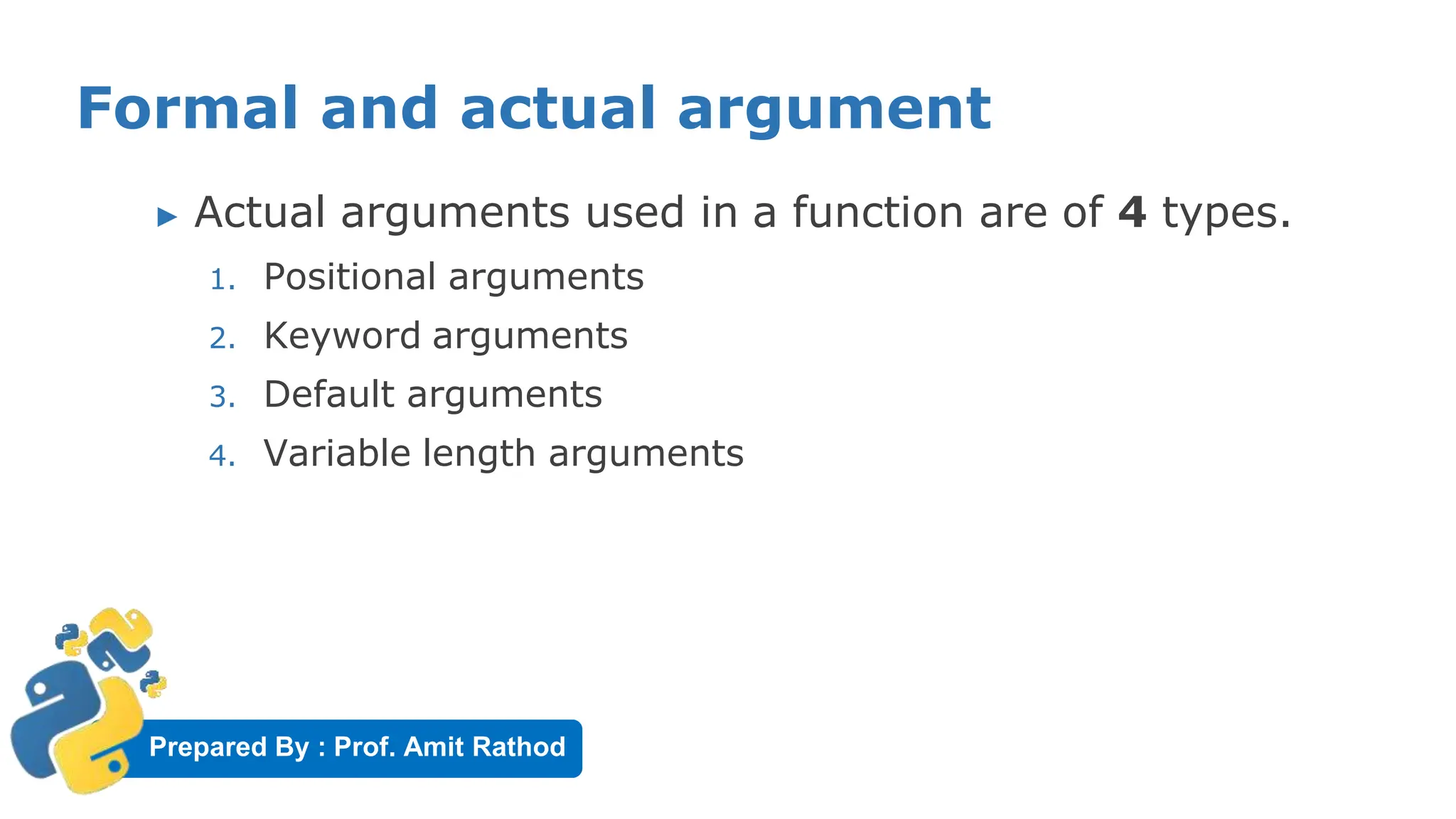
▶ Actual arguments used in a function are of 4 types.
1. Positional arguments
2. Keyword arguments
3. Default arguments
4. Variable length arguments
Prepared By : Prof. Amit Rathod
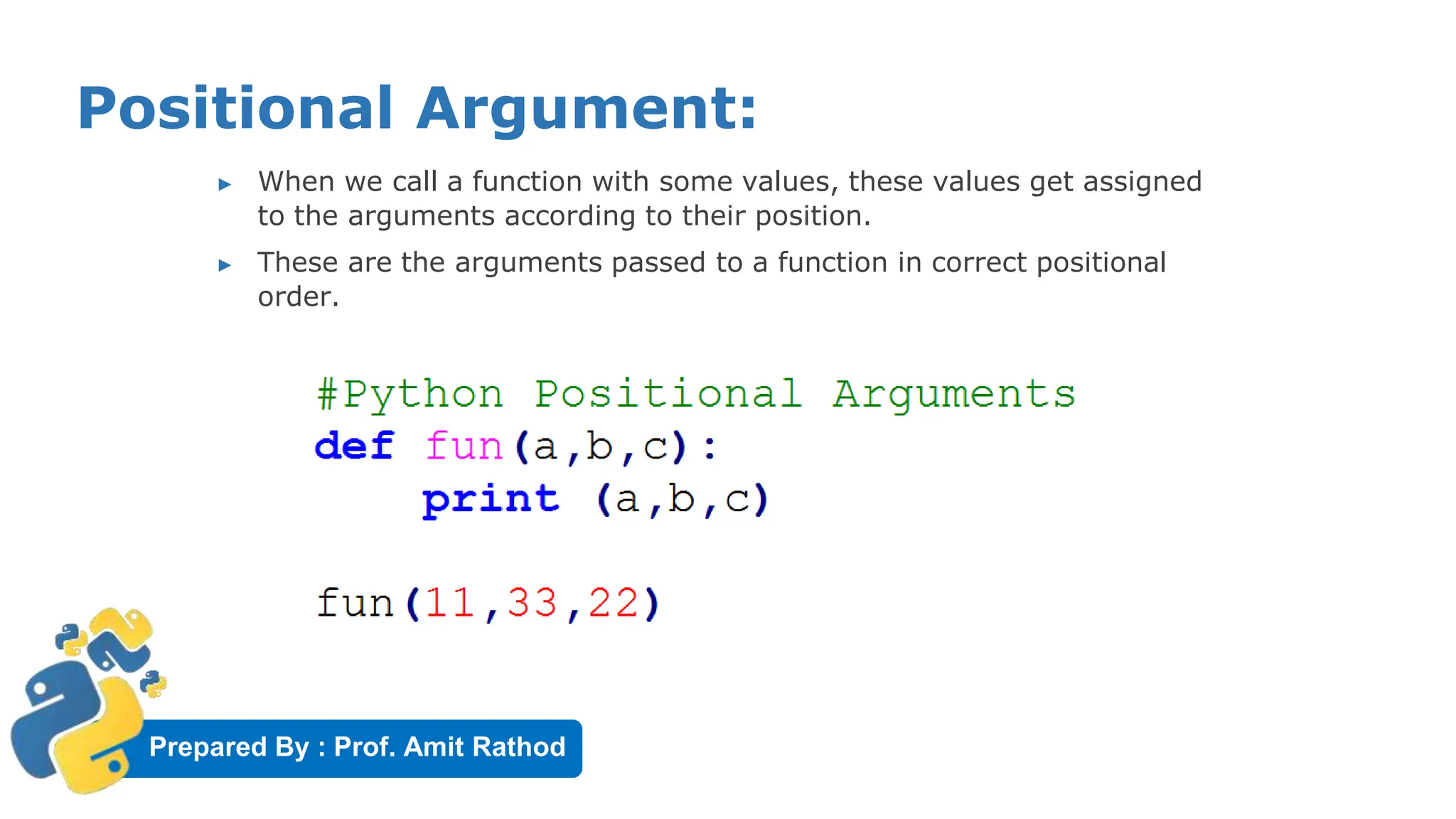
Positional Argument:
▶ When we call a function with some values, these values get assigned
to the arguments according to their position.
▶ These are the arguments passed to a function in correct positional
order.
Prepared By : Prof. Amit Rathod
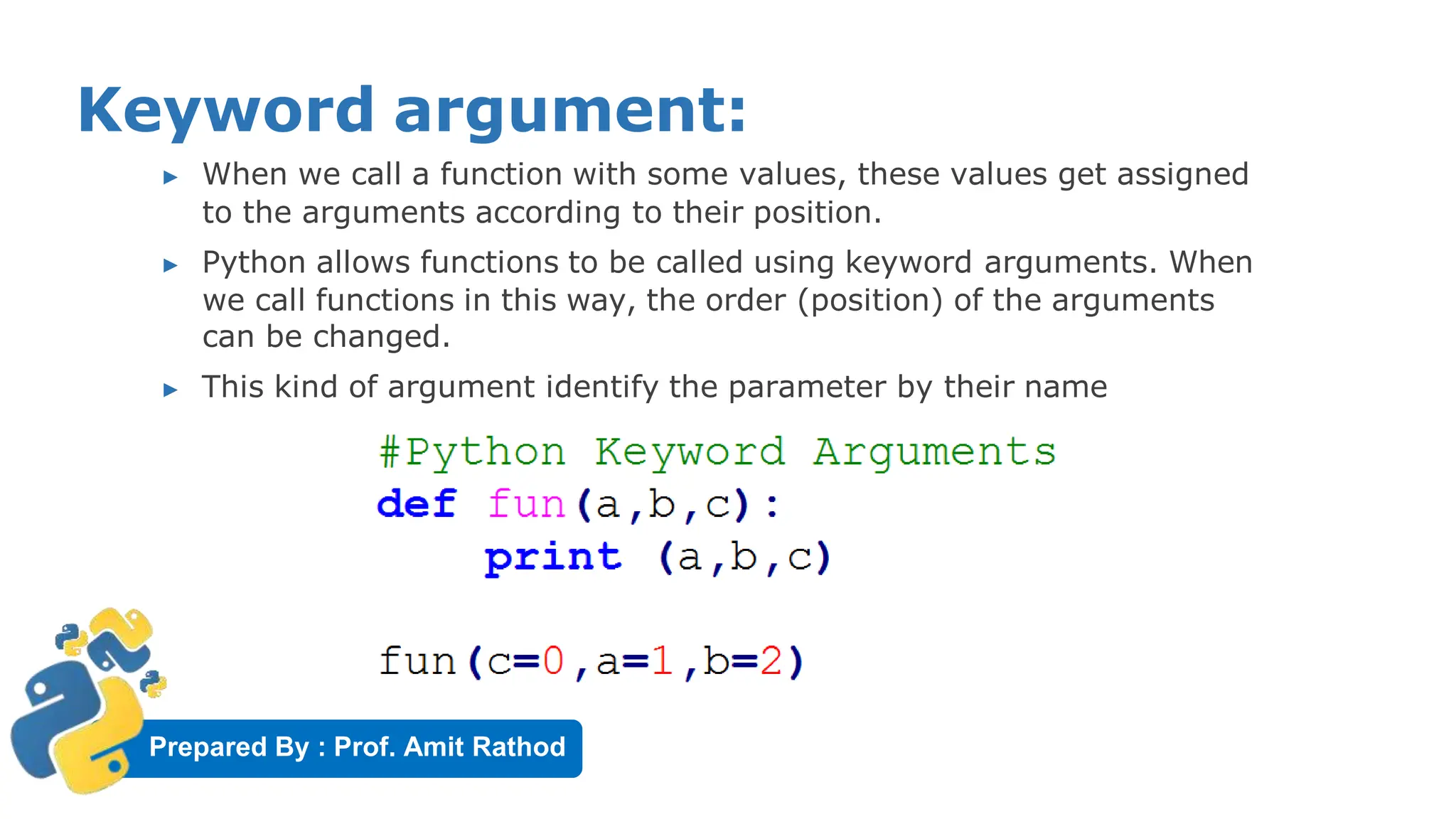
Keyword argument:
▶ When we call a function with some values, these values get assigned
to the arguments according to their position.
▶ Python allows functions to be called using keyword arguments. When
we call functions in this way, the order (position) of the arguments
can be changed.
▶ This kind of argument identify the parameter by their name
Prepared By : Prof. Amit Rathod
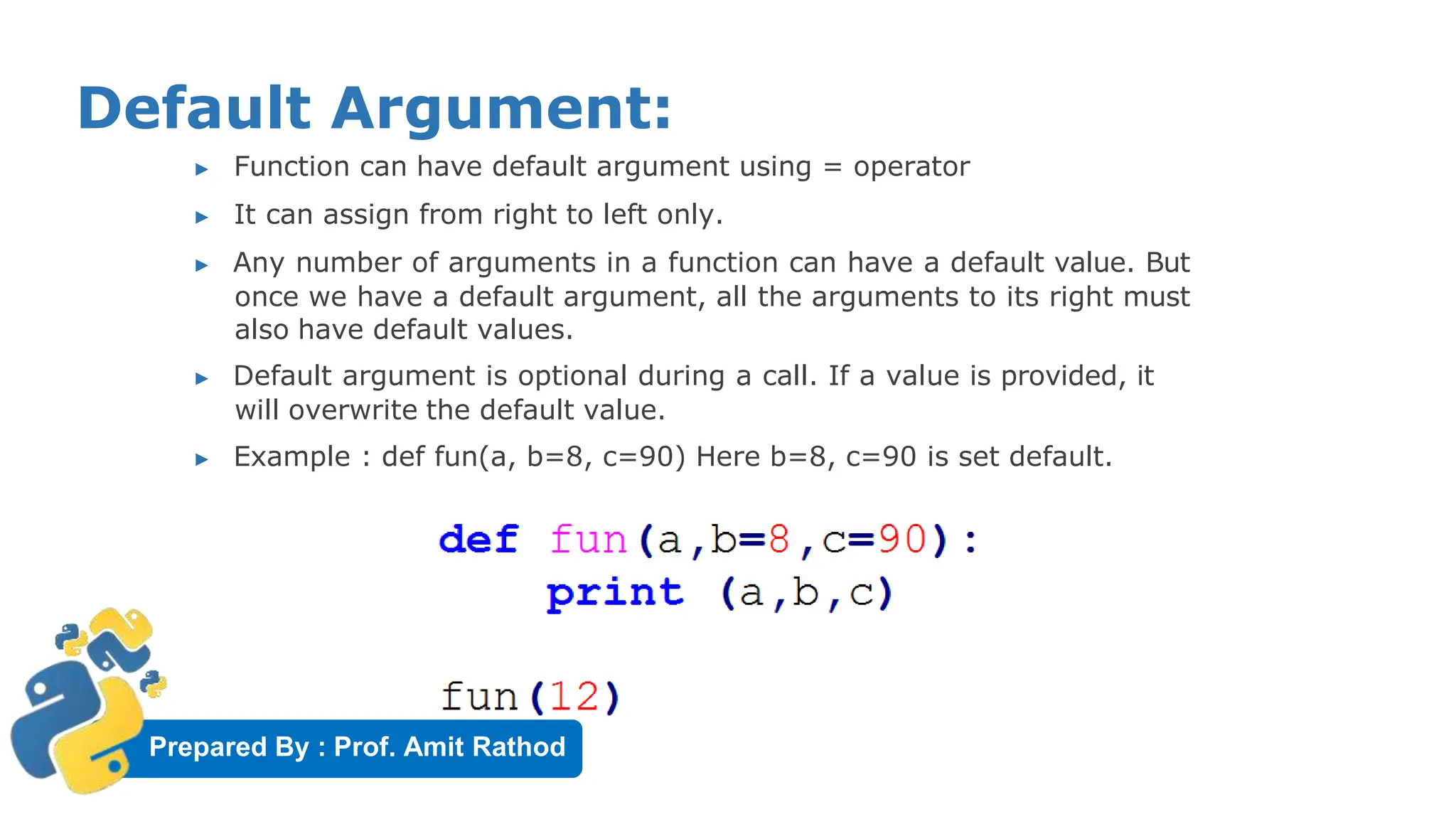
Default Argument:
▶ Function can have default argument using = operator
▶ It can assign from right to left only.
▶ Any number of arguments in a function can have a default value. But
once we have a default argument, all the arguments to its right must
also have default values.
▶ Default argument is optional during a call. If a value is provided, it
will overwrite the default value.
▶ Example : def fun(a, b=8, c=90) Here b=8, c=90 is set default.
Prepared By : Prof. Amit Rathod
Variable length argument:
30
In Python, we can pass a variable number of arguments to a
function using special symbols.
There are two special symbols:
▶ *args (Non Keyword Arguments)
▶ **kwargs (Keyword Arguments)
Prepared By : Prof. Amit Rathod
Non Keyword Variable length argument:
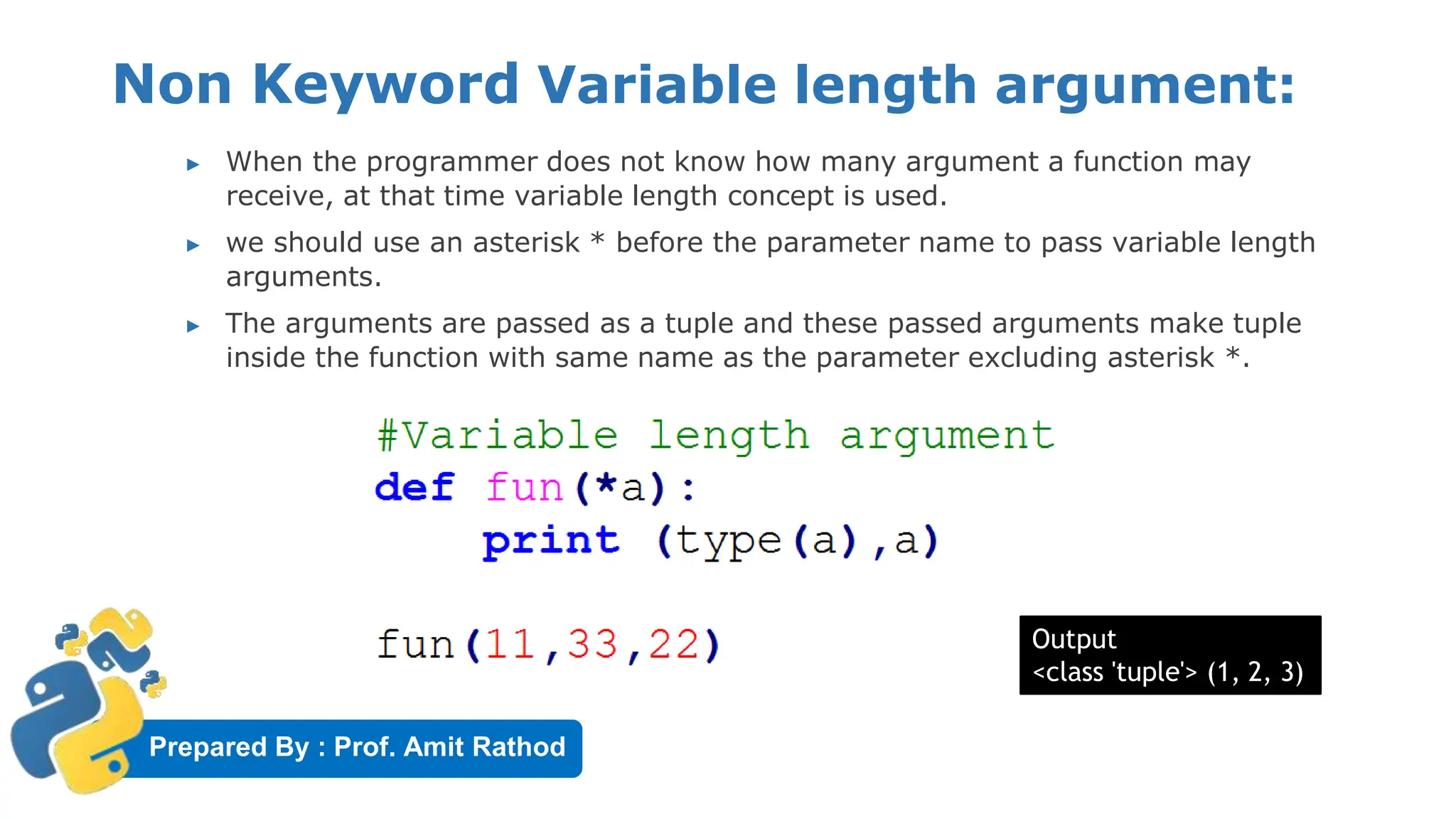
▶ When the programmer does not know how many argument a function may
receive, at that time variable length concept is used.
▶ we should use an asterisk * before the parameter name to pass variable length
arguments.
▶ The arguments are passed as a tuple and these passed arguments make tuple
inside the function with same name as the parameter excluding asterisk *.
Output
<class 'tuple'> (1, 2, 3)
Prepared By : Prof. Amit Rathod
Keyword Variable length argument:
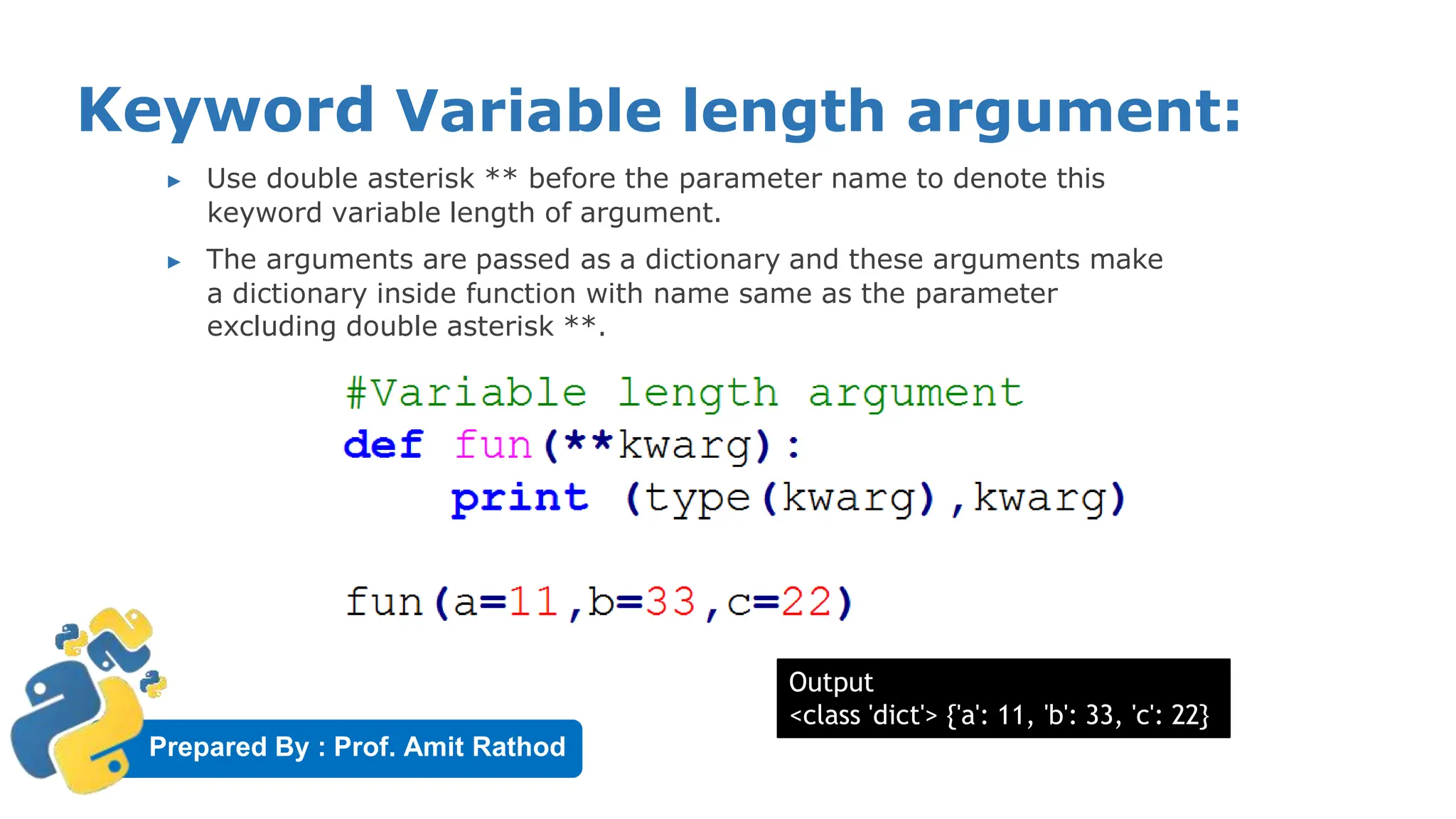
▶ Use double asterisk ** before the parameter name to denote this
keyword variable length of argument.
▶ The arguments are passed as a dictionary and these arguments make
a dictionary inside function with name same as the parameter
excluding double asterisk **.
Output
<class 'dict'> {'a': 11, 'b': 33, 'c': 22}
Prepared By : Prof. Amit Rathod
Local Variables
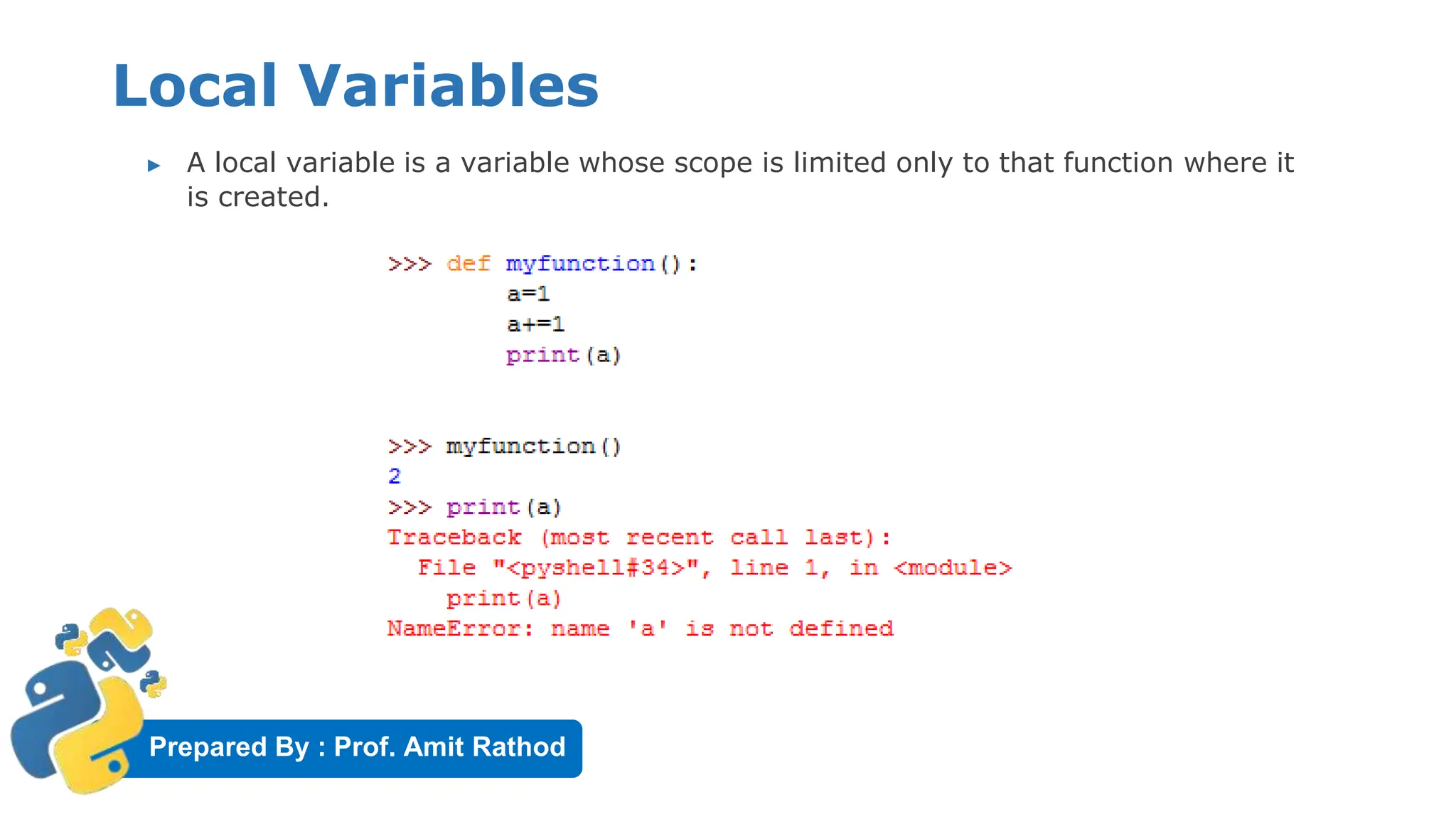
▶ A local variable is a variable whose scope is limited only to that function where it
is created.
Prepared By : Prof. Amit Rathod
Global Variables
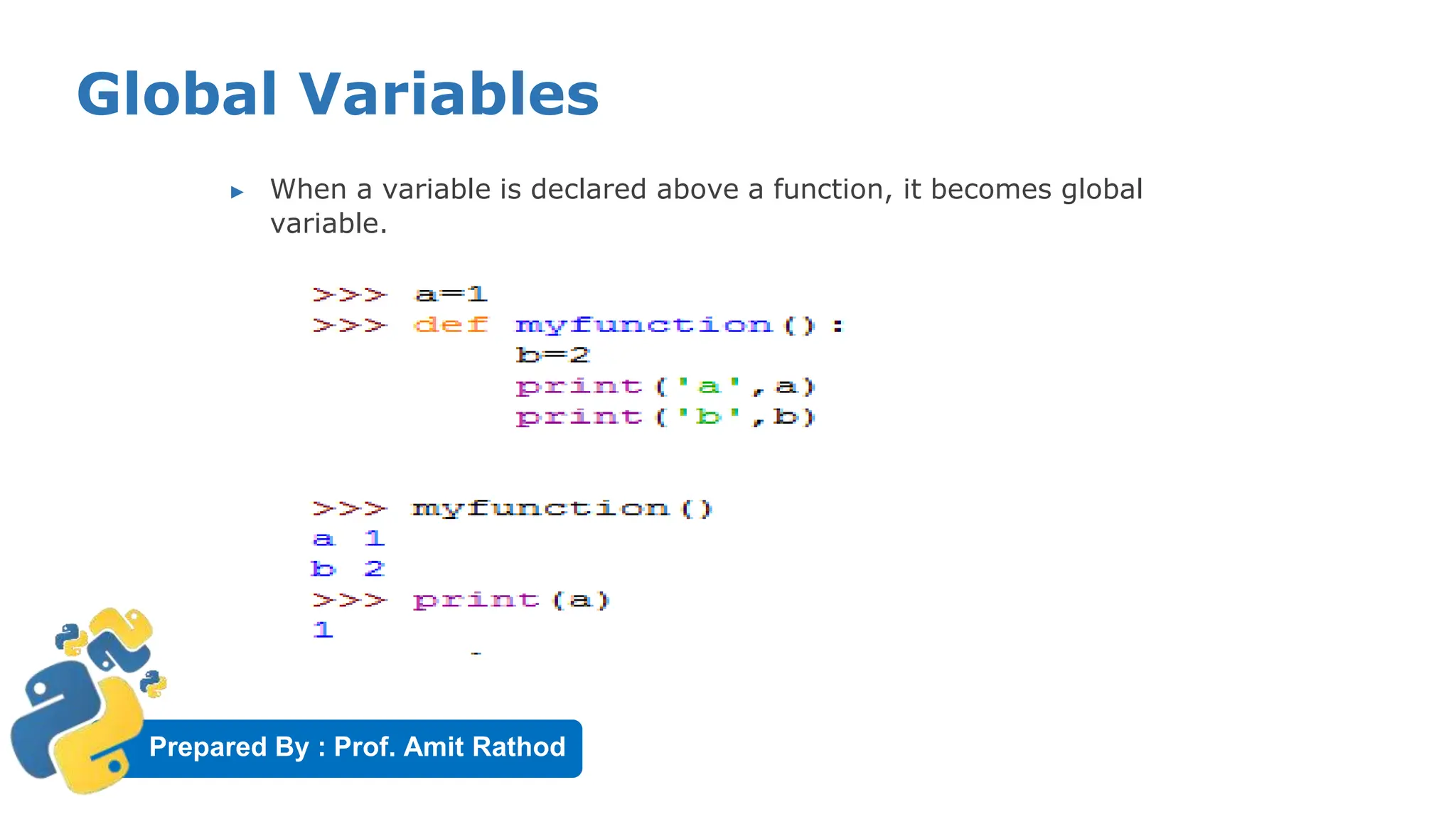
▶ When a variable is declared above a function, it becomes global
variable.
Prepared By : Prof. Amit Rathod
The Global Keyword
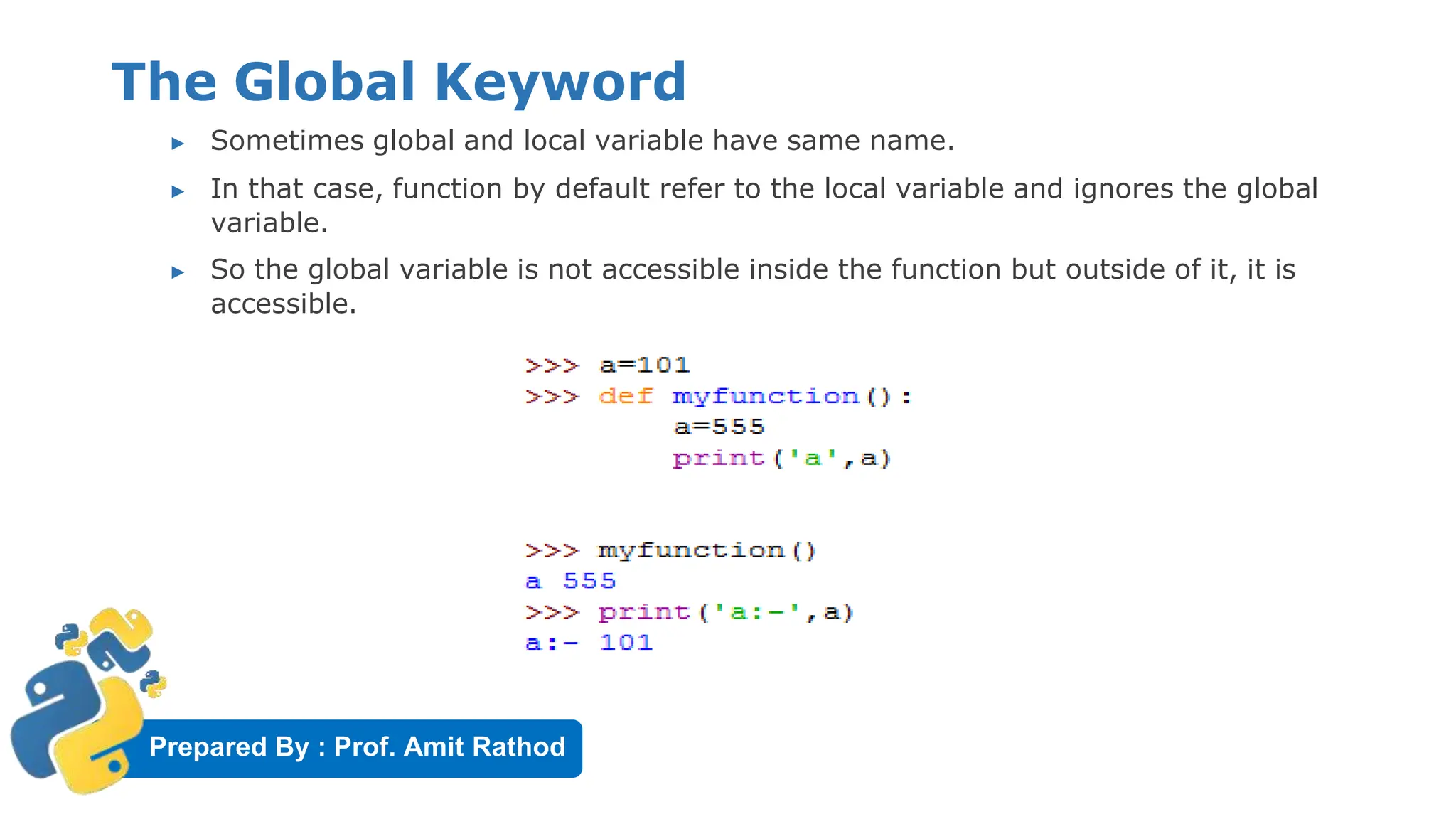
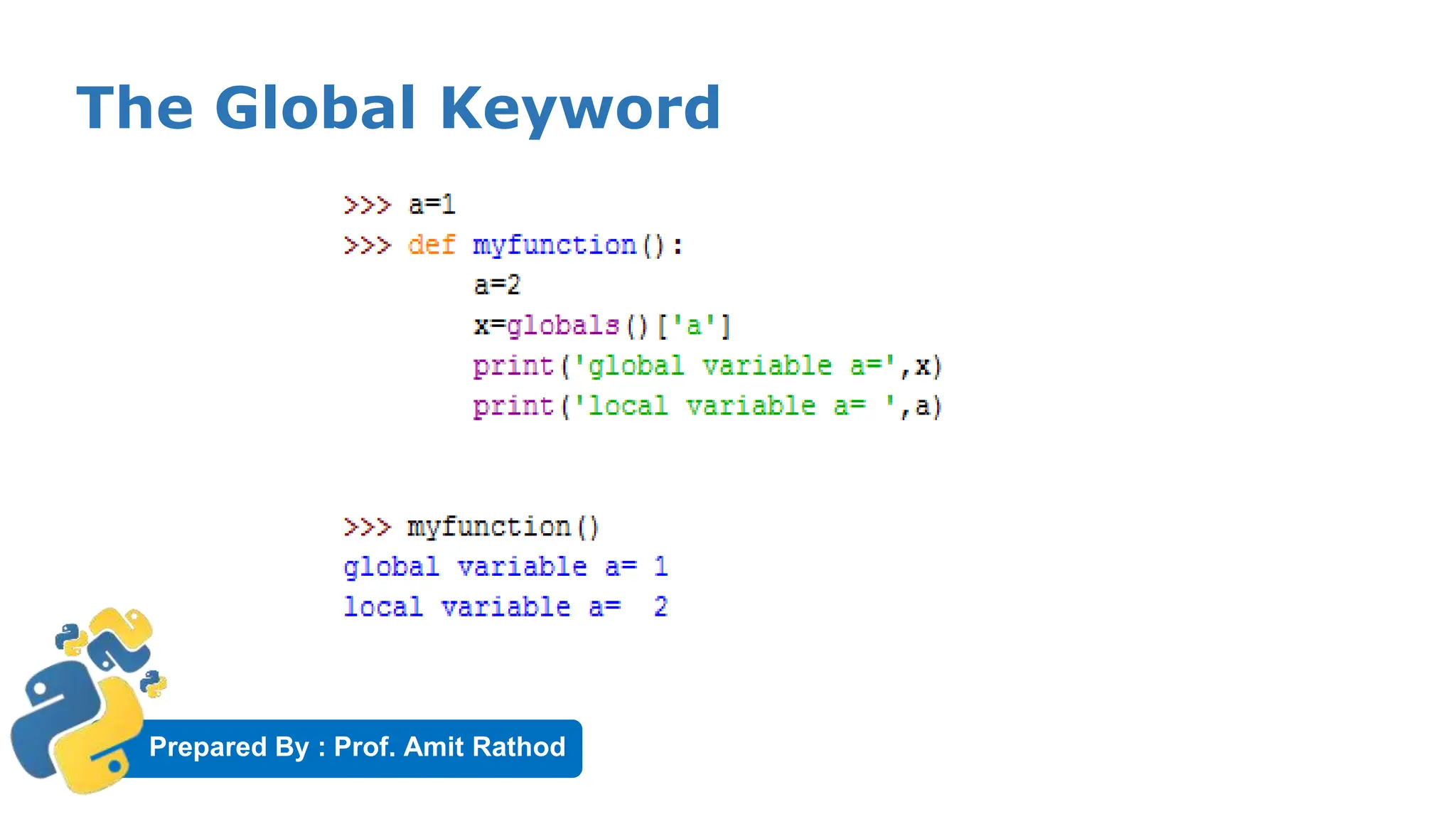
▶ Sometimes global and local variable have same name.
▶ In that case, function by default refer to the local variable and ignores the global
variable.
▶ So the global variable is not accessible inside the function but outside of it, it is
accessible.
Prepared By : Prof. Amit Rathod
The Global Keyword
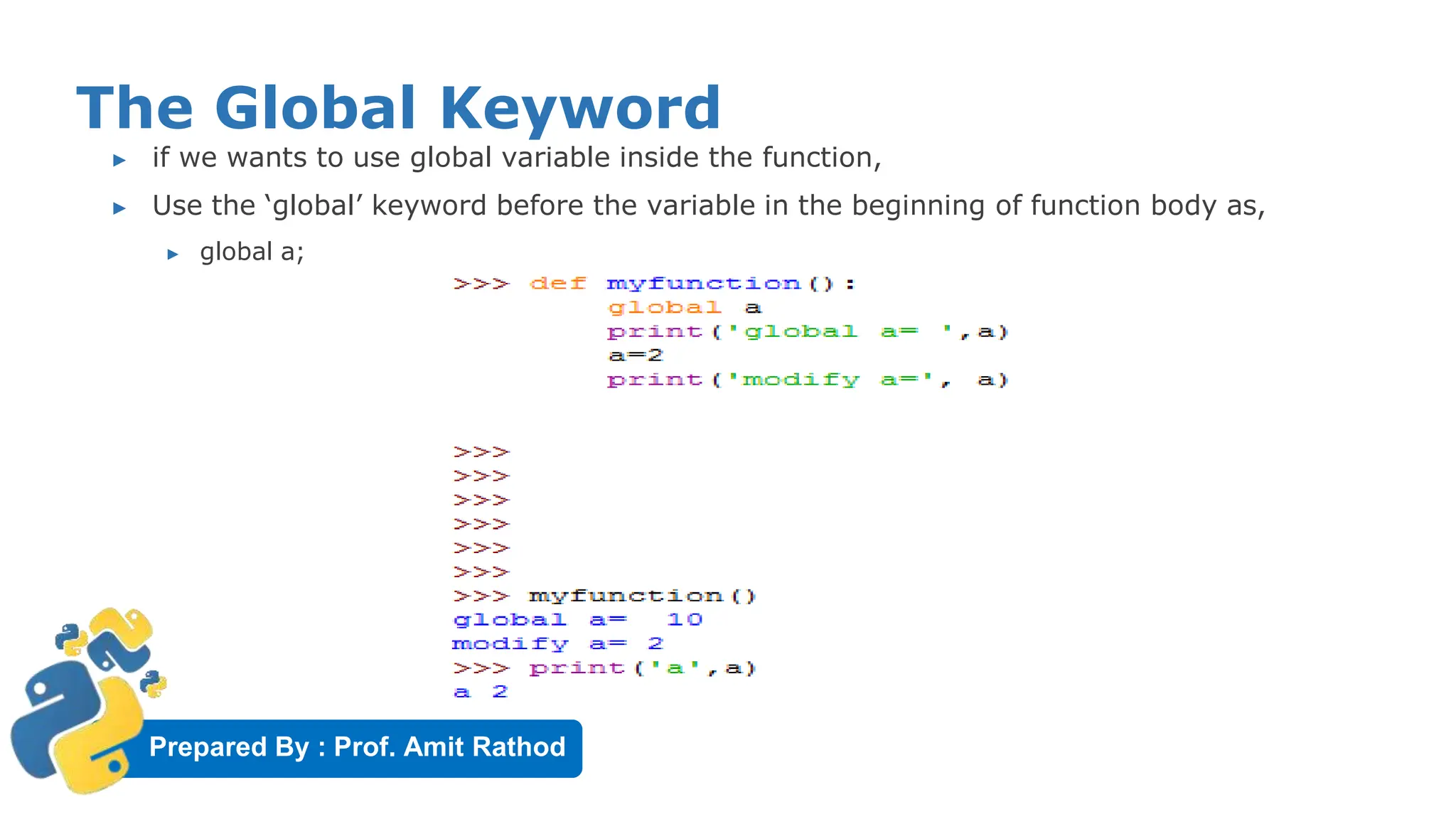
▶ if we wants to use global variable inside the function,
▶ Use the ‘global’ keyword before the variable in the beginning of function body as,
▶ global a;
Prepared By : Prof. Amit Rathod
The Global Keyword
Prepared By : Prof. Amit Rathod
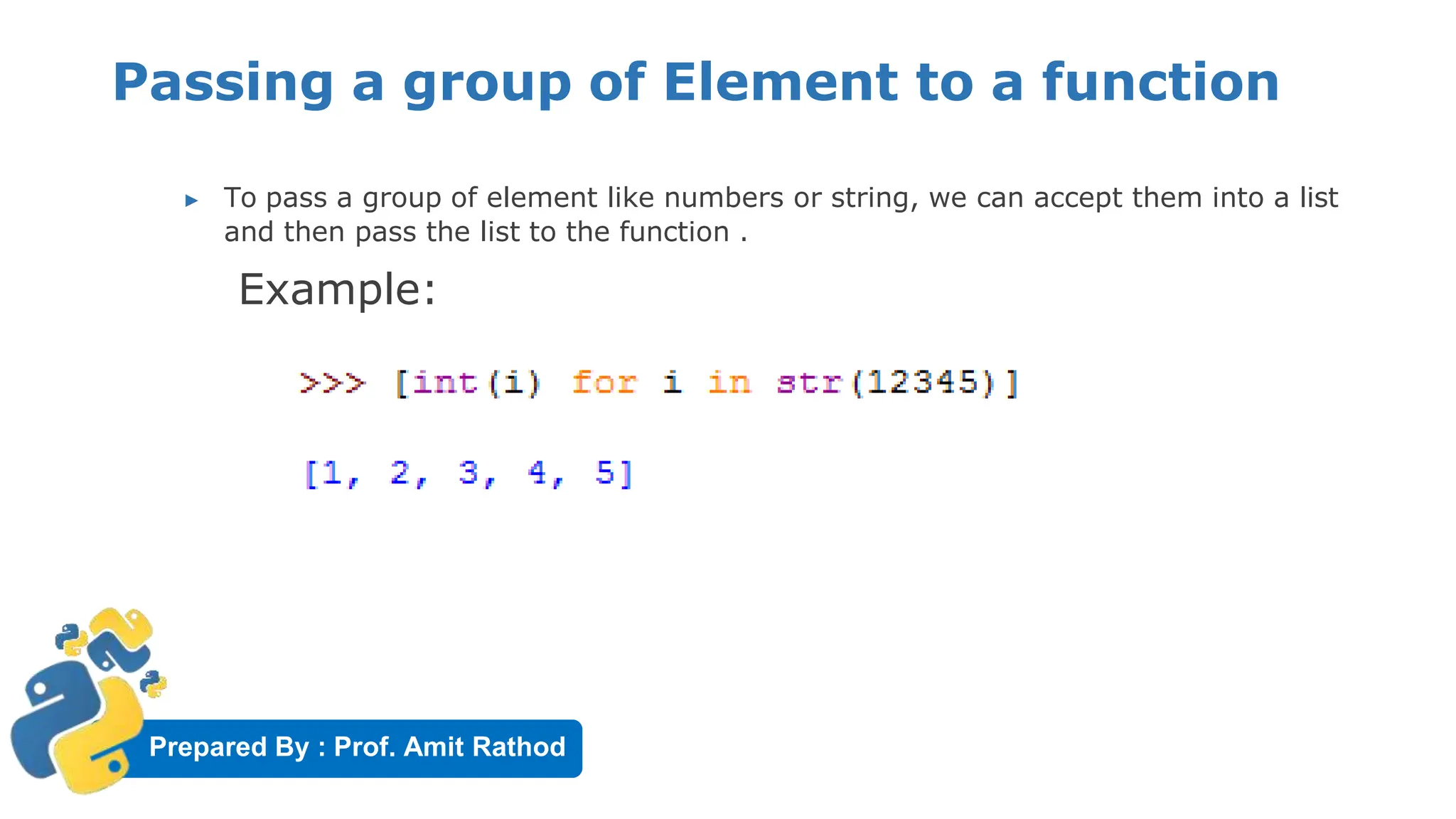
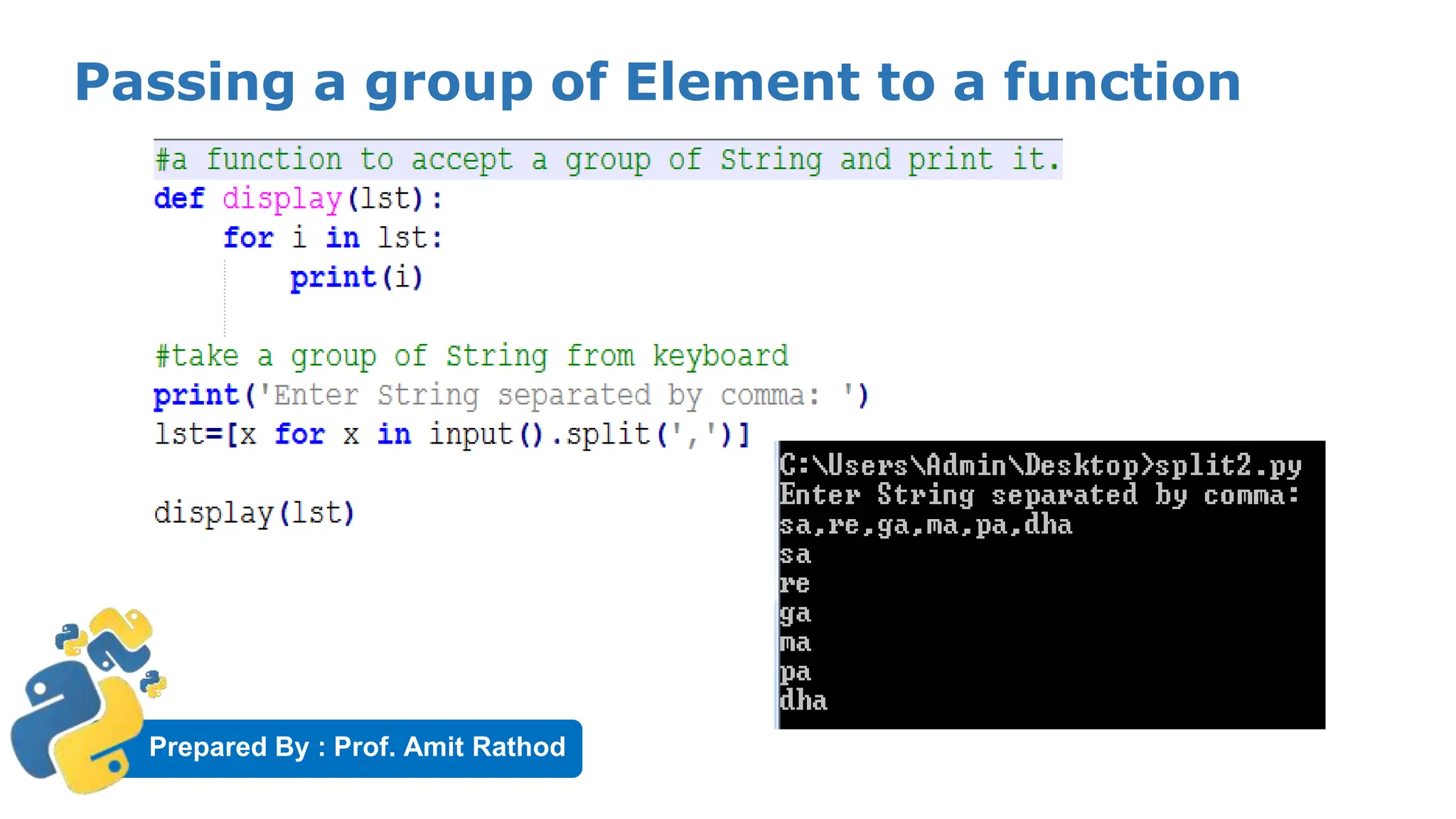
Passing a group of Element to a function
▶ To pass a group of element like numbers or string, we can accept them into a list
and then pass the list to the function .
Example:
Prepared By : Prof. Amit Rathod
Passing a group of Element to a function
Prepared By : Prof. Amit Rathod
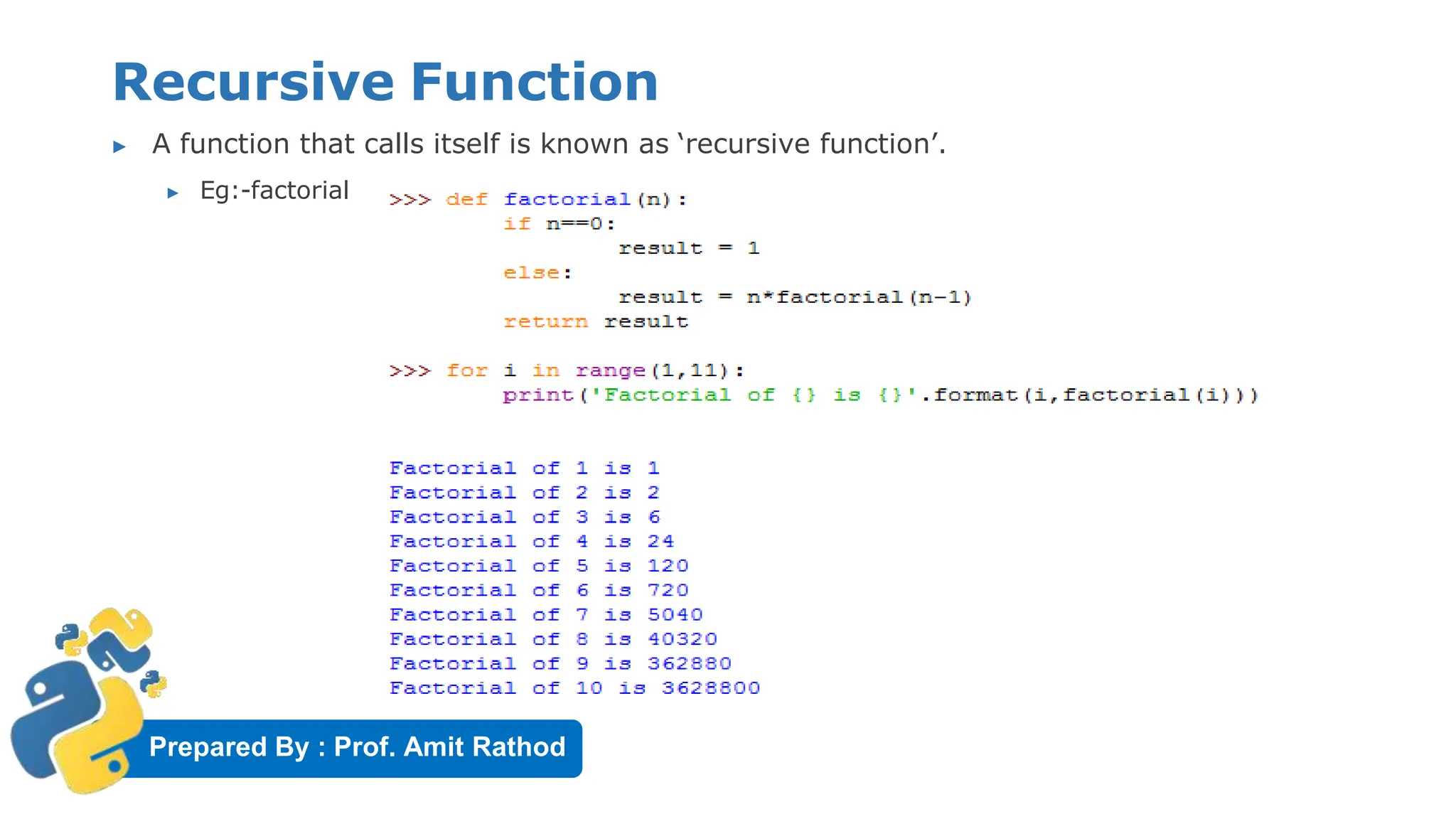
Recursive Function
▶ A function that calls itself is known as ‘recursive function’.
▶ Eg:-factorial
Prepared By : Prof. Amit Rathod
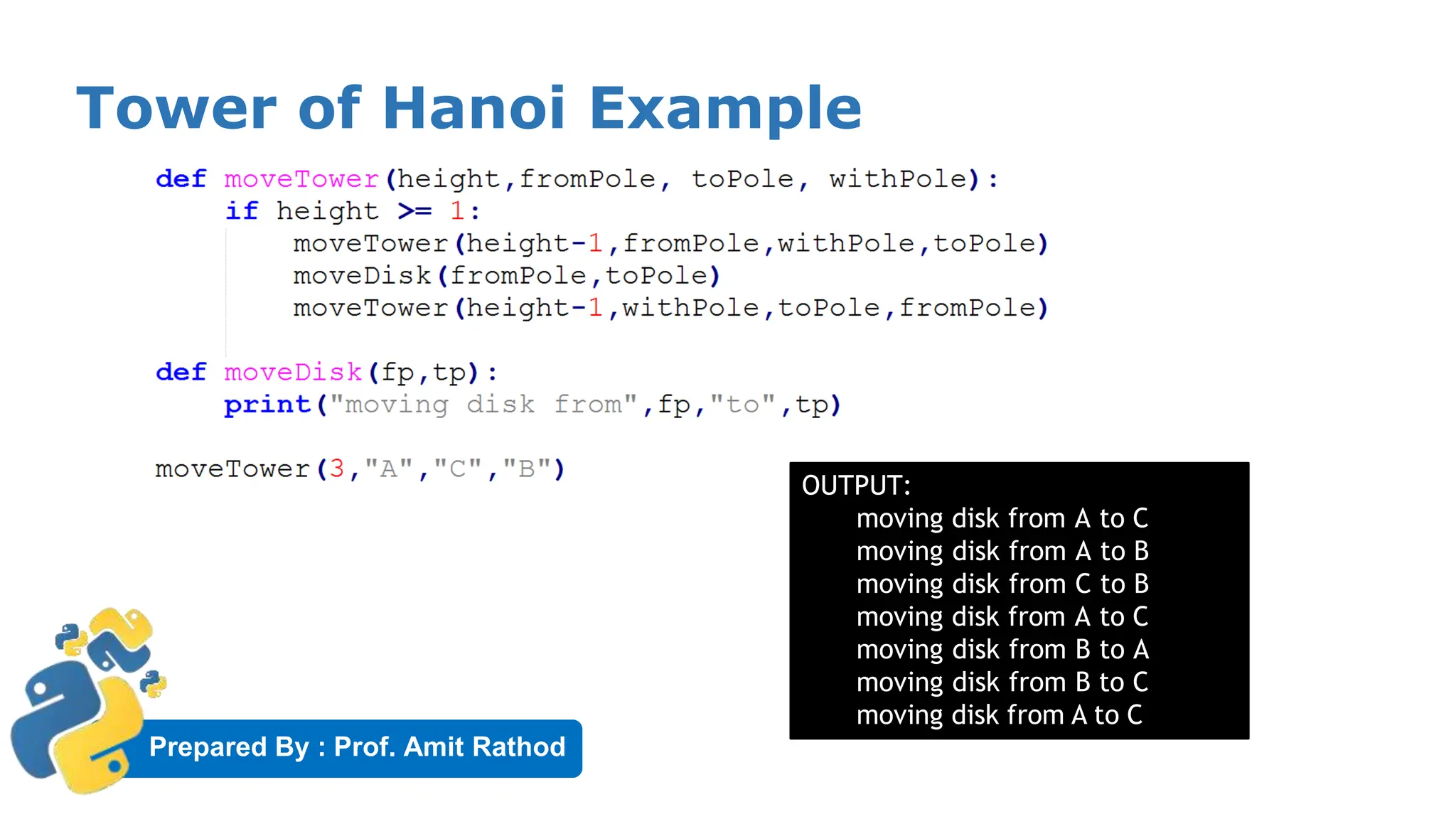
Recursive Function: Tower of Hanoi
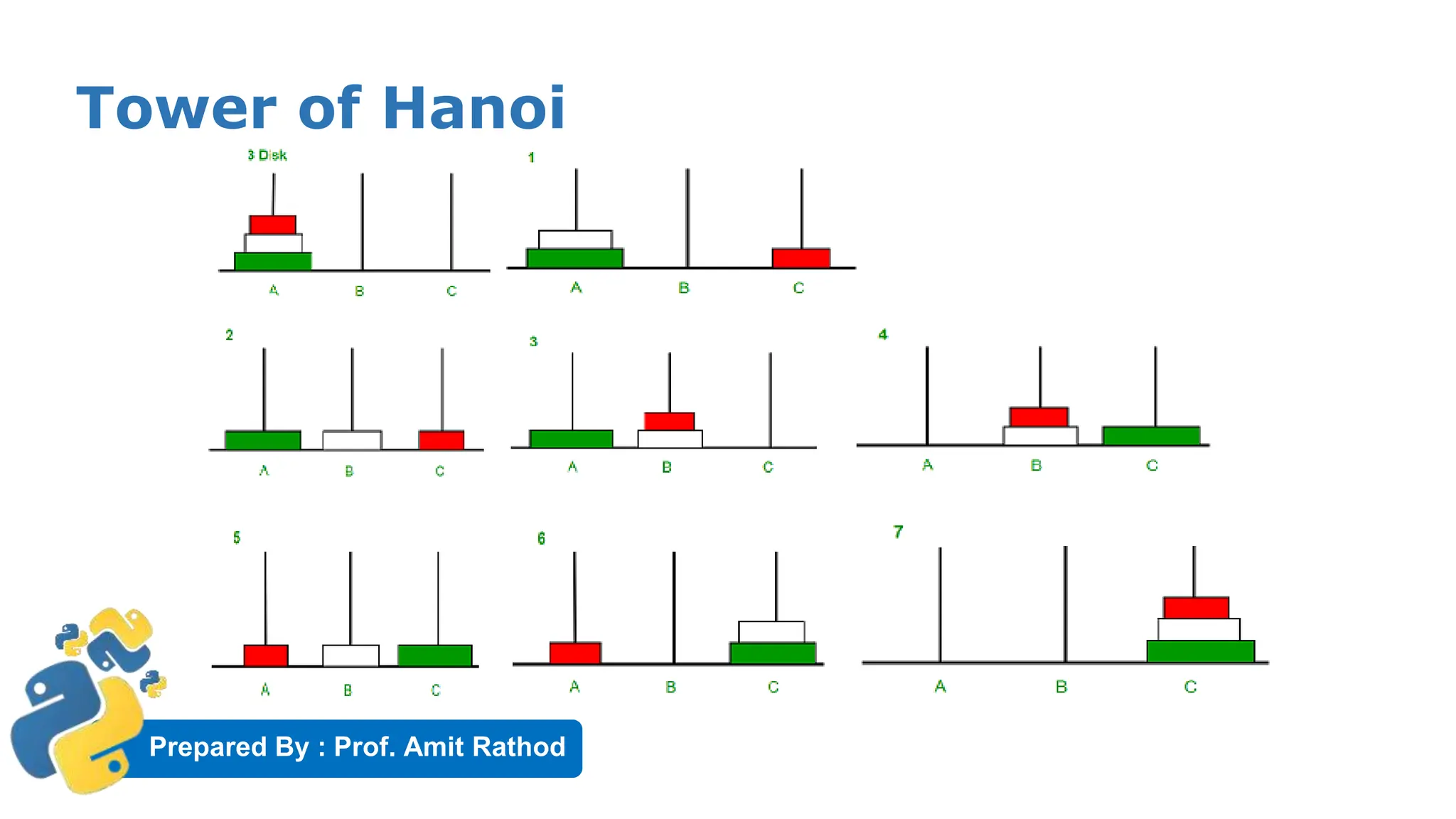
Tower of Hanoi is a mathematical puzzle where we have three rods and n
disks. The objective of the puzzle is to move the entire stack to another
rod, obeying the following simple rules:
1) Only one disk can be moved at a time.
2) Each move consists of taking the upper disk from one of the stacks
and placing it on top of another stack i.e. a disk can only be moved if it is
the uppermost disk on a stack.
3) No disk may be placed on top of a smaller disk.
Prepared By : Prof. Amit Rathod
Tower of Hanoi
Prepared By : Prof. Amit Rathod
Tower of Hanoi Example
OUTPUT:
moving disk from A to C
moving disk from A to B
moving disk from C to B
moving disk from A to C
moving disk from B to A
moving disk from B to C
moving disk from A to C
Prepared By : Prof. Amit Rathod
Anonymous/Lambda Function
▶ What are lambda functions in Python?
▶ anonymous function is a function that is defined without a name.
▶ While normal functions are defined using the def keyword
▶ anonymous functions are defined using the lambda keyword.
▶ Hence, anonymous functions are also called lambda functions.
Prepared By : Prof. Amit Rathod
Anonymous/Lambda Function
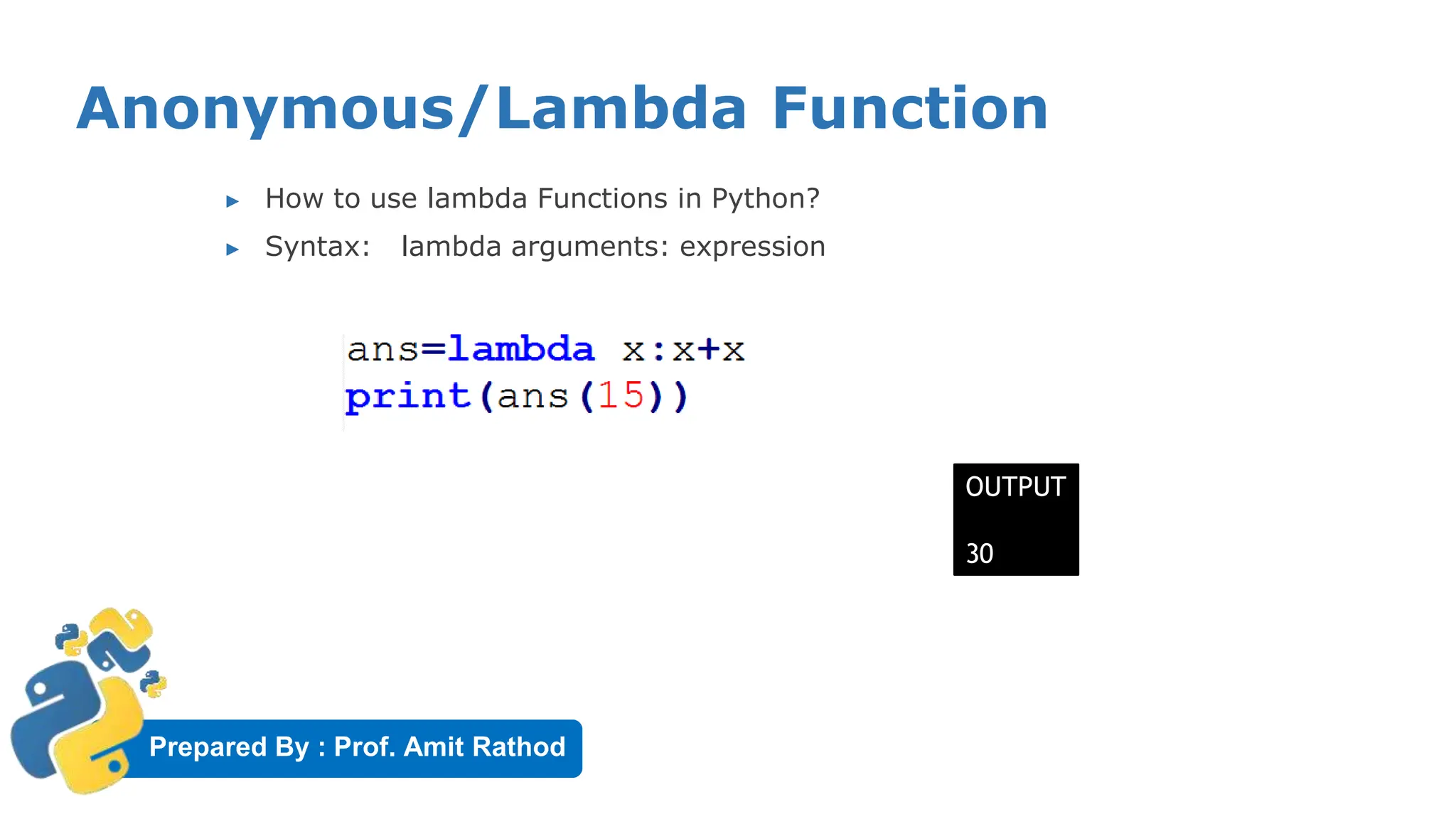
▶ How to use lambda Functions in Python?
▶ Syntax: lambda arguments: expression
OUTPUT
30
Prepared By : Prof. Amit Rathod
Use of Lambda Function
▶ We use lambda functions when we require a nameless
function for a short period of time.
▶ we generally use it as an argument to a higher-order
function
▶ Higher-order function is a function that takes in other
functions as arguments
▶ Lambda functions are used along with built-in functions like
filter(), map() etc.
Prepared By : Prof. Amit Rathod
Using lambda with filter()
▶ The filter() function takes two arguments: function and a list
▶ The function is called with all the items in the list and a new list is returned
which contains items for which the function evaluates to True.
▶ Example:
Sample List: [1, 2, 3, 4, 5, 6, 7, 8, 9, 10]
Even List: [2, 4, 6, 8, 10]
Odd List: [1, 3, 5, 7, 9]
Prepared By : Prof. Amit Rathod
Using lambda with map()
▶ The map() function takes two argument: function and a list
▶ The function is called with all the items in the list and a new list is returned which
contains items returned by that function for each item.
▶ Example:
OUTPUT:
List: [1, 2, 3, 4]
List: [1, 4, 9, 16]
Prepared By : Prof. Amit Rathod
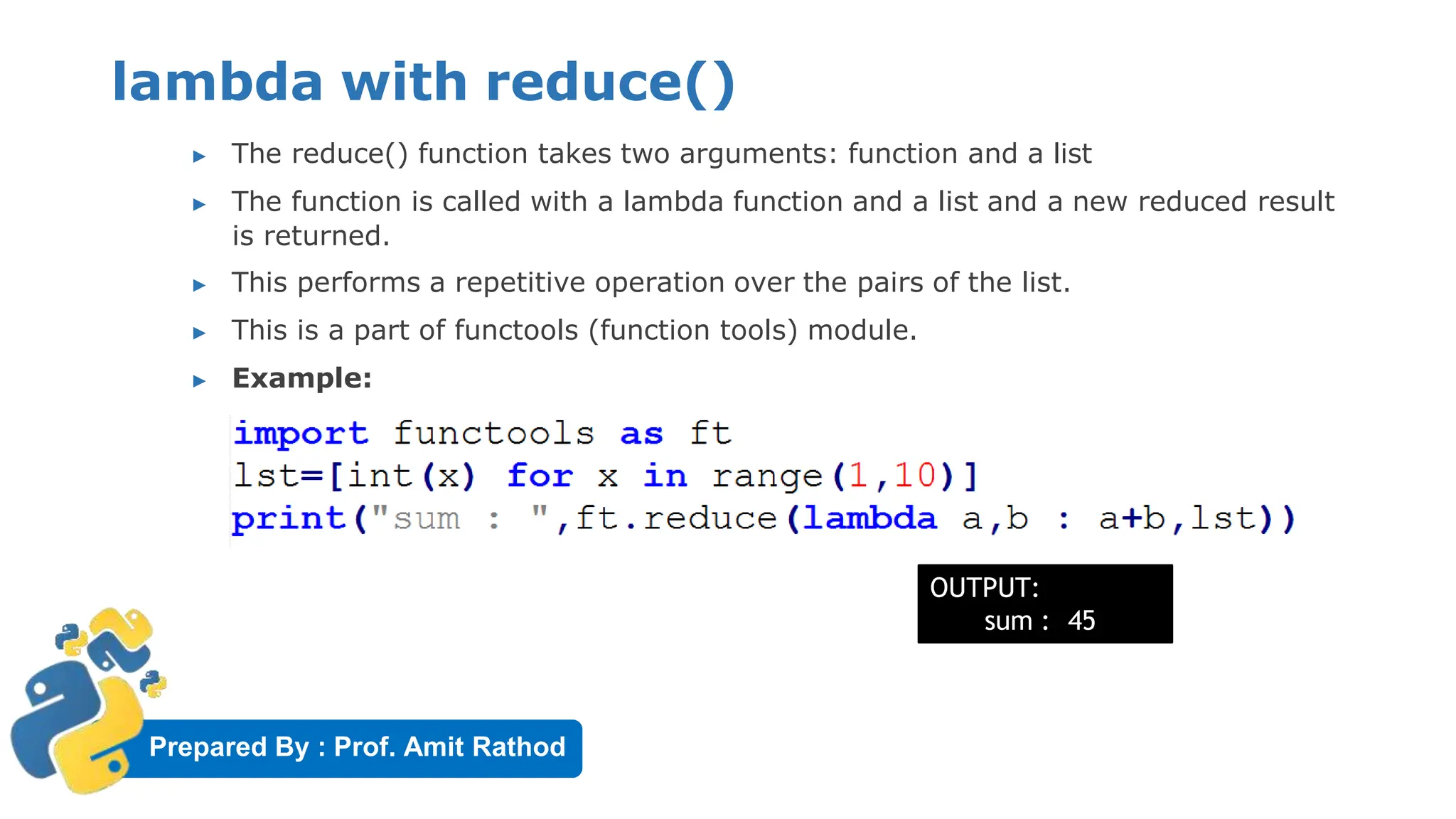
lambda with reduce()
▶ The reduce() function takes two arguments: function and a list
▶ The function is called with a lambda function and a list and a new reduced result
is returned.
▶ This performs a repetitive operation over the pairs of the list.
▶ This is a part of functools (function tools) module.
▶ Example:
OUTPUT:
sum : 45
Prepared By : Prof. Amit Rathod
Function Decorators
▶ A decorator is a function that takes a function as its only
parameter and returns a function.
▶ This is helpful to “wrap” functionality with the same code over
and over again.
Prepared By : Prof. Amit Rathod
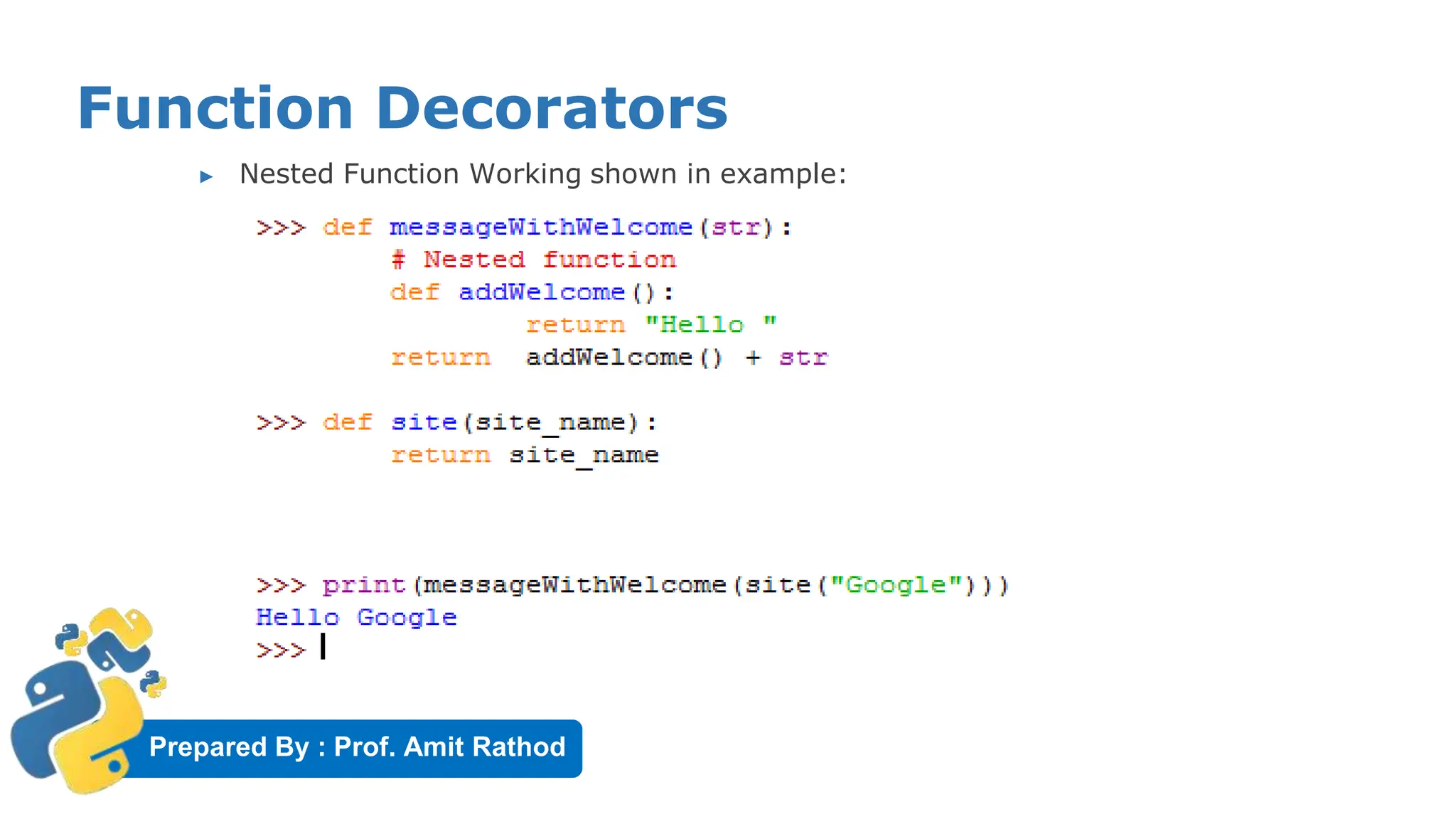
Function Decorators
▶ Nested Function Working shown in example:
Prepared By : Prof. Amit Rathod
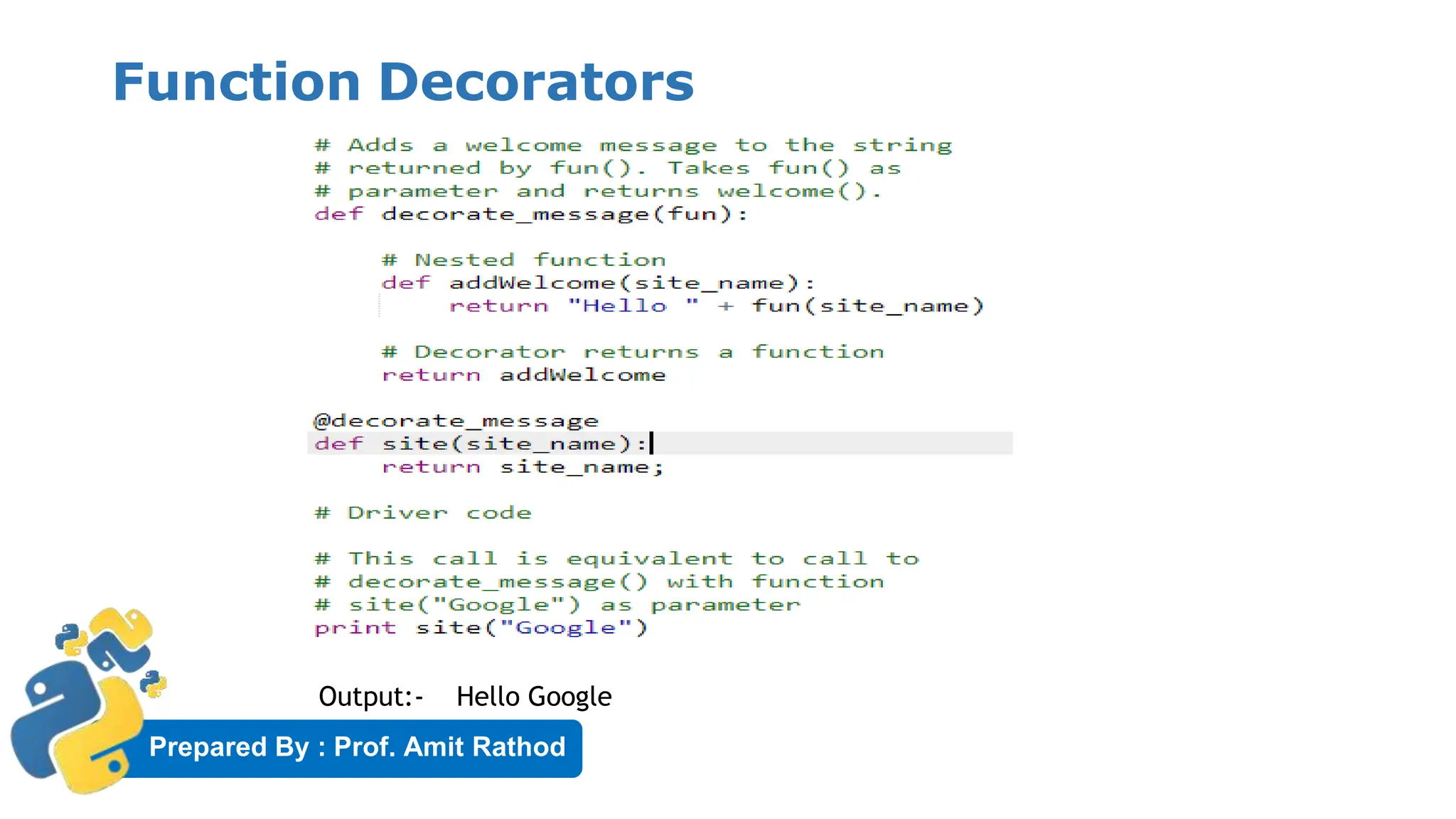
Function Decorators
Output:- Hello Google
Prepared By : Prof. Amit Rathod
Generators
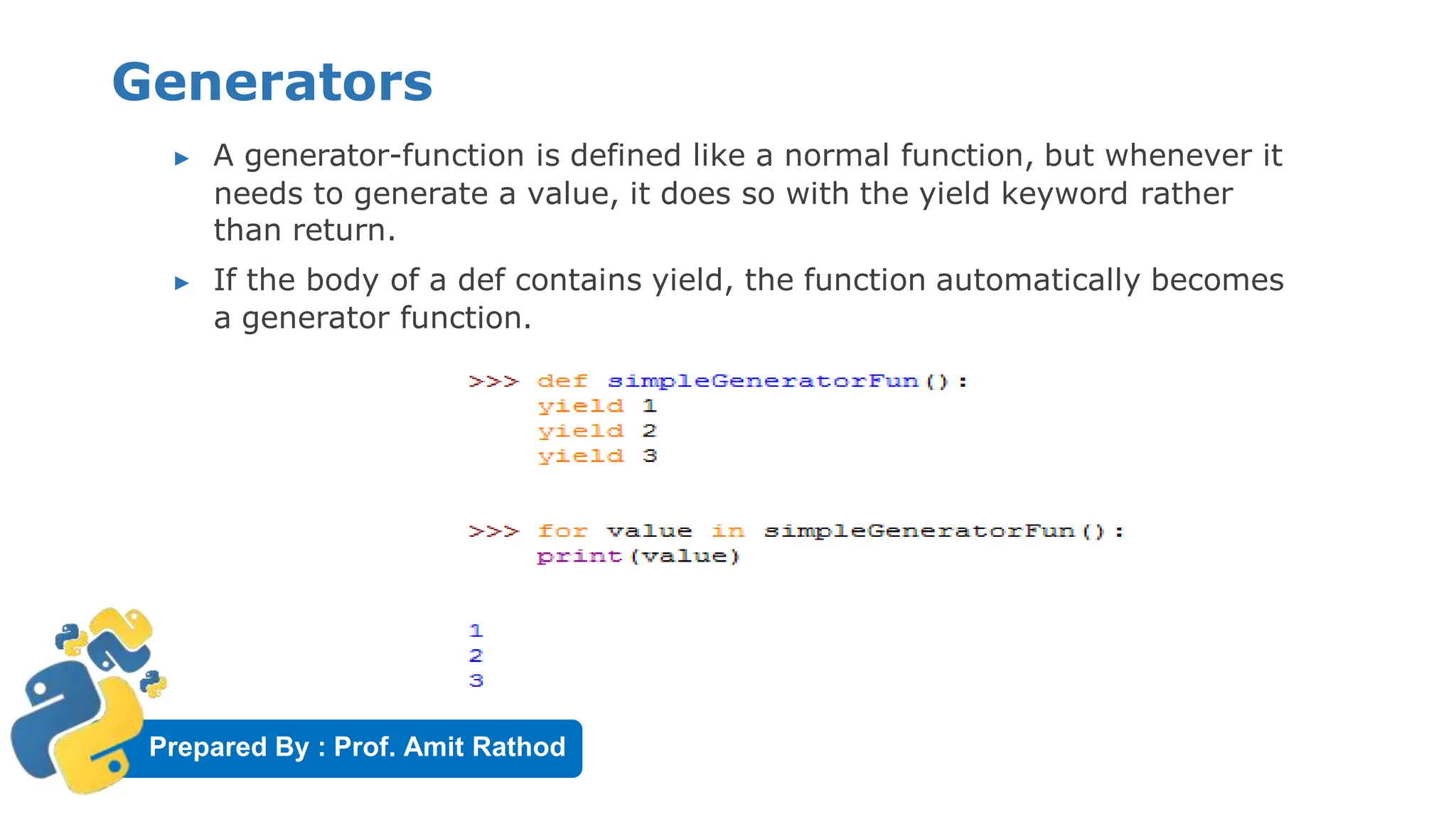
▶ A generator-function is defined like a normal function, but whenever it
needs to generate a value, it does so with the yield keyword rather
than return.
▶ If the body of a def contains yield, the function automatically becomes
a generator function.
Prepared By : Prof. Amit Rathod
Generators
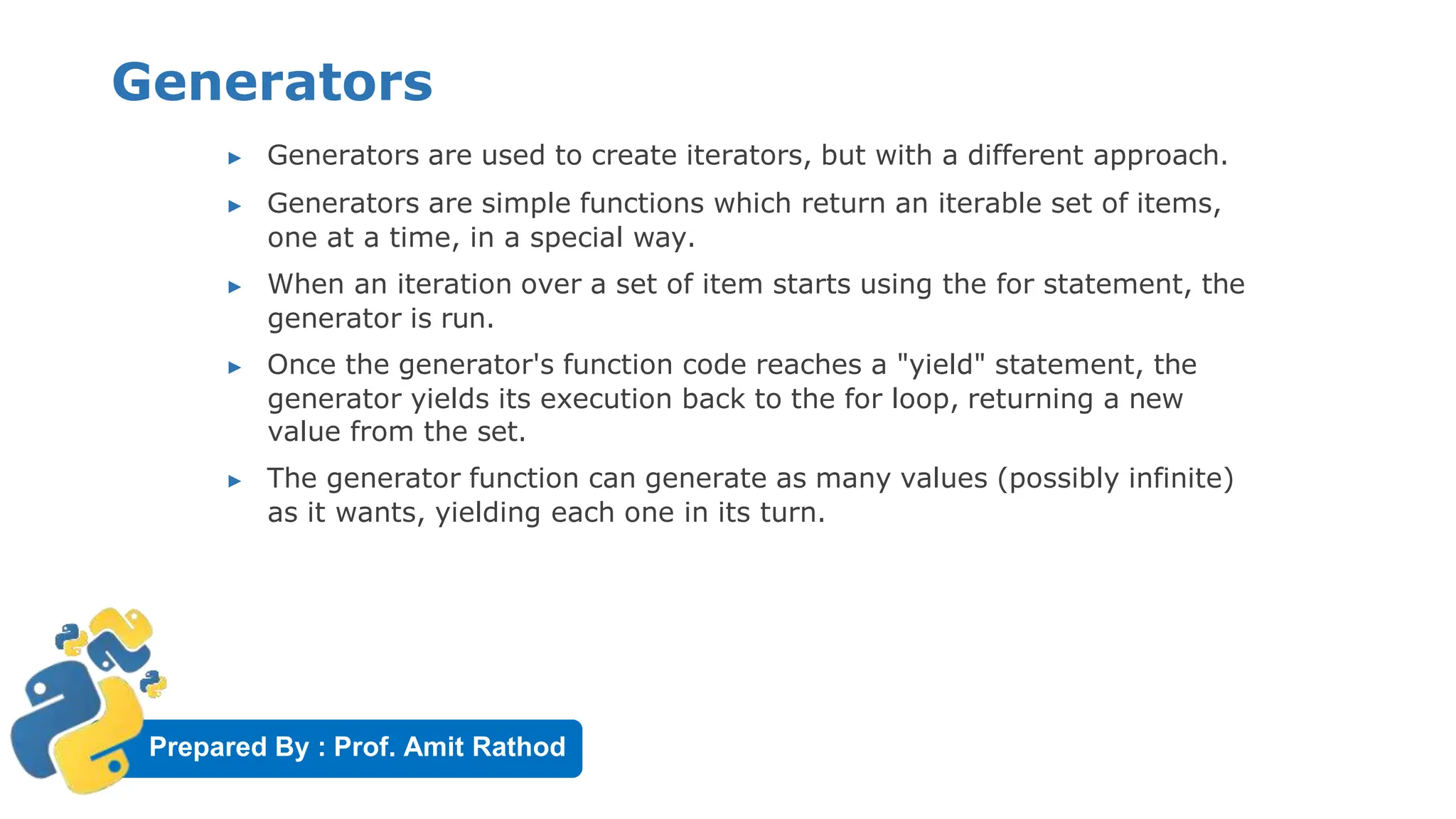
▶ Generators are used to create iterators, but with a different approach.
▶ Generators are simple functions which return an iterable set of items,
one at a time, in a special way.
▶ When an iteration over a set of item starts using the for statement, the
generator is run.
▶ Once the generator's function code reaches a "yield" statement, the
generator yields its execution back to the for loop, returning a new
value from the set.
▶ The generator function can generate as many values (possibly infinite)
as it wants, yielding each one in its turn.
Prepared By : Prof. Amit Rathod
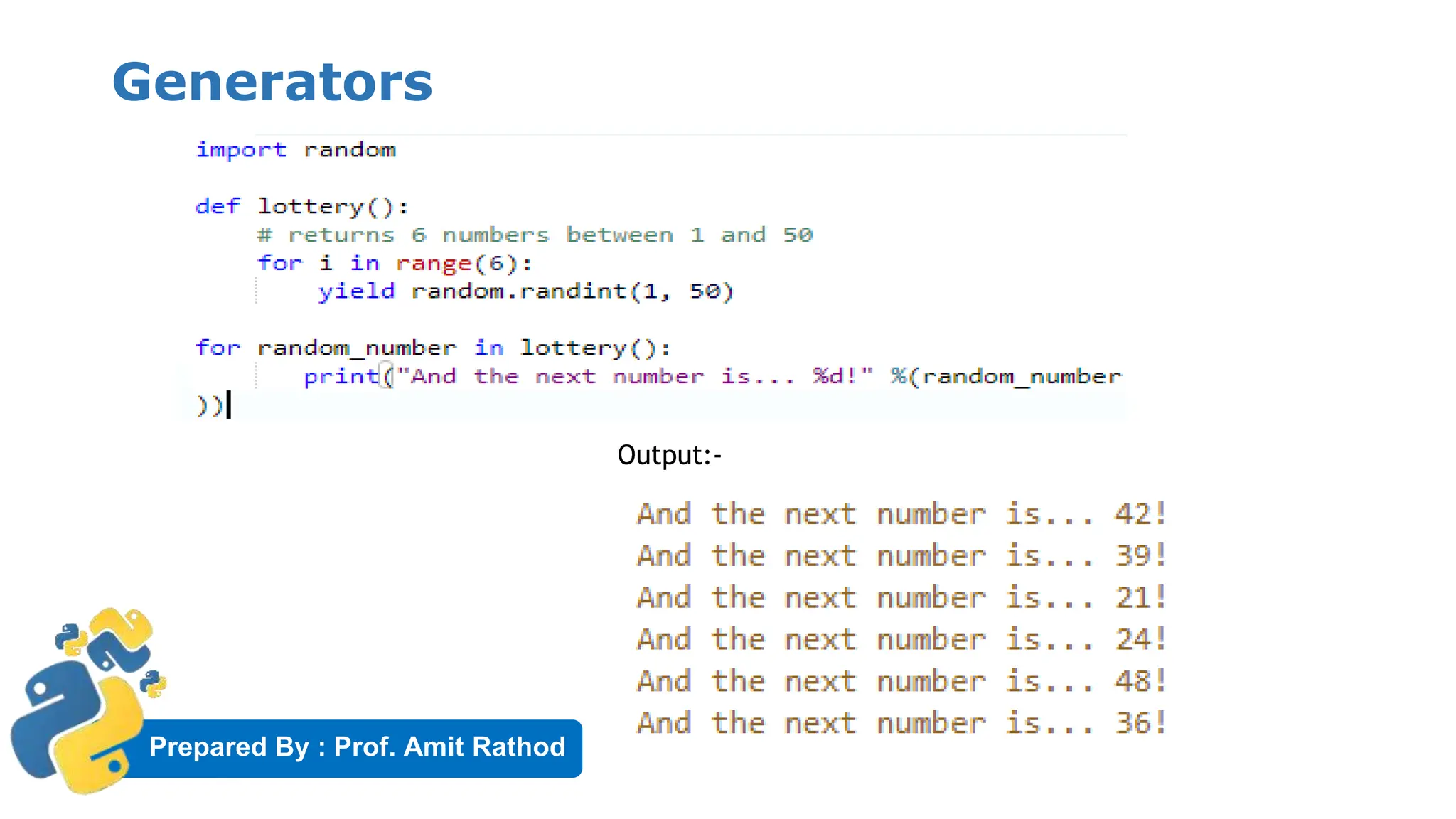
Generators
Output:-
Prepared By : Prof. Amit Rathod
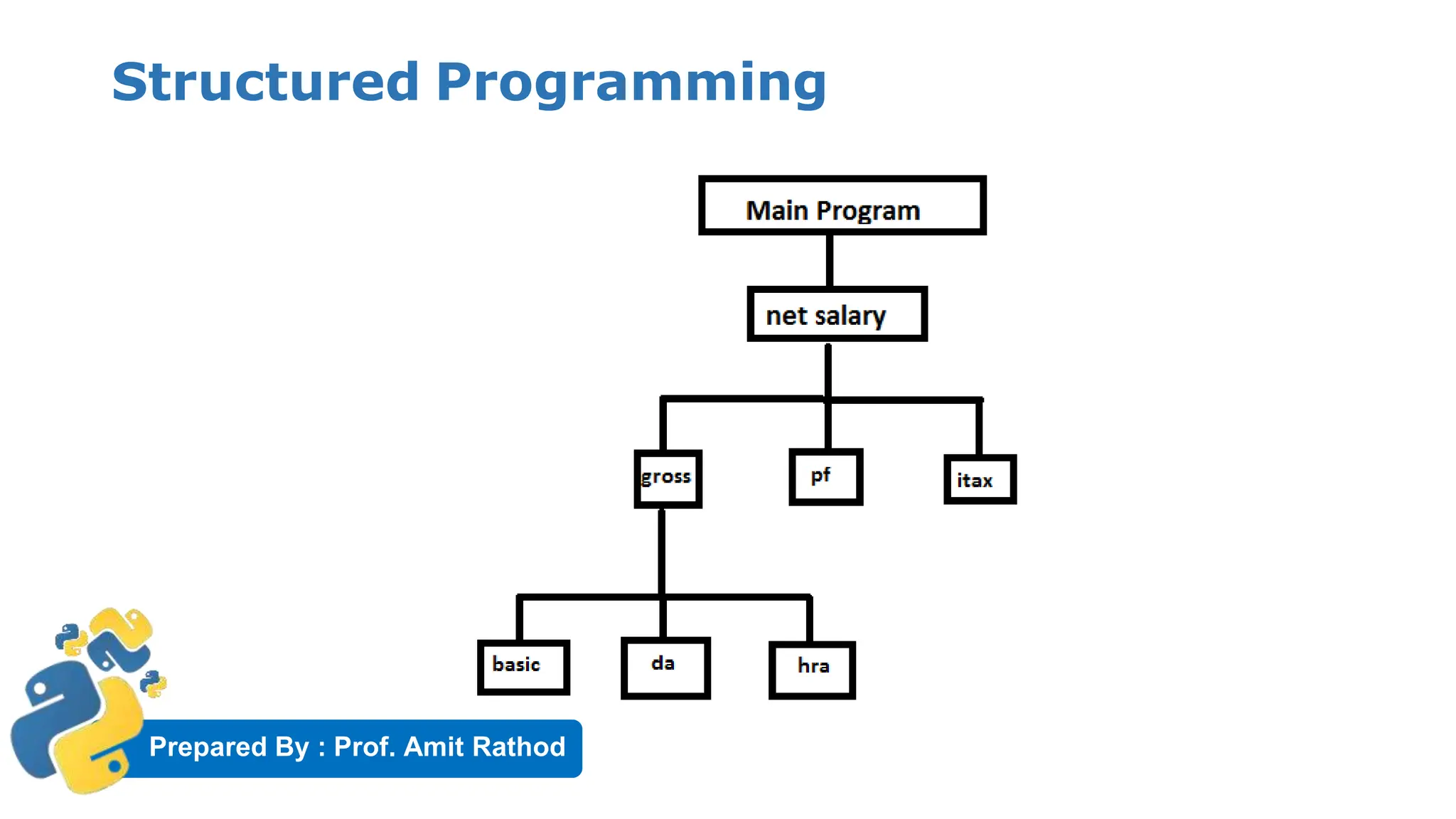
Structured Programming
▶ The purpose of programming is to solve problems related to various areas.
▶ Starting problems like adding two numbers to complex problem like
designing engine of air craft we can solve this problem through
programming.
▶ Solving a complex problem , structured programming is the strategy used
by the programmers.
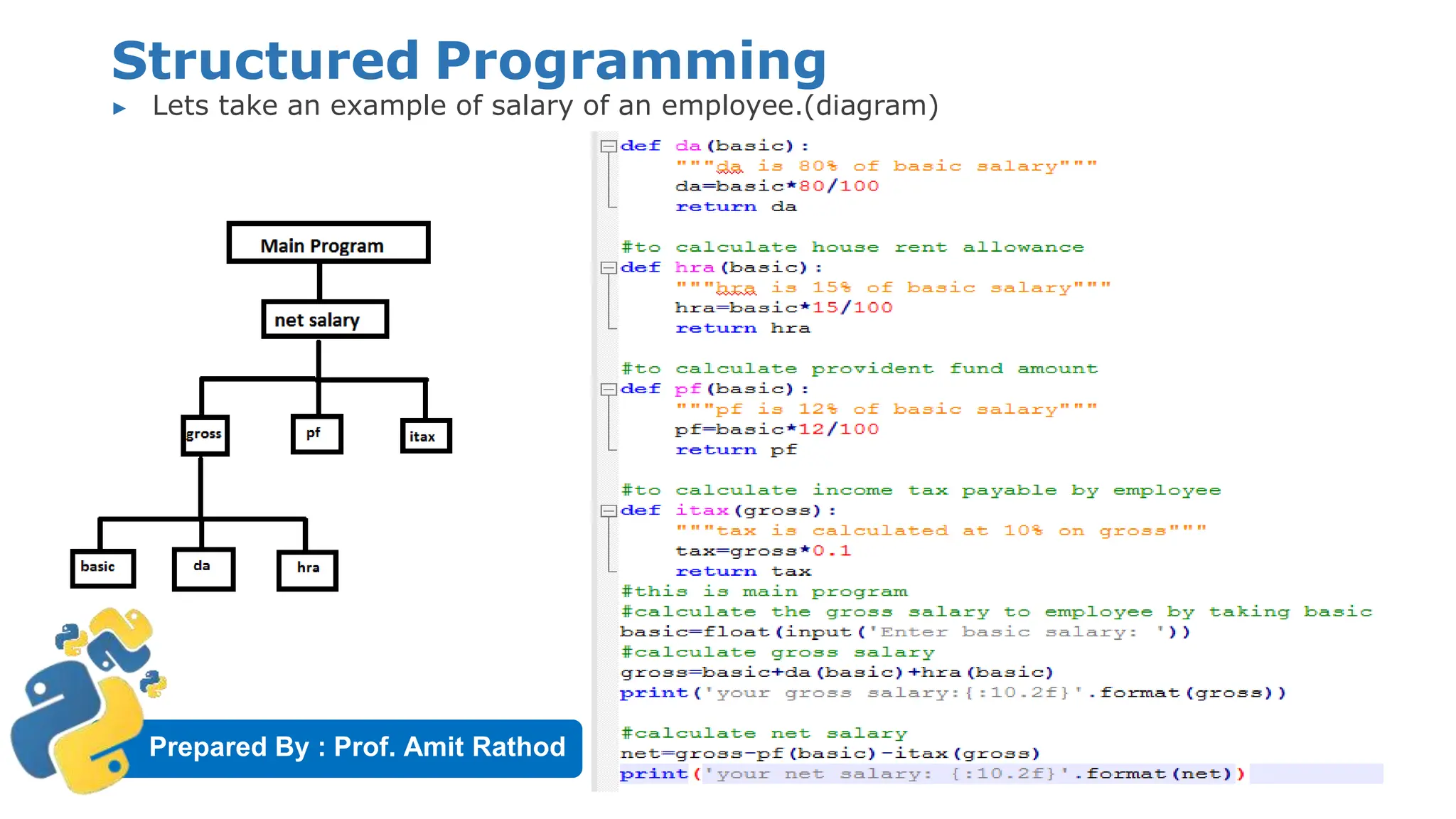
▶ In structured programming, the main task is divided into several parts
called Sub tasks and each this task is represented by one or more functions.
Prepared By : Prof. Amit Rathod
Structured Programming
Prepared By : Prof. Amit Rathod
Structured Programming
▶ Lets take an example of salary of an employee.(diagram)
Prepared By : Prof. Amit Rathod
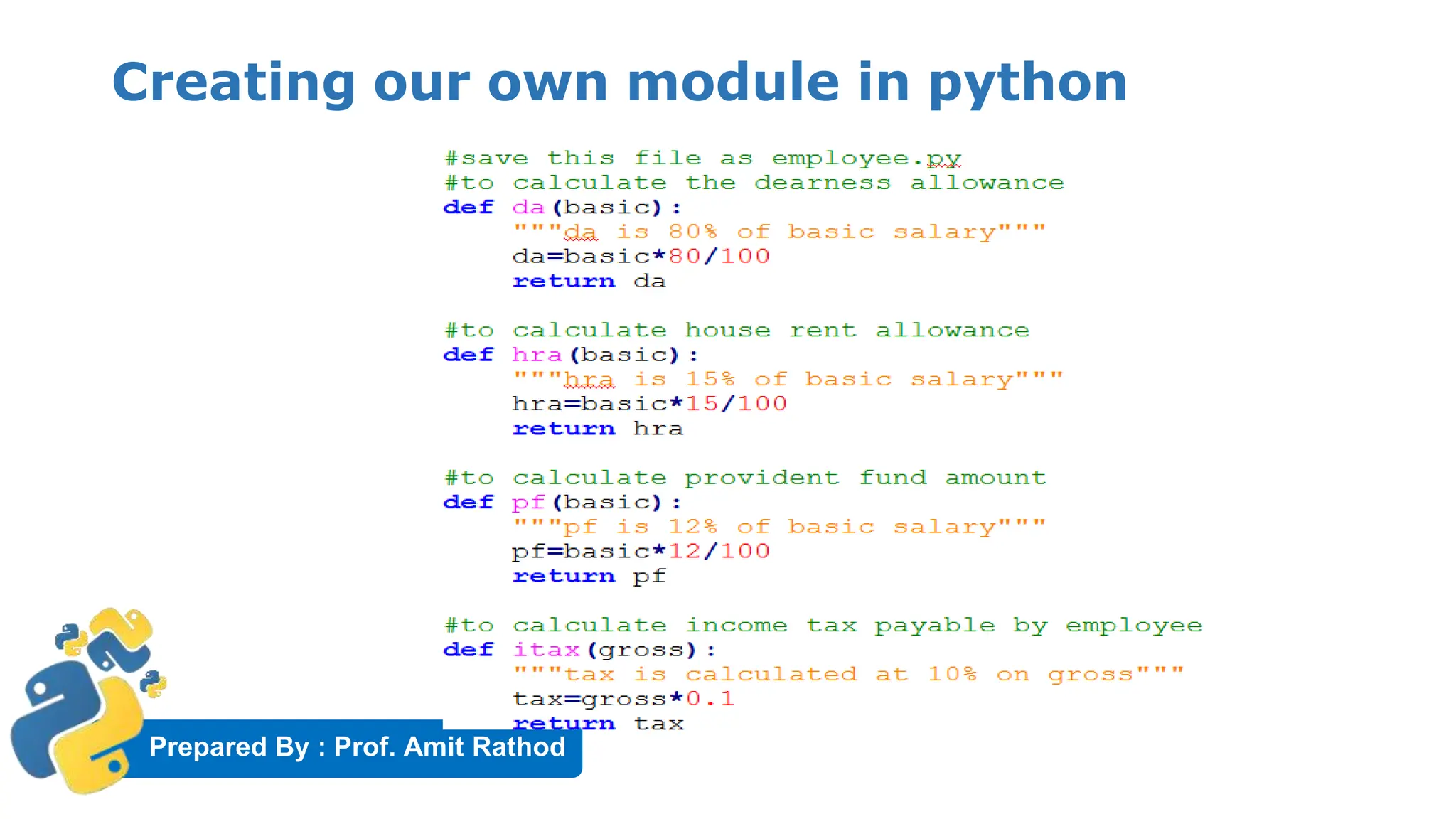
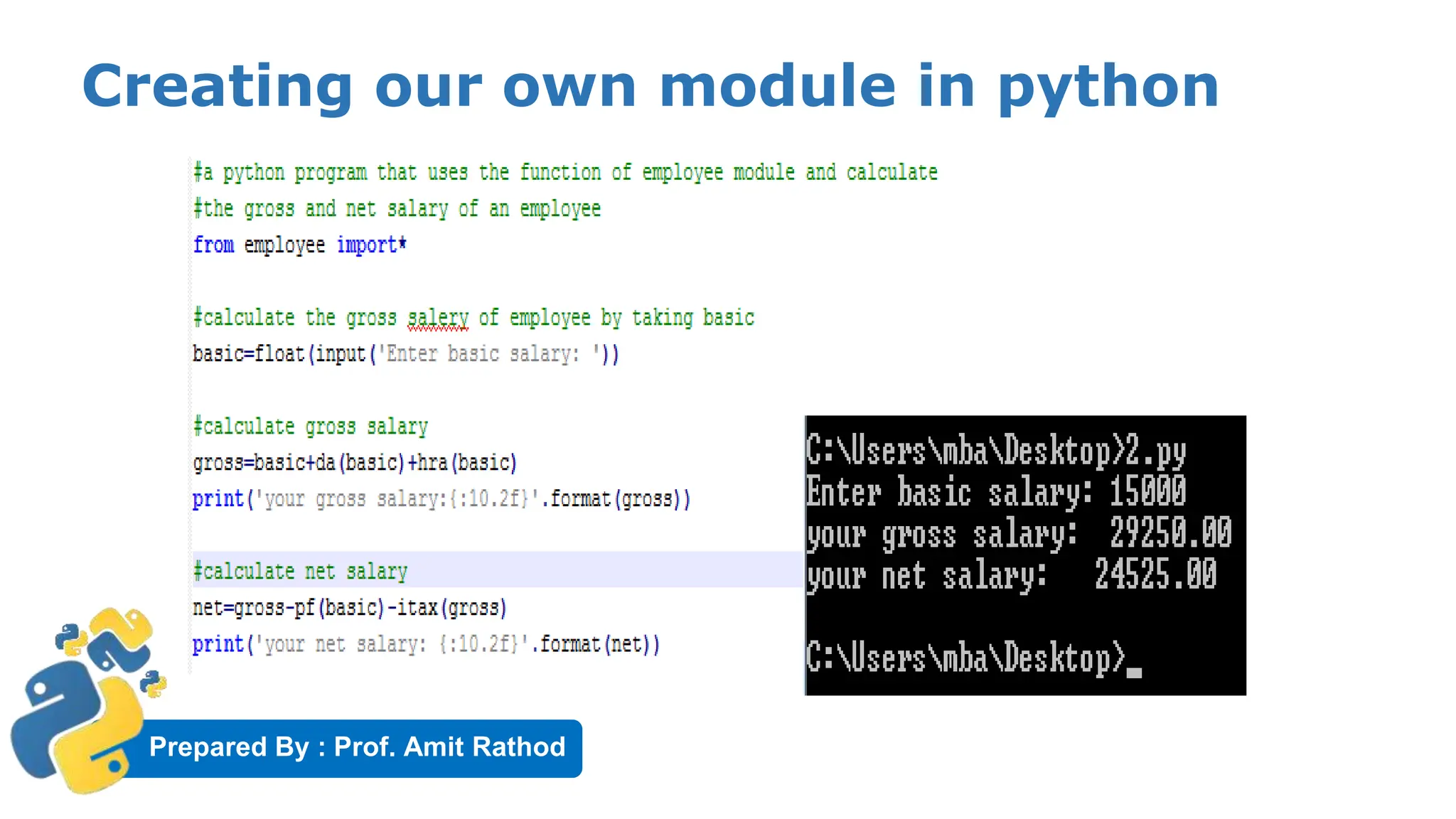
Creating our own module in python
▶ A module represents a group of classes, methods , functions and
variables.
▶ While we are developing software, there may be several classes,
methods and functions.
▶ We should first group them on depending on their relationship into
various modules and later use these module in the other programs.
▶ It means, when a module is developed, it can be reused in any
program that needs the module.
▶ In python , there is several built-in modules like sys, io , time etc.
▶ Just like this , we can create our own module too, and use them
whenever we need them.
Prepared By : Prof. Amit Rathod
Creating our own module in python
Prepared By : Prof. Amit Rathod
Creating our own module in python
Prepared By : Prof. Amit Rathod
The Special Variable _name_
▶ When a program is executed in python, there is a special variable internally
created by the name ‘_name_’
▶ This variable stores information regarding weather the program is executed as
an individual program or as a module.
▶ When the program is executed directly, the python interpreter stores the value
‘_main_’ into this variable.
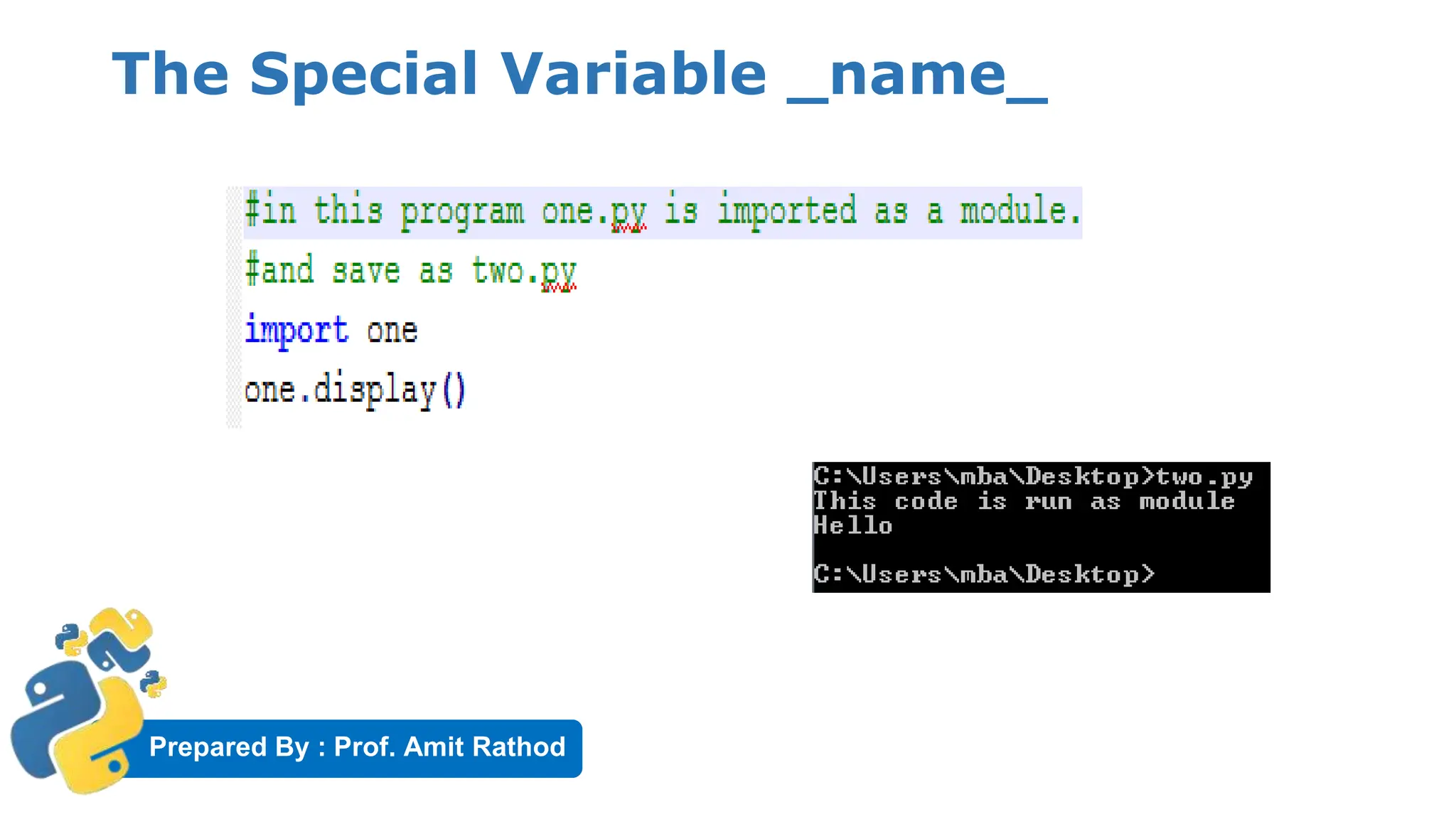
▶ When the program is imported as another program, then python interpreter
stores the module name into this variable.
▶ So by observing _name_ we can understand how program is executed.
Prepared By : Prof. Amit Rathod
The Special Variable _name_
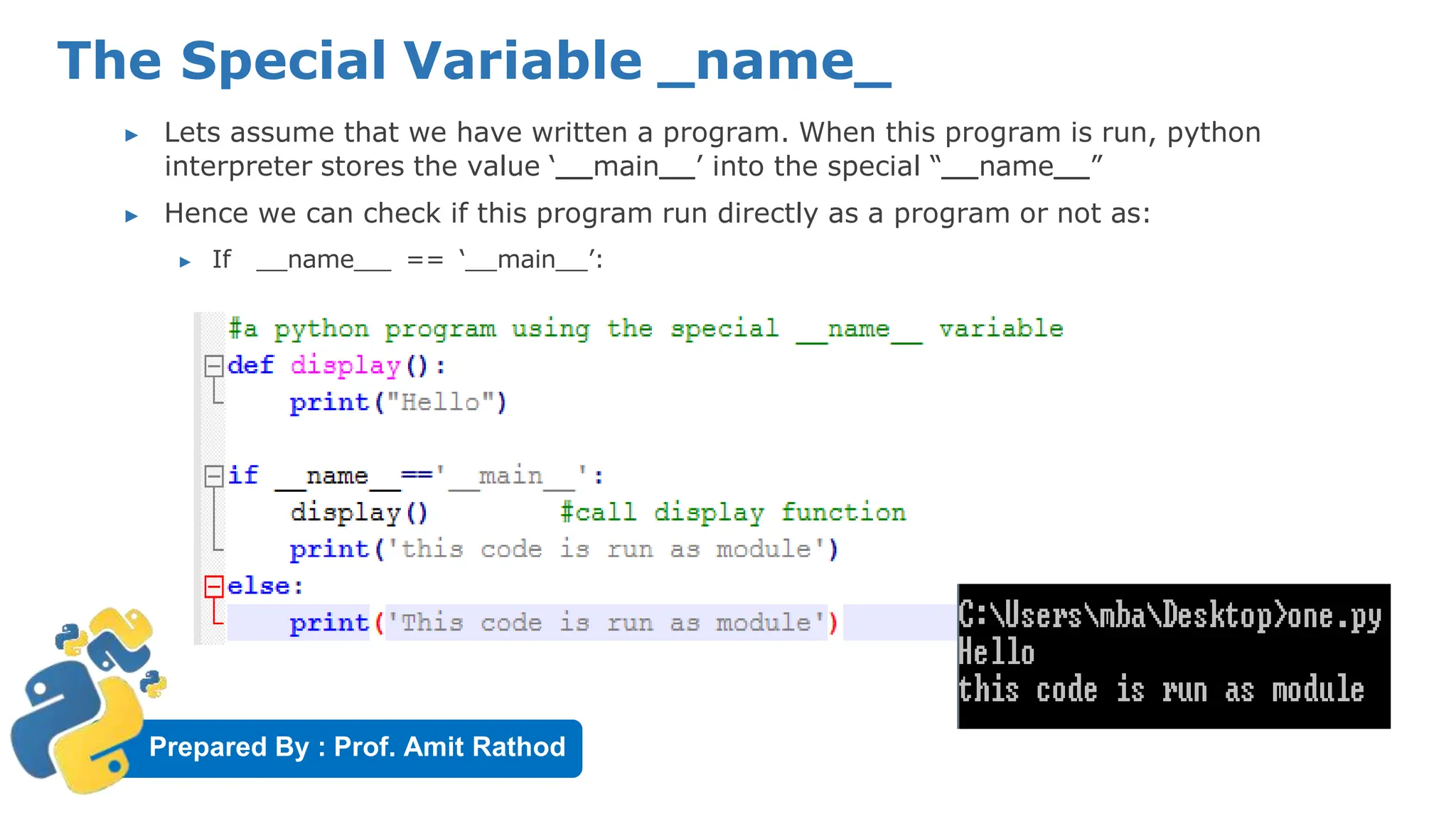
▶ Lets assume that we have written a program. When this program is run, python
interpreter stores the value ‘ main ’ into the special “ name ”
▶ Hence we can check if this program run directly as a program or not as:
▶ If name == ‘ main ’:
Prepared By : Prof. Amit Rathod
The Special Variable _name_

Unit_2.0_Functions (1).pdfUnit_2.0_Functions (1).pdf

  • 1.
    Prepared By :Prof. Amit Rathod MASTER OF COMPUTER APPLICATIONS (MCA) SEMESTER: II 1 Subject Name: Programming in Python Subject Code : MCA11510
  • 2.
    Prepared By :Prof. Amit Rathod Functions
  • 3.
    Prepared By :Prof. Amit Rathod Introduction ▶ It is similar to a program that consist of a group of statements that are intendant to perform a specific task. ▶ Two types of function: ▶ User Defined ▶ Built-In (abs(), len(), sort(), sqrt(), power())
  • 4.
    Prepared By :Prof. Amit Rathod Advantages of Functions: ▶ Used to process data, make calculations , perform task. ▶ Function as Reusable code ▶ Function provides Modularity ▶ Code maintenance is easy because of functions
  • 5.
    Prepared By :Prof. Amit Rathod Python Method: ▶ Method is called by its name, but it is associated to an object (dependent). ▶ A method is implicitly passed the object on which it is invoked. ▶ It may or may not return any data. ▶ A method can operate on the data (instance variables) that is contained by the corresponding class Output: I am in method_abc of ABC class
  • 6.
    Prepared By :Prof. Amit Rathod Functions: ▶ Function is block of code that is also called by its name. (independent) ▶ The function can have different parameters or may not have any at all. If any data (parameters) are passed, they are passed explicitly. ▶ It may or may not return any data. ▶ Function does not deal with Class and its instance concept. Output: -2and9
  • 7.
    Prepared By :Prof. Amit Rathod Difference between method and function ▶ Simply, function and method both look similar as they perform in almost similar way, but the key difference is the concept of ‘Class and its Object‘. ▶ Functions can be called only by its name, as it is defined independently. ▶ But methods can’t be called by its name only, we need to invoke the class by a reference of that class in which it is defined, i.e. method is defined within a class and hence they are dependent on that class.
  • 8.
    Prepared By :Prof. Amit Rathod Defining a Function & Calling a function Output: -2and9 Output: -22and15
  • 9.
    Prepared By :Prof. Amit Rathod Returning a result/single value from function def square(n): return n*n r= square(2) Print(r) # or print it as before print(square(2))
  • 10.
    Prepared By :Prof. Amit Rathod Returning multiple value from function ▶ Python also has the ability to return multiple values from a function call, something missing from many other languages. ▶ In this case the return values should be a comma-separated list of values and Python then constructs a tuple and returns this to the caller. def square(x,y): return x*x, y*y t = square(2,3) print(t) # Produces (4,9)
  • 11.
    Prepared By :Prof. Amit Rathod Returning a multiple value from function ▶ An alternate syntax when dealing with multiple return values is to have Python "unwrap" the tuple into the variables directly by specifying the same number of variables on the left-hand side of the assignment as there are returned from the function. def square(x,y): return x*x, y*y xsq, ysq = square(2,3) print(xsq) # Prints 4 print(ysq) # Prints 9
  • 12.
    Prepared By :Prof. Amit Rathod Functions are first class objects ▶ Functions are first class objects, It means we can use function as perfect object. ▶ Since a functions are objects, we can pass functions to another functions just like an object. ▶ Also it is possible to return a function from another function. ▶ Following possibilities are important: 1. Possible to assign function to a variable 2. Possible to define a one function inside the another function. 3. Possible to pass a function as parameter to another function. 4. Possible that a function can return another function.
  • 13.
    Prepared By :Prof. Amit Rathod Possible to assign function to a variable:
  • 14.
    Prepared By :Prof. Amit Rathod Define a function inside the another function
  • 15.
    Prepared By :Prof. Amit Rathod Pass a function as parameter to another function. Here new name of message() function is ‘fun’ (=reference name of message() function)
  • 16.
    Prepared By :Prof. Amit Rathod function can return another function
  • 17.
    Prepared By :Prof. Amit Rathod Pass by Object Reference ▶ In function when we pass values, we can think of this two way. ▶ Pass by value or call by value ▶ Pass by reference or call by reference ▶ Pass by value represents that a copy of variable is passed to the function and modification to that value will not reflect outside of function. ▶ Pass by reference represents sending the reference or memory address of the variable to the function. ▶ Neither of this two concepts are applicable to Python.
  • 18.
    Prepared By :Prof. Amit Rathod Pass by Object Reference ▶ In a python, values are sent to function by means of Object Reference. ▶ We know everything is considered as object in python. ▶ All numbers, strings, datatypes (like tuples, lists, dictionaries) are object in python. ▶ In python an object can be imagined as memory block where we can store some value. ▶ For example x=10 , here in python 10 is object and x is the name or tag given to it.
  • 19.
    Prepared By :Prof. Amit Rathod Pass by Object Reference ▶ To know the location of the an object in heap, we can use id() function that gives an identity number of an object. ▶ X = 10 ▶ id(x) ▶ Output= 1154899390 ▶ This number may change computer to computer
  • 20.
    Prepared By :Prof. Amit Rathod Exampel-1: Pass by Object Reference ▶ A python program to pass an integer to a function and modify it. Here in function x= 15 but it will not be available outside of function when we modify its value by x=10
  • 21.
    Prepared By :Prof. Amit Rathod Exampel-2: Pass by Object Reference ▶ A program to modify the list to a function .
  • 22.
    Prepared By :Prof. Amit Rathod Exampel-3: Pass by Object Reference ▶ A python program to create a new object inside the function does not modify outside object.
  • 23.
    Prepared By :Prof. Amit Rathod Formal and actual argument ▶ Formal Arguments ▶ When you define function , it may have some parameters. These parameters are useful to receive values from outside of function. They are called ‘Formal Arguments’. ▶ Actual Arguments ▶ When we call the function we should pass the data or values to the function. These values are called ‘Actual Arguments’ Here, a and b formal arguments And x and y are actual arguments
  • 24.
    Prepared By :Prof. Amit Rathod Formal and actual argument ▶ Actual arguments used in a function are of 4 types. 1. Positional arguments 2. Keyword arguments 3. Default arguments 4. Variable length arguments
  • 25.
    Prepared By :Prof. Amit Rathod Positional Argument: ▶ When we call a function with some values, these values get assigned to the arguments according to their position. ▶ These are the arguments passed to a function in correct positional order.
  • 26.
    Prepared By :Prof. Amit Rathod Keyword argument: ▶ When we call a function with some values, these values get assigned to the arguments according to their position. ▶ Python allows functions to be called using keyword arguments. When we call functions in this way, the order (position) of the arguments can be changed. ▶ This kind of argument identify the parameter by their name
  • 27.
    Prepared By :Prof. Amit Rathod Default Argument: ▶ Function can have default argument using = operator ▶ It can assign from right to left only. ▶ Any number of arguments in a function can have a default value. But once we have a default argument, all the arguments to its right must also have default values. ▶ Default argument is optional during a call. If a value is provided, it will overwrite the default value. ▶ Example : def fun(a, b=8, c=90) Here b=8, c=90 is set default.
  • 28.
    Prepared By :Prof. Amit Rathod Variable length argument: 30 In Python, we can pass a variable number of arguments to a function using special symbols. There are two special symbols: ▶ *args (Non Keyword Arguments) ▶ **kwargs (Keyword Arguments)
  • 29.
    Prepared By :Prof. Amit Rathod Non Keyword Variable length argument: ▶ When the programmer does not know how many argument a function may receive, at that time variable length concept is used. ▶ we should use an asterisk * before the parameter name to pass variable length arguments. ▶ The arguments are passed as a tuple and these passed arguments make tuple inside the function with same name as the parameter excluding asterisk *. Output <class 'tuple'> (1, 2, 3)
  • 30.
    Prepared By :Prof. Amit Rathod Keyword Variable length argument: ▶ Use double asterisk ** before the parameter name to denote this keyword variable length of argument. ▶ The arguments are passed as a dictionary and these arguments make a dictionary inside function with name same as the parameter excluding double asterisk **. Output <class 'dict'> {'a': 11, 'b': 33, 'c': 22}
  • 31.
    Prepared By :Prof. Amit Rathod Local Variables ▶ A local variable is a variable whose scope is limited only to that function where it is created.
  • 32.
    Prepared By :Prof. Amit Rathod Global Variables ▶ When a variable is declared above a function, it becomes global variable.
  • 33.
    Prepared By :Prof. Amit Rathod The Global Keyword ▶ Sometimes global and local variable have same name. ▶ In that case, function by default refer to the local variable and ignores the global variable. ▶ So the global variable is not accessible inside the function but outside of it, it is accessible.
  • 34.
    Prepared By :Prof. Amit Rathod The Global Keyword ▶ if we wants to use global variable inside the function, ▶ Use the ‘global’ keyword before the variable in the beginning of function body as, ▶ global a;
  • 35.
    Prepared By :Prof. Amit Rathod The Global Keyword
  • 36.
    Prepared By :Prof. Amit Rathod Passing a group of Element to a function ▶ To pass a group of element like numbers or string, we can accept them into a list and then pass the list to the function . Example:
  • 37.
    Prepared By :Prof. Amit Rathod Passing a group of Element to a function
  • 38.
    Prepared By :Prof. Amit Rathod Recursive Function ▶ A function that calls itself is known as ‘recursive function’. ▶ Eg:-factorial
  • 39.
    Prepared By :Prof. Amit Rathod Recursive Function: Tower of Hanoi Tower of Hanoi is a mathematical puzzle where we have three rods and n disks. The objective of the puzzle is to move the entire stack to another rod, obeying the following simple rules: 1) Only one disk can be moved at a time. 2) Each move consists of taking the upper disk from one of the stacks and placing it on top of another stack i.e. a disk can only be moved if it is the uppermost disk on a stack. 3) No disk may be placed on top of a smaller disk.
  • 40.
    Prepared By :Prof. Amit Rathod Tower of Hanoi
  • 41.
    Prepared By :Prof. Amit Rathod Tower of Hanoi Example OUTPUT: moving disk from A to C moving disk from A to B moving disk from C to B moving disk from A to C moving disk from B to A moving disk from B to C moving disk from A to C
  • 42.
    Prepared By :Prof. Amit Rathod Anonymous/Lambda Function ▶ What are lambda functions in Python? ▶ anonymous function is a function that is defined without a name. ▶ While normal functions are defined using the def keyword ▶ anonymous functions are defined using the lambda keyword. ▶ Hence, anonymous functions are also called lambda functions.
  • 43.
    Prepared By :Prof. Amit Rathod Anonymous/Lambda Function ▶ How to use lambda Functions in Python? ▶ Syntax: lambda arguments: expression OUTPUT 30
  • 44.
    Prepared By :Prof. Amit Rathod Use of Lambda Function ▶ We use lambda functions when we require a nameless function for a short period of time. ▶ we generally use it as an argument to a higher-order function ▶ Higher-order function is a function that takes in other functions as arguments ▶ Lambda functions are used along with built-in functions like filter(), map() etc.
  • 45.
    Prepared By :Prof. Amit Rathod Using lambda with filter() ▶ The filter() function takes two arguments: function and a list ▶ The function is called with all the items in the list and a new list is returned which contains items for which the function evaluates to True. ▶ Example: Sample List: [1, 2, 3, 4, 5, 6, 7, 8, 9, 10] Even List: [2, 4, 6, 8, 10] Odd List: [1, 3, 5, 7, 9]
  • 46.
    Prepared By :Prof. Amit Rathod Using lambda with map() ▶ The map() function takes two argument: function and a list ▶ The function is called with all the items in the list and a new list is returned which contains items returned by that function for each item. ▶ Example: OUTPUT: List: [1, 2, 3, 4] List: [1, 4, 9, 16]
  • 47.
    Prepared By :Prof. Amit Rathod lambda with reduce() ▶ The reduce() function takes two arguments: function and a list ▶ The function is called with a lambda function and a list and a new reduced result is returned. ▶ This performs a repetitive operation over the pairs of the list. ▶ This is a part of functools (function tools) module. ▶ Example: OUTPUT: sum : 45
  • 48.
    Prepared By :Prof. Amit Rathod Function Decorators ▶ A decorator is a function that takes a function as its only parameter and returns a function. ▶ This is helpful to “wrap” functionality with the same code over and over again.
  • 49.
    Prepared By :Prof. Amit Rathod Function Decorators ▶ Nested Function Working shown in example:
  • 50.
    Prepared By :Prof. Amit Rathod Function Decorators Output:- Hello Google
  • 51.
    Prepared By :Prof. Amit Rathod Generators ▶ A generator-function is defined like a normal function, but whenever it needs to generate a value, it does so with the yield keyword rather than return. ▶ If the body of a def contains yield, the function automatically becomes a generator function.
  • 52.
    Prepared By :Prof. Amit Rathod Generators ▶ Generators are used to create iterators, but with a different approach. ▶ Generators are simple functions which return an iterable set of items, one at a time, in a special way. ▶ When an iteration over a set of item starts using the for statement, the generator is run. ▶ Once the generator's function code reaches a "yield" statement, the generator yields its execution back to the for loop, returning a new value from the set. ▶ The generator function can generate as many values (possibly infinite) as it wants, yielding each one in its turn.
  • 53.
    Prepared By :Prof. Amit Rathod Generators Output:-
  • 54.
    Prepared By :Prof. Amit Rathod Structured Programming ▶ The purpose of programming is to solve problems related to various areas. ▶ Starting problems like adding two numbers to complex problem like designing engine of air craft we can solve this problem through programming. ▶ Solving a complex problem , structured programming is the strategy used by the programmers. ▶ In structured programming, the main task is divided into several parts called Sub tasks and each this task is represented by one or more functions.
  • 55.
    Prepared By :Prof. Amit Rathod Structured Programming
  • 56.
    Prepared By :Prof. Amit Rathod Structured Programming ▶ Lets take an example of salary of an employee.(diagram)
  • 57.
    Prepared By :Prof. Amit Rathod Creating our own module in python ▶ A module represents a group of classes, methods , functions and variables. ▶ While we are developing software, there may be several classes, methods and functions. ▶ We should first group them on depending on their relationship into various modules and later use these module in the other programs. ▶ It means, when a module is developed, it can be reused in any program that needs the module. ▶ In python , there is several built-in modules like sys, io , time etc. ▶ Just like this , we can create our own module too, and use them whenever we need them.
  • 58.
    Prepared By :Prof. Amit Rathod Creating our own module in python
  • 59.
    Prepared By :Prof. Amit Rathod Creating our own module in python
  • 60.
    Prepared By :Prof. Amit Rathod The Special Variable _name_ ▶ When a program is executed in python, there is a special variable internally created by the name ‘_name_’ ▶ This variable stores information regarding weather the program is executed as an individual program or as a module. ▶ When the program is executed directly, the python interpreter stores the value ‘_main_’ into this variable. ▶ When the program is imported as another program, then python interpreter stores the module name into this variable. ▶ So by observing _name_ we can understand how program is executed.
  • 61.
    Prepared By :Prof. Amit Rathod The Special Variable _name_ ▶ Lets assume that we have written a program. When this program is run, python interpreter stores the value ‘ main ’ into the special “ name ” ▶ Hence we can check if this program run directly as a program or not as: ▶ If name == ‘ main ’:
  • 62.
    Prepared By :Prof. Amit Rathod The Special Variable _name_