www.uniface.comlectures.
Uniface Lectures
lectures.
www.uniface.comlectures.
Arjen van Vliet
Solution Consultant
Thursday March 10th, 2016
Uniface
Standard Deployment
www.uniface.comlectures.
Uniface
classic deployment
versus
standard deployment
www.uniface.comlectures.
Agenda
• How to Move to Standard Deployment
• ASN settings
• Development vs Deployment
• Uniface Resource Manager
• Compatibility
www.uniface.comlectures.
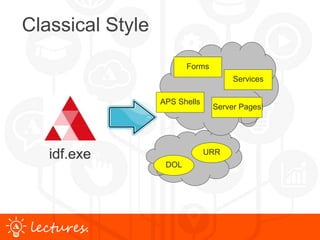
Classical Style
www.uniface.comlectures.
Classical Style
Forms
Server Pages
Services
DOL
URR
APS Shells
idf.exe
www.uniface.comlectures.
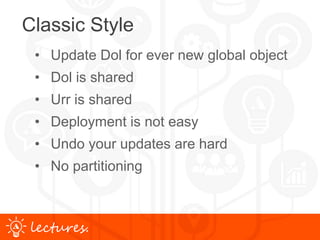
Classic Style
• Update Dol for ever new global object
• Dol is shared
• Urr is shared
• Deployment is not easy
• Undo your updates are hard
• No partitioning
www.uniface.comlectures.
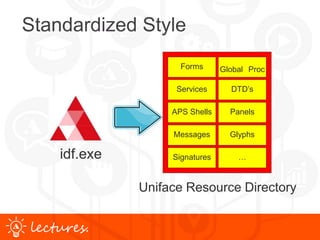
Standardized Style
Uniface Resource Directory
Forms
APS Shells
Services
Signatures
Messages
Global Proc
Panels
DTD’s
…
Glyphs
idf.exe
www.uniface.comlectures.
Uniface Resource directory
www.uniface.comlectures.
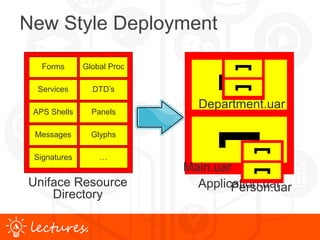
New Style Deployment
Application.uar
Main.uar
Person.uar
Department.uar
Forms
APS Shells
Services
Signatures
Messages
Global Proc
Panels
DTD’s
…
Glyphs
Uniface Resource
Directory
www.uniface.comlectures.
Assignment Settings
Which ASN settings are needed for:
 Development
 Runtime
www.uniface.comlectures.
Forms
APS
Services
DTD’s
Glyphs
DSP’s
Forms
…
Panels
Settings for Development
idf.asn
[SETTINGS]
$RESOURCES_OUTPUT = {Path}Directory
CompileUniface Resources
Directory
Deployment
www.uniface.comlectures.
$RESOURCES_OUTPUT =
(build scripting)
idf.asn
[SETTINGS]
{Path}Appl.uar
Appl.uar
Compile
Settings for Development
www.uniface.comlectures.
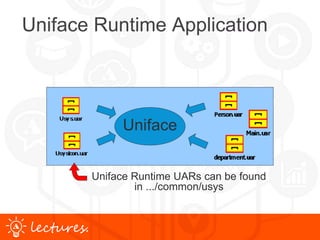
Uniface Runtime Application
Uniface
Uniface Runtime UARs can be found
in .../common/usys
www.uniface.comlectures.
Settings for Runtime
Uniface
[SETTINGS]
$SEARCH_RESOURCES = Resources_Only
usys.asn
[RESOURCES]
Usys.uar
Usysicon.uar
www.uniface.comlectures.
Settings for Runtime
Uniface
Appl.asn
[RESOURCES]
Main.uar
Person.uar
Department.uar
www.uniface.comlectures.
Deploy a Patch
Uniface
Development
Runtime
Main2.uar
Appl.asn
[RESOURCES]
Main2.uar
Main.uar
Person.uar
Department.uar
www.uniface.comlectures.
Resource Locations
1. Compiler Output
– Defined by $Resources_Output
– $RSO
2. The Resources (UARs)
– Defined by [RESOURCES] section
– $RES
3. The Classic style
– DOL/UOBJ & URR/ULANA
– [FILES]
Appl.uar
Forms
Server Pages
Services
DOL
URR
APS Shells
Fixed Directory
Structure
www.uniface.comlectures.
$RES
[FILES]
*.xml $RES:FIL/*.xml
[RESOURCES]
MyApp.uar
C:ContactInfoMyData.uar
www.uniface.comlectures.
IDF.ASN[SETTINGS]
$search_descriptor DBMS_FIRST
$enhanced_edit all
$putmess_logfile D:builduniface9w2klogidf.log
$search_resources Resources_only
$resources_output Uniface_Resource_Directory
[FILES]
usys:*.xml usysuniface:misc*.xml
usys:idf.aps usysuniface:componentsidf.aps
usys:uu*.frm usysuniface:componentsuu*.frm
usys:uu*.svc usysuniface:componentsuu*.svc
common:uu*.frm usys:..componentsuu*.frm
common:uu*.svc usys:..componentsuu*.svc
common:ur*.svc usys:..componentsur*.svca
[PATHS]
[ENTITIES]
[USER_3GL]
[RESOURCES]
Uniface_Resource_Directory
usys:uidf.uar
usys:usys.uar
usys:usysicon.uar
www.uniface.comlectures.
Local & Remote UAR’s
usys.asn:
[SETTING]
$SEARCH_RESOURCES = Resources_Only
[RESOURCES]
usys:usysnl.uar
usys:usys.uar
usys:usysicon.uar
myapp.asn:
[RESOURCES]
F:sharesMyApp.uar
www.uniface.comlectures.
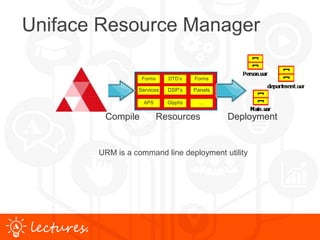
Uniface Resource Manager
Forms
APS
Services
DTD’s
Glyphs
DSP’s
Forms
…
Panels
Compile Resources Deployment
URM is a command line deployment utility
www.uniface.comlectures.
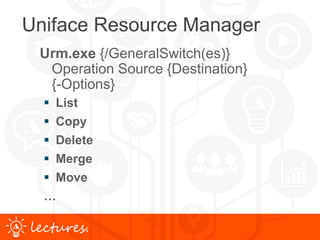
Uniface Resource Manager
Urm.exe {/GeneralSwitch(es)}
Operation Source {Destination}
{-Options}
 List
 Copy
 Delete
 Merge
 Move
…
www.uniface.comlectures.
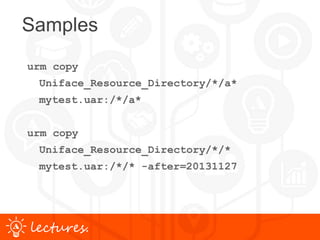
Samples
urm copy
Uniface_Resource_Directory/*/a*
mytest.uar:/*/a*
urm copy
Uniface_Resource_Directory/*/*
mytest.uar:/*/* -after=20131127
www.uniface.comlectures.
The Benefits
• Easy to deploy: Copy & Paste
• UAR Based on Standard Zip technology
• Easy to do/undo changes
• Run Straight from UARs
• Application Partitioning
www.uniface.comlectures.
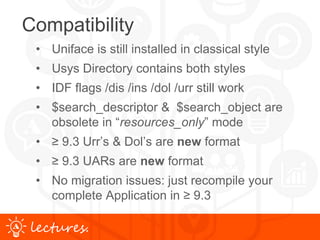
Compatibility
• Uniface is still installed in classical style
• Usys Directory contains both styles
• IDF flags /dis /ins /dol /urr still work
• $search_descriptor & $search_object are
obsolete in “resources_only” mode
• ≥ 9.3 Urr’s & Dol’s are new format
• ≥ 9.3 UARs are new format
• No migration issues: just recompile your
complete Application in ≥ 9.3
www.uniface.comlectures.
Remember
who is your best
friend
/
?
www.uniface.comlectures.
/who Classic deployment
UNIFACE 9.6.06
----------------------------------------------------------------------
Executable = C:Program Files (x86)UnifaceUniface 9.6.06commonbinidf.exe
Application = Development Environment
Release update = 9.6.06.01 ( 1125_1) - November 25, 2014
Platform: Operating system = MSW: Windows 7 (W71)
usysbin directory = C:Program Files (x86)UnifaceUniface 9.6.06commonbin
usysadm directory = C:Program Files (x86)UnifaceUniface 9.6.06unifaceadm
usys directory = C:Program Files (x86)UnifaceUniface 9.6.06commonusys
working directory = C:Program Files (x86)UnifaceUniface 9.6.06_Dataproject
$RSO = UOBJ.TEXT (Objects)
$RSO = ULANA.DICT (References)
$RSO = [FILES] (Components)
www.uniface.comlectures.
$RES = ULANA.DICT (References)
$RES = [FILES] (Components)
$RES = C:Program Files (x86)UnifaceUniface 9.6.06commonusysuobj.dol
Archive (uobj) created with : 9.6.06.01 ( 1125_1)
Archive (uobj) creation date : 23 Apr 2015 14:56:13
Archive (uobj) creation info : Create by Object Distribution
$RES = C:Program Files (x86)UnifaceUniface 9.6.06commonusysusys.urr
Archive (uana) created with : 9.6.06.01 ( 1125_1)
Archive (uana) creation date : 27 Nov 2014 12:28:58
Archive (uana) creation info : Create by /URR
Archive (udesc) created with : 9.6.06.01 ( 1125_1)
Archive (udesc) creation date : 27 Nov 2014 12:28:42
Archive (udesc) creation info : Create by /URR
Archive (usys) created with : 9.6.06.01 ( 1125)
Archive (usys) creation date : 26 Nov 2014 22:52:08
Archive (usys) creation info : Create by /URR
Assignment file = C:Program Files (x86)UnifaceUniface 9.6.06unifaceadmusys.asn
Assignment file = C:Program Files (x86)UnifaceUniface 9.6.06unifaceadmidf.asn
$SYS_charset = CP1252
$DEF_charset = CP1252
$WEB_charset = CP1252
(c) 2014 Uniface B.V. All rights reserved.
www.uniface.comlectures.
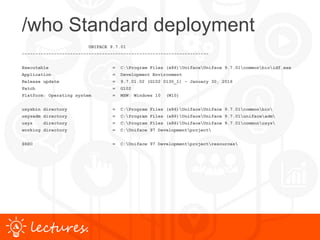
/who Standard deployment
UNIFACE 9.7.01
----------------------------------------------------------------------
Executable = C:Program Files (x86)UnifaceUniface 9.7.01commonbinidf.exe
Application = Development Environment
Release update = 9.7.01.02 (G102 0130_1) - January 30, 2016
Patch = G102
Platform: Operating system = MSW: Windows 10 (W10)
usysbin directory = C:Program Files (x86)UnifaceUniface 9.7.01commonbin
usysadm directory = C:Program Files (x86)UnifaceUniface 9.7.01unifaceadm
usys directory = C:Program Files (x86)UnifaceUniface 9.7.01commonusys
working directory = C:Uniface 97 Developmentproject
$RSO = C:Uniface 97 Developmentprojectresources
www.uniface.comlectures.
$RES = C:Program Files (x86)UnifaceUniface 9.7.01commonusysuidf.uar
Archive (uidf) created with : 9.7.01.02 (G101 0121)
Archive (uidf) creation date : 27 Jan 2016 15:11:32
Archive (uidf) description : Create by Object Distribution
$RES = C:Program Files (x86)UnifaceUniface 9.7.01commonusysusys.uar
Archive (usys) created with : 9.7.01.02 (G101 0121)
Archive (usys) creation date : 27 Jan 2016 15:11:32
Archive (usys) description : Create by Object Distribution
$RES = C:Program Files (x86)UnifaceUniface 9.7.01commonusysusysicon.uar
Archive (usysicon) created with : 9.7.01.02 (G101 0121)
Archive (usysicon) creation date : 27 Jan 2016 15:11:24
Archive (usysicon) description : Create by Object Distribution
Assignment file = C:Program Files (x86)UnifaceUniface 9.7.01unifaceadmusys.asn
Assignment file = C:Program Files (x86)UnifaceUniface 9.7.01unifaceadmidf.asn
$SYS_charset = CP1252
$DEF_charset = CP1252
$WEB_charset = CP1252
(c) 2015 Uniface B.V. All rights reserved.
www.uniface.comlectures.
Demo
Classis vs. Standard
deployment
www.uniface.comlectures.
Thank You / Q & A
Thank You!
Q & A
arjen.van.vliet@uniface.com
nl.linkedin.com/in/arjenvanvliet
www.uniface.comlectures.
Follow us online
uniface.com
unifaceinfo.com/forum

Uniface 9.7 Standard vs. Classic Deployment Lecture

Editor's Notes

  • #6  /urr {ULANA} {USYSANA} {UDESC} {UANA} {FileList} ULANA—take occurrences from the table ULANA.DICT. USYSANA—take occurrences from the table USYSANA.TEXT. UDESC—take occurrences from the file USYS:udesc.urr. UANA—take occurrences from an existing USYS:uana.urr FileList—take occurrences from one or more URR files, where each entry in FileList is a path to an URR file (before assignment file translation). DOL: contains compiled global objects needed by Uniface at run time. occurrence in the UOBJ entity of the Uniface Repository usys.dol contains the global objects needed by Uniface itself uobj.dol contains the application-specific objects. Global objects can be compiled to the Repository (UOBJ.TEXT) and then moved to uobj.dol, or they can be compiled to resource files on the file system. For deployment, objects need to be copied into UAR files. There is no need to update uobj.dol every time you add a new global object. Storing global objects in this way makes it easier to distribute applications in a modular fashion, because global objects can be grouped into different archive files, instead of all global objects ending up in a single DOL file. /dis dol | numgen | lib= LibName, {LibName, ...} geeft => usys.dis+usysicon.dis+usysLanguage.dis+usysappl.dis+usysLibName.dis+numgen.xml /ins meta | {dol {icon LanguageCode LanguageCode n}{lib= LibName{,LibName,...} } } geeft => UOBJ.DOL
  • #7 RUNTIME REPOSITORY INTRODUCTION: This is the Uniface runtime environment as you’re used to. Will deliver Uniface object like: Components + DOL + URR +DIS This will be called the classic style. (in the documentation) Role out your application is not always so easy. Because : dol and urr files are shared over the components New Runtime Repository Goals: Easy application distribution Easy application updates Easy application partitioning
  • #9  The new runtime environment will be different. And will be called the standardized style. The new style also delivers the Uniface Objects. ALL objects are delivered as files. Messages, glyphs all a file. based on a fixed directory structure. This structure is fixed and may not be changed. To get performance and to find quick the needed objects. And to avoid name clashes. If you compile in the new style nothing will be hold in the DBMS. You do not see files like dol & urrs, but all individual object like Glyph - Messages – Global proc - signatures. No private implementations file-structures for dis, dol, urr, uar, No DBMS (and no logon) for uobj, ulana, usysana needed anymore. For compatibility reasons we will deliver Uniface still in the old style. ZIP standard + Called UAR UARs is not new in Uniface but in ≥ 9.3 it is changed! These do not have to be unpacked. You can run directly from an archive It is not the same UAR as in our previous versions of Uniface! No mixture over the URR & DOL
  • #11 The Structure can be compressed into a archive so called UAR. This compress technique is based on the ZIP standard. UARs is not new in Uniface but in ≥ 9.3 it is changed! These do not have to be unpacked. You can run directly from an archive It is not the same UAR as in our previous versions of Uniface! You can run your application from a single UAR or subdivided as you wish. Here you see that you can subdivide your application “Partitioning’ No mixture over the URR & DOL
  • #13 Because of compatibility IDF 9.6 and previous are delivered in the classic style. You need to add some settings. 1) Set $Resources_output to tell were the compiler output must be send to.
  • #14 Compiler output straight into a UAR Very handy if you already build your applications by script. (patches)
  • #15 You can run directly from an archive (you do not have to unpack the UAR) What to do for the runtime: Just add the UARs in the ASN file So, No object in the dictionary, all in the directory structure. No UOBJ.TEXT or ULANA.DICT or USYSANA.TEXT No components are read from /components or /usys
  • #16 What do you have todo to set op the standardized environment. (NEW style) Explain the picture: [resources] contains ALL information you need on runtime. Read from top down So, No object in the dictionary, all in the directory structure. No UOBJ.TEXT or ULANA.DICT or USYSANA.TEXT Change of [resources] section in asn. Next time a servers starts it will run with the new UARs.
  • #17 What do you have todo to set op the standardized environment. (NEW style) Explain the picture: [resources] contains ALL information you need on runtime. Read from top down So, No object in the dictionary, all in the directory structure. No UOBJ.TEXT or ULANA.DICT or USYSANA.TEXT Change of [resources] in asn. Next time a servers starts it will run with the new UARs.
  • #18 Create / deploy a New version
  • #20 Add your own files into an UAR
  • #21  Do not add Uniface_Resource_Directory to the [RESOURCES] section
  • #23 URM is a command line deployment utility It is to maintain UARs or to get information about their contents It runs on all Uniface Client/Server platforms
  • #24 Like WinZip Based on ASN files
  • #25  D:\build\uniface9\w2k\common\bin> urm copy ..\..\project\Uniface_Resource_Direc tory/*/* mytest.uar:/*/* -aft=20110502 Or use aft=today option
  • #26 What is in it for you: Let see step by step Deploy is just copy and past. A FIX needed, change ONLY that particular UAR You don't have to unpack the new UARs Changing the asn will automatically pick up the new uar. Change asn of a running server the next time it uses your fix You can make the decision want a archive must hold. UAR can be used to PARTIONING your application. Can be done component based. UARs are totally flexible in storing all your Uniface objects It will be very clear what is running at the customer side, Just ask which UARs are running Standard technology you can used WinZip (open source: Zlib)
  • #27 If do decide not to use this new style of deployment. You can use everything as before. But you have to recompile all your sources!!! If you still want to use the old DOL and URR files it is still possible. The needed component for old and new style can be found in the /usys directory Keep in mind that if you running in RESOURCE_ONLY that these $search_settings are not used Old format can NOT run under ≥ 9.3
  • #28 Remember you best friend will be /who