Twitter Sentiment
Analysis
Prepared by
Dany Maron,
Jason Gillette, Olusola Amusan,
and Polina Nemkova
for CSCE 5214
Project Abstract
The purpose of this project is insight. Insight makes the difference between sound decisions and misunderstanding.
It separates blind faith from calculated risk. From decision makers in business to leaders on the world stage, insight
is highly valued. As the global marketplace for ideas grows evermore interconnected and increasingly virtual,
insights may no longer be as evident. Gone are the days of in-person dialogue. Cyberspace has become the new
paradigm for opinions and preferences. Recognizing these premises, this project seeks to capitalize on the 145
million daily users of the Twitter social media platform to gain insights on the opinions and preferences of the
general public, and to inform a wide range of stakeholders.
The Twitter sentiment analysis project is envisioned as an easy to use interface that can service marketing
professionals seeking a metric for brand management, social scientists tracking the growth of an idea, or
communications directors needing to refine a message. The project works by looking at the latest tweets containing
a user’s searchable term or keyword. It then uses natural language processing to determine if the keyword is
associated with positive or negative terms, and provides a score based on that association. The score provided is a
metric by which the degree of positive or negative terms are associated across the latest posts on Twitter. The
tracking of increasing or decreasing scores over a select period will act as a response variable by which the user can
grade the success of any given strategy.
Project Workflow
In order to meet the demands of this project within the relatively short
period of time allotted, the project group will be task organized, and
independently achieve assigned milestones. Tasks will be identified,
accounted for, and synchronized during group meetings held every
Monday. Additional meetings will be held as needed, and open
communication will be held via DIscord server with email serving as a
secondary means of communication. A shared Google Collab Notebook
will serve as the development environment for the duration of the project
with localized editing and testing as needed.
Project Workflow
Communication: Discord (on a need base)
Collaboration:
● Google Colab - for coding,
● Google Doc - for documents.
Project Design
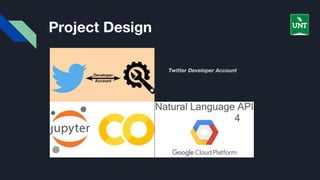
The project team established a Twitter Developer Account to enable access to live tweets. The
application makes a search for tweets with the keywords entered by the user and employ additional
criteria as language and geographical area to filter the pertinent ones.
From the several attributes of a tweet, the application extracts the text and apply tokenization
methods to break it down into separate words. The next step are to clean the data, to eliminate
emoticons, signs and other characters that can interfere with the sentiment analysis.
Finally, the project applies Google Natural Language Processing API to get the score and the
magnitude for each tweet. The score represents the polarity (positive, negative or neutral), while the
magnitude shows the strength of the sentiment. The average of both measurements among all
tweets will determine the overall sentiment towards the selected keyword that will be displayed to
the user.
Project Design
Twitter Developer Account
Milestones
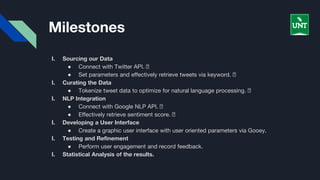
I. Sourcing our Data
● Connect with Twitter API. 🗹
● Set parameters and effectively retrieve tweets via keyword. 🗹
I. Curating the Data
● Tokenize tweet data to optimize for natural language processing. 🗹
I. NLP Integration
● Connect with Google NLP API. 🗹
● Effectively retrieve sentiment score. 🗹
I. Developing a User Interface
● Create a graphic user interface with user oriented parameters via Gooey.
I. Testing and Refinement
● Perform user engagement and record feedback.
I. Statistical Analysis of the results.
Resources
1. How to make your own sentiment analyzer using Python and Google’s Natural
Language API
2. Tutorial To extend
3. Azurez
More tutorials:
➔ Comprehensive Hands on Guide to Twitter Sentiment Analysis with dataset and code
➔ Mining Twitter Data with Python
➔ Predicting US presidential results with Twitter Sentiment Analysis
➔ UI tutorials

Twitter sentiment analysis using Azure NLP

  • 1.
    Twitter Sentiment Analysis Prepared by DanyMaron, Jason Gillette, Olusola Amusan, and Polina Nemkova for CSCE 5214
  • 2.
    Project Abstract The purposeof this project is insight. Insight makes the difference between sound decisions and misunderstanding. It separates blind faith from calculated risk. From decision makers in business to leaders on the world stage, insight is highly valued. As the global marketplace for ideas grows evermore interconnected and increasingly virtual, insights may no longer be as evident. Gone are the days of in-person dialogue. Cyberspace has become the new paradigm for opinions and preferences. Recognizing these premises, this project seeks to capitalize on the 145 million daily users of the Twitter social media platform to gain insights on the opinions and preferences of the general public, and to inform a wide range of stakeholders. The Twitter sentiment analysis project is envisioned as an easy to use interface that can service marketing professionals seeking a metric for brand management, social scientists tracking the growth of an idea, or communications directors needing to refine a message. The project works by looking at the latest tweets containing a user’s searchable term or keyword. It then uses natural language processing to determine if the keyword is associated with positive or negative terms, and provides a score based on that association. The score provided is a metric by which the degree of positive or negative terms are associated across the latest posts on Twitter. The tracking of increasing or decreasing scores over a select period will act as a response variable by which the user can grade the success of any given strategy.
  • 4.
    Project Workflow In orderto meet the demands of this project within the relatively short period of time allotted, the project group will be task organized, and independently achieve assigned milestones. Tasks will be identified, accounted for, and synchronized during group meetings held every Monday. Additional meetings will be held as needed, and open communication will be held via DIscord server with email serving as a secondary means of communication. A shared Google Collab Notebook will serve as the development environment for the duration of the project with localized editing and testing as needed.
  • 5.
    Project Workflow Communication: Discord(on a need base) Collaboration: ● Google Colab - for coding, ● Google Doc - for documents.
  • 6.
    Project Design The projectteam established a Twitter Developer Account to enable access to live tweets. The application makes a search for tweets with the keywords entered by the user and employ additional criteria as language and geographical area to filter the pertinent ones. From the several attributes of a tweet, the application extracts the text and apply tokenization methods to break it down into separate words. The next step are to clean the data, to eliminate emoticons, signs and other characters that can interfere with the sentiment analysis. Finally, the project applies Google Natural Language Processing API to get the score and the magnitude for each tweet. The score represents the polarity (positive, negative or neutral), while the magnitude shows the strength of the sentiment. The average of both measurements among all tweets will determine the overall sentiment towards the selected keyword that will be displayed to the user.
  • 7.
  • 8.
    Milestones I. Sourcing ourData ● Connect with Twitter API. 🗹 ● Set parameters and effectively retrieve tweets via keyword. 🗹 I. Curating the Data ● Tokenize tweet data to optimize for natural language processing. 🗹 I. NLP Integration ● Connect with Google NLP API. 🗹 ● Effectively retrieve sentiment score. 🗹 I. Developing a User Interface ● Create a graphic user interface with user oriented parameters via Gooey. I. Testing and Refinement ● Perform user engagement and record feedback. I. Statistical Analysis of the results.
  • 9.
    Resources 1. How tomake your own sentiment analyzer using Python and Google’s Natural Language API 2. Tutorial To extend 3. Azurez More tutorials: ➔ Comprehensive Hands on Guide to Twitter Sentiment Analysis with dataset and code ➔ Mining Twitter Data with Python ➔ Predicting US presidential results with Twitter Sentiment Analysis ➔ UI tutorials