Troubleshooting OSSEC
Common support issues for OSSEC/Atomic OSSEC
Frank Iacovino
fiacovino@atomicorp.com
Troubleshooting
#1 OSSEC HUB Installation
Processes Will Not Start After Install 3
This could be the awpd process for the
Atomic OSSEC or the remoted/analysisd
This will usually happen when there is not
enough space on the /var drive
Check the drive and if needed, provide
more space to /var. Once completed
restart the ossec-hids with
systemctl start ossec-hids
OSSEC HUB Installation
Provisioning Space For Installation 4
When provisioning your HUB server, keep in
mind the recommended minimum
resources:
● Cores: 4 min, 8 recommended
● Memory: 16GB
● Storage: 1TB
○ For the /var partition and dependant
on specific retention requirements
OSSEC HUB Installation
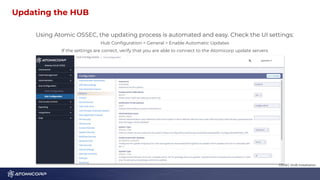
Updating the HUB 5
Using Atomic OSSEC, the updating process is automated and easy. Check the UI settings:
Hub Configuration > General > Enable Automatic Updates
If the settings are correct, verify that you are able to connect to the Atomicorp update servers
OSSEC HUB Installation
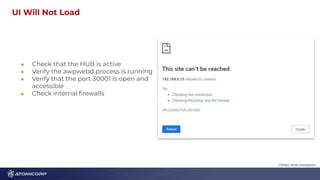
UI Will Not Load 6
● Check that the HUB is active
● Verify the awpwebd process is running
● Verify that the port 30001 is open and
accessible
● Check internal firewalls
OSSEC HUB Installation
Troubleshooting
#2 Agent Connectivity
Check the Status of the Agent
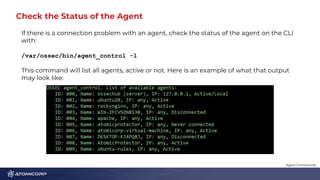
If there is a connection problem with an agent, check the status of the agent on the CLI
with:
/var/ossec/bin/agent_control -l
This command will list all agents, active or not. Here is an example of what that output
may look like:
Agent Connectivity
Look at the OSSEC Logs on the Disconnected Agent
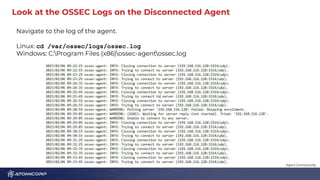
Navigate to the log of the agent.
Linux: cd /var/ossec/logs/ossec.log
Windows: C:Program Files (x86)ossec-agentossec.log
Agent Connectivity
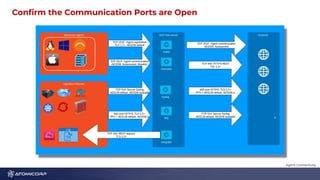
Confirm the Communication Ports are Open 1
0
Agent Connectivity
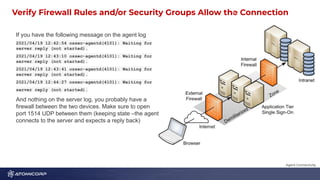
Verify Firewall Rules and/or Security Groups Allow the Connection
1
1
If you have the following message on the agent log
2021/04/19 12:42:54 ossec-agentd(4101): Waiting for
server reply (not started).
2021/04/19 12:43:10 ossec-agentd(4101): Waiting for
server reply (not started).
2021/04/19 12:43:41 ossec-agentd(4101): Waiting for
server reply (not started).
2021/04/19 12:44:27 ossec-agentd(4101): Waiting for
server reply (not started).
And nothing on the server log, you probably have a
firewall between the two devices. Make sure to open
port 1514 UDP between them (keeping state –the agent
connects to the server and expects a reply back)
Agent Connectivity
Confirm Packets on OSSEC HUB 1
2
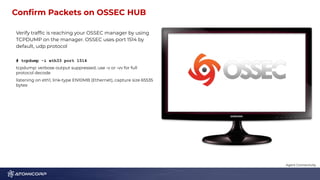
Verify traffic is reaching your OSSEC manager by using
TCPDUMP on the manager. OSSEC uses port 1514 by
default, udp protocol
# tcpdump -i eth33 port 1514
tcpdump: verbose output suppressed, use -v or -vv for full
protocol decode
listening on eth1, link-type EN10MB (Ethernet), capture size 65535
bytes
Agent Connectivity
Troubleshooting
#3 Notifications and Emails
Not Receiving Notification Emails for Alerts? 1
4
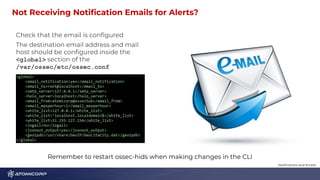
Check that the email is configured
The destination email address and mail
host should be configured inside the
<global> section of the
/var/ossec/etc/ossec.conf
Notifications and Emails
Remember to restart ossec-hids when making changes in the CLI
Are Notifications Turned On? 1
5
In the HUB UI this can be configured at hub
Configuration > General > Enable email
notifications
In the CLI, you will find this setting in
/var/etc/ossec/ossec.conf
Notifications and Emails
Is Postfix Configured Properly? 1
6
You will want to look at your
/etc/postfix/main.cf configuration file
and verify the settings are correct and that
postfix is running correctly.
There are many sources online for tutorials
on setting up postfix for your environment
Notifications and Emails
Troubleshooting
#4 FIM Troubles
Not Seeing FIM for a Certain Directory/Path 1
8
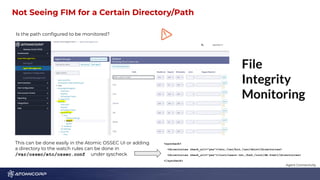
Is the path configured to be monitored?
Agent Connectivity
This can be done easily in the Atomic OSSEC UI or adding
a directory to the watch rules can be done in
/var/ossec/etc/ossec.conf under syscheck
<syscheck>
<directories check_all="yes">/etc,/usr/bin,/usr/sbin</directories>
<directories check_all="yes">/root/users.txt,/bsd,/root/db.html</directories>
</syscheck>
How to Reach Out For Help 1
9
ossec.slack.com
atomicorp-support.slack.com
support@atomicorp.com
ossec.net
https://github.com/ossec
Notifications and Emails
Questions, Comments, Concerns?

Troubleshooting OSSEC Common support issues for OSSEC_Atomic OSSEC.pdf

  • 1.
    Troubleshooting OSSEC Common supportissues for OSSEC/Atomic OSSEC Frank Iacovino fiacovino@atomicorp.com
  • 2.
  • 3.
    Processes Will NotStart After Install 3 This could be the awpd process for the Atomic OSSEC or the remoted/analysisd This will usually happen when there is not enough space on the /var drive Check the drive and if needed, provide more space to /var. Once completed restart the ossec-hids with systemctl start ossec-hids OSSEC HUB Installation
  • 4.
    Provisioning Space ForInstallation 4 When provisioning your HUB server, keep in mind the recommended minimum resources: ● Cores: 4 min, 8 recommended ● Memory: 16GB ● Storage: 1TB ○ For the /var partition and dependant on specific retention requirements OSSEC HUB Installation
  • 5.
    Updating the HUB5 Using Atomic OSSEC, the updating process is automated and easy. Check the UI settings: Hub Configuration > General > Enable Automatic Updates If the settings are correct, verify that you are able to connect to the Atomicorp update servers OSSEC HUB Installation
  • 6.
    UI Will NotLoad 6 ● Check that the HUB is active ● Verify the awpwebd process is running ● Verify that the port 30001 is open and accessible ● Check internal firewalls OSSEC HUB Installation
  • 7.
  • 8.
    Check the Statusof the Agent If there is a connection problem with an agent, check the status of the agent on the CLI with: /var/ossec/bin/agent_control -l This command will list all agents, active or not. Here is an example of what that output may look like: Agent Connectivity
  • 9.
    Look at theOSSEC Logs on the Disconnected Agent Navigate to the log of the agent. Linux: cd /var/ossec/logs/ossec.log Windows: C:Program Files (x86)ossec-agentossec.log Agent Connectivity
  • 10.
    Confirm the CommunicationPorts are Open 1 0 Agent Connectivity
  • 11.
    Verify Firewall Rulesand/or Security Groups Allow the Connection 1 1 If you have the following message on the agent log 2021/04/19 12:42:54 ossec-agentd(4101): Waiting for server reply (not started). 2021/04/19 12:43:10 ossec-agentd(4101): Waiting for server reply (not started). 2021/04/19 12:43:41 ossec-agentd(4101): Waiting for server reply (not started). 2021/04/19 12:44:27 ossec-agentd(4101): Waiting for server reply (not started). And nothing on the server log, you probably have a firewall between the two devices. Make sure to open port 1514 UDP between them (keeping state –the agent connects to the server and expects a reply back) Agent Connectivity
  • 12.
    Confirm Packets onOSSEC HUB 1 2 Verify traffic is reaching your OSSEC manager by using TCPDUMP on the manager. OSSEC uses port 1514 by default, udp protocol # tcpdump -i eth33 port 1514 tcpdump: verbose output suppressed, use -v or -vv for full protocol decode listening on eth1, link-type EN10MB (Ethernet), capture size 65535 bytes Agent Connectivity
  • 13.
  • 14.
    Not Receiving NotificationEmails for Alerts? 1 4 Check that the email is configured The destination email address and mail host should be configured inside the <global> section of the /var/ossec/etc/ossec.conf Notifications and Emails Remember to restart ossec-hids when making changes in the CLI
  • 15.
    Are Notifications TurnedOn? 1 5 In the HUB UI this can be configured at hub Configuration > General > Enable email notifications In the CLI, you will find this setting in /var/etc/ossec/ossec.conf Notifications and Emails
  • 16.
    Is Postfix ConfiguredProperly? 1 6 You will want to look at your /etc/postfix/main.cf configuration file and verify the settings are correct and that postfix is running correctly. There are many sources online for tutorials on setting up postfix for your environment Notifications and Emails
  • 17.
  • 18.
    Not Seeing FIMfor a Certain Directory/Path 1 8 Is the path configured to be monitored? Agent Connectivity This can be done easily in the Atomic OSSEC UI or adding a directory to the watch rules can be done in /var/ossec/etc/ossec.conf under syscheck <syscheck> <directories check_all="yes">/etc,/usr/bin,/usr/sbin</directories> <directories check_all="yes">/root/users.txt,/bsd,/root/db.html</directories> </syscheck>
  • 19.
    How to ReachOut For Help 1 9 ossec.slack.com atomicorp-support.slack.com support@atomicorp.com ossec.net https://github.com/ossec Notifications and Emails
  • 20.