TEST REPORT                    Digital TV Signal Meter


              TRIMAX
              TM-6800+

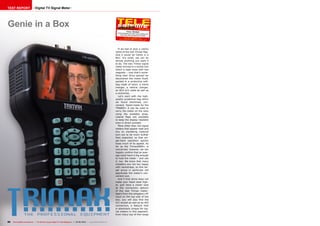
                                 •	Exclusive feature: ASI output that usually only
                                 comes with professional signal meters
                                 •	Another treat: CAM that even accepts CI+
                                 smartcards
                                 •	Perfect for feed hunters thanks to spectrum
                                 analyzer
                                 •	Fast and easy satellite search with the help
                                 of pre-stored transponder data for virtually all
                                 positions
                                 •	Automatic NIT access for satellite names


78   TELE-satellite International — The World‘s Largest Digital TV Trade Magazine — 04-05/2012 — www.TELE-satellite.com   www.TELE-satellite.com — 04-05/2012 — TELE-satellite International — The World‘s Largest Digital TV Trade Magazine   79
TEST REPORT                    Digital TV Signal Meter


Genie in a Box                                                                                                                                            04-05/2012
                                                                                                                                          Trima x TM-6800+
                                                                                                                            All the features you need, plus profes
                                                                                                                                                                  sional
                                                                                                                                extras like ASI and spectrum displa
                                                                                                                                                                   y
                                                                                                                                     www.TELE -satellite.com/
                                                                                                                              TELE- satell ite-1205/eng/tr imax.
                                                                                                                                                                  pdf


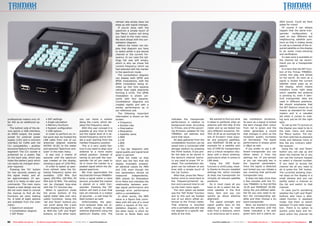
                                                                                                                             If we had to give a catchy
                                                                                                                          name to the new Trimax flag-
                                                                                                                          ship it would be ‘Genie in a
                                                                                                                          Box’. It’s small, yet can do
                                                                                                                          almost anything you want it
                                                                                                                          to do. The new Trimax signal
                                                                                                                          meter arrived in a stylish box
                                                                                                                          which is kept close with two
                                                                                                                          magnets – now that’s some-
                                                                                                                          thing new! Once opened we
                                                                                                                          discovered the meter itself,
                                                                                                                          packed in a protective soft-
                                                                                                                          bag made of nylon, a mains
                                                                                                                          charger, a vehicle charger,
                                                                                                                          an RCA A/V cable as well as
                                                                                                                          a neckstrap.
                                                                                                                             Let’s start with the high-
                                                                                                                          quality protective bag which
                                                                                                                          we found extremely con-
                                                                                                                          venient. Taylor-made for the
                                                                                                                          TM6800+ it can be used to
                                                                                                                          carry the meter on the neck
                                                                                                                          using the available strap.
                                                                                                                          Lateral flaps are available
                                                                                                                          to keep the display readable
                                                                                                                          even in direct sunlight.
                                                                                                                             More often than not signal
                                                                                                                          meters that appear neat and
                                                                                                                          tiny on marketing material
                                                                                                                          turn out to be much bulkier
                                                                                                                          than expected, so that sin-
                                                                                                                          gle-hand operation quickly
                                                                                                                          loses much of its appeal. As
                                                                                                                          far as the Trimax6800+ is
                                                                                                                          concerned, however, we can
                                                                                                                          happily confirm that an aver-
                                                                                                                          age sized hand is big enough
                                                                                                                          to hold the meter – and use
                                                                                                                          it, too. We know that many
                                                                                                                          installers are not too happy
                                                                                                                          with neckstraps, so this tar-
                                                                                                                          get group in particular will
                                                                                                                          appreciate the meter’s con-
                                                                                                                          venient size.
                                                                                                                             And if that alone does not
                                                                                                                          make your heart beat high-
                                                                                                                          er, just have a closer look
                                                                                                                          at the connection options
                                                                                                                          of the new Trimax meter:
                                                                                                                          Apart from the obligatory HF
                                                                                                                          input on the top side of the
                                                                                                                          box, you will also find the
                                                                                                                          A/C socket as well as an ASI
                                                                                                                          connection, a feature that
                                                                                                                          is absolutely unique for sig-
                                                                                                                          nal meters in this segment.
                                                                                                                          Even many top-of-the-range


80   TELE-satellite International — The World‘s Largest Digital TV Trade Magazine — 04-05/2012 — www.TELE-satellite.com
refresh rate simply does not                                                                                                                             dible sound. Could we have
                                                                                                                          keep up with signal changes.                                                                                                                             asked for more?
                                                                                                                             If you’re done with the                                                                                                                                  Of course it can always
                                                                                                                          spectrum a simple touch of                                                                                                                               happen that the same tran-
                                                                                                                          the ‘Menu’ button will bring                                                                                                                             sponder       configuration   is
                                                                                                                          you back to the main menu.                                                                                                                               used on two different but
                                                                                                                          We went ahead with the con-                                                                                                                              neighbouring satellite posi-
                                                                                                                          stellation diagram.                                                                                                                                      tions so that it makes sense
                                                                                                                             Before the meter can dis-                                                                                                                             to call up a channel of the re-
                                                                                                                          play that diagram you have                                                                                                                               quired satellite on the display
                                                                                                                          to select either a pre-stored                                                                                                                            to do some cross-checking
                                                                                                                          channel or the current fre-                                                                                                                              and verification.
                                                                                                                          quency. In our case the set-                                                                                                                                In case none is available on
                                                                                                                          tings list was still empty,                                                                                                                              the channel list we recom-
                                                                                                                          which is why we chose the                                                                                                                                mend you do a transponder
                                                                                                                          current frequency which we                                                                                                                               search.
                                                                                                                          had selected with the marker                                                                                                                                It is here that the NIT func-
                                                                                                                          in the spectrum mode.                                                                                                                                    tion of the Trimax TM6800+
                                                                                                                             The constellation diagram                                                                                                                             comes into play and shows
                                                                                                                          can display both QPSK and                                                                                                                                its full worth. As soon as a
                                                                                                                          8PSK modulations, with the                                                                                                                               signal is locked the current
                                                                                                                          8PSK modulation being di-                                                                                                                                satellite name pops up on
                                                                                                                          vided up into nine squares                                                                                                                               the display, which means
                                                                                                                          rather than eight segments                                                                                                                               installers know right away
                                                                                                                          forming a circle. The QPSK                                                                                                                               which satellite the antenna
                                                                                                                          modulation is shown cor-                                                                                                                                 is pointing to, even if iden-
                                                                                                                          rectly with four squares.                                                                                                                                tical transponder data are
                                                                                                                          Constellation diagrams are                                                                                                                               used in different positions.
                                                                                                                          created rapidly and with a                                                                                                                               We should emphasise that
                                                                                                                          similar performance as in                                                                                                                                the NIT feature comes by no
                                                                                                                          our reference unit.                                                                                                                                      means as standard for most
                                                                                                                             The following important                                                                                                                               meters and is a valuable
                                                                                                                          information is shown on the                                                                                                                              aid when it comes to mak-
professional meters only of-                 • SAT settings                          you can move a marker                screen:                           indicates the transponder            We wanted to find out what            day installation situations.                ing sure you’ve hit the right
fer ASI as an additional op-                 • Angle calculation                     along the x-axis, which dis-            • Frequency                    performance in relation to        it takes to perfectly align an           As soon as a signal is locked               spot.
tion.                                        • Memory functions                      plays the frequency value.              • Symbol rate                  background noise. According       antenna with the help of the             the bars change their colour                   To call up the TV picture on
   The bottom side of the de-                • System configuration                     With this user concept it is         • Polarisation                 to Trimax, one of the upcom-      meter and so we tested two               from red to green and the                   the display you need to be in
vice sports a USB interface,                 • USB options                           possible at any time to find            • Modulation                   ing firmware updates for the      very different scenarios: AS-            meter generates a sound                     the main menu and press
an HDMI output, the power                    In order to perform an ini-             out the signal level of a se-           • Satellite name               TM6800+ will address and          TRA 19.2E as an example for              that changes in pitch as the                the ‘Menu’ button. The me-
socket for external power                 tial quick test we hooked the              lected frequency and to initi-          • MER                          solve that issue.                 one of Europe’s most popu-               reception quality increases                 ter then switches to playback
supply (12V) and a common                 LNB cable from one of our                  ate a scan starting from the            • C/N                             All data gathered from the     lar and powerful satellites,             (or decreases). The signal                  mode and behaves more or
interface for CAMs with full              antennas (aligned towards                  marked frequency position.              • BER                          constellation function can be     and HISPASAT 30.0W as an                 performance is always given                 less like any ordinary satel-
CI+ compatibility – another               ASTRA 19.2E) to the meter                     This is a very useful fea-           • FEC                          saved onto a connected USB        example for a satellite with             in dBµV as well.                            lite receiver.
exclusive feature in this price           and selected ‘Spectrum ana-                ture if you need to align your          • Two bar diagrams with        storage medium by pressing        lots of DVB-S2 transponders                 If you prefer to use a dif-                 Using the ‘Up’ and ‘Down’
segment! The CI+ socket is                lyzer’ in the main menu.                   antenna to a more exotic             signal quality and signal level   the ‘Point’ button. If you pre-   and a critical reception situ-           ferent transponder you can                  button you can zap up and
protected by a plastic flap                  It was only a matter of                 orbital position: Instead of         given in percent                  fer the data to be stored in      ation with a 60cm antenna,               either select it from the                   down the channel list or you
on the back side, which also              seconds until the spectrum                 having to pre-edit the tran-            What did make us stop          the device’s internal memo-       particularly when it comes to            settings list (if pre-stored)               can use the numeric keypad
hides the battery pack which              was created on the display,                sponder list all you need to         short was the fact that the       ry you need to press ‘F4’ in-     LNB skew.                                or you can manually key in                  to select a channel number.
can easily be changed when-               showing a span of 1250 MHz.                do is move the marker to a           display invariably present-       stead. The constellation dia-        Using the ‘SAT finder’                the required parameters.                    If you want to access the
ever required.                               In order to speed up spec-              peaked signal within the dis-        ed identical values for MER       gram can be redrawn at any        function is child’s play, most-          Once the signal is detected                 channel list all you need to
   Pressing the ‘On’ button               trum refresh rates the fol-                played spectrum.                     and C/N, even though the          time with a simple touch of       ly thanks to the pre-installed           and locked you can initiate a               do is press the ‘OK’ button.
for two seconds powers up                 lowing frequency spans are                    We truly appreciated the          two parameters should be          the ‘Up’ button.                  settings list, which includes            san covering that particular                The currently showing chan-
the signal meter, and af-                 available: 1250 MHz (full                  fact that the Trimax TM6800+         measured        independently.       After that, press the ‘Menu’   at least one transponder for             transponder only.                           nel stays on the display in a
ter approximately 15 sec-                 span), 200 MHz, 100 MHz, 50                locks a signal within a mere         MER stands for Modulation         button once to move back to       virtually all relevant satellite            It does not take more than               small window and you can
onds it is ready to take your             MHz and 32 MHz. The setting                second, provided the marker          Error Ratio and indicates the     the frequency/channel op-         positions.                               a few minutes with the Tri-                 swiftly select a channel on
commands. The main menu                   can be changed loop-wise                   is placed on a valid tran-           relationship between aver-        tion and a second time to call       So in most cases all you              max TM6800+ to find ASTRA                   the list and switch to that
boasts a neat design and we               with the ‘F1’ function key.                sponder. Pressing the ‘OK’           age signal performance and        up the main menu again.           have to do is select the de-             19.2E and HISPASAT 30.0W.                   channel.
did not even need to consult                 When in spectrum mode                   button will start a scan that        average error performance            The next option we tested      sired satellite in the first             Using the pre-defined satel-                   In case you’re wondering
the manual to find all the                the arrow buttons of the                   lists all channels in a matter       within a constellation.           was the ‘SAT finder’ function     menu item and you can                    lite list you only need to se-              whether the ‘Left’ and ‘Right’
functions we were looking                 signal meter take over very                of seconds – a real treat for           In other words, the MER        and to this end we hooked         quickly go about antenna                 lect the corresponding sat-                 buttons also have a dedi-
for. A total of eight options             useful functions: Using the                feed hunters as well!                value is a figure that corre-     one of our 60cm offset an-        alignment.                               ellite and then choose a Ku                 cated function in playback
are available from the main               ‘Up’ and ‘Down’ buttons you                   Unfortunately, the spec-          lates with the size of a cloud    tennas to the Trimax meter.          The signal strength and               band transponder.                           mode: Use them to switch
menu:                                     can scroll along the y-axis                trum analyzer does not re-           within a square of the con-       That antenna is mounted           signal quality bars on the                  Next, we started to slowly               between TV and radio recep-
   • Spectrum analyzer                    which displays the signal lev-             act swiftly enough to allow          stellation diagram. C/N, on       onto a portable pole and was      display are easy to read                 move the antenna until the                  tion. There is no option to
   • Constellation diagram                el. With the ‘Left’ and ‘Right’            antenna alignment using the          the other hand, is short for      not aligned to a specific sat-    even from a distance, which              meter indicated a hit with                  quickly jump back and for-
   • SAT finder                           buttons, on the other hand,                spectrum display only. The           Carrier to Noise Ratio and        ellite at the time.               is an enormous aid in every-             green bars and a clearly au-                ward within the channel list


82   TELE-satellite International — The World‘s Largest Digital TV Trade Magazine — 04-05/2012 — www.TELE-satellite.com                                                                           www.TELE-satellite.com — 04-05/2012 — TELE-satellite International — The World‘s Largest Digital TV Trade Magazine   83
1


                                                                                                                                                       2


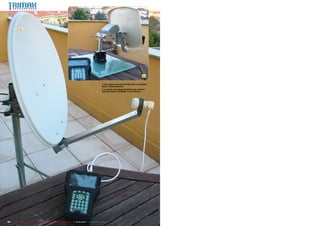
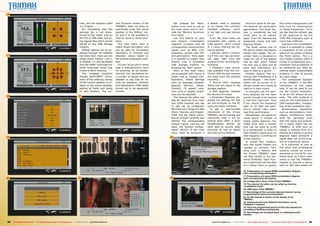
                                                                                                                1. Our tests were performed with a portable
                                                                                                                60cm offset antenna.
                                                                                                                2. A small motorised antenna was used to
                                                                                                                test the meter’s DiSEqC 1.2 functions.


84   TELE-satellite International — The World‘s Largest Digital TV Trade Magazine — 04-05/2012 — www.TELE-satellite.com
1                                                                                   6                                     11
                                                                                                                                                                    with its hundreds or poten-                 types for each satellite and
                                                                                                                                                                    tially thousands of entries,                start a channel search on
                                                                                                                                                                    and there are no favourites                 an entire satellite or a single
                                                                                                                                                                    lists, so be prepared to wise-              transponder.
                                                                                                                                                                    ly manage your channel list                    In our opinion a channel
                                                                                                                                                                    and stick to the bare essen-                search across an entire sat-
                                                                                                                                                                    tials – unless you are of the               ellite should be avoided by
                                                                                                                                                                    severely patient kind.                      all means, as it is very tire-
                                                                                                                                                                       Since it took much less                  some and time-consuming
                                                                                                                                                                    time than expected to align                 at a later stage to switch be-
                                                                                                                                                                    our antenna to the two sat-                 tween channels on a list that
                                                                                                                                                                    ellite positions we had some                boasts hundreds or thou-
2                                                                                   7                                     12                                        time to spare, so why not                   sands of entries, but no fa-
                                                                                                                                                                    have a closer look at the                   vourites options (see above).
                                                                                                                                                                    built-in tuner and its thresh-              What does make sense is
                                                                                                                                                                    old capabilities?                           saving one free-to-air chan-
                                                                                                                                                                       We pointed our 60cm an-                  nel per polarisation level and
                                                                                                                                                                    tenna towards ASTRA 2D                      satellite, so that you can
                                                                                                                                                                    and tried to catch BBC HD                   quickly and easily verify if
                                                                                                                                                                    on transponder 49 (10847 V                  your antenna alignment is
                                                                                                                                                                    23000-8/9 QPSK). According                  successful.
                                                                                                                                                                    to ASTRA/SES our location                      While such a settings list
                                                                                                                                                                    in Portugal would require an                can of course be compiled
                                                                                                                                                                    antenna with at least 120cm                 on the meter itself, it is a job
                                                                                                                                                                    for successful reception.                   that takes some time and ef-
                                                                                                                                                                    Nonetheless, we achieved                    fort. Luckily, there is an eas-
3                                                                                   8                                     13                                        reliable and stable reception               ier way: On its website www.
                                                                                                                                                                    of BBC HD with only half that               trimaxtec.net the manufac-
                                                                                                                                                                    diameter. Quite frankly, we                 turer provides the ‘Satellite
                                                                                                                                                                    had no idea how that came                   list edit tools for TM6xxx se-
                                                                                                                                                                    about, but it does speak                    ries Meter/Finder.rar’ file via
                                                                                                                                                                    volumes about the recep-                    its Download Center.
                                                                                                                                                                    tion quality of the Trimax                     What you get is a settings
                                                                                                                                                                    TM6800+ tuner.                              editor, which at this stage
                                                                                                                                                                       The fourth menu item of                  only comes with an installa-
                                                                                                                                                                    the meter includes a set-                   tion wizard in Chinese. But
                                                                                                                                                                    tings editor, which allows to               rest assured, all you need to
                                                                                                                                                                    edit the satellite list, define             do is click the right button
                                                                                                                                                                    DiSEqC parameters and LNB                   during the installation pro-

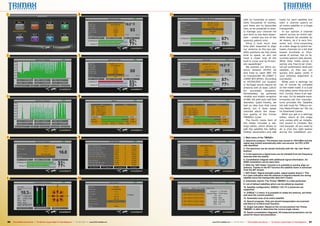
4                                                                                   9                                     14                                        1. Main menu of the TM6800+.
                                                                                                                                                                    2. Spectrum analyzer: The marker was moved to 11914 MHz and the
                                                                                                                                                                    signal was locked automatically after one second. An FEC of 9/0
                                                                                                                                                                    was identified.
                                                                                                                                                                    3. The spectrum can be moved vertically with the ‘Up’ and ‘Down’
                                                                                                                                                                    buttons.
                                                                                                                                                                    4. In the spectrum a signal scan can be initiated from the frequency
                                                                                                                                                                    selected with the marker.
                                                                                                                                                                    5. Constellation diagram with additional signal information. An
                                                                                                                                                                    8PSK modulation can be seen here.
                                                                                                                                                                    6. With the ‘SAT finder’ function it is possible to quickly align an
                                                                                                                                                                    antenna. Thanks to the NIT function the satellite name is extracted
                                                                                                                                                                    from the NIT stream.
                                                                                                                                                                    7. SAT finder: Signal strength peaks, signal quality doesn’t: This
                                                                                                                                                                    is a clear indication that the antenna is aligned towards the wrong
5                                                                                  10                                     15                                        satellite since the transponder data don’t match.
                                                                                                                                                                    8. Automatic search: The Trimax TM6800+ is a fast performer.
                                                                                                                                                                    9. List of default satellites which can be edited as required.
                                                                                                                                                                    10. Satellite configuration. DiSEqC 1.0/1.1/1.2 protocols are
                                                                                                                                                                    supported.
                                                                                                                                                                    11. DiSEqC 1.2 menu: It is possible to rotate the antenna, set limits
                                                                                                                                                                    and save the current position.
                                                                                                                                                                    12. Automatic scan of an entire satellite.
                                                                                                                                                                    13. Search progress. Only pre-stored transponders are scanned
                                                                                                                                                                    and there is no blind scan function.
                                                                                                                                                                    14. Angle calculator: Based on the current position the Trimax
                                                                                                                                                                    TM6800+ is able to determine the correct angle values.
                                                                                                                                                                    15. Saved constellation diagrams: All measured parameters can be
                                                                                                                                                                    saved for future documentation.


86   TELE-satellite International — The World‘s Largest Digital TV Trade Magazine — 04-05/2012 — www.TELE-satellite.com        www.TELE-satellite.com — 04-05/2012 — TELE-satellite International — The World‘s Largest Digital TV Trade Magazine   87
16

                                                                                     cess, and the software itself        rent firmware version of the          We pressed the ‘Menu’         a default reset is required                 Here are some of the spe-                find active transponders and
                                                                                     is in English.                       TM6800+ does not allow to          button once more to call up      or to display the currently              cial features we particularly               then hunt for transmissions
                                                                                        It’s interesting that the         specifically enter the saved       the main menu and to acti-       installed software, which                appreciated: The large dis-                 on those frequencies. For a
                                                                                     settings list is not trans-          position in the DiSEqC mo-         vate the ‘Memory functions’      in our test unit was version             play is something we will                   job like that the refresh rate
                                                                                     ferred to the meter with an          tor and it is not possible to      from there.                      1.0.3.                                   never want to do without                    of the spectrum at the full
                                                                                     RS-232 or USB cable, but us-         directly move to saved posi-          Use this feature to save        From the main menu we                  again. Even HD channels are                 1250 MHz frequency span is
                                                                                     ing regular files which can be       tions.                             and retrieve constellation       proceeded with calling up                presented crisply and with                  more than sufficient.
                                                                                     stored on any USB storage               The next menu item is           diagrams complete with all       ‘USB options’, which consist             amazing details.                               Just like in the constellation
                                                                                     medium.                              called ‘Angle calculation’ and     corresponding measurement        of a menu offering the fol-                 The small overall size of                mode it is possible to create
                                                                                        DiSEqC options can be ac-         can be used for convenient         values such as BER, C/N,         lowing options:                          the device makes the display                a screenshot of the current
                                                                                     cessed through the satellite         calculation of Azimuth and         frequency, symbol rate, FEC        • Record: Starts a record-             appear even bigger. The on-                 spectrum by simply pressing
17                                                                                   list menu item. Here you can         elevation values based on          and polarisation. Here again     ing if the user has set chan-            screen menu is designed to                  the ‘Point’ button. This is a
                                                                                     chose either DiSEqC 1.0/1.1          the entered geographic posi-       it is possible to export data    nel, date, start time and                make full use of the display                very helpful function when it
                                                                                     or DiSEqC 1.2, and we tested         tion.                              directly onto a connected        duration of the recording be-            size as well, which means                   comes to professional docu-
                                                                                     how the meter controlled our            It’s part of our job to never   USB storage medium by            forehand.                                the font size is ideal and all              mentation and acceptance of
                                                                                     small motorised setup that           take a manufacturer’s word         pressing the ‘Point’ button.       • Playback: Lists record-              texts and information are                   an installation job. After all,
                                                                                     moves a 45cm antenna.                for anything, so we double-           Back in the main menu         ings available from the con-             easy to read at a glance.                   nothing beats substantiated
                                                                                        The available functions           checked the calculations for       we proceeded with having a       nected USB storage medium                   Another feature that en-                 evidence in case of queries
                                                                                     include EAST/WEST move-              a number of setups and are         closer look at ‘System con-      and plays back the selected              hances user-friendliness is a               at a later stage.
                                                                                     ment of the antenna, saving          pleased to say that all re-        figuration’, where settings      recording.                               backlit keypad – the illumi-                   The undisputed highlight
                                                                                     of the current position in re-       sults for elevation, Azimuth       such as language (English,         • Picture View: Displays               nation can be turned on or                  of the TM6800+ is the BNC
                                                                                     lation to the active satellite,      and polarisation (LNB skew)        Spanish, German, Italian,        JPEGs that are saved on the              off and comes very handy at                 connection on the upper
                                                                                     setting of limits and going          turned out to be absolutely        Turkish), TV aspect ratio,       storage medium.                          night or in dark rooms.                     side. It can be used to put
                                                                                     to zero position. The cur-           correct.                           time zone or display bright-       • Soft Upgrade: Updates                   In everyday use the spec-                out the current transpond-
                                                                                                                                                             ness can be adjusted.            the device’s firmware.                   trum analyzer did not react                 er as an ASI stream at any
18                                                                                  21                                                                          The channel list editor can     • Parameter Upgrade: Up-               quickly enough to be used as                time. The ASI protocol is
                                                                                                                                                             also be launched from here       grades the settings list that            a real-time spectrum. Only                  used for the transmission of
                                                                                                                                                             and CAMs inserted into the       we pre-arranged on the PC                if you reduce the frequency                 DVB transponders, irrespec-
                                                                                                                                                             CI slot can be configured.       using the editor software.               span to 50 MHz the spec-                    tive of the modulation type.
                                                                                                                                                             We tried out a range of CAMs       To get a well-founded                  trum’s refresh rates reach                     Broadcasting       equipment
                                                                                                                                                             (Seca, Viaccess and Dragon-      impression of the Trimax                 real-time performance.                      such as demodulators, mod-
                                                                                                                                                             CAM) and the meter identi-       TM6800+ we exclusively and                  Nonetheless, the spectrum                ulators, multiplexers, head-
                                                                                                                                                             fied all of them correctly and   intensively tried it out for             mode sports a number of                     ends etc. generally come
                                                                                                                                                             offered the corresponding        several days. After a short              highly useful features: You                 with ASI inputs and outputs.
                                                                                                                                                             module menus. Last but not       familiarisation period we                might think that a marker                   For a signal meter like the
                                                                                                                                                             least, the ‘System configu-      were able to quickly align               that can be used to scroll                  TM6800+ to offer such an
                                                                                                                                                             ration’ section of the main      antennas as well as detect               to a transponder in order to                output is nothing short of a
                                                                                                                                                             menu must be accessed if         and also solve problems.                 then initiate a signal scan on              miracle as it allows to quickly
                                                                                                                                                                                                                                       that frequency is nothing out               diagnose flaws whenever a
19                                                                                  22                                                                       24                                                                        of the ordinary.                            signal does not arrive prop-
                                                                                                                                                                                                                                          In actual fact, however,                 erly at a particular device.
                                                                                                                                                                                                                                       only few signal meters are                     It is important to note at
                                                                                                                                                                                                                                       capable of correctly han-                   this point that professional
                                                                                                                                                                                                                                       dling such a feature and                    systems cannot be re-pro-
                                                                                                                                                                                                                                       the Trimax TM6800+ does                     grammed on the fly for indi-
                                                                                                                                                                                                                                       not only handle it, but per-                vidual tests, so it does make
                                                                                                                                                                                                                                       forms brilliantly. Feed hunt-               sense to use the TM6800+
                                                                                                                                                                                                                                       ers in particular will love that            instead to provide a device
                                                                                                                                                                                                                                       as it allows them to quickly                with an ASI data steam for

                                                                                                                                                                                                                                       16. Presentation of a saved QPSK constellation diagram
                                                                                                                                                                                                                                       with corresponding information.
                                                                                                                                                                                                                                       17. Presentation of a saved 8PSK constellation diagram
20                                                                                  23                                                                       25                                                                        with corresponding information.
                                                                                                                                                                                                                                       18. Configuration menu of the Trimax TM6800+.
                                                                                                                                                                                                                                       19. The channel list editor can be called up from the
                                                                                                                                                                                                                                       constellation menu.
                                                                                                                                                                                                                                       20. USB menu of the TM6800+.
                                                                                                                                                                                                                                       21. Recordings of the currently selected channel can be
                                                                                                                                                                                                                                       programmed for future documentation.
                                                                                                                                                                                                                                       22. An HD channel is shown on the display of the
                                                                                                                                                                                                                                       TM6800+.
                                                                                                                                                                                                                                       23. Additional and more detailed information can be
                                                                                                                                                                                                                                       displayed if required.
                                                                                                                                                                                                                                       24. Once the programmed period of time has elapsed the
                                                                                                                                                                                                                                       recording is finished automatically.
                                                                                                                                                                                                                                       25. Recordings can be played back in a dedicated small
                                                                                                                                                                                                                                       window.


88   TELE-satellite International — The World‘s Largest Digital TV Trade Magazine — 04-05/2012 — www.TELE-satellite.com                                                                           www.TELE-satellite.com — 04-05/2012 — TELE-satellite International — The World‘s Largest Digital TV Trade Magazine   89
Last Minute Firmware Update
evaluation purposes. Any in-               finally managed to propel a                 little miracle box offering                    nal antennas as well as feed
staller who also sets up and               handheld meter into the pro-                a whole range of profes-                       hunters will find that the new
services small-scale head-                 fessional league.                           sional features, with the ASI                  meter can easily become
ends will find the Trimax                     The TM6800+ is currently                 output shining particularly                    their equipment of choice.
TM6800+ to be a perfect                    available in two versions, for              bright. Installers of commu-                   Talk about ‘Genie in box’…
companion.                                 DVB-S/S2 (our test meter)
  What’s more, the demand                  and for DVB-C/T. Versions                                                 TECHNICAL
for head-ends in communal                  for DVB-T2 and with a com-                                                        DATA
distribution systems will re-              bination of tuners are in the               Manufacturer	                         Trimax Technology Limited,
                                                                                       	                                     Room 1016-1019 Max Smart Centre,
main on the rise in the years              pipeline. If you want to ex-
to come.                                   change tuners all you need
                                                                                       	
                                                                                       	
                                                                                                                             21 Bao Xing Road, Bao‘an,
                                                                                                                             518133 Shenzhen, China
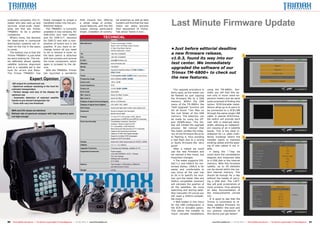
                                                                                                                                                                                    •	Just before editorial deadline
  The bottom line is that the
Trimax TM6800+ is just what
                                           to do is remove a cover on
                                           the back (which is attached
                                                                                       Tel	+86-755-21636899                                                                         a new firmware release,                                                    1
we were looking for. The me-               with two screws) and remove
                                                                                       Fax	+86-755-21636879
                                                                                       E-mail	sales@trimaxtec.net
                                                                                                                                                                                    v1.0.3, found its way into our
ter definitely allows speedy               the tuner component, which
satellite antenna alignment                again is screwed to the de-                 Website	www.trimaxtec.net                                                                    test center. We immediately
and is a valuable aid in the               vice.                                       Model	TM-6800+
                                                                                                                                                                                    upgraded the software of our
hunt for errors and flaws.                    With the TM6800+ Trimax                  Type	                                 Handheld Satellite Meter for         /        or

The Trimax TM6800+ has                     has launched a wonderful                    	                                         /                                                  Trimax TM-6800+ to check out
                                                                                       Tuner	Exchangeable                                                   Tuner (Tested Device)
                                                                                                                                                                                    the new features.
                                                                                                                                                    /

                          Expert Opinion                                               Frequency range	                      920-2150MHz (              /   )
                                                                                       Input Level	                          -80 to -20dB
      ASI output for professional use
                                                                                       Input Impedance	                      75 Ώ
     - Spectrum analyzer assisting in the hunt for
                                                                                       Power out	                            13/18V (       /       )
+    unknown transponders
     - Perfect design and size of the display for                                      Ku/C-band	Selectable
                                                                                                                                                                                       The upgrade procedure is
                                                                                                                                                                                    fairly easy, as the meter can
                                                                                                                                                                                                                      using the TM-6800+. Nor-
                                                                                                                                                                                                                      mally you will find this op-
     optimum use                                                                       Min. level in	                        About 35 dBµV (noise)                                  be flashed by just copying        tion only in much more ex-
     - Automatic detection of selected satellite
                                                                                                                                                                                                                                                               2
                                                               Vitor Martins Augusto   Max level in	                         About 90 dBµV                                          the firmware file to a USB        pensive meters and we were
     thanks to pre-stored transponder list                          TELE-satellite
                                                                                       Display of signal level (analogue)	   dB on LCD/Monitor                                      memory. Within the USB            quite surprised of finding this
                                                                      Test Center
     - Tuner with very low threshold                                     Portugal
                                                                                       Display of signal level (digital)	    C/N, BER, FEC, MER                                     menu of the TM-6800+ the          option. SCR/Unicable instal-
                                                                                       SAT-Finder	                           Sound and light alarm when upon signal lock            “Soft Upgrade” function will      lations allow up to 8 users to
     BER and C/N values are identical                                                  Keyboard	                             Numeric keypad with backlight,                         list all found *.bin files on     be connected to a SCR-LNB
–    Refresh rate of spectrum analyzer with high frequency span                        	                                     allows use at night                                    the root folder of the USB        through the same single LNB
     not high enough                                                                   Display	                              4.3 inch TFT LCD screen (16:9), allows                 memory. The selection can         cable. A special SCR/Unica-
                                                                                       	                                     reproduction of MPEG2 and MPEG4 channels               be made by using the UP-          ble switch will provide each
                                                                                       Extra functionality	                  Constellation analyzer, Spectrum                       and DOWN-keys. The OK-            user with a reserved band-
                                                                                       	                                     analyzer, Stream output by ASI
                                                                                                                                                                                    Key will initiate the upgrade     width, allowing an independ-
                                                                                       	                                     CI+ compatible, CAM Interface
                                                                                       	                                     Recording and reproduction of TV channels              process. We noticed that          ent viewing of all 4 satellite
                                                                                       	                                     Capture and browsing of pictures                       the meter verifies the integ-     bands. This is the ideal in-
                                                                                       	                                     Capture of OSD and signal strength                     rity of the firmware file prior   stallation for i.e. older multi-
                                                                                       	
                                                                                       	
                                                                                                                             Supports multiple OSD languages
                                                                                                                             Supports SCR (Unicable)
                                                                                                                                                                                    to flashing it, thus avoiding     family buildings where the               3
                                                                                                                                                                                    a bad flash due to a wrong        installer wants to maintain
                                                                                       Output	                               Audio and video input/output (S-VIDEO, HDMI)
                                                                                                                                                                                    or faulty firmware file. Very     existing cables and the pass-
                                                                                       DiSEqC	                               1.0, 1.1, 1.2, USALS
                                                                                                                                                                                    good!                             ing of new cables is not vi-
                                                                                       Upgrade Functions	                    Firmware and Settings, editable on PC                     After a reboot we could        able.
                                                                                       Supplied Accessories	Power-supply                                                            use the new firmware and             • Using the “.”-key we
                                                                                       	                    (100-240V/50/60Hz 14.5V, 1.5Amp)
                                                                                                                                                                                    we noticed a few minor, but       could store the constellation
                                                                                       	                    12V Car-charger
                                                                                       	                    Softbag with neckstrap
                                                                                                                                                                                    important changes:                diagram and measured data
                                                                                       	A/V-Cable                                                                                      • The meter supports DiS-      to a USB disk or the internal
                                                                                       Battery	                              Fast charge LI-ION battery (1950mA),                   EqC-1.2 and USALS for mo-         memory. With this firmware
                                                                                       	                                     can last around 3 hours                                torized dishes. USALS is far      update, up to 20 datasets
                                                                                       Weight	                               0.6 Kg                                                 easier and comfortable to         can be stored within the me-
                                                                                                                                                                                    use, since all the user has       ters internal memory. This
                                                                                                                                                                                    to do is to specify his loca-     should be enough for a day
                                                                                                                                                                                    tion and the meter (like any      without the hassle of carry-             4
                                                                                                                                                                                    USALS compatible receiver)        ing a USB disk. The CAPT-
                                                                                                                                                                                    will calculate the position of    Key will grab screenshots of
                                                                                                                                                                                    all the satellites. No more       most screens, thus allowing
                                                                                                                                                                                    searching and storing satel-      an easy documentation of
                                                                                                                                                                                    lites manually! Of course you     the measurements carried
                                                                                                                                                                                    will need a USALS-compati-        out.
                                                                                                                                                                                    ble motor.                           It is good to see that the
                                                                                                                                                                                       • Well hidden in the menu      Trimax is committed to re-
                                                                                                                                                                                    for the LNB configuration is      lease updated firmware for
                                                                                                                                                                                    the SCR or Unicable option.       the TM-6800+ this soon and
                                                                                                                                                                                    This allows the installer to      our positive impression of
                                                                                                                                                                                    check unicable installations      this device just got better!


90    TELE-satellite International — The World‘s Largest Digital TV Trade Magazine — 04-05/2012 — www.TELE-satellite.com                                                                                                   www.TELE-satellite.com — 04-05/2012 — TELE-satellite International — The World‘s Largest Digital TV Trade Magazine   91

Trimax tm6800+

  • 1.
    TEST REPORT Digital TV Signal Meter TRIMAX TM-6800+ • Exclusive feature: ASI output that usually only comes with professional signal meters • Another treat: CAM that even accepts CI+ smartcards • Perfect for feed hunters thanks to spectrum analyzer • Fast and easy satellite search with the help of pre-stored transponder data for virtually all positions • Automatic NIT access for satellite names 78 TELE-satellite International — The World‘s Largest Digital TV Trade Magazine — 04-05/2012 — www.TELE-satellite.com www.TELE-satellite.com — 04-05/2012 — TELE-satellite International — The World‘s Largest Digital TV Trade Magazine 79
  • 2.
    TEST REPORT Digital TV Signal Meter Genie in a Box 04-05/2012 Trima x TM-6800+ All the features you need, plus profes sional extras like ASI and spectrum displa y www.TELE -satellite.com/ TELE- satell ite-1205/eng/tr imax. pdf If we had to give a catchy name to the new Trimax flag- ship it would be ‘Genie in a Box’. It’s small, yet can do almost anything you want it to do. The new Trimax signal meter arrived in a stylish box which is kept close with two magnets – now that’s some- thing new! Once opened we discovered the meter itself, packed in a protective soft- bag made of nylon, a mains charger, a vehicle charger, an RCA A/V cable as well as a neckstrap. Let’s start with the high- quality protective bag which we found extremely con- venient. Taylor-made for the TM6800+ it can be used to carry the meter on the neck using the available strap. Lateral flaps are available to keep the display readable even in direct sunlight. More often than not signal meters that appear neat and tiny on marketing material turn out to be much bulkier than expected, so that sin- gle-hand operation quickly loses much of its appeal. As far as the Trimax6800+ is concerned, however, we can happily confirm that an aver- age sized hand is big enough to hold the meter – and use it, too. We know that many installers are not too happy with neckstraps, so this tar- get group in particular will appreciate the meter’s con- venient size. And if that alone does not make your heart beat high- er, just have a closer look at the connection options of the new Trimax meter: Apart from the obligatory HF input on the top side of the box, you will also find the A/C socket as well as an ASI connection, a feature that is absolutely unique for sig- nal meters in this segment. Even many top-of-the-range 80 TELE-satellite International — The World‘s Largest Digital TV Trade Magazine — 04-05/2012 — www.TELE-satellite.com
  • 3.
    refresh rate simplydoes not dible sound. Could we have keep up with signal changes. asked for more? If you’re done with the Of course it can always spectrum a simple touch of happen that the same tran- the ‘Menu’ button will bring sponder configuration is you back to the main menu. used on two different but We went ahead with the con- neighbouring satellite posi- stellation diagram. tions so that it makes sense Before the meter can dis- to call up a channel of the re- play that diagram you have quired satellite on the display to select either a pre-stored to do some cross-checking channel or the current fre- and verification. quency. In our case the set- In case none is available on tings list was still empty, the channel list we recom- which is why we chose the mend you do a transponder current frequency which we search. had selected with the marker It is here that the NIT func- in the spectrum mode. tion of the Trimax TM6800+ The constellation diagram comes into play and shows can display both QPSK and its full worth. As soon as a 8PSK modulations, with the signal is locked the current 8PSK modulation being di- satellite name pops up on vided up into nine squares the display, which means rather than eight segments installers know right away forming a circle. The QPSK which satellite the antenna modulation is shown cor- is pointing to, even if iden- rectly with four squares. tical transponder data are Constellation diagrams are used in different positions. created rapidly and with a We should emphasise that similar performance as in the NIT feature comes by no our reference unit. means as standard for most The following important meters and is a valuable information is shown on the aid when it comes to mak- professional meters only of- • SAT settings you can move a marker screen: indicates the transponder We wanted to find out what day installation situations. ing sure you’ve hit the right fer ASI as an additional op- • Angle calculation along the x-axis, which dis- • Frequency performance in relation to it takes to perfectly align an As soon as a signal is locked spot. tion. • Memory functions plays the frequency value. • Symbol rate background noise. According antenna with the help of the the bars change their colour To call up the TV picture on The bottom side of the de- • System configuration With this user concept it is • Polarisation to Trimax, one of the upcom- meter and so we tested two from red to green and the the display you need to be in vice sports a USB interface, • USB options possible at any time to find • Modulation ing firmware updates for the very different scenarios: AS- meter generates a sound the main menu and press an HDMI output, the power In order to perform an ini- out the signal level of a se- • Satellite name TM6800+ will address and TRA 19.2E as an example for that changes in pitch as the the ‘Menu’ button. The me- socket for external power tial quick test we hooked the lected frequency and to initi- • MER solve that issue. one of Europe’s most popu- reception quality increases ter then switches to playback supply (12V) and a common LNB cable from one of our ate a scan starting from the • C/N All data gathered from the lar and powerful satellites, (or decreases). The signal mode and behaves more or interface for CAMs with full antennas (aligned towards marked frequency position. • BER constellation function can be and HISPASAT 30.0W as an performance is always given less like any ordinary satel- CI+ compatibility – another ASTRA 19.2E) to the meter This is a very useful fea- • FEC saved onto a connected USB example for a satellite with in dBµV as well. lite receiver. exclusive feature in this price and selected ‘Spectrum ana- ture if you need to align your • Two bar diagrams with storage medium by pressing lots of DVB-S2 transponders If you prefer to use a dif- Using the ‘Up’ and ‘Down’ segment! The CI+ socket is lyzer’ in the main menu. antenna to a more exotic signal quality and signal level the ‘Point’ button. If you pre- and a critical reception situ- ferent transponder you can button you can zap up and protected by a plastic flap It was only a matter of orbital position: Instead of given in percent fer the data to be stored in ation with a 60cm antenna, either select it from the down the channel list or you on the back side, which also seconds until the spectrum having to pre-edit the tran- What did make us stop the device’s internal memo- particularly when it comes to settings list (if pre-stored) can use the numeric keypad hides the battery pack which was created on the display, sponder list all you need to short was the fact that the ry you need to press ‘F4’ in- LNB skew. or you can manually key in to select a channel number. can easily be changed when- showing a span of 1250 MHz. do is move the marker to a display invariably present- stead. The constellation dia- Using the ‘SAT finder’ the required parameters. If you want to access the ever required. In order to speed up spec- peaked signal within the dis- ed identical values for MER gram can be redrawn at any function is child’s play, most- Once the signal is detected channel list all you need to Pressing the ‘On’ button trum refresh rates the fol- played spectrum. and C/N, even though the time with a simple touch of ly thanks to the pre-installed and locked you can initiate a do is press the ‘OK’ button. for two seconds powers up lowing frequency spans are We truly appreciated the two parameters should be the ‘Up’ button. settings list, which includes san covering that particular The currently showing chan- the signal meter, and af- available: 1250 MHz (full fact that the Trimax TM6800+ measured independently. After that, press the ‘Menu’ at least one transponder for transponder only. nel stays on the display in a ter approximately 15 sec- span), 200 MHz, 100 MHz, 50 locks a signal within a mere MER stands for Modulation button once to move back to virtually all relevant satellite It does not take more than small window and you can onds it is ready to take your MHz and 32 MHz. The setting second, provided the marker Error Ratio and indicates the the frequency/channel op- positions. a few minutes with the Tri- swiftly select a channel on commands. The main menu can be changed loop-wise is placed on a valid tran- relationship between aver- tion and a second time to call So in most cases all you max TM6800+ to find ASTRA the list and switch to that boasts a neat design and we with the ‘F1’ function key. sponder. Pressing the ‘OK’ age signal performance and up the main menu again. have to do is select the de- 19.2E and HISPASAT 30.0W. channel. did not even need to consult When in spectrum mode button will start a scan that average error performance The next option we tested sired satellite in the first Using the pre-defined satel- In case you’re wondering the manual to find all the the arrow buttons of the lists all channels in a matter within a constellation. was the ‘SAT finder’ function menu item and you can lite list you only need to se- whether the ‘Left’ and ‘Right’ functions we were looking signal meter take over very of seconds – a real treat for In other words, the MER and to this end we hooked quickly go about antenna lect the corresponding sat- buttons also have a dedi- for. A total of eight options useful functions: Using the feed hunters as well! value is a figure that corre- one of our 60cm offset an- alignment. ellite and then choose a Ku cated function in playback are available from the main ‘Up’ and ‘Down’ buttons you Unfortunately, the spec- lates with the size of a cloud tennas to the Trimax meter. The signal strength and band transponder. mode: Use them to switch menu: can scroll along the y-axis trum analyzer does not re- within a square of the con- That antenna is mounted signal quality bars on the Next, we started to slowly between TV and radio recep- • Spectrum analyzer which displays the signal lev- act swiftly enough to allow stellation diagram. C/N, on onto a portable pole and was display are easy to read move the antenna until the tion. There is no option to • Constellation diagram el. With the ‘Left’ and ‘Right’ antenna alignment using the the other hand, is short for not aligned to a specific sat- even from a distance, which meter indicated a hit with quickly jump back and for- • SAT finder buttons, on the other hand, spectrum display only. The Carrier to Noise Ratio and ellite at the time. is an enormous aid in every- green bars and a clearly au- ward within the channel list 82 TELE-satellite International — The World‘s Largest Digital TV Trade Magazine — 04-05/2012 — www.TELE-satellite.com www.TELE-satellite.com — 04-05/2012 — TELE-satellite International — The World‘s Largest Digital TV Trade Magazine 83
  • 4.
    1 2 1. Our tests were performed with a portable 60cm offset antenna. 2. A small motorised antenna was used to test the meter’s DiSEqC 1.2 functions. 84 TELE-satellite International — The World‘s Largest Digital TV Trade Magazine — 04-05/2012 — www.TELE-satellite.com
  • 5.
    1 6 11 with its hundreds or poten- types for each satellite and tially thousands of entries, start a channel search on and there are no favourites an entire satellite or a single lists, so be prepared to wise- transponder. ly manage your channel list In our opinion a channel and stick to the bare essen- search across an entire sat- tials – unless you are of the ellite should be avoided by severely patient kind. all means, as it is very tire- Since it took much less some and time-consuming time than expected to align at a later stage to switch be- our antenna to the two sat- tween channels on a list that ellite positions we had some boasts hundreds or thou- 2 7 12 time to spare, so why not sands of entries, but no fa- have a closer look at the vourites options (see above). built-in tuner and its thresh- What does make sense is old capabilities? saving one free-to-air chan- We pointed our 60cm an- nel per polarisation level and tenna towards ASTRA 2D satellite, so that you can and tried to catch BBC HD quickly and easily verify if on transponder 49 (10847 V your antenna alignment is 23000-8/9 QPSK). According successful. to ASTRA/SES our location While such a settings list in Portugal would require an can of course be compiled antenna with at least 120cm on the meter itself, it is a job for successful reception. that takes some time and ef- Nonetheless, we achieved fort. Luckily, there is an eas- 3 8 13 reliable and stable reception ier way: On its website www. of BBC HD with only half that trimaxtec.net the manufac- diameter. Quite frankly, we turer provides the ‘Satellite had no idea how that came list edit tools for TM6xxx se- about, but it does speak ries Meter/Finder.rar’ file via volumes about the recep- its Download Center. tion quality of the Trimax What you get is a settings TM6800+ tuner. editor, which at this stage The fourth menu item of only comes with an installa- the meter includes a set- tion wizard in Chinese. But tings editor, which allows to rest assured, all you need to edit the satellite list, define do is click the right button DiSEqC parameters and LNB during the installation pro- 4 9 14 1. Main menu of the TM6800+. 2. Spectrum analyzer: The marker was moved to 11914 MHz and the signal was locked automatically after one second. An FEC of 9/0 was identified. 3. The spectrum can be moved vertically with the ‘Up’ and ‘Down’ buttons. 4. In the spectrum a signal scan can be initiated from the frequency selected with the marker. 5. Constellation diagram with additional signal information. An 8PSK modulation can be seen here. 6. With the ‘SAT finder’ function it is possible to quickly align an antenna. Thanks to the NIT function the satellite name is extracted from the NIT stream. 7. SAT finder: Signal strength peaks, signal quality doesn’t: This is a clear indication that the antenna is aligned towards the wrong 5 10 15 satellite since the transponder data don’t match. 8. Automatic search: The Trimax TM6800+ is a fast performer. 9. List of default satellites which can be edited as required. 10. Satellite configuration. DiSEqC 1.0/1.1/1.2 protocols are supported. 11. DiSEqC 1.2 menu: It is possible to rotate the antenna, set limits and save the current position. 12. Automatic scan of an entire satellite. 13. Search progress. Only pre-stored transponders are scanned and there is no blind scan function. 14. Angle calculator: Based on the current position the Trimax TM6800+ is able to determine the correct angle values. 15. Saved constellation diagrams: All measured parameters can be saved for future documentation. 86 TELE-satellite International — The World‘s Largest Digital TV Trade Magazine — 04-05/2012 — www.TELE-satellite.com www.TELE-satellite.com — 04-05/2012 — TELE-satellite International — The World‘s Largest Digital TV Trade Magazine 87
  • 6.
    16 cess, and the software itself rent firmware version of the We pressed the ‘Menu’ a default reset is required Here are some of the spe- find active transponders and is in English. TM6800+ does not allow to button once more to call up or to display the currently cial features we particularly then hunt for transmissions It’s interesting that the specifically enter the saved the main menu and to acti- installed software, which appreciated: The large dis- on those frequencies. For a settings list is not trans- position in the DiSEqC mo- vate the ‘Memory functions’ in our test unit was version play is something we will job like that the refresh rate ferred to the meter with an tor and it is not possible to from there. 1.0.3. never want to do without of the spectrum at the full RS-232 or USB cable, but us- directly move to saved posi- Use this feature to save From the main menu we again. Even HD channels are 1250 MHz frequency span is ing regular files which can be tions. and retrieve constellation proceeded with calling up presented crisply and with more than sufficient. stored on any USB storage The next menu item is diagrams complete with all ‘USB options’, which consist amazing details. Just like in the constellation medium. called ‘Angle calculation’ and corresponding measurement of a menu offering the fol- The small overall size of mode it is possible to create DiSEqC options can be ac- can be used for convenient values such as BER, C/N, lowing options: the device makes the display a screenshot of the current cessed through the satellite calculation of Azimuth and frequency, symbol rate, FEC • Record: Starts a record- appear even bigger. The on- spectrum by simply pressing 17 list menu item. Here you can elevation values based on and polarisation. Here again ing if the user has set chan- screen menu is designed to the ‘Point’ button. This is a chose either DiSEqC 1.0/1.1 the entered geographic posi- it is possible to export data nel, date, start time and make full use of the display very helpful function when it or DiSEqC 1.2, and we tested tion. directly onto a connected duration of the recording be- size as well, which means comes to professional docu- how the meter controlled our It’s part of our job to never USB storage medium by forehand. the font size is ideal and all mentation and acceptance of small motorised setup that take a manufacturer’s word pressing the ‘Point’ button. • Playback: Lists record- texts and information are an installation job. After all, moves a 45cm antenna. for anything, so we double- Back in the main menu ings available from the con- easy to read at a glance. nothing beats substantiated The available functions checked the calculations for we proceeded with having a nected USB storage medium Another feature that en- evidence in case of queries include EAST/WEST move- a number of setups and are closer look at ‘System con- and plays back the selected hances user-friendliness is a at a later stage. ment of the antenna, saving pleased to say that all re- figuration’, where settings recording. backlit keypad – the illumi- The undisputed highlight of the current position in re- sults for elevation, Azimuth such as language (English, • Picture View: Displays nation can be turned on or of the TM6800+ is the BNC lation to the active satellite, and polarisation (LNB skew) Spanish, German, Italian, JPEGs that are saved on the off and comes very handy at connection on the upper setting of limits and going turned out to be absolutely Turkish), TV aspect ratio, storage medium. night or in dark rooms. side. It can be used to put to zero position. The cur- correct. time zone or display bright- • Soft Upgrade: Updates In everyday use the spec- out the current transpond- ness can be adjusted. the device’s firmware. trum analyzer did not react er as an ASI stream at any 18 21 The channel list editor can • Parameter Upgrade: Up- quickly enough to be used as time. The ASI protocol is also be launched from here grades the settings list that a real-time spectrum. Only used for the transmission of and CAMs inserted into the we pre-arranged on the PC if you reduce the frequency DVB transponders, irrespec- CI slot can be configured. using the editor software. span to 50 MHz the spec- tive of the modulation type. We tried out a range of CAMs To get a well-founded trum’s refresh rates reach Broadcasting equipment (Seca, Viaccess and Dragon- impression of the Trimax real-time performance. such as demodulators, mod- CAM) and the meter identi- TM6800+ we exclusively and Nonetheless, the spectrum ulators, multiplexers, head- fied all of them correctly and intensively tried it out for mode sports a number of ends etc. generally come offered the corresponding several days. After a short highly useful features: You with ASI inputs and outputs. module menus. Last but not familiarisation period we might think that a marker For a signal meter like the least, the ‘System configu- were able to quickly align that can be used to scroll TM6800+ to offer such an ration’ section of the main antennas as well as detect to a transponder in order to output is nothing short of a menu must be accessed if and also solve problems. then initiate a signal scan on miracle as it allows to quickly that frequency is nothing out diagnose flaws whenever a 19 22 24 of the ordinary. signal does not arrive prop- In actual fact, however, erly at a particular device. only few signal meters are It is important to note at capable of correctly han- this point that professional dling such a feature and systems cannot be re-pro- the Trimax TM6800+ does grammed on the fly for indi- not only handle it, but per- vidual tests, so it does make forms brilliantly. Feed hunt- sense to use the TM6800+ ers in particular will love that instead to provide a device as it allows them to quickly with an ASI data steam for 16. Presentation of a saved QPSK constellation diagram with corresponding information. 17. Presentation of a saved 8PSK constellation diagram 20 23 25 with corresponding information. 18. Configuration menu of the Trimax TM6800+. 19. The channel list editor can be called up from the constellation menu. 20. USB menu of the TM6800+. 21. Recordings of the currently selected channel can be programmed for future documentation. 22. An HD channel is shown on the display of the TM6800+. 23. Additional and more detailed information can be displayed if required. 24. Once the programmed period of time has elapsed the recording is finished automatically. 25. Recordings can be played back in a dedicated small window. 88 TELE-satellite International — The World‘s Largest Digital TV Trade Magazine — 04-05/2012 — www.TELE-satellite.com www.TELE-satellite.com — 04-05/2012 — TELE-satellite International — The World‘s Largest Digital TV Trade Magazine 89
  • 7.
    Last Minute FirmwareUpdate evaluation purposes. Any in- finally managed to propel a little miracle box offering nal antennas as well as feed staller who also sets up and handheld meter into the pro- a whole range of profes- hunters will find that the new services small-scale head- fessional league. sional features, with the ASI meter can easily become ends will find the Trimax The TM6800+ is currently output shining particularly their equipment of choice. TM6800+ to be a perfect available in two versions, for bright. Installers of commu- Talk about ‘Genie in box’… companion. DVB-S/S2 (our test meter) What’s more, the demand and for DVB-C/T. Versions TECHNICAL for head-ends in communal for DVB-T2 and with a com- DATA distribution systems will re- bination of tuners are in the Manufacturer Trimax Technology Limited, Room 1016-1019 Max Smart Centre, main on the rise in the years pipeline. If you want to ex- to come. change tuners all you need 21 Bao Xing Road, Bao‘an, 518133 Shenzhen, China • Just before editorial deadline The bottom line is that the Trimax TM6800+ is just what to do is remove a cover on the back (which is attached Tel +86-755-21636899 a new firmware release, 1 we were looking for. The me- with two screws) and remove Fax +86-755-21636879 E-mail sales@trimaxtec.net v1.0.3, found its way into our ter definitely allows speedy the tuner component, which satellite antenna alignment again is screwed to the de- Website www.trimaxtec.net test center. We immediately and is a valuable aid in the vice. Model TM-6800+ upgraded the software of our hunt for errors and flaws. With the TM6800+ Trimax Type Handheld Satellite Meter for / or The Trimax TM6800+ has has launched a wonderful / Trimax TM-6800+ to check out Tuner Exchangeable Tuner (Tested Device) the new features. / Expert Opinion Frequency range 920-2150MHz ( / ) Input Level -80 to -20dB ASI output for professional use Input Impedance 75 Ώ - Spectrum analyzer assisting in the hunt for Power out 13/18V ( / ) + unknown transponders - Perfect design and size of the display for Ku/C-band Selectable The upgrade procedure is fairly easy, as the meter can using the TM-6800+. Nor- mally you will find this op- optimum use Min. level in About 35 dBµV (noise) be flashed by just copying tion only in much more ex- - Automatic detection of selected satellite 2 Vitor Martins Augusto Max level in About 90 dBµV the firmware file to a USB pensive meters and we were thanks to pre-stored transponder list TELE-satellite Display of signal level (analogue) dB on LCD/Monitor memory. Within the USB quite surprised of finding this Test Center - Tuner with very low threshold Portugal Display of signal level (digital) C/N, BER, FEC, MER menu of the TM-6800+ the option. SCR/Unicable instal- SAT-Finder Sound and light alarm when upon signal lock “Soft Upgrade” function will lations allow up to 8 users to BER and C/N values are identical Keyboard Numeric keypad with backlight, list all found *.bin files on be connected to a SCR-LNB – Refresh rate of spectrum analyzer with high frequency span allows use at night the root folder of the USB through the same single LNB not high enough Display 4.3 inch TFT LCD screen (16:9), allows memory. The selection can cable. A special SCR/Unica- reproduction of MPEG2 and MPEG4 channels be made by using the UP- ble switch will provide each Extra functionality Constellation analyzer, Spectrum and DOWN-keys. The OK- user with a reserved band- analyzer, Stream output by ASI Key will initiate the upgrade width, allowing an independ- CI+ compatible, CAM Interface Recording and reproduction of TV channels process. We noticed that ent viewing of all 4 satellite Capture and browsing of pictures the meter verifies the integ- bands. This is the ideal in- Capture of OSD and signal strength rity of the firmware file prior stallation for i.e. older multi- Supports multiple OSD languages Supports SCR (Unicable) to flashing it, thus avoiding family buildings where the 3 a bad flash due to a wrong installer wants to maintain Output Audio and video input/output (S-VIDEO, HDMI) or faulty firmware file. Very existing cables and the pass- DiSEqC 1.0, 1.1, 1.2, USALS good! ing of new cables is not vi- Upgrade Functions Firmware and Settings, editable on PC After a reboot we could able. Supplied Accessories Power-supply use the new firmware and • Using the “.”-key we (100-240V/50/60Hz 14.5V, 1.5Amp) we noticed a few minor, but could store the constellation 12V Car-charger Softbag with neckstrap important changes: diagram and measured data A/V-Cable • The meter supports DiS- to a USB disk or the internal Battery Fast charge LI-ION battery (1950mA), EqC-1.2 and USALS for mo- memory. With this firmware can last around 3 hours torized dishes. USALS is far update, up to 20 datasets Weight 0.6 Kg easier and comfortable to can be stored within the me- use, since all the user has ters internal memory. This to do is to specify his loca- should be enough for a day tion and the meter (like any without the hassle of carry- 4 USALS compatible receiver) ing a USB disk. The CAPT- will calculate the position of Key will grab screenshots of all the satellites. No more most screens, thus allowing searching and storing satel- an easy documentation of lites manually! Of course you the measurements carried will need a USALS-compati- out. ble motor. It is good to see that the • Well hidden in the menu Trimax is committed to re- for the LNB configuration is lease updated firmware for the SCR or Unicable option. the TM-6800+ this soon and This allows the installer to our positive impression of check unicable installations this device just got better! 90 TELE-satellite International — The World‘s Largest Digital TV Trade Magazine — 04-05/2012 — www.TELE-satellite.com www.TELE-satellite.com — 04-05/2012 — TELE-satellite International — The World‘s Largest Digital TV Trade Magazine 91