A "Translation" is a type of 2D transformation in computer graphics. It basically involves moving one point to another point based on certain. This presentation covers the topic in brief.
TRANSLATION – A2D TRANSFORMATION
MADE BY:
SOUMADIP DEY
BWU/BCA/18/096
DEPT. OF COMPUTATIONAL SCIENCE
COMPUTER GRAPHICS (BCA503)
2.
WHAT IS TRANSLATION?
In 2D computer graphics , translation is a basic type of linear transformation in which the
object/pixel is moved to a certain point on the cartesian plane by adding or deducting to its
current x and y coordinate values.
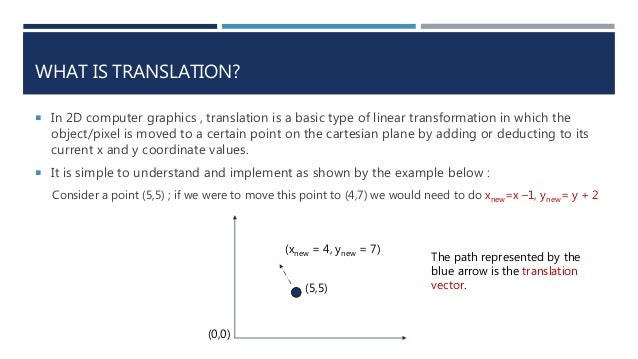
It is simple to understand and implement as shown by the example below :
Consider a point (5,5) ; if we were to move this point to (4,7) we would need to do xnew=x –1, ynew= y + 2
(xnew = 4, ynew = 7)
(5,5)
(0,0)
The path represented by the
blue arrow is the translation
vector.
3.
HOW DO WEREPRESENT TRANSLATION ?
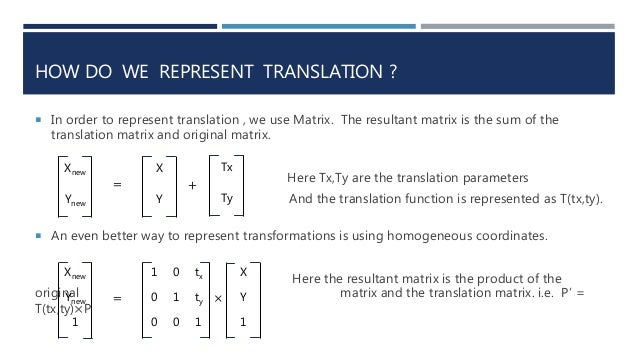
In order to represent translation , we use Matrix. The resultant matrix is the sum of the
translation matrix and original matrix.
Here Tx,Ty are the translation parameters
And the translation function is represented as T(tx,ty).
Xnew
Ynew
X
Y
Tx
Ty
= +
An even better way to represent transformations is using homogeneous coordinates.
Here the resultant matrix is the product of the
original matrix and the translation matrix. i.e. P’ =
T(tx,ty)×P
Xnew
Ynew
1
1 0 tx
0 1 ty
0 0 1
X
Y
1
×
=
4.
TRANSLATION OF ASHAPE
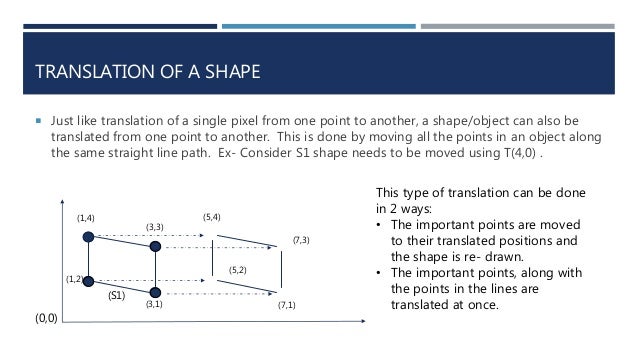
Just like translation of a single pixel from one point to another, a shape/object can also be
translated from one point to another. This is done by moving all the points in an object along
the same straight line path. Ex- Consider S1 shape needs to be moved using T(4,0) .
(1,2)
(0,0)
(3,1)
(1,4)
(3,3)
(S1)
This type of translation can be done
in 2 ways:
• The important points are moved
to their translated positions and
the shape is re- drawn.
• The important points, along with
the points in the lines are
translated at once.
(7,1)
(7,3)
(5,4)
(5,2)
5.
CONCLUSION
TRANSLATION IS THESIMPLEST FORM OF 2D GEOMETRIC TRANSFORMATION AVAILABLE AND IT’S
HOMOGENEOUS COORDINATE FORM CAN BE MULTIPLIED EASILY ALONG WITH OTHER
TRANSFORMATIONS TO CREATE COMPOSITE TRANSFORMATIONS.
THANK YOU