MyCampus Student Self-Service Tools


Request Transcript
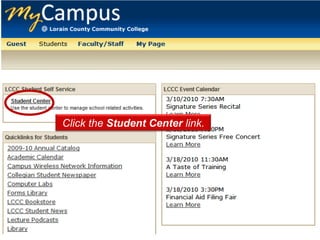
Click the Student Center link.
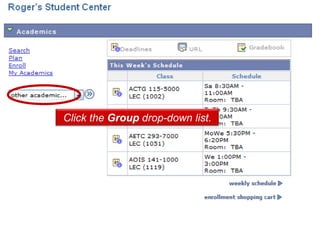
Click the Group drop-down list.
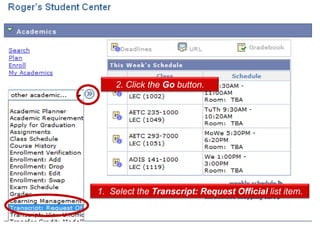
2. Click the Go button.


1. Select the Transcript: Request Official list item.
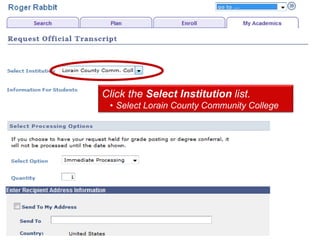
Click the Select Institution list.
 • Select Lorain County Community College
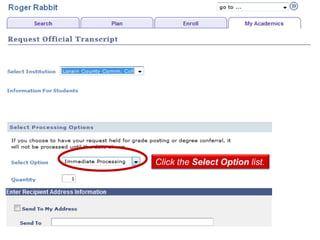
Click the Select Option list.
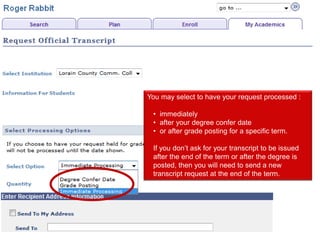
You may select to have your request processed :

 • immediately
 • after your degree confer date
 • or after grade posting for a specific term.

 If you don’t ask for your transcript to be issued
 after the end of the term or after the degree is
 posted, then you will need to send a new
 transcript request at the end of the term.
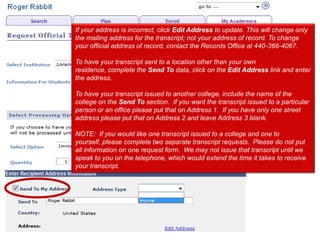
If your address is incorrect, click Edit Address to update. This will change only
the mailing address for the transcript; not your address of record. To change
your official address of record, contact the Records Office at 440-366-4067.

To have your transcript sent to a location other than your own
residence, complete the Send To data, click on the Edit Address link and enter
the address.

To have your transcript issued to another college, include the name of the
college on the Send To section. If you want the transcript issued to a particular
person or an office please put that on Address 1. If you have only one street
address please put that on Address 2 and leave Address 3 blank.

NOTE: If you would like one transcript issued to a college and one to
yourself, please complete two separate transcript requests. Please do not put
all information on one request form. We may not issue that transcript until we
speak to you on the telephone, which would extend the time it takes to receive
your transcript.
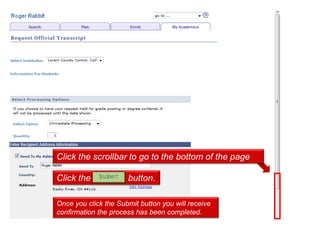
Click the scrollbar to go to the bottom of the page

Click the Submit button.

Once you click the Submit button you will receive
confirmation the process has been completed.

Transcript Request in MyCampus

  • 1.
    MyCampus Student Self-ServiceTools Request Transcript
  • 2.
    Click the StudentCenter link.
  • 3.
    Click the Groupdrop-down list.
  • 4.
    2. Click theGo button. 1. Select the Transcript: Request Official list item.
  • 5.
    Click the SelectInstitution list. • Select Lorain County Community College
  • 6.
    Click the SelectOption list.
  • 7.
    You may selectto have your request processed : • immediately • after your degree confer date • or after grade posting for a specific term. If you don’t ask for your transcript to be issued after the end of the term or after the degree is posted, then you will need to send a new transcript request at the end of the term.
  • 8.
    If your addressis incorrect, click Edit Address to update. This will change only the mailing address for the transcript; not your address of record. To change your official address of record, contact the Records Office at 440-366-4067. To have your transcript sent to a location other than your own residence, complete the Send To data, click on the Edit Address link and enter the address. To have your transcript issued to another college, include the name of the college on the Send To section. If you want the transcript issued to a particular person or an office please put that on Address 1. If you have only one street address please put that on Address 2 and leave Address 3 blank. NOTE: If you would like one transcript issued to a college and one to yourself, please complete two separate transcript requests. Please do not put all information on one request form. We may not issue that transcript until we speak to you on the telephone, which would extend the time it takes to receive your transcript.
  • 9.
    Click the scrollbarto go to the bottom of the page Click the Submit button. Once you click the Submit button you will receive confirmation the process has been completed.