2 December 2005
Audrey Sanctorum
Brenda Ordoñez Lujan
Web & Information Systems Engineering (WISE) Lab
Vrije Universiteit Brussel
Brussels, Belgium
Towards End-User-Driven
Generation of IoT Applications
Audrey Sanctorum - Department of Computer Science - asanctor@vub.be 2
June, 2024
End User Development
eSPACE - Audrey Sanctorum (2020)
Across multiple devices…
… and things.
Audrey Sanctorum - Department of Computer Science - asanctor@vub.be 3
June, 2024
Poor UI Designs
Audrey Sanctorum - Department of Computer Science - asanctor@vub.be 4
June, 2024
Solution
End-User-Driven Generation of IoT Applications
Audrey Sanctorum - Department of Computer Science - asanctor@vub.be 5
June, 2024
UI Generation Flowchart
2 December 2005
Audrey Sanctorum - Department of Computer Science - asanctor@vub.be 7
June, 2024
Expert Review
6 Design Experts
On a scale of 1 to 7 with 1 strongly disagree and 7 strongly agree.
6 6
5
7
6
7
P1 P2 P3 P4 P5 P6
I was able to create the two
applications quickly using this system.
6
5
6 6 6 6
P1 P2 P3 P4 P5 P6
The organization of information on
the system screens was clear.
𝟓
𝟔
satisfied with the
generated app designs
Valuable feedback
recommending adding:
• Theme (colours)
• Previews
• Different UI elements
Audrey Sanctorum - Department of Computer Science - asanctor@vub.be 8
June, 2024
Conclusion & Future Work
User-friendly IoT App Generation
eSPACE module Flexible & Extensible
Limited UI elements
Limited UI designs
Fast & Efficient Clear & Organised
Limited UI design rules

Towards End-User-Driven Generation of IoT Applications (EICS2024)

  • 1.
    2 December 2005 AudreySanctorum Brenda Ordoñez Lujan Web & Information Systems Engineering (WISE) Lab Vrije Universiteit Brussel Brussels, Belgium Towards End-User-Driven Generation of IoT Applications
  • 2.
    Audrey Sanctorum -Department of Computer Science - asanctor@vub.be 2 June, 2024 End User Development eSPACE - Audrey Sanctorum (2020) Across multiple devices… … and things.
  • 3.
    Audrey Sanctorum -Department of Computer Science - asanctor@vub.be 3 June, 2024 Poor UI Designs
  • 4.
    Audrey Sanctorum -Department of Computer Science - asanctor@vub.be 4 June, 2024 Solution End-User-Driven Generation of IoT Applications
  • 5.
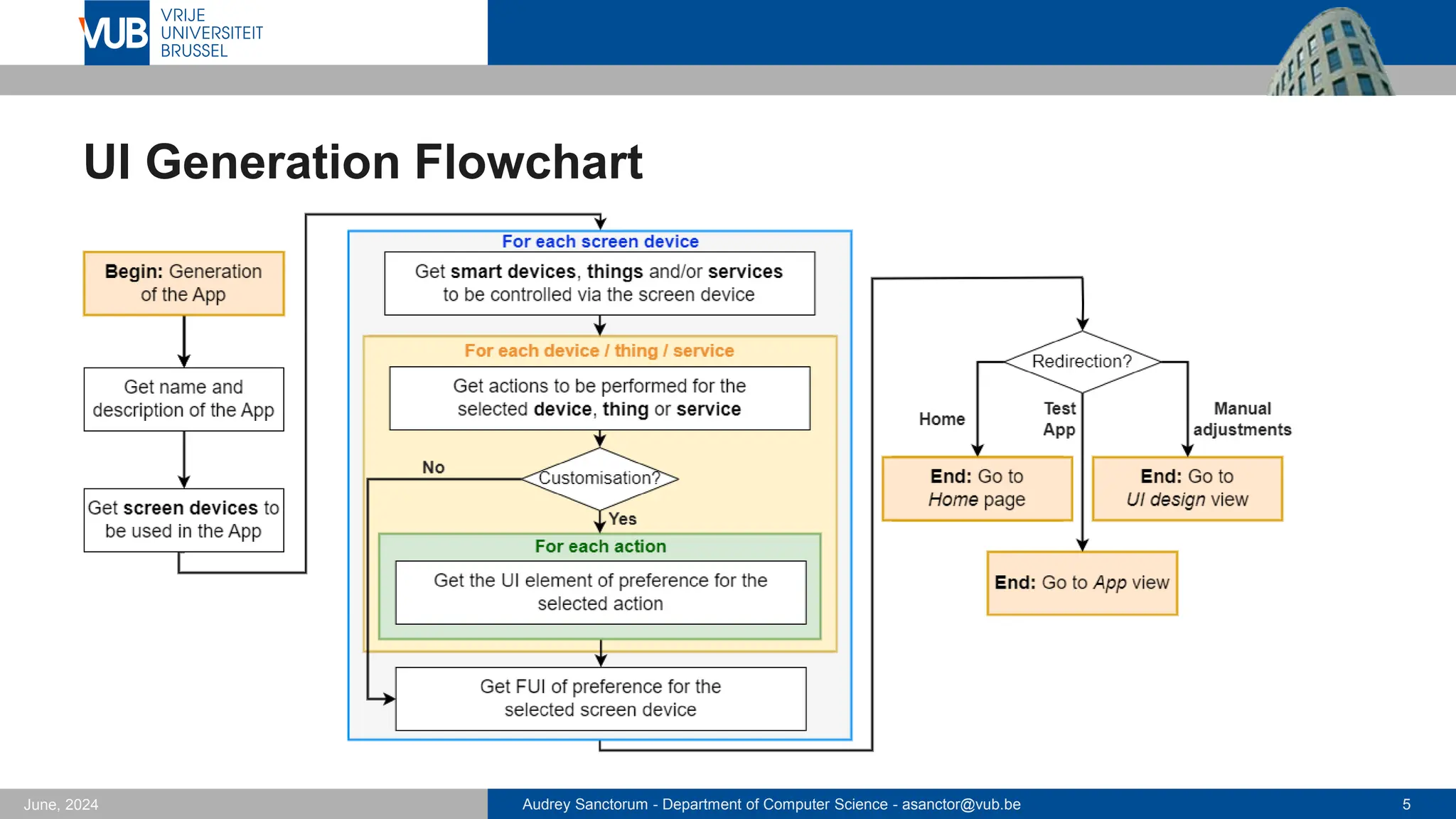
    Audrey Sanctorum -Department of Computer Science - asanctor@vub.be 5 June, 2024 UI Generation Flowchart
  • 6.
  • 7.
    Audrey Sanctorum -Department of Computer Science - asanctor@vub.be 7 June, 2024 Expert Review 6 Design Experts On a scale of 1 to 7 with 1 strongly disagree and 7 strongly agree. 6 6 5 7 6 7 P1 P2 P3 P4 P5 P6 I was able to create the two applications quickly using this system. 6 5 6 6 6 6 P1 P2 P3 P4 P5 P6 The organization of information on the system screens was clear. 𝟓 𝟔 satisfied with the generated app designs Valuable feedback recommending adding: • Theme (colours) • Previews • Different UI elements
  • 8.
    Audrey Sanctorum -Department of Computer Science - asanctor@vub.be 8 June, 2024 Conclusion & Future Work User-friendly IoT App Generation eSPACE module Flexible & Extensible Limited UI elements Limited UI designs Fast & Efficient Clear & Organised Limited UI design rules

Editor's Notes

  • #2 Hello, my name is Audrey Sanctorum, I am a post doc at the Vrije Universiteit Brussel. Today I will present the paper ‘Towards End-User-Driven Generetion of IoT Applications’, which I co-authored with Brenda, a former Master Student of mine.
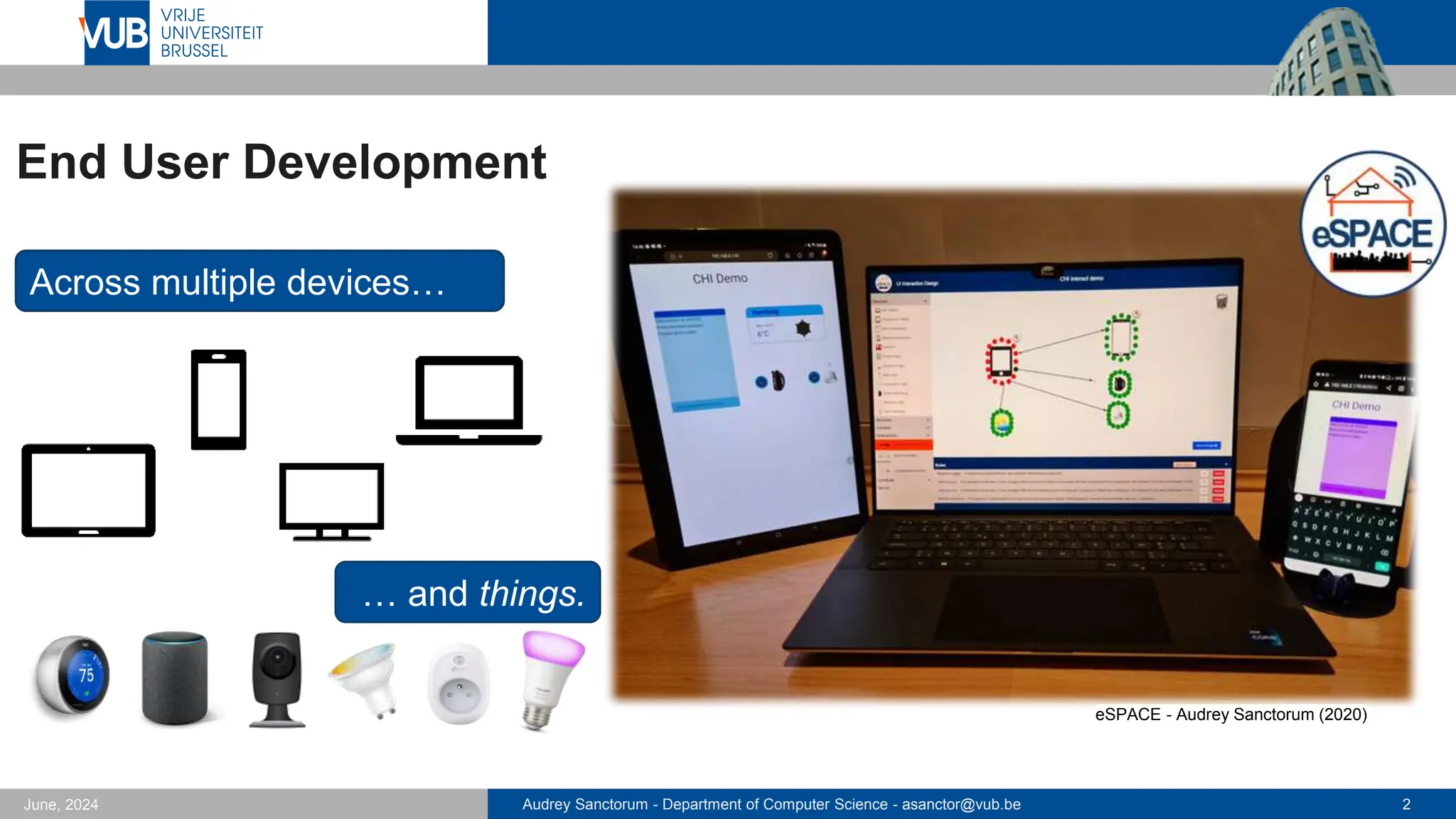
  • #3 My research has always revolved around the end user development research domain with a focus on helping non-technical users create cross-device and IoT applications. So applications that can be used across multiple devices and which can control these devices as well as diverse Internet of Things objects or things. In order to allow end users to create such applications, during my PhD I developed the eSPACE end-user authoring tool which allows users to create applications using trigger-action rules (using the if-this then that notation or a more visual one as shown on the laptop screen here, where users can link different elements to create rules), in contrast too many existing tools in the domain, eSPACE also allows users to create their own user interfaces, as you see here we see an interface with some to-do list, the weather and some buttons to control the waterboiler and light.
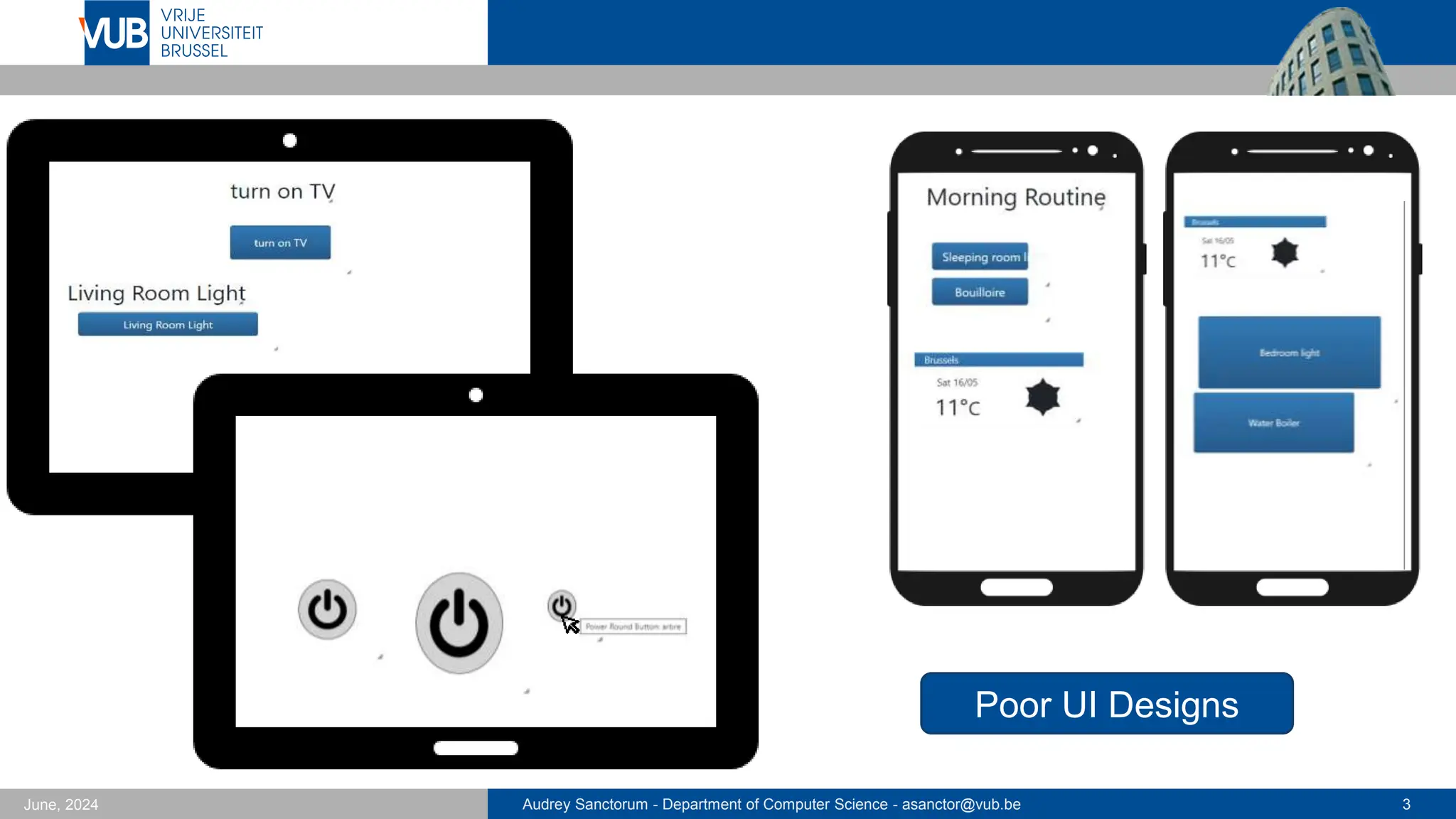
  • #4 Now… After a user study of eSPACE we noticed that, of course since end users do not have any particular skills in designing user interfaces, the created applications were quite poorly designed. As you can see here some examples of duplicated labels, buttons without any label, labels going outside of a button, different button sizes as well as elements that are not aligned…
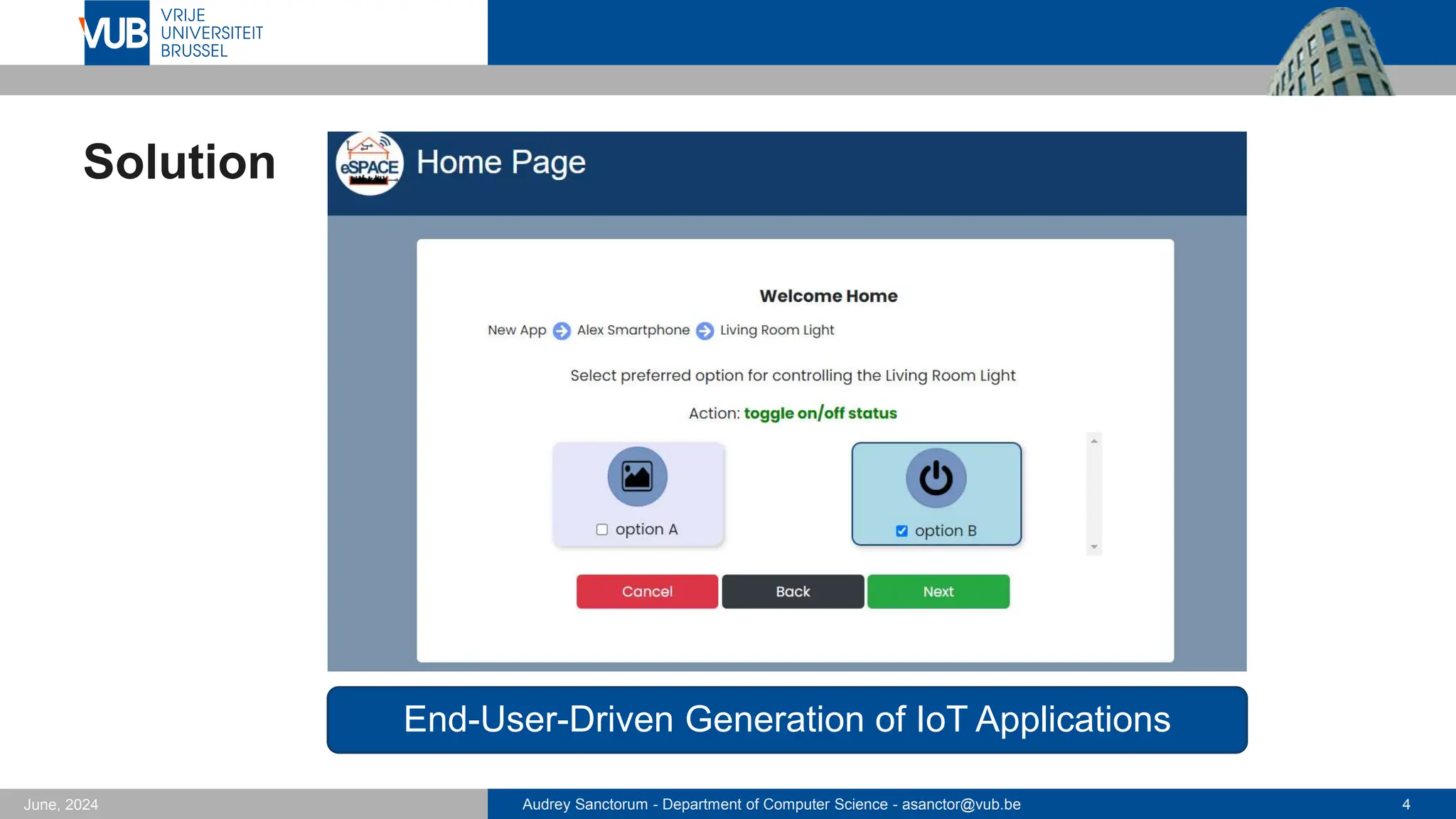
  • #5 To cope with this we came up with the idea of generating the applications for the end users… Therefore, we developed an extension module to the eSPACE end-user authoring tool, which based on the user’s requirements generates the application for them.
  • #6 In the paper, you will find the UI generation flowchart as well as some design choices we made regarding the implementation, since I do not have time to go into details now, I refer back to the paper for technical details. So here to shortly explain the diagram, the user will be taken through a series of loops where they will first select for which device they want to create the app, what devices or things they want to control with it, and then which type of user interface elements they want to use to do so… This will I think be much clearer with a small demo video:
  • #7 First, we click the “generate app” button, then we enter the name and a description for the application. Now we decide for which device we want to create the app, in this case I selected the “living room tablet”. And now I select what I want to control with this app, here I say I want to control the smart TV, living room light and I also want to see the weather. Here I select what actions I want to be able to do with the smart TV, so I choose toggling it on and off. I want to select the buttons for this action … so here I select a button with a custom image that I select… at tv icon. Now for the weather I want to see the weather of Brussels and here I let the module decide for me how this will be shown… For the living room light I want different buttons to turn it on and off so I select this… Here you see that I have different button choices, but in the end I choose to go back and let the module decide for me… So now we see the final result, we have two options with either the elements stacked under each other or in two columns, I select the first option Finally, now I can either go back to the home page, choose to do some modifications or test the application, which I will do Since it is suppose to be used on a tablet I put the browser in tablet view. So you can see here is the weather at the moment of filming the demo, we can test the buttons as well via a virtual home shown here on the right. So when I click the turn on button of the living room light, it turns on, now I click turn off so you see that it turns off. Same for the toggle button of the TV which can be used for both turning it on or off.
  • #8 In order to get a first assessment of our app generation module, we performed an expert review with 6 design experts. We let them create two applications and then asked them a number of questions, for example here we asked if creating the two apps was done quickly, which they all agreed. They also agreed on the statement that all information was well-organised and clear. Notice here that most participants selected 6 instead of 7. Some of them told us that for example the “turn” label was unclear as they thought the lamp would physically turn, instead of simply “turn on or off”, which was an interesting discovery for us… (that’s exactly why we do such user studies) Overall 5 on the 6 participants were satisfied with the generated designs, one that was not satisfied selected a number of different colours which did not match so they were not satisfied with the final look of the app. So this brings us on the feedback and recommendations we got. To avoid this, the designer proposed to allow users to select a “theme” rather than separate colours so that they would not end up with a colour combination that does not match. Many participants also recommended to add a preview when selected the different options. We also were suggested to add more UI elements as for now, the UI elements are quite simplistic.
  • #9 To conclude, we presented a user-friendly IoT application generation module which is fast and efficient, showing the information in a clear and organised manner. Since it is an extension of eSPACE it is flexible and extensible, but due to the fact that it is an eSPACE extension it also comes with its limitations, so it has a limited set of UI elements. So in the future we want to work on this as well as adding new design possibilities, as for now we only propose two design options either vertically stacked or all elements divided in two columns. Here we could add new rules for placing the different elements depending on their type and functionality for example.