• This summative assessment can be completed in class or at
any other convenient location.
• Students are required to complete this task using digital tools
and ensure to submit in an acceptable format, e.g. .docx, .pdf,
.pptx, or as advised by your assessor.
• Please use the following formatting guidelines to complete
this assessment task:
• Font Size: 12; Line Spacing: Double; Font Style: Times New
Roman
• Assessment activities can be completed either in real
workplace environment or in a simulated environment such as
your classroom. In both cases, appropriate evidence of the
assessment activities must be provided.
Instruction to Assessors:
https://zealtutors.com/2021/05/11/assuming-your-organization-
was-awarded-the-following-tender-atm-id-naa-rft-20xx-105/
• You must assess student’s assessment according to the
provided Marking Criteria.
• You must complete and record any evidence related to
assessment activities including role-plays and presentations
using appropriate forms which must be attached with student
assessment submission.
• You must provide students with detailed feedback within 10
working days from submission.
Assuming your organization was awarded the following tender:
ATM ID: NAA RFT 20xx/1058
Agency: National Archives of Australia
Category: 81110000 – Computer services
Close Date & Time: 15-Aug-20xx 2:00 pm (ACT Local Time)
Publish Date: 15-Jul-20xx
Location: ACT Canberra
ATM Type: Request for Tender
APP Reference: NAA20XX-1
Multi Agency Access: No
Panel Arrangement: No
Description:
A service provider is being sought for the technical upgrade of
the Archives’ website Destination: Australia. In order to ensure
the best value for money and optimal functionality (for the
website and related exhibition interactive) going forward, it is
necessary for the website to be transferred from a proprietary
CMS to a commonly available CMS (including, but not limited
to, an Open Source CMS).
https://4assignmenthelpers.com/assuming-your-organization-
was-awarded-the-following-tender-atm-id-naa-rft-20xx-105/
The website will enable the National Archives of Australia to
collect user contributed data about the photographic collection
featured on the site. The interface must be modern, engaging
and user-friendly, designed to meet the needs of people of all
ages, and differing levels of computer and English literacy. The
website must interact successfully with an exhibition interactive
via an existing API. There is an option for hosting, maintenance
and support services to be provided from contract execution
until 31 December 2019.
Timeframe for Delivery: November/December 20XX with a
possible extension of up to 3 years for hosting and maintenance.
http://assignmenthelp4u.com/assuming-your-organization-was-
awarded-the-following-tender-atm-id-naa-rft-20xx-105/
The Requirement
The National Archives of Australia (Archives) (the Customer) is
responsible under the Archives Act 1983 (Cth) for the
preservation and storage of Commonwealth records, including
the archival resources of the Commonwealth.
This procurement request relates to the website redevelopment
and hosting and maintenance services for website Destination:
Australia. The current website is located at
https://www.destinationaustralia.gov.au
The photographs showcased on this website are part of the
Immigration Photographic Archive (Series A12111). This
collection comprises more than 22,000 black-and-white and
colour photographs taken by government photographers between
1946 and 1999 to record the arrival and settlement of migrants
in Australia after World War II. The photographs were used in
newspapers, magazines, posters, brochures and displays to
promote Australia as a prosperous welcoming nation to potential
migrants and to reassure the Australian public that new migrants
would readily settle into the Australian way of life.
https://yourassignmenthelpers.com/assuming-your-organization-
was-awarded-the-following-tender-atm-id-naa-rft-20xx-105/
In 2014, Destination: Australia was upgraded to encourage users
to upload their own photographs and stories to share their
migrant experience, further adding rich personal context to the
Archives’ collection. These ‘Feature Stories’ are also available
(via an API) in a ‘Globe’ interactive in the Archives’ exhibition
A Ticket to Paradise?, which is touring nationally from April
2016 to September 2019.
Required
• Redevelopment of existing website Destination: Australia
• Software to be either open source or common-use proprietary
Content Management System (CMS)
• One website prototype round, with testing and feedback
• Website testing including content review
• Final revisions
• Final testing and bug fixes
• Website handover
• Final documentation including website style guides, master
templates, admin user guidelines, technical specifications. This
must be written in English with clear instructions for non-
technical experts to operate the CMS.
Optional
• External hosting and ongoing support with a service level
agreement (3 years).
• Updates and post implementation changes in response to user
feedback
Required deliverables
API compatibility
• The website must continue to work with the pre-existing API
linking the content with an exhibition interactive
• The administrator account to the Destination: Australia CMS
must have a check box function that allows the administrator to
select which feature stories will be published through the API to
the exhibition interactive.
• The API must be able to draw all user-added content in the
selected feature stories, including photographs, through to the
linked exhibition interactive.
http://rushprimeessays.com/2021/05/11/assuming-your-
organization-was-awarded-the-following-tender-atm-id-naa-rft-
20xx-105/
• The website will support sourcing and storing its data from the
Archives’ API, according to API calls provided by the Archives,
to ensure valid, up to date data is displayed on the website.
• The website must successfully GET, POST and PUT and
DELETE data using the API within agreed timeframes.
• Data from the API contains a mix of official records and user
generated content
• API compatibility and function must be maintained at all times
until December 2019
• The successful supplier will be provided with further
documentation on the API.
Accessibility/compatibility
• All elements of the solution must comply with the relevant
Australian Government mandatory criteria including meeting
Web Content Accessibility Guidelines (WCAG) 2.0 – to Level
AA. Refer to the Australian Government Digital Transformation
Office website for more information –
https://www.dto.gov.au/standard/design-guides/
• Any online forms should include identifying mandatory fields,
error validation and error suggestion on input fields (e.g.
include @ for email addresses), as per the WCAG 2.0 Level
AA.
• All elements of the solution must display consistently across
popular Windows, Macintosh and Linux browsers including
Internet Explorer (V9 up), Firefox, Chrome, Safari and Opera.
• Code to ensure ease of use and accessibility from desktop,
tablet and smart phone / mobile platforms using responsive
interface design.
Privacy, security and intellectual property
• Data captured in online forms should reflect the Australian
Privacy Principles (which unify the National Privacy Principals
and the Information Privacy Principles) and security obligations
of (ASD). Including any updates to how data should be stored
according to the Australian Privacy Principles or security
obligations.
• Website security appropriate to support administration
module, members’ pages, API developer key hidden and enables
encryption of stored data including indexes and registered
user’s personal details e.g. email address.
Hosting
• The website application must be built to be hosted externally
to the Archives’ IT infrastructure considering data sovereignty,
data protection controls (see the Australian Government
Protective Security Policy Framework (PSPF) and Information
Security Manual) and compliance with the Privacy Act.
• Please see ‘Optional Deliverables’ for information on the
optional hosting component of this procurement process.
Aesthetic design
• The aesthetic design of the website must be maintained for the
upgraded website.
• Style guides and other necessary components will be provided
to the successful Supplier.
Content Management System
• The website must support formats to enable crowd sourced
data and display of collection data including images.
• The solution must provide an easy way for administrators to
view and record user-generated activity across the site from
within the administration CMS.
• The website’s supporting CMS or web application must have
both a design and source interface enabling recognition of user
contributed data and has the ability to manage full user
administration and content moderation in-house. This must
include tasks such as updating all content (including
descriptions on collection photographs), monitoring and
moderating user-generated data and where necessary, blocking,
removing, editing and/or extracting user-generated data.
• Administration module must be secure
• Administration page displays name (as well as screen ID) of
contributing users
• The solution must support Google Analytics for website
visitor statistics and pre-scripted database reports for listing and
exporting all user generated content.
• The website must comply with records management
requirements to enable the website to be archived with user-
generated data extracted (e.g. XML, CSV format and image
formats) with relevant references for future re-purposing.
Email notifications to administrator
• Email notification to be sent to
[email protected]
when a user adds a comment, tag, person, location to a
collection photograph, or adds a feature story. Notifications
should include a hyperlink to the new content in the CMS
administrator account.
• Email notification to be sent to
[email protected]
when a user reports comments or other content. Notifications
must include a direct hyperlink to the reported content.
Public user login
• Website users have the option of browsing and searching the
website without registration. Anyone wishing to input data to
the website must register and login with a unique email address
and passphrase.
• Existing usernames and passwords must carry over to the
redeveloped site
• Profile must include an online form for users to contact
Archives to remove or edit their user-added content
• Optional: ability for the user to ‘link’ together multiple stories
that they have contributed by the user, or to allow sorting by tag
with user name. The published feature story page would display
a link to take viewers to the related stories.
Navigation
• Website navigation must align with pre-existing information
architecture for Destination: Australia.
• Breadcrumbs must be added to the top of each page to enhance
user navigation
Search function
• Ability to query search and return search results, this will be
supported through the API calls, and the interface will need to
be configured to return merged search requirements and apply
search parameters (e.g. filters) for the Discovering Anzacs
interface.
• Required: free text feature stories and comments contributed
by users must be posted back to the API to become searchable
on Destination: Australia.
• User-added tags on stories must be posted back through the
API to become searchable.
• User-added locations on stories must be searchable and
clickable to sort stories by place
• Adding terms to the search parameters should refine the search
(it currently expands the result field)
• The website must include all images within the A12111
series/collection, and search results must display all relevant
images. Check that search picks up all photographs in collection
(or that Destination: Australia captures all images in A12111) –
e.g. searching for “Petrus Mouwmans” does not give a result,
although it is listed in Record Search: A12111, 1/1963/14/9.
• Results distinguish between feature stories, collection items
and user added photographs.
• Results able to be sorted by category (feature story, collection
item) or by date range (earliest to latest or vice versa)
• Image title to appear at the top of the results display
(currently “view this photograph”).
• Hit highlighting – the search interface will support search
term (e.g. keyword, name) hit highlighting using bold or similar
Updates/fixes to ‘add your story’ form (see Attachment B for
images of changes)
• All free text fields must allow users to copy and paste text
from other programs.
• The fields ‘Year’, ‘Country of origin’, ‘Theme’ and ‘Photos’
(at least one) must be compulsory
Adding images
• ‘Add photos’ must be moved to location above ‘Add Your
Story’
• When adding an image from the website, the citation and
image caption must also be imported. The citation (e.g. NAA:
A12111, 2/1969/4A/18) must be locked in, with the option for
the user to personalise the caption.
• When adding an image from the website, users must be able to
search by collection control symbols and non-consecutive key
words.
• When adding an image from the website, user has the ability
to refine the search using date range.
• When adding an image from the website, clicking ‘enter’ after
typing keyword must initiate the search (currently takes user to
blank error page).
• ‘Add image from website’ search must return all results
available through Destination: Australia.
• The website must perform checks to ensure the user is
uploading an accepted size and format (e.g. png, jpeg) and
provide error messages where limits are exceeded.
• Optional: add a new function to allow users to select from
their ‘Favourite’ images to add to their story.
• Optional: users able to crop images before they upload.
Add your story
• ‘Add your story’ text field must allow simple formatting:
paragraph breaks, italics.
• Must display Latin diacritics (accents e.g. acute é, grave è,
circonflex ê, caron c; dots e.g. diaeresis ë; cedilla ç, ogonek a).
Feature story publishing process
• Selecting ‘Preview’ must save a copy that allows for the user
to return and edit content. This draft copy must not be publicly
available at this stage.
• Selecting ‘Save your story’ (on contribution form page) or
‘Save and submit’ (on preview page) submits the story to the
CMS and publishes the feature story on the live website
• Stories are automatically published on submission.
Feature story display page (front end)
• On published feature stories, viewers must be able to click on
categories (year, country, tags, locations) to bring up a list of
any other stories/images with the same user-added metadata
• Must display Latin diacritics (accents e.g. acute é, grave è,
circonflex ê, caron c; dots e.g. diaeresis ë; cedilla ç, ogonek a)
• Must display simple formatting: line breaks, italics
• Images must be able to open for larger display in a lightbox,
with accompanying caption
• Optional: where a user has added a photograph from the
website, the image on the published feature story page links
back to the image display page for the particular record (i.e.
with metadata, comments, tags etc).
• Optional: if users add data to ‘location’, map with tagged
locations should be shown on published feature story page.
Record display page (front end)
• Required: create ‘order record’ button that takes the user
through to PhotoSearch result for that image and the associated
‘ordering images’ text box.
Home page
• Optional: preview of ‘Feature stories’ displays feature stories
at random
Testing
• The Supplier must outline the project plan and team roles and
the testing strategy and plan. It should also include any
handover files and documentation to be provided for
implementation.
• Extensive testing will be required prior to the website launch.
This includes iterative testing during development,
implementation of changes and subsequent re-testing.
• On implementation and handover, the Destination: Australia
website should be fully functional and populated with relevant
content and data. As part of the website handover, training
sessions and support documentation for nominated
administrators will also be required.
• Testing must include success of API calls to/from the
Destination: Australia website for creation, deletion, updates
and retrieval of data in conjunction A Ticket to Paradise?
‘globe’ interactive.
• The National Archives will determine when the website is
ready to be launched and the date. However, the supplier must
be able to meet the nominal launch date of 25 October 2016.
Acknowledgements
The banner (visible on all pages) must include:
• Destination: Australia web tile
• Multi-agency logo for the National Archives of Australia and
the Department of Immigration and Border Protection (to be
provided by the Customer)
• The following tagline:
• ‘The National Archives acknowledges the support of the
Department of Immigration and Border Protection for the
Destination: Australia website’, with the text ‘Department of
Immigration and Border Protection’ hyperlinked to the website
https://www.border.gov.au/
Progress meetings and reports
The successful Supplier will be required to:
• Attend the project kick-off meeting (face-to-face /
teleconference)
• Attend regular updates at an agreed time and day, at least
fortnightly.
• Attend scheduled project meetings to report at key milestones
or deliverables throughout the project.
• Communicate any issues which may impact agreed project
tolerances as they occur
• Attend project wrap-up meeting with final deliverables and
website handover including report/documentation.
• Work collaboratively with National Archives staff and
Suppliers to meet expectations and resolve issues.
Optional
• Should the option of host services be agreed to by the
Customer, the Supplier must attend ongoing support meetings or
maintain regular communication as required, up until the end of
the contract.
Project Management Requirements
• The Archives will nominate a Project Manager who will be
responsible for liaison with the successful supplier in relation to
management of the contract and overall service delivery.
• Potential Suppliers must specify all staff and subcontractors
proposed to complete the work.
• The successful Supplier will be required to nominate a Project
Manager as the primary point of contact for the Archives. This
person will be responsible for the management of the contract
as a whole and for liaison with the Archives’ Project Manager.
After delivery
The Supplier must commit to providing defect resolution in the
post-launch period, up to 30 April 20xx, in response to Archives
user testing and feedback. In this period the Supplier must
complete full internal testing and bug fixes before any solution
release for publishing.
Optional deliverables
Hosting and maintenance
The Potential Supplier should provide a response for an optional
service level agreement, to host the website externally to the
Archives’ infrastructure, provide ongoing maintenance and
support until 31 December 2019.
• The website application must be hosted externally to the
Archives’ IT infrastructure taking into account data
sovereignty, data protection controls (see the Australian
Government Protective Security Policy Framework (PSPF) and
Information Security Manual) and compliance with the Privacy
Act.
• Quality of service requirement in order to maintain its
effectiveness; available 99% of up time annually and has
appropriate back-up (with equal features to meet above-
mentioned data security and privacy requirements) scalability
options and recovery processes.
• Response time for issues to be negotiated and confirmed with
the successful Supplier.
Capability to function with future API’s
Potential to link with National Archives’ and external sources’
collections and data, via API’s that may be developed in the
future.
Complete the following:
Conduct project authorisation activities
Outline the project authorisation procedure for your project:
• What are the governance arrangements in regards to project
delegation?
• What are the critical review points during the project?
• Who is the appropriate authorising authority/s?
The Australian Government Digital Transformation Office
• What will they expect to see at the review points?
INSERT ANSWER HERE
Define project scope
Using your Project Charter as the basis of the project, use the
template below to define in detail the Scope Statement and the
Scope Management Plan for the project. This should be
extensive including both product and project scope and give a
shared understanding of the desired project outcomes and how
the project will be delivered.
Project Scope Statement:
Background information about the Project
Insert name of the project background information about the
company and how the Project was triggered and its intended
outcome.
Insert the benefits to be achieved from the project and the title
of the person responsible for tracking and measuring the
achievement of the benefits.
Scope Definition
The scope of the plan covers the following aspects:
• in scope
The scope of the plan does not cover the following aspects:
• out of scope
Objectives and Success Criteria
From this plan the key objectives and success criteria are to:
• insert objectives and success criteria – they must be SMART
Deliverables
• insert deliverables
Acceptance Criteria
• insert the conditions required to be met before the deliverables
are accepted
Constraints
List of all known constraints:
• insert constraints
Assumptions
The following assumptions have been made:
• insert assumptions
Dependencies
• insert dependencies
Outstanding Issues
• insert outstanding issues for Project Manager resolution
The proposed project methodology consists of X separate
phases, as described below:
• insert phase number and names
Work Breakdown Structure
• Insert diagram of the WBS
Project Scope Management Plan:
Roles and responsibilities:
Who has authority and responsibility for scope management?
List the stakeholders who are responsible for collecting or
contributing to scope requirements and confirming scope
Major milestones
What are the milestone dates for: collection of scope
requirements, detailed definition of scope and approval of the
scope baseline?
How is scope defined and documented?
Describe how scope is defined and documented
Scope Change Control Process
Describe the process to change scope including the title of the
person/s responsible for evaluating and approving scope change.
You may include a diagram for clarity .
Scope Validation
Describe how the scope will be validated including the title of
the person responsible for scope validation .
Scope Acceptance
Who is responsible for accepting the final project deliverable
and approves acceptance of project scope
Scope Performance measurement
Who is responsible for managing scope performance and
measurement? When is scope performance measurement to be
done?
————————————————————————————
———————————————–
Element 3: Manage project scope control processes
• List the main factors that could trigger requests for scope
change on your project.
INSERT ANSWER HERE
• A stakeholder has requested a change in scope to the project.
Fill out the Change Request Form below (or provide your own
template), which shows the impacts to time, cost and quality.
Note: there must be impacts to time and cost as this change
request will be referred to in other following course units.
Change Control Form
Project Name
Requested By: Requested Date:
Change Request Number: Unique identifier
Description of the change: A detailed description of the change
being requested
Reason for the change: The trigger or reason the change is
needed
Alternative solutions:
Any other options
Impact Assessment Description of impact
Cost The $ impact of the change – either positive or negative
Time The time impact of the change – including number of
hours/days and the knock-on impact to the other tasks in the
project
Resources The resources required or no longer required and the
impact to the project e.g.: resource availability
Quality
The impact to quality of the change
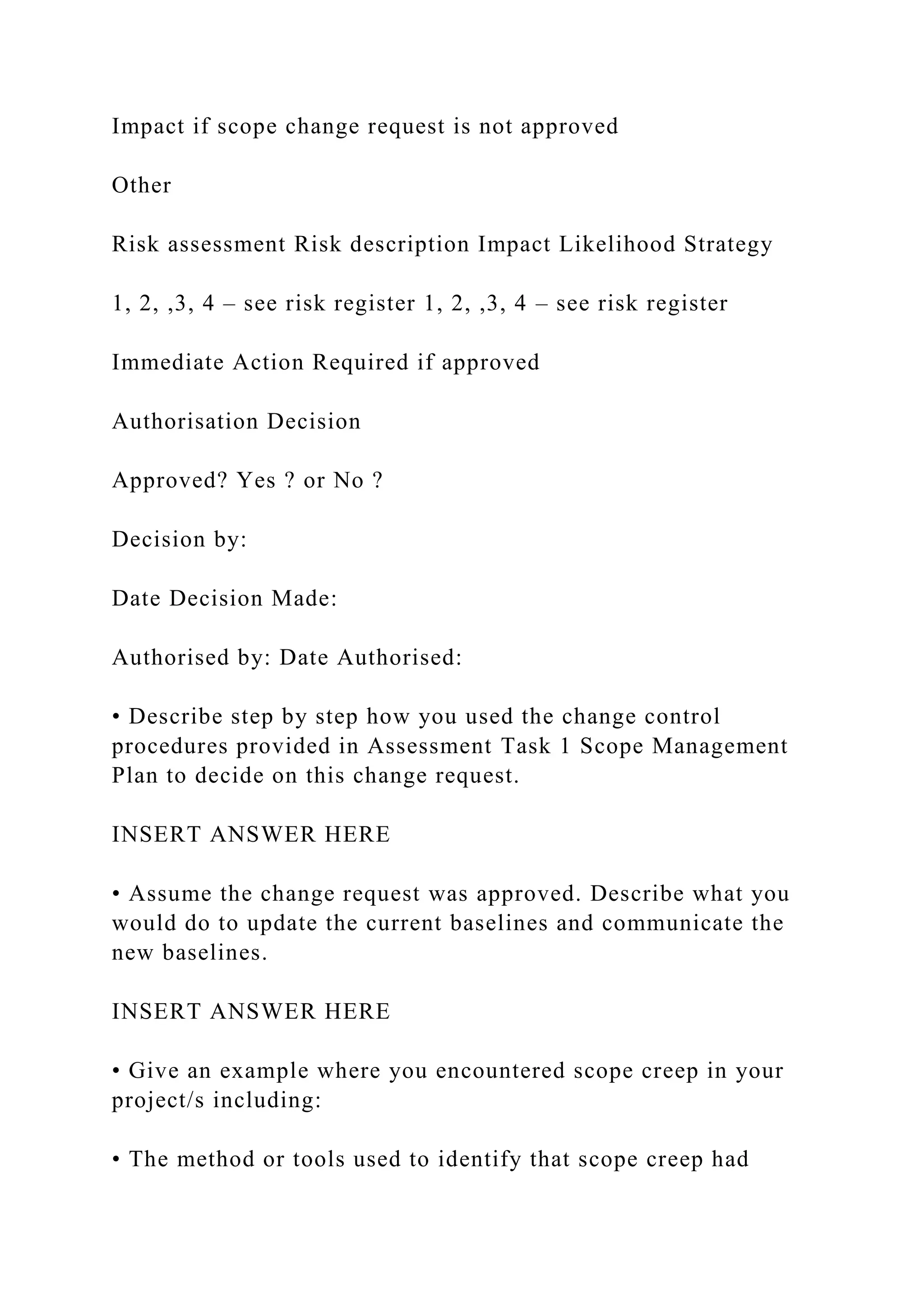
Impact if scope change request is not approved
Other
Risk assessment Risk description Impact Likelihood Strategy
1, 2, ,3, 4 – see risk register 1, 2, ,3, 4 – see risk register
Immediate Action Required if approved
Authorisation Decision
Approved? Yes ? or No ?
Decision by:
Date Decision Made:
Authorised by: Date Authorised:
• Describe step by step how you used the change control
procedures provided in Assessment Task 1 Scope Management
Plan to decide on this change request.
INSERT ANSWER HERE
• Assume the change request was approved. Describe what you
would do to update the current baselines and communicate the
new baselines.
INSERT ANSWER HERE
• Give an example where you encountered scope creep in your
project/s including:
• The method or tools used to identify that scope creep had
occurred.
• What was the impact of the scope creep?
• How did you or would you handle this situation?
INSERT ANSWER HERE

• This summative assessment can be completed in class or at any .docx

  • 1.
    • This summativeassessment can be completed in class or at any other convenient location. • Students are required to complete this task using digital tools and ensure to submit in an acceptable format, e.g. .docx, .pdf, .pptx, or as advised by your assessor. • Please use the following formatting guidelines to complete this assessment task: • Font Size: 12; Line Spacing: Double; Font Style: Times New Roman • Assessment activities can be completed either in real workplace environment or in a simulated environment such as your classroom. In both cases, appropriate evidence of the assessment activities must be provided. Instruction to Assessors: https://zealtutors.com/2021/05/11/assuming-your-organization- was-awarded-the-following-tender-atm-id-naa-rft-20xx-105/ • You must assess student’s assessment according to the provided Marking Criteria. • You must complete and record any evidence related to assessment activities including role-plays and presentations using appropriate forms which must be attached with student assessment submission. • You must provide students with detailed feedback within 10 working days from submission.
  • 2.
    Assuming your organizationwas awarded the following tender: ATM ID: NAA RFT 20xx/1058 Agency: National Archives of Australia Category: 81110000 – Computer services Close Date & Time: 15-Aug-20xx 2:00 pm (ACT Local Time) Publish Date: 15-Jul-20xx Location: ACT Canberra ATM Type: Request for Tender APP Reference: NAA20XX-1 Multi Agency Access: No Panel Arrangement: No Description: A service provider is being sought for the technical upgrade of the Archives’ website Destination: Australia. In order to ensure the best value for money and optimal functionality (for the website and related exhibition interactive) going forward, it is necessary for the website to be transferred from a proprietary CMS to a commonly available CMS (including, but not limited to, an Open Source CMS). https://4assignmenthelpers.com/assuming-your-organization- was-awarded-the-following-tender-atm-id-naa-rft-20xx-105/ The website will enable the National Archives of Australia to
  • 3.
    collect user contributeddata about the photographic collection featured on the site. The interface must be modern, engaging and user-friendly, designed to meet the needs of people of all ages, and differing levels of computer and English literacy. The website must interact successfully with an exhibition interactive via an existing API. There is an option for hosting, maintenance and support services to be provided from contract execution until 31 December 2019. Timeframe for Delivery: November/December 20XX with a possible extension of up to 3 years for hosting and maintenance. http://assignmenthelp4u.com/assuming-your-organization-was- awarded-the-following-tender-atm-id-naa-rft-20xx-105/ The Requirement The National Archives of Australia (Archives) (the Customer) is responsible under the Archives Act 1983 (Cth) for the preservation and storage of Commonwealth records, including the archival resources of the Commonwealth. This procurement request relates to the website redevelopment and hosting and maintenance services for website Destination: Australia. The current website is located at https://www.destinationaustralia.gov.au The photographs showcased on this website are part of the Immigration Photographic Archive (Series A12111). This collection comprises more than 22,000 black-and-white and colour photographs taken by government photographers between 1946 and 1999 to record the arrival and settlement of migrants in Australia after World War II. The photographs were used in newspapers, magazines, posters, brochures and displays to promote Australia as a prosperous welcoming nation to potential migrants and to reassure the Australian public that new migrants would readily settle into the Australian way of life.
  • 4.
    https://yourassignmenthelpers.com/assuming-your-organization- was-awarded-the-following-tender-atm-id-naa-rft-20xx-105/ In 2014, Destination:Australia was upgraded to encourage users to upload their own photographs and stories to share their migrant experience, further adding rich personal context to the Archives’ collection. These ‘Feature Stories’ are also available (via an API) in a ‘Globe’ interactive in the Archives’ exhibition A Ticket to Paradise?, which is touring nationally from April 2016 to September 2019. Required • Redevelopment of existing website Destination: Australia • Software to be either open source or common-use proprietary Content Management System (CMS) • One website prototype round, with testing and feedback • Website testing including content review • Final revisions • Final testing and bug fixes • Website handover • Final documentation including website style guides, master templates, admin user guidelines, technical specifications. This must be written in English with clear instructions for non- technical experts to operate the CMS. Optional • External hosting and ongoing support with a service level
  • 5.
    agreement (3 years). •Updates and post implementation changes in response to user feedback Required deliverables API compatibility • The website must continue to work with the pre-existing API linking the content with an exhibition interactive • The administrator account to the Destination: Australia CMS must have a check box function that allows the administrator to select which feature stories will be published through the API to the exhibition interactive. • The API must be able to draw all user-added content in the selected feature stories, including photographs, through to the linked exhibition interactive. http://rushprimeessays.com/2021/05/11/assuming-your- organization-was-awarded-the-following-tender-atm-id-naa-rft- 20xx-105/ • The website will support sourcing and storing its data from the Archives’ API, according to API calls provided by the Archives, to ensure valid, up to date data is displayed on the website. • The website must successfully GET, POST and PUT and DELETE data using the API within agreed timeframes. • Data from the API contains a mix of official records and user generated content • API compatibility and function must be maintained at all times until December 2019
  • 6.
    • The successfulsupplier will be provided with further documentation on the API. Accessibility/compatibility • All elements of the solution must comply with the relevant Australian Government mandatory criteria including meeting Web Content Accessibility Guidelines (WCAG) 2.0 – to Level AA. Refer to the Australian Government Digital Transformation Office website for more information – https://www.dto.gov.au/standard/design-guides/ • Any online forms should include identifying mandatory fields, error validation and error suggestion on input fields (e.g. include @ for email addresses), as per the WCAG 2.0 Level AA. • All elements of the solution must display consistently across popular Windows, Macintosh and Linux browsers including Internet Explorer (V9 up), Firefox, Chrome, Safari and Opera. • Code to ensure ease of use and accessibility from desktop, tablet and smart phone / mobile platforms using responsive interface design. Privacy, security and intellectual property • Data captured in online forms should reflect the Australian Privacy Principles (which unify the National Privacy Principals and the Information Privacy Principles) and security obligations of (ASD). Including any updates to how data should be stored according to the Australian Privacy Principles or security obligations. • Website security appropriate to support administration
  • 7.
    module, members’ pages,API developer key hidden and enables encryption of stored data including indexes and registered user’s personal details e.g. email address. Hosting • The website application must be built to be hosted externally to the Archives’ IT infrastructure considering data sovereignty, data protection controls (see the Australian Government Protective Security Policy Framework (PSPF) and Information Security Manual) and compliance with the Privacy Act. • Please see ‘Optional Deliverables’ for information on the optional hosting component of this procurement process. Aesthetic design • The aesthetic design of the website must be maintained for the upgraded website. • Style guides and other necessary components will be provided to the successful Supplier. Content Management System • The website must support formats to enable crowd sourced data and display of collection data including images. • The solution must provide an easy way for administrators to view and record user-generated activity across the site from within the administration CMS. • The website’s supporting CMS or web application must have both a design and source interface enabling recognition of user contributed data and has the ability to manage full user administration and content moderation in-house. This must
  • 8.
    include tasks suchas updating all content (including descriptions on collection photographs), monitoring and moderating user-generated data and where necessary, blocking, removing, editing and/or extracting user-generated data. • Administration module must be secure • Administration page displays name (as well as screen ID) of contributing users • The solution must support Google Analytics for website visitor statistics and pre-scripted database reports for listing and exporting all user generated content. • The website must comply with records management requirements to enable the website to be archived with user- generated data extracted (e.g. XML, CSV format and image formats) with relevant references for future re-purposing. Email notifications to administrator • Email notification to be sent to [email protected] when a user adds a comment, tag, person, location to a collection photograph, or adds a feature story. Notifications should include a hyperlink to the new content in the CMS administrator account. • Email notification to be sent to [email protected] when a user reports comments or other content. Notifications must include a direct hyperlink to the reported content. Public user login • Website users have the option of browsing and searching the
  • 9.
    website without registration.Anyone wishing to input data to the website must register and login with a unique email address and passphrase. • Existing usernames and passwords must carry over to the redeveloped site • Profile must include an online form for users to contact Archives to remove or edit their user-added content • Optional: ability for the user to ‘link’ together multiple stories that they have contributed by the user, or to allow sorting by tag with user name. The published feature story page would display a link to take viewers to the related stories. Navigation • Website navigation must align with pre-existing information architecture for Destination: Australia. • Breadcrumbs must be added to the top of each page to enhance user navigation Search function • Ability to query search and return search results, this will be supported through the API calls, and the interface will need to be configured to return merged search requirements and apply search parameters (e.g. filters) for the Discovering Anzacs interface. • Required: free text feature stories and comments contributed by users must be posted back to the API to become searchable on Destination: Australia. • User-added tags on stories must be posted back through the
  • 10.
    API to becomesearchable. • User-added locations on stories must be searchable and clickable to sort stories by place • Adding terms to the search parameters should refine the search (it currently expands the result field) • The website must include all images within the A12111 series/collection, and search results must display all relevant images. Check that search picks up all photographs in collection (or that Destination: Australia captures all images in A12111) – e.g. searching for “Petrus Mouwmans” does not give a result, although it is listed in Record Search: A12111, 1/1963/14/9. • Results distinguish between feature stories, collection items and user added photographs. • Results able to be sorted by category (feature story, collection item) or by date range (earliest to latest or vice versa) • Image title to appear at the top of the results display (currently “view this photograph”). • Hit highlighting – the search interface will support search term (e.g. keyword, name) hit highlighting using bold or similar Updates/fixes to ‘add your story’ form (see Attachment B for images of changes) • All free text fields must allow users to copy and paste text from other programs. • The fields ‘Year’, ‘Country of origin’, ‘Theme’ and ‘Photos’ (at least one) must be compulsory
  • 11.
    Adding images • ‘Addphotos’ must be moved to location above ‘Add Your Story’ • When adding an image from the website, the citation and image caption must also be imported. The citation (e.g. NAA: A12111, 2/1969/4A/18) must be locked in, with the option for the user to personalise the caption. • When adding an image from the website, users must be able to search by collection control symbols and non-consecutive key words. • When adding an image from the website, user has the ability to refine the search using date range. • When adding an image from the website, clicking ‘enter’ after typing keyword must initiate the search (currently takes user to blank error page). • ‘Add image from website’ search must return all results available through Destination: Australia. • The website must perform checks to ensure the user is uploading an accepted size and format (e.g. png, jpeg) and provide error messages where limits are exceeded. • Optional: add a new function to allow users to select from their ‘Favourite’ images to add to their story. • Optional: users able to crop images before they upload. Add your story • ‘Add your story’ text field must allow simple formatting:
  • 12.
    paragraph breaks, italics. •Must display Latin diacritics (accents e.g. acute é, grave è, circonflex ê, caron c; dots e.g. diaeresis ë; cedilla ç, ogonek a). Feature story publishing process • Selecting ‘Preview’ must save a copy that allows for the user to return and edit content. This draft copy must not be publicly available at this stage. • Selecting ‘Save your story’ (on contribution form page) or ‘Save and submit’ (on preview page) submits the story to the CMS and publishes the feature story on the live website • Stories are automatically published on submission. Feature story display page (front end) • On published feature stories, viewers must be able to click on categories (year, country, tags, locations) to bring up a list of any other stories/images with the same user-added metadata • Must display Latin diacritics (accents e.g. acute é, grave è, circonflex ê, caron c; dots e.g. diaeresis ë; cedilla ç, ogonek a) • Must display simple formatting: line breaks, italics • Images must be able to open for larger display in a lightbox, with accompanying caption • Optional: where a user has added a photograph from the website, the image on the published feature story page links back to the image display page for the particular record (i.e. with metadata, comments, tags etc).
  • 13.
    • Optional: ifusers add data to ‘location’, map with tagged locations should be shown on published feature story page. Record display page (front end) • Required: create ‘order record’ button that takes the user through to PhotoSearch result for that image and the associated ‘ordering images’ text box. Home page • Optional: preview of ‘Feature stories’ displays feature stories at random Testing • The Supplier must outline the project plan and team roles and the testing strategy and plan. It should also include any handover files and documentation to be provided for implementation. • Extensive testing will be required prior to the website launch. This includes iterative testing during development, implementation of changes and subsequent re-testing. • On implementation and handover, the Destination: Australia website should be fully functional and populated with relevant content and data. As part of the website handover, training sessions and support documentation for nominated administrators will also be required. • Testing must include success of API calls to/from the Destination: Australia website for creation, deletion, updates and retrieval of data in conjunction A Ticket to Paradise? ‘globe’ interactive.
  • 14.
    • The NationalArchives will determine when the website is ready to be launched and the date. However, the supplier must be able to meet the nominal launch date of 25 October 2016. Acknowledgements The banner (visible on all pages) must include: • Destination: Australia web tile • Multi-agency logo for the National Archives of Australia and the Department of Immigration and Border Protection (to be provided by the Customer) • The following tagline: • ‘The National Archives acknowledges the support of the Department of Immigration and Border Protection for the Destination: Australia website’, with the text ‘Department of Immigration and Border Protection’ hyperlinked to the website https://www.border.gov.au/ Progress meetings and reports The successful Supplier will be required to: • Attend the project kick-off meeting (face-to-face / teleconference) • Attend regular updates at an agreed time and day, at least fortnightly. • Attend scheduled project meetings to report at key milestones or deliverables throughout the project. • Communicate any issues which may impact agreed project
  • 15.
    tolerances as theyoccur • Attend project wrap-up meeting with final deliverables and website handover including report/documentation. • Work collaboratively with National Archives staff and Suppliers to meet expectations and resolve issues. Optional • Should the option of host services be agreed to by the Customer, the Supplier must attend ongoing support meetings or maintain regular communication as required, up until the end of the contract. Project Management Requirements • The Archives will nominate a Project Manager who will be responsible for liaison with the successful supplier in relation to management of the contract and overall service delivery. • Potential Suppliers must specify all staff and subcontractors proposed to complete the work. • The successful Supplier will be required to nominate a Project Manager as the primary point of contact for the Archives. This person will be responsible for the management of the contract as a whole and for liaison with the Archives’ Project Manager. After delivery The Supplier must commit to providing defect resolution in the post-launch period, up to 30 April 20xx, in response to Archives user testing and feedback. In this period the Supplier must complete full internal testing and bug fixes before any solution release for publishing.
  • 16.
    Optional deliverables Hosting andmaintenance The Potential Supplier should provide a response for an optional service level agreement, to host the website externally to the Archives’ infrastructure, provide ongoing maintenance and support until 31 December 2019. • The website application must be hosted externally to the Archives’ IT infrastructure taking into account data sovereignty, data protection controls (see the Australian Government Protective Security Policy Framework (PSPF) and Information Security Manual) and compliance with the Privacy Act. • Quality of service requirement in order to maintain its effectiveness; available 99% of up time annually and has appropriate back-up (with equal features to meet above- mentioned data security and privacy requirements) scalability options and recovery processes. • Response time for issues to be negotiated and confirmed with the successful Supplier. Capability to function with future API’s Potential to link with National Archives’ and external sources’ collections and data, via API’s that may be developed in the future. Complete the following: Conduct project authorisation activities
  • 17.
    Outline the projectauthorisation procedure for your project: • What are the governance arrangements in regards to project delegation? • What are the critical review points during the project? • Who is the appropriate authorising authority/s? The Australian Government Digital Transformation Office • What will they expect to see at the review points? INSERT ANSWER HERE Define project scope Using your Project Charter as the basis of the project, use the template below to define in detail the Scope Statement and the Scope Management Plan for the project. This should be extensive including both product and project scope and give a shared understanding of the desired project outcomes and how the project will be delivered. Project Scope Statement: Background information about the Project Insert name of the project background information about the company and how the Project was triggered and its intended outcome. Insert the benefits to be achieved from the project and the title of the person responsible for tracking and measuring the achievement of the benefits.
  • 18.
    Scope Definition The scopeof the plan covers the following aspects: • in scope The scope of the plan does not cover the following aspects: • out of scope Objectives and Success Criteria From this plan the key objectives and success criteria are to: • insert objectives and success criteria – they must be SMART Deliverables • insert deliverables Acceptance Criteria • insert the conditions required to be met before the deliverables are accepted Constraints List of all known constraints: • insert constraints Assumptions The following assumptions have been made: • insert assumptions
  • 19.
    Dependencies • insert dependencies OutstandingIssues • insert outstanding issues for Project Manager resolution The proposed project methodology consists of X separate phases, as described below: • insert phase number and names Work Breakdown Structure • Insert diagram of the WBS Project Scope Management Plan: Roles and responsibilities: Who has authority and responsibility for scope management? List the stakeholders who are responsible for collecting or contributing to scope requirements and confirming scope Major milestones What are the milestone dates for: collection of scope requirements, detailed definition of scope and approval of the scope baseline? How is scope defined and documented? Describe how scope is defined and documented
  • 20.
    Scope Change ControlProcess Describe the process to change scope including the title of the person/s responsible for evaluating and approving scope change. You may include a diagram for clarity . Scope Validation Describe how the scope will be validated including the title of the person responsible for scope validation . Scope Acceptance Who is responsible for accepting the final project deliverable and approves acceptance of project scope Scope Performance measurement Who is responsible for managing scope performance and measurement? When is scope performance measurement to be done? ———————————————————————————— ———————————————– Element 3: Manage project scope control processes • List the main factors that could trigger requests for scope change on your project. INSERT ANSWER HERE • A stakeholder has requested a change in scope to the project. Fill out the Change Request Form below (or provide your own template), which shows the impacts to time, cost and quality.
  • 21.
    Note: there mustbe impacts to time and cost as this change request will be referred to in other following course units. Change Control Form Project Name Requested By: Requested Date: Change Request Number: Unique identifier Description of the change: A detailed description of the change being requested Reason for the change: The trigger or reason the change is needed Alternative solutions: Any other options Impact Assessment Description of impact Cost The $ impact of the change – either positive or negative Time The time impact of the change – including number of hours/days and the knock-on impact to the other tasks in the project Resources The resources required or no longer required and the impact to the project e.g.: resource availability Quality The impact to quality of the change
  • 22.
    Impact if scopechange request is not approved Other Risk assessment Risk description Impact Likelihood Strategy 1, 2, ,3, 4 – see risk register 1, 2, ,3, 4 – see risk register Immediate Action Required if approved Authorisation Decision Approved? Yes ? or No ? Decision by: Date Decision Made: Authorised by: Date Authorised: • Describe step by step how you used the change control procedures provided in Assessment Task 1 Scope Management Plan to decide on this change request. INSERT ANSWER HERE • Assume the change request was approved. Describe what you would do to update the current baselines and communicate the new baselines. INSERT ANSWER HERE • Give an example where you encountered scope creep in your project/s including: • The method or tools used to identify that scope creep had
  • 23.
    occurred. • What wasthe impact of the scope creep? • How did you or would you handle this situation? INSERT ANSWER HERE