Unit-5
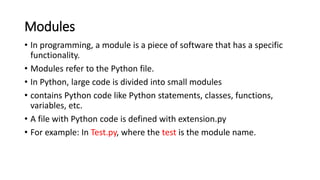
Modules
• In programming, a module is a piece of software that has a specific
functionality.
• Modules refer to the Python file.
• In Python, large code is divided into small modules
• contains Python code like Python statements, classes, functions,
variables, etc.
• A file with Python code is defined with extension.py
• For example: In Test.py, where the test is the module name.
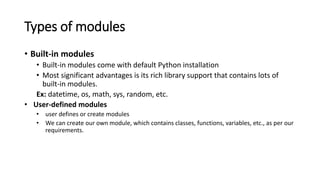
Types of modules
• Built-in modules
• Built-in modules come with default Python installation
• Most significant advantages is its rich library support that contains lots of
built-in modules.
Ex: datetime, os, math, sys, random, etc.
• User-defined modules
• user defines or create modules
• We can create our own module, which contains classes, functions, variables, etc., as per our
requirements.
Import Modules
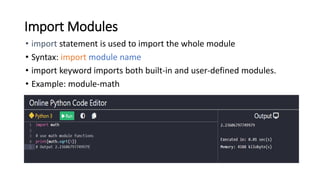
• import statement is used to import the whole module
• Syntax: import module name
• import keyword imports both built-in and user-defined modules.
• Example: module-math
Import multiple modules
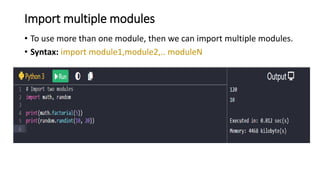
• To use more than one module, then we can import multiple modules.
• Syntax: import module1,module2,.. moduleN
Import specific classes or functions from a module
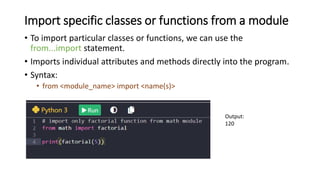
• To import particular classes or functions, we can use the
from...import statement.
• Imports individual attributes and methods directly into the program.
• Syntax:
• from <module_name> import <name(s)>
Output:
120
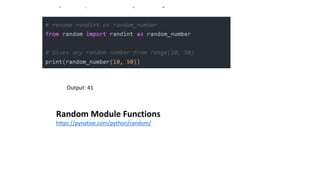
Import with renaming a module
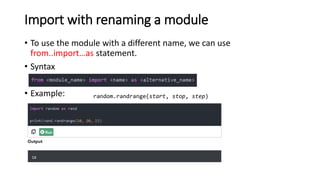
• To use the module with a different name, we can use
from..import…as statement.
• Syntax
• Example: random.randrange(start, stop, step)
Output: 41
Random Module Functions
https://pynative.com/python/random/
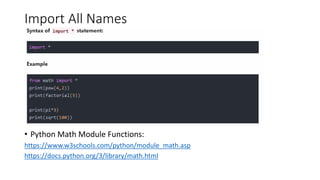
Import All Names
• Python Math Module Functions:
https://www.w3schools.com/python/module_math.asp
https://docs.python.org/3/library/math.html
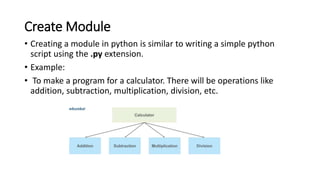
Create Module
• Creating a module in python is similar to writing a simple python
script using the .py extension.
• Example:
• To make a program for a calculator. There will be operations like
addition, subtraction, multiplication, division, etc.
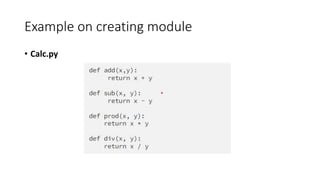
Example on creating module
• Calc.py
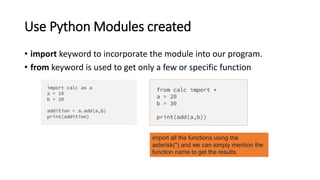
Use Python Modules created
• import keyword to incorporate the module into our program.
• from keyword is used to get only a few or specific function
import all the functions using the
asterisk(*) and we can simply mention the
function name to get the results.
Pandas
• Pandas is a powerful Python library that is specifically designed to
work on data frames that have "relational" or "labeled" data.
• Its aim aligns with doing real-world data analysis using Python.
• Hence, this Python package works well for data manipulation,
operating a dataset, exploring a data frame, data analysis, and
machine learning-related tasks
• it simplifies the task related to data frames
• Import datasets - available in the form of spreadsheets, comma-separated values (CSV) files, and
more.
• Data cleansing - dealing with missing values and representing them as NaN, NA, or NaT.
• Size mutability - columns can be added and removed from DataFrame and higher-dimensional
objects.
• Data normalization – normalize the data into a suitable format for analysis.
• Data alignment - objects can be explicitly aligned to a set of labels.
Intuitive merging and joining data sets – we can merge and join datasets.
• Reshaping and pivoting of datasets – datasets can be reshaped and pivoted as per the need.
• Efficient manipulation and extraction - manipulation and extraction of specific parts of extensive
datasets using intelligent label-based slicing, indexing, and subsetting techniques.
• Statistical analysis - to perform statistical operations on datasets.
• Data visualization - Visualize datasets and uncover insights.
Applications
The most common applications of Pandas are as follows:
• Data Cleaning: Pandas provides functionalities to clean messy data, deal with incomplete or inconsistent data, handle missing values,
remove duplicates, and standardise formats to do effective data analysis.
• Data Exploration: Pandas easily summarise statistics, find trends, and visualise data using built-in plotting functions, Matplotlib, or Seaborn
integration.
• Data Preparation: Pandas may pivot, melt, convert variables, and merge datasets based on common columns to prepare data for analysis.
• Data Analysis: Pandas supports descriptive statistics, time series analysis, group-by operations, and custom functions.
• Data Visualisation: Pandas itself has basic plotting capabilities; it integrates and supports data visualisation libraries like Matplotlib,
Seaborn, and Plotly to create innovative visualisations.
• Time Series Analysis: Pandas supports date/time indexing, resampling, frequency conversion, and rolling statistics for time series data.
• Data Aggregation and Grouping: Pandas groupby() function lets you aggregate data and compute group-wise summary statistics or apply
functions to groups.
• Data Input/Output: Pandas makes data input and export easy by reading and writing CSV, Excel, JSON, SQL databases, and more.
• Machine Learning: Pandas works well with Scikit-learn for data preparation, feature engineering, and model input data.
• Web Scraping: Pandas may be used with BeautifulSoup or Scrapy to parse and analyse structured web data for web scraping and data
extraction.
• Financial Analysis: Pandas is commonly used in finance for stock market data analysis, financial indicator calculation, and portfolio
optimisation.
• Text Data Analysis: Pandas' string manipulation, regular expressions, and text mining functions help analyse textual data.
• Experimental Data Analysis: Pandas makes manipulating and analysing large datasets, performing statistical tests, and visualising results

this includes basics about python modules and packages introduction

  • 1.
  • 2.
    Modules • In programming,a module is a piece of software that has a specific functionality. • Modules refer to the Python file. • In Python, large code is divided into small modules • contains Python code like Python statements, classes, functions, variables, etc. • A file with Python code is defined with extension.py • For example: In Test.py, where the test is the module name.
  • 3.
    Types of modules •Built-in modules • Built-in modules come with default Python installation • Most significant advantages is its rich library support that contains lots of built-in modules. Ex: datetime, os, math, sys, random, etc. • User-defined modules • user defines or create modules • We can create our own module, which contains classes, functions, variables, etc., as per our requirements.
  • 4.
    Import Modules • importstatement is used to import the whole module • Syntax: import module name • import keyword imports both built-in and user-defined modules. • Example: module-math
  • 5.
    Import multiple modules •To use more than one module, then we can import multiple modules. • Syntax: import module1,module2,.. moduleN
  • 6.
    Import specific classesor functions from a module • To import particular classes or functions, we can use the from...import statement. • Imports individual attributes and methods directly into the program. • Syntax: • from <module_name> import <name(s)> Output: 120
  • 7.
    Import with renaminga module • To use the module with a different name, we can use from..import…as statement. • Syntax • Example: random.randrange(start, stop, step)
  • 8.
    Output: 41 Random ModuleFunctions https://pynative.com/python/random/
  • 9.
    Import All Names •Python Math Module Functions: https://www.w3schools.com/python/module_math.asp https://docs.python.org/3/library/math.html
  • 10.
    Create Module • Creatinga module in python is similar to writing a simple python script using the .py extension. • Example: • To make a program for a calculator. There will be operations like addition, subtraction, multiplication, division, etc.
  • 11.
    Example on creatingmodule • Calc.py
  • 12.
    Use Python Modulescreated • import keyword to incorporate the module into our program. • from keyword is used to get only a few or specific function import all the functions using the asterisk(*) and we can simply mention the function name to get the results.
  • 13.
    Pandas • Pandas isa powerful Python library that is specifically designed to work on data frames that have "relational" or "labeled" data. • Its aim aligns with doing real-world data analysis using Python. • Hence, this Python package works well for data manipulation, operating a dataset, exploring a data frame, data analysis, and machine learning-related tasks • it simplifies the task related to data frames
  • 14.
    • Import datasets- available in the form of spreadsheets, comma-separated values (CSV) files, and more. • Data cleansing - dealing with missing values and representing them as NaN, NA, or NaT. • Size mutability - columns can be added and removed from DataFrame and higher-dimensional objects. • Data normalization – normalize the data into a suitable format for analysis. • Data alignment - objects can be explicitly aligned to a set of labels. Intuitive merging and joining data sets – we can merge and join datasets. • Reshaping and pivoting of datasets – datasets can be reshaped and pivoted as per the need. • Efficient manipulation and extraction - manipulation and extraction of specific parts of extensive datasets using intelligent label-based slicing, indexing, and subsetting techniques. • Statistical analysis - to perform statistical operations on datasets. • Data visualization - Visualize datasets and uncover insights.
  • 15.
    Applications The most commonapplications of Pandas are as follows: • Data Cleaning: Pandas provides functionalities to clean messy data, deal with incomplete or inconsistent data, handle missing values, remove duplicates, and standardise formats to do effective data analysis. • Data Exploration: Pandas easily summarise statistics, find trends, and visualise data using built-in plotting functions, Matplotlib, or Seaborn integration. • Data Preparation: Pandas may pivot, melt, convert variables, and merge datasets based on common columns to prepare data for analysis. • Data Analysis: Pandas supports descriptive statistics, time series analysis, group-by operations, and custom functions. • Data Visualisation: Pandas itself has basic plotting capabilities; it integrates and supports data visualisation libraries like Matplotlib, Seaborn, and Plotly to create innovative visualisations. • Time Series Analysis: Pandas supports date/time indexing, resampling, frequency conversion, and rolling statistics for time series data. • Data Aggregation and Grouping: Pandas groupby() function lets you aggregate data and compute group-wise summary statistics or apply functions to groups. • Data Input/Output: Pandas makes data input and export easy by reading and writing CSV, Excel, JSON, SQL databases, and more. • Machine Learning: Pandas works well with Scikit-learn for data preparation, feature engineering, and model input data. • Web Scraping: Pandas may be used with BeautifulSoup or Scrapy to parse and analyse structured web data for web scraping and data extraction. • Financial Analysis: Pandas is commonly used in finance for stock market data analysis, financial indicator calculation, and portfolio optimisation. • Text Data Analysis: Pandas' string manipulation, regular expressions, and text mining functions help analyse textual data. • Experimental Data Analysis: Pandas makes manipulating and analysing large datasets, performing statistical tests, and visualising results