;-_=_Scrolldown to the Underground_=_-;


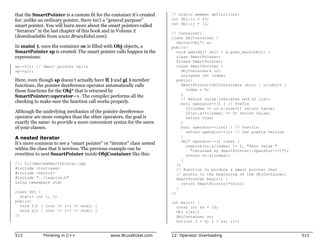
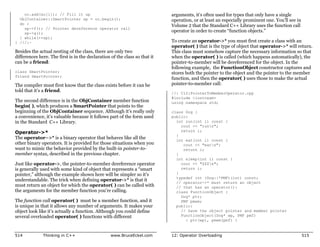
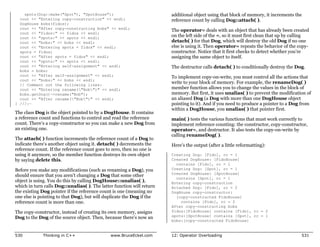
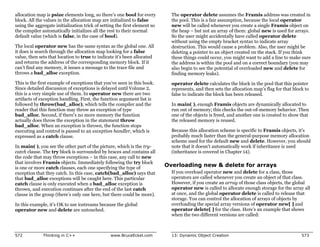
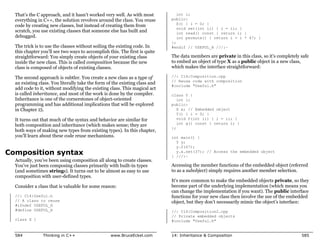
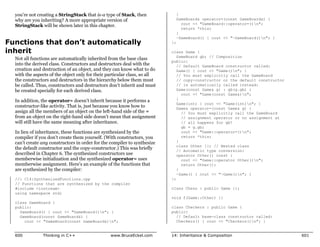
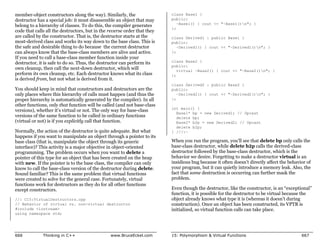
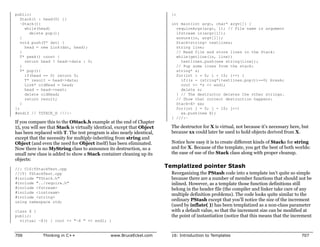
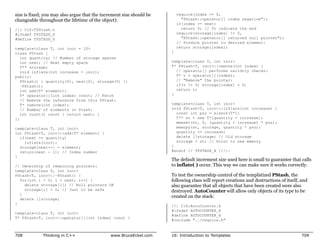
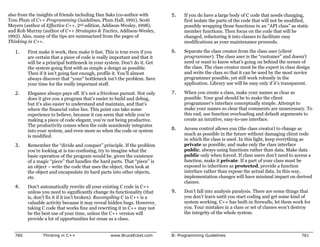
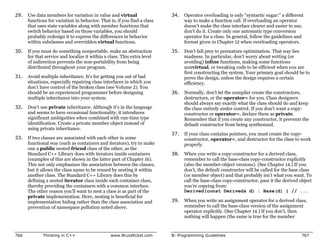
              Thinking in C++ 2nd #1

                                   http://kickme.to/tiger/
Winner, Software Development Magazine’s
1996 Jolt Award for Best Book of the Year

“This book is a tremendous achievement. You owe it to yourself to
have a copy on your shelf. The chapter on iostreams is the most
comprehensive and understandable treatment of that subject I’ve
seen to date.”
                                    Al Stevens
     Contributing Editor, Doctor Dobbs Journal
“Eckel’s book is the only one to so clearly explain how to rethink
program construction for object orientation. That the book is also
an excellent tutorial on the ins and outs of C++ is an added bonus.”
                                          Andrew Binstock
                                        Editor, Unix Review

“Bruce continues to amaze me with his insight into C++, and
Thinking in C++ is his best collection of ideas yet. If you want clear
answers to difficult questions about C++, buy this outstanding
book.”
                                       Gary Entsminger
                             Author, The Tao of Objects

“Thinking in C++ patiently and methodically explores the issues of
when and how to use inlines, references, operator overloading,
inheritance and dynamic objects, as well as advanced topics such as
the proper use of templates, exceptions and multiple inheritance.
The entire effort is woven in a fabric that includes Eckel’s own
philosophy of object and program design. A must for every C++
developer’s bookshelf, Thinking in C++ is the one C++ book you
must have if you’re doing serious development with C++.”
                                 Richard Hale Shaw
                   Contributing Editor, PC Magazine
whenever possible, and to that effect, “Thinking in C++” has given me the strong
Comments from Readers:                                                                foundation for my continuous improvement. Peter Tran, Senior Systems
                                                                                      Analyst (IM), Compaq Computer Corporation
Wonderful book … Great stuff! Andrew Schulman, Doctor Dobbs Journal
                                                                                      This book is the best general reference in my on-going quest to master C++. Most
An absolute, unqualified must. One of the most-used, most trusted books on my         books explain some topics thoroughly but are deficient in others. “Thinking in
shelf.” TUG Lines                                                                     C++” 2/E does not pass the buck to another book. When I have questions it has
This is stuff a programmer can really use. IEEE Computer                              answers. Thomas Michel

A refreshing departure. PJ Plauger, Embedded Systems Programming                      I have a whole mountain of books and none of them make sense nor do they
magazine                                                                              explain things properly. I have been dying for a good template and STL book.
                                                                                      Then I decided to read your material and I was amazed. What you did was show
…Eckel succeeds … it’s so readable. Unix World                                        how to write C++ with templates and STL without bogging down with details.
                                                                                      What you did was what I expected of the C++ community, the next generation of
Should definitely be your first buy. C Gazette                                        C++ authors. As an author I AM IMPRESSED at your writing and explanation
A fantastic reference for C++! Michael Brandt, Senior Analyst/Programmer,             skills. You covered topics that nobody has properly covered before. Your
Sydney, Australia                                                                     approach is one from a person who has actually sat down and went through the
                                                                                      material in detail. And then you questioned the sanity of the situation and what
On our project at HRB Systems we call your book “The Answer Book”. It is our          would be the problem areas. On my bookshelf, it will definitely be one of the
C++ Bible for the project. Curt Snyder, HRB Systems                                   necessary books, right beside Petzold. Christian Gross, consultant/mentor
Your book is really great, and I can’t thank you enough for making it available for   cgross@eusoft.com
free on the web. It’s one of the most thorough and useful references for C++ I’ve     I think your book is very, very, VERY good. I have compared it to others in the
seen. Russell Davis                                                                   bookstore, and have found that your book actually teaches me basic C++
... the only book out there that even comes close to being actually readable when     fundamentals while I learn the STL... a very nice experience to learn about both
trying to learn the ropes of C++ (and the basics of good object oriented              at once, hand-in-hand. I think your book is laid out very well, and explains things
programming in general). Gunther Schulz, KawaiiSoft                                   in an easy-to-understand fashion. Jeff Meininger, Software Developer,
                                                                                      boxybutgood.com
I love the examples in your book. There’s stuff there that I never would have
thought of (and some things that I didn’t know you could do)! Rich Herrick,           Your book is the best by far of any I’ve seen. Please get it right so that we can all
Senior Associate Software Engineer, Lockheed-Martin Federal Systems,                  have an excellent and “reliable” reference work! And please hurry! We are
Owego, NY                                                                             desperate for a work of this quality! Steve Strickland, Live Minds (a Puzzle
                                                                                      business)
It’s an amazing book. Any questions I have I refer to this online book. Helped in
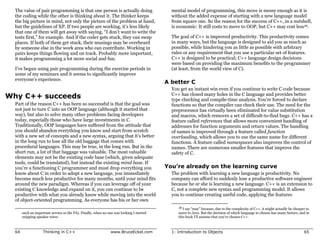
every case. I’m simply happy to have access to a book of this caliber. Wes Kells,      (On Usenet) Unlike most other C++ authors, Eckel has made a career of teaching
                                                                                      C++ and Java classes ONLY. He’s had the benefit of a GREAT deal of novice
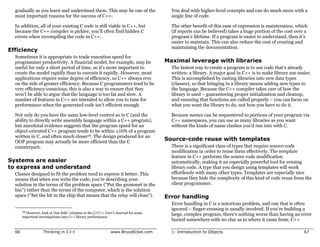
Comp Eng. Student, SLC Kingston.
                                                                                      feedback, and the books reflect that. His books are not just about writing in
You are an invaluable resource and I greatly appreciate your books, email list        C++/Java, but understanding the intent of the languages and the mindset that
etc... It seems every project I have worked on has been successful because of your    goes with thinking in them. Eckel’s also the best technical writer I’ve read since
insights. Justin Voshell                                                              Jeff Duntemann. Very clear and easy to read. Don’t be put off by the apparent
                                                                                      large size of his books. Either can be read in *less* than 21 days. :-} Randy
This is the book I have been looking for on C++. Thomas A. Fink, Managing
                                                                                      Crawford, MRJ Technology Solutions, Fairfax VA
Director, Trepp, LLC
                                                                                      Your work is greatly appreciated and I thank you for helping me understand both
Your books are authoritative yet easy to read. To my colleagues I call you the
                                                                                      C++ and Java better. Barry Wallin, Math/Computer Science Teacher,
K&R of C++. Mark Orlassino, Senior Design Engineer, Harmon
                                                                                      Rosemount High School, Rosemount, MN
Industries, Inc., Hauppauge, NY
When I first started learning C++, your book “Thinking in C++” was my shining
guide light in a dark tunnel. It has been my endeavor to improve my C++ skills
I would like to thank you for your book “Thinking in C++” which is, with no
doubt, the best book I ever read about this subject. Riccardo Tarli - SW
Engineer - R&D TXT Ingegneria Informatica - Italy


                                                                                      Thinking
I have been reading both of your books, Thinking In Java and Thinking In C++.
Each of these books is easily the best in its category. Ranakarprasad H. Tiwari,
Mumbai, India
… the “Debugging Hints” section is so valuable, I’m tempted to print it and keep
it with me at all times. I think this section should be a mandatory part of any
introductory class after the first one or two programming problems. Fred
Ballard, Synectics Inc.


                                                                                                      In
Your book is really a treasure trove of C++ knowledge. I feel like you give a good
overview and then explain the nuts and bolts. Raymond Pickles, Antenna
Section, Radar Division, U.S. Naval Research Laboratory, Washington
DC
As an Internal Medicine Specialist and Computer Scientist I spend a great deal of
time trying to extract information from books and journals. My experience is that


                                                                                              C++
a good author is one who makes difficult concepts accessible, a great one makes it
look almost easy. On this score you are certainly one of my top three technical
writers. Keep up the good work. Dr. Declan O’Kane, Leicester, England
For my second-level C++ course, “Thinking in C++” is my constant reference and
companion, and I urge my students to consult it regularly. I refer to the chapter
on Operator Overloading constantly. The examples/code alone are worth the cost
of the book many times over. So many books and development environments are
predicated on the assumption that the only application for a programming
language is for a Windows environment; it’s great to find and use a book which
                                                                                              Second Edition
concentrates on C++ so we can prepare our students for careers in fields like
embedded systems, networking, etc., which require real depth of understanding.
Robert Chase, Professor, Sweet Briar College
I think it’s a fantastic intro to C++, especially for longtime dabblers like me – I          Bruce Eckel
often know “how,” but rarely “why,” and TIC2 is a godsend. Tony Likhite,
System Administrator/DBA, Together Networks                                            President, MindView Inc.
After reading the first 80 pages of this book, I have a better understanding of oop
then I've gotten out of the ton of books I've accumulated on the subject. Thanks...
Rick Schneewind
                                                                                       Prentice Hall
                                                                                       Upper Saddle River, New Jersey 07458
                                                                                       http://www.prenhall.com
Publisher: Alan Apt
Production Editor: Scott Disanno
Executive Managing Editor: Vince O'Brien
                                                                                                              Public
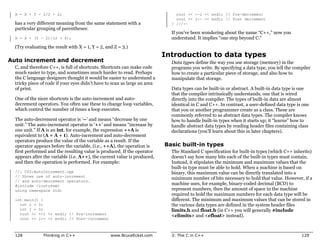
Vice President and Editorial Director: Marcia Horton
Vice President of Production and Manufacturing: David W. Riccardi                                             C++ Seminars
Project Manager: Ana Terry
Book Design, Cover Design and Cover Line Art:                                                                 Check www.BruceEckel.com
    Daniel Will-Harris, daniel@will-harris.com                                                                for in-depth details and the date
Cover Watercolor: Bruce Eckel
Copy Editor: Stephanie English                                                                                and location of the next:
Production Coordinator: Lori Bulwin
Editorial Assistant: Toni Holm
                                                                                                  Hands-On C++ Seminar
Marketing Managers: Jennie Burger, Bryan Gambrel                                                    x Based on this book
                                                                                                    x Get a solid grounding in Standard C++ fundamentals
©2000 by Bruce Eckel, MindView, Inc.                                                                x Includes in-class programming exercises
             Published by Prentice Hall Inc.                                                        x Personal attention during exercises
             Pearson Higher Education
             Upper Saddle River, New Jersey 07632                                                 Intermediate C++ Seminar
The information in this book is distributed on an “as is” basis, without warranty. While
                                                                                                    x Based on Volume 2 of this book (downloadable at
every precaution has been taken in the preparation of this book, neither the author nor the            www.BruceEckel.com)
publisher shall have any liability to any person or entitle with respect to any liability, loss
or damage caused or alleged to be caused directly or indirectly by instructions contained in
                                                                                                     x In-depth coverage of the Standard C++ Library
this book or by the computer software or hardware products described herein.                         x Strings, containers, iterators, algorithms
All rights reserved. No part of this book may be reproduced in any form or by any                    x In-depth templates & exception handling
electronic or mechanical means including information storage and retrieval systems
without permission in writing from the publisher or author, except by a reviewer who may          Advanced C++ Topics
quote brief passages in a review. Any of the names used in the examples and text of this
book are fictional; any relationship to persons living or dead or to fictional characters in
                                                                                                    x Based on advanced topics in Volume 2 of this book
other works is purely coincidental.                                                                 x Design patterns
Printed in the United States of America                                                             x Building robust systems
                                                                                                    x Creating testing & debugging frameworks
10 9 8 7 6 5 4 3 2 1
ISBN 0-13-979809-9
                                                                                                  Subscribe to the free newsletter
Prentice-Hall International (UK) Limited, London
Prentice-Hall of Australia Pty. Limited, Sydney                                                   to be automatically informed
Prentice-Hall Canada, Inc., Toronto                                                               of upcoming seminars
Prentice-Hall Hispanoamericana, S.A., Mexico
Prentice-Hall of India Private Limited, New Delhi
Prentice-Hall of Japan, Inc., Tokyo                                                               Also visit www.BrucEckel.com for:
Pearson Education Asia Ltd., Singapore
Editora Prentice-Hall do Brasil, Ltda., Rio de Janeiro                                            „ Consulting Services
                                                                                                  „ Exercise solutions for this book
Dedication
                                                                       To my parents, my sister, and my brother
                 Seminars-on-CD-ROM
                 If you like the Thinking in C
                 Seminar-on-CD packaged with
                 this book, then you’ll also like:

 ruce Eckel’s
 ands-On C++ Seminar
Multimedia CD ROM
t’s like coming to the seminar!

 vailable at www.BruceEckel.com
 Overhead slides and synchronized audio recorded by Bruce Eckel
 All the lectures from the Hands-On C++ Seminar
 Based on this book
 Get a solid grounding in Standard C++ Fundamentals
 Just play it to see and hear the lectures!
 Lectures are indexed so you can rapidly locate the discussion
 of any subject
 Details and sample lecture can be found on the Web site

ee www.BruceEckel.com
or other Seminars-on-CD ROM
 The Intermediate C++ Seminar
 Advanced C++ Topics
What’s inside...
Preface                                   1      1: Introduction to
    What’s new in                                Objects                                21
    the second edition .... 2                         The progress of
       What’s in Volume 2
       of this book......................... 3        abstraction............. 22
       How to get Volume 2............ 3              An object has an
    Prerequisites............ 3                       interface ................ 25
    Learning C++ .......... 4                         The hidden
    Goals ...................... 5                    implementation ...... 28
    Chapters ................. 7                      Reusing the
    Exercises............... 12                       implementation ...... 29
       Exercise solutions ...............12
                                                      Inheritance: reusing
    Source code........... 12
                                                      the interface .......... 31
    Language                                            Is-a vs. is-like-a
    standards .............. 14                         relationships...................... 35
       Language support ...............15             Interchangeable
    The book’s                                        objects with
    CD ROM ................ 15                        polymorphism ........ 37
    CD ROMs, seminars,                                Creating and
    and consulting ....... 16                         destroying objects... 41
    Errors ................... 16                     Exception handling:
    About the cover...... 17                          dealing with errors .. 43
    Book design and                                   Analysis
    production ............. 18                       and design ............. 44
    Acknowledgements . 19                               Phase 0: Make a plan.......... 47
                                                        Phase 1: What are
                                                        we making?....................... 48
                                                        Phase 2: How will
                                                        we build it? ....................... 52
                                                        Phase 3: Build the core ....... 56
                                                        Phase 4: Iterate
                                                        the use cases .................... 57
Phase 5: Evolution ..............58                                                              Modifying the
      Plans pay off ......................60
                                                     More about                                        outside object .................. 137
                                                                                                                                                       Function
    Extreme                                          iostreams .............. 96                       Introduction to                                 addresses ............ 198
                                                       Character array                                 C++ references ................ 140               Defining a
    programming ......... 61                           concatenation .................... 96           Pointers and references                           function pointer ...............     198
      Write tests first...................61           Reading input .................... 97           as modifiers ..................... 141            Complicated declarations
      Pair programming ...............63               Calling other programs........ 98                                                                 & definitions ....................   199
                                                                                                     Scoping................143                          Using a function pointer ....        200
    Why C++                                          Introducing                                       Defining variables
                                                                                                                                                         Arrays of pointers
                                                                                                       on the fly......................... 145
    succeeds ............... 64                      strings................... 98                                                                       to functions .....................   201
      A better C ..........................65
                                                     Reading and                                     Specifying storage                                Make: managing
      You’re already on
      the learning curve...............65            writing files .......... 100                    allocation .............147                       separate
                                                                                                       Global variables ................ 147
      Efficiency ...........................66
      Systems are easier to
                                                     Introducing                                       Local variables ................. 149           compilation .......... 202
                                                                                                       static .............................. 149         Make activities ................. 204
      express and understand.......66                vector ................. 102                      extern ............................. 151          Makefiles in this book ....... 207
      Maximal leverage
      with libraries ......................67
                                                     Summary............. 108                          Constants ........................ 153            An example makefile ........ 208
                                                                                                       volatile ............................ 155
      Source-code reuse                              Exercises ............. 109                                                                       Summary............. 210
      with templates ...................67                                                           Operators and                                     Exercises ............. 210
      Error handling ....................67
      Programming in the large.....68            3: The C in C++                        111          their use ..............156
                                                                                                       Assignment ...................... 156
    Strategies for                                   Creating                                          Mathematical operators ..... 156            4: Data Abstraction 217
                                                                                                       Relational operators .......... 158
    transition............... 68                     functions ............. 112                       Logical operators .............. 158            A tiny C-like
      Guidelines..........................69           Function return values ...... 115
      Management obstacles ........71                  Using the C
                                                                                                       Bitwise operators .............. 159            library ................. 219
                                                                                                       Shift operators ................. 160             Dynamic
    Summary .............. 73                          function library ................ 116           Unary operators................ 163               storage allocation............. 223
                                                       Creating your own                               The ternary operator ......... 164                Bad guesses .................... 227
                                                       libraries with the librarian.. 117              The comma operator ......... 165
2: Making & Using                                    Controlling                                       Common pitfalls                                 What's wrong?......               229
Objects                                75            execution............. 117
                                                                                                       when using operators ........ 166               The basic object....              230
                                                                                                       Casting operators ............. 166
                                                       True and false .................        117     C++ explicit casts............. 167             What's an object? .               238
    The process of                                     if-else .............................   118     sizeof – an operator                            Abstract
    language                                           while ..............................    119     by itself ........................... 172
                                                       do-while .........................      120     The asm keyword ............. 173               data typing ..........            239
    translation ............. 76                       for .................................   121
      Interpreters .......................77           The break and
                                                                                                       Explicit operators .............. 173           Object details .......            240
      Compilers ..........................77           continue keywords ...........           122   Composite type                                    Header file
      The compilation process.......79                 switch.............................     123   creation ...............174                       etiquette..............           241
    Tools for separate                                 Using and misusing goto ...             125     Aliasing names                                    Importance of
                                                       Recursion........................       126     with typedef..................... 174
    compilation............ 80                                                                                                                           header files ..................... 242
      Declarations vs. definitions...81              Introduction to                                   Combining variables                               The multiple-declaration
                                                                                                       with struct ....................... 175           problem .......................... 244
      Linking ..............................87       operators ............. 127                       Clarifying programs                               The preprocessor directives
      Using libraries ....................88           Precedence...................... 127            with enum ....................... 179             #define, #ifdef,
    Your first                                         Auto increment                                  Saving memory                                     and #endif ...................... 245
                                                       and decrement ................ 128              with union ....................... 181
    C++ program ........ 90                                                                                                                              A standard for header files 246
      Using the iostreams class.....90               Introduction to                                   Arrays ............................. 182          Namespaces in headers .... 247
      Namespaces.......................91            data types ........... 129                      Debugging hints ....193                             Using headers in projects .. 248
      Fundamentals of                                  Basic built-in types ...........        129     Debugging flags................ 194             Nested structures.. 248
      program structure...............93               bool, true, & false ............        131     Turning variables and                             Global scope resolution ..... 253
      "Hello, world!" ....................94           Specifiers ........................     132     expressions into strings ..... 196
      Running the compiler ..........95                Introduction to pointers ....           133     The C assert( ) macro........ 197               Summary............. 253
Returning by const value ... 345                Other storage
     Exercises..............254                       Aggregate                                         Passing and returning                           class specifiers................. 414
                                                      initialization .........        301               addresses ........................ 349
                                                                                                                                                      Namespaces......... 414
5: Hiding the                                         Default                                         Classes ................352                       Creating a namespace ...... 415
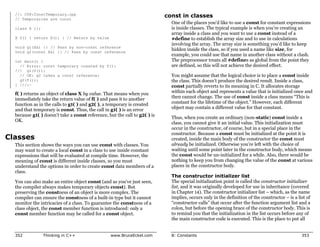
                                                                                                        const in classes ................ 353           Using a namespace .......... 417
Implementation                       259              constructors .........          304               Compile-time constants                          The use of namespaces ..... 422
     Setting limits ........260                       Summary.............            305               in classes......................... 356
                                                                                                                                                      Static members
                                                                                                        const objects &
     C++ access                                       Exercises .............         306               member functions ............. 359            in C++ ................ 423
                                                                                                                                                        Defining storage for
     control .................261                                                                     volatile.................365
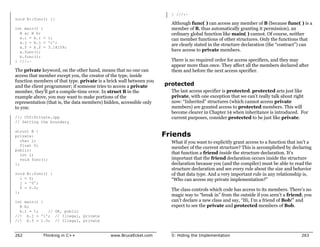
       protected......................... 263     7: Function Overloading                             Summary .............367
                                                                                                                                                        static data members ......... 424
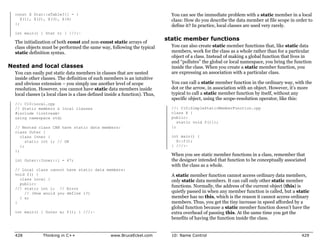
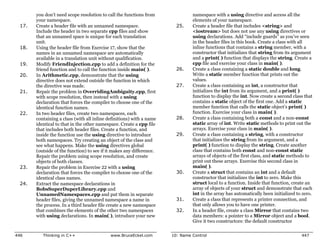
                                                                                                                                                        Nested and local classes.... 428
     Friends.................263                  & Default                                           Exercises..............367                        static member functions .... 429
       Nested friends .................. 266                                                                                                          Static initialization
       Is it pure?........................ 269    Arguments           309
     Object layout ........269                                                                   9: Inline Functions                  371             dependency ......... 432
                                                      More name                                                                                         What to do ...................... 434
     The class ..............270                      decoration ........... 311                      Preprocessor                                    Alternate linkage
       Modifying Stash to use                           Overloading on
       access control .................. 273            return values ................... 312
                                                                                                      pitfalls .................372                   specifications........ 442
       Modifying Stack to use                                                                           Macros and access ............ 376
                                                        Type-safe linkage ............. 313                                                           Summary............. 443
       access control .................. 274
                                                      Overloading                                     Inline functions .....377
     Handle classes ......275                                                                           Inlines inside classes ......... 378          Exercises ............. 443
       Hiding the                                     example .............. 314                        Access functions ............... 379
       implementation ................ 276
       Reducing recompilation...... 276
                                                      unions ................. 318                    Stash & Stack                               11: References & the
                                                      Default                                         with inlines ...........385                 Copy-Constructor   449
     Summary .............279
                                                      arguments ........... 321                       Inlines &
     Exercises..............280                         Placeholder arguments...... 323                                                               Pointers in C++ .... 450
                                                                                                      the compiler .........390
                                                      Choosing overloading                              Limitations....................... 390        References
6: Initialization &                                   vs. default                                       Forward references ........... 391            in C++ ................ 451
                                                                                                        Hidden activities in                            References in functions ..... 452
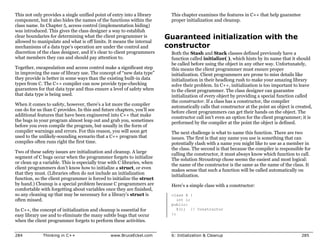
Cleanup                              283              arguments ........... 324                         constructors &                                  Argument-passing
                                                                                                        destructors ...................... 392
     Guaranteed                                       Summary............. 329                                                                          guidelines ....................... 455

                                                      Exercises ............. 330                     Reducing clutter ....393                        The copy-
     initialization with the
                                                                                                      More preprocessor                               constructor .......... 455
     constructor ...........285
                                                  8: Constants                      333               features ...............395                       Passing & returning
     Guaranteed cleanup                                                                                 Token pasting .................. 396            by value..........................   455
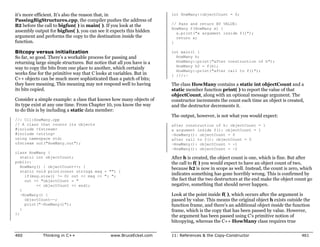
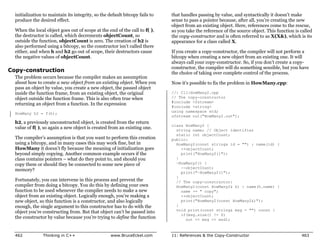
                                                                                                                                                        Copy-construction ............       462
     with the                                         Value substitution . 334                        Improved error                                    Default copy-constructor ...         468
                                                        const in header files .........    335
     destructor ............287                         Safety consts...................   336        checking ..............396                        Alternatives to copy-
                                                                                                                                                        construction ....................    471
     Elimination of the                                 Aggregates......................   337        Summary .............400
     definition block......289                          Differences with C ............    338                                                        Pointers
                                                                                                      Exercises..............400
       for loops .......................... 291       Pointers ............... 340                                                                    to members ......... 473
       Storage allocation ............. 292             Pointer to const ............... 340                                                            Functions ........................ 475
     Stash with                                         const pointer ................... 341    10: Name Control                     405             Summary............. 478
                                                        Assignment and
     constructors and                                   type checking .................. 343          Static elements                                 Exercises ............. 479
     destructors ...........294                       Function arguments &                            from C .................406
                                                                                                        static variables
     Stack with constructors                          return values........ 344                         inside functions ................ 406
                                                        Passing by const value ...... 344
     & destructors ........298                                                                          Controlling linkage ............ 412
Stash for pointers ............ 558
12: Operator                                                                                        Choosing composition                               Abstract base classes
                                                   new & delete                                     vs. inheritance ......604                          and pure virtual
Overloading                        485             for arrays............. 563                        Subtyping ........................ 606
                                                                                                                                                       functions ............. 646
    Warning &                                        Making a pointer                                 private inheritance ............ 609
                                                                                                                                                         Pure virtual definitions ...... 651
                                                     more like an array............ 564
    reassurance ..........486                                                                       protected .............610                         Inheritance and
                                                   Running out                                        protected inheritance ........ 611
    Syntax .................487                                                                                                                        the VTABLE .......... 652
                                                   of storage ............ 565                      Operator overloading
    Overloadable                                                                                                                                         Object slicing................... 655
                                                   Overloading                                      & inheritance ........612                          Overloading &
    operators .............488
      Unary operators................ 489          new & delete ........ 566                        Multiple                                           overriding ............ 658
                                                     Overloading global
      Binary operators ............... 493
                                                     new & delete ...................   568
                                                                                                    inheritance ...........613                           Variant return type........... 660
      Arguments &
      return values.................... 505          Overloading                                    Incremental                                        virtual functions &
                                                     new & delete for a class ....      570
      Unusual operators............. 508
                                                     Overloading
                                                                                                    development.........614                            constructors ......... 662
      Operators you                                                                                                                                      Order of constructor calls .. 663
      can’t overload .................. 517          new & delete for arrays.....       573         Upcasting .............615                           Behavior of virtual functions
                                                     Constructor calls ..............   576           Why “upcasting?”.............. 617
    Non-member                                       placement new & delete ....        577           Upcasting and the
                                                                                                                                                         inside constructors ........... 664

    operators .............518                     Summary............. 580                           copy-constructor............... 617              Destructors and
                                                                                                      Composition vs.
      Basic guidelines ................ 520
                                                   Exercises ............. 580                        inheritance (revisited) ....... 620
                                                                                                                                                       virtual destructors. 665
    Overloading                                                                                       Pointer & reference
                                                                                                                                                         Pure virtual destructors..... 668
                                                                                                                                                         Virtuals in destructors....... 670
    assignment...........521                                                                          upcasting......................... 622
      Behavior of operator= ....... 522
                                               14: Inheritance &                                      A crisis ............................ 622
                                                                                                                                                         Creating an
                                                                                                                                                         object-based hierarchy ..... 671
    Automatic type                             Composition                         583              Summary .............623                           Operator
    conversion............533                      Composition                                      Exercises..............623                         overloading ..........          675
      Constructor conversion ...... 534
      Operator conversion.......... 535            syntax................. 584                                                                         Downcasting ........            678
      Type conversion example... 538               Inheritance                                  15: Polymorphism &                                     Summary.............            681
      Pitfalls in automatic
      type conversion ................ 539         syntax................. 586                  Virtual Functions  627                                 Exercises .............         682
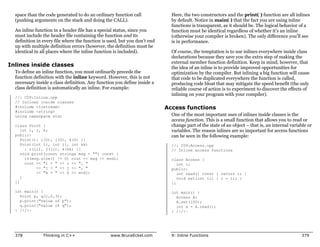
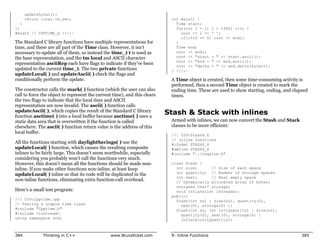
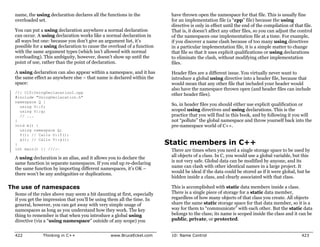
    Summary .............542                       The constructor                                  Evolution of C++
    Exercises..............542                     initializer list ........ 588                    programmers ........628                       16: Introduction to
                                                     Member object
                                                     initialization..................... 589
                                                                                                    Upcasting .............629                    Templates                          689
13: Dynamic                                          Built-in types in the                          The problem .........631                           Containers ........... 690
                                                     initializer list.................... 589         Function call binding ......... 631
Object Creation                    547             Combining composition                            virtual functions ....632
                                                                                                                                                         The need for containers .... 692
                                                                                                                                                       Overview
    Object creation......549                       & inheritance........ 591                          Extensibility ..................... 633
      C’s approach to the heap ... 550               Order of constructor &                         How C++ implements                                 of templates......... 693
      operator new.................... 552                                                                                                               The template solution ....... 696
                                                     destructor calls ................ 592
      operator delete................. 553                                                          late binding ..........636                         Template syntax ... 697
      A simple example ............. 553           Name hiding......... 595                           Storing type information .... 637
                                                                                                                                                         Non-inline
                                                                                                      Picturing virtual functions... 639
      Memory manager                               Functions that                                     Under the hood ................ 642
                                                                                                                                                         function definitions ........... 699
      overhead ......................... 554                                                                                                             IntStack as a template...... 701
                                                   don’t automatically                                Installing the vpointer ....... 643
    Early examples                                                                                    Objects are different ......... 644
                                                                                                                                                         Constants in templates ..... 703
                                                   inherit ................. 600                                                                       Stack and Stash
    redesigned ...........555                        Inheritance and static                         Why virtual
      delete void* is                                member functions ............ 604
                                                                                                    functions?.............645                         as templates ........ 705
      probably a bug ................. 555                                                                                                               Templatized pointer Stash . 707
      Cleanup responsibility
      with pointers .................... 557                                                                                                           Turning ownership
on and off.............713
    Holding objects
    by value ...............716
    Introducing
    iterators ...............719
        Stack with iterators ........... 728
        PStash with iterators ......... 732
    Why iterators? ......738
        Function templates............ 742
    Summary .............743
    Exercises..............744

A: Coding Style                    747

B: Programming
Guidelines                         759

C: Recommended
Reading                            775
    C.........................776
    General C++.........776
        My own list of books.......... 777
    Depth &
    dark corners .........778
    Analysis & design ..779

Index                              783

                                               Preface
                                               Like any human language, C++ provides a way to
                                               express concepts. If successful, this medium of
                                               expression will be significantly easier and more flexible
                                               than the alternatives as problems grow larger and more
                                               complex.
You can’t just look at C++ as a collection of features; some of the         on a day-to-day basis but that the C++ and Java languages steer you
  features make no sense in isolation. You can only use the sum of the        away from (or even eliminate, in the case of Java).
  parts if you are thinking about design, not simply coding. And to
  understand C++ this way, you must understand the problems with              So the short answer to the question “what’s different in the 2nd
  C and with programming in general. This book discusses                      edition?” is: what isn’t brand new has been rewritten, sometimes to
  programming problems, why they are problems, and the approach               the point where you wouldn’t recognize the original examples and
  C++ has taken to solve such problems. Thus, the set of features I           material.
  explain in each chapter will be based on the way that I see a
  particular type of problem being solved with the language. In this        What’s in Volume 2 of this book
  way I hope to move you, a little at a time, from understanding C to
  the point where the C++ mindset becomes your native tongue.                 The completion of the C++ Standard also added a number of
                                                                              important new libraries, such as string and the containers and
  Throughout, I’ll be taking the attitude that you want to build a            algorithms in the Standard C++ Library, as well as new complexity
  model in your head that allows you to understand the language all           in templates. These and other more advanced topics have been
  the way down to the bare metal; if you encounter a puzzle, you’ll be        relegated to Volume 2 of this book, including issues such as
  able to feed it to your model and deduce the answer. I will try to          multiple inheritance, exception handling, design patterns, and
  convey to you the insights that have rearranged my brain to make            topics about building and debugging stable systems.
  me start “thinking in C++.”
                                                                            How to get Volume 2
                                                                              Just like the book you currently hold, Thinking in C++, Volume 2 is
What’s new in the second edition                                              downloadable in its entirety from my Web site at
  This book is a thorough rewrite of the first edition to reflect all of      www.BruceEckel.com. You can find information on the Web site
  the changes introduced in C++ by the finalization of the C++                about the expected print date of Volume 2.
  Standard, and also to reflect what I’ve learned since writing the first
  edition. The entire text present in the first edition has been              The Web site also contains the source code for both of the books,
  examined and rewritten, sometimes removing old examples, often              along with updates and information about other seminars-on-CD
  changing existing examples and adding new ones, and adding many             ROM that MindView, Inc. offers, public seminars, and in-house
  new exercises. Significant rearrangement and re-ordering of the             training, consulting, mentoring, and walkthroughs.
  material took place to reflect the availability of better tools and my
  improved understanding of how people learn C++. A new chapter
  was added which is a rapid introduction to the C concepts and basic       Prerequisites
  C++ features for those who don’t have the C background to tackle
                                                                              In the first edition of this book, I decided to assume that someone
  the rest of the book. The CD ROM bound into the back of the book
                                                                              else had taught you C and that you have at least a reading level of
  contains a seminar that is an even gentler introduction to the C
                                                                              comfort with it. My primary focus was on simplifying what I found
  concepts necessary to understand C++ (or Java). It was created by
                                                                              difficult: the C++ language. In this edition I have added a chapter
  Chuck Allison for my company (MindView, Inc.), and it’s called
                                                                              that is a rapid introduction to C, along with the Thinking in C
  “Thinking in C: Foundations for Java and C++.” It introduces you to
                                                                              seminar-on-CD, but I am still assuming that you already have some
  the aspects of C that are necessary for you to move on to C++ or
                                                                              kind of programming experience. In addition, just as you learn
  Java, leaving out the nasty bits that C programmers must deal with


  2             Thinking in C++                   www.BruceEckel.com          Preface                                                             3
many new words intuitively by seeing them in context in a novel, it’s                  issues. I found out, by creating and chairing the C++ and Java
  possible to learn a great deal about C from the context in which it is                 tracks at the Software Development Conference for many years,
  used in the rest of the book.                                                          that I and other speakers tended to give the typical audience too
                                                                                         many topics, too fast. So eventually, through both variety in the
                                                                                         audience level and the way that I presented the material, I would
Learning C++                                                                             end up losing some portion of the audience. Maybe it’s asking too
                                                                                         much, but because I am one of those people resistant to traditional
  I clawed my way into C++ from exactly the same position I expect                       lecturing (and for most people, I believe, such resistance results
  many of the readers of this book are in: as a programmer with a                        from boredom), I wanted to try to keep everyone up to speed.
  very no-nonsense, nuts-and-bolts attitude about programming.
  Worse, my background and experience was in hardware-level                              For a time, I was creating a number of different presentations in
  embedded programming, in which C has often been considered a                           fairly short order. Thus, I ended up learning by experiment and
  high-level language and an inefficient overkill for pushing bits                       iteration (a technique that also works well in C++ program design).
  around. I discovered later that I wasn’t even a very good C                            Eventually I developed a course using everything I had learned
  programmer, hiding my ignorance of structures, malloc( ) and                           from my teaching experience. It tackles the learning problem in
  free( ), setjmp( ) and longjmp( ), and other “sophisticated”                           discrete, easy-to-digest steps and for a hands-on seminar (the ideal
  concepts, scuttling away in shame when the subjects came up in                         learning situation) there are exercises following each of the
  conversation instead of reaching out for new knowledge.                                presentations. You can find out about my public seminars at
                                                                                         www.BruceEckel.com, and you can also learn about the seminars
  When I began my struggle to understand C++, the only decent book                       that I’ve turned into CD ROMs.
  was Bjarne Stroustrup’s self-professed “expert’s guide,1” so I was
  left to simplify the basic concepts on my own. This resulted in my                     The first edition of this book developed over the course of two years,
  first C++ book,2 which was essentially a brain dump of my                              and the material in this book has been road-tested in many forms in
  experience. That was designed as a reader’s guide to bring                             many different seminars. The feedback that I’ve gotten from each
  programmers into C and C++ at the same time. Both editions3 of                         seminar has helped me change and refocus the material until I feel
  the book garnered enthusiastic response.                                               it works well as a teaching medium. But it isn’t just a seminar
                                                                                         handout; I tried to pack as much information as I could within
  At about the same time that Using C++ came out, I began teaching                       these pages, and structure it to draw you through onto the next
  the language in seminars and presentations. Teaching C++ (and                          subject. More than anything, the book is designed to serve the
  later, Java) became my profession; I’ve seen nodding heads, blank                      solitary reader who is struggling with a new programming language.
  faces, and puzzled expressions in audiences all over the world since
  1989. As I began giving in-house training to smaller groups of
  people, I discovered something during the exercises. Even those
  people who were smiling and nodding were confused about many                         Goals
                                                                                         My goals in this book are to:
      1 Bjarne Stroustrup, The C++ Programming Language, Addison-Wesley, 1986 (first
                                                                                         1.    Present the material one simple step at a time, so the reader
      edition).
      2 Using C++, Osborne/McGraw-Hill 1989.
                                                                                               can easily digest each concept before moving on.
      3 Using C++ and C++ Inside & Out, Osborne/McGraw-Hill 1993.


  4               Thinking in C++                         www.BruceEckel.com             Preface                                                            5
2.   Use examples that are as simple and short as possible. This          7.    I’ve tried not to use any particular vendor’s version of C++
     often prevents me from tackling “real world” problems, but                 because, for learning the language, I don’t think that the
     I’ve found that beginners are usually happier when they can                details of a particular implementation are as important as the
     understand every detail of an example rather than being                    language itself. Most vendors’ documentation concerning
     impressed by the scope of the problem it solves. Also, there’s             their own implementation specifics is adequate.
     a severe limit to the amount of code that can be absorbed in a
     classroom situation. For this I sometimes receive criticism for
     using “toy examples,” but I’m willing to accept that in favor of   Chapters
     producing something pedagogically useful.                            C++ is a language in which new and different features are built on
3.   Carefully sequence the presentation of features so that you          top of an existing syntax. (Because of this, it is referred to as a
     aren’t seeing something you haven’t been exposed to. Of              hybrid object-oriented programming language.) As more people
     course, this isn’t always possible; in those situations, a brief     pass through the learning curve, we’ve begun to get a feel for the
     introductory description will be given.                              way programmers move through the stages of the C++ language
                                                                          features. Because it appears to be the natural progression of the
4.   Give you what I think is important for you to understand             procedurally-trained mind, I decided to understand and follow this
     about the language, rather than everything that I know. I            same path and accelerate the process by posing and answering the
     believe there is an “information importance hierarchy,” and          questions that came to me as I learned the language and those
     there are some facts that 95 percent of programmers will             questions that came from audiences as I taught the language.
     never need to know and that would just confuse them and
     add to their perception of the complexity of the language. To        This course was designed with one thing in mind: to streamline the
     take an example from C, if you memorize the operator                 process of learning C++. Audience feedback helped me understand
     precedence table (I never did), you can write clever code. But       which parts were difficult and needed extra illumination. In the
     if you have to think about it, it will confuse the                   areas in which I got ambitious and included too many features all at
     reader/maintainer of that code. So forget about precedence,          once, I came to know – through the process of presenting the
     and use parentheses when things aren’t clear. This same              material – that if you include a lot of new features, you have to
     attitude will be taken with some information in the C++              explain them all, and the student’s confusion is easily compounded.
     language, which I think is more important for compiler               As a result, I’ve taken a great deal of trouble to introduce the
     writers than for programmers.                                        features as few at a time as possible; ideally, only one major concept
                                                                          at a time per chapter.
5.   Keep each section focused enough so the lecture time – and
     the time between exercise periods – is reasonable. Not only          The goal, then, is for each chapter to teach a single concept, or a
     does this keep the audience’s minds more active and involved         small group of associated concepts, in such a way that no additional
     during a hands-on seminar, it gives the reader a greater sense       features are relied upon. That way you can digest each piece in the
     of accomplishment.                                                   context of your current knowledge before moving on. To accomplish
                                                                          this, I leave some C features in place for longer than I would prefer.
6.   Provide readers with a solid foundation so they can                  The benefit is that you will not be confused by seeing all the C++
     understand the issues well enough to move on to more                 features used before they are explained, so your introduction to the
     difficult coursework and books (in particular, Volume 2 of           language will be gentle and will mirror the way you will assimilate
     this book).                                                          the features if left to your own devices.


6           Thinking in C++                     www.BruceEckel.com        Preface                                                            7
Here is a brief description of the chapters contained in this book:      by the simple act of putting functions inside structures, the details
                                                                         of how to do it, and what kind of code it creates. You’ll also learn the
Chapter 1: Introduction to Objects. When projects became too             best way to organize your code into header files and
big and complicated to easily maintain, the “software crisis” was        implementation files.
born, with programmers saying, “We can’t get projects done, and if
we can, they’re too expensive!” This precipitated a number of            Chapter 5: Hiding the Implementation. You can decide that
responses, which are discussed in this chapter along with the ideas      some of the data and functions in your structure are unavailable to
of object-oriented programming (OOP) and how it attempts to solve        the user of the new type by making them private. This means that
the software crisis. The chapter walks you through the basic             you can separate the underlying implementation from the interface
concepts and features of OOP and also introduces the analysis and        that the client programmer sees, and thus allow that
design process. In addition, you’ll learn about the benefits and         implementation to be easily changed without affecting client code.
concerns of adopting the language and suggestions for moving into        The keyword class is also introduced as a fancier way to describe a
the world of C++.                                                        new data type, and the meaning of the word “object” is demystified
                                                                         (it’s a fancy variable).
Chapter 2: Making and Using Objects. This chapter explains
the process of building programs using compilers and libraries. It       Chapter 6: Initialization and Cleanup. One of the most
introduces the first C++ program in the book and shows how               common C errors results from uninitialized variables. The
programs are constructed and compiled. Then some of the basic            constructor in C++ allows you to guarantee that variables of your
libraries of objects available in Standard C++ are introduced. By the    new data type (“objects of your class”) will always be initialized
time you finish this chapter you’ll have a good grasp of what it         properly. If your objects also require some sort of cleanup, you can
means to write a C++ program using off-the-shelf object libraries.       guarantee that this cleanup will always happen with the C++
                                                                         destructor.
Chapter 3: The C in C++. This chapter is a dense overview of the
features in C that are used in C++, as well as a number of basic         Chapter 7: Function Overloading and Default Arguments.
features that are available only in C++. It also introduces the          C++ is intended to help you build big, complex projects. While
“make” utility that’s common in the software development world           doing this, you may bring in multiple libraries that use the same
and that is used to build all the examples in this book (the source      function name, and you may also choose to use the same name with
code for the book, which is available at www.BruceEckel.com,             different meanings within a single library. C++ makes this easy with
contains makefiles for each chapter). Chapter 3 assumes that you         function overloading, which allows you to reuse the same function
have a solid grounding in some procedural programming language           name as long as the argument lists are different. Default arguments
like Pascal, C, or even some flavors of Basic (as long as you’ve         allow you to call the same function in different ways by
written plenty of code in that language, especially functions). If you   automatically providing default values for some of your arguments.
find this chapter a bit too much, you should first go through the
Thinking in C seminar on the CD that’s bound with this book (and         Chapter 8: Constants. This chapter covers the const and
also available at www.BruceEckel.com).                                   volatile keywords, which have additional meaning in C++,
                                                                         especially inside classes. You’ll learn what it means to apply const
Chapter 4: Data Abstraction. Most features in C++ revolve                to a pointer definition. The chapter also shows how the meaning of
around the ability to create new data types. Not only does this          const varies when used inside and outside of classes and how to
provide superior code organization, but it lays the groundwork for       create compile-time constants inside classes.
more powerful OOP abilities. You’ll see how this idea is facilitated


8             Thinking in C++                  www.BruceEckel.com        Preface                                                              9
Chapter 9: Inline Functions. Preprocessor macros eliminate                delete elegantly solve this problem by safely creating objects on the
function call overhead, but the preprocessor also eliminates              heap. You’ll also see how new and delete can be overloaded in a
valuable C++ type checking. The inline function gives you all the         variety of ways so you can control how storage is allocated and
benefits of a preprocessor macro plus all of the benefits of a real       released.
function call. This chapter thoroughly explores the implementation
and use of inline functions.                                              Chapter 14: Inheritance and Composition. Data abstraction
                                                                          allows you to create new types from scratch, but with composition
Chapter 10: Name Control. Creating names is a fundamental                 and inheritance, you can create new types from existing types. With
activity in programming, and when a project gets large, the number        composition, you assemble a new type using other types as pieces,
of names can be overwhelming. C++ allows you a great deal of              and with inheritance, you create a more specific version of an
control over names in terms of their creation, visibility, placement      existing type. In this chapter you’ll learn the syntax, how to redefine
of storage, and linkage. This chapter shows how names are                 functions, and the importance of construction and destruction for
controlled in C++ using two techniques. First, the static keyword is      inheritance and composition.
used to control visibility and linkage, and its special meaning with
classes is explored. A far more useful technique for controlling          Chapter 15: Polymorphism and virtual Functions. On your
names at the global scope is C++’s namespace feature, which               own, you might take nine months to discover and understand this
allows you to break up the global name space into distinct regions.       cornerstone of OOP. Through small, simple examples, you’ll see
                                                                          how to create a family of types with inheritance and manipulate
Chapter 11: References and the Copy-Constructor. C++                      objects in that family through their common base class. The virtual
pointers work like C pointers with the additional benefit of stronger     keyword allows you to treat all objects in this family generically,
C++ type checking. C++ also provides an additional way to handle          which means that the bulk of your code doesn’t rely on specific type
addresses: from Algol and Pascal, C++ lifts the reference, which lets     information. This makes your programs extensible, so building
the compiler handle the address manipulation while you use                programs and code maintenance is easier and cheaper.
ordinary notation. You’ll also meet the copy-constructor, which
controls the way objects are passed into and out of functions by          Chapter 16: Introduction to Templates. Inheritance and
value. Finally, the C++ pointer-to-member is illuminated.                 composition allow you to reuse object code, but that doesn’t solve
                                                                          all of your reuse needs. Templates allow you to reuse source code by
Chapter 12: Operator Overloading. This feature is sometimes               providing the compiler with a way to substitute type names in the
called “syntactic sugar;” it lets you sweeten the syntax for using        body of a class or function. This supports the use of container class
your type by allowing operators as well as function calls. In this        libraries, which are important tools for the rapid, robust
chapter you’ll learn that operator overloading is just a different type   development of object-oriented programs (the Standard C++
of function call and you’ll learn how to write your own, dealing with     Library includes a significant library of container classes). This
the sometimes-confusing uses of arguments, return types, and the          chapter gives you a thorough grounding in this essential subject.
decision of whether to make an operator a member or friend.
                                                                          Additional topics (and more advanced subjects) are available in
Chapter 13: Dynamic Object Creation. How many planes will                 Volume 2 of this book, which can be downloaded from the Web site
an air-traffic system need to manage? How many shapes will a CAD          www.BruceEckel.com.
system require? In the general programming problem, you can’t
know the quantity, lifetime, or type of objects needed by your
running program. In this chapter, you’ll learn how C++’s new and


10            Thinking in C++                   www.BruceEckel.com        Preface                                                            11
All rights reserved EXCEPT as allowed by the
Exercises                                                                  following statements: You can freely use this file
  I’ve discovered that exercises are exceptionally useful during a         for your own work (personal or commercial),
  seminar to complete a student’s understanding, so you’ll find a set      including modifications and distribution in
                                                                           executable form only. Permission is granted to use
  at the end of each chapter. The number of exercises has been greatly
                                                                           this file in classroom situations, including its
  increased over the number in the first edition.                          use in presentation materials, as long as the book
                                                                           "Thinking in C++" is cited as the source.
  Many of the exercises are fairly simple so that they can be finished     Except in classroom situations, you cannot copy
  in a reasonable amount of time in a classroom situation or lab           and distribute this code; instead, the sole
  section while the instructor observes, making sure all students are      distribution point is http://www.BruceEckel.com
  absorbing the material. Some exercises are a bit more challenging        (and official mirror sites) where it is
  to keep advanced students entertained. The bulk of the exercises are     available for free. You cannot remove this
                                                                           copyright and notice. You cannot distribute
  designed to be solved in a short time and are intended only to test
                                                                           modified versions of the source code in this
  and polish your knowledge rather than present major challenges           package. You cannot use this file in printed
  (presumably, you’ll find those on your own – or more likely, they’ll     media without the express permission of the
  find you).                                                               author. Bruce Eckel makes no representation about
                                                                           the suitability of this software for any purpose.
                                                                           It is provided "as is" without express or implied
Exercise solutions                                                         warranty of any kind, including any implied
  Solutions to selected exercises can be found in the electronic           warranty of merchantability, fitness for a
  document The Thinking in C++ Annotated Solution Guide,                   particular purpose, or non-infringement. The entire
                                                                           risk as to the quality and performance of the
  available for a small fee from www.BruceEckel.com.
                                                                           software is with you. Bruce Eckel and the
                                                                           publisher shall not be liable for any damages
                                                                           suffered by you or any third party as a result of
Source code                                                                using or distributing this software. In no event
                                                                           will Bruce Eckel or the publisher be liable for
  The source code for this book is copyrighted freeware, distributed       any lost revenue, profit, or data, or for direct,
  via the Web site www.BruceEckel.com. The copyright prevents you          indirect, special, consequential, incidental, or
  from republishing the code in print media without permission, but        punitive damages, however caused and regardless of
  you are granted the right to use it in many other situations (see        the theory of liability, arising out of the use of
  below).                                                                  or inability to use software, even if Bruce Eckel
                                                                           and the publisher have been advised of the
  The code is available in a zipped file, designed to be extracted for     possibility of such damages. Should the software
                                                                           prove defective, you assume the cost of all
  any platform that has a “zip” utility (most do; you can search the
                                                                           necessary servicing, repair, or correction. If you
  Internet to find a version for your platform if you don’t already have   think you've found an error, please submit the
  one installed). In the starting directory where you unpacked the         correction using the form you will find at
  code you will find the following copyright notice:                       www.BruceEckel.com. (Please use the same
                                                                           form for non-code errors found in the book.)
  //:! :Copyright.txt                                                      ///:~
  Copyright (c) 2000, Bruce Eckel
  Source code file from the book "Thinking in C++"


  12           Thinking in C++                   www.BruceEckel.com        Preface                                               13
You may use the code in your projects and in the classroom as long      Thus, ‘ISO’ is the correct way to refer to the C++ Standard.
  as the copyright notice is retained.
                                                                        Language support
                                                                          Your compiler may not support all of the features discussed in this
Language standards                                                        book, especially if you don’t have the newest version of the
  Throughout this book, when referring to conformance to the ISO C        compiler. Implementing a language like C++ is a Herculean task,
  standard, I will generally just say ‘C.’ Only if it is necessary to     and you can expect that the features will appear in pieces rather
  distinguish between Standard C and older, pre-Standard versions of      than all at once. But if you attempt one of the examples in the book
  C will I make a distinction.                                            and get a lot of errors from the compiler, it’s not necessarily a bug
                                                                          in the code or the compiler; it may simply not be implemented in
  At this writing the C++ Standards Committee was finished working        your particular compiler yet.
  on the language. Thus, I will use the term Standard C++ to refer to
  the standardized language. If I simply refer to C++ you should
  assume I mean “Standard C++.”
                                                                        The book’s CD ROM
  There is some confusion over the actual name of the C++ Standards       The primary content of the CD ROM packaged in the back of this
  Committee and the name of the standard itself. Steve Clamage, the       book is a “seminar on CD ROM” titled Thinking in C: Foundations
  committee chair, clarified this:                                        for Java & C++ by Chuck Allison (published by MindView, Inc.,
                                                                          and also available in quantities at www.BruceEckel.com). This
       There are two C++ standardization committees: The NCITS            contains many hours of audio lectures and slides, and can be viewed
       (formerly X3) J16 committee and the ISO JTC1/SC22/WG14             on most computers if you have a CD ROM player and a sound
       committee. ANSI charters NCITS to create technical                 system.
       committees for developing American national standards.
                                                                          The goal of Thinking in C is to take you carefully through the
       J16 was chartered in 1989 to create an American standard for       fundamentals of the C language. It focuses on the knowledge
       C++. In about 1991 WG14 was chartered to create an                 necessary for you to be able to move on to the C++ or Java
       international standard. The J16 project was converted to a         languages instead of trying to make you an expert in all the dark
       "Type I" (International) project and subordinated to the ISO       corners of C. (One of the reasons for using a higher-level language
       standardization effort.                                            like C++ or Java is precisely so we can avoid many of these dark
                                                                          corners.) It also contains exercises and guided solutions. Keep in
       The two committees meet at the same time at the same location,     mind that because Chapter 3 of this book goes beyond the Thinking
       and the J16 vote constitutes the American vote on WG14. WG14       in C CD, the CD is not a replacement for that chapter, but should be
       delegates technical work to J16. WG14 votes on the technical       used instead as a preparation for this book.
       work of J16.
                                                                          Please note that the CD ROM is browser-based, so you should have
       The C++ standard was originally created as an ISO standard.        a Web browser installed on your machine before using it.
       ANSI later voted (as recommended by J16) to adopt the ISO
       C++ standard as the American standard for C++.


  14            Thinking in C++                www.BruceEckel.com         Preface                                                           15
CD ROMs, seminars,                                                          About the cover
and consulting                                                                The first edition of this book had my face on the cover, but I
                                                                              originally wanted a cover for the second edition that was more of a
  There are seminars-on-CD-ROM planned to cover Volume 1 and                  work of art like the Thinking in Java cover. For some reason, C++
  Volume 2 of this book. These comprise many hours of audio                   seems to me to suggest Art Deco with its simple curves and brushed
  lectures by me that accompany slides that cover selected material           chrome. I had in mind something like those posters of ships and
  from each chapter in the book. They can be viewed on most                   airplanes with the long sweeping bodies.
  computers if you have a CD ROM player and a sound system. These
  CDs may be purchased at www.BruceEckel.com, where you will                  My friend Daniel Will-Harris, (www.Will-Harris.com) whom I first
  find more information and sample lectures.                                  met in junior high school choir class, went on to become a world-
                                                                              class designer and writer. He has done virtually all of my designs,
  My company, MindView, Inc., provides public hands-on training               including the cover for the first edition of this book. During the
  seminars based on the material in this book and also on advanced            cover design process, Daniel, unsatisfied with the progress we were
  topics. Selected material from each chapter represents a lesson,            making, kept asking “How does this relate people to computers?”
  which is followed by a monitored exercise period so each student            We were stuck.
  receives personal attention. We also provide on-site training,
  consulting, mentoring, and design and code walkthroughs.                    On a whim, with no particular outcome in mind, he asked me to put
  Information and sign-up forms for upcoming seminars and other               my face on the scanner. Daniel had one of his graphics programs
  contact information can be found at www.BruceEckel.com.                     (Corel Xara, his favorite) “autotrace” the scan of my face. As he
                                                                              describes it, “Autotracing is the computer's way to turn a picture
  I am sometimes available for design consulting, project evaluation          into the kinds of lines and curves it really likes.” Then he played
  and code walkthroughs. When I first began writing about                     with it until he had something that looked like a topographic map of
  computers, my primary motivation was to increase my consulting              my face, an image that might be the way a computer could see
  activities, because I find consulting to be challenging, educational,       people.
  and one of my most enjoyable experiences, professionally. Thus I
  will try my best to fit you into my schedule, or to provide you with        I took this image and photocopied it onto watercolor paper (some
  one of my associates (who are people that I know well and trust,            color copiers can handle thick stock), and then started creating lots
  and often people who co-develop and teach seminars with me).                of experiments by adding watercolor to the image. We selected the
                                                                              ones we liked best, then Daniel scanned them back in and arranged
                                                                              them into the cover, adding the text and other design elements. The
Errors                                                                        whole process happened over several months, mostly because of the
  No matter how many tricks a writer uses to detect errors, some              time it took me to do the watercolors. But I’ve especially enjoyed it
  always creep in and these often leap off the page to a fresh reader. If     because I got to participate in the art on the cover, and because it
  you discover anything you believe to be an error, please use the            gave me incentive to do more watercolors (what they say about
  correction form you will find at www.BruceEckel.com. Your help is           practice really is true).
  appreciated.


  16            Thinking in C++                   www.BruceEckel.com          Preface                                                          17
Book design and production                                                   Acknowledgements
  The book’s interior design was created by Daniel Will-Harris, who            First, thanks to everyone on the Internet who submitted corrections
  used to play with rub-on letters in junior high school while he              and suggestions; you’ve been tremendously helpful in improving
  awaited the invention of computers and desktop publishing.                   the quality of this book, and I couldn’t have done it without you.
  However, I produced the camera-ready pages myself, so the                    Special thanks to John Cook.
  typesetting errors are mine. Microsoft® Word for Windows
  Versions 8 and 9 were used to write the book and to create camera-           The ideas and understanding in this book have come from many
  ready pages, including generating the table of contents and index. (I        sources: friends like Chuck Allison, Andrea Provaglio, Dan Saks,
  created a COM automation server in Python, called from Word VBA              Scott Meyers, Charles Petzold, and Michael Wilk; pioneers of the
  macros, to aid me in index marking.) Python (see                             language like Bjarne Stroustrup, Andrew Koenig, and Rob Murray;
  www.Python.org) was used to create some of the tools for checking            members of the C++ Standards Committee like Nathan Myers (who
  the code, and would have been use for the code extraction tool had I         was particularly helpful and generous with his insights), Bill
  discovered it earlier.                                                       Plauger, Reg Charney, Tom Penello, Tom Plum, Sam Druker, and
                                                                               Uwe Steinmueller; people who have spoken in my C++ track at the
  I created the diagrams using Visio® – thanks to Visio Corporation            Software Development Conference; and often students in my
  for creating a useful tool.                                                  seminars, who ask the questions I need to hear in order to make the
                                                                               material more clear.
  The body typeface is Georgia and the headlines are in Verdana. The
  final camera-ready version was produced in Adobe® Acrobat 4 and              A huge thank-you to my friend Gen Kiyooka, whose company
  taken directly to press from that file – thanks very much to Adobe           Digigami has provided me with a web server.
  for creating a tool that allows e-mailing camera-ready documents,
  as it enables multiple revisions to be made in a single day rather           My friend Richard Hale Shaw and I have taught C++ together;
  than relying on my laser printer and overnight express services.             Richard’s insights and support have been very helpful (and Kim’s,
  (We first tried the Acrobat process with Thinking in Java, and I was         too). Thanks also to KoAnn Vikoren, Eric Faurot, Jennifer Jessup,
  able to upload the final version of that book to the printer in the          Tara Arrowood, Marco Pardi, Nicole Freeman, Barbara Hanscome,
  U.S. from South Africa.)                                                     Regina Ridley, Alex Dunne, and the rest of the cast and crew at
                                                                               MFI.
  The HTML version was created by exporting the Word document to
  RTF, then using RTF2HTML (see                                                A special thanks to all my teachers and all my students (who are my
  http://www.sunpack.com/RTF/) to do most of the work of the                   teachers as well).
  HTML conversion. (Thanks to Chris Hector for making such a
  useful, and especially reliable, tool.) The resulting files were cleaned     And for favorite writers, my deep appreciation and sympathy for
  up using a custom Python program that I hacked together, and the             your efforts: John Irving, Neal Stephenson, Robertson Davies (we
  WMFs were converted to GIFs using JASC® PaintShop Pro 6 and its              shall miss you), Tom Robbins, William Gibson, Richard Bach,
  batch conversion tool (thanks to JASC for solving so many                    Carlos Castaneda, and Gene Wolfe.
  problems for me with their excellent product). The color syntax
  highlighting was added via a Perl script kindly contributed by Zafir         To Guido van Rossum, for inventing Python and giving it selflessly
  Anjum.                                                                       to the world. You have enriched my life with your contribution.


  18            Thinking in C++                   www.BruceEckel.com           Preface                                                        19
Thanks to the people at Prentice Hall: Alan Apt, Ana Terry, Scott
Disanno, Toni Holm, and my electronic copy-editor Stephanie
English. In marketing, Bryan Gambrel and Jennie Burger.

Sonda Donovan helped with the production of the CD Rom. Daniel
Will-Harris (of course) created the silkscreen design that’s on the
Disc itself.

To all the great folks in Crested Butte, thanks for making it a
magical place, especially Al Smith (creator of the wonderful Camp4
Coffee Garden), my neighbors Dave & Erika, Marsha at Heg’s Place
bookstore, Pat & John at the Teocalli Tamale, Sam at the Bakery
Café, and Tiller for his help with audio research. And to all the
terrific people that hang out at Camp4 in and make my mornings
interesting.

The supporting cast of friends includes, but is not limited to, Zack
Urlocker, Andrew Binstock, Neil Rubenking, Kraig Brockschmidt,
Steve Sinofsky, JD Hildebrandt, Brian McElhinney, Brinkley Barr,
Larry O’Brien, Bill Gates at Midnight Engineering Magazine, Larry
Constantine, Lucy Lockwood, Tom Keffer, Dan Putterman, Gene
Wang, Dave Mayer, David Intersimone, Claire Sawyers, the Italians
(Andrea Provaglio, Rossella Gioia, Laura Fallai, Marco & Lella
Cantu, Corrado, Ilsa and Christina Giustozzi), Chris and Laura
Strand (and Parker), the Almquists, Brad Jerbic, Marilyn Cvitanic,
the Mabrys, the Haflingers, the Pollocks, Peter Vinci, the Robbins,
the Moelters, Dave Stoner, Laurie Adams, the Cranstons, Larry
Fogg, Mike and Karen Sequeira, Gary Entsminger and Allison
Brody, Kevin, Sonda, & Ella Donovan, Chester and Shannon
Andersen, Joe Lordi, Dave and Brenda Bartlett, the Rentschlers,
Lynn and Todd, and their families. And of course, Mom and Dad.

                                                                       1: Introduction to Objects
                                                                       The genesis of the computer revolution was in a
                                                                       machine. The genesis of our programming languages
                                                                       thus tends to look like that machine.


                                                                                                                           21
20           Thinking in C++                  www.BruceEckel.com
But computers are not so much machines as they are mind                  abstraction of the underlying machine. Many so-called “imperative”
  amplification tools (“bicycles for the mind,” as Steve Jobs is fond of   languages that followed (such as Fortran, BASIC, and C) were
  saying) and a different kind of expressive medium. As a result, the      abstractions of assembly language. These languages are big
  tools are beginning to look less like machines and more like parts of    improvements over assembly language, but their primary
  our minds, and also like other expressive mediums such as writing,       abstraction still requires you to think in terms of the structure of
  painting, sculpture, animation, and filmmaking. Object-oriented          the computer rather than the structure of the problem you are
  programming is part of this movement toward using the computer           trying to solve. The programmer must establish the association
  as an expressive medium.                                                 between the machine model (in the “solution space,” which is the
                                                                           place where you’re modeling that problem, such as a computer) and
  This chapter will introduce you to the basic concepts of object-         the model of the problem that is actually being solved (in the
  oriented programming (OOP), including an overview of OOP                 “problem space,” which is the place where the problem exists). The
  development methods. This chapter, and this book, assume that            effort required to perform this mapping, and the fact that it is
  you have had experience in a procedural programming language,            extrinsic to the programming language, produces programs that are
  although not necessarily C. If you think you need more preparation       difficult to write and expensive to maintain, and as a side effect
  in programming and the syntax of C before tackling this book, you        created the entire “programming methods” industry.
  should work through the “Thinking in C: Foundations for C++ and
  Java” training CD ROM, bound in with this book and also available        The alternative to modeling the machine is to model the problem
  at www.BruceEckel.com.                                                   you’re trying to solve. Early languages such as LISP and APL chose
                                                                           particular views of the world (“All problems are ultimately lists” or
  This chapter is background and supplementary material. Many              “All problems are algorithmic”). PROLOG casts all problems into
  people do not feel comfortable wading into object-oriented               chains of decisions. Languages have been created for constraint-
  programming without understanding the big picture first. Thus,           based programming and for programming exclusively by
  there are many concepts that are introduced here to give you a solid     manipulating graphical symbols. (The latter proved to be too
  overview of OOP. However, many other people don’t get the big            restrictive.) Each of these approaches is a good solution to the
  picture concepts until they’ve seen some of the mechanics first;         particular class of problem they’re designed to solve, but when you
  these people may become bogged down and lost without some code           step outside of that domain they become awkward.
  to get their hands on. If you’re part of this latter group and are
  eager to get to the specifics of the language, feel free to jump past    The object-oriented approach goes a step farther by providing tools
  this chapter – skipping it at this point will not prevent you from       for the programmer to represent elements in the problem space.
  writing programs or learning the language. However, you will want        This representation is general enough that the programmer is not
  to come back here eventually to fill in your knowledge so you can        constrained to any particular type of problem. We refer to the
  understand why objects are important and how to design with              elements in the problem space and their representations in the
  them.                                                                    solution space as “objects.” (Of course, you will also need other
                                                                           objects that don’t have problem-space analogs.) The idea is that the
                                                                           program is allowed to adapt itself to the lingo of the problem by
The progress of abstraction                                                adding new types of objects, so when you read the code describing
                                                                           the solution, you’re reading words that also express the problem.
  All programming languages provide abstractions. It can be argued         This is a more flexible and powerful language abstraction than what
  that the complexity of the problems you’re able to solve is directly     we’ve had before. Thus, OOP allows you to describe the problem in
  related to the kind and quality of abstraction. By “kind” I mean,        terms of the problem, rather than in terms of the computer where
  “What is it that you are abstracting?” Assembly language is a small

  22           Thinking in C++                   www.BruceEckel.com        1: Introduction to Objects                                        23
the solution will run. There’s still a connection back to the                    4.      Every object has a type. Using the parlance, each
computer, though. Each object looks quite a bit like a little                            object is an instance of a class, in which “class” is
computer; it has a state, and it has operations that you can ask it to                   synonymous with “type.” The most important distinguishing
perform. However, this doesn’t seem like such a bad analogy to                           characteristic of a class is “What messages can you send to
objects in the real world; they all have characteristics and                             it?”
behaviors.
                                                                                 5.      All objects of a particular type can receive the
Some language designers have decided that object-oriented                                same messages. This is actually a loaded statement, as
programming by itself is not adequate to easily solve all                                you will see later. Because an object of type “circle” is also an
programming problems, and advocate the combination of various                            object of type “shape,” a circle is guaranteed to accept shape
approaches into multiparadigm programming languages.1                                    messages. This means you can write code that talks to shapes
                                                                                         and automatically handles anything that fits the description
Alan Kay summarized five basic characteristics of Smalltalk, the                         of a shape. This substitutability is one of the most powerful
first successful object-oriented language and one of the languages                       concepts in OOP.
upon which C++ is based. These characteristics represent a pure
approach to object-oriented programming:
                                                                               An object has an interface
1.      Everything is an object. Think of an object as a fancy
                                                                                 Aristotle was probably the first to begin a careful study of the
        variable; it stores data, but you can “make requests” to that
                                                                                 concept of type; he spoke of “the class of fishes and the class of
        object, asking it to perform operations on itself. In theory,
                                                                                 birds.” The idea that all objects, while being unique, are also part of
        you can take any conceptual component in the problem
                                                                                 a class of objects that have characteristics and behaviors in common
        you’re trying to solve (dogs, buildings, services, etc.) and
                                                                                 was used directly in the first object-oriented language, Simula-67,
        represent it as an object in your program.
                                                                                 with its fundamental keyword class that introduces a new type into
2.      A program is a bunch of objects telling each                             a program.
        other what to do by sending messages. To make a
        request of an object, you “send a message” to that object.               Simula, as its name implies, was created for developing simulations
        More concretely, you can think of a message as a request to              such as the classic “bank teller problem2.” In this, you have a bunch
        call a function that belongs to a particular object.                     of tellers, customers, accounts, transactions, and units of money – a
                                                                                 lot of “objects.” Objects that are identical except for their state
3.      Each object has its own memory made up of                                during a program’s execution are grouped together into “classes of
        other objects. Put another way, you create a new kind of                 objects” and that’s where the keyword class came from. Creating
        object by making a package containing existing objects. Thus,            abstract data types (classes) is a fundamental concept in object-
        you can build complexity in a program while hiding it behind             oriented programming. Abstract data types work almost exactly like
        the simplicity of objects.                                               built-in types: You can create variables of a type (called objects or
                                                                                 instances in object-oriented parlance) and manipulate those
                                                                                 variables (called sending messages or requests; you send a message

     1 See Multiparadigm Programming in Leda by Timothy Budd (Addison-Wesley          2 You can find an interesting implementation of this problem in Volume 2 of this
     1995).                                                                           book, available at www.BruceEckel.com.


24              Thinking in C++                        www.BruceEckel.com        1: Introduction to Objects                                                              25
and the object figures out what to do with it). The members                               But how do you get an object to do useful work for you? There must
(elements) of each class share some commonality: every account                            be a way to make a request of the object so that it will do something,
has a balance, every teller can accept a deposit, etc. At the same                        such as complete a transaction, draw something on the screen or
time, each member has its own state, each account has a different                         turn on a switch. And each object can satisfy only certain requests.
balance, each teller has a name. Thus, the tellers, customers,                            The requests you can make of an object are defined by its interface,
accounts, transactions, etc., can each be represented with a unique                       and the type is what determines the interface. A simple example
entity in the computer program. This entity is the object, and each                       might be a representation of a light bulb:
object belongs to a particular class that defines its characteristics
and behaviors.
                                                                                                                          Light
So, although what we really do in object-oriented programming is                                       Type Name
create new data types, virtually all object-oriented programming                                                       on()
languages use the “class” keyword. When you see the word “type”                                          Interface
                                                                                                                       off()
think “class” and vice versa3.                                                                                         brighten()
                                                                                                                       dim()
Since a class describes a set of objects that have identical
characteristics (data elements) and behaviors (functionality), a class                    Light lt;
is really a data type because a floating point number, for example,                       lt.on();
also has a set of characteristics and behaviors. The difference is that
a programmer defines a class to fit a problem rather than being                           The interface establishes what requests you can make for a
forced to use an existing data type that was designed to represent a                      particular object. However, there must be code somewhere to
unit of storage in a machine. You extend the programming language                         satisfy that request. This, along with the hidden data, comprises the
by adding new data types specific to your needs. The programming                          implementation. From a procedural programming standpoint, it’s
system welcomes the new classes and gives them all the care and                           not that complicated. A type has a function associated with each
type-checking that it gives to built-in types.                                            possible request, and when you make a particular request to an
                                                                                          object, that function is called. This process is usually summarized
The object-oriented approach is not limited to building simulations.                      by saying that you “send a message” (make a request) to an object,
Whether or not you agree that any program is a simulation of the                          and the object figures out what to do with that message (it executes
system you’re designing, the use of OOP techniques can easily                             code).
reduce a large set of problems to a simple solution.
                                                                                          Here, the name of the type/class is Light, the name of this
Once a class is established, you can make as many objects of that                         particular Light object is lt, and the requests that you can make of
class as you like, and then manipulate those objects as if they are                       a Light object are to turn it on, turn it off, make it brighter or make
the elements that exist in the problem you are trying to solve.                           it dimmer. You create a Light object by declaring a name (lt) for
Indeed, one of the challenges of object-oriented programming is to                        that object. To send a message to the object, you state the name of
create a one-to-one mapping between the elements in the problem                           the object and connect it to the message request with a period (dot).
space and objects in the solution space.                                                  From the standpoint of the user of a pre-defined class, that’s pretty
                                                                                          much all there is to programming with objects.
     3 Some people make a distinction, stating that type determines the interface while
     class is a particular implementation of that interface.
                                                                                          The diagram shown above follows the format of the Unified
                                                                                          Modeling Language (UML). Each class is represented by a box,

26                 Thinking in C++                             www.BruceEckel.com         1: Introduction to Objects                                         27
with the type name in the top portion of the box, any data members                    your class, without access control there’s no way to prevent it.
  that you care to describe in the middle portion of the box, and the                   Everything’s naked to the world.
  member functions (the functions that belong to this object, which
  receive any messages you send to that object) in the bottom portion                   So the first reason for access control is to keep client programmers’
  of the box. Often, only the name of the class and the public member                   hands off portions they shouldn’t touch – parts that are necessary
  functions are shown in UML design diagrams, and so the middle                         for the internal machinations of the data type but not part of the
  portion is not shown. If you’re interested only in the class name,                    interface that users need in order to solve their particular problems.
  then the bottom portion doesn’t need to be shown, either.                             This is actually a service to users because they can easily see what’s
                                                                                        important to them and what they can ignore.

                                                                                        The second reason for access control is to allow the library designer
The hidden implementation                                                               to change the internal workings of the class without worrying about
  It is helpful to break up the playing field into class creators (those                how it will affect the client programmer. For example, you might
  who create new data types) and client programmers4 (the class                         implement a particular class in a simple fashion to ease
  consumers who use the data types in their applications). The goal of                  development, and then later discover that you need to rewrite it in
  the client programmer is to collect a toolbox full of classes to use for              order to make it run faster. If the interface and implementation are
  rapid application development. The goal of the class creator is to                    clearly separated and protected, you can accomplish this easily and
  build a class that exposes only what’s necessary to the client                        require only a relink by the user.
  programmer and keeps everything else hidden. Why? Because if it’s
  hidden, the client programmer can’t use it, which means that the                      C++ uses three explicit keywords to set the boundaries in a class:
  class creator can change the hidden portion at will without worrying                  public, private, and protected. Their use and meaning are quite
  about the impact to anyone else. The hidden portion usually                           straightforward. These access specifiers determine who can use the
  represents the tender insides of an object that could easily be                       definitions that follow. public means the following definitions are
  corrupted by a careless or uninformed client programmer, so hiding                    available to everyone. The private keyword, on the other hand,
  the implementation reduces program bugs. The concept of                               means that no one can access those definitions except you, the
  implementation hiding cannot be overemphasized.                                       creator of the type, inside member functions of that type. private is
                                                                                        a brick wall between you and the client programmer. If someone
  In any relationship it’s important to have boundaries that are                        tries to access a private member, they’ll get a compile-time error.
  respected by all parties involved. When you create a library, you                     protected acts just like private, with the exception that an
  establish a relationship with the client programmer, who is also a                    inheriting class has access to protected members, but not private
  programmer, but one who is putting together an application by                         members. Inheritance will be introduced shortly.
  using your library, possibly to build a bigger library.

  If all the members of a class are available to everyone, then the
  client programmer can do anything with that class and there’s no                    Reusing the implementation
  way to enforce rules. Even though you might really prefer that the                    Once a class has been created and tested, it should (ideally)
  client programmer not directly manipulate some of the members of                      represent a useful unit of code. It turns out that this reusability is
                                                                                        not nearly so easy to achieve as many would hope; it takes
                                                                                        experience and insight to produce a good design. But once you have
       4 I’m indebted to my friend Scott Meyers for this term.                          such a design, it begs to be reused. Code reuse is one of the greatest
                                                                                        advantages that object-oriented programming languages provide.

  28                Thinking in C++                              www.BruceEckel.com     1: Introduction to Objects                                         29
The simplest way to reuse a class is to just use an object of that class                       experience, it will be reasonably obvious when you need
directly, but you can also place an object of that class inside a new                          inheritance.
class. We call this “creating a member object.” Your new class can
be made up of any number and type of other objects, in any
combination that you need to achieve the functionality desired in                            Inheritance:
your new class. Because you are composing a new class from
existing classes, this concept is called composition (or more                                reusing the interface
generally, aggregation). Composition is often referred to as a “has-                           By itself, the idea of an object is a convenient tool. It allows you to
a” relationship, as in “a car has an engine.”                                                  package data and functionality together by concept, so you can
                                                                                               represent an appropriate problem-space idea rather than being
                                                                                               forced to use the idioms of the underlying machine. These concepts
                          Car                          Engine
                                                                                               are expressed as fundamental units in the programming language
                                                                                               by using the class keyword.

(The above UML diagram indicates composition with the filled                                   It seems a pity, however, to go to all the trouble to create a class and
diamond, which states there is one car. I will typically use a simpler                         then be forced to create a brand new one that might have similar
form: just a line, without the diamond, to indicate an association.5)                          functionality. It’s nicer if we can take the existing class, clone it, and
                                                                                               then make additions and modifications to the clone. This is
Composition comes with a great deal of flexibility. The member                                 effectively what you get with inheritance, with the exception that if
objects of your new class are usually private, making them                                     the original class (called the base or super or parent class) is
inaccessible to the client programmers who are using the class. This                           changed, the modified “clone” (called the derived or inherited or
allows you to change those members without disturbing existing                                 sub or child class) also reflects those changes.
client code. You can also change the member objects at runtime, to
dynamically change the behavior of your program. Inheritance,
which is described next, does not have this flexibility since the                                                               Base
compiler must place compile-time restrictions on classes created
with inheritance.

Because inheritance is so important in object-oriented                                                                        Derived
programming it is often highly emphasized, and the new
programmer can get the idea that inheritance should be used
everywhere. This can result in awkward and overly-complicated
designs. Instead, you should first look to composition when creating                           (The arrow in the above UML diagram points from the derived class
new classes, since it is simpler and more flexible. If you take this                           to the base class. As you will see, there can be more than one
approach, your designs will stay cleaner. Once you’ve had some                                 derived class.)

                                                                                               A type does more than describe the constraints on a set of objects; it
                                                                                               also has a relationship with other types. Two types can have
     5 This is usually enough detail for most diagrams, and you don’t need to get specific     characteristics and behaviors in common, but one type may contain
     about whether you’re using aggregation or composition.                                    more characteristics than another and may also handle more
                                                                                               messages (or handle them differently). Inheritance expresses this

30                Thinking in C++                              www.BruceEckel.com              1: Introduction to Objects                                           31
similarity between types using the concept of base types and
derived types. A base type contains all of the characteristics and
behaviors that are shared among the types derived from it. You                                        Shape
create a base type to represent the core of your ideas about some
objects in your system. From the base type, you derive other types                                  draw()
to express the different ways that this core can be realized.                                       erase()
                                                                                                    move()
For example, a trash-recycling machine sorts pieces of trash. The                                   getColor()
base type is “trash,” and each piece of trash has a weight, a value,                                setColor()
and so on, and can be shredded, melted, or decomposed. From this,
more specific types of trash are derived that may have additional
characteristics (a bottle has a color) or behaviors (an aluminum can
may be crushed, a steel can is magnetic). In addition, some                          Circle           Square        Triangle
behaviors may be different (the value of paper depends on its type
and condition). Using inheritance, you can build a type hierarchy
that expresses the problem you’re trying to solve in terms of its
types.                                                                 Casting the solution in the same terms as the problem is
                                                                       tremendously beneficial because you don’t need a lot of
A second example is the classic “shape” example, perhaps used in a     intermediate models to get from a description of the problem to a
computer-aided design system or game simulation. The base type is      description of the solution. With objects, the type hierarchy is the
“shape,” and each shape has a size, a color, a position, and so on.    primary model, so you go directly from the description of the
Each shape can be drawn, erased, moved, colored, etc. From this,       system in the real world to the description of the system in code.
specific types of shapes are derived (inherited): circle, square,      Indeed, one of the difficulties people have with object-oriented
triangle, and so on, each of which may have additional                 design is that it’s too simple to get from the beginning to the end. A
characteristics and behaviors. Certain shapes can be flipped, for      mind trained to look for complex solutions is often stumped by this
example. Some behaviors may be different, such as when you want        simplicity at first.
to calculate the area of a shape. The type hierarchy embodies both
the similarities and differences between the shapes.                   When you inherit from an existing type, you create a new type. This
                                                                       new type contains not only all the members of the existing type
                                                                       (although the private ones are hidden away and inaccessible), but
                                                                       more importantly it duplicates the interface of the base class. That
                                                                       is, all the messages you can send to objects of the base class you can
                                                                       also send to objects of the derived class. Since we know the type of a
                                                                       class by the messages we can send to it, this means that the derived
                                                                       class is the same type as the base class. In the previous example, “a
                                                                       circle is a shape.” This type equivalence via inheritance is one of the
                                                                       fundamental gateways in understanding the meaning of object-
                                                                       oriented programming.


32           Thinking in C++                  www.BruceEckel.com       1: Introduction to Objects                                         33
Since both the base class and derived class have the same interface,      change the behavior of an existing base-class function. This is
there must be some implementation to go along with that interface.        referred to as overriding that function.
That is, there must be some code to execute when an object receives
a particular message. If you simply inherit a class and don’t do
anything else, the methods from the base-class interface come right                                       Shape
along into the derived class. That means objects of the derived class
have not only the same type, they also have the same behavior,                                         draw()
which isn’t particularly interesting.                                                                  erase()
                                                                                                       move()
You have two ways to differentiate your new derived class from the                                     getColor()
original base class. The first is quite straightforward: You simply                                    setColor()
add brand new functions to the derived class. These new functions
are not part of the base class interface. This means that the base
class simply didn’t do as much as you wanted it to, so you added
more functions. This simple and primitive use for inheritance is, at                    Circle           Square          Triangle
times, the perfect solution to your problem. However, you should
look closely for the possibility that your base class might also need                draw()            draw()          draw()
these additional functions. This process of discovery and iteration                  erase()           erase()         erase()
of your design happens regularly in object-oriented programming.
                                                                          To override a function, you simply create a new definition for the
                                                                          function in the derived class. You’re saying, “I’m using the same
                            Shape                                         interface function here, but I want it to do something different for
                                                                          my new type.”
                          draw()
                          erase()
                          move()                                        Is-a vs. is-like-a relationships
                          getColor()                                      There’s a certain debate that can occur about inheritance: Should
                          setColor()
                                                                          inheritance override only base-class functions (and not add new
                                                                          member functions that aren’t in the base class)? This would mean
                                                                          that the derived type is exactly the same type as the base class since
                                                                          it has exactly the same interface. As a result, you can exactly
            Circle          Square           Triangle                     substitute an object of the derived class for an object of the base
                                                                          class. This can be thought of as pure substitution, and it’s often
                                          FlipVertical()                  referred to as the substitution principle. In a sense, this is the ideal
                                          FlipHorizontal()                way to treat inheritance. We often refer to the relationship between
                                                                          the base class and derived classes in this case as an is-a
Although inheritance may sometimes imply that you are going to            relationship, because you can say “a circle is a shape.” A test for
add new functions to the interface, that’s not necessarily true. The      inheritance is to determine whether you can state the is-a
second and more important way to differentiate your new class is to       relationship about the classes and have it make sense.


34           Thinking in C++                   www.BruceEckel.com         1: Introduction to Objects                                          35
There are times when you must add new interface elements to a               fact it is nice if your design works out that way. But you’ll find that
derived type, thus extending the interface and creating a new type.         there are times when it’s equally clear that you must add new
The new type can still be substituted for the base type, but the            functions to the interface of a derived class. With inspection both
substitution isn’t perfect because your new functions are not               cases should be reasonably obvious.
accessible from the base type. This can be described as an is-like-a
relationship; the new type has the interface of the old type but it
also contains other functions, so you can’t really say it’s exactly the   Interchangeable objects
same. For example, consider an air conditioner. Suppose your
house is wired with all the controls for cooling; that is, it has an      with polymorphism
interface that allows you to control cooling. Imagine that the air          When dealing with type hierarchies, you often want to treat an
conditioner breaks down and you replace it with a heat pump,                object not as the specific type that it is but instead as its base type.
which can both heat and cool. The heat pump is-like-an air                  This allows you to write code that doesn’t depend on specific types.
conditioner, but it can do more. Because the control system of your         In the shape example, functions manipulate generic shapes without
house is designed only to control cooling, it is restricted to              respect to whether they’re circles, squares, triangles, and so on. All
communication with the cooling part of the new object. The                  shapes can be drawn, erased, and moved, so these functions simply
interface of the new object has been extended, and the existing             send a message to a shape object; they don’t worry about how the
system doesn’t know about anything except the original interface.           object copes with the message.

                                                                            Such code is unaffected by the addition of new types, and adding
         Thermostat        Controls      Cooling System                     new types is the most common way to extend an object-oriented
                                                                            program to handle new situations. For example, you can derive a
     lowerTemperature()                  cool()                             new subtype of shape called pentagon without modifying the
                                                                            functions that deal only with generic shapes. This ability to extend a
                                                                            program easily by deriving new subtypes is important because it
                                                                            greatly improves designs while reducing the cost of software
                                                                            maintenance.
                              Air Conditioner      Heat Pump

                                                                            There’s a problem, however, with attempting to treat derived-type
                                cool()             cool()
                                                   heat()
                                                                            objects as their generic base types (circles as shapes, bicycles as
                                                                            vehicles, cormorants as birds, etc.). If a function is going to tell a
                                                                            generic shape to draw itself, or a generic vehicle to steer, or a
Of course, once you see this design it becomes clear that the base
                                                                            generic bird to move, the compiler cannot know at compile-time
class “cooling system” is not general enough, and should be
                                                                            precisely what piece of code will be executed. That’s the whole point
renamed to “temperature control system” so that it can also include
                                                                            – when the message is sent, the programmer doesn’t want to know
heating – at which point the substitution principle will work.
                                                                            what piece of code will be executed; the draw function can be
However, the diagram above is an example of what can happen in
                                                                            applied equally to a circle, a square, or a triangle, and the object will
design and in the real world.
                                                                            execute the proper code depending on its specific type. If you don’t
                                                                            have to know what piece of code will be executed, then when you
When you see the substitution principle it’s easy to feel like this         add a new subtype, the code it executes can be different without
approach (pure substitution) is the only way to do things, and in           requiring changes to the function call. Therefore, the compiler

36            Thinking in C++                     www.BruceEckel.com        1: Introduction to Objects                                          37
cannot know precisely what piece of code is executed, so what does       To perform late binding, the C++ compiler inserts a special bit of
it do? For example, in the following diagram the BirdController          code in lieu of the absolute call. This code calculates the address of
object just works with generic Bird objects, and does not know           the function body, using information stored in the object (this
what exact type they are. This is convenient from                        process is covered in great detail in Chapter 15). Thus, each object
BirdController’s perspective, because it doesn’t have to write           can behave differently according to the contents of that special bit
special code to determine the exact type of Bird it’s working with,      of code. When you send a message to an object, the object actually
or that Bird’s behavior. So how does it happen that, when move( )        does figure out what to do with that message.
is called while ignoring the specific type of Bird, the right behavior
will occur (a Goose runs, flies, or swims, and a Penguin runs or         You state that you want a function to have the flexibility of late-
swims)?                                                                  binding properties using the keyword virtual. You don’t need to
                                                                         understand the mechanics of virtual to use it, but without it you
                                                                         can’t do object-oriented programming in C++. In C++, you must
     BirdController                           Bird
                                                                         remember to add the virtual keyword because, by default, member
                      What happens                                       functions are not dynamically bound. Virtual functions allow you to
     reLocate()       when move() is       move()
                                                                         express the differences in behavior of classes in the same family.
                         called?
                                                                         Those differences are what cause polymorphic behavior.

                                                                         Consider the shape example. The family of classes (all based on the
                                     Goose           Penguin             same uniform interface) was diagrammed earlier in the chapter. To
                                                                         demonstrate polymorphism, we want to write a single piece of code
                                  move()            move()               that ignores the specific details of type and talks only to the base
                                                                         class. That code is decoupled from type-specific information, and
The answer is the primary twist in object-oriented programming:          thus is simpler to write and easier to understand. And, if a new type
The compiler cannot make a function call in the traditional sense.       – a Hexagon, for example – is added through inheritance, the
The function call generated by a non-OOP compiler causes what is         code you write will work just as well for the new type of Shape as it
called early binding, a term you may not have heard before because       did on the existing types. Thus, the program is extensible.
you’ve never thought about it any other way. It means the compiler
generates a call to a specific function name, and the linker resolves    If you write a function in C++ (as you will soon learn how to do):
this call to the absolute address of the code to be executed. In OOP,
                                                                         void doStuff(Shape& s) {
the program cannot determine the address of the code until                 s.erase();
runtime, so some other scheme is necessary when a message is sent          // ...
to a generic object.                                                       s.draw();
                                                                         }
To solve the problem, object-oriented languages use the concept of
late binding. When you send a message to an object, the code being       This function speaks to any Shape, so it is independent of the
called isn’t determined until runtime. The compiler does ensure          specific type of object that it’s drawing and erasing (the ‘&’ means
that the function exists and performs type checking on the               “Take the address of the object that’s passed to doStuff( ),” but it’s
arguments and return value (a language in which this isn’t true is       not important that you understand the details of that right now). If
called weakly typed), but it doesn’t know the exact code to execute.     in some other part of the program we use the doStuff( ) function:
                                                                         Circle c;

38            Thinking in C++                  www.BruceEckel.com        1: Introduction to Objects                                         39
Triangle t;                                                                 s.draw();
Line l;
doStuff(c);                                                               Notice that it doesn’t say “If you’re a Circle, do this, if you’re a
doStuff(t);                                                               Square, do that, etc.” If you write that kind of code, which checks
doStuff(l);                                                               for all the possible types that a Shape can actually be, it’s messy
                                                                          and you need to change it every time you add a new kind of Shape.
The calls to doStuff( ) automatically work right, regardless of the
                                                                          Here, you just say “You’re a shape, I know you can erase( ) and
exact type of the object.
                                                                          draw( ) yourself, do it, and take care of the details correctly.”
This is actually a pretty amazing trick. Consider the line:
                                                                          What’s impressive about the code in doStuff( ) is that, somehow,
doStuff(c);                                                               the right thing happens. Calling draw( ) for Circle causes different
                                                                          code to be executed than when calling draw( ) for a Square or a
What’s happening here is that a Circle is being passed into a             Line, but when the draw( ) message is sent to an anonymous
function that’s expecting a Shape. Since a Circle is a Shape it can       Shape, the correct behavior occurs based on the actual type of the
be treated as one by doStuff( ). That is, any message that                Shape. This is amazing because, as mentioned earlier, when the
doStuff( ) can send to a Shape, a Circle can accept. So it is a           C++ compiler is compiling the code for doStuff( ), it cannot know
completely safe and logical thing to do.                                  exactly what types it is dealing with. So ordinarily, you’d expect it to
                                                                          end up calling the version of erase( ) and draw( ) for Shape, and
We call this process of treating a derived type as though it were its     not for the specific Circle, Square, or Line. And yet the right
base type upcasting. The name cast is used in the sense of casting        thing happens because of polymorphism. The compiler and runtime
into a mold and the up comes from the way the inheritance diagram         system handle the details; all you need to know is that it happens
is typically arranged, with the base type at the top and the derived      and more importantly how to design with it. If a member function is
classes fanning out downward. Thus, casting to a base type is             virtual, then when you send a message to an object, the object will
moving up the inheritance diagram: “upcasting.”                           do the right thing, even when upcasting is involved.


                                Shape
         "Upcasting"
                                                                        Creating and destroying objects
                                                                          Technically, the domain of OOP is abstract data typing, inheritance,
                                                                          and polymorphism, but other issues can be at least as important.
                                                                          This section gives an overview of these issues.

                Circle          Square         Triangle                   Especially important is the way objects are created and destroyed.
                                                                          Where is the data for an object and how is the lifetime of that object
                                                                          controlled? Different programming languages use different
                                                                          philosophies here. C++ takes the approach that control of efficiency
An object-oriented program contains some upcasting somewhere,             is the most important issue, so it gives the programmer a choice.
because that’s how you decouple yourself from knowing about the           For maximum runtime speed, the storage and lifetime can be
exact type you’re working with. Look at the code in doStuff( ):           determined while the program is being written, by placing the
  s.erase();                                                              objects on the stack or in static storage. The stack is an area in
  // ...                                                                  memory that is used directly by the microprocessor to store data

40            Thinking in C++                   www.BruceEckel.com        1: Introduction to Objects                                         41
during program execution. Variables on the stack are sometimes              automatically discovers when an object is no longer in use and
called automatic or scoped variables. The static storage area is            destroys it. Of course, writing programs using a garbage collector is
simply a fixed patch of memory that is allocated before the program         much more convenient, but it requires that all applications must be
begins to run. Using the stack or static storage area places a priority     able to tolerate the existence of the garbage collector and the
on the speed of storage allocation and release, which can be                overhead for garbage collection. This does not meet the design
valuable in some situations. However, you sacrifice flexibility             requirements of the C++ language and so it was not included,
because you must know the exact quantity, lifetime, and type of             although third-party garbage collectors exist for C++.
objects while you’re writing the program. If you are trying to solve a
more general problem, such as computer-aided design, warehouse
management, or air-traffic control, this is too restrictive.              Exception handling:
The second approach is to create objects dynamically in a pool of         dealing with errors
memory called the heap. In this approach you don’t know until               Ever since the beginning of programming languages, error handling
runtime how many objects you need, what their lifetime is, or what          has been one of the most difficult issues. Because it’s so hard to
their exact type is. Those decisions are made at the spur of the            design a good error-handling scheme, many languages simply
moment while the program is running. If you need a new object,              ignore the issue, passing the problem on to library designers who
you simply make it on the heap when you need it, using the new              come up with halfway measures that can work in many situations
keyword. When you’re finished with the storage, you must release it         but can easily be circumvented, generally by just ignoring them. A
using the delete keyword.                                                   major problem with most error-handling schemes is that they rely
                                                                            on programmer vigilance in following an agreed-upon convention
Because the storage is managed dynamically at runtime, the                  that is not enforced by the language. If programmers are not
amount of time required to allocate storage on the heap is                  vigilant, which often occurs when they are in a hurry, these schemes
significantly longer than the time to create storage on the stack.          can easily be forgotten.
(Creating storage on the stack is often a single microprocessor
instruction to move the stack pointer down, and another to move it          Exception handling wires error handling directly into the
back up.) The dynamic approach makes the generally logical                  programming language and sometimes even the operating system.
assumption that objects tend to be complicated, so the extra                An exception is an object that is “thrown” from the site of the error
overhead of finding storage and releasing that storage will not have        and can be “caught” by an appropriate exception handler designed
an important impact on the creation of an object. In addition, the          to handle that particular type of error. It’s as if exception handling
greater flexibility is essential to solve general programming               is a different, parallel path of execution that can be taken when
problems.                                                                   things go wrong. And because it uses a separate execution path, it
                                                                            doesn’t need to interfere with your normally-executing code. This
There’s another issue, however, and that’s the lifetime of an object.       makes that code simpler to write since you aren’t constantly forced
If you create an object on the stack or in static storage, the compiler     to check for errors. In addition, a thrown exception is unlike an
determines how long the object lasts and can automatically destroy          error value that’s returned from a function or a flag that’s set by a
it. However, if you create it on the heap, the compiler has no              function in order to indicate an error condition – these can be
knowledge of its lifetime. In C++, the programmer must determine            ignored. An exception cannot be ignored so it’s guaranteed to be
programmatically when to destroy the object, and then perform the           dealt with at some point. Finally, exceptions provide a way to
destruction using the delete keyword. As an alternative, the                recover reliably from a bad situation. Instead of just exiting the
environment can provide a feature called a garbage collector that           program, you are often able to set things right and restore the

42            Thinking in C++                   www.BruceEckel.com          1: Introduction to Objects                                         43
execution of a program, which produces much more robust                 method, and you may not be conscious of doing it, but it is a process
  systems.                                                                you go through as you create. If it is an effective process, it may
                                                                          need only a small tune-up to work with C++. If you are not satisfied
  It’s worth noting that exception handling isn’t an object-oriented      with your productivity and the way your programs turn out, you
  feature, although in object-oriented languages the exception is         may want to consider adopting a formal method, or choosing pieces
  normally represented with an object. Exception handling existed         from among the many formal methods.
  before object-oriented languages.
                                                                          While you’re going through the development process, the most
  Exception handling is only lightly introduced and used in this          important issue is this: Don’t get lost. It’s easy to do. Most of the
  Volume; Volume 2 (available from www.BruceEckel.com) has                analysis and design methods are intended to solve the largest of
  thorough coverage of exception handling.                                problems. Remember that most projects don’t fit into that category,
                                                                          so you can usually have successful analysis and design with a
                                                                          relatively small subset of what a method recommends6. But some
Analysis and design                                                       sort of process, no matter how limited, will generally get you on
                                                                          your way in a much better fashion than simply beginning to code.
  The object-oriented paradigm is a new and different way of thinking
  about programming and many folks have trouble at first knowing          It’s also easy to get stuck, to fall into “analysis paralysis,” where you
  how to approach an OOP project. Once you know that everything is        feel like you can’t move forward because you haven’t nailed down
  supposed to be an object, and as you learn to think more in an          every little detail at the current stage. Remember, no matter how
  object-oriented style, you can begin to create “good” designs that      much analysis you do, there are some things about a system that
  take advantage of all the benefits that OOP has to offer.               won’t reveal themselves until design time, and more things that
                                                                          won’t reveal themselves until you’re coding, or not even until a
  A method (often called a methodology) is a set of processes and
                                                                          program is up and running. Because of this, it’s crucial to move
  heuristics used to break down the complexity of a programming
                                                                          fairly quickly through analysis and design, and to implement a test
  problem. Many OOP methods have been formulated since the dawn
                                                                          of the proposed system.
  of object-oriented programming. This section will give you a feel for
  what you’re trying to accomplish when using a method.                   This point is worth emphasizing. Because of the history we’ve had
                                                                          with procedural languages, it is commendable that a team will want
  Especially in OOP, methodology is a field of many experiments, so
                                                                          to proceed carefully and understand every minute detail before
  it is important to understand what problem the method is trying to
                                                                          moving to design and implementation. Certainly, when creating a
  solve before you consider adopting one. This is particularly true
                                                                          DBMS, it pays to understand a customer’s needs thoroughly. But a
  with C++, in which the programming language is intended to
                                                                          DBMS is in a class of problems that is very well-posed and well-
  reduce the complexity (compared to C) involved in expressing a
                                                                          understood; in many such programs, the database structure is the
  program. This may in fact alleviate the need for ever-more-complex
                                                                          problem to be tackled. The class of programming problem
  methodologies. Instead, simpler ones may suffice in C++ for a
                                                                          discussed in this chapter is of the “wild-card” (my term) variety, in
  much larger class of problems than you could handle using simple
                                                                          which the solution isn’t simply re-forming a well-known solution,
  methodologies with procedural languages.

  It’s also important to realize that the term “methodology” is often        6 An excellent example of this is UML Distilled, by Martin Fowler (Addison-Wesley
  too grand and promises too much. Whatever you do now when you              2000), which reduces the sometimes-overwhelming UML process to a manageable
                                                                             subset.
  design and write a program is a method. It may be your own

  44           Thinking in C++                   www.BruceEckel.com       1: Introduction to Objects                                                       45
but instead involves one or more “wild-card factors” – elements for                               If you come up with nothing more than the objects and their
which there is no well-understood previous solution, and for which                                interfaces, then you can write a program. For various reasons you
research is necessary7. Attempting to thoroughly analyze a wild-                                  might need more descriptions and documents than this, but you
card problem before moving into design and implementation                                         can’t get away with any less.
results in analysis paralysis because you don’t have enough
information to solve this kind of problem during the analysis phase.                              The process can be undertaken in five phases, and a phase 0 that is
Solving such a problem requires iteration through the whole cycle,                                just the initial commitment to using some kind of structure.
and that requires risk-taking behavior (which makes sense, because
you’re trying to do something new and the potential rewards are                                 Phase 0: Make a plan
higher). It may seem like the risk is compounded by “rushing” into
a preliminary implementation, but it can instead reduce the risk in                               You must first decide what steps you’re going to have in your
a wild-card project because you’re finding out early whether a                                    process. It sounds simple (in fact, all of this sounds simple) and yet
particular approach to the problem is viable. Product development                                 people often don’t make this decision before they start coding. If
is risk management.                                                                               your plan is “let’s jump in and start coding,” fine. (Sometimes that’s
                                                                                                  appropriate when you have a well-understood problem.) At least
It’s often proposed that you “build one to throw away.” With OOP,                                 agree that this is the plan.
you may still throw part of it away, but because code is
encapsulated into classes, during the first iteration you will                                    You might also decide at this phase that some additional process
inevitably produce some useful class designs and develop some                                     structure is necessary, but not the whole nine yards.
worthwhile ideas about the system design that do not need to be                                   Understandably enough, some programmers like to work in
thrown away. Thus, the first rapid pass at a problem not only                                     “vacation mode” in which no structure is imposed on the process of
produces critical information for the next analysis, design, and                                  developing their work; “It will be done when it’s done.” This can be
implementation iteration, it also creates a code foundation for that                              appealing for awhile, but I’ve found that having a few milestones
iteration.                                                                                        along the way helps to focus and galvanize your efforts around
                                                                                                  those milestones instead of being stuck with the single goal of
That said, if you’re looking at a methodology that contains                                       “finish the project.” In addition, it divides the project into more
tremendous detail and suggests many steps and documents, it’s still                               bite-sized pieces and makes it seem less threatening (plus the
difficult to know when to stop. Keep in mind what you’re trying to                                milestones offer more opportunities for celebration).
discover:
                                                                                                  When I began to study story structure (so that I will someday write
1.      What are the objects? (How do you partition your project into                             a novel) I was initially resistant to the idea of structure, feeling that
        its component parts?)                                                                     when I wrote I simply let it flow onto the page. But I later realized
                                                                                                  that when I write about computers the structure is clear enough so
2.      What are their interfaces? (What messages do you need to be                               that I don’t think much about it. But I still structure my work, albeit
        able to send to each object?)                                                             only semi-consciously in my head. So even if you think that your
                                                                                                  plan is to just start coding, you still somehow go through the
                                                                                                  subsequent phases while asking and answering certain questions.
     7 My rule of thumb for estimating such projects: If there’s more than one wild card,
     don’t even try to plan how long it’s going to take or how much it will cost until you’ve
                                                                                                  The mission statement
     created a working prototype. There are too many degrees of freedom.                          Any system you build, no matter how complicated, has a
                                                                                                  fundamental purpose, the business that it’s in, the basic need that it

46                 Thinking in C++                              www.BruceEckel.com                1: Introduction to Objects                                           47
satisfies. If you can look past the user interface, the hardware- or       a few sessions of group brainstorming with a leader who
  system-specific details, the coding algorithms and the efficiency          dynamically creates the description. This not only solicits input
  problems, you will eventually find the core of its being, simple and       from everyone, it also fosters initial buy-in and agreement by
  straightforward. Like the so-called high concept from a Hollywood          everyone on the team. Perhaps most importantly, it can kick off a
  movie, you can describe it in one or two sentences. This pure              project with a lot of enthusiasm.
  description is the starting point.
                                                                             It’s necessary to stay focused on the heart of what you’re trying to
  The high concept is quite important because it sets the tone for your      accomplish in this phase: determine what the system is supposed to
  project; it’s a mission statement. You won’t necessarily get it right      do. The most valuable tool for this is a collection of what are called
  the first time (you may be in a later phase of the project before it       “use cases.” Use cases identify key features in the system that will
  becomes completely clear), but keep trying until it feels right. For       reveal some of the fundamental classes you’ll be using. These are
  example, in an air-traffic control system you may start out with a         essentially descriptive answers to questions like8:
  high concept focused on the system that you’re building: “The tower           x   "Who will use this system?"
  program keeps track of the aircraft.” But consider what happens
  when you shrink the system to a very small airfield; perhaps there’s          x   "What can those actors do with the system?"
  only a human controller or none at all. A more useful model won’t             x   "How does this actor do that with this system?"
  concern the solution you’re creating as much as it describes the
                                                                                x   "How else might this work if someone else were doing this,
  problem: “Aircraft arrive, unload, service and reload, and depart.”
                                                                                    or if the same actor had a different objective?" (to reveal
                                                                                    variations)
Phase 1: What are we making?                                                    x   "What problems might happen while doing this with the
  In the previous generation of program design (called procedural                   system?" (to reveal exceptions)
  design), this is called “creating the requirements analysis and
  system specification.” These, of course, were places to get lost;          If you are designing an auto-teller, for example, the use case for a
  intimidatingly-named documents that could become big projects in           particular aspect of the functionality of the system is able to
  their own right. Their intention was good, however. The                    describe what the auto-teller does in every possible situation. Each
  requirements analysis says “Make a list of the guidelines we will use      of these “situations” is referred to as a scenario, and a use case can
  to know when the job is done and the customer is satisfied.” The           be considered a collection of scenarios. You can think of a scenario
  system specification says “Here’s a description of what the program        as a question that starts with: “What does the system do if…?” For
  will do (not how) to satisfy the requirements.” The requirements           example, “What does the auto-teller do if a customer has just
  analysis is really a contract between you and the customer (even if        deposited a check within 24 hours and there’s not enough in the
  the customer works within your company or is some other object or          account without the check to provide the desired withdrawal?”
  system). The system specification is a top-level exploration into the
  problem and in some sense a discovery of whether it can be done            Use case diagrams are intentionally simple to prevent you from
  and how long it will take. Since both of these will require consensus      getting bogged down in system implementation details
  among people (and because they will usually change over time), I           prematurely:
  think it’s best to keep them as bare as possible – ideally, to lists and
  basic diagrams – to save time. You might have other constraints
  that require you to expand them into bigger documents, but by
                                                                                8 Thanks for help from James H Jarrett.
  keeping the initial document small and concise, it can be created in


  48            Thinking in C++                    www.BruceEckel.com        1: Introduction to Objects                                         49
and once you’ve done that you have the core of what the system is
                                          Bank                         supposed to do. The nice thing about focusing on use cases is that
                                 Make                                  they always bring you back to the essentials and keep you from
                                Deposit                                drifting off into issues that aren’t critical for getting the job done.
                     Uses                                              That is, if you have a full set of use cases you can describe your
                                 Make                      Teller      system and move onto the next phase. You probably won’t get it all
                              Withdrawal                               figured out perfectly on the first try, but that’s OK. Everything will
                                                                       reveal itself in time, and if you demand a perfect system
     Customer
                              Get Account                              specification at this point you’ll get stuck.
                                Balance

                                                                       If you get stuck, you can kick-start this phase by using a rough
                               Transfer
                               Between                                 approximation tool: describe the system in a few paragraphs and
                               Accounts                                then look for nouns and verbs. The nouns can suggest actors,
                                                    ATM
                                                                       context of the use case (e.g. “lobby”), or artifacts manipulated in the
                                                                       use case. Verbs can suggest interactions between actors and use
Each stick person represents an “actor,” which is typically a human    cases, and specify steps within the use case. You’ll also discover that
or some other kind of free agent. (These can even be other             nouns and verbs produce objects and messages during the design
computer systems, as is the case with “ATM.”) The box represents       phase (and note that use cases describe interactions between
the boundary of your system. The ellipses represent the use cases,     subsystems, so the “noun and verb” technique can be used only as a
which are descriptions of valuable work that can be performed with     brainstorming tool as it does not generate use cases) 9.
the system. The lines between the actors and the use cases
represent the interactions.                                            The boundary between a use case and an actor can point out the
                                                                       existence of a user interface, but it does not define such a user
It doesn’t matter how the system is actually implemented, as long as   interface. For a process of defining and creating user interfaces, see
it looks like this to the user.                                        Software for Use by Larry Constantine and Lucy Lockwood,
                                                                       (Addison Wesley Longman, 1999) or go to www.ForUse.com.
A use case does not need to be terribly complex, even if the
underlying system is complex. It is only intended to show the          Although it’s a black art, at this point some kind of basic scheduling
system as it appears to the user. For example:                         is important. You now have an overview of what you’re building so
                                                                       you’ll probably be able to get some idea of how long it will take. A
                                                                       lot of factors come into play here. If you estimate a long schedule
                                          Greenhouse                   then the company might decide not to build it (and thus use their
                                            Maintain                   resources on something more reasonable – that’s a good thing). Or
                                            Growing                    a manager might have already decided how long the project should
                                          Temperature                  take and will try to influence your estimate. But it’s best to have an
                   Gardener                                            honest schedule from the beginning and deal with the tough

The use cases produce the requirements specifications by                  9 More information on use cases can be found in Applying Use Cases by Schneider &
determining all the interactions that the user may have with the          Winters (Addison-Wesley 1998) and Use Case Driven Object Modeling with UML by
system. You try to discover a full set of use cases for your system,      Rosenberg (Addison-Wesley 1999).


50              Thinking in C++                   www.BruceEckel.com   1: Introduction to Objects                                                      51
decisions early. There have been a lot of attempts to come up with                               3.    The “collaborations” of the class: what other classes does it
  accurate scheduling techniques (like techniques to predict the stock                                   interact with? “Interact” is an intentionally broad term; it
  market), but probably the best approach is to rely on your                                             could mean aggregation or simply that some other object
  experience and intuition. Get a gut feeling for how long it will really                                exists that will perform services for an object of the class.
  take, then double that and add 10 percent. Your gut feeling is                                         Collaborations should also consider the audience for this
  probably correct; you can get something working in that time. The                                      class. For example, if you create a class Firecracker, who is
  “doubling” will turn that into something decent, and the 10 percent                                    going to observe it, a Chemist or a Spectator? The former
  will deal with the final polishing and details10. However you want to                                  will want to know what chemicals go into the construction,
  explain it, and regardless of the moans and manipulations that                                         and the latter will respond to the colors and shapes released
  happen when you reveal such a schedule, it just seems to work out                                      when it explodes.
  that way.
                                                                                                   You may feel like the cards should be bigger because of all the
                                                                                                   information you’d like to get on them, but they are intentionally
Phase 2: How will we build it?                                                                     small, not only to keep your classes small but also to keep you from
  In this phase you must come up with a design that describes what                                 getting into too much detail too early. If you can’t fit all you need to
  the classes look like and how they will interact. An excellent                                   know about a class on a small card, the class is too complex (either
  technique in determining classes and interactions is the Class-                                  you’re getting too detailed, or you should create more than one
  Responsibility-Collaboration (CRC) card. Part of the value of this                               class). The ideal class should be understood at a glance. The idea of
  tool is that it’s so low-tech: you start out with a set of blank 3” by 5”                        CRC cards is to assist you in coming up with a first cut of the design
  cards, and you write on them. Each card represents a single class,                               so that you can get the big picture and then refine your design.
  and on the card you write:
                                                                                                   One of the great benefits of CRC cards is in communication. It’s
  1.      The name of the class. It’s important that this name capture                             best done real-time, in a group, without computers. Each person
          the essence of what the class does, so that it makes sense at a                          takes responsibility for several classes (which at first have no names
          glance.                                                                                  or other information). You run a live simulation by solving one
                                                                                                   scenario at a time, deciding which messages are sent to the various
  2.      The “responsibilities” of the class: what it should do. This can                         objects to satisfy each scenario. As you go through this process, you
          typically be summarized by just stating the names of the                                 discover the classes that you need along with their responsibilities
          member functions (since those names should be descriptive                                and collaborations, and you fill out the cards as you do this. When
          in a good design), but it does not preclude other notes. If you                          you’ve moved through all the use cases, you should have a fairly
          need to seed the process, look at the problem from a lazy                                complete first cut of your design.
          programmer’s standpoint: What objects would you like to
          magically appear to solve your problem?                                                  Before I began using CRC cards, the most successful consulting
                                                                                                   experiences I had when coming up with an initial design involved
                                                                                                   standing in front of a team, who hadn’t built an OOP project before,
                                                                                                   and drawing objects on a whiteboard. We talked about how the
       10 My personal take on this has changed lately. Doubling and adding 10 percent will         objects should communicate with each other, and erased some of
       give you a reasonably accurate estimate (assuming there are not too many wild-card          them and replaced them with other objects. Effectively, I was
       factors), but you still have to work quite diligently to finish in that time. If you want
       time to really make it elegant and to enjoy yourself in the process, the correct            managing all the “CRC cards” on the whiteboard. The team (who
       multiplier is more like three or four times, I believe.                                     knew what the project was supposed to do) actually created the
                                                                                                   design; they “owned” the design rather than having it given to them.

  52                 Thinking in C++                               www.BruceEckel.com              1: Introduction to Objects                                          53
All I was doing was guiding the process by asking the right                     stop expecting perfection right away; instead, you realize that the
questions, trying out the assumptions, and taking the feedback from             understanding of what an object does and what it should look like
the team to modify those assumptions. The true beauty of the                    happens over time. This view also applies to the design of various
process was that the team learned how to do object-oriented design              types of programs; the pattern for a particular type of program
not by reviewing abstract examples, but by working on the one                   emerges through struggling again and again with that problem
design that was most interesting to them at that moment: theirs.                (Design Patterns are covered in Volume 2). Objects, too, have their
                                                                                patterns that emerge through understanding, use, and reuse.
Once you’ve come up with a set of CRC cards, you may want to
create a more formal description of your design using UML11. You                1. Object discovery. This stage occurs during the initial
don’t need to use UML, but it can be helpful, especially if you want            analysis of a program. Objects may be discovered by looking for
to put up a diagram on the wall for everyone to ponder, which is a              external factors and boundaries, duplication of elements in the
good idea. An alternative to UML is a textual description of the                system, and the smallest conceptual units. Some objects are obvious
objects and their interfaces, or, depending on your programming                 if you already have a set of class libraries. Commonality between
language, the code itself12.                                                    classes suggesting base classes and inheritance may appear right
                                                                                away, or later in the design process.
UML also provides an additional diagramming notation for
describing the dynamic model of your system. This is helpful in                 2. Object assembly. As you’re building an object you’ll
situations in which the state transitions of a system or subsystem              discover the need for new members that didn’t appear during
are dominant enough that they need their own diagrams (such as in               discovery. The internal needs of the object may require other
a control system). You may also need to describe the data                       classes to support it.
structures, for systems or subsystems in which data is a dominant
factor (such as a database).                                                    3. System construction. Once again, more requirements for
                                                                                an object may appear at this later stage. As you learn, you evolve
You’ll know you’re done with phase 2 when you have described the                your objects. The need for communication and interconnection with
objects and their interfaces. Well, most of them – there are usually            other objects in the system may change the needs of your classes or
a few that slip through the cracks and don’t make themselves                    require new classes. For example, you may discover the need for
known until phase 3. But that’s OK. All you are concerned with is               facilitator or helper classes, such as a linked list, that contain little
that you eventually discover all of your objects. It’s nice to discover         or no state information and simply help other classes function.
them early in the process but OOP provides enough structure so
that it’s not so bad if you discover them later. In fact, the design of         4. System extension. As you add new features to a system you
an object tends to happen in five stages, throughout the process of             may discover that your previous design doesn’t support easy system
program development.                                                            extension. With this new information, you can restructure parts of
                                                                                the system, possibly adding new classes or class hierarchies.
Five stages of object design
The design life of an object is not limited to the time when you’re             5. Object reuse. This is the real stress test for a class. If
writing the program. Instead, the design of an object appears over a            someone tries to reuse it in an entirely new situation, they’ll
sequence of stages. It’s helpful to have this perspective because you           probably discover some shortcomings. As you change a class to
                                                                                adapt to more new programs, the general principles of the class will
     11 For starters, I recommend the aforementioned UML Distilled.
                                                                                become clearer, until you have a truly reusable type. However, don’t
     12 Python (www.Python.org) is often used as “executable pseudocode.”
                                                                                expect most objects from a system design to be reusable – it is

54               Thinking in C++                           www.BruceEckel.com   1: Introduction to Objects                                          55
perfectly acceptable for the bulk of your objects to be system-            Your goal is to find the core of your system architecture that needs
  specific. Reusable types tend to be less common, and they must             to be implemented in order to generate a running system, no matter
  solve more general problems in order to be reusable.                       how incomplete that system is in this initial pass. You’re creating a
                                                                             framework that you can build upon with further iterations. You’re
  Guidelines for object development                                          also performing the first of many system integrations and tests, and
  These stages suggest some guidelines when thinking about                   giving the stakeholders feedback about what their system will look
  developing your classes:                                                   like and how it is progressing. Ideally, you are also exposing some
                                                                             of the critical risks. You’ll probably also discover changes and
  1.    Let a specific problem generate a class, then let the class grow     improvements that can be made to your original architecture –
        and mature during the solution of other problems.                    things you would not have learned without implementing the
                                                                             system.
  2.    Remember, discovering the classes you need (and their
        interfaces) is the majority of the system design. If you already     Part of building the system is the reality check that you get from
        had those classes, this would be an easy project.                    testing against your requirements analysis and system specification
                                                                             (in whatever form they exist). Make sure that your tests verify the
  3.    Don’t force yourself to know everything at the beginning;
                                                                             requirements and use cases. When the core of the system is stable,
        learn as you go. This will happen anyway.
                                                                             you’re ready to move on and add more functionality.
  4.    Start programming; get something working so you can prove
        or disprove your design. Don’t fear that you’ll end up with        Phase 4: Iterate the use cases
        procedural-style spaghetti code – classes partition the
                                                                             Once the core framework is running, each feature set you add is a
        problem and help control anarchy and entropy. Bad classes
                                                                             small project in itself. You add a feature set during an iteration, a
        do not break good classes.
                                                                             reasonably short period of development.
  5.    Always keep it simple. Little clean objects with obvious utility
        are better than big complicated interfaces. When decision            How big is an iteration? Ideally, each iteration lasts one to three
        points come up, use an Occam’s Razor approach: Consider              weeks (this can vary based on the implementation language). At the
        the choices and select the one that is simplest, because simple      end of that period, you have an integrated, tested system with more
        classes are almost always best. Start small and simple, and          functionality than it had before. But what’s particularly interesting
        you can expand the class interface when you understand it            is the basis for the iteration: a single use case. Each use case is a
        better, but as time goes on, it’s difficult to remove elements       package of related functionality that you build into the system all at
        from a class.                                                        once, during one iteration. Not only does this give you a better idea
                                                                             of what the scope of a use case should be, but it also gives more
                                                                             validation to the idea of a use case, since the concept isn’t discarded
Phase 3: Build the core                                                      after analysis and design, but instead it is a fundamental unit of
  This is the initial conversion from the rough design into a compiling      development throughout the software-building process.
  and executing body of code that can be tested, and especially that
  will prove or disprove your architecture. This is not a one-pass           You stop iterating when you achieve target functionality or an
  process, but rather the beginning of a series of steps that will           external deadline arrives and the customer can be satisfied with the
  iteratively build the system, as you’ll see in phase 4.                    current version. (Remember, software is a subscription business.)
                                                                             Because the process is iterative, you have many opportunities to
                                                                             ship a product instead of a single endpoint; open-source projects

  56           Thinking in C++                   www.BruceEckel.com          1: Introduction to Objects                                         57
work exclusively in an iterative, high-feedback environment, which                         What it means to “get it right” isn’t just that the program works
  is precisely what makes them successful.                                                   according to the requirements and the use cases. It also means that
                                                                                             the internal structure of the code makes sense to you, and feels like
  An iterative development process is valuable for many reasons. You                         it fits together well, with no awkward syntax, oversized objects, or
  can reveal and resolve critical risks early, the customers have ample                      ungainly exposed bits of code. In addition, you must have some
  opportunity to change their minds, programmer satisfaction is                              sense that the program structure will survive the changes that it will
  higher, and the project can be steered with more precision. But an                         inevitably go through during its lifetime, and that those changes can
  additional important benefit is the feedback to the stakeholders,                          be made easily and cleanly. This is no small feat. You must not only
  who can see by the current state of the product exactly where                              understand what you’re building, but also how the program will
  everything lies. This may reduce or eliminate the need for mind-                           evolve (what I call the vector of change14). Fortunately, object-
  numbing status meetings and increase the confidence and support                            oriented programming languages are particularly adept at
  from the stakeholders.                                                                     supporting this kind of continuing modification – the boundaries
                                                                                             created by the objects are what tend to keep the structure from
Phase 5: Evolution                                                                           breaking down. They also allow you to make changes – ones that
                                                                                             would seem drastic in a procedural program – without causing
  This is the point in the development cycle that has traditionally                          earthquakes throughout your code. In fact, support for evolution
  been called “maintenance,” a catch-all term that can mean                                  might be the most important benefit of OOP.
  everything from “getting it to work the way it was really supposed to
  in the first place” to “adding features that the customer forgot to                        With evolution, you create something that at least approximates
  mention” to the more traditional “fixing the bugs that show up” and                        what you think you’re building, and then you kick the tires,
  “adding new features as the need arises.” So many misconceptions                           compare it to your requirements and see where it falls short. Then
  have been applied to the term “maintenance” that it has taken on a                         you can go back and fix it by redesigning and re-implementing the
  slightly deceiving quality, partly because it suggests that you’ve                         portions of the program that didn’t work right15. You might actually
  actually built a pristine program and all you need to do is change                         need to solve the problem, or an aspect of the problem, several
  parts, oil it, and keep it from rusting. Perhaps there’s a better term                     times before you hit on the right solution. (A study of Design
  to describe what’s going on.                                                               Patterns, described in Volume 2, is usually helpful here.)
  I’ll use the term evolution13. That is, “You won’t get it right the first                  Evolution also occurs when you build a system, see that it matches
  time, so give yourself the latitude to learn and to go back and make                       your requirements, and then discover it wasn’t actually what you
  changes.” You might need to make a lot of changes as you learn and                         wanted. When you see the system in operation, you find that you
  understand the problem more deeply. The elegance you’ll produce if                         really wanted to solve a different problem. If you think this kind of
  you evolve until you get it right will pay off, both in the short and                      evolution is going to happen, then you owe it to yourself to build
  the long term. Evolution is where your program goes from good to
  great, and where those issues that you didn’t really understand in
  the first pass become clear. It’s also where your classes can evolve                          14 This term is explored in the Design Patterns chapter in Volume 2.
  from single-project usage to reusable resources.                                              15 This is something like “rapid prototyping,” where you were supposed to build a
                                                                                                quick-and-dirty version so that you could learn about the system, and then throw
                                                                                                away your prototype and build it right. The trouble with rapid prototyping is that
       13 At least one aspect of evolution is covered in Martin Fowler’s book Refactoring:      people didn’t throw away the prototype, but instead built upon it. Combined with the
       improving the design of existing code (Addison-Wesley 1999). Be forewarned that          lack of structure in procedural programming, this often produced messy systems that
       this book uses Java examples exclusively.                                                were expensive to maintain.


  58                Thinking in C++                             www.BruceEckel.com           1: Introduction to Objects                                                         59
your first version as quickly as possible so you can find out if it is     and debug, but it’s also easier to understand and maintain, and
  indeed what you want.                                                      that’s where the financial value lies.

  Perhaps the most important thing to remember is that by default –
  by definition, really – if you modify a class then its super- and        Extreme programming
  subclasses will still function. You need not fear modification
  (especially if you have a built-in set of unit tests to verify the         I have studied analysis and design techniques, on and off, since I
  correctness of your modifications). Modification won’t necessarily         was in graduate school. The concept of Extreme Programming
  break the program, and any change in the outcome will be limited           (XP) is the most radical, and delightful, that I’ve seen. You can find
  to subclasses and/or specific collaborators of the class you change.       it chronicled in Extreme Programming Explained by Kent Beck
                                                                             (Addison-Wesley 2000) and on the Web at
                                                                             www.xprogramming.com.
Plans pay off
  Of course you wouldn’t build a house without a lot of carefully-           XP is both a philosophy about programming work and a set of
  drawn plans. If you build a deck or a dog house, your plans won’t be       guidelines to do it. Some of these guidelines are reflected in other
  so elaborate but you’ll probably still start with some kind of             recent methodologies, but the two most important and distinct
  sketches to guide you on your way. Software development has gone           contributions, in my opinion, are “write tests first” and “pair
  to extremes. For a long time, people didn’t have much structure in         programming.” Although he argues strongly for the whole process,
  their development, but then big projects began failing. In reaction,       Beck points out that if you adopt only these two practices you’ll
  we ended up with methodologies that had an intimidating amount             greatly improve your productivity and reliability.
  of structure and detail, primarily intended for those big projects.
  These methodologies were too scary to use – it looked like you’d         Write tests first
  spend all your time writing documents and no time programming.
  (This was often the case.) I hope that what I’ve shown you here            Testing has traditionally been relegated to the last part of a project,
  suggests a middle path – a sliding scale. Use an approach that fits        after you’ve “gotten everything working, but just to be sure.” It’s
  your needs (and your personality). No matter how minimal you               implicitly had a low priority, and people who specialize in it have
  choose to make it, some kind of plan will make a big improvement           not been given a lot of status and have often even been cordoned off
  in your project as opposed to no plan at all. Remember that, by            in a basement, away from the “real programmers.” Test teams have
  most estimates, over 50 percent of projects fail (some estimates go        responded in kind, going so far as to wear black clothing and
  up to 70 percent!).                                                        cackling with glee whenever they broke something (to be honest,
                                                                             I’ve had this feeling myself when breaking C++ compilers).
  By following a plan – preferably one that is simple and brief – and
  coming up with design structure before coding, you’ll discover that        XP completely revolutionizes the concept of testing by giving it
  things fall together far more easily than if you dive in and start         equal (or even greater) priority than the code. In fact, you write the
  hacking, and you’ll also realize a great deal of satisfaction. It’s my     tests before you write the code that’s being tested, and the tests stay
  experience that coming up with an elegant solution is deeply               with the code forever. The tests must be executed successfully every
  satisfying at an entirely different level; it feels closer to art than     time you do an integration of the project (which is often, sometimes
  technology. And elegance always pays off; it’s not a frivolous             more than once a day).
  pursuit. Not only does it give you a program that’s easier to build
                                                                             Writing tests first has two extremely important effects.


  60            Thinking in C++                     www.BruceEckel.com       1: Introduction to Objects                                         61
First, it forces a clear definition of the interface of a class. I’ve often     like having a compiler watching over your shoulder, wouldn’t you
suggested that people “imagine the perfect class to solve a                     want these tests helping you right from the beginning? That’s why
particular problem” as a tool when trying to design the system. The             you write them first, and run them automatically with every build of
XP testing strategy goes further than that – it specifies exactly what          your system. Your tests become an extension of the safety net
the class must look like, to the consumer of that class, and exactly            provided by the language.
how the class must behave. In no uncertain terms. You can write all
the prose, or create all the diagrams you want describing how a                 One of the things that I’ve discovered about the use of more and
class should behave and what it looks like, but nothing is as real as a         more powerful programming languages is that I am emboldened to
set of tests. The former is a wish list, but the tests are a contract that      try more brazen experiments, because I know that the language will
is enforced by the compiler and the running program. It’s hard to               keep me from wasting my time chasing bugs. The XP test scheme
imagine a more concrete description of a class than the tests.                  does the same thing for your entire project. Because you know your
                                                                                tests will always catch any problems that you introduce (and you
While creating the tests, you are forced to completely think out the            regularly add any new tests as you think of them), you can make big
class and will often discover needed functionality that might be                changes when you need to without worrying that you’ll throw the
missed during the thought experiments of UML diagrams, CRC                      whole project into complete disarray. This is incredibly powerful.
cards, use cases, etc.

The second important effect of writing the tests first comes from             Pair programming
running the tests every time you do a build of your software. This              Pair programming goes against the rugged individualism that we’ve
activity gives you the other half of the testing that’s performed by            been indoctrinated into from the beginning, through school (where
the compiler. If you look at the evolution of programming languages             we succeed or fail on our own, and working with our neighbors is
from this perspective, you’ll see that the real improvements in the             considered “cheating”) and media, especially Hollywood movies in
technology have actually revolved around testing. Assembly                      which the hero is usually fighting against mindless conformity16.
language checked only for syntax, but C imposed some semantic                   Programmers, too, are considered paragons of individuality –
restrictions, and these prevented you from making certain types of              “cowboy coders” as Larry Constantine likes to say. And yet XP,
mistakes. OOP languages impose even more semantic restrictions,                 which is itself battling against conventional thinking, says that code
which if you think about it are actually forms of testing. “Is this data        should be written with two people per workstation. And that this
type being used properly? Is this function being called properly?”              should be done in an area with a group of workstations, without the
are the kinds of tests that are being performed by the compiler or              barriers that the facilities design people are so fond of. In fact, Beck
run-time system. We’ve seen the results of having these tests built             says that the first task of converting to XP is to arrive with
into the language: people have been able to write more complex                  screwdrivers and Allen wrenches and take apart everything that
systems, and get them to work, with much less time and effort. I’ve             gets in the way.17 (This will require a manager who can deflect the
puzzled over why this is, but now I realize it’s the tests: you do              ire of the facilities department.)
something wrong, and the safety net of the built-in tests tells you
there’s a problem and points you to where it is.
                                                                                   16 Although this may be a more American perspective, the stories of Hollywood reach
But the built-in testing afforded by the design of the language can
                                                                                   everywhere.
only go so far. At some point, you must step in and add the rest of                17 Including (especially) the PA system. I once worked in a company that insisted on
the tests that produce a full suite (in cooperation with the compiler              broadcasting every phone call that arrived for every executive, and it constantly
and run-time system) that verifies all of your program. And, just                  interrupted our productivity (but the managers couldn’t begin to conceive of stifling


62            Thinking in C++                     www.BruceEckel.com            1: Introduction to Objects                                                          63
The value of pair programming is that one person is actually doing                        mental model of programming, this move is messy enough as it is
  the coding while the other is thinking about it. The thinker keeps                        without the added expense of starting with a new language model
  the big picture in mind, not only the picture of the problem at hand,                     from square one. So the reason for the success of C++, in a nutshell,
  but the guidelines of XP. If two people are working, it’s less likely                     is economic: It still costs to move to OOP, but C++ may cost less18.
  that one of them will get away with saying, “I don’t want to write the
  tests first,” for example. And if the coder gets stuck, they can swap                     The goal of C++ is improved productivity. This productivity comes
  places. If both of them get stuck, their musings may be overheard                         in many ways, but the language is designed to aid you as much as
  by someone else in the work area who can contribute. Working in                           possible, while hindering you as little as possible with arbitrary
  pairs keeps things flowing and on track. Probably more important,                         rules or any requirement that you use a particular set of features.
  it makes programming a lot more social and fun.                                           C++ is designed to be practical; C++ language design decisions
                                                                                            were based on providing the maximum benefits to the programmer
  I’ve begun using pair programming during the exercise periods in                          (at least, from the world view of C).
  some of my seminars and it seems to significantly improve
  everyone’s experience.
                                                                                          A better C
                                                                                            You get an instant win even if you continue to write C code because
                                                                                            C++ has closed many holes in the C language and provides better
Why C++ succeeds                                                                            type checking and compile-time analysis. You’re forced to declare
  Part of the reason C++ has been so successful is that the goal was                        functions so that the compiler can check their use. The need for the
  not just to turn C into an OOP language (although it started that                         preprocessor has virtually been eliminated for value substitution
  way), but also to solve many other problems facing developers                             and macros, which removes a set of difficult-to-find bugs. C++ has a
  today, especially those who have large investments in C.                                  feature called references that allows more convenient handling of
  Traditionally, OOP languages have suffered from the attitude that                         addresses for function arguments and return values. The handling
  you should abandon everything you know and start from scratch                             of names is improved through a feature called function
  with a new set of concepts and a new syntax, arguing that it’s better                     overloading, which allows you to use the same name for different
  in the long run to lose all the old baggage that comes with                               functions. A feature called namespaces also improves the control of
  procedural languages. This may be true, in the long run. But in the                       names. There are numerous smaller features that improve the
  short run, a lot of that baggage was valuable. The most valuable                          safety of C.
  elements may not be the existing code base (which, given adequate
  tools, could be translated), but instead the existing mind base. If
  you’re a functioning C programmer and must drop everything you                          You’re already on the learning curve
  know about C in order to adopt a new language, you immediately                            The problem with learning a new language is productivity. No
  become much less productive for many months, until your mind fits                         company can afford to suddenly lose a productive software engineer
  around the new paradigm. Whereas if you can leverage off of your                          because he or she is learning a new language. C++ is an extension to
  existing C knowledge and expand on it, you can continue to be                             C, not a complete new syntax and programming model. It allows
  productive with what you already know while moving into the world                         you to continue creating useful code, applying the features
  of object-oriented programming. As everyone has his or her own
                                                                                               18 I say “may” because, due to the complexity of C++, it might actually be cheaper to
       such an important service as the PA). Finally, when no one was looking I started        move to Java. But the decision of which language to choose has many factors, and in
       snipping speaker wires.                                                                 this book I’ll assume that you’ve chosen C++.


  64                Thinking in C++                             www.BruceEckel.com          1: Introduction to Objects                                                          65
gradually as you learn and understand them. This may be one of the                   You deal with higher-level concepts and can do much more with a
  most important reasons for the success of C++.                                       single line of code.

  In addition, all of your existing C code is still viable in C++, but                 The other benefit of this ease of expression is maintenance, which
  because the C++ compiler is pickier, you’ll often find hidden C                      (if reports can be believed) takes a huge portion of the cost over a
  errors when recompiling the code in C++.                                             program’s lifetime. If a program is easier to understand, then it’s
                                                                                       easier to maintain. This can also reduce the cost of creating and
                                                                                       maintaining the documentation.
Efficiency
  Sometimes it is appropriate to trade execution speed for
  programmer productivity. A financial model, for example, may be                    Maximal leverage with libraries
  useful for only a short period of time, so it’s more important to                    The fastest way to create a program is to use code that’s already
  create the model rapidly than to execute it rapidly. However, most                   written: a library. A major goal in C++ is to make library use easier.
  applications require some degree of efficiency, so C++ always errs                   This is accomplished by casting libraries into new data types
  on the side of greater efficiency. Because C programmers tend to be                  (classes), so that bringing in a library means adding new types to
  very efficiency-conscious, this is also a way to ensure that they                    the language. Because the C++ compiler takes care of how the
  won’t be able to argue that the language is too fat and slow. A                      library is used – guaranteeing proper initialization and cleanup,
  number of features in C++ are intended to allow you to tune for                      and ensuring that functions are called properly – you can focus on
  performance when the generated code isn’t efficient enough.                          what you want the library to do, not how you have to do it.

  Not only do you have the same low-level control as in C (and the                     Because names can be sequestered to portions of your program via
  ability to directly write assembly language within a C++ program),                   C++ namespaces, you can use as many libraries as you want
  but anecdotal evidence suggests that the program speed for an                        without the kinds of name clashes you’d run into with C.
  object-oriented C++ program tends to be within ±10% of a program
  written in C, and often much closer19. The design produced for an
  OOP program may actually be more efficient than the C
                                                                                     Source-code reuse with templates
  counterpart.                                                                         There is a significant class of types that require source-code
                                                                                       modification in order to reuse them effectively. The template
                                                                                       feature in C++ performs the source code modification
Systems are easier                                                                     automatically, making it an especially powerful tool for reusing
to express and understand                                                              library code. A type that you design using templates will work
  Classes designed to fit the problem tend to express it better. This                  effortlessly with many other types. Templates are especially nice
  means that when you write the code, you’re describing your                           because they hide the complexity of this kind of code reuse from the
  solution in the terms of the problem space (“Put the grommet in the                  client programmer.
  bin”) rather than the terms of the computer, which is the solution
  space (“Set the bit in the chip that means that the relay will close”).            Error handling
                                                                                       Error handling in C is a notorious problem, and one that is often
                                                                                       ignored – finger-crossing is usually involved. If you’re building a
       19 However, look at Dan Saks’ columns in the C/C++ User’s Journal for some
       important investigations into C++ library performance.
                                                                                       large, complex program, there’s nothing worse than having an error
                                                                                       buried somewhere with no clue as to where it came from. C++

  66                Thinking in C++                             www.BruceEckel.com     1: Introduction to Objects                                        67
exception handling (introduced in this Volume, and fully covered in         examples; then comes a trial project to give you a feel for the basics
  Volume 2, which is downloadable from www.BruceEckel.com) is a               without doing anything too confusing. Then comes a “real world”
  way to guarantee that an error is noticed and that something                project that actually does something useful. Throughout your first
  happens as a result.                                                        projects you continue your education by reading, asking questions
                                                                              of experts, and trading hints with friends. This is the approach
                                                                              many experienced programmers suggest for the switch from C to
Programming in the large                                                      C++. Switching an entire company will of course introduce certain
  Many traditional languages have built-in limitations to program             group dynamics, but it will help at each step to remember how one
  size and complexity. BASIC, for example, can be great for pulling           person would do it.
  together quick solutions for certain classes of problems, but if the
  program gets more than a few pages long or ventures out of the
  normal problem domain of that language, it’s like trying to swim          Guidelines
  through an ever-more viscous fluid. C, too, has these limitations.          Here are some guidelines to consider when making the transition to
  For example, when a program gets beyond perhaps 50,000 lines of             OOP and C++:
  code, name collisions start to become a problem – effectively, you
  run out of function and variable names. Another particularly bad            1. Training
  problem is the little holes in the C language – errors buried in a          The first step is some form of education. Remember the company’s
  large program can be extremely difficult to find.                           investment in plain C code, and try not to throw everything into
                                                                              disarray for six to nine months while everyone puzzles over how
  There’s no clear line that tells you when your language is failing          multiple inheritance works. Pick a small group for indoctrination,
  you, and even if there were, you’d ignore it. You don’t say, “My            preferably one composed of people who are curious, work well
  BASIC program just got too big; I’ll have to rewrite it in C!” Instead,     together, and can function as their own support network while
  you try to shoehorn a few more lines in to add that one new feature.        they’re learning C++.
  So the extra costs come creeping up on you.
                                                                              An alternative approach that is sometimes suggested is the
  C++ is designed to aid programming in the large, that is, to erase          education of all company levels at once, including overview courses
  those creeping-complexity boundaries between a small program                for strategic managers as well as design and programming courses
  and a large one. You certainly don’t need to use OOP, templates,            for project builders. This is especially good for smaller companies
  namespaces, and exception handling when you’re writing a hello-             making fundamental shifts in the way they do things, or at the
  world style utility program, but those features are there when you          division level of larger companies. Because the cost is higher,
  need them. And the compiler is aggressive about ferreting out bug-          however, some may choose to start with project-level training, do a
  producing errors for small and large programs alike.                        pilot project (possibly with an outside mentor), and let the project
                                                                              team become the teachers for the rest of the company.

Strategies for transition                                                     2. Low-risk project
                                                                              Try a low-risk project first and allow for mistakes. Once you’ve
  If you buy into OOP, your next question is probably, “How can I get         gained some experience, you can either seed other projects from
  my manager/colleagues/department/peers to start using objects?”             members of this first team or use the team members as an OOP
  Think about how you – one independent programmer – would go                 technical support staff. This first project may not work right the
  about learning to use a new language and a new programming                  first time, so it should not be mission-critical for the company. It
  paradigm. You’ve done it before. First comes education and

  68            Thinking in C++                   www.BruceEckel.com          1: Introduction to Objects                                         69
should be simple, self-contained, and instructive; this means that it     Management obstacles
should involve creating classes that will be meaningful to the other
                                                                           If you’re a manager, your job is to acquire resources for your team,
programmers in the company when they get their turn to learn
                                                                           to overcome barriers to your team’s success, and in general to try to
C++.
                                                                           provide the most productive and enjoyable environment so your
                                                                           team is most likely to perform those miracles that are always being
3. Model from success
                                                                           asked of you. Moving to C++ falls in all three of these categories,
Seek out examples of good object-oriented design before starting
                                                                           and it would be wonderful if it didn’t cost you anything as well.
from scratch. There’s a good probability that someone has solved
                                                                           Although moving to C++ may be cheaper – depending on your
your problem already, and if they haven’t solved it exactly you can
                                                                           constraints20 – than the OOP alternatives for a team of C
probably apply what you’ve learned about abstraction to modify an
                                                                           programmers (and probably for programmers in other procedural
existing design to fit your needs. This is the general concept of
                                                                           languages), it isn’t free, and there are obstacles you should be aware
design patterns, covered in Volume 2.
                                                                           of before trying to sell the move to C++ within your company and
                                                                           embarking on the move itself.
4. Use existing class libraries
The primary economic motivation for switching to OOP is the easy
                                                                           Startup costs
use of existing code in the form of class libraries (in particular, the
                                                                           The cost of moving to C++ is more than just the acquisition of C++
Standard C++ libraries, which are covered in depth in Volume two
                                                                           compilers (the GNU C++ compiler, one of the very best, is free).
of this book). The shortest application development cycle will result
                                                                           Your medium- and long-term costs will be minimized if you invest
when you don’t have to write anything but main( ), creating and
                                                                           in training (and possibly mentoring for your first project) and also if
using objects from off-the-shelf libraries. However, some new
                                                                           you identify and purchase class libraries that solve your problem
programmers don’t understand this, are unaware of existing class
                                                                           rather than trying to build those libraries yourself. These are hard-
libraries, or, through fascination with the language, desire to write
                                                                           money costs that must be factored into a realistic proposal. In
classes that may already exist. Your success with OOP and C++ will
                                                                           addition, there are the hidden costs in loss of productivity while
be optimized if you make an effort to seek out and reuse other
                                                                           learning a new language and possibly a new programming
people’s code early in the transition process.
                                                                           environment. Training and mentoring can certainly minimize these,
                                                                           but team members must overcome their own struggles to
5. Don’t rewrite existing code in C++
Although compiling your C code with a C++ compiler usually                 understand the new technology. During this process they will make
produces (sometimes tremendous) benefits by finding problems in            more mistakes (this is a feature, because acknowledged mistakes
the old code, it is not usually the best use of your time to take          are the fastest path to learning) and be less productive. Even then,
existing, functional code and rewrite it in C++. (If you must turn it      with some types of programming problems, the right classes, and
into objects, you can “wrap” the C code in C++ classes.) There are         the right development environment, it’s possible to be more
incremental benefits, especially if the code is slated for reuse. But      productive while you’re learning C++ (even considering that you’re
chances are you aren’t going to see the dramatic increases in              making more mistakes and writing fewer lines of code per day) than
productivity that you hope for in your first few projects unless that      if you’d stayed with C.
project is a new one. C++ and OOP shine best when taking a project
from concept to reality.
                                                                              20 Because of its productivity improvements, the Java language should also be
                                                                              considered here.


70            Thinking in C++                   www.BruceEckel.com         1: Introduction to Objects                                                         71
Performance issues                                                        programming productivity, and that’s the most compelling
A common question is, “Doesn’t OOP automatically make my                  argument you can find.
programs a lot bigger and slower?” The answer is, “It depends.”
Most traditional OOP languages were designed with                         Common design errors
experimentation and rapid prototyping in mind rather than lean-           When starting your team into OOP and C++, programmers will
and-mean operation. Thus, they virtually guaranteed a significant         typically go through a series of common design errors. This often
increase in size and decrease in speed. C++, however, is designed         happens because of too little feedback from experts during the
with production programming in mind. When your focus is on                design and implementation of early projects, because no experts
rapid prototyping, you can throw together components as fast as           have been developed within the company and there may be
possible while ignoring efficiency issues. If you’re using any third      resistance to retaining consultants. It’s easy to feel that you
party libraries, these are usually already optimized by their vendors;    understand OOP too early in the cycle and go off on a bad tangent.
in any case it’s not an issue while you’re in rapid-development           Something that’s obvious to someone experienced with the
mode. When you have a system that you like, if it’s small and fast        language may be a subject of great internal debate for a novice.
enough, then you’re done. If not, you begin tuning with a profiling       Much of this trauma can be skipped by using an experienced
tool, looking first for speedups that can be done with simple             outside expert for training and mentoring.
applications of built-in C++ features. If that doesn’t help, you look
for modifications that can be made in the underlying                      On the other hand, the fact that it is easy to make these design
implementation so no code that uses a particular class needs to be        errors points to C++’s main drawback: its backward compatibility
changed. Only if nothing else solves the problem do you need to           with C (of course, that’s also its main strength). To accomplish the
change the design. The fact that performance is so critical in that       feat of being able to compile C code, the language had to make some
portion of the design is an indicator that it must be part of the         compromises, which have resulted in a number of “dark corners.”
primary design criteria. You have the benefit of finding this out         These are a reality, and comprise much of the learning curve for the
early using rapid development.                                            language. In this book and the subsequent volume (and in other
                                                                          books; see Appendix C), I try to reveal most of the pitfalls you are
As mentioned earlier, the number that is most often given for the         likely to encounter when working with C++. You should always be
difference in size and speed between C and C++ is ±10%, and often         aware that there are some holes in the safety net.
much closer to par. You might even get a significant improvement
in size and speed when using C++ rather than C because the design
you make for C++ could be quite different from the one you’d make        Summary
for C.
                                                                          This chapter attempts to give you a feel for the broad issues of
The evidence for size and speed comparisons between C and C++             object-oriented programming and C++, including why OOP is
tends to be anecdotal and is likely to remain so. Regardless of the       different, and why C++ in particular is different, concepts of OOP
number of people who suggest that a company try the same project          methodologies, and finally the kinds of issues you will encounter
using C and C++, no company is likely to waste money that way             when moving your own company to OOP and C++.
unless it’s very big and interested in such research projects. Even
                                                                          OOP and C++ may not be for everyone. It’s important to evaluate
then, it seems like the money could be better spent. Almost
                                                                          your own needs and decide whether C++ will optimally satisfy those
universally, programmers who have moved from C (or some other
                                                                          needs, or if you might be better off with another programming
procedural language) to C++ (or some other OOP language) have
                                                                          system (including the one you’re currently using). If you know that
had the personal experience of a great acceleration in their
                                                                          your needs will be very specialized for the foreseeable future and if

72           Thinking in C++                   www.BruceEckel.com         1: Introduction to Objects                                       73
you have specific constraints that may not be satisfied by C++, then
you owe it to yourself to investigate the alternatives21. Even if you
eventually choose C++ as your language, you’ll at least understand
what the options were and have a clear vision of why you took that
direction.

You know what a procedural program looks like: data definitions
and function calls. To find the meaning of such a program you have
to work a little, looking through the function calls and low-level
concepts to create a model in your mind. This is the reason we need
intermediate representations when designing procedural programs
– by themselves, these programs tend to be confusing because the
terms of expression are oriented more toward the computer than to
the problem you’re solving.

Because C++ adds many new concepts to the C language, your
natural assumption may be that the main( ) in a C++ program will
be far more complicated than for the equivalent C program. Here,
you’ll be pleasantly surprised: A well-written C++ program is
generally far simpler and much easier to understand than the
equivalent C program. What you’ll see are the definitions of the
objects that represent concepts in your problem space (rather than
the issues of the computer representation) and messages sent to
those objects to represent the activities in that space. One of the
delights of object-oriented programming is that, with a well-
designed program, it’s easy to understand the code by reading it.
Usually there’s a lot less code, as well, because many of your
problems will be solved by reusing existing library code.


                                                                                      2: Making & Using Objects
                                                                                      This chapter will introduce enough C++ syntax and
                                                                                      program construction concepts to allow you to write
                                                                                      and run some simple object-oriented programs. In the
                                                                                      subsequent chapter we will cover the basic syntax of C
                                                                                      and C++ in detail.
     21 In particular, I recommend looking at Java (http://java.sun.com) and Python
     (http://www.Python.org).


74                Thinking in C++                           www.BruceEckel.com
                                                                                                                                           75
By reading this chapter first, you’ll get the basic flavor of what it is   Interpreters
  like to program with objects in C++, and you’ll also discover some
                                                                               An interpreter translates source code into activities (which may
  of the reasons for the enthusiasm surrounding this language. This
                                                                               comprise groups of machine instructions) and immediately
  should be enough to carry you through Chapter 3, which can be a
                                                                               executes those activities. BASIC, for example, has been a popular
  bit exhausting since it contains most of the details of the C
                                                                               interpreted language. Traditional BASIC interpreters translate and
  language.
                                                                               execute one line at a time, and then forget that the line has been
  The user-defined data type, or class, is what distinguishes C++ from         translated. This makes them slow, since they must re-translate any
  traditional procedural languages. A class is a new data type that you        repeated code. BASIC has also been compiled, for speed. More
  or someone else creates to solve a particular kind of problem. Once          modern interpreters, such as those for the Python language,
  a class is created, anyone can use it without knowing the specifics of       translate the entire program into an intermediate language that is
  how it works, or even how classes are built. This chapter treats             then executed by a much faster interpreter1.
  classes as if they are just another built-in data type available for use
                                                                               Interpreters have many advantages. The transition from writing
  in programs.
                                                                               code to executing code is almost immediate, and the source code is
  Classes that someone else has created are typically packaged into a          always available so the interpreter can be much more specific when
  library. This chapter uses several of the class libraries that come          an error occurs. The benefits often cited for interpreters are ease of
  with all C++ implementations. An especially important standard               interaction and rapid development (but not necessarily execution)
  library is iostreams, which (among other things) allow you to read           of programs.
  from files and the keyboard, and to write to files and the display.
                                                                               Interpreted languages often have severe limitations when building
  You’ll also see the very handy string class, and the vector
                                                                               large projects (Python seems to be an exception to this). The
  container from the Standard C++ Library. By the end of the
                                                                               interpreter (or a reduced version) must always be in memory to
  chapter, you’ll see how easy it is to use a pre-defined library of
                                                                               execute the code, and even the fastest interpreter may introduce
  classes.
                                                                               unacceptable speed restrictions. Most interpreters require that the
  In order to create your first program you must understand the tools          complete source code be brought into the interpreter all at once.
  used to build applications.                                                  Not only does this introduce a space limitation, it can also cause
                                                                               more difficult bugs if the language doesn’t provide facilities to
                                                                               localize the effect of different pieces of code.
The process of language translation
  All computer languages are translated from something that tends to
                                                                             Compilers
  be easy for a human to understand (source code) into something               A compiler translates source code directly into assembly language
  that is executed on a computer (machine instructions).                       or machine instructions. The eventual end product is a file or files
  Traditionally, translators fall into two classes: interpreters and           containing machine code. This is an involved process, and usually
  compilers.

                                                                                  1 The boundary between compilers and interpreters can tend to become a bit fuzzy,
                                                                                  especially with Python, which has many of the features and power of a compiled
                                                                                  language but the quick turnaround of an interpreted language.


  76            Thinking in C++                     www.BruceEckel.com         2: Making & Using Objects                                                           77
takes several steps. The transition from writing code to executing                  The compilation process
code is significantly longer with a compiler.
                                                                                      To program in C and C++, you need to understand the steps and
Depending on the acumen of the compiler writer, programs                              tools in the compilation process. Some languages (C and C++, in
generated by a compiler tend to require much less space to run, and                   particular) start compilation by running a preprocessor on the
they run much more quickly. Although size and speed are probably                      source code. The preprocessor is a simple program that replaces
the most often cited reasons for using a compiler, in many                            patterns in the source code with other patterns the programmer has
situations they aren’t the most important reasons. Some languages                     defined (using preprocessor directives). Preprocessor directives are
(such as C) are designed to allow pieces of a program to be                           used to save typing and to increase the readability of the code.
compiled independently. These pieces are eventually combined into                     (Later in the book, you’ll learn how the design of C++ is meant to
a final executable program by a tool called the linker. This process                  discourage much of the use of the preprocessor, since it can cause
is called separate compilation.                                                       subtle bugs.) The pre-processed code is often written to an
                                                                                      intermediate file.
Separate compilation has many benefits. A program that, taken all
at once, would exceed the limits of the compiler or the compiling                     Compilers usually do their work in two passes. The first pass parses
environment can be compiled in pieces. Programs can be built and                      the pre-processed code. The compiler breaks the source code into
tested one piece at a time. Once a piece is working, it can be saved                  small units and organizes it into a structure called a tree. In the
and treated as a building block. Collections of tested and working                    expression “A + B” the elements ‘A’, ‘+,’ and ‘B’ are leaves on the
pieces can be combined into libraries for use by other                                parse tree.
programmers. As each piece is created, the complexity of the other
                                                                                      A global optimizer is sometimes used between the first and second
pieces is hidden. All these features support the creation of large
                                                                                      passes to produce smaller, faster code.
programs2.
                                                                                      In the second pass, the code generator walks through the parse tree
Compiler debugging features have improved significantly over time.
                                                                                      and generates either assembly language code or machine code for
Early compilers only generated machine code, and the programmer
                                                                                      the nodes of the tree. If the code generator creates assembly code,
inserted print statements to see what was going on. This is not
                                                                                      the assembler must then be run. The end result in both cases is an
always effective. Modern compilers can insert information about
                                                                                      object module (a file that typically has an extension of .o or .obj). A
the source code into the executable program. This information is
                                                                                      peephole optimizer is sometimes used in the second pass to look for
used by powerful source-level debuggers to show exactly what is
                                                                                      pieces of code containing redundant assembly-language statements.
happening in a program by tracing its progress through the source
code.                                                                                 The use of the word “object” to describe chunks of machine code is
                                                                                      an unfortunate artifact. The word came into use before object-
Some compilers tackle the compilation-speed problem by
                                                                                      oriented programming was in general use. “Object” is used in the
performing in-memory compilation. Most compilers work with
                                                                                      same sense as “goal” when discussing compilation, while in object-
files, reading and writing them in each step of the compilation
                                                                                      oriented programming it means “a thing with boundaries.”
process. In-memory compilers keep the compiler program in RAM.
For small programs, this can seem as responsive as an interpreter.                    The linker combines a list of object modules into an executable
                                                                                      program that can be loaded and run by the operating system. When
     2 Python is again an exception, since it also provides separate compilation.
                                                                                      a function in one object module makes a reference to a function or


78                Thinking in C++                              www.BruceEckel.com     2: Making & Using Objects                                         79
variable in another object module, the linker resolves these                 tool for breaking a program up into pieces is the ability to create
  references; it makes sure that all the external functions and data           named subroutines or subprograms. In C and C++, a subprogram is
  you claimed existed during compilation do exist. The linker also             called a function, and functions are the pieces of code that can be
  adds a special object module to perform start-up activities.                 placed in different files, enabling separate compilation. Put another
                                                                               way, the function is the atomic unit of code, since you cannot have
  The linker can search through special files called libraries in order        part of a function in one file and another part in a different file; the
  to resolve all its references. A library contains a collection of object     entire function must be placed in a single file (although files can
  modules in a single file. A library is created and maintained by a           and do contain more than one function).
  program called a librarian.
                                                                               When you call a function, you typically pass it some arguments,
  Static type checking                                                         which are values you’d like the function to work with during its
  The compiler performs type checking during the first pass. Type              execution. When the function is finished, you typically get back a
  checking tests for the proper use of arguments in functions and              return value, a value that the function hands back to you as a result.
  prevents many kinds of programming errors. Since type checking               It’s also possible to write functions that take no arguments and
  occurs during compilation instead of when the program is running,            return no values.
  it is called static type checking.
                                                                               To create a program with multiple files, functions in one file must
  Some object-oriented languages (notably Java) perform some type              access functions and data in other files. When compiling a file, the C
  checking at runtime (dynamic type checking). If combined with                or C++ compiler must know about the functions and data in the
  static type checking, dynamic type checking is more powerful than            other files, in particular their names and proper usage. The
  static type checking alone. However, it also adds overhead to                compiler ensures that functions and data are used correctly. This
  program execution.                                                           process of “telling the compiler” the names of external functions
                                                                               and data and what they should look like is called declaration. Once
  C++ uses static type checking because the language cannot assume             you declare a function or variable, the compiler knows how to check
  any particular runtime support for bad operations. Static type               to make sure it is used properly.
  checking notifies the programmer about misuses of types during
  compilation, and thus maximizes execution speed. As you learn
  C++, you will see that most of the language design decisions favor         Declarations vs. definitions
  the same kind of high-speed, production-oriented programming the             It’s important to understand the difference between declarations
  C language is famous for.                                                    and definitions because these terms will be used precisely
                                                                               throughout the book. Essentially all C and C++ programs require
  You can disable static type checking in C++. You can also do your            declarations. Before you can write your first program, you need to
  own dynamic type checking – you just need to write the code.                 understand the proper way to write a declaration.

                                                                               A declaration introduces a name – an identifier – to the compiler.
Tools for separate compilation                                                 It tells the compiler “This function or this variable exists
                                                                               somewhere, and here is what it should look like.” A definition, on
  Separate compilation is particularly important when building large           the other hand, says: “Make this variable here” or “Make this
  projects. In C and C++, a program can be created in small,                   function here.” It allocates storage for the name. This meaning
  manageable, independently tested pieces. The most fundamental                works whether you’re talking about a variable or a function; in


  80            Thinking in C++                    www.BruceEckel.com          2: Making & Using Objects                                           81
either case, at the point of definition the compiler allocates storage.    Arguments in function declarations may have names. The compiler
For a variable, the compiler determines how big that variable is and       ignores the names but they can be helpful as mnemonic devices for
causes space to be generated in memory to hold the data for that           the user. For example, we can declare func1( ) in a different
variable. For a function, the compiler generates code, which ends          fashion that has the same meaning:
up occupying storage in memory.
                                                                           int func1(int length, int width);
You can declare a variable or a function in many different places,
but there must be only one definition in C and C++ (this is                A gotcha
sometimes called the ODR: one-definition rule). When the linker is         There is a significant difference between C and C++ for functions
uniting all the object modules, it will usually complain if it finds       with empty argument lists. In C, the declaration:
more than one definition for the same function or variable.                int func2();

A definition can also be a declaration. If the compiler hasn’t seen        means “a function with any number and type of argument.” This
the name x before and you define int x;, the compiler sees the             prevents type-checking, so in C++ it means “a function with no
name as a declaration and allocates storage for it all at once.            arguments.”
Function declaration syntax                                                Function definitions
A function declaration in C and C++ gives the function name, the           Function definitions look like function declarations except that they
argument types passed to the function, and the return value of the         have bodies. A body is a collection of statements enclosed in braces.
function. For example, here is a declaration for a function called         Braces denote the beginning and ending of a block of code. To give
func1( ) that takes two integer arguments (integers are denoted in         func1( ) a definition that is an empty body (a body containing no
C/C++ with the keyword int) and returns an integer:                        code), write:
int func1(int,int);                                                        int func1(int length, int width) { }

The first keyword you see is the return value all by itself: int. The      Notice that in the function definition, the braces replace the
arguments are enclosed in parentheses after the function name in           semicolon. Since braces surround a statement or group of
the order they are used. The semicolon indicates the end of a              statements, you don’t need a semicolon. Notice also that the
statement; in this case, it tells the compiler “that’s all – there is no   arguments in the function definition must have names if you want
function definition here!”                                                 to use the arguments in the function body (since they are never
                                                                           used here, they are optional).
C and C++ declarations attempt to mimic the form of the item’s use.
For example, if a is another integer the above function might be           Variable declaration syntax
used this way:                                                             The meaning attributed to the phrase “variable declaration” has
                                                                           historically been confusing and contradictory, and it’s important
a = func1(2,3);
                                                                           that you understand the correct definition so you can read code
Since func1( ) returns an integer, the C or C++ compiler will check        properly. A variable declaration tells the compiler what a variable
the use of func1( ) to make sure that a can accept the return value        looks like. It says, “I know you haven’t seen this name before, but I
and that the arguments are appropriate.                                    promise it exists someplace, and it’s a variable of X type.”


82            Thinking in C++                     www.BruceEckel.com       2: Making & Using Objects                                         83
In a function declaration, you give a type (the return value), the       float b; // Declaration & definition
function name, the argument list, and a semicolon. That’s enough         float f(float a) { // Definition
                                                                           return a + 1.0;
for the compiler to figure out that it’s a declaration and what the
                                                                         }
function should look like. By inference, a variable declaration might
be a type followed by a name. For example:                               int i; // Definition
                                                                         int h(int x) { // Declaration & definition
int a;                                                                     return x + 1;
                                                                         }
could declare the variable a as an integer, using the logic above.
Here’s the conflict: there is enough information in the code above       int main() {
for the compiler to create space for an integer called a, and that’s       b = 1.0;
what happens. To resolve this dilemma, a keyword was necessary             i = 2;
for C and C++ to say “This is only a declaration; it’s defined             f(b);
elsewhere.” The keyword is extern. It can mean the definition is           h(i);
                                                                         } ///:~
external to the file, or that the definition occurs later in the file.
                                                                         In the function declarations, the argument identifiers are optional.
Declaring a variable without defining it means using the extern          In the definitions, they are required (the identifiers are required
keyword before a description of the variable, like this:
                                                                         only in C, not C++).
extern int a;
                                                                         Including headers
extern can also apply to function declarations. For func1( ), it         Most libraries contain significant numbers of functions and
looks like this:                                                         variables. To save work and ensure consistency when making the
                                                                         external declarations for these items, C and C++ use a device called
extern int func1(int length, int width);                                 the header file. A header file is a file containing the external
                                                                         declarations for a library; it conventionally has a file name
This statement is equivalent to the previous func1( ) declarations.
                                                                         extension of ‘h’, such as headerfile.h. (You may also see some
Since there is no function body, the compiler must treat it as a
                                                                         older code using different extensions, such as .hxx or .hpp, but
function declaration rather than a function definition. The extern
                                                                         this is becoming rare.)
keyword is thus superfluous and optional for function declarations.
It is probably unfortunate that the designers of C did not require       The programmer who creates the library provides the header file.
the use of extern for function declarations; it would have been          To declare the functions and external variables in the library, the
more consistent and less confusing (but would have required more         user simply includes the header file. To include a header file, use
typing, which probably explains the decision).                           the #include preprocessor directive. This tells the preprocessor to
                                                                         open the named header file and insert its contents where the
Here are some more examples of declarations:
                                                                         #include statement appears. A #include may name a file in two
//: C02:Declare.cpp                                                      ways: in angle brackets (< >) or in double quotes.
// Declaration & definition examples
extern int i; // Declaration without definition                          File names in angle brackets, such as:
extern float f(float); // Function declaration
                                                                         #include <header>


84            Thinking in C++                    www.BruceEckel.com      2: Making & Using Objects                                        85
cause the preprocessor to search for the file in a way that is                necessary truncating the name and adding an extension. Of course,
particular to your implementation, but typically there’s some kind            you can also copy the headers given you by your compiler vendor to
of “include search path” that you specify in your environment or on           ones without extensions if you want to use this style before a vendor
the compiler command line. The mechanism for setting the search               has provided support for it.
path varies between machines, operating systems, and C++
implementations, and may require some investigation on your part.             The libraries that have been inherited from C are still available with
                                                                              the traditional ‘.h’ extension. However, you can also use them with
File names in double quotes, such as:                                         the more modern C++ include style by prepending a “c” before the
                                                                              name. Thus:
#include "local.h"
                                                                              #include <stdio.h>
tell the preprocessor to search for the file in (according to the             #include <stdlib.h>
specification) an “implementation-defined way.” What this typically
means is to search for the file relative to the current directory. If the     become:
file is not found, then the include directive is reprocessed as if it had
                                                                              #include <cstdio>
angle brackets instead of quotes.
                                                                              #include <cstdlib>
To include the iostream header file, you write:                               And so on, for all the Standard C headers. This provides a nice
#include <iostream>
                                                                              distinction to the reader indicating when you’re using C versus C++
                                                                              libraries.
The preprocessor will find the iostream header file (often in a
subdirectory called “include”) and insert it.                                 The effect of the new include format is not identical to the old:
                                                                              using the .h gives you the older, non-template version, and omitting
Standard C++ include format                                                   the .h gives you the new templatized version. You’ll usually have
As C++ evolved, different compiler vendors chose different                    problems if you try to intermix the two forms in a single program.
extensions for file names. In addition, various operating systems
have different restrictions on file names, in particular on name            Linking
length. These issues caused source code portability problems. To
smooth over these rough edges, the standard uses a format that                The linker collects object modules (which often use file name
allows file names longer than the notorious eight characters and              extensions like .o or .obj), generated by the compiler, into an
eliminates the extension. For example, instead of the old style of            executable program the operating system can load and run. It is the
including iostream.h, which looks like this:                                  last phase of the compilation process.

#include <iostream.h>                                                         Linker characteristics vary from system to system. In general, you
                                                                              just tell the linker the names of the object modules and libraries you
you can now write:                                                            want linked together, and the name of the executable, and it goes to
                                                                              work. Some systems require you to invoke the linker yourself. With
#include <iostream>                                                           most C++ packages you invoke the linker through the C++
The translator can implement the include statements in a way that             compiler. In many situations, the linker is invoked for you invisibly.
suits the needs of that particular compiler and operating system, if


86            Thinking in C++                     www.BruceEckel.com          2: Making & Using Objects                                         87
Some older linkers won’t search object files and libraries more than      code file when you build your own libraries. This requires more
  once, and they search through the list you give them from left to         editing3, but it can be helpful to the user.
  right. This means that the order of object files and libraries can be
  important. If you have a mysterious problem that doesn’t show up          Because the linker searches files in the order you give them, you can
  until link time, one possibility is the order in which the files are      pre-empt the use of a library function by inserting a file with your
  given to the linker.                                                      own function, using the same function name, into the list before the
                                                                            library name appears. Since the linker will resolve any references to
                                                                            this function by using your function before it searches the library,
Using libraries                                                             your function is used instead of the library function. Note that this
  Now that you know the basic terminology, you can understand how           can also be a bug, and the kind of thing C++ namespaces prevent.
  to use a library. To use a library:
                                                                            Secret additions
  1.    Include the library’s header file.                                  When a C or C++ executable program is created, certain items are
                                                                            secretly linked in. One of these is the startup module, which
  2.    Use the functions and variables in the library.                     contains initialization routines that must be run any time a C or
  3.    Link the library into the executable program.                       C++ program begins to execute. These routines set up the stack and
                                                                            initialize certain variables in the program.
  These steps also apply when the object modules aren’t combined
  into a library. Including a header file and linking the object modules    The linker always searches the standard library for the compiled
  are the basic steps for separate compilation in both C and C++.           versions of any “standard” functions called in the program. Because
                                                                            the standard library is always searched, you can use anything in
  How the linker searches a library                                         that library by simply including the appropriate header file in your
  When you make an external reference to a function or variable in C        program; you don’t have to tell it to search the standard library. The
  or C++, the linker, upon encountering this reference, can do one of       iostream functions, for example, are in the Standard C++ library.
  two things. If it has not already encountered the definition for the      To use them, you just include the <iostream> header file.
  function or variable, it adds the identifier to its list of “unresolved
  references.” If the linker has already encountered the definition, the    If you are using an add-on library, you must explicitly add the
  reference is resolved.                                                    library name to the list of files handed to the linker.

  If the linker cannot find the definition in the list of object modules,   Using plain C libraries
  it searches the libraries. Libraries have some sort of indexing so the    Just because you are writing code in C++, you are not prevented
  linker doesn’t need to look through all the object modules in the         from using C library functions. In fact, the entire C library is
  library – it just looks in the index. When the linker finds a             included by default into Standard C++. There has been a
  definition in a library, the entire object module, not just the           tremendous amount of work done for you in these functions, so
  function definition, is linked into the executable program. Note that     they can save you a lot of time.
  the whole library isn’t linked, just the object module in the library
  that contains the definition you want (otherwise programs would be
  unnecessarily large). If you want to minimize executable program             3 I would recommend using Perl or Python to automate this task as part of your
  size, you might consider putting a single function in each source            library-packaging process (see www.Perl.org or www.Python.org).


  88            Thinking in C++                   www.BruceEckel.com        2: Making & Using Objects                                                           89
This book will use Standard C++ (and thus also Standard C) library      will be described in the next chapter. Suffice it to say that a bitwise
  functions when convenient, but only standard library functions will     left shift has nothing to do with output. However, C++ allows
  be used, to ensure the portability of programs. In the few cases in     operators to be overloaded. When you overload an operator, you
  which library functions must be used that are not in the C++            give it a new meaning when that operator is used with an object of a
  standard, all attempts will be made to use POSIX-compliant              particular type. With iostream objects, the operator << means
  functions. POSIX is a standard based on a Unix standardization          “send to.” For example:
  effort that includes functions that go beyond the scope of the C++
  library. You can generally expect to find POSIX functions on Unix       cout << "howdy!";
  (in particular, Linux) platforms, and often under DOS/Windows.
                                                                          sends the string “howdy!” to the object called cout (which is short
  For example, if you’re using multithreading you are better off using
                                                                          for “console output”).
  the POSIX thread library because your code will then be easier to
  understand, port and maintain (and the POSIX thread library will        That’s enough operator overloading to get you started. Chapter 12
  usually just use the underlying thread facilities of the operating      covers operator overloading in detail.
  system, if these are provided).

                                                                         Namespaces
Your first C++ program                                                    As mentioned in Chapter 1, one of the problems encountered in the
                                                                          C language is that you “run out of names” for functions and
  You now know almost enough of the basics to create and compile a
                                                                          identifiers when your programs reach a certain size. Of course, you
  program. The program will use the Standard C++ iostream classes.
                                                                          don’t really run out of names; it does, however, become harder to
  These read from and write to files and “standard” input and output
                                                                          think of new ones after awhile. More importantly, when a program
  (which normally comes from and goes to the console, but may be
                                                                          reaches a certain size it’s typically broken up into pieces, each of
  redirected to files or devices). In this simple program, a stream
                                                                          which is built and maintained by a different person or group. Since
  object will be used to print a message on the screen.
                                                                          C effectively has a single arena where all the identifier and function
                                                                          names live, this means that all the developers must be careful not to
Using the iostreams class                                                 accidentally use the same names in situations where they can
  To declare the functions and external data in the iostreams class,      conflict. This rapidly becomes tedious, time-wasting, and,
  include the header file with the statement                              ultimately, expensive.

  #include <iostream>                                                     Standard C++ has a mechanism to prevent this collision: the
                                                                          namespace keyword. Each set of C++ definitions in a library or
  The first program uses the concept of standard output, which            program is “wrapped” in a namespace, and if some other definition
  means “a general-purpose place to send output.” You will see other      has an identical name, but is in a different namespace, then there is
  examples using standard output in different ways, but here it will      no collision.
  just go to the console. The iostream package automatically defines a
  variable (an object) called cout that accepts all data bound for        Namespaces are a convenient and helpful tool, but their presence
  standard output.                                                        means that you must be aware of them before you can write any
                                                                          programs. If you simply include a header file and use some
  To send data to standard output, you use the operator <<. C             functions or objects from that header, you’ll probably get strange-
  programmers know this operator as the “bitwise left shift,” which

  90           Thinking in C++                   www.BruceEckel.com       2: Making & Using Objects                                          91
sounding errors when you try to compile the program, to the effect             it means
that the compiler cannot find any of the declarations for the items
that you just included in the header file! After you see this message          #include <iostream>
                                                                               using namespace std;
a few times you’ll become familiar with its meaning (which is “You
included the header file but all the declarations are within a                 However, in this book the standard include format will be used
namespace and you didn’t tell the compiler that you wanted to use              (without the ‘.h’) and so the using directive must be explicit.
the declarations in that namespace”).
                                                                               For now, that’s all you need to know about namespaces, but in
There’s a keyword that allows you to say “I want to use the                    Chapter 10 the subject is covered much more thoroughly.
declarations and/or definitions in this namespace.” This keyword,
appropriately enough, is using. All of the Standard C++ libraries
are wrapped in a single namespace, which is std (for “standard”).            Fundamentals of program structure
As this book uses the standard libraries almost exclusively, you’ll            A C or C++ program is a collection of variables, function
see the following using directive in almost every program:                     definitions, and function calls. When the program starts, it executes
                                                                               initialization code and calls a special function, “main( ).” You put
using namespace std;
                                                                               the primary code for the program here.
This means that you want to expose all the elements from the
                                                                               As mentioned earlier, a function definition consists of a return type
namespace called std. After this statement, you don’t have to worry
                                                                               (which must be specified in C++), a function name, an argument
that your particular library component is inside a namespace, since
                                                                               list in parentheses, and the function code contained in braces. Here
the using directive makes that namespace available throughout the
                                                                               is a sample function definition:
file where the using directive was written.
                                                                               int function() {
Exposing all the elements from a namespace after someone has                     // Function code here (this is a comment)
gone to the trouble to hide them may seem a bit counterproductive,             }
and in fact you should be careful about thoughtlessly doing this (as
you’ll learn later in the book). However, the using directive exposes          The function above has an empty argument list and a body that
only those names for the current file, so it is not quite as drastic as it     contains only a comment.
first sounds. (But think twice about doing it in a header file – that is
reckless.)                                                                     There can be many sets of braces within a function definition, but
                                                                               there must always be at least one set surrounding the function
There’s a relationship between namespaces and the way header files             body. Since main( ) is a function, it must follow these rules. In
are included. Before the modern header file inclusion was                      C++, main( ) always has return type of int.
standardized (without the trailing ‘.h’, as in <iostream>), the
typical way to include a header file was with the ‘.h’, such as                C and C++ are free form languages. With few exceptions, the
<iostream.h>. At that time, namespaces were not part of the                    compiler ignores newlines and white space, so it must have some
language either. So to provide backward compatibility with existing            way to determine the end of a statement. Statements are delimited
code, if you say                                                               by semicolons.

#include <iostream.h>


92            Thinking in C++                     www.BruceEckel.com           2: Making & Using Objects                                         93
C comments start with /* and end with */. They can include                 or local C guide gives a complete set of escape sequences; others
  newlines. C++ uses C-style comments and has an additional type of          include t (tab),  (backslash), and b (backspace).
  comment: //. The // starts a comment that terminates with a
  newline. It is more convenient than /* */ for one-line comments,           Notice that the statement can continue over multiple lines, and that
  and is used extensively in this book.                                      the entire statement terminates with a semicolon

                                                                             Character array arguments and constant numbers are mixed
"Hello, world!"                                                              together in the above cout statement. Because the operator << is
  And now, finally, the first program:                                       overloaded with a variety of meanings when used with cout, you
                                                                             can send cout a variety of different arguments and it will “figure
  //: C02:Hello.cpp                                                          out what to do with the message.”
  // Saying Hello with C++
  #include <iostream> // Stream declarations                                 Throughout this book you’ll notice that the first line of each file will
  using namespace std;
                                                                             be a comment that starts with the characters that start a comment
  int main() {                                                               (typically //), followed by a colon, and the last line of the listing will
    cout << "Hello, World! I am "                                            end with a comment followed by ‘/:~’. This is a technique I use to
          << 8 << " Today!" << endl;                                         allow easy extraction of information from code files (the program to
  } ///:~                                                                    do this can be found in volume two of this book, at
                                                                             www.BruceEckel.com). The first line also has the name and
  The cout object is handed a series of arguments via the ‘<<’               location of the file, so it can be referred to in text and in other files,
  operators. It prints out these arguments in left-to-right order. The       and so you can easily locate it in the source code for this book
  special iostream function endl outputs the line and a newline. With        (which is downloadable from www.BruceEckel.com).
  iostreams, you can string together a series of arguments like this,
  which makes the class easy to use.
                                                                           Running the compiler
  In C, text inside double quotes is traditionally called a “string.”        After downloading and unpacking the book’s source code, find the
  However, the Standard C++ library has a powerful class called              program in the subdirectory CO2. Invoke the compiler with
  string for manipulating text, and so I shall use the more precise          Hello.cpp as the argument. For simple, one-file programs like this
  term character array for text inside double quotes.                        one, most compilers will take you all the way through the process.
                                                                             For example, to use the GNU C++ compiler (which is freely
  The compiler creates storage for character arrays and stores the           available on the Internet), you write:
  ASCII equivalent for each character in this storage. The compiler
  automatically terminates this array of characters with an extra piece      g++ Hello.cpp
  of storage containing the value 0 to indicate the end of the character
  array.                                                                     Other compilers will have a similar syntax; consult your compiler’s
                                                                             documentation for details.
  Inside a character array, you can insert special characters by using
  escape sequences. These consist of a backslash () followed by a
  special code. For example n means newline. Your compiler manual


  94            Thinking in C++                   www.BruceEckel.com         2: Making & Using Objects                                            95
//: C02:Concat.cpp
More about iostreams                                                        // Character array Concatenation
  So far you have seen only the most rudimentary aspect of the              #include <iostream>
  iostreams class. The output formatting available with iostreams also      using namespace std;
  includes features such as number formatting in decimal, octal, and        int main() {
  hexadecimal. Here’s another example of the use of iostreams:                cout << "This is far too long to put on a "
                                                                                "single line but it can be broken up with "
  //: C02:Stream2.cpp                                                           "no ill effectsnas long as there is no "
  // More streams features                                                      "punctuation separating adjacent character "
  #include <iostream>                                                           "arrays.n";
  using namespace std;                                                      } ///:~
  int main() {                                                              At first, the code above can look like an error because there’s no
    // Specifying formats with manipulators:
                                                                            familiar semicolon at the end of each line. Remember that C and
    cout << "a number in decimal: "
          << dec << 15 << endl;                                             C++ are free-form languages, and although you’ll usually see a
    cout << "in octal: " << oct << 15 << endl;                              semicolon at the end of each line, the actual requirement is for a
    cout << "in hex: " << hex << 15 << endl;                                semicolon at the end of each statement, and it’s possible for a
    cout << "a floating-point number: "                                     statement to continue over several lines.
          << 3.14159 << endl;
    cout << "non-printing char (escape): "
          << char(27) << endl;                                            Reading input
  } ///:~                                                                   The iostreams classes provide the ability to read input. The object
  This example shows the iostreams class printing numbers in                used for standard input is cin (for “console input”). cin normally
  decimal, octal, and hexadecimal using iostream manipulators               expects input from the console, but this input can be redirected
  (which don’t print anything, but change the state of the output           from other sources. An example of redirection is shown later in this
  stream). The formatting of floating-point numbers is determined           chapter.
  automatically by the compiler. In addition, any character can be
                                                                            The iostreams operator used with cin is >>. This operator waits for
  sent to a stream object using a cast to a char (a char is a data type
                                                                            the same kind of input as its argument. For example, if you give it
  that holds single characters). This cast looks like a function call:
                                                                            an integer argument, it waits for an integer from the console. Here’s
  char( ), along with the character’s ASCII value. In the program
                                                                            an example:
  above, the char(27) sends an “escape” to cout.
                                                                            //: C02:Numconv.cpp
                                                                            // Converts decimal to octal and hex
Character array concatenation                                               #include <iostream>
  An important feature of the C preprocessor is character array             using namespace std;
  concatenation. This feature is used in some of the examples in this
  book. If two quoted character arrays are adjacent, and no                 int main() {
  punctuation is between them, the compiler will paste the character          int number;
                                                                              cout << "Enter a decimal number: ";
  arrays together into a single character array. This is particularly         cin >> number;
  useful when code listings have width restrictions:                          cout << "value in octal = 0"


  96           Thinking in C++                   www.BruceEckel.com         2: Making & Using Objects                                        97
<< oct << number << endl;                                         anything with it you must manage all the little details. For example,
    cout << "value in hex = 0x"                                             the size of a quoted character array is fixed at compile time. If you
          << hex << number << endl;
                                                                            have a character array and you want to add some more characters
  } ///:~
                                                                            to it, you’ll need to understand quite a lot (including dynamic
  This program converts a number typed in by the user into octal and        memory management, character array copying, and concatenation)
  hexadecimal representations.                                              before you can get your wish. This is exactly the kind of thing we’d
                                                                            like to have an object do for us.
Calling other programs                                                      The Standard C++ string class is designed to take care of (and
  While the typical way to use a program that reads from standard           hide) all the low-level manipulations of character arrays that were
  input and writes to standard output is within a Unix shell script or      previously required of the C programmer. These manipulations
  DOS batch file, any program can be called from inside a C or C++          have been a constant source of time-wasting and errors since the
  program using the Standard C system( ) function, which is                 inception of the C language. So, although an entire chapter is
  declared in the header file <cstdlib>:                                    devoted to the string class in Volume 2 of this book, the string is
                                                                            so important and it makes life so much easier that it will be
  //: C02:CallHello.cpp                                                     introduced here and used in much of the early part of the book.
  // Call another program
  #include <cstdlib> // Declare "system()"                                  To use strings you include the C++ header file <string>. The
  using namespace std;
                                                                            string class is in the namespace std so a using directive is
  int main() {
                                                                            necessary. Because of operator overloading, the syntax for using
    system("Hello");                                                        strings is quite intuitive:
  } ///:~
                                                                            //: C02:HelloStrings.cpp
  To use the system( ) function, you give it a character array that         // The basics of the Standard C++ string class
  you would normally type at the operating system command prompt.           #include <string>
                                                                            #include <iostream>
  This can also include command-line arguments, and the character           using namespace std;
  array can be one that you fabricate at run time (instead of just using
  a static character array as shown above). The command executes            int main() {
  and control returns to the program.                                         string s1, s2; // Empty strings
                                                                              string s3 = "Hello, World."; // Initialized
  This program shows you how easy it is to use plain C library                string s4("I am"); // Also initialized
  functions in C++; just include the header file and call the function.       s2 = "Today"; // Assigning to a string
  This upward compatibility from C to C++ is a big advantage if you           s1 = s3 + " " + s4; // Combining strings
                                                                              s1 += " 8 "; // Appending to a string
  are learning the language starting from a background in C.
                                                                              cout << s1 + s2 + "!" << endl;
                                                                            } ///:~

Introducing strings                                                         The first two strings, s1 and s2, start out empty, while s3 and s4
                                                                            show two equivalent ways to initialize string objects from
  While a character array can be fairly useful, it is quite limited. It’s
                                                                            character arrays (you can just as easily initialize string objects
  simply a group of characters in memory, but if you want to do
                                                                            from other string objects).


  98            Thinking in C++                     www.BruceEckel.com      2: Making & Using Objects                                          99
You can assign to any string object using ‘=’. This replaces the                      object you’re reading from and the second argument is the string
 previous contents of the string with whatever is on the right-hand                    object. When the function call is finished, the string object will
 side, and you don’t have to worry about what happens to the                           contain the line.
 previous contents – that’s handled automatically for you. To
 combine strings you simply use the ‘+’ operator, which also allows                    Here’s a simple example, which copies the contents of one file into
 you to combine character arrays with strings. If you want to                          another:
 append either a string or a character array to another string, you
                                                                                       //: C02:Scopy.cpp
 can use the operator ‘+=’. Finally, note that iostreams already know
                                                                                       // Copy one file to another, a line at a time
 what to do with strings, so you can just send a string (or an                         #include <string>
 expression that produces a string, which happens with s1 + s2 +                       #include <fstream>
 "!") directly to cout in order to print it.                                           using namespace std;

                                                                                       int main() {
Reading and writing files                                                                ifstream in("Scopy.cpp"); // Open for reading
                                                                                         ofstream out("Scopy2.cpp"); // Open for writing
 In C, the process of opening and manipulating files requires a lot of                   string s;
 language background to prepare you for the complexity of the                            while(getline(in, s)) // Discards newline char
 operations. However, the C++ iostream library provides a simple                           out << s << "n"; // ... must add it back
                                                                                       } ///:~
 way to manipulate files, and so this functionality can be introduced
 much earlier than it would be in C.                                                   To open the files, you just hand the ifstream and ofstream
                                                                                       objects the file names you want to create, as seen above.
 To open files for reading and writing, you must include
 <fstream>. Although this will automatically include                                   There is a new concept introduced here, which is the while loop.
 <iostream>, it’s generally prudent to explicitly include                              Although this will be explained in detail in the next chapter, the
 <iostream> if you’re planning to use cin, cout, etc.                                  basic idea is that the expression in parentheses following the while
                                                                                       controls the execution of the subsequent statement (which can also
 To open a file for reading, you create an ifstream object, which                      be multiple statements, wrapped inside curly braces). As long as the
 then behaves like cin. To open a file for writing, you create an                      expression in parentheses (in this case, getline(in, s)) produces a
 ofstream object, which then behaves like cout. Once you’ve                            “true” result, then the statement controlled by the while will
 opened the file, you can read from it or write to it just as you would                continue to execute. It turns out that getline( ) will return a value
 with any other iostream object. It’s that simple (which is, of course,                that can be interpreted as “true” if another line has been read
 the whole point).                                                                     successfully, and “false” upon reaching the end of the input. Thus,
                                                                                       the above while loop reads every line in the input file and sends
 One of the most useful functions in the iostream library is
                                                                                       each line to the output file.
 getline( ), which allows you to read one line (terminated by a
 newline) into a string object4. The first argument is the ifstream                    getline( ) reads in the characters of each line until it discovers a
                                                                                       newline (the termination character can be changed, but that won’t
    4 There are actually a number of variants of getline( ), which will be discussed   be an issue until the iostreams chapter in Volume 2). However, it
    thoroughly in the iostreams chapter in Volume 2.                                   discards the newline and doesn’t store it in the resulting string


 100             Thinking in C++                             www.BruceEckel.com        2: Making & Using Objects                                       101
object. Thus, if we want the copied file to look just like the source       you’ve read the entire file. To solve this problem, we need some sort
 file, we must add the newline back in, as shown.                            of holder that will automatically expand to contain as many string
                                                                             objects as we care to put into it.
 Another interesting example is to copy the entire file into a single
 string object:                                                              In fact, why limit ourselves to holding string objects? It turns out
                                                                             that this kind of problem – not knowing how many of something
 //: C02:FillString.cpp                                                      you have while you’re writing a program – happens a lot. And this
 // Read an entire file into a single string
                                                                             “container” object sounds like it would be more useful if it would
 #include <string>
 #include <iostream>
                                                                             hold any kind of object at all! Fortunately, the Standard C++
 #include <fstream>                                                          Library has a ready-made solution: the standard container classes.
 using namespace std;                                                        The container classes are one of the real powerhouses of Standard
                                                                             C++.
 int main() {
   ifstream in("FillString.cpp");                                            There is often a bit of confusion between the containers and
   string s, line;                                                           algorithms in the Standard C++ Library, and the entity known as
   while(getline(in, line))                                                  the STL. The Standard Template Library was the name Alex
     s += line + "n";
   cout << s;
                                                                             Stepanov (who was working at Hewlett-Packard at the time) used
 } ///:~                                                                     when he presented his library to the C++ Standards Committee at
                                                                             the meeting in San Diego, California in Spring 1994. The name
 Because of the dynamic nature of strings, you don’t have to worry           stuck, especially after HP decided to make it available for public
 about how much storage to allocate for a string; you can just keep          downloads. Meanwhile, the committee integrated it into the
 adding things and the string will keep expanding to hold whatever           Standard C++ Library, making a large number of changes. STL's
 you put into it.                                                            development continues at Silicon Graphics (SGI; see
                                                                             http://www.sgi.com/Technology/STL). The SGI STL diverges
 One of the nice things about putting an entire file into a string is        from the Standard C++ Library on many subtle points. So although
 that the string class has many functions for searching and                  it's a popular misconception, the C++ Standard does not “include”
 manipulation that would then allow you to modify the file as a              the STL. It can be a bit confusing since the containers and
 single string. However, this has its limitations. For one thing, it is      algorithms in the Standard C++ Library have the same root (and
 often convenient to treat a file as a collection of lines instead of just   usually the same names) as the SGI STL. In this book, I will say
 a big blob of text. For example, if you want to add line numbering          “The Standard C++ Library” or “The Standard Library containers,”
 it’s much easier if you have each line as a separate string object. To      or something similar and will avoid the term “STL.”
 accomplish this, we’ll need another approach.
                                                                             Even though the implementation of the Standard C++ Library
                                                                             containers and algorithms uses some advanced concepts and the
Introducing vector                                                           full coverage takes two large chapters in Volume 2 of this book, this
                                                                             library can also be potent without knowing a lot about it. It’s so
 With strings, we can fill up a string object without knowing how            useful that the most basic of the standard containers, the vector, is
 much storage we’re going to need. The problem with reading lines            introduced in this early chapter and used throughout the book.
 from a file into individual string objects is that you don’t know up        You’ll find that you can do a tremendous amount just by using the
 front how many strings you’re going to need – you only know after           basics of vector and not worrying about the underlying

 102           Thinking in C++                    www.BruceEckel.com         2: Making & Using Objects                                       103
implementation (again, an important goal of OOP). Since you’ll               more clever and elegant – operator overloading is used to make the
learn much more about this and the other containers when you                 vector look like an array. The array (which will be described more
reach the Standard Library chapters in Volume 2, it seems                    fully in the next chapter) is a data type that is available in virtually
forgivable if the programs that use vector in the early portion of           every programming language so you should already be somewhat
the book aren’t exactly what an experienced C++ programmer                   familiar with it. Arrays are aggregates, which mean they consist of
would do. You’ll find that in most cases, the usage shown here is            a number of elements clumped together. The distinguishing
adequate.                                                                    characteristic of an array is that these elements are the same size
                                                                             and are arranged to be one right after the other. Most importantly,
The vector class is a template, which means that it can be                   these elements can be selected by “indexing,” which means you can
efficiently applied to different types. That is, we can create a vector      say “I want element number n” and that element will be produced,
of shapes, a vector of cats, a vector of strings, etc. Basically,            usually quickly. Although there are exceptions in programming
with a template you can create a “class of anything.” To tell the            languages, the indexing is normally achieved using square brackets,
compiler what it is that the class will work with (in this case, what        so if you have an array a and you want to produce element five, you
the vector will hold), you put the name of the desired type in               say a[4] (note that indexing always starts at zero).
“angle brackets,” which means ‘<’ and ‘>’. So a vector of string
would be denoted vector<string>. When you do this, you end up                This very compact and powerful indexing notation is incorporated
with a customized vector that will hold only string objects, and             into the vector using operator overloading, just like ‘<<’ and ‘>>’
you’ll get an error message from the compiler if you try to put              were incorporated into iostreams. Again, you don’t need to know
anything else into it.                                                       how the overloading was implemented – that’s saved for a later
                                                                             chapter – but it’s helpful if you’re aware that there’s some magic
Since vector expresses the concept of a “container,” there must be           going on under the covers in order to make the [ ] work with
a way to put things into the container and get things back out of the        vector.
container. To add a brand-new element on the end of a vector, you
use the member function push_back( ). (Remember that, since                  With that in mind, you can now see a program that uses vector. To
it’s a member function, you use a ‘.’ to call it for a particular object.)   use a vector, you include the header file <vector>:
The reason the name of this member function might seem a bit
verbose – push_back( ) instead of something simpler like “put” –             //: C02:Fillvector.cpp
                                                                             // Copy an entire file into a vector of string
is because there are other containers and other member functions
                                                                             #include <string>
for putting new elements into containers. For example, there is an           #include <iostream>
insert( ) member function to put something in the middle of a                #include <fstream>
container. vector supports this but its use is more complicated and          #include <vector>
we won’t need to explore it until Volume 2 of the book. There’s also         using namespace std;
a push_front( ) (not part of vector) to put things at the
beginning. There are many more member functions in vector and                int main() {
many more containers in the Standard C++ Library, but you’ll be                vector<string> v;
                                                                               ifstream in("Fillvector.cpp");
surprised at how much you can do just knowing about a few simple               string line;
features.                                                                      while(getline(in, line))
                                                                                 v.push_back(line); // Add the line to the end
So you can put new elements into a vector with push_back( ),                   // Add line numbers:
but how do you get these elements back out again? This solution is

104           Thinking in C++                     www.BruceEckel.com         2: Making & Using Objects                                         105
for(int i = 0; i < v.size(); i++)                                          #include <iostream>
    cout << i << ": " << v[i] << endl;                                       #include <fstream>
} ///:~                                                                      #include <vector>
                                                                             using namespace std;
Much of this program is similar to the previous one; a file is opened
and lines are read into string objects one at a time. However, these         int main() {
string objects are pushed onto the back of the vector v. Once the              vector<string> words;
while loop completes, the entire file is resident in memory, inside            ifstream in("GetWords.cpp");
                                                                               string word;
v.
                                                                               while(in >> word)
                                                                                 words.push_back(word);
The next statement in the program is called a for loop. It is similar          for(int i = 0; i < words.size(); i++)
to a while loop except that it adds some extra control. After the                cout << words[i] << endl;
for, there is a “control expression” inside of parentheses, just like        } ///:~
the while loop. However, this control expression is in three parts: a
part which initializes, one that tests to see if we should exit the loop,    The expression
and one that changes something, typically to step through a
                                                                             while(in >> word)
sequence of items. This program shows the for loop in the way
you’ll see it most commonly used: the initialization part int i = 0          is what gets the input one “word” at a time, and when this
creates an integer i to use as a loop counter and gives it an initial        expression evaluates to “false” it means the end of the file has been
value of zero. The testing portion says that to stay in the loop, i          reached. Of course, delimiting words by whitespace is quite crude,
should be less than the number of elements in the vector v. (This is         but it makes for a simple example. Later in the book you’ll see more
produced using the member function size( ), which I just sort of             sophisticated examples that let you break up input just about any
slipped in here, but you must admit it has a fairly obvious                  way you’d like.
meaning.) The final portion uses a shorthand for C and C++, the
“auto-increment” operator, to add one to the value of i. Effectively,        To demonstrate how easy it is to use a vector with any type, here’s
i++ says “get the value of i, add one to it, and put the result back         an example that creates a vector<int>:
into i. Thus, the total effect of the for loop is to take a variable i and
march it through the values from zero to one less than the size of           //: C02:Intvector.cpp
the vector. For each value of i, the cout statement is executed and          // Creating a vector that holds integers
                                                                             #include <iostream>
this builds a line that consists of the value of i (magically converted
                                                                             #include <vector>
to a character array by cout), a colon and a space, the line from the        using namespace std;
file, and a newline provided by endl. When you compile and run it
you’ll see the effect is to add line numbers to the file.                    int main() {
                                                                               vector<int> v;
Because of the way that the ‘>>’ operator works with iostreams, you            for(int i = 0; i < 10; i++)
can easily modify the program above so that it breaks up the input               v.push_back(i);
into whitespace-separated words instead of lines:                              for(int i = 0; i < v.size(); i++)
                                                                                 cout << v[i] << ", ";
//: C02:GetWords.cpp                                                           cout << endl;
// Break a file into whitespace-separated words                                for(int i = 0; i < v.size(); i++)
#include <string>                                                                v[i] = v[i] * 10; // Assignment


106           Thinking in C++                     www.BruceEckel.com         2: Making & Using Objects                                       107
for(int i = 0; i < v.size(); i++)                                        lot more that they’re capable of5. Even though we’ll only be using a
     cout << v[i] << ", ";                                                  limited subset of the functionality of these tools in the early part of
   cout << endl;
                                                                            the book, they nonetheless provide a large step up from the
 } ///:~
                                                                            primitiveness of learning a low-level language like C. and while
 To create a vector that holds a different type, you just put that type     learning the low-level aspects of C is educational, it’s also time
 in as the template argument (the argument in angle brackets).              consuming. In the end, you’ll be much more productive if you’ve got
 Templates and well-designed template libraries are intended to be          objects to manage the low-level issues. After all, the whole point of
 exactly this easy to use.                                                  OOP is to hide the details so you can “paint with a bigger brush.”

 This example goes on to demonstrate another essential feature of           However, as high-level as OOP tries to be, there are some
 vector. In the expression                                                  fundamental aspects of C that you can’t avoid knowing, and these
                                                                            will be covered in the next chapter.
 v[i] = v[i] * 10;

 you can see that the vector is not limited to only putting things in
 and getting things out. You also have the ability to assign (and thus    Exercises
                                                                            Solutions to selected exercises can be found in the electronic document The Thinking in C++
 to change) to any element of a vector, also through the use of the         Annotated Solution Guide, available for a small fee from http://www.BruceEckel.com
 square-brackets indexing operator. This means that vector is a
 general-purpose, flexible “scratchpad” for working with collections             1.        Modify Hello.cpp so that it prints out your name and
 of objects, and we will definitely make use of it in coming chapters.                     age (or shoe size, or your dog’s age, if that makes you feel
                                                                                           better). Compile and run the program.
                                                                                 2.        Using Stream2.cpp and Numconv.cpp as guidelines,
Summary                                                                                    create a program that asks for the radius of a circle and
 The intent of this chapter is to show you how easy object-oriented                        prints the area of that circle. You can just use the ‘*’
 programming can be – if someone else has gone to the work of                              operator to square the radius. Do not try to print out the
 defining the objects for you. In that case, you include a header file,                    value as octal or hex (these only work with integral
 create the objects, and send messages to them. If the types you are                       types).
 using are powerful and well-designed, then you won’t have to do                 3.        Create a program that opens a file and counts the
 much work and your resulting program will also be powerful.                               whitespace-separated words in that file.
                                                                                 4.        Create a program that counts the occurrence of a
 In the process of showing the ease of OOP when using library                              particular word in a file (use the string class’ operator
 classes, this chapter also introduced some of the most basic and                          ‘==’ to find the word).
 useful types in the Standard C++ library: the family of iostreams (in           5.        Change Fillvector.cpp so that it prints the lines
 particular, those that read from and write to the console and files),                     (backwards) from last to first.
 the string class, and the vector template. You’ve seen how
 straightforward it is to use these and can now probably imagine
 many things you can accomplish with them, but there’s actually a                5 If you’re particularly eager to see all the things that can be done with these and other
                                                                                 Standard library components, see Volume 2 of this book at www.BruceEckel.com,
                                                                                 and also www.dinkumware.com.


 108           Thinking in C++                   www.BruceEckel.com         2: Making & Using Objects                                                                     109
6.   Change Fillvector.cpp so that it concatenates all the
           elements in the vector into a single string before
           printing it out, but don’t try to add line numbering.
      7.   Display a file a line at a time, waiting for the user to press
           the “Enter” key after each line.
      8.   Create a vector<float> and put 25 floating-point
           numbers into it using a for loop. Display the vector.
      9.   Create three vector<float> objects and fill the first two
           as in the previous exercise. Write a for loop that adds
           each corresponding element in the first two vectors and
           puts the result in the corresponding element of the third
           vector. Display all three vectors.
 10.       Create a vector<float> and put 25 numbers into it as in
           the previous exercises. Now square each number and put
           the result back into the same location in the vector.
           Display the vector before and after the multiplication.


                                                                            3: The C in C++
                                                                            Since C++ is based on C, you must be familiar with the
                                                                            syntax of C in order to program in C++, just as you
                                                                            must be reasonably fluent in algebra in order to tackle
                                                                            calculus.


110           Thinking in C++                    www.BruceEckel.com                                                             111
bugs that resulted is probably one reason why C was dubbed a
                                                                          “high-level assembly language.” Pre-Standard C programmers just
  If you’ve never seen C before, this chapter will give you a decent      adapted to it.
  background in the style of C used in C++. If you are familiar with
  the style of C described in the first edition of Kernighan & Ritchie    Standard C and C++ use a feature called function prototyping.
  (often called K&R C), you will find some new and different features     With function prototyping, you must use a description of the types
  in C++ as well as in Standard C. If you are familiar with Standard C,   of arguments when declaring and defining a function. This
  you should skim through this chapter looking for features that are      description is the “prototype.” When the function is called, the
  particular to C++. Note that there are some fundamental C++             compiler uses the prototype to ensure that the proper arguments
  features introduced here, which are basic ideas that are akin to the    are passed in and that the return value is treated correctly. If the
  features in C or often modifications to the way that C does things.     programmer makes a mistake when calling the function, the
  The more sophisticated C++ features will not be introduced until        compiler catches the mistake.
  later chapters.
                                                                          Essentially, you learned about function prototyping (without
  This chapter is a fairly fast coverage of C constructs and              naming it as such) in the previous chapter, since the form of
  introduction to some basic C++ constructs, with the understanding       function declaration in C++ requires proper prototyping. In a
  that you’ve had some experience programming in another language.        function prototype, the argument list contains the types of
  A more gentle introduction to C is found in the CD ROM packaged         arguments that must be passed to the function and (optionally for
  in the back of this book, titled Thinking in C: Foundations for Java    the declaration) identifiers for the arguments. The order and type of
  & C++ by Chuck Allison (published by MindView, Inc., and also           the arguments must match in the declaration, definition, and
  available at www.MindView.net). This is a seminar on a CD ROM           function call. Here’s an example of a function prototype in a
  with the goal of taking you carefully through the fundamentals of       declaration:
  the C language. It focuses on the knowledge necessary for you to be
  able to move on to the C++ or Java languages rather than trying to      int translate(float x, float y, float z);
  make you an expert in all the dark corners of C (one of the reasons
                                                                          You do not use the same form when declaring variables in function
  for using a higher-level language like C++ or Java is precisely so we
                                                                          prototypes as you do in ordinary variable definitions. That is, you
  can avoid many of these dark corners). It also contains exercises
                                                                          cannot say: float x, y, z. You must indicate the type of each
  and guided solutions. Keep in mind that because this chapter goes
                                                                          argument. In a function declaration, the following form is also
  beyond the Thinking in C CD, the CD is not a replacement for this
                                                                          acceptable:
  chapter, but should be used instead as a preparation for this
  chapter and for the book.                                               int translate(float, float, float);

                                                                          Since the compiler doesn’t do anything but check for types when the
Creating functions                                                        function is called, the identifiers are only included for clarity when
                                                                          someone is reading the code.
  In old (pre-Standard) C, you could call a function with any number
  or type of arguments and the compiler wouldn’t complain.                In the function definition, names are required because the
  Everything seemed fine until you ran the program. You got               arguments are referenced inside the function:
  mysterious results (or worse, the program crashed) with no hints as
  to why. The lack of help with argument passing and the enigmatic        int translate(float x, float y, float z) {


  112          Thinking in C++                   www.BruceEckel.com       3: The C in C++                                                 113
x = y = z;
    // ...
                                                                          Function return values
}                                                                           A C++ function prototype must specify the return value type of the
                                                                            function (in C, if you leave off the return value type it defaults to
It turns out this rule applies only to C. In C++, an argument may be        int). The return type specification precedes the function name. To
unnamed in the argument list of the function definition. Since it is        specify that no value is returned, use the void keyword. This will
unnamed, you cannot use it in the function body, of course.                 generate an error if you try to return a value from the function.
Unnamed arguments are allowed to give the programmer a way to               Here are some complete function prototypes:
“reserve space in the argument list.” Whoever uses the function
must still call the function with the proper arguments. However, the        int f1(void); // Returns an int, takes no arguments
person creating the function can then use the argument in the               int f2(); // Like f1() in C++ but not in Standard C!
future without forcing modification of code that calls the function.        float f3(float, int, char, double); // Returns a float
                                                                            void f4(void); // Takes no arguments, returns nothing
This option of ignoring an argument in the list is also possible if you
leave the name in, but you will get an annoying warning message             To return a value from a function, you use the return statement.
about the value being unused every time you compile the function.           return exits the function back to the point right after the function
The warning is eliminated if you remove the name.                           call. If return has an argument, that argument becomes the return
                                                                            value of the function. If a function says that it will return a
C and C++ have two other ways to declare an argument list. If you           particular type, then each return statement must return that type.
have an empty argument list, you can declare it as func( ) in C++,          You can have more than one return statement in a function
which tells the compiler there are exactly zero arguments. You              definition:
should be aware that this only means an empty argument list in
C++. In C it means “an indeterminate number of arguments (which             //: C03:Return.cpp
is a “hole” in C since it disables type checking in that case). In both     // Use of "return"
C and C++, the declaration func(void); means an empty argument              #include <iostream>
list. The void keyword means “nothing” in this case (it can also            using namespace std;
mean “no type” in the case of pointers, as you’ll see later in this
                                                                            char cfunc(int i) {
chapter).                                                                     if(i == 0)
                                                                                return 'a';
The other option for argument lists occurs when you don’t know                if(i == 1)
how many arguments or what type of arguments you will have; this                return 'g';
is called a variable argument list. This “uncertain argument list” is         if(i == 5)
represented by ellipses (...). Defining a function with a variable              return 'z';
argument list is significantly more complicated than defining a               return 'c';
regular function. You can use a variable argument list for a function       }
that has a fixed set of arguments if (for some reason) you want to          int main() {
disable the error checks of function prototyping. Because of this,            cout << "type an integer: ";
you should restrict your use of variable argument lists to C and              int val;
avoid them in C++ (in which, as you’ll learn, there are much better           cin >> val;
alternatives). Handling variable argument lists is described in the           cout << cfunc(val) << endl;
library section of your local C guide.                                      } ///:~


114           Thinking in C++                   www.BruceEckel.com          3: The C in C++                                                  115
In cfunc( ), the first if that evaluates to true exits the function via    Creating your own libraries with the librarian
  the return statement. Notice that a function declaration is not
                                                                               You can collect your own functions together into a library. Most
  necessary because the function definition appears before it is used
                                                                               programming packages come with a librarian that manages groups
  in main( ), so the compiler knows about it from that function
                                                                               of object modules. Each librarian has its own commands, but the
  definition.
                                                                               general idea is this: if you want to create a library, make a header
                                                                               file containing the function prototypes for all the functions in your
Using the C function library                                                   library. Put this header file somewhere in the preprocessor’s search
  All the functions in your local C function library are available while       path, either in the local directory (so it can be found by #include
  you are programming in C++. You should look hard at the function             "header") or in the include directory (so it can be found by
  library before defining your own function – there’s a good chance            #include <header>). Now take all the object modules and hand
  that someone has already solved your problem for you, and                    them to the librarian along with a name for the finished library
  probably given it a lot more thought and debugging.                          (most librarians require a common extension, such as .lib or .a).
                                                                               Place the finished library where the other libraries reside so the
  A word of caution, though: many compilers include a lot of extra             linker can find it. When you use your library, you will have to add
  functions that make life even easier and are tempting to use, but are        something to the command line so the linker knows to search the
  not part of the Standard C library. If you are certain you will never        library for the functions you call. You must find all the details in
  want to move the application to another platform (and who is                 your local manual, since they vary from system to system.
  certain of that?), go ahead –use those functions and make your life
  easier. If you want your application to be portable, you should
  restrict yourself to Standard library functions. If you must perform       Controlling execution
  platform-specific activities, try to isolate that code in one spot so it     This section covers the execution control statements in C++. You
  can be changed easily when porting to another platform. In C++,              must be familiar with these statements before you can read and
  platform-specific activities are often encapsulated in a class, which        write C or C++ code.
  is the ideal solution.
                                                                               C++ uses all of C’s execution control statements. These include if-
  The formula for using a library function is as follows: first, find the      else, while, do-while, for, and a selection statement called
  function in your programming reference (many programming                     switch. C++ also allows the infamous goto, which will be avoided
  references will index the function by category as well as                    in this book.
  alphabetically). The description of the function should include a
  section that demonstrates the syntax of the code. The top of this
  section usually has at least one #include line, showing you the            True and false
  header file containing the function prototype. Duplicate this                All conditional statements use the truth or falsehood of a
  #include line in your file so the function is properly declared. Now         conditional expression to determine the execution path. An
  you can call the function in the same way it appears in the syntax           example of a conditional expression is A == B. This uses the
  section. If you make a mistake, the compiler will discover it by             conditional operator == to see if the variable A is equivalent to the
  comparing your function call to the function prototype in the                variable B. The expression produces a Boolean true or false (these
  header and tell you about your error. The linker searches the                are keywords only in C++; in C an expression is “true” if it evaluates
  Standard library by default, so that’s all you need to do: include the
  header file and call the function.


  116           Thinking in C++                    www.BruceEckel.com          3: The C in C++                                                 117
to a nonzero value). Other conditional operators are >, <, >=, etc.        cin >> i;
  Conditional statements are covered more fully later in this chapter.       if(i < 10)
                                                                               if(i > 5) // "if" is just another statement
                                                                                 cout << "5 < i < 10" << endl;
if-else                                                                        else
                                                                                 cout << "i <= 5" << endl;
  The if-else statement can exist in two forms: with or without the          else // Matches "if(i < 10)"
  else. The two forms are:                                                     cout << "i >= 10" << endl;
                                                                           } ///:~
  if(expression)
      statement                                                            It is conventional to indent the body of a control flow statement so
                                                                           the reader may easily determine where it begins and ends1.
  or
  if(expression)                                                         while
       statement
  else                                                                     while, do-while, and for control looping. A statement repeats
       statement                                                           until the controlling expression evaluates to false. The form of a
                                                                           while loop is
  The “expression” evaluates to true or false. The “statement”
  means either a simple statement terminated by a semicolon or a           while(expression)
  compound statement, which is a group of simple statements                    statement
  enclosed in braces. Any time the word “statement” is used, it always
                                                                           The expression is evaluated once at the beginning of the loop and
  implies that the statement is simple or compound. Note that this
                                                                           again before each further iteration of the statement.
  statement can also be another if, so they can be strung together.
  //: C03:Ifthen.cpp                                                       This example stays in the body of the while loop until you type the
  // Demonstration of if and if-else conditionals                          secret number or press control-C.
  #include <iostream>
  using namespace std;                                                     //: C03:Guess.cpp
                                                                           // Guess a number (demonstrates "while")
  int main() {                                                             #include <iostream>
    int i;                                                                 using namespace std;
    cout << "type a number and 'Enter'" << endl;
    cin >> i;                                                              int main() {
    if(i > 5)                                                                int secret = 15;
      cout << "It's greater than 5" << endl;                                 int guess = 0;
    else                                                                     // "!=" is the "not-equal" conditional:
      if(i < 5)                                                              while(guess != secret) { // Compound statement
         cout << "It's less than 5 " << endl;                                  cout << "guess the number: ";
      else
         cout << "It's equal to 5 " << endl;                                  1 Note that all conventions seem to end after the agreement that some sort of
                                                                              indentation take place. The feud between styles of code formatting is unending. See
       cout << "type a number and 'Enter'" << endl;                           Appendix A for the description of this book’s coding style.


  118           Thinking in C++                 www.BruceEckel.com         3: The C in C++                                                                    119
cin >> guess;                                                                 cin >> guess; // Initialization happens
    }                                                                             }   while(guess != secret);
    cout << "You guessed it!" << endl;                                            cout << "You got it!" << endl;
  } ///:~                                                                       } ///:~

  The while’s conditional expression is not restricted to a simple test         For some reason, most programmers tend to avoid do-while and
  as in the example above; it can be as complicated as you like as long         just work with while.
  as it produces a true or false result. You will even see code where
  the loop has no body, just a bare semicolon:
                                                                              for
  while(/* Do a lot here */)                                                    A for loop performs initialization before the first iteration. Then it
    ;                                                                           performs conditional testing and, at the end of each iteration, some
                                                                                form of “stepping.” The form of the for loop is:
  In these cases, the programmer has written the conditional
  expression not only to perform the test but also to do the work.              for(initialization; conditional; step)
                                                                                    statement

do-while                                                                        Any of the expressions initialization, conditional, or step may be
  The form of do-while is                                                       empty. The initialization code executes once at the very beginning.
                                                                                The conditional is tested before each iteration (if it evaluates to
  do                                                                            false at the beginning, the statement never executes). At the end of
      statement
                                                                                each loop, the step executes.
  while(expression);

  The do-while is different from the while because the statement                for loops are usually used for “counting” tasks:
  always executes at least once, even if the expression evaluates to            //: C03:Charlist.cpp
  false the first time. In a regular while, if the conditional is false the     // Display all the ASCII characters
  first time the statement never executes.                                      // Demonstrates "for"
                                                                                #include <iostream>
  If a do-while is used in Guess.cpp, the variable guess does not               using namespace std;
  need an initial dummy value, since it is initialized by the cin
  statement before it is tested:                                                int main() {
                                                                                  for(int i = 0; i < 128; i = i + 1)
  //: C03:Guess2.cpp                                                                if (i != 26) // ANSI Terminal Clear screen
  // The guess program using do-while                                                 cout << " value: " << i
  #include <iostream>                                                                      << " character: "
  using namespace std;                                                                     << char(i) // Type conversion
                                                                                           << endl;
  int main() {                                                                  } ///:~
    int secret = 15;
    int guess; // No initialization needed here                                 You may notice that the variable i is defined at the point where it is
    do {                                                                        used, instead of at the beginning of the block denoted by the open
      cout << "guess the number: ";                                             curly brace ‘{’. This is in contrast to traditional procedural


  120           Thinking in C++                     www.BruceEckel.com          3: The C in C++                                                  121
languages (including C), which require that all variables be defined              cout << "you didn't choose a or b!"
  at the beginning of the block. This will be discussed later in this                    << endl;
                                                                                    continue; // Back to main menu
  chapter.
                                                                                 }
                                                                               }
The break and continue keywords                                                if(c == 'r') {
                                                                                 cout << "RIGHT MENU:" << endl;
  Inside the body of any of the looping constructs while, do-while,              cout << "select c or d: ";
  or for, you can control the flow of the loop using break and                   cin >> c;
  continue. break quits the loop without executing the rest of the               if(c == 'c') {
  statements in the loop. continue stops the execution of the current              cout << "you chose 'c'" << endl;
  iteration and goes back to the beginning of the loop to begin a new              continue; // Back to main menu
                                                                                 }
  iteration.
                                                                                 if(c == 'd') {
                                                                                   cout << "you chose 'd'" << endl;
  As an example of break and continue, this program is a very                      continue; // Back to main menu
  simple menu system:                                                            }
                                                                                 else {
  //: C03:Menu.cpp                                                                 cout << "you didn't choose c or d!"
  // Simple menu program demonstrating                                                  << endl;
  // the use of "break" and "continue"                                             continue; // Back to main menu
  #include <iostream>                                                            }
  using namespace std;                                                         }
                                                                               cout << "you must type l or r or q!" << endl;
  int main() {                                                               }
    char c; // To hold response                                              cout << "quitting menu..." << endl;
    while(true) {                                                          } ///:~
      cout << "MAIN MENU:" << endl;
      cout << "l: left, r: right, q: quit -> ";                            If the user selects ‘q’ in the main menu, the break keyword is used
      cin >> c;
                                                                           to quit, otherwise the program just continues to execute
      if(c == 'q')
        break; // Out of "while(1)"
                                                                           indefinitely. After each of the sub-menu selections, the continue
      if(c == 'l') {                                                       keyword is used to pop back up to the beginning of the while loop.
        cout << "LEFT MENU:" << endl;
        cout << "select a or b: ";                                         The while(true) statement is the equivalent of saying “do this loop
        cin >> c;                                                          forever.” The break statement allows you to break out of this
        if(c == 'a') {                                                     infinite while loop when the user types a ‘q.’
          cout << "you chose 'a'" << endl;
          continue; // Back to main menu
        }                                                                switch
        if(c == 'b') {                                                     A switch statement selects from among pieces of code based on the
          cout << "you chose 'b'" << endl;
          continue; // Back to main menu
                                                                           value of an integral expression. Its form is:
        }
                                                                           switch(selector) {
        else {


  122          Thinking in C++                  www.BruceEckel.com         3: The C in C++                                                123
case integral-value1   :   statement;   break;                           cout << "Select a, b, c or q to quit: ";
      case integral-value2   :   statement;   break;                           char response;
      case integral-value3   :   statement;   break;                           cin >> response;
      case integral-value4   :   statement;   break;                           switch(response) {
      case integral-value5   :   statement;   break;                             case 'a' : cout << "you chose 'a'" << endl;
      (...)                                                                                 break;
      default: statement;                                                        case 'b' : cout << "you chose 'b'" << endl;
}                                                                                           break;
                                                                                 case 'c' : cout << "you chose 'c'" << endl;
Selector is an expression that produces an integral value. The                              break;
switch compares the result of selector to each integral value. If it             case 'q' : cout << "quitting menu" << endl;
finds a match, the corresponding statement (simple or compound)                             quit = true;
executes. If no match occurs, the default statement executes.                               break;
                                                                                 default : cout << "Please use a,b,c or q!"
                                                                                            << endl;
You will notice in the definition above that each case ends with a
                                                                               }
break, which causes execution to jump to the end of the switch               }
body (the closing brace that completes the switch). This is the            } ///:~
conventional way to build a switch statement, but the break is
optional. If it is missing, your case “drops through” to the one after     The quit flag is a bool, short for “Boolean,” which is a type you’ll
it. That is, the code for the following case statements execute until      find only in C++. It can have only the keyword values true or false.
a break is encountered. Although you don’t usually want this kind          Selecting ‘q’ sets the quit flag to true. The next time the selector is
of behavior, it can be useful to an experienced programmer.                evaluated, quit == false returns false so the body of the while
                                                                           does not execute.
The switch statement is a clean way to implement multi-way
selection (i.e., selecting from among a number of different
execution paths), but it requires a selector that evaluates to an        Using and misusing goto
integral value at compile-time. If you want to use, for example, a         The goto keyword is supported in C++, since it exists in C. Using
string object as a selector, it won’t work in a switch statement.          goto is often dismissed as poor programming style, and most of the
For a string selector, you must instead use a series of if statements      time it is. Anytime you use goto, look at your code and see if there’s
and compare the string inside the conditional.                             another way to do it. On rare occasions, you may discover goto can
                                                                           solve a problem that can’t be solved otherwise, but still, consider it
The menu example shown above provides a particularly nice                  carefully. Here’s an example that might make a plausible candidate:
example of a switch:
                                                                           //: C03:gotoKeyword.cpp
//: C03:Menu2.cpp                                                          // The infamous goto is supported in C++
// A menu using a switch statement                                         #include <iostream>
#include <iostream>                                                        using namespace std;
using namespace std;
                                                                           int main() {
int main() {                                                                 long val = 0;
  bool quit = false; // Flag for quitting                                    for(int i = 1; i < 1000; i++) {
  while(quit == false) {                                                       for(int j = 1; j < 100; j += 10) {


124           Thinking in C++                   www.BruceEckel.com         3: The C in C++                                                  125
val = i * j;                                                               removeHat('A');
            if(val > 47000)                                                          } ///:~
              goto bottom;
              // Break would only go to the outer 'for'                              In removeHat( ), you can see that as long as cat is less than ‘Z’,
        }                                                                            removeHat( ) will be called from within removeHat( ), thus
    }                                                                                effecting the recursion. Each time removeHat( ) is called, its
    bottom: // A label                                                               argument is one greater than the current cat so the argument keeps
    cout << val << endl;
                                                                                     increasing.
  } ///:~

  The alternative would be to set a Boolean that is tested in the outer              Recursion is often used when evaluating some sort of arbitrarily
  for loop, and then do a break from the inner for loop. However, if                 complex problem, since you aren’t restricted to a particular “size”
  you have several levels of for or while this could get awkward.                    for the solution – the function can just keep recursing until it’s
                                                                                     reached the end of the problem.

Recursion
  Recursion is an interesting and sometimes useful programming                      Introduction to operators
  technique whereby you call the function that you’re in. Of course, if
                                                                                     You can think of operators as a special type of function (you’ll learn
  this is all you do, you’ll keep calling the function you’re in until you
                                                                                     that C++ operator overloading treats operators precisely that way).
  run out of memory, so there must be some way to “bottom out” the
                                                                                     An operator takes one or more arguments and produces a new
  recursive call. In the following example, this “bottoming out” is
                                                                                     value. The arguments are in a different form than ordinary function
  accomplished by simply saying that the recursion will go only until
                                                                                     calls, but the effect is the same.
  the cat exceeds ‘Z’:2
  //: C03:CatsInHats.cpp                                                             From your previous programming experience, you should be
  // Simple demonstration of recursion                                               reasonably comfortable with the operators that have been used so
  #include <iostream>                                                                far. The concepts of addition (+), subtraction and unary minus (-),
  using namespace std;                                                               multiplication (*), division (/), and assignment(=) all have
                                                                                     essentially the same meaning in any programming language. The
  void removeHat(char cat) {                                                         full set of operators is enumerated later in this chapter.
    for(char c = 'A'; c < cat; c++)
      cout << " ";
    if(cat <= 'Z') {                                                                Precedence
      cout << "cat " << cat << endl;
      removeHat(cat + 1); // Recursive call                                          Operator precedence defines the order in which an expression
    } else                                                                           evaluates when several different operators are present. C and C++
      cout << "VOOM!!!" << endl;                                                     have specific rules to determine the order of evaluation. The easiest
  }                                                                                  to remember is that multiplication and division happen before
                                                                                     addition and subtraction. After that, if an expression isn’t
  int main() {                                                                       transparent to you it probably won’t be for anyone reading the code,
                                                                                     so you should use parentheses to make the order of evaluation
     2 Thanks to Kris C. Matson for suggesting this exercise topic.                  explicit. For example:


  126             Thinking in C++                              www.BruceEckel.com    3: The C in C++                                                  127
A = X + Y - 2/2 + Z;                                                         cout << --i << endl; // Pre-decrement
                                                                               cout << j-- << endl; // Post decrement
  has a very different meaning from the same statement with a                } ///:~
  particular grouping of parentheses:
                                                                             If you’ve been wondering about the name “C++,” now you
  A = X + (Y - 2)/(2 + Z);                                                   understand. It implies “one step beyond C.”
  (Try evaluating the result with X = 1, Y = 2, and Z = 3.)
                                                                           Introduction to data types
Auto increment and decrement                                                 Data types define the way you use storage (memory) in the
  C, and therefore C++, is full of shortcuts. Shortcuts can make code        programs you write. By specifying a data type, you tell the compiler
  much easier to type, and sometimes much harder to read. Perhaps            how to create a particular piece of storage, and also how to
  the C language designers thought it would be easier to understand a        manipulate that storage.
  tricky piece of code if your eyes didn’t have to scan as large an area
  of print.                                                                  Data types can be built-in or abstract. A built-in data type is one
                                                                             that the compiler intrinsically understands, one that is wired
  One of the nicer shortcuts is the auto-increment and auto-                 directly into the compiler. The types of built-in data are almost
  decrement operators. You often use these to change loop variables,         identical in C and C++. In contrast, a user-defined data type is one
  which control the number of times a loop executes.                         that you or another programmer create as a class. These are
                                                                             commonly referred to as abstract data types. The compiler knows
  The auto-decrement operator is ‘--’ and means “decrease by one             how to handle built-in types when it starts up; it “learns” how to
  unit.” The auto-increment operator is ‘++’ and means “increase by          handle abstract data types by reading header files containing class
  one unit.” If A is an int, for example, the expression ++A is              declarations (you’ll learn about this in later chapters).
  equivalent to (A = A + 1). Auto-increment and auto-decrement
  operators produce the value of the variable as a result. If the
  operator appears before the variable, (i.e., ++A), the operation is      Basic built-in types
  first performed and the resulting value is produced. If the operator       The Standard C specification for built-in types (which C++ inherits)
  appears after the variable (i.e. A++), the current value is produced,      doesn’t say how many bits each of the built-in types must contain.
  and then the operation is performed. For example:                          Instead, it stipulates the minimum and maximum values that the
                                                                             built-in type must be able to hold. When a machine is based on
  //: C03:AutoIncrement.cpp                                                  binary, this maximum value can be directly translated into a
  // Shows use of auto-increment
                                                                             minimum number of bits necessary to hold that value. However, if a
  // and auto-decrement operators.
  #include <iostream>                                                        machine uses, for example, binary-coded decimal (BCD) to
  using namespace std;                                                       represent numbers, then the amount of space in the machine
                                                                             required to hold the maximum numbers for each data type will be
  int main() {                                                               different. The minimum and maximum values that can be stored in
    int i = 0;                                                               the various data types are defined in the system header files
    int j = 0;                                                               limits.h and float.h (in C++ you will generally #include
    cout << ++i << endl; // Pre-increment                                    <climits> and <cfloat> instead).
    cout << j++ << endl; // Post-increment


  128           Thinking in C++                   www.BruceEckel.com         3: The C in C++                                                 129
C and C++ have four basic built-in data types, described here for           bool, true, & false
binary-based machines. A char is for character storage and uses a
                                                                              Before bool became part of Standard C++, everyone tended to use
minimum of 8 bits (one byte) of storage, although it may be larger.
                                                                              different techniques in order to produce Boolean-like behavior.
An int stores an integral number and uses a minimum of two bytes
                                                                              These produced portability problems and could introduce subtle
of storage. The float and double types store floating-point
                                                                              errors.
numbers, usually in IEEE floating-point format. float is for single-
precision floating point and double is for double-precision floating          The Standard C++ bool type can have two states expressed by the
point.                                                                        built-in constants true (which converts to an integral one) and
                                                                              false (which converts to an integral zero). All three names are
As mentioned previously, you can define variables anywhere in a
                                                                              keywords. In addition, some language elements have been adapted:
scope, and you can define and initialize them at the same time.
Here’s how to define variables using the four basic data types:
                                                                                        Element         Usage with bool
//: C03:Basic.cpp
                                                                                        && || !         Take bool arguments and
// Defining the four basic data
// types in C and C++
                                                                                                        produce bool results.
                                                                                        < > <=
int main() {                                                                                            Produce bool results.
                                                                                        >= == !=
  // Definition without initialization:
  char protein;                                                                         if, for,        Conditional expressions
  int carbohydrates;                                                                    while, do       convert to bool values.
  float fiber;
  double fat;                                                                           ?:              First operand converts to
  // Simultaneous definition & initialization:                                                          bool value.
  char pizza = 'A', pop = 'Z';
  int dongdings = 100, twinkles = 150,                                        Because there’s a lot of existing code that uses an int to represent a
    heehos = 200;
  float chocolate = 3.14159;
                                                                              flag, the compiler will implicitly convert from an int to a bool
  // Exponential notation:                                                    (nonzero values will produce true while zero values produce
  double fudge_ripple = 6e-4;                                                 false). Ideally, the compiler will give you a warning as a suggestion
} ///:~                                                                       to correct the situation.

The first part of the program defines variables of the four basic data        An idiom that falls under “poor programming style” is the use of ++
types without initializing them. If you don’t initialize a variable, the      to set a flag to true. This is still allowed, but deprecated, which
Standard says that its contents are undefined (usually, this means            means that at some time in the future it will be made illegal. The
they contain garbage). The second part of the program defines and             problem is that you’re making an implicit type conversion from
initializes variables at the same time (it’s always best, if possible, to     bool to int, incrementing the value (perhaps beyond the range of
provide an initialization value at the point of definition). Notice the       the normal bool values of zero and one), and then implicitly
use of exponential notation in the constant 6e-4, meaning “6 times            converting it back again.
10 to the minus fourth power.”
                                                                              Pointers (which will be introduced later in this chapter) will also be
                                                                              automatically converted to bool when necessary.


130           Thinking in C++                    www.BruceEckel.com           3: The C in C++                                                  131
unsigned short iisu;
Specifiers                                                                      long int il;
  Specifiers modify the meanings of the basic built-in types and                long iil; // Same as long int
  expand them to a much larger set. There are four specifiers: long,            unsigned long int ilu;
  short, signed, and unsigned.                                                  unsigned long iilu;
                                                                                float f;
  long and short modify the maximum and minimum values that a                   double d;
  data type will hold. A plain int must be at least the size of a short.        long double ld;
                                                                                cout
  The size hierarchy for integral types is: short int, int, long int. All         << "n char= " << sizeof(c)
  the sizes could conceivably be the same, as long as they satisfy the            << "n unsigned char = " << sizeof(cu)
  minimum/maximum value requirements. On a machine with a 64-                     << "n int = " << sizeof(i)
  bit word, for instance, all the data types might be 64 bits.                    << "n unsigned int = " << sizeof(iu)
                                                                                  << "n short = " << sizeof(is)
  The size hierarchy for floating point numbers is: float, double,                << "n unsigned short = " << sizeof(isu)
  and long double. “long float” is not a legal type. There are no                 << "n long = " << sizeof(il)
  short floating-point numbers.                                                   << "n unsigned long = " << sizeof(ilu)
                                                                                  << "n float = " << sizeof(f)
                                                                                  << "n double = " << sizeof(d)
  The signed and unsigned specifiers tell the compiler how to use
                                                                                  << "n long double = " << sizeof(ld)
  the sign bit with integral types and characters (floating-point                 << endl;
  numbers always contain a sign). An unsigned number does not                 } ///:~
  keep track of the sign and thus has an extra bit available, so it can
  store positive numbers twice as large as the positive numbers that          Be aware that the results you get by running this program will
  can be stored in a signed number. signed is the default and is only         probably be different from one machine/operating system/compiler
  necessary with char; char may or may not default to signed. By              to the next, since (as mentioned previously) the only thing that
  specifying signed char, you force the sign bit to be used.                  must be consistent is that each different type hold the minimum
                                                                              and maximum values specified in the Standard.
  The following example shows the size of the data types in bytes by
  using the sizeof operator, introduced later in this chapter:                When you are modifying an int with short or long, the keyword
                                                                              int is optional, as shown above.
  //: C03:Specify.cpp
  // Demonstrates the use of specifiers
  #include <iostream>                                                       Introduction to pointers
  using namespace std;                                                        Whenever you run a program, it is first loaded (typically from disk)
  int main() {
                                                                              into the computer’s memory. Thus, all elements of your program
    char c;                                                                   are located somewhere in memory. Memory is typically laid out as a
    unsigned char cu;                                                         sequential series of memory locations; we usually refer to these
    int i;                                                                    locations as eight-bit bytes but actually the size of each space
    unsigned int iu;                                                          depends on the architecture of the particular machine and is usually
    short int is;                                                             called that machine’s word size. Each space can be uniquely
    short iis; // Same as short int                                           distinguished from all other spaces by its address. For the purposes
    unsigned short int isu;


  132           Thinking in C++                   www.BruceEckel.com          3: The C in C++                                               133
of this discussion, we’ll just say that all machines use bytes that
have sequential addresses starting at zero and going up to however    int main() {
                                                                        int i, j, k;
much memory you have in your computer.
                                                                        cout << "f(): " << (long)&f << endl;
                                                                        cout << "dog: " << (long)&dog << endl;
Since your program lives in memory while it’s being run, every          cout << "cat: " << (long)&cat << endl;
element of your program has an address. Suppose we start with a         cout << "bird: " << (long)&bird << endl;
simple program:                                                         cout << "fish: " << (long)&fish << endl;
                                                                        cout << "i: " << (long)&i << endl;
//: C03:YourPets1.cpp                                                   cout << "j: " << (long)&j << endl;
#include <iostream>                                                     cout << "k: " << (long)&k << endl;
using namespace std;                                                  } ///:~

int dog, cat, bird, fish;                                             The (long) is a cast. It says “Don’t treat this as if it’s normal type,
                                                                      instead treat it as a long.” The cast isn’t essential, but if it wasn’t
void f(int pet) {                                                     there, the addresses would have been printed out in hexadecimal
  cout << "pet id number: " << pet << endl;
}
                                                                      instead, so casting to a long makes things a little more readable.

int main() {                                                          The results of this program will vary depending on your computer,
  int i, j, k;                                                        OS, and all sorts of other factors, but it will always give you some
} ///:~                                                               interesting insights. For a single run on my computer, the results
                                                                      looked like this:
Each of the elements in this program has a location in storage when
the program is running. Even the function occupies storage. As        f(): 4198736
you’ll see, it turns out that what an element is and the way you      dog: 4323632
define it usually determines the area of memory where that element    cat: 4323636
                                                                      bird: 4323640
is placed.
                                                                      fish: 4323644
                                                                      i: 6684160
There is an operator in C and C++ that will tell you the address of   j: 6684156
an element. This is the ‘&’ operator. All you do is precede the       k: 6684152
identifier name with ‘&’ and it will produce the address of that
identifier. YourPets1.cpp can be modified to print out the            You can see how the variables that are defined inside main( ) are
addresses of all its elements, like this:                             in a different area than the variables defined outside of main( );
                                                                      you’ll understand why as you learn more about the language. Also,
//: C03:YourPets2.cpp                                                 f( ) appears to be in its own area; code is typically separated from
#include <iostream>                                                   data in memory.
using namespace std;

int dog, cat, bird, fish;
                                                                      Another interesting thing to note is that variables defined one right
                                                                      after the other appear to be placed contiguously in memory. They
void f(int pet) {                                                     are separated by the number of bytes that are required by their data
  cout << "pet id number: " << pet << endl;                           type. Here, the only data type used is int, and cat is four bytes away
}


134          Thinking in C++                   www.BruceEckel.com     3: The C in C++                                                    135
from dog, bird is four bytes away from cat, etc. So it would appear
                                                                             Since a general guideline for C++ programming is that you should
that, on this machine, an int is four bytes long.
                                                                             always initialize a variable at the point of definition, this form
Other than this interesting experiment showing how memory is                 actually works better. For example, the variables above are not
mapped out, what can you do with an address? The most important              initialized to any particular value; they hold garbage. It’s much
thing you can do is store it inside another variable for later use. C        better to say something like:
and C++ have a special type of variable that holds an address. This          int a = 47;
variable is called a pointer.                                                int* ipa = &a;

The operator that defines a pointer is the same as the one used for          Now both a and ipa have been initialized, and ipa holds the
multiplication: ‘*’. The compiler knows that it isn’t multiplication         address of a.
because of the context in which it is used, as you will see.
                                                                             Once you have an initialized pointer, the most basic thing you can
When you define a pointer, you must specify the type of variable it          do with it is to use it to modify the value it points to. To access a
points to. You start out by giving the type name, then instead of            variable through a pointer, you dereference the pointer using the
immediately giving an identifier for the variable, you say “Wait, it’s       same operator that you used to define it, like this:
a pointer” by inserting a star between the type and the identifier. So
a pointer to an int looks like this:                                         *ipa = 100;

int* ip; // ip points to an int variable                                     Now a contains the value 100 instead of 47.

The association of the ‘*’ with the type looks sensible and reads            These are the basics of pointers: you can hold an address, and you
easily, but it can actually be a bit deceiving. Your inclination might       can use that address to modify the original variable. But the
be to say “intpointer” as if it is a single discrete type. However, with     question still remains: why do you want to modify one variable
an int or other basic data type, it’s possible to say:                       using another variable as a proxy?

int a, b, c;                                                                 For this introductory view of pointers, we can put the answer into
                                                                             two broad categories:
whereas with a pointer, you’d like to say:
int* ipa, ipb, ipc;
                                                                             1.    To change “outside objects” from within a function. This is
                                                                                   perhaps the most basic use of pointers, and it will be
C syntax (and by inheritance, C++ syntax) does not allow such                      examined here.
sensible expressions. In the definitions above, only ipa is a pointer,
but ipb and ipc are ordinary ints (you can say that “* binds more            2.    To achieve many other clever programming techniques,
tightly to the identifier”). Consequently, the best results can be                 which you’ll learn about in portions of the rest of the book.
achieved by using only one definition per line; you still get the
sensible syntax without the confusion:                                     Modifying the outside object
                                                                             Ordinarily, when you pass an argument to a function, a copy of that
int* ipa;
                                                                             argument is made inside the function. This is referred to as pass-
int* ipb;
int* ipc;


136           Thinking in C++                    www.BruceEckel.com          3: The C in C++                                                   137
by-value. You can see the effect of pass-by-value in the following          When you’re inside f( ), x is the outside object (my terminology),
program:                                                                    and changing the local variable does not affect the outside object,
                                                                            naturally enough, since they are two separate locations in storage.
//: C03:PassByValue.cpp                                                     But what if you do want to modify the outside object? This is where
#include <iostream>
                                                                            pointers come in handy. In a sense, a pointer is an alias for another
using namespace std;
                                                                            variable. So if we pass a pointer into a function instead of an
void f(int a) {                                                             ordinary value, we are actually passing an alias to the outside
  cout << "a = " << a << endl;                                              object, enabling the function to modify that outside object, like this:
  a = 5;
  cout << "a = " << a << endl;                                              //: C03:PassAddress.cpp
}                                                                           #include <iostream>
                                                                            using namespace std;
int main() {
  int x = 47;                                                               void f(int* p) {
  cout << "x = " << x << endl;                                                cout << "p = " << p << endl;
  f(x);                                                                       cout << "*p = " << *p << endl;
  cout << "x = " << x << endl;                                                *p = 5;
} ///:~                                                                       cout << "p = " << p << endl;
                                                                            }
In f( ), a is a local variable, so it exists only for the duration of the
function call to f( ). Because it’s a function argument, the value of a     int main() {
is initialized by the arguments that are passed when the function is          int x = 47;
                                                                              cout << "x = " << x << endl;
called; in main( ) the argument is x, which has a value of 47, so             cout << "&x = " << &x << endl;
this value is copied into a when f( ) is called.                              f(&x);
                                                                              cout << "x = " << x << endl;
When you run this program you’ll see:                                       } ///:~

x   =   47                                                                  Now f( ) takes a pointer as an argument and dereferences the
a   =   47                                                                  pointer during assignment, and this causes the outside object x to
a   =   5
                                                                            be modified. The output is:
x   =   47
                                                                            x = 47
Initially, of course, x is 47. When f( ) is called, temporary space is      &x = 0065FE00
created to hold the variable a for the duration of the function call,       p = 0065FE00
and a is initialized by copying the value of x, which is verified by        *p = 47
printing it out. Of course, you can change the value of a and show          p = 0065FE00
that it is changed. But when f( ) is completed, the temporary space         x = 5
that was created for a disappears, and we see that the only
connection that ever existed between a and x happened when the              Notice that the value contained in p is the same as the address of x
value of x was copied into a.                                               – the pointer p does indeed point to x. If that isn’t convincing
                                                                            enough, when p is dereferenced to assign the value 5, we see that
                                                                            the value of x is now changed to 5 as well.


138           Thinking in C++                    www.BruceEckel.com         3: The C in C++                                                  139
Thus, passing a pointer into a function will allow that function to                 // is actually pass by reference
  modify the outside object. You’ll see plenty of other uses for                cout << "x = " << x << endl;
                                                                              } ///:~
  pointers later, but this is arguably the most basic and possibly the
  most common use.                                                            In f( )’s argument list, instead of saying int* to pass a pointer, you
                                                                              say int& to pass a reference. Inside f( ), if you just say ‘r’ (which
Introduction to C++ references                                                would produce the address if r were a pointer) you get the value in
                                                                              the variable that r references. If you assign to r, you actually assign
  Pointers work roughly the same in C and in C++, but C++ adds an
                                                                              to the variable that r references. In fact, the only way to get the
  additional way to pass an address into a function. This is pass-by-
                                                                              address that’s held inside r is with the ‘&’ operator.
  reference and it exists in several other programming languages so it
  was not a C++ invention.                                                    In main( ), you can see the key effect of references in the syntax of
                                                                              the call to f( ), which is just f(x). Even though this looks like an
  Your initial perception of references may be that they are
                                                                              ordinary pass-by-value, the effect of the reference is that it actually
  unnecessary, that you could write all your programs without
                                                                              takes the address and passes it in, rather than making a copy of the
  references. In general, this is true, with the exception of a few
                                                                              value. The output is:
  important places that you’ll learn about later in the book. You’ll also
  learn more about references later, but the basic idea is the same as        x = 47
  the demonstration of pointer use above: you can pass the address of         &x = 0065FE00
  an argument using a reference. The difference between references            r = 47
  and pointers is that calling a function that takes references is            &r = 0065FE00
  cleaner, syntactically, than calling a function that takes pointers         r = 5
  (and it is exactly this syntactic difference that makes references          x = 5
  essential in certain situations). If PassAddress.cpp is modified to         So you can see that pass-by-reference allows a function to modify
  use references, you can see the difference in the function call in          the outside object, just like passing a pointer does (you can also
  main( ):                                                                    observe that the reference obscures the fact that an address is being
  //: C03:PassReference.cpp                                                   passed; this will be examined later in the book). Thus, for this
  #include <iostream>                                                         simple introduction you can assume that references are just a
  using namespace std;                                                        syntactically different way (sometimes referred to as “syntactic
                                                                              sugar”) to accomplish the same thing that pointers do: allow
  void f(int& r) {                                                            functions to change outside objects.
    cout << "r = " << r << endl;
    cout << "&r = " << &r << endl;
    r = 5;                                                                  Pointers and references as modifiers
    cout << "r = " << r << endl;
                                                                              So far, you’ve seen the basic data types char, int, float, and
  }
                                                                              double, along with the specifiers signed, unsigned, short, and
  int main() {                                                                long, which can be used with the basic data types in almost any
    int x = 47;                                                               combination. Now we’ve added pointers and references that are
    cout << "x = " << x << endl;                                              orthogonal to the basic data types and specifiers, so the possible
    cout << "&x = " << &x << endl;                                            combinations have just tripled:
    f(x); // Looks like pass-by-value,


  140           Thinking in C++                   www.BruceEckel.com          3: The C in C++                                                   141
//: C03:AllDefinitions.cpp                                                    vp = &i;
// All possible combinations of basic data types,                             vp = &f;
// specifiers, pointers and references                                        vp = &d;
#include <iostream>                                                         } ///:~
using namespace std;
                                                                            Once you assign to a void* you lose any information about what
void f1(char c, int i, float f, double d);                                  type it is. This means that before you can use the pointer, you must
void f2(short int si, long int li, long double ld);                         cast it to the correct type:
void f3(unsigned char uc, unsigned int ui,
  unsigned short int usi, unsigned long int uli);                           //: C03:CastFromVoidPointer.cpp
void f4(char* cp, int* ip, float* fp, double* dp);                          int main() {
void f5(short int* sip, long int* lip,                                        int i = 99;
  long double* ldp);                                                          void* vp = &i;
void f6(unsigned char* ucp, unsigned int* uip,                                // Can't dereference a void pointer:
  unsigned short int* usip,                                                   // *vp = 3; // Compile-time error
  unsigned long int* ulip);                                                   // Must cast back to int before dereferencing:
void f7(char& cr, int& ir, float& fr, double& dr);                            *((int*)vp) = 3;
void f8(short int& sir, long int& lir,                                      } ///:~
  long double& ldr);
void f9(unsigned char& ucr, unsigned int& uir,                              The cast (int*)vp takes the void* and tells the compiler to treat it
  unsigned short int& usir,                                                 as an int*, and thus it can be successfully dereferenced. You might
  unsigned long int& ulir);                                                 observe that this syntax is ugly, and it is, but it’s worse than that –
int main() {} ///:~
                                                                            the void* introduces a hole in the language’s type system. That is, it
                                                                            allows, or even promotes, the treatment of one type as another type.
Pointers and references also work when passing objects into and             In the example above, I treat an int as an int by casting vp to an
out of functions; you’ll learn about this in a later chapter.               int*, but there’s nothing that says I can’t cast it to a char* or
                                                                            double*, which would modify a different amount of storage that
There’s one other type that works with pointers: void. If you state         had been allocated for the int, possibly crashing the program. In
that a pointer is a void*, it means that any type of address at all can     general, void pointers should be avoided, and used only in rare
be assigned to that pointer (whereas if you have an int*, you can           special cases, the likes of which you won’t be ready to consider until
assign only the address of an int variable to that pointer). For            significantly later in the book.
example:
                                                                            You cannot have a void reference, for reasons that will be explained
//: C03:VoidPointer.cpp                                                     in Chapter 11.
int main() {
  void* vp;
  char c;
  int i;                                                                  Scoping
  float f;                                                                  Scoping rules tell you where a variable is valid, where it is created,
  double d;
  // The address of ANY type can be
                                                                            and where it gets destroyed (i.e., goes out of scope). The scope of a
  // assigned to a void pointer:                                            variable extends from the point where it is defined to the first
  vp = &c;                                                                  closing brace that matches the closest opening brace before the


142           Thinking in C++                   www.BruceEckel.com          3: The C in C++                                                   143
variable was defined. That is, a scope is defined by its “nearest” set   Defining variables on the fly
of braces. To illustrate:
                                                                           As noted earlier in this chapter, there is a significant difference
//: C03:Scope.cpp                                                          between C and C++ when defining variables. Both languages
// How variables are scoped                                                require that variables be defined before they are used, but C (and
int main() {                                                               many other traditional procedural languages) forces you to define
  int scp1;                                                                all the variables at the beginning of a scope, so that when the
  // scp1 visible here                                                     compiler creates a block it can allocate space for those variables.
  {
    // scp1 still visible here                                             While reading C code, a block of variable definitions is usually the
    //.....
    int scp2;
                                                                           first thing you see when entering a scope. Declaring all variables at
    // scp2 visible here                                                   the beginning of the block requires the programmer to write in a
    //.....                                                                particular way because of the implementation details of the
    {                                                                      language. Most people don’t know all the variables they are going to
       // scp1 & scp2 still visible here                                   use before they write the code, so they must keep jumping back to
       //..                                                                the beginning of the block to insert new variables, which is awkward
       int scp3;                                                           and causes errors. These variable definitions don’t usually mean
       // scp1, scp2 & scp3 visible here
                                                                           much to the reader, and they actually tend to be confusing because
       // ...
    } // <-- scp3 destroyed here                                           they appear apart from the context in which they are used.
    // scp3 not available here
    // scp1 & scp2 still visible here                                      C++ (not C) allows you to define variables anywhere in a scope, so
    // ...                                                                 you can define a variable right before you use it. In addition, you
  } // <-- scp2 destroyed here                                             can initialize the variable at the point you define it, which prevents
  // scp3 & scp2 not available here                                        a certain class of errors. Defining variables this way makes the code
  // scp1 still visible here                                               much easier to write and reduces the errors you get from being
  //..
                                                                           forced to jump back and forth within a scope. It makes the code
} // <-- scp1 destroyed here
///:~
                                                                           easier to understand because you see a variable defined in the
                                                                           context of its use. This is especially important when you are
The example above shows when variables are visible and when they           defining and initializing a variable at the same time – you can see
are unavailable (that is, when they go out of scope). A variable can       the meaning of the initialization value by the way the variable is
be used only when inside its scope. Scopes can be nested, indicated        used.
by matched pairs of braces inside other matched pairs of braces.
Nesting means that you can access a variable in a scope that               You can also define variables inside the control expressions of for
encloses the scope you are in. In the example above, the variable          loops and while loops, inside the conditional of an if statement,
scp1 is available inside all of the other scopes, while scp3 is            and inside the selector statement of a switch. Here’s an example
available only in the innermost scope.                                     showing on-the-fly variable definitions:
                                                                           //: C03:OnTheFly.cpp
                                                                           // On-the-fly variable definitions
                                                                           #include <iostream>
                                                                           using namespace std;


144           Thinking in C++                   www.BruceEckel.com         3: The C in C++                                                  145
Although the example also shows variables defined within while,
int main() {                                                               if, and switch statements, this kind of definition is much less
  //..
                                                                           common than those in for expressions, possibly because the syntax
  { // Begin a new scope
    int q = 0; // C requires definitions here
                                                                           is so constrained. For example, you cannot have any parentheses.
    //..                                                                   That is, you cannot say:
    // Define at point of use:
    for(int i = 0; i < 100; i++) {                                         while((char c = cin.get()) != 'q')
       q++; // q comes from a larger scope
       // Definition at the end of the scope:                              The addition of the extra parentheses would seem like an innocent
       int p = 12;                                                         and useful thing to do, and because you cannot use them, the
    }                                                                      results are not what you might like. The problem occurs because
    int p = 1; // A different p                                            ‘!=’ has a higher precedence than ‘=’, so the char c ends up
  } // End scope containing q & outer p                                    containing a bool converted to char. When that’s printed, on many
  cout << "Type characters:" << endl;                                      terminals you’ll see a smiley-face character.
  while(char c = cin.get() != 'q') {
    cout << c << " wasn't it" << endl;
                                                                           In general, you can consider the ability to define variables within
    if(char x = c == 'a' || c == 'b')
       cout << "You typed a or b" << endl;
                                                                           while, if, and switch statements as being there for completeness,
    else                                                                   but the only place you’re likely to use this kind of variable definition
       cout << "You typed " << x << endl;                                  is in a for loop (where you’ll use it quite often).
  }
  cout << "Type A, B, or C" << endl;
  switch(int i = cin.get()) {
    case 'A': cout << "Snap" << endl; break;
                                                                         Specifying storage allocation
    case 'B': cout << "Crackle" << endl; break;                            When creating a variable, you have a number of options to specify
    case 'C': cout << "Pop" << endl; break;                                the lifetime of the variable, how the storage is allocated for that
    default: cout << "Not A, B or C!" << endl;                             variable, and how the variable is treated by the compiler.
  }
} ///:~
                                                                         Global variables
In the innermost scope, p is defined right before the scope ends, so
it is really a useless gesture (but it shows you can define a variable     Global variables are defined outside all function bodies and are
anywhere). The p in the outer scope is in the same situation.              available to all parts of the program (even code in other files).
                                                                           Global variables are unaffected by scopes and are always available
The definition of i in the control expression of the for loop is an        (i.e., the lifetime of a global variable lasts until the program ends).
example of being able to define a variable exactly at the point you        If the existence of a global variable in one file is declared using the
need it (you can do this only in C++). The scope of i is the scope of      extern keyword in another file, the data is available for use by the
the expression controlled by the for loop, so you can turn around          second file. Here’s an example of the use of global variables:
and re-use i in the next for loop. This is a convenient and
                                                                           //: C03:Global.cpp
commonly-used idiom in C++; i is the classic name for a loop               //{L} Global2
counter and you don’t have to keep inventing new names.                    // Demonstration of global variables
                                                                           #include <iostream>


146           Thinking in C++                   www.BruceEckel.com         3: The C in C++                                                    147
using namespace std;                                                     executable.” The ExtractCode.cpp program in Volume 2 of this
                                                                         book (downloadable at www.BruceEckel.com) reads these tags and
int globe;
                                                                         creates the appropriate makefile so everything compiles properly
void func();
int main() {
                                                                         (you’ll learn about makefiles at the end of this chapter).
  globe = 12;
  cout << globe << endl;
  func(); // Modifies globe
                                                                       Local variables
  cout << globe << endl;                                                 Local variables occur within a scope; they are “local” to a function.
} ///:~                                                                  They are often called automatic variables because they
                                                                         automatically come into being when the scope is entered and
Here’s a file that accesses globe as an extern:                          automatically go away when the scope closes. The keyword auto
//: C03:Global2.cpp {O}
                                                                         makes this explicit, but local variables default to auto so it is never
// Accessing external global variables                                   necessary to declare something as an auto.
extern int globe;
// (The linker resolves the reference)                                   Register variables
void func() {                                                            A register variable is a type of local variable. The register keyword
  globe = 47;                                                            tells the compiler “Make accesses to this variable as fast as
} ///:~                                                                  possible.” Increasing the access speed is implementation
                                                                         dependent, but, as the name suggests, it is often done by placing the
Storage for the variable globe is created by the definition in
                                                                         variable in a register. There is no guarantee that the variable will be
Global.cpp, and that same variable is accessed by the code in
                                                                         placed in a register or even that the access speed will increase. It is a
Global2.cpp. Since the code in Global2.cpp is compiled
                                                                         hint to the compiler.
separately from the code in Global.cpp, the compiler must be
informed that the variable exists elsewhere by the declaration           There are restrictions to the use of register variables. You cannot
extern int globe;                                                        take or compute the address of a register variable. A register
                                                                         variable can be declared only within a block (you cannot have global
When you run the program, you’ll see that the call to func( ) does       or static register variables). You can, however, use a register
indeed affect the single global instance of globe.                       variable as a formal argument in a function (i.e., in the argument
                                                                         list).
In Global.cpp, you can see the special comment tag (which is my
own design):                                                             In general, you shouldn’t try to second-guess the compiler’s
                                                                         optimizer, since it will probably do a better job than you can. Thus,
//{L} Global2                                                            the register keyword is best avoided.
This says that to create the final program, the object file with the
name Global2 must be linked in (there is no extension because the      static
extension names of object files differ from one system to the next).     The static keyword has several distinct meanings. Normally,
In Global2.cpp, the first line has another special comment tag           variables defined local to a function disappear at the end of the
{O}, which says “Don’t try to create an executable out of this file,     function scope. When you call the function again, storage for the
it’s being compiled so that it can be linked into some other             variables is created anew and the values are re-initialized. If you


148          Thinking in C++                  www.BruceEckel.com         3: The C in C++                                                    149
want a value to be extant throughout the life of a program, you can           // File scope demonstration. Compiling and
define a function’s local variable to be static and give it an initial        // linking this file with FileStatic2.cpp
                                                                              // will cause a linker error
value. The initialization is performed only the first time the function
is called, and the data retains its value between function calls. This        // File scope means only available in this file:
way, a function can “remember” some piece of information between              static int fs;
function calls.
                                                                              int main() {
You may wonder why a global variable isn’t used instead. The                    fs = 1;
beauty of a static variable is that it is unavailable outside the scope       } ///:~
of the function, so it can’t be inadvertently changed. This localizes
errors.                                                                       Even though the variable fs is claimed to exist as an extern in the
                                                                              following file, the linker won’t find it because it has been declared
Here’s an example of the use of static variables:                             static in FileStatic.cpp.

//: C03:Static.cpp                                                            //: C03:FileStatic2.cpp {O}
// Using a static variable in a function                                      // Trying to reference fs
#include <iostream>                                                           extern int fs;
using namespace std;                                                          void func() {
                                                                                fs = 100;
void func() {                                                                 } ///:~
  static int i = 0;
  cout << "i = " << ++i << endl;                                              The static specifier may also be used inside a class. This
}                                                                             explanation will be delayed until you learn to create classes, later in
                                                                              the book.
int main() {
  for(int x = 0; x < 10; x++)
    func();                                                                 extern
} ///:~                                                                       The extern keyword has already been briefly described and
                                                                              demonstrated. It tells the compiler that a variable or a function
Each time func( ) is called in the for loop, it prints a different value.
                                                                              exists, even if the compiler hasn’t yet seen it in the file currently
If the keyword static is not used, the value printed will always be
                                                                              being compiled. This variable or function may be defined in another
‘1’.
                                                                              file or further down in the current file. As an example of the latter:
The second meaning of static is related to the first in the                   //: C03:Forward.cpp
“unavailable outside a certain scope” sense. When static is applied           // Forward function & data declarations
to a function name or to a variable that is outside of all functions, it      #include <iostream>
means “This name is unavailable outside of this file.” The function           using namespace std;
name or variable is local to the file; we say it has file scope. As a
demonstration, compiling and linking the following two files will             // This is not actually external, but the
                                                                              // compiler must be told it exists somewhere:
cause a linker error:
                                                                              extern int i;
//: C03:FileStatic.cpp                                                        extern void func();


150           Thinking in C++                    www.BruceEckel.com           3: The C in C++                                                   151
int main() {                                                                 external linkage. You can specifically force them to have internal
  i = 0;                                                                     linkage using the static keyword. You can explicitly state that an
  func();
                                                                             identifier has external linkage by defining it with the extern
}
int i; // The data definition
                                                                             keyword. Defining a variable or function with extern is not
void func() {                                                                necessary in C, but it is sometimes necessary for const in C++.
  i++;
  cout << i;                                                                 Automatic (local) variables exist only temporarily, on the stack,
} ///:~                                                                      while a function is being called. The linker doesn’t know about
                                                                             automatic variables, and so these have no linkage.
When the compiler encounters the declaration ‘extern int i’, it
knows that the definition for i must exist somewhere as a global
variable. When the compiler reaches the definition of i, no other          Constants
declaration is visible, so it knows it has found the same i declared         In old (pre-Standard) C, if you wanted to make a constant, you had
earlier in the file. If you were to define i as static, you would be         to use the preprocessor:
telling the compiler that i is defined globally (via the extern), but it
also has file scope (via the static), so the compiler will generate an       #define PI 3.14159
error.
                                                                             Everywhere you used PI, the value 3.14159 was substituted by the
                                                                             preprocessor (you can still use this method in C and C++).
Linkage
To understand the behavior of C and C++ programs, you need to                When you use the preprocessor to create constants, you place
know about linkage. In an executing program, an identifier is                control of those constants outside the scope of the compiler. No
represented by storage in memory that holds a variable or a                  type checking is performed on the name PI and you can’t take the
compiled function body. Linkage describes this storage as it is seen         address of PI (so you can’t pass a pointer or a reference to PI). PI
by the linker. There are two types of linkage: internal linkage and          cannot be a variable of a user-defined type. The meaning of PI lasts
external linkage.                                                            from the point it is defined to the end of the file; the preprocessor
                                                                             doesn’t recognize scoping.
Internal linkage means that storage is created to represent the
identifier only for the file being compiled. Other files may use the         C++ introduces the concept of a named constant that is just like a
same identifier name with internal linkage, or for a global variable,        variable, except that its value cannot be changed. The modifier
and no conflicts will be found by the linker – separate storage is           const tells the compiler that a name represents a constant. Any
created for each identifier. Internal linkage is specified by the            data type, built-in or user-defined, may be defined as const. If you
keyword static in C and C++.                                                 define something as const and then attempt to modify it, the
                                                                             compiler will generate an error.
External linkage means that a single piece of storage is created to
represent the identifier for all files being compiled. The storage is        You must specify the type of a const, like this:
created once, and the linker must resolve all other references to that
storage. Global variables and function names have external linkage.          const int x = 10;
These are accessed from other files by declaring them with the
keyword extern. Variables defined outside all functions (with the            In Standard C and C++, you can use a named constant in an
exception of const in C++) and function definitions default to               argument list, even if the argument it fills is a pointer or a reference


152           Thinking in C++                    www.BruceEckel.com          3: The C in C++                                                    153
(i.e., you can take the address of a const). A const has a scope, just        are using a floating-point number; some older compilers also need
like a regular variable, so you can “hide” a const inside a function          the hint.
and be sure that the name will not affect the rest of the program.
                                                                              Legitimate floating-point constant values are: 1e4, 1.0001, 47.0,
The const was taken from C++ and incorporated into Standard C,                0.0, and -1.159e-77. You can add suffixes to force the type of
albeit quite differently. In C, the compiler treats a const just like a       floating-point number: f or F forces a float, L or l forces a long
variable that has a special tag attached that says “Don’t change me.”         double; otherwise the number will be a double.
When you define a const in C, the compiler creates storage for it,
so if you define more than one const with the same name in two                Character constants are characters surrounded by single quotes, as:
different files (or put the definition in a header file), the linker will     ‘A’, ‘0’, ‘ ‘. Notice there is a big difference between the character ‘0’
generate error messages about conflicts. The intended use of const            (ASCII 96) and the value 0. Special characters are represented with
in C is quite different from its intended use in C++ (in short, it’s          the “backslash escape”: ‘n’ (newline), ‘t’ (tab), ‘ ’ (backslash), ‘r’
nicer in C++).                                                                (carriage return), ‘"’ (double quotes), ‘'’ (single quote), etc. You
                                                                              can also express char constants in octal: ‘17’ or hexadecimal: ‘xff’.
Constant values
In C++, a const must always have an initialization value (in C, this
                                                                            volatile
is not true). Constant values for built-in types are expressed as
decimal, octal, hexadecimal, or floating-point numbers (sadly,                Whereas the qualifier const tells the compiler “This never changes”
binary numbers were not considered important), or as characters.              (which allows the compiler to perform extra optimizations), the
                                                                              qualifier volatile tells the compiler “You never know when this will
In the absence of any other clues, the compiler assumes a constant            change,” and prevents the compiler from performing any
value is a decimal number. The numbers 47, 0, and 1101 are all                optimizations based on the stability of that variable. Use this
treated as decimal numbers.                                                   keyword when you read some value outside the control of your
                                                                              code, such as a register in a piece of communication hardware. A
A constant value with a leading 0 is treated as an octal number               volatile variable is always read whenever its value is required, even
(base 8). Base 8 numbers can contain only digits 0-7; the compiler            if it was just read the line before.
flags other digits as an error. A legitimate octal number is 017 (15 in
base 10).                                                                     A special case of some storage being “outside the control of your
                                                                              code” is in a multithreaded program. If you’re watching a particular
A constant value with a leading 0x is treated as a hexadecimal                flag that is modified by another thread or process, that flag should
number (base 16). Base 16 numbers contain the digits 0-9 and a-f or           be volatile so the compiler doesn’t make the assumption that it can
A-F. A legitimate hexadecimal number is 0x1fe (510 in base 10).               optimize away multiple reads of the flag.

Floating point numbers can contain decimal points and exponential             Note that volatile may have no effect when a compiler is not
powers (represented by e, which means “10 to the power of”). Both             optimizing, but may prevent critical bugs when you start optimizing
the decimal point and the e are optional. If you assign a constant to         the code (which is when the compiler will begin looking for
a floating-point variable, the compiler will take the constant value          redundant reads).
and convert it to a floating-point number (this process is one form
of what’s called implicit type conversion). However, it is a good idea        The const and volatile keywords will be further illuminated in a
to use either a decimal point or an e to remind the reader that you           later chapter.


154           Thinking in C++                    www.BruceEckel.com           3: The C in C++                                                     155
//: C03:Mathops.cpp
Operators and their use                                                    // Mathematical operators
  This section covers all the operators in C and C++.                      #include <iostream>
                                                                           using namespace std;
  All operators produce a value from their operands. This value is
                                                                           // A macro to display a string and a value.
  produced without modifying the operands, except with the                 #define PRINT(STR, VAR) 
  assignment, increment, and decrement operators. Modifying an               cout << STR " = " << VAR << endl
  operand is called a side effect. The most common use for operators
  that modify their operands is to generate the side effect, but you       int main() {
  should keep in mind that the value produced is available for your          int i, j, k;
  use just as in operators without side effects.                             float u, v, w; // Applies to doubles, too
                                                                             cout << "enter an integer: ";
                                                                             cin >> j;
Assignment                                                                   cout << "enter another integer: ";
                                                                             cin >> k;
  Assignment is performed with the operator =. It means “Take the
                                                                             PRINT("j",j); PRINT("k",k);
  right-hand side (often called the rvalue) and copy it into the left-       i = j + k; PRINT("j + k",i);
  hand side (often called the lvalue).” An rvalue is any constant,           i = j - k; PRINT("j - k",i);
  variable, or expression that can produce a value, but an lvalue must       i = k / j; PRINT("k / j",i);
  be a distinct, named variable (that is, there must be a physical space     i = k * j; PRINT("k * j",i);
  in which to store data). For instance, you can assign a constant           i = k % j; PRINT("k % j",i);
  value to a variable (A = 4;), but you cannot assign anything to            // The following only works with integers:
                                                                             j %= k; PRINT("j %= k", j);
  constant value – it cannot be an lvalue (you can’t say 4 = A;).
                                                                             cout << "Enter a floating-point number: ";
                                                                             cin >> v;
Mathematical operators                                                       cout << "Enter another floating-point number:";
                                                                             cin >> w;
  The basic mathematical operators are the same as the ones                  PRINT("v",v); PRINT("w",w);
  available in most programming languages: addition (+), subtraction         u = v + w; PRINT("v + w", u);
  (-), division (/), multiplication (*), and modulus (%; this produces       u = v - w; PRINT("v - w", u);
  the remainder from integer division). Integer division truncates the       u = v * w; PRINT("v * w", u);
  result (it doesn’t round). The modulus operator cannot be used with        u = v / w; PRINT("v / w", u);
                                                                             // The following works for ints, chars,
  floating-point numbers.
                                                                             // and doubles too:
                                                                             PRINT("u", u); PRINT("v", v);
  C and C++ also use a shorthand notation to perform an operation            u += v; PRINT("u += v", u);
  and an assignment at the same time. This is denoted by an operator         u -= v; PRINT("u -= v", u);
  followed by an equal sign, and is consistent with all the operators in     u *= v; PRINT("u *= v", u);
  the language (whenever it makes sense). For example, to add 4 to           u /= v; PRINT("u /= v", u);
  the variable x and assign x to the result, you say: x += 4;.             } ///:~

  This example shows the use of the mathematical operators:                The rvalues of all the assignments can, of course, be much more
                                                                           complex.


  156          Thinking in C++                   www.BruceEckel.com        3: The C in C++                                               157
Introduction to preprocessor macros                                            int main() {
  Notice the use of the macro PRINT( ) to save typing (and typing                  int i,j;
                                                                                   cout << "Enter an integer: ";
  errors!). Preprocessor macros are traditionally named with all                   cin >> i;
  uppercase letters so they stand out – you’ll learn later that macros             cout << "Enter another integer: ";
  can quickly become dangerous (and they can also be very useful).                 cin >> j;
                                                                                   cout << "i > j is " << (i > j) << endl;
  The arguments in the parenthesized list following the macro name                 cout << "i < j is " << (i < j) << endl;
  are substituted in all the code following the closing parenthesis. The           cout << "i >= j is " << (i >= j) << endl;
  preprocessor removes the name PRINT and substitutes the code                     cout << "i <= j is " << (i <= j) << endl;
  wherever the macro is called, so the compiler cannot generate any                cout << "i == j is " << (i == j) << endl;
                                                                                   cout << "i != j is " << (i != j) << endl;
  error messages using the macro name, and it doesn’t do any type
                                                                                   cout << "i && j is " << (i && j) << endl;
  checking on the arguments (the latter can be beneficial, as shown in             cout << "i || j is " << (i || j) << endl;
  the debugging macros at the end of the chapter).                                 cout << " (i < 10) && (j < 10) is "
                                                                                         << ((i < 10) && (j < 10)) << endl;
                                                                                 } ///:~
Relational operators
  Relational operators establish a relationship between the values of            You can replace the definition for int with float or double in the
  the operands. They produce a Boolean (specified with the bool                  program above. Be aware, however, that the comparison of a
  keyword in C++) true if the relationship is true, and false if the             floating-point number with the value of zero is strict; a number that
  relationship is false. The relational operators are: less than (<),            is the tiniest fraction different from another number is still “not
  greater than (>), less than or equal to (<=), greater than or equal to         equal.” A floating-point number that is the tiniest bit above zero is
  (>=), equivalent (==), and not equivalent (!=). They may be used               still true.
  with all built-in data types in C and C++. They may be given special
  definitions for user-defined data types in C++ (you’ll learn about
                                                                               Bitwise operators
  this in Chapter 12, which covers operator overloading).
                                                                                 The bitwise operators allow you to manipulate individual bits in a
                                                                                 number (since floating point values use a special internal format,
Logical operators                                                                the bitwise operators work only with integral types: char, int and
  The logical operators and (&&) and or (||) produce a true or false             long). Bitwise operators perform Boolean algebra on the
  based on the logical relationship of its arguments. Remember that              corresponding bits in the arguments to produce the result.
  in C and C++, a statement is true if it has a non-zero value, and
  false if it has a value of zero. If you print a bool, you’ll typically see     The bitwise and operator (&) produces a one in the output bit if
  a ‘1’ for true and ‘0’ for false.                                              both input bits are one; otherwise it produces a zero. The bitwise or
                                                                                 operator (|) produces a one in the output bit if either input bit is a
  This example uses the relational and logical operators:                        one and produces a zero only if both input bits are zero. The bitwise
                                                                                 exclusive or, or xor (^) produces a one in the output bit if one or
  //: C03:Boolean.cpp                                                            the other input bit is a one, but not both. The bitwise not (~, also
  // Relational and logical operators.                                           called the ones complement operator) is a unary operator – it only
  #include <iostream>
                                                                                 takes one argument (all other bitwise operators are binary
  using namespace std;


  158           Thinking in C++                     www.BruceEckel.com           3: The C in C++                                                  159
operators). Bitwise not produces the opposite of the input bit – a             if(val & (1 << i))
  one if the input bit is zero, a zero if the input bit is one.                    std::cout << "1";
                                                                                 else
                                                                                   std::cout << "0";
  Bitwise operators can be combined with the = sign to unite the
                                                                             } ///:~
  operation and assignment: &=, |=, and ^= are all legitimate
  operations (since ~ is a unary operator it cannot be combined with         The printBinary( ) function takes a single byte and displays it bit-
  the = sign).                                                               by-bit. The expression
                                                                             (1 << i)
Shift operators
  The shift operators also manipulate bits. The left-shift operator          produces a one in each successive bit position; in binary:
  (<<) produces the operand to the left of the operator shifted to the       00000001, 00000010, etc. If this bit is bitwise anded with val and
  left by the number of bits specified after the operator. The right-        the result is nonzero, it means there was a one in that position in
  shift operator (>>) produces the operand to the left of the operator       val.
  shifted to the right by the number of bits specified after the
  operator. If the value after the shift operator is greater than the        Finally, the function is used in the example that shows the bit-
  number of bits in the left-hand operand, the result is undefined. If       manipulation operators:
  the left-hand operand is unsigned, the right shift is a logical shift so
                                                                             //: C03:Bitwise.cpp
  the upper bits will be filled with zeros. If the left-hand operand is      //{L} printBinary
  signed, the right shift may or may not be a logical shift (that is, the    // Demonstration of bit manipulation
  behavior is undefined).                                                    #include "printBinary.h"
                                                                             #include <iostream>
  Shifts can be combined with the equal sign (<<= and >>=). The              using namespace std;
  lvalue is replaced by the lvalue shifted by the rvalue.
                                                                             // A macro to save typing:
  What follows is an example that demonstrates the use of all the            #define PR(STR, EXPR) 
  operators involving bits. First, here’s a general-purpose function           cout << STR; printBinary(EXPR); cout << endl;
  that prints a byte in binary format, created separately so that it may     int main() {
  be easily reused. The header file declares the function:                     unsigned int getval;
                                                                               unsigned char a, b;
  //: C03:printBinary.h                                                        cout << "Enter a number between 0 and 255: ";
  // Display a byte in binary                                                  cin >> getval; a = getval;
  void printBinary(const unsigned char val);                                   PR("a in binary: ", a);
  ///:~                                                                        cout << "Enter a number between 0 and 255: ";
                                                                               cin >> getval; b = getval;
  Here’s the implementation of the function:                                   PR("b in binary: ", b);
                                                                               PR("a | b = ", a | b);
  //: C03:printBinary.cpp {O}
                                                                               PR("a & b = ", a & b);
  #include <iostream>
                                                                               PR("a ^ b = ", a ^ b);
  void printBinary(const unsigned char val) {
                                                                               PR("~a = ", ~a);
    for(int i = 7; i >= 0; i--)
                                                                               PR("~b = ", ~b);


  160           Thinking in C++                    www.BruceEckel.com        3: The C in C++                                                    161
// An interesting bit pattern:                                                   highbit = 1;
  unsigned char c = 0x5A;                                                        else
  PR("c in binary: ", c);                                                          highbit = 0;
  a |= c;                                                                        // Left shift (bottom bit becomes 0):
  PR("a |= c; a = ", a);                                                         val <<= 1;
  b &= c;                                                                        // Rotate the high bit onto the bottom:
  PR("b &= c; b = ", b);                                                         val |= highbit;
  b ^= a;                                                                        return val;
  PR("b ^= a; b = ", b);                                                     }
} ///:~
                                                                             unsigned char ror(unsigned char val) {
Once again, a preprocessor macro is used to save typing. It prints             int lowbit;
the string of your choice, then the binary representation of an                if(val & 1) // Check the low bit
expression, then a newline.                                                      lowbit = 1;
                                                                               else
In main( ), the variables are unsigned. This is because, in                      lowbit = 0;
                                                                               val >>= 1; // Right shift by one position
general, you don't want signs when you are working with bytes. An
                                                                               // Rotate the low bit onto the top:
int must be used instead of a char for getval because the “cin >>”             val |= (lowbit << 7);
statement will otherwise treat the first digit as a character. By              return val;
assigning getval to a and b, the value is converted to a single byte         } ///:~
(by truncating it).
                                                                             Try using these functions in Bitwise.cpp. Notice the definitions
The << and >> provide bit-shifting behavior, but when they shift             (or at least declarations) of rol( ) and ror( ) must be seen by the
bits off the end of the number, those bits are lost (it’s commonly           compiler in Bitwise.cpp before the functions are used.
said that they fall into the mythical bit bucket, a place where
discarded bits end up, presumably so they can be reused…). When              The bitwise functions are generally extremely efficient to use
manipulating bits you can also perform rotation, which means that            because they translate directly into assembly language statements.
the bits that fall off one end are inserted back at the other end, as if     Sometimes a single C or C++ statement will generate a single line of
they’re being rotated around a loop. Even though most computer               assembly code.
processors provide a machine-level rotate command (so you’ll see it
in the assembly language for that processor), there is no direct           Unary operators
support for “rotate” in C or C++. Presumably the designers of C felt
justified in leaving “rotate” off (aiming, as they said, for a minimal       Bitwise not isn’t the only operator that takes a single argument. Its
language) because you can build your own rotate command. For                 companion, the logical not (!), will take a true value and produce a
example, here are functions to perform left and right rotations:             false value. The unary minus (-) and unary plus (+) are the same
                                                                             operators as binary minus and plus; the compiler figures out which
//: C03:Rotation.cpp {O}                                                     usage is intended by the way you write the expression. For instance,
// Perform left and right rotations                                          the statement

unsigned char rol(unsigned char val) {                                       x = -a;
  int highbit;
  if(val & 0x80) // 0x80 is the high bit only                                has an obvious meaning. The compiler can figure out:


162           Thinking in C++                    www.BruceEckel.com          3: The C in C++                                                 163
x = a * -b;                                                              and b are both assigned to -99. b is always decremented, but it is
                                                                           assigned to -99 only if the decrement causes b to become 0. A
  but the reader might get confused, so it is safer to say:                similar statement can be used without the “a =” just for its side
  x = a * (-b);                                                            effects:

  The unary minus produces the negative of the value. Unary plus           --b ? b : (b = -99);
  provides symmetry with unary minus, although it doesn’t actually         Here the second B is superfluous, since the value produced by the
  do anything.                                                             operator is unused. An expression is required between the ? and :.
                                                                           In this case, the expression could simply be a constant that might
  The increment and decrement operators (++ and --) were
                                                                           make the code run a bit faster.
  introduced earlier in this chapter. These are the only operators
  other than those involving assignment that have side effects. These
  operators increase or decrease the variable by one unit, although       The comma operator
  “unit” can have different meanings according to the data type – this     The comma is not restricted to separating variable names in
  is especially true with pointers.                                        multiple definitions, such as
  The last unary operators are the address-of (&), dereference (* and      int i, j, k;
  ->), and cast operators in C and C++, and new and delete in C++.
  Address-of and dereference are used with pointers, described in this     Of course, it’s also used in function argument lists. However, it can
  chapter. Casting is described later in this chapter, and new and         also be used as an operator to separate expressions – in this case it
  delete are introduced in Chapter 4.                                      produces only the value of the last expression. All the rest of the
                                                                           expressions in the comma-separated list are evaluated only for their
                                                                           side effects. This example increments a list of variables and uses the
The ternary operator                                                       last one as the rvalue:
  The ternary if-else is unusual because it has three operands. It is
  truly an operator because it produces a value, unlike the ordinary       //: C03:CommaOperator.cpp
  if-else statement. It consists of three expressions: if the first        #include <iostream>
                                                                           using namespace std;
  expression (followed by a ?) evaluates to true, the expression
                                                                           int main() {
  following the ? is evaluated and its result becomes the value              int a = 0, b = 1, c = 2, d = 3, e = 4;
  produced by the operator. If the first expression is false, the third      a = (b++, c++, d++, e++);
  expression (following a :) is executed and its result becomes the          cout << "a = " << a << endl;
  value produced by the operator.                                            // The parentheses are critical here. Without
                                                                             // them, the statement will evaluate to:
  The conditional operator can be used for its side effects or for the       (a = b++), c++, d++, e++;
  value it produces. Here’s a code fragment that demonstrates both:          cout << "a = " << a << endl;
                                                                           } ///:~
  a = --b ? b : (b = -99);
                                                                           In general, it’s best to avoid using the comma as anything other
  Here, the conditional produces the rvalue. a is assigned to the value    than a separator, since people are not used to seeing it as an
  of b if the result of decrementing b is nonzero. If b became zero, a     operator.


  164           Thinking in C++                   www.BruceEckel.com       3: The C in C++                                                 165
Common pitfalls when using operators                                          To perform a cast, put the desired data type (including all
                                                                              modifiers) inside parentheses to the left of the value. This value can
  As illustrated above, one of the pitfalls when using operators is
                                                                              be a variable, a constant, the value produced by an expression, or
  trying to get away without parentheses when you are even the least
                                                                              the return value of a function. Here’s an example:
  bit uncertain about how an expression will evaluate (consult your
  local C manual for the order of expression evaluation).                     //: C03:SimpleCast.cpp
                                                                              int main() {
  Another extremely common error looks like this:                               int b = 200;
                                                                                unsigned long a = (unsigned long int)b;
  //: C03:Pitfall.cpp                                                         } ///:~
  // Operator mistakes
                                                                              Casting is powerful, but it can cause headaches because in some
  int main() {                                                                situations it forces the compiler to treat data as if it were (for
    int a = 1, b = 1;
                                                                              instance) larger than it really is, so it will occupy more space in
    while(a = b) {
      // ....
                                                                              memory; this can trample over other data. This usually occurs when
    }                                                                         casting pointers, not when making simple casts like the one shown
  } ///:~                                                                     above.

  The statement a = b will always evaluate to true when b is non-             C++ has an additional casting syntax, which follows the function
  zero. The variable a is assigned to the value of b, and the value of b      call syntax. This syntax puts the parentheses around the argument,
  is also produced by the operator =. In general, you want to use the         like a function call, rather than around the data type:
  equivalence operator == inside a conditional statement, not
  assignment. This one bites a lot of programmers (however, some              //: C03:FunctionCallCast.cpp
                                                                              int main() {
  compilers will point out the problem to you, which is helpful).
                                                                                float a = float(200);
                                                                                // This is equivalent to:
  A similar problem is using bitwise and and or instead of their                float b = (float)200;
  logical counterparts. Bitwise and and or use one of the characters          } ///:~
  (& or |), while logical and and or use two (&& and ||). Just as with
  = and ==, it’s easy to just type one character instead of two. A            Of course in the case above you wouldn’t really need a cast; you
  useful mnemonic device is to observe that “Bits are smaller, so they        could just say 200f (in effect, that’s typically what the compiler will
  don’t need as many characters in their operators.”                          do for the above expression). Casts are generally used instead with
                                                                              variables, rather than constants.
Casting operators
  The word cast is used in the sense of “casting into a mold.” The          C++ explicit casts
  compiler will automatically change one type of data into another if         Casts should be used carefully, because what you are actually doing
  it makes sense. For instance, if you assign an integral value to a          is saying to the compiler “Forget type checking – treat it as this
  floating-point variable, the compiler will secretly call a function (or     other type instead.” That is, you’re introducing a hole in the C++
  more probably, insert code) to convert the int to a float. Casting          type system and preventing the compiler from telling you that
  allows you to make this type conversion explicit, or to force it when       you’re doing something wrong with a type. What’s worse, the
  it wouldn’t normally happen.                                                compiler believes you implicitly and doesn’t perform any other


  166           Thinking in C++                   www.BruceEckel.com          3: The C in C++                                                  167
checking to catch errors. Once you start casting, you open yourself       the following sections, while the last one can be demonstrated only
up for all kinds of problems. In fact, any program that uses a lot of     after you’ve learned more, in Chapter 15.
casts should be viewed with suspicion, no matter how much you are
told it simply “must” be done that way. In general, casts should be       static_cast
few and isolated to the solution of very specific problems.               A static_cast is used for all conversions that are well-defined.
                                                                          These include “safe” conversions that the compiler would allow you
Once you understand this and are presented with a buggy program,          to do without a cast and less-safe conversions that are nonetheless
your first inclination may be to look for casts as culprits. But how      well-defined. The types of conversions covered by static_cast
do you locate C-style casts? They are simply type names inside of         include typical castless conversions, narrowing (information-losing)
parentheses, and if you start hunting for such things you’ll discover     conversions, forcing a conversion from a void*, implicit type
that it’s often hard to distinguish them from the rest of your code.      conversions, and static navigation of class hierarchies (since you
                                                                          haven’t seen classes and inheritance yet, this last topic will be
Standard C++ includes an explicit cast syntax that can be used to         delayed until Chapter 15):
completely replace the old C-style casts (of course, C-style casts
cannot be outlawed without breaking code, but compiler writers            //: C03:static_cast.cpp
could easily flag old-style casts for you). The explicit cast syntax is   void func(int) {}
such that you can easily find them, as you can see by their names:
                                                                          int main() {
                                                                            int i = 0x7fff; // Max pos value = 32767
      static_cast           For “well-behaved” and                          long l;
                            “reasonably well-behaved” casts,                float f;
                            including things you might now                  // (1) Typical castless conversions:
                            do without a cast (such as an                   l = i;
                            automatic type conversion).                     f = i;
                                                                            // Also works:
      const_cast            To cast away const and/or                       l = static_cast<long>(i);
                            volatile.                                       f = static_cast<float>(i);

      reinterpret_cast      To cast to a completely different               // (2) Narrowing conversions:
                            meaning. The key is that you’ll                 i = l; // May lose digits
                            need to cast back to the original               i = f; // May lose info
                            type to use it safely. The type you             // Says "I know," eliminates warnings:
                            cast to is typically used only for              i = static_cast<int>(l);
                                                                            i = static_cast<int>(f);
                            bit twiddling or some other                     char c = static_cast<char>(i);
                            mysterious purpose. This is the
                            most dangerous of all the casts.                // (3) Forcing a conversion from void* :
                                                                            void* vp = &i;
      dynamic_cast          For type-safe downcasting (this
                                                                            // Old way produces a dangerous conversion:
                            cast will be described in Chapter               float* fp = (float*)vp;
                            15).                                            // The new way is equally dangerous:
                                                                            fp = static_cast<float*>(vp);
The first three explicit casts will be described more completely in


168           Thinking in C++                    www.BruceEckel.com       3: The C in C++                                                169
// (4) Implicit type conversions, normally                            int main() {
  // performed by the compiler:                                           const int i = 0;
  double d = 0.0;                                                         int* j = (int*)&i; // Deprecated form
  int x = d; // Automatic type conversion                                 j = const_cast<int*>(&i); // Preferred
  x = static_cast<int>(d); // More explicit                               // Can't do simultaneous additional casting:
  func(d); // Automatic type conversion                                 //! long* l = const_cast<long*>(&i); // Error
  func(static_cast<int>(d)); // More explicit                             volatile int k = 0;
} ///:~                                                                   int* u = const_cast<int*>(&k);
                                                                        } ///:~
In Section (1), you see the kinds of conversions you’re used to doing
in C, with or without a cast. Promoting from an int to a long or        If you take the address of a const object, you produce a pointer to a
float is not a problem because the latter can always hold every         const, and this cannot be assigned to a nonconst pointer without a
value that an int can contain. Although it’s unnecessary, you can       cast. The old-style cast will accomplish this, but the const_cast is
use static_cast to highlight these promotions.                          the appropriate one to use. The same holds true for volatile.

Converting back the other way is shown in (2). Here, you can lose       reinterpret_cast
data because an int is not as “wide” as a long or a float; it won’t     This is the least safe of the casting mechanisms, and the one most
hold numbers of the same size. Thus these are called narrowing          likely to produce bugs. A reinterpret_cast pretends that an
conversions. The compiler will still perform these, but will often      object is just a bit pattern that can be treated (for some dark
give you a warning. You can eliminate this warning and indicate         purpose) as if it were an entirely different type of object. This is the
that you really did mean it using a cast.                               low-level bit twiddling that C is notorious for. You’ll virtually always
                                                                        need to reinterpret_cast back to the original type (or otherwise
Assigning from a void* is not allowed without a cast in C++ (unlike     treat the variable as its original type) before doing anything else
C), as seen in (3). This is dangerous and requires that programmers     with it.
know what they’re doing. The static_cast, at least, is easier to
locate than the old standard cast when you’re hunting for bugs.         //: C03:reinterpret_cast.cpp
                                                                        #include <iostream>
Section (4) of the program shows the kinds of implicit type             using namespace std;
                                                                        const int sz = 100;
conversions that are normally performed automatically by the
compiler. These are automatic and require no casting, but again         struct X { int a[sz]; };
static_cast highlights the action in case you want to make it clear
what’s happening or hunt for it later.                                  void print(X* x) {
                                                                          for(int i = 0; i < sz; i++)
const_cast                                                                  cout << x->a[i] << ' ';
If you want to convert from a const to a nonconst or from a               cout << endl << "--------------------" << endl;
volatile to a nonvolatile, you use const_cast. This is the only         }
conversion allowed with const_cast; if any other conversion is          int main() {
involved it must be done using a separate expression or you’ll get a      X x;
compile-time error.                                                       print(&x);
                                                                          int* xp = reinterpret_cast<int*>(&x);
//: C03:const_cast.cpp                                                    for(int* i = xp; i < xp + sz; i++)


170          Thinking in C++                   www.BruceEckel.com       3: The C in C++                                                   171
*i = 0;                                                                     cout << "sizeof(double) = " << sizeof(double);
    // Can't use xp as an X* at this point                                        cout << ", sizeof(char) = " << sizeof(char);
    // unless you cast it back:                                                 } ///:~
    print(reinterpret_cast<X*>(xp));
    // In this example, you can also just use                                   By definition, the sizeof any type of char (signed, unsigned or
    // the original identifier:                                                 plain) is always one, regardless of whether the underlying storage
    print(&x);                                                                  for a char is actually one byte. For all other types, the result is the
  } ///:~                                                                       size in bytes.
  In this simple example, struct X just contains an array of int, but
                                                                                Note that sizeof is an operator, not a function. If you apply it to a
  when you create one on the stack as in X x, the values of each of the
                                                                                type, it must be used with the parenthesized form shown above, but
  ints are garbage (this is shown using the print( ) function to
                                                                                if you apply it to a variable you can use it without parentheses:
  display the contents of the struct). To initialize them, the address
  of the X is taken and cast to an int pointer, which is then walked            //: C03:sizeofOperator.cpp
  through the array to set each int to zero. Notice how the upper               int main() {
  bound for i is calculated by “adding” sz to xp; the compiler knows              int x;
  that you actually want sz pointer locations greater than xp and it              int i = sizeof x;
  does the correct pointer arithmetic for you.                                  } ///:~

  The idea of reinterpret_cast is that when you use it, what you get            sizeof can also give you the sizes of user-defined data types. This is
  is so foreign that it cannot be used for the type’s original purpose          used later in the book.
  unless you cast it back. Here, we see the cast back to an X* in the
  call to print, but of course since you still have the original identifier   The asm keyword
  you can also use that. But the xp is only useful as an int*, which is         This is an escape mechanism that allows you to write assembly code
  truly a “reinterpretation” of the original X.                                 for your hardware within a C++ program. Often you’re able to
                                                                                reference C++ variables within the assembly code, which means you
  A reinterpret_cast often indicates inadvisable and/or
                                                                                can easily communicate with your C++ code and limit the assembly
  nonportable programming, but it’s available when you decide you
                                                                                code to that necessary for efficiency tuning or to use special
  have to use it.
                                                                                processor instructions. The exact syntax that you must use when
                                                                                writing the assembly language is compiler-dependent and can be
sizeof – an operator by itself                                                  discovered in your compiler’s documentation.
  The sizeof operator stands alone because it satisfies an unusual
  need. sizeof gives you information about the amount of memory               Explicit operators
  allocated for data items. As described earlier in this chapter, sizeof
                                                                                These are keywords for bitwise and logical operators. Non-U.S.
  tells you the number of bytes used by any particular variable. It can
                                                                                programmers without keyboard characters like &, |, ^, and so on,
  also give the size of a data type (with no variable name):
                                                                                were forced to use C’s horrible trigraphs, which were not only
  //: C03:sizeof.cpp                                                            annoying to type, but obscure when reading. This is repaired in C++
  #include <iostream>                                                           with additional keywords:
  using namespace std;
  int main() {


  172           Thinking in C++                    www.BruceEckel.com           3: The C in C++                                                    173
Keyword           Meaning                                         typedef existing-type-description alias-name

           and               && (logical and)                                People often use typedef when data types get slightly complicated,
           or                || (logical or)                                 just to prevent extra keystrokes. Here is a commonly-used typedef:

           not               ! (logical NOT)                                 typedef unsigned long ulong;

            not_eq           != (logical not-equivalent)                     Now if you say ulong the compiler knows that you mean
           bitand            & (bitwise and)                                 unsigned long. You might think that this could as easily be
                                                                             accomplished using preprocessor substitution, but there are key
           and_eq            &= (bitwise and-assignment)                     situations in which the compiler must be aware that you’re treating
           bitor             | (bitwise or)                                  a name as if it were a type, so typedef is essential.

           or_eq             |= (bitwise or-assignment)                      One place where typedef comes in handy is for pointer types. As
           xor               ^ (bitwise exclusive-or)                        previously mentioned, if you say:

           xor_eq            ^= (bitwise exclusive-or-                       int* x, y;
                             assignment)
                                                                             This actually produces an int* which is x and an int (not an int*)
           compl             ~ (ones complement)                             which is y. That is, the ‘*’ binds to the right, not the left. However, if
                                                                             you use a typedef:
  If your compiler complies with Standard C++, it will support these
  keywords.                                                                  typedef int* IntPtr;
                                                                             IntPtr x, y;

                                                                             Then both x and y are of type int*.
Composite type creation
                                                                             You can argue that it’s more explicit and therefore more readable to
  The fundamental data types and their variations are essential, but
                                                                             avoid typedefs for primitive types, and indeed programs rapidly
  rather primitive. C and C++ provide tools that allow you to compose
                                                                             become difficult to read when many typedefs are used. However,
  more sophisticated data types from the fundamental data types. As
                                                                             typedefs become especially important in C when used with struct.
  you’ll see, the most important of these is struct, which is the
  foundation for class in C++. However, the simplest way to create
  more sophisticated types is simply to alias a name to another name       Combining variables with struct
  via typedef.                                                               A struct is a way to collect a group of variables into a structure.
                                                                             Once you create a struct, then you can make many instances of this
Aliasing names with typedef                                                  “new” type of variable you’ve invented. For example:
  This keyword promises more than it delivers: typedef suggests              //: C03:SimpleStruct.cpp
  “type definition” when “alias” would probably have been a more             struct Structure1 {
  accurate description, since that’s what it really does. The syntax is:       char c;
                                                                               int i;


  174            Thinking in C++                  www.BruceEckel.com         3: The C in C++                                                     175
float f;                                                             s1.f =   3.14;
     double d;                                                            s1.d =   0.00093;
};                                                                        s2.c =   'a';
                                                                          s2.i =   1;
int main() {                                                              s2.f =   3.14;
  struct Structure1 s1, s2;                                               s2.d =   0.00093;
  s1.c = 'a'; // Select an element using a '.'                          } ///:~
  s1.i = 1;
  s1.f = 3.14;                                                          By using typedef in this way, you can pretend (in C; try removing
  s1.d = 0.00093;                                                       the typedef for C++) that Structure2 is a built-in type, like int or
  s2.c = 'a';                                                           float, when you define s1 and s2 (but notice it only has data –
  s2.i = 1;                                                             characteristics – and does not include behavior, which is what we
  s2.f = 3.14;
                                                                        get with real objects in C++). You’ll notice that the struct identifier
  s2.d = 0.00093;
} ///:~                                                                 has been left off at the beginning, because the goal is to create the
                                                                        typedef. However, there are times when you might need to refer to
The struct declaration must end with a semicolon. In main( ), two       the struct during its definition. In those cases, you can actually
instances of Structure1 are created: s1 and s2. Each of these has       repeat the name of the struct as the struct name and as the
their own separate versions of c, i, f, and d. So s1 and s2 represent   typedef:
clumps of completely independent variables. To select one of the
elements within s1 or s2, you use a ‘.’, syntax you’ve seen in the      //: C03:SelfReferential.cpp
                                                                        // Allowing a struct to refer to itself
previous chapter when using C++ class objects – since classes
evolved from structs, this is where that syntax arose from.             typedef struct SelfReferential {
                                                                          int i;
One thing you’ll notice is the awkwardness of the use of                  SelfReferential* sr; // Head spinning yet?
Structure1 (as it turns out, this is only required by C, not C++). In   } SelfReferential;
C, you can’t just say Structure1 when you’re defining variables,
you must say struct Structure1. This is where typedef becomes           int main() {
especially handy in C:                                                    SelfReferential sr1, sr2;
                                                                          sr1.sr = &sr2;
//: C03:SimpleStruct2.cpp                                                 sr2.sr = &sr1;
// Using typedef with struct                                              sr1.i = 47;
typedef struct {                                                          sr2.i = 1024;
  char c;                                                               } ///:~
  int i;
  float f;                                                              If you look at this for awhile, you’ll see that sr1 and sr2 point to
  double d;                                                             each other, as well as each holding a piece of data.
} Structure2;
                                                                        Actually, the struct name does not have to be the same as the
int main() {                                                            typedef name, but it is usually done this way as it tends to keep
  Structure2 s1, s2;                                                    things simpler.
  s1.c = 'a';
  s1.i = 1;


176              Thinking in C++               www.BruceEckel.com       3: The C in C++                                                   177
Pointers and structs                                                       For now, that’s all you need to know about structs, but you’ll
In the examples above, all the structs are manipulated as objects.         become much more comfortable with them (and especially their
However, like any piece of storage, you can take the address of a          more potent successors, classes) as the book progresses.
struct object (as seen in SelfReferential.cpp above). To select
the elements of a particular struct object, you use a ‘.’, as seen
                                                                         Clarifying programs with enum
above. However, if you have a pointer to a struct object, you must
select an element of that object using a different operator: the ‘->’.     An enumerated data type is a way of attaching names to numbers,
Here’s an example:                                                         thereby giving more meaning to anyone reading the code. The
                                                                           enum keyword (from C) automatically enumerates any list of
//: C03:SimpleStruct3.cpp                                                  identifiers you give it by assigning them values of 0, 1, 2, etc. You
// Using pointers to structs                                               can declare enum variables (which are always represented as
typedef struct Structure3 {                                                integral values). The declaration of an enum looks similar to a
  char c;                                                                  struct declaration.
  int i;
  float f;
  double d;
                                                                           An enumerated data type is useful when you want to keep track of
} Structure3;                                                              some sort of feature:

int main() {                                                               //: C03:Enum.cpp
  Structure3 s1, s2;                                                       // Keeping track of shapes
  Structure3* sp = &s1;
  sp->c = 'a';                                                             enum ShapeType {
  sp->i = 1;                                                                 circle,
  sp->f = 3.14;                                                              square,
  sp->d = 0.00093;                                                           rectangle
  sp = &s2; // Point to a different struct object                          }; // Must end with a semicolon like a struct
  sp->c = 'a';
  sp->i = 1;                                                               int main() {
  sp->f = 3.14;                                                              ShapeType shape = circle;
  sp->d = 0.00093;                                                           // Activities here....
} ///:~                                                                      // Now do something based on what the shape is:
                                                                             switch(shape) {
In main( ), the struct pointer sp is initially pointing to s1, and the         case circle: /* circle stuff */ break;
                                                                               case square: /* square stuff */ break;
members of s1 are initialized by selecting them with the ‘->’ (and
                                                                               case rectangle: /* rectangle stuff */ break;
you use this same operator in order to read those members). But              }
then sp is pointed to s2, and those variables are initialized the          } ///:~
same way. So you can see that another benefit of pointers is that
they can be dynamically redirected to point to different objects; this     shape is a variable of the ShapeType enumerated data type, and
provides more flexibility in your programming, as you will learn.          its value is compared with the value in the enumeration. Since
                                                                           shape is really just an int, however, it can be any value an int can
                                                                           hold (including a negative number). You can also compare an int
                                                                           variable with a value in the enumeration.


178           Thinking in C++                   www.BruceEckel.com         3: The C in C++                                                  179
You should be aware that the example above of switching on type             a distinct type and not equivalent to an int. This makes sense,
turns out to be a problematic way to program. C++ has a much                because how do you know the increment of blue will even be in the
better way to code this sort of thing, the explanation of which must        list of colors? If you want to increment a color, then it should be a
be delayed until much later in the book.                                    class (with an increment operation) and not an enum, because the
                                                                            class can be made to be much safer. Any time you write code that
If you don’t like the way the compiler assigns values, you can do it        assumes an implicit conversion to an enum type, the compiler will
yourself, like this:                                                        flag this inherently dangerous activity.
enum ShapeType {                                                            Unions (described next) have similar additional type checking in
   circle = 10, square = 20, rectangle = 50
                                                                            C++.
};

If you give values to some names and not to others, the compiler          Saving memory with union
will use the next integral value. For example,
                                                                            Sometimes a program will handle different types of data using the
enum snap { crackle = 25, pop };                                            same variable. In this situation, you have two choices: you can
                                                                            create a struct containing all the possible different types you might
The compiler gives pop the value 26.                                        need to store, or you can use a union. A union piles all the data
                                                                            into a single space; it figures out the amount of space necessary for
You can see how much more readable the code is when you use                 the largest item you’ve put in the union, and makes that the size of
enumerated data types. However, to some degree this is still an             the union. Use a union to save memory.
attempt (in C) to accomplish the things that we can do with a class
in C++, so you’ll see enum used less in C++.                                Anytime you place a value in a union, the value always starts in the
                                                                            same place at the beginning of the union, but only uses as much
Type checking for enumerations                                              space as is necessary. Thus, you create a “super-variable” capable of
C’s enumerations are fairly primitive, simply associating integral          holding any of the union variables. All the addresses of the union
values with names, but they provide no type checking. In C++, as            variables are the same (in a class or struct, the addresses are
you may have come to expect by now, the concept of type is                  different).
fundamental, and this is true with enumerations. When you create a
named enumeration, you effectively create a new type just as you do         Here’s a simple use of a union. Try removing various elements and
with a class: The name of your enumeration becomes a reserved               see what effect it has on the size of the union. Notice that it makes
word for the duration of that translation unit.                             no sense to declare more than one instance of a single data type in a
                                                                            union (unless you’re just doing it to use a different name).
In addition, there’s stricter type checking for enumerations in C++
than in C. You’ll notice this in particular if you have an instance of      //: C03:Union.cpp
an enumeration color called a. In C you can say a++, but in C++             // The size and simple use of a union
you can’t. This is because incrementing an enumeration is                   #include <iostream>
                                                                            using namespace std;
performing two type conversions, one of them legal in C++ and one
of them illegal. First, the value of the enumeration is implicitly cast     union Packed { // Declaration similar to a class
from a color to an int, then the value is incremented, then the int           char i;
is cast back into a color. In C++ this isn’t allowed, because color is        short j;


180           Thinking in C++                   www.BruceEckel.com          3: The C in C++                                                 181
int k;                                                                To access one of these array elements, you use the same square-
    long l;                                                               bracket syntax that you use to define an array:
    float f;
    double d;                                                             a[5] = 47;
    // The union will be the size of a
    // double, since that's the largest element                           However, you must remember that even though the size of a is 10,
  }; // Semicolon ends a union, like a struct                             you select array elements starting at zero (this is sometimes called
                                                                          zero indexing), so you can select only the array elements 0-9, like
  int main() {
    cout << "sizeof(Packed) = "                                           this:
          << sizeof(Packed) << endl;
    Packed x;                                                             //: C03:Arrays.cpp
    x.i = 'c';                                                            #include <iostream>
    cout << x.i << endl;                                                  using namespace std;
    x.d = 3.14159;
    cout << x.d << endl;                                                  int main() {
  } ///:~                                                                   int a[10];
                                                                            for(int i = 0; i < 10; i++) {
  The compiler performs the proper assignment according to the                a[i] = i * 10;
                                                                              cout << "a[" << i << "] = " << a[i] << endl;
  union member you select.
                                                                            }
                                                                          } ///:~
  Once you perform an assignment, the compiler doesn’t care what
  you do with the union. In the example above, you could assign a         Array access is extremely fast. However, if you index past the end of
  floating-point value to x:                                              the array, there is no safety net – you’ll step on other variables. The
                                                                          other drawback is that you must define the size of the array at
  x.f = 2.222;
                                                                          compile time; if you want to change the size at runtime you can’t do
  and then send it to the output as if it were an int:                    it with the syntax above (C does have a way to create an array
                                                                          dynamically, but it’s significantly messier). The C++ vector,
  cout << x.i;                                                            introduced in the previous chapter, provides an array-like object
                                                                          that automatically resizes itself, so it is usually a much better
  This would produce garbage.                                             solution if your array size cannot be known at compile time.

Arrays                                                                    You can make an array of any type, even of structs:
  Arrays are a kind of composite type because they allow you to           //: C03:StructArray.cpp
  clump a lot of variables together, one right after the other, under a   // An array of struct
  single identifier name. If you say:
                                                                          typedef struct {
  int a[10];                                                                int i, j, k;
                                                                          } ThreeDpoint;
  You create storage for 10 int variables stacked on top of each other,
  but without unique identifier names for each variable. Instead, they    int main() {
  are all lumped under the name a.                                          ThreeDpoint p[10];


  182           Thinking in C++                   www.BruceEckel.com      3: The C in C++                                                  183
for(int i = 0;    i < 10; i++) {                                       } ///:~
    p[i].i = i +    1;
    p[i].j = i +    2;                                                   When you run this program you’ll see that the two addresses (which
    p[i].k = i +    3;                                                   will be printed in hexadecimal, since there is no cast to long) are
  }                                                                      the same.
} ///:~
                                                                         So one way to look at the array identifier is as a read-only pointer to
Notice how the struct identifier i is independent of the for loop’s i.
                                                                         the beginning of an array. And although we can’t change the array
To see that each element of an array is contiguous with the next,        identifier to point somewhere else, we can create another pointer
you can print out the addresses like this:                               and use that to move around in the array. In fact, the square-
                                                                         bracket syntax works with regular pointers as well:
//: C03:ArrayAddresses.cpp
#include <iostream>                                                      //: C03:PointersAndBrackets.cpp
using namespace std;                                                     int main() {
                                                                           int a[10];
int main() {                                                               int* ip = a;
  int a[10];                                                               for(int i = 0; i < 10; i++)
  cout << "sizeof(int) = "<< sizeof(int) << endl;                            ip[i] = i * 10;
  for(int i = 0; i < 10; i++)                                            } ///:~
    cout << "&a[" << i << "] = "
         << (long)&a[i] << endl;                                         The fact that naming an array produces its starting address turns
} ///:~                                                                  out to be quite important when you want to pass an array to a
                                                                         function. If you declare an array as a function argument, what
When you run this program, you’ll see that each element is one int       you’re really declaring is a pointer. So in the following example,
size away from the previous one. That is, they are stacked one on        func1( ) and func2( ) effectively have the same argument lists:
top of the other.
                                                                         //: C03:ArrayArguments.cpp
Pointers and arrays                                                      #include <iostream>
                                                                         #include <string>
The identifier of an array is unlike the identifiers for ordinary
                                                                         using namespace std;
variables. For one thing, an array identifier is not an lvalue; you
cannot assign to it. It’s really just a hook into the square-bracket     void func1(int a[], int size) {
syntax, and when you give the name of an array, without square             for(int i = 0; i < size; i++)
brackets, what you get is the starting address of the array:                 a[i] = i * i - i;
                                                                         }
//: C03:ArrayIdentifier.cpp
#include <iostream>                                                      void func2(int* a, int size) {
using namespace std;                                                       for(int i = 0; i < size; i++)
                                                                             a[i] = i * i + i;
int main() {                                                             }
  int a[10];
  cout << "a = " << a << endl;                                           void print(int a[], string name, int size) {
  cout << "&a[0] =" << &a[0] << endl;                                      for(int i = 0; i < size; i++)


184           Thinking in C++                   www.BruceEckel.com       3: The C in C++                                                  185
cout << name << "[" << i << "] = "                                                        Also note that the size argument is passed in each case. Just
           << a[i] << endl;                                                                     passing the address of an array isn’t enough information; you must
}
                                                                                                always be able to know how big the array is inside your function, so
int main() {
                                                                                                you don’t run off the end of that array.
  int a[5], b[5];
  // Probably garbage values:                                                                   Arrays can be of any type, including arrays of pointers. In fact,
  print(a, "a", 5);                                                                             when you want to pass command-line arguments into your
  print(b, "b", 5);                                                                             program, C and C++ have a special argument list for main( ),
  // Initialize the arrays:                                                                     which looks like this:
  func1(a, 5);
  func1(b, 5);                                                                                  int main(int argc, char* argv[]) { // ...
  print(a, "a", 5);
  print(b, "b", 5);                                                                             The first argument is the number of elements in the array, which is
  // Notice the arrays are always modified:                                                     the second argument. The second argument is always an array of
  func2(a, 5);                                                                                  char*, because the arguments are passed from the command line
  func2(b, 5);
                                                                                                as character arrays (and remember, an array can be passed only as a
  print(a, "a", 5);
  print(b, "b", 5);
                                                                                                pointer). Each whitespace-delimited cluster of characters on the
} ///:~                                                                                         command line is turned into a separate array argument. The
                                                                                                following program prints out all its command-line arguments by
Even though func1( ) and func2( ) declare their arguments                                       stepping through the array:
differently, the usage is the same inside the function. There are
some other issues that this example reveals: arrays cannot be                                   //: C03:CommandLineArgs.cpp
passed by value3, that is, you never automatically get a local copy of                          #include <iostream>
                                                                                                using namespace std;
the array that you pass into a function. Thus, when you modify an
array, you’re always modifying the outside object. This can be a bit                            int main(int argc, char* argv[]) {
confusing at first, if you’re expecting the pass-by-value provided                                cout << "argc = " << argc << endl;
with ordinary arguments.                                                                          for(int i = 0; i < argc; i++)
                                                                                                    cout << "argv[" << i << "] = "
You’ll notice that print( ) uses the square-bracket syntax for array                                     << argv[i] << endl;
arguments. Even though the pointer syntax and the square-bracket                                } ///:~
syntax are effectively the same when passing arrays as arguments,
                                                                                                You’ll notice that argv[0] is the path and name of the program
the square-bracket syntax makes it clearer to the reader that you
                                                                                                itself. This allows the program to discover information about itself.
mean for this argument to be an array.
                                                                                                It also adds one more to the array of program arguments, so a
    3 Unless you take the very strict approach that “all argument passing in C/C++ is by
                                                                                                common error when fetching command-line arguments is to grab
    value, and the ‘value’ of an array is what is produced by the array identifier: it’s        argv[0] when you want argv[1].
    address.” This can be seen as true from the assembly-language standpoint, but I don’t
    think it helps when trying to work with higher-level concepts. The addition of              You are not forced to use argc and argv as identifiers in main( );
    references in C++ makes the “all passing is by value” argument more confusing, to the       those identifiers are only conventions (but it will confuse people if
    point where I feel it’s more helpful to think in terms of “passing by value” vs. “passing
    addresses.”                                                                                 you don’t use them). Also, there is an alternate way to declare argv:


186              Thinking in C++                               www.BruceEckel.com               3: The C in C++                                                     187
int main(int argc, char** argv) { // ...                                 be completely exposed here, the bits inside of floats and doubles
                                                                         are divided into three regions: the exponent, the mantissa, and the
Both forms are equivalent, but I find the version used in this book      sign bit; thus it stores the values using scientific notation. The
to be the most intuitive when reading the code, since it says,           following program allows you to play around by printing out the
directly, “This is an array of character pointers.”                      binary patterns of various floating point numbers so you can deduce
                                                                         for yourself the scheme used in your compiler’s floating-point
All you get from the command-line is character arrays; if you want
                                                                         format (usually this is the IEEE standard for floating point
to treat an argument as some other type, you are responsible for
                                                                         numbers, but your compiler may not follow that):
converting it inside your program. To facilitate the conversion to
numbers, there are some helper functions in the Standard C library,      //: C03:FloatingAsBinary.cpp
declared in <cstdlib>. The simplest ones to use are atoi( ),             //{L} printBinary
atol( ), and atof( ) to convert an ASCII character array to an int,      //{T} 3.14159
long, and double floating-point value, respectively. Here’s an           #include "printBinary.h"
example using atoi( ) (the other two functions are called the same       #include <cstdlib>
way):                                                                    #include <iostream>
                                                                         using namespace std;
//: C03:ArgsToInts.cpp
// Converting command-line arguments to ints                             int main(int argc, char* argv[]) {
#include <iostream>                                                        if(argc != 2) {
#include <cstdlib>                                                           cout << "Must provide a number" << endl;
using namespace std;                                                         exit(1);
                                                                           }
int main(int argc, char* argv[]) {                                         double d = atof(argv[1]);
  for(int i = 1; i < argc; i++)                                            unsigned char* cp =
    cout << atoi(argv[i]) << endl;                                           reinterpret_cast<unsigned char*>(&d);
} ///:~                                                                    for(int i = sizeof(double); i > 0 ; i -= 2) {
                                                                             printBinary(cp[i-1]);
In this program, you can put any number of arguments on the                  printBinary(cp[i]);
command line. You’ll notice that the for loop starts at the value 1 to     }
                                                                         } ///:~
skip over the program name at argv[0]. Also, if you put a floating-
point number containing a decimal point on the command line,             First, the program guarantees that you’ve given it an argument by
atoi( ) takes only the digits up to the decimal point. If you put non-   checking the value of argc, which is two if there’s a single argument
numbers on the command line, these come back from atoi( ) as             (it’s one if there are no arguments, since the program name is
zero.                                                                    always the first element of argv). If this fails, a message is printed
                                                                         and the Standard C Library function exit( ) is called to terminate
Exploring floating-point format                                          the program.
The printBinary( ) function introduced earlier in this chapter is
handy for delving into the internal structure of various data types.     The program grabs the argument from the command line and
The most interesting of these is the floating-point format that          converts the characters to a double using atof( ). Then the double
allows C and C++ to store numbers representing very large and very       is treated as an array of bytes by taking the address and casting it to
small values in a limited amount of space. Although the details can’t


188          Thinking in C++                   www.BruceEckel.com        3: The C in C++                                                   189
an unsigned char*. Each of these bytes is passed to                           ip++;
printBinary( ) for display.                                                   cout << "ip = " << (long)ip << endl;
                                                                              cout << "dp = " << (long)dp << endl;
                                                                              dp++;
This example has been set up to print the bytes in an order such
                                                                              cout << "dp = " << (long)dp << endl;
that the sign bit appears first – on my machine. Yours may be               } ///:~
different, so you might want to re-arrange the way things are
printed. You should also be aware that floating-point formats are           For one run on my machine, the output is:
not trivial to understand; for example, the exponent and mantissa
are not generally arranged on byte boundaries, but instead a                ip   =   6684124
number of bits is reserved for each one and they are packed into the        ip   =   6684128
                                                                            dp   =   6684044
memory as tightly as possible. To truly see what’s going on, you’d
                                                                            dp   =   6684052
need to find out the size of each part of the number (sign bits are
always one bit, but exponents and mantissas are of differing sizes)         What’s interesting here is that even though the operation ++
and print out the bits in each part separately.                             appears to be the same operation for both the int* and the
                                                                            double*, you can see that the pointer has been changed only 4
Pointer arithmetic                                                          bytes for the int* but 8 bytes for the double*. Not coincidentally,
If all you could do with a pointer that points at an array is treat it as   these are the sizes of int and double on my machine. And that’s
if it were an alias for that array, pointers into arrays wouldn’t be        the trick of pointer arithmetic: the compiler figures out the right
very interesting. However, pointers are more flexible than this,            amount to change the pointer so that it’s pointing to the next
since they can be modified to point somewhere else (but remember,           element in the array (pointer arithmetic is only meaningful within
the array identifier cannot be modified to point somewhere else).           arrays). This even works with arrays of structs:
Pointer arithmetic refers to the application of some of the                 //: C03:PointerIncrement2.cpp
arithmetic operators to pointers. The reason pointer arithmetic is a        #include <iostream>
separate subject from ordinary arithmetic is that pointers must             using namespace std;
conform to special constraints in order to make them behave
                                                                            typedef struct {
properly. For example, a common operator to use with pointers is
                                                                              char c;
++, which “adds one to the pointer.” What this actually means is              short s;
that the pointer is changed to move to “the next value,” whatever             int i;
that means. Here’s an example:                                                long l;
                                                                              float f;
//: C03:PointerIncrement.cpp                                                  double d;
#include <iostream>                                                           long double ld;
using namespace std;                                                        } Primitives;

int main() {                                                                int main() {
  int i[10];                                                                  Primitives p[10];
  double d[10];                                                               Primitives* pp = p;
  int* ip = i;                                                                cout << "sizeof(Primitives) = "
  double* dp = d;                                                                  << sizeof(Primitives) << endl;
  cout << "ip = " << (long)ip << endl;                                        cout << "pp = " << (long)pp << endl;


190           Thinking in C++                    www.BruceEckel.com         3: The C in C++                                                191
pp++;                                                                   array. This is quite convenient, since it allows the expression to be
  cout << "pp = " << (long)pp << endl;                                    printed, followed by a colon, followed by the value of the
} ///:~
                                                                          expression. In main( ) you can see the useful shorthand that is
The output for one run on my machine was:                                 produced.

sizeof(Primitives) = 40                                                   Although pre- and postfix versions of ++ and -- are valid with
pp = 6683764                                                              pointers, only the prefix versions are used in this example because
pp = 6683804                                                              they are applied before the pointers are dereferenced in the
                                                                          expressions above, so they allow us to see the effects of the
So you can see the compiler also does the right thing for pointers to     operations. Note that only integral values are being added and
structs (and classes and unions).                                         subtracted; if two pointers were combined this way the compiler
                                                                          would not allow it.
Pointer arithmetic also works with the operators --, +, and -, but
the latter two operators are limited: you cannot add two pointers,        Here is the output of the program above:
and if you subtract pointers the result is the number of elements
between the two pointers. However, you can add or subtract an             *ip: 0
integral value and a pointer. Here’s an example demonstrating the         *++ip: 1
use of pointer arithmetic:                                                *(ip + 5): 6
                                                                          *ip2: 6
//: C03:PointerArithmetic.cpp                                             *(ip2 - 4): 2
#include <iostream>                                                       *--ip2: 5
using namespace std;
                                                                          In all cases, the pointer arithmetic results in the pointer being
#define P(EX) cout << #EX << ": " << EX << endl;                          adjusted to point to the “right place,” based on the size of the
                                                                          elements being pointed to.
int main() {
  int a[10];                                                              If pointer arithmetic seems a bit overwhelming at first, don’t worry.
  for(int i = 0; i < 10; i++)                                             Most of the time you’ll only need to create arrays and index into
    a[i] = i; // Give it index values
                                                                          them with [ ], and the most sophisticated pointer arithmetic you’ll
  int* ip = a;
  P(*ip);                                                                 usually need is ++ and --. Pointer arithmetic is generally reserved
  P(*++ip);                                                               for more clever and complex programs, and many of the containers
  P(*(ip + 5));                                                           in the Standard C++ library hide most of these clever details so you
  int* ip2 = ip + 5;                                                      don’t have to worry about them.
  P(*ip2);
  P(*(ip2 - 4));
  P(*--ip2);
  P(ip2 - ip); // Yields number of elements                             Debugging hints
} ///:~                                                                   In an ideal environment, you have an excellent debugger available
                                                                          that easily makes the behavior of your program transparent so you
It begins with another macro, but this one uses a preprocessor
                                                                          can quickly discover errors. However, most debuggers have blind
feature called stringizing (implemented with the ‘#’ sign before an
                                                                          spots, and these will require you to embed code snippets in your
expression) that takes any expression and turns it into a character


192          Thinking in C++                   www.BruceEckel.com         3: The C in C++                                                     193
program to help you understand what’s going on. In addition, you       command (preferably via the makefile, a tool that will be described
  may be developing in an environment (such as an embedded               shortly). Check your local documentation for details.
  system, which is where I spent my formative years) that has no
  debugger available, and perhaps very limited feedback (i.e. a one-     Runtime debugging flags
  line LED display). In these cases you become creative in the ways      In some situations it is more convenient to turn debugging flags on
  you discover and display information about the execution of your       and off during program execution, especially by setting them when
  program. This section suggests some techniques for doing this.         the program starts up using the command line. Large programs are
                                                                         tedious to recompile just to insert debugging code.
Debugging flags                                                          To turn debugging code on and off dynamically, create bool flags:
  If you hard-wire debugging code into a program, you can run into
  problems. You start to get too much information, which makes the       //: C03:DynamicDebugFlags.cpp
  bugs difficult to isolate. When you think you’ve found the bug you     #include <iostream>
                                                                         #include <string>
  start tearing out debugging code, only to find you need to put it      using namespace std;
  back in again. You can solve these problems with two types of flags:   // Debug flags aren't necessarily global:
  preprocessor debugging flags and runtime debugging flags.              bool debug = false;

  Preprocessor debugging flags                                           int main(int argc, char* argv[]) {
  By using the preprocessor to #define one or more debugging flags         for(int i = 0; i < argc; i++)
  (preferably in a header file), you can test a flag using an #ifdef         if(string(argv[i]) == "--debug=on")
                                                                               debug = true;
  statement and conditionally include debugging code. When you
                                                                           bool go = true;
  think your debugging is finished, you can simply #undef the flag(s)      while(go) {
  and the code will automatically be removed (and you’ll reduce the          if(debug) {
  size and runtime overhead of your executable file).                          // Debugging code here
                                                                               cout << "Debugger is now on!" << endl;
  It is best to decide on names for debugging flags before you begin         } else {
  building your project so the names will be consistent. Preprocessor          cout << "Debugger is now off." << endl;
  flags are traditionally distinguished from variables by writing them       }
  in all upper case. A common flag name is simply DEBUG (but be              cout << "Turn debugger [on/off/quit]: ";
                                                                             string reply;
  careful you don’t use NDEBUG, which is reserved in C). The                 cin >> reply;
  sequence of statements might be:                                           if(reply == "on") debug = true; // Turn it on
                                                                             if(reply == "off") debug = false; // Off
  #define DEBUG // Probably in a header file                                 if(reply == "quit") break; // Out of 'while'
  //...                                                                    }
  #ifdef DEBUG // Check to see if flag is defined                        } ///:~
  /* debugging code here */
  #endif // DEBUG                                                        This program continues to allow you to turn the debugging flag on
  Most C and C++ implementations will also let you #define and           and off until you type “quit” to tell it you want to exit. Notice it
  #undef flags from the compiler command line, so you can re-            requires that full words are typed in, not just letters (you can
  compile code and insert debugging information with a single            shorten it to letter if you wish). Also, a command-line argument can


  194          Thinking in C++                  www.BruceEckel.com       3: The C in C++                                                195
optionally be used to turn debugging on at startup – this argument        stringized expression and then evaluates the expression and prints
  can appear anyplace in the command line, since the startup code in        the result:
  main( ) looks at all the arguments. The testing is quite simple
  because of the expression:                                                //: C03:StringizingExpressions.cpp
                                                                            #include <iostream>
  string(argv[i])                                                           using namespace std;

  This takes the argv[i] character array and creates a string, which        #define P(A) cout << #A << ": " << (A) << endl;
  then can be easily compared to the right-hand side of the ==. The
                                                                            int main() {
  program above searches for the entire string --debug=on. You can
                                                                              int a = 1, b = 2, c = 3;
  also look for --debug= and then see what’s after that, to provide           P(a); P(b); P(c);
  more options. Volume 2 (available from www.BruceEckel.com)                  P(a + b);
  devotes a chapter to the Standard C++ string class.                         P((c - a)/b);
                                                                            } ///:~
  Although a debugging flag is one of the relatively few areas where it
  makes a lot of sense to use a global variable, there’s nothing that       You can see how a technique like this can quickly become
  says it must be that way. Notice that the variable is in lower case       indispensable, especially if you have no debugger (or must use
  letters to remind the reader it isn’t a preprocessor flag.                multiple development environments). You can also insert an #ifdef
                                                                            to cause P(A) to be defined as “nothing” when you want to strip out
                                                                            debugging.
Turning variables and expressions into strings
  When writing debugging code, it is tedious to write print
  expressions consisting of a character array containing the variable
                                                                          The C assert( ) macro
  name, followed by the variable. Fortunately, Standard C includes          In the standard header file <cassert> you’ll find assert( ), which
  the stringize operator ‘#’, which was used earlier in this chapter.       is a convenient debugging macro. When you use assert( ), you give
  When you put a # before an argument in a preprocessor macro, the          it an argument that is an expression you are “asserting to be true.”
  preprocessor turns that argument into a character array. This,            The preprocessor generates code that will test the assertion. If the
  combined with the fact that character arrays with no intervening          assertion isn’t true, the program will stop after issuing an error
  punctuation are concatenated into a single character array, allows        message telling you what the assertion was and that it failed. Here’s
  you to make a very convenient macro for printing the values of            a trivial example:
  variables during debugging:
                                                                            //: C03:Assert.cpp
  #define PR(x) cout << #x " = " << x << "n";                              // Use of the assert() debugging macro
                                                                            #include <cassert> // Contains the macro
  If you print the variable a by calling the macro PR(a), it will have      using namespace std;
  the same effect as the code:
                                                                            int main() {
                                                                              int i = 100;
  cout << "a = " << a << "n";
                                                                              assert(i != 100); // Fails
  This same process works with entire expressions. The following            } ///:~
  program uses a macro to create a shorthand that prints the


  196          Thinking in C++                   www.BruceEckel.com         3: The C in C++                                                 197
The macro originated in Standard C, so it’s also available in the             asterisk), then looking to the right (an empty argument list
  header file assert.h.                                                         indicating a function that takes no arguments), then looking to the
                                                                                left (void, which indicates the function has no return value). This
  When you are finished debugging, you can remove the code                      right-left-right motion works with most declarations.
  generated by the macro by placing the line:
                                                                                To review, “start in the middle” (“funcPtr is a ...”), go to the right
  #define NDEBUG                                                                (nothing there – you're stopped by the right parenthesis), go to the
                                                                                left and find the ‘*’ (“... pointer to a ...”), go to the right and find the
  in the program before the inclusion of <cassert>, or by defining
                                                                                empty argument list (“... function that takes no arguments ... ”), go
  NDEBUG on the compiler command line. NDEBUG is a flag used in
                                                                                to the left and find the void (“funcPtr is a pointer to a function
  <cassert> to change the way code is generated by the macros.
                                                                                that takes no arguments and returns void”).
  Later in this book, you’ll see some more sophisticated alternatives
                                                                                You may wonder why *funcPtr requires parentheses. If you didn't
  to assert( ).
                                                                                use them, the compiler would see:
                                                                                void *funcPtr();
Function addresses
                                                                                You would be declaring a function (that returns a void*) rather
  Once a function is compiled and loaded into the computer to be                than defining a variable. You can think of the compiler as going
  executed, it occupies a chunk of memory. That memory, and thus                through the same process you do when it figures out what a
  the function, has an address.                                                 declaration or definition is supposed to be. It needs those
                                                                                parentheses to “bump up against” so it goes back to the left and
  C has never been a language to bar entry where others fear to tread.
                                                                                finds the ‘*’, instead of continuing to the right and finding the
  You can use function addresses with pointers just as you can use
                                                                                empty argument list.
  variable addresses. The declaration and use of function pointers
  looks a bit opaque at first, but it follows the format of the rest of the
  language.                                                                   Complicated declarations & definitions
                                                                                As an aside, once you figure out how the C and C++ declaration
Defining a function pointer                                                     syntax works you can create much more complicated items. For
                                                                                instance:
  To define a pointer to a function that has no arguments and no
  return value, you say:                                                        //: C03:ComplicatedDefinitions.cpp
  void (*funcPtr)();                                                            /* 1. */        void * (*(*fp1)(int))[10];
  When you are looking at a complex definition like this, the best way          /* 2. */        float (*(*fp2)(int,int,float))(int);
  to attack it is to start in the middle and work your way out. “Starting
  in the middle” means starting at the variable name, which is                  /* 3. */        typedef double (*(*(*fp3)())[10])();
  funcPtr. “Working your way out” means looking to the right for                                fp3 a;
  the nearest item (nothing in this case; the right parenthesis stops
  you short), then looking to the left (a pointer denoted by the                /* 4. */        int (*(*f4())[10])();


  198           Thinking in C++                    www.BruceEckel.com           3: The C in C++                                                        199
int main() {} ///:~                                                       are used). The following example shows how a pointer to a function
                                                                            is defined and used:
  Walk through each one and use the right-left guideline to figure it
  out. Number 1 says “fp1 is a pointer to a function that takes an          //: C03:PointerToFunction.cpp
  integer argument and returns a pointer to an array of 10 void             // Defining and using a pointer to a function
  pointers.”                                                                #include <iostream>
                                                                            using namespace std;
  Number 2 says “fp2 is a pointer to a function that takes three
  arguments (int, int, and float) and returns a pointer to a function       void func() {
                                                                              cout << "func() called..." << endl;
  that takes an integer argument and returns a float.”
                                                                            }
  If you are creating a lot of complicated definitions, you might want      int main() {
  to use a typedef. Number 3 shows how a typedef saves typing the             void (*fp)(); // Define a function pointer
  complicated description every time. It says “An fp3 is a pointer to a       fp = func; // Initialize it
  function that takes no arguments and returns a pointer to an array          (*fp)();    // Dereferencing calls the function
  of 10 pointers to functions that take no arguments and return               void (*fp2)() = func; // Define and initialize
  doubles.” Then it says “a is one of these fp3 types.” typedef is            (*fp2)();
                                                                            } ///:~
  generally useful for building complicated descriptions from simple
  ones.                                                                     After the pointer to function fp is defined, it is assigned to the
                                                                            address of a function func() using fp = func (notice the argument
  Number 4 is a function declaration instead of a variable definition.
                                                                            list is missing on the function name). The second case shows
  It says “f4 is a function that returns a pointer to an array of 10        simultaneous definition and initialization.
  pointers to functions that return integers.”

  You will rarely if ever need such complicated declarations and          Arrays of pointers to functions
  definitions as these. However, if you go through the exercise of          One of the more interesting constructs you can create is an array of
  figuring them out you will not even be mildly disturbed with the          pointers to functions. To select a function, you just index into the
  slightly complicated ones you may encounter in real life.                 array and dereference the pointer. This supports the concept of
                                                                            table-driven code; instead of using conditionals or case statements,
Using a function pointer                                                    you select functions to execute based on a state variable (or a
  Once you define a pointer to a function, you must assign it to a          combination of state variables). This kind of design can be useful if
  function address before you can use it. Just as the address of an         you often add or delete functions from the table (or if you want to
  array arr[10] is produced by the array name without the brackets          create or change such a table dynamically).
  (arr), the address of a function func() is produced by the function
                                                                            The following example creates some dummy functions using a
  name without the argument list (func). You can also use the more          preprocessor macro, then creates an array of pointers to those
  explicit syntax &func(). To call the function, you dereference the
                                                                            functions using automatic aggregate initialization. As you can see, it
  pointer in the same way that you declared it (remember that C and
                                                                            is easy to add or remove functions from the table (and thus,
  C++ always try to make definitions look the same as the way they
                                                                            functionality from the program) by changing a small amount of
                                                                            code:


  200          Thinking in C++                   www.BruceEckel.com         3: The C in C++                                                 201
//: C03:FunctionTable.cpp
  // Using an array of pointers to functions                                  The problem with this approach is that the compiler will first
  #include <iostream>                                                         compile each individual file, regardless of whether that file needs to
  using namespace std;                                                        be rebuilt or not. With many files in a project, it can become
                                                                              prohibitive to recompile everything if you’ve changed only a single
  // A macro to define dummy functions:                                       file.
  #define DF(N) void N() { 
     cout << "function " #N " called..." << endl; }                           The solution to this problem, developed on Unix but available
  DF(a); DF(b); DF(c); DF(d); DF(e); DF(f); DF(g);
                                                                              everywhere in some form, is a program called make. The make
                                                                              utility manages all the individual files in a project by following the
  void (*func_table[])() = { a, b, c, d, e, f, g };                           instructions in a text file called a makefile. When you edit some of
                                                                              the files in a project and type make, the make program follows the
  int main() {                                                                guidelines in the makefile to compare the dates on the source code
    while(1) {                                                                files to the dates on the corresponding target files, and if a source
      cout << "press a key from 'a' to 'g' "                                  code file date is more recent than its target file, make invokes the
        "or q to quit" << endl;
                                                                              compiler on the source code file. make only recompiles the source
      char c, cr;
      cin.get(c); cin.get(cr); // second one for CR                           code files that were changed, and any other source-code files that
      if ( c == 'q' )                                                         are affected by the modified files. By using make, you don’t have to
        break; // ... out of while(1)                                         re-compile all the files in your project every time you make a
      if ( c < 'a' || c > 'g' )                                               change, nor do you have to check to see that everything was built
        continue;                                                             properly. The makefile contains all the commands to put your
      (*func_table[c - 'a'])();                                               project together. Learning to use make will save you a lot of time
    }
                                                                              and frustration. You’ll also discover that make is the typical way
  } ///:~
                                                                              that you install new software on a Linux/Unix machine (although
  At this point, you might be able to imagine how this technique              those makefiles tend to be far more complicated than the ones
  could be useful when creating some sort of interpreter or list              presented in this book, and you’ll often automatically generate a
  processing program.                                                         makefile for your particular machine as part of the installation
                                                                              process).

                                                                              Because make is available in some form for virtually all C++
Make: managing separate                                                       compilers (and even if it isn’t, you can use freely-available makes
compilation                                                                   with any compiler), it will be the tool used throughout this book.
                                                                              However, compiler vendors have also created their own project
  When using separate compilation (breaking code into a number of
                                                                              building tools. These tools ask you which files are in your project
  translation units), you need some way to automatically compile
                                                                              and determine all the relationships themselves. These tools use
  each file and to tell the linker to build all the pieces – along with the
                                                                              something similar to a makefile, generally called a project file, but
  appropriate libraries and startup code – into an executable file.
                                                                              the programming environment maintains this file so you don’t have
  Most compilers allow you to do this with a single command-line
                                                                              to worry about it. The configuration and use of project files varies
  statement. For the GNU C++ compiler, for example, you might say
                                                                              from one development environment to another, so you must find
  g++ SourceFile1.cpp SourceFile2.cpp                                         the appropriate documentation on how to use them (although


  202           Thinking in C++                    www.BruceEckel.com         3: The C in C++                                                  203
project file tools provided by compiler vendors are usually so simple   Macros
  to use that you can learn them by playing around – my favorite          A makefile may contain macros (note that these are completely
  form of education).                                                     different from C/C++ preprocessor macros). Macros allow
                                                                          convenient string replacement. The makefiles in this book use a
  The makefiles used within this book should work even if you are         macro to invoke the C++ compiler. For example,
  also using a specific vendor’s project-building tool.
                                                                          CPP = mycompiler
                                                                          hello.exe: hello.cpp
Make activities                                                                   $(CPP) hello.cpp
  When you type make (or whatever the name of your “make”
  program happens to be), the make program looks in the current           The = is used to identify CPP as a macro, and the $ and
  directory for a file named makefile, which you’ve created if it’s       parentheses expand the macro. In this case, the expansion means
  your project. This file lists dependencies between source code files.   that the macro call $(CPP) will be replaced with the string
  make looks at the dates on files. If a dependent file has an older      mycompiler. With the macro above, if you want to change to a
  date than a file it depends on, make executes the rule given after      different compiler called cpp, you just change the macro to:
  the dependency.                                                         CPP = cpp

  All comments in makefiles start with a # and continue to the end        You can also add compiler flags, etc., to the macro, or use separate
  of the line.                                                            macros to add compiler flags.
  As a simple example, the makefile for a program called “hello”          Suffix Rules
  might contain:                                                          It becomes tedious to tell make how to invoke the compiler for
                                                                          every single cpp file in your project, when you know it’s the same
  # A comment
  hello.exe: hello.cpp                                                    basic process each time. Since make is designed to be a time-saver,
          mycompiler hello.cpp                                            it also has a way to abbreviate actions, as long as they depend on file
                                                                          name suffixes. These abbreviations are called suffix rules. A suffix
  This says that hello.exe (the target) depends on hello.cpp. When        rule is the way to teach make how to convert a file with one type of
  hello.cpp has a newer date than hello.exe, make executes the            extension (.cpp, for example) into a file with another type of
  “rule” mycompiler hello.cpp. There may be multiple                      extension (.obj or .exe). Once you teach make the rules for
  dependencies and multiple rules. Many make programs require             producing one kind of file from another, all you have to do is tell
  that all the rules begin with a tab. Other than that, whitespace is     make which files depend on which other files. When make finds a
  generally ignored so you can format for readability.                    file with a date earlier than the file it depends on, it uses the rule to
                                                                          create a new file.
  The rules are not restricted to being calls to the compiler; you can
  call any program you want from within make. By creating groups          The suffix rule tells make that it doesn’t need explicit rules to build
  of interdependent dependency-rule sets, you can modify your             everything, but instead it can figure out how to build things based
  source code files, type make and be certain that all the affected       on their file extension. In this case it says “To build a file that ends
  files will be rebuilt correctly.                                        in exe from one that ends in cpp, invoke the following command.”
                                                                          Here’s what it looks like for the example above:


  204          Thinking in C++                   www.BruceEckel.com       3: The C in C++                                                    205
CPP = mycompiler                                                           .SUFFIXES: .exe .cpp
.SUFFIXES: .exe .cpp                                                       .cpp.exe:
.cpp.exe:                                                                          $(CPP) $<
        $(CPP) $<                                                          all: target1.exe target2.exe

The .SUFFIXES directive tells make that it should watch out for            Here, ‘all’ does not exist and there’s no file called ‘all’, so every time
any of the following file-name extensions because they have special        you type make, the program sees ‘all’ as the first target in the list
meaning for this particular makefile. Next you see the suffix rule         (and thus the default target), then it sees that ‘all’ does not exist so
.cpp.exe, which says “Here’s how to convert any file with an               it had better make it by checking all the dependencies. So it looks at
extension of cpp to one with an extension of exe” (when the cpp            target1.exe and (using the suffix rule) sees whether (1)
file is more recent than the exe file). As before, the $(CPP) macro        target1.exe exists and (2) whether target1.cpp is more recent
is used, but then you see something new: $<. Because this begins           than target1.exe, and if so runs the suffix rule (if you provide an
with a ‘$’ it’s a macro, but this is one of make’s special built-in        explicit rule for a particular target, that rule is used instead). Then it
macros. The $< can be used only in suffix rules, and it means              moves on to the next file in the default target list. Thus, by creating
“whatever prerequisite triggered the rule” (sometimes called the           a default target list (typically called ‘all’ by convention, but you can
dependent), which in this case translates to “the cpp file that needs      call it anything) you can cause every executable in your project to be
to be compiled.”                                                           made simply by typing ‘make’. In addition, you can have other
                                                                           non-default target lists that do other things – for example, you
Once the suffix rules have been set up, you can simply say, for            could set it up so that typing ‘make debug’ rebuilds all your files
example, “make Union.exe,” and the suffix rule will kick in, even          with debugging wired in.
though there’s no mention of “Union” anywhere in the makefile.

Default targets                                                          Makefiles in this book
After the macros and suffix rules, make looks for the first “target”       Using the program ExtractCode.cpp from Volume 2 of this book,
in a file, and builds that, unless you specify differently. So for the     all the code listings in this book are automatically extracted from
following makefile:                                                        the ASCII text version of this book and placed in subdirectories
                                                                           according to their chapters. In addition, ExtractCode.cpp creates
CPP = mycompiler                                                           several makefiles in each subdirectory (with different names) so
.SUFFIXES: .exe .cpp                                                       you can simply move into that subdirectory and type make -f
.cpp.exe:
        $(CPP) $<
                                                                           mycompiler.makefile (substituting the name of your compiler
target1.exe:                                                               for ‘mycompiler’, the ‘-f’ flag says “use what follows as the
target2.exe:                                                               makefile”). Finally, ExtractCode.cpp creates a “master”
                                                                           makefile in the root directory where the book’s files have been
If you just type ‘make’, then target1.exe will be built (using the         expanded, and this makefile descends into each subdirectory and
default suffix rule) because that’s the first target that make             calls make with the appropriate makefile. This way you can
encounters. To build target2.exe you’d have to explicitly say              compile all the code in the book by invoking a single make
‘make target2.exe’. This becomes tedious, so you normally create           command, and the process will stop whenever your compiler is
a default “dummy” target that depends on all the rest of the targets,      unable to handle a particular file (note that a Standard C++
like this:                                                                 conforming compiler should be able to compile all the files in this
                                                                           book). Because implementations of make vary from system to
CPP = mycompiler


206           Thinking in C++                   www.BruceEckel.com         3: The C in C++                                                     207
system, only the most basic, common features are used in the
  generated makefiles.                                                  Guess2: Guess2.o
                                                                          $(CPP) $(OFLAG)Guess2 Guess2.o

An example makefile                                                     Return.o: Return.cpp
                                                                        Declare.o: Declare.cpp
  As mentioned, the code-extraction tool ExtractCode.cpp                Ifthen.o: Ifthen.cpp
  automatically generates makefiles for each chapter. Because of        Guess.o: Guess.cpp
  this, the makefiles for each chapter will not be placed in the book   Guess2.o: Guess2.cpp
  (all the makefiles are packaged with the source code, which you can
  download from www.BruceEckel.com). However, it’s useful to see        The macro CPP is set to the name of the compiler. To use a different
  an example of a makefile. What follows is a shortened version of      compiler, you can either edit the makefile or change the value of
  the one that was automatically generated for this chapter by the      the macro on the command line, like this:
  book’s extraction tool. You’ll find more than one makefile in each
                                                                        make CPP=cpp
  subdirectory (they have different names; you invoke a specific one
  with ‘make -f’). This one is for GNU C++:                             Note, however, that ExtractCode.cpp has an automatic scheme to
                                                                        automatically build makefiles for additional compilers.
  CPP = g++
  OFLAG = -o
  .SUFFIXES : .o .cpp .c                                                The second macro OFLAG is the flag that’s used to indicate the
  .cpp.o :                                                              name of the output file. Although many compilers automatically
    $(CPP) $(CPPFLAGS) -c $<                                            assume the output file has the same base name as the input file,
  .c.o :                                                                others don’t (such as Linux/Unix compilers, which default to
    $(CPP) $(CPPFLAGS) -c $<                                            creating a file called a.out).
  all:                                                                 You can see that there are two suffix rules here, one for cpp files
    Return 
                                                                        and one for .c files (in case any C source code needs to be
    Declare 
    Ifthen 
                                                                        compiled). The default target is all, and each line for this target is
    Guess                                                              “continued” by using the backslash, up until Guess2, which is the
    Guess2                                                              last one in the list and thus has no backslash. There are many more
  # Rest of the files for this chapter not shown                        files in this chapter, but only these are shown here for the sake of
                                                                        brevity.
  Return: Return.o
    $(CPP) $(OFLAG)Return Return.o                                      The suffix rules take care of creating object files (with a .o
                                                                        extension) from cpp files, but in general you need to explicitly state
  Declare: Declare.o
    $(CPP) $(OFLAG)Declare Declare.o
                                                                        rules for creating the executable, because normally an executable is
                                                                        created by linking many different object files and make cannot
  Ifthen: Ifthen.o                                                      guess what those are. Also, in this case (Linux/Unix) there is no
    $(CPP) $(OFLAG)Ifthen Ifthen.o                                      standard extension for executables so a suffix rule won’t work for
                                                                        these simple situations. Thus, you see all the rules for building the
  Guess: Guess.o                                                        final executables explicitly stated.
    $(CPP) $(OFLAG)Guess Guess.o


  208          Thinking in C++                 www.BruceEckel.com       3: The C in C++                                                  209
This makefile takes the absolute safest route of using as few make                               1.    Create a header file (with an extension of ‘.h’). In this file,
  features as possible; it only uses the basic make concepts of targets                                  declare a group of functions by varying the argument lists
  and dependencies, as well as macros. This way it is virtually assured                                  and return values from among the following: void, char,
  of working with as many make programs as possible. It tends to                                         int, and float. Now create a .cpp file that includes your
  produce a larger makefile, but that’s not so bad since it’s                                            header file and creates definitions for all of these
  automatically generated by ExtractCode.cpp.                                                            functions. Each definition should simply print out the
                                                                                                         function name, argument list, and return type so you
  There are lots of other make features that this book will not use, as                                  know it’s been called. Create a second .cpp file that
  well as newer and cleverer versions and variations of make with                                        includes your header file and defines int main( ),
  advanced shortcuts that can save a lot of time. Your local                                             containing calls to all of your functions. Compile and run
  documentation may describe the further features of your particular                                     your program.
  make, and you can learn more about make from Managing                                            2.    Write a program that uses two nested for loops and the
  Projects with Make by Oram and Talbott (O’Reilly, 1993). Also, if                                      modulus operator (%) to detect and print prime numbers
  your compiler vendor does not supply a make or it uses a non-                                          (integral numbers that are not evenly divisible by any
  standard make, you can find GNU make for virtually any platform                                        other numbers except for themselves and 1).
  in existence by searching the Internet for GNU archives (of which                                3.    Write a program that uses a while loop to read words
  there are many).                                                                                       from standard input (cin) into a string. This is an
                                                                                                         “infinite” while loop, which you break out of (and exit
                                                                                                         the program) using a break statement. For each word
Summary                                                                                                  that is read, evaluate it by first using a sequence of if
  This chapter was a fairly intense tour through all the fundamental                                     statements to “map” an integral value to the word, and
  features of C++ syntax, most of which are inherited from and in                                        then use a switch statement that uses that integral value
  common with C (and result in C++’s vaunted backwards                                                   as its selector (this sequence of events is not meant to be
  compatibility with C). Although some C++ features were introduced                                      good programming style; it’s just supposed to give you
  here, this tour is primarily intended for people who are conversant                                    exercise with control flow). Inside each case, print
  in programming, and simply need to be given an introduction to the                                     something meaningful. You must decide what the
  syntax basics of C and C++. If you’re already a C programmer, you                                      “interesting” words are and what the meaning is. You
  may have even seen one or two things about C here that were                                            must also decide what word will signal the end of the
  unfamiliar, aside from the C++ features that were most likely new                                      program. Test the program by redirecting a file into the
  to you. However, if this chapter has still seemed a bit                                                program’s standard input (if you want to save typing, this
  overwhelming, you should go through the CD ROM course                                                  file can be your program’s source file).
  Thinking in C: Foundations for C++ and Java (which contains                                      4.    Modify Menu.cpp to use switch statements instead of
  lectures, exercises, and guided solutions), which is bound into this                                   if statements.
  book, and also available at www.BruceEckel.com.                                                  5.    Write a program that evaluates the two expressions in the
                                                                                                         section labeled “precedence.”
                                                                                                   6.    Modify YourPets2.cpp so that it uses various different
Exercises                                                                                                data types (char, int, float, double, and their variants).
  Solutions to selected exercises can be found in the electronic document The Thinking in C++
                                                                                                         Run the program and create a map of the resulting
  Annotated Solution Guide, available for a small fee from www.BruceEckel.com.                           memory layout. If you have access to more than one kind


  210                Thinking in C++                                  www.BruceEckel.com        3: The C in C++                                                   211
of machine, operating system, or compiler, try this              17.    Experiment with Union.cpp by removing various
           experiment with as many variations as you can manage.                   union elements to see the effects on the size of the
      7.   Create two functions, one that takes a string* and one                  resulting union. Try assigning to one element (thus one
           that takes a string&. Each of these functions should                    type) of the union and printing out a via a different
           modify the outside string object in its own unique way.                 element (thus a different type) to see what happens.
           In main( ), create and initialize a string object, print it,     18.    Create a program that defines two int arrays, one right
           then pass it to each of the two functions, printing the                 after the other. Index off the end of the first array into the
           results.                                                                second, and make an assignment. Print out the second
      8.   Write a program that uses all the trigraphs to see if your              array to see the changes cause by this. Now try defining a
           compiler supports them.                                                 char variable between the first array definition and the
      9.   Compile and run Static.cpp. Remove the static                           second, and repeat the experiment. You may want to
           keyword from the code, compile and run it again, and                    create an array printing function to simplify your coding.
           explain what happens.                                            19.    Modify ArrayAddresses.cpp to work with the data
 10.       Try to compile and link FileStatic.cpp with                             types char, long int, float, and double.
           FileStatic2.cpp. What does the resulting error message           20.    Apply the technique in ArrayAddresses.cpp to print
           mean?                                                                   out the size of the struct and the addresses of the array
 11.       Modify Boolean.cpp so that it works with double                         elements in StructArray.cpp.
           values instead of ints.                                          21.    Create an array of string objects and assign a string to
 12.       Modify Boolean.cpp and Bitwise.cpp so they use the                      each element. Print out the array using a for loop.
           explicit operators (if your compiler is conformant to the        22.    Create two new programs starting from ArgsToInts.cpp
           C++ Standard it will support these).                                    so they use atol( ) and atof( ), respectively.
 13.       Modify Bitwise.cpp to use the functions from                     23.    Modify PointerIncrement2.cpp so it uses a union
           Rotation.cpp. Make sure you display the results in such                 instead of a struct.
           a way that it’s clear what’s happening during rotations.         24.    Modify PointerArithmetic.cpp to work with long and
 14.       Modify Ifthen.cpp to use the ternary if-else operator                   long double.
           (?:).                                                            25.    Define a float variable. Take its address, cast that
 15.       Create a struct that holds two string objects and one                   address to an unsigned char, and assign it to an
           int. Use a typedef for the struct name. Create an                       unsigned char pointer. Using this pointer and [ ],
           instance of the struct, initialize all three values in your             index into the float variable and use the printBinary( )
           instance, and print them out. Take the address of your                  function defined in this chapter to print out a map of the
           instance and assign it to a pointer to your struct type.                float (go from 0 to sizeof(float)). Change the value of
           Change the three values in your instance and print them                 the float and see if you can figure out what’s going on
           out, all using the pointer.                                             (the float contains encoded data).
 16.       Create a program that uses an enumeration of colors.             26.    Define an array of int. Take the starting address of that
           Create a variable of this enum type and print out all the               array and use static_cast to convert it into an void*.
           numbers that correspond with the color names, using a                   Write a function that takes a void*, a number (indicating
           for loop.                                                               a number of bytes), and a value (indicating the value to
                                                                                   which each byte should be set) as arguments. The


212           Thinking in C++                   www.BruceEckel.com        3: The C in C++                                                  213
function should set each byte in the specified range to the      33.    Declare a pointer to a function taking an int argument
       specified value. Try out the function on your array of int.             and returning a pointer to a function that takes a char
 27.   Create a const array of double and a volatile array of                  argument and returns a float.
       double. Index through each array and use const_cast              34.    Modify FunctionTable.cpp so that each function
       to cast each element to non-const and non-volatile,                     returns a string (instead of printing out a message) and
       respectively, and assign a value to each element.                       so that this value is printed inside of main( ).
 28.   Create a function that takes a pointer to an array of            35.    Create a makefile for one of the previous exercises (of
       double and a value indicating the size of that array. The               your choice) that allows you to type make for a
       function should print each element in the array. Now                    production build of the program, and make debug for a
       create an array of double and initialize each element to                build of the program including debugging information.
       zero, then use your function to print the array. Next use
       reinterpret_cast to cast the starting address of your
       array to an unsigned char*, and set each byte of the
       array to 1 (hint: you’ll need to use sizeof to calculate the
       number of bytes in a double). Now use your array-
       printing function to print the results. Why do you think
       each element was not set to the value 1.0?
 29.   (Challenging) Modify FloatingAsBinary.cpp so that it
       prints out each part of the double as a separate group of
       bits. You’ll have to replace the calls to printBinary( )
       with your own specialized code (which you can derive
       from printBinary( )) in order to do this, and you’ll also
       have to look up and understand the floating-point format
       along with the byte ordering for your compiler (this is the
       challenging part).
 30.   Create a makefile that not only compiles YourPets1.cpp
       and YourPets2.cpp (for your particular compiler) but
       also executes both programs as part of the default target
       behavior. Make sure you use suffix rules.
 31.   Modify StringizingExpressions.cpp so that P(A) is
       conditionally #ifdefed to allow the debugging code to be
       automatically stripped out by setting a command-line
       flag. You will need to consult your compiler’s
       documentation to see how to define and undefine
       preprocessor values on the compiler command line.
 32.   Define a function that takes a double argument and
       returns an int. Create and initialize a pointer to this
       function, and call the function through your pointer.


214       Thinking in C++                   www.BruceEckel.com        3: The C in C++                                             215
4: Data Abstraction
      C++ is a productivity enhancement tool. Why else
      would you make the effort (and it is an effort,
      regardless of how easy we attempt to make the
      transition)


216                                                      217
to switch from some language that you already know and are                  using libraries in C. Understanding this factor will give you a first
productive with to a new language in which you’re going to be less          insight into the design of C++, and thus insight into how to use it.
productive for a while, until you get the hang of it? It’s because
you’ve become convinced that you’re going to get big gains by using
this new tool.                                                            A tiny C-like library
Productivity, in computer programming terms, means that fewer               A library usually starts out as a collection of functions, but if you
people can make much more complex and impressive programs in                have used third-party C libraries you know there’s usually more to it
less time. There are certainly other issues when it comes to                than that because there’s more to life than behavior, actions, and
choosing a language, such as efficiency (does the nature of the             functions. There are also characteristics (blue, pounds, texture,
language cause slowdown and code bloat?), safety (does the                  luminance), which are represented by data. And when you start to
language help you ensure that your program will always do what              deal with a set of characteristics in C, it is very convenient to clump
you plan, and handle errors gracefully?), and maintenance (does             them together into a struct, especially if you want to represent
the language help you create code that is easy to understand,               more than one similar thing in your problem space. Then you can
modify, and extend?). These are certainly important factors that            make a variable of this struct for each thing.
will be examined in this book.
                                                                            Thus, most C libraries have a set of structs and a set of functions
But raw productivity means a program that formerly took three of            that act on those structs. As an example of what such a system
you a week to write now takes one of you a day or two. This touches         looks like, consider a programming tool that acts like an array, but
several levels of economics. You’re happy because you get the rush          whose size can be established at runtime, when it is created. I’ll call
of power that comes from building something, your client (or boss)          it a CStash. Although it’s written in C++, it has the style of what
is happy because products are produced faster and with fewer                you’d write in C:
people, and the customers are happy because they get products               //: C04:CLib.h
more cheaply. The only way to get massive increases in productivity         // Header file for a C-like library
is to leverage off other people’s code. That is, to use libraries.          // An array-like entity created at runtime

A library is simply a bunch of code that someone else has written           typedef struct CStashTag {
and packaged together. Often, the most minimal package is a file              int size;      // Size of each space
with an extension like lib and one or more header files to tell your          int quantity; // Number of storage spaces
compiler what’s in the library. The linker knows how to search                int next;      // Next empty space
                                                                              // Dynamically allocated array of bytes:
through the library file and extract the appropriate compiled code.
                                                                              unsigned char* storage;
But that’s only one way to deliver a library. On platforms that span        } CStash;
many architectures, such as Linux/Unix, often the only sensible
way to deliver a library is with source code, so it can be reconfigured     void initialize(CStash* s, int size);
and recompiled on the new target.                                           void cleanup(CStash* s);
                                                                            int add(CStash* s, const void* element);
Thus, libraries are probably the most important way to improve              void* fetch(CStash* s, int index);
productivity, and one of the primary design goals of C++ is to make         int count(CStash* s);
library use easier. This implies that there’s something hard about          void inflate(CStash* s, int increase);
                                                                            ///:~


218           Thinking in C++                   www.BruceEckel.com          4: Data Abstraction                                               219
A tag name like CStashTag is generally used for a struct in case
you need to reference the struct inside itself. For example, when         int add(CStash* s, const void* element) {
                                                                            if(s->next >= s->quantity) //Enough space left?
creating a linked list (each element in your list contains a pointer to
                                                                              inflate(s, increment);
the next element), you need a pointer to the next struct variable, so       // Copy element into storage,
you need a way to identify the type of that pointer within the struct       // starting at next empty space:
body. Also, you'll almost universally see the typedef as shown              int startBytes = s->next * s->size;
above for every struct in a C library. This is done so you can treat        unsigned char* e = (unsigned char*)element;
the struct as if it were a new type and define variables of that            for(int i = 0; i < s->size; i++)
struct like this:                                                             s->storage[startBytes + i] = e[i];
                                                                            s->next++;
CStash A, B, C;                                                             return(s->next - 1); // Index number
                                                                          }
The storage pointer is an unsigned char*. An unsigned char is
the smallest piece of storage a C compiler supports, although on          void* fetch(CStash* s, int index) {
                                                                            // Check index boundaries:
some machines it can be the same size as the largest. It’s
                                                                            assert(0 <= index);
implementation dependent, but is often one byte long. You might             if(index >= s->next)
think that because the CStash is designed to hold any type of                 return 0; // To indicate the end
variable, a void* would be more appropriate here. However, the              // Produce pointer to desired element:
purpose is not to treat this storage as a block of some unknown             return &(s->storage[index * s->size]);
type, but rather as a block of contiguous bytes.                          }

The source code for the implementation file (which you may not get        int count(CStash* s) {
if you buy a library commercially – you might get only a compiled           return s->next; // Elements in CStash
                                                                          }
obj or lib or dll, etc.) looks like this:
                                                                          void inflate(CStash* s, int increase) {
//: C04:CLib.cpp {O}
                                                                            assert(increase > 0);
// Implementation of example C-like library
                                                                            int newQuantity = s->quantity + increase;
// Declare structure and functions:
                                                                            int newBytes = newQuantity * s->size;
#include "CLib.h"
                                                                            int oldBytes = s->quantity * s->size;
#include <iostream>
                                                                            unsigned char* b = new unsigned char[newBytes];
#include <cassert>
                                                                            for(int i = 0; i < oldBytes; i++)
using namespace std;
                                                                              b[i] = s->storage[i]; // Copy old to new
// Quantity of elements to add
                                                                            delete [](s->storage); // Old storage
// when increasing storage:
                                                                            s->storage = b; // Point to new memory
const int increment = 100;
                                                                            s->quantity = newQuantity;
                                                                          }
void initialize(CStash* s, int sz) {
  s->size = sz;
                                                                          void cleanup(CStash* s) {
  s->quantity = 0;
                                                                            if(s->storage != 0) {
  s->storage = 0;
                                                                              cout << "freeing storage" << endl;
  s->next = 0;
                                                                              delete []s->storage;
}
                                                                            }


220           Thinking in C++                   www.BruceEckel.com        4: Data Abstraction                                 221
} ///:~                                                                     by saying intStash.next instead of making a function call (which
                                                                            has overhead), such as count(&intStash). However, if you
initialize( ) performs the necessary setup for struct CStash by             wanted to change the internal representation of CStash and thus
setting the internal variables to appropriate values. Initially, the        the way the count was calculated, the function call interface allows
storage pointer is set to zero – no initial storage is allocated.           the necessary flexibility. But alas, most programmers won’t bother
                                                                            to find out about your “better” design for the library. They’ll look at
The add( ) function inserts an element into the CStash at the next
                                                                            the struct and grab the next value directly, and possibly even
available location. First, it checks to see if there is any available
                                                                            change next without your permission. If only there were some way
space left. If not, it expands the storage using the inflate( )
                                                                            for the library designer to have better control over things like this!
function, described later.
                                                                            (Yes, that’s foreshadowing.)
Because the compiler doesn’t know the specific type of the variable
being stored (all the function gets is a void*), you can’t just do an     Dynamic storage allocation
assignment, which would certainly be the convenient thing. Instead,
                                                                            You never know the maximum amount of storage you might need
you must copy the variable byte-by-byte. The most straightforward
                                                                            for a CStash, so the memory pointed to by storage is allocated
way to perform the copying is with array indexing. Typically, there
                                                                            from the heap. The heap is a big block of memory used for
are already data bytes in storage, and this is indicated by the value
                                                                            allocating smaller pieces at runtime. You use the heap when you
of next. To start with the right byte offset, next is multiplied by the
                                                                            don’t know the size of the memory you’ll need while you’re writing a
size of each element (in bytes) to produce startBytes. Then the
                                                                            program. That is, only at runtime will you find out that you need
argument element is cast to an unsigned char* so that it can be
                                                                            space to hold 200 Airplane variables instead of 20. In Standard C,
addressed byte-by-byte and copied into the available storage
                                                                            dynamic-memory allocation functions include malloc( ),
space. next is incremented so that it indicates the next available
                                                                            calloc( ), realloc( ), and free( ). Instead of library calls, however,
piece of storage, and the “index number” where the value was
                                                                            C++ has a more sophisticated (albeit simpler to use) approach to
stored so that value can be retrieved using this index number with
                                                                            dynamic memory that is integrated into the language via the
fetch( ).
                                                                            keywords new and delete.
fetch( ) checks to see that the index isn’t out of bounds and then
                                                                            The inflate( ) function uses new to get a bigger chunk of space for
returns the address of the desired variable, calculated using the
                                                                            the CStash. In this situation, we will only expand memory and not
index argument. Since index indicates the number of elements to
                                                                            shrink it, and the assert( ) will guarantee that a negative number is
offset into the CStash, it must be multiplied by the number of bytes
                                                                            not passed to inflate( ) as the increase value. The new number of
occupied by each piece to produce the numerical offset in bytes.
                                                                            elements that can be held (after inflate( ) completes) is calculated
When this offset is used to index into storage using array indexing,
                                                                            as newQuantity, and this is multiplied by the number of bytes per
you don’t get the address, but instead the byte at the address. To
                                                                            element to produce newBytes, which will be the number of bytes
produce the address, you must use the address-of operator &.
                                                                            in the allocation. So that we know how many bytes to copy over
count( ) may look a bit strange at first to a seasoned C                    from the old location, oldBytes is calculated using the old
programmer. It seems like a lot of trouble to go through to do              quantity.
something that would probably be a lot easier to do by hand. If you
                                                                            The actual storage allocation occurs in the new-expression, which is
have a struct CStash called intStash, for example, it would seem
                                                                            the expression involving the new keyword:
much more straightforward to find out how many elements it has


222           Thinking in C++                   www.BruceEckel.com          4: Data Abstraction                                               223
new unsigned char[newBytes];                                           object, but to an array of objects: you put a set of empty square
                                                                       brackets in front of the pointer to be deleted:
The general form of the new-expression is:
                                                                       delete []myArray;
new Type;
                                                                       Once the old storage has been deleted, the pointer to the new
in which Type describes the type of variable you want allocated on     storage can be assigned to the storage pointer, the quantity is
the heap. In this case, we want an array of unsigned char that is      adjusted, and inflate( ) has completed its job.
newBytes long, so that is what appears as the Type. You can also
allocate something as simple as an int by saying:                      Note that the heap manager is fairly primitive. It gives you chunks
                                                                       of memory and takes them back when you delete them. There’s no
new int;                                                               inherent facility for heap compaction, which compresses the heap
                                                                       to provide bigger free chunks. If a program allocates and frees heap
and although this is rarely done, you can see that the form is
                                                                       storage for a while, you can end up with a fragmented heap that has
consistent.
                                                                       lots of memory free, but without any pieces that are big enough to
A new-expression returns a pointer to an object of the exact type      allocate the size you’re looking for at the moment. A heap
that you asked for. So if you say new Type, you get back a pointer     compactor complicates a program because it moves memory
to a Type. If you say new int, you get back a pointer to an int. If    chunks around, so your pointers won’t retain their proper values.
you want a new unsigned char array, you get back a pointer to          Some operating environments have heap compaction built in, but
the first element of that array. The compiler will ensure that you     they require you to use special memory handles (which can be
assign the return value of the new-expression to a pointer of the      temporarily converted to pointers, after locking the memory so the
correct type.                                                          heap compactor can’t move it) instead of pointers. You can also
                                                                       build your own heap-compaction scheme, but this is not a task to be
Of course, any time you request memory it’s possible for the request   undertaken lightly.
to fail, if there is no more memory. As you will learn, C++ has
mechanisms that come into play if the memory-allocation operation      When you create a variable on the stack at compile-time, the
is unsuccessful.                                                       storage for that variable is automatically created and freed by the
                                                                       compiler. The compiler knows exactly how much storage is needed,
Once the new storage is allocated, the data in the old storage must    and it knows the lifetime of the variables because of scoping. With
be copied to the new storage; this is again accomplished with array    dynamic memory allocation, however, the compiler doesn’t know
indexing, copying one byte at a time in a loop. After the data is      how much storage you’re going to need, and it doesn’t know the
copied, the old storage must be released so that it can be used by     lifetime of that storage. That is, the storage doesn’t get cleaned up
other parts of the program if they need new storage. The delete        automatically. Therefore, you’re responsible for releasing the
keyword is the complement of new, and must be applied to release       storage using delete, which tells the heap manager that storage can
any storage that is allocated with new (if you forget to use delete,   be used by the next call to new. The logical place for this to happen
that storage remains unavailable, and if this so-called memory leak    in the library is in the cleanup( ) function because that is where all
happens enough, you’ll run out of memory). In addition, there’s a      the closing-up housekeeping is done.
special syntax when you’re deleting an array. It’s as if you must
remind the compiler that this pointer is not just pointing to one      To test the library, two CStashes are created. The first holds ints
                                                                       and the second holds arrays of 80 chars:


224          Thinking in C++                   www.BruceEckel.com      4: Data Abstraction                                                 225
//: C04:CLibTest.cpp                                                       initialize( ). One of the problems with C libraries is that you must
//{L} CLib                                                                 carefully convey to the user the importance of the initialization and
// Test the C-like library
                                                                           cleanup functions. If these functions aren’t called, there will be a lot
#include "CLib.h"
#include <fstream>
                                                                           of trouble. Unfortunately, the user doesn’t always wonder if
#include <iostream>                                                        initialization and cleanup are mandatory. They know what they
#include <string>                                                          want to accomplish, and they’re not as concerned about you
#include <cassert>                                                         jumping up and down saying, “Hey, wait, you have to do this first!”
using namespace std;                                                       Some users have even been known to initialize the elements of a
                                                                           structure themselves. There’s certainly no mechanism in C to
int main() {                                                               prevent it (more foreshadowing).
  // Define variables at the beginning
  // of the block, as in C:
  CStash intStash, stringStash;
                                                                           The intStash is filled up with integers, and the stringStash is
  int i;                                                                   filled with character arrays. These character arrays are produced by
  char* cp;                                                                opening the source code file, CLibTest.cpp, and reading the lines
  ifstream in;                                                             from it into a string called line, and then producing a pointer to
  string line;                                                             the character representation of line using the member function
  const int bufsize = 80;                                                  c_str( ).
  // Now remember to initialize the variables:
  initialize(&intStash, sizeof(int));                                      After each Stash is loaded, it is displayed. The intStash is printed
  for(i = 0; i < 100; i++)
                                                                           using a for loop, which uses count( ) to establish its limit. The
    add(&intStash, &i);
  for(i = 0; i < count(&intStash); i++)                                    stringStash is printed with a while, which breaks out when
    cout << "fetch(&intStash, " << i << ") = "                             fetch( ) returns zero to indicate it is out of bounds.
         << *(int*)fetch(&intStash, i)
         << endl;                                                          You’ll also notice an additional cast in
  // Holds 80-character strings:
  initialize(&stringStash, sizeof(char)*bufsize);                          cp = (char*)fetch(&stringStash,i++)
  in.open("CLibTest.cpp");
  assert(in);                                                              This is due to the stricter type checking in C++, which does not
  while(getline(in, line))                                                 allow you to simply assign a void* to any other type (C allows this).
    add(&stringStash, line.c_str());
  i = 0;
  while((cp = (char*)fetch(&stringStash,i++))!=0)                        Bad guesses
    cout << "fetch(&stringStash, " << i << ") = "                          There is one more important issue you should understand before
         << cp << endl;                                                    we look at the general problems in creating a C library. Note that
  cleanup(&intStash);
  cleanup(&stringStash);
                                                                           the CLib.h header file must be included in any file that refers to
} ///:~                                                                    CStash because the compiler can’t even guess at what that
                                                                           structure looks like. However, it can guess at what a function looks
Following the form required by C, all the variables are created at the     like; this sounds like a feature but it turns out to be a major C
beginning of the scope of main( ). Of course, you must remember            pitfall.
to initialize the CStash variables later in the block by calling


226          Thinking in C++                   www.BruceEckel.com          4: Data Abstraction                                               227
Although you should always declare functions by including a header          It’s important to realize that in C, the external references that the
file, function declarations aren’t essential in C. It’s possible in C       linker searches for are simply function names, generally with an
(but not in C++) to call a function that you haven’t declared. A good       underscore in front of them. So all the linker has to do is match up
compiler will warn you that you probably ought to declare a                 the function name where it is called and the function body in the
function first, but it isn’t enforced by the C language standard. This      object file, and it’s done. If you accidentally made a call that the
is a dangerous practice, because the C compiler can assume that a           compiler interpreted as func(int) and there’s a function body for
function that you call with an int argument has an argument list            func(float) in some other object file, the linker will see _func in
containing int, even if it may actually contain a float. This can           one place and _func in another, and it will think everything’s OK.
produce bugs that are very difficult to find, as you will see.              The func( ) at the calling location will push an int onto the stack,
                                                                            and the func( ) function body will expect a float to be on the stack.
Each separate C implementation file (with an extension of .c) is a          If the function only reads the value and doesn’t write to it, it won’t
translation unit. That is, the compiler is run separately on each           blow up the stack. In fact, the float value it reads off the stack
translation unit, and when it is running it is aware of only that unit.     might even make some kind of sense. That’s worse because it’s
Thus, any information you provide by including header files is quite        harder to find the bug.
important because it determines the compiler’s understanding of
the rest of your program. Declarations in header files are
particularly important, because everywhere the header is included,        What's wrong?
the compiler will know exactly what to do. If, for example, you have
a declaration in a header file that says void func(float), the              We are remarkably adaptable, even in situations in which perhaps
compiler knows that if you call that function with an integer               we shouldn’t adapt. The style of the CStash library has been a
argument, it should convert the int to a float as it passes the             staple for C programmers, but if you look at it for a while, you might
argument (this is called promotion). Without the declaration, the C         notice that it’s rather . . . awkward. When you use it, you have to
compiler would simply assume that a function func(int) existed, it          pass the address of the structure to every single function in the
wouldn’t do the promotion, and the wrong data would quietly be              library. When reading the code, the mechanism of the library gets
passed into func( ).                                                        mixed with the meaning of the function calls, which is confusing
                                                                            when you’re trying to understand what’s going on.
For each translation unit, the compiler creates an object file, with
an extension of .o or .obj or something similar. These object files,        One of the biggest obstacles, however, to using libraries in C is the
along with the necessary start-up code, must be collected by the            problem of name clashes. C has a single name space for functions;
linker into the executable program. During linking, all the external        that is, when the linker looks for a function name, it looks in a
references must be resolved. For example, in CLibTest.cpp,                  single master list. In addition, when the compiler is working on a
functions such as initialize( ) and fetch( ) are declared (that is,         translation unit, it can work only with a single function with a given
the compiler is told what they look like) and used, but not defined.        name.
They are defined elsewhere, in CLib.cpp. Thus, the calls in
CLib.cpp are external references. The linker must, when it puts all         Now suppose you decide to buy two libraries from two different
the object files together, take the unresolved external references          vendors, and each library has a structure that must be initialized
and find the addresses they actually refer to. Those addresses are          and cleaned up. Both vendors decided that initialize( ) and
put into the executable program to replace the external references.         cleanup( ) are good names. If you include both their header files
                                                                            in a single translation unit, what does the C compiler do?
                                                                            Fortunately, C gives you an error, telling you there’s a type


228           Thinking in C++                   www.BruceEckel.com          4: Data Abstraction                                              229
mismatch in the two different argument lists of the declared               void cleanup();
  functions. But even if you don’t include them in the same                  int add(const void* element);
                                                                             void* fetch(int index);
  translation unit, the linker will still have problems. A good linker
                                                                             int count();
  will detect that there’s a name clash, but some linkers take the first     void inflate(int increase);
  function name they find, by searching through the list of object files   }; ///:~
  in the order you give them in the link list. (This can even be thought
  of as a feature because it allows you to replace a library function      First, notice there is no typedef. Instead of requiring you to create
  with your own version.)                                                  a typedef, the C++ compiler turns the name of the structure into a
                                                                           new type name for the program (just as int, char, float and
  In either event, you can’t use two C libraries that contain a function   double are type names).
  with the identical name. To solve this problem, C library vendors
  will often prepend a sequence of unique characters to the beginning      All the data members are exactly the same as before, but now the
  of all their function names. So initialize( ) and cleanup( ) might       functions are inside the body of the struct. In addition, notice that
  become CStash_initialize( ) and CStash_cleanup( ). This is a             the first argument from the C version of the library has been
  logical thing to do because it “decorates” the name of the struct the    removed. In C++, instead of forcing you to pass the address of the
  function works on with the name of the function.                         structure as the first argument to all the functions that operate on
                                                                           that structure, the compiler secretly does this for you. Now the only
  Now it’s time to take the first step toward creating classes in C++.     arguments for the functions are concerned with what the function
  Variable names inside a struct do not clash with global variable         does, not the mechanism of the function’s operation.
  names. So why not take advantage of this for function names, when
  those functions operate on a particular struct? That is, why not         It’s important to realize that the function code is effectively the
  make functions members of structs?                                       same as it was with the C version of the library. The number of
                                                                           arguments is the same (even though you don’t see the structure
                                                                           address being passed in, it’s still there), and there’s only one
The basic object                                                           function body for each function. That is, just because you say
  Step one is exactly that. C++ functions can be placed inside structs     Stash A, B, C;
  as “member functions.” Here’s what it looks like after converting
  the C version of CStash to the C++ Stash:                                doesn’t mean you get a different add( ) function for each variable.

  //: C04:CppLib.h                                                         So the code that’s generated is almost identical to what you would
  // C-like library converted to C++                                       have written for the C version of the library. Interestingly enough,
                                                                           this includes the “name decoration” you probably would have done
  struct Stash {                                                           to produce Stash_initialize( ), Stash_cleanup( ), and so on.
    int size;      // Size of each space
    int quantity; // Number of storage spaces
                                                                           When the function name is inside the struct, the compiler
    int next;      // Next empty space                                     effectively does the same thing. Therefore, initialize( ) inside the
     // Dynamically allocated array of bytes:                              structure Stash will not collide with a function named initialize( )
    unsigned char* storage;                                                inside any other structure, or even a global function named
    // Functions!                                                          initialize( ). Most of the time you don’t have to worry about the
    void initialize(int size);                                             function name decoration – you use the undecorated name. But


  230          Thinking in C++                   www.BruceEckel.com        4: Data Abstraction                                               231
sometimes you do need to be able to specify that this initialize( )       // Check index boundaries:
belongs to the struct Stash, and not to any other struct. In              assert(0 <= index);
                                                                          if(index >= next)
particular, when you’re defining the function you need to fully
                                                                            return 0; // To indicate the end
specify which one it is. To accomplish this full specification, C++       // Produce pointer to desired element:
has an operator (::) called the scope resolution operator (named so       return &(storage[index * size]);
because names can now be in different scopes: at global scope or      }
within the scope of a struct). For example, if you want to specify
initialize( ), which belongs to Stash, you say                        int Stash::count() {
Stash::initialize(int size). You can see how the scope resolution       return next; // Number of elements in CStash
operator is used in the function definitions:                         }

//: C04:CppLib.cpp {O}                                                void Stash::inflate(int increase) {
// C library converted to C++                                           assert(increase > 0);
// Declare structure and functions:                                     int newQuantity = quantity + increase;
#include "CppLib.h"                                                     int newBytes = newQuantity * size;
#include <iostream>                                                     int oldBytes = quantity * size;
#include <cassert>                                                      unsigned char* b = new unsigned char[newBytes];
using namespace std;                                                    for(int i = 0; i < oldBytes; i++)
// Quantity of elements to add                                            b[i] = storage[i]; // Copy old to new
// when increasing storage:                                             delete []storage; // Old storage
const int increment = 100;                                              storage = b; // Point to new memory
                                                                        quantity = newQuantity;
void Stash::initialize(int sz) {                                      }
  size = sz;
  quantity = 0;                                                       void Stash::cleanup() {
  storage = 0;                                                          if(storage != 0) {
  next = 0;                                                               cout << "freeing storage" << endl;
}                                                                         delete []storage;
                                                                        }
int Stash::add(const void* element) {                                 } ///:~
  if(next >= quantity) // Enough space left?
    inflate(increment);                                               There are several other things that are different between C and
  // Copy element into storage,                                       C++. First, the declarations in the header files are required by the
  // starting at next empty space:                                    compiler. In C++ you cannot call a function without declaring it
  int startBytes = next * size;                                       first. The compiler will issue an error message otherwise. This is an
  unsigned char* e = (unsigned char*)element;                         important way to ensure that function calls are consistent between
  for(int i = 0; i < size; i++)                                       the point where they are called and the point where they are
    storage[startBytes + i] = e[i];                                   defined. By forcing you to declare the function before you call it, the
  next++;
  return(next - 1); // Index number
                                                                      C++ compiler virtually ensures that you will perform this
}                                                                     declaration by including the header file. If you also include the
                                                                      same header file in the place where the functions are defined, then
void* Stash::fetch(int index) {                                       the compiler checks to make sure that the declaration in the header


232          Thinking in C++                 www.BruceEckel.com       4: Data Abstraction                                              233
and the function definition match up. This means that the header            this->size = Size;
file becomes a validated repository for function declarations and
ensures that functions are used consistently throughout all                 The code generated by the compiler is exactly the same, so you
translation units in the project.                                           don’t need to use this in such a fashion; occasionally, you’ll see
                                                                            code where people explicitly use this-> everywhere but it doesn’t
Of course, global functions can still be declared by hand every place       add anything to the meaning of the code and often indicates an
where they are defined and used. (This is so tedious that it becomes        inexperienced programmer. Usually, you don’t use this often, but
very unlikely.) However, structures must always be declared before          when you need it, it’s there (some of the examples later in the book
they are defined or used, and the most convenient place to put a            will use this).
structure definition is in a header file, except for those you
intentionally hide in a file.                                               There’s one last item to mention. In C, you could assign a void* to
                                                                            any other pointer like this:
You can see that all the member functions look almost the same as           int i = 10;
when they were C functions, except for the scope resolution and the         void* vp = &i; // OK in both C and C++
fact that the first argument from the C version of the library is no        int* ip = vp; // Only acceptable in C
longer explicit. It’s still there, of course, because the function has to
be able to work on a particular struct variable. But notice, inside         and there was no complaint from the compiler. But in C++, this
the member function, that the member selection is also gone! Thus,          statement is not allowed. Why? Because C is not so particular about
instead of saying s–>size = sz; you say size = sz; and eliminate            type information, so it allows you to assign a pointer with an
the tedious s–>, which didn’t really add anything to the meaning of         unspecified type to a pointer with a specified type. Not so with C++.
what you were doing anyway. The C++ compiler is apparently doing            Type is critical in C++, and the compiler stamps its foot when there
this for you. Indeed, it is taking the “secret” first argument (the         are any violations of type information. This has always been
address of the structure that we were previously passing in by hand)        important, but it is especially important in C++ because you have
and applying the member selector whenever you refer to one of the           member functions in structs. If you could pass pointers to structs
data members of a struct. This means that whenever you are inside           around with impunity in C++, then you could end up calling a
the member function of another struct, you can refer to any                 member function for a struct that doesn’t even logically exist for
member (including another member function) by simply giving its             that struct! A real recipe for disaster. Therefore, while C++ allows
name. The compiler will search through the local structure’s names          the assignment of any type of pointer to a void* (this was the
before looking for a global version of that name. You’ll find that this     original intent of void*, which is required to be large enough to
feature means that not only is your code easier to write, it’s a lot        hold a pointer to any type), it will not allow you to assign a void
easier to read.                                                             pointer to any other type of pointer. A cast is always required to tell
                                                                            the reader and the compiler that you really do want to treat it as the
But what if, for some reason, you want to be able to get your hands         destination type.
on the address of the structure? In the C version of the library it was
easy because each function’s first argument was a CStash* called s.         This brings up an interesting issue. One of the important goals for
In C++, things are even more consistent. There’s a special keyword,         C++ is to compile as much existing C code as possible to allow for
called this, which produces the address of the struct. It’s the             an easy transition to the new language. However, this doesn’t mean
equivalent of the ‘s’ in the C version of the library. So we can revert     any code that C allows will automatically be allowed in C++. There
to the C style of things by saying                                          are a number of things the C compiler lets you get away with that
                                                                            are dangerous and error-prone. (We’ll look at them as the book


234           Thinking in C++                    www.BruceEckel.com         4: Data Abstraction                                              235
progresses.) The C++ compiler generates warnings and errors for           while((cp =(char*)stringStash.fetch(k++)) != 0)
these situations. This is often much more of an advantage than a            cout << "stringStash.fetch(" << k << ") = "
                                                                                 << cp << endl;
hindrance. In fact, there are many situations in which you are trying
                                                                          intStash.cleanup();
to run down an error in C and just can’t find it, but as soon as you      stringStash.cleanup();
recompile the program in C++, the compiler points out the               } ///:~
problem! In C, you’ll often find that you can get the program to
compile, but then you have to get it to work. In C++, when the          One thing you’ll notice is that the variables are all defined “on the
program compiles correctly, it often works, too! This is because the    fly” (as introduced in the previous chapter). That is, they are
language is a lot stricter about type.                                  defined at any point in the scope, rather than being restricted – as
                                                                        in C – to the beginning of the scope.
You can see a number of new things in the way the C++ version of
Stash is used in the following test program:                            The code is quite similar to CLibTest.cpp, but when a member
                                                                        function is called, the call occurs using the member selection
//: C04:CppLibTest.cpp                                                  operator ‘.’ preceded by the name of the variable. This is a
//{L} CppLib                                                            convenient syntax because it mimics the selection of a data member
// Test of C++ library
#include "CppLib.h"
                                                                        of the structure. The difference is that this is a function member, so
#include "../require.h"                                                 it has an argument list.
#include <fstream>
#include <iostream>                                                     Of course, the call that the compiler actually generates looks much
#include <string>                                                       more like the original C library function. Thus, considering name
using namespace std;                                                    decoration and the passing of this, the C++ function call
                                                                        intStash.initialize(sizeof(int), 100) becomes something like
int main() {                                                            Stash_initialize(&intStash, sizeof(int), 100). If you ever
  Stash intStash;
                                                                        wonder what’s going on underneath the covers, remember that the
  intStash.initialize(sizeof(int));
  for(int i = 0; i < 100; i++)                                          original C++ compiler cfront from AT&T produced C code as its
    intStash.add(&i);                                                   output, which was then compiled by the underlying C compiler.
  for(int j = 0; j < intStash.count(); j++)                             This approach meant that cfront could be quickly ported to any
    cout << "intStash.fetch(" << j << ") = "                            machine that had a C compiler, and it helped to rapidly disseminate
         << *(int*)intStash.fetch(j)                                    C++ compiler technology. But because the C++ compiler had to
         << endl;                                                       generate C, you know that there must be some way to represent
  // Holds 80-character strings:
                                                                        C++ syntax in C (some compilers still allow you to produce C code).
  Stash stringStash;
  const int bufsize = 80;
  stringStash.initialize(sizeof(char) * bufsize);
                                                                        There’s one other change from ClibTest.cpp, which is the
  ifstream in("CppLibTest.cpp");                                        introduction of the require.h header file. This is a header file that
  assure(in, "CppLibTest.cpp");                                         I created for this book to perform more sophisticated error checking
  string line;                                                          than that provided by assert( ). It contains several functions,
  while(getline(in, line))                                              including the one used here called assure( ), which is used for
    stringStash.add(line.c_str());                                      files. This function checks to see if the file has successfully been
  int k = 0;                                                            opened, and if not it reports to standard error that the file could not
  char* cp;
                                                                        be opened (thus it needs the name of the file as the second


236          Thinking in C++                  www.BruceEckel.com        4: Data Abstraction                                              237
argument) and exits the program. The require.h functions will be          language, and languages that stop at packaging functions inside
  used throughout the book, in particular to ensure that there are the      data structures are object-based, not object-oriented.
  right number of command-line arguments and that files are opened
  properly. The require.h functions replace repetitive and
  distracting error-checking code, and yet they provide essentially       Abstract data typing
  useful error messages. These functions will be fully explained later
  in the book.                                                              The ability to package data with functions allows you to create a
                                                                            new data type. This is often called encapsulation1. An existing data
                                                                            type may have several pieces of data packaged together. For
                                                                            example, a float has an exponent, a mantissa, and a sign bit. You
What's an object?                                                           can tell it to do things: add to another float or to an int, and so on.
  Now that you’ve seen an initial example, it’s time to step back and       It has characteristics and behavior.
  take a look at some terminology. The act of bringing functions
  inside structures is the root of what C++ adds to C, and it               The definition of Stash creates a new data type. You can add( ),
  introduces a new way of thinking about structures: as concepts. In        fetch( ), and inflate( ). You create one by saying Stash s, just as
  C, a struct is an agglomeration of data, a way to package data so         you create a float by saying float f. A Stash also has
  you can treat it in a clump. But it’s hard to think about it as           characteristics and behavior. Even though it acts like a real, built-in
  anything but a programming convenience. The functions that                data type, we refer to it as an abstract data type, perhaps because it
  operate on those structures are elsewhere. However, with functions        allows us to abstract a concept from the problem space into the
  in the package, the structure becomes a new creature, capable of          solution space. In addition, the C++ compiler treats it like a new
  describing both characteristics (like a C struct does) and                data type, and if you say a function expects a Stash, the compiler
  behaviors. The concept of an object, a free-standing, bounded entity      makes sure you pass a Stash to that function. So the same level of
  that can remember and act, suggests itself.                               type checking happens with abstract data types (sometimes called
                                                                            user-defined types) as with built-in types.
  In C++, an object is just a variable, and the purest definition is “a
  region of storage” (this is a more specific way of saying, “an object     You can immediately see a difference, however, in the way you
  must have a unique identifier,” which in the case of C++ is a unique      perform operations on objects. You say
  memory address). It’s a place where you can store data, and it’s          object.memberFunction(arglist). This is “calling a member
  implied that there are also operations that can be performed on this      function for an object.” But in object-oriented parlance, this is also
  data.                                                                     referred to as “sending a message to an object.” So for a Stash s,
                                                                            the statement s.add(&i) “sends a message to s” saying, “add( )
  Unfortunately, there’s not complete consistency across languages          this to yourself.” In fact, object-oriented programming can be
  when it comes to these terms, although they are fairly well-              summed up in a single phrase: sending messages to objects. Really,
  accepted. You will also sometimes encounter disagreement about            that’s all you do – create a bunch of objects and send messages to
  what an object-oriented language is, although that seems to be            them. The trick, of course, is figuring out what your objects and
  reasonably well sorted out by now. There are languages that are
  object-based, which means that they have objects like the C++
  structures-with-functions that you’ve seen so far. This, however, is
                                                                               1 This term can cause debate. Some people use it as defined here; others use it to
  only part of the picture when it comes to an object-oriented                 describe access control, discussed in the following chapter.


  238          Thinking in C++                   www.BruceEckel.com         4: Data Abstraction                                                                239
messages are, but once you accomplish this the implementation in
  C++ is surprisingly straightforward.                                      int main() {
                                                                              cout << "sizeof struct A = " << sizeof(A)
                                                                                    << " bytes" << endl;
                                                                              cout << "sizeof struct B = " << sizeof(B)
Object details                                                                      << " bytes" << endl;
                                                                              cout << "sizeof CStash in C = "
  A question that often comes up in seminars is, “How big is an                     << sizeof(CStash) << " bytes" << endl;
  object, and what does it look like?” The answer is “about what you          cout << "sizeof Stash in C++ = "
  expect from a C struct.” In fact, the code the C compiler produces                << sizeof(Stash) << " bytes" << endl;
  for a C struct (with no C++ adornments) will usually look exactly         } ///:~
  the same as the code produced by a C++ compiler. This is
  reassuring to those C programmers who depend on the details of            On my machine (your results may vary) the first print statement
  size and layout in their code, and for some reason directly access        produces 200 because each int occupies two bytes. struct B is
  structure bytes instead of using identifiers (relying on a particular     something of an anomaly because it is a struct with no data
  size and layout for a structure is a nonportable activity).               members. In C, this is illegal, but in C++ we need the option of
                                                                            creating a struct whose sole task is to scope function names, so it is
  The size of a struct is the combined size of all of its members.          allowed. Still, the result produced by the second print statement is a
  Sometimes when the compiler lays out a struct, it adds extra bytes        somewhat surprising nonzero value. In early versions of the
  to make the boundaries come out neatly – this may increase                language, the size was zero, but an awkward situation arises when
  execution efficiency. In Chapter 15, you’ll see how in some cases         you create such objects: They have the same address as the object
  “secret” pointers are added to the structure, but you don’t need to       created directly after them, and so are not distinct. One of the
  worry about that right now.                                               fundamental rules of objects is that each object must have a unique
                                                                            address, so structures with no data members will always have some
  You can determine the size of a struct using the sizeof operator.         minimum nonzero size.
  Here’s a small example:
                                                                            The last two sizeof statements show you that the size of the
  //: C04:Sizeof.cpp                                                        structure in C++ is the same as the size of the equivalent version in
  // Sizes of structs                                                       C. C++ tries not to add any unnecessary overhead.
  #include "CLib.h"
  #include "CppLib.h"
  #include <iostream>
  using namespace std;                                                    Header file etiquette
  struct A {
                                                                            When you create a struct containing member functions, you are
     int i[100];                                                            creating a new data type. In general, you want this type to be easily
  };                                                                        accessible to yourself and others. In addition, you want to separate
                                                                            the interface (the declaration) from the implementation (the
  struct B {                                                                definition of the member functions) so the implementation can be
     void f();                                                              changed without forcing a re-compile of the entire system. You
  };                                                                        achieve this end by putting the declaration for your new type in a
                                                                            header file.
  void B::f() {}


  240            Thinking in C++                  www.BruceEckel.com        4: Data Abstraction                                              241
When I first learned to program in C, the header file was a mystery        The ellipses specify a variable argument list2, which says: printf( )
  to me. Many C books don’t seem to emphasize it, and the compiler           has some arguments, each of which has a type, but ignore that. Just
  didn’t enforce function declarations, so it seemed optional most of        take whatever arguments you see and accept them. By using this
  the time, except when structures were declared. In C++ the use of          kind of declaration, you suspend all error checking on the
  header files becomes crystal clear. They are virtually mandatory for       arguments.
  easy program development, and you put very specific information
  in them: declarations. The header file tells the compiler what is          This practice can cause subtle problems. If you declare functions by
  available in your library. You can use the library even if you only        hand, in one file you may make a mistake. Since the compiler sees
  possess the header file along with the object file or library file; you    only your hand-declaration in that file, it may be able to adapt to
  don’t need the source code for the cpp file. The header file is where      your mistake. The program will then link correctly, but the use of
  the interface specification is stored.                                     the function in that one file will be faulty. This is a tough error to
                                                                             find, and is easily avoided by using a header file.
  Although it is not enforced by the compiler, the best approach to
  building large projects in C is to use libraries; collect associated       If you place all your function declarations in a header file, and
  functions into the same object module or library, and use a header         include that header everywhere you use the function and where you
  file to hold all the declarations for the functions. It is de rigueur in   define the function, you ensure a consistent declaration across the
  C++; you could throw any function into a C library, but the C++            whole system. You also ensure that the declaration and the
  abstract data type determines the functions that are associated by         definition match by including the header in the definition file.
  dint of their common access to the data in a struct. Any member
  function must be declared in the struct declaration; you cannot put        If a struct is declared in a header file in C++, you must include the
  it elsewhere. The use of function libraries was encouraged in C and        header file everywhere a struct is used and where struct member
  institutionalized in C++.                                                  functions are defined. The C++ compiler will give an error message
                                                                             if you try to call a regular function, or to call or define a member
                                                                             function, without declaring it first. By enforcing the proper use of
Importance of header files                                                   header files, the language ensures consistency in libraries, and
  When using a function from a library, C allows you the option of           reduces bugs by forcing the same interface to be used everywhere.
  ignoring the header file and simply declaring the function by hand.
  In the past, people would sometimes do this to speed up the                The header is a contract between you and the user of your library.
  compiler just a bit by avoiding the task of opening and including the      The contract describes your data structures, and states the
  file (this is usually not an issue with modern compilers). For             arguments and return values for the function calls. It says, “Here’s
  example, here’s an extremely lazy declaration of the C function            what my library does.” The user needs some of this information to
  printf( ) (from <stdio.h>):                                                develop the application and the compiler needs all of it to generate
                                                                             proper code. The user of the struct simply includes the header file,
  printf(...);                                                               creates objects (instances) of that struct, and links in the object
                                                                             module or library (i.e.: the compiled code).

                                                                                2 To write a function definition for a function that takes a true variable argument list,
                                                                                you must use varargs, although these should be avoided in C++. You can find details
                                                                                about the use of varargs in your C manual.


  242           Thinking in C++                   www.BruceEckel.com         4: Data Abstraction                                                                  243
The compiler enforces the contract by requiring you to declare all                  The compiler considers the redeclaration of a structure (this
  structures and functions before they are used and, in the case of                   includes both structs and classes) to be an error, since it would
  member functions, before they are defined. Thus, you’re forced to                   otherwise allow you to use the same name for different types. To
  put the declarations in the header and to include the header in the                 prevent this error when multiple header files are included, you need
  file where the member functions are defined and the file(s) where                   to build some intelligence into your header files using the
  they are used. Because a single header file describing your library is              preprocessor (Standard C++ header files like <iostream> already
  included throughout the system, the compiler can ensure                             have this “intelligence”).
  consistency and prevent errors.
                                                                                      Both C and C++ allow you to redeclare a function, as long as the two
  There are certain issues that you must be aware of in order to                      declarations match, but neither will allow the redeclaration of a
  organize your code properly and write effective header files. The                   structure. In C++ this rule is especially important because if the
  first issue concerns what you can put into header files. The basic                  compiler allowed you to redeclare a structure and the two
  rule is “only declarations,” that is, only information to the compiler              declarations differed, which one would it use?
  but nothing that allocates storage by generating code or creating
  variables. This is because the header file will typically be included in            The problem of redeclaration comes up quite a bit in C++ because
  several translation units in a project, and if storage for one                      each data type (structure with functions) generally has its own
  identifier is allocated in more than one place, the linker will come                header file, and you have to include one header in another if you
  up with a multiple definition error (this is C++’s one definition rule:             want to create another data type that uses the first one. In any cpp
  You can declare things as many times as you want, but there can be                  file in your project, it’s likely that you’ll include several files that
  only one actual definition for each thing).                                         include the same header file. During a single compilation, the
                                                                                      compiler can see the same header file several times. Unless you do
  This rule isn’t completely hard and fast. If you define a variable that             something about it, the compiler will see the redeclaration of your
  is “file static” (has visibility only within a file) inside a header file,          structure and report a compile-time error. To solve the problem,
  there will be multiple instances of that data across the project, but               you need to know a bit more about the preprocessor.
  the linker won’t have a collision3. Basically, you don’t want to do
  anything in the header file that will cause an ambiguity at link time.
                                                                                    The preprocessor directives
                                                                                    #define, #ifdef, and #endif
The multiple-declaration problem                                                      The preprocessor directive #define can be used to create compile-
  The second header-file issue is this: when you put a struct                         time flags. You have two choices: you can simply tell the
  declaration in a header file, it is possible for the file to be included            preprocessor that the flag is defined, without specifying a value:
  more than once in a complicated program. Iostreams are a good
  example. Any time a struct does I/O it may include one of the                       #define FLAG
  iostream headers. If the cpp file you are working on uses more than
  one kind of struct (typically including a header file for each one),                or you can give it a value (which is the typical C way to define a
  you run the risk of including the <iostream> header more than                       constant):
  once and re-declaring iostreams.                                                    #define PI 3.14159

     3 However, in Standard C++ file static is a deprecated feature.                  In either case, the label can now be tested by the preprocessor to see
                                                                                      if it has been defined:

  244             Thinking in C++                              www.BruceEckel.com     4: Data Abstraction                                                  245
#ifdef FLAG                                                                  As you can see, the first time the header file is included, the
                                                                               contents of the header file (including your type declaration) will be
  This will yield a true result, and the code following the #ifdef will        included by the preprocessor. All the subsequent times it is
  be included in the package sent to the compiler. This inclusion              included – in a single compilation unit – the type declaration will
  stops when the preprocessor encounters the statement                         be ignored. The name HEADER_FLAG can be any unique name,
  #endif                                                                       but a reliable standard to follow is to capitalize the name of the
                                                                               header file and replace periods with underscores (leading
  or                                                                           underscores, however, are reserved for system names). Here’s an
                                                                               example:
  #endif // FLAG
                                                                               //: C04:Simple.h
  Any non-comment after the #endif on the same line is illegal, even           // Simple header that prevents re-definition
  though some compilers may accept it. The #ifdef/#endif pairs                 #ifndef SIMPLE_H
  may be nested within each other.                                             #define SIMPLE_H

  The complement of #define is #undef (short for “un-define”),                 struct Simple {
  which will make an #ifdef statement using the same variable yield               int i,j,k;
                                                                                  initialize() { i = j = k = 0; }
  a false result. #undef will also cause the preprocessor to stop using        };
  a macro. The complement of #ifdef is #ifndef, which will yield a             #endif // SIMPLE_H ///:~
  true if the label has not been defined (this is the one we will use in
  header files).                                                               Although the SIMPLE_H after the #endif is commented out and
                                                                               thus ignored by the preprocessor, it is useful for documentation.
  There are other useful features in the C preprocessor. You should
  check your local documentation for the full set.                             These preprocessor statements that prevent multiple inclusion are
                                                                               often referred to as include guards.
A standard for header files
  In each header file that contains a structure, you should first check      Namespaces in headers
  to see if this header has already been included in this particular cpp       You’ll notice that using directives are present in nearly all the cpp
  file. You do this by testing a preprocessor flag. If the flag isn’t set,     files in this book, usually in the form:
  the file wasn’t included and you should set the flag (so the structure
  can’t get re-declared) and declare the structure. If the flag was set        using namespace std;
  then that type has already been declared so you should just ignore
                                                                               Since std is the namespace that surrounds the entire Standard C++
  the code that declares it. Here’s how the header file should look:
                                                                               library, this particular using directive allows the names in the
  #ifndef HEADER_FLAG                                                          Standard C++ library to be used without qualification. However,
  #define HEADER_FLAG                                                          you’ll virtually never see a using directive in a header file (at least,
  // Type declaration here...                                                  not outside of a scope). The reason is that the using directive
  #endif // HEADER_FLAG                                                        eliminates the protection of that particular namespace, and the
                                                                               effect lasts until the end of the current compilation unit. If you put a
                                                                               using directive (outside of a scope) in a header file, it means that


  246           Thinking in C++                   www.BruceEckel.com           4: Data Abstraction                                               247
this loss of “namespace protection” will occur with any file that            void* data;
  includes this header, which often means other header files. Thus, if         Link* next;
                                                                               void initialize(void* dat, Link* nxt);
  you start putting using directives in header files, it’s very easy to
                                                                             }* head;
  end up “turning off” namespaces practically everywhere, and                void initialize();
  thereby neutralizing the beneficial effects of namespaces.                 void push(void* dat);
                                                                             void* peek();
  In short: don’t put using directives in header files.                      void* pop();
                                                                             void cleanup();
                                                                           };
Using headers in projects                                                  #endif // STACK_H ///:~
  When building a project in C++, you’ll usually create it by bringing
  together a lot of different types (data structures with associated       The nested struct is called Link, and it contains a pointer to the
  functions). You’ll usually put the declaration for each type or group    next Link in the list and a pointer to the data stored in the Link. If
  of associated types in a separate header file, then define the           the next pointer is zero, it means you’re at the end of the list.
  functions for that type in a translation unit. When you use that type,
  you must include the header file to perform the declarations             Notice that the head pointer is defined right after the declaration
  properly.                                                                for struct Link, instead of a separate definition Link* head. This
                                                                           is a syntax that came from C, but it emphasizes the importance of
  Sometimes that pattern will be followed in this book, but more           the semicolon after the structure declaration; the semicolon
  often the examples will be very small, so everything – the structure     indicates the end of the comma-separated list of definitions of that
  declarations, function definitions, and the main( ) function – may       structure type. (Usually the list is empty.)
  appear in a single file. However, keep in mind that you’ll want to
  use separate files and header files in practice.                         The nested structure has its own initialize( ) function, like all the
                                                                           structures presented so far, to ensure proper initialization. Stack
                                                                           has both an initialize( ) and cleanup( ) function, as well as
                                                                           push( ), which takes a pointer to the data you wish to store (it
Nested structures                                                          assumes this has been allocated on the heap), and pop( ), which
  The convenience of taking data and function names out of the             returns the data pointer from the top of the Stack and removes the
  global name space extends to structures. You can nest a structure        top element. (When you pop( ) an element, you are responsible for
  within another structure, and therefore keep associated elements         destroying the object pointed to by the data.) The peek( ) function
  together. The declaration syntax is what you would expect, as you        also returns the data pointer from the top element, but it leaves the
  can see in the following structure, which implements a push-down         top element on the Stack.
  stack as a simple linked list so it “never” runs out of memory:
                                                                           Here are the definitions for the member functions:
  //: C04:Stack.h
  // Nested struct in linked list                                          //: C04:Stack.cpp {O}
  #ifndef STACK_H                                                          // Linked list with nesting
  #define STACK_H                                                          #include "Stack.h"
                                                                           #include "../require.h"
  struct Stack {                                                           using namespace std;
    struct Link {


  248           Thinking in C++                    www.BruceEckel.com      4: Data Abstraction                                              249
void                                                                    First, it uses new to allocate storage for the Link it will insert at
Stack::Link::initialize(void* dat, Link* nxt) {                         the top. Then it calls Link’s initialize( ) function to assign the
  data = dat;
                                                                        appropriate values to the members of the Link. Notice that the
  next = nxt;
}
                                                                        next pointer is assigned to the current head; then head is
                                                                        assigned to the new Link pointer. This effectively pushes the Link
void Stack::initialize() { head = 0; }                                  in at the top of the list.

void Stack::push(void* dat) {                                           Stack::pop( ) captures the data pointer at the current top of the
  Link* newLink = new Link;                                             Stack; then it moves the head pointer down and deletes the old
  newLink->initialize(dat, head);                                       top of the Stack, finally returning the captured pointer. When
  head = newLink;                                                       pop( ) removes the last element, then head again becomes zero,
}
                                                                        meaning the Stack is empty.
void* Stack::peek() {
  require(head != 0, "Stack empty");                                    Stack::cleanup( ) doesn’t actually do any cleanup. Instead, it
  return head->data;                                                    establishes a firm policy that “you (the client programmer using this
}                                                                       Stack object) are responsible for popping all the elements off this
                                                                        Stack and deleting them.” The require( ) is used to indicate that a
void* Stack::pop() {                                                    programming error has occurred if the Stack is not empty.
  if(head == 0) return 0;
  void* result = head->data;                                            Why couldn’t the Stack destructor be responsible for all the objects
  Link* oldHead = head;
                                                                        that the client programmer didn’t pop( )? The problem is that the
  head = head->next;
  delete oldHead;                                                       Stack is holding void pointers, and you’ll learn in Chapter 13 that
  return result;                                                        calling delete for a void* doesn’t clean things up properly. The
}                                                                       subject of “who’s responsible for the memory” is not even that
                                                                        simple, as we’ll see in later chapters.
void Stack::cleanup() {
  require(head == 0, "Stack not empty");                                Here’s an example to test the Stack:
} ///:~
                                                                        //: C04:StackTest.cpp
The first definition is particularly interesting because it shows you   //{L} Stack
how to define a member of a nested structure. You simply use an         //{T} StackTest.cpp
additional level of scope resolution to specify the name of the         // Test of nested linked list
enclosing struct. Stack::Link::initialize( ) takes the arguments        #include "Stack.h"
and assigns them to its members.                                        #include "../require.h"
                                                                        #include <fstream>
                                                                        #include <iostream>
Stack::initialize( ) sets head to zero, so the object knows it has
                                                                        #include <string>
an empty list.                                                          using namespace std;

Stack::push( ) takes the argument, which is a pointer to the            int main(int argc, char* argv[]) {
variable you want to keep track of, and pushes it on the Stack.           requireArgs(argc, 1); // File name is argument


250          Thinking in C++                   www.BruceEckel.com       4: Data Abstraction                                             251
ifstream in(argv[1]);
  assure(in, argv[1]);
                                                                          Global scope resolution
  Stack textlines;                                                          The scope resolution operator gets you out of situations in which
  textlines.initialize();                                                   the name the compiler chooses by default (the “nearest” name) isn’t
  string line;                                                              what you want. For example, suppose you have a structure with a
  // Read file and store lines in the Stack:                                local identifier a, and you want to select a global identifier a from
  while(getline(in, line))                                                  inside a member function. The compiler would default to choosing
    textlines.push(new string(line));
  // Pop the lines from the Stack and print them:
                                                                            the local one, so you must tell it to do otherwise. When you want to
  string* s;                                                                specify a global name using scope resolution, you use the operator
  while((s = (string*)textlines.pop()) != 0) {                              with nothing in front of it. Here’s an example that shows global
    cout << *s << endl;                                                     scope resolution for both a variable and a function:
    delete s;
  }                                                                         //: C04:Scoperes.cpp
  textlines.cleanup();                                                      // Global scope resolution
} ///:~                                                                     int a;
                                                                            void f() {}
This is similar to the earlier example, but it pushes lines from a file
(as string pointers) on the Stack and then pops them off, which             struct S {
results in the file being printed out in reverse order. Note that the          int a;
                                                                               void f();
pop( ) member function returns a void* and this must be cast
                                                                            };
back to a string* before it can be used. To print the string, the
pointer is dereferenced.                                                    void S::f() {
                                                                              ::f(); // Would be recursive otherwise!
As textlines is being filled, the contents of line is “cloned” for each       ::a++; // Select the global a
push( ) by making a new string(line). The value returned from                 a--;    // The a at struct scope
the new-expression is a pointer to the new string that was created          }
and that copied the information from line. If you had simply                int main() { S s; f(); } ///:~
passed the address of line to push( ), you would end up with a
                                                                            Without scope resolution in S::f( ), the compiler would default to
Stack filled with identical addresses, all pointing to line. You’ll
                                                                            selecting the member versions of f( ) and a.
learn more about this “cloning” process later in the book.

The file name is taken from the command line. To guarantee that
there are enough arguments on the command line, you see a second          Summary
function used from the require.h header file: requireArgs( ),               In this chapter, you’ve learned the fundamental “twist” of C++: that
which compares argc to the desired number of arguments and                  you can place functions inside of structures. This new type of
prints an appropriate error message and exits the program if there          structure is called an abstract data type, and variables you create
aren’t enough arguments.                                                    using this structure are called objects, or instances, of that type.
                                                                            Calling a member function for an object is called sending a message
                                                                            to that object. The primary action in object-oriented programming
                                                                            is sending messages to objects.


252           Thinking in C++                    www.BruceEckel.com         4: Data Abstraction                                             253
Although packaging data and functions together is a significant                                         keyword (which refers to the address of the current
  benefit for code organization and makes library use easier because                                      object).
  it prevents name clashes by hiding the names, there’s a lot more you                             7.     Make a Stash that holds doubles. Fill it with 25 double
  can do to make programming safer in C++. In the next chapter,                                           values, then print them out to the console.
  you’ll learn how to protect some members of a struct so that only                                8.     Repeat Exercise 7 with Stack.
  you can manipulate them. This establishes a clear boundary                                       9.     Create a file containing a function f( ) that takes an int
  between what the user of the structure can change and what only                                         argument and prints it to the console using the printf( )
  the programmer may change.                                                                              function in <stdio.h> by saying: printf(“%dn”, i) in
                                                                                                          which i is the int you wish to print. Create a separate file
                                                                                                          containing main( ), and in this file declare f( ) to take a
Exercises                                                                                                 float argument. Call f( ) from inside main( ). Try to
  Solutions to selected exercises can be found in the electronic document The Thinking in C++             compile and link your program with the C++ compiler
  Annotated Solution Guide, available for a small fee from http://www.BruceEckel.com.                     and see what happens. Now compile and link the
                                                                                                          program using the C compiler, and see what happens
        1.       In the Standard C library, the function puts( ) prints a                                 when it runs. Explain the behavior.
                 char array to the console (so you can say puts("hello")).                        10.     Find out how to produce assembly language from your C
                 Write a C program that uses puts( ) but does not include                                 and C++ compilers. Write a function in C and a struct
                 <stdio.h> or otherwise declare the function. Compile                                     with a single member function in C++. Produce assembly
                 this program with your C compiler. (Some C++ compilers                                   language from each and find the function names that are
                 are not distinct from their C compilers; in this case you                                produced by your C function and your C++ member
                 may need to discover a command-line flag that forces a C                                 function, so you can see what sort of name decoration
                 compilation.) Now compile it with the C++ compiler and                                   occurs inside the compiler.
                 note the difference.
                                                                                                  11.     Write a program with conditionally-compiled code in
        2.       Create a struct declaration with a single member                                         main( ), so that when a preprocessor value is defined
                 function, then create a definition for that member                                       one message is printed, but when it is not defined
                 function. Create an object of your new data type, and call                               another message is printed. Compile this code
                 the member function.                                                                     experimenting with a #define within the program, then
        3.       Change your solution to Exercise 2 so the struct is                                      discover the way your compiler takes preprocessor
                 declared in a properly “guarded” header file, with the                                   definitions on the command line and experiment with
                 definition in one cpp file and your main( ) in another.                                  that.
        4.       Create a struct with a single int data member, and two                           12.     Write a program that uses assert( ) with an argument
                 global functions, each of which takes a pointer to that                                  that is always false (zero) to see what happens when you
                 struct. The first function has a second int argument and                                 run it. Now compile it with #define NDEBUG and run
                 sets the struct’s int to the argument value, the second                                  it again to see the difference.
                 displays the int from the struct. Test the functions.                            13.     Create an abstract data type that represents a videotape
        5.       Repeat Exercise 4 but move the functions so they are                                     in a video rental store. Try to consider all the data and
                 member functions of the struct, and test again.                                          operations that may be necessary for the Video type to
        6.       Create a class that (redundantly) performs data member                                   work well within the video rental management system.
                 selection and a member function call using the this


  254                Thinking in C++                                  www.BruceEckel.com        4: Data Abstraction                                             255
Include a print( ) member function that displays                        for enumerations and unions. Write a small program that
       information about the Video.                                            demonstrates this.
 14.   Create a Stack object to hold the Video objects from            22.     Create a Stack that holds Stashes. Each Stash will hold
       Exercise 13. Create several Video objects, store them in                five lines from an input file. Create the Stashes using
       the Stack, then display them using Video::print( ).                     new. Read a file into your Stack, then reprint it in its
 15.   Write a program that prints out all the sizes for the                   original form by extracting it from the Stack.
       fundamental data types on your computer using sizeof.           23.     Modify Exercise 22 so that you create a struct that
 16.   Modify Stash to use a vector<char> as its underlying                    encapsulates the Stack of Stashes. The user should only
       data structure.                                                         add and get lines via member functions, but under the
 17.   Dynamically create pieces of storage of the following                   covers the struct happens to use a Stack of Stashes.
       types, using new: int, long, an array of 100 chars, an          24.     Create a struct that holds an int and a pointer to
       array of 100 floats. Print the addresses of these and then              another instance of the same struct. Write a function
       free the storage using delete.                                          that takes the address of one of these structs and an int
 18.   Write a function that takes a char* argument. Using                     indicating the length of the list you want created. This
       new, dynamically allocate an array of char that is the                  function will make a whole chain of these structs (a
       size of the char array that’s passed to the function. Using             linked list), starting from the argument (the head of the
       array indexing, copy the characters from the argument to                list), with each one pointing to the next. Make the new
       the dynamically allocated array (don’t forget the null                  structs using new, and put the count (which object
       terminator) and return the pointer to the copy. In your                 number this is) in the int. In the last struct in the list,
       main( ), test the function by passing a static quoted                   put a zero value in the pointer to indicate that it’s the end.
       character array, then take the result of that and pass it               Write a second function that takes the head of your list
       back into the function. Print both strings and both                     and moves through to the end, printing out both the
       pointers so you can see they are different storage. Using               pointer value and the int value for each one.
       delete, clean up all the dynamic storage.                       25.     Repeat Exercise 24, but put the functions inside a struct
 19.   Show an example of a structure declared within another                  instead of using “raw” structs and functions.
       structure (a nested structure). Declare data members in
       both structs, and declare and define member functions
       in both structs. Write a main( ) that tests your new
       types.
 20.   How big is a structure? Write a piece of code that prints
       the size of various structures. Create structures that have
       data members only and ones that have data members and
       function members. Then create a structure that has no
       members at all. Print out the sizes of all these. Explain
       the reason for the result of the structure with no data
       members at all.
 21.   C++ automatically creates the equivalent of a typedef for
       structs, as you’ve seen in this chapter. It also does this


256       Thinking in C++                  www.BruceEckel.com        4: Data Abstraction                                               257
5: Hiding the
Implementation
A typical C library contains a struct and some
associated functions to act on that struct. So far,
you've seen how C++ takes functions that are
conceptually associated and makes them literally
associated by


                                                      259
putting the function declarations inside the scope of the struct,            The second reason for access control is to allow the library designer
  changing the way functions are called for the struct, eliminating            to change the internal workings of the structure without worrying
  the passing of the structure address as the first argument, and              about how it will affect the client programmer. In the Stack
  adding a new type name to the program (so you don’t have to create           example in the last chapter, you might want to allocate the storage
  a typedef for the struct tag).                                               in big chunks, for speed, rather than creating new storage each time
                                                                               an element is added. If the interface and implementation are clearly
  These are all convenient – they help you organize your code and              separated and protected, you can accomplish this and require only a
  make it easier to write and read. However, there are other                   relink by the client programmer.
  important issues when making libraries easier in C++, especially
  the issues of safety and control. This chapter looks at the subject of
  boundaries in structures.                                                  C++ access control
                                                                               C++ introduces three new keywords to set the boundaries in a
                                                                               structure: public, private, and protected. Their use and meaning
Setting limits                                                                 are remarkably straightforward. These access specifiers are used
  In any relationship it’s important to have boundaries that are               only in a structure declaration, and they change the boundary for all
  respected by all parties involved. When you create a library, you            the declarations that follow them. Whenever you use an access
  establish a relationship with the client programmer who uses that            specifier, it must be followed by a colon.
  library to build an application or another library.
                                                                               public means all member declarations that follow are available to
  In a C struct, as with most things in C, there are no rules. Client          everyone. public members are like struct members. For example,
  programmers can do anything they want with that struct, and                  the following struct declarations are identical:
  there’s no way to force any particular behaviors. For example, even
  though you saw in the last chapter the importance of the functions           //: C05:Public.cpp
  named initialize( ) and cleanup( ), the client programmer has                // Public is just like C's struct
  the option not to call those functions. (We’ll look at a better
                                                                               struct A {
  approach in the next chapter.) And even though you would really                 int i;
  prefer that the client programmer not directly manipulate some of               char j;
  the members of your struct, in C there’s no way to prevent it.                  float f;
  Everything’s naked to the world.                                                void func();
                                                                               };
  There are two reasons for controlling access to members. The first
  is to keep the client programmer’s hands off tools they shouldn’t            void A::func() {}
  touch, tools that are necessary for the internal machinations of the
                                                                               struct B {
  data type, but not part of the interface the client programmer needs         public:
  to solve their particular problems. This is actually a service to client        int i;
  programmers because they can easily see what’s important to them                char j;
  and what they can ignore.                                                       float f;
                                                                                  void func();
                                                                               };


  260           Thinking in C++                    www.BruceEckel.com          5: Hiding the Implementation                                   261
} ///:~
void B::func() {}
                                                                       Although func( ) can access any member of B (because func( ) is a
int main() {                                                           member of B, thus automatically granting it permission), an
  A a; B b;                                                            ordinary global function like main( ) cannot. Of course, neither
  a.i = b.i = 1;                                                       can member functions of other structures. Only the functions that
  a.j = b.j = 'c';
                                                                       are clearly stated in the structure declaration (the “contract”) can
  a.f = b.f = 3.14159;
  a.func();                                                            have access to private members.
  b.func();
} ///:~                                                                There is no required order for access specifiers, and they may
                                                                       appear more than once. They affect all the members declared after
The private keyword, on the other hand, means that no one can          them and before the next access specifier.
access that member except you, the creator of the type, inside
function members of that type. private is a brick wall between you
and the client programmer; if someone tries to access a private      protected
member, they’ll get a compile-time error. In struct B in the           The last access specifier is protected. protected acts just like
example above, you may want to make portions of the                    private, with one exception that we can’t really talk about right
representation (that is, the data members) hidden, accessible only     now: “Inherited” structures (which cannot access private
to you:                                                                members) are granted access to protected members. This will
                                                                       become clearer in Chapter 14 when inheritance is introduced. For
//: C05:Private.cpp                                                    current purposes, consider protected to be just like private.
// Setting the boundary

struct B {
private:                                                             Friends
   char j;                                                             What if you want to explicitly grant access to a function that isn’t a
   float f;
                                                                       member of the current structure? This is accomplished by declaring
public:
   int i;                                                              that function a friend inside the structure declaration. It’s
   void func();                                                        important that the friend declaration occurs inside the structure
};                                                                     declaration because you (and the compiler) must be able to read the
                                                                       structure declaration and see every rule about the size and behavior
void B::func() {                                                       of that data type. And a very important rule in any relationship is,
   i = 0;                                                              “Who can access my private implementation?”
   j = '0';
   f = 0.0;
                                                                       The class controls which code has access to its members. There’s no
};
                                                                       magic way to “break in” from the outside if you aren’t a friend; you
int main() {                                                           can’t declare a new class and say, “Hi, I’m a friend of Bob!” and
  B b;                                                                 expect to see the private and protected members of Bob.
  b.i = 1;   // OK, public
//! b.j = '1'; // Illegal, private
//! b.f = 1.0; // Illegal, private


262          Thinking in C++                 www.BruceEckel.com        5: Hiding the Implementation                                    263
You can declare a global function as a friend, and you can also
declare a member function of another structure, or even an entire   void Z::initialize() {
                                                                      j = 99;
structure, as a friend. Here’s an example :
                                                                    }
//: C05:Friend.cpp
// Friend allows special access                                     void Z::g(X* x) {
                                                                      x->i += j;
// Declaration (incomplete type specification):                     }
struct X;
                                                                    void h() {
struct Y {                                                            X x;
   void f(X*);                                                        x.i = 100; // Direct data manipulation
};                                                                  }

struct X { // Definition                                            int main() {
private:                                                              X x;
   int i;                                                             Z z;
public:                                                               z.g(&x);
   void initialize();                                               } ///:~
   friend void g(X*, int); // Global friend
   friend void Y::f(X*); // Struct member friend
                                                                    struct Y has a member function f( ) that will modify an object of
   friend struct Z; // Entire struct is a friend                    type X. This is a bit of a conundrum because the C++ compiler
   friend void h();                                                 requires you to declare everything before you can refer to it, so
};                                                                  struct Y must be declared before its member Y::f(X*) can be
                                                                    declared as a friend in struct X. But for Y::f(X*) to be declared,
void X::initialize() {                                              struct X must be declared first!
  i = 0;
}                                                                   Here’s the solution. Notice that Y::f(X*) takes the address of an X
                                                                    object. This is critical because the compiler always knows how to
void g(X* x, int i) {
  x->i = i;                                                         pass an address, which is of a fixed size regardless of the object
}                                                                   being passed, even if it doesn’t have full information about the size
                                                                    of the type. If you try to pass the whole object, however, the
void Y::f(X* x) {                                                   compiler must see the entire structure definition of X, to know the
  x->i = 47;                                                        size and how to pass it, before it allows you to declare a function
}                                                                   such as Y::g(X).
struct Z {
                                                                    By passing the address of an X, the compiler allows you to make an
private:
   int j;
                                                                    incomplete type specification of X prior to declaring Y::f(X*). This
public:                                                             is accomplished in the declaration:
   void initialize();
   void g(X* x);                                                    struct X;
};


264          Thinking in C++                 www.BruceEckel.com     5: Hiding the Implementation                                    265
This declaration simply tells the compiler there’s a struct by that          void initialize();
  name, so it’s OK to refer to it as long as you don’t require any more        struct Pointer;
                                                                               friend Pointer;
  knowledge than the name.
                                                                               struct Pointer {
                                                                               private:
  Now, in struct X, the function Y::f(X*) can be declared as a                    Holder* h;
  friend with no problem. If you tried to declare it before the                   int* p;
  compiler had seen the full specification for Y, it would have given          public:
  you an error. This is a safety feature to ensure consistency and                void initialize(Holder* h);
  eliminate bugs.                                                                 // Move around in the array:
                                                                                  void next();
  Notice the two other friend functions. The first declares an                    void previous();
  ordinary global function g( ) as a friend. But g( ) has not been                void top();
                                                                                  void end();
  previously declared at the global scope! It turns out that friend can           // Access values:
  be used this way to simultaneously declare the function and give it             int read();
  friend status. This extends to entire structures:                               void set(int i);
                                                                               };
  friend struct Z;                                                        };

  is an incomplete type specification for Z, and it gives the entire      void Holder::initialize() {
  structure friend status.                                                  memset(a, 0, sz * sizeof(int));
                                                                          }

Nested friends                                                            void Holder::Pointer::initialize(Holder* rv) {
  Making a structure nested doesn’t automatically give it access to         h = rv;
  private members. To accomplish this, you must follow a particular         p = rv->a;
                                                                          }
  form: first, declare (without defining) the nested structure, then
  declare it as a friend, and finally define the structure. The           void Holder::Pointer::next() {
  structure definition must be separate from the friend declaration,        if(p < &(h->a[sz - 1])) p++;
  otherwise it would be seen by the compiler as a non-member.             }
  Here’s an example:
                                                                          void Holder::Pointer::previous() {
  //: C05:NestFriend.cpp                                                    if(p > &(h->a[0])) p--;
  // Nested friends                                                       }
  #include <iostream>
  #include <cstring> // memset()                                          void Holder::Pointer::top() {
  using namespace std;                                                      p = &(h->a[0]);
  const int sz = 20;                                                      }

  struct Holder {                                                         void Holder::Pointer::end() {
  private:                                                                  p = &(h->a[sz - 1]);
    int a[sz];                                                            }
  public:


  266           Thinking in C++                   www.BruceEckel.com      5: Hiding the Implementation                     267
int Holder::Pointer::read() {                                              The Standard C library function memset( ) (in <cstring>) is used
  return *p;                                                               for convenience in the program above. It sets all memory starting at
}
                                                                           a particular address (the first argument) to a particular value (the
void Holder::Pointer::set(int i) {
                                                                           second argument) for n bytes past the starting address (n is the
  *p = i;                                                                  third argument). Of course, you could have simply used a loop to
}                                                                          iterate through all the memory, but memset( ) is available, well-
                                                                           tested (so it’s less likely you’ll introduce an error), and probably
int main() {                                                               more efficient than if you coded it by hand.
  Holder h;
  Holder::Pointer hp, hp2;
  int i;                                                                 Is it pure?
                                                                           The class definition gives you an audit trail, so you can see from
  h.initialize();
  hp.initialize(&h);
                                                                           looking at the class which functions have permission to modify the
  hp2.initialize(&h);                                                      private parts of the class. If a function is a friend, it means that it
  for(i = 0; i < sz; i++) {                                                isn’t a member, but you want to give permission to modify private
    hp.set(i);                                                             data anyway, and it must be listed in the class definition so
    hp.next();                                                             everyone can see that it’s one of the privileged functions.
  }
  hp.top();                                                                C++ is a hybrid object-oriented language, not a pure one, and
  hp2.end();                                                               friend was added to get around practical problems that crop up.
  for(i = 0; i < sz; i++) {
    cout << "hp = " << hp.read()
                                                                           It’s fine to point out that this makes the language less “pure,”
         << ", hp2 = " << hp2.read() << endl;                              because C++ is designed to be pragmatic, not to aspire to an
    hp.next();                                                             abstract ideal.
    hp2.previous();
  }
} ///:~
                                                                         Object layout
Once Pointer is declared, it is granted access to the private              Chapter 4 stated that a struct written for a C compiler and later
members of Holder by saying:                                               compiled with C++ would be unchanged. This referred primarily to
                                                                           the object layout of the struct, that is, where the storage for the
friend Pointer;                                                            individual variables is positioned in the memory allocated for the
The struct Holder contains an array of ints and the Pointer                object. If the C++ compiler changed the layout of C structs, then
allows you to access them. Because Pointer is strongly associated          any C code you wrote that inadvisably took advantage of knowledge
with Holder, it’s sensible to make it a member structure of                of the positions of variables in the struct would break.
Holder. But because Pointer is a separate class from Holder,
                                                                           When you start using access specifiers, however, you’ve moved
you can make more than one of them in main( ) and use them to
                                                                           completely into the C++ realm, and things change a bit. Within a
select different parts of the array. Pointer is a structure instead of
                                                                           particular “access block” (a group of declarations delimited by
a raw C pointer, so you can guarantee that it will always safely point
                                                                           access specifiers), the variables are guaranteed to be laid out
inside the Holder.
                                                                           contiguously, as in C. However, the access blocks may not appear in


268          Thinking in C++                   www.BruceEckel.com          5: Hiding the Implementation                                       269
the object in the order that you declare them. Although the                       This feeds directly into the second reason, which is to separate the
  compiler will usually lay the blocks out exactly as you see them,                 interface from the implementation. If the structure is used in a set
  there is no rule about it, because a particular machine architecture              of programs, but the client programmers can’t do anything but send
  and/or operating environment may have explicit support for                        messages to the public interface, then you can change anything
  private and protected that might require those blocks to be                       that’s private without requiring modifications to their code.
  placed in special memory locations. The language specification
  doesn’t want to restrict this kind of advantage.                                  Encapsulation and access control, taken together, invent something
                                                                                    more than a C struct. We’re now in the world of object-oriented
  Access specifiers are part of the structure and don’t affect the                  programming, where a structure is describing a class of objects as
  objects created from the structure. All of the access specification               you would describe a class of fishes or a class of birds: Any object
  information disappears before the program is run; generally this                  belonging to this class will share these characteristics and
  happens during compilation. In a running program, objects become                  behaviors. That’s what the structure declaration has become, a
  “regions of storage” and nothing more. If you really want to, you                 description of the way all objects of this type will look and act.
  can break all the rules and access the memory directly, as you can in
  C. C++ is not designed to prevent you from doing unwise things. It                In the original OOP language, Simula-67, the keyword class was
  just provides you with a much easier, highly desirable alternative.               used to describe a new data type. This apparently inspired
                                                                                    Stroustrup to choose the same keyword for C++, to emphasize that
  In general, it’s not a good idea to depend on anything that’s                     this was the focal point of the whole language: the creation of new
  implementation-specific when you’re writing a program. When you                   data types that are more than just C structs with functions. This
  must have implementation-specific dependencies, encapsulate                       certainly seems like adequate justification for a new keyword.
  them inside a structure so that any porting changes are focused in
  one place.                                                                        However, the use of class in C++ comes close to being an
                                                                                    unnecessary keyword. It’s identical to the struct keyword in
                                                                                    absolutely every way except one: class defaults to private,
The class                                                                           whereas struct defaults to public. Here are two structures that
                                                                                    produce the same result:
  Access control is often referred to as implementation hiding.
  Including functions within structures (often referred to as                       //: C05:Class.cpp
  encapsulation1) produces a data type with characteristics and                     // Similarity of struct and class
  behaviors, but access control puts boundaries within that data type,
  for two important reasons. The first is to establish what the client              struct A {
                                                                                    private:
  programmers can and can’t use. You can build your internal                           int i, j, k;
  mechanisms into the structure without worrying that client                        public:
  programmers will think that these mechanisms are part of the                         int f();
  interface they should be using.                                                      void g();
                                                                                    };

                                                                                    int A::f() {
                                                                                      return i + j + k;
     1 As noted before, sometimes access control is referred to as encapsulation.   }


  270             Thinking in C++                             www.BruceEckel.com    5: Hiding the Implementation                                   271
void private_function();
void A::g() {                                                                 int internal_representation;
  i = j = k = 0;                                                         };
}
                                                                         The logic behind this is that it makes more sense for the reader to
// Identical results are produced with:                                  see the members of interest first, then they can ignore anything that
                                                                         says private. Indeed, the only reasons all the other members must
class B {                                                                be declared in the class at all are so the compiler knows how big the
   int i, j, k;
                                                                         objects are and can allocate them properly, and so it can guarantee
public:
   int f();                                                              consistency.
   void g();
};                                                                       The examples in this book, however, will put the private members
                                                                         first, like this:
int B::f() {
  return i + j + k;                                                      class X {
}                                                                           void private_function();
                                                                            int internal_representation;
void B::g() {                                                            public:
  i = j = k = 0;                                                            void interface_function();
}                                                                        };

int main() {                                                             Some people even go to the trouble of decorating their own private
  A a;                                                                   names:
  B b;
  a.f(); a.g();                                                          class Y {
  b.f(); b.g();                                                          public:
} ///:~                                                                     void f();
                                                                         private:
The class is the fundamental OOP concept in C++. It is one of the           int mX; // "Self-decorated" name
keywords that will not be set in bold in this book – it becomes          };
annoying with a word repeated as often as “class.” The shift to
classes is so important that I suspect Stroustrup’s preference would     Because mX is already hidden in the scope of Y, the m (for
have been to throw struct out altogether, but the need for               “member”) is unnecessary. However, in projects with many global
backwards compatibility with C wouldn’t allow that.                      variables (something you should strive to avoid, but which is
                                                                         sometimes inevitable in existing projects), it is helpful to be able to
Many people prefer a style of creating classes that is more struct-      distinguish inside a member function definition which data is global
like than class-like, because you override the “default-to-private”      and which is a member.
behavior of the class by starting out with public elements:
class X {
                                                                       Modifying Stash to use access control
public:                                                                  It makes sense to take the examples from Chapter 4 and modify
  void interface_function();                                             them to use classes and access control. Notice how the client
private:                                                                 programmer portion of the interface is now clearly distinguished, so

272          Thinking in C++                  www.BruceEckel.com         5: Hiding the Implementation                                     273
there’s no possibility of client programmers accidentally                  #ifndef STACK2_H
  manipulating a part of the class that they shouldn’t.                      #define STACK2_H

  //: C05:Stash.h                                                            class Stack {
  // Converted to use access control                                            struct Link {
  #ifndef STASH_H                                                                 void* data;
  #define STASH_H                                                                 Link* next;
                                                                                  void initialize(void* dat, Link* nxt);
  class Stash {                                                                 }* head;
     int size;       // Size of each space                                   public:
     int quantity; // Number of storage spaces                                  void initialize();
     int next;       // Next empty space                                        void push(void* dat);
     // Dynamically allocated array of bytes:                                   void* peek();
     unsigned char* storage;                                                    void* pop();
     void inflate(int increase);                                                void cleanup();
  public:                                                                    };
     void initialize(int size);                                              #endif // STACK2_H ///:~
     void cleanup();
     int add(void* element);                                                 As before, the implementation doesn’t change and so it is not
     void* fetch(int index);                                                 repeated here. The test, too, is identical. The only thing that’s been
     int count();                                                            changed is the robustness of the class interface. The real value of
  };                                                                         access control is to prevent you from crossing boundaries during
  #endif // STASH_H ///:~                                                    development. In fact, the compiler is the only thing that knows
                                                                             about the protection level of class members. There is no access
  The inflate( ) function has been made private because it is used
                                                                             control information mangled into the member name that carries
  only by the add( ) function and is thus part of the underlying
                                                                             through to the linker. All the protection checking is done by the
  implementation, not the interface. This means that, sometime later,
                                                                             compiler; it has vanished by runtime.
  you can change the underlying implementation to use a different
  system for memory management.                                              Notice that the interface presented to the client programmer is now
                                                                             truly that of a push-down stack. It happens to be implemented as a
  Other than the name of the include file, the header above is the only
                                                                             linked list, but you can change that without affecting what the client
  thing that’s been changed for this example. The implementation file
                                                                             programmer interacts with, or (more importantly) a single line of
  and test file are the same.
                                                                             client code.

Modifying Stack to use access control
  As a second example, here’s the Stack turned into a class. Now the       Handle classes
  nested data structure is private, which is nice because it ensures         Access control in C++ allows you to separate interface from
  that the client programmer will neither have to look at it nor be able     implementation, but the implementation hiding is only partial. The
  to depend on the internal representation of the Stack:                     compiler must still see the declarations for all parts of an object in
                                                                             order to create and manipulate it properly. You could imagine a
  //: C05:Stack2.h
  // Nested structs via linked list                                          programming language that requires only the public interface of an


  274          Thinking in C++                   www.BruceEckel.com          5: Hiding the Implementation                                      275
object and allows the private implementation to be hidden, but C++            The technique to solve this is sometimes called handle classes or
  performs type checking statically (at compile time) as much as                the “Cheshire cat”2 – everything about the implementation
  possible. This means that you’ll learn as early as possible if there’s        disappears except for a single pointer, the “smile.” The pointer
  an error. It also means that your program is more efficient.                  refers to a structure whose definition is in the implementation file
  However, including the private implementation has two effects: the            along with all the member function definitions. Thus, as long as the
  implementation is visible even if you can’t easily access it, and it can      interface is unchanged, the header file is untouched. The
  cause needless recompilation.                                                 implementation can change at will, and only the implementation
                                                                                file needs to be recompiled and relinked with the project.
Hiding the implementation                                                       Here’s a simple example demonstrating the technique. The header
  Some projects cannot afford to have their implementation visible to           file contains only the public interface and a single pointer of an
  the client programmer. It may show strategic information in a                 incompletely specified class:
  library header file that the company doesn’t want available to
  competitors. You may be working on a system where security is an              //: C05:Handle.h
  issue – an encryption algorithm, for example – and you don’t want             // Handle classes
                                                                                #ifndef HANDLE_H
  to expose any clues in a header file that might help people to crack
                                                                                #define HANDLE_H
  the code. Or you may be putting your library in a “hostile”
  environment, where the programmers will directly access the                   class Handle {
  private components anyway, using pointers and casting. In all these              struct Cheshire; // Class declaration only
  situations, it’s valuable to have the actual structure compiled inside           Cheshire* smile;
  an implementation file rather than exposed in a header file.                  public:
                                                                                   void initialize();
                                                                                   void cleanup();
Reducing recompilation                                                             int read();
                                                                                   void change(int);
  The project manager in your programming environment will cause
                                                                                };
  a recompilation of a file if that file is touched (that is, modified) or if   #endif // HANDLE_H ///:~
  another file it’s dependent upon – that is, an included header file –
  is touched. This means that any time you make a change to a class,            This is all the client programmer is able to see. The line
  whether it’s to the public interface or to the private member
  declarations, you’ll force a recompilation of anything that includes          struct Cheshire;
  that header file. This is often referred to as the fragile base-class
                                                                                is an incomplete type specification or a class declaration (A class
  problem. For a large project in its early stages this can be very
                                                                                definition includes the body of the class.) It tells the compiler that
  unwieldy because the underlying implementation may change
                                                                                Cheshire is a structure name, but it doesn’t give any details about
  often; if the project is very big, the time for compiles can prohibit
                                                                                the struct. This is only enough information to create a pointer to
  rapid turnaround.
                                                                                the struct; you can’t create an object until the structure body has

                                                                                   2 This name is attributed to John Carolan, one of the early pioneers in C++, and of
                                                                                   course, Lewis Carroll. This technique can also be seen as a form of the “bridge” design
                                                                                   pattern, described in Volume 2.


  276           Thinking in C++                     www.BruceEckel.com          5: Hiding the Implementation                                                       277
been provided. In this technique, that structure body is hidden        The use of Handle is like the use of any class: include the header,
away in the implementation file:                                       create objects, and send messages.
//: C05:Handle.cpp {O}                                                 //: C05:UseHandle.cpp
// Handle implementation                                               //{L} Handle
#include "Handle.h"                                                    // Use the Handle class
#include "../require.h"                                                #include "Handle.h"

// Define Handle's implementation:                                     int main() {
struct Handle::Cheshire {                                                Handle u;
   int i;                                                                u.initialize();
};                                                                       u.read();
                                                                         u.change(1);
void Handle::initialize() {                                              u.cleanup();
  smile = new Cheshire;                                                } ///:~
  smile->i = 0;
}                                                                      The only thing the client programmer can access is the public
                                                                       interface, so as long as the implementation is the only thing that
void Handle::cleanup() {                                               changes, the file above never needs recompilation. Thus, although
  delete smile;                                                        this isn’t perfect implementation hiding, it’s a big improvement.
}

int Handle::read() {
  return smile->i;                                                    Summary
}
                                                                       Access control in C++ gives valuable control to the creator of a
void Handle::change(int x) {                                           class. The users of the class can clearly see exactly what they can use
  smile->i = x;                                                        and what to ignore. More important, though, is the ability to ensure
} ///:~                                                                that no client programmer becomes dependent on any part of the
                                                                       underlying implementation of a class. If you know this as the
Cheshire is a nested structure, so it must be defined with scope       creator of the class, you can change the underlying implementation
resolution:                                                            with the knowledge that no client programmer will be affected by
                                                                       the changes because they can’t access that part of the class.
struct Handle::Cheshire {

In Handle::initialize( ), storage is allocated for a Cheshire          When you have the ability to change the underlying
structure, and in Handle::cleanup( ) this storage is released. This    implementation, you can not only improve your design at some
storage is used in lieu of all the data elements you’d normally put    later time, but you also have the freedom to make mistakes. No
into the private section of the class. When you compile                matter how carefully you plan and design, you’ll make mistakes.
Handle.cpp, this structure definition is hidden away in the object     Knowing that it’s relatively safe to make these mistakes means
file where no one can see it. If you change the elements of            you’ll be more experimental, you’ll learn faster, and you’ll finish
Cheshire, the only file that must be recompiled is Handle.cpp          your project sooner.
because the header file is untouched.


278          Thinking in C++                  www.BruceEckel.com       5: Hiding the Implementation                                     279
The public interface to a class is what the client programmer does                               6.     Create a Hen class. Inside this, nest a Nest class. Inside
  see, so that is the most important part of the class to get “right”                                     Nest, place an Egg class. Each class should have a
  during analysis and design. But even that allows you some leeway                                        display( ) member function. In main( ), create an
  for change. If you don’t get the interface right the first time, you can                                instance of each class and call the display( ) function for
  add more functions, as long as you don’t remove any that client                                         each one.
  programmers have already used in their code.                                                     7.     Modify Exercise 6 so that Nest and Egg each contain
                                                                                                          private data. Grant friendship to allow the enclosing
                                                                                                          classes access to this private data.
Exercises                                                                                          8.     Create a class with data members distributed among
  Solutions to selected exercises can be found in the electronic document The Thinking in C++             numerous public, private, and protected sections.
  Annotated Solution Guide, available for a small fee from www.BruceEckel.com.                            Add a member function showMap( ) that prints the
                                                                                                          names of each of these data members and their
        1.       Create a class with public, private, and protected data                                  addresses. If possible, compile and run this program on
                 members and function members. Create an object of this                                   more than one compiler and/or computer and/or
                 class and see what kind of compiler messages you get                                     operating system to see if there are layout differences in
                 when you try to access all the class members.                                            the object.
        2.       Write a struct called Lib that contains three string                              9.     Copy the implementation and test files for Stash in
                 objects a, b, and c. In main( ) create a Lib object called                               Chapter 4 so that you can compile and test Stash.h in
                 x and assign to x.a, x.b, and x.c. Print out the values.                                 this chapter.
                 Now replace a, b, and c with an array of string s[3].                            10.     Place objects of the Hen class from Exercise 6 in a
                 Show that your code in main( ) breaks as a result of the                                 Stash. Fetch them out and print them (if you have not
                 change. Now create a class called Libc, with private                                     already done so, you will need to add Hen::print( )).
                 string objects a, b, and c, and member functions
                                                                                                  11.     Copy the implementation and test files for Stack in
                 seta( ), geta( ), setb( ), getb( ), setc( ), and getc( ) to
                                                                                                          Chapter 4 so that you can compile and test Stack2.h in
                 set and get the values. Write main( ) as before. Now
                                                                                                          this chapter.
                 change the private string objects a, b, and c to a
                 private array of string s[3]. Show that the code in                              12.     Place objects of the Hen class from Exercise 6 in a
                 main( ) does not break as a result of the change.                                        Stack. Fetch them out and print them (if you have not
                                                                                                          already done so, you will need to add Hen::print( )).
        3.       Create a class and a global friend function that
                 manipulates the private data in the class.                                       13.     Modify Cheshire in Handle.cpp, and verify that your
                                                                                                          project manager recompiles and relinks only this file, but
        4.       Write two classes, each of which has a member function
                                                                                                          doesn’t recompile UseHandle.cpp.
                 that takes a pointer to an object of the other class. Create
                 instances of both objects in main( ) and call the                                14.     Create a StackOfInt class (a stack that holds ints) using
                 aforementioned member function in each class.                                            the “Cheshire cat” technique that hides the low-level data
                                                                                                          structure you use to store the elements in a class called
        5.       Create three classes. The first class contains private
                                                                                                          StackImp. Implement two versions of StackImp: one
                 data, and grants friendship to the entire second class and
                                                                                                          that uses a fixed-length array of int, and one that uses a
                 to a member function of the third class. In main( ),
                                                                                                          vector<int>. Have a preset maximum size for the stack
                 demonstrate that all of these work correctly.
                                                                                                          so you don’t have to worry about expanding the array in


  280                Thinking in C++                                  www.BruceEckel.com        5: Hiding the Implementation                                    281
the first version. Note that the StackOfInt.h class
      doesn’t have to change with StackImp.


                                                               6: Initialization
                                                               & Cleanup
                                                               Chapter 4 made a significant improvement in library
                                                               use by taking all the scattered components of a typical
                                                               C library and encapsulating them into a structure (an
                                                               abstract data type, called a class from now on).


282      Thinking in C++                  www.BruceEckel.com                                                        283
This not only provides a single unified point of entry into a library     This chapter examines the features in C++ that help guarantee
component, but it also hides the names of the functions within the        proper initialization and cleanup.
class name. In Chapter 5, access control (implementation hiding)
was introduced. This gives the class designer a way to establish
clear boundaries for determining what the client programmer is           Guaranteed initialization with the
allowed to manipulate and what is off limits. It means the internal
mechanisms of a data type’s operation are under the control and          constructor
discretion of the class designer, and it’s clear to client programmers    Both the Stash and Stack classes defined previously have a
what members they can and should pay attention to.                        function called initialize( ), which hints by its name that it should
                                                                          be called before using the object in any other way. Unfortunately,
Together, encapsulation and access control make a significant step        this means the client programmer must ensure proper
in improving the ease of library use. The concept of “new data type”      initialization. Client programmers are prone to miss details like
they provide is better in some ways than the existing built-in data       initialization in their headlong rush to make your amazing library
types from C. The C++ compiler can now provide type-checking              solve their problem. In C++, initialization is too important to leave
guarantees for that data type and thus ensure a level of safety when      to the client programmer. The class designer can guarantee
that data type is being used.                                             initialization of every object by providing a special function called
                                                                          the constructor. If a class has a constructor, the compiler
When it comes to safety, however, there’s a lot more the compiler         automatically calls that constructor at the point an object is created,
can do for us than C provides. In this and future chapters, you’ll see    before client programmers can get their hands on the object. The
additional features that have been engineered into C++ that make          constructor call isn’t even an option for the client programmer; it is
the bugs in your program almost leap out and grab you, sometimes          performed by the compiler at the point the object is defined.
before you even compile the program, but usually in the form of
compiler warnings and errors. For this reason, you will soon get          The next challenge is what to name this function. There are two
used to the unlikely-sounding scenario that a C++ program that            issues. The first is that any name you use is something that can
compiles often runs right the first time.                                 potentially clash with a name you might like to use as a member in
                                                                          the class. The second is that because the compiler is responsible for
Two of these safety issues are initialization and cleanup. A large        calling the constructor, it must always know which function to call.
segment of C bugs occur when the programmer forgets to initialize         The solution Stroustrup chose seems the easiest and most logical:
or clean up a variable. This is especially true with C libraries, when    the name of the constructor is the same as the name of the class. It
client programmers don’t know how to initialize a struct, or even         makes sense that such a function will be called automatically on
that they must. (Libraries often do not include an initialization         initialization.
function, so the client programmer is forced to initialize the struct
by hand.) Cleanup is a special problem because C programmers are          Here’s a simple class with a constructor:
comfortable with forgetting about variables once they are finished,
so any cleaning up that may be necessary for a library’s struct is        class X {
often missed.                                                                int i;
                                                                          public:
In C++, the concept of initialization and cleanup is essential for           X(); // Constructor
easy library use and to eliminate the many subtle bugs that occur         };
when the client programmer forgets to perform these activities.


284           Thinking in C++                   www.BruceEckel.com        6: Initialization & Cleanup                                      285
Now, when an object is defined,                                             Both the constructor and destructor are very unusual types of
                                                                            functions: they have no return value. This is distinctly different
void f() {                                                                  from a void return value, in which the function returns nothing but
  X a;
                                                                            you still have the option to make it something else. Constructors
  // ...
}
                                                                            and destructors return nothing and you don’t have an option. The
                                                                            acts of bringing an object into and out of the program are special,
the same thing happens as if a were an int: storage is allocated for        like birth and death, and the compiler always makes the function
the object. But when the program reaches the sequence point (point          calls itself, to make sure they happen. If there were a return value,
of execution) where a is defined, the constructor is called                 and if you could select your own, the compiler would somehow have
automatically. That is, the compiler quietly inserts the call to            to know what to do with the return value, or the client programmer
X::X( ) for the object a at the point of definition. Like any member        would have to explicitly call constructors and destructors, which
function, the first (secret) argument to the constructor is the this        would eliminate their safety.
pointer – the address of the object for which it is being called. In the
case of the constructor, however, this is pointing to an un-
initialized block of memory, and it’s the job of the constructor to        Guaranteed cleanup with the
initialize this memory properly.
                                                                           destructor
Like any function, the constructor can have arguments to allow you          As a C programmer, you often think about the importance of
to specify how an object is created, give it initialization values, and     initialization, but it’s rarer to think about cleanup. After all, what do
so on. Constructor arguments provide you with a way to guarantee            you need to do to clean up an int? Just forget about it. However,
that all parts of your object are initialized to appropriate values. For    with libraries, just “letting go” of an object once you’re done with it
example, if a class Tree has a constructor that takes a single integer      is not so safe. What if it modifies some piece of hardware, or puts
argument denoting the height of the tree, then you must create a            something on the screen, or allocates storage on the heap? If you
tree object like this:                                                      just forget about it, your object never achieves closure upon its exit
                                                                            from this world. In C++, cleanup is as important as initialization
Tree t(12);    // 12-foot tree
                                                                            and is therefore guaranteed with the destructor.
If Tree(int) is your only constructor, the compiler won’t let you
create an object any other way. (We’ll look at multiple constructors        The syntax for the destructor is similar to that for the constructor:
and different ways to call constructors in the next chapter.)               the class name is used for the name of the function. However, the
                                                                            destructor is distinguished from the constructor by a leading tilde
That’s really all there is to a constructor; it’s a specially named         (~). In addition, the destructor never has any arguments because
function that is called automatically by the compiler for every object      destruction never needs any options. Here’s the declaration for a
at the point of that object’s creation. Despite it’s simplicity, it is      destructor:
exceptionally valuable because it eliminates a large class of
                                                                            class Y {
problems and makes the code easier to write and read. In the                public:
preceding code fragment, for example, you don’t see an explicit                ~Y();
function call to some initialize( ) function that is conceptually           };
separate from definition. In C++, definition and initialization are
unified concepts – you can’t have one without the other.


286           Thinking in C++                    www.BruceEckel.com         6: Initialization & Cleanup                                        287
The destructor is called automatically by the compiler when the           void Tree::printsize() {
object goes out of scope. You can see where the constructor gets            cout << "Tree height is " << height << endl;
                                                                          }
called by the point of definition of the object, but the only evidence
for a destructor call is the closing brace of the scope that surrounds    int main() {
the object. Yet the destructor is still called, even when you use goto      cout << "before opening brace" << endl;
to jump out of a scope. (goto still exists in C++ for backward              {
compatibility with C and for the times when it comes in handy.) You           Tree t(12);
should note that a nonlocal goto, implemented by the Standard C               cout << "after Tree creation" << endl;
library functions setjmp( ) and longjmp( ), doesn’t cause                     t.printsize();
destructors to be called. (This is the specification, even if your            t.grow(4);
                                                                              cout << "before closing brace" << endl;
compiler doesn’t implement it that way. Relying on a feature that           }
isn’t in the specification means your code is nonportable.)                 cout << "after closing brace" << endl;
                                                                          } ///:~
Here’s an example demonstrating the features of constructors and
destructors you’ve seen so far:                                           Here’s the output of the above program:
//: C06:Constructor1.cpp                                                  before opening brace
// Constructors & destructors                                             after Tree creation
#include <iostream>                                                       Tree height is 12
using namespace std;                                                      before closing brace
                                                                          inside Tree destructor
class Tree {                                                              Tree height is 16
   int height;                                                            after closing brace
public:
   Tree(int initialHeight);     // Constructor                            You can see that the destructor is automatically called at the closing
   ~Tree(); // Destructor                                                 brace of the scope that encloses it.
   void grow(int years);
   void printsize();
};
                                                                         Elimination of the definition block
Tree::Tree(int initialHeight) {                                           In C, you must always define all the variables at the beginning of a
  height = initialHeight;
                                                                          block, after the opening brace. This is not an uncommon
}
                                                                          requirement in programming languages, and the reason given has
Tree::~Tree() {                                                           often been that it’s “good programming style.” On this point, I have
  cout << "inside Tree destructor" << endl;                               my suspicions. It has always seemed inconvenient to me, as a
  printsize();                                                            programmer, to pop back to the beginning of a block every time I
}                                                                         need a new variable. I also find code more readable when the
                                                                          variable definition is close to its point of use.
void Tree::grow(int years) {
  height += years;                                                        Perhaps these arguments are stylistic. In C++, however, there’s a
}
                                                                          significant problem in being forced to define all objects at the


288          Thinking in C++                   www.BruceEckel.com         6: Initialization & Cleanup                                      289
beginning of a scope. If a constructor exists, it must be called when
the object is created. However, if the constructor takes one or more                         G::G(int ii) { i = ii; }
initialization arguments, how do you know you will have that
                                                                                             int main() {
initialization information at the beginning of a scope? In the                                 cout << "initialization value? ";
general programming situation, you won’t. Because C has no                                     int retval = 0;
concept of private, this separation of definition and initialization is                        cin >> retval;
no problem. However, C++ guarantees that when an object is                                     require(retval != 0);
created, it is simultaneously initialized. This ensures that you will                          int y = retval + 3;
have no uninitialized objects running around in your system. C                                 G g(y);
doesn’t care; in fact, C encourages this practice by requiring you to                        } ///:~
define variables at the beginning of a block before you necessarily                          You can see that some code is executed, then retval is defined,
have the initialization information1.                                                        initialized, and used to capture user input, and then y and g are
                                                                                             defined. C, on the other hand, does not allow a variable to be
In general, C++ will not allow you to create an object before you
                                                                                             defined anywhere except at the beginning of the scope.
have the initialization information for the constructor. Because of
this, the language wouldn’t be feasible if you had to define variables                       In general, you should define variables as close to their point of use
at the beginning of a scope. In fact, the style of the language seems                        as possible, and always initialize them when they are defined. (This
to encourage the definition of an object as close to its point of use as                     is a stylistic suggestion for built-in types, where initialization is
possible. In C++, any rule that applies to an “object” automatically                         optional.) This is a safety issue. By reducing the duration of the
refers to an object of a built-in type as well. This means that any                          variable’s availability within the scope, you are reducing the chance
class object or variable of a built-in type can also be defined at any                       it will be misused in some other part of the scope. In addition,
point in a scope. It also means that you can wait until you have the                         readability is improved because the reader doesn’t have to jump
information for a variable before defining it, so you can always                             back and forth to the beginning of the scope to know the type of a
define and initialize at the same time:                                                      variable.
//: C06:DefineInitialize.cpp
// Defining variables anywhere                                                             for loops
#include "../require.h"
#include <iostream>                                                                          In C++, you will often see a for loop counter defined right inside
#include <string>                                                                            the for expression:
using namespace std;
                                                                                             for(int j =   0; j < 100; j++) {
class G {                                                                                        cout <<   "j = " << j << endl;
   int i;                                                                                    }
public:                                                                                      for(int i =   0; i < 100; i++)
   G(int ii);                                                                                    cout <<   "i = " << i << endl;
};
                                                                                             The statements above are important special cases, which cause
                                                                                             confusion to new C++ programmers.
   1 C99, The updated version of Standard C, allows variables to be defined at any point
   in a scope, like C++.


290              Thinking in C++                            www.BruceEckel.com               6: Initialization & Cleanup                                      291
The variables i and j are defined directly inside the for expression                            sequence point where the object is defined because the identifier
  (which you cannot do in C). They are then available for use in the                              isn’t available until then. The compiler even checks to make sure
  for loop. It’s a very convenient syntax because the context removes                             that you don’t put the object definition (and thus the constructor
  all question about the purpose of i and j, so you don’t need to use                             call) where the sequence point only conditionally passes through it,
  such ungainly names as i_loop_counter for clarity.                                              such as in a switch statement or somewhere a goto can jump past
                                                                                                  it. Uncommenting the statements in the following code will
  However, some confusion may result if you expect the lifetimes of                               generate a warning or an error:
  the variables i and j to extend beyond the scope of the for loop –
  they do not2.                                                                                   //: C06:Nojump.cpp
                                                                                                  // Can't jump past constructors
  Chapter 3 points out that while and switch statements also allow
                                                                                                  class X {
  the definition of objects in their control expressions, although this
                                                                                                  public:
  usage seems far less important than with the for loop.                                             X();
                                                                                                  };
  Watch out for local variables that hide variables from the enclosing
  scope. In general, using the same name for a nested variable and a                              X::X() {}
  variable that is global to that scope is confusing and error prone3.
                                                                                                  void f(int i) {
  I find small scopes an indicator of good design. If you have several                               if(i < 10) {
  pages for a single function, perhaps you’re trying to do too much                                    //! goto jump1; // Error: goto bypasses init
  with that function. More granular functions are not only more                                      }
                                                                                                     X x1; // Constructor called here
  useful, but it’s also easier to find bugs.                                                        jump1:
                                                                                                     switch(i) {
                                                                                                        case 1 :
Storage allocation                                                                                        X x2; // Constructor called here
  A variable can now be defined at any point in a scope, so it might                                      break;
  seem that the storage for a variable may not be defined until its                                  //! case 2 : // Error: case bypasses init
  point of definition. It’s actually more likely that the compiler will                                   X x3; // Constructor called here
  follow the practice in C of allocating all the storage for a scope at the                               break;
  opening brace of that scope. It doesn’t matter because, as a                                       }
                                                                                                  }
  programmer, you can’t access the storage (a.k.a. the object) until it
  has been defined4. Although the storage is allocated at the                                     int main() {
  beginning of the block, the constructor call doesn’t happen until the                             f(9);
                                                                                                    f(11);
     2 An earlier iteration of the C++ draft standard said the variable lifetime extended to      }///:~
     the end of the scope that enclosed the for loop. Some compilers still implement that,
     but it is not correct so your code will only be portable if you limit the scope to the for   In the code above, both the goto and the switch can potentially
     loop.                                                                                        jump past the sequence point where a constructor is called. That
     3 The Java language considers this such a bad idea that it flags such code as an error.
                                                                                                  object will then be in scope even if the constructor hasn’t been
     4 OK, you probably could by fooling around with pointers, but you’d be very, very bad.
                                                                                                  called, so the compiler gives an error message. This once again


  292              Thinking in C++                              www.BruceEckel.com                6: Initialization & Cleanup                                    293
guarantees that an object cannot be created unless it is also          //: C06:Stash2.cpp {O}
 initialized.                                                           // Constructors & destructors
                                                                        #include "Stash2.h"
                                                                        #include "../require.h"
 All the storage allocation discussed here happens, of course, on the
                                                                        #include <iostream>
 stack. The storage is allocated by the compiler by moving the stack    #include <cassert>
 pointer “down” (a relative term, which may indicate an increase or     using namespace std;
 decrease of the actual stack pointer value, depending on your          const int increment = 100;
 machine). Objects can also be allocated on the heap using new,
 which is something we’ll explore further in Chapter 13.                Stash::Stash(int sz) {
                                                                          size = sz;
                                                                          quantity = 0;
                                                                          storage = 0;
Stash with constructors and                                               next = 0;
                                                                        }
destructors
 The examples from previous chapters have obvious functions that        int Stash::add(void* element) {
 map to constructors and destructors: initialize( ) and cleanup( ).       if(next >= quantity) // Enough space left?
                                                                            inflate(increment);
 Here’s the Stash header using constructors and destructors:
                                                                          // Copy element into storage,
 //: C06:Stash2.h                                                         // starting at next empty space:
 // With constructors & destructors                                       int startBytes = next * size;
 #ifndef STASH2_H                                                         unsigned char* e = (unsigned char*)element;
 #define STASH2_H                                                         for(int i = 0; i < size; i++)
                                                                            storage[startBytes + i] = e[i];
 class Stash {                                                            next++;
    int size;      // Size of each space                                  return(next - 1); // Index number
    int quantity; // Number of storage spaces                           }
    int next;      // Next empty space
    // Dynamically allocated array of bytes:                            void* Stash::fetch(int index) {
    unsigned char* storage;                                               require(0 <= index, "Stash::fetch (-)index");
    void inflate(int increase);                                           if(index >= next)
 public:                                                                    return 0; // To indicate the end
    Stash(int size);                                                      // Produce pointer to desired element:
    ~Stash();                                                             return &(storage[index * size]);
    int add(void* element);                                             }
    void* fetch(int index);
    int count();                                                        int Stash::count() {
 };                                                                       return next; // Number of elements in CStash
 #endif // STASH2_H ///:~                                               }

 The only member function definitions that are changed are              void Stash::inflate(int increase) {
                                                                          require(increase > 0,
 initialize( ) and cleanup( ), which have been replaced with a
                                                                            "Stash::inflate zero or negative increase");
 constructor and destructor:                                              int newQuantity = quantity + increase;


 294          Thinking in C++                   www.BruceEckel.com      6: Initialization & Cleanup                        295
int newBytes = newQuantity * size;                                     #include <string>
    int oldBytes = quantity * size;                                        using namespace std;
    unsigned char* b = new unsigned char[newBytes];
    for(int i = 0; i < oldBytes; i++)                                      int main() {
      b[i] = storage[i]; // Copy old to new                                  Stash intStash(sizeof(int));
    delete [](storage); // Old storage                                       for(int i = 0; i < 100; i++)
    storage = b; // Point to new memory                                        intStash.add(&i);
    quantity = newQuantity;                                                  for(int j = 0; j < intStash.count(); j++)
}                                                                              cout << "intStash.fetch(" << j << ") = "
                                                                                    << *(int*)intStash.fetch(j)
Stash::~Stash() {                                                                   << endl;
  if(storage != 0) {                                                         const int bufsize = 80;
    cout << "freeing storage" << endl;                                       Stash stringStash(sizeof(char) * bufsize);
    delete []storage;                                                        ifstream in("Stash2Test.cpp");
  }                                                                          assure(in, " Stash2Test.cpp");
} ///:~                                                                      string line;
                                                                             while(getline(in, line))
You can see that the require.h functions are being used to watch               stringStash.add((char*)line.c_str());
for programmer errors, instead of assert( ). The output of a failed          int k = 0;
assert( ) is not as useful as that of the require.h functions (which         char* cp;
will be shown later in the book).                                            while((cp = (char*)stringStash.fetch(k++))!=0)
                                                                               cout << "stringStash.fetch(" << k << ") = "
                                                                                    << cp << endl;
Because inflate( ) is private, the only way a require( ) could fail is
                                                                           } ///:~
if one of the other member functions accidentally passed an
incorrect value to inflate( ). If you are certain this can’t happen,       Also notice how the cleanup( ) calls have been eliminated, but the
you could consider removing the require( ), but you might keep in          destructors are still automatically called when intStash and
mind that until the class is stable, there’s always the possibility that   stringStash go out of scope.
new code might be added to the class that could cause errors. The
cost of the require( ) is low (and could be automatically removed          One thing to be aware of in the Stash examples: I’m being very
using the preprocessor) and the value of code robustness is high.          careful to use only built-in types; that is, those without destructors.
                                                                           If you were to try to copy class objects into the Stash, you’d run
Notice in the following test program how the definitions for Stash         into all kinds of problems and it wouldn’t work right. The Standard
objects appear right before they are needed, and how the                   C++ Library can actually make correct copies of objects into its
initialization appears as part of the definition, in the constructor       containers, but this is a rather messy and complicated process. In
argument list:                                                             the following Stack example, you’ll see that pointers are used to
                                                                           sidestep this issue, and in a later chapter the Stash will be
//: C06:Stash2Test.cpp
                                                                           converted so that it uses pointers.
//{L} Stash2
// Constructors & destructors
#include "Stash2.h"
#include "../require.h"
#include <fstream>
#include <iostream>


296           Thinking in C++                   www.BruceEckel.com         6: Initialization & Cleanup                                       297
Stack with constructors &                                             Stack::Stack() { head = 0; }
destructors                                                           void Stack::push(void* dat) {
 Reimplementing the linked list (inside Stack) with constructors        head = new Link(dat,head);
 and destructors shows how neatly constructors and destructors        }
 work with new and delete. Here’s the modified header file:
                                                                      void* Stack::peek() {
 //: C06:Stack3.h                                                       require(head != 0, "Stack empty");
 // With constructors/destructors                                       return head->data;
 #ifndef STACK3_H                                                     }
 #define STACK3_H
                                                                      void* Stack::pop() {
 class Stack {                                                          if(head == 0) return 0;
    struct Link {                                                       void* result = head->data;
      void* data;                                                       Link* oldHead = head;
      Link* next;                                                       head = head->next;
      Link(void* dat, Link* nxt);                                       delete oldHead;
      ~Link();                                                          return result;
    }* head;                                                          }
 public:
    Stack();                                                          Stack::~Stack() {
    ~Stack();                                                           require(head == 0, "Stack not empty");
    void push(void* dat);                                             } ///:~
    void* peek();
    void* pop();                                                      The Link::Link( ) constructor simply initializes the data and
 };                                                                   next pointers, so in Stack::push( ) the line
 #endif // STACK3_H ///:~
                                                                      head = new Link(dat,head);
 Not only does Stack have a constructor and destructor, but so does
 the nested class Link:                                               not only allocates a new link (using dynamic object creation with
                                                                      the keyword new, introduced in Chapter 4), but it also neatly
 //: C06:Stack3.cpp {O}                                               initializes the pointers for that link.
 // Constructors/destructors
 #include "Stack3.h"                                                  You may wonder why the destructor for Link doesn’t do anything –
 #include "../require.h"                                              in particular, why doesn’t it delete the data pointer? There are two
 using namespace std;                                                 problems. In Chapter 4, where the Stack was introduced, it was
                                                                      pointed out that you cannot properly delete a void pointer if it
 Stack::Link::Link(void* dat, Link* nxt) {
   data = dat;                                                        points to an object (an assertion that will be proven in Chapter 13).
   next = nxt;                                                        But in addition, if the Link destructor deleted the data pointer,
 }                                                                    pop( ) would end up returning a pointer to a deleted object, which
                                                                      would definitely be a bug. This is sometimes referred to as the issue
 Stack::Link::~Link() { }                                             of ownership: the Link and thus the Stack only holds the pointers,


 298          Thinking in C++                 www.BruceEckel.com      6: Initialization & Cleanup                                     299
but is not responsible for cleaning them up. This means that you        In this case, all the lines in textlines are popped and deleted, but if
must be very careful that you know who is responsible. For              they weren’t, you’d get a require( ) message that would mean
example, if you don’t pop( ) and delete all the pointers on the         there was a memory leak.
Stack, they won’t get cleaned up automatically by the Stack’s
destructor. This can be a sticky issue and leads to memory leaks, so
knowing who is responsible for cleaning up an object can make the      Aggregate initialization
difference between a successful program and a buggy one – that’s
why Stack::~Stack( ) prints an error message if the Stack object        An aggregate is just what it sounds like: a bunch of things clumped
isn’t empty upon destruction.                                           together. This definition includes aggregates of mixed types, like
                                                                        structs and classes. An array is an aggregate of a single type.
Because the allocation and cleanup of the Link objects are hidden
within Stack – it’s part of the underlying implementation – you         Initializing aggregates can be error-prone and tedious. C++
don’t see it happening in the test program, although you are            aggregate initialization makes it much safer. When you create an
responsible for deleting the pointers that come back from pop( ):       object that’s an aggregate, all you must do is make an assignment,
                                                                        and the initialization will be taken care of by the compiler. This
//: C06:Stack3Test.cpp                                                  assignment comes in several flavors, depending on the type of
//{L} Stack3                                                            aggregate you’re dealing with, but in all cases the elements in the
//{T} Stack3Test.cpp                                                    assignment must be surrounded by curly braces. For an array of
// Constructors/destructors                                             built-in types this is quite simple:
#include "Stack3.h"
#include "../require.h"                                                 int a[5] = { 1, 2, 3, 4, 5 };
#include <fstream>
#include <iostream>                                                     If you try to give more initializers than there are array elements, the
#include <string>                                                       compiler gives an error message. But what happens if you give
using namespace std;
                                                                        fewer initializers? For example:
int main(int argc, char* argv[]) {                                      int b[6] = {0};
  requireArgs(argc, 1); // File name is argument
  ifstream in(argv[1]);                                                 Here, the compiler will use the first initializer for the first array
  assure(in, argv[1]);
                                                                        element, and then use zero for all the elements without initializers.
  Stack textlines;
  string line;                                                          Notice this initialization behavior doesn’t occur if you define an
  // Read file and store lines in the stack:                            array without a list of initializers. So the expression above is a
  while(getline(in, line))                                              succinct way to initialize an array to zero, without using a for loop,
    textlines.push(new string(line));                                   and without any possibility of an off-by-one error (Depending on
  // Pop the lines from the stack and print them:                       the compiler, it may also be more efficient than the for loop.)
  string* s;
  while((s = (string*)textlines.pop()) != 0) {                          A second shorthand for arrays is automatic counting, in which you
    cout << *s << endl;
                                                                        let the compiler determine the size of the array based on the
    delete s;
  }
                                                                        number of initializers:
} ///:~
                                                                        int c[] = { 1, 2, 3, 4 };


300          Thinking in C++                  www.BruceEckel.com        6: Initialization & Cleanup                                       301
Now if you decide to add another element to the array, you simply                      struct Y {
add another initializer. If you can set your code up so it needs to be                    float f;
                                                                                          int i;
changed in only one spot, you reduce the chance of errors during
                                                                                          Y(int a);
modification. But how do you determine the size of the array? The                      };
expression sizeof c / sizeof *c (size of the entire array divided by
the size of the first element) does the trick in a way that doesn’t                    You must indicate constructor calls. The best approach is the
need to be changed if the array size changes5:                                         explicit one as follows:
for(int i = 0; i < sizeof c / sizeof *c; i++)                                          Y y1[] = { Y(1), Y(2), Y(3) };
  c[i]++;
                                                                                       You get three objects and three constructor calls. Any time you have
Because structures are also aggregates, they can be initialized in a                   a constructor, whether it’s a struct with all members public or a
similar fashion. Because a C-style struct has all of its members                       class with private data members, all the initialization must go
public, they can be assigned directly:                                                 through the constructor, even if you’re using aggregate
                                                                                       initialization.
struct X {
   int i;
   float f;
                                                                                       Here’s a second example showing multiple constructor arguments:
   char c;
                                                                                       //: C06:Multiarg.cpp
};
                                                                                       // Multiple constructor arguments
                                                                                       // with aggregate initialization
X x1 = { 1, 2.2, 'c' };
                                                                                       #include <iostream>
                                                                                       using namespace std;
If you have an array of such objects, you can initialize them by using
a nested set of curly braces for each object:                                          class Z {
                                                                                          int i, j;
X x2[3] = { {1, 1.1, 'a'}, {2, 2.2, 'b'} };
                                                                                       public:
                                                                                          Z(int ii, int jj);
Here, the third object is initialized to zero.
                                                                                          void print();
                                                                                       };
If any of the data members are private (which is typically the case
for a well-designed class in C++), or even if everything’s public but                  Z::Z(int ii, int jj) {
there’s a constructor, things are different. In the examples above,                      i = ii;
the initializers are assigned directly to the elements of the                            j = jj;
aggregate, but constructors are a way of forcing initialization to                     }
occur through a formal interface. Here, the constructors must be
                                                                                       void Z::print() {
called to perform the initialization. So if you have a struct that
                                                                                         cout << "i = " << i << ", j = " << j << endl;
looks like this,                                                                       }

   5 In Volume 2 of this book (freely available at www.BruceEckel.com), you’ll see a   int main() {
   more succinct calculation of an array size using templates.
                                                                                         Z zz[] = { Z(1,2), Z(3,4), Z(5,6), Z(7,8) };
                                                                                         for(int i = 0; i < sizeof zz / sizeof *zz; i++)


302             Thinking in C++                             www.BruceEckel.com         6: Initialization & Cleanup                                     303
zz[i].print();                                                         }; // No constructor
 } ///:~
                                                                            int main() {
 Notice that it looks like an explicit constructor is called for each         V v, v2[10];
 object in the array.                                                       } ///:~

                                                                            If any constructors are defined, however, and there’s no default
                                                                            constructor, the instances of V above will generate compile-time
Default constructors                                                        errors.
 A default constructor is one that can be called with no arguments. A
 default constructor is used to create a “vanilla object,” but it’s also    You might think that the compiler-synthesized constructor should
 important when the compiler is told to create an object but isn’t          do some intelligent initialization, like setting all the memory for the
 given any details. For example, if you take the struct Y defined           object to zero. But it doesn’t – that would add extra overhead but be
 previously and use it in a definition like this,                           out of the programmer’s control. If you want the memory to be
                                                                            initialized to zero, you must do it yourself by writing the default
 Y y2[2] = { Y(1) };                                                        constructor explicitly.
 the compiler will complain that it cannot find a default constructor.      Although the compiler will create a default constructor for you, the
 The second object in the array wants to be created with no                 behavior of the compiler-synthesized constructor is rarely what you
 arguments, and that’s where the compiler looks for a default               want. You should treat this feature as a safety net, but use it
 constructor. In fact, if you simply define an array of Y objects,          sparingly. In general, you should define your constructors explicitly
 Y y3[7];
                                                                            and not allow the compiler to do it for you.

 the compiler will complain because it must have a default
 constructor to initialize every object in the array.                      Summary
 The same problem occurs if you create an individual object like this:      The seemingly elaborate mechanisms provided by C++ should give
                                                                            you a strong hint about the critical importance placed on
 Y y4;                                                                      initialization and cleanup in the language. As Stroustrup was
                                                                            designing C++, one of the first observations he made about
 Remember, if you have a constructor, the compiler ensures that             productivity in C was that a significant portion of programming
 construction always happens, regardless of the situation.                  problems are caused by improper initialization of variables. These
                                                                            kinds of bugs are hard to find, and similar issues apply to improper
 The default constructor is so important that if (and only if) there are    cleanup. Because constructors and destructors allow you to
 no constructors for a structure (struct or class), the compiler will       guarantee proper initialization and cleanup (the compiler will not
 automatically create one for you. So this works:                           allow an object to be created and destroyed without the proper
                                                                            constructor and destructor calls), you get complete control and
 //: C06:AutoDefaultConstructor.cpp
 // Automatically-generated default constructor                             safety.

 class V {
   int i; // private


 304           Thinking in C++                    www.BruceEckel.com        6: Initialization & Cleanup                                      305
Aggregate initialization is included in a similar vein – it prevents                                     sizeof to determine the size of the array. Now create an
  you from making typical initialization mistakes with aggregates of                                       array of double using aggregate initialization and
  built-in types and makes your code more succinct.                                                        automatic counting. Print out the array.
                                                                                                    8.     Use aggregate initialization to create an array of string
  Safety during coding is a big issue in C++. Initialization and                                           objects. Create a Stack to hold these strings and step
  cleanup are an important part of this, but you’ll also see other safety                                  through your array, pushing each string on your Stack.
  issues as the book progresses.                                                                           Finally, pop the strings off your Stack and print each
                                                                                                           one.
                                                                                                    9.     Demonstrate automatic counting and aggregate
Exercises                                                                                                  initialization with an array of objects of the class you
  Solutions to selected exercises can be found in the electronic document The Thinking in C++              created in Exercise 3. Add a member function to that
  Annotated Solution Guide, available for a small fee from www.BruceEckel.com.
                                                                                                           class that prints a message. Calculate the size of the array
                                                                                                           and move through it, calling your new member function.
        1.       Write a simple class called Simple with a constructor
                                                                                                  10.      Create a class without any constructors, and show that
                 that prints something to tell you that it’s been called. In
                                                                                                           you can create objects with the default constructor. Now
                 main( ) make an object of your class.
                                                                                                           create a nondefault constructor (one with an argument)
        2.       Add a destructor to Exercise 1 that prints out a message                                  for the class, and try compiling again. Explain what
                 to tell you that it’s been called.                                                        happened.
        3.       Modify Exercise 2 so that the class contains an int
                 member. Modify the constructor so that it takes an int
                 argument that it stores in the class member. Both the
                 constructor and destructor should print out the int value
                 as part of their message, so you can see the objects as
                 they are created and destroyed.
        4.       Demonstrate that destructors are still called even when
                 goto is used to jump out of a loop.
        5.       Write two for loops that print out values from zero to 10.
                 In the first, define the loop counter before the for loop,
                 and in the second, define the loop counter in the control
                 expression of the for loop. For the second part of this
                 exercise, modify the identifier in the second for loop so
                 that it as the same name as the loop counter for the first
                 and see what your compiler does.
        6.       Modify the Handle.h, Handle.cpp, and
                 UseHandle.cpp files at the end of Chapter 5 to use
                 constructors and destructors.
        7.       Use aggregate initialization to create an array of double
                 in which you specify the size of the array but do not
                 provide enough elements. Print out this array using


  306                Thinking in C++                                  www.BruceEckel.com        6: Initialization & Cleanup                                       307
7: Function Overloading &
Default Arguments
One of the important features in any programming
language is the convenient use of names.


                                                   309
When you create an object (a variable), you give a name to a region       Although function overloading is a must for constructors, it’s a
of storage. A function is a name for an action. By making up names        general convenience and can be used with any function, not just
to describe the system at hand, you create a program that is easier       class member functions. In addition, function overloading means
for people to understand and change. It’s a lot like writing prose –      that if you have two libraries that contain functions of the same
the goal is to communicate with your readers.                             name, they won’t conflict as long as the argument lists are different.
                                                                          We’ll look at all these factors in detail throughout this chapter.
A problem arises when mapping the concept of nuance in human
language onto a programming language. Often, the same word                The theme of this chapter is convenient use of function names.
expresses a number of different meanings, depending on context.           Function overloading allows you to use the same name for different
That is, a single word has multiple meanings – it’s overloaded. This      functions, but there’s a second way to make calling a function more
is very useful, especially when it comes to trivial differences. You      convenient. What if you’d like to call the same function in different
say “wash the shirt, wash the car.” It would be silly to be forced to     ways? When functions have long argument lists, it can become
say, “shirt_wash the shirt, car_wash the car” just so the listener        tedious to write (and confusing to read) the function calls when
doesn’t have to make any distinction about the action performed.          most of the arguments are the same for all the calls. A commonly
Human languages have built-in redundancy, so even if you miss a           used feature in C++ is called default arguments. A default
few words, you can still determine the meaning. We don’t need             argument is one the compiler inserts if it isn’t specified in the
unique identifiers – we can deduce meaning from context.                  function call. Thus, the calls f(“hello”), f(“hi”, 1), and
                                                                          f(“howdy”, 2, ‘c’) can all be calls to the same function. They could
Most programming languages, however, require that you have a              also be calls to three overloaded functions, but when the argument
unique identifier for each function. If you have three different types    lists are this similar, you’ll usually want similar behavior, which
of data that you want to print: int, char, and float, you generally       calls for a single function.
have to create three different function names, for example,
print_int( ), print_char( ), and print_float( ). This loads extra         Function overloading and default arguments really aren’t very
work on you as you write the program, and on readers as they try to       complicated. By the time you reach the end of this chapter, you’ll
understand it.                                                            understand when to use them and the underlying mechanisms that
                                                                          implement them during compiling and linking.
In C++, another factor forces the overloading of function names:
the constructor. Because the constructor’s name is predetermined
by the name of the class, it would seem that there can be only one       More name decoration
constructor. But what if you want to create an object in more than
one way? For example, suppose you build a class that can initialize       In Chapter 4, the concept of name decoration was introduced. In
itself in a standard way and also by reading information from a file.     the code
You need two constructors, one that takes no arguments (the               void f();
default constructor) and one that takes a string as an argument,          class X { void f(); };
which is the name of the file to initialize the object. Both are
constructors, so they must have the same name: the name of the            the function f( ) inside the scope of class X does not clash with the
class. Thus, function overloading is essential to allow the same          global version of f( ). The compiler performs this scoping by
function name – the constructor in this case – to be used with            manufacturing different internal names for the global version of f( )
different argument types.                                                 and X::f( ). In Chapter 4, it was suggested that the names are
                                                                          simply the class name “decorated” together with the function name,

310          Thinking in C++                   www.BruceEckel.com         7: Function Overloading & Default Arguments                      311
so the internal names the compiler uses might be _f and _X_f.              int f();
  However, it turns out that function name decoration involves more
  than the class name.                                                       This works fine when the compiler can unequivocally determine the
                                                                             meaning from the context, as in int x = f( );. However, in C you’ve
  Here’s why. Suppose you want to overload two function names                always been able to call a function and ignore the return value (that
                                                                             is, you can call the function for its side effects). How can the
  void print(char);                                                          compiler distinguish which call is meant in this case? Possibly
  void print(float);                                                         worse is the difficulty the reader has in knowing which function call
                                                                             is meant. Overloading solely on return value is a bit too subtle, and
  It doesn’t matter whether they are both inside a class or at the           thus isn’t allowed in C++.
  global scope. The compiler can’t generate unique internal identifiers
  if it uses only the scope of the function names. You’d end up with
  _print in both cases. The idea of an overloaded function is that you     Type-safe linkage
  use the same function name, but different argument lists. Thus, for        There is an added benefit to all of this name decoration. A
  overloading to work the compiler must decorate the function name           particularly sticky problem in C occurs when the client programmer
  with the names of the argument types. The functions above, defined         misdeclares a function, or, worse, a function is called without
  at global scope, produce internal names that might look something          declaring it first, and the compiler infers the function declaration
  like _print_char and _print_float. It’s worth noting there is no           from the way it is called. Sometimes this function declaration is
  standard for the way names must be decorated by the compiler, so           correct, but when it isn’t, it can be a difficult bug to find.
  you will see very different results from one compiler to another.
  (You can see what it looks like by telling the compiler to generate        Because all functions must be declared before they are used in C++,
  assembly-language output.) This, of course, causes problems if you         the opportunity for this problem to pop up is greatly diminished.
  want to buy compiled libraries for a particular compiler and linker        The C++ compiler refuses to declare a function automatically for
  – but even if name decoration were standardized, there would be            you, so it’s likely that you will include the appropriate header file.
  other roadblocks because of the way different compilers generate           However, if for some reason you still manage to misdeclare a
  code.                                                                      function, either by declaring by hand or including the wrong header
                                                                             file (perhaps one that is out of date), the name decoration provides
  That’s really all there is to function overloading: you can use the        a safety net that is often referred to as type-safe linkage.
  same function name for different functions as long as the argument
  lists are different. The compiler decorates the name, the scope, and       Consider the following scenario. In one file is the definition for a
  the argument lists to produce internal names for it and the linker to      function:
  use.
                                                                             //: C07:Def.cpp {O}
                                                                             // Function definition
Overloading on return values                                                 void f(int) {}
                                                                             ///:~
  It’s common to wonder, “Why just scopes and argument lists? Why
  not return values?” It seems at first that it would make sense to also     In the second file, the function is misdeclared and then called:
  decorate the return value with the internal function name. Then you
  could overload on return values, as well:                                  //: C07:Use.cpp
                                                                             //{L} Def
  void f();


  312          Thinking in C++                   www.BruceEckel.com          7: Function Overloading & Default Arguments                        313
// Function misdeclaration                                                  Stash(int size); // Zero quantity
 void f(char);                                                               Stash(int size, int initQuantity);
                                                                             ~Stash();
 int main() {                                                                int add(void* element);
 //! f(1); // Causes a linker error                                          void* fetch(int index);
 } ///:~                                                                     int count();
                                                                           };
 Even though you can see that the function is actually f(int), the         #endif // STASH3_H ///:~
 compiler doesn’t know this because it was told – through an explicit
 declaration – that the function is f(char). Thus, the compilation is      The first Stash( ) constructor is the same as before, but the second
 successful. In C, the linker would also be successful, but not in C++.    one has a Quantity argument to indicate the initial number of
 Because the compiler decorates the names, the definition becomes          storage places to be allocated. In the definition, you can see that the
 something like f_int, whereas the use of the function is f_char.          internal value of quantity is set to zero, along with the storage
 When the linker tries to resolve the reference to f_char, it can only     pointer. In the second constructor, the call to
 find f_int, and it gives you an error message. This is type-safe          inflate(initQuantity) increases quantity to the allocated size:
 linkage. Although the problem doesn’t occur all that often, when it
                                                                           //: C07:Stash3.cpp {O}
 does it can be incredibly difficult to find, especially in a large        // Function overloading
 project. This is one of the cases where you can easily find a difficult   #include "Stash3.h"
 error in a C program simply by running it through the C++                 #include "../require.h"
 compiler.                                                                 #include <iostream>
                                                                           #include <cassert>
                                                                           using namespace std;
                                                                           const int increment = 100;
Overloading example
 We can now modify earlier examples to use function overloading.           Stash::Stash(int sz) {
 As stated before, an immediately useful place for overloading is in         size = sz;
                                                                             quantity = 0;
 constructors. You can see this in the following version of the Stash
                                                                             next = 0;
 class:                                                                      storage = 0;
                                                                           }
 //: C07:Stash3.h
 // Function overloading
                                                                           Stash::Stash(int sz, int initQuantity) {
 #ifndef STASH3_H
                                                                             size = sz;
 #define STASH3_H
                                                                             quantity = 0;
                                                                             next = 0;
 class Stash {
                                                                             storage = 0;
   int size;      // Size of each space
                                                                             inflate(initQuantity);
   int quantity; // Number of storage spaces
                                                                           }
   int next;      // Next empty space
   // Dynamically allocated array of bytes:
                                                                           Stash::~Stash() {
   unsigned char* storage;
                                                                             if(storage != 0) {
   void inflate(int increase);
                                                                               cout << "freeing storage" << endl;
 public:
                                                                               delete []storage;


 314           Thinking in C++                   www.BruceEckel.com        7: Function Overloading & Default Arguments                       315
}                                                                 object and any time the current block of memory is exceeded inside
}                                                                     add( ).
int Stash::add(void* element) {
                                                                      Both constructors are exercised in the test program:
  if(next >= quantity) // Enough space left?
    inflate(increment);                                               //: C07:Stash3Test.cpp
  // Copy element into storage,                                       //{L} Stash3
  // starting at next empty space:                                    // Function overloading
  int startBytes = next * size;                                       #include "Stash3.h"
  unsigned char* e = (unsigned char*)element;                         #include "../require.h"
  for(int i = 0; i < size; i++)                                       #include <fstream>
    storage[startBytes + i] = e[i];                                   #include <iostream>
  next++;                                                             #include <string>
  return(next - 1); // Index number                                   using namespace std;
}
                                                                      int main() {
void* Stash::fetch(int index) {                                         Stash intStash(sizeof(int));
  require(0 <= index, "Stash::fetch (-)index");                         for(int i = 0; i < 100; i++)
  if(index >= next)                                                       intStash.add(&i);
    return 0; // To indicate the end                                    for(int j = 0; j < intStash.count(); j++)
  // Produce pointer to desired element:                                  cout << "intStash.fetch(" << j << ") = "
  return &(storage[index * size]);                                             << *(int*)intStash.fetch(j)
}                                                                              << endl;
                                                                        const int bufsize = 80;
int Stash::count() {                                                    Stash stringStash(sizeof(char) * bufsize, 100);
  return next; // Number of elements in CStash                          ifstream in("Stash3Test.cpp");
}                                                                       assure(in, "Stash3Test.cpp");
                                                                        string line;
void Stash::inflate(int increase) {                                     while(getline(in, line))
  assert(increase >= 0);                                                  stringStash.add((char*)line.c_str());
  if(increase == 0) return;                                             int k = 0;
  int newQuantity = quantity + increase;                                char* cp;
  int newBytes = newQuantity * size;                                    while((cp = (char*)stringStash.fetch(k++))!=0)
  int oldBytes = quantity * size;                                         cout << "stringStash.fetch(" << k << ") = "
  unsigned char* b = new unsigned char[newBytes];                              << cp << endl;
  for(int i = 0; i < oldBytes; i++)                                   } ///:~
    b[i] = storage[i]; // Copy old to new
  delete [](storage); // Release old storage                          The constructor call for stringStash uses a second argument;
  storage = b; // Point to new memory
                                                                      presumably you know something special about the specific problem
  quantity = newQuantity; // Adjust the size
} ///:~                                                               you’re solving that allows you to choose an initial size for the Stash.

When you use the first constructor no memory is allocated for
storage. The allocation happens the first time you try to add( ) an


316          Thinking in C++                  www.BruceEckel.com      7: Function Overloading & Default Arguments                      317
You might think from the code above that the only difference
unions                                                                 between a union and a class is the way the data is stored (that is,
 As you’ve seen, the only difference between struct and class in       the int and float are overlaid on the same piece of storage).
 C++ is that struct defaults to public and class defaults to           However, a union cannot be used as a base class during
 private. A struct can also have constructors and destructors, as      inheritance, which is quite limiting from an object-oriented design
 you might expect. But it turns out that a union can also have a       standpoint (you’ll learn about inheritance in Chapter 14).
 constructor, destructor, member functions, and even access control.
 You can again see the use and benefit of overloading in the           Although the member functions civilize access to the union
 following example:                                                    somewhat, there is still no way to prevent the client programmer
                                                                       from selecting the wrong element type once the union is
 //: C07:UnionClass.cpp                                                initialized. In the example above, you could say X.read_float( )
 // Unions with constructors and member functions
 #include<iostream>
                                                                       even though it is inappropriate. However, a “safe” union can be
 using namespace std;                                                  encapsulated in a class. In the following example, notice how the
                                                                       enum clarifies the code, and how overloading comes in handy with
 union U {                                                             the constructors:
 private: // Access control too!
    int i;                                                             //: C07:SuperVar.cpp
    float f;                                                           // A super-variable
 public:                                                               #include <iostream>
    U(int a);                                                          using namespace std;
    U(float b);
    ~U();                                                              class SuperVar {
    int read_int();                                                       enum {
    float read_float();                                                      character,
 };                                                                          integer,
                                                                             floating_point
 U::U(int a) { i = a; }                                                   } vartype; // Define one
                                                                          union { // Anonymous union
 U::U(float b) { f = b;}                                                     char c;
                                                                             int i;
 U::~U() { cout << "U::~U()n"; }                                            float f;
                                                                          };
 int U::read_int() { return i; }                                       public:
                                                                          SuperVar(char ch);
 float U::read_float() { return f; }                                      SuperVar(int ii);
                                                                          SuperVar(float ff);
 int main() {                                                             void print();
   U X(12), Y(1.9F);                                                   };
   cout << X.read_int() << endl;
   cout << Y.read_float() << endl;                                     SuperVar::SuperVar(char ch) {
 } ///:~                                                                 vartype = character;
                                                                         c = ch;
                                                                       }


 318          Thinking in C++                 www.BruceEckel.com       7: Function Overloading & Default Arguments                    319
int main() {
SuperVar::SuperVar(int ii) {                                            union {
  vartype = integer;                                                       int i;
  i = ii;                                                                  float f;
}                                                                       };
                                                                        // Access members without using qualifiers:
SuperVar::SuperVar(float ff) {                                          i = 12;
  vartype = floating_point;                                             f = 1.22;
  f = ff;                                                             } ///:~
}
                                                                      Note that you access members of an anonymous union just as if
void SuperVar::print() {                                              they were ordinary variables. The only difference is that both
  switch (vartype) {                                                  variables occupy the same space. If the anonymous union is at file
    case character:                                                   scope (outside all functions and classes) then it must be declared
      cout << "character: " << c << endl;
                                                                      static so it has internal linkage.
      break;
    case integer:
      cout << "integer: " << i << endl;                               Although SuperVar is now safe, its usefulness is a bit dubious
      break;                                                          because the reason for using a union in the first place is to save
    case floating_point:                                              space, and the addition of vartype takes up quite a bit of space
      cout << "float: " << f << endl;                                 relative to the data in the union, so the savings are effectively
      break;                                                          eliminated. There are a couple of alternatives to make this scheme
  }                                                                   workable. If the vartype controlled more than one union instance
}
                                                                      – if they were all the same type – then you’d only need one for the
int main() {
                                                                      group and it wouldn’t take up more space. A more useful approach
  SuperVar A('c'), B(12), C(1.44F);                                   is to have #ifdefs around all the vartype code, which can then
  A.print();                                                          guarantee things are being used correctly during development and
  B.print();                                                          testing. For shipping code, the extra space and time overhead can
  C.print();                                                          be eliminated.
} ///:~

In the code above, the enum has no type name (it is an untagged
enumeration). This is acceptable if you are going to immediately     Default arguments
define instances of the enum, as is done here. There is no need to    In Stash3.h, examine the two constructors for Stash( ). They
refer to the enum’s type name in the future, so the type name is      don’t seem all that different, do they? In fact, the first constructor
optional.                                                             seems to be a special case of the second one with the initial size set
                                                                      to zero. It’s a bit of a waste of effort to create and maintain two
The union has no type name and no variable name. This is called       different versions of a similar function.
an anonymous union, and creates space for the union but doesn’t
require accessing the union elements with a variable name and the     C++ provides a remedy with default arguments. A default
dot operator. For instance, if your anonymous union is:               argument is a value given in the declaration that the compiler
//: C07:AnonymousUnion.cpp


320          Thinking in C++                  www.BruceEckel.com      7: Function Overloading & Default Arguments                      321
automatically inserts if you don’t provide a value in the function         particular function call, all the subsequent arguments in that
call. In the Stash example, we can replace the two functions:              function’s argument list must be defaulted (this follows from the
                                                                           first rule).
  Stash(int size); // Zero quantity
  Stash(int size, int initQuantity);                                       Default arguments are only placed in the declaration of a function
                                                                           (typically placed in a header file). The compiler must see the default
with the single function:
                                                                           value before it can use it. Sometimes people will place the
  Stash(int size, int initQuantity = 0);                                   commented values of the default arguments in the function
                                                                           definition, for documentation purposes
The Stash(int) definition is simply removed – all that is necessary
is the single Stash(int, int) definition.                                  void fn(int x /* = 0 */) { // ...

Now, the two object definitions                                          Placeholder arguments
  Stash A(100), B(100, 0);                                                 Arguments in a function declaration can be declared without
                                                                           identifiers. When these are used with default arguments, it can look
will produce exactly the same results. The identical constructor is        a bit funny. You can end up with
called in both cases, but for A, the second argument is
automatically substituted by the compiler when it sees the first           void f(int x, int = 0, float = 1.1);
argument is an int and that there is no second argument. The
compiler has seen the default argument, so it knows it can still           In C++ you don’t need identifiers in the function definition, either:
make the function call if it substitutes this second argument, which       void f(int x, int, float flt) { /* ... */ }
is what you’ve told it to do by making it a default.
                                                                           In the function body, x and flt can be referenced, but not the
Default arguments are a convenience, as function overloading is a          middle argument, because it has no name. Function calls must still
convenience. Both features allow you to use a single function name         provide a value for the placeholder, though: f(1) or f(1,2,3.0). This
in different situations. The difference is that with default arguments     syntax allows you to put the argument in as a placeholder without
the compiler is substituting arguments when you don’t want to put          using it. The idea is that you might want to change the function
them in yourself. The preceding example is a good place to use             definition to use the placeholder later, without changing all the code
default arguments instead of function overloading; otherwise you           where the function is called. Of course, you can accomplish the
end up with two or more functions that have similar signatures and         same thing by using a named argument, but if you define the
similar behaviors. If the functions have very different behaviors, it      argument for the function body without using it, most compilers
doesn’t usually make sense to use default arguments (for that              will give you a warning message, assuming you’ve made a logical
matter, you might want to question whether two functions with very         error. By intentionally leaving the argument name out, you
different behaviors should have the same name).                            suppress this warning.
There are two rules you must be aware of when using default                More important, if you start out using a function argument and
arguments. First, only trailing arguments may be defaulted. That is,       later decide that you don’t need it, you can effectively remove it
you can’t have a default argument followed by a non-default                without generating warnings, and yet not disturb any client code
argument. Second, once you start using default arguments in a              that was calling the previous version of the function.


322          Thinking in C++                   www.BruceEckel.com          7: Function Overloading & Default Arguments                      323
of the memory block (notice that it’s not safe to hold the result of
Choosing overloading vs. default                                        pointer( ) if the memory is resized).
arguments
                                                                        Here’s the implementation of the class:
 Both function overloading and default arguments provide a
 convenience for calling function names. However, it can seem           //: C07:Mem.cpp {O}
 confusing at times to know which technique to use. For example,        #include "Mem.h"
 consider the following tool that is designed to automatically manage   #include <cstring>
 blocks of memory for you:                                              using namespace std;

 //: C07:Mem.h                                                          Mem::Mem() { mem = 0; size = 0; }
 #ifndef MEM_H
 #define MEM_H                                                          Mem::Mem(int sz) {
 typedef unsigned char byte;                                              mem = 0;
                                                                          size = 0;
 class Mem {                                                              ensureMinSize(sz);
    byte* mem;                                                          }
    int size;
    void ensureMinSize(int minSize);                                    Mem::~Mem() { delete []mem; }
 public:
    Mem();                                                              int Mem::msize() { return size; }
    Mem(int sz);
    ~Mem();                                                             void Mem::ensureMinSize(int minSize) {
    int msize();                                                          if(size < minSize) {
    byte* pointer();                                                        byte* newmem = new byte[minSize];
    byte* pointer(int minSize);                                             memset(newmem + size, 0, minSize - size);
 };                                                                         memcpy(newmem, mem, size);
 #endif // MEM_H ///:~                                                      delete []mem;
                                                                            mem = newmem;
 A Mem object holds a block of bytes and makes sure that you have           size = minSize;
 enough storage. The default constructor doesn’t allocate any             }
 storage, and the second constructor ensures that there is sz storage   }
 in the Mem object. The destructor releases the storage, msize( )       byte* Mem::pointer() { return mem; }
 tells you how many bytes there are currently in the Mem object,
 and pointer( ) produces a pointer to the starting address of the       byte* Mem::pointer(int minSize) {
 storage (Mem is a fairly low-level tool). There’s an overloaded          ensureMinSize(minSize);
 version of pointer( ) in which client programmers can say that           return mem;
 they want a pointer to a block of bytes that is at least minSize       } ///:~
 large, and the member function ensures this.
                                                                        You can see that ensureMinSize( ) is the only function
 Both the constructor and the pointer( ) member function use the        responsible for allocating memory, and that it is used from the
 private ensureMinSize( ) member function to increase the size          second constructor and the second overloaded form of pointer( ).
                                                                        Inside ensureMinSize( ), nothing needs to be done if the size is


 324          Thinking in C++                  www.BruceEckel.com       7: Function Overloading & Default Arguments                       325
large enough. If new storage must be allocated in order to make the       strcat((char*)buf->pointer(
block bigger (which is also the case when the block is of size zero         buf->msize() + strlen(str) + 1), str);
                                                                      }
after default construction), the new “extra” portion is set to zero
using the Standard C library function memset( ), which was            void MyString::print(ostream& os) {
introduced in Chapter 5. The subsequent function call is to the         if(!buf) return;
Standard C library function memcpy( ), which in this case copies        os << buf->pointer() << endl;
the existing bytes from mem to newmem (typically in an efficient      }
fashion). Finally, the old memory is deleted and the new memory
and sizes are assigned to the appropriate members.                    MyString::~MyString() { delete buf; }

The Mem class is designed to be used as a tool within other classes   int main() {
                                                                        MyString s("My test string");
to simplify their memory management (it could also be used to hide      s.print(cout);
a more sophisticated memory-management system provided, for             s.concat(" some additional stuff");
example, by the operating system). Appropriately, it is tested here     s.print(cout);
by creating a simple “string” class:                                    MyString s2;
                                                                        s2.concat("Using default constructor");
//: C07:MemTest.cpp                                                     s2.print(cout);
// Testing the Mem class                                              } ///:~
//{L} Mem
#include "Mem.h"                                                      All you can do with this class is to create a MyString, concatenate
#include <cstring>                                                    text, and print to an ostream. The class only contains a pointer to
#include <iostream>                                                   a Mem, but note the distinction between the default constructor,
using namespace std;                                                  which sets the pointer to zero, and the second constructor, which
                                                                      creates a Mem and copies data into it. The advantage of the default
class MyString {
                                                                      constructor is that you can create, for example, a large array of
   Mem* buf;
public:                                                               empty MyString objects very cheaply, since the size of each object
   MyString();                                                        is only one pointer and the only overhead of the default constructor
   MyString(char* str);                                               is that of assigning to zero. The cost of a MyString only begins to
   ~MyString();                                                       accrue when you concatenate data; at that point the Mem object is
   void concat(char* str);                                            created if it hasn’t been already. However, if you use the default
   void print(ostream& os);                                           constructor and never concatenate any data, the destructor call is
};
                                                                      still safe because calling delete for zero is defined such that it does
MyString::MyString() {     buf = 0; }
                                                                      not try to release storage or otherwise cause problems.

MyString::MyString(char* str) {                                       If you look at these two constructors it might at first seem like this
  buf = new Mem(strlen(str) + 1);                                     is a prime candidate for default arguments. However, if you drop
  strcpy((char*)buf->pointer(), str);                                 the default constructor and write the remaining constructor with a
}                                                                     default argument:
void MyString::concat(char* str) {                                    MyString(char* str = "");
  if(!buf) buf = new Mem;


326          Thinking in C++                 www.BruceEckel.com       7: Function Overloading & Default Arguments                       327
everything will work correctly, but you’ll lose the previous efficiency       byte* mem;
benefit since a Mem object will always be created. To get the                 int size;
                                                                              void ensureMinSize(int minSize);
efficiency back, you must modify the constructor:
                                                                           public:
MyString::MyString(char* str) {                                               Mem(int sz = 0);
  if(!*str) { // Pointing at an empty string                                  ~Mem();
    buf = 0;                                                                  int msize();
    return;                                                                   byte* pointer(int minSize = 0);
  }                                                                        };
  buf = new Mem(strlen(str) + 1);                                          #endif // MEM2_H ///:~
  strcpy((char*)buf->pointer(), str);
}
                                                                           Notice that a call to ensureMinSize(0) will always be quite
                                                                           efficient.
This means, in effect, that the default value becomes a flag that
causes a separate piece of code to be executed than if a non-default       Although in both of these cases I based some of the decision-
value is used. Although it seems innocent enough with a small              making process on the issue of efficiency, you must be careful not to
constructor like this one, in general this practice can cause              fall into the trap of thinking only about efficiency (fascinating as it
problems. If you have to look for the default rather than treating it      is). The most important issue in class design is the interface of the
as an ordinary value, that should be a clue that you will end up with      class (its public members, which are available to the client
effectively two different functions inside a single function body: one     programmer). If these produce a class that is easy to use and reuse,
version for the normal case and one for the default. You might as          then you have a success; you can always tune for efficiency if
well split it up into two distinct function bodies and let the compiler    necessary but the effect of a class that is designed badly because the
do the selection. This results in a slight (but usually invisible)         programmer is over-focused on efficiency issues can be dire. Your
increase in efficiency, because the extra argument isn’t passed and        primary concern should be that the interface makes sense to those
the extra code for the conditional isn’t executed. More importantly,       who use it and who read the resulting code. Notice that in
you are keeping the code for two separate functions in two separate        MemTest.cpp the usage of MyString does not change regardless
functions rather than combining them into one using default                of whether a default constructor is used or whether the efficiency is
arguments, which will result in easier maintainability, especially if      high or low.
the functions are large.

On the other hand, consider the Mem class. If you look at the             Summary
definitions of the two constructors and the two pointer( )
                                                                           As a guideline, you shouldn’t use a default argument as a flag upon
functions, you can see that using default arguments in both cases
                                                                           which to conditionally execute code. You should instead break the
will not cause the member function definitions to change at all.
                                                                           function into two or more overloaded functions if you can. A default
Thus, the class could easily be:
                                                                           argument should be a value you would ordinarily put in that
//: C07:Mem2.h                                                             position. It’s a value that is more likely to occur than all the rest, so
#ifndef MEM2_H                                                             client programmers can generally ignore it or use it only if they
#define MEM2_H                                                             want to change it from the default value.
typedef unsigned char byte;

class Mem {


328           Thinking in C++                   www.BruceEckel.com         7: Function Overloading & Default Arguments                        329
The default argument is included to make function calls easier,                                  4.     Create a class that contains four member functions, with
  especially when those functions have many arguments with typical                                        0, 1, 2, and 3 int arguments, respectively. Create a
  values. Not only is it much easier to write the calls, it’s easier to read                              main( ) that makes an object of your class and calls each
  them, especially if the class creator can order the arguments so the                                    of the member functions. Now modify the class so it has
  least-modified defaults appear latest in the list.                                                      instead a single member function with all the arguments
                                                                                                          defaulted. Does this change your main( )?
  An especially important use of default arguments is when you start                               5.     Create a function with two arguments and call it from
  out with a function with a set of arguments, and after it’s been used                                   main( ). Now make one of the arguments a
  for a while you discover you need to add arguments. By defaulting                                       “placeholder” (no identifier) and see if your call in
  all the new arguments, you ensure that all client code using the                                        main( ) changes.
  previous interface is not disturbed.                                                             6.     Modify Stash3.h and Stash3.cpp to use default
                                                                                                          arguments in the constructor. Test the constructor by
                                                                                                          making two different versions of a Stash object.
Exercises                                                                                          7.     Create a new version of the Stack class (from Chapter 6)
  Solutions to selected exercises can be found in the electronic document The Thinking in C++             that contains the default constructor as before, and a
  Annotated Solution Guide, available for a small fee from www.BruceEckel.com.
                                                                                                          second constructor that takes as its arguments an array of
                                                                                                          pointers to objects and the size of that array. This
        1.       Create a Text class that contains a string object to hold
                                                                                                          constructor should move through the array and push
                 the text of a file. Give it two constructors: a default
                                                                                                          each pointer onto the Stack. Test your class with an
                 constructor and a constructor that takes a string
                                                                                                          array of string.
                 argument that is the name of the file to open. When the
                 second constructor is used, open the file and read the                            8.     Modify SuperVar so that there are #ifdefs around all
                 contents into the string member object. Add a member                                     the vartype code as described in the section on enum.
                 function contents( ) to return the string so (for                                        Make vartype a regular and public enumeration (with
                 example) it can be printed. In main( ), open a file using                                no instance) and modify print( ) so that it requires a
                 Text and print the contents.                                                             vartype argument to tell it what to do.
        2.       Create a Message class with a constructor that takes a                            9.     Implement Mem2.h and make sure that the modified
                 single string with a default value. Create a private                                     class still works with MemTest.cpp.
                 member string, and in the constructor simply assign the                          10.     Use class Mem to implement Stash. Note that because
                 argument string to your internal string. Create two                                      the implementation is private and thus hidden from the
                 overloaded member functions called print( ): one that                                    client programmer, the test code does not need to be
                 takes no arguments and simply prints the message stored                                  modified.
                 in the object, and one that takes a string argument,                             11.     In class Mem, add a bool moved( ) member function
                 which it prints in addition to the internal message. Does                                that takes the result of a call to pointer( ) and tells you
                 it make sense to use this approach instead of the one used                               whether the pointer has moved (due to reallocation).
                 for the constructor?                                                                     Write a main( ) that tests your moved( ) member
        3.       Determine how to generate assembly output with your                                      function. Does it make more sense to use something like
                 compiler, and run experiments to deduce the name-                                        moved( ) or to simply call pointer( ) every time you
                 decoration scheme.                                                                       need to access the memory in Mem?


  330                Thinking in C++                                  www.BruceEckel.com        7: Function Overloading & Default Arguments                    331
8: Constants
The concept of constant (expressed by the const
keyword) was created to allow the programmer to
draw a line between what changes and what doesn’t.
This provides safety and control in a C++
programming project.


                                                     333
Since its origin, const has taken on a number of different purposes.           Most of the time, BUFSIZE will behave like an ordinary variable,
  In the meantime it trickled back into the C language where its                 but not all the time. In addition, there’s no type information. This
  meaning was changed. All this can seem a bit confusing at first, and           can hide bugs that are very difficult to find. C++ uses const to
  in this chapter you’ll learn when, why, and how to use the const               eliminate these problems by bringing value substitution into the
  keyword. At the end there’s a discussion of volatile, which is a near          domain of the compiler. Now you can say
  cousin to const (because they both concern change) and has
  identical syntax.                                                              const int bufsize = 100;

  The first motivation for const seems to have been to eliminate the             You can use bufsize anyplace where the compiler must know the
  use of preprocessor #defines for value substitution. It has since              value at compile time. The compiler can use bufsize to perform
  been put to use for pointers, function arguments, return types, class          constant folding, which means the compiler will reduce a
  objects and member functions. All of these have slightly different             complicated constant expression to a simple one by performing the
  but conceptually compatible meanings and will be looked at in                  necessary calculations at compile time. This is especially important
  separate sections in this chapter.                                             in array definitions:
                                                                                 char buf[bufsize];

Value substitution                                                               You can use const for all the built-in types (char, int, float, and
                                                                                 double) and their variants (as well as class objects, as you’ll see
  When programming in C, the preprocessor is liberally used to                   later in this chapter). Because of subtle bugs that the preprocessor
  create macros and to substitute values. Because the preprocessor               might introduce, you should always use const instead of #define
  simply does text replacement and has no concept nor facility for               value substitution.
  type checking, preprocessor value substitution introduces subtle
  problems that can be avoided in C++ by using const values.
                                                                               const in header files
  The typical use of the preprocessor to substitute values for names in          To use const instead of #define, you must be able to place const
  C looks like this:                                                             definitions inside header files as you can with #define. This way,
  #define BUFSIZE 100
                                                                                 you can place the definition for a const in a single place and
                                                                                 distribute it to translation units by including the header file. A
  BUFSIZE is a name that only exists during preprocessing,                       const in C++ defaults to internal linkage; that is, it is visible only
  therefore it doesn’t occupy storage and can be placed in a header              within the file where it is defined and cannot be seen at link time by
  file to provide a single value for all translation units that use it. It’s     other translation units. You must always assign a value to a const
  very important for code maintenance to use value substitution                  when you define it, except when you make an explicit declaration
  instead of so-called “magic numbers.” If you use magic numbers in              using extern:
  your code, not only does the reader have no idea where the
                                                                                 extern const int bufsize;
  numbers come from or what they represent, but if you decide to
  change a value, you must perform hand editing, and you have no                 Normally, the C++ compiler avoids creating storage for a const,
  trail to follow to ensure you don’t miss one of your values (or                but instead holds the definition in its symbol table. When you use
  accidentally change one you shouldn’t).                                        extern with const, however, you force storage to be allocated (this
                                                                                 is also true for certain other cases, such as taking the address of a


  334            Thinking in C++                     www.BruceEckel.com          8: Constants                                                     335
const). Storage must be allocated because extern says “use                  const int j = i + 10; // Value from const expr
  external linkage,” which means that several translation units must          long address = (long)&j; // Forces storage
                                                                              char buf[j + 10]; // Still a const expression
  be able to refer to the item, which requires it to have storage.
                                                                              int main() {
  In the ordinary case, when extern is not part of the definition, no           cout << "type a character & CR:";
  storage is allocated. When the const is used, it is simply folded in          const char c = cin.get(); // Can't change
  at compile time.                                                              const char c2 = c + 'a';
                                                                                cout << c2;
  The goal of never allocating storage for a const also fails with              // ...
  complicated structures. Whenever the compiler must allocate                 } ///:~
  storage, constant folding is prevented (since there’s no way for the
  compiler to know for sure what the value of that storage is – if it         You can see that i is a compile-time const, but j is calculated from
  could know that, it wouldn’t need to allocate the storage).                 i. However, because i is a const, the calculated value for j still
                                                                              comes from a constant expression and is itself a compile-time
  Because the compiler cannot always avoid allocating storage for a           constant. The very next line requires the address of j and therefore
  const, const definitions must default to internal linkage, that is,         forces the compiler to allocate storage for j. Yet this doesn’t prevent
  linkage only within that particular translation unit. Otherwise,            the use of j in the determination of the size of buf because the
  linker errors would occur with complicated consts because they              compiler knows j is const and that the value is valid even if storage
  cause storage to be allocated in multiple cpp files. The linker would       was allocated to hold that value at some point in the program.
  then see the same definition in multiple object files, and complain.
  Because a const defaults to internal linkage, the linker doesn’t try        In main( ), you see a different kind of const in the identifier c
  to link those definitions across translation units, and there are no        because the value cannot be known at compile time. This means
  collisions. With built-in types, which are used in the majority of          storage is required, and the compiler doesn’t attempt to keep
  cases involving constant expressions, the compiler can always               anything in its symbol table (the same behavior as in C). The
  perform constant folding.                                                   initialization must still happen at the point of definition, and once
                                                                              the initialization occurs, the value cannot be changed. You can see
                                                                              that c2 is calculated from c and also that scoping works for consts
Safety consts                                                                 as it does for any other type – yet another improvement over the
  The use of const is not limited to replacing #defines in constant           use of #define.
  expressions. If you initialize a variable with a value that is produced
  at runtime and you know it will not change for the lifetime of that         As a matter of practice, if you think a value shouldn’t change, you
  variable, it is good programming practice to make it a const so the         should make it a const. This not only provides insurance against
  compiler will give you an error message if you accidentally try to          inadvertent changes, it also allows the compiler to generate more
  change it. Here’s an example:                                               efficient code by eliminating storage and memory reads.

  //: C08:Safecons.cpp
  // Using const for safety
                                                                            Aggregates
  #include <iostream>                                                         It’s possible to use const for aggregates, but you’re virtually
  using namespace std;                                                        assured that the compiler will not be sophisticated enough to keep
                                                                              an aggregate in its symbol table, so storage will be allocated. In
  const int i = 100;     // Typical constant


  336           Thinking in C++                   www.BruceEckel.com          8: Constants                                                      337
these situations, const means “a piece of storage that cannot be       internal linkage for consts so if you want to accomplish the same
  changed.” However, the value cannot be used at compile time            thing in C++, you must explicitly change the linkage to external
  because the compiler is not required to know the contents of the       using extern:
  storage at compile time. In the following code, you can see the
  statements that are illegal:                                           extern const int bufsize; // Declaration only

  //: C08:Constag.cpp                                                    This line also works in C.
  // Constants and aggregates
  const int i[] = { 1, 2, 3, 4 };                                        In C++, a const doesn’t necessarily create storage. In C a const
  //! float f[i[3]]; // Illegal                                          always creates storage. Whether or not storage is reserved for a
  struct S { int i, j; };                                                const in C++ depends on how it is used. In general, if a const is
  const S s[] = { { 1, 2 }, { 3, 4 } };                                  used simply to replace a name with a value (just as you would use a
  //! double d[s[1].j]; // Illegal                                       #define), then storage doesn’t have to be created for the const. If
  int main() {} ///:~
                                                                         no storage is created (this depends on the complexity of the data
  In an array definition, the compiler must be able to generate code     type and the sophistication of the compiler), the values may be
  that moves the stack pointer to accommodate the array. In both of      folded into the code for greater efficiency after type checking, not
  the illegal definitions above, the compiler complains because it       before, as with #define. If, however, you take an address of a
  cannot find a constant expression in the array definition.             const (even unknowingly, by passing it to a function that takes a
                                                                         reference argument) or you define it as extern, then storage is
                                                                         created for the const.
Differences with C
  Constants were introduced in early versions of C++ while the           In C++, a const that is outside all functions has file scope (i.e., it is
  Standard C specification was still being finished. Although the C      invisible outside the file). That is, it defaults to internal linkage.
  committee then decided to include const in C, somehow it came to       This is very different from all other identifiers in C++ (and from
  mean for them “an ordinary variable that cannot be changed.” In C,     const in C!) that default to external linkage. Thus, if you declare a
  a const always occupies storage and its name is global. The C          const of the same name in two different files and you don’t take the
  compiler cannot treat a const as a compile-time constant. In C, if     address or define that name as extern, the ideal C++ compiler
  you say                                                                won’t allocate storage for the const, but simply fold it into the code.
                                                                         Because const has implied file scope, you can put it in C++ header
  const int bufsize = 100;                                               files with no conflicts at link time.
  char buf[bufsize];
                                                                         Since a const in C++ defaults to internal linkage, you can’t just
  you will get an error, even though it seems like a rational thing to   define a const in one file and reference it as an extern in another
  do. Because bufsize occupies storage somewhere, the C compiler         file. To give a const external linkage so it can be referenced from
  cannot know the value at compile time. You can optionally say          another file, you must explicitly define it as extern, like this:
  const int bufsize;                                                     extern const int x = 1;
  in C, but not in C++, and the C compiler accepts it as a declaration   Notice that by giving it an initializer and saying it is extern, you
  indicating there is storage allocated elsewhere. Because C defaults    force storage to be created for the const (although the compiler still
  to external linkage for consts, this makes sense. C++ defaults to


  338           Thinking in C++                  www.BruceEckel.com      8: Constants                                                       339
has the option of doing constant folding here). The initialization         const int* u;
  establishes this as a definition, not a declaration. The declaration:
                                                                             Starting from the identifier, we read “u is a pointer, which points to
  extern const int x;                                                        a const int.” Here, no initialization is required because you’re
                                                                             saying that u can point to anything (that is, it is not const), but the
  in C++ means that the definition exists elsewhere (again, this is not      thing it points to cannot be changed.
  necessarily true in C). You can now see why C++ requires a const
  definition to have an initializer: the initializer distinguishes a         Here’s the mildly confusing part. You might think that to make the
  declaration from a definition (in C it’s always a definition, so no        pointer itself unchangeable, that is, to prevent any change to the
  initializer is necessary). With an extern const declaration, the           address contained inside u, you would simply move the const to
  compiler cannot do constant folding because it doesn’t know the            the other side of the int like this:
  value.
                                                                             int const* v;
  The C approach to const is not very useful, and if you want to use a
  named value inside a constant expression (one that must be                 It’s not all that crazy to think that this should read “v is a const
  evaluated at compile time), C almost forces you to use #define in          pointer to an int.” However, the way it actually reads is “v is an
  the preprocessor.                                                          ordinary pointer to an int that happens to be const.” That is, the
                                                                             const has bound itself to the int again, and the effect is the same as
                                                                             the previous definition. The fact that these two definitions are the
                                                                             same is the confusing point; to prevent this confusion on the part of
Pointers                                                                     your reader, you should probably stick to the first form.
  Pointers can be made const. The compiler will still endeavor to
  prevent storage allocation and do constant folding when dealing
  with const pointers, but these features seem less useful in this case.
                                                                           const pointer
  More importantly, the compiler will tell you if you attempt to             To make the pointer itself a const, you must place the const
  change a const pointer, which adds a great deal of safety.                 specifier to the right of the *, like this:
                                                                             int d = 1;
  When using const with pointers, you have two options: const can
                                                                             int* const w = &d;
  be applied to what the pointer is pointing to, or the const can be
  applied to the address stored in the pointer itself. The syntax for        Now it reads: “w is a pointer, which is const, that points to an int.”
  these is a little confusing at first but becomes comfortable with          Because the pointer itself is now the const, the compiler requires
  practice.                                                                  that it be given an initial value that will be unchanged for the life of
                                                                             that pointer. It’s OK, however, to change what that value points to
Pointer to const                                                             by saying
  The trick with a pointer definition, as with any complicated               *w = 2;
  definition, is to read it starting at the identifier and work your way
  out. The const specifier binds to the thing it is “closest to.” So if      You can also make a const pointer to a const object using either of
  you want to prevent any changes to the element you are pointing to,        two legal forms:
  you write a definition like this:
                                                                             int d = 1;


  340           Thinking in C++                   www.BruceEckel.com         8: Constants                                                      341
const int* const x = &d; // (1)
int const* const x2 = &d; // (2)
                                                                          Assignment and type checking
                                                                            C++ is very particular about type checking, and this extends to
Now neither the pointer nor the object can be changed.                      pointer assignments. You can assign the address of a non-const
                                                                            object to a const pointer because you’re simply promising not to
Some people argue that the second form is more consistent because           change something that is OK to change. However, you can’t assign
the const is always placed to the right of what it modifies. You’ll         the address of a const object to a non-const pointer because then
have to decide which is clearer for your particular coding style.           you’re saying you might change the object via the pointer. Of
                                                                            course, you can always use a cast to force such an assignment, but
Here are the above lines in a compileable file:                             this is bad programming practice because you are then breaking the
                                                                            constness of the object, along with any safety promised by the
//: C08:ConstPointers.cpp
const int* u;                                                               const. For example:
int const* v;
                                                                            //: C08:PointerAssignment.cpp
int d = 1;
                                                                            int d = 1;
int* const w = &d;
                                                                            const int e = 2;
const int* const x = &d; // (1)
                                                                            int* u = &d; // OK -- d not const
int const* const x2 = &d; // (2)
                                                                            //! int* v = &e; // Illegal -- e const
int main() {} ///:~
                                                                            int* w = (int*)&e; // Legal but bad practice
                                                                            int main() {} ///:~
Formatting
This book makes a point of only putting one pointer definition on a         Although C++ helps prevent errors it does not protect you from
line, and initializing each pointer at the point of definition              yourself if you want to break the safety mechanisms.
whenever possible. Because of this, the formatting style of
“attaching” the ‘*’ to the data type is possible:                           Character array literals
                                                                            The place where strict constness is not enforced is with character
int* u = &i;
                                                                            array literals. You can say
as if int* were a discrete type unto itself. This makes the code easier
                                                                            char* cp = "howdy";
to understand, but unfortunately that’s not actually the way things
work. The ‘*’ in fact binds to the identifier, not the type. It can be      and the compiler will accept it without complaint. This is
placed anywhere between the type name and the identifier. So you            technically an error because a character array literal (“howdy” in
could do this:                                                              this case) is created by the compiler as a constant character array,
                                                                            and the result of the quoted character array is its starting address in
int *u = &i, v = 0;
                                                                            memory. Modifying any of the characters in the array is a runtime
which creates an int* u, as before, and a non-pointer int v.                error, although not all compilers enforce this correctly.
Because readers often find this confusing, it is best to follow the
form shown in this book.                                                    So character array literals are actually constant character arrays. Of
                                                                            course, the compiler lets you get away with treating them as non-
                                                                            const because there’s so much existing C code that relies on this.
                                                                            However, if you try to change the values in a character array literal,


342           Thinking in C++                     www.BruceEckel.com        8: Constants                                                     343
the behavior is undefined, although it will probably work on many          Inside the function, the const takes on meaning: the argument
  machines.                                                                  cannot be changed. So it’s really a tool for the creator of the
                                                                             function, and not the caller.
  If you want to be able to modify the string, put it in an array:
                                                                             To avoid confusion to the caller, you can make the argument a
  char cp[] = "howdy";                                                       const inside the function, rather than in the argument list. You
                                                                             could do this with a pointer, but a nicer syntax is achieved with the
  Since compilers often don’t enforce the difference you won’t be
                                                                             reference, a subject that will be fully developed in Chapter 11.
  reminded to use this latter form and so the point becomes rather
                                                                             Briefly, a reference is like a constant pointer that is automatically
  subtle.
                                                                             dereferenced, so it has the effect of being an alias to an object. To
                                                                             create a reference, you use the & in the definition. So the non-
                                                                             confusing function definition looks like this:
Function arguments
                                                                             void f2(int ic) {
& return values                                                                const int& i = ic;
  The use of const to specify function arguments and return values is          i++; // Illegal -- compile-time error
  another place where the concept of constants can be confusing. If          }
  you are passing objects by value, specifying const has no meaning
                                                                             Again, you’ll get an error message, but this time the constness of
  to the client (it means that the passed argument cannot be modified
                                                                             the local object is not part of the function signature; it only has
  inside the function). If you are returning an object of a user-defined
                                                                             meaning to the implementation of the function and therefore it’s
  type by value as a const, it means the returned value cannot be
                                                                             hidden from the client.
  modified. If you are passing and returning addresses, const is a
  promise that the destination of the address will not be changed.
                                                                           Returning by const value
Passing by const value                                                       A similar truth holds for the return value. If you say that a
                                                                             function’s return value is const:
  You can specify that function arguments are const when passing
  them by value, such as                                                     const int g();

  void f1(const int i) {                                                     you are promising that the original variable (inside the function
    i++; // Illegal -- compile-time error                                    frame) will not be modified. And again, because you’re returning it
  }
                                                                             by value, it’s copied so the original value could never be modified
  but what does this mean? You’re making a promise that the original         via the return value.
  value of the variable will not be changed by the function f1( ).
  However, because the argument is passed by value, you                      At first, this can make the specification of const seem meaningless.
  immediately make a copy of the original variable, so the promise to        You can see the apparent lack of effect of returning consts by value
  the client is implicitly kept.                                             in this example:
                                                                             //: C08:Constval.cpp
                                                                             // Returning consts by value
                                                                             // has no meaning for built-in types


  344           Thinking in C++                   www.BruceEckel.com         8: Constants                                                     345
}
int f3() { return 1; }
const int f4() { return 1; }                                            int main() {
                                                                          f5() = X(1); // OK -- non-const return value
int main() {                                                              f5().modify(); // OK
  const int j = f3(); // Works fine                                     // Causes compile-time errors:
  int k = f4(); // But this works fine too!                             //! f7(f5());
} ///:~                                                                 //! f6() = X(1);
                                                                        //! f6().modify();
For built-in types, it doesn’t matter whether you return by value as    //! f7(f6());
a const, so you should avoid confusing the client programmer and        } ///:~
leave off the const when returning a built-in type by value.
                                                                        f5( ) returns a non-const X object, while f6( ) returns a const X
Returning by value as a const becomes important when you’re             object. Only the non-const return value can be used as an lvalue.
dealing with user-defined types. If a function returns a class object   Thus, it’s important to use const when returning an object by value
by value as a const, the return value of that function cannot be an     if you want to prevent its use as an lvalue.
lvalue (that is, it cannot be assigned to or otherwise modified). For
example:                                                                The reason const has no meaning when you’re returning a built-in
                                                                        type by value is that the compiler already prevents it from being an
//: C08:ConstReturnValues.cpp                                           lvalue (because it’s always a value, and not a variable). Only when
// Constant return by value                                             you’re returning objects of user-defined types by value does it
// Result cannot be used as an lvalue                                   become an issue.
class X {                                                               The function f7( ) takes its argument as a non-const reference (an
   int i;
                                                                        additional way of handling addresses in C++ and the subject of
public:
   X(int ii = 0);
                                                                        Chapter 11). This is effectively the same as taking a non-const
   void modify();                                                       pointer; it’s just that the syntax is different. The reason this won’t
};                                                                      compile in C++ is because of the creation of a temporary.

X::X(int ii) { i = ii; }                                                Temporaries
                                                                        Sometimes, during the evaluation of an expression, the compiler
void X::modify() { i++; }                                               must create temporary objects. These are objects like any other:
                                                                        they require storage and they must be constructed and destroyed.
X f5() {
  return X();                                                           The difference is that you never see them – the compiler is
}                                                                       responsible for deciding that they’re needed and the details of their
                                                                        existence. But there is one thing about temporaries: they’re
const X f6() {                                                          automatically const. Because you usually won’t be able to get your
  return X();                                                           hands on a temporary object, telling it to do something that will
}                                                                       change that temporary is almost certainly a mistake because you
                                                                        won’t be able to use that information. By making all temporaries
void f7(X& x) { // Pass by non-const reference
  x.modify();


346           Thinking in C++                  www.BruceEckel.com       8: Constants                                                     347
automatically const, the compiler informs you when you make that         Passing and returning addresses
mistake.
                                                                           If you pass or return an address (either a pointer or a reference), it’s
In the above example, f5( ) returns a non-const X object. But in           possible for the client programmer to take it and modify the original
the expression:                                                            value. If you make the pointer or reference a const, you prevent
                                                                           this from happening, which may save you some grief. In fact,
f7(f5());                                                                  whenever you’re passing an address into a function, you should
                                                                           make it a const if at all possible. If you don’t, you’re excluding the
the compiler must manufacture a temporary object to hold the               possibility of using that function with anything that is a const.
return value of f5( ) so it can be passed to f7( ). This would be fine
if f7( ) took its argument by value; then the temporary would be           The choice of whether to return a pointer or reference to a const
copied into f7( ) and it wouldn’t matter what happened to the              depends on what you want to allow your client programmer to do
temporary X. However, f7( ) takes its argument by reference,               with it. Here’s an example that demonstrates the use of const
which means in this example takes the address of the temporary X.          pointers as function arguments and return values:
Since f7( ) doesn’t take its argument by const reference, it has
permission to modify the temporary object. But the compiler knows          //: C08:ConstPointer.cpp
                                                                           // Constant pointer arg/return
that the temporary will vanish as soon as the expression evaluation
is complete, and thus any modifications you make to the temporary          void t(int*) {}
X will be lost. By making all temporary objects automatically
const, this situation causes a compile-time error so you don’t get         void u(const int* cip) {
caught by what would be a very difficult bug to find.                      //! *cip = 2; // Illegal -- modifies value
                                                                             int i = *cip; // OK -- copies value
However, notice the expressions that are legal:                            //! int* ip2 = cip; // Illegal: non-const
                                                                           }
  f5() = X(1);
  f5().modify();                                                           const char* v() {
                                                                             // Returns address of static character array:
Although these pass muster for the compiler, they are actually               return "result of function v()";
problematic. f5( ) returns an X object, and for the compiler to            }
satisfy the above expressions it must create a temporary to hold that
                                                                           const int* const w() {
return value. So in both expressions the temporary object is being
                                                                             static int i;
modified, and as soon as the expression is over the temporary is             return &i;
cleaned up. As a result, the modifications are lost so this code is        }
probably a bug – but the compiler doesn’t tell you anything about it.
Expressions like these are simple enough for you to detect the             int main() {
problem, but when things get more complex it’s possible for a bug            int x = 0;
to slip through these cracks.                                                int* ip = &x;
                                                                             const int* cip = &x;
The way the constness of class objects is preserved is shown later           t(ip); // OK
                                                                           //! t(cip); // Not OK
in the chapter.                                                              u(ip); // OK


348          Thinking in C++                   www.BruceEckel.com          8: Constants                                                      349
u(cip); // Also OK                                                         As expected, the return value of v( ) can be assigned only to a
//! char* cp = v(); // Not OK                                                pointer to a const. You would also expect that the compiler refuses
  const char* ccp = v(); // OK
                                                                             to assign the return value of w( ) to a non-const pointer, and
//! int* ip2 = w(); // Not OK
  const int* const ccip = w(); // OK
                                                                             accepts a const int* const, but it might be a bit surprising to see
  const int* cip2 = w(); // OK                                               that it also accepts a const int*, which is not an exact match to the
//! *w() = 1; // Not OK                                                      return type. Once again, because the value (which is the address
} ///:~                                                                      contained in the pointer) is being copied, the promise that the
                                                                             original variable is untouched is automatically kept. Thus, the
The function t( ) takes an ordinary non-const pointer as an                  second const in const int* const is only meaningful when you try
argument, and u( ) takes a const pointer. Inside u( ) you can see            to use it as an lvalue, in which case the compiler prevents you.
that attempting to modify the destination of the const pointer is
illegal, but you can of course copy the information out into a non-          Standard argument passing
const variable. The compiler also prevents you from creating a               In C it’s very common to pass by value, and when you want to pass
non-const pointer using the address stored inside a const pointer.           an address your only choice is to use a pointer1. However, neither of
                                                                             these approaches is preferred in C++. Instead, your first choice
The functions v( ) and w( ) test return value semantics. v( )                when passing an argument is to pass by reference, and by const
returns a const char* that is created from a character array literal.        reference at that. To the client programmer, the syntax is identical
This statement actually produces the address of the character array          to that of passing by value, so there’s no confusion about pointers –
literal, after the compiler creates it and stores it in the static storage   they don’t even have to think about pointers. For the creator of the
area. As mentioned earlier, this character array is technically a            function, passing an address is virtually always more efficient than
constant, which is properly expressed by the return value of v( ).           passing an entire class object, and if you pass by const reference it
                                                                             means your function will not change the destination of that address,
The return value of w( ) requires that both the pointer and what it
                                                                             so the effect from the client programmer’s point of view is exactly
points to must be const. As with v( ), the value returned by w( ) is
                                                                             the same as pass-by-value (only more efficient).
valid after the function returns only because it is static. You never
want to return pointers to local stack variables because they will be        Because of the syntax of references (it looks like pass-by-value to
invalid after the function returns and the stack is cleaned up.              the caller) it’s possible to pass a temporary object to a function that
(Another common pointer you might return is the address of                   takes a const reference, whereas you can never pass a temporary
storage allocated on the heap, which is still valid after the function       object to a function that takes a pointer – with a pointer, the
returns.)                                                                    address must be explicitly taken. So passing by reference produces a
                                                                             new situation that never occurs in C: a temporary, which is always
In main( ), the functions are tested with various arguments. You
                                                                             const, can have its address passed to a function. This is why, to
can see that t( ) will accept a non-const pointer argument, but if
                                                                             allow temporaries to be passed to functions by reference, the
you try to pass it a pointer to a const, there’s no promise that t( )
                                                                             argument must be a const reference. The following example
will leave the pointer’s destination alone, so the compiler gives you
                                                                             demonstrates this:
an error message. u( ) takes a const pointer, so it will accept both
types of arguments. Thus, a function that takes a const pointer is
                                                                                1 Some folks go as far as saying that everything in C is pass by value, since when you
more general than one that does not.
                                                                                pass a pointer a copy is made (so you’re passing the pointer by value). However
                                                                                precise this might be, I think it actually confuses the issue.


350           Thinking in C++                     www.BruceEckel.com         8: Constants                                                                       351
//: C08:ConstTemporary.cpp
  // Temporaries are const
                                                                           const in classes
                                                                             One of the places you’d like to use a const for constant expressions
  class X {};                                                                is inside classes. The typical example is when you’re creating an
                                                                             array inside a class and you want to use a const instead of a
  X f() { return X(); } // Return by value                                   #define to establish the array size and to use in calculations
                                                                             involving the array. The array size is something you’d like to keep
  void g1(X&) {} // Pass by non-const reference
  void g2(const X&) {} // Pass by const reference
                                                                             hidden inside the class, so if you used a name like size, for
                                                                             example, you could use that name in another class without a clash.
  int main() {                                                               The preprocessor treats all #defines as global from the point they
    // Error: const temporary created by f():                                are defined, so this will not achieve the desired effect.
  //! g1(f());
    // OK: g2 takes a const reference:                                       You might assume that the logical choice is to place a const inside
    g2(f());                                                                 the class. This doesn’t produce the desired result. Inside a class,
  } ///:~                                                                    const partially reverts to its meaning in C. It allocates storage
  f( ) returns an object of class X by value. That means when you            within each object and represents a value that is initialized once and
  immediately take the return value of f( ) and pass it to another           then cannot change. The use of const inside a class means “This is
  function as in the calls to g1( ) and g2( ), a temporary is created        constant for the lifetime of the object.” However, each different
  and that temporary is const. Thus, the call in g1( ) is an error           object may contain a different value for that constant.
  because g1( ) doesn’t take a const reference, but the call to g2( ) is
                                                                             Thus, when you create an ordinary (non-static) const inside a
  OK.
                                                                             class, you cannot give it an initial value. This initialization must
                                                                             occur in the constructor, of course, but in a special place in the
                                                                             constructor. Because a const must be initialized at the point it is
Classes                                                                      created, inside the main body of the constructor the const must
  This section shows the ways you can use const with classes. You            already be initialized. Otherwise you’re left with the choice of
  may want to create a local const in a class to use inside constant         waiting until some point later in the constructor body, which means
  expressions that will be evaluated at compile time. However, the           the const would be un-initialized for a while. Also, there would be
  meaning of const is different inside classes, so you must                  nothing to keep you from changing the value of the const at various
  understand the options in order to create const data members of a          places in the constructor body.
  class.
                                                                             The constructor initializer list
  You can also make an entire object const (and as you’ve just seen,         The special initialization point is called the constructor initializer
  the compiler always makes temporary objects const). But                    list, and it was originally developed for use in inheritance (covered
  preserving the constness of an object is more complex. The                 in Chapter 14). The constructor initializer list – which, as the name
  compiler can ensure the constness of a built-in type but it cannot         implies, occurs only in the definition of the constructor – is a list of
  monitor the intricacies of a class. To guarantee the constness of a        “constructor calls” that occur after the function argument list and a
  class object, the const member function is introduced: only a              colon, but before the opening brace of the constructor body. This is
  const member function may be called for a const object.                    to remind you that the initialization in the list occurs before any of
                                                                             the main constructor code is executed. This is the place to put all


  352           Thinking in C++                  www.BruceEckel.com          8: Constants                                                       353
const initializations. The proper form for const inside a class is         };
shown here:
                                                                           B::B(int ii) : i(ii) {}
//: C08:ConstInitialization.cpp                                            void B::print() { cout << i << endl; }
// Initializing const in classes
#include <iostream>                                                        int main() {
using namespace std;                                                         B a(1), b(2);
                                                                             float pi(3.14159);
class Fred {                                                                 a.print(); b.print();
   const int size;                                                           cout << pi << endl;
public:                                                                    } ///:~
   Fred(int sz);
   void print();                                                           This is especially critical when initializing const data members
};                                                                         because they must be initialized before the function body is entered.

Fred::Fred(int sz) : size(sz) {}                                           It made sense to extend this “constructor” for built-in types (which
void Fred::print() { cout << size << endl; }                               simply means assignment) to the general case, which is why the
                                                                           float pi(3.14159) definition works in the above code.
int main() {
  Fred a(1), b(2), c(3);                                                   It’s often useful to encapsulate a built-in type inside a class to
  a.print(), b.print(), c.print();
                                                                           guarantee initialization with the constructor. For example, here’s an
} ///:~
                                                                           Integer class:
The form of the constructor initializer list shown above is confusing
                                                                           //: C08:EncapsulatingTypes.cpp
at first because you’re not used to seeing a built-in type treated as if
                                                                           #include <iostream>
it has a constructor.                                                      using namespace std;

“Constructors” for built-in types                                          class Integer {
As the language developed and more effort was put into making                 int i;
user-defined types look like built-in types, it became apparent that       public:
there were times when it was helpful to make built-in types look like         Integer(int ii = 0);
user-defined types. In the constructor initializer list, you can treat a      void print();
                                                                           };
built-in type as if it has a constructor, like this:
                                                                           Integer::Integer(int ii) : i(ii) {}
//: C08:BuiltInTypeConstructors.cpp
                                                                           void Integer::print() { cout << i << ' '; }
#include <iostream>
using namespace std;
                                                                           int main() {
                                                                             Integer i[100];
class B {
                                                                             for(int j = 0; j < 100; j++)
  int i;
                                                                               i[j].print();
public:
                                                                           } ///:~
  B(int ii);
  void print();


354           Thinking in C++                    www.BruceEckel.com        8: Constants                                                    355
The array of Integers in main( ) are all automatically initialized to                 const string* stack[size];
  zero. This initialization isn’t necessarily more costly than a for loop               int index;
                                                                                     public:
  or memset( ). Many compilers easily optimize this to a very fast
                                                                                        StringStack();
  process.                                                                              void push(const string* s);
                                                                                        const string* pop();
                                                                                     };
Compile-time constants in classes
  The above use of const is interesting and probably useful in cases,                StringStack::StringStack() : index(0) {
  but it does not solve the original problem which is: “how do you                     memset(stack, 0, size * sizeof(string*));
  make a compile-time constant inside a class?” The answer requires                  }
  the use of an additional keyword which will not be fully introduced
                                                                                     void StringStack::push(const string* s) {
  until Chapter 10: static. The static keyword, in this situation,
                                                                                       if(index < size)
  means “there’s only one instance, regardless of how many objects of                    stack[index++] = s;
  the class are created,” which is precisely what we need here: a                    }
  member of a class which is constant, and which cannot change from
  one object of the class to another. Thus, a static const of a built-in             const string* StringStack::pop() {
  type can be treated as a compile-time constant.                                      if(index > 0) {
                                                                                         const string* rv = stack[--index];
  There is one feature of static const when used inside classes which                    stack[index] = 0;
  is a bit unusual: you must provide the initializer at the point of                     return rv;
                                                                                       }
  definition of the static const. This is something that only occurs                   return 0;
  with the static const; as much as you might like to use it in other                }
  situations it won’t work because all other data members must be
  initialized in the constructor or in other member functions.                       string iceCream[] = {
                                                                                        "pralines & cream",
  Here’s an example that shows the creation and use of a static                         "fudge ripple",
  const called size inside a class that represents a stack of string                    "jamocha almond fudge",
  pointers2:                                                                            "wild mountain blackberry",
                                                                                        "raspberry sorbet",
  //: C08:StringStack.cpp                                                               "lemon swirl",
  // Using static const to create a                                                     "rocky road",
  // compile-time constant inside a class                                               "deep chocolate fudge"
  #include <string>                                                                  };
  #include <iostream>
  using namespace std;                                                               const int iCsz =
                                                                                       sizeof iceCream / sizeof *iceCream;
  class StringStack {
    static const int size = 100;                                                     int main() {
                                                                                       StringStack ss;
                                                                                       for(int i = 0; i < iCsz; i++)
     2 At the time of this writing, not all compilers supported this feature.            ss.push(&iceCream[i]);
                                                                                       const string* cp;


  356              Thinking in C++                              www.BruceEckel.com   8: Constants                                  357
while((cp = ss.pop()) != 0)                                                The use of enum here is guaranteed to occupy no storage in the
    cout << *cp << endl;                                                     object, and the enumerators are all evaluated at compile time. You
} ///:~
                                                                             can also explicitly establish the values of the enumerators:
Since size is used to determine the size of the array stack, it is           enum { one = 1, two = 2, three };
indeed a compile-time constant, but one that is hidden inside the
class.                                                                       With integral enum types, the compiler will continue counting
                                                                             from the last value, so the enumerator three will get the value 3.
Notice that push( ) takes a const string* as an argument, pop( )
returns a const string*, and StringStack holds const string*. If             In the StringStack.cpp example above, the line:
this were not true, you couldn’t use a StringStack to hold the
pointers in iceCream. However, it also prevents you from doing               static const int size = 100;
anything that will change the objects contained by StringStack. Of
course, not all containers are designed with this restriction.               would be instead:
                                                                             enum { size = 100 };
The “enum hack” in old code
In older versions of C++, static const was not supported inside              Although you’ll often see the enum technique in legacy code, the
classes. This meant that const was useless for constant expressions          static const feature was added to the language to solve just this
inside classes. However, people still wanted to do this so a typical         problem. However, there is no overwhelming reason that you must
solution (usually referred to as the “enum hack”) was to use an              choose static const over the enum hack, and in this book the
untagged enum with no instances. An enumeration must have all                enum hack is used because it is supported by more compilers at
its values established at compile time, it’s local to the class, and its     the time this book was written.
values are available for constant expressions. Thus, you will
commonly see:
                                                                           const objects & member functions
//: C08:EnumHack.cpp                                                         Class member functions can be made const. What does this mean?
#include <iostream>                                                          To understand, you must first grasp the concept of const objects.
using namespace std;
                                                                             A const object is defined the same for a user-defined type as a
class Bunch {
   enum { size = 1000 };
                                                                             built-in type. For example:
   int i[size];
                                                                             const int i = 1;
};
                                                                             const blob b(2);
int main() {
                                                                             Here, b is a const object of type blob. Its constructor is called with
  cout << "sizeof(Bunch) = " << sizeof(Bunch)
        << ", sizeof(i[1000]) = "                                            an argument of two. For the compiler to enforce constness, it must
        << sizeof(int[1000]) << endl;                                        ensure that no data members of the object are changed during the
} ///:~                                                                      object’s lifetime. It can easily ensure that no public data is modified,
                                                                             but how is it to know which member functions will change the data
                                                                             and which ones are “safe” for a const object?


358           Thinking in C++                    www.BruceEckel.com          8: Constants                                                      359
If you declare a member function const, you tell the compiler the      member function, if it attempts to change i in any way or to call
function can be called for a const object. A member function that is   another member function that is not const, the compiler flags it as
not specifically declared const is treated as one that will modify     an error.
data members in an object, and the compiler will not allow you to
call it for a const object.                                            You can see that a const member function is safe to call with both
                                                                       const and non-const objects. Thus, you could think of it as the
It doesn’t stop there, however. Just claiming a member function is     most general form of a member function (and because of this, it is
const doesn’t guarantee it will act that way, so the compiler forces   unfortunate that member functions do not automatically default to
you to reiterate the const specification when defining the function.   const). Any function that doesn’t modify member data should be
(The const becomes part of the function signature, so both the         declared as const, so it can be used with const objects.
compiler and linker check for constness.) Then it enforces
constness during the function definition by issuing an error           Here’s an example that contrasts a const and non-const member
message if you try to change any members of the object or call a       function:
non-const member function. Thus, any member function you
                                                                       //: C08:Quoter.cpp
declare const is guaranteed to behave that way in the definition.
                                                                       // Random quote selection
                                                                       #include <iostream>
To understand the syntax for declaring const member functions,         #include <cstdlib> // Random number generator
first notice that preceding the function declaration with const        #include <ctime> // To seed random generator
means the return value is const, so that doesn’t produce the           using namespace std;
desired results. Instead, you must place the const specifier after
the argument list. For example,                                        class Quoter {
                                                                          int lastquote;
//: C08:ConstMember.cpp                                                public:
class X {                                                                 Quoter();
   int i;                                                                 int lastQuote() const;
public:                                                                   const char* quote();
   X(int ii);                                                          };
   int f() const;
};                                                                     Quoter::Quoter(){
                                                                         lastquote = -1;
X::X(int ii) : i(ii) {}                                                  srand(time(0)); // Seed random number generator
int X::f() const { return i; }                                         }

int main() {                                                           int Quoter::lastQuote() const {
  X x1(10);                                                              return lastquote;
  const X x2(20);                                                      }
  x1.f();
  x2.f();                                                              const char* Quoter::quote() {
} ///:~                                                                  static const char* quotes[] = {
                                                                           "Are we having fun yet?",
Note that the const keyword must be repeated in the definition or          "Doctors always know best",
the compiler sees it as a different function. Since f( ) is a const        "Is it ... Atomic?",


360          Thinking in C++                  www.BruceEckel.com       8: Constants                                                  361
"Fear is obscene",                                              The first approach is the historical one and is called casting away
      "There is no scientific evidence "                              constness. It is performed in a rather odd fashion. You take this
      "to support the idea "
                                                                      (the keyword that produces the address of the current object) and
      "that life is serious",
      "Things that make us happy, make us wise",
                                                                      cast it to a pointer to an object of the current type. It would seem
    };                                                                that this is already such a pointer. However, inside a const
    const int qsize = sizeof quotes/sizeof *quotes;                   member function it’s actually a const pointer, so by casting it to an
    int qnum = rand() % qsize;                                        ordinary pointer, you remove the constness for that operation.
    while(lastquote >= 0 && qnum == lastquote)                        Here’s an example:
       qnum = rand() % qsize;
    return quotes[lastquote = qnum];                                  //: C08:Castaway.cpp
}                                                                     // "Casting away" constness

int main() {                                                          class Y {
  Quoter q;                                                              int i;
  const Quoter cq;                                                    public:
  cq.lastQuote(); // OK                                                  Y();
//! cq.quote(); // Not OK; non const function                            void f() const;
  for(int i = 0; i < 20; i++)                                         };
    cout << q.quote() << endl;
} ///:~                                                               Y::Y() { i = 0; }

Neither constructors nor destructors can be const member              void Y::f() const {
functions because they virtually always perform some modification     //! i++; // Error -- const member function
on the object during initialization and cleanup. The quote( )           ((Y*)this)->i++; // OK: cast away const-ness
member function also cannot be const because it modifies the data       // Better: use C++ explicit cast syntax:
member lastquote (see the return statement). However,                   (const_cast<Y*>(this))->i++;
                                                                      }
lastQuote( ) makes no modifications, and so it can be const and
can be safely called for the const object cq.                         int main() {
                                                                        const Y yy;
mutable: bitwise vs. logical const                                      yy.f(); // Actually changes it!
What if you want to create a const member function, but you’d still   } ///:~
like to change some of the data in the object? This is sometimes
referred to as the difference between bitwise const and logical       This approach works and you’ll see it used in legacy code, but it is
const (also sometimes called memberwise const). Bitwise const         not the preferred technique. The problem is that this lack of
means that every bit in the object is permanent, so a bit image of    constness is hidden away in a member function definition, and you
the object will never change. Logical const means that, although      have no clue from the class interface that the data of the object is
the entire object is conceptually constant, there may be changes on   actually being modified unless you have access to the source code
a member-by-member basis. However, if the compiler is told that       (and you must suspect that constness is being cast away, and look
an object is const, it will jealously guard that object to ensure     for the cast). To put everything out in the open, you should use the
bitwise constness. To effect logical constness, there are two ways    mutable keyword in the class declaration to specify that a
to change a data member from within a const member function.          particular data member may be changed inside a const object:


362          Thinking in C++                 www.BruceEckel.com       8: Constants                                                    363
//: C08:Mutable.cpp                                                     The effect of a write operation on any part of a const object of a
// The "mutable" keyword                                                ROMable type is undefined. Although a suitably formed object may
                                                                        be placed in ROM, no objects are ever required to be placed in
class Z {
   int i;
                                                                        ROM.
   mutable int j;
public:
   Z();
   void f() const;
                                                                      volatile
};                                                                      The syntax of volatile is identical to that for const, but volatile
                                                                        means “This data may change outside the knowledge of the
Z::Z() : i(0), j(0) {}                                                  compiler.” Somehow, the environment is changing the data
                                                                        (possibly through multitasking, multithreading or interrupts), and
void Z::f() const {                                                     volatile tells the compiler not to make any assumptions about that
//! i++; // Error -- const member function
                                                                        data, especially during optimization.
    j++; // OK: mutable
}
                                                                        If the compiler says, “I read this data into a register earlier, and I
int main() {                                                            haven’t touched that register,” normally it wouldn’t need to read the
  const Z zz;                                                           data again. But if the data is volatile, the compiler cannot make
  zz.f(); // Actually changes it!                                       such an assumption because the data may have been changed by
} ///:~                                                                 another process, and it must reread that data rather than
                                                                        optimizing the code to remove what would normally be a redundant
This way, the user of the class can see from the declaration which      read.
members are likely to be modified in a const member function.
                                                                        You create volatile objects using the same syntax that you use to
ROMability                                                              create const objects. You can also create const volatile objects,
If an object is defined as const, it is a candidate to be placed in     which can’t be changed by the client programmer but instead
read-only memory (ROM), which is often an important                     change through some outside agency. Here is an example that
consideration in embedded systems programming. Simply making            might represent a class associated with some piece of
an object const, however, is not enough – the requirements for          communication hardware:
ROMability are much stricter. Of course, the object must be
bitwise-const, rather than logical-const. This is easy to see if        //: C08:Volatile.cpp
logical constness is implemented only through the mutable               // The volatile keyword
keyword, but probably not detectable by the compiler if constness
is cast away inside a const member function. In addition,               class Comm {
                                                                          const volatile unsigned char byte;
                                                                          volatile unsigned char flag;
1.    The class or struct must have no user-defined constructors          enum { bufsize = 100 };
      or destructor.                                                      unsigned char buf[bufsize];
                                                                          int index;
2.    There can be no base classes (covered in Chapter 14) or           public:
      member objects with user-defined constructors or                    Comm();
      destructors.

364          Thinking in C++                  www.BruceEckel.com        8: Constants                                                    365
void isr() volatile;
     char read(int index) const;                                        Summary
};                                                                        The const keyword gives you the ability to define objects, function
                                                                          arguments, return values and member functions as constants, and
Comm::Comm() : index(0), byte(0), flag(0) {}
                                                                          to eliminate the preprocessor for value substitution without losing
// Only a demo; won't actually work                                       any preprocessor benefits. All this provides a significant additional
// as an interrupt service routine:                                       form of type checking and safety in your programming. The use of
void Comm::isr() volatile {                                               so-called const correctness (the use of const anywhere you possibly
  flag = 0;                                                               can) can be a lifesaver for projects.
  buf[index++] = byte;
  // Wrap to beginning of buffer:                                         Although you can ignore const and continue to use old C coding
  if(index >= bufsize) index = 0;                                         practices, it’s there to help you. Chapters 11 and on begin using
}
                                                                          references heavily, and there you’ll see even more about how critical
char Comm::read(int index) const {                                        it is to use const with function arguments.
  if(index < 0 || index >= bufsize)
    return 0;

}
  return buf[index];                                                    Exercises
                                                                          Solutions to selected exercises can be found in the electronic document The Thinking in C++
                                                                          Annotated Solution Guide, available for a small fee from www.BruceEckel.com.
int main() {
  volatile Comm Port;                                                          1.        Create three const int values, then add them together to
  Port.isr(); // OK
//! Port.read(0); // Error, read() not volatile
                                                                                         produce a value that determines the size of an array in an
} ///:~                                                                                  array definition. Try to compile the same code in C and
                                                                                         see what happens (you can generally force your C++
As with const, you can use volatile for data members, member                             compiler to run as a C compiler by using a command-line
functions, and objects themselves. You can only call volatile                            flag).
member functions for volatile objects.                                         2.        Prove to yourself that the C and C++ compilers really do
                                                                                         treat constants differently. Create a global const and use
The reason that isr( ) can’t actually be used as an interrupt service                    it in a global constant expression; then compile it under
routine is that in a member function, the address of the current                         both C and C++.
object (this) must be secretly passed, and an ISR generally wants              3.        Create example const definitions for all the built-in types
no arguments at all. To solve this problem, you can make isr( ) a                        and their variants. Use these in expressions with other
static member function, a subject covered in Chapter 10.                                 consts to make new const definitions. Make sure they
                                                                                         compile successfully.
The syntax of volatile is identical to const, so discussions of the
                                                                               4.        Create a const definition in a header file, include that
two are often treated together. The two are referred to in
                                                                                         header file in two .cpp files, then compile those files and
combination as the c-v qualifier.
                                                                                         link them. You should not get any errors. Now try the
                                                                                         same experiment with C.


366           Thinking in C++                  www.BruceEckel.com         8: Constants                                                                                  367
5.   Create a const whose value is determined at runtime by           15.     Modify ConstReturnValues.cpp removing comments
           reading the time when the program starts (you’ll have to                 on the error-causing lines one at a time, to see what error
           use the <ctime> standard header). Later in the program,                  messages your compiler generates.
           try to read a second value of the time into your const and       16.     Modify ConstPointer.cpp removing comments on the
           see what happens.                                                        error-causing lines one at a time, to see what error
      6.   Create a const array of char, then try to change one of                  messages your compiler generates.
           the chars.                                                       17.     Make a new version of ConstPointer.cpp called
      7.   Create an extern const declaration in one file, and put a                ConstReference.cpp which demonstrates references
           main( ) in that file that prints the value of the extern                 instead of pointers (you may need to look forward to
           const. Provide an extern const definition in a second                    Chapter 11).
           file, then compile and link the two files together.              18.     Modify ConstTemporary.cpp removing the comment
      8.   Write two pointers to const long using both forms of the                 on the error-causing line to see what error messages your
           declaration. Point one of them to an array of long.                      compiler generates.
           Demonstrate that you can increment or decrement the              19.     Create a class containing both a const and a non-const
           pointer, but you can’t change what it points to.                         float. Initialize these using the constructor initializer list.
      9.   Write a const pointer to a double, and point it at an            20.     Create a class called MyString which contains a string
           array of double. Show that you can change what the                       and has a constructor that initializes the string, and a
           pointer points to, but you can’t increment or decrement                  print( ) function. Modify StringStack.cpp so that the
           the pointer.                                                             container holds MyString objects, and main( ) so it
 10.       Write a const pointer to a const object. Show that you                   prints them.
           can only read the value that the pointer points to, but you      21.     Create a class containing a const member that you
           can’t change the pointer or what it points to.                           initialize in the constructor initializer list and an
 11.       Remove the comment on the error-generating line of                       untagged enumeration that you use to determine an array
           code in PointerAssignment.cpp to see the error that                      size.
           your compiler generates.                                         22.     In ConstMember.cpp, remove the const specifier on
 12.       Create a character array literal with a pointer that points              the member function definition, but leave it on the
           to the beginning of the array. Now use the pointer to                    declaration, to see what kind of compiler error message
           modify elements in the array. Does your compiler report                  you get.
           this as an error? Should it? If it doesn’t, why do you think     23.     Create a class with both const and non-const member
           that is?                                                                 functions. Create const and non-const objects of this
 13.       Create a function that takes an argument by value as a                   class, and try calling the different types of member
           const; then try to change that argument in the function                  functions for the different types of objects.
           body.                                                            24.     Create a class with both const and non-const member
 14.       Create a function that takes a float by value. Inside the                functions. Try to call a non-const member function from
           function, bind a const float& to the argument, and only                  a const member function to see what kind of compiler
           use the reference from then on to ensure that the                        error message you get.
           argument is not changed.


368           Thinking in C++                   www.BruceEckel.com        8: Constants                                                       369
25.   In Mutable.cpp, remove the comment on the error-
       causing line to see what sort of error message your
       compiler produces.
 26.   Modify Quoter.cpp by making quote( ) a const
       member function and lastquote mutable.
 27.   Create a class with a volatile data member. Create both
       volatile and non-volatile member functions that
       modify the volatile data member, and see what the
       compiler says. Create both volatile and non-volatile
       objects of your class and try calling both the volatile and
       non-volatile member functions to see what is successful
       and what kind of error messages the compiler produces.
 28.   Create a class called bird that can fly( ) and a class rock
       that can’t. Create a rock object, take its address, and
       assign that to a void*. Now take the void*, assign it to a
       bird* (you’ll have to use a cast), and call fly( ) through
       that pointer. Is it clear why C’s permission to openly
       assign via a void* (without a cast) is a “hole” in the
       language, which couldn’t be propagated into C++?


                                                                     9: Inline Functions
                                                                     One of the important features C++ inherits from C is
                                                                     efficiency. If the efficiency of C++ were dramatically
                                                                     less than C, there would be a significant contingent of
                                                                     programmers who couldn’t justify its use.


370       Thinking in C++                  www.BruceEckel.com                                                              371
In C, one of the ways to preserve efficiency is through the use of
                                                                              the preprocessor expands it, somewhat unexpectedly, to the
 macros, which allow you to make what looks like a function call
                                                                              following:
 without the normal function call overhead. The macro is
 implemented with the preprocessor instead of the compiler proper,            (x) (x + 1)(1)
 and the preprocessor replaces all macro calls directly with the
 macro code, so there’s no cost involved from pushing arguments,              The problem occurs because of the gap between F and its opening
 making an assembly-language CALL, returning arguments, and                   parenthesis in the macro definition. When this gap is removed, you
 performing an assembly-language RETURN. All the work is                      can actually call the macro with the gap
 performed by the preprocessor, so you have the convenience and
 readability of a function call but it doesn’t cost you anything.             F (1)

                                                                              and it will still expand properly to
 There are two problems with the use of preprocessor macros in
 C++. The first is also true with C: a macro looks like a function call,      (1 + 1)
 but doesn’t always act like one. This can bury difficult-to-find bugs.
 The second problem is specific to C++: the preprocessor has no               The example above is fairly trivial and the problem will make itself
 permission to access class member data. This means preprocessor              evident right away. The real difficulties occur when using
 macros cannot be used as class member functions.                             expressions as arguments in macro calls.

 To retain the efficiency of the preprocessor macro, but to add the           There are two problems. The first is that expressions may expand
 safety and class scoping of true functions, C++ has the inline               inside the macro so that their evaluation precedence is different
 function. In this chapter, we’ll look at the problems of preprocessor        from what you expect. For example,
 macros in C++, how these problems are solved with inline
 functions, and guidelines and insights on the way inlines work.              #define FLOOR(x,b) x>=b?0:1

                                                                              Now, if expressions are used for the arguments

Preprocessor pitfalls                                                         if(FLOOR(a&0x0f,0x07)) // ...
 The key to the problems of preprocessor macros is that you can be            the macro will expand to
 fooled into thinking that the behavior of the preprocessor is the
 same as the behavior of the compiler. Of course, it was intended             if(a&0x0f>=0x07?0:1)
 that a macro look and act like a function call, so it’s quite easy to fall
 into this fiction. The difficulties begin when the subtle differences        The precedence of & is lower than that of >=, so the macro
 appear.                                                                      evaluation will surprise you. Once you discover the problem, you
                                                                              can solve it by putting parentheses around everything in the macro
 As a simple example, consider the following:                                 definition. (This is a good practice to use when creating
                                                                              preprocessor macros.) Thus,
 #define F (x) (x + 1)
                                                                              #define FLOOR(x,b) ((x)>=(b)?0:1)
 Now, if a call is made to F like this
                                                                              Discovering the problem may be difficult, however, and you may
 F(1)                                                                         not find it until after you’ve taken the proper macro behavior for


 372           Thinking in C++                     www.BruceEckel.com         9: Inline Functions                                             373
granted. In the un-parenthesized version of the preceding macro,         Notice the use of all upper-case characters in the name of the
most expressions will work correctly because the precedence of >=        macro. This is a helpful practice because it tells the reader this is a
is lower than most of the operators like +, /, – –, and even the         macro and not a function, so if there are problems, it acts as a little
bitwise shift operators. So you can easily begin to think that it        reminder.
works with all expressions, including those using bitwise logical
operators.                                                               Here’s the output produced by the program, which is not at all what
                                                                         you would have expected from a true function:
The preceding problem can be solved with careful programming
practice: parenthesize everything in a macro. However, the second        a = 4
                                                                           BAND(++a)=0
difficulty is subtler. Unlike a normal function, every time you use an
                                                                            a = 5
argument in a macro, that argument is evaluated. As long as the          a = 5
macro is called only with ordinary variables, this evaluation is           BAND(++a)=8
benign, but if the evaluation of an argument has side effects, then         a = 8
the results can be surprising and will definitely not mimic function     a = 6
behavior.                                                                  BAND(++a)=9
                                                                            a = 9
For example, this macro determines whether its argument falls            a = 7
within a certain range:                                                    BAND(++a)=10
                                                                            a = 10
#define BAND(x) (((x)>5 && (x)<10) ? (x) : 0)                            a = 8
                                                                           BAND(++a)=0
As long as you use an “ordinary” argument, the macro works very             a = 10
                                                                         a = 9
much like a real function. But as soon as you relax and start
                                                                           BAND(++a)=0
believing it is a real function, the problems start. Thus:                  a = 11
                                                                         a = 10
//: C09:MacroSideEffects.cpp
                                                                           BAND(++a)=0
#include "../require.h"
                                                                            a = 12
#include <fstream>
using namespace std;                                                     When a is four, only the first part of the conditional occurs, so the
#define BAND(x) (((x)>5 && (x)<10) ? (x) : 0)
                                                                         expression is evaluated only once, and the side effect of the macro
                                                                         call is that a becomes five, which is what you would expect from a
int main() {                                                             normal function call in the same situation. However, when the
  ofstream out("macro.out");                                             number is within the band, both conditionals are tested, which
  assure(out, "macro.out");                                              results in two increments. The result is produced by evaluating the
  for(int i = 4; i < 11; i++) {                                          argument again, which results in a third increment. Once the
    int a = i;                                                           number gets out of the band, both conditionals are still tested so
    out << "a = " << a << endl << 't';
                                                                         you get two increments. The side effects are different, depending on
    out << "BAND(++a)=" << BAND(++a) << endl;
    out << "t a = " << a << endl;                                       the argument.
  }
} ///:~


374          Thinking in C++                   www.BruceEckel.com        9: Inline Functions                                               375
This is clearly not the kind of behavior you want from a macro that
  looks like a function call. In this case, the obvious solution is to
                                                                                     Inline functions
  make it a true function, which of course adds the extra overhead                    In solving the C++ problem of a macro with access to private class
  and may reduce efficiency if you call that function a lot.                          members, all the problems associated with preprocessor macros
  Unfortunately, the problem may not always be so obvious, and you                    were eliminated. This was done by bringing the concept of macros
  can unknowingly get a library that contains functions and macros                    under the control of the compiler where they belong. C++
  mixed together, so a problem like this can hide some very difficult-                implements the macro as inline function, which is a true function in
  to-find bugs. For example, the putc( ) macro in cstdio may                          every sense. Any behavior you expect from an ordinary function,
  evaluate its second argument twice. This is specified in Standard C.                you get from an inline function. The only difference is that an inline
  Also, careless implementations of toupper( ) as a macro may                         function is expanded in place, like a preprocessor macro, so the
  evaluate the argument more than once, which will give you                           overhead of the function call is eliminated. Thus, you should
  unexpected results with toupper(*p++).1                                             (almost) never use macros, only inline functions.

                                                                                      Any function defined within a class body is automatically inline, but
Macros and access                                                                     you can also make a non-class function inline by preceding it with
  Of course, careful coding and use of preprocessor macros is                         the inline keyword. However, for it to have any effect, you must
  required with C, and we could certainly get away with the same                      include the function body with the declaration, otherwise the
  thing in C++ if it weren’t for one problem: a macro has no concept                  compiler will treat it as an ordinary function declaration. Thus,
  of the scoping required with member functions. The preprocessor
  simply performs text substitution, so you cannot say something like                 inline int plusOne(int x);

  class X {
                                                                                      has no effect at all other than declaring the function (which may or
    int i;                                                                            may not get an inline definition sometime later). The successful
  public:                                                                             approach provides the function body:
  #define VAL(X::i) // Error
                                                                                      inline int plusOne(int x) { return ++x; }
  or anything even close. In addition, there would be no indication of
  which object you were referring to. There is simply no way to                       Notice that the compiler will check (as it always does) for the proper
  express class scope in a macro. Without some alternative to                         use of the function argument list and return value (performing any
  preprocessor macros, programmers will be tempted to make some                       necessary conversions), something the preprocessor is incapable of.
  data members public for the sake of efficiency, thus exposing the                   Also, if you try to write the above as a preprocessor macro, you get
  underlying implementation and preventing changes in that                            an unwanted side effect.
  implementation, as well as eliminating the guarding that private
  provides.                                                                           You’ll almost always want to put inline definitions in a header file.
                                                                                      When the compiler sees such a definition, it puts the function type
                                                                                      (the signature combined with the return value) and the function
                                                                                      body in its symbol table. When you use the function, the compiler
                                                                                      checks to ensure the call is correct and the return value is being
     1Andrew Koenig goes into more detail in his book C Traps & Pitfalls (Addison-
                                                                                      used correctly, and then substitutes the function body for the
     Wesley, 1989).                                                                   function call, thus eliminating the overhead. The inline code does
                                                                                      occupy space, but if the function is small, this can actually take less


  376             Thinking in C++                           www.BruceEckel.com        9: Inline Functions                                               377
space than the code generated to do an ordinary function call              Here, the two constructors and the print( ) function are all inlines
  (pushing arguments on the stack and doing the CALL).                       by default. Notice in main( ) that the fact you are using inline
                                                                             functions is transparent, as it should be. The logical behavior of a
  An inline function in a header file has a special status, since you        function must be identical regardless of whether it’s an inline
  must include the header file containing the function and its               (otherwise your compiler is broken). The only difference you’ll see
  definition in every file where the function is used, but you don’t end     is in performance.
  up with multiple definition errors (however, the definition must be
  identical in all places where the inline function is included).            Of course, the temptation is to use inlines everywhere inside class
                                                                             declarations because they save you the extra step of making the
                                                                             external member function definition. Keep in mind, however, that
Inlines inside classes                                                       the idea of an inline is to provide improved opportunities for
  To define an inline function, you must ordinarily precede the              optimization by the compiler. But inlining a big function will cause
  function definition with the inline keyword. However, this is not          that code to be duplicated everywhere the function is called,
  necessary inside a class definition. Any function you define inside a      producing code bloat that may mitigate the speed benefit (the only
  class definition is automatically an inline. For example:                  reliable course of action is to experiment to discover the effects of
                                                                             inlining on your program with your compiler).
  //: C09:Inline.cpp
  // Inlines inside classes
  #include <iostream>                                                      Access functions
  #include <string>
  using namespace std;                                                       One of the most important uses of inlines inside classes is the
                                                                             access function. This is a small function that allows you to read or
  class Point {                                                              change part of the state of an object – that is, an internal variable or
     int i, j, k;                                                            variables. The reason inlines are so important for access functions
  public:                                                                    can be seen in the following example:
     Point(): i(0), j(0), k(0) {}
     Point(int ii, int jj, int kk)                                           //: C09:Access.cpp
       : i(ii), j(jj), k(kk) {}                                              // Inline access functions
     void print(const string& msg = "") const {
       if(msg.size() != 0) cout << msg << endl;                              class Access {
       cout << "i = " << i << ", "                                              int i;
            << "j = " << j << ", "                                           public:
            << "k = " << k << endl;                                             int read() const { return i; }
     }                                                                          void set(int ii) { i = ii; }
  };                                                                         };

  int main() {                                                               int main() {
    Point p, q(1,2,3);                                                         Access A;
    p.print("value of p");                                                     A.set(100);
    q.print("value of q");                                                     int x = A.read();
  } ///:~                                                                    } ///:~


  378           Thinking in C++                  www.BruceEckel.com          9: Inline Functions                                               379
Here, the class user never has direct contact with the state variables   //: C09:Rectangle.cpp
inside the class, and they can be kept private, under the control of     // Accessors & mutators
the class designer. All the access to the private data members can
                                                                         class Rectangle {
be controlled through the member function interface. In addition,           int wide, high;
access is remarkably efficient. Consider the read( ), for example.       public:
Without inlines, the code generated for the call to read( ) would           Rectangle(int w = 0, int h = 0)
typically include pushing this on the stack and making an assembly            : wide(w), high(h) {}
language CALL. With most machines, the size of this code would be           int width() const { return wide; } // Read
larger than the code created by the inline, and the execution time          void width(int w) { wide = w; } // Set
would certainly be longer.                                                  int height() const { return high; } // Read
                                                                            void height(int h) { high = h; } // Set
                                                                         };
Without inline functions, an efficiency-conscious class designer will
be tempted to simply make i a public member, eliminating the             int main() {
overhead by allowing the user to directly access i. From a design          Rectangle r(19, 47);
standpoint, this is disastrous because i then becomes part of the          // Change width & height:
public interface, which means the class designer can never change          r.height(2 * r.width());
it. You’re stuck with an int called i. This is a problem because you       r.width(2 * r.height());
may learn sometime later that it would be much more useful to            } ///:~
represent the state information as a float rather than an int, but       The constructor uses the constructor initializer list (briefly
because int i is part of the public interface, you can’t change it. Or   introduced in Chapter 8 and covered fully in Chapter 14) to
you may want to perform some additional calculation as part of           initialize the values of wide and high (using the pseudoconstructor
reading or setting i, which you can’t do if it’s public. If, on the      form for built-in types).
other hand, you’ve always used member functions to read and
change the state information of an object, you can modify the            You cannot have member function names using the same identifiers
underlying representation of the object to your heart’s content.         as data members, so you might be tempted to distinguish the data
                                                                         members with a leading underscore. However, identifiers with
In addition, the use of member functions to control data members         leading underscores are reserved so you should not use them.
allows you to add code to the member function to detect when that
data is being changed, which can be very useful during debugging.        You may choose instead to use “get” and “set” to indicate accessors
If a data member is public, anyone can change it anytime without         and mutators:
you knowing about it.
                                                                         //: C09:Rectangle2.cpp
Accessors and mutators                                                   // Accessors & mutators with "get" and "set"
Some people further divide the concept of access functions into
accessors (to read state information from an object) and mutators        class Rectangle {
                                                                           int width, height;
(to change the state of an object). In addition, function overloading
                                                                         public:
may be used to provide the same function name for both the                 Rectangle(int w = 0, int h = 0)
accessor and mutator; how you call the function determines                   : width(w), height(h) {}
whether you’re reading or modifying state information. Thus,               int getWidth() const { return width; }


380           Thinking in C++                  www.BruceEckel.com        9: Inline Functions                                            381
void setWidth(int w) { width = w; }                                void mark() {
     int getHeight() const { return height; }                             lflag = aflag = 0;
     void setHeight(int h) { height = h; }                                std::time(&t);
};                                                                      }
                                                                        const char* ascii() {
int main() {                                                              updateAscii();
  Rectangle r(19, 47);                                                    return asciiRep;
  // Change width & height:                                             }
  r.setHeight(2 * r.getWidth());                                        // Difference in seconds:
  r.setWidth(2 * r.getHeight());                                        int delta(Time* dt) const {
} ///:~                                                                   return int(std::difftime(t, dt->t));
                                                                        }
Of course, accessors and mutators don’t have to be simple pipelines     int daylightSavings() {
to an internal variable. Sometimes they can perform more                  updateLocal();
sophisticated calculations. The following example uses the Standard       return local.tm_isdst;
C library time functions to produce a simple Time class:                }
                                                                        int dayOfYear() { // Since January 1
//: C09:Cpptime.h                                                         updateLocal();
// A simple time class                                                    return local.tm_yday;
#ifndef CPPTIME_H                                                       }
#define CPPTIME_H                                                       int dayOfWeek() { // Since Sunday
#include <ctime>                                                          updateLocal();
#include <cstring>                                                        return local.tm_wday;
                                                                        }
class Time {                                                            int since1900() { // Years since 1900
  std::time_t t;                                                          updateLocal();
  std::tm local;                                                          return local.tm_year;
  char asciiRep[26];                                                    }
  unsigned char lflag, aflag;                                           int month() { // Since January
  void updateLocal() {                                                    updateLocal();
    if(!lflag) {                                                          return local.tm_mon;
      local = *std::localtime(&t);                                      }
      lflag++;                                                          int dayOfMonth() {
    }                                                                     updateLocal();
  }                                                                       return local.tm_mday;
  void updateAscii() {                                                  }
    if(!aflag) {                                                        int hour() { // Since midnight, 24-hour clock
      updateLocal();                                                      updateLocal();
      std::strcpy(asciiRep,std::asctime(&local));                         return local.tm_hour;
      aflag++;                                                          }
    }                                                                   int minute() {
  }                                                                       updateLocal();
public:                                                                   return local.tm_min;
  Time() { mark(); }                                                    }
                                                                        int second() {


382           Thinking in C++                www.BruceEckel.com       9: Inline Functions                               383
updateLocal();
      return local.tm_sec;                                                  int main() {
  }                                                                           Time start;
};                                                                            for(int i = 1; i < 1000; i++) {
#endif // CPPTIME_H ///:~                                                       cout << i << ' ';
                                                                                if(i%10 == 0) cout << endl;
The Standard C library functions have multiple representations for            }
time, and these are all part of the Time class. However, it isn’t             Time end;
necessary to update all of them, so instead the time_t t is used as           cout << endl;
the base representation, and the tm local and ASCII character                 cout << "start = " << start.ascii();
                                                                              cout << "end = " << end.ascii();
representation asciiRep each have flags to indicate if they’ve been
                                                                              cout << "delta = " << end.delta(&start);
updated to the current time_t. The two private functions                    } ///:~
updateLocal( ) and updateAscii( ) check the flags and
conditionally perform the update.                                           A Time object is created, then some time-consuming activity is
                                                                            performed, then a second Time object is created to mark the
The constructor calls the mark( ) function (which the user can also         ending time. These are used to show starting, ending, and elapsed
call to force the object to represent the current time), and this clears    times.
the two flags to indicate that the local time and ASCII
representation are now invalid. The ascii( ) function calls
updateAscii( ), which copies the result of the Standard C library
function asctime( ) into a local buffer because asctime( ) uses a
                                                                           Stash & Stack with inlines
static data area that is overwritten if the function is called              Armed with inlines, we can now convert the Stash and Stack
elsewhere. The ascii( ) function return value is the address of this        classes to be more efficient:
local buffer.
                                                                            //: C09:Stash4.h
                                                                            // Inline functions
All the functions starting with daylightSavings( ) use the                  #ifndef STASH4_H
updateLocal( ) function, which causes the resulting composite               #define STASH4_H
inlines to be fairly large. This doesn’t seem worthwhile, especially        #include "../require.h"
considering you probably won’t call the functions very much.
However, this doesn’t mean all the functions should be made non-            class Stash {
inline. If you make other functions non-inline, at least keep                 int size;      // Size of each space
updateLocal( ) inline so that its code will be duplicated in the              int quantity; // Number of storage spaces
                                                                              int next;      // Next empty space
non-inline functions, eliminating extra function-call overhead.               // Dynamically allocated array of bytes:
                                                                              unsigned char* storage;
Here’s a small test program:                                                  void inflate(int increase);
                                                                            public:
//: C09:Cpptime.cpp                                                           Stash(int sz) : size(sz), quantity(0),
// Testing a simple time class                                                  next(0), storage(0) {}
#include "Cpptime.h"                                                          Stash(int sz, int initQuantity) : size(sz),
#include <iostream>                                                             quantity(0), next(0), storage(0) {
using namespace std;                                                            inflate(initQuantity);


384           Thinking in C++                   www.BruceEckel.com          9: Inline Functions                                           385
}                                                                         int newQuantity = quantity + increase;
  Stash::~Stash() {                                                         int newBytes = newQuantity * size;
    if(storage != 0)                                                        int oldBytes = quantity * size;
      delete []storage;                                                     unsigned char* b = new unsigned char[newBytes];
  }                                                                         for(int i = 0; i < oldBytes; i++)
  int add(void* element);                                                     b[i] = storage[i]; // Copy old to new
  void* fetch(int index) const {                                            delete [](storage); // Release old storage
    require(0 <= index, "Stash::fetch (-)index");                           storage = b; // Point to new memory
    if(index >= next)                                                       quantity = newQuantity; // Adjust the size
      return 0; // To indicate the end                                    } ///:~
    // Produce pointer to desired element:
    return &(storage[index * size]);                                      Once again, the test program verifies that everything is working
  }                                                                       correctly:
  int count() const { return next; }
};                                                                        //: C09:Stash4Test.cpp
#endif // STASH4_H ///:~                                                  //{L} Stash4
                                                                          #include "Stash4.h"
The small functions obviously work well as inlines, but notice that       #include "../require.h"
the two largest functions are still left as non-inlines, since inlining   #include <fstream>
them probably wouldn’t cause any performance gains:                       #include <iostream>
                                                                          #include <string>
//: C09:Stash4.cpp {O}                                                    using namespace std;
#include "Stash4.h"
#include <iostream>                                                       int main() {
#include <cassert>                                                          Stash intStash(sizeof(int));
using namespace std;                                                        for(int i = 0; i < 100; i++)
const int increment = 100;                                                    intStash.add(&i);
                                                                            for(int j = 0; j < intStash.count(); j++)
int Stash::add(void* element) {                                               cout << "intStash.fetch(" << j << ") = "
  if(next >= quantity) // Enough space left?                                       << *(int*)intStash.fetch(j)
    inflate(increment);                                                            << endl;
  // Copy element into storage,                                             const int bufsize = 80;
  // starting at next empty space:                                          Stash stringStash(sizeof(char) * bufsize, 100);
  int startBytes = next * size;                                             ifstream in("Stash4Test.cpp");
  unsigned char* e = (unsigned char*)element;                               assure(in, "Stash4Test.cpp");
  for(int i = 0; i < size; i++)                                             string line;
    storage[startBytes + i] = e[i];                                         while(getline(in, line))
  next++;                                                                     stringStash.add((char*)line.c_str());
  return(next - 1); // Index number                                         int k = 0;
}                                                                           char* cp;
                                                                            while((cp = (char*)stringStash.fetch(k++))!=0)
void Stash::inflate(int increase) {                                           cout << "stringStash.fetch(" << k << ") = "
  assert(increase >= 0);                                                           << cp << endl;
  if(increase == 0) return;                                               } ///:~


386           Thinking in C++                    www.BruceEckel.com       9: Inline Functions                                            387
This is the same test program that was used before, so the output   that Link (it does not destroy the data object pointed to by the
should be basically the same.                                       Link).

The Stack class makes even better use of inlines:                   Most of the functions inline quite nicely and obviously, especially
                                                                    for Link. Even pop( ) seems legitimate, although anytime you have
//: C09:Stack4.h                                                    conditionals or local variables it’s not clear that inlines will be that
// With inlines
                                                                    beneficial. Here, the function is small enough that it probably won’t
#ifndef STACK4_H
#define STACK4_H
                                                                    hurt anything.
#include "../require.h"
                                                                    If all your functions are inlined, using the library becomes quite
class Stack {                                                       simple because there’s no linking necessary, as you can see in the
   struct Link {                                                    test example (notice that there’s no Stack4.cpp):
     void* data;
     Link* next;                                                    //: C09:Stack4Test.cpp
     Link(void* dat, Link* nxt):                                    //{T} Stack4Test.cpp
       data(dat), next(nxt) {}                                      #include "Stack4.h"
   }* head;                                                         #include "../require.h"
public:                                                             #include <fstream>
   Stack() : head(0) {}                                             #include <iostream>
   ~Stack() {                                                       #include <string>
     require(head == 0, "Stack not empty");                         using namespace std;
   }
   void push(void* dat) {                                           int main(int argc, char* argv[]) {
     head = new Link(dat, head);                                      requireArgs(argc, 1); // File name is argument
   }                                                                  ifstream in(argv[1]);
   void* peek() const {                                               assure(in, argv[1]);
     return head ? head->data : 0;                                    Stack textlines;
   }                                                                  string line;
   void* pop() {                                                      // Read file and store lines in the stack:
     if(head == 0) return 0;                                          while(getline(in, line))
     void* result = head->data;                                         textlines.push(new string(line));
     Link* oldHead = head;                                            // Pop the lines from the stack and print them:
     head = head->next;                                               string* s;
     delete oldHead;                                                  while((s = (string*)textlines.pop()) != 0) {
     return result;                                                     cout << *s << endl;
   }                                                                    delete s;
};                                                                    }
#endif // STACK4_H ///:~                                            } ///:~

                                                                    People will sometimes write classes with all inline functions so that
Notice that the Link destructor that was present but empty in the
                                                                    the whole class will be in the header file (you’ll see in this book that
previous version of Stack has been removed. In pop( ), the
                                                                    I step over the line myself). During program development this is
expression delete oldHead simply releases the memory used by
                                                                    probably harmless, although sometimes it can make for longer


388          Thinking in C++                  www.BruceEckel.com    9: Inline Functions                                                389
compilations. Once the program stabilizes a bit, you’ll probably            function just as it does for a non-inline. If it must do this in multiple
  want to go back and make functions non-inline where appropriate.            translation units (which would normally cause a multiple definition
                                                                              error), the linker is told to ignore the multiple definitions.

Inlines & the compiler                                                        The compiler cannot perform inlining if the function is too
                                                                              complicated. This depends upon the particular compiler, but at the
  To understand when inlining is effective, it’s helpful to know what         point most compilers give up, the inline probably wouldn’t gain you
  the compiler does when it encounters an inline. As with any                 any efficiency. In general, any sort of looping is considered too
  function, the compiler holds the function type (that is, the function       complicated to expand as an inline, and if you think about it,
  prototype including the name and argument types, in combination             looping probably entails much more time inside the function than
  with the function return value) in its symbol table. In addition,           what is required for the function call overhead. If the function is
  when the compiler sees that the inline’s function type and the              just a collection of simple statements, the compiler probably won’t
  function body parses without error, the code for the function body          have any trouble inlining it, but if there are a lot of statements, the
  is also brought into the symbol table. Whether the code is stored in        overhead of the function call will be much less than the cost of
  source form, compiled assembly instructions, or some other                  executing the body. And remember, every time you call a big inline
  representation is up to the compiler.                                       function, the entire function body is inserted in place of each call, so
                                                                              you can easily get code bloat without any noticeable performance
  When you make a call to an inline function, the compiler first              improvement. (Note that some of the examples in this book may
  ensures that the call can be correctly made. That is, all the               exceed reasonable inline sizes in favor of conserving screen real
  argument types must either be the exact types in the function’s             estate.)
  argument list, or the compiler must be able to make a type
  conversion to the proper types and the return value must be the             The compiler also cannot perform inlining if the address of the
  correct type (or convertible to the correct type) in the destination        function is taken implicitly or explicitly. If the compiler must
  expression. This, of course, is exactly what the compiler does for          produce an address, then it will allocate storage for the function
  any function and is markedly different from what the preprocessor           code and use the resulting address. However, where an address is
  does because the preprocessor cannot check types or make                    not required, the compiler will probably still inline the code.
  conversions.
                                                                              It is important to understand that an inline is just a suggestion to
  If all the function type information fits the context of the call, then     the compiler; the compiler is not forced to inline anything at all. A
  the inline code is substituted directly for the function call,              good compiler will inline small, simple functions while intelligently
  eliminating the call overhead and allowing for further optimizations        ignoring inlines that are too complicated. This will give you the
  by the compiler. Also, if the inline is a member function, the              results you want – the true semantics of a function call with the
  address of the object (this) is put in the appropriate place(s), which      efficiency of a macro.
  of course is another action the preprocessor is unable to perform.

                                                                            Forward references
Limitations
                                                                              If you’re imagining what the compiler is doing to implement inlines,
  There are two situations in which the compiler cannot perform               you can confuse yourself into thinking there are more limitations
  inlining. In these cases, it simply reverts to the ordinary form of a       than actually exist. In particular, if an inline makes a forward
  function by taking the inline definition and creating storage for the       reference to a function that hasn’t yet been declared in the class


  390           Thinking in C++                   www.BruceEckel.com          9: Inline Functions                                                391
(whether that function is inline or not), it can seem like the            #include <iostream>
  compiler won’t be able to handle it:                                      using namespace std;

  //: C09:EvaluationOrder.cpp                                               class Member {
  // Inline evaluation order                                                   int i, j, k;
                                                                            public:
  class Forward {                                                              Member(int x = 0) : i(x), j(x), k(x) {}
     int i;                                                                    ~Member() { cout << "~Member" << endl; }
  public:                                                                   };
     Forward() : i(0) {}
     // Call to undeclared function:                                        class WithMembers {
     int f() const { return g() + 1; }                                         Member q, r, s; // Have constructors
     int g() const { return i; }                                               int i;
  };                                                                        public:
                                                                               WithMembers(int ii) : i(ii) {} // Trivial?
  int main() {                                                                 ~WithMembers() {
    Forward frwd;                                                                cout << "~WithMembers" << endl;
    frwd.f();                                                                  }
  } ///:~                                                                   };

  In f( ), a call is made to g( ), although g( ) has not yet been           int main() {
  declared. This works because the language definition states that no         WithMembers wm(1);
                                                                            } ///:~
  inline functions in a class shall be evaluated until the closing brace
  of the class declaration.                                                 The constructor for Member is simple enough to inline, since
                                                                            there’s nothing special going on – no inheritance or member objects
  Of course, if g( ) in turn called f( ), you’d end up with a set of        are causing extra hidden activities. But in class WithMembers
  recursive calls, which are too complicated for the compiler to inline.    there’s more going on than meets the eye. The constructors and
  (Also, you’d have to perform some test in f( ) or g( ) to force one of    destructors for the member objects q, r, and s are being called
  them to “bottom out,” or the recursion would be infinite.)                automatically, and those constructors and destructors are also
                                                                            inline, so the difference is significant from normal member
Hidden activities in constructors & destructors                             functions. This doesn’t necessarily mean that you should always
  Constructors and destructors are two places where you can be              make constructor and destructor definitions non-inline; there are
  fooled into thinking that an inline is more efficient than it actually    cases in which it makes sense. Also, when you’re making an initial
  is. Constructors and destructors may have hidden activities,              “sketch” of a program by quickly writing code, it’s often more
  because the class can contain subobjects whose constructors and           convenient to use inlines. But if you’re concerned about efficiency,
  destructors must be called. These subobjects may be member                it’s a place to look.
  objects, or they may exist because of inheritance (covered in
  Chapter 14). As an example of a class with member objects:
                                                                           Reducing clutter
  //: C09:Hidden.cpp
  // Hidden activities in inlines
                                                                            In a book like this, the simplicity and terseness of putting inline
                                                                            definitions inside classes is very useful because more fits on a page


  392           Thinking in C++                    www.BruceEckel.com       9: Inline Functions                                              393
or screen (in a seminar). However, Dan Saks2 has pointed out that
in a real project this has the effect of needlessly cluttering the class        int main() {
                                                                                  Rectangle r(19, 47);
interface and thereby making the class harder to use. He refers to
                                                                                  // Transpose width & height:
member functions defined within classes using the Latin in situ (in               int iHeight = r.getHeight();
place) and maintains that all definitions should be placed outside                r.setHeight(r.getWidth());
the class to keep the interface clean. Optimization, he argues, is a              r.setWidth(iHeight);
separate issue. If you want to optimize, use the inline keyword.                } ///:~
Using this approach, the earlier Rectangle.cpp example becomes:
                                                                                Now if you want to compare the effect of inline functions to non-
//: C09:Noinsitu.cpp                                                            inline functions, you can simply remove the inline keyword. (Inline
// Removing in situ functions                                                   functions should normally be put in header files, however, while
                                                                                non-inline functions must reside in their own translation unit.) If
class Rectangle {                                                               you want to put the functions into documentation, it’s a simple cut-
   int width, height;
public:
                                                                                and-paste operation. In situ functions require more work and have
   Rectangle(int w = 0, int h = 0);                                             greater potential for errors. Another argument for this approach is
   int getWidth() const;                                                        that you can always produce a consistent formatting style for
   void setWidth(int w);                                                        function definitions, something that doesn’t always occur with in
   int getHeight() const;                                                       situ functions.
   void setHeight(int h);
};

inline Rectangle::Rectangle(int w, int h)                                      More preprocessor features
  : width(w), height(h) {}                                                      Earlier, I said that you almost always want to use inline functions
                                                                                instead of preprocessor macros. The exceptions are when you need
inline int Rectangle::getWidth() const {
  return width;
                                                                                to use three special features in the C preprocessor (which is also the
}                                                                               C++ preprocessor): stringizing, string concatenation, and token
                                                                                pasting. Stringizing, introduced earlier in the book, is performed
inline void Rectangle::setWidth(int w) {                                        with the # directive and allows you to take an identifier and turn it
  width = w;                                                                    into a character array. String concatenation takes place when two
}                                                                               adjacent character arrays have no intervening punctuation, in
                                                                                which case they are combined. These two features are especially
inline int Rectangle::getHeight() const {
  return height;
                                                                                useful when writing debug code. Thus,
}
                                                                                #define DEBUG(x) cout << #x " = " << x << endl
inline void Rectangle::setHeight(int h) {
                                                                                This prints the value of any variable. You can also get a trace that
  height = h;
}
                                                                                prints out the statements as they execute:
                                                                                #define TRACE(s) cerr << #s << endl; s
   2 Co-author with Tom Plum of C++ Programming Guidelines, Plum Hall, 1991.


394            Thinking in C++                         www.BruceEckel.com       9: Inline Functions                                              395
The #s stringizes the statement for output, and the second s            You should note that exceptions (presented in detail in Volume 2 of
  reiterates the statement so it is executed. Of course, this kind of     this book) provide a much more effective way of handling many
  thing can cause problems, especially in one-line for loops:             kinds of errors – especially those that you’d like to recover from –
                                                                          instead of just halting the program. The conditions that require.h
  for(int i = 0; i < 100; i++)                                            handles, however, are ones which prevent the continuation of the
    TRACE(f(i));
                                                                          program, such as if the user doesn’t provide enough command-line
  Because there are actually two statements in the TRACE( ) macro,        arguments or if a file cannot be opened. Thus, it’s acceptable that
  the one-line for loop executes only the first one. The solution is to   they call the Standard C Library function exit( ).
  replace the semicolon with a comma in the macro.
                                                                          The following header file is placed in the book’s root directory so it’s
                                                                          easily accessed from all chapters.
Token pasting
                                                                          //: :require.h
  Token pasting, implemented with the ## directive, is very useful        // Test for error conditions in programs
  when you are manufacturing code. It allows you to take two              // Local "using namespace std" for old compilers
  identifiers and paste them together to automatically create a new       #ifndef REQUIRE_H
  identifier. For example,                                                #define REQUIRE_H
                                                                          #include <cstdio>
  #define FIELD(a) char* a##_string; int a##_size                         #include <cstdlib>
  class Record {                                                          #include <fstream>
     FIELD(one);                                                          #include <string>
     FIELD(two);
     FIELD(three);                                                        inline void require(bool requirement,
     // ...                                                                 const std::string& msg = "Requirement failed"){
  };                                                                        using namespace std;
                                                                            if (!requirement) {
  Each call to the FIELD( ) macro creates an identifier to hold a             fputs(msg.c_str(), stderr);
  character array and another to hold the length of that array. Not           fputs("n", stderr);
  only is it easier to read, it can eliminate coding errors and make          exit(1);
  maintenance easier.                                                       }
                                                                          }

                                                                          inline void requireArgs(int argc, int args,
Improved error checking                                                     const std::string& msg =
                                                                               "Must use %d arguments") {
  The require.h functions have been used up to this point without           using namespace std;
  defining them (although assert( ) has also been used to help detect        if (argc != args + 1) {
  programmer errors where it’s appropriate). Now it’s time to define            fprintf(stderr, msg.c_str(), args);
  this header file. Inline functions are convenient here because they           fputs("n", stderr);
  allow everything to be placed in a header file, which simplifies the          exit(1);
  process of using the package. You just include the header file and         }
  you don’t need to worry about linking an implementation file.           }


  396           Thinking in C++                   www.BruceEckel.com      9: Inline Functions                                               397
inline void requireMinArgs(int argc, int minArgs,                    program being executed as argument zero, and so always has a
  const std::string& msg =                                           value that is one more than the number of actual arguments on the
    "Must use at least %d arguments") {
                                                                     command line.
  using namespace std;
  if(argc < minArgs + 1) {
    fprintf(stderr, msg.c_str(), minArgs);
                                                                     Note the use of local “using namespace std” declarations within
    fputs("n", stderr);                                             each function. This is because some compilers at the time of this
    exit(1);                                                         writing incorrectly did not include the C standard library functions
  }                                                                  in namespace std, so explicit qualification would cause a compile-
}                                                                    time error. The local declaration allows require.h to work with
                                                                     both correct and incorrect libraries without opening up the
inline void assure(std::ifstream& in,                                namespace std for anyone who includes this header file.
  const std::string& filename = "") {
  using namespace std;
  if(!in) {
                                                                     Here’s a simple program to test require.h:
    fprintf(stderr, "Could not open file %sn",
                                                                     //: C09:ErrTest.cpp
      filename.c_str());
                                                                     //{T} ErrTest.cpp
    exit(1);
                                                                     // Testing require.h
  }
                                                                     #include "../require.h"
}
                                                                     #include <fstream>
                                                                     using namespace std;
inline void assure(std::ofstream& out,
  const std::string& filename = "") {
                                                                     int main(int argc, char* argv[]) {
  using namespace std;
                                                                       int i = 1;
  if(!out) {
                                                                       require(i, "value must be nonzero");
    fprintf(stderr, "Could not open file %sn",
                                                                       requireArgs(argc, 1);
      filename.c_str());
                                                                       requireMinArgs(argc, 1);
    exit(1);
                                                                       ifstream in(argv[1]);
  }
                                                                       assure(in, argv[1]); // Use the file name
}
                                                                       ifstream nofile("nofile.xxx");
#endif // REQUIRE_H ///:~
                                                                       // Fails:
                                                                     //! assure(nofile); // The default argument
The default values provide reasonable messages that can be
                                                                       ofstream out("tmp.txt");
changed if necessary.                                                  assure(out);
                                                                     } ///:~
You’ll notice that instead of using char* arguments, const
string& arguments are used. This allows both char* and strings       You might be tempted to go one step further for opening files and
as arguments to these functions, and thus is more generally useful   add a macro to require.h:
(you may want to follow this form in your own coding).
                                                                     #define IFOPEN(VAR, NAME) 
In the definitions for requireArgs( ) and requireMinArgs( ),           ifstream VAR(NAME); 
one is added to the number of arguments you need on the                assure(VAR, NAME);
command line because argc always includes the name of the            Which could then be used like this:


398          Thinking in C++                 www.BruceEckel.com      9: Inline Functions                                           399
IFOPEN(in, argv[1])                                                                                     not expand properly, as described in the text. Repair the
                                                                                                         macro and show that it works correctly.
 At first, this might seem appealing since it means there’s less to
                                                                                                  2.     Write a program that uses the FLOOR( ) macro shown
 type. It’s not terribly unsafe, but it’s a road best avoided. Note that,
                                                                                                         at the beginning of the chapter. Show the conditions
 once again, a macro looks like a function but behaves differently;
                                                                                                         under which it does not work properly.
 it’s actually creating an object (in) whose scope persists beyond the
 macro. You may understand this, but for new programmers and                                      3.     Modify MacroSideEffects.cpp so that BAND( ) works
 code maintainers it’s just one more thing they have to puzzle out.                                      properly.
 C++ is complicated enough without adding to the confusion, so try                                4.     Create two identical functions, f1( ) and f2( ). Inline f1( )
 to talk yourself out of using preprocessor macros whenever you can.                                     and leave f2( ) as an non-inline function. Use the
                                                                                                         Standard C Library function clock( ) that is found in
                                                                                                         <ctime> to mark the starting point and ending points
                                                                                                         and compare the two functions to see which one is faster.
Summary                                                                                                  You may need to make repeated calls to the functions
 It’s critical that you be able to hide the underlying implementation                                    inside your timing loop in order to get useful numbers.
 of a class because you may want to change that implementation                                    5.     Experiment with the size and complexity of the code
 sometime later. You’ll make these changes for efficiency, or because                                    inside the functions in Exercise 4 to see if you can find a
 you get a better understanding of the problem, or because some                                          break-even point where the inline function and the non-
 new class becomes available that you want to use in the                                                 inline function take the same amount of time. If you have
 implementation. Anything that jeopardizes the privacy of the                                            them available, try this with different compilers and note
 underlying implementation reduces the flexibility of the language.                                      the differences.
 Thus, the inline function is very important because it virtually                                 6.     Prove that inline functions default to internal linkage.
 eliminates the need for preprocessor macros and their attendant                                  7.     Create a class that contains an array of char. Add an
 problems. With inlines, member functions can be as efficient as                                         inline constructor that uses the Standard C library
 preprocessor macros.                                                                                    function memset( ) to initialize the array to the
                                                                                                         constructor argument (default this to ‘ ’), and an inline
 The inline function can be overused in class definitions, of course.                                    member function called print( ) to print out all the
 The programmer is tempted to do so because it’s easier, so it will                                      characters in the array.
 happen. However, it’s not that big of an issue because later, when
                                                                                                  8.     Take the NestFriend.cpp example from Chapter 5 and
 looking for size reductions, you can always change the functions to
                                                                                                         replace all the member functions with inlines. Make them
 non-inlines with no effect on their functionality. The development
                                                                                                         non-in situ inline functions. Also change the initialize( )
 guideline should be “First make it work, then optimize it.”
                                                                                                         functions to constructors.
                                                                                                  9.     Modify StringStack.cpp from Chapter 8 to use inline
                                                                                                         functions.
Exercises                                                                                        10.     Create an enum called Hue containing red, blue, and
 Solutions to selected exercises can be found in the electronic document The Thinking in C++
 Annotated Solution Guide, available for a small fee from www.BruceEckel.com.
                                                                                                         yellow. Now create a class called Color containing a
                                                                                                         data member of type Hue and a constructor that sets the
       1.       Write a program that uses the F( ) macro shown at the                                    Hue from its argument. Add access functions to “get”
                beginning of the chapter and demonstrates that it does                                   and “set” the Hue. Make all of the functions inlines.


 400                Thinking in C++                                  www.BruceEckel.com        9: Inline Functions                                              401
11.   Modify Exercise 10 to use the “accessor” and “mutator”                    number of arguments, that the int is between 5 and 10,
       approach.                                                                 and that the file can successfully be opened.
 12.   Modify Cpptime.cpp so that it measures the time from              21.     Write a program that uses the IFOPEN( ) macro to open
       the time that the program begins running to the time                      a file as an input stream. Note the creation of the
       when the user presses the “Enter” or “Return” key.                        ifstream object and its scope.
 13.   Create a class with two inline member functions, such             22.     (Challenging) Determine how to get your compiler to
       that the first function that’s defined in the class calls the             generate assembly code. Create a file containing a very
       second function, without the need for a forward                           small function and a main( ) that calls the function.
       declaration. Write a main that creates an object of the                   Generate assembly code when the function is inlined and
       class and calls the first function.                                       not inlined, and demonstrate that the inlined version
 14.   Create a class A with an inline default constructor that                  does not have the function call overhead.
       announces itself. Now make a new class B and put an
       object of A as a member of B, and give B an inline
       constructor. Create an array of B objects and see what
       happens.
 15.   Create a large quantity of the objects from the previous
       Exercise, and use the Time class to time the difference
       between non-inline constructors and inline constructors.
       (If you have a profiler, also try using that.)
 16.   Write a program that takes a string as the command-line
       argument. Write a for loop that removes one character
       from the string with each pass, and use the DEBUG( )
       macro from this chapter to print the string each time.
 17.   Correct the TRACE( ) macro as specified in this chapter,
       and prove that it works correctly.
 18.   Modify the FIELD( ) macro so that it also contains an
       index number. Create a class whose members are
       composed of calls to the FIELD( ) macro. Add a member
       function that allows you to look up a field using its index
       number. Write a main( ) to test the class.
 19.   Modify the FIELD( ) macro so that it automatically
       generates access functions for each field (the data should
       still be private, however). Create a class whose members
       are composed of calls to the FIELD( ) macro. Write a
       main( ) to test the class.
 20.   Write a program that takes two command-line
       arguments: the first is an int and the second is a file
       name. Use require.h to ensure that you have the right


402       Thinking in C++                   www.BruceEckel.com         9: Inline Functions                                         403
10: Name Control
Creating names is a fundamental activity in
programming, and when a project gets large, the
number of names can easily be overwhelming.


                                                  405
C++ allows you a great deal of control over the creation and              Sometimes, however, you want to retain a value between function
  visibility of names, where storage for those names is placed, and         calls. You could accomplish this by making a global variable, but
  linkage for names.                                                        then that variable would not be under the sole control of the
                                                                            function. C and C++ allow you to create a static object inside a
  The static keyword was overloaded in C before people knew what            function; the storage for this object is not on the stack but instead in
  the term “overload” meant, and C++ has added yet another                  the program’s static data area. This object is initialized only once,
  meaning. The underlying concept with all uses of static seems to be       the first time the function is called, and then retains its value
  “something that holds its position” (like static electricity), whether    between function invocations. For example, the following function
  that means a physical location in memory or visibility within a file.     returns the next character in the array each time the function is
                                                                            called:
  In this chapter, you’ll learn how static controls storage and
  visibility, and an improved way to control access to names via C++’s      //: C10:StaticVariablesInfunctions.cpp
  namespace feature. You’ll also find out how to use functions that         #include "../require.h"
  were written and compiled in C.                                           #include <iostream>
                                                                            using namespace std;

                                                                            char oneChar(const char* charArray = 0) {
Static elements from C                                                        static const char* s;
                                                                              if(charArray) {
  In both C and C++ the keyword static has two basic meanings,                  s = charArray;
  which unfortunately often step on each other’s toes:                          return *s;
                                                                              }
  1.    Allocated once at a fixed address; that is, the object is created     else
        in a special static data area rather than on the stack each             require(s, "un-initialized s");
        time a function is called. This is the concept of static storage.     if(*s == '0')
                                                                                return 0;
  2.    Local to a particular translation unit (and local to a class          return *s++;
        scope in C++, as you will see later). Here, static controls the     }
        visibility of a name, so that name cannot be seen outside the
                                                                            char* a = "abcdefghijklmnopqrstuvwxyz";
        translation unit or class. This also describes the concept of
        linkage, which determines what names the linker will see.           int main() {
                                                                              // oneChar(); // require() fails
  This section will look at the above meanings of static as they were         oneChar(a); // Initializes s to a
  inherited from C.                                                           char c;
                                                                              while((c = oneChar()) != 0)
                                                                                cout << c << endl;
static variables inside functions                                           } ///:~
  When you create a local variable inside a function, the compiler
  allocates storage for that variable each time the function is called by   The static char* s holds its value between calls of oneChar( )
  moving the stack pointer down an appropriate amount. If there is          because its storage is not part of the stack frame of the function, but
  an initializer for the variable, the initialization is performed each     is in the static storage area of the program. When you call
  time that sequence point is passed.                                       oneChar( ) with a char* argument, s is assigned to that


  406           Thinking in C++                   www.BruceEckel.com        10: Name Control                                                  407
argument, and the first character of the array is returned. Each             //: C10:StaticObjectsInFunctions.cpp
subsequent call to oneChar( ) without an argument produces the               #include <iostream>
                                                                             using namespace std;
default value of zero for charArray, which indicates to the
function that you are still extracting characters from the previously        class X {
initialized value of s. The function will continue to produce                   int i;
characters until it reaches the null terminator of the character             public:
array, at which point it stops incrementing the pointer so it doesn’t           X(int ii = 0) : i(ii) {} // Default
overrun the end of the array.                                                   ~X() { cout << "X::~X()" << endl; }
                                                                             };
But what happens if you call oneChar( ) with no arguments and
without previously initializing the value of s? In the definition for s,     void f() {
                                                                               static X x1(47);
you could have provided an initializer,                                        static X x2; // Default constructor required
                                                                             }
static char* s = 0;
                                                                             int main() {
but if you do not provide an initializer for a static variable of a built-
                                                                               f();
in type, the compiler guarantees that variable will be initialized to        } ///:~
zero (converted to the proper type) at program start-up. So in
oneChar( ), the first time the function is called, s is zero. In this        The static objects of type X inside f( ) can be initialized either with
case, the if(!s) conditional will catch it.                                  the constructor argument list or with the default constructor. This
                                                                             construction occurs the first time control passes through the
The initialization above for s is very simple, but initialization for        definition, and only the first time.
static objects (like all other objects) can be arbitrary expressions
involving constants and previously declared variables and                    Static object destructors
functions.                                                                   Destructors for static objects (that is, all objects with static storage,
                                                                             not just local static objects as in the example above) are called when
You should be aware that the function above is very vulnerable to            main( ) exits or when the Standard C library function exit( ) is
multithreading problems; whenever you design functions                       explicitly called. In most implementations, main( ) just calls
containing static variables you should keep multithreading issues in         exit( ) when it terminates. This means that it can be dangerous to
mind.                                                                        call exit( ) inside a destructor because you can end up with infinite
                                                                             recursion. Static object destructors are not called if you exit the
static class objects inside functions                                        program using the Standard C library function abort( ).
The rules are the same for static objects of user-defined types,
including the fact that some initialization is required for the object.      You can specify actions to take place when leaving main( ) (or
However, assignment to zero has meaning only for built-in types;             calling exit( )) by using the Standard C library function atexit( ).
user-defined types must be initialized with constructor calls. Thus,         In this case, the functions registered by atexit( ) may be called
if you don’t specify constructor arguments when you define the               before the destructors for any objects constructed before leaving
static object, the class must have a default constructor. For                main( ) (or calling exit( )).
example,


408           Thinking in C++                     www.BruceEckel.com         10: Name Control                                                   409
Like ordinary destruction, destruction of static objects occurs in the   } ///:~
reverse order of initialization. However, only objects that have been
constructed are destroyed. Fortunately, the C++ development tools        In Obj, the char c acts as an identifier so the constructor and
keep track of initialization order and the objects that have been        destructor can print out information about the object they’re
constructed. Global objects are always constructed before main( )        working on. The Obj a is a global object, so the constructor is
is entered and destroyed as main( ) exits, but if a function             always called for it before main( ) is entered, but the constructors
containing a local static object is never called, the constructor for    for the static Obj b inside f( ) and the static Obj c inside g( ) are
that object is never executed, so the destructor is also not executed.   called only if those functions are called.
For example,
                                                                         To demonstrate which constructors and destructors are called, only
//: C10:StaticDestructors.cpp                                            f( ) is called. The output of the program is
// Static object destructors
#include <fstream>                                                       Obj::Obj() for a
using namespace std;                                                     inside main()
ofstream out("statdest.out"); // Trace file                              Obj::Obj() for b
                                                                         leaving main()
class Obj {                                                              Obj::~Obj() for b
   char c; // Identifier                                                 Obj::~Obj() for a
public:
   Obj(char cc) : c(cc) {                                                The constructor for a is called before main( ) is entered, and the
     out << "Obj::Obj() for " << c << endl;                              constructor for b is called only because f( ) is called. When main( )
   }                                                                     exits, the destructors for the objects that have been constructed are
   ~Obj() {                                                              called in reverse order of their construction. This means that if g( )
     out << "Obj::~Obj() for " << c << endl;                             is called, the order in which the destructors for b and c are called
   }                                                                     depends on whether f( ) or g( ) is called first.
};
                                                                         Notice that the trace file ofstream object out is also a static object
Obj a('a'); // Global (static storage)
// Constructor & destructor always called
                                                                         – since it is defined outside of all functions, it lives in the static
                                                                         storage area. It is important that its definition (as opposed to an
void f() {                                                               extern declaration) appear at the beginning of the file, before there
  static Obj b('b');                                                     is any possible use of out. Otherwise, you’ll be using an object
}                                                                        before it is properly initialized.
void g() {                                                               In C++, the constructor for a global static object is called before
  static Obj c('c');                                                     main( ) is entered, so you now have a simple and portable way to
}
                                                                         execute code before entering main( ) and to execute code with the
int main() {                                                             destructor after exiting main( ). In C, this was always a trial that
  out << "inside main()" << endl;                                        required you to root around in the compiler vendor’s assembly-
  f(); // Calls static constructor for b                                 language startup code.
  // g() not called
  out << "leaving main()" << endl;


410           Thinking in C++                  www.BruceEckel.com        10: Name Control                                                411
Controlling linkage                                                          of the name is across all translation units. So the definition above is
                                                                             equivalent to saying
  Ordinarily, any name at file scope (that is, not nested inside a class
  or function) is visible throughout all translation units in a program.     extern int a = 0;
  This is often called external linkage because at link time the name
  is visible to the linker everywhere, external to that translation unit.    But if you say instead,
  Global variables and ordinary functions have external linkage.
                                                                             static int a = 0;
  There are times when you’d like to limit the visibility of a name. You
                                                                             all you’ve done is change the visibility, so a has internal linkage.
  might like to have a variable at file scope so all the functions in that
                                                                             The storage class is unchanged – the object resides in the static data
  file can use it, but you don’t want functions outside that file to see
                                                                             area whether the visibility is static or extern.
  or access that variable, or to inadvertently cause name clashes with
  identifiers outside the file.                                              Once you get into local variables, static stops altering the visibility
                                                                             and instead alters the storage class.
  An object or function name at file scope that is explicitly declared
  static is local to its translation unit (in the terms of this book, the    If you declare what appears to be a local variable as extern, it
  cpp file where the declaration occurs). That name has internal             means that the storage exists elsewhere (so the variable is actually
  linkage. This means that you can use the same name in other                global to the function). For example:
  translation units without a name clash.
                                                                             //: C10:LocalExtern.cpp
  One advantage to internal linkage is that the name can be placed in        //{L} LocalExtern2
  a header file without worrying that there will be a clash at link time.    #include <iostream>
  Names that are commonly placed in header files, such as const
  definitions and inline functions, default to internal linkage.             int main() {
  (However, const defaults to internal linkage only in C++; in C it            extern int i;
                                                                               std::cout << i;
  defaults to external linkage.) Note that linkage refers only to
                                                                             } ///:~
  elements that have addresses at link/load time; thus, class
  declarations and local variables have no linkage.                          //: C10:LocalExtern2.cpp {O}
                                                                             int i = 5;
  Confusion                                                                  ///:~
  Here’s an example of how the two meanings of static can cross over
  each other. All global objects implicitly have static storage class, so    With function names (for non-member functions), static and
  if you say (at file scope),                                                extern can only alter visibility, so if you say

  int a = 0;                                                                 extern void f();

  then storage for a will be in the program’s static data area, and the      it’s the same as the unadorned declaration
  initialization for a will occur once, before main( ) is entered. In
                                                                             void f();
  addition, the visibility of a is global across all translation units. In
  terms of visibility, the opposite of static (visible only in this          and if you say,
  translation unit) is extern, which explicitly states that the visibility


  412           Thinking in C++                    www.BruceEckel.com        10: Name Control                                                  413
static void f();                                                            names of its members in a distinct space. While the other keywords
                                                                              have additional purposes, the creation of a new name space is the
  it means f( ) is visible only within this translation unit – this is        only purpose for namespace.
  sometimes called file static.

                                                                            Creating a namespace
Other storage class specifiers
                                                                              The creation of a namespace is notably similar to the creation of a
  You will see static and extern used commonly. There are two                 class:
  other storage class specifiers that occur less often. The auto
  specifier is almost never used because it tells the compiler that this      //: C10:MyLib.cpp
  is a local variable. auto is short for “automatic” and it refers to the     namespace MyLib {
  way the compiler automatically allocates storage for the variable.            // Declarations
  The compiler can always determine this fact from the context in             }
  which the variable is defined, so auto is redundant.                        int main() {} ///:~

                                                                              This produces a new namespace containing the enclosed
  A register variable is a local (auto) variable, along with a hint to
                                                                              declarations. There are significant differences from class, struct,
  the compiler that this particular variable will be heavily used so the
                                                                              union and enum, however:
  compiler ought to keep it in a register if it can. Thus, it is an
  optimization aid. Various compilers respond differently to this hint;
                                                                                 x   A namespace definition can appear only at global scope, or
  they have the option to ignore it. If you take the address of the
                                                                                     nested within another namespace.
  variable, the register specifier will almost certainly be ignored.
  You should avoid using register because the compiler can usually               x   No terminating semicolon is necessary after the closing brace
  do a better job of optimization than you.                                          of a namespace definition.

                                                                                 x   A namespace definition can be “continued” over multiple
Namespaces                                                                           header files using a syntax that, for a class, would appear to
  Although names can be nested inside classes, the names of global                   be a redefinition:
  functions, global variables, and classes are still in a single global
                                                                              //: C10:Header1.h
  name space. The static keyword gives you some control over this             #ifndef HEADER1_H
  by allowing you to give variables and functions internal linkage            #define HEADER1_H
  (that is, to make them file static). But in a large project, lack of        namespace MyLib {
  control over the global name space can cause problems. To solve               extern int x;
  these problems for classes, vendors often create long complicated             void f();
  names that are unlikely to clash, but then you’re stuck typing those          // ...
  names. (A typedef is often used to simplify this.) It’s not an              }
  elegant, language-supported solution.                                       #endif // HEADER1_H ///:~
                                                                              //: C10:Header2.h
  You can subdivide the global name space into more manageable                #ifndef HEADER2_H
  pieces using the namespace feature of C++. The namespace                    #define HEADER2_H
  keyword, similar to class, struct, enum, and union, puts the                #include "Header1.h"


  414           Thinking in C++                     www.BruceEckel.com        10: Name Control                                                 415
// Add more names to MyLib                                             int i, j, k;
namespace MyLib { // NOT a redefinition!                             }
  extern int y;                                                      int main() {} ///:~
  void g();
  // ...                                                             The names in this space are automatically available in that
}                                                                    translation unit without qualification. It is guaranteed that an
                                                                     unnamed space is unique for each translation unit. If you put local
#endif // HEADER2_H ///:~
//: C10:Continuation.cpp
                                                                     names in an unnamed namespace, you don’t need to give them
#include "Header2.h"                                                 internal linkage by making them static.
int main() {} ///:~
                                                                     C++ deprecates the use of file statics in favor of the unnamed
   x   A namespace name can be aliased to another name, so you       namespace.
       don’t have to type an unwieldy name created by a library
       vendor:                                                       Friends
                                                                     You can inject a friend declaration into a namespace by declaring
//: C10:BobsSuperDuperLibrary.cpp                                    it within an enclosed class:
namespace BobsSuperDuperLibrary {
  class Widget { /* ... */ };                                        //: C10:FriendInjection.cpp
  class Poppit { /* ... */ };                                        namespace Me {
  // ...                                                               class Us {
}                                                                         //...
// Too much to type! I’ll alias it:                                       friend void you();
namespace Bob = BobsSuperDuperLibrary;                                 };
int main() {} ///:~                                                  }
                                                                     int main() {} ///:~
   x   You cannot create an instance of a namespace as you can
       with a class.                                                 Now the function you( ) is a member of the namespace Me.

Unnamed namespaces                                                   If you introduce a friend within a class in the global namespace, the
Each translation unit contains an unnamed namespace that you can     friend is injected globally.
add to by saying “namespace” without an identifier:
//: C10:UnnamedNamespaces.cpp                                      Using a namespace
namespace {                                                          You can refer to a name within a namespace in three ways: by
  class Arm { /* ... */ };                                           specifying the name using the scope resolution operator, with a
  class Leg { /* ... */ };                                           using directive to introduce all names in the namespace, or with a
  class Head { /* ... */ };
                                                                     using declaration to introduce names one at a time.
  class Robot {
    Arm arm[4];
    Leg leg[16];                                                     Scope resolution
    Head head[3];                                                    Any name in a namespace can be explicitly specified using the scope
    // ...                                                           resolution operator in the same way that you can refer to the names
  } xanthan;                                                         within a class:


416          Thinking in C++                 www.BruceEckel.com      10: Name Control                                                 417
//: C10:ScopeResolution.cpp                                                #define NAMESPACEINT_H
namespace X {                                                              namespace Int {
  class Y {                                                                  enum sign { positive, negative };
     static int i;                                                           class Integer {
  public:                                                                       int i;
     void f();                                                                  sign s;
  };                                                                         public:
  class Z;                                                                      Integer(int ii = 0)
  void func();                                                                     : i(ii),
}                                                                                    s(i >= 0 ? positive : negative)
int X::Y::i = 9;                                                                {}
class X::Z {                                                                    sign getSign() const { return s; }
   int u, v, w;                                                                 void setSign(sign sgn) { s = sgn; }
public:                                                                         // ...
   Z(int i);                                                                 };
   int g();                                                                }
};                                                                         #endif // NAMESPACEINT_H ///:~
X::Z::Z(int i) { u = v = w = i; }
                                                                           One use of the using directive is to bring all of the names in Int
int X::Z::g() { return u = v = w = 0; }
                                                                           into another namespace, leaving those names nested within the
void X::func() {
                                                                           namespace:
  X::Z a(1);
  a.g();
                                                                           //: C10:NamespaceMath.h
}
                                                                           #ifndef NAMESPACEMATH_H
int main(){} ///:~
                                                                           #define NAMESPACEMATH_H
                                                                           #include "NamespaceInt.h"
Notice that the definition X::Y::i could just as easily be referring to    namespace Math {
a data member of a class Y nested in a class X instead of a                  using namespace Int;
namespace X.                                                                 Integer a, b;
                                                                             Integer divide(Integer, Integer);
So far, namespaces look very much like classes.                              // ...
                                                                           }
The using directive                                                        #endif // NAMESPACEMATH_H ///:~
Because it can rapidly get tedious to type the full qualification for an
identifier in a namespace, the using keyword allows you to import          You can also declare all of the names in Int inside a function, but
an entire namespace at once. When used in conjunction with the             leave those names nested within the function:
namespace keyword this is called a using directive. The using              //: C10:Arithmetic.cpp
directive makes names appear as if they belong to the nearest              #include "NamespaceInt.h"
enclosing namespace scope, so you can conveniently use the                 void arithmetic() {
unqualified names. Consider a simple namespace:                              using namespace Int;
                                                                             Integer x;
//: C10:NamespaceInt.h                                                       x.setSign(positive);
#ifndef NAMESPACEINT_H                                                     }


418           Thinking in C++                   www.BruceEckel.com         10: Name Control                                                419
int main(){} ///:~                                                         using namespace Math;
                                                                           using namespace Calculation;
Without the using directive, all the names in the namespace would          // Everything's ok until:
need to be fully qualified.                                                //! divide(1, 2); // Ambiguity
                                                                         }
One aspect of the using directive may seem slightly                      int main() {} ///:~
counterintuitive at first. The visibility of the names introduced with
                                                                         Thus, it’s possible to write using directives to introduce a number
a using directive is the scope in which the directive is made. But
                                                                         of namespaces with conflicting names without ever producing an
you can override the names from the using directive as if they’ve
                                                                         ambiguity.
been declared globally to that scope!
//: C10:NamespaceOverriding1.cpp                                         The using declaration
#include "NamespaceMath.h"                                               You can inject names one at a time into the current scope with a
int main() {                                                             using declaration. Unlike the using directive, which treats names
  using namespace Math;                                                  as if they were declared globally to the scope, a using declaration is
  Integer a; // Hides Math::a;                                           a declaration within the current scope. This means it can override
  a.setSign(negative);                                                   names from a using directive:
  // Now scope resolution is necessary
  // to select Math::a :                                                 //: C10:UsingDeclaration.h
  Math::a.setSign(positive);                                             #ifndef USINGDECLARATION_H
} ///:~                                                                  #define USINGDECLARATION_H
Thinking in c++ volume1

Thinking in c++ volume1

  • 1.
    ;-_=_Scrolldown to theUnderground_=_-; Thinking in C++ 2nd #1 http://kickme.to/tiger/
  • 2.
    Winner, Software DevelopmentMagazine’s 1996 Jolt Award for Best Book of the Year “This book is a tremendous achievement. You owe it to yourself to have a copy on your shelf. The chapter on iostreams is the most comprehensive and understandable treatment of that subject I’ve seen to date.” Al Stevens Contributing Editor, Doctor Dobbs Journal “Eckel’s book is the only one to so clearly explain how to rethink program construction for object orientation. That the book is also an excellent tutorial on the ins and outs of C++ is an added bonus.” Andrew Binstock Editor, Unix Review “Bruce continues to amaze me with his insight into C++, and Thinking in C++ is his best collection of ideas yet. If you want clear answers to difficult questions about C++, buy this outstanding book.” Gary Entsminger Author, The Tao of Objects “Thinking in C++ patiently and methodically explores the issues of when and how to use inlines, references, operator overloading, inheritance and dynamic objects, as well as advanced topics such as the proper use of templates, exceptions and multiple inheritance. The entire effort is woven in a fabric that includes Eckel’s own philosophy of object and program design. A must for every C++ developer’s bookshelf, Thinking in C++ is the one C++ book you must have if you’re doing serious development with C++.” Richard Hale Shaw Contributing Editor, PC Magazine
  • 3.
    whenever possible, andto that effect, “Thinking in C++” has given me the strong Comments from Readers: foundation for my continuous improvement. Peter Tran, Senior Systems Analyst (IM), Compaq Computer Corporation Wonderful book … Great stuff! Andrew Schulman, Doctor Dobbs Journal This book is the best general reference in my on-going quest to master C++. Most An absolute, unqualified must. One of the most-used, most trusted books on my books explain some topics thoroughly but are deficient in others. “Thinking in shelf.” TUG Lines C++” 2/E does not pass the buck to another book. When I have questions it has This is stuff a programmer can really use. IEEE Computer answers. Thomas Michel A refreshing departure. PJ Plauger, Embedded Systems Programming I have a whole mountain of books and none of them make sense nor do they magazine explain things properly. I have been dying for a good template and STL book. Then I decided to read your material and I was amazed. What you did was show …Eckel succeeds … it’s so readable. Unix World how to write C++ with templates and STL without bogging down with details. What you did was what I expected of the C++ community, the next generation of Should definitely be your first buy. C Gazette C++ authors. As an author I AM IMPRESSED at your writing and explanation A fantastic reference for C++! Michael Brandt, Senior Analyst/Programmer, skills. You covered topics that nobody has properly covered before. Your Sydney, Australia approach is one from a person who has actually sat down and went through the material in detail. And then you questioned the sanity of the situation and what On our project at HRB Systems we call your book “The Answer Book”. It is our would be the problem areas. On my bookshelf, it will definitely be one of the C++ Bible for the project. Curt Snyder, HRB Systems necessary books, right beside Petzold. Christian Gross, consultant/mentor Your book is really great, and I can’t thank you enough for making it available for cgross@eusoft.com free on the web. It’s one of the most thorough and useful references for C++ I’ve I think your book is very, very, VERY good. I have compared it to others in the seen. Russell Davis bookstore, and have found that your book actually teaches me basic C++ ... the only book out there that even comes close to being actually readable when fundamentals while I learn the STL... a very nice experience to learn about both trying to learn the ropes of C++ (and the basics of good object oriented at once, hand-in-hand. I think your book is laid out very well, and explains things programming in general). Gunther Schulz, KawaiiSoft in an easy-to-understand fashion. Jeff Meininger, Software Developer, boxybutgood.com I love the examples in your book. There’s stuff there that I never would have thought of (and some things that I didn’t know you could do)! Rich Herrick, Your book is the best by far of any I’ve seen. Please get it right so that we can all Senior Associate Software Engineer, Lockheed-Martin Federal Systems, have an excellent and “reliable” reference work! And please hurry! We are Owego, NY desperate for a work of this quality! Steve Strickland, Live Minds (a Puzzle business) It’s an amazing book. Any questions I have I refer to this online book. Helped in every case. I’m simply happy to have access to a book of this caliber. Wes Kells, (On Usenet) Unlike most other C++ authors, Eckel has made a career of teaching C++ and Java classes ONLY. He’s had the benefit of a GREAT deal of novice Comp Eng. Student, SLC Kingston. feedback, and the books reflect that. His books are not just about writing in You are an invaluable resource and I greatly appreciate your books, email list C++/Java, but understanding the intent of the languages and the mindset that etc... It seems every project I have worked on has been successful because of your goes with thinking in them. Eckel’s also the best technical writer I’ve read since insights. Justin Voshell Jeff Duntemann. Very clear and easy to read. Don’t be put off by the apparent large size of his books. Either can be read in *less* than 21 days. :-} Randy This is the book I have been looking for on C++. Thomas A. Fink, Managing Crawford, MRJ Technology Solutions, Fairfax VA Director, Trepp, LLC Your work is greatly appreciated and I thank you for helping me understand both Your books are authoritative yet easy to read. To my colleagues I call you the C++ and Java better. Barry Wallin, Math/Computer Science Teacher, K&R of C++. Mark Orlassino, Senior Design Engineer, Harmon Rosemount High School, Rosemount, MN Industries, Inc., Hauppauge, NY When I first started learning C++, your book “Thinking in C++” was my shining guide light in a dark tunnel. It has been my endeavor to improve my C++ skills
  • 4.
    I would liketo thank you for your book “Thinking in C++” which is, with no doubt, the best book I ever read about this subject. Riccardo Tarli - SW Engineer - R&D TXT Ingegneria Informatica - Italy Thinking I have been reading both of your books, Thinking In Java and Thinking In C++. Each of these books is easily the best in its category. Ranakarprasad H. Tiwari, Mumbai, India … the “Debugging Hints” section is so valuable, I’m tempted to print it and keep it with me at all times. I think this section should be a mandatory part of any introductory class after the first one or two programming problems. Fred Ballard, Synectics Inc. In Your book is really a treasure trove of C++ knowledge. I feel like you give a good overview and then explain the nuts and bolts. Raymond Pickles, Antenna Section, Radar Division, U.S. Naval Research Laboratory, Washington DC As an Internal Medicine Specialist and Computer Scientist I spend a great deal of time trying to extract information from books and journals. My experience is that C++ a good author is one who makes difficult concepts accessible, a great one makes it look almost easy. On this score you are certainly one of my top three technical writers. Keep up the good work. Dr. Declan O’Kane, Leicester, England For my second-level C++ course, “Thinking in C++” is my constant reference and companion, and I urge my students to consult it regularly. I refer to the chapter on Operator Overloading constantly. The examples/code alone are worth the cost of the book many times over. So many books and development environments are predicated on the assumption that the only application for a programming language is for a Windows environment; it’s great to find and use a book which Second Edition concentrates on C++ so we can prepare our students for careers in fields like embedded systems, networking, etc., which require real depth of understanding. Robert Chase, Professor, Sweet Briar College I think it’s a fantastic intro to C++, especially for longtime dabblers like me – I Bruce Eckel often know “how,” but rarely “why,” and TIC2 is a godsend. Tony Likhite, System Administrator/DBA, Together Networks President, MindView Inc. After reading the first 80 pages of this book, I have a better understanding of oop then I've gotten out of the ton of books I've accumulated on the subject. Thanks... Rick Schneewind Prentice Hall Upper Saddle River, New Jersey 07458 http://www.prenhall.com
  • 5.
    Publisher: Alan Apt ProductionEditor: Scott Disanno Executive Managing Editor: Vince O'Brien Public Vice President and Editorial Director: Marcia Horton Vice President of Production and Manufacturing: David W. Riccardi C++ Seminars Project Manager: Ana Terry Book Design, Cover Design and Cover Line Art: Check www.BruceEckel.com Daniel Will-Harris, daniel@will-harris.com for in-depth details and the date Cover Watercolor: Bruce Eckel Copy Editor: Stephanie English and location of the next: Production Coordinator: Lori Bulwin Editorial Assistant: Toni Holm Hands-On C++ Seminar Marketing Managers: Jennie Burger, Bryan Gambrel x Based on this book x Get a solid grounding in Standard C++ fundamentals ©2000 by Bruce Eckel, MindView, Inc. x Includes in-class programming exercises Published by Prentice Hall Inc. x Personal attention during exercises Pearson Higher Education Upper Saddle River, New Jersey 07632 Intermediate C++ Seminar The information in this book is distributed on an “as is” basis, without warranty. While x Based on Volume 2 of this book (downloadable at every precaution has been taken in the preparation of this book, neither the author nor the www.BruceEckel.com) publisher shall have any liability to any person or entitle with respect to any liability, loss or damage caused or alleged to be caused directly or indirectly by instructions contained in x In-depth coverage of the Standard C++ Library this book or by the computer software or hardware products described herein. x Strings, containers, iterators, algorithms All rights reserved. No part of this book may be reproduced in any form or by any x In-depth templates & exception handling electronic or mechanical means including information storage and retrieval systems without permission in writing from the publisher or author, except by a reviewer who may Advanced C++ Topics quote brief passages in a review. Any of the names used in the examples and text of this book are fictional; any relationship to persons living or dead or to fictional characters in x Based on advanced topics in Volume 2 of this book other works is purely coincidental. x Design patterns Printed in the United States of America x Building robust systems x Creating testing & debugging frameworks 10 9 8 7 6 5 4 3 2 1 ISBN 0-13-979809-9 Subscribe to the free newsletter Prentice-Hall International (UK) Limited, London Prentice-Hall of Australia Pty. Limited, Sydney to be automatically informed Prentice-Hall Canada, Inc., Toronto of upcoming seminars Prentice-Hall Hispanoamericana, S.A., Mexico Prentice-Hall of India Private Limited, New Delhi Prentice-Hall of Japan, Inc., Tokyo Also visit www.BrucEckel.com for: Pearson Education Asia Ltd., Singapore Editora Prentice-Hall do Brasil, Ltda., Rio de Janeiro „ Consulting Services „ Exercise solutions for this book
  • 6.
    Dedication To my parents, my sister, and my brother Seminars-on-CD-ROM If you like the Thinking in C Seminar-on-CD packaged with this book, then you’ll also like: ruce Eckel’s ands-On C++ Seminar Multimedia CD ROM t’s like coming to the seminar! vailable at www.BruceEckel.com Overhead slides and synchronized audio recorded by Bruce Eckel All the lectures from the Hands-On C++ Seminar Based on this book Get a solid grounding in Standard C++ Fundamentals Just play it to see and hear the lectures! Lectures are indexed so you can rapidly locate the discussion of any subject Details and sample lecture can be found on the Web site ee www.BruceEckel.com or other Seminars-on-CD ROM The Intermediate C++ Seminar Advanced C++ Topics
  • 7.
    What’s inside... Preface 1 1: Introduction to What’s new in Objects 21 the second edition .... 2 The progress of What’s in Volume 2 of this book......................... 3 abstraction............. 22 How to get Volume 2............ 3 An object has an Prerequisites............ 3 interface ................ 25 Learning C++ .......... 4 The hidden Goals ...................... 5 implementation ...... 28 Chapters ................. 7 Reusing the Exercises............... 12 implementation ...... 29 Exercise solutions ...............12 Inheritance: reusing Source code........... 12 the interface .......... 31 Language Is-a vs. is-like-a standards .............. 14 relationships...................... 35 Language support ...............15 Interchangeable The book’s objects with CD ROM ................ 15 polymorphism ........ 37 CD ROMs, seminars, Creating and and consulting ....... 16 destroying objects... 41 Errors ................... 16 Exception handling: About the cover...... 17 dealing with errors .. 43 Book design and Analysis production ............. 18 and design ............. 44 Acknowledgements . 19 Phase 0: Make a plan.......... 47 Phase 1: What are we making?....................... 48 Phase 2: How will we build it? ....................... 52 Phase 3: Build the core ....... 56 Phase 4: Iterate the use cases .................... 57
  • 8.
    Phase 5: Evolution..............58 Modifying the Plans pay off ......................60 More about outside object .................. 137 Function Extreme iostreams .............. 96 Introduction to addresses ............ 198 Character array C++ references ................ 140 Defining a programming ......... 61 concatenation .................... 96 Pointers and references function pointer ............... 198 Write tests first...................61 Reading input .................... 97 as modifiers ..................... 141 Complicated declarations Pair programming ...............63 Calling other programs........ 98 & definitions .................... 199 Scoping................143 Using a function pointer .... 200 Why C++ Introducing Defining variables Arrays of pointers on the fly......................... 145 succeeds ............... 64 strings................... 98 to functions ..................... 201 A better C ..........................65 Reading and Specifying storage Make: managing You’re already on the learning curve...............65 writing files .......... 100 allocation .............147 separate Global variables ................ 147 Efficiency ...........................66 Systems are easier to Introducing Local variables ................. 149 compilation .......... 202 static .............................. 149 Make activities ................. 204 express and understand.......66 vector ................. 102 extern ............................. 151 Makefiles in this book ....... 207 Maximal leverage with libraries ......................67 Summary............. 108 Constants ........................ 153 An example makefile ........ 208 volatile ............................ 155 Source-code reuse Exercises ............. 109 Summary............. 210 with templates ...................67 Operators and Exercises ............. 210 Error handling ....................67 Programming in the large.....68 3: The C in C++ 111 their use ..............156 Assignment ...................... 156 Strategies for Creating Mathematical operators ..... 156 4: Data Abstraction 217 Relational operators .......... 158 transition............... 68 functions ............. 112 Logical operators .............. 158 A tiny C-like Guidelines..........................69 Function return values ...... 115 Management obstacles ........71 Using the C Bitwise operators .............. 159 library ................. 219 Shift operators ................. 160 Dynamic Summary .............. 73 function library ................ 116 Unary operators................ 163 storage allocation............. 223 Creating your own The ternary operator ......... 164 Bad guesses .................... 227 libraries with the librarian.. 117 The comma operator ......... 165 2: Making & Using Controlling Common pitfalls What's wrong?...... 229 Objects 75 execution............. 117 when using operators ........ 166 The basic object.... 230 Casting operators ............. 166 True and false ................. 117 C++ explicit casts............. 167 What's an object? . 238 The process of if-else ............................. 118 sizeof – an operator Abstract language while .............................. 119 by itself ........................... 172 do-while ......................... 120 The asm keyword ............. 173 data typing .......... 239 translation ............. 76 for ................................. 121 Interpreters .......................77 The break and Explicit operators .............. 173 Object details ....... 240 Compilers ..........................77 continue keywords ........... 122 Composite type Header file The compilation process.......79 switch............................. 123 creation ...............174 etiquette.............. 241 Tools for separate Using and misusing goto ... 125 Aliasing names Importance of Recursion........................ 126 with typedef..................... 174 compilation............ 80 header files ..................... 242 Declarations vs. definitions...81 Introduction to Combining variables The multiple-declaration with struct ....................... 175 problem .......................... 244 Linking ..............................87 operators ............. 127 Clarifying programs The preprocessor directives Using libraries ....................88 Precedence...................... 127 with enum ....................... 179 #define, #ifdef, Your first Auto increment Saving memory and #endif ...................... 245 and decrement ................ 128 with union ....................... 181 C++ program ........ 90 A standard for header files 246 Using the iostreams class.....90 Introduction to Arrays ............................. 182 Namespaces in headers .... 247 Namespaces.......................91 data types ........... 129 Debugging hints ....193 Using headers in projects .. 248 Fundamentals of Basic built-in types ........... 129 Debugging flags................ 194 Nested structures.. 248 program structure...............93 bool, true, & false ............ 131 Turning variables and Global scope resolution ..... 253 "Hello, world!" ....................94 Specifiers ........................ 132 expressions into strings ..... 196 Running the compiler ..........95 Introduction to pointers .... 133 The C assert( ) macro........ 197 Summary............. 253
  • 9.
    Returning by constvalue ... 345 Other storage Exercises..............254 Aggregate Passing and returning class specifiers................. 414 initialization ......... 301 addresses ........................ 349 Namespaces......... 414 5: Hiding the Default Classes ................352 Creating a namespace ...... 415 const in classes ................ 353 Using a namespace .......... 417 Implementation 259 constructors ......... 304 Compile-time constants The use of namespaces ..... 422 Setting limits ........260 Summary............. 305 in classes......................... 356 Static members const objects & C++ access Exercises ............. 306 member functions ............. 359 in C++ ................ 423 Defining storage for control .................261 volatile.................365 protected......................... 263 7: Function Overloading Summary .............367 static data members ......... 424 Nested and local classes.... 428 Friends.................263 & Default Exercises..............367 static member functions .... 429 Nested friends .................. 266 Static initialization Is it pure?........................ 269 Arguments 309 Object layout ........269 9: Inline Functions 371 dependency ......... 432 More name What to do ...................... 434 The class ..............270 decoration ........... 311 Preprocessor Alternate linkage Modifying Stash to use Overloading on access control .................. 273 return values ................... 312 pitfalls .................372 specifications........ 442 Modifying Stack to use Macros and access ............ 376 Type-safe linkage ............. 313 Summary............. 443 access control .................. 274 Overloading Inline functions .....377 Handle classes ......275 Inlines inside classes ......... 378 Exercises ............. 443 Hiding the example .............. 314 Access functions ............... 379 implementation ................ 276 Reducing recompilation...... 276 unions ................. 318 Stash & Stack 11: References & the Default with inlines ...........385 Copy-Constructor 449 Summary .............279 arguments ........... 321 Inlines & Exercises..............280 Placeholder arguments...... 323 Pointers in C++ .... 450 the compiler .........390 Choosing overloading Limitations....................... 390 References 6: Initialization & vs. default Forward references ........... 391 in C++ ................ 451 Hidden activities in References in functions ..... 452 Cleanup 283 arguments ........... 324 constructors & Argument-passing destructors ...................... 392 Guaranteed Summary............. 329 guidelines ....................... 455 Exercises ............. 330 Reducing clutter ....393 The copy- initialization with the More preprocessor constructor .......... 455 constructor ...........285 8: Constants 333 features ...............395 Passing & returning Guaranteed cleanup Token pasting .................. 396 by value.......................... 455 Copy-construction ............ 462 with the Value substitution . 334 Improved error Default copy-constructor ... 468 const in header files ......... 335 destructor ............287 Safety consts................... 336 checking ..............396 Alternatives to copy- construction .................... 471 Elimination of the Aggregates...................... 337 Summary .............400 definition block......289 Differences with C ............ 338 Pointers Exercises..............400 for loops .......................... 291 Pointers ............... 340 to members ......... 473 Storage allocation ............. 292 Pointer to const ............... 340 Functions ........................ 475 Stash with const pointer ................... 341 10: Name Control 405 Summary............. 478 Assignment and constructors and type checking .................. 343 Static elements Exercises ............. 479 destructors ...........294 Function arguments & from C .................406 static variables Stack with constructors return values........ 344 inside functions ................ 406 Passing by const value ...... 344 & destructors ........298 Controlling linkage ............ 412
  • 10.
    Stash for pointers............ 558 12: Operator Choosing composition Abstract base classes new & delete vs. inheritance ......604 and pure virtual Overloading 485 for arrays............. 563 Subtyping ........................ 606 functions ............. 646 Warning & Making a pointer private inheritance ............ 609 Pure virtual definitions ...... 651 more like an array............ 564 reassurance ..........486 protected .............610 Inheritance and Running out protected inheritance ........ 611 Syntax .................487 the VTABLE .......... 652 of storage ............ 565 Operator overloading Overloadable Object slicing................... 655 Overloading & inheritance ........612 Overloading & operators .............488 Unary operators................ 489 new & delete ........ 566 Multiple overriding ............ 658 Overloading global Binary operators ............... 493 new & delete ................... 568 inheritance ...........613 Variant return type........... 660 Arguments & return values.................... 505 Overloading Incremental virtual functions & new & delete for a class .... 570 Unusual operators............. 508 Overloading development.........614 constructors ......... 662 Operators you Order of constructor calls .. 663 can’t overload .................. 517 new & delete for arrays..... 573 Upcasting .............615 Behavior of virtual functions Constructor calls .............. 576 Why “upcasting?”.............. 617 Non-member placement new & delete .... 577 Upcasting and the inside constructors ........... 664 operators .............518 Summary............. 580 copy-constructor............... 617 Destructors and Composition vs. Basic guidelines ................ 520 Exercises ............. 580 inheritance (revisited) ....... 620 virtual destructors. 665 Overloading Pointer & reference Pure virtual destructors..... 668 Virtuals in destructors....... 670 assignment...........521 upcasting......................... 622 Behavior of operator= ....... 522 14: Inheritance & A crisis ............................ 622 Creating an object-based hierarchy ..... 671 Automatic type Composition 583 Summary .............623 Operator conversion............533 Composition Exercises..............623 overloading .......... 675 Constructor conversion ...... 534 Operator conversion.......... 535 syntax................. 584 Downcasting ........ 678 Type conversion example... 538 Inheritance 15: Polymorphism & Summary............. 681 Pitfalls in automatic type conversion ................ 539 syntax................. 586 Virtual Functions 627 Exercises ............. 682 Summary .............542 The constructor Evolution of C++ Exercises..............542 initializer list ........ 588 programmers ........628 16: Introduction to Member object initialization..................... 589 Upcasting .............629 Templates 689 13: Dynamic Built-in types in the The problem .........631 Containers ........... 690 initializer list.................... 589 Function call binding ......... 631 Object Creation 547 Combining composition virtual functions ....632 The need for containers .... 692 Overview Object creation......549 & inheritance........ 591 Extensibility ..................... 633 C’s approach to the heap ... 550 Order of constructor & How C++ implements of templates......... 693 operator new.................... 552 The template solution ....... 696 destructor calls ................ 592 operator delete................. 553 late binding ..........636 Template syntax ... 697 A simple example ............. 553 Name hiding......... 595 Storing type information .... 637 Non-inline Picturing virtual functions... 639 Memory manager Functions that Under the hood ................ 642 function definitions ........... 699 overhead ......................... 554 IntStack as a template...... 701 don’t automatically Installing the vpointer ....... 643 Early examples Objects are different ......... 644 Constants in templates ..... 703 inherit ................. 600 Stack and Stash redesigned ...........555 Inheritance and static Why virtual delete void* is member functions ............ 604 functions?.............645 as templates ........ 705 probably a bug ................. 555 Templatized pointer Stash . 707 Cleanup responsibility with pointers .................... 557 Turning ownership
  • 11.
    on and off.............713 Holding objects by value ...............716 Introducing iterators ...............719 Stack with iterators ........... 728 PStash with iterators ......... 732 Why iterators? ......738 Function templates............ 742 Summary .............743 Exercises..............744 A: Coding Style 747 B: Programming Guidelines 759 C: Recommended Reading 775 C.........................776 General C++.........776 My own list of books.......... 777 Depth & dark corners .........778 Analysis & design ..779 Index 783 Preface Like any human language, C++ provides a way to express concepts. If successful, this medium of expression will be significantly easier and more flexible than the alternatives as problems grow larger and more complex.
  • 12.
    You can’t justlook at C++ as a collection of features; some of the on a day-to-day basis but that the C++ and Java languages steer you features make no sense in isolation. You can only use the sum of the away from (or even eliminate, in the case of Java). parts if you are thinking about design, not simply coding. And to understand C++ this way, you must understand the problems with So the short answer to the question “what’s different in the 2nd C and with programming in general. This book discusses edition?” is: what isn’t brand new has been rewritten, sometimes to programming problems, why they are problems, and the approach the point where you wouldn’t recognize the original examples and C++ has taken to solve such problems. Thus, the set of features I material. explain in each chapter will be based on the way that I see a particular type of problem being solved with the language. In this What’s in Volume 2 of this book way I hope to move you, a little at a time, from understanding C to the point where the C++ mindset becomes your native tongue. The completion of the C++ Standard also added a number of important new libraries, such as string and the containers and Throughout, I’ll be taking the attitude that you want to build a algorithms in the Standard C++ Library, as well as new complexity model in your head that allows you to understand the language all in templates. These and other more advanced topics have been the way down to the bare metal; if you encounter a puzzle, you’ll be relegated to Volume 2 of this book, including issues such as able to feed it to your model and deduce the answer. I will try to multiple inheritance, exception handling, design patterns, and convey to you the insights that have rearranged my brain to make topics about building and debugging stable systems. me start “thinking in C++.” How to get Volume 2 Just like the book you currently hold, Thinking in C++, Volume 2 is What’s new in the second edition downloadable in its entirety from my Web site at This book is a thorough rewrite of the first edition to reflect all of www.BruceEckel.com. You can find information on the Web site the changes introduced in C++ by the finalization of the C++ about the expected print date of Volume 2. Standard, and also to reflect what I’ve learned since writing the first edition. The entire text present in the first edition has been The Web site also contains the source code for both of the books, examined and rewritten, sometimes removing old examples, often along with updates and information about other seminars-on-CD changing existing examples and adding new ones, and adding many ROM that MindView, Inc. offers, public seminars, and in-house new exercises. Significant rearrangement and re-ordering of the training, consulting, mentoring, and walkthroughs. material took place to reflect the availability of better tools and my improved understanding of how people learn C++. A new chapter was added which is a rapid introduction to the C concepts and basic Prerequisites C++ features for those who don’t have the C background to tackle In the first edition of this book, I decided to assume that someone the rest of the book. The CD ROM bound into the back of the book else had taught you C and that you have at least a reading level of contains a seminar that is an even gentler introduction to the C comfort with it. My primary focus was on simplifying what I found concepts necessary to understand C++ (or Java). It was created by difficult: the C++ language. In this edition I have added a chapter Chuck Allison for my company (MindView, Inc.), and it’s called that is a rapid introduction to C, along with the Thinking in C “Thinking in C: Foundations for Java and C++.” It introduces you to seminar-on-CD, but I am still assuming that you already have some the aspects of C that are necessary for you to move on to C++ or kind of programming experience. In addition, just as you learn Java, leaving out the nasty bits that C programmers must deal with 2 Thinking in C++ www.BruceEckel.com Preface 3
  • 13.
    many new wordsintuitively by seeing them in context in a novel, it’s issues. I found out, by creating and chairing the C++ and Java possible to learn a great deal about C from the context in which it is tracks at the Software Development Conference for many years, used in the rest of the book. that I and other speakers tended to give the typical audience too many topics, too fast. So eventually, through both variety in the audience level and the way that I presented the material, I would Learning C++ end up losing some portion of the audience. Maybe it’s asking too much, but because I am one of those people resistant to traditional I clawed my way into C++ from exactly the same position I expect lecturing (and for most people, I believe, such resistance results many of the readers of this book are in: as a programmer with a from boredom), I wanted to try to keep everyone up to speed. very no-nonsense, nuts-and-bolts attitude about programming. Worse, my background and experience was in hardware-level For a time, I was creating a number of different presentations in embedded programming, in which C has often been considered a fairly short order. Thus, I ended up learning by experiment and high-level language and an inefficient overkill for pushing bits iteration (a technique that also works well in C++ program design). around. I discovered later that I wasn’t even a very good C Eventually I developed a course using everything I had learned programmer, hiding my ignorance of structures, malloc( ) and from my teaching experience. It tackles the learning problem in free( ), setjmp( ) and longjmp( ), and other “sophisticated” discrete, easy-to-digest steps and for a hands-on seminar (the ideal concepts, scuttling away in shame when the subjects came up in learning situation) there are exercises following each of the conversation instead of reaching out for new knowledge. presentations. You can find out about my public seminars at www.BruceEckel.com, and you can also learn about the seminars When I began my struggle to understand C++, the only decent book that I’ve turned into CD ROMs. was Bjarne Stroustrup’s self-professed “expert’s guide,1” so I was left to simplify the basic concepts on my own. This resulted in my The first edition of this book developed over the course of two years, first C++ book,2 which was essentially a brain dump of my and the material in this book has been road-tested in many forms in experience. That was designed as a reader’s guide to bring many different seminars. The feedback that I’ve gotten from each programmers into C and C++ at the same time. Both editions3 of seminar has helped me change and refocus the material until I feel the book garnered enthusiastic response. it works well as a teaching medium. But it isn’t just a seminar handout; I tried to pack as much information as I could within At about the same time that Using C++ came out, I began teaching these pages, and structure it to draw you through onto the next the language in seminars and presentations. Teaching C++ (and subject. More than anything, the book is designed to serve the later, Java) became my profession; I’ve seen nodding heads, blank solitary reader who is struggling with a new programming language. faces, and puzzled expressions in audiences all over the world since 1989. As I began giving in-house training to smaller groups of people, I discovered something during the exercises. Even those people who were smiling and nodding were confused about many Goals My goals in this book are to: 1 Bjarne Stroustrup, The C++ Programming Language, Addison-Wesley, 1986 (first 1. Present the material one simple step at a time, so the reader edition). 2 Using C++, Osborne/McGraw-Hill 1989. can easily digest each concept before moving on. 3 Using C++ and C++ Inside & Out, Osborne/McGraw-Hill 1993. 4 Thinking in C++ www.BruceEckel.com Preface 5
  • 14.
    2. Use examples that are as simple and short as possible. This 7. I’ve tried not to use any particular vendor’s version of C++ often prevents me from tackling “real world” problems, but because, for learning the language, I don’t think that the I’ve found that beginners are usually happier when they can details of a particular implementation are as important as the understand every detail of an example rather than being language itself. Most vendors’ documentation concerning impressed by the scope of the problem it solves. Also, there’s their own implementation specifics is adequate. a severe limit to the amount of code that can be absorbed in a classroom situation. For this I sometimes receive criticism for using “toy examples,” but I’m willing to accept that in favor of Chapters producing something pedagogically useful. C++ is a language in which new and different features are built on 3. Carefully sequence the presentation of features so that you top of an existing syntax. (Because of this, it is referred to as a aren’t seeing something you haven’t been exposed to. Of hybrid object-oriented programming language.) As more people course, this isn’t always possible; in those situations, a brief pass through the learning curve, we’ve begun to get a feel for the introductory description will be given. way programmers move through the stages of the C++ language features. Because it appears to be the natural progression of the 4. Give you what I think is important for you to understand procedurally-trained mind, I decided to understand and follow this about the language, rather than everything that I know. I same path and accelerate the process by posing and answering the believe there is an “information importance hierarchy,” and questions that came to me as I learned the language and those there are some facts that 95 percent of programmers will questions that came from audiences as I taught the language. never need to know and that would just confuse them and add to their perception of the complexity of the language. To This course was designed with one thing in mind: to streamline the take an example from C, if you memorize the operator process of learning C++. Audience feedback helped me understand precedence table (I never did), you can write clever code. But which parts were difficult and needed extra illumination. In the if you have to think about it, it will confuse the areas in which I got ambitious and included too many features all at reader/maintainer of that code. So forget about precedence, once, I came to know – through the process of presenting the and use parentheses when things aren’t clear. This same material – that if you include a lot of new features, you have to attitude will be taken with some information in the C++ explain them all, and the student’s confusion is easily compounded. language, which I think is more important for compiler As a result, I’ve taken a great deal of trouble to introduce the writers than for programmers. features as few at a time as possible; ideally, only one major concept at a time per chapter. 5. Keep each section focused enough so the lecture time – and the time between exercise periods – is reasonable. Not only The goal, then, is for each chapter to teach a single concept, or a does this keep the audience’s minds more active and involved small group of associated concepts, in such a way that no additional during a hands-on seminar, it gives the reader a greater sense features are relied upon. That way you can digest each piece in the of accomplishment. context of your current knowledge before moving on. To accomplish this, I leave some C features in place for longer than I would prefer. 6. Provide readers with a solid foundation so they can The benefit is that you will not be confused by seeing all the C++ understand the issues well enough to move on to more features used before they are explained, so your introduction to the difficult coursework and books (in particular, Volume 2 of language will be gentle and will mirror the way you will assimilate this book). the features if left to your own devices. 6 Thinking in C++ www.BruceEckel.com Preface 7
  • 15.
    Here is abrief description of the chapters contained in this book: by the simple act of putting functions inside structures, the details of how to do it, and what kind of code it creates. You’ll also learn the Chapter 1: Introduction to Objects. When projects became too best way to organize your code into header files and big and complicated to easily maintain, the “software crisis” was implementation files. born, with programmers saying, “We can’t get projects done, and if we can, they’re too expensive!” This precipitated a number of Chapter 5: Hiding the Implementation. You can decide that responses, which are discussed in this chapter along with the ideas some of the data and functions in your structure are unavailable to of object-oriented programming (OOP) and how it attempts to solve the user of the new type by making them private. This means that the software crisis. The chapter walks you through the basic you can separate the underlying implementation from the interface concepts and features of OOP and also introduces the analysis and that the client programmer sees, and thus allow that design process. In addition, you’ll learn about the benefits and implementation to be easily changed without affecting client code. concerns of adopting the language and suggestions for moving into The keyword class is also introduced as a fancier way to describe a the world of C++. new data type, and the meaning of the word “object” is demystified (it’s a fancy variable). Chapter 2: Making and Using Objects. This chapter explains the process of building programs using compilers and libraries. It Chapter 6: Initialization and Cleanup. One of the most introduces the first C++ program in the book and shows how common C errors results from uninitialized variables. The programs are constructed and compiled. Then some of the basic constructor in C++ allows you to guarantee that variables of your libraries of objects available in Standard C++ are introduced. By the new data type (“objects of your class”) will always be initialized time you finish this chapter you’ll have a good grasp of what it properly. If your objects also require some sort of cleanup, you can means to write a C++ program using off-the-shelf object libraries. guarantee that this cleanup will always happen with the C++ destructor. Chapter 3: The C in C++. This chapter is a dense overview of the features in C that are used in C++, as well as a number of basic Chapter 7: Function Overloading and Default Arguments. features that are available only in C++. It also introduces the C++ is intended to help you build big, complex projects. While “make” utility that’s common in the software development world doing this, you may bring in multiple libraries that use the same and that is used to build all the examples in this book (the source function name, and you may also choose to use the same name with code for the book, which is available at www.BruceEckel.com, different meanings within a single library. C++ makes this easy with contains makefiles for each chapter). Chapter 3 assumes that you function overloading, which allows you to reuse the same function have a solid grounding in some procedural programming language name as long as the argument lists are different. Default arguments like Pascal, C, or even some flavors of Basic (as long as you’ve allow you to call the same function in different ways by written plenty of code in that language, especially functions). If you automatically providing default values for some of your arguments. find this chapter a bit too much, you should first go through the Thinking in C seminar on the CD that’s bound with this book (and Chapter 8: Constants. This chapter covers the const and also available at www.BruceEckel.com). volatile keywords, which have additional meaning in C++, especially inside classes. You’ll learn what it means to apply const Chapter 4: Data Abstraction. Most features in C++ revolve to a pointer definition. The chapter also shows how the meaning of around the ability to create new data types. Not only does this const varies when used inside and outside of classes and how to provide superior code organization, but it lays the groundwork for create compile-time constants inside classes. more powerful OOP abilities. You’ll see how this idea is facilitated 8 Thinking in C++ www.BruceEckel.com Preface 9
  • 16.
    Chapter 9: InlineFunctions. Preprocessor macros eliminate delete elegantly solve this problem by safely creating objects on the function call overhead, but the preprocessor also eliminates heap. You’ll also see how new and delete can be overloaded in a valuable C++ type checking. The inline function gives you all the variety of ways so you can control how storage is allocated and benefits of a preprocessor macro plus all of the benefits of a real released. function call. This chapter thoroughly explores the implementation and use of inline functions. Chapter 14: Inheritance and Composition. Data abstraction allows you to create new types from scratch, but with composition Chapter 10: Name Control. Creating names is a fundamental and inheritance, you can create new types from existing types. With activity in programming, and when a project gets large, the number composition, you assemble a new type using other types as pieces, of names can be overwhelming. C++ allows you a great deal of and with inheritance, you create a more specific version of an control over names in terms of their creation, visibility, placement existing type. In this chapter you’ll learn the syntax, how to redefine of storage, and linkage. This chapter shows how names are functions, and the importance of construction and destruction for controlled in C++ using two techniques. First, the static keyword is inheritance and composition. used to control visibility and linkage, and its special meaning with classes is explored. A far more useful technique for controlling Chapter 15: Polymorphism and virtual Functions. On your names at the global scope is C++’s namespace feature, which own, you might take nine months to discover and understand this allows you to break up the global name space into distinct regions. cornerstone of OOP. Through small, simple examples, you’ll see how to create a family of types with inheritance and manipulate Chapter 11: References and the Copy-Constructor. C++ objects in that family through their common base class. The virtual pointers work like C pointers with the additional benefit of stronger keyword allows you to treat all objects in this family generically, C++ type checking. C++ also provides an additional way to handle which means that the bulk of your code doesn’t rely on specific type addresses: from Algol and Pascal, C++ lifts the reference, which lets information. This makes your programs extensible, so building the compiler handle the address manipulation while you use programs and code maintenance is easier and cheaper. ordinary notation. You’ll also meet the copy-constructor, which controls the way objects are passed into and out of functions by Chapter 16: Introduction to Templates. Inheritance and value. Finally, the C++ pointer-to-member is illuminated. composition allow you to reuse object code, but that doesn’t solve all of your reuse needs. Templates allow you to reuse source code by Chapter 12: Operator Overloading. This feature is sometimes providing the compiler with a way to substitute type names in the called “syntactic sugar;” it lets you sweeten the syntax for using body of a class or function. This supports the use of container class your type by allowing operators as well as function calls. In this libraries, which are important tools for the rapid, robust chapter you’ll learn that operator overloading is just a different type development of object-oriented programs (the Standard C++ of function call and you’ll learn how to write your own, dealing with Library includes a significant library of container classes). This the sometimes-confusing uses of arguments, return types, and the chapter gives you a thorough grounding in this essential subject. decision of whether to make an operator a member or friend. Additional topics (and more advanced subjects) are available in Chapter 13: Dynamic Object Creation. How many planes will Volume 2 of this book, which can be downloaded from the Web site an air-traffic system need to manage? How many shapes will a CAD www.BruceEckel.com. system require? In the general programming problem, you can’t know the quantity, lifetime, or type of objects needed by your running program. In this chapter, you’ll learn how C++’s new and 10 Thinking in C++ www.BruceEckel.com Preface 11
  • 17.
    All rights reservedEXCEPT as allowed by the Exercises following statements: You can freely use this file I’ve discovered that exercises are exceptionally useful during a for your own work (personal or commercial), seminar to complete a student’s understanding, so you’ll find a set including modifications and distribution in executable form only. Permission is granted to use at the end of each chapter. The number of exercises has been greatly this file in classroom situations, including its increased over the number in the first edition. use in presentation materials, as long as the book "Thinking in C++" is cited as the source. Many of the exercises are fairly simple so that they can be finished Except in classroom situations, you cannot copy in a reasonable amount of time in a classroom situation or lab and distribute this code; instead, the sole section while the instructor observes, making sure all students are distribution point is http://www.BruceEckel.com absorbing the material. Some exercises are a bit more challenging (and official mirror sites) where it is to keep advanced students entertained. The bulk of the exercises are available for free. You cannot remove this copyright and notice. You cannot distribute designed to be solved in a short time and are intended only to test modified versions of the source code in this and polish your knowledge rather than present major challenges package. You cannot use this file in printed (presumably, you’ll find those on your own – or more likely, they’ll media without the express permission of the find you). author. Bruce Eckel makes no representation about the suitability of this software for any purpose. It is provided "as is" without express or implied Exercise solutions warranty of any kind, including any implied Solutions to selected exercises can be found in the electronic warranty of merchantability, fitness for a document The Thinking in C++ Annotated Solution Guide, particular purpose, or non-infringement. The entire risk as to the quality and performance of the available for a small fee from www.BruceEckel.com. software is with you. Bruce Eckel and the publisher shall not be liable for any damages suffered by you or any third party as a result of Source code using or distributing this software. In no event will Bruce Eckel or the publisher be liable for The source code for this book is copyrighted freeware, distributed any lost revenue, profit, or data, or for direct, via the Web site www.BruceEckel.com. The copyright prevents you indirect, special, consequential, incidental, or from republishing the code in print media without permission, but punitive damages, however caused and regardless of you are granted the right to use it in many other situations (see the theory of liability, arising out of the use of below). or inability to use software, even if Bruce Eckel and the publisher have been advised of the The code is available in a zipped file, designed to be extracted for possibility of such damages. Should the software prove defective, you assume the cost of all any platform that has a “zip” utility (most do; you can search the necessary servicing, repair, or correction. If you Internet to find a version for your platform if you don’t already have think you've found an error, please submit the one installed). In the starting directory where you unpacked the correction using the form you will find at code you will find the following copyright notice: www.BruceEckel.com. (Please use the same form for non-code errors found in the book.) //:! :Copyright.txt ///:~ Copyright (c) 2000, Bruce Eckel Source code file from the book "Thinking in C++" 12 Thinking in C++ www.BruceEckel.com Preface 13
  • 18.
    You may usethe code in your projects and in the classroom as long Thus, ‘ISO’ is the correct way to refer to the C++ Standard. as the copyright notice is retained. Language support Your compiler may not support all of the features discussed in this Language standards book, especially if you don’t have the newest version of the Throughout this book, when referring to conformance to the ISO C compiler. Implementing a language like C++ is a Herculean task, standard, I will generally just say ‘C.’ Only if it is necessary to and you can expect that the features will appear in pieces rather distinguish between Standard C and older, pre-Standard versions of than all at once. But if you attempt one of the examples in the book C will I make a distinction. and get a lot of errors from the compiler, it’s not necessarily a bug in the code or the compiler; it may simply not be implemented in At this writing the C++ Standards Committee was finished working your particular compiler yet. on the language. Thus, I will use the term Standard C++ to refer to the standardized language. If I simply refer to C++ you should assume I mean “Standard C++.” The book’s CD ROM There is some confusion over the actual name of the C++ Standards The primary content of the CD ROM packaged in the back of this Committee and the name of the standard itself. Steve Clamage, the book is a “seminar on CD ROM” titled Thinking in C: Foundations committee chair, clarified this: for Java & C++ by Chuck Allison (published by MindView, Inc., and also available in quantities at www.BruceEckel.com). This There are two C++ standardization committees: The NCITS contains many hours of audio lectures and slides, and can be viewed (formerly X3) J16 committee and the ISO JTC1/SC22/WG14 on most computers if you have a CD ROM player and a sound committee. ANSI charters NCITS to create technical system. committees for developing American national standards. The goal of Thinking in C is to take you carefully through the J16 was chartered in 1989 to create an American standard for fundamentals of the C language. It focuses on the knowledge C++. In about 1991 WG14 was chartered to create an necessary for you to be able to move on to the C++ or Java international standard. The J16 project was converted to a languages instead of trying to make you an expert in all the dark "Type I" (International) project and subordinated to the ISO corners of C. (One of the reasons for using a higher-level language standardization effort. like C++ or Java is precisely so we can avoid many of these dark corners.) It also contains exercises and guided solutions. Keep in The two committees meet at the same time at the same location, mind that because Chapter 3 of this book goes beyond the Thinking and the J16 vote constitutes the American vote on WG14. WG14 in C CD, the CD is not a replacement for that chapter, but should be delegates technical work to J16. WG14 votes on the technical used instead as a preparation for this book. work of J16. Please note that the CD ROM is browser-based, so you should have The C++ standard was originally created as an ISO standard. a Web browser installed on your machine before using it. ANSI later voted (as recommended by J16) to adopt the ISO C++ standard as the American standard for C++. 14 Thinking in C++ www.BruceEckel.com Preface 15
  • 19.
    CD ROMs, seminars, About the cover and consulting The first edition of this book had my face on the cover, but I originally wanted a cover for the second edition that was more of a There are seminars-on-CD-ROM planned to cover Volume 1 and work of art like the Thinking in Java cover. For some reason, C++ Volume 2 of this book. These comprise many hours of audio seems to me to suggest Art Deco with its simple curves and brushed lectures by me that accompany slides that cover selected material chrome. I had in mind something like those posters of ships and from each chapter in the book. They can be viewed on most airplanes with the long sweeping bodies. computers if you have a CD ROM player and a sound system. These CDs may be purchased at www.BruceEckel.com, where you will My friend Daniel Will-Harris, (www.Will-Harris.com) whom I first find more information and sample lectures. met in junior high school choir class, went on to become a world- class designer and writer. He has done virtually all of my designs, My company, MindView, Inc., provides public hands-on training including the cover for the first edition of this book. During the seminars based on the material in this book and also on advanced cover design process, Daniel, unsatisfied with the progress we were topics. Selected material from each chapter represents a lesson, making, kept asking “How does this relate people to computers?” which is followed by a monitored exercise period so each student We were stuck. receives personal attention. We also provide on-site training, consulting, mentoring, and design and code walkthroughs. On a whim, with no particular outcome in mind, he asked me to put Information and sign-up forms for upcoming seminars and other my face on the scanner. Daniel had one of his graphics programs contact information can be found at www.BruceEckel.com. (Corel Xara, his favorite) “autotrace” the scan of my face. As he describes it, “Autotracing is the computer's way to turn a picture I am sometimes available for design consulting, project evaluation into the kinds of lines and curves it really likes.” Then he played and code walkthroughs. When I first began writing about with it until he had something that looked like a topographic map of computers, my primary motivation was to increase my consulting my face, an image that might be the way a computer could see activities, because I find consulting to be challenging, educational, people. and one of my most enjoyable experiences, professionally. Thus I will try my best to fit you into my schedule, or to provide you with I took this image and photocopied it onto watercolor paper (some one of my associates (who are people that I know well and trust, color copiers can handle thick stock), and then started creating lots and often people who co-develop and teach seminars with me). of experiments by adding watercolor to the image. We selected the ones we liked best, then Daniel scanned them back in and arranged them into the cover, adding the text and other design elements. The Errors whole process happened over several months, mostly because of the No matter how many tricks a writer uses to detect errors, some time it took me to do the watercolors. But I’ve especially enjoyed it always creep in and these often leap off the page to a fresh reader. If because I got to participate in the art on the cover, and because it you discover anything you believe to be an error, please use the gave me incentive to do more watercolors (what they say about correction form you will find at www.BruceEckel.com. Your help is practice really is true). appreciated. 16 Thinking in C++ www.BruceEckel.com Preface 17
  • 20.
    Book design andproduction Acknowledgements The book’s interior design was created by Daniel Will-Harris, who First, thanks to everyone on the Internet who submitted corrections used to play with rub-on letters in junior high school while he and suggestions; you’ve been tremendously helpful in improving awaited the invention of computers and desktop publishing. the quality of this book, and I couldn’t have done it without you. However, I produced the camera-ready pages myself, so the Special thanks to John Cook. typesetting errors are mine. Microsoft® Word for Windows Versions 8 and 9 were used to write the book and to create camera- The ideas and understanding in this book have come from many ready pages, including generating the table of contents and index. (I sources: friends like Chuck Allison, Andrea Provaglio, Dan Saks, created a COM automation server in Python, called from Word VBA Scott Meyers, Charles Petzold, and Michael Wilk; pioneers of the macros, to aid me in index marking.) Python (see language like Bjarne Stroustrup, Andrew Koenig, and Rob Murray; www.Python.org) was used to create some of the tools for checking members of the C++ Standards Committee like Nathan Myers (who the code, and would have been use for the code extraction tool had I was particularly helpful and generous with his insights), Bill discovered it earlier. Plauger, Reg Charney, Tom Penello, Tom Plum, Sam Druker, and Uwe Steinmueller; people who have spoken in my C++ track at the I created the diagrams using Visio® – thanks to Visio Corporation Software Development Conference; and often students in my for creating a useful tool. seminars, who ask the questions I need to hear in order to make the material more clear. The body typeface is Georgia and the headlines are in Verdana. The final camera-ready version was produced in Adobe® Acrobat 4 and A huge thank-you to my friend Gen Kiyooka, whose company taken directly to press from that file – thanks very much to Adobe Digigami has provided me with a web server. for creating a tool that allows e-mailing camera-ready documents, as it enables multiple revisions to be made in a single day rather My friend Richard Hale Shaw and I have taught C++ together; than relying on my laser printer and overnight express services. Richard’s insights and support have been very helpful (and Kim’s, (We first tried the Acrobat process with Thinking in Java, and I was too). Thanks also to KoAnn Vikoren, Eric Faurot, Jennifer Jessup, able to upload the final version of that book to the printer in the Tara Arrowood, Marco Pardi, Nicole Freeman, Barbara Hanscome, U.S. from South Africa.) Regina Ridley, Alex Dunne, and the rest of the cast and crew at MFI. The HTML version was created by exporting the Word document to RTF, then using RTF2HTML (see A special thanks to all my teachers and all my students (who are my http://www.sunpack.com/RTF/) to do most of the work of the teachers as well). HTML conversion. (Thanks to Chris Hector for making such a useful, and especially reliable, tool.) The resulting files were cleaned And for favorite writers, my deep appreciation and sympathy for up using a custom Python program that I hacked together, and the your efforts: John Irving, Neal Stephenson, Robertson Davies (we WMFs were converted to GIFs using JASC® PaintShop Pro 6 and its shall miss you), Tom Robbins, William Gibson, Richard Bach, batch conversion tool (thanks to JASC for solving so many Carlos Castaneda, and Gene Wolfe. problems for me with their excellent product). The color syntax highlighting was added via a Perl script kindly contributed by Zafir To Guido van Rossum, for inventing Python and giving it selflessly Anjum. to the world. You have enriched my life with your contribution. 18 Thinking in C++ www.BruceEckel.com Preface 19
  • 21.
    Thanks to thepeople at Prentice Hall: Alan Apt, Ana Terry, Scott Disanno, Toni Holm, and my electronic copy-editor Stephanie English. In marketing, Bryan Gambrel and Jennie Burger. Sonda Donovan helped with the production of the CD Rom. Daniel Will-Harris (of course) created the silkscreen design that’s on the Disc itself. To all the great folks in Crested Butte, thanks for making it a magical place, especially Al Smith (creator of the wonderful Camp4 Coffee Garden), my neighbors Dave & Erika, Marsha at Heg’s Place bookstore, Pat & John at the Teocalli Tamale, Sam at the Bakery Café, and Tiller for his help with audio research. And to all the terrific people that hang out at Camp4 in and make my mornings interesting. The supporting cast of friends includes, but is not limited to, Zack Urlocker, Andrew Binstock, Neil Rubenking, Kraig Brockschmidt, Steve Sinofsky, JD Hildebrandt, Brian McElhinney, Brinkley Barr, Larry O’Brien, Bill Gates at Midnight Engineering Magazine, Larry Constantine, Lucy Lockwood, Tom Keffer, Dan Putterman, Gene Wang, Dave Mayer, David Intersimone, Claire Sawyers, the Italians (Andrea Provaglio, Rossella Gioia, Laura Fallai, Marco & Lella Cantu, Corrado, Ilsa and Christina Giustozzi), Chris and Laura Strand (and Parker), the Almquists, Brad Jerbic, Marilyn Cvitanic, the Mabrys, the Haflingers, the Pollocks, Peter Vinci, the Robbins, the Moelters, Dave Stoner, Laurie Adams, the Cranstons, Larry Fogg, Mike and Karen Sequeira, Gary Entsminger and Allison Brody, Kevin, Sonda, & Ella Donovan, Chester and Shannon Andersen, Joe Lordi, Dave and Brenda Bartlett, the Rentschlers, Lynn and Todd, and their families. And of course, Mom and Dad. 1: Introduction to Objects The genesis of the computer revolution was in a machine. The genesis of our programming languages thus tends to look like that machine. 21 20 Thinking in C++ www.BruceEckel.com
  • 22.
    But computers arenot so much machines as they are mind abstraction of the underlying machine. Many so-called “imperative” amplification tools (“bicycles for the mind,” as Steve Jobs is fond of languages that followed (such as Fortran, BASIC, and C) were saying) and a different kind of expressive medium. As a result, the abstractions of assembly language. These languages are big tools are beginning to look less like machines and more like parts of improvements over assembly language, but their primary our minds, and also like other expressive mediums such as writing, abstraction still requires you to think in terms of the structure of painting, sculpture, animation, and filmmaking. Object-oriented the computer rather than the structure of the problem you are programming is part of this movement toward using the computer trying to solve. The programmer must establish the association as an expressive medium. between the machine model (in the “solution space,” which is the place where you’re modeling that problem, such as a computer) and This chapter will introduce you to the basic concepts of object- the model of the problem that is actually being solved (in the oriented programming (OOP), including an overview of OOP “problem space,” which is the place where the problem exists). The development methods. This chapter, and this book, assume that effort required to perform this mapping, and the fact that it is you have had experience in a procedural programming language, extrinsic to the programming language, produces programs that are although not necessarily C. If you think you need more preparation difficult to write and expensive to maintain, and as a side effect in programming and the syntax of C before tackling this book, you created the entire “programming methods” industry. should work through the “Thinking in C: Foundations for C++ and Java” training CD ROM, bound in with this book and also available The alternative to modeling the machine is to model the problem at www.BruceEckel.com. you’re trying to solve. Early languages such as LISP and APL chose particular views of the world (“All problems are ultimately lists” or This chapter is background and supplementary material. Many “All problems are algorithmic”). PROLOG casts all problems into people do not feel comfortable wading into object-oriented chains of decisions. Languages have been created for constraint- programming without understanding the big picture first. Thus, based programming and for programming exclusively by there are many concepts that are introduced here to give you a solid manipulating graphical symbols. (The latter proved to be too overview of OOP. However, many other people don’t get the big restrictive.) Each of these approaches is a good solution to the picture concepts until they’ve seen some of the mechanics first; particular class of problem they’re designed to solve, but when you these people may become bogged down and lost without some code step outside of that domain they become awkward. to get their hands on. If you’re part of this latter group and are eager to get to the specifics of the language, feel free to jump past The object-oriented approach goes a step farther by providing tools this chapter – skipping it at this point will not prevent you from for the programmer to represent elements in the problem space. writing programs or learning the language. However, you will want This representation is general enough that the programmer is not to come back here eventually to fill in your knowledge so you can constrained to any particular type of problem. We refer to the understand why objects are important and how to design with elements in the problem space and their representations in the them. solution space as “objects.” (Of course, you will also need other objects that don’t have problem-space analogs.) The idea is that the program is allowed to adapt itself to the lingo of the problem by The progress of abstraction adding new types of objects, so when you read the code describing the solution, you’re reading words that also express the problem. All programming languages provide abstractions. It can be argued This is a more flexible and powerful language abstraction than what that the complexity of the problems you’re able to solve is directly we’ve had before. Thus, OOP allows you to describe the problem in related to the kind and quality of abstraction. By “kind” I mean, terms of the problem, rather than in terms of the computer where “What is it that you are abstracting?” Assembly language is a small 22 Thinking in C++ www.BruceEckel.com 1: Introduction to Objects 23
  • 23.
    the solution willrun. There’s still a connection back to the 4. Every object has a type. Using the parlance, each computer, though. Each object looks quite a bit like a little object is an instance of a class, in which “class” is computer; it has a state, and it has operations that you can ask it to synonymous with “type.” The most important distinguishing perform. However, this doesn’t seem like such a bad analogy to characteristic of a class is “What messages can you send to objects in the real world; they all have characteristics and it?” behaviors. 5. All objects of a particular type can receive the Some language designers have decided that object-oriented same messages. This is actually a loaded statement, as programming by itself is not adequate to easily solve all you will see later. Because an object of type “circle” is also an programming problems, and advocate the combination of various object of type “shape,” a circle is guaranteed to accept shape approaches into multiparadigm programming languages.1 messages. This means you can write code that talks to shapes and automatically handles anything that fits the description Alan Kay summarized five basic characteristics of Smalltalk, the of a shape. This substitutability is one of the most powerful first successful object-oriented language and one of the languages concepts in OOP. upon which C++ is based. These characteristics represent a pure approach to object-oriented programming: An object has an interface 1. Everything is an object. Think of an object as a fancy Aristotle was probably the first to begin a careful study of the variable; it stores data, but you can “make requests” to that concept of type; he spoke of “the class of fishes and the class of object, asking it to perform operations on itself. In theory, birds.” The idea that all objects, while being unique, are also part of you can take any conceptual component in the problem a class of objects that have characteristics and behaviors in common you’re trying to solve (dogs, buildings, services, etc.) and was used directly in the first object-oriented language, Simula-67, represent it as an object in your program. with its fundamental keyword class that introduces a new type into 2. A program is a bunch of objects telling each a program. other what to do by sending messages. To make a request of an object, you “send a message” to that object. Simula, as its name implies, was created for developing simulations More concretely, you can think of a message as a request to such as the classic “bank teller problem2.” In this, you have a bunch call a function that belongs to a particular object. of tellers, customers, accounts, transactions, and units of money – a lot of “objects.” Objects that are identical except for their state 3. Each object has its own memory made up of during a program’s execution are grouped together into “classes of other objects. Put another way, you create a new kind of objects” and that’s where the keyword class came from. Creating object by making a package containing existing objects. Thus, abstract data types (classes) is a fundamental concept in object- you can build complexity in a program while hiding it behind oriented programming. Abstract data types work almost exactly like the simplicity of objects. built-in types: You can create variables of a type (called objects or instances in object-oriented parlance) and manipulate those variables (called sending messages or requests; you send a message 1 See Multiparadigm Programming in Leda by Timothy Budd (Addison-Wesley 2 You can find an interesting implementation of this problem in Volume 2 of this 1995). book, available at www.BruceEckel.com. 24 Thinking in C++ www.BruceEckel.com 1: Introduction to Objects 25
  • 24.
    and the objectfigures out what to do with it). The members But how do you get an object to do useful work for you? There must (elements) of each class share some commonality: every account be a way to make a request of the object so that it will do something, has a balance, every teller can accept a deposit, etc. At the same such as complete a transaction, draw something on the screen or time, each member has its own state, each account has a different turn on a switch. And each object can satisfy only certain requests. balance, each teller has a name. Thus, the tellers, customers, The requests you can make of an object are defined by its interface, accounts, transactions, etc., can each be represented with a unique and the type is what determines the interface. A simple example entity in the computer program. This entity is the object, and each might be a representation of a light bulb: object belongs to a particular class that defines its characteristics and behaviors. Light So, although what we really do in object-oriented programming is Type Name create new data types, virtually all object-oriented programming on() languages use the “class” keyword. When you see the word “type” Interface off() think “class” and vice versa3. brighten() dim() Since a class describes a set of objects that have identical characteristics (data elements) and behaviors (functionality), a class Light lt; is really a data type because a floating point number, for example, lt.on(); also has a set of characteristics and behaviors. The difference is that a programmer defines a class to fit a problem rather than being The interface establishes what requests you can make for a forced to use an existing data type that was designed to represent a particular object. However, there must be code somewhere to unit of storage in a machine. You extend the programming language satisfy that request. This, along with the hidden data, comprises the by adding new data types specific to your needs. The programming implementation. From a procedural programming standpoint, it’s system welcomes the new classes and gives them all the care and not that complicated. A type has a function associated with each type-checking that it gives to built-in types. possible request, and when you make a particular request to an object, that function is called. This process is usually summarized The object-oriented approach is not limited to building simulations. by saying that you “send a message” (make a request) to an object, Whether or not you agree that any program is a simulation of the and the object figures out what to do with that message (it executes system you’re designing, the use of OOP techniques can easily code). reduce a large set of problems to a simple solution. Here, the name of the type/class is Light, the name of this Once a class is established, you can make as many objects of that particular Light object is lt, and the requests that you can make of class as you like, and then manipulate those objects as if they are a Light object are to turn it on, turn it off, make it brighter or make the elements that exist in the problem you are trying to solve. it dimmer. You create a Light object by declaring a name (lt) for Indeed, one of the challenges of object-oriented programming is to that object. To send a message to the object, you state the name of create a one-to-one mapping between the elements in the problem the object and connect it to the message request with a period (dot). space and objects in the solution space. From the standpoint of the user of a pre-defined class, that’s pretty much all there is to programming with objects. 3 Some people make a distinction, stating that type determines the interface while class is a particular implementation of that interface. The diagram shown above follows the format of the Unified Modeling Language (UML). Each class is represented by a box, 26 Thinking in C++ www.BruceEckel.com 1: Introduction to Objects 27
  • 25.
    with the typename in the top portion of the box, any data members your class, without access control there’s no way to prevent it. that you care to describe in the middle portion of the box, and the Everything’s naked to the world. member functions (the functions that belong to this object, which receive any messages you send to that object) in the bottom portion So the first reason for access control is to keep client programmers’ of the box. Often, only the name of the class and the public member hands off portions they shouldn’t touch – parts that are necessary functions are shown in UML design diagrams, and so the middle for the internal machinations of the data type but not part of the portion is not shown. If you’re interested only in the class name, interface that users need in order to solve their particular problems. then the bottom portion doesn’t need to be shown, either. This is actually a service to users because they can easily see what’s important to them and what they can ignore. The second reason for access control is to allow the library designer The hidden implementation to change the internal workings of the class without worrying about It is helpful to break up the playing field into class creators (those how it will affect the client programmer. For example, you might who create new data types) and client programmers4 (the class implement a particular class in a simple fashion to ease consumers who use the data types in their applications). The goal of development, and then later discover that you need to rewrite it in the client programmer is to collect a toolbox full of classes to use for order to make it run faster. If the interface and implementation are rapid application development. The goal of the class creator is to clearly separated and protected, you can accomplish this easily and build a class that exposes only what’s necessary to the client require only a relink by the user. programmer and keeps everything else hidden. Why? Because if it’s hidden, the client programmer can’t use it, which means that the C++ uses three explicit keywords to set the boundaries in a class: class creator can change the hidden portion at will without worrying public, private, and protected. Their use and meaning are quite about the impact to anyone else. The hidden portion usually straightforward. These access specifiers determine who can use the represents the tender insides of an object that could easily be definitions that follow. public means the following definitions are corrupted by a careless or uninformed client programmer, so hiding available to everyone. The private keyword, on the other hand, the implementation reduces program bugs. The concept of means that no one can access those definitions except you, the implementation hiding cannot be overemphasized. creator of the type, inside member functions of that type. private is a brick wall between you and the client programmer. If someone In any relationship it’s important to have boundaries that are tries to access a private member, they’ll get a compile-time error. respected by all parties involved. When you create a library, you protected acts just like private, with the exception that an establish a relationship with the client programmer, who is also a inheriting class has access to protected members, but not private programmer, but one who is putting together an application by members. Inheritance will be introduced shortly. using your library, possibly to build a bigger library. If all the members of a class are available to everyone, then the client programmer can do anything with that class and there’s no Reusing the implementation way to enforce rules. Even though you might really prefer that the Once a class has been created and tested, it should (ideally) client programmer not directly manipulate some of the members of represent a useful unit of code. It turns out that this reusability is not nearly so easy to achieve as many would hope; it takes experience and insight to produce a good design. But once you have 4 I’m indebted to my friend Scott Meyers for this term. such a design, it begs to be reused. Code reuse is one of the greatest advantages that object-oriented programming languages provide. 28 Thinking in C++ www.BruceEckel.com 1: Introduction to Objects 29
  • 26.
    The simplest wayto reuse a class is to just use an object of that class experience, it will be reasonably obvious when you need directly, but you can also place an object of that class inside a new inheritance. class. We call this “creating a member object.” Your new class can be made up of any number and type of other objects, in any combination that you need to achieve the functionality desired in Inheritance: your new class. Because you are composing a new class from existing classes, this concept is called composition (or more reusing the interface generally, aggregation). Composition is often referred to as a “has- By itself, the idea of an object is a convenient tool. It allows you to a” relationship, as in “a car has an engine.” package data and functionality together by concept, so you can represent an appropriate problem-space idea rather than being forced to use the idioms of the underlying machine. These concepts Car Engine are expressed as fundamental units in the programming language by using the class keyword. (The above UML diagram indicates composition with the filled It seems a pity, however, to go to all the trouble to create a class and diamond, which states there is one car. I will typically use a simpler then be forced to create a brand new one that might have similar form: just a line, without the diamond, to indicate an association.5) functionality. It’s nicer if we can take the existing class, clone it, and then make additions and modifications to the clone. This is Composition comes with a great deal of flexibility. The member effectively what you get with inheritance, with the exception that if objects of your new class are usually private, making them the original class (called the base or super or parent class) is inaccessible to the client programmers who are using the class. This changed, the modified “clone” (called the derived or inherited or allows you to change those members without disturbing existing sub or child class) also reflects those changes. client code. You can also change the member objects at runtime, to dynamically change the behavior of your program. Inheritance, which is described next, does not have this flexibility since the Base compiler must place compile-time restrictions on classes created with inheritance. Because inheritance is so important in object-oriented Derived programming it is often highly emphasized, and the new programmer can get the idea that inheritance should be used everywhere. This can result in awkward and overly-complicated designs. Instead, you should first look to composition when creating (The arrow in the above UML diagram points from the derived class new classes, since it is simpler and more flexible. If you take this to the base class. As you will see, there can be more than one approach, your designs will stay cleaner. Once you’ve had some derived class.) A type does more than describe the constraints on a set of objects; it also has a relationship with other types. Two types can have 5 This is usually enough detail for most diagrams, and you don’t need to get specific characteristics and behaviors in common, but one type may contain about whether you’re using aggregation or composition. more characteristics than another and may also handle more messages (or handle them differently). Inheritance expresses this 30 Thinking in C++ www.BruceEckel.com 1: Introduction to Objects 31
  • 27.
    similarity between typesusing the concept of base types and derived types. A base type contains all of the characteristics and behaviors that are shared among the types derived from it. You Shape create a base type to represent the core of your ideas about some objects in your system. From the base type, you derive other types draw() to express the different ways that this core can be realized. erase() move() For example, a trash-recycling machine sorts pieces of trash. The getColor() base type is “trash,” and each piece of trash has a weight, a value, setColor() and so on, and can be shredded, melted, or decomposed. From this, more specific types of trash are derived that may have additional characteristics (a bottle has a color) or behaviors (an aluminum can may be crushed, a steel can is magnetic). In addition, some Circle Square Triangle behaviors may be different (the value of paper depends on its type and condition). Using inheritance, you can build a type hierarchy that expresses the problem you’re trying to solve in terms of its types. Casting the solution in the same terms as the problem is tremendously beneficial because you don’t need a lot of A second example is the classic “shape” example, perhaps used in a intermediate models to get from a description of the problem to a computer-aided design system or game simulation. The base type is description of the solution. With objects, the type hierarchy is the “shape,” and each shape has a size, a color, a position, and so on. primary model, so you go directly from the description of the Each shape can be drawn, erased, moved, colored, etc. From this, system in the real world to the description of the system in code. specific types of shapes are derived (inherited): circle, square, Indeed, one of the difficulties people have with object-oriented triangle, and so on, each of which may have additional design is that it’s too simple to get from the beginning to the end. A characteristics and behaviors. Certain shapes can be flipped, for mind trained to look for complex solutions is often stumped by this example. Some behaviors may be different, such as when you want simplicity at first. to calculate the area of a shape. The type hierarchy embodies both the similarities and differences between the shapes. When you inherit from an existing type, you create a new type. This new type contains not only all the members of the existing type (although the private ones are hidden away and inaccessible), but more importantly it duplicates the interface of the base class. That is, all the messages you can send to objects of the base class you can also send to objects of the derived class. Since we know the type of a class by the messages we can send to it, this means that the derived class is the same type as the base class. In the previous example, “a circle is a shape.” This type equivalence via inheritance is one of the fundamental gateways in understanding the meaning of object- oriented programming. 32 Thinking in C++ www.BruceEckel.com 1: Introduction to Objects 33
  • 28.
    Since both thebase class and derived class have the same interface, change the behavior of an existing base-class function. This is there must be some implementation to go along with that interface. referred to as overriding that function. That is, there must be some code to execute when an object receives a particular message. If you simply inherit a class and don’t do anything else, the methods from the base-class interface come right Shape along into the derived class. That means objects of the derived class have not only the same type, they also have the same behavior, draw() which isn’t particularly interesting. erase() move() You have two ways to differentiate your new derived class from the getColor() original base class. The first is quite straightforward: You simply setColor() add brand new functions to the derived class. These new functions are not part of the base class interface. This means that the base class simply didn’t do as much as you wanted it to, so you added more functions. This simple and primitive use for inheritance is, at Circle Square Triangle times, the perfect solution to your problem. However, you should look closely for the possibility that your base class might also need draw() draw() draw() these additional functions. This process of discovery and iteration erase() erase() erase() of your design happens regularly in object-oriented programming. To override a function, you simply create a new definition for the function in the derived class. You’re saying, “I’m using the same Shape interface function here, but I want it to do something different for my new type.” draw() erase() move() Is-a vs. is-like-a relationships getColor() There’s a certain debate that can occur about inheritance: Should setColor() inheritance override only base-class functions (and not add new member functions that aren’t in the base class)? This would mean that the derived type is exactly the same type as the base class since it has exactly the same interface. As a result, you can exactly Circle Square Triangle substitute an object of the derived class for an object of the base class. This can be thought of as pure substitution, and it’s often FlipVertical() referred to as the substitution principle. In a sense, this is the ideal FlipHorizontal() way to treat inheritance. We often refer to the relationship between the base class and derived classes in this case as an is-a Although inheritance may sometimes imply that you are going to relationship, because you can say “a circle is a shape.” A test for add new functions to the interface, that’s not necessarily true. The inheritance is to determine whether you can state the is-a second and more important way to differentiate your new class is to relationship about the classes and have it make sense. 34 Thinking in C++ www.BruceEckel.com 1: Introduction to Objects 35
  • 29.
    There are timeswhen you must add new interface elements to a fact it is nice if your design works out that way. But you’ll find that derived type, thus extending the interface and creating a new type. there are times when it’s equally clear that you must add new The new type can still be substituted for the base type, but the functions to the interface of a derived class. With inspection both substitution isn’t perfect because your new functions are not cases should be reasonably obvious. accessible from the base type. This can be described as an is-like-a relationship; the new type has the interface of the old type but it also contains other functions, so you can’t really say it’s exactly the Interchangeable objects same. For example, consider an air conditioner. Suppose your house is wired with all the controls for cooling; that is, it has an with polymorphism interface that allows you to control cooling. Imagine that the air When dealing with type hierarchies, you often want to treat an conditioner breaks down and you replace it with a heat pump, object not as the specific type that it is but instead as its base type. which can both heat and cool. The heat pump is-like-an air This allows you to write code that doesn’t depend on specific types. conditioner, but it can do more. Because the control system of your In the shape example, functions manipulate generic shapes without house is designed only to control cooling, it is restricted to respect to whether they’re circles, squares, triangles, and so on. All communication with the cooling part of the new object. The shapes can be drawn, erased, and moved, so these functions simply interface of the new object has been extended, and the existing send a message to a shape object; they don’t worry about how the system doesn’t know about anything except the original interface. object copes with the message. Such code is unaffected by the addition of new types, and adding Thermostat Controls Cooling System new types is the most common way to extend an object-oriented program to handle new situations. For example, you can derive a lowerTemperature() cool() new subtype of shape called pentagon without modifying the functions that deal only with generic shapes. This ability to extend a program easily by deriving new subtypes is important because it greatly improves designs while reducing the cost of software maintenance. Air Conditioner Heat Pump There’s a problem, however, with attempting to treat derived-type cool() cool() heat() objects as their generic base types (circles as shapes, bicycles as vehicles, cormorants as birds, etc.). If a function is going to tell a generic shape to draw itself, or a generic vehicle to steer, or a Of course, once you see this design it becomes clear that the base generic bird to move, the compiler cannot know at compile-time class “cooling system” is not general enough, and should be precisely what piece of code will be executed. That’s the whole point renamed to “temperature control system” so that it can also include – when the message is sent, the programmer doesn’t want to know heating – at which point the substitution principle will work. what piece of code will be executed; the draw function can be However, the diagram above is an example of what can happen in applied equally to a circle, a square, or a triangle, and the object will design and in the real world. execute the proper code depending on its specific type. If you don’t have to know what piece of code will be executed, then when you When you see the substitution principle it’s easy to feel like this add a new subtype, the code it executes can be different without approach (pure substitution) is the only way to do things, and in requiring changes to the function call. Therefore, the compiler 36 Thinking in C++ www.BruceEckel.com 1: Introduction to Objects 37
  • 30.
    cannot know preciselywhat piece of code is executed, so what does To perform late binding, the C++ compiler inserts a special bit of it do? For example, in the following diagram the BirdController code in lieu of the absolute call. This code calculates the address of object just works with generic Bird objects, and does not know the function body, using information stored in the object (this what exact type they are. This is convenient from process is covered in great detail in Chapter 15). Thus, each object BirdController’s perspective, because it doesn’t have to write can behave differently according to the contents of that special bit special code to determine the exact type of Bird it’s working with, of code. When you send a message to an object, the object actually or that Bird’s behavior. So how does it happen that, when move( ) does figure out what to do with that message. is called while ignoring the specific type of Bird, the right behavior will occur (a Goose runs, flies, or swims, and a Penguin runs or You state that you want a function to have the flexibility of late- swims)? binding properties using the keyword virtual. You don’t need to understand the mechanics of virtual to use it, but without it you can’t do object-oriented programming in C++. In C++, you must BirdController Bird remember to add the virtual keyword because, by default, member What happens functions are not dynamically bound. Virtual functions allow you to reLocate() when move() is move() express the differences in behavior of classes in the same family. called? Those differences are what cause polymorphic behavior. Consider the shape example. The family of classes (all based on the Goose Penguin same uniform interface) was diagrammed earlier in the chapter. To demonstrate polymorphism, we want to write a single piece of code move() move() that ignores the specific details of type and talks only to the base class. That code is decoupled from type-specific information, and The answer is the primary twist in object-oriented programming: thus is simpler to write and easier to understand. And, if a new type The compiler cannot make a function call in the traditional sense. – a Hexagon, for example – is added through inheritance, the The function call generated by a non-OOP compiler causes what is code you write will work just as well for the new type of Shape as it called early binding, a term you may not have heard before because did on the existing types. Thus, the program is extensible. you’ve never thought about it any other way. It means the compiler generates a call to a specific function name, and the linker resolves If you write a function in C++ (as you will soon learn how to do): this call to the absolute address of the code to be executed. In OOP, void doStuff(Shape& s) { the program cannot determine the address of the code until s.erase(); runtime, so some other scheme is necessary when a message is sent // ... to a generic object. s.draw(); } To solve the problem, object-oriented languages use the concept of late binding. When you send a message to an object, the code being This function speaks to any Shape, so it is independent of the called isn’t determined until runtime. The compiler does ensure specific type of object that it’s drawing and erasing (the ‘&’ means that the function exists and performs type checking on the “Take the address of the object that’s passed to doStuff( ),” but it’s arguments and return value (a language in which this isn’t true is not important that you understand the details of that right now). If called weakly typed), but it doesn’t know the exact code to execute. in some other part of the program we use the doStuff( ) function: Circle c; 38 Thinking in C++ www.BruceEckel.com 1: Introduction to Objects 39
  • 31.
    Triangle t; s.draw(); Line l; doStuff(c); Notice that it doesn’t say “If you’re a Circle, do this, if you’re a doStuff(t); Square, do that, etc.” If you write that kind of code, which checks doStuff(l); for all the possible types that a Shape can actually be, it’s messy and you need to change it every time you add a new kind of Shape. The calls to doStuff( ) automatically work right, regardless of the Here, you just say “You’re a shape, I know you can erase( ) and exact type of the object. draw( ) yourself, do it, and take care of the details correctly.” This is actually a pretty amazing trick. Consider the line: What’s impressive about the code in doStuff( ) is that, somehow, doStuff(c); the right thing happens. Calling draw( ) for Circle causes different code to be executed than when calling draw( ) for a Square or a What’s happening here is that a Circle is being passed into a Line, but when the draw( ) message is sent to an anonymous function that’s expecting a Shape. Since a Circle is a Shape it can Shape, the correct behavior occurs based on the actual type of the be treated as one by doStuff( ). That is, any message that Shape. This is amazing because, as mentioned earlier, when the doStuff( ) can send to a Shape, a Circle can accept. So it is a C++ compiler is compiling the code for doStuff( ), it cannot know completely safe and logical thing to do. exactly what types it is dealing with. So ordinarily, you’d expect it to end up calling the version of erase( ) and draw( ) for Shape, and We call this process of treating a derived type as though it were its not for the specific Circle, Square, or Line. And yet the right base type upcasting. The name cast is used in the sense of casting thing happens because of polymorphism. The compiler and runtime into a mold and the up comes from the way the inheritance diagram system handle the details; all you need to know is that it happens is typically arranged, with the base type at the top and the derived and more importantly how to design with it. If a member function is classes fanning out downward. Thus, casting to a base type is virtual, then when you send a message to an object, the object will moving up the inheritance diagram: “upcasting.” do the right thing, even when upcasting is involved. Shape "Upcasting" Creating and destroying objects Technically, the domain of OOP is abstract data typing, inheritance, and polymorphism, but other issues can be at least as important. This section gives an overview of these issues. Circle Square Triangle Especially important is the way objects are created and destroyed. Where is the data for an object and how is the lifetime of that object controlled? Different programming languages use different philosophies here. C++ takes the approach that control of efficiency An object-oriented program contains some upcasting somewhere, is the most important issue, so it gives the programmer a choice. because that’s how you decouple yourself from knowing about the For maximum runtime speed, the storage and lifetime can be exact type you’re working with. Look at the code in doStuff( ): determined while the program is being written, by placing the s.erase(); objects on the stack or in static storage. The stack is an area in // ... memory that is used directly by the microprocessor to store data 40 Thinking in C++ www.BruceEckel.com 1: Introduction to Objects 41
  • 32.
    during program execution.Variables on the stack are sometimes automatically discovers when an object is no longer in use and called automatic or scoped variables. The static storage area is destroys it. Of course, writing programs using a garbage collector is simply a fixed patch of memory that is allocated before the program much more convenient, but it requires that all applications must be begins to run. Using the stack or static storage area places a priority able to tolerate the existence of the garbage collector and the on the speed of storage allocation and release, which can be overhead for garbage collection. This does not meet the design valuable in some situations. However, you sacrifice flexibility requirements of the C++ language and so it was not included, because you must know the exact quantity, lifetime, and type of although third-party garbage collectors exist for C++. objects while you’re writing the program. If you are trying to solve a more general problem, such as computer-aided design, warehouse management, or air-traffic control, this is too restrictive. Exception handling: The second approach is to create objects dynamically in a pool of dealing with errors memory called the heap. In this approach you don’t know until Ever since the beginning of programming languages, error handling runtime how many objects you need, what their lifetime is, or what has been one of the most difficult issues. Because it’s so hard to their exact type is. Those decisions are made at the spur of the design a good error-handling scheme, many languages simply moment while the program is running. If you need a new object, ignore the issue, passing the problem on to library designers who you simply make it on the heap when you need it, using the new come up with halfway measures that can work in many situations keyword. When you’re finished with the storage, you must release it but can easily be circumvented, generally by just ignoring them. A using the delete keyword. major problem with most error-handling schemes is that they rely on programmer vigilance in following an agreed-upon convention Because the storage is managed dynamically at runtime, the that is not enforced by the language. If programmers are not amount of time required to allocate storage on the heap is vigilant, which often occurs when they are in a hurry, these schemes significantly longer than the time to create storage on the stack. can easily be forgotten. (Creating storage on the stack is often a single microprocessor instruction to move the stack pointer down, and another to move it Exception handling wires error handling directly into the back up.) The dynamic approach makes the generally logical programming language and sometimes even the operating system. assumption that objects tend to be complicated, so the extra An exception is an object that is “thrown” from the site of the error overhead of finding storage and releasing that storage will not have and can be “caught” by an appropriate exception handler designed an important impact on the creation of an object. In addition, the to handle that particular type of error. It’s as if exception handling greater flexibility is essential to solve general programming is a different, parallel path of execution that can be taken when problems. things go wrong. And because it uses a separate execution path, it doesn’t need to interfere with your normally-executing code. This There’s another issue, however, and that’s the lifetime of an object. makes that code simpler to write since you aren’t constantly forced If you create an object on the stack or in static storage, the compiler to check for errors. In addition, a thrown exception is unlike an determines how long the object lasts and can automatically destroy error value that’s returned from a function or a flag that’s set by a it. However, if you create it on the heap, the compiler has no function in order to indicate an error condition – these can be knowledge of its lifetime. In C++, the programmer must determine ignored. An exception cannot be ignored so it’s guaranteed to be programmatically when to destroy the object, and then perform the dealt with at some point. Finally, exceptions provide a way to destruction using the delete keyword. As an alternative, the recover reliably from a bad situation. Instead of just exiting the environment can provide a feature called a garbage collector that program, you are often able to set things right and restore the 42 Thinking in C++ www.BruceEckel.com 1: Introduction to Objects 43
  • 33.
    execution of aprogram, which produces much more robust method, and you may not be conscious of doing it, but it is a process systems. you go through as you create. If it is an effective process, it may need only a small tune-up to work with C++. If you are not satisfied It’s worth noting that exception handling isn’t an object-oriented with your productivity and the way your programs turn out, you feature, although in object-oriented languages the exception is may want to consider adopting a formal method, or choosing pieces normally represented with an object. Exception handling existed from among the many formal methods. before object-oriented languages. While you’re going through the development process, the most Exception handling is only lightly introduced and used in this important issue is this: Don’t get lost. It’s easy to do. Most of the Volume; Volume 2 (available from www.BruceEckel.com) has analysis and design methods are intended to solve the largest of thorough coverage of exception handling. problems. Remember that most projects don’t fit into that category, so you can usually have successful analysis and design with a relatively small subset of what a method recommends6. But some Analysis and design sort of process, no matter how limited, will generally get you on your way in a much better fashion than simply beginning to code. The object-oriented paradigm is a new and different way of thinking about programming and many folks have trouble at first knowing It’s also easy to get stuck, to fall into “analysis paralysis,” where you how to approach an OOP project. Once you know that everything is feel like you can’t move forward because you haven’t nailed down supposed to be an object, and as you learn to think more in an every little detail at the current stage. Remember, no matter how object-oriented style, you can begin to create “good” designs that much analysis you do, there are some things about a system that take advantage of all the benefits that OOP has to offer. won’t reveal themselves until design time, and more things that won’t reveal themselves until you’re coding, or not even until a A method (often called a methodology) is a set of processes and program is up and running. Because of this, it’s crucial to move heuristics used to break down the complexity of a programming fairly quickly through analysis and design, and to implement a test problem. Many OOP methods have been formulated since the dawn of the proposed system. of object-oriented programming. This section will give you a feel for what you’re trying to accomplish when using a method. This point is worth emphasizing. Because of the history we’ve had with procedural languages, it is commendable that a team will want Especially in OOP, methodology is a field of many experiments, so to proceed carefully and understand every minute detail before it is important to understand what problem the method is trying to moving to design and implementation. Certainly, when creating a solve before you consider adopting one. This is particularly true DBMS, it pays to understand a customer’s needs thoroughly. But a with C++, in which the programming language is intended to DBMS is in a class of problems that is very well-posed and well- reduce the complexity (compared to C) involved in expressing a understood; in many such programs, the database structure is the program. This may in fact alleviate the need for ever-more-complex problem to be tackled. The class of programming problem methodologies. Instead, simpler ones may suffice in C++ for a discussed in this chapter is of the “wild-card” (my term) variety, in much larger class of problems than you could handle using simple which the solution isn’t simply re-forming a well-known solution, methodologies with procedural languages. It’s also important to realize that the term “methodology” is often 6 An excellent example of this is UML Distilled, by Martin Fowler (Addison-Wesley too grand and promises too much. Whatever you do now when you 2000), which reduces the sometimes-overwhelming UML process to a manageable subset. design and write a program is a method. It may be your own 44 Thinking in C++ www.BruceEckel.com 1: Introduction to Objects 45
  • 34.
    but instead involvesone or more “wild-card factors” – elements for If you come up with nothing more than the objects and their which there is no well-understood previous solution, and for which interfaces, then you can write a program. For various reasons you research is necessary7. Attempting to thoroughly analyze a wild- might need more descriptions and documents than this, but you card problem before moving into design and implementation can’t get away with any less. results in analysis paralysis because you don’t have enough information to solve this kind of problem during the analysis phase. The process can be undertaken in five phases, and a phase 0 that is Solving such a problem requires iteration through the whole cycle, just the initial commitment to using some kind of structure. and that requires risk-taking behavior (which makes sense, because you’re trying to do something new and the potential rewards are Phase 0: Make a plan higher). It may seem like the risk is compounded by “rushing” into a preliminary implementation, but it can instead reduce the risk in You must first decide what steps you’re going to have in your a wild-card project because you’re finding out early whether a process. It sounds simple (in fact, all of this sounds simple) and yet particular approach to the problem is viable. Product development people often don’t make this decision before they start coding. If is risk management. your plan is “let’s jump in and start coding,” fine. (Sometimes that’s appropriate when you have a well-understood problem.) At least It’s often proposed that you “build one to throw away.” With OOP, agree that this is the plan. you may still throw part of it away, but because code is encapsulated into classes, during the first iteration you will You might also decide at this phase that some additional process inevitably produce some useful class designs and develop some structure is necessary, but not the whole nine yards. worthwhile ideas about the system design that do not need to be Understandably enough, some programmers like to work in thrown away. Thus, the first rapid pass at a problem not only “vacation mode” in which no structure is imposed on the process of produces critical information for the next analysis, design, and developing their work; “It will be done when it’s done.” This can be implementation iteration, it also creates a code foundation for that appealing for awhile, but I’ve found that having a few milestones iteration. along the way helps to focus and galvanize your efforts around those milestones instead of being stuck with the single goal of That said, if you’re looking at a methodology that contains “finish the project.” In addition, it divides the project into more tremendous detail and suggests many steps and documents, it’s still bite-sized pieces and makes it seem less threatening (plus the difficult to know when to stop. Keep in mind what you’re trying to milestones offer more opportunities for celebration). discover: When I began to study story structure (so that I will someday write 1. What are the objects? (How do you partition your project into a novel) I was initially resistant to the idea of structure, feeling that its component parts?) when I wrote I simply let it flow onto the page. But I later realized that when I write about computers the structure is clear enough so 2. What are their interfaces? (What messages do you need to be that I don’t think much about it. But I still structure my work, albeit able to send to each object?) only semi-consciously in my head. So even if you think that your plan is to just start coding, you still somehow go through the subsequent phases while asking and answering certain questions. 7 My rule of thumb for estimating such projects: If there’s more than one wild card, don’t even try to plan how long it’s going to take or how much it will cost until you’ve The mission statement created a working prototype. There are too many degrees of freedom. Any system you build, no matter how complicated, has a fundamental purpose, the business that it’s in, the basic need that it 46 Thinking in C++ www.BruceEckel.com 1: Introduction to Objects 47
  • 35.
    satisfies. If youcan look past the user interface, the hardware- or a few sessions of group brainstorming with a leader who system-specific details, the coding algorithms and the efficiency dynamically creates the description. This not only solicits input problems, you will eventually find the core of its being, simple and from everyone, it also fosters initial buy-in and agreement by straightforward. Like the so-called high concept from a Hollywood everyone on the team. Perhaps most importantly, it can kick off a movie, you can describe it in one or two sentences. This pure project with a lot of enthusiasm. description is the starting point. It’s necessary to stay focused on the heart of what you’re trying to The high concept is quite important because it sets the tone for your accomplish in this phase: determine what the system is supposed to project; it’s a mission statement. You won’t necessarily get it right do. The most valuable tool for this is a collection of what are called the first time (you may be in a later phase of the project before it “use cases.” Use cases identify key features in the system that will becomes completely clear), but keep trying until it feels right. For reveal some of the fundamental classes you’ll be using. These are example, in an air-traffic control system you may start out with a essentially descriptive answers to questions like8: high concept focused on the system that you’re building: “The tower x "Who will use this system?" program keeps track of the aircraft.” But consider what happens when you shrink the system to a very small airfield; perhaps there’s x "What can those actors do with the system?" only a human controller or none at all. A more useful model won’t x "How does this actor do that with this system?" concern the solution you’re creating as much as it describes the x "How else might this work if someone else were doing this, problem: “Aircraft arrive, unload, service and reload, and depart.” or if the same actor had a different objective?" (to reveal variations) Phase 1: What are we making? x "What problems might happen while doing this with the In the previous generation of program design (called procedural system?" (to reveal exceptions) design), this is called “creating the requirements analysis and system specification.” These, of course, were places to get lost; If you are designing an auto-teller, for example, the use case for a intimidatingly-named documents that could become big projects in particular aspect of the functionality of the system is able to their own right. Their intention was good, however. The describe what the auto-teller does in every possible situation. Each requirements analysis says “Make a list of the guidelines we will use of these “situations” is referred to as a scenario, and a use case can to know when the job is done and the customer is satisfied.” The be considered a collection of scenarios. You can think of a scenario system specification says “Here’s a description of what the program as a question that starts with: “What does the system do if…?” For will do (not how) to satisfy the requirements.” The requirements example, “What does the auto-teller do if a customer has just analysis is really a contract between you and the customer (even if deposited a check within 24 hours and there’s not enough in the the customer works within your company or is some other object or account without the check to provide the desired withdrawal?” system). The system specification is a top-level exploration into the problem and in some sense a discovery of whether it can be done Use case diagrams are intentionally simple to prevent you from and how long it will take. Since both of these will require consensus getting bogged down in system implementation details among people (and because they will usually change over time), I prematurely: think it’s best to keep them as bare as possible – ideally, to lists and basic diagrams – to save time. You might have other constraints that require you to expand them into bigger documents, but by 8 Thanks for help from James H Jarrett. keeping the initial document small and concise, it can be created in 48 Thinking in C++ www.BruceEckel.com 1: Introduction to Objects 49
  • 36.
    and once you’vedone that you have the core of what the system is Bank supposed to do. The nice thing about focusing on use cases is that Make they always bring you back to the essentials and keep you from Deposit drifting off into issues that aren’t critical for getting the job done. Uses That is, if you have a full set of use cases you can describe your Make Teller system and move onto the next phase. You probably won’t get it all Withdrawal figured out perfectly on the first try, but that’s OK. Everything will reveal itself in time, and if you demand a perfect system Customer Get Account specification at this point you’ll get stuck. Balance If you get stuck, you can kick-start this phase by using a rough Transfer Between approximation tool: describe the system in a few paragraphs and Accounts then look for nouns and verbs. The nouns can suggest actors, ATM context of the use case (e.g. “lobby”), or artifacts manipulated in the use case. Verbs can suggest interactions between actors and use Each stick person represents an “actor,” which is typically a human cases, and specify steps within the use case. You’ll also discover that or some other kind of free agent. (These can even be other nouns and verbs produce objects and messages during the design computer systems, as is the case with “ATM.”) The box represents phase (and note that use cases describe interactions between the boundary of your system. The ellipses represent the use cases, subsystems, so the “noun and verb” technique can be used only as a which are descriptions of valuable work that can be performed with brainstorming tool as it does not generate use cases) 9. the system. The lines between the actors and the use cases represent the interactions. The boundary between a use case and an actor can point out the existence of a user interface, but it does not define such a user It doesn’t matter how the system is actually implemented, as long as interface. For a process of defining and creating user interfaces, see it looks like this to the user. Software for Use by Larry Constantine and Lucy Lockwood, (Addison Wesley Longman, 1999) or go to www.ForUse.com. A use case does not need to be terribly complex, even if the underlying system is complex. It is only intended to show the Although it’s a black art, at this point some kind of basic scheduling system as it appears to the user. For example: is important. You now have an overview of what you’re building so you’ll probably be able to get some idea of how long it will take. A lot of factors come into play here. If you estimate a long schedule Greenhouse then the company might decide not to build it (and thus use their Maintain resources on something more reasonable – that’s a good thing). Or Growing a manager might have already decided how long the project should Temperature take and will try to influence your estimate. But it’s best to have an Gardener honest schedule from the beginning and deal with the tough The use cases produce the requirements specifications by 9 More information on use cases can be found in Applying Use Cases by Schneider & determining all the interactions that the user may have with the Winters (Addison-Wesley 1998) and Use Case Driven Object Modeling with UML by system. You try to discover a full set of use cases for your system, Rosenberg (Addison-Wesley 1999). 50 Thinking in C++ www.BruceEckel.com 1: Introduction to Objects 51
  • 37.
    decisions early. Therehave been a lot of attempts to come up with 3. The “collaborations” of the class: what other classes does it accurate scheduling techniques (like techniques to predict the stock interact with? “Interact” is an intentionally broad term; it market), but probably the best approach is to rely on your could mean aggregation or simply that some other object experience and intuition. Get a gut feeling for how long it will really exists that will perform services for an object of the class. take, then double that and add 10 percent. Your gut feeling is Collaborations should also consider the audience for this probably correct; you can get something working in that time. The class. For example, if you create a class Firecracker, who is “doubling” will turn that into something decent, and the 10 percent going to observe it, a Chemist or a Spectator? The former will deal with the final polishing and details10. However you want to will want to know what chemicals go into the construction, explain it, and regardless of the moans and manipulations that and the latter will respond to the colors and shapes released happen when you reveal such a schedule, it just seems to work out when it explodes. that way. You may feel like the cards should be bigger because of all the information you’d like to get on them, but they are intentionally Phase 2: How will we build it? small, not only to keep your classes small but also to keep you from In this phase you must come up with a design that describes what getting into too much detail too early. If you can’t fit all you need to the classes look like and how they will interact. An excellent know about a class on a small card, the class is too complex (either technique in determining classes and interactions is the Class- you’re getting too detailed, or you should create more than one Responsibility-Collaboration (CRC) card. Part of the value of this class). The ideal class should be understood at a glance. The idea of tool is that it’s so low-tech: you start out with a set of blank 3” by 5” CRC cards is to assist you in coming up with a first cut of the design cards, and you write on them. Each card represents a single class, so that you can get the big picture and then refine your design. and on the card you write: One of the great benefits of CRC cards is in communication. It’s 1. The name of the class. It’s important that this name capture best done real-time, in a group, without computers. Each person the essence of what the class does, so that it makes sense at a takes responsibility for several classes (which at first have no names glance. or other information). You run a live simulation by solving one scenario at a time, deciding which messages are sent to the various 2. The “responsibilities” of the class: what it should do. This can objects to satisfy each scenario. As you go through this process, you typically be summarized by just stating the names of the discover the classes that you need along with their responsibilities member functions (since those names should be descriptive and collaborations, and you fill out the cards as you do this. When in a good design), but it does not preclude other notes. If you you’ve moved through all the use cases, you should have a fairly need to seed the process, look at the problem from a lazy complete first cut of your design. programmer’s standpoint: What objects would you like to magically appear to solve your problem? Before I began using CRC cards, the most successful consulting experiences I had when coming up with an initial design involved standing in front of a team, who hadn’t built an OOP project before, and drawing objects on a whiteboard. We talked about how the 10 My personal take on this has changed lately. Doubling and adding 10 percent will objects should communicate with each other, and erased some of give you a reasonably accurate estimate (assuming there are not too many wild-card them and replaced them with other objects. Effectively, I was factors), but you still have to work quite diligently to finish in that time. If you want time to really make it elegant and to enjoy yourself in the process, the correct managing all the “CRC cards” on the whiteboard. The team (who multiplier is more like three or four times, I believe. knew what the project was supposed to do) actually created the design; they “owned” the design rather than having it given to them. 52 Thinking in C++ www.BruceEckel.com 1: Introduction to Objects 53
  • 38.
    All I wasdoing was guiding the process by asking the right stop expecting perfection right away; instead, you realize that the questions, trying out the assumptions, and taking the feedback from understanding of what an object does and what it should look like the team to modify those assumptions. The true beauty of the happens over time. This view also applies to the design of various process was that the team learned how to do object-oriented design types of programs; the pattern for a particular type of program not by reviewing abstract examples, but by working on the one emerges through struggling again and again with that problem design that was most interesting to them at that moment: theirs. (Design Patterns are covered in Volume 2). Objects, too, have their patterns that emerge through understanding, use, and reuse. Once you’ve come up with a set of CRC cards, you may want to create a more formal description of your design using UML11. You 1. Object discovery. This stage occurs during the initial don’t need to use UML, but it can be helpful, especially if you want analysis of a program. Objects may be discovered by looking for to put up a diagram on the wall for everyone to ponder, which is a external factors and boundaries, duplication of elements in the good idea. An alternative to UML is a textual description of the system, and the smallest conceptual units. Some objects are obvious objects and their interfaces, or, depending on your programming if you already have a set of class libraries. Commonality between language, the code itself12. classes suggesting base classes and inheritance may appear right away, or later in the design process. UML also provides an additional diagramming notation for describing the dynamic model of your system. This is helpful in 2. Object assembly. As you’re building an object you’ll situations in which the state transitions of a system or subsystem discover the need for new members that didn’t appear during are dominant enough that they need their own diagrams (such as in discovery. The internal needs of the object may require other a control system). You may also need to describe the data classes to support it. structures, for systems or subsystems in which data is a dominant factor (such as a database). 3. System construction. Once again, more requirements for an object may appear at this later stage. As you learn, you evolve You’ll know you’re done with phase 2 when you have described the your objects. The need for communication and interconnection with objects and their interfaces. Well, most of them – there are usually other objects in the system may change the needs of your classes or a few that slip through the cracks and don’t make themselves require new classes. For example, you may discover the need for known until phase 3. But that’s OK. All you are concerned with is facilitator or helper classes, such as a linked list, that contain little that you eventually discover all of your objects. It’s nice to discover or no state information and simply help other classes function. them early in the process but OOP provides enough structure so that it’s not so bad if you discover them later. In fact, the design of 4. System extension. As you add new features to a system you an object tends to happen in five stages, throughout the process of may discover that your previous design doesn’t support easy system program development. extension. With this new information, you can restructure parts of the system, possibly adding new classes or class hierarchies. Five stages of object design The design life of an object is not limited to the time when you’re 5. Object reuse. This is the real stress test for a class. If writing the program. Instead, the design of an object appears over a someone tries to reuse it in an entirely new situation, they’ll sequence of stages. It’s helpful to have this perspective because you probably discover some shortcomings. As you change a class to adapt to more new programs, the general principles of the class will 11 For starters, I recommend the aforementioned UML Distilled. become clearer, until you have a truly reusable type. However, don’t 12 Python (www.Python.org) is often used as “executable pseudocode.” expect most objects from a system design to be reusable – it is 54 Thinking in C++ www.BruceEckel.com 1: Introduction to Objects 55
  • 39.
    perfectly acceptable forthe bulk of your objects to be system- Your goal is to find the core of your system architecture that needs specific. Reusable types tend to be less common, and they must to be implemented in order to generate a running system, no matter solve more general problems in order to be reusable. how incomplete that system is in this initial pass. You’re creating a framework that you can build upon with further iterations. You’re Guidelines for object development also performing the first of many system integrations and tests, and These stages suggest some guidelines when thinking about giving the stakeholders feedback about what their system will look developing your classes: like and how it is progressing. Ideally, you are also exposing some of the critical risks. You’ll probably also discover changes and 1. Let a specific problem generate a class, then let the class grow improvements that can be made to your original architecture – and mature during the solution of other problems. things you would not have learned without implementing the system. 2. Remember, discovering the classes you need (and their interfaces) is the majority of the system design. If you already Part of building the system is the reality check that you get from had those classes, this would be an easy project. testing against your requirements analysis and system specification (in whatever form they exist). Make sure that your tests verify the 3. Don’t force yourself to know everything at the beginning; requirements and use cases. When the core of the system is stable, learn as you go. This will happen anyway. you’re ready to move on and add more functionality. 4. Start programming; get something working so you can prove or disprove your design. Don’t fear that you’ll end up with Phase 4: Iterate the use cases procedural-style spaghetti code – classes partition the Once the core framework is running, each feature set you add is a problem and help control anarchy and entropy. Bad classes small project in itself. You add a feature set during an iteration, a do not break good classes. reasonably short period of development. 5. Always keep it simple. Little clean objects with obvious utility are better than big complicated interfaces. When decision How big is an iteration? Ideally, each iteration lasts one to three points come up, use an Occam’s Razor approach: Consider weeks (this can vary based on the implementation language). At the the choices and select the one that is simplest, because simple end of that period, you have an integrated, tested system with more classes are almost always best. Start small and simple, and functionality than it had before. But what’s particularly interesting you can expand the class interface when you understand it is the basis for the iteration: a single use case. Each use case is a better, but as time goes on, it’s difficult to remove elements package of related functionality that you build into the system all at from a class. once, during one iteration. Not only does this give you a better idea of what the scope of a use case should be, but it also gives more validation to the idea of a use case, since the concept isn’t discarded Phase 3: Build the core after analysis and design, but instead it is a fundamental unit of This is the initial conversion from the rough design into a compiling development throughout the software-building process. and executing body of code that can be tested, and especially that will prove or disprove your architecture. This is not a one-pass You stop iterating when you achieve target functionality or an process, but rather the beginning of a series of steps that will external deadline arrives and the customer can be satisfied with the iteratively build the system, as you’ll see in phase 4. current version. (Remember, software is a subscription business.) Because the process is iterative, you have many opportunities to ship a product instead of a single endpoint; open-source projects 56 Thinking in C++ www.BruceEckel.com 1: Introduction to Objects 57
  • 40.
    work exclusively inan iterative, high-feedback environment, which What it means to “get it right” isn’t just that the program works is precisely what makes them successful. according to the requirements and the use cases. It also means that the internal structure of the code makes sense to you, and feels like An iterative development process is valuable for many reasons. You it fits together well, with no awkward syntax, oversized objects, or can reveal and resolve critical risks early, the customers have ample ungainly exposed bits of code. In addition, you must have some opportunity to change their minds, programmer satisfaction is sense that the program structure will survive the changes that it will higher, and the project can be steered with more precision. But an inevitably go through during its lifetime, and that those changes can additional important benefit is the feedback to the stakeholders, be made easily and cleanly. This is no small feat. You must not only who can see by the current state of the product exactly where understand what you’re building, but also how the program will everything lies. This may reduce or eliminate the need for mind- evolve (what I call the vector of change14). Fortunately, object- numbing status meetings and increase the confidence and support oriented programming languages are particularly adept at from the stakeholders. supporting this kind of continuing modification – the boundaries created by the objects are what tend to keep the structure from Phase 5: Evolution breaking down. They also allow you to make changes – ones that would seem drastic in a procedural program – without causing This is the point in the development cycle that has traditionally earthquakes throughout your code. In fact, support for evolution been called “maintenance,” a catch-all term that can mean might be the most important benefit of OOP. everything from “getting it to work the way it was really supposed to in the first place” to “adding features that the customer forgot to With evolution, you create something that at least approximates mention” to the more traditional “fixing the bugs that show up” and what you think you’re building, and then you kick the tires, “adding new features as the need arises.” So many misconceptions compare it to your requirements and see where it falls short. Then have been applied to the term “maintenance” that it has taken on a you can go back and fix it by redesigning and re-implementing the slightly deceiving quality, partly because it suggests that you’ve portions of the program that didn’t work right15. You might actually actually built a pristine program and all you need to do is change need to solve the problem, or an aspect of the problem, several parts, oil it, and keep it from rusting. Perhaps there’s a better term times before you hit on the right solution. (A study of Design to describe what’s going on. Patterns, described in Volume 2, is usually helpful here.) I’ll use the term evolution13. That is, “You won’t get it right the first Evolution also occurs when you build a system, see that it matches time, so give yourself the latitude to learn and to go back and make your requirements, and then discover it wasn’t actually what you changes.” You might need to make a lot of changes as you learn and wanted. When you see the system in operation, you find that you understand the problem more deeply. The elegance you’ll produce if really wanted to solve a different problem. If you think this kind of you evolve until you get it right will pay off, both in the short and evolution is going to happen, then you owe it to yourself to build the long term. Evolution is where your program goes from good to great, and where those issues that you didn’t really understand in the first pass become clear. It’s also where your classes can evolve 14 This term is explored in the Design Patterns chapter in Volume 2. from single-project usage to reusable resources. 15 This is something like “rapid prototyping,” where you were supposed to build a quick-and-dirty version so that you could learn about the system, and then throw away your prototype and build it right. The trouble with rapid prototyping is that 13 At least one aspect of evolution is covered in Martin Fowler’s book Refactoring: people didn’t throw away the prototype, but instead built upon it. Combined with the improving the design of existing code (Addison-Wesley 1999). Be forewarned that lack of structure in procedural programming, this often produced messy systems that this book uses Java examples exclusively. were expensive to maintain. 58 Thinking in C++ www.BruceEckel.com 1: Introduction to Objects 59
  • 41.
    your first versionas quickly as possible so you can find out if it is and debug, but it’s also easier to understand and maintain, and indeed what you want. that’s where the financial value lies. Perhaps the most important thing to remember is that by default – by definition, really – if you modify a class then its super- and Extreme programming subclasses will still function. You need not fear modification (especially if you have a built-in set of unit tests to verify the I have studied analysis and design techniques, on and off, since I correctness of your modifications). Modification won’t necessarily was in graduate school. The concept of Extreme Programming break the program, and any change in the outcome will be limited (XP) is the most radical, and delightful, that I’ve seen. You can find to subclasses and/or specific collaborators of the class you change. it chronicled in Extreme Programming Explained by Kent Beck (Addison-Wesley 2000) and on the Web at www.xprogramming.com. Plans pay off Of course you wouldn’t build a house without a lot of carefully- XP is both a philosophy about programming work and a set of drawn plans. If you build a deck or a dog house, your plans won’t be guidelines to do it. Some of these guidelines are reflected in other so elaborate but you’ll probably still start with some kind of recent methodologies, but the two most important and distinct sketches to guide you on your way. Software development has gone contributions, in my opinion, are “write tests first” and “pair to extremes. For a long time, people didn’t have much structure in programming.” Although he argues strongly for the whole process, their development, but then big projects began failing. In reaction, Beck points out that if you adopt only these two practices you’ll we ended up with methodologies that had an intimidating amount greatly improve your productivity and reliability. of structure and detail, primarily intended for those big projects. These methodologies were too scary to use – it looked like you’d Write tests first spend all your time writing documents and no time programming. (This was often the case.) I hope that what I’ve shown you here Testing has traditionally been relegated to the last part of a project, suggests a middle path – a sliding scale. Use an approach that fits after you’ve “gotten everything working, but just to be sure.” It’s your needs (and your personality). No matter how minimal you implicitly had a low priority, and people who specialize in it have choose to make it, some kind of plan will make a big improvement not been given a lot of status and have often even been cordoned off in your project as opposed to no plan at all. Remember that, by in a basement, away from the “real programmers.” Test teams have most estimates, over 50 percent of projects fail (some estimates go responded in kind, going so far as to wear black clothing and up to 70 percent!). cackling with glee whenever they broke something (to be honest, I’ve had this feeling myself when breaking C++ compilers). By following a plan – preferably one that is simple and brief – and coming up with design structure before coding, you’ll discover that XP completely revolutionizes the concept of testing by giving it things fall together far more easily than if you dive in and start equal (or even greater) priority than the code. In fact, you write the hacking, and you’ll also realize a great deal of satisfaction. It’s my tests before you write the code that’s being tested, and the tests stay experience that coming up with an elegant solution is deeply with the code forever. The tests must be executed successfully every satisfying at an entirely different level; it feels closer to art than time you do an integration of the project (which is often, sometimes technology. And elegance always pays off; it’s not a frivolous more than once a day). pursuit. Not only does it give you a program that’s easier to build Writing tests first has two extremely important effects. 60 Thinking in C++ www.BruceEckel.com 1: Introduction to Objects 61
  • 42.
    First, it forcesa clear definition of the interface of a class. I’ve often like having a compiler watching over your shoulder, wouldn’t you suggested that people “imagine the perfect class to solve a want these tests helping you right from the beginning? That’s why particular problem” as a tool when trying to design the system. The you write them first, and run them automatically with every build of XP testing strategy goes further than that – it specifies exactly what your system. Your tests become an extension of the safety net the class must look like, to the consumer of that class, and exactly provided by the language. how the class must behave. In no uncertain terms. You can write all the prose, or create all the diagrams you want describing how a One of the things that I’ve discovered about the use of more and class should behave and what it looks like, but nothing is as real as a more powerful programming languages is that I am emboldened to set of tests. The former is a wish list, but the tests are a contract that try more brazen experiments, because I know that the language will is enforced by the compiler and the running program. It’s hard to keep me from wasting my time chasing bugs. The XP test scheme imagine a more concrete description of a class than the tests. does the same thing for your entire project. Because you know your tests will always catch any problems that you introduce (and you While creating the tests, you are forced to completely think out the regularly add any new tests as you think of them), you can make big class and will often discover needed functionality that might be changes when you need to without worrying that you’ll throw the missed during the thought experiments of UML diagrams, CRC whole project into complete disarray. This is incredibly powerful. cards, use cases, etc. The second important effect of writing the tests first comes from Pair programming running the tests every time you do a build of your software. This Pair programming goes against the rugged individualism that we’ve activity gives you the other half of the testing that’s performed by been indoctrinated into from the beginning, through school (where the compiler. If you look at the evolution of programming languages we succeed or fail on our own, and working with our neighbors is from this perspective, you’ll see that the real improvements in the considered “cheating”) and media, especially Hollywood movies in technology have actually revolved around testing. Assembly which the hero is usually fighting against mindless conformity16. language checked only for syntax, but C imposed some semantic Programmers, too, are considered paragons of individuality – restrictions, and these prevented you from making certain types of “cowboy coders” as Larry Constantine likes to say. And yet XP, mistakes. OOP languages impose even more semantic restrictions, which is itself battling against conventional thinking, says that code which if you think about it are actually forms of testing. “Is this data should be written with two people per workstation. And that this type being used properly? Is this function being called properly?” should be done in an area with a group of workstations, without the are the kinds of tests that are being performed by the compiler or barriers that the facilities design people are so fond of. In fact, Beck run-time system. We’ve seen the results of having these tests built says that the first task of converting to XP is to arrive with into the language: people have been able to write more complex screwdrivers and Allen wrenches and take apart everything that systems, and get them to work, with much less time and effort. I’ve gets in the way.17 (This will require a manager who can deflect the puzzled over why this is, but now I realize it’s the tests: you do ire of the facilities department.) something wrong, and the safety net of the built-in tests tells you there’s a problem and points you to where it is. 16 Although this may be a more American perspective, the stories of Hollywood reach But the built-in testing afforded by the design of the language can everywhere. only go so far. At some point, you must step in and add the rest of 17 Including (especially) the PA system. I once worked in a company that insisted on the tests that produce a full suite (in cooperation with the compiler broadcasting every phone call that arrived for every executive, and it constantly and run-time system) that verifies all of your program. And, just interrupted our productivity (but the managers couldn’t begin to conceive of stifling 62 Thinking in C++ www.BruceEckel.com 1: Introduction to Objects 63
  • 43.
    The value ofpair programming is that one person is actually doing mental model of programming, this move is messy enough as it is the coding while the other is thinking about it. The thinker keeps without the added expense of starting with a new language model the big picture in mind, not only the picture of the problem at hand, from square one. So the reason for the success of C++, in a nutshell, but the guidelines of XP. If two people are working, it’s less likely is economic: It still costs to move to OOP, but C++ may cost less18. that one of them will get away with saying, “I don’t want to write the tests first,” for example. And if the coder gets stuck, they can swap The goal of C++ is improved productivity. This productivity comes places. If both of them get stuck, their musings may be overheard in many ways, but the language is designed to aid you as much as by someone else in the work area who can contribute. Working in possible, while hindering you as little as possible with arbitrary pairs keeps things flowing and on track. Probably more important, rules or any requirement that you use a particular set of features. it makes programming a lot more social and fun. C++ is designed to be practical; C++ language design decisions were based on providing the maximum benefits to the programmer I’ve begun using pair programming during the exercise periods in (at least, from the world view of C). some of my seminars and it seems to significantly improve everyone’s experience. A better C You get an instant win even if you continue to write C code because C++ has closed many holes in the C language and provides better Why C++ succeeds type checking and compile-time analysis. You’re forced to declare Part of the reason C++ has been so successful is that the goal was functions so that the compiler can check their use. The need for the not just to turn C into an OOP language (although it started that preprocessor has virtually been eliminated for value substitution way), but also to solve many other problems facing developers and macros, which removes a set of difficult-to-find bugs. C++ has a today, especially those who have large investments in C. feature called references that allows more convenient handling of Traditionally, OOP languages have suffered from the attitude that addresses for function arguments and return values. The handling you should abandon everything you know and start from scratch of names is improved through a feature called function with a new set of concepts and a new syntax, arguing that it’s better overloading, which allows you to use the same name for different in the long run to lose all the old baggage that comes with functions. A feature called namespaces also improves the control of procedural languages. This may be true, in the long run. But in the names. There are numerous smaller features that improve the short run, a lot of that baggage was valuable. The most valuable safety of C. elements may not be the existing code base (which, given adequate tools, could be translated), but instead the existing mind base. If you’re a functioning C programmer and must drop everything you You’re already on the learning curve know about C in order to adopt a new language, you immediately The problem with learning a new language is productivity. No become much less productive for many months, until your mind fits company can afford to suddenly lose a productive software engineer around the new paradigm. Whereas if you can leverage off of your because he or she is learning a new language. C++ is an extension to existing C knowledge and expand on it, you can continue to be C, not a complete new syntax and programming model. It allows productive with what you already know while moving into the world you to continue creating useful code, applying the features of object-oriented programming. As everyone has his or her own 18 I say “may” because, due to the complexity of C++, it might actually be cheaper to such an important service as the PA). Finally, when no one was looking I started move to Java. But the decision of which language to choose has many factors, and in snipping speaker wires. this book I’ll assume that you’ve chosen C++. 64 Thinking in C++ www.BruceEckel.com 1: Introduction to Objects 65
  • 44.
    gradually as youlearn and understand them. This may be one of the You deal with higher-level concepts and can do much more with a most important reasons for the success of C++. single line of code. In addition, all of your existing C code is still viable in C++, but The other benefit of this ease of expression is maintenance, which because the C++ compiler is pickier, you’ll often find hidden C (if reports can be believed) takes a huge portion of the cost over a errors when recompiling the code in C++. program’s lifetime. If a program is easier to understand, then it’s easier to maintain. This can also reduce the cost of creating and maintaining the documentation. Efficiency Sometimes it is appropriate to trade execution speed for programmer productivity. A financial model, for example, may be Maximal leverage with libraries useful for only a short period of time, so it’s more important to The fastest way to create a program is to use code that’s already create the model rapidly than to execute it rapidly. However, most written: a library. A major goal in C++ is to make library use easier. applications require some degree of efficiency, so C++ always errs This is accomplished by casting libraries into new data types on the side of greater efficiency. Because C programmers tend to be (classes), so that bringing in a library means adding new types to very efficiency-conscious, this is also a way to ensure that they the language. Because the C++ compiler takes care of how the won’t be able to argue that the language is too fat and slow. A library is used – guaranteeing proper initialization and cleanup, number of features in C++ are intended to allow you to tune for and ensuring that functions are called properly – you can focus on performance when the generated code isn’t efficient enough. what you want the library to do, not how you have to do it. Not only do you have the same low-level control as in C (and the Because names can be sequestered to portions of your program via ability to directly write assembly language within a C++ program), C++ namespaces, you can use as many libraries as you want but anecdotal evidence suggests that the program speed for an without the kinds of name clashes you’d run into with C. object-oriented C++ program tends to be within ±10% of a program written in C, and often much closer19. The design produced for an OOP program may actually be more efficient than the C Source-code reuse with templates counterpart. There is a significant class of types that require source-code modification in order to reuse them effectively. The template feature in C++ performs the source code modification Systems are easier automatically, making it an especially powerful tool for reusing to express and understand library code. A type that you design using templates will work Classes designed to fit the problem tend to express it better. This effortlessly with many other types. Templates are especially nice means that when you write the code, you’re describing your because they hide the complexity of this kind of code reuse from the solution in the terms of the problem space (“Put the grommet in the client programmer. bin”) rather than the terms of the computer, which is the solution space (“Set the bit in the chip that means that the relay will close”). Error handling Error handling in C is a notorious problem, and one that is often ignored – finger-crossing is usually involved. If you’re building a 19 However, look at Dan Saks’ columns in the C/C++ User’s Journal for some important investigations into C++ library performance. large, complex program, there’s nothing worse than having an error buried somewhere with no clue as to where it came from. C++ 66 Thinking in C++ www.BruceEckel.com 1: Introduction to Objects 67
  • 45.
    exception handling (introducedin this Volume, and fully covered in examples; then comes a trial project to give you a feel for the basics Volume 2, which is downloadable from www.BruceEckel.com) is a without doing anything too confusing. Then comes a “real world” way to guarantee that an error is noticed and that something project that actually does something useful. Throughout your first happens as a result. projects you continue your education by reading, asking questions of experts, and trading hints with friends. This is the approach many experienced programmers suggest for the switch from C to Programming in the large C++. Switching an entire company will of course introduce certain Many traditional languages have built-in limitations to program group dynamics, but it will help at each step to remember how one size and complexity. BASIC, for example, can be great for pulling person would do it. together quick solutions for certain classes of problems, but if the program gets more than a few pages long or ventures out of the normal problem domain of that language, it’s like trying to swim Guidelines through an ever-more viscous fluid. C, too, has these limitations. Here are some guidelines to consider when making the transition to For example, when a program gets beyond perhaps 50,000 lines of OOP and C++: code, name collisions start to become a problem – effectively, you run out of function and variable names. Another particularly bad 1. Training problem is the little holes in the C language – errors buried in a The first step is some form of education. Remember the company’s large program can be extremely difficult to find. investment in plain C code, and try not to throw everything into disarray for six to nine months while everyone puzzles over how There’s no clear line that tells you when your language is failing multiple inheritance works. Pick a small group for indoctrination, you, and even if there were, you’d ignore it. You don’t say, “My preferably one composed of people who are curious, work well BASIC program just got too big; I’ll have to rewrite it in C!” Instead, together, and can function as their own support network while you try to shoehorn a few more lines in to add that one new feature. they’re learning C++. So the extra costs come creeping up on you. An alternative approach that is sometimes suggested is the C++ is designed to aid programming in the large, that is, to erase education of all company levels at once, including overview courses those creeping-complexity boundaries between a small program for strategic managers as well as design and programming courses and a large one. You certainly don’t need to use OOP, templates, for project builders. This is especially good for smaller companies namespaces, and exception handling when you’re writing a hello- making fundamental shifts in the way they do things, or at the world style utility program, but those features are there when you division level of larger companies. Because the cost is higher, need them. And the compiler is aggressive about ferreting out bug- however, some may choose to start with project-level training, do a producing errors for small and large programs alike. pilot project (possibly with an outside mentor), and let the project team become the teachers for the rest of the company. Strategies for transition 2. Low-risk project Try a low-risk project first and allow for mistakes. Once you’ve If you buy into OOP, your next question is probably, “How can I get gained some experience, you can either seed other projects from my manager/colleagues/department/peers to start using objects?” members of this first team or use the team members as an OOP Think about how you – one independent programmer – would go technical support staff. This first project may not work right the about learning to use a new language and a new programming first time, so it should not be mission-critical for the company. It paradigm. You’ve done it before. First comes education and 68 Thinking in C++ www.BruceEckel.com 1: Introduction to Objects 69
  • 46.
    should be simple,self-contained, and instructive; this means that it Management obstacles should involve creating classes that will be meaningful to the other If you’re a manager, your job is to acquire resources for your team, programmers in the company when they get their turn to learn to overcome barriers to your team’s success, and in general to try to C++. provide the most productive and enjoyable environment so your team is most likely to perform those miracles that are always being 3. Model from success asked of you. Moving to C++ falls in all three of these categories, Seek out examples of good object-oriented design before starting and it would be wonderful if it didn’t cost you anything as well. from scratch. There’s a good probability that someone has solved Although moving to C++ may be cheaper – depending on your your problem already, and if they haven’t solved it exactly you can constraints20 – than the OOP alternatives for a team of C probably apply what you’ve learned about abstraction to modify an programmers (and probably for programmers in other procedural existing design to fit your needs. This is the general concept of languages), it isn’t free, and there are obstacles you should be aware design patterns, covered in Volume 2. of before trying to sell the move to C++ within your company and embarking on the move itself. 4. Use existing class libraries The primary economic motivation for switching to OOP is the easy Startup costs use of existing code in the form of class libraries (in particular, the The cost of moving to C++ is more than just the acquisition of C++ Standard C++ libraries, which are covered in depth in Volume two compilers (the GNU C++ compiler, one of the very best, is free). of this book). The shortest application development cycle will result Your medium- and long-term costs will be minimized if you invest when you don’t have to write anything but main( ), creating and in training (and possibly mentoring for your first project) and also if using objects from off-the-shelf libraries. However, some new you identify and purchase class libraries that solve your problem programmers don’t understand this, are unaware of existing class rather than trying to build those libraries yourself. These are hard- libraries, or, through fascination with the language, desire to write money costs that must be factored into a realistic proposal. In classes that may already exist. Your success with OOP and C++ will addition, there are the hidden costs in loss of productivity while be optimized if you make an effort to seek out and reuse other learning a new language and possibly a new programming people’s code early in the transition process. environment. Training and mentoring can certainly minimize these, but team members must overcome their own struggles to 5. Don’t rewrite existing code in C++ Although compiling your C code with a C++ compiler usually understand the new technology. During this process they will make produces (sometimes tremendous) benefits by finding problems in more mistakes (this is a feature, because acknowledged mistakes the old code, it is not usually the best use of your time to take are the fastest path to learning) and be less productive. Even then, existing, functional code and rewrite it in C++. (If you must turn it with some types of programming problems, the right classes, and into objects, you can “wrap” the C code in C++ classes.) There are the right development environment, it’s possible to be more incremental benefits, especially if the code is slated for reuse. But productive while you’re learning C++ (even considering that you’re chances are you aren’t going to see the dramatic increases in making more mistakes and writing fewer lines of code per day) than productivity that you hope for in your first few projects unless that if you’d stayed with C. project is a new one. C++ and OOP shine best when taking a project from concept to reality. 20 Because of its productivity improvements, the Java language should also be considered here. 70 Thinking in C++ www.BruceEckel.com 1: Introduction to Objects 71
  • 47.
    Performance issues programming productivity, and that’s the most compelling A common question is, “Doesn’t OOP automatically make my argument you can find. programs a lot bigger and slower?” The answer is, “It depends.” Most traditional OOP languages were designed with Common design errors experimentation and rapid prototyping in mind rather than lean- When starting your team into OOP and C++, programmers will and-mean operation. Thus, they virtually guaranteed a significant typically go through a series of common design errors. This often increase in size and decrease in speed. C++, however, is designed happens because of too little feedback from experts during the with production programming in mind. When your focus is on design and implementation of early projects, because no experts rapid prototyping, you can throw together components as fast as have been developed within the company and there may be possible while ignoring efficiency issues. If you’re using any third resistance to retaining consultants. It’s easy to feel that you party libraries, these are usually already optimized by their vendors; understand OOP too early in the cycle and go off on a bad tangent. in any case it’s not an issue while you’re in rapid-development Something that’s obvious to someone experienced with the mode. When you have a system that you like, if it’s small and fast language may be a subject of great internal debate for a novice. enough, then you’re done. If not, you begin tuning with a profiling Much of this trauma can be skipped by using an experienced tool, looking first for speedups that can be done with simple outside expert for training and mentoring. applications of built-in C++ features. If that doesn’t help, you look for modifications that can be made in the underlying On the other hand, the fact that it is easy to make these design implementation so no code that uses a particular class needs to be errors points to C++’s main drawback: its backward compatibility changed. Only if nothing else solves the problem do you need to with C (of course, that’s also its main strength). To accomplish the change the design. The fact that performance is so critical in that feat of being able to compile C code, the language had to make some portion of the design is an indicator that it must be part of the compromises, which have resulted in a number of “dark corners.” primary design criteria. You have the benefit of finding this out These are a reality, and comprise much of the learning curve for the early using rapid development. language. In this book and the subsequent volume (and in other books; see Appendix C), I try to reveal most of the pitfalls you are As mentioned earlier, the number that is most often given for the likely to encounter when working with C++. You should always be difference in size and speed between C and C++ is ±10%, and often aware that there are some holes in the safety net. much closer to par. You might even get a significant improvement in size and speed when using C++ rather than C because the design you make for C++ could be quite different from the one you’d make Summary for C. This chapter attempts to give you a feel for the broad issues of The evidence for size and speed comparisons between C and C++ object-oriented programming and C++, including why OOP is tends to be anecdotal and is likely to remain so. Regardless of the different, and why C++ in particular is different, concepts of OOP number of people who suggest that a company try the same project methodologies, and finally the kinds of issues you will encounter using C and C++, no company is likely to waste money that way when moving your own company to OOP and C++. unless it’s very big and interested in such research projects. Even OOP and C++ may not be for everyone. It’s important to evaluate then, it seems like the money could be better spent. Almost your own needs and decide whether C++ will optimally satisfy those universally, programmers who have moved from C (or some other needs, or if you might be better off with another programming procedural language) to C++ (or some other OOP language) have system (including the one you’re currently using). If you know that had the personal experience of a great acceleration in their your needs will be very specialized for the foreseeable future and if 72 Thinking in C++ www.BruceEckel.com 1: Introduction to Objects 73
  • 48.
    you have specificconstraints that may not be satisfied by C++, then you owe it to yourself to investigate the alternatives21. Even if you eventually choose C++ as your language, you’ll at least understand what the options were and have a clear vision of why you took that direction. You know what a procedural program looks like: data definitions and function calls. To find the meaning of such a program you have to work a little, looking through the function calls and low-level concepts to create a model in your mind. This is the reason we need intermediate representations when designing procedural programs – by themselves, these programs tend to be confusing because the terms of expression are oriented more toward the computer than to the problem you’re solving. Because C++ adds many new concepts to the C language, your natural assumption may be that the main( ) in a C++ program will be far more complicated than for the equivalent C program. Here, you’ll be pleasantly surprised: A well-written C++ program is generally far simpler and much easier to understand than the equivalent C program. What you’ll see are the definitions of the objects that represent concepts in your problem space (rather than the issues of the computer representation) and messages sent to those objects to represent the activities in that space. One of the delights of object-oriented programming is that, with a well- designed program, it’s easy to understand the code by reading it. Usually there’s a lot less code, as well, because many of your problems will be solved by reusing existing library code. 2: Making & Using Objects This chapter will introduce enough C++ syntax and program construction concepts to allow you to write and run some simple object-oriented programs. In the subsequent chapter we will cover the basic syntax of C and C++ in detail. 21 In particular, I recommend looking at Java (http://java.sun.com) and Python (http://www.Python.org). 74 Thinking in C++ www.BruceEckel.com 75
  • 49.
    By reading thischapter first, you’ll get the basic flavor of what it is Interpreters like to program with objects in C++, and you’ll also discover some An interpreter translates source code into activities (which may of the reasons for the enthusiasm surrounding this language. This comprise groups of machine instructions) and immediately should be enough to carry you through Chapter 3, which can be a executes those activities. BASIC, for example, has been a popular bit exhausting since it contains most of the details of the C interpreted language. Traditional BASIC interpreters translate and language. execute one line at a time, and then forget that the line has been The user-defined data type, or class, is what distinguishes C++ from translated. This makes them slow, since they must re-translate any traditional procedural languages. A class is a new data type that you repeated code. BASIC has also been compiled, for speed. More or someone else creates to solve a particular kind of problem. Once modern interpreters, such as those for the Python language, a class is created, anyone can use it without knowing the specifics of translate the entire program into an intermediate language that is how it works, or even how classes are built. This chapter treats then executed by a much faster interpreter1. classes as if they are just another built-in data type available for use Interpreters have many advantages. The transition from writing in programs. code to executing code is almost immediate, and the source code is Classes that someone else has created are typically packaged into a always available so the interpreter can be much more specific when library. This chapter uses several of the class libraries that come an error occurs. The benefits often cited for interpreters are ease of with all C++ implementations. An especially important standard interaction and rapid development (but not necessarily execution) library is iostreams, which (among other things) allow you to read of programs. from files and the keyboard, and to write to files and the display. Interpreted languages often have severe limitations when building You’ll also see the very handy string class, and the vector large projects (Python seems to be an exception to this). The container from the Standard C++ Library. By the end of the interpreter (or a reduced version) must always be in memory to chapter, you’ll see how easy it is to use a pre-defined library of execute the code, and even the fastest interpreter may introduce classes. unacceptable speed restrictions. Most interpreters require that the In order to create your first program you must understand the tools complete source code be brought into the interpreter all at once. used to build applications. Not only does this introduce a space limitation, it can also cause more difficult bugs if the language doesn’t provide facilities to localize the effect of different pieces of code. The process of language translation All computer languages are translated from something that tends to Compilers be easy for a human to understand (source code) into something A compiler translates source code directly into assembly language that is executed on a computer (machine instructions). or machine instructions. The eventual end product is a file or files Traditionally, translators fall into two classes: interpreters and containing machine code. This is an involved process, and usually compilers. 1 The boundary between compilers and interpreters can tend to become a bit fuzzy, especially with Python, which has many of the features and power of a compiled language but the quick turnaround of an interpreted language. 76 Thinking in C++ www.BruceEckel.com 2: Making & Using Objects 77
  • 50.
    takes several steps.The transition from writing code to executing The compilation process code is significantly longer with a compiler. To program in C and C++, you need to understand the steps and Depending on the acumen of the compiler writer, programs tools in the compilation process. Some languages (C and C++, in generated by a compiler tend to require much less space to run, and particular) start compilation by running a preprocessor on the they run much more quickly. Although size and speed are probably source code. The preprocessor is a simple program that replaces the most often cited reasons for using a compiler, in many patterns in the source code with other patterns the programmer has situations they aren’t the most important reasons. Some languages defined (using preprocessor directives). Preprocessor directives are (such as C) are designed to allow pieces of a program to be used to save typing and to increase the readability of the code. compiled independently. These pieces are eventually combined into (Later in the book, you’ll learn how the design of C++ is meant to a final executable program by a tool called the linker. This process discourage much of the use of the preprocessor, since it can cause is called separate compilation. subtle bugs.) The pre-processed code is often written to an intermediate file. Separate compilation has many benefits. A program that, taken all at once, would exceed the limits of the compiler or the compiling Compilers usually do their work in two passes. The first pass parses environment can be compiled in pieces. Programs can be built and the pre-processed code. The compiler breaks the source code into tested one piece at a time. Once a piece is working, it can be saved small units and organizes it into a structure called a tree. In the and treated as a building block. Collections of tested and working expression “A + B” the elements ‘A’, ‘+,’ and ‘B’ are leaves on the pieces can be combined into libraries for use by other parse tree. programmers. As each piece is created, the complexity of the other A global optimizer is sometimes used between the first and second pieces is hidden. All these features support the creation of large passes to produce smaller, faster code. programs2. In the second pass, the code generator walks through the parse tree Compiler debugging features have improved significantly over time. and generates either assembly language code or machine code for Early compilers only generated machine code, and the programmer the nodes of the tree. If the code generator creates assembly code, inserted print statements to see what was going on. This is not the assembler must then be run. The end result in both cases is an always effective. Modern compilers can insert information about object module (a file that typically has an extension of .o or .obj). A the source code into the executable program. This information is peephole optimizer is sometimes used in the second pass to look for used by powerful source-level debuggers to show exactly what is pieces of code containing redundant assembly-language statements. happening in a program by tracing its progress through the source code. The use of the word “object” to describe chunks of machine code is an unfortunate artifact. The word came into use before object- Some compilers tackle the compilation-speed problem by oriented programming was in general use. “Object” is used in the performing in-memory compilation. Most compilers work with same sense as “goal” when discussing compilation, while in object- files, reading and writing them in each step of the compilation oriented programming it means “a thing with boundaries.” process. In-memory compilers keep the compiler program in RAM. For small programs, this can seem as responsive as an interpreter. The linker combines a list of object modules into an executable program that can be loaded and run by the operating system. When 2 Python is again an exception, since it also provides separate compilation. a function in one object module makes a reference to a function or 78 Thinking in C++ www.BruceEckel.com 2: Making & Using Objects 79
  • 51.
    variable in anotherobject module, the linker resolves these tool for breaking a program up into pieces is the ability to create references; it makes sure that all the external functions and data named subroutines or subprograms. In C and C++, a subprogram is you claimed existed during compilation do exist. The linker also called a function, and functions are the pieces of code that can be adds a special object module to perform start-up activities. placed in different files, enabling separate compilation. Put another way, the function is the atomic unit of code, since you cannot have The linker can search through special files called libraries in order part of a function in one file and another part in a different file; the to resolve all its references. A library contains a collection of object entire function must be placed in a single file (although files can modules in a single file. A library is created and maintained by a and do contain more than one function). program called a librarian. When you call a function, you typically pass it some arguments, Static type checking which are values you’d like the function to work with during its The compiler performs type checking during the first pass. Type execution. When the function is finished, you typically get back a checking tests for the proper use of arguments in functions and return value, a value that the function hands back to you as a result. prevents many kinds of programming errors. Since type checking It’s also possible to write functions that take no arguments and occurs during compilation instead of when the program is running, return no values. it is called static type checking. To create a program with multiple files, functions in one file must Some object-oriented languages (notably Java) perform some type access functions and data in other files. When compiling a file, the C checking at runtime (dynamic type checking). If combined with or C++ compiler must know about the functions and data in the static type checking, dynamic type checking is more powerful than other files, in particular their names and proper usage. The static type checking alone. However, it also adds overhead to compiler ensures that functions and data are used correctly. This program execution. process of “telling the compiler” the names of external functions and data and what they should look like is called declaration. Once C++ uses static type checking because the language cannot assume you declare a function or variable, the compiler knows how to check any particular runtime support for bad operations. Static type to make sure it is used properly. checking notifies the programmer about misuses of types during compilation, and thus maximizes execution speed. As you learn C++, you will see that most of the language design decisions favor Declarations vs. definitions the same kind of high-speed, production-oriented programming the It’s important to understand the difference between declarations C language is famous for. and definitions because these terms will be used precisely throughout the book. Essentially all C and C++ programs require You can disable static type checking in C++. You can also do your declarations. Before you can write your first program, you need to own dynamic type checking – you just need to write the code. understand the proper way to write a declaration. A declaration introduces a name – an identifier – to the compiler. Tools for separate compilation It tells the compiler “This function or this variable exists somewhere, and here is what it should look like.” A definition, on Separate compilation is particularly important when building large the other hand, says: “Make this variable here” or “Make this projects. In C and C++, a program can be created in small, function here.” It allocates storage for the name. This meaning manageable, independently tested pieces. The most fundamental works whether you’re talking about a variable or a function; in 80 Thinking in C++ www.BruceEckel.com 2: Making & Using Objects 81
  • 52.
    either case, atthe point of definition the compiler allocates storage. Arguments in function declarations may have names. The compiler For a variable, the compiler determines how big that variable is and ignores the names but they can be helpful as mnemonic devices for causes space to be generated in memory to hold the data for that the user. For example, we can declare func1( ) in a different variable. For a function, the compiler generates code, which ends fashion that has the same meaning: up occupying storage in memory. int func1(int length, int width); You can declare a variable or a function in many different places, but there must be only one definition in C and C++ (this is A gotcha sometimes called the ODR: one-definition rule). When the linker is There is a significant difference between C and C++ for functions uniting all the object modules, it will usually complain if it finds with empty argument lists. In C, the declaration: more than one definition for the same function or variable. int func2(); A definition can also be a declaration. If the compiler hasn’t seen means “a function with any number and type of argument.” This the name x before and you define int x;, the compiler sees the prevents type-checking, so in C++ it means “a function with no name as a declaration and allocates storage for it all at once. arguments.” Function declaration syntax Function definitions A function declaration in C and C++ gives the function name, the Function definitions look like function declarations except that they argument types passed to the function, and the return value of the have bodies. A body is a collection of statements enclosed in braces. function. For example, here is a declaration for a function called Braces denote the beginning and ending of a block of code. To give func1( ) that takes two integer arguments (integers are denoted in func1( ) a definition that is an empty body (a body containing no C/C++ with the keyword int) and returns an integer: code), write: int func1(int,int); int func1(int length, int width) { } The first keyword you see is the return value all by itself: int. The Notice that in the function definition, the braces replace the arguments are enclosed in parentheses after the function name in semicolon. Since braces surround a statement or group of the order they are used. The semicolon indicates the end of a statements, you don’t need a semicolon. Notice also that the statement; in this case, it tells the compiler “that’s all – there is no arguments in the function definition must have names if you want function definition here!” to use the arguments in the function body (since they are never used here, they are optional). C and C++ declarations attempt to mimic the form of the item’s use. For example, if a is another integer the above function might be Variable declaration syntax used this way: The meaning attributed to the phrase “variable declaration” has historically been confusing and contradictory, and it’s important a = func1(2,3); that you understand the correct definition so you can read code Since func1( ) returns an integer, the C or C++ compiler will check properly. A variable declaration tells the compiler what a variable the use of func1( ) to make sure that a can accept the return value looks like. It says, “I know you haven’t seen this name before, but I and that the arguments are appropriate. promise it exists someplace, and it’s a variable of X type.” 82 Thinking in C++ www.BruceEckel.com 2: Making & Using Objects 83
  • 53.
    In a functiondeclaration, you give a type (the return value), the float b; // Declaration & definition function name, the argument list, and a semicolon. That’s enough float f(float a) { // Definition return a + 1.0; for the compiler to figure out that it’s a declaration and what the } function should look like. By inference, a variable declaration might be a type followed by a name. For example: int i; // Definition int h(int x) { // Declaration & definition int a; return x + 1; } could declare the variable a as an integer, using the logic above. Here’s the conflict: there is enough information in the code above int main() { for the compiler to create space for an integer called a, and that’s b = 1.0; what happens. To resolve this dilemma, a keyword was necessary i = 2; for C and C++ to say “This is only a declaration; it’s defined f(b); elsewhere.” The keyword is extern. It can mean the definition is h(i); } ///:~ external to the file, or that the definition occurs later in the file. In the function declarations, the argument identifiers are optional. Declaring a variable without defining it means using the extern In the definitions, they are required (the identifiers are required keyword before a description of the variable, like this: only in C, not C++). extern int a; Including headers extern can also apply to function declarations. For func1( ), it Most libraries contain significant numbers of functions and looks like this: variables. To save work and ensure consistency when making the external declarations for these items, C and C++ use a device called extern int func1(int length, int width); the header file. A header file is a file containing the external declarations for a library; it conventionally has a file name This statement is equivalent to the previous func1( ) declarations. extension of ‘h’, such as headerfile.h. (You may also see some Since there is no function body, the compiler must treat it as a older code using different extensions, such as .hxx or .hpp, but function declaration rather than a function definition. The extern this is becoming rare.) keyword is thus superfluous and optional for function declarations. It is probably unfortunate that the designers of C did not require The programmer who creates the library provides the header file. the use of extern for function declarations; it would have been To declare the functions and external variables in the library, the more consistent and less confusing (but would have required more user simply includes the header file. To include a header file, use typing, which probably explains the decision). the #include preprocessor directive. This tells the preprocessor to open the named header file and insert its contents where the Here are some more examples of declarations: #include statement appears. A #include may name a file in two //: C02:Declare.cpp ways: in angle brackets (< >) or in double quotes. // Declaration & definition examples extern int i; // Declaration without definition File names in angle brackets, such as: extern float f(float); // Function declaration #include <header> 84 Thinking in C++ www.BruceEckel.com 2: Making & Using Objects 85
  • 54.
    cause the preprocessorto search for the file in a way that is necessary truncating the name and adding an extension. Of course, particular to your implementation, but typically there’s some kind you can also copy the headers given you by your compiler vendor to of “include search path” that you specify in your environment or on ones without extensions if you want to use this style before a vendor the compiler command line. The mechanism for setting the search has provided support for it. path varies between machines, operating systems, and C++ implementations, and may require some investigation on your part. The libraries that have been inherited from C are still available with the traditional ‘.h’ extension. However, you can also use them with File names in double quotes, such as: the more modern C++ include style by prepending a “c” before the name. Thus: #include "local.h" #include <stdio.h> tell the preprocessor to search for the file in (according to the #include <stdlib.h> specification) an “implementation-defined way.” What this typically means is to search for the file relative to the current directory. If the become: file is not found, then the include directive is reprocessed as if it had #include <cstdio> angle brackets instead of quotes. #include <cstdlib> To include the iostream header file, you write: And so on, for all the Standard C headers. This provides a nice #include <iostream> distinction to the reader indicating when you’re using C versus C++ libraries. The preprocessor will find the iostream header file (often in a subdirectory called “include”) and insert it. The effect of the new include format is not identical to the old: using the .h gives you the older, non-template version, and omitting Standard C++ include format the .h gives you the new templatized version. You’ll usually have As C++ evolved, different compiler vendors chose different problems if you try to intermix the two forms in a single program. extensions for file names. In addition, various operating systems have different restrictions on file names, in particular on name Linking length. These issues caused source code portability problems. To smooth over these rough edges, the standard uses a format that The linker collects object modules (which often use file name allows file names longer than the notorious eight characters and extensions like .o or .obj), generated by the compiler, into an eliminates the extension. For example, instead of the old style of executable program the operating system can load and run. It is the including iostream.h, which looks like this: last phase of the compilation process. #include <iostream.h> Linker characteristics vary from system to system. In general, you just tell the linker the names of the object modules and libraries you you can now write: want linked together, and the name of the executable, and it goes to work. Some systems require you to invoke the linker yourself. With #include <iostream> most C++ packages you invoke the linker through the C++ The translator can implement the include statements in a way that compiler. In many situations, the linker is invoked for you invisibly. suits the needs of that particular compiler and operating system, if 86 Thinking in C++ www.BruceEckel.com 2: Making & Using Objects 87
  • 55.
    Some older linkerswon’t search object files and libraries more than code file when you build your own libraries. This requires more once, and they search through the list you give them from left to editing3, but it can be helpful to the user. right. This means that the order of object files and libraries can be important. If you have a mysterious problem that doesn’t show up Because the linker searches files in the order you give them, you can until link time, one possibility is the order in which the files are pre-empt the use of a library function by inserting a file with your given to the linker. own function, using the same function name, into the list before the library name appears. Since the linker will resolve any references to this function by using your function before it searches the library, Using libraries your function is used instead of the library function. Note that this Now that you know the basic terminology, you can understand how can also be a bug, and the kind of thing C++ namespaces prevent. to use a library. To use a library: Secret additions 1. Include the library’s header file. When a C or C++ executable program is created, certain items are secretly linked in. One of these is the startup module, which 2. Use the functions and variables in the library. contains initialization routines that must be run any time a C or 3. Link the library into the executable program. C++ program begins to execute. These routines set up the stack and initialize certain variables in the program. These steps also apply when the object modules aren’t combined into a library. Including a header file and linking the object modules The linker always searches the standard library for the compiled are the basic steps for separate compilation in both C and C++. versions of any “standard” functions called in the program. Because the standard library is always searched, you can use anything in How the linker searches a library that library by simply including the appropriate header file in your When you make an external reference to a function or variable in C program; you don’t have to tell it to search the standard library. The or C++, the linker, upon encountering this reference, can do one of iostream functions, for example, are in the Standard C++ library. two things. If it has not already encountered the definition for the To use them, you just include the <iostream> header file. function or variable, it adds the identifier to its list of “unresolved references.” If the linker has already encountered the definition, the If you are using an add-on library, you must explicitly add the reference is resolved. library name to the list of files handed to the linker. If the linker cannot find the definition in the list of object modules, Using plain C libraries it searches the libraries. Libraries have some sort of indexing so the Just because you are writing code in C++, you are not prevented linker doesn’t need to look through all the object modules in the from using C library functions. In fact, the entire C library is library – it just looks in the index. When the linker finds a included by default into Standard C++. There has been a definition in a library, the entire object module, not just the tremendous amount of work done for you in these functions, so function definition, is linked into the executable program. Note that they can save you a lot of time. the whole library isn’t linked, just the object module in the library that contains the definition you want (otherwise programs would be unnecessarily large). If you want to minimize executable program 3 I would recommend using Perl or Python to automate this task as part of your size, you might consider putting a single function in each source library-packaging process (see www.Perl.org or www.Python.org). 88 Thinking in C++ www.BruceEckel.com 2: Making & Using Objects 89
  • 56.
    This book willuse Standard C++ (and thus also Standard C) library will be described in the next chapter. Suffice it to say that a bitwise functions when convenient, but only standard library functions will left shift has nothing to do with output. However, C++ allows be used, to ensure the portability of programs. In the few cases in operators to be overloaded. When you overload an operator, you which library functions must be used that are not in the C++ give it a new meaning when that operator is used with an object of a standard, all attempts will be made to use POSIX-compliant particular type. With iostream objects, the operator << means functions. POSIX is a standard based on a Unix standardization “send to.” For example: effort that includes functions that go beyond the scope of the C++ library. You can generally expect to find POSIX functions on Unix cout << "howdy!"; (in particular, Linux) platforms, and often under DOS/Windows. sends the string “howdy!” to the object called cout (which is short For example, if you’re using multithreading you are better off using for “console output”). the POSIX thread library because your code will then be easier to understand, port and maintain (and the POSIX thread library will That’s enough operator overloading to get you started. Chapter 12 usually just use the underlying thread facilities of the operating covers operator overloading in detail. system, if these are provided). Namespaces Your first C++ program As mentioned in Chapter 1, one of the problems encountered in the C language is that you “run out of names” for functions and You now know almost enough of the basics to create and compile a identifiers when your programs reach a certain size. Of course, you program. The program will use the Standard C++ iostream classes. don’t really run out of names; it does, however, become harder to These read from and write to files and “standard” input and output think of new ones after awhile. More importantly, when a program (which normally comes from and goes to the console, but may be reaches a certain size it’s typically broken up into pieces, each of redirected to files or devices). In this simple program, a stream which is built and maintained by a different person or group. Since object will be used to print a message on the screen. C effectively has a single arena where all the identifier and function names live, this means that all the developers must be careful not to Using the iostreams class accidentally use the same names in situations where they can To declare the functions and external data in the iostreams class, conflict. This rapidly becomes tedious, time-wasting, and, include the header file with the statement ultimately, expensive. #include <iostream> Standard C++ has a mechanism to prevent this collision: the namespace keyword. Each set of C++ definitions in a library or The first program uses the concept of standard output, which program is “wrapped” in a namespace, and if some other definition means “a general-purpose place to send output.” You will see other has an identical name, but is in a different namespace, then there is examples using standard output in different ways, but here it will no collision. just go to the console. The iostream package automatically defines a variable (an object) called cout that accepts all data bound for Namespaces are a convenient and helpful tool, but their presence standard output. means that you must be aware of them before you can write any programs. If you simply include a header file and use some To send data to standard output, you use the operator <<. C functions or objects from that header, you’ll probably get strange- programmers know this operator as the “bitwise left shift,” which 90 Thinking in C++ www.BruceEckel.com 2: Making & Using Objects 91
  • 57.
    sounding errors whenyou try to compile the program, to the effect it means that the compiler cannot find any of the declarations for the items that you just included in the header file! After you see this message #include <iostream> using namespace std; a few times you’ll become familiar with its meaning (which is “You included the header file but all the declarations are within a However, in this book the standard include format will be used namespace and you didn’t tell the compiler that you wanted to use (without the ‘.h’) and so the using directive must be explicit. the declarations in that namespace”). For now, that’s all you need to know about namespaces, but in There’s a keyword that allows you to say “I want to use the Chapter 10 the subject is covered much more thoroughly. declarations and/or definitions in this namespace.” This keyword, appropriately enough, is using. All of the Standard C++ libraries are wrapped in a single namespace, which is std (for “standard”). Fundamentals of program structure As this book uses the standard libraries almost exclusively, you’ll A C or C++ program is a collection of variables, function see the following using directive in almost every program: definitions, and function calls. When the program starts, it executes initialization code and calls a special function, “main( ).” You put using namespace std; the primary code for the program here. This means that you want to expose all the elements from the As mentioned earlier, a function definition consists of a return type namespace called std. After this statement, you don’t have to worry (which must be specified in C++), a function name, an argument that your particular library component is inside a namespace, since list in parentheses, and the function code contained in braces. Here the using directive makes that namespace available throughout the is a sample function definition: file where the using directive was written. int function() { Exposing all the elements from a namespace after someone has // Function code here (this is a comment) gone to the trouble to hide them may seem a bit counterproductive, } and in fact you should be careful about thoughtlessly doing this (as you’ll learn later in the book). However, the using directive exposes The function above has an empty argument list and a body that only those names for the current file, so it is not quite as drastic as it contains only a comment. first sounds. (But think twice about doing it in a header file – that is reckless.) There can be many sets of braces within a function definition, but there must always be at least one set surrounding the function There’s a relationship between namespaces and the way header files body. Since main( ) is a function, it must follow these rules. In are included. Before the modern header file inclusion was C++, main( ) always has return type of int. standardized (without the trailing ‘.h’, as in <iostream>), the typical way to include a header file was with the ‘.h’, such as C and C++ are free form languages. With few exceptions, the <iostream.h>. At that time, namespaces were not part of the compiler ignores newlines and white space, so it must have some language either. So to provide backward compatibility with existing way to determine the end of a statement. Statements are delimited code, if you say by semicolons. #include <iostream.h> 92 Thinking in C++ www.BruceEckel.com 2: Making & Using Objects 93
  • 58.
    C comments startwith /* and end with */. They can include or local C guide gives a complete set of escape sequences; others newlines. C++ uses C-style comments and has an additional type of include t (tab), (backslash), and b (backspace). comment: //. The // starts a comment that terminates with a newline. It is more convenient than /* */ for one-line comments, Notice that the statement can continue over multiple lines, and that and is used extensively in this book. the entire statement terminates with a semicolon Character array arguments and constant numbers are mixed "Hello, world!" together in the above cout statement. Because the operator << is And now, finally, the first program: overloaded with a variety of meanings when used with cout, you can send cout a variety of different arguments and it will “figure //: C02:Hello.cpp out what to do with the message.” // Saying Hello with C++ #include <iostream> // Stream declarations Throughout this book you’ll notice that the first line of each file will using namespace std; be a comment that starts with the characters that start a comment int main() { (typically //), followed by a colon, and the last line of the listing will cout << "Hello, World! I am " end with a comment followed by ‘/:~’. This is a technique I use to << 8 << " Today!" << endl; allow easy extraction of information from code files (the program to } ///:~ do this can be found in volume two of this book, at www.BruceEckel.com). The first line also has the name and The cout object is handed a series of arguments via the ‘<<’ location of the file, so it can be referred to in text and in other files, operators. It prints out these arguments in left-to-right order. The and so you can easily locate it in the source code for this book special iostream function endl outputs the line and a newline. With (which is downloadable from www.BruceEckel.com). iostreams, you can string together a series of arguments like this, which makes the class easy to use. Running the compiler In C, text inside double quotes is traditionally called a “string.” After downloading and unpacking the book’s source code, find the However, the Standard C++ library has a powerful class called program in the subdirectory CO2. Invoke the compiler with string for manipulating text, and so I shall use the more precise Hello.cpp as the argument. For simple, one-file programs like this term character array for text inside double quotes. one, most compilers will take you all the way through the process. For example, to use the GNU C++ compiler (which is freely The compiler creates storage for character arrays and stores the available on the Internet), you write: ASCII equivalent for each character in this storage. The compiler automatically terminates this array of characters with an extra piece g++ Hello.cpp of storage containing the value 0 to indicate the end of the character array. Other compilers will have a similar syntax; consult your compiler’s documentation for details. Inside a character array, you can insert special characters by using escape sequences. These consist of a backslash () followed by a special code. For example n means newline. Your compiler manual 94 Thinking in C++ www.BruceEckel.com 2: Making & Using Objects 95
  • 59.
    //: C02:Concat.cpp More aboutiostreams // Character array Concatenation So far you have seen only the most rudimentary aspect of the #include <iostream> iostreams class. The output formatting available with iostreams also using namespace std; includes features such as number formatting in decimal, octal, and int main() { hexadecimal. Here’s another example of the use of iostreams: cout << "This is far too long to put on a " "single line but it can be broken up with " //: C02:Stream2.cpp "no ill effectsnas long as there is no " // More streams features "punctuation separating adjacent character " #include <iostream> "arrays.n"; using namespace std; } ///:~ int main() { At first, the code above can look like an error because there’s no // Specifying formats with manipulators: familiar semicolon at the end of each line. Remember that C and cout << "a number in decimal: " << dec << 15 << endl; C++ are free-form languages, and although you’ll usually see a cout << "in octal: " << oct << 15 << endl; semicolon at the end of each line, the actual requirement is for a cout << "in hex: " << hex << 15 << endl; semicolon at the end of each statement, and it’s possible for a cout << "a floating-point number: " statement to continue over several lines. << 3.14159 << endl; cout << "non-printing char (escape): " << char(27) << endl; Reading input } ///:~ The iostreams classes provide the ability to read input. The object This example shows the iostreams class printing numbers in used for standard input is cin (for “console input”). cin normally decimal, octal, and hexadecimal using iostream manipulators expects input from the console, but this input can be redirected (which don’t print anything, but change the state of the output from other sources. An example of redirection is shown later in this stream). The formatting of floating-point numbers is determined chapter. automatically by the compiler. In addition, any character can be The iostreams operator used with cin is >>. This operator waits for sent to a stream object using a cast to a char (a char is a data type the same kind of input as its argument. For example, if you give it that holds single characters). This cast looks like a function call: an integer argument, it waits for an integer from the console. Here’s char( ), along with the character’s ASCII value. In the program an example: above, the char(27) sends an “escape” to cout. //: C02:Numconv.cpp // Converts decimal to octal and hex Character array concatenation #include <iostream> An important feature of the C preprocessor is character array using namespace std; concatenation. This feature is used in some of the examples in this book. If two quoted character arrays are adjacent, and no int main() { punctuation is between them, the compiler will paste the character int number; cout << "Enter a decimal number: "; arrays together into a single character array. This is particularly cin >> number; useful when code listings have width restrictions: cout << "value in octal = 0" 96 Thinking in C++ www.BruceEckel.com 2: Making & Using Objects 97
  • 60.
    << oct <<number << endl; anything with it you must manage all the little details. For example, cout << "value in hex = 0x" the size of a quoted character array is fixed at compile time. If you << hex << number << endl; have a character array and you want to add some more characters } ///:~ to it, you’ll need to understand quite a lot (including dynamic This program converts a number typed in by the user into octal and memory management, character array copying, and concatenation) hexadecimal representations. before you can get your wish. This is exactly the kind of thing we’d like to have an object do for us. Calling other programs The Standard C++ string class is designed to take care of (and While the typical way to use a program that reads from standard hide) all the low-level manipulations of character arrays that were input and writes to standard output is within a Unix shell script or previously required of the C programmer. These manipulations DOS batch file, any program can be called from inside a C or C++ have been a constant source of time-wasting and errors since the program using the Standard C system( ) function, which is inception of the C language. So, although an entire chapter is declared in the header file <cstdlib>: devoted to the string class in Volume 2 of this book, the string is so important and it makes life so much easier that it will be //: C02:CallHello.cpp introduced here and used in much of the early part of the book. // Call another program #include <cstdlib> // Declare "system()" To use strings you include the C++ header file <string>. The using namespace std; string class is in the namespace std so a using directive is int main() { necessary. Because of operator overloading, the syntax for using system("Hello"); strings is quite intuitive: } ///:~ //: C02:HelloStrings.cpp To use the system( ) function, you give it a character array that // The basics of the Standard C++ string class you would normally type at the operating system command prompt. #include <string> #include <iostream> This can also include command-line arguments, and the character using namespace std; array can be one that you fabricate at run time (instead of just using a static character array as shown above). The command executes int main() { and control returns to the program. string s1, s2; // Empty strings string s3 = "Hello, World."; // Initialized This program shows you how easy it is to use plain C library string s4("I am"); // Also initialized functions in C++; just include the header file and call the function. s2 = "Today"; // Assigning to a string This upward compatibility from C to C++ is a big advantage if you s1 = s3 + " " + s4; // Combining strings s1 += " 8 "; // Appending to a string are learning the language starting from a background in C. cout << s1 + s2 + "!" << endl; } ///:~ Introducing strings The first two strings, s1 and s2, start out empty, while s3 and s4 show two equivalent ways to initialize string objects from While a character array can be fairly useful, it is quite limited. It’s character arrays (you can just as easily initialize string objects simply a group of characters in memory, but if you want to do from other string objects). 98 Thinking in C++ www.BruceEckel.com 2: Making & Using Objects 99
  • 61.
    You can assignto any string object using ‘=’. This replaces the object you’re reading from and the second argument is the string previous contents of the string with whatever is on the right-hand object. When the function call is finished, the string object will side, and you don’t have to worry about what happens to the contain the line. previous contents – that’s handled automatically for you. To combine strings you simply use the ‘+’ operator, which also allows Here’s a simple example, which copies the contents of one file into you to combine character arrays with strings. If you want to another: append either a string or a character array to another string, you //: C02:Scopy.cpp can use the operator ‘+=’. Finally, note that iostreams already know // Copy one file to another, a line at a time what to do with strings, so you can just send a string (or an #include <string> expression that produces a string, which happens with s1 + s2 + #include <fstream> "!") directly to cout in order to print it. using namespace std; int main() { Reading and writing files ifstream in("Scopy.cpp"); // Open for reading ofstream out("Scopy2.cpp"); // Open for writing In C, the process of opening and manipulating files requires a lot of string s; language background to prepare you for the complexity of the while(getline(in, s)) // Discards newline char operations. However, the C++ iostream library provides a simple out << s << "n"; // ... must add it back } ///:~ way to manipulate files, and so this functionality can be introduced much earlier than it would be in C. To open the files, you just hand the ifstream and ofstream objects the file names you want to create, as seen above. To open files for reading and writing, you must include <fstream>. Although this will automatically include There is a new concept introduced here, which is the while loop. <iostream>, it’s generally prudent to explicitly include Although this will be explained in detail in the next chapter, the <iostream> if you’re planning to use cin, cout, etc. basic idea is that the expression in parentheses following the while controls the execution of the subsequent statement (which can also To open a file for reading, you create an ifstream object, which be multiple statements, wrapped inside curly braces). As long as the then behaves like cin. To open a file for writing, you create an expression in parentheses (in this case, getline(in, s)) produces a ofstream object, which then behaves like cout. Once you’ve “true” result, then the statement controlled by the while will opened the file, you can read from it or write to it just as you would continue to execute. It turns out that getline( ) will return a value with any other iostream object. It’s that simple (which is, of course, that can be interpreted as “true” if another line has been read the whole point). successfully, and “false” upon reaching the end of the input. Thus, the above while loop reads every line in the input file and sends One of the most useful functions in the iostream library is each line to the output file. getline( ), which allows you to read one line (terminated by a newline) into a string object4. The first argument is the ifstream getline( ) reads in the characters of each line until it discovers a newline (the termination character can be changed, but that won’t 4 There are actually a number of variants of getline( ), which will be discussed be an issue until the iostreams chapter in Volume 2). However, it thoroughly in the iostreams chapter in Volume 2. discards the newline and doesn’t store it in the resulting string 100 Thinking in C++ www.BruceEckel.com 2: Making & Using Objects 101
  • 62.
    object. Thus, ifwe want the copied file to look just like the source you’ve read the entire file. To solve this problem, we need some sort file, we must add the newline back in, as shown. of holder that will automatically expand to contain as many string objects as we care to put into it. Another interesting example is to copy the entire file into a single string object: In fact, why limit ourselves to holding string objects? It turns out that this kind of problem – not knowing how many of something //: C02:FillString.cpp you have while you’re writing a program – happens a lot. And this // Read an entire file into a single string “container” object sounds like it would be more useful if it would #include <string> #include <iostream> hold any kind of object at all! Fortunately, the Standard C++ #include <fstream> Library has a ready-made solution: the standard container classes. using namespace std; The container classes are one of the real powerhouses of Standard C++. int main() { ifstream in("FillString.cpp"); There is often a bit of confusion between the containers and string s, line; algorithms in the Standard C++ Library, and the entity known as while(getline(in, line)) the STL. The Standard Template Library was the name Alex s += line + "n"; cout << s; Stepanov (who was working at Hewlett-Packard at the time) used } ///:~ when he presented his library to the C++ Standards Committee at the meeting in San Diego, California in Spring 1994. The name Because of the dynamic nature of strings, you don’t have to worry stuck, especially after HP decided to make it available for public about how much storage to allocate for a string; you can just keep downloads. Meanwhile, the committee integrated it into the adding things and the string will keep expanding to hold whatever Standard C++ Library, making a large number of changes. STL's you put into it. development continues at Silicon Graphics (SGI; see http://www.sgi.com/Technology/STL). The SGI STL diverges One of the nice things about putting an entire file into a string is from the Standard C++ Library on many subtle points. So although that the string class has many functions for searching and it's a popular misconception, the C++ Standard does not “include” manipulation that would then allow you to modify the file as a the STL. It can be a bit confusing since the containers and single string. However, this has its limitations. For one thing, it is algorithms in the Standard C++ Library have the same root (and often convenient to treat a file as a collection of lines instead of just usually the same names) as the SGI STL. In this book, I will say a big blob of text. For example, if you want to add line numbering “The Standard C++ Library” or “The Standard Library containers,” it’s much easier if you have each line as a separate string object. To or something similar and will avoid the term “STL.” accomplish this, we’ll need another approach. Even though the implementation of the Standard C++ Library containers and algorithms uses some advanced concepts and the Introducing vector full coverage takes two large chapters in Volume 2 of this book, this library can also be potent without knowing a lot about it. It’s so With strings, we can fill up a string object without knowing how useful that the most basic of the standard containers, the vector, is much storage we’re going to need. The problem with reading lines introduced in this early chapter and used throughout the book. from a file into individual string objects is that you don’t know up You’ll find that you can do a tremendous amount just by using the front how many strings you’re going to need – you only know after basics of vector and not worrying about the underlying 102 Thinking in C++ www.BruceEckel.com 2: Making & Using Objects 103
  • 63.
    implementation (again, animportant goal of OOP). Since you’ll more clever and elegant – operator overloading is used to make the learn much more about this and the other containers when you vector look like an array. The array (which will be described more reach the Standard Library chapters in Volume 2, it seems fully in the next chapter) is a data type that is available in virtually forgivable if the programs that use vector in the early portion of every programming language so you should already be somewhat the book aren’t exactly what an experienced C++ programmer familiar with it. Arrays are aggregates, which mean they consist of would do. You’ll find that in most cases, the usage shown here is a number of elements clumped together. The distinguishing adequate. characteristic of an array is that these elements are the same size and are arranged to be one right after the other. Most importantly, The vector class is a template, which means that it can be these elements can be selected by “indexing,” which means you can efficiently applied to different types. That is, we can create a vector say “I want element number n” and that element will be produced, of shapes, a vector of cats, a vector of strings, etc. Basically, usually quickly. Although there are exceptions in programming with a template you can create a “class of anything.” To tell the languages, the indexing is normally achieved using square brackets, compiler what it is that the class will work with (in this case, what so if you have an array a and you want to produce element five, you the vector will hold), you put the name of the desired type in say a[4] (note that indexing always starts at zero). “angle brackets,” which means ‘<’ and ‘>’. So a vector of string would be denoted vector<string>. When you do this, you end up This very compact and powerful indexing notation is incorporated with a customized vector that will hold only string objects, and into the vector using operator overloading, just like ‘<<’ and ‘>>’ you’ll get an error message from the compiler if you try to put were incorporated into iostreams. Again, you don’t need to know anything else into it. how the overloading was implemented – that’s saved for a later chapter – but it’s helpful if you’re aware that there’s some magic Since vector expresses the concept of a “container,” there must be going on under the covers in order to make the [ ] work with a way to put things into the container and get things back out of the vector. container. To add a brand-new element on the end of a vector, you use the member function push_back( ). (Remember that, since With that in mind, you can now see a program that uses vector. To it’s a member function, you use a ‘.’ to call it for a particular object.) use a vector, you include the header file <vector>: The reason the name of this member function might seem a bit verbose – push_back( ) instead of something simpler like “put” – //: C02:Fillvector.cpp // Copy an entire file into a vector of string is because there are other containers and other member functions #include <string> for putting new elements into containers. For example, there is an #include <iostream> insert( ) member function to put something in the middle of a #include <fstream> container. vector supports this but its use is more complicated and #include <vector> we won’t need to explore it until Volume 2 of the book. There’s also using namespace std; a push_front( ) (not part of vector) to put things at the beginning. There are many more member functions in vector and int main() { many more containers in the Standard C++ Library, but you’ll be vector<string> v; ifstream in("Fillvector.cpp"); surprised at how much you can do just knowing about a few simple string line; features. while(getline(in, line)) v.push_back(line); // Add the line to the end So you can put new elements into a vector with push_back( ), // Add line numbers: but how do you get these elements back out again? This solution is 104 Thinking in C++ www.BruceEckel.com 2: Making & Using Objects 105
  • 64.
    for(int i =0; i < v.size(); i++) #include <iostream> cout << i << ": " << v[i] << endl; #include <fstream> } ///:~ #include <vector> using namespace std; Much of this program is similar to the previous one; a file is opened and lines are read into string objects one at a time. However, these int main() { string objects are pushed onto the back of the vector v. Once the vector<string> words; while loop completes, the entire file is resident in memory, inside ifstream in("GetWords.cpp"); string word; v. while(in >> word) words.push_back(word); The next statement in the program is called a for loop. It is similar for(int i = 0; i < words.size(); i++) to a while loop except that it adds some extra control. After the cout << words[i] << endl; for, there is a “control expression” inside of parentheses, just like } ///:~ the while loop. However, this control expression is in three parts: a part which initializes, one that tests to see if we should exit the loop, The expression and one that changes something, typically to step through a while(in >> word) sequence of items. This program shows the for loop in the way you’ll see it most commonly used: the initialization part int i = 0 is what gets the input one “word” at a time, and when this creates an integer i to use as a loop counter and gives it an initial expression evaluates to “false” it means the end of the file has been value of zero. The testing portion says that to stay in the loop, i reached. Of course, delimiting words by whitespace is quite crude, should be less than the number of elements in the vector v. (This is but it makes for a simple example. Later in the book you’ll see more produced using the member function size( ), which I just sort of sophisticated examples that let you break up input just about any slipped in here, but you must admit it has a fairly obvious way you’d like. meaning.) The final portion uses a shorthand for C and C++, the “auto-increment” operator, to add one to the value of i. Effectively, To demonstrate how easy it is to use a vector with any type, here’s i++ says “get the value of i, add one to it, and put the result back an example that creates a vector<int>: into i. Thus, the total effect of the for loop is to take a variable i and march it through the values from zero to one less than the size of //: C02:Intvector.cpp the vector. For each value of i, the cout statement is executed and // Creating a vector that holds integers #include <iostream> this builds a line that consists of the value of i (magically converted #include <vector> to a character array by cout), a colon and a space, the line from the using namespace std; file, and a newline provided by endl. When you compile and run it you’ll see the effect is to add line numbers to the file. int main() { vector<int> v; Because of the way that the ‘>>’ operator works with iostreams, you for(int i = 0; i < 10; i++) can easily modify the program above so that it breaks up the input v.push_back(i); into whitespace-separated words instead of lines: for(int i = 0; i < v.size(); i++) cout << v[i] << ", "; //: C02:GetWords.cpp cout << endl; // Break a file into whitespace-separated words for(int i = 0; i < v.size(); i++) #include <string> v[i] = v[i] * 10; // Assignment 106 Thinking in C++ www.BruceEckel.com 2: Making & Using Objects 107
  • 65.
    for(int i =0; i < v.size(); i++) lot more that they’re capable of5. Even though we’ll only be using a cout << v[i] << ", "; limited subset of the functionality of these tools in the early part of cout << endl; the book, they nonetheless provide a large step up from the } ///:~ primitiveness of learning a low-level language like C. and while To create a vector that holds a different type, you just put that type learning the low-level aspects of C is educational, it’s also time in as the template argument (the argument in angle brackets). consuming. In the end, you’ll be much more productive if you’ve got Templates and well-designed template libraries are intended to be objects to manage the low-level issues. After all, the whole point of exactly this easy to use. OOP is to hide the details so you can “paint with a bigger brush.” This example goes on to demonstrate another essential feature of However, as high-level as OOP tries to be, there are some vector. In the expression fundamental aspects of C that you can’t avoid knowing, and these will be covered in the next chapter. v[i] = v[i] * 10; you can see that the vector is not limited to only putting things in and getting things out. You also have the ability to assign (and thus Exercises Solutions to selected exercises can be found in the electronic document The Thinking in C++ to change) to any element of a vector, also through the use of the Annotated Solution Guide, available for a small fee from http://www.BruceEckel.com square-brackets indexing operator. This means that vector is a general-purpose, flexible “scratchpad” for working with collections 1. Modify Hello.cpp so that it prints out your name and of objects, and we will definitely make use of it in coming chapters. age (or shoe size, or your dog’s age, if that makes you feel better). Compile and run the program. 2. Using Stream2.cpp and Numconv.cpp as guidelines, Summary create a program that asks for the radius of a circle and The intent of this chapter is to show you how easy object-oriented prints the area of that circle. You can just use the ‘*’ programming can be – if someone else has gone to the work of operator to square the radius. Do not try to print out the defining the objects for you. In that case, you include a header file, value as octal or hex (these only work with integral create the objects, and send messages to them. If the types you are types). using are powerful and well-designed, then you won’t have to do 3. Create a program that opens a file and counts the much work and your resulting program will also be powerful. whitespace-separated words in that file. 4. Create a program that counts the occurrence of a In the process of showing the ease of OOP when using library particular word in a file (use the string class’ operator classes, this chapter also introduced some of the most basic and ‘==’ to find the word). useful types in the Standard C++ library: the family of iostreams (in 5. Change Fillvector.cpp so that it prints the lines particular, those that read from and write to the console and files), (backwards) from last to first. the string class, and the vector template. You’ve seen how straightforward it is to use these and can now probably imagine many things you can accomplish with them, but there’s actually a 5 If you’re particularly eager to see all the things that can be done with these and other Standard library components, see Volume 2 of this book at www.BruceEckel.com, and also www.dinkumware.com. 108 Thinking in C++ www.BruceEckel.com 2: Making & Using Objects 109
  • 66.
    6. Change Fillvector.cpp so that it concatenates all the elements in the vector into a single string before printing it out, but don’t try to add line numbering. 7. Display a file a line at a time, waiting for the user to press the “Enter” key after each line. 8. Create a vector<float> and put 25 floating-point numbers into it using a for loop. Display the vector. 9. Create three vector<float> objects and fill the first two as in the previous exercise. Write a for loop that adds each corresponding element in the first two vectors and puts the result in the corresponding element of the third vector. Display all three vectors. 10. Create a vector<float> and put 25 numbers into it as in the previous exercises. Now square each number and put the result back into the same location in the vector. Display the vector before and after the multiplication. 3: The C in C++ Since C++ is based on C, you must be familiar with the syntax of C in order to program in C++, just as you must be reasonably fluent in algebra in order to tackle calculus. 110 Thinking in C++ www.BruceEckel.com 111
  • 67.
    bugs that resultedis probably one reason why C was dubbed a “high-level assembly language.” Pre-Standard C programmers just If you’ve never seen C before, this chapter will give you a decent adapted to it. background in the style of C used in C++. If you are familiar with the style of C described in the first edition of Kernighan & Ritchie Standard C and C++ use a feature called function prototyping. (often called K&R C), you will find some new and different features With function prototyping, you must use a description of the types in C++ as well as in Standard C. If you are familiar with Standard C, of arguments when declaring and defining a function. This you should skim through this chapter looking for features that are description is the “prototype.” When the function is called, the particular to C++. Note that there are some fundamental C++ compiler uses the prototype to ensure that the proper arguments features introduced here, which are basic ideas that are akin to the are passed in and that the return value is treated correctly. If the features in C or often modifications to the way that C does things. programmer makes a mistake when calling the function, the The more sophisticated C++ features will not be introduced until compiler catches the mistake. later chapters. Essentially, you learned about function prototyping (without This chapter is a fairly fast coverage of C constructs and naming it as such) in the previous chapter, since the form of introduction to some basic C++ constructs, with the understanding function declaration in C++ requires proper prototyping. In a that you’ve had some experience programming in another language. function prototype, the argument list contains the types of A more gentle introduction to C is found in the CD ROM packaged arguments that must be passed to the function and (optionally for in the back of this book, titled Thinking in C: Foundations for Java the declaration) identifiers for the arguments. The order and type of & C++ by Chuck Allison (published by MindView, Inc., and also the arguments must match in the declaration, definition, and available at www.MindView.net). This is a seminar on a CD ROM function call. Here’s an example of a function prototype in a with the goal of taking you carefully through the fundamentals of declaration: the C language. It focuses on the knowledge necessary for you to be able to move on to the C++ or Java languages rather than trying to int translate(float x, float y, float z); make you an expert in all the dark corners of C (one of the reasons You do not use the same form when declaring variables in function for using a higher-level language like C++ or Java is precisely so we prototypes as you do in ordinary variable definitions. That is, you can avoid many of these dark corners). It also contains exercises cannot say: float x, y, z. You must indicate the type of each and guided solutions. Keep in mind that because this chapter goes argument. In a function declaration, the following form is also beyond the Thinking in C CD, the CD is not a replacement for this acceptable: chapter, but should be used instead as a preparation for this chapter and for the book. int translate(float, float, float); Since the compiler doesn’t do anything but check for types when the Creating functions function is called, the identifiers are only included for clarity when someone is reading the code. In old (pre-Standard) C, you could call a function with any number or type of arguments and the compiler wouldn’t complain. In the function definition, names are required because the Everything seemed fine until you ran the program. You got arguments are referenced inside the function: mysterious results (or worse, the program crashed) with no hints as to why. The lack of help with argument passing and the enigmatic int translate(float x, float y, float z) { 112 Thinking in C++ www.BruceEckel.com 3: The C in C++ 113
  • 68.
    x = y= z; // ... Function return values } A C++ function prototype must specify the return value type of the function (in C, if you leave off the return value type it defaults to It turns out this rule applies only to C. In C++, an argument may be int). The return type specification precedes the function name. To unnamed in the argument list of the function definition. Since it is specify that no value is returned, use the void keyword. This will unnamed, you cannot use it in the function body, of course. generate an error if you try to return a value from the function. Unnamed arguments are allowed to give the programmer a way to Here are some complete function prototypes: “reserve space in the argument list.” Whoever uses the function must still call the function with the proper arguments. However, the int f1(void); // Returns an int, takes no arguments person creating the function can then use the argument in the int f2(); // Like f1() in C++ but not in Standard C! future without forcing modification of code that calls the function. float f3(float, int, char, double); // Returns a float void f4(void); // Takes no arguments, returns nothing This option of ignoring an argument in the list is also possible if you leave the name in, but you will get an annoying warning message To return a value from a function, you use the return statement. about the value being unused every time you compile the function. return exits the function back to the point right after the function The warning is eliminated if you remove the name. call. If return has an argument, that argument becomes the return value of the function. If a function says that it will return a C and C++ have two other ways to declare an argument list. If you particular type, then each return statement must return that type. have an empty argument list, you can declare it as func( ) in C++, You can have more than one return statement in a function which tells the compiler there are exactly zero arguments. You definition: should be aware that this only means an empty argument list in C++. In C it means “an indeterminate number of arguments (which //: C03:Return.cpp is a “hole” in C since it disables type checking in that case). In both // Use of "return" C and C++, the declaration func(void); means an empty argument #include <iostream> list. The void keyword means “nothing” in this case (it can also using namespace std; mean “no type” in the case of pointers, as you’ll see later in this char cfunc(int i) { chapter). if(i == 0) return 'a'; The other option for argument lists occurs when you don’t know if(i == 1) how many arguments or what type of arguments you will have; this return 'g'; is called a variable argument list. This “uncertain argument list” is if(i == 5) represented by ellipses (...). Defining a function with a variable return 'z'; argument list is significantly more complicated than defining a return 'c'; regular function. You can use a variable argument list for a function } that has a fixed set of arguments if (for some reason) you want to int main() { disable the error checks of function prototyping. Because of this, cout << "type an integer: "; you should restrict your use of variable argument lists to C and int val; avoid them in C++ (in which, as you’ll learn, there are much better cin >> val; alternatives). Handling variable argument lists is described in the cout << cfunc(val) << endl; library section of your local C guide. } ///:~ 114 Thinking in C++ www.BruceEckel.com 3: The C in C++ 115
  • 69.
    In cfunc( ),the first if that evaluates to true exits the function via Creating your own libraries with the librarian the return statement. Notice that a function declaration is not You can collect your own functions together into a library. Most necessary because the function definition appears before it is used programming packages come with a librarian that manages groups in main( ), so the compiler knows about it from that function of object modules. Each librarian has its own commands, but the definition. general idea is this: if you want to create a library, make a header file containing the function prototypes for all the functions in your Using the C function library library. Put this header file somewhere in the preprocessor’s search All the functions in your local C function library are available while path, either in the local directory (so it can be found by #include you are programming in C++. You should look hard at the function "header") or in the include directory (so it can be found by library before defining your own function – there’s a good chance #include <header>). Now take all the object modules and hand that someone has already solved your problem for you, and them to the librarian along with a name for the finished library probably given it a lot more thought and debugging. (most librarians require a common extension, such as .lib or .a). Place the finished library where the other libraries reside so the A word of caution, though: many compilers include a lot of extra linker can find it. When you use your library, you will have to add functions that make life even easier and are tempting to use, but are something to the command line so the linker knows to search the not part of the Standard C library. If you are certain you will never library for the functions you call. You must find all the details in want to move the application to another platform (and who is your local manual, since they vary from system to system. certain of that?), go ahead –use those functions and make your life easier. If you want your application to be portable, you should restrict yourself to Standard library functions. If you must perform Controlling execution platform-specific activities, try to isolate that code in one spot so it This section covers the execution control statements in C++. You can be changed easily when porting to another platform. In C++, must be familiar with these statements before you can read and platform-specific activities are often encapsulated in a class, which write C or C++ code. is the ideal solution. C++ uses all of C’s execution control statements. These include if- The formula for using a library function is as follows: first, find the else, while, do-while, for, and a selection statement called function in your programming reference (many programming switch. C++ also allows the infamous goto, which will be avoided references will index the function by category as well as in this book. alphabetically). The description of the function should include a section that demonstrates the syntax of the code. The top of this section usually has at least one #include line, showing you the True and false header file containing the function prototype. Duplicate this All conditional statements use the truth or falsehood of a #include line in your file so the function is properly declared. Now conditional expression to determine the execution path. An you can call the function in the same way it appears in the syntax example of a conditional expression is A == B. This uses the section. If you make a mistake, the compiler will discover it by conditional operator == to see if the variable A is equivalent to the comparing your function call to the function prototype in the variable B. The expression produces a Boolean true or false (these header and tell you about your error. The linker searches the are keywords only in C++; in C an expression is “true” if it evaluates Standard library by default, so that’s all you need to do: include the header file and call the function. 116 Thinking in C++ www.BruceEckel.com 3: The C in C++ 117
  • 70.
    to a nonzerovalue). Other conditional operators are >, <, >=, etc. cin >> i; Conditional statements are covered more fully later in this chapter. if(i < 10) if(i > 5) // "if" is just another statement cout << "5 < i < 10" << endl; if-else else cout << "i <= 5" << endl; The if-else statement can exist in two forms: with or without the else // Matches "if(i < 10)" else. The two forms are: cout << "i >= 10" << endl; } ///:~ if(expression) statement It is conventional to indent the body of a control flow statement so the reader may easily determine where it begins and ends1. or if(expression) while statement else while, do-while, and for control looping. A statement repeats statement until the controlling expression evaluates to false. The form of a while loop is The “expression” evaluates to true or false. The “statement” means either a simple statement terminated by a semicolon or a while(expression) compound statement, which is a group of simple statements statement enclosed in braces. Any time the word “statement” is used, it always The expression is evaluated once at the beginning of the loop and implies that the statement is simple or compound. Note that this again before each further iteration of the statement. statement can also be another if, so they can be strung together. //: C03:Ifthen.cpp This example stays in the body of the while loop until you type the // Demonstration of if and if-else conditionals secret number or press control-C. #include <iostream> using namespace std; //: C03:Guess.cpp // Guess a number (demonstrates "while") int main() { #include <iostream> int i; using namespace std; cout << "type a number and 'Enter'" << endl; cin >> i; int main() { if(i > 5) int secret = 15; cout << "It's greater than 5" << endl; int guess = 0; else // "!=" is the "not-equal" conditional: if(i < 5) while(guess != secret) { // Compound statement cout << "It's less than 5 " << endl; cout << "guess the number: "; else cout << "It's equal to 5 " << endl; 1 Note that all conventions seem to end after the agreement that some sort of indentation take place. The feud between styles of code formatting is unending. See cout << "type a number and 'Enter'" << endl; Appendix A for the description of this book’s coding style. 118 Thinking in C++ www.BruceEckel.com 3: The C in C++ 119
  • 71.
    cin >> guess; cin >> guess; // Initialization happens } } while(guess != secret); cout << "You guessed it!" << endl; cout << "You got it!" << endl; } ///:~ } ///:~ The while’s conditional expression is not restricted to a simple test For some reason, most programmers tend to avoid do-while and as in the example above; it can be as complicated as you like as long just work with while. as it produces a true or false result. You will even see code where the loop has no body, just a bare semicolon: for while(/* Do a lot here */) A for loop performs initialization before the first iteration. Then it ; performs conditional testing and, at the end of each iteration, some form of “stepping.” The form of the for loop is: In these cases, the programmer has written the conditional expression not only to perform the test but also to do the work. for(initialization; conditional; step) statement do-while Any of the expressions initialization, conditional, or step may be The form of do-while is empty. The initialization code executes once at the very beginning. The conditional is tested before each iteration (if it evaluates to do false at the beginning, the statement never executes). At the end of statement each loop, the step executes. while(expression); The do-while is different from the while because the statement for loops are usually used for “counting” tasks: always executes at least once, even if the expression evaluates to //: C03:Charlist.cpp false the first time. In a regular while, if the conditional is false the // Display all the ASCII characters first time the statement never executes. // Demonstrates "for" #include <iostream> If a do-while is used in Guess.cpp, the variable guess does not using namespace std; need an initial dummy value, since it is initialized by the cin statement before it is tested: int main() { for(int i = 0; i < 128; i = i + 1) //: C03:Guess2.cpp if (i != 26) // ANSI Terminal Clear screen // The guess program using do-while cout << " value: " << i #include <iostream> << " character: " using namespace std; << char(i) // Type conversion << endl; int main() { } ///:~ int secret = 15; int guess; // No initialization needed here You may notice that the variable i is defined at the point where it is do { used, instead of at the beginning of the block denoted by the open cout << "guess the number: "; curly brace ‘{’. This is in contrast to traditional procedural 120 Thinking in C++ www.BruceEckel.com 3: The C in C++ 121
  • 72.
    languages (including C),which require that all variables be defined cout << "you didn't choose a or b!" at the beginning of the block. This will be discussed later in this << endl; continue; // Back to main menu chapter. } } The break and continue keywords if(c == 'r') { cout << "RIGHT MENU:" << endl; Inside the body of any of the looping constructs while, do-while, cout << "select c or d: "; or for, you can control the flow of the loop using break and cin >> c; continue. break quits the loop without executing the rest of the if(c == 'c') { statements in the loop. continue stops the execution of the current cout << "you chose 'c'" << endl; iteration and goes back to the beginning of the loop to begin a new continue; // Back to main menu } iteration. if(c == 'd') { cout << "you chose 'd'" << endl; As an example of break and continue, this program is a very continue; // Back to main menu simple menu system: } else { //: C03:Menu.cpp cout << "you didn't choose c or d!" // Simple menu program demonstrating << endl; // the use of "break" and "continue" continue; // Back to main menu #include <iostream> } using namespace std; } cout << "you must type l or r or q!" << endl; int main() { } char c; // To hold response cout << "quitting menu..." << endl; while(true) { } ///:~ cout << "MAIN MENU:" << endl; cout << "l: left, r: right, q: quit -> "; If the user selects ‘q’ in the main menu, the break keyword is used cin >> c; to quit, otherwise the program just continues to execute if(c == 'q') break; // Out of "while(1)" indefinitely. After each of the sub-menu selections, the continue if(c == 'l') { keyword is used to pop back up to the beginning of the while loop. cout << "LEFT MENU:" << endl; cout << "select a or b: "; The while(true) statement is the equivalent of saying “do this loop cin >> c; forever.” The break statement allows you to break out of this if(c == 'a') { infinite while loop when the user types a ‘q.’ cout << "you chose 'a'" << endl; continue; // Back to main menu } switch if(c == 'b') { A switch statement selects from among pieces of code based on the cout << "you chose 'b'" << endl; continue; // Back to main menu value of an integral expression. Its form is: } switch(selector) { else { 122 Thinking in C++ www.BruceEckel.com 3: The C in C++ 123
  • 73.
    case integral-value1 : statement; break; cout << "Select a, b, c or q to quit: "; case integral-value2 : statement; break; char response; case integral-value3 : statement; break; cin >> response; case integral-value4 : statement; break; switch(response) { case integral-value5 : statement; break; case 'a' : cout << "you chose 'a'" << endl; (...) break; default: statement; case 'b' : cout << "you chose 'b'" << endl; } break; case 'c' : cout << "you chose 'c'" << endl; Selector is an expression that produces an integral value. The break; switch compares the result of selector to each integral value. If it case 'q' : cout << "quitting menu" << endl; finds a match, the corresponding statement (simple or compound) quit = true; executes. If no match occurs, the default statement executes. break; default : cout << "Please use a,b,c or q!" << endl; You will notice in the definition above that each case ends with a } break, which causes execution to jump to the end of the switch } body (the closing brace that completes the switch). This is the } ///:~ conventional way to build a switch statement, but the break is optional. If it is missing, your case “drops through” to the one after The quit flag is a bool, short for “Boolean,” which is a type you’ll it. That is, the code for the following case statements execute until find only in C++. It can have only the keyword values true or false. a break is encountered. Although you don’t usually want this kind Selecting ‘q’ sets the quit flag to true. The next time the selector is of behavior, it can be useful to an experienced programmer. evaluated, quit == false returns false so the body of the while does not execute. The switch statement is a clean way to implement multi-way selection (i.e., selecting from among a number of different execution paths), but it requires a selector that evaluates to an Using and misusing goto integral value at compile-time. If you want to use, for example, a The goto keyword is supported in C++, since it exists in C. Using string object as a selector, it won’t work in a switch statement. goto is often dismissed as poor programming style, and most of the For a string selector, you must instead use a series of if statements time it is. Anytime you use goto, look at your code and see if there’s and compare the string inside the conditional. another way to do it. On rare occasions, you may discover goto can solve a problem that can’t be solved otherwise, but still, consider it The menu example shown above provides a particularly nice carefully. Here’s an example that might make a plausible candidate: example of a switch: //: C03:gotoKeyword.cpp //: C03:Menu2.cpp // The infamous goto is supported in C++ // A menu using a switch statement #include <iostream> #include <iostream> using namespace std; using namespace std; int main() { int main() { long val = 0; bool quit = false; // Flag for quitting for(int i = 1; i < 1000; i++) { while(quit == false) { for(int j = 1; j < 100; j += 10) { 124 Thinking in C++ www.BruceEckel.com 3: The C in C++ 125
  • 74.
    val = i* j; removeHat('A'); if(val > 47000) } ///:~ goto bottom; // Break would only go to the outer 'for' In removeHat( ), you can see that as long as cat is less than ‘Z’, } removeHat( ) will be called from within removeHat( ), thus } effecting the recursion. Each time removeHat( ) is called, its bottom: // A label argument is one greater than the current cat so the argument keeps cout << val << endl; increasing. } ///:~ The alternative would be to set a Boolean that is tested in the outer Recursion is often used when evaluating some sort of arbitrarily for loop, and then do a break from the inner for loop. However, if complex problem, since you aren’t restricted to a particular “size” you have several levels of for or while this could get awkward. for the solution – the function can just keep recursing until it’s reached the end of the problem. Recursion Recursion is an interesting and sometimes useful programming Introduction to operators technique whereby you call the function that you’re in. Of course, if You can think of operators as a special type of function (you’ll learn this is all you do, you’ll keep calling the function you’re in until you that C++ operator overloading treats operators precisely that way). run out of memory, so there must be some way to “bottom out” the An operator takes one or more arguments and produces a new recursive call. In the following example, this “bottoming out” is value. The arguments are in a different form than ordinary function accomplished by simply saying that the recursion will go only until calls, but the effect is the same. the cat exceeds ‘Z’:2 //: C03:CatsInHats.cpp From your previous programming experience, you should be // Simple demonstration of recursion reasonably comfortable with the operators that have been used so #include <iostream> far. The concepts of addition (+), subtraction and unary minus (-), using namespace std; multiplication (*), division (/), and assignment(=) all have essentially the same meaning in any programming language. The void removeHat(char cat) { full set of operators is enumerated later in this chapter. for(char c = 'A'; c < cat; c++) cout << " "; if(cat <= 'Z') { Precedence cout << "cat " << cat << endl; removeHat(cat + 1); // Recursive call Operator precedence defines the order in which an expression } else evaluates when several different operators are present. C and C++ cout << "VOOM!!!" << endl; have specific rules to determine the order of evaluation. The easiest } to remember is that multiplication and division happen before addition and subtraction. After that, if an expression isn’t int main() { transparent to you it probably won’t be for anyone reading the code, so you should use parentheses to make the order of evaluation 2 Thanks to Kris C. Matson for suggesting this exercise topic. explicit. For example: 126 Thinking in C++ www.BruceEckel.com 3: The C in C++ 127
  • 75.
    A = X+ Y - 2/2 + Z; cout << --i << endl; // Pre-decrement cout << j-- << endl; // Post decrement has a very different meaning from the same statement with a } ///:~ particular grouping of parentheses: If you’ve been wondering about the name “C++,” now you A = X + (Y - 2)/(2 + Z); understand. It implies “one step beyond C.” (Try evaluating the result with X = 1, Y = 2, and Z = 3.) Introduction to data types Auto increment and decrement Data types define the way you use storage (memory) in the C, and therefore C++, is full of shortcuts. Shortcuts can make code programs you write. By specifying a data type, you tell the compiler much easier to type, and sometimes much harder to read. Perhaps how to create a particular piece of storage, and also how to the C language designers thought it would be easier to understand a manipulate that storage. tricky piece of code if your eyes didn’t have to scan as large an area of print. Data types can be built-in or abstract. A built-in data type is one that the compiler intrinsically understands, one that is wired One of the nicer shortcuts is the auto-increment and auto- directly into the compiler. The types of built-in data are almost decrement operators. You often use these to change loop variables, identical in C and C++. In contrast, a user-defined data type is one which control the number of times a loop executes. that you or another programmer create as a class. These are commonly referred to as abstract data types. The compiler knows The auto-decrement operator is ‘--’ and means “decrease by one how to handle built-in types when it starts up; it “learns” how to unit.” The auto-increment operator is ‘++’ and means “increase by handle abstract data types by reading header files containing class one unit.” If A is an int, for example, the expression ++A is declarations (you’ll learn about this in later chapters). equivalent to (A = A + 1). Auto-increment and auto-decrement operators produce the value of the variable as a result. If the operator appears before the variable, (i.e., ++A), the operation is Basic built-in types first performed and the resulting value is produced. If the operator The Standard C specification for built-in types (which C++ inherits) appears after the variable (i.e. A++), the current value is produced, doesn’t say how many bits each of the built-in types must contain. and then the operation is performed. For example: Instead, it stipulates the minimum and maximum values that the built-in type must be able to hold. When a machine is based on //: C03:AutoIncrement.cpp binary, this maximum value can be directly translated into a // Shows use of auto-increment minimum number of bits necessary to hold that value. However, if a // and auto-decrement operators. #include <iostream> machine uses, for example, binary-coded decimal (BCD) to using namespace std; represent numbers, then the amount of space in the machine required to hold the maximum numbers for each data type will be int main() { different. The minimum and maximum values that can be stored in int i = 0; the various data types are defined in the system header files int j = 0; limits.h and float.h (in C++ you will generally #include cout << ++i << endl; // Pre-increment <climits> and <cfloat> instead). cout << j++ << endl; // Post-increment 128 Thinking in C++ www.BruceEckel.com 3: The C in C++ 129
  • 76.
    C and C++have four basic built-in data types, described here for bool, true, & false binary-based machines. A char is for character storage and uses a Before bool became part of Standard C++, everyone tended to use minimum of 8 bits (one byte) of storage, although it may be larger. different techniques in order to produce Boolean-like behavior. An int stores an integral number and uses a minimum of two bytes These produced portability problems and could introduce subtle of storage. The float and double types store floating-point errors. numbers, usually in IEEE floating-point format. float is for single- precision floating point and double is for double-precision floating The Standard C++ bool type can have two states expressed by the point. built-in constants true (which converts to an integral one) and false (which converts to an integral zero). All three names are As mentioned previously, you can define variables anywhere in a keywords. In addition, some language elements have been adapted: scope, and you can define and initialize them at the same time. Here’s how to define variables using the four basic data types: Element Usage with bool //: C03:Basic.cpp && || ! Take bool arguments and // Defining the four basic data // types in C and C++ produce bool results. < > <= int main() { Produce bool results. >= == != // Definition without initialization: char protein; if, for, Conditional expressions int carbohydrates; while, do convert to bool values. float fiber; double fat; ?: First operand converts to // Simultaneous definition & initialization: bool value. char pizza = 'A', pop = 'Z'; int dongdings = 100, twinkles = 150, Because there’s a lot of existing code that uses an int to represent a heehos = 200; float chocolate = 3.14159; flag, the compiler will implicitly convert from an int to a bool // Exponential notation: (nonzero values will produce true while zero values produce double fudge_ripple = 6e-4; false). Ideally, the compiler will give you a warning as a suggestion } ///:~ to correct the situation. The first part of the program defines variables of the four basic data An idiom that falls under “poor programming style” is the use of ++ types without initializing them. If you don’t initialize a variable, the to set a flag to true. This is still allowed, but deprecated, which Standard says that its contents are undefined (usually, this means means that at some time in the future it will be made illegal. The they contain garbage). The second part of the program defines and problem is that you’re making an implicit type conversion from initializes variables at the same time (it’s always best, if possible, to bool to int, incrementing the value (perhaps beyond the range of provide an initialization value at the point of definition). Notice the the normal bool values of zero and one), and then implicitly use of exponential notation in the constant 6e-4, meaning “6 times converting it back again. 10 to the minus fourth power.” Pointers (which will be introduced later in this chapter) will also be automatically converted to bool when necessary. 130 Thinking in C++ www.BruceEckel.com 3: The C in C++ 131
  • 77.
    unsigned short iisu; Specifiers long int il; Specifiers modify the meanings of the basic built-in types and long iil; // Same as long int expand them to a much larger set. There are four specifiers: long, unsigned long int ilu; short, signed, and unsigned. unsigned long iilu; float f; long and short modify the maximum and minimum values that a double d; data type will hold. A plain int must be at least the size of a short. long double ld; cout The size hierarchy for integral types is: short int, int, long int. All << "n char= " << sizeof(c) the sizes could conceivably be the same, as long as they satisfy the << "n unsigned char = " << sizeof(cu) minimum/maximum value requirements. On a machine with a 64- << "n int = " << sizeof(i) bit word, for instance, all the data types might be 64 bits. << "n unsigned int = " << sizeof(iu) << "n short = " << sizeof(is) The size hierarchy for floating point numbers is: float, double, << "n unsigned short = " << sizeof(isu) and long double. “long float” is not a legal type. There are no << "n long = " << sizeof(il) short floating-point numbers. << "n unsigned long = " << sizeof(ilu) << "n float = " << sizeof(f) << "n double = " << sizeof(d) The signed and unsigned specifiers tell the compiler how to use << "n long double = " << sizeof(ld) the sign bit with integral types and characters (floating-point << endl; numbers always contain a sign). An unsigned number does not } ///:~ keep track of the sign and thus has an extra bit available, so it can store positive numbers twice as large as the positive numbers that Be aware that the results you get by running this program will can be stored in a signed number. signed is the default and is only probably be different from one machine/operating system/compiler necessary with char; char may or may not default to signed. By to the next, since (as mentioned previously) the only thing that specifying signed char, you force the sign bit to be used. must be consistent is that each different type hold the minimum and maximum values specified in the Standard. The following example shows the size of the data types in bytes by using the sizeof operator, introduced later in this chapter: When you are modifying an int with short or long, the keyword int is optional, as shown above. //: C03:Specify.cpp // Demonstrates the use of specifiers #include <iostream> Introduction to pointers using namespace std; Whenever you run a program, it is first loaded (typically from disk) int main() { into the computer’s memory. Thus, all elements of your program char c; are located somewhere in memory. Memory is typically laid out as a unsigned char cu; sequential series of memory locations; we usually refer to these int i; locations as eight-bit bytes but actually the size of each space unsigned int iu; depends on the architecture of the particular machine and is usually short int is; called that machine’s word size. Each space can be uniquely short iis; // Same as short int distinguished from all other spaces by its address. For the purposes unsigned short int isu; 132 Thinking in C++ www.BruceEckel.com 3: The C in C++ 133
  • 78.
    of this discussion,we’ll just say that all machines use bytes that have sequential addresses starting at zero and going up to however int main() { int i, j, k; much memory you have in your computer. cout << "f(): " << (long)&f << endl; cout << "dog: " << (long)&dog << endl; Since your program lives in memory while it’s being run, every cout << "cat: " << (long)&cat << endl; element of your program has an address. Suppose we start with a cout << "bird: " << (long)&bird << endl; simple program: cout << "fish: " << (long)&fish << endl; cout << "i: " << (long)&i << endl; //: C03:YourPets1.cpp cout << "j: " << (long)&j << endl; #include <iostream> cout << "k: " << (long)&k << endl; using namespace std; } ///:~ int dog, cat, bird, fish; The (long) is a cast. It says “Don’t treat this as if it’s normal type, instead treat it as a long.” The cast isn’t essential, but if it wasn’t void f(int pet) { there, the addresses would have been printed out in hexadecimal cout << "pet id number: " << pet << endl; } instead, so casting to a long makes things a little more readable. int main() { The results of this program will vary depending on your computer, int i, j, k; OS, and all sorts of other factors, but it will always give you some } ///:~ interesting insights. For a single run on my computer, the results looked like this: Each of the elements in this program has a location in storage when the program is running. Even the function occupies storage. As f(): 4198736 you’ll see, it turns out that what an element is and the way you dog: 4323632 define it usually determines the area of memory where that element cat: 4323636 bird: 4323640 is placed. fish: 4323644 i: 6684160 There is an operator in C and C++ that will tell you the address of j: 6684156 an element. This is the ‘&’ operator. All you do is precede the k: 6684152 identifier name with ‘&’ and it will produce the address of that identifier. YourPets1.cpp can be modified to print out the You can see how the variables that are defined inside main( ) are addresses of all its elements, like this: in a different area than the variables defined outside of main( ); you’ll understand why as you learn more about the language. Also, //: C03:YourPets2.cpp f( ) appears to be in its own area; code is typically separated from #include <iostream> data in memory. using namespace std; int dog, cat, bird, fish; Another interesting thing to note is that variables defined one right after the other appear to be placed contiguously in memory. They void f(int pet) { are separated by the number of bytes that are required by their data cout << "pet id number: " << pet << endl; type. Here, the only data type used is int, and cat is four bytes away } 134 Thinking in C++ www.BruceEckel.com 3: The C in C++ 135
  • 79.
    from dog, birdis four bytes away from cat, etc. So it would appear Since a general guideline for C++ programming is that you should that, on this machine, an int is four bytes long. always initialize a variable at the point of definition, this form Other than this interesting experiment showing how memory is actually works better. For example, the variables above are not mapped out, what can you do with an address? The most important initialized to any particular value; they hold garbage. It’s much thing you can do is store it inside another variable for later use. C better to say something like: and C++ have a special type of variable that holds an address. This int a = 47; variable is called a pointer. int* ipa = &a; The operator that defines a pointer is the same as the one used for Now both a and ipa have been initialized, and ipa holds the multiplication: ‘*’. The compiler knows that it isn’t multiplication address of a. because of the context in which it is used, as you will see. Once you have an initialized pointer, the most basic thing you can When you define a pointer, you must specify the type of variable it do with it is to use it to modify the value it points to. To access a points to. You start out by giving the type name, then instead of variable through a pointer, you dereference the pointer using the immediately giving an identifier for the variable, you say “Wait, it’s same operator that you used to define it, like this: a pointer” by inserting a star between the type and the identifier. So a pointer to an int looks like this: *ipa = 100; int* ip; // ip points to an int variable Now a contains the value 100 instead of 47. The association of the ‘*’ with the type looks sensible and reads These are the basics of pointers: you can hold an address, and you easily, but it can actually be a bit deceiving. Your inclination might can use that address to modify the original variable. But the be to say “intpointer” as if it is a single discrete type. However, with question still remains: why do you want to modify one variable an int or other basic data type, it’s possible to say: using another variable as a proxy? int a, b, c; For this introductory view of pointers, we can put the answer into two broad categories: whereas with a pointer, you’d like to say: int* ipa, ipb, ipc; 1. To change “outside objects” from within a function. This is perhaps the most basic use of pointers, and it will be C syntax (and by inheritance, C++ syntax) does not allow such examined here. sensible expressions. In the definitions above, only ipa is a pointer, but ipb and ipc are ordinary ints (you can say that “* binds more 2. To achieve many other clever programming techniques, tightly to the identifier”). Consequently, the best results can be which you’ll learn about in portions of the rest of the book. achieved by using only one definition per line; you still get the sensible syntax without the confusion: Modifying the outside object Ordinarily, when you pass an argument to a function, a copy of that int* ipa; argument is made inside the function. This is referred to as pass- int* ipb; int* ipc; 136 Thinking in C++ www.BruceEckel.com 3: The C in C++ 137
  • 80.
    by-value. You cansee the effect of pass-by-value in the following When you’re inside f( ), x is the outside object (my terminology), program: and changing the local variable does not affect the outside object, naturally enough, since they are two separate locations in storage. //: C03:PassByValue.cpp But what if you do want to modify the outside object? This is where #include <iostream> pointers come in handy. In a sense, a pointer is an alias for another using namespace std; variable. So if we pass a pointer into a function instead of an void f(int a) { ordinary value, we are actually passing an alias to the outside cout << "a = " << a << endl; object, enabling the function to modify that outside object, like this: a = 5; cout << "a = " << a << endl; //: C03:PassAddress.cpp } #include <iostream> using namespace std; int main() { int x = 47; void f(int* p) { cout << "x = " << x << endl; cout << "p = " << p << endl; f(x); cout << "*p = " << *p << endl; cout << "x = " << x << endl; *p = 5; } ///:~ cout << "p = " << p << endl; } In f( ), a is a local variable, so it exists only for the duration of the function call to f( ). Because it’s a function argument, the value of a int main() { is initialized by the arguments that are passed when the function is int x = 47; cout << "x = " << x << endl; called; in main( ) the argument is x, which has a value of 47, so cout << "&x = " << &x << endl; this value is copied into a when f( ) is called. f(&x); cout << "x = " << x << endl; When you run this program you’ll see: } ///:~ x = 47 Now f( ) takes a pointer as an argument and dereferences the a = 47 pointer during assignment, and this causes the outside object x to a = 5 be modified. The output is: x = 47 x = 47 Initially, of course, x is 47. When f( ) is called, temporary space is &x = 0065FE00 created to hold the variable a for the duration of the function call, p = 0065FE00 and a is initialized by copying the value of x, which is verified by *p = 47 printing it out. Of course, you can change the value of a and show p = 0065FE00 that it is changed. But when f( ) is completed, the temporary space x = 5 that was created for a disappears, and we see that the only connection that ever existed between a and x happened when the Notice that the value contained in p is the same as the address of x value of x was copied into a. – the pointer p does indeed point to x. If that isn’t convincing enough, when p is dereferenced to assign the value 5, we see that the value of x is now changed to 5 as well. 138 Thinking in C++ www.BruceEckel.com 3: The C in C++ 139
  • 81.
    Thus, passing apointer into a function will allow that function to // is actually pass by reference modify the outside object. You’ll see plenty of other uses for cout << "x = " << x << endl; } ///:~ pointers later, but this is arguably the most basic and possibly the most common use. In f( )’s argument list, instead of saying int* to pass a pointer, you say int& to pass a reference. Inside f( ), if you just say ‘r’ (which Introduction to C++ references would produce the address if r were a pointer) you get the value in the variable that r references. If you assign to r, you actually assign Pointers work roughly the same in C and in C++, but C++ adds an to the variable that r references. In fact, the only way to get the additional way to pass an address into a function. This is pass-by- address that’s held inside r is with the ‘&’ operator. reference and it exists in several other programming languages so it was not a C++ invention. In main( ), you can see the key effect of references in the syntax of the call to f( ), which is just f(x). Even though this looks like an Your initial perception of references may be that they are ordinary pass-by-value, the effect of the reference is that it actually unnecessary, that you could write all your programs without takes the address and passes it in, rather than making a copy of the references. In general, this is true, with the exception of a few value. The output is: important places that you’ll learn about later in the book. You’ll also learn more about references later, but the basic idea is the same as x = 47 the demonstration of pointer use above: you can pass the address of &x = 0065FE00 an argument using a reference. The difference between references r = 47 and pointers is that calling a function that takes references is &r = 0065FE00 cleaner, syntactically, than calling a function that takes pointers r = 5 (and it is exactly this syntactic difference that makes references x = 5 essential in certain situations). If PassAddress.cpp is modified to So you can see that pass-by-reference allows a function to modify use references, you can see the difference in the function call in the outside object, just like passing a pointer does (you can also main( ): observe that the reference obscures the fact that an address is being //: C03:PassReference.cpp passed; this will be examined later in the book). Thus, for this #include <iostream> simple introduction you can assume that references are just a using namespace std; syntactically different way (sometimes referred to as “syntactic sugar”) to accomplish the same thing that pointers do: allow void f(int& r) { functions to change outside objects. cout << "r = " << r << endl; cout << "&r = " << &r << endl; r = 5; Pointers and references as modifiers cout << "r = " << r << endl; So far, you’ve seen the basic data types char, int, float, and } double, along with the specifiers signed, unsigned, short, and int main() { long, which can be used with the basic data types in almost any int x = 47; combination. Now we’ve added pointers and references that are cout << "x = " << x << endl; orthogonal to the basic data types and specifiers, so the possible cout << "&x = " << &x << endl; combinations have just tripled: f(x); // Looks like pass-by-value, 140 Thinking in C++ www.BruceEckel.com 3: The C in C++ 141
  • 82.
    //: C03:AllDefinitions.cpp vp = &i; // All possible combinations of basic data types, vp = &f; // specifiers, pointers and references vp = &d; #include <iostream> } ///:~ using namespace std; Once you assign to a void* you lose any information about what void f1(char c, int i, float f, double d); type it is. This means that before you can use the pointer, you must void f2(short int si, long int li, long double ld); cast it to the correct type: void f3(unsigned char uc, unsigned int ui, unsigned short int usi, unsigned long int uli); //: C03:CastFromVoidPointer.cpp void f4(char* cp, int* ip, float* fp, double* dp); int main() { void f5(short int* sip, long int* lip, int i = 99; long double* ldp); void* vp = &i; void f6(unsigned char* ucp, unsigned int* uip, // Can't dereference a void pointer: unsigned short int* usip, // *vp = 3; // Compile-time error unsigned long int* ulip); // Must cast back to int before dereferencing: void f7(char& cr, int& ir, float& fr, double& dr); *((int*)vp) = 3; void f8(short int& sir, long int& lir, } ///:~ long double& ldr); void f9(unsigned char& ucr, unsigned int& uir, The cast (int*)vp takes the void* and tells the compiler to treat it unsigned short int& usir, as an int*, and thus it can be successfully dereferenced. You might unsigned long int& ulir); observe that this syntax is ugly, and it is, but it’s worse than that – int main() {} ///:~ the void* introduces a hole in the language’s type system. That is, it allows, or even promotes, the treatment of one type as another type. Pointers and references also work when passing objects into and In the example above, I treat an int as an int by casting vp to an out of functions; you’ll learn about this in a later chapter. int*, but there’s nothing that says I can’t cast it to a char* or double*, which would modify a different amount of storage that There’s one other type that works with pointers: void. If you state had been allocated for the int, possibly crashing the program. In that a pointer is a void*, it means that any type of address at all can general, void pointers should be avoided, and used only in rare be assigned to that pointer (whereas if you have an int*, you can special cases, the likes of which you won’t be ready to consider until assign only the address of an int variable to that pointer). For significantly later in the book. example: You cannot have a void reference, for reasons that will be explained //: C03:VoidPointer.cpp in Chapter 11. int main() { void* vp; char c; int i; Scoping float f; Scoping rules tell you where a variable is valid, where it is created, double d; // The address of ANY type can be and where it gets destroyed (i.e., goes out of scope). The scope of a // assigned to a void pointer: variable extends from the point where it is defined to the first vp = &c; closing brace that matches the closest opening brace before the 142 Thinking in C++ www.BruceEckel.com 3: The C in C++ 143
  • 83.
    variable was defined.That is, a scope is defined by its “nearest” set Defining variables on the fly of braces. To illustrate: As noted earlier in this chapter, there is a significant difference //: C03:Scope.cpp between C and C++ when defining variables. Both languages // How variables are scoped require that variables be defined before they are used, but C (and int main() { many other traditional procedural languages) forces you to define int scp1; all the variables at the beginning of a scope, so that when the // scp1 visible here compiler creates a block it can allocate space for those variables. { // scp1 still visible here While reading C code, a block of variable definitions is usually the //..... int scp2; first thing you see when entering a scope. Declaring all variables at // scp2 visible here the beginning of the block requires the programmer to write in a //..... particular way because of the implementation details of the { language. Most people don’t know all the variables they are going to // scp1 & scp2 still visible here use before they write the code, so they must keep jumping back to //.. the beginning of the block to insert new variables, which is awkward int scp3; and causes errors. These variable definitions don’t usually mean // scp1, scp2 & scp3 visible here much to the reader, and they actually tend to be confusing because // ... } // <-- scp3 destroyed here they appear apart from the context in which they are used. // scp3 not available here // scp1 & scp2 still visible here C++ (not C) allows you to define variables anywhere in a scope, so // ... you can define a variable right before you use it. In addition, you } // <-- scp2 destroyed here can initialize the variable at the point you define it, which prevents // scp3 & scp2 not available here a certain class of errors. Defining variables this way makes the code // scp1 still visible here much easier to write and reduces the errors you get from being //.. forced to jump back and forth within a scope. It makes the code } // <-- scp1 destroyed here ///:~ easier to understand because you see a variable defined in the context of its use. This is especially important when you are The example above shows when variables are visible and when they defining and initializing a variable at the same time – you can see are unavailable (that is, when they go out of scope). A variable can the meaning of the initialization value by the way the variable is be used only when inside its scope. Scopes can be nested, indicated used. by matched pairs of braces inside other matched pairs of braces. Nesting means that you can access a variable in a scope that You can also define variables inside the control expressions of for encloses the scope you are in. In the example above, the variable loops and while loops, inside the conditional of an if statement, scp1 is available inside all of the other scopes, while scp3 is and inside the selector statement of a switch. Here’s an example available only in the innermost scope. showing on-the-fly variable definitions: //: C03:OnTheFly.cpp // On-the-fly variable definitions #include <iostream> using namespace std; 144 Thinking in C++ www.BruceEckel.com 3: The C in C++ 145
  • 84.
    Although the examplealso shows variables defined within while, int main() { if, and switch statements, this kind of definition is much less //.. common than those in for expressions, possibly because the syntax { // Begin a new scope int q = 0; // C requires definitions here is so constrained. For example, you cannot have any parentheses. //.. That is, you cannot say: // Define at point of use: for(int i = 0; i < 100; i++) { while((char c = cin.get()) != 'q') q++; // q comes from a larger scope // Definition at the end of the scope: The addition of the extra parentheses would seem like an innocent int p = 12; and useful thing to do, and because you cannot use them, the } results are not what you might like. The problem occurs because int p = 1; // A different p ‘!=’ has a higher precedence than ‘=’, so the char c ends up } // End scope containing q & outer p containing a bool converted to char. When that’s printed, on many cout << "Type characters:" << endl; terminals you’ll see a smiley-face character. while(char c = cin.get() != 'q') { cout << c << " wasn't it" << endl; In general, you can consider the ability to define variables within if(char x = c == 'a' || c == 'b') cout << "You typed a or b" << endl; while, if, and switch statements as being there for completeness, else but the only place you’re likely to use this kind of variable definition cout << "You typed " << x << endl; is in a for loop (where you’ll use it quite often). } cout << "Type A, B, or C" << endl; switch(int i = cin.get()) { case 'A': cout << "Snap" << endl; break; Specifying storage allocation case 'B': cout << "Crackle" << endl; break; When creating a variable, you have a number of options to specify case 'C': cout << "Pop" << endl; break; the lifetime of the variable, how the storage is allocated for that default: cout << "Not A, B or C!" << endl; variable, and how the variable is treated by the compiler. } } ///:~ Global variables In the innermost scope, p is defined right before the scope ends, so it is really a useless gesture (but it shows you can define a variable Global variables are defined outside all function bodies and are anywhere). The p in the outer scope is in the same situation. available to all parts of the program (even code in other files). Global variables are unaffected by scopes and are always available The definition of i in the control expression of the for loop is an (i.e., the lifetime of a global variable lasts until the program ends). example of being able to define a variable exactly at the point you If the existence of a global variable in one file is declared using the need it (you can do this only in C++). The scope of i is the scope of extern keyword in another file, the data is available for use by the the expression controlled by the for loop, so you can turn around second file. Here’s an example of the use of global variables: and re-use i in the next for loop. This is a convenient and //: C03:Global.cpp commonly-used idiom in C++; i is the classic name for a loop //{L} Global2 counter and you don’t have to keep inventing new names. // Demonstration of global variables #include <iostream> 146 Thinking in C++ www.BruceEckel.com 3: The C in C++ 147
  • 85.
    using namespace std; executable.” The ExtractCode.cpp program in Volume 2 of this book (downloadable at www.BruceEckel.com) reads these tags and int globe; creates the appropriate makefile so everything compiles properly void func(); int main() { (you’ll learn about makefiles at the end of this chapter). globe = 12; cout << globe << endl; func(); // Modifies globe Local variables cout << globe << endl; Local variables occur within a scope; they are “local” to a function. } ///:~ They are often called automatic variables because they automatically come into being when the scope is entered and Here’s a file that accesses globe as an extern: automatically go away when the scope closes. The keyword auto //: C03:Global2.cpp {O} makes this explicit, but local variables default to auto so it is never // Accessing external global variables necessary to declare something as an auto. extern int globe; // (The linker resolves the reference) Register variables void func() { A register variable is a type of local variable. The register keyword globe = 47; tells the compiler “Make accesses to this variable as fast as } ///:~ possible.” Increasing the access speed is implementation dependent, but, as the name suggests, it is often done by placing the Storage for the variable globe is created by the definition in variable in a register. There is no guarantee that the variable will be Global.cpp, and that same variable is accessed by the code in placed in a register or even that the access speed will increase. It is a Global2.cpp. Since the code in Global2.cpp is compiled hint to the compiler. separately from the code in Global.cpp, the compiler must be informed that the variable exists elsewhere by the declaration There are restrictions to the use of register variables. You cannot extern int globe; take or compute the address of a register variable. A register variable can be declared only within a block (you cannot have global When you run the program, you’ll see that the call to func( ) does or static register variables). You can, however, use a register indeed affect the single global instance of globe. variable as a formal argument in a function (i.e., in the argument list). In Global.cpp, you can see the special comment tag (which is my own design): In general, you shouldn’t try to second-guess the compiler’s optimizer, since it will probably do a better job than you can. Thus, //{L} Global2 the register keyword is best avoided. This says that to create the final program, the object file with the name Global2 must be linked in (there is no extension because the static extension names of object files differ from one system to the next). The static keyword has several distinct meanings. Normally, In Global2.cpp, the first line has another special comment tag variables defined local to a function disappear at the end of the {O}, which says “Don’t try to create an executable out of this file, function scope. When you call the function again, storage for the it’s being compiled so that it can be linked into some other variables is created anew and the values are re-initialized. If you 148 Thinking in C++ www.BruceEckel.com 3: The C in C++ 149
  • 86.
    want a valueto be extant throughout the life of a program, you can // File scope demonstration. Compiling and define a function’s local variable to be static and give it an initial // linking this file with FileStatic2.cpp // will cause a linker error value. The initialization is performed only the first time the function is called, and the data retains its value between function calls. This // File scope means only available in this file: way, a function can “remember” some piece of information between static int fs; function calls. int main() { You may wonder why a global variable isn’t used instead. The fs = 1; beauty of a static variable is that it is unavailable outside the scope } ///:~ of the function, so it can’t be inadvertently changed. This localizes errors. Even though the variable fs is claimed to exist as an extern in the following file, the linker won’t find it because it has been declared Here’s an example of the use of static variables: static in FileStatic.cpp. //: C03:Static.cpp //: C03:FileStatic2.cpp {O} // Using a static variable in a function // Trying to reference fs #include <iostream> extern int fs; using namespace std; void func() { fs = 100; void func() { } ///:~ static int i = 0; cout << "i = " << ++i << endl; The static specifier may also be used inside a class. This } explanation will be delayed until you learn to create classes, later in the book. int main() { for(int x = 0; x < 10; x++) func(); extern } ///:~ The extern keyword has already been briefly described and demonstrated. It tells the compiler that a variable or a function Each time func( ) is called in the for loop, it prints a different value. exists, even if the compiler hasn’t yet seen it in the file currently If the keyword static is not used, the value printed will always be being compiled. This variable or function may be defined in another ‘1’. file or further down in the current file. As an example of the latter: The second meaning of static is related to the first in the //: C03:Forward.cpp “unavailable outside a certain scope” sense. When static is applied // Forward function & data declarations to a function name or to a variable that is outside of all functions, it #include <iostream> means “This name is unavailable outside of this file.” The function using namespace std; name or variable is local to the file; we say it has file scope. As a demonstration, compiling and linking the following two files will // This is not actually external, but the // compiler must be told it exists somewhere: cause a linker error: extern int i; //: C03:FileStatic.cpp extern void func(); 150 Thinking in C++ www.BruceEckel.com 3: The C in C++ 151
  • 87.
    int main() { external linkage. You can specifically force them to have internal i = 0; linkage using the static keyword. You can explicitly state that an func(); identifier has external linkage by defining it with the extern } int i; // The data definition keyword. Defining a variable or function with extern is not void func() { necessary in C, but it is sometimes necessary for const in C++. i++; cout << i; Automatic (local) variables exist only temporarily, on the stack, } ///:~ while a function is being called. The linker doesn’t know about automatic variables, and so these have no linkage. When the compiler encounters the declaration ‘extern int i’, it knows that the definition for i must exist somewhere as a global variable. When the compiler reaches the definition of i, no other Constants declaration is visible, so it knows it has found the same i declared In old (pre-Standard) C, if you wanted to make a constant, you had earlier in the file. If you were to define i as static, you would be to use the preprocessor: telling the compiler that i is defined globally (via the extern), but it also has file scope (via the static), so the compiler will generate an #define PI 3.14159 error. Everywhere you used PI, the value 3.14159 was substituted by the preprocessor (you can still use this method in C and C++). Linkage To understand the behavior of C and C++ programs, you need to When you use the preprocessor to create constants, you place know about linkage. In an executing program, an identifier is control of those constants outside the scope of the compiler. No represented by storage in memory that holds a variable or a type checking is performed on the name PI and you can’t take the compiled function body. Linkage describes this storage as it is seen address of PI (so you can’t pass a pointer or a reference to PI). PI by the linker. There are two types of linkage: internal linkage and cannot be a variable of a user-defined type. The meaning of PI lasts external linkage. from the point it is defined to the end of the file; the preprocessor doesn’t recognize scoping. Internal linkage means that storage is created to represent the identifier only for the file being compiled. Other files may use the C++ introduces the concept of a named constant that is just like a same identifier name with internal linkage, or for a global variable, variable, except that its value cannot be changed. The modifier and no conflicts will be found by the linker – separate storage is const tells the compiler that a name represents a constant. Any created for each identifier. Internal linkage is specified by the data type, built-in or user-defined, may be defined as const. If you keyword static in C and C++. define something as const and then attempt to modify it, the compiler will generate an error. External linkage means that a single piece of storage is created to represent the identifier for all files being compiled. The storage is You must specify the type of a const, like this: created once, and the linker must resolve all other references to that storage. Global variables and function names have external linkage. const int x = 10; These are accessed from other files by declaring them with the keyword extern. Variables defined outside all functions (with the In Standard C and C++, you can use a named constant in an exception of const in C++) and function definitions default to argument list, even if the argument it fills is a pointer or a reference 152 Thinking in C++ www.BruceEckel.com 3: The C in C++ 153
  • 88.
    (i.e., you cantake the address of a const). A const has a scope, just are using a floating-point number; some older compilers also need like a regular variable, so you can “hide” a const inside a function the hint. and be sure that the name will not affect the rest of the program. Legitimate floating-point constant values are: 1e4, 1.0001, 47.0, The const was taken from C++ and incorporated into Standard C, 0.0, and -1.159e-77. You can add suffixes to force the type of albeit quite differently. In C, the compiler treats a const just like a floating-point number: f or F forces a float, L or l forces a long variable that has a special tag attached that says “Don’t change me.” double; otherwise the number will be a double. When you define a const in C, the compiler creates storage for it, so if you define more than one const with the same name in two Character constants are characters surrounded by single quotes, as: different files (or put the definition in a header file), the linker will ‘A’, ‘0’, ‘ ‘. Notice there is a big difference between the character ‘0’ generate error messages about conflicts. The intended use of const (ASCII 96) and the value 0. Special characters are represented with in C is quite different from its intended use in C++ (in short, it’s the “backslash escape”: ‘n’ (newline), ‘t’ (tab), ‘ ’ (backslash), ‘r’ nicer in C++). (carriage return), ‘"’ (double quotes), ‘'’ (single quote), etc. You can also express char constants in octal: ‘17’ or hexadecimal: ‘xff’. Constant values In C++, a const must always have an initialization value (in C, this volatile is not true). Constant values for built-in types are expressed as decimal, octal, hexadecimal, or floating-point numbers (sadly, Whereas the qualifier const tells the compiler “This never changes” binary numbers were not considered important), or as characters. (which allows the compiler to perform extra optimizations), the qualifier volatile tells the compiler “You never know when this will In the absence of any other clues, the compiler assumes a constant change,” and prevents the compiler from performing any value is a decimal number. The numbers 47, 0, and 1101 are all optimizations based on the stability of that variable. Use this treated as decimal numbers. keyword when you read some value outside the control of your code, such as a register in a piece of communication hardware. A A constant value with a leading 0 is treated as an octal number volatile variable is always read whenever its value is required, even (base 8). Base 8 numbers can contain only digits 0-7; the compiler if it was just read the line before. flags other digits as an error. A legitimate octal number is 017 (15 in base 10). A special case of some storage being “outside the control of your code” is in a multithreaded program. If you’re watching a particular A constant value with a leading 0x is treated as a hexadecimal flag that is modified by another thread or process, that flag should number (base 16). Base 16 numbers contain the digits 0-9 and a-f or be volatile so the compiler doesn’t make the assumption that it can A-F. A legitimate hexadecimal number is 0x1fe (510 in base 10). optimize away multiple reads of the flag. Floating point numbers can contain decimal points and exponential Note that volatile may have no effect when a compiler is not powers (represented by e, which means “10 to the power of”). Both optimizing, but may prevent critical bugs when you start optimizing the decimal point and the e are optional. If you assign a constant to the code (which is when the compiler will begin looking for a floating-point variable, the compiler will take the constant value redundant reads). and convert it to a floating-point number (this process is one form of what’s called implicit type conversion). However, it is a good idea The const and volatile keywords will be further illuminated in a to use either a decimal point or an e to remind the reader that you later chapter. 154 Thinking in C++ www.BruceEckel.com 3: The C in C++ 155
  • 89.
    //: C03:Mathops.cpp Operators andtheir use // Mathematical operators This section covers all the operators in C and C++. #include <iostream> using namespace std; All operators produce a value from their operands. This value is // A macro to display a string and a value. produced without modifying the operands, except with the #define PRINT(STR, VAR) assignment, increment, and decrement operators. Modifying an cout << STR " = " << VAR << endl operand is called a side effect. The most common use for operators that modify their operands is to generate the side effect, but you int main() { should keep in mind that the value produced is available for your int i, j, k; use just as in operators without side effects. float u, v, w; // Applies to doubles, too cout << "enter an integer: "; cin >> j; Assignment cout << "enter another integer: "; cin >> k; Assignment is performed with the operator =. It means “Take the PRINT("j",j); PRINT("k",k); right-hand side (often called the rvalue) and copy it into the left- i = j + k; PRINT("j + k",i); hand side (often called the lvalue).” An rvalue is any constant, i = j - k; PRINT("j - k",i); variable, or expression that can produce a value, but an lvalue must i = k / j; PRINT("k / j",i); be a distinct, named variable (that is, there must be a physical space i = k * j; PRINT("k * j",i); in which to store data). For instance, you can assign a constant i = k % j; PRINT("k % j",i); value to a variable (A = 4;), but you cannot assign anything to // The following only works with integers: j %= k; PRINT("j %= k", j); constant value – it cannot be an lvalue (you can’t say 4 = A;). cout << "Enter a floating-point number: "; cin >> v; Mathematical operators cout << "Enter another floating-point number:"; cin >> w; The basic mathematical operators are the same as the ones PRINT("v",v); PRINT("w",w); available in most programming languages: addition (+), subtraction u = v + w; PRINT("v + w", u); (-), division (/), multiplication (*), and modulus (%; this produces u = v - w; PRINT("v - w", u); the remainder from integer division). Integer division truncates the u = v * w; PRINT("v * w", u); result (it doesn’t round). The modulus operator cannot be used with u = v / w; PRINT("v / w", u); // The following works for ints, chars, floating-point numbers. // and doubles too: PRINT("u", u); PRINT("v", v); C and C++ also use a shorthand notation to perform an operation u += v; PRINT("u += v", u); and an assignment at the same time. This is denoted by an operator u -= v; PRINT("u -= v", u); followed by an equal sign, and is consistent with all the operators in u *= v; PRINT("u *= v", u); the language (whenever it makes sense). For example, to add 4 to u /= v; PRINT("u /= v", u); the variable x and assign x to the result, you say: x += 4;. } ///:~ This example shows the use of the mathematical operators: The rvalues of all the assignments can, of course, be much more complex. 156 Thinking in C++ www.BruceEckel.com 3: The C in C++ 157
  • 90.
    Introduction to preprocessormacros int main() { Notice the use of the macro PRINT( ) to save typing (and typing int i,j; cout << "Enter an integer: "; errors!). Preprocessor macros are traditionally named with all cin >> i; uppercase letters so they stand out – you’ll learn later that macros cout << "Enter another integer: "; can quickly become dangerous (and they can also be very useful). cin >> j; cout << "i > j is " << (i > j) << endl; The arguments in the parenthesized list following the macro name cout << "i < j is " << (i < j) << endl; are substituted in all the code following the closing parenthesis. The cout << "i >= j is " << (i >= j) << endl; preprocessor removes the name PRINT and substitutes the code cout << "i <= j is " << (i <= j) << endl; wherever the macro is called, so the compiler cannot generate any cout << "i == j is " << (i == j) << endl; cout << "i != j is " << (i != j) << endl; error messages using the macro name, and it doesn’t do any type cout << "i && j is " << (i && j) << endl; checking on the arguments (the latter can be beneficial, as shown in cout << "i || j is " << (i || j) << endl; the debugging macros at the end of the chapter). cout << " (i < 10) && (j < 10) is " << ((i < 10) && (j < 10)) << endl; } ///:~ Relational operators Relational operators establish a relationship between the values of You can replace the definition for int with float or double in the the operands. They produce a Boolean (specified with the bool program above. Be aware, however, that the comparison of a keyword in C++) true if the relationship is true, and false if the floating-point number with the value of zero is strict; a number that relationship is false. The relational operators are: less than (<), is the tiniest fraction different from another number is still “not greater than (>), less than or equal to (<=), greater than or equal to equal.” A floating-point number that is the tiniest bit above zero is (>=), equivalent (==), and not equivalent (!=). They may be used still true. with all built-in data types in C and C++. They may be given special definitions for user-defined data types in C++ (you’ll learn about Bitwise operators this in Chapter 12, which covers operator overloading). The bitwise operators allow you to manipulate individual bits in a number (since floating point values use a special internal format, Logical operators the bitwise operators work only with integral types: char, int and The logical operators and (&&) and or (||) produce a true or false long). Bitwise operators perform Boolean algebra on the based on the logical relationship of its arguments. Remember that corresponding bits in the arguments to produce the result. in C and C++, a statement is true if it has a non-zero value, and false if it has a value of zero. If you print a bool, you’ll typically see The bitwise and operator (&) produces a one in the output bit if a ‘1’ for true and ‘0’ for false. both input bits are one; otherwise it produces a zero. The bitwise or operator (|) produces a one in the output bit if either input bit is a This example uses the relational and logical operators: one and produces a zero only if both input bits are zero. The bitwise exclusive or, or xor (^) produces a one in the output bit if one or //: C03:Boolean.cpp the other input bit is a one, but not both. The bitwise not (~, also // Relational and logical operators. called the ones complement operator) is a unary operator – it only #include <iostream> takes one argument (all other bitwise operators are binary using namespace std; 158 Thinking in C++ www.BruceEckel.com 3: The C in C++ 159
  • 91.
    operators). Bitwise notproduces the opposite of the input bit – a if(val & (1 << i)) one if the input bit is zero, a zero if the input bit is one. std::cout << "1"; else std::cout << "0"; Bitwise operators can be combined with the = sign to unite the } ///:~ operation and assignment: &=, |=, and ^= are all legitimate operations (since ~ is a unary operator it cannot be combined with The printBinary( ) function takes a single byte and displays it bit- the = sign). by-bit. The expression (1 << i) Shift operators The shift operators also manipulate bits. The left-shift operator produces a one in each successive bit position; in binary: (<<) produces the operand to the left of the operator shifted to the 00000001, 00000010, etc. If this bit is bitwise anded with val and left by the number of bits specified after the operator. The right- the result is nonzero, it means there was a one in that position in shift operator (>>) produces the operand to the left of the operator val. shifted to the right by the number of bits specified after the operator. If the value after the shift operator is greater than the Finally, the function is used in the example that shows the bit- number of bits in the left-hand operand, the result is undefined. If manipulation operators: the left-hand operand is unsigned, the right shift is a logical shift so //: C03:Bitwise.cpp the upper bits will be filled with zeros. If the left-hand operand is //{L} printBinary signed, the right shift may or may not be a logical shift (that is, the // Demonstration of bit manipulation behavior is undefined). #include "printBinary.h" #include <iostream> Shifts can be combined with the equal sign (<<= and >>=). The using namespace std; lvalue is replaced by the lvalue shifted by the rvalue. // A macro to save typing: What follows is an example that demonstrates the use of all the #define PR(STR, EXPR) operators involving bits. First, here’s a general-purpose function cout << STR; printBinary(EXPR); cout << endl; that prints a byte in binary format, created separately so that it may int main() { be easily reused. The header file declares the function: unsigned int getval; unsigned char a, b; //: C03:printBinary.h cout << "Enter a number between 0 and 255: "; // Display a byte in binary cin >> getval; a = getval; void printBinary(const unsigned char val); PR("a in binary: ", a); ///:~ cout << "Enter a number between 0 and 255: "; cin >> getval; b = getval; Here’s the implementation of the function: PR("b in binary: ", b); PR("a | b = ", a | b); //: C03:printBinary.cpp {O} PR("a & b = ", a & b); #include <iostream> PR("a ^ b = ", a ^ b); void printBinary(const unsigned char val) { PR("~a = ", ~a); for(int i = 7; i >= 0; i--) PR("~b = ", ~b); 160 Thinking in C++ www.BruceEckel.com 3: The C in C++ 161
  • 92.
    // An interestingbit pattern: highbit = 1; unsigned char c = 0x5A; else PR("c in binary: ", c); highbit = 0; a |= c; // Left shift (bottom bit becomes 0): PR("a |= c; a = ", a); val <<= 1; b &= c; // Rotate the high bit onto the bottom: PR("b &= c; b = ", b); val |= highbit; b ^= a; return val; PR("b ^= a; b = ", b); } } ///:~ unsigned char ror(unsigned char val) { Once again, a preprocessor macro is used to save typing. It prints int lowbit; the string of your choice, then the binary representation of an if(val & 1) // Check the low bit expression, then a newline. lowbit = 1; else In main( ), the variables are unsigned. This is because, in lowbit = 0; val >>= 1; // Right shift by one position general, you don't want signs when you are working with bytes. An // Rotate the low bit onto the top: int must be used instead of a char for getval because the “cin >>” val |= (lowbit << 7); statement will otherwise treat the first digit as a character. By return val; assigning getval to a and b, the value is converted to a single byte } ///:~ (by truncating it). Try using these functions in Bitwise.cpp. Notice the definitions The << and >> provide bit-shifting behavior, but when they shift (or at least declarations) of rol( ) and ror( ) must be seen by the bits off the end of the number, those bits are lost (it’s commonly compiler in Bitwise.cpp before the functions are used. said that they fall into the mythical bit bucket, a place where discarded bits end up, presumably so they can be reused…). When The bitwise functions are generally extremely efficient to use manipulating bits you can also perform rotation, which means that because they translate directly into assembly language statements. the bits that fall off one end are inserted back at the other end, as if Sometimes a single C or C++ statement will generate a single line of they’re being rotated around a loop. Even though most computer assembly code. processors provide a machine-level rotate command (so you’ll see it in the assembly language for that processor), there is no direct Unary operators support for “rotate” in C or C++. Presumably the designers of C felt justified in leaving “rotate” off (aiming, as they said, for a minimal Bitwise not isn’t the only operator that takes a single argument. Its language) because you can build your own rotate command. For companion, the logical not (!), will take a true value and produce a example, here are functions to perform left and right rotations: false value. The unary minus (-) and unary plus (+) are the same operators as binary minus and plus; the compiler figures out which //: C03:Rotation.cpp {O} usage is intended by the way you write the expression. For instance, // Perform left and right rotations the statement unsigned char rol(unsigned char val) { x = -a; int highbit; if(val & 0x80) // 0x80 is the high bit only has an obvious meaning. The compiler can figure out: 162 Thinking in C++ www.BruceEckel.com 3: The C in C++ 163
  • 93.
    x = a* -b; and b are both assigned to -99. b is always decremented, but it is assigned to -99 only if the decrement causes b to become 0. A but the reader might get confused, so it is safer to say: similar statement can be used without the “a =” just for its side x = a * (-b); effects: The unary minus produces the negative of the value. Unary plus --b ? b : (b = -99); provides symmetry with unary minus, although it doesn’t actually Here the second B is superfluous, since the value produced by the do anything. operator is unused. An expression is required between the ? and :. In this case, the expression could simply be a constant that might The increment and decrement operators (++ and --) were make the code run a bit faster. introduced earlier in this chapter. These are the only operators other than those involving assignment that have side effects. These operators increase or decrease the variable by one unit, although The comma operator “unit” can have different meanings according to the data type – this The comma is not restricted to separating variable names in is especially true with pointers. multiple definitions, such as The last unary operators are the address-of (&), dereference (* and int i, j, k; ->), and cast operators in C and C++, and new and delete in C++. Address-of and dereference are used with pointers, described in this Of course, it’s also used in function argument lists. However, it can chapter. Casting is described later in this chapter, and new and also be used as an operator to separate expressions – in this case it delete are introduced in Chapter 4. produces only the value of the last expression. All the rest of the expressions in the comma-separated list are evaluated only for their side effects. This example increments a list of variables and uses the The ternary operator last one as the rvalue: The ternary if-else is unusual because it has three operands. It is truly an operator because it produces a value, unlike the ordinary //: C03:CommaOperator.cpp if-else statement. It consists of three expressions: if the first #include <iostream> using namespace std; expression (followed by a ?) evaluates to true, the expression int main() { following the ? is evaluated and its result becomes the value int a = 0, b = 1, c = 2, d = 3, e = 4; produced by the operator. If the first expression is false, the third a = (b++, c++, d++, e++); expression (following a :) is executed and its result becomes the cout << "a = " << a << endl; value produced by the operator. // The parentheses are critical here. Without // them, the statement will evaluate to: The conditional operator can be used for its side effects or for the (a = b++), c++, d++, e++; value it produces. Here’s a code fragment that demonstrates both: cout << "a = " << a << endl; } ///:~ a = --b ? b : (b = -99); In general, it’s best to avoid using the comma as anything other Here, the conditional produces the rvalue. a is assigned to the value than a separator, since people are not used to seeing it as an of b if the result of decrementing b is nonzero. If b became zero, a operator. 164 Thinking in C++ www.BruceEckel.com 3: The C in C++ 165
  • 94.
    Common pitfalls whenusing operators To perform a cast, put the desired data type (including all modifiers) inside parentheses to the left of the value. This value can As illustrated above, one of the pitfalls when using operators is be a variable, a constant, the value produced by an expression, or trying to get away without parentheses when you are even the least the return value of a function. Here’s an example: bit uncertain about how an expression will evaluate (consult your local C manual for the order of expression evaluation). //: C03:SimpleCast.cpp int main() { Another extremely common error looks like this: int b = 200; unsigned long a = (unsigned long int)b; //: C03:Pitfall.cpp } ///:~ // Operator mistakes Casting is powerful, but it can cause headaches because in some int main() { situations it forces the compiler to treat data as if it were (for int a = 1, b = 1; instance) larger than it really is, so it will occupy more space in while(a = b) { // .... memory; this can trample over other data. This usually occurs when } casting pointers, not when making simple casts like the one shown } ///:~ above. The statement a = b will always evaluate to true when b is non- C++ has an additional casting syntax, which follows the function zero. The variable a is assigned to the value of b, and the value of b call syntax. This syntax puts the parentheses around the argument, is also produced by the operator =. In general, you want to use the like a function call, rather than around the data type: equivalence operator == inside a conditional statement, not assignment. This one bites a lot of programmers (however, some //: C03:FunctionCallCast.cpp int main() { compilers will point out the problem to you, which is helpful). float a = float(200); // This is equivalent to: A similar problem is using bitwise and and or instead of their float b = (float)200; logical counterparts. Bitwise and and or use one of the characters } ///:~ (& or |), while logical and and or use two (&& and ||). Just as with = and ==, it’s easy to just type one character instead of two. A Of course in the case above you wouldn’t really need a cast; you useful mnemonic device is to observe that “Bits are smaller, so they could just say 200f (in effect, that’s typically what the compiler will don’t need as many characters in their operators.” do for the above expression). Casts are generally used instead with variables, rather than constants. Casting operators The word cast is used in the sense of “casting into a mold.” The C++ explicit casts compiler will automatically change one type of data into another if Casts should be used carefully, because what you are actually doing it makes sense. For instance, if you assign an integral value to a is saying to the compiler “Forget type checking – treat it as this floating-point variable, the compiler will secretly call a function (or other type instead.” That is, you’re introducing a hole in the C++ more probably, insert code) to convert the int to a float. Casting type system and preventing the compiler from telling you that allows you to make this type conversion explicit, or to force it when you’re doing something wrong with a type. What’s worse, the it wouldn’t normally happen. compiler believes you implicitly and doesn’t perform any other 166 Thinking in C++ www.BruceEckel.com 3: The C in C++ 167
  • 95.
    checking to catcherrors. Once you start casting, you open yourself the following sections, while the last one can be demonstrated only up for all kinds of problems. In fact, any program that uses a lot of after you’ve learned more, in Chapter 15. casts should be viewed with suspicion, no matter how much you are told it simply “must” be done that way. In general, casts should be static_cast few and isolated to the solution of very specific problems. A static_cast is used for all conversions that are well-defined. These include “safe” conversions that the compiler would allow you Once you understand this and are presented with a buggy program, to do without a cast and less-safe conversions that are nonetheless your first inclination may be to look for casts as culprits. But how well-defined. The types of conversions covered by static_cast do you locate C-style casts? They are simply type names inside of include typical castless conversions, narrowing (information-losing) parentheses, and if you start hunting for such things you’ll discover conversions, forcing a conversion from a void*, implicit type that it’s often hard to distinguish them from the rest of your code. conversions, and static navigation of class hierarchies (since you haven’t seen classes and inheritance yet, this last topic will be Standard C++ includes an explicit cast syntax that can be used to delayed until Chapter 15): completely replace the old C-style casts (of course, C-style casts cannot be outlawed without breaking code, but compiler writers //: C03:static_cast.cpp could easily flag old-style casts for you). The explicit cast syntax is void func(int) {} such that you can easily find them, as you can see by their names: int main() { int i = 0x7fff; // Max pos value = 32767 static_cast For “well-behaved” and long l; “reasonably well-behaved” casts, float f; including things you might now // (1) Typical castless conversions: do without a cast (such as an l = i; automatic type conversion). f = i; // Also works: const_cast To cast away const and/or l = static_cast<long>(i); volatile. f = static_cast<float>(i); reinterpret_cast To cast to a completely different // (2) Narrowing conversions: meaning. The key is that you’ll i = l; // May lose digits need to cast back to the original i = f; // May lose info type to use it safely. The type you // Says "I know," eliminates warnings: cast to is typically used only for i = static_cast<int>(l); i = static_cast<int>(f); bit twiddling or some other char c = static_cast<char>(i); mysterious purpose. This is the most dangerous of all the casts. // (3) Forcing a conversion from void* : void* vp = &i; dynamic_cast For type-safe downcasting (this // Old way produces a dangerous conversion: cast will be described in Chapter float* fp = (float*)vp; 15). // The new way is equally dangerous: fp = static_cast<float*>(vp); The first three explicit casts will be described more completely in 168 Thinking in C++ www.BruceEckel.com 3: The C in C++ 169
  • 96.
    // (4) Implicittype conversions, normally int main() { // performed by the compiler: const int i = 0; double d = 0.0; int* j = (int*)&i; // Deprecated form int x = d; // Automatic type conversion j = const_cast<int*>(&i); // Preferred x = static_cast<int>(d); // More explicit // Can't do simultaneous additional casting: func(d); // Automatic type conversion //! long* l = const_cast<long*>(&i); // Error func(static_cast<int>(d)); // More explicit volatile int k = 0; } ///:~ int* u = const_cast<int*>(&k); } ///:~ In Section (1), you see the kinds of conversions you’re used to doing in C, with or without a cast. Promoting from an int to a long or If you take the address of a const object, you produce a pointer to a float is not a problem because the latter can always hold every const, and this cannot be assigned to a nonconst pointer without a value that an int can contain. Although it’s unnecessary, you can cast. The old-style cast will accomplish this, but the const_cast is use static_cast to highlight these promotions. the appropriate one to use. The same holds true for volatile. Converting back the other way is shown in (2). Here, you can lose reinterpret_cast data because an int is not as “wide” as a long or a float; it won’t This is the least safe of the casting mechanisms, and the one most hold numbers of the same size. Thus these are called narrowing likely to produce bugs. A reinterpret_cast pretends that an conversions. The compiler will still perform these, but will often object is just a bit pattern that can be treated (for some dark give you a warning. You can eliminate this warning and indicate purpose) as if it were an entirely different type of object. This is the that you really did mean it using a cast. low-level bit twiddling that C is notorious for. You’ll virtually always need to reinterpret_cast back to the original type (or otherwise Assigning from a void* is not allowed without a cast in C++ (unlike treat the variable as its original type) before doing anything else C), as seen in (3). This is dangerous and requires that programmers with it. know what they’re doing. The static_cast, at least, is easier to locate than the old standard cast when you’re hunting for bugs. //: C03:reinterpret_cast.cpp #include <iostream> Section (4) of the program shows the kinds of implicit type using namespace std; const int sz = 100; conversions that are normally performed automatically by the compiler. These are automatic and require no casting, but again struct X { int a[sz]; }; static_cast highlights the action in case you want to make it clear what’s happening or hunt for it later. void print(X* x) { for(int i = 0; i < sz; i++) const_cast cout << x->a[i] << ' '; If you want to convert from a const to a nonconst or from a cout << endl << "--------------------" << endl; volatile to a nonvolatile, you use const_cast. This is the only } conversion allowed with const_cast; if any other conversion is int main() { involved it must be done using a separate expression or you’ll get a X x; compile-time error. print(&x); int* xp = reinterpret_cast<int*>(&x); //: C03:const_cast.cpp for(int* i = xp; i < xp + sz; i++) 170 Thinking in C++ www.BruceEckel.com 3: The C in C++ 171
  • 97.
    *i = 0; cout << "sizeof(double) = " << sizeof(double); // Can't use xp as an X* at this point cout << ", sizeof(char) = " << sizeof(char); // unless you cast it back: } ///:~ print(reinterpret_cast<X*>(xp)); // In this example, you can also just use By definition, the sizeof any type of char (signed, unsigned or // the original identifier: plain) is always one, regardless of whether the underlying storage print(&x); for a char is actually one byte. For all other types, the result is the } ///:~ size in bytes. In this simple example, struct X just contains an array of int, but Note that sizeof is an operator, not a function. If you apply it to a when you create one on the stack as in X x, the values of each of the type, it must be used with the parenthesized form shown above, but ints are garbage (this is shown using the print( ) function to if you apply it to a variable you can use it without parentheses: display the contents of the struct). To initialize them, the address of the X is taken and cast to an int pointer, which is then walked //: C03:sizeofOperator.cpp through the array to set each int to zero. Notice how the upper int main() { bound for i is calculated by “adding” sz to xp; the compiler knows int x; that you actually want sz pointer locations greater than xp and it int i = sizeof x; does the correct pointer arithmetic for you. } ///:~ The idea of reinterpret_cast is that when you use it, what you get sizeof can also give you the sizes of user-defined data types. This is is so foreign that it cannot be used for the type’s original purpose used later in the book. unless you cast it back. Here, we see the cast back to an X* in the call to print, but of course since you still have the original identifier The asm keyword you can also use that. But the xp is only useful as an int*, which is This is an escape mechanism that allows you to write assembly code truly a “reinterpretation” of the original X. for your hardware within a C++ program. Often you’re able to reference C++ variables within the assembly code, which means you A reinterpret_cast often indicates inadvisable and/or can easily communicate with your C++ code and limit the assembly nonportable programming, but it’s available when you decide you code to that necessary for efficiency tuning or to use special have to use it. processor instructions. The exact syntax that you must use when writing the assembly language is compiler-dependent and can be sizeof – an operator by itself discovered in your compiler’s documentation. The sizeof operator stands alone because it satisfies an unusual need. sizeof gives you information about the amount of memory Explicit operators allocated for data items. As described earlier in this chapter, sizeof These are keywords for bitwise and logical operators. Non-U.S. tells you the number of bytes used by any particular variable. It can programmers without keyboard characters like &, |, ^, and so on, also give the size of a data type (with no variable name): were forced to use C’s horrible trigraphs, which were not only //: C03:sizeof.cpp annoying to type, but obscure when reading. This is repaired in C++ #include <iostream> with additional keywords: using namespace std; int main() { 172 Thinking in C++ www.BruceEckel.com 3: The C in C++ 173
  • 98.
    Keyword Meaning typedef existing-type-description alias-name and && (logical and) People often use typedef when data types get slightly complicated, or || (logical or) just to prevent extra keystrokes. Here is a commonly-used typedef: not ! (logical NOT) typedef unsigned long ulong; not_eq != (logical not-equivalent) Now if you say ulong the compiler knows that you mean bitand & (bitwise and) unsigned long. You might think that this could as easily be accomplished using preprocessor substitution, but there are key and_eq &= (bitwise and-assignment) situations in which the compiler must be aware that you’re treating bitor | (bitwise or) a name as if it were a type, so typedef is essential. or_eq |= (bitwise or-assignment) One place where typedef comes in handy is for pointer types. As xor ^ (bitwise exclusive-or) previously mentioned, if you say: xor_eq ^= (bitwise exclusive-or- int* x, y; assignment) This actually produces an int* which is x and an int (not an int*) compl ~ (ones complement) which is y. That is, the ‘*’ binds to the right, not the left. However, if you use a typedef: If your compiler complies with Standard C++, it will support these keywords. typedef int* IntPtr; IntPtr x, y; Then both x and y are of type int*. Composite type creation You can argue that it’s more explicit and therefore more readable to The fundamental data types and their variations are essential, but avoid typedefs for primitive types, and indeed programs rapidly rather primitive. C and C++ provide tools that allow you to compose become difficult to read when many typedefs are used. However, more sophisticated data types from the fundamental data types. As typedefs become especially important in C when used with struct. you’ll see, the most important of these is struct, which is the foundation for class in C++. However, the simplest way to create more sophisticated types is simply to alias a name to another name Combining variables with struct via typedef. A struct is a way to collect a group of variables into a structure. Once you create a struct, then you can make many instances of this Aliasing names with typedef “new” type of variable you’ve invented. For example: This keyword promises more than it delivers: typedef suggests //: C03:SimpleStruct.cpp “type definition” when “alias” would probably have been a more struct Structure1 { accurate description, since that’s what it really does. The syntax is: char c; int i; 174 Thinking in C++ www.BruceEckel.com 3: The C in C++ 175
  • 99.
    float f; s1.f = 3.14; double d; s1.d = 0.00093; }; s2.c = 'a'; s2.i = 1; int main() { s2.f = 3.14; struct Structure1 s1, s2; s2.d = 0.00093; s1.c = 'a'; // Select an element using a '.' } ///:~ s1.i = 1; s1.f = 3.14; By using typedef in this way, you can pretend (in C; try removing s1.d = 0.00093; the typedef for C++) that Structure2 is a built-in type, like int or s2.c = 'a'; float, when you define s1 and s2 (but notice it only has data – s2.i = 1; characteristics – and does not include behavior, which is what we s2.f = 3.14; get with real objects in C++). You’ll notice that the struct identifier s2.d = 0.00093; } ///:~ has been left off at the beginning, because the goal is to create the typedef. However, there are times when you might need to refer to The struct declaration must end with a semicolon. In main( ), two the struct during its definition. In those cases, you can actually instances of Structure1 are created: s1 and s2. Each of these has repeat the name of the struct as the struct name and as the their own separate versions of c, i, f, and d. So s1 and s2 represent typedef: clumps of completely independent variables. To select one of the elements within s1 or s2, you use a ‘.’, syntax you’ve seen in the //: C03:SelfReferential.cpp // Allowing a struct to refer to itself previous chapter when using C++ class objects – since classes evolved from structs, this is where that syntax arose from. typedef struct SelfReferential { int i; One thing you’ll notice is the awkwardness of the use of SelfReferential* sr; // Head spinning yet? Structure1 (as it turns out, this is only required by C, not C++). In } SelfReferential; C, you can’t just say Structure1 when you’re defining variables, you must say struct Structure1. This is where typedef becomes int main() { especially handy in C: SelfReferential sr1, sr2; sr1.sr = &sr2; //: C03:SimpleStruct2.cpp sr2.sr = &sr1; // Using typedef with struct sr1.i = 47; typedef struct { sr2.i = 1024; char c; } ///:~ int i; float f; If you look at this for awhile, you’ll see that sr1 and sr2 point to double d; each other, as well as each holding a piece of data. } Structure2; Actually, the struct name does not have to be the same as the int main() { typedef name, but it is usually done this way as it tends to keep Structure2 s1, s2; things simpler. s1.c = 'a'; s1.i = 1; 176 Thinking in C++ www.BruceEckel.com 3: The C in C++ 177
  • 100.
    Pointers and structs For now, that’s all you need to know about structs, but you’ll In the examples above, all the structs are manipulated as objects. become much more comfortable with them (and especially their However, like any piece of storage, you can take the address of a more potent successors, classes) as the book progresses. struct object (as seen in SelfReferential.cpp above). To select the elements of a particular struct object, you use a ‘.’, as seen Clarifying programs with enum above. However, if you have a pointer to a struct object, you must select an element of that object using a different operator: the ‘->’. An enumerated data type is a way of attaching names to numbers, Here’s an example: thereby giving more meaning to anyone reading the code. The enum keyword (from C) automatically enumerates any list of //: C03:SimpleStruct3.cpp identifiers you give it by assigning them values of 0, 1, 2, etc. You // Using pointers to structs can declare enum variables (which are always represented as typedef struct Structure3 { integral values). The declaration of an enum looks similar to a char c; struct declaration. int i; float f; double d; An enumerated data type is useful when you want to keep track of } Structure3; some sort of feature: int main() { //: C03:Enum.cpp Structure3 s1, s2; // Keeping track of shapes Structure3* sp = &s1; sp->c = 'a'; enum ShapeType { sp->i = 1; circle, sp->f = 3.14; square, sp->d = 0.00093; rectangle sp = &s2; // Point to a different struct object }; // Must end with a semicolon like a struct sp->c = 'a'; sp->i = 1; int main() { sp->f = 3.14; ShapeType shape = circle; sp->d = 0.00093; // Activities here.... } ///:~ // Now do something based on what the shape is: switch(shape) { In main( ), the struct pointer sp is initially pointing to s1, and the case circle: /* circle stuff */ break; case square: /* square stuff */ break; members of s1 are initialized by selecting them with the ‘->’ (and case rectangle: /* rectangle stuff */ break; you use this same operator in order to read those members). But } then sp is pointed to s2, and those variables are initialized the } ///:~ same way. So you can see that another benefit of pointers is that they can be dynamically redirected to point to different objects; this shape is a variable of the ShapeType enumerated data type, and provides more flexibility in your programming, as you will learn. its value is compared with the value in the enumeration. Since shape is really just an int, however, it can be any value an int can hold (including a negative number). You can also compare an int variable with a value in the enumeration. 178 Thinking in C++ www.BruceEckel.com 3: The C in C++ 179
  • 101.
    You should beaware that the example above of switching on type a distinct type and not equivalent to an int. This makes sense, turns out to be a problematic way to program. C++ has a much because how do you know the increment of blue will even be in the better way to code this sort of thing, the explanation of which must list of colors? If you want to increment a color, then it should be a be delayed until much later in the book. class (with an increment operation) and not an enum, because the class can be made to be much safer. Any time you write code that If you don’t like the way the compiler assigns values, you can do it assumes an implicit conversion to an enum type, the compiler will yourself, like this: flag this inherently dangerous activity. enum ShapeType { Unions (described next) have similar additional type checking in circle = 10, square = 20, rectangle = 50 C++. }; If you give values to some names and not to others, the compiler Saving memory with union will use the next integral value. For example, Sometimes a program will handle different types of data using the enum snap { crackle = 25, pop }; same variable. In this situation, you have two choices: you can create a struct containing all the possible different types you might The compiler gives pop the value 26. need to store, or you can use a union. A union piles all the data into a single space; it figures out the amount of space necessary for You can see how much more readable the code is when you use the largest item you’ve put in the union, and makes that the size of enumerated data types. However, to some degree this is still an the union. Use a union to save memory. attempt (in C) to accomplish the things that we can do with a class in C++, so you’ll see enum used less in C++. Anytime you place a value in a union, the value always starts in the same place at the beginning of the union, but only uses as much Type checking for enumerations space as is necessary. Thus, you create a “super-variable” capable of C’s enumerations are fairly primitive, simply associating integral holding any of the union variables. All the addresses of the union values with names, but they provide no type checking. In C++, as variables are the same (in a class or struct, the addresses are you may have come to expect by now, the concept of type is different). fundamental, and this is true with enumerations. When you create a named enumeration, you effectively create a new type just as you do Here’s a simple use of a union. Try removing various elements and with a class: The name of your enumeration becomes a reserved see what effect it has on the size of the union. Notice that it makes word for the duration of that translation unit. no sense to declare more than one instance of a single data type in a union (unless you’re just doing it to use a different name). In addition, there’s stricter type checking for enumerations in C++ than in C. You’ll notice this in particular if you have an instance of //: C03:Union.cpp an enumeration color called a. In C you can say a++, but in C++ // The size and simple use of a union you can’t. This is because incrementing an enumeration is #include <iostream> using namespace std; performing two type conversions, one of them legal in C++ and one of them illegal. First, the value of the enumeration is implicitly cast union Packed { // Declaration similar to a class from a color to an int, then the value is incremented, then the int char i; is cast back into a color. In C++ this isn’t allowed, because color is short j; 180 Thinking in C++ www.BruceEckel.com 3: The C in C++ 181
  • 102.
    int k; To access one of these array elements, you use the same square- long l; bracket syntax that you use to define an array: float f; double d; a[5] = 47; // The union will be the size of a // double, since that's the largest element However, you must remember that even though the size of a is 10, }; // Semicolon ends a union, like a struct you select array elements starting at zero (this is sometimes called zero indexing), so you can select only the array elements 0-9, like int main() { cout << "sizeof(Packed) = " this: << sizeof(Packed) << endl; Packed x; //: C03:Arrays.cpp x.i = 'c'; #include <iostream> cout << x.i << endl; using namespace std; x.d = 3.14159; cout << x.d << endl; int main() { } ///:~ int a[10]; for(int i = 0; i < 10; i++) { The compiler performs the proper assignment according to the a[i] = i * 10; cout << "a[" << i << "] = " << a[i] << endl; union member you select. } } ///:~ Once you perform an assignment, the compiler doesn’t care what you do with the union. In the example above, you could assign a Array access is extremely fast. However, if you index past the end of floating-point value to x: the array, there is no safety net – you’ll step on other variables. The other drawback is that you must define the size of the array at x.f = 2.222; compile time; if you want to change the size at runtime you can’t do and then send it to the output as if it were an int: it with the syntax above (C does have a way to create an array dynamically, but it’s significantly messier). The C++ vector, cout << x.i; introduced in the previous chapter, provides an array-like object that automatically resizes itself, so it is usually a much better This would produce garbage. solution if your array size cannot be known at compile time. Arrays You can make an array of any type, even of structs: Arrays are a kind of composite type because they allow you to //: C03:StructArray.cpp clump a lot of variables together, one right after the other, under a // An array of struct single identifier name. If you say: typedef struct { int a[10]; int i, j, k; } ThreeDpoint; You create storage for 10 int variables stacked on top of each other, but without unique identifier names for each variable. Instead, they int main() { are all lumped under the name a. ThreeDpoint p[10]; 182 Thinking in C++ www.BruceEckel.com 3: The C in C++ 183
  • 103.
    for(int i =0; i < 10; i++) { } ///:~ p[i].i = i + 1; p[i].j = i + 2; When you run this program you’ll see that the two addresses (which p[i].k = i + 3; will be printed in hexadecimal, since there is no cast to long) are } the same. } ///:~ So one way to look at the array identifier is as a read-only pointer to Notice how the struct identifier i is independent of the for loop’s i. the beginning of an array. And although we can’t change the array To see that each element of an array is contiguous with the next, identifier to point somewhere else, we can create another pointer you can print out the addresses like this: and use that to move around in the array. In fact, the square- bracket syntax works with regular pointers as well: //: C03:ArrayAddresses.cpp #include <iostream> //: C03:PointersAndBrackets.cpp using namespace std; int main() { int a[10]; int main() { int* ip = a; int a[10]; for(int i = 0; i < 10; i++) cout << "sizeof(int) = "<< sizeof(int) << endl; ip[i] = i * 10; for(int i = 0; i < 10; i++) } ///:~ cout << "&a[" << i << "] = " << (long)&a[i] << endl; The fact that naming an array produces its starting address turns } ///:~ out to be quite important when you want to pass an array to a function. If you declare an array as a function argument, what When you run this program, you’ll see that each element is one int you’re really declaring is a pointer. So in the following example, size away from the previous one. That is, they are stacked one on func1( ) and func2( ) effectively have the same argument lists: top of the other. //: C03:ArrayArguments.cpp Pointers and arrays #include <iostream> #include <string> The identifier of an array is unlike the identifiers for ordinary using namespace std; variables. For one thing, an array identifier is not an lvalue; you cannot assign to it. It’s really just a hook into the square-bracket void func1(int a[], int size) { syntax, and when you give the name of an array, without square for(int i = 0; i < size; i++) brackets, what you get is the starting address of the array: a[i] = i * i - i; } //: C03:ArrayIdentifier.cpp #include <iostream> void func2(int* a, int size) { using namespace std; for(int i = 0; i < size; i++) a[i] = i * i + i; int main() { } int a[10]; cout << "a = " << a << endl; void print(int a[], string name, int size) { cout << "&a[0] =" << &a[0] << endl; for(int i = 0; i < size; i++) 184 Thinking in C++ www.BruceEckel.com 3: The C in C++ 185
  • 104.
    cout << name<< "[" << i << "] = " Also note that the size argument is passed in each case. Just << a[i] << endl; passing the address of an array isn’t enough information; you must } always be able to know how big the array is inside your function, so int main() { you don’t run off the end of that array. int a[5], b[5]; // Probably garbage values: Arrays can be of any type, including arrays of pointers. In fact, print(a, "a", 5); when you want to pass command-line arguments into your print(b, "b", 5); program, C and C++ have a special argument list for main( ), // Initialize the arrays: which looks like this: func1(a, 5); func1(b, 5); int main(int argc, char* argv[]) { // ... print(a, "a", 5); print(b, "b", 5); The first argument is the number of elements in the array, which is // Notice the arrays are always modified: the second argument. The second argument is always an array of func2(a, 5); char*, because the arguments are passed from the command line func2(b, 5); as character arrays (and remember, an array can be passed only as a print(a, "a", 5); print(b, "b", 5); pointer). Each whitespace-delimited cluster of characters on the } ///:~ command line is turned into a separate array argument. The following program prints out all its command-line arguments by Even though func1( ) and func2( ) declare their arguments stepping through the array: differently, the usage is the same inside the function. There are some other issues that this example reveals: arrays cannot be //: C03:CommandLineArgs.cpp passed by value3, that is, you never automatically get a local copy of #include <iostream> using namespace std; the array that you pass into a function. Thus, when you modify an array, you’re always modifying the outside object. This can be a bit int main(int argc, char* argv[]) { confusing at first, if you’re expecting the pass-by-value provided cout << "argc = " << argc << endl; with ordinary arguments. for(int i = 0; i < argc; i++) cout << "argv[" << i << "] = " You’ll notice that print( ) uses the square-bracket syntax for array << argv[i] << endl; arguments. Even though the pointer syntax and the square-bracket } ///:~ syntax are effectively the same when passing arrays as arguments, You’ll notice that argv[0] is the path and name of the program the square-bracket syntax makes it clearer to the reader that you itself. This allows the program to discover information about itself. mean for this argument to be an array. It also adds one more to the array of program arguments, so a 3 Unless you take the very strict approach that “all argument passing in C/C++ is by common error when fetching command-line arguments is to grab value, and the ‘value’ of an array is what is produced by the array identifier: it’s argv[0] when you want argv[1]. address.” This can be seen as true from the assembly-language standpoint, but I don’t think it helps when trying to work with higher-level concepts. The addition of You are not forced to use argc and argv as identifiers in main( ); references in C++ makes the “all passing is by value” argument more confusing, to the those identifiers are only conventions (but it will confuse people if point where I feel it’s more helpful to think in terms of “passing by value” vs. “passing addresses.” you don’t use them). Also, there is an alternate way to declare argv: 186 Thinking in C++ www.BruceEckel.com 3: The C in C++ 187
  • 105.
    int main(int argc,char** argv) { // ... be completely exposed here, the bits inside of floats and doubles are divided into three regions: the exponent, the mantissa, and the Both forms are equivalent, but I find the version used in this book sign bit; thus it stores the values using scientific notation. The to be the most intuitive when reading the code, since it says, following program allows you to play around by printing out the directly, “This is an array of character pointers.” binary patterns of various floating point numbers so you can deduce for yourself the scheme used in your compiler’s floating-point All you get from the command-line is character arrays; if you want format (usually this is the IEEE standard for floating point to treat an argument as some other type, you are responsible for numbers, but your compiler may not follow that): converting it inside your program. To facilitate the conversion to numbers, there are some helper functions in the Standard C library, //: C03:FloatingAsBinary.cpp declared in <cstdlib>. The simplest ones to use are atoi( ), //{L} printBinary atol( ), and atof( ) to convert an ASCII character array to an int, //{T} 3.14159 long, and double floating-point value, respectively. Here’s an #include "printBinary.h" example using atoi( ) (the other two functions are called the same #include <cstdlib> way): #include <iostream> using namespace std; //: C03:ArgsToInts.cpp // Converting command-line arguments to ints int main(int argc, char* argv[]) { #include <iostream> if(argc != 2) { #include <cstdlib> cout << "Must provide a number" << endl; using namespace std; exit(1); } int main(int argc, char* argv[]) { double d = atof(argv[1]); for(int i = 1; i < argc; i++) unsigned char* cp = cout << atoi(argv[i]) << endl; reinterpret_cast<unsigned char*>(&d); } ///:~ for(int i = sizeof(double); i > 0 ; i -= 2) { printBinary(cp[i-1]); In this program, you can put any number of arguments on the printBinary(cp[i]); command line. You’ll notice that the for loop starts at the value 1 to } } ///:~ skip over the program name at argv[0]. Also, if you put a floating- point number containing a decimal point on the command line, First, the program guarantees that you’ve given it an argument by atoi( ) takes only the digits up to the decimal point. If you put non- checking the value of argc, which is two if there’s a single argument numbers on the command line, these come back from atoi( ) as (it’s one if there are no arguments, since the program name is zero. always the first element of argv). If this fails, a message is printed and the Standard C Library function exit( ) is called to terminate Exploring floating-point format the program. The printBinary( ) function introduced earlier in this chapter is handy for delving into the internal structure of various data types. The program grabs the argument from the command line and The most interesting of these is the floating-point format that converts the characters to a double using atof( ). Then the double allows C and C++ to store numbers representing very large and very is treated as an array of bytes by taking the address and casting it to small values in a limited amount of space. Although the details can’t 188 Thinking in C++ www.BruceEckel.com 3: The C in C++ 189
  • 106.
    an unsigned char*.Each of these bytes is passed to ip++; printBinary( ) for display. cout << "ip = " << (long)ip << endl; cout << "dp = " << (long)dp << endl; dp++; This example has been set up to print the bytes in an order such cout << "dp = " << (long)dp << endl; that the sign bit appears first – on my machine. Yours may be } ///:~ different, so you might want to re-arrange the way things are printed. You should also be aware that floating-point formats are For one run on my machine, the output is: not trivial to understand; for example, the exponent and mantissa are not generally arranged on byte boundaries, but instead a ip = 6684124 number of bits is reserved for each one and they are packed into the ip = 6684128 dp = 6684044 memory as tightly as possible. To truly see what’s going on, you’d dp = 6684052 need to find out the size of each part of the number (sign bits are always one bit, but exponents and mantissas are of differing sizes) What’s interesting here is that even though the operation ++ and print out the bits in each part separately. appears to be the same operation for both the int* and the double*, you can see that the pointer has been changed only 4 Pointer arithmetic bytes for the int* but 8 bytes for the double*. Not coincidentally, If all you could do with a pointer that points at an array is treat it as these are the sizes of int and double on my machine. And that’s if it were an alias for that array, pointers into arrays wouldn’t be the trick of pointer arithmetic: the compiler figures out the right very interesting. However, pointers are more flexible than this, amount to change the pointer so that it’s pointing to the next since they can be modified to point somewhere else (but remember, element in the array (pointer arithmetic is only meaningful within the array identifier cannot be modified to point somewhere else). arrays). This even works with arrays of structs: Pointer arithmetic refers to the application of some of the //: C03:PointerIncrement2.cpp arithmetic operators to pointers. The reason pointer arithmetic is a #include <iostream> separate subject from ordinary arithmetic is that pointers must using namespace std; conform to special constraints in order to make them behave typedef struct { properly. For example, a common operator to use with pointers is char c; ++, which “adds one to the pointer.” What this actually means is short s; that the pointer is changed to move to “the next value,” whatever int i; that means. Here’s an example: long l; float f; //: C03:PointerIncrement.cpp double d; #include <iostream> long double ld; using namespace std; } Primitives; int main() { int main() { int i[10]; Primitives p[10]; double d[10]; Primitives* pp = p; int* ip = i; cout << "sizeof(Primitives) = " double* dp = d; << sizeof(Primitives) << endl; cout << "ip = " << (long)ip << endl; cout << "pp = " << (long)pp << endl; 190 Thinking in C++ www.BruceEckel.com 3: The C in C++ 191
  • 107.
    pp++; array. This is quite convenient, since it allows the expression to be cout << "pp = " << (long)pp << endl; printed, followed by a colon, followed by the value of the } ///:~ expression. In main( ) you can see the useful shorthand that is The output for one run on my machine was: produced. sizeof(Primitives) = 40 Although pre- and postfix versions of ++ and -- are valid with pp = 6683764 pointers, only the prefix versions are used in this example because pp = 6683804 they are applied before the pointers are dereferenced in the expressions above, so they allow us to see the effects of the So you can see the compiler also does the right thing for pointers to operations. Note that only integral values are being added and structs (and classes and unions). subtracted; if two pointers were combined this way the compiler would not allow it. Pointer arithmetic also works with the operators --, +, and -, but the latter two operators are limited: you cannot add two pointers, Here is the output of the program above: and if you subtract pointers the result is the number of elements between the two pointers. However, you can add or subtract an *ip: 0 integral value and a pointer. Here’s an example demonstrating the *++ip: 1 use of pointer arithmetic: *(ip + 5): 6 *ip2: 6 //: C03:PointerArithmetic.cpp *(ip2 - 4): 2 #include <iostream> *--ip2: 5 using namespace std; In all cases, the pointer arithmetic results in the pointer being #define P(EX) cout << #EX << ": " << EX << endl; adjusted to point to the “right place,” based on the size of the elements being pointed to. int main() { int a[10]; If pointer arithmetic seems a bit overwhelming at first, don’t worry. for(int i = 0; i < 10; i++) Most of the time you’ll only need to create arrays and index into a[i] = i; // Give it index values them with [ ], and the most sophisticated pointer arithmetic you’ll int* ip = a; P(*ip); usually need is ++ and --. Pointer arithmetic is generally reserved P(*++ip); for more clever and complex programs, and many of the containers P(*(ip + 5)); in the Standard C++ library hide most of these clever details so you int* ip2 = ip + 5; don’t have to worry about them. P(*ip2); P(*(ip2 - 4)); P(*--ip2); P(ip2 - ip); // Yields number of elements Debugging hints } ///:~ In an ideal environment, you have an excellent debugger available that easily makes the behavior of your program transparent so you It begins with another macro, but this one uses a preprocessor can quickly discover errors. However, most debuggers have blind feature called stringizing (implemented with the ‘#’ sign before an spots, and these will require you to embed code snippets in your expression) that takes any expression and turns it into a character 192 Thinking in C++ www.BruceEckel.com 3: The C in C++ 193
  • 108.
    program to helpyou understand what’s going on. In addition, you command (preferably via the makefile, a tool that will be described may be developing in an environment (such as an embedded shortly). Check your local documentation for details. system, which is where I spent my formative years) that has no debugger available, and perhaps very limited feedback (i.e. a one- Runtime debugging flags line LED display). In these cases you become creative in the ways In some situations it is more convenient to turn debugging flags on you discover and display information about the execution of your and off during program execution, especially by setting them when program. This section suggests some techniques for doing this. the program starts up using the command line. Large programs are tedious to recompile just to insert debugging code. Debugging flags To turn debugging code on and off dynamically, create bool flags: If you hard-wire debugging code into a program, you can run into problems. You start to get too much information, which makes the //: C03:DynamicDebugFlags.cpp bugs difficult to isolate. When you think you’ve found the bug you #include <iostream> #include <string> start tearing out debugging code, only to find you need to put it using namespace std; back in again. You can solve these problems with two types of flags: // Debug flags aren't necessarily global: preprocessor debugging flags and runtime debugging flags. bool debug = false; Preprocessor debugging flags int main(int argc, char* argv[]) { By using the preprocessor to #define one or more debugging flags for(int i = 0; i < argc; i++) (preferably in a header file), you can test a flag using an #ifdef if(string(argv[i]) == "--debug=on") debug = true; statement and conditionally include debugging code. When you bool go = true; think your debugging is finished, you can simply #undef the flag(s) while(go) { and the code will automatically be removed (and you’ll reduce the if(debug) { size and runtime overhead of your executable file). // Debugging code here cout << "Debugger is now on!" << endl; It is best to decide on names for debugging flags before you begin } else { building your project so the names will be consistent. Preprocessor cout << "Debugger is now off." << endl; flags are traditionally distinguished from variables by writing them } in all upper case. A common flag name is simply DEBUG (but be cout << "Turn debugger [on/off/quit]: "; string reply; careful you don’t use NDEBUG, which is reserved in C). The cin >> reply; sequence of statements might be: if(reply == "on") debug = true; // Turn it on if(reply == "off") debug = false; // Off #define DEBUG // Probably in a header file if(reply == "quit") break; // Out of 'while' //... } #ifdef DEBUG // Check to see if flag is defined } ///:~ /* debugging code here */ #endif // DEBUG This program continues to allow you to turn the debugging flag on Most C and C++ implementations will also let you #define and and off until you type “quit” to tell it you want to exit. Notice it #undef flags from the compiler command line, so you can re- requires that full words are typed in, not just letters (you can compile code and insert debugging information with a single shorten it to letter if you wish). Also, a command-line argument can 194 Thinking in C++ www.BruceEckel.com 3: The C in C++ 195
  • 109.
    optionally be usedto turn debugging on at startup – this argument stringized expression and then evaluates the expression and prints can appear anyplace in the command line, since the startup code in the result: main( ) looks at all the arguments. The testing is quite simple because of the expression: //: C03:StringizingExpressions.cpp #include <iostream> string(argv[i]) using namespace std; This takes the argv[i] character array and creates a string, which #define P(A) cout << #A << ": " << (A) << endl; then can be easily compared to the right-hand side of the ==. The int main() { program above searches for the entire string --debug=on. You can int a = 1, b = 2, c = 3; also look for --debug= and then see what’s after that, to provide P(a); P(b); P(c); more options. Volume 2 (available from www.BruceEckel.com) P(a + b); devotes a chapter to the Standard C++ string class. P((c - a)/b); } ///:~ Although a debugging flag is one of the relatively few areas where it makes a lot of sense to use a global variable, there’s nothing that You can see how a technique like this can quickly become says it must be that way. Notice that the variable is in lower case indispensable, especially if you have no debugger (or must use letters to remind the reader it isn’t a preprocessor flag. multiple development environments). You can also insert an #ifdef to cause P(A) to be defined as “nothing” when you want to strip out debugging. Turning variables and expressions into strings When writing debugging code, it is tedious to write print expressions consisting of a character array containing the variable The C assert( ) macro name, followed by the variable. Fortunately, Standard C includes In the standard header file <cassert> you’ll find assert( ), which the stringize operator ‘#’, which was used earlier in this chapter. is a convenient debugging macro. When you use assert( ), you give When you put a # before an argument in a preprocessor macro, the it an argument that is an expression you are “asserting to be true.” preprocessor turns that argument into a character array. This, The preprocessor generates code that will test the assertion. If the combined with the fact that character arrays with no intervening assertion isn’t true, the program will stop after issuing an error punctuation are concatenated into a single character array, allows message telling you what the assertion was and that it failed. Here’s you to make a very convenient macro for printing the values of a trivial example: variables during debugging: //: C03:Assert.cpp #define PR(x) cout << #x " = " << x << "n"; // Use of the assert() debugging macro #include <cassert> // Contains the macro If you print the variable a by calling the macro PR(a), it will have using namespace std; the same effect as the code: int main() { int i = 100; cout << "a = " << a << "n"; assert(i != 100); // Fails This same process works with entire expressions. The following } ///:~ program uses a macro to create a shorthand that prints the 196 Thinking in C++ www.BruceEckel.com 3: The C in C++ 197
  • 110.
    The macro originatedin Standard C, so it’s also available in the asterisk), then looking to the right (an empty argument list header file assert.h. indicating a function that takes no arguments), then looking to the left (void, which indicates the function has no return value). This When you are finished debugging, you can remove the code right-left-right motion works with most declarations. generated by the macro by placing the line: To review, “start in the middle” (“funcPtr is a ...”), go to the right #define NDEBUG (nothing there – you're stopped by the right parenthesis), go to the left and find the ‘*’ (“... pointer to a ...”), go to the right and find the in the program before the inclusion of <cassert>, or by defining empty argument list (“... function that takes no arguments ... ”), go NDEBUG on the compiler command line. NDEBUG is a flag used in to the left and find the void (“funcPtr is a pointer to a function <cassert> to change the way code is generated by the macros. that takes no arguments and returns void”). Later in this book, you’ll see some more sophisticated alternatives You may wonder why *funcPtr requires parentheses. If you didn't to assert( ). use them, the compiler would see: void *funcPtr(); Function addresses You would be declaring a function (that returns a void*) rather Once a function is compiled and loaded into the computer to be than defining a variable. You can think of the compiler as going executed, it occupies a chunk of memory. That memory, and thus through the same process you do when it figures out what a the function, has an address. declaration or definition is supposed to be. It needs those parentheses to “bump up against” so it goes back to the left and C has never been a language to bar entry where others fear to tread. finds the ‘*’, instead of continuing to the right and finding the You can use function addresses with pointers just as you can use empty argument list. variable addresses. The declaration and use of function pointers looks a bit opaque at first, but it follows the format of the rest of the language. Complicated declarations & definitions As an aside, once you figure out how the C and C++ declaration Defining a function pointer syntax works you can create much more complicated items. For instance: To define a pointer to a function that has no arguments and no return value, you say: //: C03:ComplicatedDefinitions.cpp void (*funcPtr)(); /* 1. */ void * (*(*fp1)(int))[10]; When you are looking at a complex definition like this, the best way /* 2. */ float (*(*fp2)(int,int,float))(int); to attack it is to start in the middle and work your way out. “Starting in the middle” means starting at the variable name, which is /* 3. */ typedef double (*(*(*fp3)())[10])(); funcPtr. “Working your way out” means looking to the right for fp3 a; the nearest item (nothing in this case; the right parenthesis stops you short), then looking to the left (a pointer denoted by the /* 4. */ int (*(*f4())[10])(); 198 Thinking in C++ www.BruceEckel.com 3: The C in C++ 199
  • 111.
    int main() {}///:~ are used). The following example shows how a pointer to a function is defined and used: Walk through each one and use the right-left guideline to figure it out. Number 1 says “fp1 is a pointer to a function that takes an //: C03:PointerToFunction.cpp integer argument and returns a pointer to an array of 10 void // Defining and using a pointer to a function pointers.” #include <iostream> using namespace std; Number 2 says “fp2 is a pointer to a function that takes three arguments (int, int, and float) and returns a pointer to a function void func() { cout << "func() called..." << endl; that takes an integer argument and returns a float.” } If you are creating a lot of complicated definitions, you might want int main() { to use a typedef. Number 3 shows how a typedef saves typing the void (*fp)(); // Define a function pointer complicated description every time. It says “An fp3 is a pointer to a fp = func; // Initialize it function that takes no arguments and returns a pointer to an array (*fp)(); // Dereferencing calls the function of 10 pointers to functions that take no arguments and return void (*fp2)() = func; // Define and initialize doubles.” Then it says “a is one of these fp3 types.” typedef is (*fp2)(); } ///:~ generally useful for building complicated descriptions from simple ones. After the pointer to function fp is defined, it is assigned to the address of a function func() using fp = func (notice the argument Number 4 is a function declaration instead of a variable definition. list is missing on the function name). The second case shows It says “f4 is a function that returns a pointer to an array of 10 simultaneous definition and initialization. pointers to functions that return integers.” You will rarely if ever need such complicated declarations and Arrays of pointers to functions definitions as these. However, if you go through the exercise of One of the more interesting constructs you can create is an array of figuring them out you will not even be mildly disturbed with the pointers to functions. To select a function, you just index into the slightly complicated ones you may encounter in real life. array and dereference the pointer. This supports the concept of table-driven code; instead of using conditionals or case statements, Using a function pointer you select functions to execute based on a state variable (or a Once you define a pointer to a function, you must assign it to a combination of state variables). This kind of design can be useful if function address before you can use it. Just as the address of an you often add or delete functions from the table (or if you want to array arr[10] is produced by the array name without the brackets create or change such a table dynamically). (arr), the address of a function func() is produced by the function The following example creates some dummy functions using a name without the argument list (func). You can also use the more preprocessor macro, then creates an array of pointers to those explicit syntax &func(). To call the function, you dereference the functions using automatic aggregate initialization. As you can see, it pointer in the same way that you declared it (remember that C and is easy to add or remove functions from the table (and thus, C++ always try to make definitions look the same as the way they functionality from the program) by changing a small amount of code: 200 Thinking in C++ www.BruceEckel.com 3: The C in C++ 201
  • 112.
    //: C03:FunctionTable.cpp // Using an array of pointers to functions The problem with this approach is that the compiler will first #include <iostream> compile each individual file, regardless of whether that file needs to using namespace std; be rebuilt or not. With many files in a project, it can become prohibitive to recompile everything if you’ve changed only a single // A macro to define dummy functions: file. #define DF(N) void N() { cout << "function " #N " called..." << endl; } The solution to this problem, developed on Unix but available DF(a); DF(b); DF(c); DF(d); DF(e); DF(f); DF(g); everywhere in some form, is a program called make. The make utility manages all the individual files in a project by following the void (*func_table[])() = { a, b, c, d, e, f, g }; instructions in a text file called a makefile. When you edit some of the files in a project and type make, the make program follows the int main() { guidelines in the makefile to compare the dates on the source code while(1) { files to the dates on the corresponding target files, and if a source cout << "press a key from 'a' to 'g' " code file date is more recent than its target file, make invokes the "or q to quit" << endl; compiler on the source code file. make only recompiles the source char c, cr; cin.get(c); cin.get(cr); // second one for CR code files that were changed, and any other source-code files that if ( c == 'q' ) are affected by the modified files. By using make, you don’t have to break; // ... out of while(1) re-compile all the files in your project every time you make a if ( c < 'a' || c > 'g' ) change, nor do you have to check to see that everything was built continue; properly. The makefile contains all the commands to put your (*func_table[c - 'a'])(); project together. Learning to use make will save you a lot of time } and frustration. You’ll also discover that make is the typical way } ///:~ that you install new software on a Linux/Unix machine (although At this point, you might be able to imagine how this technique those makefiles tend to be far more complicated than the ones could be useful when creating some sort of interpreter or list presented in this book, and you’ll often automatically generate a processing program. makefile for your particular machine as part of the installation process). Because make is available in some form for virtually all C++ Make: managing separate compilers (and even if it isn’t, you can use freely-available makes compilation with any compiler), it will be the tool used throughout this book. However, compiler vendors have also created their own project When using separate compilation (breaking code into a number of building tools. These tools ask you which files are in your project translation units), you need some way to automatically compile and determine all the relationships themselves. These tools use each file and to tell the linker to build all the pieces – along with the something similar to a makefile, generally called a project file, but appropriate libraries and startup code – into an executable file. the programming environment maintains this file so you don’t have Most compilers allow you to do this with a single command-line to worry about it. The configuration and use of project files varies statement. For the GNU C++ compiler, for example, you might say from one development environment to another, so you must find g++ SourceFile1.cpp SourceFile2.cpp the appropriate documentation on how to use them (although 202 Thinking in C++ www.BruceEckel.com 3: The C in C++ 203
  • 113.
    project file toolsprovided by compiler vendors are usually so simple Macros to use that you can learn them by playing around – my favorite A makefile may contain macros (note that these are completely form of education). different from C/C++ preprocessor macros). Macros allow convenient string replacement. The makefiles in this book use a The makefiles used within this book should work even if you are macro to invoke the C++ compiler. For example, also using a specific vendor’s project-building tool. CPP = mycompiler hello.exe: hello.cpp Make activities $(CPP) hello.cpp When you type make (or whatever the name of your “make” program happens to be), the make program looks in the current The = is used to identify CPP as a macro, and the $ and directory for a file named makefile, which you’ve created if it’s parentheses expand the macro. In this case, the expansion means your project. This file lists dependencies between source code files. that the macro call $(CPP) will be replaced with the string make looks at the dates on files. If a dependent file has an older mycompiler. With the macro above, if you want to change to a date than a file it depends on, make executes the rule given after different compiler called cpp, you just change the macro to: the dependency. CPP = cpp All comments in makefiles start with a # and continue to the end You can also add compiler flags, etc., to the macro, or use separate of the line. macros to add compiler flags. As a simple example, the makefile for a program called “hello” Suffix Rules might contain: It becomes tedious to tell make how to invoke the compiler for every single cpp file in your project, when you know it’s the same # A comment hello.exe: hello.cpp basic process each time. Since make is designed to be a time-saver, mycompiler hello.cpp it also has a way to abbreviate actions, as long as they depend on file name suffixes. These abbreviations are called suffix rules. A suffix This says that hello.exe (the target) depends on hello.cpp. When rule is the way to teach make how to convert a file with one type of hello.cpp has a newer date than hello.exe, make executes the extension (.cpp, for example) into a file with another type of “rule” mycompiler hello.cpp. There may be multiple extension (.obj or .exe). Once you teach make the rules for dependencies and multiple rules. Many make programs require producing one kind of file from another, all you have to do is tell that all the rules begin with a tab. Other than that, whitespace is make which files depend on which other files. When make finds a generally ignored so you can format for readability. file with a date earlier than the file it depends on, it uses the rule to create a new file. The rules are not restricted to being calls to the compiler; you can call any program you want from within make. By creating groups The suffix rule tells make that it doesn’t need explicit rules to build of interdependent dependency-rule sets, you can modify your everything, but instead it can figure out how to build things based source code files, type make and be certain that all the affected on their file extension. In this case it says “To build a file that ends files will be rebuilt correctly. in exe from one that ends in cpp, invoke the following command.” Here’s what it looks like for the example above: 204 Thinking in C++ www.BruceEckel.com 3: The C in C++ 205
  • 114.
    CPP = mycompiler .SUFFIXES: .exe .cpp .SUFFIXES: .exe .cpp .cpp.exe: .cpp.exe: $(CPP) $< $(CPP) $< all: target1.exe target2.exe The .SUFFIXES directive tells make that it should watch out for Here, ‘all’ does not exist and there’s no file called ‘all’, so every time any of the following file-name extensions because they have special you type make, the program sees ‘all’ as the first target in the list meaning for this particular makefile. Next you see the suffix rule (and thus the default target), then it sees that ‘all’ does not exist so .cpp.exe, which says “Here’s how to convert any file with an it had better make it by checking all the dependencies. So it looks at extension of cpp to one with an extension of exe” (when the cpp target1.exe and (using the suffix rule) sees whether (1) file is more recent than the exe file). As before, the $(CPP) macro target1.exe exists and (2) whether target1.cpp is more recent is used, but then you see something new: $<. Because this begins than target1.exe, and if so runs the suffix rule (if you provide an with a ‘$’ it’s a macro, but this is one of make’s special built-in explicit rule for a particular target, that rule is used instead). Then it macros. The $< can be used only in suffix rules, and it means moves on to the next file in the default target list. Thus, by creating “whatever prerequisite triggered the rule” (sometimes called the a default target list (typically called ‘all’ by convention, but you can dependent), which in this case translates to “the cpp file that needs call it anything) you can cause every executable in your project to be to be compiled.” made simply by typing ‘make’. In addition, you can have other non-default target lists that do other things – for example, you Once the suffix rules have been set up, you can simply say, for could set it up so that typing ‘make debug’ rebuilds all your files example, “make Union.exe,” and the suffix rule will kick in, even with debugging wired in. though there’s no mention of “Union” anywhere in the makefile. Default targets Makefiles in this book After the macros and suffix rules, make looks for the first “target” Using the program ExtractCode.cpp from Volume 2 of this book, in a file, and builds that, unless you specify differently. So for the all the code listings in this book are automatically extracted from following makefile: the ASCII text version of this book and placed in subdirectories according to their chapters. In addition, ExtractCode.cpp creates CPP = mycompiler several makefiles in each subdirectory (with different names) so .SUFFIXES: .exe .cpp you can simply move into that subdirectory and type make -f .cpp.exe: $(CPP) $< mycompiler.makefile (substituting the name of your compiler target1.exe: for ‘mycompiler’, the ‘-f’ flag says “use what follows as the target2.exe: makefile”). Finally, ExtractCode.cpp creates a “master” makefile in the root directory where the book’s files have been If you just type ‘make’, then target1.exe will be built (using the expanded, and this makefile descends into each subdirectory and default suffix rule) because that’s the first target that make calls make with the appropriate makefile. This way you can encounters. To build target2.exe you’d have to explicitly say compile all the code in the book by invoking a single make ‘make target2.exe’. This becomes tedious, so you normally create command, and the process will stop whenever your compiler is a default “dummy” target that depends on all the rest of the targets, unable to handle a particular file (note that a Standard C++ like this: conforming compiler should be able to compile all the files in this book). Because implementations of make vary from system to CPP = mycompiler 206 Thinking in C++ www.BruceEckel.com 3: The C in C++ 207
  • 115.
    system, only themost basic, common features are used in the generated makefiles. Guess2: Guess2.o $(CPP) $(OFLAG)Guess2 Guess2.o An example makefile Return.o: Return.cpp Declare.o: Declare.cpp As mentioned, the code-extraction tool ExtractCode.cpp Ifthen.o: Ifthen.cpp automatically generates makefiles for each chapter. Because of Guess.o: Guess.cpp this, the makefiles for each chapter will not be placed in the book Guess2.o: Guess2.cpp (all the makefiles are packaged with the source code, which you can download from www.BruceEckel.com). However, it’s useful to see The macro CPP is set to the name of the compiler. To use a different an example of a makefile. What follows is a shortened version of compiler, you can either edit the makefile or change the value of the one that was automatically generated for this chapter by the the macro on the command line, like this: book’s extraction tool. You’ll find more than one makefile in each make CPP=cpp subdirectory (they have different names; you invoke a specific one with ‘make -f’). This one is for GNU C++: Note, however, that ExtractCode.cpp has an automatic scheme to automatically build makefiles for additional compilers. CPP = g++ OFLAG = -o .SUFFIXES : .o .cpp .c The second macro OFLAG is the flag that’s used to indicate the .cpp.o : name of the output file. Although many compilers automatically $(CPP) $(CPPFLAGS) -c $< assume the output file has the same base name as the input file, .c.o : others don’t (such as Linux/Unix compilers, which default to $(CPP) $(CPPFLAGS) -c $< creating a file called a.out). all: You can see that there are two suffix rules here, one for cpp files Return and one for .c files (in case any C source code needs to be Declare Ifthen compiled). The default target is all, and each line for this target is Guess “continued” by using the backslash, up until Guess2, which is the Guess2 last one in the list and thus has no backslash. There are many more # Rest of the files for this chapter not shown files in this chapter, but only these are shown here for the sake of brevity. Return: Return.o $(CPP) $(OFLAG)Return Return.o The suffix rules take care of creating object files (with a .o extension) from cpp files, but in general you need to explicitly state Declare: Declare.o $(CPP) $(OFLAG)Declare Declare.o rules for creating the executable, because normally an executable is created by linking many different object files and make cannot Ifthen: Ifthen.o guess what those are. Also, in this case (Linux/Unix) there is no $(CPP) $(OFLAG)Ifthen Ifthen.o standard extension for executables so a suffix rule won’t work for these simple situations. Thus, you see all the rules for building the Guess: Guess.o final executables explicitly stated. $(CPP) $(OFLAG)Guess Guess.o 208 Thinking in C++ www.BruceEckel.com 3: The C in C++ 209
  • 116.
    This makefile takesthe absolute safest route of using as few make 1. Create a header file (with an extension of ‘.h’). In this file, features as possible; it only uses the basic make concepts of targets declare a group of functions by varying the argument lists and dependencies, as well as macros. This way it is virtually assured and return values from among the following: void, char, of working with as many make programs as possible. It tends to int, and float. Now create a .cpp file that includes your produce a larger makefile, but that’s not so bad since it’s header file and creates definitions for all of these automatically generated by ExtractCode.cpp. functions. Each definition should simply print out the function name, argument list, and return type so you There are lots of other make features that this book will not use, as know it’s been called. Create a second .cpp file that well as newer and cleverer versions and variations of make with includes your header file and defines int main( ), advanced shortcuts that can save a lot of time. Your local containing calls to all of your functions. Compile and run documentation may describe the further features of your particular your program. make, and you can learn more about make from Managing 2. Write a program that uses two nested for loops and the Projects with Make by Oram and Talbott (O’Reilly, 1993). Also, if modulus operator (%) to detect and print prime numbers your compiler vendor does not supply a make or it uses a non- (integral numbers that are not evenly divisible by any standard make, you can find GNU make for virtually any platform other numbers except for themselves and 1). in existence by searching the Internet for GNU archives (of which 3. Write a program that uses a while loop to read words there are many). from standard input (cin) into a string. This is an “infinite” while loop, which you break out of (and exit the program) using a break statement. For each word Summary that is read, evaluate it by first using a sequence of if This chapter was a fairly intense tour through all the fundamental statements to “map” an integral value to the word, and features of C++ syntax, most of which are inherited from and in then use a switch statement that uses that integral value common with C (and result in C++’s vaunted backwards as its selector (this sequence of events is not meant to be compatibility with C). Although some C++ features were introduced good programming style; it’s just supposed to give you here, this tour is primarily intended for people who are conversant exercise with control flow). Inside each case, print in programming, and simply need to be given an introduction to the something meaningful. You must decide what the syntax basics of C and C++. If you’re already a C programmer, you “interesting” words are and what the meaning is. You may have even seen one or two things about C here that were must also decide what word will signal the end of the unfamiliar, aside from the C++ features that were most likely new program. Test the program by redirecting a file into the to you. However, if this chapter has still seemed a bit program’s standard input (if you want to save typing, this overwhelming, you should go through the CD ROM course file can be your program’s source file). Thinking in C: Foundations for C++ and Java (which contains 4. Modify Menu.cpp to use switch statements instead of lectures, exercises, and guided solutions), which is bound into this if statements. book, and also available at www.BruceEckel.com. 5. Write a program that evaluates the two expressions in the section labeled “precedence.” 6. Modify YourPets2.cpp so that it uses various different Exercises data types (char, int, float, double, and their variants). Solutions to selected exercises can be found in the electronic document The Thinking in C++ Run the program and create a map of the resulting Annotated Solution Guide, available for a small fee from www.BruceEckel.com. memory layout. If you have access to more than one kind 210 Thinking in C++ www.BruceEckel.com 3: The C in C++ 211
  • 117.
    of machine, operatingsystem, or compiler, try this 17. Experiment with Union.cpp by removing various experiment with as many variations as you can manage. union elements to see the effects on the size of the 7. Create two functions, one that takes a string* and one resulting union. Try assigning to one element (thus one that takes a string&. Each of these functions should type) of the union and printing out a via a different modify the outside string object in its own unique way. element (thus a different type) to see what happens. In main( ), create and initialize a string object, print it, 18. Create a program that defines two int arrays, one right then pass it to each of the two functions, printing the after the other. Index off the end of the first array into the results. second, and make an assignment. Print out the second 8. Write a program that uses all the trigraphs to see if your array to see the changes cause by this. Now try defining a compiler supports them. char variable between the first array definition and the 9. Compile and run Static.cpp. Remove the static second, and repeat the experiment. You may want to keyword from the code, compile and run it again, and create an array printing function to simplify your coding. explain what happens. 19. Modify ArrayAddresses.cpp to work with the data 10. Try to compile and link FileStatic.cpp with types char, long int, float, and double. FileStatic2.cpp. What does the resulting error message 20. Apply the technique in ArrayAddresses.cpp to print mean? out the size of the struct and the addresses of the array 11. Modify Boolean.cpp so that it works with double elements in StructArray.cpp. values instead of ints. 21. Create an array of string objects and assign a string to 12. Modify Boolean.cpp and Bitwise.cpp so they use the each element. Print out the array using a for loop. explicit operators (if your compiler is conformant to the 22. Create two new programs starting from ArgsToInts.cpp C++ Standard it will support these). so they use atol( ) and atof( ), respectively. 13. Modify Bitwise.cpp to use the functions from 23. Modify PointerIncrement2.cpp so it uses a union Rotation.cpp. Make sure you display the results in such instead of a struct. a way that it’s clear what’s happening during rotations. 24. Modify PointerArithmetic.cpp to work with long and 14. Modify Ifthen.cpp to use the ternary if-else operator long double. (?:). 25. Define a float variable. Take its address, cast that 15. Create a struct that holds two string objects and one address to an unsigned char, and assign it to an int. Use a typedef for the struct name. Create an unsigned char pointer. Using this pointer and [ ], instance of the struct, initialize all three values in your index into the float variable and use the printBinary( ) instance, and print them out. Take the address of your function defined in this chapter to print out a map of the instance and assign it to a pointer to your struct type. float (go from 0 to sizeof(float)). Change the value of Change the three values in your instance and print them the float and see if you can figure out what’s going on out, all using the pointer. (the float contains encoded data). 16. Create a program that uses an enumeration of colors. 26. Define an array of int. Take the starting address of that Create a variable of this enum type and print out all the array and use static_cast to convert it into an void*. numbers that correspond with the color names, using a Write a function that takes a void*, a number (indicating for loop. a number of bytes), and a value (indicating the value to which each byte should be set) as arguments. The 212 Thinking in C++ www.BruceEckel.com 3: The C in C++ 213
  • 118.
    function should seteach byte in the specified range to the 33. Declare a pointer to a function taking an int argument specified value. Try out the function on your array of int. and returning a pointer to a function that takes a char 27. Create a const array of double and a volatile array of argument and returns a float. double. Index through each array and use const_cast 34. Modify FunctionTable.cpp so that each function to cast each element to non-const and non-volatile, returns a string (instead of printing out a message) and respectively, and assign a value to each element. so that this value is printed inside of main( ). 28. Create a function that takes a pointer to an array of 35. Create a makefile for one of the previous exercises (of double and a value indicating the size of that array. The your choice) that allows you to type make for a function should print each element in the array. Now production build of the program, and make debug for a create an array of double and initialize each element to build of the program including debugging information. zero, then use your function to print the array. Next use reinterpret_cast to cast the starting address of your array to an unsigned char*, and set each byte of the array to 1 (hint: you’ll need to use sizeof to calculate the number of bytes in a double). Now use your array- printing function to print the results. Why do you think each element was not set to the value 1.0? 29. (Challenging) Modify FloatingAsBinary.cpp so that it prints out each part of the double as a separate group of bits. You’ll have to replace the calls to printBinary( ) with your own specialized code (which you can derive from printBinary( )) in order to do this, and you’ll also have to look up and understand the floating-point format along with the byte ordering for your compiler (this is the challenging part). 30. Create a makefile that not only compiles YourPets1.cpp and YourPets2.cpp (for your particular compiler) but also executes both programs as part of the default target behavior. Make sure you use suffix rules. 31. Modify StringizingExpressions.cpp so that P(A) is conditionally #ifdefed to allow the debugging code to be automatically stripped out by setting a command-line flag. You will need to consult your compiler’s documentation to see how to define and undefine preprocessor values on the compiler command line. 32. Define a function that takes a double argument and returns an int. Create and initialize a pointer to this function, and call the function through your pointer. 214 Thinking in C++ www.BruceEckel.com 3: The C in C++ 215
  • 119.
    4: Data Abstraction C++ is a productivity enhancement tool. Why else would you make the effort (and it is an effort, regardless of how easy we attempt to make the transition) 216 217
  • 120.
    to switch fromsome language that you already know and are using libraries in C. Understanding this factor will give you a first productive with to a new language in which you’re going to be less insight into the design of C++, and thus insight into how to use it. productive for a while, until you get the hang of it? It’s because you’ve become convinced that you’re going to get big gains by using this new tool. A tiny C-like library Productivity, in computer programming terms, means that fewer A library usually starts out as a collection of functions, but if you people can make much more complex and impressive programs in have used third-party C libraries you know there’s usually more to it less time. There are certainly other issues when it comes to than that because there’s more to life than behavior, actions, and choosing a language, such as efficiency (does the nature of the functions. There are also characteristics (blue, pounds, texture, language cause slowdown and code bloat?), safety (does the luminance), which are represented by data. And when you start to language help you ensure that your program will always do what deal with a set of characteristics in C, it is very convenient to clump you plan, and handle errors gracefully?), and maintenance (does them together into a struct, especially if you want to represent the language help you create code that is easy to understand, more than one similar thing in your problem space. Then you can modify, and extend?). These are certainly important factors that make a variable of this struct for each thing. will be examined in this book. Thus, most C libraries have a set of structs and a set of functions But raw productivity means a program that formerly took three of that act on those structs. As an example of what such a system you a week to write now takes one of you a day or two. This touches looks like, consider a programming tool that acts like an array, but several levels of economics. You’re happy because you get the rush whose size can be established at runtime, when it is created. I’ll call of power that comes from building something, your client (or boss) it a CStash. Although it’s written in C++, it has the style of what is happy because products are produced faster and with fewer you’d write in C: people, and the customers are happy because they get products //: C04:CLib.h more cheaply. The only way to get massive increases in productivity // Header file for a C-like library is to leverage off other people’s code. That is, to use libraries. // An array-like entity created at runtime A library is simply a bunch of code that someone else has written typedef struct CStashTag { and packaged together. Often, the most minimal package is a file int size; // Size of each space with an extension like lib and one or more header files to tell your int quantity; // Number of storage spaces compiler what’s in the library. The linker knows how to search int next; // Next empty space // Dynamically allocated array of bytes: through the library file and extract the appropriate compiled code. unsigned char* storage; But that’s only one way to deliver a library. On platforms that span } CStash; many architectures, such as Linux/Unix, often the only sensible way to deliver a library is with source code, so it can be reconfigured void initialize(CStash* s, int size); and recompiled on the new target. void cleanup(CStash* s); int add(CStash* s, const void* element); Thus, libraries are probably the most important way to improve void* fetch(CStash* s, int index); productivity, and one of the primary design goals of C++ is to make int count(CStash* s); library use easier. This implies that there’s something hard about void inflate(CStash* s, int increase); ///:~ 218 Thinking in C++ www.BruceEckel.com 4: Data Abstraction 219
  • 121.
    A tag namelike CStashTag is generally used for a struct in case you need to reference the struct inside itself. For example, when int add(CStash* s, const void* element) { if(s->next >= s->quantity) //Enough space left? creating a linked list (each element in your list contains a pointer to inflate(s, increment); the next element), you need a pointer to the next struct variable, so // Copy element into storage, you need a way to identify the type of that pointer within the struct // starting at next empty space: body. Also, you'll almost universally see the typedef as shown int startBytes = s->next * s->size; above for every struct in a C library. This is done so you can treat unsigned char* e = (unsigned char*)element; the struct as if it were a new type and define variables of that for(int i = 0; i < s->size; i++) struct like this: s->storage[startBytes + i] = e[i]; s->next++; CStash A, B, C; return(s->next - 1); // Index number } The storage pointer is an unsigned char*. An unsigned char is the smallest piece of storage a C compiler supports, although on void* fetch(CStash* s, int index) { // Check index boundaries: some machines it can be the same size as the largest. It’s assert(0 <= index); implementation dependent, but is often one byte long. You might if(index >= s->next) think that because the CStash is designed to hold any type of return 0; // To indicate the end variable, a void* would be more appropriate here. However, the // Produce pointer to desired element: purpose is not to treat this storage as a block of some unknown return &(s->storage[index * s->size]); type, but rather as a block of contiguous bytes. } The source code for the implementation file (which you may not get int count(CStash* s) { if you buy a library commercially – you might get only a compiled return s->next; // Elements in CStash } obj or lib or dll, etc.) looks like this: void inflate(CStash* s, int increase) { //: C04:CLib.cpp {O} assert(increase > 0); // Implementation of example C-like library int newQuantity = s->quantity + increase; // Declare structure and functions: int newBytes = newQuantity * s->size; #include "CLib.h" int oldBytes = s->quantity * s->size; #include <iostream> unsigned char* b = new unsigned char[newBytes]; #include <cassert> for(int i = 0; i < oldBytes; i++) using namespace std; b[i] = s->storage[i]; // Copy old to new // Quantity of elements to add delete [](s->storage); // Old storage // when increasing storage: s->storage = b; // Point to new memory const int increment = 100; s->quantity = newQuantity; } void initialize(CStash* s, int sz) { s->size = sz; void cleanup(CStash* s) { s->quantity = 0; if(s->storage != 0) { s->storage = 0; cout << "freeing storage" << endl; s->next = 0; delete []s->storage; } } 220 Thinking in C++ www.BruceEckel.com 4: Data Abstraction 221
  • 122.
    } ///:~ by saying intStash.next instead of making a function call (which has overhead), such as count(&intStash). However, if you initialize( ) performs the necessary setup for struct CStash by wanted to change the internal representation of CStash and thus setting the internal variables to appropriate values. Initially, the the way the count was calculated, the function call interface allows storage pointer is set to zero – no initial storage is allocated. the necessary flexibility. But alas, most programmers won’t bother to find out about your “better” design for the library. They’ll look at The add( ) function inserts an element into the CStash at the next the struct and grab the next value directly, and possibly even available location. First, it checks to see if there is any available change next without your permission. If only there were some way space left. If not, it expands the storage using the inflate( ) for the library designer to have better control over things like this! function, described later. (Yes, that’s foreshadowing.) Because the compiler doesn’t know the specific type of the variable being stored (all the function gets is a void*), you can’t just do an Dynamic storage allocation assignment, which would certainly be the convenient thing. Instead, You never know the maximum amount of storage you might need you must copy the variable byte-by-byte. The most straightforward for a CStash, so the memory pointed to by storage is allocated way to perform the copying is with array indexing. Typically, there from the heap. The heap is a big block of memory used for are already data bytes in storage, and this is indicated by the value allocating smaller pieces at runtime. You use the heap when you of next. To start with the right byte offset, next is multiplied by the don’t know the size of the memory you’ll need while you’re writing a size of each element (in bytes) to produce startBytes. Then the program. That is, only at runtime will you find out that you need argument element is cast to an unsigned char* so that it can be space to hold 200 Airplane variables instead of 20. In Standard C, addressed byte-by-byte and copied into the available storage dynamic-memory allocation functions include malloc( ), space. next is incremented so that it indicates the next available calloc( ), realloc( ), and free( ). Instead of library calls, however, piece of storage, and the “index number” where the value was C++ has a more sophisticated (albeit simpler to use) approach to stored so that value can be retrieved using this index number with dynamic memory that is integrated into the language via the fetch( ). keywords new and delete. fetch( ) checks to see that the index isn’t out of bounds and then The inflate( ) function uses new to get a bigger chunk of space for returns the address of the desired variable, calculated using the the CStash. In this situation, we will only expand memory and not index argument. Since index indicates the number of elements to shrink it, and the assert( ) will guarantee that a negative number is offset into the CStash, it must be multiplied by the number of bytes not passed to inflate( ) as the increase value. The new number of occupied by each piece to produce the numerical offset in bytes. elements that can be held (after inflate( ) completes) is calculated When this offset is used to index into storage using array indexing, as newQuantity, and this is multiplied by the number of bytes per you don’t get the address, but instead the byte at the address. To element to produce newBytes, which will be the number of bytes produce the address, you must use the address-of operator &. in the allocation. So that we know how many bytes to copy over count( ) may look a bit strange at first to a seasoned C from the old location, oldBytes is calculated using the old programmer. It seems like a lot of trouble to go through to do quantity. something that would probably be a lot easier to do by hand. If you The actual storage allocation occurs in the new-expression, which is have a struct CStash called intStash, for example, it would seem the expression involving the new keyword: much more straightforward to find out how many elements it has 222 Thinking in C++ www.BruceEckel.com 4: Data Abstraction 223
  • 123.
    new unsigned char[newBytes]; object, but to an array of objects: you put a set of empty square brackets in front of the pointer to be deleted: The general form of the new-expression is: delete []myArray; new Type; Once the old storage has been deleted, the pointer to the new in which Type describes the type of variable you want allocated on storage can be assigned to the storage pointer, the quantity is the heap. In this case, we want an array of unsigned char that is adjusted, and inflate( ) has completed its job. newBytes long, so that is what appears as the Type. You can also allocate something as simple as an int by saying: Note that the heap manager is fairly primitive. It gives you chunks of memory and takes them back when you delete them. There’s no new int; inherent facility for heap compaction, which compresses the heap to provide bigger free chunks. If a program allocates and frees heap and although this is rarely done, you can see that the form is storage for a while, you can end up with a fragmented heap that has consistent. lots of memory free, but without any pieces that are big enough to A new-expression returns a pointer to an object of the exact type allocate the size you’re looking for at the moment. A heap that you asked for. So if you say new Type, you get back a pointer compactor complicates a program because it moves memory to a Type. If you say new int, you get back a pointer to an int. If chunks around, so your pointers won’t retain their proper values. you want a new unsigned char array, you get back a pointer to Some operating environments have heap compaction built in, but the first element of that array. The compiler will ensure that you they require you to use special memory handles (which can be assign the return value of the new-expression to a pointer of the temporarily converted to pointers, after locking the memory so the correct type. heap compactor can’t move it) instead of pointers. You can also build your own heap-compaction scheme, but this is not a task to be Of course, any time you request memory it’s possible for the request undertaken lightly. to fail, if there is no more memory. As you will learn, C++ has mechanisms that come into play if the memory-allocation operation When you create a variable on the stack at compile-time, the is unsuccessful. storage for that variable is automatically created and freed by the compiler. The compiler knows exactly how much storage is needed, Once the new storage is allocated, the data in the old storage must and it knows the lifetime of the variables because of scoping. With be copied to the new storage; this is again accomplished with array dynamic memory allocation, however, the compiler doesn’t know indexing, copying one byte at a time in a loop. After the data is how much storage you’re going to need, and it doesn’t know the copied, the old storage must be released so that it can be used by lifetime of that storage. That is, the storage doesn’t get cleaned up other parts of the program if they need new storage. The delete automatically. Therefore, you’re responsible for releasing the keyword is the complement of new, and must be applied to release storage using delete, which tells the heap manager that storage can any storage that is allocated with new (if you forget to use delete, be used by the next call to new. The logical place for this to happen that storage remains unavailable, and if this so-called memory leak in the library is in the cleanup( ) function because that is where all happens enough, you’ll run out of memory). In addition, there’s a the closing-up housekeeping is done. special syntax when you’re deleting an array. It’s as if you must remind the compiler that this pointer is not just pointing to one To test the library, two CStashes are created. The first holds ints and the second holds arrays of 80 chars: 224 Thinking in C++ www.BruceEckel.com 4: Data Abstraction 225
  • 124.
    //: C04:CLibTest.cpp initialize( ). One of the problems with C libraries is that you must //{L} CLib carefully convey to the user the importance of the initialization and // Test the C-like library cleanup functions. If these functions aren’t called, there will be a lot #include "CLib.h" #include <fstream> of trouble. Unfortunately, the user doesn’t always wonder if #include <iostream> initialization and cleanup are mandatory. They know what they #include <string> want to accomplish, and they’re not as concerned about you #include <cassert> jumping up and down saying, “Hey, wait, you have to do this first!” using namespace std; Some users have even been known to initialize the elements of a structure themselves. There’s certainly no mechanism in C to int main() { prevent it (more foreshadowing). // Define variables at the beginning // of the block, as in C: CStash intStash, stringStash; The intStash is filled up with integers, and the stringStash is int i; filled with character arrays. These character arrays are produced by char* cp; opening the source code file, CLibTest.cpp, and reading the lines ifstream in; from it into a string called line, and then producing a pointer to string line; the character representation of line using the member function const int bufsize = 80; c_str( ). // Now remember to initialize the variables: initialize(&intStash, sizeof(int)); After each Stash is loaded, it is displayed. The intStash is printed for(i = 0; i < 100; i++) using a for loop, which uses count( ) to establish its limit. The add(&intStash, &i); for(i = 0; i < count(&intStash); i++) stringStash is printed with a while, which breaks out when cout << "fetch(&intStash, " << i << ") = " fetch( ) returns zero to indicate it is out of bounds. << *(int*)fetch(&intStash, i) << endl; You’ll also notice an additional cast in // Holds 80-character strings: initialize(&stringStash, sizeof(char)*bufsize); cp = (char*)fetch(&stringStash,i++) in.open("CLibTest.cpp"); assert(in); This is due to the stricter type checking in C++, which does not while(getline(in, line)) allow you to simply assign a void* to any other type (C allows this). add(&stringStash, line.c_str()); i = 0; while((cp = (char*)fetch(&stringStash,i++))!=0) Bad guesses cout << "fetch(&stringStash, " << i << ") = " There is one more important issue you should understand before << cp << endl; we look at the general problems in creating a C library. Note that cleanup(&intStash); cleanup(&stringStash); the CLib.h header file must be included in any file that refers to } ///:~ CStash because the compiler can’t even guess at what that structure looks like. However, it can guess at what a function looks Following the form required by C, all the variables are created at the like; this sounds like a feature but it turns out to be a major C beginning of the scope of main( ). Of course, you must remember pitfall. to initialize the CStash variables later in the block by calling 226 Thinking in C++ www.BruceEckel.com 4: Data Abstraction 227
  • 125.
    Although you shouldalways declare functions by including a header It’s important to realize that in C, the external references that the file, function declarations aren’t essential in C. It’s possible in C linker searches for are simply function names, generally with an (but not in C++) to call a function that you haven’t declared. A good underscore in front of them. So all the linker has to do is match up compiler will warn you that you probably ought to declare a the function name where it is called and the function body in the function first, but it isn’t enforced by the C language standard. This object file, and it’s done. If you accidentally made a call that the is a dangerous practice, because the C compiler can assume that a compiler interpreted as func(int) and there’s a function body for function that you call with an int argument has an argument list func(float) in some other object file, the linker will see _func in containing int, even if it may actually contain a float. This can one place and _func in another, and it will think everything’s OK. produce bugs that are very difficult to find, as you will see. The func( ) at the calling location will push an int onto the stack, and the func( ) function body will expect a float to be on the stack. Each separate C implementation file (with an extension of .c) is a If the function only reads the value and doesn’t write to it, it won’t translation unit. That is, the compiler is run separately on each blow up the stack. In fact, the float value it reads off the stack translation unit, and when it is running it is aware of only that unit. might even make some kind of sense. That’s worse because it’s Thus, any information you provide by including header files is quite harder to find the bug. important because it determines the compiler’s understanding of the rest of your program. Declarations in header files are particularly important, because everywhere the header is included, What's wrong? the compiler will know exactly what to do. If, for example, you have a declaration in a header file that says void func(float), the We are remarkably adaptable, even in situations in which perhaps compiler knows that if you call that function with an integer we shouldn’t adapt. The style of the CStash library has been a argument, it should convert the int to a float as it passes the staple for C programmers, but if you look at it for a while, you might argument (this is called promotion). Without the declaration, the C notice that it’s rather . . . awkward. When you use it, you have to compiler would simply assume that a function func(int) existed, it pass the address of the structure to every single function in the wouldn’t do the promotion, and the wrong data would quietly be library. When reading the code, the mechanism of the library gets passed into func( ). mixed with the meaning of the function calls, which is confusing when you’re trying to understand what’s going on. For each translation unit, the compiler creates an object file, with an extension of .o or .obj or something similar. These object files, One of the biggest obstacles, however, to using libraries in C is the along with the necessary start-up code, must be collected by the problem of name clashes. C has a single name space for functions; linker into the executable program. During linking, all the external that is, when the linker looks for a function name, it looks in a references must be resolved. For example, in CLibTest.cpp, single master list. In addition, when the compiler is working on a functions such as initialize( ) and fetch( ) are declared (that is, translation unit, it can work only with a single function with a given the compiler is told what they look like) and used, but not defined. name. They are defined elsewhere, in CLib.cpp. Thus, the calls in CLib.cpp are external references. The linker must, when it puts all Now suppose you decide to buy two libraries from two different the object files together, take the unresolved external references vendors, and each library has a structure that must be initialized and find the addresses they actually refer to. Those addresses are and cleaned up. Both vendors decided that initialize( ) and put into the executable program to replace the external references. cleanup( ) are good names. If you include both their header files in a single translation unit, what does the C compiler do? Fortunately, C gives you an error, telling you there’s a type 228 Thinking in C++ www.BruceEckel.com 4: Data Abstraction 229
  • 126.
    mismatch in thetwo different argument lists of the declared void cleanup(); functions. But even if you don’t include them in the same int add(const void* element); void* fetch(int index); translation unit, the linker will still have problems. A good linker int count(); will detect that there’s a name clash, but some linkers take the first void inflate(int increase); function name they find, by searching through the list of object files }; ///:~ in the order you give them in the link list. (This can even be thought of as a feature because it allows you to replace a library function First, notice there is no typedef. Instead of requiring you to create with your own version.) a typedef, the C++ compiler turns the name of the structure into a new type name for the program (just as int, char, float and In either event, you can’t use two C libraries that contain a function double are type names). with the identical name. To solve this problem, C library vendors will often prepend a sequence of unique characters to the beginning All the data members are exactly the same as before, but now the of all their function names. So initialize( ) and cleanup( ) might functions are inside the body of the struct. In addition, notice that become CStash_initialize( ) and CStash_cleanup( ). This is a the first argument from the C version of the library has been logical thing to do because it “decorates” the name of the struct the removed. In C++, instead of forcing you to pass the address of the function works on with the name of the function. structure as the first argument to all the functions that operate on that structure, the compiler secretly does this for you. Now the only Now it’s time to take the first step toward creating classes in C++. arguments for the functions are concerned with what the function Variable names inside a struct do not clash with global variable does, not the mechanism of the function’s operation. names. So why not take advantage of this for function names, when those functions operate on a particular struct? That is, why not It’s important to realize that the function code is effectively the make functions members of structs? same as it was with the C version of the library. The number of arguments is the same (even though you don’t see the structure address being passed in, it’s still there), and there’s only one The basic object function body for each function. That is, just because you say Step one is exactly that. C++ functions can be placed inside structs Stash A, B, C; as “member functions.” Here’s what it looks like after converting the C version of CStash to the C++ Stash: doesn’t mean you get a different add( ) function for each variable. //: C04:CppLib.h So the code that’s generated is almost identical to what you would // C-like library converted to C++ have written for the C version of the library. Interestingly enough, this includes the “name decoration” you probably would have done struct Stash { to produce Stash_initialize( ), Stash_cleanup( ), and so on. int size; // Size of each space int quantity; // Number of storage spaces When the function name is inside the struct, the compiler int next; // Next empty space effectively does the same thing. Therefore, initialize( ) inside the // Dynamically allocated array of bytes: structure Stash will not collide with a function named initialize( ) unsigned char* storage; inside any other structure, or even a global function named // Functions! initialize( ). Most of the time you don’t have to worry about the void initialize(int size); function name decoration – you use the undecorated name. But 230 Thinking in C++ www.BruceEckel.com 4: Data Abstraction 231
  • 127.
    sometimes you doneed to be able to specify that this initialize( ) // Check index boundaries: belongs to the struct Stash, and not to any other struct. In assert(0 <= index); if(index >= next) particular, when you’re defining the function you need to fully return 0; // To indicate the end specify which one it is. To accomplish this full specification, C++ // Produce pointer to desired element: has an operator (::) called the scope resolution operator (named so return &(storage[index * size]); because names can now be in different scopes: at global scope or } within the scope of a struct). For example, if you want to specify initialize( ), which belongs to Stash, you say int Stash::count() { Stash::initialize(int size). You can see how the scope resolution return next; // Number of elements in CStash operator is used in the function definitions: } //: C04:CppLib.cpp {O} void Stash::inflate(int increase) { // C library converted to C++ assert(increase > 0); // Declare structure and functions: int newQuantity = quantity + increase; #include "CppLib.h" int newBytes = newQuantity * size; #include <iostream> int oldBytes = quantity * size; #include <cassert> unsigned char* b = new unsigned char[newBytes]; using namespace std; for(int i = 0; i < oldBytes; i++) // Quantity of elements to add b[i] = storage[i]; // Copy old to new // when increasing storage: delete []storage; // Old storage const int increment = 100; storage = b; // Point to new memory quantity = newQuantity; void Stash::initialize(int sz) { } size = sz; quantity = 0; void Stash::cleanup() { storage = 0; if(storage != 0) { next = 0; cout << "freeing storage" << endl; } delete []storage; } int Stash::add(const void* element) { } ///:~ if(next >= quantity) // Enough space left? inflate(increment); There are several other things that are different between C and // Copy element into storage, C++. First, the declarations in the header files are required by the // starting at next empty space: compiler. In C++ you cannot call a function without declaring it int startBytes = next * size; first. The compiler will issue an error message otherwise. This is an unsigned char* e = (unsigned char*)element; important way to ensure that function calls are consistent between for(int i = 0; i < size; i++) the point where they are called and the point where they are storage[startBytes + i] = e[i]; defined. By forcing you to declare the function before you call it, the next++; return(next - 1); // Index number C++ compiler virtually ensures that you will perform this } declaration by including the header file. If you also include the same header file in the place where the functions are defined, then void* Stash::fetch(int index) { the compiler checks to make sure that the declaration in the header 232 Thinking in C++ www.BruceEckel.com 4: Data Abstraction 233
  • 128.
    and the functiondefinition match up. This means that the header this->size = Size; file becomes a validated repository for function declarations and ensures that functions are used consistently throughout all The code generated by the compiler is exactly the same, so you translation units in the project. don’t need to use this in such a fashion; occasionally, you’ll see code where people explicitly use this-> everywhere but it doesn’t Of course, global functions can still be declared by hand every place add anything to the meaning of the code and often indicates an where they are defined and used. (This is so tedious that it becomes inexperienced programmer. Usually, you don’t use this often, but very unlikely.) However, structures must always be declared before when you need it, it’s there (some of the examples later in the book they are defined or used, and the most convenient place to put a will use this). structure definition is in a header file, except for those you intentionally hide in a file. There’s one last item to mention. In C, you could assign a void* to any other pointer like this: You can see that all the member functions look almost the same as int i = 10; when they were C functions, except for the scope resolution and the void* vp = &i; // OK in both C and C++ fact that the first argument from the C version of the library is no int* ip = vp; // Only acceptable in C longer explicit. It’s still there, of course, because the function has to be able to work on a particular struct variable. But notice, inside and there was no complaint from the compiler. But in C++, this the member function, that the member selection is also gone! Thus, statement is not allowed. Why? Because C is not so particular about instead of saying s–>size = sz; you say size = sz; and eliminate type information, so it allows you to assign a pointer with an the tedious s–>, which didn’t really add anything to the meaning of unspecified type to a pointer with a specified type. Not so with C++. what you were doing anyway. The C++ compiler is apparently doing Type is critical in C++, and the compiler stamps its foot when there this for you. Indeed, it is taking the “secret” first argument (the are any violations of type information. This has always been address of the structure that we were previously passing in by hand) important, but it is especially important in C++ because you have and applying the member selector whenever you refer to one of the member functions in structs. If you could pass pointers to structs data members of a struct. This means that whenever you are inside around with impunity in C++, then you could end up calling a the member function of another struct, you can refer to any member function for a struct that doesn’t even logically exist for member (including another member function) by simply giving its that struct! A real recipe for disaster. Therefore, while C++ allows name. The compiler will search through the local structure’s names the assignment of any type of pointer to a void* (this was the before looking for a global version of that name. You’ll find that this original intent of void*, which is required to be large enough to feature means that not only is your code easier to write, it’s a lot hold a pointer to any type), it will not allow you to assign a void easier to read. pointer to any other type of pointer. A cast is always required to tell the reader and the compiler that you really do want to treat it as the But what if, for some reason, you want to be able to get your hands destination type. on the address of the structure? In the C version of the library it was easy because each function’s first argument was a CStash* called s. This brings up an interesting issue. One of the important goals for In C++, things are even more consistent. There’s a special keyword, C++ is to compile as much existing C code as possible to allow for called this, which produces the address of the struct. It’s the an easy transition to the new language. However, this doesn’t mean equivalent of the ‘s’ in the C version of the library. So we can revert any code that C allows will automatically be allowed in C++. There to the C style of things by saying are a number of things the C compiler lets you get away with that are dangerous and error-prone. (We’ll look at them as the book 234 Thinking in C++ www.BruceEckel.com 4: Data Abstraction 235
  • 129.
    progresses.) The C++compiler generates warnings and errors for while((cp =(char*)stringStash.fetch(k++)) != 0) these situations. This is often much more of an advantage than a cout << "stringStash.fetch(" << k << ") = " << cp << endl; hindrance. In fact, there are many situations in which you are trying intStash.cleanup(); to run down an error in C and just can’t find it, but as soon as you stringStash.cleanup(); recompile the program in C++, the compiler points out the } ///:~ problem! In C, you’ll often find that you can get the program to compile, but then you have to get it to work. In C++, when the One thing you’ll notice is that the variables are all defined “on the program compiles correctly, it often works, too! This is because the fly” (as introduced in the previous chapter). That is, they are language is a lot stricter about type. defined at any point in the scope, rather than being restricted – as in C – to the beginning of the scope. You can see a number of new things in the way the C++ version of Stash is used in the following test program: The code is quite similar to CLibTest.cpp, but when a member function is called, the call occurs using the member selection //: C04:CppLibTest.cpp operator ‘.’ preceded by the name of the variable. This is a //{L} CppLib convenient syntax because it mimics the selection of a data member // Test of C++ library #include "CppLib.h" of the structure. The difference is that this is a function member, so #include "../require.h" it has an argument list. #include <fstream> #include <iostream> Of course, the call that the compiler actually generates looks much #include <string> more like the original C library function. Thus, considering name using namespace std; decoration and the passing of this, the C++ function call intStash.initialize(sizeof(int), 100) becomes something like int main() { Stash_initialize(&intStash, sizeof(int), 100). If you ever Stash intStash; wonder what’s going on underneath the covers, remember that the intStash.initialize(sizeof(int)); for(int i = 0; i < 100; i++) original C++ compiler cfront from AT&T produced C code as its intStash.add(&i); output, which was then compiled by the underlying C compiler. for(int j = 0; j < intStash.count(); j++) This approach meant that cfront could be quickly ported to any cout << "intStash.fetch(" << j << ") = " machine that had a C compiler, and it helped to rapidly disseminate << *(int*)intStash.fetch(j) C++ compiler technology. But because the C++ compiler had to << endl; generate C, you know that there must be some way to represent // Holds 80-character strings: C++ syntax in C (some compilers still allow you to produce C code). Stash stringStash; const int bufsize = 80; stringStash.initialize(sizeof(char) * bufsize); There’s one other change from ClibTest.cpp, which is the ifstream in("CppLibTest.cpp"); introduction of the require.h header file. This is a header file that assure(in, "CppLibTest.cpp"); I created for this book to perform more sophisticated error checking string line; than that provided by assert( ). It contains several functions, while(getline(in, line)) including the one used here called assure( ), which is used for stringStash.add(line.c_str()); files. This function checks to see if the file has successfully been int k = 0; opened, and if not it reports to standard error that the file could not char* cp; be opened (thus it needs the name of the file as the second 236 Thinking in C++ www.BruceEckel.com 4: Data Abstraction 237
  • 130.
    argument) and exitsthe program. The require.h functions will be language, and languages that stop at packaging functions inside used throughout the book, in particular to ensure that there are the data structures are object-based, not object-oriented. right number of command-line arguments and that files are opened properly. The require.h functions replace repetitive and distracting error-checking code, and yet they provide essentially Abstract data typing useful error messages. These functions will be fully explained later in the book. The ability to package data with functions allows you to create a new data type. This is often called encapsulation1. An existing data type may have several pieces of data packaged together. For example, a float has an exponent, a mantissa, and a sign bit. You What's an object? can tell it to do things: add to another float or to an int, and so on. Now that you’ve seen an initial example, it’s time to step back and It has characteristics and behavior. take a look at some terminology. The act of bringing functions inside structures is the root of what C++ adds to C, and it The definition of Stash creates a new data type. You can add( ), introduces a new way of thinking about structures: as concepts. In fetch( ), and inflate( ). You create one by saying Stash s, just as C, a struct is an agglomeration of data, a way to package data so you create a float by saying float f. A Stash also has you can treat it in a clump. But it’s hard to think about it as characteristics and behavior. Even though it acts like a real, built-in anything but a programming convenience. The functions that data type, we refer to it as an abstract data type, perhaps because it operate on those structures are elsewhere. However, with functions allows us to abstract a concept from the problem space into the in the package, the structure becomes a new creature, capable of solution space. In addition, the C++ compiler treats it like a new describing both characteristics (like a C struct does) and data type, and if you say a function expects a Stash, the compiler behaviors. The concept of an object, a free-standing, bounded entity makes sure you pass a Stash to that function. So the same level of that can remember and act, suggests itself. type checking happens with abstract data types (sometimes called user-defined types) as with built-in types. In C++, an object is just a variable, and the purest definition is “a region of storage” (this is a more specific way of saying, “an object You can immediately see a difference, however, in the way you must have a unique identifier,” which in the case of C++ is a unique perform operations on objects. You say memory address). It’s a place where you can store data, and it’s object.memberFunction(arglist). This is “calling a member implied that there are also operations that can be performed on this function for an object.” But in object-oriented parlance, this is also data. referred to as “sending a message to an object.” So for a Stash s, the statement s.add(&i) “sends a message to s” saying, “add( ) Unfortunately, there’s not complete consistency across languages this to yourself.” In fact, object-oriented programming can be when it comes to these terms, although they are fairly well- summed up in a single phrase: sending messages to objects. Really, accepted. You will also sometimes encounter disagreement about that’s all you do – create a bunch of objects and send messages to what an object-oriented language is, although that seems to be them. The trick, of course, is figuring out what your objects and reasonably well sorted out by now. There are languages that are object-based, which means that they have objects like the C++ structures-with-functions that you’ve seen so far. This, however, is 1 This term can cause debate. Some people use it as defined here; others use it to only part of the picture when it comes to an object-oriented describe access control, discussed in the following chapter. 238 Thinking in C++ www.BruceEckel.com 4: Data Abstraction 239
  • 131.
    messages are, butonce you accomplish this the implementation in C++ is surprisingly straightforward. int main() { cout << "sizeof struct A = " << sizeof(A) << " bytes" << endl; cout << "sizeof struct B = " << sizeof(B) Object details << " bytes" << endl; cout << "sizeof CStash in C = " A question that often comes up in seminars is, “How big is an << sizeof(CStash) << " bytes" << endl; object, and what does it look like?” The answer is “about what you cout << "sizeof Stash in C++ = " expect from a C struct.” In fact, the code the C compiler produces << sizeof(Stash) << " bytes" << endl; for a C struct (with no C++ adornments) will usually look exactly } ///:~ the same as the code produced by a C++ compiler. This is reassuring to those C programmers who depend on the details of On my machine (your results may vary) the first print statement size and layout in their code, and for some reason directly access produces 200 because each int occupies two bytes. struct B is structure bytes instead of using identifiers (relying on a particular something of an anomaly because it is a struct with no data size and layout for a structure is a nonportable activity). members. In C, this is illegal, but in C++ we need the option of creating a struct whose sole task is to scope function names, so it is The size of a struct is the combined size of all of its members. allowed. Still, the result produced by the second print statement is a Sometimes when the compiler lays out a struct, it adds extra bytes somewhat surprising nonzero value. In early versions of the to make the boundaries come out neatly – this may increase language, the size was zero, but an awkward situation arises when execution efficiency. In Chapter 15, you’ll see how in some cases you create such objects: They have the same address as the object “secret” pointers are added to the structure, but you don’t need to created directly after them, and so are not distinct. One of the worry about that right now. fundamental rules of objects is that each object must have a unique address, so structures with no data members will always have some You can determine the size of a struct using the sizeof operator. minimum nonzero size. Here’s a small example: The last two sizeof statements show you that the size of the //: C04:Sizeof.cpp structure in C++ is the same as the size of the equivalent version in // Sizes of structs C. C++ tries not to add any unnecessary overhead. #include "CLib.h" #include "CppLib.h" #include <iostream> using namespace std; Header file etiquette struct A { When you create a struct containing member functions, you are int i[100]; creating a new data type. In general, you want this type to be easily }; accessible to yourself and others. In addition, you want to separate the interface (the declaration) from the implementation (the struct B { definition of the member functions) so the implementation can be void f(); changed without forcing a re-compile of the entire system. You }; achieve this end by putting the declaration for your new type in a header file. void B::f() {} 240 Thinking in C++ www.BruceEckel.com 4: Data Abstraction 241
  • 132.
    When I firstlearned to program in C, the header file was a mystery The ellipses specify a variable argument list2, which says: printf( ) to me. Many C books don’t seem to emphasize it, and the compiler has some arguments, each of which has a type, but ignore that. Just didn’t enforce function declarations, so it seemed optional most of take whatever arguments you see and accept them. By using this the time, except when structures were declared. In C++ the use of kind of declaration, you suspend all error checking on the header files becomes crystal clear. They are virtually mandatory for arguments. easy program development, and you put very specific information in them: declarations. The header file tells the compiler what is This practice can cause subtle problems. If you declare functions by available in your library. You can use the library even if you only hand, in one file you may make a mistake. Since the compiler sees possess the header file along with the object file or library file; you only your hand-declaration in that file, it may be able to adapt to don’t need the source code for the cpp file. The header file is where your mistake. The program will then link correctly, but the use of the interface specification is stored. the function in that one file will be faulty. This is a tough error to find, and is easily avoided by using a header file. Although it is not enforced by the compiler, the best approach to building large projects in C is to use libraries; collect associated If you place all your function declarations in a header file, and functions into the same object module or library, and use a header include that header everywhere you use the function and where you file to hold all the declarations for the functions. It is de rigueur in define the function, you ensure a consistent declaration across the C++; you could throw any function into a C library, but the C++ whole system. You also ensure that the declaration and the abstract data type determines the functions that are associated by definition match by including the header in the definition file. dint of their common access to the data in a struct. Any member function must be declared in the struct declaration; you cannot put If a struct is declared in a header file in C++, you must include the it elsewhere. The use of function libraries was encouraged in C and header file everywhere a struct is used and where struct member institutionalized in C++. functions are defined. The C++ compiler will give an error message if you try to call a regular function, or to call or define a member function, without declaring it first. By enforcing the proper use of Importance of header files header files, the language ensures consistency in libraries, and When using a function from a library, C allows you the option of reduces bugs by forcing the same interface to be used everywhere. ignoring the header file and simply declaring the function by hand. In the past, people would sometimes do this to speed up the The header is a contract between you and the user of your library. compiler just a bit by avoiding the task of opening and including the The contract describes your data structures, and states the file (this is usually not an issue with modern compilers). For arguments and return values for the function calls. It says, “Here’s example, here’s an extremely lazy declaration of the C function what my library does.” The user needs some of this information to printf( ) (from <stdio.h>): develop the application and the compiler needs all of it to generate proper code. The user of the struct simply includes the header file, printf(...); creates objects (instances) of that struct, and links in the object module or library (i.e.: the compiled code). 2 To write a function definition for a function that takes a true variable argument list, you must use varargs, although these should be avoided in C++. You can find details about the use of varargs in your C manual. 242 Thinking in C++ www.BruceEckel.com 4: Data Abstraction 243
  • 133.
    The compiler enforcesthe contract by requiring you to declare all The compiler considers the redeclaration of a structure (this structures and functions before they are used and, in the case of includes both structs and classes) to be an error, since it would member functions, before they are defined. Thus, you’re forced to otherwise allow you to use the same name for different types. To put the declarations in the header and to include the header in the prevent this error when multiple header files are included, you need file where the member functions are defined and the file(s) where to build some intelligence into your header files using the they are used. Because a single header file describing your library is preprocessor (Standard C++ header files like <iostream> already included throughout the system, the compiler can ensure have this “intelligence”). consistency and prevent errors. Both C and C++ allow you to redeclare a function, as long as the two There are certain issues that you must be aware of in order to declarations match, but neither will allow the redeclaration of a organize your code properly and write effective header files. The structure. In C++ this rule is especially important because if the first issue concerns what you can put into header files. The basic compiler allowed you to redeclare a structure and the two rule is “only declarations,” that is, only information to the compiler declarations differed, which one would it use? but nothing that allocates storage by generating code or creating variables. This is because the header file will typically be included in The problem of redeclaration comes up quite a bit in C++ because several translation units in a project, and if storage for one each data type (structure with functions) generally has its own identifier is allocated in more than one place, the linker will come header file, and you have to include one header in another if you up with a multiple definition error (this is C++’s one definition rule: want to create another data type that uses the first one. In any cpp You can declare things as many times as you want, but there can be file in your project, it’s likely that you’ll include several files that only one actual definition for each thing). include the same header file. During a single compilation, the compiler can see the same header file several times. Unless you do This rule isn’t completely hard and fast. If you define a variable that something about it, the compiler will see the redeclaration of your is “file static” (has visibility only within a file) inside a header file, structure and report a compile-time error. To solve the problem, there will be multiple instances of that data across the project, but you need to know a bit more about the preprocessor. the linker won’t have a collision3. Basically, you don’t want to do anything in the header file that will cause an ambiguity at link time. The preprocessor directives #define, #ifdef, and #endif The multiple-declaration problem The preprocessor directive #define can be used to create compile- The second header-file issue is this: when you put a struct time flags. You have two choices: you can simply tell the declaration in a header file, it is possible for the file to be included preprocessor that the flag is defined, without specifying a value: more than once in a complicated program. Iostreams are a good example. Any time a struct does I/O it may include one of the #define FLAG iostream headers. If the cpp file you are working on uses more than one kind of struct (typically including a header file for each one), or you can give it a value (which is the typical C way to define a you run the risk of including the <iostream> header more than constant): once and re-declaring iostreams. #define PI 3.14159 3 However, in Standard C++ file static is a deprecated feature. In either case, the label can now be tested by the preprocessor to see if it has been defined: 244 Thinking in C++ www.BruceEckel.com 4: Data Abstraction 245
  • 134.
    #ifdef FLAG As you can see, the first time the header file is included, the contents of the header file (including your type declaration) will be This will yield a true result, and the code following the #ifdef will included by the preprocessor. All the subsequent times it is be included in the package sent to the compiler. This inclusion included – in a single compilation unit – the type declaration will stops when the preprocessor encounters the statement be ignored. The name HEADER_FLAG can be any unique name, #endif but a reliable standard to follow is to capitalize the name of the header file and replace periods with underscores (leading or underscores, however, are reserved for system names). Here’s an example: #endif // FLAG //: C04:Simple.h Any non-comment after the #endif on the same line is illegal, even // Simple header that prevents re-definition though some compilers may accept it. The #ifdef/#endif pairs #ifndef SIMPLE_H may be nested within each other. #define SIMPLE_H The complement of #define is #undef (short for “un-define”), struct Simple { which will make an #ifdef statement using the same variable yield int i,j,k; initialize() { i = j = k = 0; } a false result. #undef will also cause the preprocessor to stop using }; a macro. The complement of #ifdef is #ifndef, which will yield a #endif // SIMPLE_H ///:~ true if the label has not been defined (this is the one we will use in header files). Although the SIMPLE_H after the #endif is commented out and thus ignored by the preprocessor, it is useful for documentation. There are other useful features in the C preprocessor. You should check your local documentation for the full set. These preprocessor statements that prevent multiple inclusion are often referred to as include guards. A standard for header files In each header file that contains a structure, you should first check Namespaces in headers to see if this header has already been included in this particular cpp You’ll notice that using directives are present in nearly all the cpp file. You do this by testing a preprocessor flag. If the flag isn’t set, files in this book, usually in the form: the file wasn’t included and you should set the flag (so the structure can’t get re-declared) and declare the structure. If the flag was set using namespace std; then that type has already been declared so you should just ignore Since std is the namespace that surrounds the entire Standard C++ the code that declares it. Here’s how the header file should look: library, this particular using directive allows the names in the #ifndef HEADER_FLAG Standard C++ library to be used without qualification. However, #define HEADER_FLAG you’ll virtually never see a using directive in a header file (at least, // Type declaration here... not outside of a scope). The reason is that the using directive #endif // HEADER_FLAG eliminates the protection of that particular namespace, and the effect lasts until the end of the current compilation unit. If you put a using directive (outside of a scope) in a header file, it means that 246 Thinking in C++ www.BruceEckel.com 4: Data Abstraction 247
  • 135.
    this loss of“namespace protection” will occur with any file that void* data; includes this header, which often means other header files. Thus, if Link* next; void initialize(void* dat, Link* nxt); you start putting using directives in header files, it’s very easy to }* head; end up “turning off” namespaces practically everywhere, and void initialize(); thereby neutralizing the beneficial effects of namespaces. void push(void* dat); void* peek(); In short: don’t put using directives in header files. void* pop(); void cleanup(); }; Using headers in projects #endif // STACK_H ///:~ When building a project in C++, you’ll usually create it by bringing together a lot of different types (data structures with associated The nested struct is called Link, and it contains a pointer to the functions). You’ll usually put the declaration for each type or group next Link in the list and a pointer to the data stored in the Link. If of associated types in a separate header file, then define the the next pointer is zero, it means you’re at the end of the list. functions for that type in a translation unit. When you use that type, you must include the header file to perform the declarations Notice that the head pointer is defined right after the declaration properly. for struct Link, instead of a separate definition Link* head. This is a syntax that came from C, but it emphasizes the importance of Sometimes that pattern will be followed in this book, but more the semicolon after the structure declaration; the semicolon often the examples will be very small, so everything – the structure indicates the end of the comma-separated list of definitions of that declarations, function definitions, and the main( ) function – may structure type. (Usually the list is empty.) appear in a single file. However, keep in mind that you’ll want to use separate files and header files in practice. The nested structure has its own initialize( ) function, like all the structures presented so far, to ensure proper initialization. Stack has both an initialize( ) and cleanup( ) function, as well as push( ), which takes a pointer to the data you wish to store (it Nested structures assumes this has been allocated on the heap), and pop( ), which The convenience of taking data and function names out of the returns the data pointer from the top of the Stack and removes the global name space extends to structures. You can nest a structure top element. (When you pop( ) an element, you are responsible for within another structure, and therefore keep associated elements destroying the object pointed to by the data.) The peek( ) function together. The declaration syntax is what you would expect, as you also returns the data pointer from the top element, but it leaves the can see in the following structure, which implements a push-down top element on the Stack. stack as a simple linked list so it “never” runs out of memory: Here are the definitions for the member functions: //: C04:Stack.h // Nested struct in linked list //: C04:Stack.cpp {O} #ifndef STACK_H // Linked list with nesting #define STACK_H #include "Stack.h" #include "../require.h" struct Stack { using namespace std; struct Link { 248 Thinking in C++ www.BruceEckel.com 4: Data Abstraction 249
  • 136.
    void First, it uses new to allocate storage for the Link it will insert at Stack::Link::initialize(void* dat, Link* nxt) { the top. Then it calls Link’s initialize( ) function to assign the data = dat; appropriate values to the members of the Link. Notice that the next = nxt; } next pointer is assigned to the current head; then head is assigned to the new Link pointer. This effectively pushes the Link void Stack::initialize() { head = 0; } in at the top of the list. void Stack::push(void* dat) { Stack::pop( ) captures the data pointer at the current top of the Link* newLink = new Link; Stack; then it moves the head pointer down and deletes the old newLink->initialize(dat, head); top of the Stack, finally returning the captured pointer. When head = newLink; pop( ) removes the last element, then head again becomes zero, } meaning the Stack is empty. void* Stack::peek() { require(head != 0, "Stack empty"); Stack::cleanup( ) doesn’t actually do any cleanup. Instead, it return head->data; establishes a firm policy that “you (the client programmer using this } Stack object) are responsible for popping all the elements off this Stack and deleting them.” The require( ) is used to indicate that a void* Stack::pop() { programming error has occurred if the Stack is not empty. if(head == 0) return 0; void* result = head->data; Why couldn’t the Stack destructor be responsible for all the objects Link* oldHead = head; that the client programmer didn’t pop( )? The problem is that the head = head->next; delete oldHead; Stack is holding void pointers, and you’ll learn in Chapter 13 that return result; calling delete for a void* doesn’t clean things up properly. The } subject of “who’s responsible for the memory” is not even that simple, as we’ll see in later chapters. void Stack::cleanup() { require(head == 0, "Stack not empty"); Here’s an example to test the Stack: } ///:~ //: C04:StackTest.cpp The first definition is particularly interesting because it shows you //{L} Stack how to define a member of a nested structure. You simply use an //{T} StackTest.cpp additional level of scope resolution to specify the name of the // Test of nested linked list enclosing struct. Stack::Link::initialize( ) takes the arguments #include "Stack.h" and assigns them to its members. #include "../require.h" #include <fstream> #include <iostream> Stack::initialize( ) sets head to zero, so the object knows it has #include <string> an empty list. using namespace std; Stack::push( ) takes the argument, which is a pointer to the int main(int argc, char* argv[]) { variable you want to keep track of, and pushes it on the Stack. requireArgs(argc, 1); // File name is argument 250 Thinking in C++ www.BruceEckel.com 4: Data Abstraction 251
  • 137.
    ifstream in(argv[1]); assure(in, argv[1]); Global scope resolution Stack textlines; The scope resolution operator gets you out of situations in which textlines.initialize(); the name the compiler chooses by default (the “nearest” name) isn’t string line; what you want. For example, suppose you have a structure with a // Read file and store lines in the Stack: local identifier a, and you want to select a global identifier a from while(getline(in, line)) inside a member function. The compiler would default to choosing textlines.push(new string(line)); // Pop the lines from the Stack and print them: the local one, so you must tell it to do otherwise. When you want to string* s; specify a global name using scope resolution, you use the operator while((s = (string*)textlines.pop()) != 0) { with nothing in front of it. Here’s an example that shows global cout << *s << endl; scope resolution for both a variable and a function: delete s; } //: C04:Scoperes.cpp textlines.cleanup(); // Global scope resolution } ///:~ int a; void f() {} This is similar to the earlier example, but it pushes lines from a file (as string pointers) on the Stack and then pops them off, which struct S { results in the file being printed out in reverse order. Note that the int a; void f(); pop( ) member function returns a void* and this must be cast }; back to a string* before it can be used. To print the string, the pointer is dereferenced. void S::f() { ::f(); // Would be recursive otherwise! As textlines is being filled, the contents of line is “cloned” for each ::a++; // Select the global a push( ) by making a new string(line). The value returned from a--; // The a at struct scope the new-expression is a pointer to the new string that was created } and that copied the information from line. If you had simply int main() { S s; f(); } ///:~ passed the address of line to push( ), you would end up with a Without scope resolution in S::f( ), the compiler would default to Stack filled with identical addresses, all pointing to line. You’ll selecting the member versions of f( ) and a. learn more about this “cloning” process later in the book. The file name is taken from the command line. To guarantee that there are enough arguments on the command line, you see a second Summary function used from the require.h header file: requireArgs( ), In this chapter, you’ve learned the fundamental “twist” of C++: that which compares argc to the desired number of arguments and you can place functions inside of structures. This new type of prints an appropriate error message and exits the program if there structure is called an abstract data type, and variables you create aren’t enough arguments. using this structure are called objects, or instances, of that type. Calling a member function for an object is called sending a message to that object. The primary action in object-oriented programming is sending messages to objects. 252 Thinking in C++ www.BruceEckel.com 4: Data Abstraction 253
  • 138.
    Although packaging dataand functions together is a significant keyword (which refers to the address of the current benefit for code organization and makes library use easier because object). it prevents name clashes by hiding the names, there’s a lot more you 7. Make a Stash that holds doubles. Fill it with 25 double can do to make programming safer in C++. In the next chapter, values, then print them out to the console. you’ll learn how to protect some members of a struct so that only 8. Repeat Exercise 7 with Stack. you can manipulate them. This establishes a clear boundary 9. Create a file containing a function f( ) that takes an int between what the user of the structure can change and what only argument and prints it to the console using the printf( ) the programmer may change. function in <stdio.h> by saying: printf(“%dn”, i) in which i is the int you wish to print. Create a separate file containing main( ), and in this file declare f( ) to take a Exercises float argument. Call f( ) from inside main( ). Try to Solutions to selected exercises can be found in the electronic document The Thinking in C++ compile and link your program with the C++ compiler Annotated Solution Guide, available for a small fee from http://www.BruceEckel.com. and see what happens. Now compile and link the program using the C compiler, and see what happens 1. In the Standard C library, the function puts( ) prints a when it runs. Explain the behavior. char array to the console (so you can say puts("hello")). 10. Find out how to produce assembly language from your C Write a C program that uses puts( ) but does not include and C++ compilers. Write a function in C and a struct <stdio.h> or otherwise declare the function. Compile with a single member function in C++. Produce assembly this program with your C compiler. (Some C++ compilers language from each and find the function names that are are not distinct from their C compilers; in this case you produced by your C function and your C++ member may need to discover a command-line flag that forces a C function, so you can see what sort of name decoration compilation.) Now compile it with the C++ compiler and occurs inside the compiler. note the difference. 11. Write a program with conditionally-compiled code in 2. Create a struct declaration with a single member main( ), so that when a preprocessor value is defined function, then create a definition for that member one message is printed, but when it is not defined function. Create an object of your new data type, and call another message is printed. Compile this code the member function. experimenting with a #define within the program, then 3. Change your solution to Exercise 2 so the struct is discover the way your compiler takes preprocessor declared in a properly “guarded” header file, with the definitions on the command line and experiment with definition in one cpp file and your main( ) in another. that. 4. Create a struct with a single int data member, and two 12. Write a program that uses assert( ) with an argument global functions, each of which takes a pointer to that that is always false (zero) to see what happens when you struct. The first function has a second int argument and run it. Now compile it with #define NDEBUG and run sets the struct’s int to the argument value, the second it again to see the difference. displays the int from the struct. Test the functions. 13. Create an abstract data type that represents a videotape 5. Repeat Exercise 4 but move the functions so they are in a video rental store. Try to consider all the data and member functions of the struct, and test again. operations that may be necessary for the Video type to 6. Create a class that (redundantly) performs data member work well within the video rental management system. selection and a member function call using the this 254 Thinking in C++ www.BruceEckel.com 4: Data Abstraction 255
  • 139.
    Include a print() member function that displays for enumerations and unions. Write a small program that information about the Video. demonstrates this. 14. Create a Stack object to hold the Video objects from 22. Create a Stack that holds Stashes. Each Stash will hold Exercise 13. Create several Video objects, store them in five lines from an input file. Create the Stashes using the Stack, then display them using Video::print( ). new. Read a file into your Stack, then reprint it in its 15. Write a program that prints out all the sizes for the original form by extracting it from the Stack. fundamental data types on your computer using sizeof. 23. Modify Exercise 22 so that you create a struct that 16. Modify Stash to use a vector<char> as its underlying encapsulates the Stack of Stashes. The user should only data structure. add and get lines via member functions, but under the 17. Dynamically create pieces of storage of the following covers the struct happens to use a Stack of Stashes. types, using new: int, long, an array of 100 chars, an 24. Create a struct that holds an int and a pointer to array of 100 floats. Print the addresses of these and then another instance of the same struct. Write a function free the storage using delete. that takes the address of one of these structs and an int 18. Write a function that takes a char* argument. Using indicating the length of the list you want created. This new, dynamically allocate an array of char that is the function will make a whole chain of these structs (a size of the char array that’s passed to the function. Using linked list), starting from the argument (the head of the array indexing, copy the characters from the argument to list), with each one pointing to the next. Make the new the dynamically allocated array (don’t forget the null structs using new, and put the count (which object terminator) and return the pointer to the copy. In your number this is) in the int. In the last struct in the list, main( ), test the function by passing a static quoted put a zero value in the pointer to indicate that it’s the end. character array, then take the result of that and pass it Write a second function that takes the head of your list back into the function. Print both strings and both and moves through to the end, printing out both the pointers so you can see they are different storage. Using pointer value and the int value for each one. delete, clean up all the dynamic storage. 25. Repeat Exercise 24, but put the functions inside a struct 19. Show an example of a structure declared within another instead of using “raw” structs and functions. structure (a nested structure). Declare data members in both structs, and declare and define member functions in both structs. Write a main( ) that tests your new types. 20. How big is a structure? Write a piece of code that prints the size of various structures. Create structures that have data members only and ones that have data members and function members. Then create a structure that has no members at all. Print out the sizes of all these. Explain the reason for the result of the structure with no data members at all. 21. C++ automatically creates the equivalent of a typedef for structs, as you’ve seen in this chapter. It also does this 256 Thinking in C++ www.BruceEckel.com 4: Data Abstraction 257
  • 140.
    5: Hiding the Implementation Atypical C library contains a struct and some associated functions to act on that struct. So far, you've seen how C++ takes functions that are conceptually associated and makes them literally associated by 259
  • 141.
    putting the functiondeclarations inside the scope of the struct, The second reason for access control is to allow the library designer changing the way functions are called for the struct, eliminating to change the internal workings of the structure without worrying the passing of the structure address as the first argument, and about how it will affect the client programmer. In the Stack adding a new type name to the program (so you don’t have to create example in the last chapter, you might want to allocate the storage a typedef for the struct tag). in big chunks, for speed, rather than creating new storage each time an element is added. If the interface and implementation are clearly These are all convenient – they help you organize your code and separated and protected, you can accomplish this and require only a make it easier to write and read. However, there are other relink by the client programmer. important issues when making libraries easier in C++, especially the issues of safety and control. This chapter looks at the subject of boundaries in structures. C++ access control C++ introduces three new keywords to set the boundaries in a structure: public, private, and protected. Their use and meaning Setting limits are remarkably straightforward. These access specifiers are used In any relationship it’s important to have boundaries that are only in a structure declaration, and they change the boundary for all respected by all parties involved. When you create a library, you the declarations that follow them. Whenever you use an access establish a relationship with the client programmer who uses that specifier, it must be followed by a colon. library to build an application or another library. public means all member declarations that follow are available to In a C struct, as with most things in C, there are no rules. Client everyone. public members are like struct members. For example, programmers can do anything they want with that struct, and the following struct declarations are identical: there’s no way to force any particular behaviors. For example, even though you saw in the last chapter the importance of the functions //: C05:Public.cpp named initialize( ) and cleanup( ), the client programmer has // Public is just like C's struct the option not to call those functions. (We’ll look at a better struct A { approach in the next chapter.) And even though you would really int i; prefer that the client programmer not directly manipulate some of char j; the members of your struct, in C there’s no way to prevent it. float f; Everything’s naked to the world. void func(); }; There are two reasons for controlling access to members. The first is to keep the client programmer’s hands off tools they shouldn’t void A::func() {} touch, tools that are necessary for the internal machinations of the struct B { data type, but not part of the interface the client programmer needs public: to solve their particular problems. This is actually a service to client int i; programmers because they can easily see what’s important to them char j; and what they can ignore. float f; void func(); }; 260 Thinking in C++ www.BruceEckel.com 5: Hiding the Implementation 261
  • 142.
    } ///:~ void B::func(){} Although func( ) can access any member of B (because func( ) is a int main() { member of B, thus automatically granting it permission), an A a; B b; ordinary global function like main( ) cannot. Of course, neither a.i = b.i = 1; can member functions of other structures. Only the functions that a.j = b.j = 'c'; are clearly stated in the structure declaration (the “contract”) can a.f = b.f = 3.14159; a.func(); have access to private members. b.func(); } ///:~ There is no required order for access specifiers, and they may appear more than once. They affect all the members declared after The private keyword, on the other hand, means that no one can them and before the next access specifier. access that member except you, the creator of the type, inside function members of that type. private is a brick wall between you and the client programmer; if someone tries to access a private protected member, they’ll get a compile-time error. In struct B in the The last access specifier is protected. protected acts just like example above, you may want to make portions of the private, with one exception that we can’t really talk about right representation (that is, the data members) hidden, accessible only now: “Inherited” structures (which cannot access private to you: members) are granted access to protected members. This will become clearer in Chapter 14 when inheritance is introduced. For //: C05:Private.cpp current purposes, consider protected to be just like private. // Setting the boundary struct B { private: Friends char j; What if you want to explicitly grant access to a function that isn’t a float f; member of the current structure? This is accomplished by declaring public: int i; that function a friend inside the structure declaration. It’s void func(); important that the friend declaration occurs inside the structure }; declaration because you (and the compiler) must be able to read the structure declaration and see every rule about the size and behavior void B::func() { of that data type. And a very important rule in any relationship is, i = 0; “Who can access my private implementation?” j = '0'; f = 0.0; The class controls which code has access to its members. There’s no }; magic way to “break in” from the outside if you aren’t a friend; you int main() { can’t declare a new class and say, “Hi, I’m a friend of Bob!” and B b; expect to see the private and protected members of Bob. b.i = 1; // OK, public //! b.j = '1'; // Illegal, private //! b.f = 1.0; // Illegal, private 262 Thinking in C++ www.BruceEckel.com 5: Hiding the Implementation 263
  • 143.
    You can declarea global function as a friend, and you can also declare a member function of another structure, or even an entire void Z::initialize() { j = 99; structure, as a friend. Here’s an example : } //: C05:Friend.cpp // Friend allows special access void Z::g(X* x) { x->i += j; // Declaration (incomplete type specification): } struct X; void h() { struct Y { X x; void f(X*); x.i = 100; // Direct data manipulation }; } struct X { // Definition int main() { private: X x; int i; Z z; public: z.g(&x); void initialize(); } ///:~ friend void g(X*, int); // Global friend friend void Y::f(X*); // Struct member friend struct Y has a member function f( ) that will modify an object of friend struct Z; // Entire struct is a friend type X. This is a bit of a conundrum because the C++ compiler friend void h(); requires you to declare everything before you can refer to it, so }; struct Y must be declared before its member Y::f(X*) can be declared as a friend in struct X. But for Y::f(X*) to be declared, void X::initialize() { struct X must be declared first! i = 0; } Here’s the solution. Notice that Y::f(X*) takes the address of an X object. This is critical because the compiler always knows how to void g(X* x, int i) { x->i = i; pass an address, which is of a fixed size regardless of the object } being passed, even if it doesn’t have full information about the size of the type. If you try to pass the whole object, however, the void Y::f(X* x) { compiler must see the entire structure definition of X, to know the x->i = 47; size and how to pass it, before it allows you to declare a function } such as Y::g(X). struct Z { By passing the address of an X, the compiler allows you to make an private: int j; incomplete type specification of X prior to declaring Y::f(X*). This public: is accomplished in the declaration: void initialize(); void g(X* x); struct X; }; 264 Thinking in C++ www.BruceEckel.com 5: Hiding the Implementation 265
  • 144.
    This declaration simplytells the compiler there’s a struct by that void initialize(); name, so it’s OK to refer to it as long as you don’t require any more struct Pointer; friend Pointer; knowledge than the name. struct Pointer { private: Now, in struct X, the function Y::f(X*) can be declared as a Holder* h; friend with no problem. If you tried to declare it before the int* p; compiler had seen the full specification for Y, it would have given public: you an error. This is a safety feature to ensure consistency and void initialize(Holder* h); eliminate bugs. // Move around in the array: void next(); Notice the two other friend functions. The first declares an void previous(); ordinary global function g( ) as a friend. But g( ) has not been void top(); void end(); previously declared at the global scope! It turns out that friend can // Access values: be used this way to simultaneously declare the function and give it int read(); friend status. This extends to entire structures: void set(int i); }; friend struct Z; }; is an incomplete type specification for Z, and it gives the entire void Holder::initialize() { structure friend status. memset(a, 0, sz * sizeof(int)); } Nested friends void Holder::Pointer::initialize(Holder* rv) { Making a structure nested doesn’t automatically give it access to h = rv; private members. To accomplish this, you must follow a particular p = rv->a; } form: first, declare (without defining) the nested structure, then declare it as a friend, and finally define the structure. The void Holder::Pointer::next() { structure definition must be separate from the friend declaration, if(p < &(h->a[sz - 1])) p++; otherwise it would be seen by the compiler as a non-member. } Here’s an example: void Holder::Pointer::previous() { //: C05:NestFriend.cpp if(p > &(h->a[0])) p--; // Nested friends } #include <iostream> #include <cstring> // memset() void Holder::Pointer::top() { using namespace std; p = &(h->a[0]); const int sz = 20; } struct Holder { void Holder::Pointer::end() { private: p = &(h->a[sz - 1]); int a[sz]; } public: 266 Thinking in C++ www.BruceEckel.com 5: Hiding the Implementation 267
  • 145.
    int Holder::Pointer::read() { The Standard C library function memset( ) (in <cstring>) is used return *p; for convenience in the program above. It sets all memory starting at } a particular address (the first argument) to a particular value (the void Holder::Pointer::set(int i) { second argument) for n bytes past the starting address (n is the *p = i; third argument). Of course, you could have simply used a loop to } iterate through all the memory, but memset( ) is available, well- tested (so it’s less likely you’ll introduce an error), and probably int main() { more efficient than if you coded it by hand. Holder h; Holder::Pointer hp, hp2; int i; Is it pure? The class definition gives you an audit trail, so you can see from h.initialize(); hp.initialize(&h); looking at the class which functions have permission to modify the hp2.initialize(&h); private parts of the class. If a function is a friend, it means that it for(i = 0; i < sz; i++) { isn’t a member, but you want to give permission to modify private hp.set(i); data anyway, and it must be listed in the class definition so hp.next(); everyone can see that it’s one of the privileged functions. } hp.top(); C++ is a hybrid object-oriented language, not a pure one, and hp2.end(); friend was added to get around practical problems that crop up. for(i = 0; i < sz; i++) { cout << "hp = " << hp.read() It’s fine to point out that this makes the language less “pure,” << ", hp2 = " << hp2.read() << endl; because C++ is designed to be pragmatic, not to aspire to an hp.next(); abstract ideal. hp2.previous(); } } ///:~ Object layout Once Pointer is declared, it is granted access to the private Chapter 4 stated that a struct written for a C compiler and later members of Holder by saying: compiled with C++ would be unchanged. This referred primarily to the object layout of the struct, that is, where the storage for the friend Pointer; individual variables is positioned in the memory allocated for the The struct Holder contains an array of ints and the Pointer object. If the C++ compiler changed the layout of C structs, then allows you to access them. Because Pointer is strongly associated any C code you wrote that inadvisably took advantage of knowledge with Holder, it’s sensible to make it a member structure of of the positions of variables in the struct would break. Holder. But because Pointer is a separate class from Holder, When you start using access specifiers, however, you’ve moved you can make more than one of them in main( ) and use them to completely into the C++ realm, and things change a bit. Within a select different parts of the array. Pointer is a structure instead of particular “access block” (a group of declarations delimited by a raw C pointer, so you can guarantee that it will always safely point access specifiers), the variables are guaranteed to be laid out inside the Holder. contiguously, as in C. However, the access blocks may not appear in 268 Thinking in C++ www.BruceEckel.com 5: Hiding the Implementation 269
  • 146.
    the object inthe order that you declare them. Although the This feeds directly into the second reason, which is to separate the compiler will usually lay the blocks out exactly as you see them, interface from the implementation. If the structure is used in a set there is no rule about it, because a particular machine architecture of programs, but the client programmers can’t do anything but send and/or operating environment may have explicit support for messages to the public interface, then you can change anything private and protected that might require those blocks to be that’s private without requiring modifications to their code. placed in special memory locations. The language specification doesn’t want to restrict this kind of advantage. Encapsulation and access control, taken together, invent something more than a C struct. We’re now in the world of object-oriented Access specifiers are part of the structure and don’t affect the programming, where a structure is describing a class of objects as objects created from the structure. All of the access specification you would describe a class of fishes or a class of birds: Any object information disappears before the program is run; generally this belonging to this class will share these characteristics and happens during compilation. In a running program, objects become behaviors. That’s what the structure declaration has become, a “regions of storage” and nothing more. If you really want to, you description of the way all objects of this type will look and act. can break all the rules and access the memory directly, as you can in C. C++ is not designed to prevent you from doing unwise things. It In the original OOP language, Simula-67, the keyword class was just provides you with a much easier, highly desirable alternative. used to describe a new data type. This apparently inspired Stroustrup to choose the same keyword for C++, to emphasize that In general, it’s not a good idea to depend on anything that’s this was the focal point of the whole language: the creation of new implementation-specific when you’re writing a program. When you data types that are more than just C structs with functions. This must have implementation-specific dependencies, encapsulate certainly seems like adequate justification for a new keyword. them inside a structure so that any porting changes are focused in one place. However, the use of class in C++ comes close to being an unnecessary keyword. It’s identical to the struct keyword in absolutely every way except one: class defaults to private, The class whereas struct defaults to public. Here are two structures that produce the same result: Access control is often referred to as implementation hiding. Including functions within structures (often referred to as //: C05:Class.cpp encapsulation1) produces a data type with characteristics and // Similarity of struct and class behaviors, but access control puts boundaries within that data type, for two important reasons. The first is to establish what the client struct A { private: programmers can and can’t use. You can build your internal int i, j, k; mechanisms into the structure without worrying that client public: programmers will think that these mechanisms are part of the int f(); interface they should be using. void g(); }; int A::f() { return i + j + k; 1 As noted before, sometimes access control is referred to as encapsulation. } 270 Thinking in C++ www.BruceEckel.com 5: Hiding the Implementation 271
  • 147.
    void private_function(); void A::g(){ int internal_representation; i = j = k = 0; }; } The logic behind this is that it makes more sense for the reader to // Identical results are produced with: see the members of interest first, then they can ignore anything that says private. Indeed, the only reasons all the other members must class B { be declared in the class at all are so the compiler knows how big the int i, j, k; objects are and can allocate them properly, and so it can guarantee public: int f(); consistency. void g(); }; The examples in this book, however, will put the private members first, like this: int B::f() { return i + j + k; class X { } void private_function(); int internal_representation; void B::g() { public: i = j = k = 0; void interface_function(); } }; int main() { Some people even go to the trouble of decorating their own private A a; names: B b; a.f(); a.g(); class Y { b.f(); b.g(); public: } ///:~ void f(); private: The class is the fundamental OOP concept in C++. It is one of the int mX; // "Self-decorated" name keywords that will not be set in bold in this book – it becomes }; annoying with a word repeated as often as “class.” The shift to classes is so important that I suspect Stroustrup’s preference would Because mX is already hidden in the scope of Y, the m (for have been to throw struct out altogether, but the need for “member”) is unnecessary. However, in projects with many global backwards compatibility with C wouldn’t allow that. variables (something you should strive to avoid, but which is sometimes inevitable in existing projects), it is helpful to be able to Many people prefer a style of creating classes that is more struct- distinguish inside a member function definition which data is global like than class-like, because you override the “default-to-private” and which is a member. behavior of the class by starting out with public elements: class X { Modifying Stash to use access control public: It makes sense to take the examples from Chapter 4 and modify void interface_function(); them to use classes and access control. Notice how the client private: programmer portion of the interface is now clearly distinguished, so 272 Thinking in C++ www.BruceEckel.com 5: Hiding the Implementation 273
  • 148.
    there’s no possibilityof client programmers accidentally #ifndef STACK2_H manipulating a part of the class that they shouldn’t. #define STACK2_H //: C05:Stash.h class Stack { // Converted to use access control struct Link { #ifndef STASH_H void* data; #define STASH_H Link* next; void initialize(void* dat, Link* nxt); class Stash { }* head; int size; // Size of each space public: int quantity; // Number of storage spaces void initialize(); int next; // Next empty space void push(void* dat); // Dynamically allocated array of bytes: void* peek(); unsigned char* storage; void* pop(); void inflate(int increase); void cleanup(); public: }; void initialize(int size); #endif // STACK2_H ///:~ void cleanup(); int add(void* element); As before, the implementation doesn’t change and so it is not void* fetch(int index); repeated here. The test, too, is identical. The only thing that’s been int count(); changed is the robustness of the class interface. The real value of }; access control is to prevent you from crossing boundaries during #endif // STASH_H ///:~ development. In fact, the compiler is the only thing that knows about the protection level of class members. There is no access The inflate( ) function has been made private because it is used control information mangled into the member name that carries only by the add( ) function and is thus part of the underlying through to the linker. All the protection checking is done by the implementation, not the interface. This means that, sometime later, compiler; it has vanished by runtime. you can change the underlying implementation to use a different system for memory management. Notice that the interface presented to the client programmer is now truly that of a push-down stack. It happens to be implemented as a Other than the name of the include file, the header above is the only linked list, but you can change that without affecting what the client thing that’s been changed for this example. The implementation file programmer interacts with, or (more importantly) a single line of and test file are the same. client code. Modifying Stack to use access control As a second example, here’s the Stack turned into a class. Now the Handle classes nested data structure is private, which is nice because it ensures Access control in C++ allows you to separate interface from that the client programmer will neither have to look at it nor be able implementation, but the implementation hiding is only partial. The to depend on the internal representation of the Stack: compiler must still see the declarations for all parts of an object in order to create and manipulate it properly. You could imagine a //: C05:Stack2.h // Nested structs via linked list programming language that requires only the public interface of an 274 Thinking in C++ www.BruceEckel.com 5: Hiding the Implementation 275
  • 149.
    object and allowsthe private implementation to be hidden, but C++ The technique to solve this is sometimes called handle classes or performs type checking statically (at compile time) as much as the “Cheshire cat”2 – everything about the implementation possible. This means that you’ll learn as early as possible if there’s disappears except for a single pointer, the “smile.” The pointer an error. It also means that your program is more efficient. refers to a structure whose definition is in the implementation file However, including the private implementation has two effects: the along with all the member function definitions. Thus, as long as the implementation is visible even if you can’t easily access it, and it can interface is unchanged, the header file is untouched. The cause needless recompilation. implementation can change at will, and only the implementation file needs to be recompiled and relinked with the project. Hiding the implementation Here’s a simple example demonstrating the technique. The header Some projects cannot afford to have their implementation visible to file contains only the public interface and a single pointer of an the client programmer. It may show strategic information in a incompletely specified class: library header file that the company doesn’t want available to competitors. You may be working on a system where security is an //: C05:Handle.h issue – an encryption algorithm, for example – and you don’t want // Handle classes #ifndef HANDLE_H to expose any clues in a header file that might help people to crack #define HANDLE_H the code. Or you may be putting your library in a “hostile” environment, where the programmers will directly access the class Handle { private components anyway, using pointers and casting. In all these struct Cheshire; // Class declaration only situations, it’s valuable to have the actual structure compiled inside Cheshire* smile; an implementation file rather than exposed in a header file. public: void initialize(); void cleanup(); Reducing recompilation int read(); void change(int); The project manager in your programming environment will cause }; a recompilation of a file if that file is touched (that is, modified) or if #endif // HANDLE_H ///:~ another file it’s dependent upon – that is, an included header file – is touched. This means that any time you make a change to a class, This is all the client programmer is able to see. The line whether it’s to the public interface or to the private member declarations, you’ll force a recompilation of anything that includes struct Cheshire; that header file. This is often referred to as the fragile base-class is an incomplete type specification or a class declaration (A class problem. For a large project in its early stages this can be very definition includes the body of the class.) It tells the compiler that unwieldy because the underlying implementation may change Cheshire is a structure name, but it doesn’t give any details about often; if the project is very big, the time for compiles can prohibit the struct. This is only enough information to create a pointer to rapid turnaround. the struct; you can’t create an object until the structure body has 2 This name is attributed to John Carolan, one of the early pioneers in C++, and of course, Lewis Carroll. This technique can also be seen as a form of the “bridge” design pattern, described in Volume 2. 276 Thinking in C++ www.BruceEckel.com 5: Hiding the Implementation 277
  • 150.
    been provided. Inthis technique, that structure body is hidden The use of Handle is like the use of any class: include the header, away in the implementation file: create objects, and send messages. //: C05:Handle.cpp {O} //: C05:UseHandle.cpp // Handle implementation //{L} Handle #include "Handle.h" // Use the Handle class #include "../require.h" #include "Handle.h" // Define Handle's implementation: int main() { struct Handle::Cheshire { Handle u; int i; u.initialize(); }; u.read(); u.change(1); void Handle::initialize() { u.cleanup(); smile = new Cheshire; } ///:~ smile->i = 0; } The only thing the client programmer can access is the public interface, so as long as the implementation is the only thing that void Handle::cleanup() { changes, the file above never needs recompilation. Thus, although delete smile; this isn’t perfect implementation hiding, it’s a big improvement. } int Handle::read() { return smile->i; Summary } Access control in C++ gives valuable control to the creator of a void Handle::change(int x) { class. The users of the class can clearly see exactly what they can use smile->i = x; and what to ignore. More important, though, is the ability to ensure } ///:~ that no client programmer becomes dependent on any part of the underlying implementation of a class. If you know this as the Cheshire is a nested structure, so it must be defined with scope creator of the class, you can change the underlying implementation resolution: with the knowledge that no client programmer will be affected by the changes because they can’t access that part of the class. struct Handle::Cheshire { In Handle::initialize( ), storage is allocated for a Cheshire When you have the ability to change the underlying structure, and in Handle::cleanup( ) this storage is released. This implementation, you can not only improve your design at some storage is used in lieu of all the data elements you’d normally put later time, but you also have the freedom to make mistakes. No into the private section of the class. When you compile matter how carefully you plan and design, you’ll make mistakes. Handle.cpp, this structure definition is hidden away in the object Knowing that it’s relatively safe to make these mistakes means file where no one can see it. If you change the elements of you’ll be more experimental, you’ll learn faster, and you’ll finish Cheshire, the only file that must be recompiled is Handle.cpp your project sooner. because the header file is untouched. 278 Thinking in C++ www.BruceEckel.com 5: Hiding the Implementation 279
  • 151.
    The public interfaceto a class is what the client programmer does 6. Create a Hen class. Inside this, nest a Nest class. Inside see, so that is the most important part of the class to get “right” Nest, place an Egg class. Each class should have a during analysis and design. But even that allows you some leeway display( ) member function. In main( ), create an for change. If you don’t get the interface right the first time, you can instance of each class and call the display( ) function for add more functions, as long as you don’t remove any that client each one. programmers have already used in their code. 7. Modify Exercise 6 so that Nest and Egg each contain private data. Grant friendship to allow the enclosing classes access to this private data. Exercises 8. Create a class with data members distributed among Solutions to selected exercises can be found in the electronic document The Thinking in C++ numerous public, private, and protected sections. Annotated Solution Guide, available for a small fee from www.BruceEckel.com. Add a member function showMap( ) that prints the names of each of these data members and their 1. Create a class with public, private, and protected data addresses. If possible, compile and run this program on members and function members. Create an object of this more than one compiler and/or computer and/or class and see what kind of compiler messages you get operating system to see if there are layout differences in when you try to access all the class members. the object. 2. Write a struct called Lib that contains three string 9. Copy the implementation and test files for Stash in objects a, b, and c. In main( ) create a Lib object called Chapter 4 so that you can compile and test Stash.h in x and assign to x.a, x.b, and x.c. Print out the values. this chapter. Now replace a, b, and c with an array of string s[3]. 10. Place objects of the Hen class from Exercise 6 in a Show that your code in main( ) breaks as a result of the Stash. Fetch them out and print them (if you have not change. Now create a class called Libc, with private already done so, you will need to add Hen::print( )). string objects a, b, and c, and member functions 11. Copy the implementation and test files for Stack in seta( ), geta( ), setb( ), getb( ), setc( ), and getc( ) to Chapter 4 so that you can compile and test Stack2.h in set and get the values. Write main( ) as before. Now this chapter. change the private string objects a, b, and c to a private array of string s[3]. Show that the code in 12. Place objects of the Hen class from Exercise 6 in a main( ) does not break as a result of the change. Stack. Fetch them out and print them (if you have not already done so, you will need to add Hen::print( )). 3. Create a class and a global friend function that manipulates the private data in the class. 13. Modify Cheshire in Handle.cpp, and verify that your project manager recompiles and relinks only this file, but 4. Write two classes, each of which has a member function doesn’t recompile UseHandle.cpp. that takes a pointer to an object of the other class. Create instances of both objects in main( ) and call the 14. Create a StackOfInt class (a stack that holds ints) using aforementioned member function in each class. the “Cheshire cat” technique that hides the low-level data structure you use to store the elements in a class called 5. Create three classes. The first class contains private StackImp. Implement two versions of StackImp: one data, and grants friendship to the entire second class and that uses a fixed-length array of int, and one that uses a to a member function of the third class. In main( ), vector<int>. Have a preset maximum size for the stack demonstrate that all of these work correctly. so you don’t have to worry about expanding the array in 280 Thinking in C++ www.BruceEckel.com 5: Hiding the Implementation 281
  • 152.
    the first version.Note that the StackOfInt.h class doesn’t have to change with StackImp. 6: Initialization & Cleanup Chapter 4 made a significant improvement in library use by taking all the scattered components of a typical C library and encapsulating them into a structure (an abstract data type, called a class from now on). 282 Thinking in C++ www.BruceEckel.com 283
  • 153.
    This not onlyprovides a single unified point of entry into a library This chapter examines the features in C++ that help guarantee component, but it also hides the names of the functions within the proper initialization and cleanup. class name. In Chapter 5, access control (implementation hiding) was introduced. This gives the class designer a way to establish clear boundaries for determining what the client programmer is Guaranteed initialization with the allowed to manipulate and what is off limits. It means the internal mechanisms of a data type’s operation are under the control and constructor discretion of the class designer, and it’s clear to client programmers Both the Stash and Stack classes defined previously have a what members they can and should pay attention to. function called initialize( ), which hints by its name that it should be called before using the object in any other way. Unfortunately, Together, encapsulation and access control make a significant step this means the client programmer must ensure proper in improving the ease of library use. The concept of “new data type” initialization. Client programmers are prone to miss details like they provide is better in some ways than the existing built-in data initialization in their headlong rush to make your amazing library types from C. The C++ compiler can now provide type-checking solve their problem. In C++, initialization is too important to leave guarantees for that data type and thus ensure a level of safety when to the client programmer. The class designer can guarantee that data type is being used. initialization of every object by providing a special function called the constructor. If a class has a constructor, the compiler When it comes to safety, however, there’s a lot more the compiler automatically calls that constructor at the point an object is created, can do for us than C provides. In this and future chapters, you’ll see before client programmers can get their hands on the object. The additional features that have been engineered into C++ that make constructor call isn’t even an option for the client programmer; it is the bugs in your program almost leap out and grab you, sometimes performed by the compiler at the point the object is defined. before you even compile the program, but usually in the form of compiler warnings and errors. For this reason, you will soon get The next challenge is what to name this function. There are two used to the unlikely-sounding scenario that a C++ program that issues. The first is that any name you use is something that can compiles often runs right the first time. potentially clash with a name you might like to use as a member in the class. The second is that because the compiler is responsible for Two of these safety issues are initialization and cleanup. A large calling the constructor, it must always know which function to call. segment of C bugs occur when the programmer forgets to initialize The solution Stroustrup chose seems the easiest and most logical: or clean up a variable. This is especially true with C libraries, when the name of the constructor is the same as the name of the class. It client programmers don’t know how to initialize a struct, or even makes sense that such a function will be called automatically on that they must. (Libraries often do not include an initialization initialization. function, so the client programmer is forced to initialize the struct by hand.) Cleanup is a special problem because C programmers are Here’s a simple class with a constructor: comfortable with forgetting about variables once they are finished, so any cleaning up that may be necessary for a library’s struct is class X { often missed. int i; public: In C++, the concept of initialization and cleanup is essential for X(); // Constructor easy library use and to eliminate the many subtle bugs that occur }; when the client programmer forgets to perform these activities. 284 Thinking in C++ www.BruceEckel.com 6: Initialization & Cleanup 285
  • 154.
    Now, when anobject is defined, Both the constructor and destructor are very unusual types of functions: they have no return value. This is distinctly different void f() { from a void return value, in which the function returns nothing but X a; you still have the option to make it something else. Constructors // ... } and destructors return nothing and you don’t have an option. The acts of bringing an object into and out of the program are special, the same thing happens as if a were an int: storage is allocated for like birth and death, and the compiler always makes the function the object. But when the program reaches the sequence point (point calls itself, to make sure they happen. If there were a return value, of execution) where a is defined, the constructor is called and if you could select your own, the compiler would somehow have automatically. That is, the compiler quietly inserts the call to to know what to do with the return value, or the client programmer X::X( ) for the object a at the point of definition. Like any member would have to explicitly call constructors and destructors, which function, the first (secret) argument to the constructor is the this would eliminate their safety. pointer – the address of the object for which it is being called. In the case of the constructor, however, this is pointing to an un- initialized block of memory, and it’s the job of the constructor to Guaranteed cleanup with the initialize this memory properly. destructor Like any function, the constructor can have arguments to allow you As a C programmer, you often think about the importance of to specify how an object is created, give it initialization values, and initialization, but it’s rarer to think about cleanup. After all, what do so on. Constructor arguments provide you with a way to guarantee you need to do to clean up an int? Just forget about it. However, that all parts of your object are initialized to appropriate values. For with libraries, just “letting go” of an object once you’re done with it example, if a class Tree has a constructor that takes a single integer is not so safe. What if it modifies some piece of hardware, or puts argument denoting the height of the tree, then you must create a something on the screen, or allocates storage on the heap? If you tree object like this: just forget about it, your object never achieves closure upon its exit from this world. In C++, cleanup is as important as initialization Tree t(12); // 12-foot tree and is therefore guaranteed with the destructor. If Tree(int) is your only constructor, the compiler won’t let you create an object any other way. (We’ll look at multiple constructors The syntax for the destructor is similar to that for the constructor: and different ways to call constructors in the next chapter.) the class name is used for the name of the function. However, the destructor is distinguished from the constructor by a leading tilde That’s really all there is to a constructor; it’s a specially named (~). In addition, the destructor never has any arguments because function that is called automatically by the compiler for every object destruction never needs any options. Here’s the declaration for a at the point of that object’s creation. Despite it’s simplicity, it is destructor: exceptionally valuable because it eliminates a large class of class Y { problems and makes the code easier to write and read. In the public: preceding code fragment, for example, you don’t see an explicit ~Y(); function call to some initialize( ) function that is conceptually }; separate from definition. In C++, definition and initialization are unified concepts – you can’t have one without the other. 286 Thinking in C++ www.BruceEckel.com 6: Initialization & Cleanup 287
  • 155.
    The destructor iscalled automatically by the compiler when the void Tree::printsize() { object goes out of scope. You can see where the constructor gets cout << "Tree height is " << height << endl; } called by the point of definition of the object, but the only evidence for a destructor call is the closing brace of the scope that surrounds int main() { the object. Yet the destructor is still called, even when you use goto cout << "before opening brace" << endl; to jump out of a scope. (goto still exists in C++ for backward { compatibility with C and for the times when it comes in handy.) You Tree t(12); should note that a nonlocal goto, implemented by the Standard C cout << "after Tree creation" << endl; library functions setjmp( ) and longjmp( ), doesn’t cause t.printsize(); destructors to be called. (This is the specification, even if your t.grow(4); cout << "before closing brace" << endl; compiler doesn’t implement it that way. Relying on a feature that } isn’t in the specification means your code is nonportable.) cout << "after closing brace" << endl; } ///:~ Here’s an example demonstrating the features of constructors and destructors you’ve seen so far: Here’s the output of the above program: //: C06:Constructor1.cpp before opening brace // Constructors & destructors after Tree creation #include <iostream> Tree height is 12 using namespace std; before closing brace inside Tree destructor class Tree { Tree height is 16 int height; after closing brace public: Tree(int initialHeight); // Constructor You can see that the destructor is automatically called at the closing ~Tree(); // Destructor brace of the scope that encloses it. void grow(int years); void printsize(); }; Elimination of the definition block Tree::Tree(int initialHeight) { In C, you must always define all the variables at the beginning of a height = initialHeight; block, after the opening brace. This is not an uncommon } requirement in programming languages, and the reason given has Tree::~Tree() { often been that it’s “good programming style.” On this point, I have cout << "inside Tree destructor" << endl; my suspicions. It has always seemed inconvenient to me, as a printsize(); programmer, to pop back to the beginning of a block every time I } need a new variable. I also find code more readable when the variable definition is close to its point of use. void Tree::grow(int years) { height += years; Perhaps these arguments are stylistic. In C++, however, there’s a } significant problem in being forced to define all objects at the 288 Thinking in C++ www.BruceEckel.com 6: Initialization & Cleanup 289
  • 156.
    beginning of ascope. If a constructor exists, it must be called when the object is created. However, if the constructor takes one or more G::G(int ii) { i = ii; } initialization arguments, how do you know you will have that int main() { initialization information at the beginning of a scope? In the cout << "initialization value? "; general programming situation, you won’t. Because C has no int retval = 0; concept of private, this separation of definition and initialization is cin >> retval; no problem. However, C++ guarantees that when an object is require(retval != 0); created, it is simultaneously initialized. This ensures that you will int y = retval + 3; have no uninitialized objects running around in your system. C G g(y); doesn’t care; in fact, C encourages this practice by requiring you to } ///:~ define variables at the beginning of a block before you necessarily You can see that some code is executed, then retval is defined, have the initialization information1. initialized, and used to capture user input, and then y and g are defined. C, on the other hand, does not allow a variable to be In general, C++ will not allow you to create an object before you defined anywhere except at the beginning of the scope. have the initialization information for the constructor. Because of this, the language wouldn’t be feasible if you had to define variables In general, you should define variables as close to their point of use at the beginning of a scope. In fact, the style of the language seems as possible, and always initialize them when they are defined. (This to encourage the definition of an object as close to its point of use as is a stylistic suggestion for built-in types, where initialization is possible. In C++, any rule that applies to an “object” automatically optional.) This is a safety issue. By reducing the duration of the refers to an object of a built-in type as well. This means that any variable’s availability within the scope, you are reducing the chance class object or variable of a built-in type can also be defined at any it will be misused in some other part of the scope. In addition, point in a scope. It also means that you can wait until you have the readability is improved because the reader doesn’t have to jump information for a variable before defining it, so you can always back and forth to the beginning of the scope to know the type of a define and initialize at the same time: variable. //: C06:DefineInitialize.cpp // Defining variables anywhere for loops #include "../require.h" #include <iostream> In C++, you will often see a for loop counter defined right inside #include <string> the for expression: using namespace std; for(int j = 0; j < 100; j++) { class G { cout << "j = " << j << endl; int i; } public: for(int i = 0; i < 100; i++) G(int ii); cout << "i = " << i << endl; }; The statements above are important special cases, which cause confusion to new C++ programmers. 1 C99, The updated version of Standard C, allows variables to be defined at any point in a scope, like C++. 290 Thinking in C++ www.BruceEckel.com 6: Initialization & Cleanup 291
  • 157.
    The variables iand j are defined directly inside the for expression sequence point where the object is defined because the identifier (which you cannot do in C). They are then available for use in the isn’t available until then. The compiler even checks to make sure for loop. It’s a very convenient syntax because the context removes that you don’t put the object definition (and thus the constructor all question about the purpose of i and j, so you don’t need to use call) where the sequence point only conditionally passes through it, such ungainly names as i_loop_counter for clarity. such as in a switch statement or somewhere a goto can jump past it. Uncommenting the statements in the following code will However, some confusion may result if you expect the lifetimes of generate a warning or an error: the variables i and j to extend beyond the scope of the for loop – they do not2. //: C06:Nojump.cpp // Can't jump past constructors Chapter 3 points out that while and switch statements also allow class X { the definition of objects in their control expressions, although this public: usage seems far less important than with the for loop. X(); }; Watch out for local variables that hide variables from the enclosing scope. In general, using the same name for a nested variable and a X::X() {} variable that is global to that scope is confusing and error prone3. void f(int i) { I find small scopes an indicator of good design. If you have several if(i < 10) { pages for a single function, perhaps you’re trying to do too much //! goto jump1; // Error: goto bypasses init with that function. More granular functions are not only more } X x1; // Constructor called here useful, but it’s also easier to find bugs. jump1: switch(i) { case 1 : Storage allocation X x2; // Constructor called here A variable can now be defined at any point in a scope, so it might break; seem that the storage for a variable may not be defined until its //! case 2 : // Error: case bypasses init point of definition. It’s actually more likely that the compiler will X x3; // Constructor called here follow the practice in C of allocating all the storage for a scope at the break; opening brace of that scope. It doesn’t matter because, as a } } programmer, you can’t access the storage (a.k.a. the object) until it has been defined4. Although the storage is allocated at the int main() { beginning of the block, the constructor call doesn’t happen until the f(9); f(11); 2 An earlier iteration of the C++ draft standard said the variable lifetime extended to }///:~ the end of the scope that enclosed the for loop. Some compilers still implement that, but it is not correct so your code will only be portable if you limit the scope to the for In the code above, both the goto and the switch can potentially loop. jump past the sequence point where a constructor is called. That 3 The Java language considers this such a bad idea that it flags such code as an error. object will then be in scope even if the constructor hasn’t been 4 OK, you probably could by fooling around with pointers, but you’d be very, very bad. called, so the compiler gives an error message. This once again 292 Thinking in C++ www.BruceEckel.com 6: Initialization & Cleanup 293
  • 158.
    guarantees that anobject cannot be created unless it is also //: C06:Stash2.cpp {O} initialized. // Constructors & destructors #include "Stash2.h" #include "../require.h" All the storage allocation discussed here happens, of course, on the #include <iostream> stack. The storage is allocated by the compiler by moving the stack #include <cassert> pointer “down” (a relative term, which may indicate an increase or using namespace std; decrease of the actual stack pointer value, depending on your const int increment = 100; machine). Objects can also be allocated on the heap using new, which is something we’ll explore further in Chapter 13. Stash::Stash(int sz) { size = sz; quantity = 0; storage = 0; Stash with constructors and next = 0; } destructors The examples from previous chapters have obvious functions that int Stash::add(void* element) { map to constructors and destructors: initialize( ) and cleanup( ). if(next >= quantity) // Enough space left? inflate(increment); Here’s the Stash header using constructors and destructors: // Copy element into storage, //: C06:Stash2.h // starting at next empty space: // With constructors & destructors int startBytes = next * size; #ifndef STASH2_H unsigned char* e = (unsigned char*)element; #define STASH2_H for(int i = 0; i < size; i++) storage[startBytes + i] = e[i]; class Stash { next++; int size; // Size of each space return(next - 1); // Index number int quantity; // Number of storage spaces } int next; // Next empty space // Dynamically allocated array of bytes: void* Stash::fetch(int index) { unsigned char* storage; require(0 <= index, "Stash::fetch (-)index"); void inflate(int increase); if(index >= next) public: return 0; // To indicate the end Stash(int size); // Produce pointer to desired element: ~Stash(); return &(storage[index * size]); int add(void* element); } void* fetch(int index); int count(); int Stash::count() { }; return next; // Number of elements in CStash #endif // STASH2_H ///:~ } The only member function definitions that are changed are void Stash::inflate(int increase) { require(increase > 0, initialize( ) and cleanup( ), which have been replaced with a "Stash::inflate zero or negative increase"); constructor and destructor: int newQuantity = quantity + increase; 294 Thinking in C++ www.BruceEckel.com 6: Initialization & Cleanup 295
  • 159.
    int newBytes =newQuantity * size; #include <string> int oldBytes = quantity * size; using namespace std; unsigned char* b = new unsigned char[newBytes]; for(int i = 0; i < oldBytes; i++) int main() { b[i] = storage[i]; // Copy old to new Stash intStash(sizeof(int)); delete [](storage); // Old storage for(int i = 0; i < 100; i++) storage = b; // Point to new memory intStash.add(&i); quantity = newQuantity; for(int j = 0; j < intStash.count(); j++) } cout << "intStash.fetch(" << j << ") = " << *(int*)intStash.fetch(j) Stash::~Stash() { << endl; if(storage != 0) { const int bufsize = 80; cout << "freeing storage" << endl; Stash stringStash(sizeof(char) * bufsize); delete []storage; ifstream in("Stash2Test.cpp"); } assure(in, " Stash2Test.cpp"); } ///:~ string line; while(getline(in, line)) You can see that the require.h functions are being used to watch stringStash.add((char*)line.c_str()); for programmer errors, instead of assert( ). The output of a failed int k = 0; assert( ) is not as useful as that of the require.h functions (which char* cp; will be shown later in the book). while((cp = (char*)stringStash.fetch(k++))!=0) cout << "stringStash.fetch(" << k << ") = " << cp << endl; Because inflate( ) is private, the only way a require( ) could fail is } ///:~ if one of the other member functions accidentally passed an incorrect value to inflate( ). If you are certain this can’t happen, Also notice how the cleanup( ) calls have been eliminated, but the you could consider removing the require( ), but you might keep in destructors are still automatically called when intStash and mind that until the class is stable, there’s always the possibility that stringStash go out of scope. new code might be added to the class that could cause errors. The cost of the require( ) is low (and could be automatically removed One thing to be aware of in the Stash examples: I’m being very using the preprocessor) and the value of code robustness is high. careful to use only built-in types; that is, those without destructors. If you were to try to copy class objects into the Stash, you’d run Notice in the following test program how the definitions for Stash into all kinds of problems and it wouldn’t work right. The Standard objects appear right before they are needed, and how the C++ Library can actually make correct copies of objects into its initialization appears as part of the definition, in the constructor containers, but this is a rather messy and complicated process. In argument list: the following Stack example, you’ll see that pointers are used to sidestep this issue, and in a later chapter the Stash will be //: C06:Stash2Test.cpp converted so that it uses pointers. //{L} Stash2 // Constructors & destructors #include "Stash2.h" #include "../require.h" #include <fstream> #include <iostream> 296 Thinking in C++ www.BruceEckel.com 6: Initialization & Cleanup 297
  • 160.
    Stack with constructors& Stack::Stack() { head = 0; } destructors void Stack::push(void* dat) { Reimplementing the linked list (inside Stack) with constructors head = new Link(dat,head); and destructors shows how neatly constructors and destructors } work with new and delete. Here’s the modified header file: void* Stack::peek() { //: C06:Stack3.h require(head != 0, "Stack empty"); // With constructors/destructors return head->data; #ifndef STACK3_H } #define STACK3_H void* Stack::pop() { class Stack { if(head == 0) return 0; struct Link { void* result = head->data; void* data; Link* oldHead = head; Link* next; head = head->next; Link(void* dat, Link* nxt); delete oldHead; ~Link(); return result; }* head; } public: Stack(); Stack::~Stack() { ~Stack(); require(head == 0, "Stack not empty"); void push(void* dat); } ///:~ void* peek(); void* pop(); The Link::Link( ) constructor simply initializes the data and }; next pointers, so in Stack::push( ) the line #endif // STACK3_H ///:~ head = new Link(dat,head); Not only does Stack have a constructor and destructor, but so does the nested class Link: not only allocates a new link (using dynamic object creation with the keyword new, introduced in Chapter 4), but it also neatly //: C06:Stack3.cpp {O} initializes the pointers for that link. // Constructors/destructors #include "Stack3.h" You may wonder why the destructor for Link doesn’t do anything – #include "../require.h" in particular, why doesn’t it delete the data pointer? There are two using namespace std; problems. In Chapter 4, where the Stack was introduced, it was pointed out that you cannot properly delete a void pointer if it Stack::Link::Link(void* dat, Link* nxt) { data = dat; points to an object (an assertion that will be proven in Chapter 13). next = nxt; But in addition, if the Link destructor deleted the data pointer, } pop( ) would end up returning a pointer to a deleted object, which would definitely be a bug. This is sometimes referred to as the issue Stack::Link::~Link() { } of ownership: the Link and thus the Stack only holds the pointers, 298 Thinking in C++ www.BruceEckel.com 6: Initialization & Cleanup 299
  • 161.
    but is notresponsible for cleaning them up. This means that you In this case, all the lines in textlines are popped and deleted, but if must be very careful that you know who is responsible. For they weren’t, you’d get a require( ) message that would mean example, if you don’t pop( ) and delete all the pointers on the there was a memory leak. Stack, they won’t get cleaned up automatically by the Stack’s destructor. This can be a sticky issue and leads to memory leaks, so knowing who is responsible for cleaning up an object can make the Aggregate initialization difference between a successful program and a buggy one – that’s why Stack::~Stack( ) prints an error message if the Stack object An aggregate is just what it sounds like: a bunch of things clumped isn’t empty upon destruction. together. This definition includes aggregates of mixed types, like structs and classes. An array is an aggregate of a single type. Because the allocation and cleanup of the Link objects are hidden within Stack – it’s part of the underlying implementation – you Initializing aggregates can be error-prone and tedious. C++ don’t see it happening in the test program, although you are aggregate initialization makes it much safer. When you create an responsible for deleting the pointers that come back from pop( ): object that’s an aggregate, all you must do is make an assignment, and the initialization will be taken care of by the compiler. This //: C06:Stack3Test.cpp assignment comes in several flavors, depending on the type of //{L} Stack3 aggregate you’re dealing with, but in all cases the elements in the //{T} Stack3Test.cpp assignment must be surrounded by curly braces. For an array of // Constructors/destructors built-in types this is quite simple: #include "Stack3.h" #include "../require.h" int a[5] = { 1, 2, 3, 4, 5 }; #include <fstream> #include <iostream> If you try to give more initializers than there are array elements, the #include <string> compiler gives an error message. But what happens if you give using namespace std; fewer initializers? For example: int main(int argc, char* argv[]) { int b[6] = {0}; requireArgs(argc, 1); // File name is argument ifstream in(argv[1]); Here, the compiler will use the first initializer for the first array assure(in, argv[1]); element, and then use zero for all the elements without initializers. Stack textlines; string line; Notice this initialization behavior doesn’t occur if you define an // Read file and store lines in the stack: array without a list of initializers. So the expression above is a while(getline(in, line)) succinct way to initialize an array to zero, without using a for loop, textlines.push(new string(line)); and without any possibility of an off-by-one error (Depending on // Pop the lines from the stack and print them: the compiler, it may also be more efficient than the for loop.) string* s; while((s = (string*)textlines.pop()) != 0) { A second shorthand for arrays is automatic counting, in which you cout << *s << endl; let the compiler determine the size of the array based on the delete s; } number of initializers: } ///:~ int c[] = { 1, 2, 3, 4 }; 300 Thinking in C++ www.BruceEckel.com 6: Initialization & Cleanup 301
  • 162.
    Now if youdecide to add another element to the array, you simply struct Y { add another initializer. If you can set your code up so it needs to be float f; int i; changed in only one spot, you reduce the chance of errors during Y(int a); modification. But how do you determine the size of the array? The }; expression sizeof c / sizeof *c (size of the entire array divided by the size of the first element) does the trick in a way that doesn’t You must indicate constructor calls. The best approach is the need to be changed if the array size changes5: explicit one as follows: for(int i = 0; i < sizeof c / sizeof *c; i++) Y y1[] = { Y(1), Y(2), Y(3) }; c[i]++; You get three objects and three constructor calls. Any time you have Because structures are also aggregates, they can be initialized in a a constructor, whether it’s a struct with all members public or a similar fashion. Because a C-style struct has all of its members class with private data members, all the initialization must go public, they can be assigned directly: through the constructor, even if you’re using aggregate initialization. struct X { int i; float f; Here’s a second example showing multiple constructor arguments: char c; //: C06:Multiarg.cpp }; // Multiple constructor arguments // with aggregate initialization X x1 = { 1, 2.2, 'c' }; #include <iostream> using namespace std; If you have an array of such objects, you can initialize them by using a nested set of curly braces for each object: class Z { int i, j; X x2[3] = { {1, 1.1, 'a'}, {2, 2.2, 'b'} }; public: Z(int ii, int jj); Here, the third object is initialized to zero. void print(); }; If any of the data members are private (which is typically the case for a well-designed class in C++), or even if everything’s public but Z::Z(int ii, int jj) { there’s a constructor, things are different. In the examples above, i = ii; the initializers are assigned directly to the elements of the j = jj; aggregate, but constructors are a way of forcing initialization to } occur through a formal interface. Here, the constructors must be void Z::print() { called to perform the initialization. So if you have a struct that cout << "i = " << i << ", j = " << j << endl; looks like this, } 5 In Volume 2 of this book (freely available at www.BruceEckel.com), you’ll see a int main() { more succinct calculation of an array size using templates. Z zz[] = { Z(1,2), Z(3,4), Z(5,6), Z(7,8) }; for(int i = 0; i < sizeof zz / sizeof *zz; i++) 302 Thinking in C++ www.BruceEckel.com 6: Initialization & Cleanup 303
  • 163.
    zz[i].print(); }; // No constructor } ///:~ int main() { Notice that it looks like an explicit constructor is called for each V v, v2[10]; object in the array. } ///:~ If any constructors are defined, however, and there’s no default constructor, the instances of V above will generate compile-time Default constructors errors. A default constructor is one that can be called with no arguments. A default constructor is used to create a “vanilla object,” but it’s also You might think that the compiler-synthesized constructor should important when the compiler is told to create an object but isn’t do some intelligent initialization, like setting all the memory for the given any details. For example, if you take the struct Y defined object to zero. But it doesn’t – that would add extra overhead but be previously and use it in a definition like this, out of the programmer’s control. If you want the memory to be initialized to zero, you must do it yourself by writing the default Y y2[2] = { Y(1) }; constructor explicitly. the compiler will complain that it cannot find a default constructor. Although the compiler will create a default constructor for you, the The second object in the array wants to be created with no behavior of the compiler-synthesized constructor is rarely what you arguments, and that’s where the compiler looks for a default want. You should treat this feature as a safety net, but use it constructor. In fact, if you simply define an array of Y objects, sparingly. In general, you should define your constructors explicitly Y y3[7]; and not allow the compiler to do it for you. the compiler will complain because it must have a default constructor to initialize every object in the array. Summary The same problem occurs if you create an individual object like this: The seemingly elaborate mechanisms provided by C++ should give you a strong hint about the critical importance placed on Y y4; initialization and cleanup in the language. As Stroustrup was designing C++, one of the first observations he made about Remember, if you have a constructor, the compiler ensures that productivity in C was that a significant portion of programming construction always happens, regardless of the situation. problems are caused by improper initialization of variables. These kinds of bugs are hard to find, and similar issues apply to improper The default constructor is so important that if (and only if) there are cleanup. Because constructors and destructors allow you to no constructors for a structure (struct or class), the compiler will guarantee proper initialization and cleanup (the compiler will not automatically create one for you. So this works: allow an object to be created and destroyed without the proper constructor and destructor calls), you get complete control and //: C06:AutoDefaultConstructor.cpp // Automatically-generated default constructor safety. class V { int i; // private 304 Thinking in C++ www.BruceEckel.com 6: Initialization & Cleanup 305
  • 164.
    Aggregate initialization isincluded in a similar vein – it prevents sizeof to determine the size of the array. Now create an you from making typical initialization mistakes with aggregates of array of double using aggregate initialization and built-in types and makes your code more succinct. automatic counting. Print out the array. 8. Use aggregate initialization to create an array of string Safety during coding is a big issue in C++. Initialization and objects. Create a Stack to hold these strings and step cleanup are an important part of this, but you’ll also see other safety through your array, pushing each string on your Stack. issues as the book progresses. Finally, pop the strings off your Stack and print each one. 9. Demonstrate automatic counting and aggregate Exercises initialization with an array of objects of the class you Solutions to selected exercises can be found in the electronic document The Thinking in C++ created in Exercise 3. Add a member function to that Annotated Solution Guide, available for a small fee from www.BruceEckel.com. class that prints a message. Calculate the size of the array and move through it, calling your new member function. 1. Write a simple class called Simple with a constructor 10. Create a class without any constructors, and show that that prints something to tell you that it’s been called. In you can create objects with the default constructor. Now main( ) make an object of your class. create a nondefault constructor (one with an argument) 2. Add a destructor to Exercise 1 that prints out a message for the class, and try compiling again. Explain what to tell you that it’s been called. happened. 3. Modify Exercise 2 so that the class contains an int member. Modify the constructor so that it takes an int argument that it stores in the class member. Both the constructor and destructor should print out the int value as part of their message, so you can see the objects as they are created and destroyed. 4. Demonstrate that destructors are still called even when goto is used to jump out of a loop. 5. Write two for loops that print out values from zero to 10. In the first, define the loop counter before the for loop, and in the second, define the loop counter in the control expression of the for loop. For the second part of this exercise, modify the identifier in the second for loop so that it as the same name as the loop counter for the first and see what your compiler does. 6. Modify the Handle.h, Handle.cpp, and UseHandle.cpp files at the end of Chapter 5 to use constructors and destructors. 7. Use aggregate initialization to create an array of double in which you specify the size of the array but do not provide enough elements. Print out this array using 306 Thinking in C++ www.BruceEckel.com 6: Initialization & Cleanup 307
  • 165.
    7: Function Overloading& Default Arguments One of the important features in any programming language is the convenient use of names. 309
  • 166.
    When you createan object (a variable), you give a name to a region Although function overloading is a must for constructors, it’s a of storage. A function is a name for an action. By making up names general convenience and can be used with any function, not just to describe the system at hand, you create a program that is easier class member functions. In addition, function overloading means for people to understand and change. It’s a lot like writing prose – that if you have two libraries that contain functions of the same the goal is to communicate with your readers. name, they won’t conflict as long as the argument lists are different. We’ll look at all these factors in detail throughout this chapter. A problem arises when mapping the concept of nuance in human language onto a programming language. Often, the same word The theme of this chapter is convenient use of function names. expresses a number of different meanings, depending on context. Function overloading allows you to use the same name for different That is, a single word has multiple meanings – it’s overloaded. This functions, but there’s a second way to make calling a function more is very useful, especially when it comes to trivial differences. You convenient. What if you’d like to call the same function in different say “wash the shirt, wash the car.” It would be silly to be forced to ways? When functions have long argument lists, it can become say, “shirt_wash the shirt, car_wash the car” just so the listener tedious to write (and confusing to read) the function calls when doesn’t have to make any distinction about the action performed. most of the arguments are the same for all the calls. A commonly Human languages have built-in redundancy, so even if you miss a used feature in C++ is called default arguments. A default few words, you can still determine the meaning. We don’t need argument is one the compiler inserts if it isn’t specified in the unique identifiers – we can deduce meaning from context. function call. Thus, the calls f(“hello”), f(“hi”, 1), and f(“howdy”, 2, ‘c’) can all be calls to the same function. They could Most programming languages, however, require that you have a also be calls to three overloaded functions, but when the argument unique identifier for each function. If you have three different types lists are this similar, you’ll usually want similar behavior, which of data that you want to print: int, char, and float, you generally calls for a single function. have to create three different function names, for example, print_int( ), print_char( ), and print_float( ). This loads extra Function overloading and default arguments really aren’t very work on you as you write the program, and on readers as they try to complicated. By the time you reach the end of this chapter, you’ll understand it. understand when to use them and the underlying mechanisms that implement them during compiling and linking. In C++, another factor forces the overloading of function names: the constructor. Because the constructor’s name is predetermined by the name of the class, it would seem that there can be only one More name decoration constructor. But what if you want to create an object in more than one way? For example, suppose you build a class that can initialize In Chapter 4, the concept of name decoration was introduced. In itself in a standard way and also by reading information from a file. the code You need two constructors, one that takes no arguments (the void f(); default constructor) and one that takes a string as an argument, class X { void f(); }; which is the name of the file to initialize the object. Both are constructors, so they must have the same name: the name of the the function f( ) inside the scope of class X does not clash with the class. Thus, function overloading is essential to allow the same global version of f( ). The compiler performs this scoping by function name – the constructor in this case – to be used with manufacturing different internal names for the global version of f( ) different argument types. and X::f( ). In Chapter 4, it was suggested that the names are simply the class name “decorated” together with the function name, 310 Thinking in C++ www.BruceEckel.com 7: Function Overloading & Default Arguments 311
  • 167.
    so the internalnames the compiler uses might be _f and _X_f. int f(); However, it turns out that function name decoration involves more than the class name. This works fine when the compiler can unequivocally determine the meaning from the context, as in int x = f( );. However, in C you’ve Here’s why. Suppose you want to overload two function names always been able to call a function and ignore the return value (that is, you can call the function for its side effects). How can the void print(char); compiler distinguish which call is meant in this case? Possibly void print(float); worse is the difficulty the reader has in knowing which function call is meant. Overloading solely on return value is a bit too subtle, and It doesn’t matter whether they are both inside a class or at the thus isn’t allowed in C++. global scope. The compiler can’t generate unique internal identifiers if it uses only the scope of the function names. You’d end up with _print in both cases. The idea of an overloaded function is that you Type-safe linkage use the same function name, but different argument lists. Thus, for There is an added benefit to all of this name decoration. A overloading to work the compiler must decorate the function name particularly sticky problem in C occurs when the client programmer with the names of the argument types. The functions above, defined misdeclares a function, or, worse, a function is called without at global scope, produce internal names that might look something declaring it first, and the compiler infers the function declaration like _print_char and _print_float. It’s worth noting there is no from the way it is called. Sometimes this function declaration is standard for the way names must be decorated by the compiler, so correct, but when it isn’t, it can be a difficult bug to find. you will see very different results from one compiler to another. (You can see what it looks like by telling the compiler to generate Because all functions must be declared before they are used in C++, assembly-language output.) This, of course, causes problems if you the opportunity for this problem to pop up is greatly diminished. want to buy compiled libraries for a particular compiler and linker The C++ compiler refuses to declare a function automatically for – but even if name decoration were standardized, there would be you, so it’s likely that you will include the appropriate header file. other roadblocks because of the way different compilers generate However, if for some reason you still manage to misdeclare a code. function, either by declaring by hand or including the wrong header file (perhaps one that is out of date), the name decoration provides That’s really all there is to function overloading: you can use the a safety net that is often referred to as type-safe linkage. same function name for different functions as long as the argument lists are different. The compiler decorates the name, the scope, and Consider the following scenario. In one file is the definition for a the argument lists to produce internal names for it and the linker to function: use. //: C07:Def.cpp {O} // Function definition Overloading on return values void f(int) {} ///:~ It’s common to wonder, “Why just scopes and argument lists? Why not return values?” It seems at first that it would make sense to also In the second file, the function is misdeclared and then called: decorate the return value with the internal function name. Then you could overload on return values, as well: //: C07:Use.cpp //{L} Def void f(); 312 Thinking in C++ www.BruceEckel.com 7: Function Overloading & Default Arguments 313
  • 168.
    // Function misdeclaration Stash(int size); // Zero quantity void f(char); Stash(int size, int initQuantity); ~Stash(); int main() { int add(void* element); //! f(1); // Causes a linker error void* fetch(int index); } ///:~ int count(); }; Even though you can see that the function is actually f(int), the #endif // STASH3_H ///:~ compiler doesn’t know this because it was told – through an explicit declaration – that the function is f(char). Thus, the compilation is The first Stash( ) constructor is the same as before, but the second successful. In C, the linker would also be successful, but not in C++. one has a Quantity argument to indicate the initial number of Because the compiler decorates the names, the definition becomes storage places to be allocated. In the definition, you can see that the something like f_int, whereas the use of the function is f_char. internal value of quantity is set to zero, along with the storage When the linker tries to resolve the reference to f_char, it can only pointer. In the second constructor, the call to find f_int, and it gives you an error message. This is type-safe inflate(initQuantity) increases quantity to the allocated size: linkage. Although the problem doesn’t occur all that often, when it //: C07:Stash3.cpp {O} does it can be incredibly difficult to find, especially in a large // Function overloading project. This is one of the cases where you can easily find a difficult #include "Stash3.h" error in a C program simply by running it through the C++ #include "../require.h" compiler. #include <iostream> #include <cassert> using namespace std; const int increment = 100; Overloading example We can now modify earlier examples to use function overloading. Stash::Stash(int sz) { As stated before, an immediately useful place for overloading is in size = sz; quantity = 0; constructors. You can see this in the following version of the Stash next = 0; class: storage = 0; } //: C07:Stash3.h // Function overloading Stash::Stash(int sz, int initQuantity) { #ifndef STASH3_H size = sz; #define STASH3_H quantity = 0; next = 0; class Stash { storage = 0; int size; // Size of each space inflate(initQuantity); int quantity; // Number of storage spaces } int next; // Next empty space // Dynamically allocated array of bytes: Stash::~Stash() { unsigned char* storage; if(storage != 0) { void inflate(int increase); cout << "freeing storage" << endl; public: delete []storage; 314 Thinking in C++ www.BruceEckel.com 7: Function Overloading & Default Arguments 315
  • 169.
    } object and any time the current block of memory is exceeded inside } add( ). int Stash::add(void* element) { Both constructors are exercised in the test program: if(next >= quantity) // Enough space left? inflate(increment); //: C07:Stash3Test.cpp // Copy element into storage, //{L} Stash3 // starting at next empty space: // Function overloading int startBytes = next * size; #include "Stash3.h" unsigned char* e = (unsigned char*)element; #include "../require.h" for(int i = 0; i < size; i++) #include <fstream> storage[startBytes + i] = e[i]; #include <iostream> next++; #include <string> return(next - 1); // Index number using namespace std; } int main() { void* Stash::fetch(int index) { Stash intStash(sizeof(int)); require(0 <= index, "Stash::fetch (-)index"); for(int i = 0; i < 100; i++) if(index >= next) intStash.add(&i); return 0; // To indicate the end for(int j = 0; j < intStash.count(); j++) // Produce pointer to desired element: cout << "intStash.fetch(" << j << ") = " return &(storage[index * size]); << *(int*)intStash.fetch(j) } << endl; const int bufsize = 80; int Stash::count() { Stash stringStash(sizeof(char) * bufsize, 100); return next; // Number of elements in CStash ifstream in("Stash3Test.cpp"); } assure(in, "Stash3Test.cpp"); string line; void Stash::inflate(int increase) { while(getline(in, line)) assert(increase >= 0); stringStash.add((char*)line.c_str()); if(increase == 0) return; int k = 0; int newQuantity = quantity + increase; char* cp; int newBytes = newQuantity * size; while((cp = (char*)stringStash.fetch(k++))!=0) int oldBytes = quantity * size; cout << "stringStash.fetch(" << k << ") = " unsigned char* b = new unsigned char[newBytes]; << cp << endl; for(int i = 0; i < oldBytes; i++) } ///:~ b[i] = storage[i]; // Copy old to new delete [](storage); // Release old storage The constructor call for stringStash uses a second argument; storage = b; // Point to new memory presumably you know something special about the specific problem quantity = newQuantity; // Adjust the size } ///:~ you’re solving that allows you to choose an initial size for the Stash. When you use the first constructor no memory is allocated for storage. The allocation happens the first time you try to add( ) an 316 Thinking in C++ www.BruceEckel.com 7: Function Overloading & Default Arguments 317
  • 170.
    You might thinkfrom the code above that the only difference unions between a union and a class is the way the data is stored (that is, As you’ve seen, the only difference between struct and class in the int and float are overlaid on the same piece of storage). C++ is that struct defaults to public and class defaults to However, a union cannot be used as a base class during private. A struct can also have constructors and destructors, as inheritance, which is quite limiting from an object-oriented design you might expect. But it turns out that a union can also have a standpoint (you’ll learn about inheritance in Chapter 14). constructor, destructor, member functions, and even access control. You can again see the use and benefit of overloading in the Although the member functions civilize access to the union following example: somewhat, there is still no way to prevent the client programmer from selecting the wrong element type once the union is //: C07:UnionClass.cpp initialized. In the example above, you could say X.read_float( ) // Unions with constructors and member functions #include<iostream> even though it is inappropriate. However, a “safe” union can be using namespace std; encapsulated in a class. In the following example, notice how the enum clarifies the code, and how overloading comes in handy with union U { the constructors: private: // Access control too! int i; //: C07:SuperVar.cpp float f; // A super-variable public: #include <iostream> U(int a); using namespace std; U(float b); ~U(); class SuperVar { int read_int(); enum { float read_float(); character, }; integer, floating_point U::U(int a) { i = a; } } vartype; // Define one union { // Anonymous union U::U(float b) { f = b;} char c; int i; U::~U() { cout << "U::~U()n"; } float f; }; int U::read_int() { return i; } public: SuperVar(char ch); float U::read_float() { return f; } SuperVar(int ii); SuperVar(float ff); int main() { void print(); U X(12), Y(1.9F); }; cout << X.read_int() << endl; cout << Y.read_float() << endl; SuperVar::SuperVar(char ch) { } ///:~ vartype = character; c = ch; } 318 Thinking in C++ www.BruceEckel.com 7: Function Overloading & Default Arguments 319
  • 171.
    int main() { SuperVar::SuperVar(intii) { union { vartype = integer; int i; i = ii; float f; } }; // Access members without using qualifiers: SuperVar::SuperVar(float ff) { i = 12; vartype = floating_point; f = 1.22; f = ff; } ///:~ } Note that you access members of an anonymous union just as if void SuperVar::print() { they were ordinary variables. The only difference is that both switch (vartype) { variables occupy the same space. If the anonymous union is at file case character: scope (outside all functions and classes) then it must be declared cout << "character: " << c << endl; static so it has internal linkage. break; case integer: cout << "integer: " << i << endl; Although SuperVar is now safe, its usefulness is a bit dubious break; because the reason for using a union in the first place is to save case floating_point: space, and the addition of vartype takes up quite a bit of space cout << "float: " << f << endl; relative to the data in the union, so the savings are effectively break; eliminated. There are a couple of alternatives to make this scheme } workable. If the vartype controlled more than one union instance } – if they were all the same type – then you’d only need one for the int main() { group and it wouldn’t take up more space. A more useful approach SuperVar A('c'), B(12), C(1.44F); is to have #ifdefs around all the vartype code, which can then A.print(); guarantee things are being used correctly during development and B.print(); testing. For shipping code, the extra space and time overhead can C.print(); be eliminated. } ///:~ In the code above, the enum has no type name (it is an untagged enumeration). This is acceptable if you are going to immediately Default arguments define instances of the enum, as is done here. There is no need to In Stash3.h, examine the two constructors for Stash( ). They refer to the enum’s type name in the future, so the type name is don’t seem all that different, do they? In fact, the first constructor optional. seems to be a special case of the second one with the initial size set to zero. It’s a bit of a waste of effort to create and maintain two The union has no type name and no variable name. This is called different versions of a similar function. an anonymous union, and creates space for the union but doesn’t require accessing the union elements with a variable name and the C++ provides a remedy with default arguments. A default dot operator. For instance, if your anonymous union is: argument is a value given in the declaration that the compiler //: C07:AnonymousUnion.cpp 320 Thinking in C++ www.BruceEckel.com 7: Function Overloading & Default Arguments 321
  • 172.
    automatically inserts ifyou don’t provide a value in the function particular function call, all the subsequent arguments in that call. In the Stash example, we can replace the two functions: function’s argument list must be defaulted (this follows from the first rule). Stash(int size); // Zero quantity Stash(int size, int initQuantity); Default arguments are only placed in the declaration of a function (typically placed in a header file). The compiler must see the default with the single function: value before it can use it. Sometimes people will place the Stash(int size, int initQuantity = 0); commented values of the default arguments in the function definition, for documentation purposes The Stash(int) definition is simply removed – all that is necessary is the single Stash(int, int) definition. void fn(int x /* = 0 */) { // ... Now, the two object definitions Placeholder arguments Stash A(100), B(100, 0); Arguments in a function declaration can be declared without identifiers. When these are used with default arguments, it can look will produce exactly the same results. The identical constructor is a bit funny. You can end up with called in both cases, but for A, the second argument is automatically substituted by the compiler when it sees the first void f(int x, int = 0, float = 1.1); argument is an int and that there is no second argument. The compiler has seen the default argument, so it knows it can still In C++ you don’t need identifiers in the function definition, either: make the function call if it substitutes this second argument, which void f(int x, int, float flt) { /* ... */ } is what you’ve told it to do by making it a default. In the function body, x and flt can be referenced, but not the Default arguments are a convenience, as function overloading is a middle argument, because it has no name. Function calls must still convenience. Both features allow you to use a single function name provide a value for the placeholder, though: f(1) or f(1,2,3.0). This in different situations. The difference is that with default arguments syntax allows you to put the argument in as a placeholder without the compiler is substituting arguments when you don’t want to put using it. The idea is that you might want to change the function them in yourself. The preceding example is a good place to use definition to use the placeholder later, without changing all the code default arguments instead of function overloading; otherwise you where the function is called. Of course, you can accomplish the end up with two or more functions that have similar signatures and same thing by using a named argument, but if you define the similar behaviors. If the functions have very different behaviors, it argument for the function body without using it, most compilers doesn’t usually make sense to use default arguments (for that will give you a warning message, assuming you’ve made a logical matter, you might want to question whether two functions with very error. By intentionally leaving the argument name out, you different behaviors should have the same name). suppress this warning. There are two rules you must be aware of when using default More important, if you start out using a function argument and arguments. First, only trailing arguments may be defaulted. That is, later decide that you don’t need it, you can effectively remove it you can’t have a default argument followed by a non-default without generating warnings, and yet not disturb any client code argument. Second, once you start using default arguments in a that was calling the previous version of the function. 322 Thinking in C++ www.BruceEckel.com 7: Function Overloading & Default Arguments 323
  • 173.
    of the memoryblock (notice that it’s not safe to hold the result of Choosing overloading vs. default pointer( ) if the memory is resized). arguments Here’s the implementation of the class: Both function overloading and default arguments provide a convenience for calling function names. However, it can seem //: C07:Mem.cpp {O} confusing at times to know which technique to use. For example, #include "Mem.h" consider the following tool that is designed to automatically manage #include <cstring> blocks of memory for you: using namespace std; //: C07:Mem.h Mem::Mem() { mem = 0; size = 0; } #ifndef MEM_H #define MEM_H Mem::Mem(int sz) { typedef unsigned char byte; mem = 0; size = 0; class Mem { ensureMinSize(sz); byte* mem; } int size; void ensureMinSize(int minSize); Mem::~Mem() { delete []mem; } public: Mem(); int Mem::msize() { return size; } Mem(int sz); ~Mem(); void Mem::ensureMinSize(int minSize) { int msize(); if(size < minSize) { byte* pointer(); byte* newmem = new byte[minSize]; byte* pointer(int minSize); memset(newmem + size, 0, minSize - size); }; memcpy(newmem, mem, size); #endif // MEM_H ///:~ delete []mem; mem = newmem; A Mem object holds a block of bytes and makes sure that you have size = minSize; enough storage. The default constructor doesn’t allocate any } storage, and the second constructor ensures that there is sz storage } in the Mem object. The destructor releases the storage, msize( ) byte* Mem::pointer() { return mem; } tells you how many bytes there are currently in the Mem object, and pointer( ) produces a pointer to the starting address of the byte* Mem::pointer(int minSize) { storage (Mem is a fairly low-level tool). There’s an overloaded ensureMinSize(minSize); version of pointer( ) in which client programmers can say that return mem; they want a pointer to a block of bytes that is at least minSize } ///:~ large, and the member function ensures this. You can see that ensureMinSize( ) is the only function Both the constructor and the pointer( ) member function use the responsible for allocating memory, and that it is used from the private ensureMinSize( ) member function to increase the size second constructor and the second overloaded form of pointer( ). Inside ensureMinSize( ), nothing needs to be done if the size is 324 Thinking in C++ www.BruceEckel.com 7: Function Overloading & Default Arguments 325
  • 174.
    large enough. Ifnew storage must be allocated in order to make the strcat((char*)buf->pointer( block bigger (which is also the case when the block is of size zero buf->msize() + strlen(str) + 1), str); } after default construction), the new “extra” portion is set to zero using the Standard C library function memset( ), which was void MyString::print(ostream& os) { introduced in Chapter 5. The subsequent function call is to the if(!buf) return; Standard C library function memcpy( ), which in this case copies os << buf->pointer() << endl; the existing bytes from mem to newmem (typically in an efficient } fashion). Finally, the old memory is deleted and the new memory and sizes are assigned to the appropriate members. MyString::~MyString() { delete buf; } The Mem class is designed to be used as a tool within other classes int main() { MyString s("My test string"); to simplify their memory management (it could also be used to hide s.print(cout); a more sophisticated memory-management system provided, for s.concat(" some additional stuff"); example, by the operating system). Appropriately, it is tested here s.print(cout); by creating a simple “string” class: MyString s2; s2.concat("Using default constructor"); //: C07:MemTest.cpp s2.print(cout); // Testing the Mem class } ///:~ //{L} Mem #include "Mem.h" All you can do with this class is to create a MyString, concatenate #include <cstring> text, and print to an ostream. The class only contains a pointer to #include <iostream> a Mem, but note the distinction between the default constructor, using namespace std; which sets the pointer to zero, and the second constructor, which creates a Mem and copies data into it. The advantage of the default class MyString { constructor is that you can create, for example, a large array of Mem* buf; public: empty MyString objects very cheaply, since the size of each object MyString(); is only one pointer and the only overhead of the default constructor MyString(char* str); is that of assigning to zero. The cost of a MyString only begins to ~MyString(); accrue when you concatenate data; at that point the Mem object is void concat(char* str); created if it hasn’t been already. However, if you use the default void print(ostream& os); constructor and never concatenate any data, the destructor call is }; still safe because calling delete for zero is defined such that it does MyString::MyString() { buf = 0; } not try to release storage or otherwise cause problems. MyString::MyString(char* str) { If you look at these two constructors it might at first seem like this buf = new Mem(strlen(str) + 1); is a prime candidate for default arguments. However, if you drop strcpy((char*)buf->pointer(), str); the default constructor and write the remaining constructor with a } default argument: void MyString::concat(char* str) { MyString(char* str = ""); if(!buf) buf = new Mem; 326 Thinking in C++ www.BruceEckel.com 7: Function Overloading & Default Arguments 327
  • 175.
    everything will workcorrectly, but you’ll lose the previous efficiency byte* mem; benefit since a Mem object will always be created. To get the int size; void ensureMinSize(int minSize); efficiency back, you must modify the constructor: public: MyString::MyString(char* str) { Mem(int sz = 0); if(!*str) { // Pointing at an empty string ~Mem(); buf = 0; int msize(); return; byte* pointer(int minSize = 0); } }; buf = new Mem(strlen(str) + 1); #endif // MEM2_H ///:~ strcpy((char*)buf->pointer(), str); } Notice that a call to ensureMinSize(0) will always be quite efficient. This means, in effect, that the default value becomes a flag that causes a separate piece of code to be executed than if a non-default Although in both of these cases I based some of the decision- value is used. Although it seems innocent enough with a small making process on the issue of efficiency, you must be careful not to constructor like this one, in general this practice can cause fall into the trap of thinking only about efficiency (fascinating as it problems. If you have to look for the default rather than treating it is). The most important issue in class design is the interface of the as an ordinary value, that should be a clue that you will end up with class (its public members, which are available to the client effectively two different functions inside a single function body: one programmer). If these produce a class that is easy to use and reuse, version for the normal case and one for the default. You might as then you have a success; you can always tune for efficiency if well split it up into two distinct function bodies and let the compiler necessary but the effect of a class that is designed badly because the do the selection. This results in a slight (but usually invisible) programmer is over-focused on efficiency issues can be dire. Your increase in efficiency, because the extra argument isn’t passed and primary concern should be that the interface makes sense to those the extra code for the conditional isn’t executed. More importantly, who use it and who read the resulting code. Notice that in you are keeping the code for two separate functions in two separate MemTest.cpp the usage of MyString does not change regardless functions rather than combining them into one using default of whether a default constructor is used or whether the efficiency is arguments, which will result in easier maintainability, especially if high or low. the functions are large. On the other hand, consider the Mem class. If you look at the Summary definitions of the two constructors and the two pointer( ) As a guideline, you shouldn’t use a default argument as a flag upon functions, you can see that using default arguments in both cases which to conditionally execute code. You should instead break the will not cause the member function definitions to change at all. function into two or more overloaded functions if you can. A default Thus, the class could easily be: argument should be a value you would ordinarily put in that //: C07:Mem2.h position. It’s a value that is more likely to occur than all the rest, so #ifndef MEM2_H client programmers can generally ignore it or use it only if they #define MEM2_H want to change it from the default value. typedef unsigned char byte; class Mem { 328 Thinking in C++ www.BruceEckel.com 7: Function Overloading & Default Arguments 329
  • 176.
    The default argumentis included to make function calls easier, 4. Create a class that contains four member functions, with especially when those functions have many arguments with typical 0, 1, 2, and 3 int arguments, respectively. Create a values. Not only is it much easier to write the calls, it’s easier to read main( ) that makes an object of your class and calls each them, especially if the class creator can order the arguments so the of the member functions. Now modify the class so it has least-modified defaults appear latest in the list. instead a single member function with all the arguments defaulted. Does this change your main( )? An especially important use of default arguments is when you start 5. Create a function with two arguments and call it from out with a function with a set of arguments, and after it’s been used main( ). Now make one of the arguments a for a while you discover you need to add arguments. By defaulting “placeholder” (no identifier) and see if your call in all the new arguments, you ensure that all client code using the main( ) changes. previous interface is not disturbed. 6. Modify Stash3.h and Stash3.cpp to use default arguments in the constructor. Test the constructor by making two different versions of a Stash object. Exercises 7. Create a new version of the Stack class (from Chapter 6) Solutions to selected exercises can be found in the electronic document The Thinking in C++ that contains the default constructor as before, and a Annotated Solution Guide, available for a small fee from www.BruceEckel.com. second constructor that takes as its arguments an array of pointers to objects and the size of that array. This 1. Create a Text class that contains a string object to hold constructor should move through the array and push the text of a file. Give it two constructors: a default each pointer onto the Stack. Test your class with an constructor and a constructor that takes a string array of string. argument that is the name of the file to open. When the second constructor is used, open the file and read the 8. Modify SuperVar so that there are #ifdefs around all contents into the string member object. Add a member the vartype code as described in the section on enum. function contents( ) to return the string so (for Make vartype a regular and public enumeration (with example) it can be printed. In main( ), open a file using no instance) and modify print( ) so that it requires a Text and print the contents. vartype argument to tell it what to do. 2. Create a Message class with a constructor that takes a 9. Implement Mem2.h and make sure that the modified single string with a default value. Create a private class still works with MemTest.cpp. member string, and in the constructor simply assign the 10. Use class Mem to implement Stash. Note that because argument string to your internal string. Create two the implementation is private and thus hidden from the overloaded member functions called print( ): one that client programmer, the test code does not need to be takes no arguments and simply prints the message stored modified. in the object, and one that takes a string argument, 11. In class Mem, add a bool moved( ) member function which it prints in addition to the internal message. Does that takes the result of a call to pointer( ) and tells you it make sense to use this approach instead of the one used whether the pointer has moved (due to reallocation). for the constructor? Write a main( ) that tests your moved( ) member 3. Determine how to generate assembly output with your function. Does it make more sense to use something like compiler, and run experiments to deduce the name- moved( ) or to simply call pointer( ) every time you decoration scheme. need to access the memory in Mem? 330 Thinking in C++ www.BruceEckel.com 7: Function Overloading & Default Arguments 331
  • 177.
    8: Constants The conceptof constant (expressed by the const keyword) was created to allow the programmer to draw a line between what changes and what doesn’t. This provides safety and control in a C++ programming project. 333
  • 178.
    Since its origin,const has taken on a number of different purposes. Most of the time, BUFSIZE will behave like an ordinary variable, In the meantime it trickled back into the C language where its but not all the time. In addition, there’s no type information. This meaning was changed. All this can seem a bit confusing at first, and can hide bugs that are very difficult to find. C++ uses const to in this chapter you’ll learn when, why, and how to use the const eliminate these problems by bringing value substitution into the keyword. At the end there’s a discussion of volatile, which is a near domain of the compiler. Now you can say cousin to const (because they both concern change) and has identical syntax. const int bufsize = 100; The first motivation for const seems to have been to eliminate the You can use bufsize anyplace where the compiler must know the use of preprocessor #defines for value substitution. It has since value at compile time. The compiler can use bufsize to perform been put to use for pointers, function arguments, return types, class constant folding, which means the compiler will reduce a objects and member functions. All of these have slightly different complicated constant expression to a simple one by performing the but conceptually compatible meanings and will be looked at in necessary calculations at compile time. This is especially important separate sections in this chapter. in array definitions: char buf[bufsize]; Value substitution You can use const for all the built-in types (char, int, float, and double) and their variants (as well as class objects, as you’ll see When programming in C, the preprocessor is liberally used to later in this chapter). Because of subtle bugs that the preprocessor create macros and to substitute values. Because the preprocessor might introduce, you should always use const instead of #define simply does text replacement and has no concept nor facility for value substitution. type checking, preprocessor value substitution introduces subtle problems that can be avoided in C++ by using const values. const in header files The typical use of the preprocessor to substitute values for names in To use const instead of #define, you must be able to place const C looks like this: definitions inside header files as you can with #define. This way, #define BUFSIZE 100 you can place the definition for a const in a single place and distribute it to translation units by including the header file. A BUFSIZE is a name that only exists during preprocessing, const in C++ defaults to internal linkage; that is, it is visible only therefore it doesn’t occupy storage and can be placed in a header within the file where it is defined and cannot be seen at link time by file to provide a single value for all translation units that use it. It’s other translation units. You must always assign a value to a const very important for code maintenance to use value substitution when you define it, except when you make an explicit declaration instead of so-called “magic numbers.” If you use magic numbers in using extern: your code, not only does the reader have no idea where the extern const int bufsize; numbers come from or what they represent, but if you decide to change a value, you must perform hand editing, and you have no Normally, the C++ compiler avoids creating storage for a const, trail to follow to ensure you don’t miss one of your values (or but instead holds the definition in its symbol table. When you use accidentally change one you shouldn’t). extern with const, however, you force storage to be allocated (this is also true for certain other cases, such as taking the address of a 334 Thinking in C++ www.BruceEckel.com 8: Constants 335
  • 179.
    const). Storage mustbe allocated because extern says “use const int j = i + 10; // Value from const expr external linkage,” which means that several translation units must long address = (long)&j; // Forces storage char buf[j + 10]; // Still a const expression be able to refer to the item, which requires it to have storage. int main() { In the ordinary case, when extern is not part of the definition, no cout << "type a character & CR:"; storage is allocated. When the const is used, it is simply folded in const char c = cin.get(); // Can't change at compile time. const char c2 = c + 'a'; cout << c2; The goal of never allocating storage for a const also fails with // ... complicated structures. Whenever the compiler must allocate } ///:~ storage, constant folding is prevented (since there’s no way for the compiler to know for sure what the value of that storage is – if it You can see that i is a compile-time const, but j is calculated from could know that, it wouldn’t need to allocate the storage). i. However, because i is a const, the calculated value for j still comes from a constant expression and is itself a compile-time Because the compiler cannot always avoid allocating storage for a constant. The very next line requires the address of j and therefore const, const definitions must default to internal linkage, that is, forces the compiler to allocate storage for j. Yet this doesn’t prevent linkage only within that particular translation unit. Otherwise, the use of j in the determination of the size of buf because the linker errors would occur with complicated consts because they compiler knows j is const and that the value is valid even if storage cause storage to be allocated in multiple cpp files. The linker would was allocated to hold that value at some point in the program. then see the same definition in multiple object files, and complain. Because a const defaults to internal linkage, the linker doesn’t try In main( ), you see a different kind of const in the identifier c to link those definitions across translation units, and there are no because the value cannot be known at compile time. This means collisions. With built-in types, which are used in the majority of storage is required, and the compiler doesn’t attempt to keep cases involving constant expressions, the compiler can always anything in its symbol table (the same behavior as in C). The perform constant folding. initialization must still happen at the point of definition, and once the initialization occurs, the value cannot be changed. You can see that c2 is calculated from c and also that scoping works for consts Safety consts as it does for any other type – yet another improvement over the The use of const is not limited to replacing #defines in constant use of #define. expressions. If you initialize a variable with a value that is produced at runtime and you know it will not change for the lifetime of that As a matter of practice, if you think a value shouldn’t change, you variable, it is good programming practice to make it a const so the should make it a const. This not only provides insurance against compiler will give you an error message if you accidentally try to inadvertent changes, it also allows the compiler to generate more change it. Here’s an example: efficient code by eliminating storage and memory reads. //: C08:Safecons.cpp // Using const for safety Aggregates #include <iostream> It’s possible to use const for aggregates, but you’re virtually using namespace std; assured that the compiler will not be sophisticated enough to keep an aggregate in its symbol table, so storage will be allocated. In const int i = 100; // Typical constant 336 Thinking in C++ www.BruceEckel.com 8: Constants 337
  • 180.
    these situations, constmeans “a piece of storage that cannot be internal linkage for consts so if you want to accomplish the same changed.” However, the value cannot be used at compile time thing in C++, you must explicitly change the linkage to external because the compiler is not required to know the contents of the using extern: storage at compile time. In the following code, you can see the statements that are illegal: extern const int bufsize; // Declaration only //: C08:Constag.cpp This line also works in C. // Constants and aggregates const int i[] = { 1, 2, 3, 4 }; In C++, a const doesn’t necessarily create storage. In C a const //! float f[i[3]]; // Illegal always creates storage. Whether or not storage is reserved for a struct S { int i, j; }; const in C++ depends on how it is used. In general, if a const is const S s[] = { { 1, 2 }, { 3, 4 } }; used simply to replace a name with a value (just as you would use a //! double d[s[1].j]; // Illegal #define), then storage doesn’t have to be created for the const. If int main() {} ///:~ no storage is created (this depends on the complexity of the data In an array definition, the compiler must be able to generate code type and the sophistication of the compiler), the values may be that moves the stack pointer to accommodate the array. In both of folded into the code for greater efficiency after type checking, not the illegal definitions above, the compiler complains because it before, as with #define. If, however, you take an address of a cannot find a constant expression in the array definition. const (even unknowingly, by passing it to a function that takes a reference argument) or you define it as extern, then storage is created for the const. Differences with C Constants were introduced in early versions of C++ while the In C++, a const that is outside all functions has file scope (i.e., it is Standard C specification was still being finished. Although the C invisible outside the file). That is, it defaults to internal linkage. committee then decided to include const in C, somehow it came to This is very different from all other identifiers in C++ (and from mean for them “an ordinary variable that cannot be changed.” In C, const in C!) that default to external linkage. Thus, if you declare a a const always occupies storage and its name is global. The C const of the same name in two different files and you don’t take the compiler cannot treat a const as a compile-time constant. In C, if address or define that name as extern, the ideal C++ compiler you say won’t allocate storage for the const, but simply fold it into the code. Because const has implied file scope, you can put it in C++ header const int bufsize = 100; files with no conflicts at link time. char buf[bufsize]; Since a const in C++ defaults to internal linkage, you can’t just you will get an error, even though it seems like a rational thing to define a const in one file and reference it as an extern in another do. Because bufsize occupies storage somewhere, the C compiler file. To give a const external linkage so it can be referenced from cannot know the value at compile time. You can optionally say another file, you must explicitly define it as extern, like this: const int bufsize; extern const int x = 1; in C, but not in C++, and the C compiler accepts it as a declaration Notice that by giving it an initializer and saying it is extern, you indicating there is storage allocated elsewhere. Because C defaults force storage to be created for the const (although the compiler still to external linkage for consts, this makes sense. C++ defaults to 338 Thinking in C++ www.BruceEckel.com 8: Constants 339
  • 181.
    has the optionof doing constant folding here). The initialization const int* u; establishes this as a definition, not a declaration. The declaration: Starting from the identifier, we read “u is a pointer, which points to extern const int x; a const int.” Here, no initialization is required because you’re saying that u can point to anything (that is, it is not const), but the in C++ means that the definition exists elsewhere (again, this is not thing it points to cannot be changed. necessarily true in C). You can now see why C++ requires a const definition to have an initializer: the initializer distinguishes a Here’s the mildly confusing part. You might think that to make the declaration from a definition (in C it’s always a definition, so no pointer itself unchangeable, that is, to prevent any change to the initializer is necessary). With an extern const declaration, the address contained inside u, you would simply move the const to compiler cannot do constant folding because it doesn’t know the the other side of the int like this: value. int const* v; The C approach to const is not very useful, and if you want to use a named value inside a constant expression (one that must be It’s not all that crazy to think that this should read “v is a const evaluated at compile time), C almost forces you to use #define in pointer to an int.” However, the way it actually reads is “v is an the preprocessor. ordinary pointer to an int that happens to be const.” That is, the const has bound itself to the int again, and the effect is the same as the previous definition. The fact that these two definitions are the same is the confusing point; to prevent this confusion on the part of Pointers your reader, you should probably stick to the first form. Pointers can be made const. The compiler will still endeavor to prevent storage allocation and do constant folding when dealing with const pointers, but these features seem less useful in this case. const pointer More importantly, the compiler will tell you if you attempt to To make the pointer itself a const, you must place the const change a const pointer, which adds a great deal of safety. specifier to the right of the *, like this: int d = 1; When using const with pointers, you have two options: const can int* const w = &d; be applied to what the pointer is pointing to, or the const can be applied to the address stored in the pointer itself. The syntax for Now it reads: “w is a pointer, which is const, that points to an int.” these is a little confusing at first but becomes comfortable with Because the pointer itself is now the const, the compiler requires practice. that it be given an initial value that will be unchanged for the life of that pointer. It’s OK, however, to change what that value points to Pointer to const by saying The trick with a pointer definition, as with any complicated *w = 2; definition, is to read it starting at the identifier and work your way out. The const specifier binds to the thing it is “closest to.” So if You can also make a const pointer to a const object using either of you want to prevent any changes to the element you are pointing to, two legal forms: you write a definition like this: int d = 1; 340 Thinking in C++ www.BruceEckel.com 8: Constants 341
  • 182.
    const int* constx = &d; // (1) int const* const x2 = &d; // (2) Assignment and type checking C++ is very particular about type checking, and this extends to Now neither the pointer nor the object can be changed. pointer assignments. You can assign the address of a non-const object to a const pointer because you’re simply promising not to Some people argue that the second form is more consistent because change something that is OK to change. However, you can’t assign the const is always placed to the right of what it modifies. You’ll the address of a const object to a non-const pointer because then have to decide which is clearer for your particular coding style. you’re saying you might change the object via the pointer. Of course, you can always use a cast to force such an assignment, but Here are the above lines in a compileable file: this is bad programming practice because you are then breaking the constness of the object, along with any safety promised by the //: C08:ConstPointers.cpp const int* u; const. For example: int const* v; //: C08:PointerAssignment.cpp int d = 1; int d = 1; int* const w = &d; const int e = 2; const int* const x = &d; // (1) int* u = &d; // OK -- d not const int const* const x2 = &d; // (2) //! int* v = &e; // Illegal -- e const int main() {} ///:~ int* w = (int*)&e; // Legal but bad practice int main() {} ///:~ Formatting This book makes a point of only putting one pointer definition on a Although C++ helps prevent errors it does not protect you from line, and initializing each pointer at the point of definition yourself if you want to break the safety mechanisms. whenever possible. Because of this, the formatting style of “attaching” the ‘*’ to the data type is possible: Character array literals The place where strict constness is not enforced is with character int* u = &i; array literals. You can say as if int* were a discrete type unto itself. This makes the code easier char* cp = "howdy"; to understand, but unfortunately that’s not actually the way things work. The ‘*’ in fact binds to the identifier, not the type. It can be and the compiler will accept it without complaint. This is placed anywhere between the type name and the identifier. So you technically an error because a character array literal (“howdy” in could do this: this case) is created by the compiler as a constant character array, and the result of the quoted character array is its starting address in int *u = &i, v = 0; memory. Modifying any of the characters in the array is a runtime which creates an int* u, as before, and a non-pointer int v. error, although not all compilers enforce this correctly. Because readers often find this confusing, it is best to follow the form shown in this book. So character array literals are actually constant character arrays. Of course, the compiler lets you get away with treating them as non- const because there’s so much existing C code that relies on this. However, if you try to change the values in a character array literal, 342 Thinking in C++ www.BruceEckel.com 8: Constants 343
  • 183.
    the behavior isundefined, although it will probably work on many Inside the function, the const takes on meaning: the argument machines. cannot be changed. So it’s really a tool for the creator of the function, and not the caller. If you want to be able to modify the string, put it in an array: To avoid confusion to the caller, you can make the argument a char cp[] = "howdy"; const inside the function, rather than in the argument list. You could do this with a pointer, but a nicer syntax is achieved with the Since compilers often don’t enforce the difference you won’t be reference, a subject that will be fully developed in Chapter 11. reminded to use this latter form and so the point becomes rather Briefly, a reference is like a constant pointer that is automatically subtle. dereferenced, so it has the effect of being an alias to an object. To create a reference, you use the & in the definition. So the non- confusing function definition looks like this: Function arguments void f2(int ic) { & return values const int& i = ic; The use of const to specify function arguments and return values is i++; // Illegal -- compile-time error another place where the concept of constants can be confusing. If } you are passing objects by value, specifying const has no meaning Again, you’ll get an error message, but this time the constness of to the client (it means that the passed argument cannot be modified the local object is not part of the function signature; it only has inside the function). If you are returning an object of a user-defined meaning to the implementation of the function and therefore it’s type by value as a const, it means the returned value cannot be hidden from the client. modified. If you are passing and returning addresses, const is a promise that the destination of the address will not be changed. Returning by const value Passing by const value A similar truth holds for the return value. If you say that a function’s return value is const: You can specify that function arguments are const when passing them by value, such as const int g(); void f1(const int i) { you are promising that the original variable (inside the function i++; // Illegal -- compile-time error frame) will not be modified. And again, because you’re returning it } by value, it’s copied so the original value could never be modified but what does this mean? You’re making a promise that the original via the return value. value of the variable will not be changed by the function f1( ). However, because the argument is passed by value, you At first, this can make the specification of const seem meaningless. immediately make a copy of the original variable, so the promise to You can see the apparent lack of effect of returning consts by value the client is implicitly kept. in this example: //: C08:Constval.cpp // Returning consts by value // has no meaning for built-in types 344 Thinking in C++ www.BruceEckel.com 8: Constants 345
  • 184.
    } int f3() {return 1; } const int f4() { return 1; } int main() { f5() = X(1); // OK -- non-const return value int main() { f5().modify(); // OK const int j = f3(); // Works fine // Causes compile-time errors: int k = f4(); // But this works fine too! //! f7(f5()); } ///:~ //! f6() = X(1); //! f6().modify(); For built-in types, it doesn’t matter whether you return by value as //! f7(f6()); a const, so you should avoid confusing the client programmer and } ///:~ leave off the const when returning a built-in type by value. f5( ) returns a non-const X object, while f6( ) returns a const X Returning by value as a const becomes important when you’re object. Only the non-const return value can be used as an lvalue. dealing with user-defined types. If a function returns a class object Thus, it’s important to use const when returning an object by value by value as a const, the return value of that function cannot be an if you want to prevent its use as an lvalue. lvalue (that is, it cannot be assigned to or otherwise modified). For example: The reason const has no meaning when you’re returning a built-in type by value is that the compiler already prevents it from being an //: C08:ConstReturnValues.cpp lvalue (because it’s always a value, and not a variable). Only when // Constant return by value you’re returning objects of user-defined types by value does it // Result cannot be used as an lvalue become an issue. class X { The function f7( ) takes its argument as a non-const reference (an int i; additional way of handling addresses in C++ and the subject of public: X(int ii = 0); Chapter 11). This is effectively the same as taking a non-const void modify(); pointer; it’s just that the syntax is different. The reason this won’t }; compile in C++ is because of the creation of a temporary. X::X(int ii) { i = ii; } Temporaries Sometimes, during the evaluation of an expression, the compiler void X::modify() { i++; } must create temporary objects. These are objects like any other: they require storage and they must be constructed and destroyed. X f5() { return X(); The difference is that you never see them – the compiler is } responsible for deciding that they’re needed and the details of their existence. But there is one thing about temporaries: they’re const X f6() { automatically const. Because you usually won’t be able to get your return X(); hands on a temporary object, telling it to do something that will } change that temporary is almost certainly a mistake because you won’t be able to use that information. By making all temporaries void f7(X& x) { // Pass by non-const reference x.modify(); 346 Thinking in C++ www.BruceEckel.com 8: Constants 347
  • 185.
    automatically const, thecompiler informs you when you make that Passing and returning addresses mistake. If you pass or return an address (either a pointer or a reference), it’s In the above example, f5( ) returns a non-const X object. But in possible for the client programmer to take it and modify the original the expression: value. If you make the pointer or reference a const, you prevent this from happening, which may save you some grief. In fact, f7(f5()); whenever you’re passing an address into a function, you should make it a const if at all possible. If you don’t, you’re excluding the the compiler must manufacture a temporary object to hold the possibility of using that function with anything that is a const. return value of f5( ) so it can be passed to f7( ). This would be fine if f7( ) took its argument by value; then the temporary would be The choice of whether to return a pointer or reference to a const copied into f7( ) and it wouldn’t matter what happened to the depends on what you want to allow your client programmer to do temporary X. However, f7( ) takes its argument by reference, with it. Here’s an example that demonstrates the use of const which means in this example takes the address of the temporary X. pointers as function arguments and return values: Since f7( ) doesn’t take its argument by const reference, it has permission to modify the temporary object. But the compiler knows //: C08:ConstPointer.cpp // Constant pointer arg/return that the temporary will vanish as soon as the expression evaluation is complete, and thus any modifications you make to the temporary void t(int*) {} X will be lost. By making all temporary objects automatically const, this situation causes a compile-time error so you don’t get void u(const int* cip) { caught by what would be a very difficult bug to find. //! *cip = 2; // Illegal -- modifies value int i = *cip; // OK -- copies value However, notice the expressions that are legal: //! int* ip2 = cip; // Illegal: non-const } f5() = X(1); f5().modify(); const char* v() { // Returns address of static character array: Although these pass muster for the compiler, they are actually return "result of function v()"; problematic. f5( ) returns an X object, and for the compiler to } satisfy the above expressions it must create a temporary to hold that const int* const w() { return value. So in both expressions the temporary object is being static int i; modified, and as soon as the expression is over the temporary is return &i; cleaned up. As a result, the modifications are lost so this code is } probably a bug – but the compiler doesn’t tell you anything about it. Expressions like these are simple enough for you to detect the int main() { problem, but when things get more complex it’s possible for a bug int x = 0; to slip through these cracks. int* ip = &x; const int* cip = &x; The way the constness of class objects is preserved is shown later t(ip); // OK //! t(cip); // Not OK in the chapter. u(ip); // OK 348 Thinking in C++ www.BruceEckel.com 8: Constants 349
  • 186.
    u(cip); // AlsoOK As expected, the return value of v( ) can be assigned only to a //! char* cp = v(); // Not OK pointer to a const. You would also expect that the compiler refuses const char* ccp = v(); // OK to assign the return value of w( ) to a non-const pointer, and //! int* ip2 = w(); // Not OK const int* const ccip = w(); // OK accepts a const int* const, but it might be a bit surprising to see const int* cip2 = w(); // OK that it also accepts a const int*, which is not an exact match to the //! *w() = 1; // Not OK return type. Once again, because the value (which is the address } ///:~ contained in the pointer) is being copied, the promise that the original variable is untouched is automatically kept. Thus, the The function t( ) takes an ordinary non-const pointer as an second const in const int* const is only meaningful when you try argument, and u( ) takes a const pointer. Inside u( ) you can see to use it as an lvalue, in which case the compiler prevents you. that attempting to modify the destination of the const pointer is illegal, but you can of course copy the information out into a non- Standard argument passing const variable. The compiler also prevents you from creating a In C it’s very common to pass by value, and when you want to pass non-const pointer using the address stored inside a const pointer. an address your only choice is to use a pointer1. However, neither of these approaches is preferred in C++. Instead, your first choice The functions v( ) and w( ) test return value semantics. v( ) when passing an argument is to pass by reference, and by const returns a const char* that is created from a character array literal. reference at that. To the client programmer, the syntax is identical This statement actually produces the address of the character array to that of passing by value, so there’s no confusion about pointers – literal, after the compiler creates it and stores it in the static storage they don’t even have to think about pointers. For the creator of the area. As mentioned earlier, this character array is technically a function, passing an address is virtually always more efficient than constant, which is properly expressed by the return value of v( ). passing an entire class object, and if you pass by const reference it means your function will not change the destination of that address, The return value of w( ) requires that both the pointer and what it so the effect from the client programmer’s point of view is exactly points to must be const. As with v( ), the value returned by w( ) is the same as pass-by-value (only more efficient). valid after the function returns only because it is static. You never want to return pointers to local stack variables because they will be Because of the syntax of references (it looks like pass-by-value to invalid after the function returns and the stack is cleaned up. the caller) it’s possible to pass a temporary object to a function that (Another common pointer you might return is the address of takes a const reference, whereas you can never pass a temporary storage allocated on the heap, which is still valid after the function object to a function that takes a pointer – with a pointer, the returns.) address must be explicitly taken. So passing by reference produces a new situation that never occurs in C: a temporary, which is always In main( ), the functions are tested with various arguments. You const, can have its address passed to a function. This is why, to can see that t( ) will accept a non-const pointer argument, but if allow temporaries to be passed to functions by reference, the you try to pass it a pointer to a const, there’s no promise that t( ) argument must be a const reference. The following example will leave the pointer’s destination alone, so the compiler gives you demonstrates this: an error message. u( ) takes a const pointer, so it will accept both types of arguments. Thus, a function that takes a const pointer is 1 Some folks go as far as saying that everything in C is pass by value, since when you more general than one that does not. pass a pointer a copy is made (so you’re passing the pointer by value). However precise this might be, I think it actually confuses the issue. 350 Thinking in C++ www.BruceEckel.com 8: Constants 351
  • 187.
    //: C08:ConstTemporary.cpp // Temporaries are const const in classes One of the places you’d like to use a const for constant expressions class X {}; is inside classes. The typical example is when you’re creating an array inside a class and you want to use a const instead of a X f() { return X(); } // Return by value #define to establish the array size and to use in calculations involving the array. The array size is something you’d like to keep void g1(X&) {} // Pass by non-const reference void g2(const X&) {} // Pass by const reference hidden inside the class, so if you used a name like size, for example, you could use that name in another class without a clash. int main() { The preprocessor treats all #defines as global from the point they // Error: const temporary created by f(): are defined, so this will not achieve the desired effect. //! g1(f()); // OK: g2 takes a const reference: You might assume that the logical choice is to place a const inside g2(f()); the class. This doesn’t produce the desired result. Inside a class, } ///:~ const partially reverts to its meaning in C. It allocates storage f( ) returns an object of class X by value. That means when you within each object and represents a value that is initialized once and immediately take the return value of f( ) and pass it to another then cannot change. The use of const inside a class means “This is function as in the calls to g1( ) and g2( ), a temporary is created constant for the lifetime of the object.” However, each different and that temporary is const. Thus, the call in g1( ) is an error object may contain a different value for that constant. because g1( ) doesn’t take a const reference, but the call to g2( ) is Thus, when you create an ordinary (non-static) const inside a OK. class, you cannot give it an initial value. This initialization must occur in the constructor, of course, but in a special place in the constructor. Because a const must be initialized at the point it is Classes created, inside the main body of the constructor the const must This section shows the ways you can use const with classes. You already be initialized. Otherwise you’re left with the choice of may want to create a local const in a class to use inside constant waiting until some point later in the constructor body, which means expressions that will be evaluated at compile time. However, the the const would be un-initialized for a while. Also, there would be meaning of const is different inside classes, so you must nothing to keep you from changing the value of the const at various understand the options in order to create const data members of a places in the constructor body. class. The constructor initializer list You can also make an entire object const (and as you’ve just seen, The special initialization point is called the constructor initializer the compiler always makes temporary objects const). But list, and it was originally developed for use in inheritance (covered preserving the constness of an object is more complex. The in Chapter 14). The constructor initializer list – which, as the name compiler can ensure the constness of a built-in type but it cannot implies, occurs only in the definition of the constructor – is a list of monitor the intricacies of a class. To guarantee the constness of a “constructor calls” that occur after the function argument list and a class object, the const member function is introduced: only a colon, but before the opening brace of the constructor body. This is const member function may be called for a const object. to remind you that the initialization in the list occurs before any of the main constructor code is executed. This is the place to put all 352 Thinking in C++ www.BruceEckel.com 8: Constants 353
  • 188.
    const initializations. Theproper form for const inside a class is }; shown here: B::B(int ii) : i(ii) {} //: C08:ConstInitialization.cpp void B::print() { cout << i << endl; } // Initializing const in classes #include <iostream> int main() { using namespace std; B a(1), b(2); float pi(3.14159); class Fred { a.print(); b.print(); const int size; cout << pi << endl; public: } ///:~ Fred(int sz); void print(); This is especially critical when initializing const data members }; because they must be initialized before the function body is entered. Fred::Fred(int sz) : size(sz) {} It made sense to extend this “constructor” for built-in types (which void Fred::print() { cout << size << endl; } simply means assignment) to the general case, which is why the float pi(3.14159) definition works in the above code. int main() { Fred a(1), b(2), c(3); It’s often useful to encapsulate a built-in type inside a class to a.print(), b.print(), c.print(); guarantee initialization with the constructor. For example, here’s an } ///:~ Integer class: The form of the constructor initializer list shown above is confusing //: C08:EncapsulatingTypes.cpp at first because you’re not used to seeing a built-in type treated as if #include <iostream> it has a constructor. using namespace std; “Constructors” for built-in types class Integer { As the language developed and more effort was put into making int i; user-defined types look like built-in types, it became apparent that public: there were times when it was helpful to make built-in types look like Integer(int ii = 0); user-defined types. In the constructor initializer list, you can treat a void print(); }; built-in type as if it has a constructor, like this: Integer::Integer(int ii) : i(ii) {} //: C08:BuiltInTypeConstructors.cpp void Integer::print() { cout << i << ' '; } #include <iostream> using namespace std; int main() { Integer i[100]; class B { for(int j = 0; j < 100; j++) int i; i[j].print(); public: } ///:~ B(int ii); void print(); 354 Thinking in C++ www.BruceEckel.com 8: Constants 355
  • 189.
    The array ofIntegers in main( ) are all automatically initialized to const string* stack[size]; zero. This initialization isn’t necessarily more costly than a for loop int index; public: or memset( ). Many compilers easily optimize this to a very fast StringStack(); process. void push(const string* s); const string* pop(); }; Compile-time constants in classes The above use of const is interesting and probably useful in cases, StringStack::StringStack() : index(0) { but it does not solve the original problem which is: “how do you memset(stack, 0, size * sizeof(string*)); make a compile-time constant inside a class?” The answer requires } the use of an additional keyword which will not be fully introduced void StringStack::push(const string* s) { until Chapter 10: static. The static keyword, in this situation, if(index < size) means “there’s only one instance, regardless of how many objects of stack[index++] = s; the class are created,” which is precisely what we need here: a } member of a class which is constant, and which cannot change from one object of the class to another. Thus, a static const of a built-in const string* StringStack::pop() { type can be treated as a compile-time constant. if(index > 0) { const string* rv = stack[--index]; There is one feature of static const when used inside classes which stack[index] = 0; is a bit unusual: you must provide the initializer at the point of return rv; } definition of the static const. This is something that only occurs return 0; with the static const; as much as you might like to use it in other } situations it won’t work because all other data members must be initialized in the constructor or in other member functions. string iceCream[] = { "pralines & cream", Here’s an example that shows the creation and use of a static "fudge ripple", const called size inside a class that represents a stack of string "jamocha almond fudge", pointers2: "wild mountain blackberry", "raspberry sorbet", //: C08:StringStack.cpp "lemon swirl", // Using static const to create a "rocky road", // compile-time constant inside a class "deep chocolate fudge" #include <string> }; #include <iostream> using namespace std; const int iCsz = sizeof iceCream / sizeof *iceCream; class StringStack { static const int size = 100; int main() { StringStack ss; for(int i = 0; i < iCsz; i++) 2 At the time of this writing, not all compilers supported this feature. ss.push(&iceCream[i]); const string* cp; 356 Thinking in C++ www.BruceEckel.com 8: Constants 357
  • 190.
    while((cp = ss.pop())!= 0) The use of enum here is guaranteed to occupy no storage in the cout << *cp << endl; object, and the enumerators are all evaluated at compile time. You } ///:~ can also explicitly establish the values of the enumerators: Since size is used to determine the size of the array stack, it is enum { one = 1, two = 2, three }; indeed a compile-time constant, but one that is hidden inside the class. With integral enum types, the compiler will continue counting from the last value, so the enumerator three will get the value 3. Notice that push( ) takes a const string* as an argument, pop( ) returns a const string*, and StringStack holds const string*. If In the StringStack.cpp example above, the line: this were not true, you couldn’t use a StringStack to hold the pointers in iceCream. However, it also prevents you from doing static const int size = 100; anything that will change the objects contained by StringStack. Of course, not all containers are designed with this restriction. would be instead: enum { size = 100 }; The “enum hack” in old code In older versions of C++, static const was not supported inside Although you’ll often see the enum technique in legacy code, the classes. This meant that const was useless for constant expressions static const feature was added to the language to solve just this inside classes. However, people still wanted to do this so a typical problem. However, there is no overwhelming reason that you must solution (usually referred to as the “enum hack”) was to use an choose static const over the enum hack, and in this book the untagged enum with no instances. An enumeration must have all enum hack is used because it is supported by more compilers at its values established at compile time, it’s local to the class, and its the time this book was written. values are available for constant expressions. Thus, you will commonly see: const objects & member functions //: C08:EnumHack.cpp Class member functions can be made const. What does this mean? #include <iostream> To understand, you must first grasp the concept of const objects. using namespace std; A const object is defined the same for a user-defined type as a class Bunch { enum { size = 1000 }; built-in type. For example: int i[size]; const int i = 1; }; const blob b(2); int main() { Here, b is a const object of type blob. Its constructor is called with cout << "sizeof(Bunch) = " << sizeof(Bunch) << ", sizeof(i[1000]) = " an argument of two. For the compiler to enforce constness, it must << sizeof(int[1000]) << endl; ensure that no data members of the object are changed during the } ///:~ object’s lifetime. It can easily ensure that no public data is modified, but how is it to know which member functions will change the data and which ones are “safe” for a const object? 358 Thinking in C++ www.BruceEckel.com 8: Constants 359
  • 191.
    If you declarea member function const, you tell the compiler the member function, if it attempts to change i in any way or to call function can be called for a const object. A member function that is another member function that is not const, the compiler flags it as not specifically declared const is treated as one that will modify an error. data members in an object, and the compiler will not allow you to call it for a const object. You can see that a const member function is safe to call with both const and non-const objects. Thus, you could think of it as the It doesn’t stop there, however. Just claiming a member function is most general form of a member function (and because of this, it is const doesn’t guarantee it will act that way, so the compiler forces unfortunate that member functions do not automatically default to you to reiterate the const specification when defining the function. const). Any function that doesn’t modify member data should be (The const becomes part of the function signature, so both the declared as const, so it can be used with const objects. compiler and linker check for constness.) Then it enforces constness during the function definition by issuing an error Here’s an example that contrasts a const and non-const member message if you try to change any members of the object or call a function: non-const member function. Thus, any member function you //: C08:Quoter.cpp declare const is guaranteed to behave that way in the definition. // Random quote selection #include <iostream> To understand the syntax for declaring const member functions, #include <cstdlib> // Random number generator first notice that preceding the function declaration with const #include <ctime> // To seed random generator means the return value is const, so that doesn’t produce the using namespace std; desired results. Instead, you must place the const specifier after the argument list. For example, class Quoter { int lastquote; //: C08:ConstMember.cpp public: class X { Quoter(); int i; int lastQuote() const; public: const char* quote(); X(int ii); }; int f() const; }; Quoter::Quoter(){ lastquote = -1; X::X(int ii) : i(ii) {} srand(time(0)); // Seed random number generator int X::f() const { return i; } } int main() { int Quoter::lastQuote() const { X x1(10); return lastquote; const X x2(20); } x1.f(); x2.f(); const char* Quoter::quote() { } ///:~ static const char* quotes[] = { "Are we having fun yet?", Note that the const keyword must be repeated in the definition or "Doctors always know best", the compiler sees it as a different function. Since f( ) is a const "Is it ... Atomic?", 360 Thinking in C++ www.BruceEckel.com 8: Constants 361
  • 192.
    "Fear is obscene", The first approach is the historical one and is called casting away "There is no scientific evidence " constness. It is performed in a rather odd fashion. You take this "to support the idea " (the keyword that produces the address of the current object) and "that life is serious", "Things that make us happy, make us wise", cast it to a pointer to an object of the current type. It would seem }; that this is already such a pointer. However, inside a const const int qsize = sizeof quotes/sizeof *quotes; member function it’s actually a const pointer, so by casting it to an int qnum = rand() % qsize; ordinary pointer, you remove the constness for that operation. while(lastquote >= 0 && qnum == lastquote) Here’s an example: qnum = rand() % qsize; return quotes[lastquote = qnum]; //: C08:Castaway.cpp } // "Casting away" constness int main() { class Y { Quoter q; int i; const Quoter cq; public: cq.lastQuote(); // OK Y(); //! cq.quote(); // Not OK; non const function void f() const; for(int i = 0; i < 20; i++) }; cout << q.quote() << endl; } ///:~ Y::Y() { i = 0; } Neither constructors nor destructors can be const member void Y::f() const { functions because they virtually always perform some modification //! i++; // Error -- const member function on the object during initialization and cleanup. The quote( ) ((Y*)this)->i++; // OK: cast away const-ness member function also cannot be const because it modifies the data // Better: use C++ explicit cast syntax: member lastquote (see the return statement). However, (const_cast<Y*>(this))->i++; } lastQuote( ) makes no modifications, and so it can be const and can be safely called for the const object cq. int main() { const Y yy; mutable: bitwise vs. logical const yy.f(); // Actually changes it! What if you want to create a const member function, but you’d still } ///:~ like to change some of the data in the object? This is sometimes referred to as the difference between bitwise const and logical This approach works and you’ll see it used in legacy code, but it is const (also sometimes called memberwise const). Bitwise const not the preferred technique. The problem is that this lack of means that every bit in the object is permanent, so a bit image of constness is hidden away in a member function definition, and you the object will never change. Logical const means that, although have no clue from the class interface that the data of the object is the entire object is conceptually constant, there may be changes on actually being modified unless you have access to the source code a member-by-member basis. However, if the compiler is told that (and you must suspect that constness is being cast away, and look an object is const, it will jealously guard that object to ensure for the cast). To put everything out in the open, you should use the bitwise constness. To effect logical constness, there are two ways mutable keyword in the class declaration to specify that a to change a data member from within a const member function. particular data member may be changed inside a const object: 362 Thinking in C++ www.BruceEckel.com 8: Constants 363
  • 193.
    //: C08:Mutable.cpp The effect of a write operation on any part of a const object of a // The "mutable" keyword ROMable type is undefined. Although a suitably formed object may be placed in ROM, no objects are ever required to be placed in class Z { int i; ROM. mutable int j; public: Z(); void f() const; volatile }; The syntax of volatile is identical to that for const, but volatile means “This data may change outside the knowledge of the Z::Z() : i(0), j(0) {} compiler.” Somehow, the environment is changing the data (possibly through multitasking, multithreading or interrupts), and void Z::f() const { volatile tells the compiler not to make any assumptions about that //! i++; // Error -- const member function data, especially during optimization. j++; // OK: mutable } If the compiler says, “I read this data into a register earlier, and I int main() { haven’t touched that register,” normally it wouldn’t need to read the const Z zz; data again. But if the data is volatile, the compiler cannot make zz.f(); // Actually changes it! such an assumption because the data may have been changed by } ///:~ another process, and it must reread that data rather than optimizing the code to remove what would normally be a redundant This way, the user of the class can see from the declaration which read. members are likely to be modified in a const member function. You create volatile objects using the same syntax that you use to ROMability create const objects. You can also create const volatile objects, If an object is defined as const, it is a candidate to be placed in which can’t be changed by the client programmer but instead read-only memory (ROM), which is often an important change through some outside agency. Here is an example that consideration in embedded systems programming. Simply making might represent a class associated with some piece of an object const, however, is not enough – the requirements for communication hardware: ROMability are much stricter. Of course, the object must be bitwise-const, rather than logical-const. This is easy to see if //: C08:Volatile.cpp logical constness is implemented only through the mutable // The volatile keyword keyword, but probably not detectable by the compiler if constness is cast away inside a const member function. In addition, class Comm { const volatile unsigned char byte; volatile unsigned char flag; 1. The class or struct must have no user-defined constructors enum { bufsize = 100 }; or destructor. unsigned char buf[bufsize]; int index; 2. There can be no base classes (covered in Chapter 14) or public: member objects with user-defined constructors or Comm(); destructors. 364 Thinking in C++ www.BruceEckel.com 8: Constants 365
  • 194.
    void isr() volatile; char read(int index) const; Summary }; The const keyword gives you the ability to define objects, function arguments, return values and member functions as constants, and Comm::Comm() : index(0), byte(0), flag(0) {} to eliminate the preprocessor for value substitution without losing // Only a demo; won't actually work any preprocessor benefits. All this provides a significant additional // as an interrupt service routine: form of type checking and safety in your programming. The use of void Comm::isr() volatile { so-called const correctness (the use of const anywhere you possibly flag = 0; can) can be a lifesaver for projects. buf[index++] = byte; // Wrap to beginning of buffer: Although you can ignore const and continue to use old C coding if(index >= bufsize) index = 0; practices, it’s there to help you. Chapters 11 and on begin using } references heavily, and there you’ll see even more about how critical char Comm::read(int index) const { it is to use const with function arguments. if(index < 0 || index >= bufsize) return 0; } return buf[index]; Exercises Solutions to selected exercises can be found in the electronic document The Thinking in C++ Annotated Solution Guide, available for a small fee from www.BruceEckel.com. int main() { volatile Comm Port; 1. Create three const int values, then add them together to Port.isr(); // OK //! Port.read(0); // Error, read() not volatile produce a value that determines the size of an array in an } ///:~ array definition. Try to compile the same code in C and see what happens (you can generally force your C++ As with const, you can use volatile for data members, member compiler to run as a C compiler by using a command-line functions, and objects themselves. You can only call volatile flag). member functions for volatile objects. 2. Prove to yourself that the C and C++ compilers really do treat constants differently. Create a global const and use The reason that isr( ) can’t actually be used as an interrupt service it in a global constant expression; then compile it under routine is that in a member function, the address of the current both C and C++. object (this) must be secretly passed, and an ISR generally wants 3. Create example const definitions for all the built-in types no arguments at all. To solve this problem, you can make isr( ) a and their variants. Use these in expressions with other static member function, a subject covered in Chapter 10. consts to make new const definitions. Make sure they compile successfully. The syntax of volatile is identical to const, so discussions of the 4. Create a const definition in a header file, include that two are often treated together. The two are referred to in header file in two .cpp files, then compile those files and combination as the c-v qualifier. link them. You should not get any errors. Now try the same experiment with C. 366 Thinking in C++ www.BruceEckel.com 8: Constants 367
  • 195.
    5. Create a const whose value is determined at runtime by 15. Modify ConstReturnValues.cpp removing comments reading the time when the program starts (you’ll have to on the error-causing lines one at a time, to see what error use the <ctime> standard header). Later in the program, messages your compiler generates. try to read a second value of the time into your const and 16. Modify ConstPointer.cpp removing comments on the see what happens. error-causing lines one at a time, to see what error 6. Create a const array of char, then try to change one of messages your compiler generates. the chars. 17. Make a new version of ConstPointer.cpp called 7. Create an extern const declaration in one file, and put a ConstReference.cpp which demonstrates references main( ) in that file that prints the value of the extern instead of pointers (you may need to look forward to const. Provide an extern const definition in a second Chapter 11). file, then compile and link the two files together. 18. Modify ConstTemporary.cpp removing the comment 8. Write two pointers to const long using both forms of the on the error-causing line to see what error messages your declaration. Point one of them to an array of long. compiler generates. Demonstrate that you can increment or decrement the 19. Create a class containing both a const and a non-const pointer, but you can’t change what it points to. float. Initialize these using the constructor initializer list. 9. Write a const pointer to a double, and point it at an 20. Create a class called MyString which contains a string array of double. Show that you can change what the and has a constructor that initializes the string, and a pointer points to, but you can’t increment or decrement print( ) function. Modify StringStack.cpp so that the the pointer. container holds MyString objects, and main( ) so it 10. Write a const pointer to a const object. Show that you prints them. can only read the value that the pointer points to, but you 21. Create a class containing a const member that you can’t change the pointer or what it points to. initialize in the constructor initializer list and an 11. Remove the comment on the error-generating line of untagged enumeration that you use to determine an array code in PointerAssignment.cpp to see the error that size. your compiler generates. 22. In ConstMember.cpp, remove the const specifier on 12. Create a character array literal with a pointer that points the member function definition, but leave it on the to the beginning of the array. Now use the pointer to declaration, to see what kind of compiler error message modify elements in the array. Does your compiler report you get. this as an error? Should it? If it doesn’t, why do you think 23. Create a class with both const and non-const member that is? functions. Create const and non-const objects of this 13. Create a function that takes an argument by value as a class, and try calling the different types of member const; then try to change that argument in the function functions for the different types of objects. body. 24. Create a class with both const and non-const member 14. Create a function that takes a float by value. Inside the functions. Try to call a non-const member function from function, bind a const float& to the argument, and only a const member function to see what kind of compiler use the reference from then on to ensure that the error message you get. argument is not changed. 368 Thinking in C++ www.BruceEckel.com 8: Constants 369
  • 196.
    25. In Mutable.cpp, remove the comment on the error- causing line to see what sort of error message your compiler produces. 26. Modify Quoter.cpp by making quote( ) a const member function and lastquote mutable. 27. Create a class with a volatile data member. Create both volatile and non-volatile member functions that modify the volatile data member, and see what the compiler says. Create both volatile and non-volatile objects of your class and try calling both the volatile and non-volatile member functions to see what is successful and what kind of error messages the compiler produces. 28. Create a class called bird that can fly( ) and a class rock that can’t. Create a rock object, take its address, and assign that to a void*. Now take the void*, assign it to a bird* (you’ll have to use a cast), and call fly( ) through that pointer. Is it clear why C’s permission to openly assign via a void* (without a cast) is a “hole” in the language, which couldn’t be propagated into C++? 9: Inline Functions One of the important features C++ inherits from C is efficiency. If the efficiency of C++ were dramatically less than C, there would be a significant contingent of programmers who couldn’t justify its use. 370 Thinking in C++ www.BruceEckel.com 371
  • 197.
    In C, oneof the ways to preserve efficiency is through the use of the preprocessor expands it, somewhat unexpectedly, to the macros, which allow you to make what looks like a function call following: without the normal function call overhead. The macro is implemented with the preprocessor instead of the compiler proper, (x) (x + 1)(1) and the preprocessor replaces all macro calls directly with the macro code, so there’s no cost involved from pushing arguments, The problem occurs because of the gap between F and its opening making an assembly-language CALL, returning arguments, and parenthesis in the macro definition. When this gap is removed, you performing an assembly-language RETURN. All the work is can actually call the macro with the gap performed by the preprocessor, so you have the convenience and readability of a function call but it doesn’t cost you anything. F (1) and it will still expand properly to There are two problems with the use of preprocessor macros in C++. The first is also true with C: a macro looks like a function call, (1 + 1) but doesn’t always act like one. This can bury difficult-to-find bugs. The second problem is specific to C++: the preprocessor has no The example above is fairly trivial and the problem will make itself permission to access class member data. This means preprocessor evident right away. The real difficulties occur when using macros cannot be used as class member functions. expressions as arguments in macro calls. To retain the efficiency of the preprocessor macro, but to add the There are two problems. The first is that expressions may expand safety and class scoping of true functions, C++ has the inline inside the macro so that their evaluation precedence is different function. In this chapter, we’ll look at the problems of preprocessor from what you expect. For example, macros in C++, how these problems are solved with inline functions, and guidelines and insights on the way inlines work. #define FLOOR(x,b) x>=b?0:1 Now, if expressions are used for the arguments Preprocessor pitfalls if(FLOOR(a&0x0f,0x07)) // ... The key to the problems of preprocessor macros is that you can be the macro will expand to fooled into thinking that the behavior of the preprocessor is the same as the behavior of the compiler. Of course, it was intended if(a&0x0f>=0x07?0:1) that a macro look and act like a function call, so it’s quite easy to fall into this fiction. The difficulties begin when the subtle differences The precedence of & is lower than that of >=, so the macro appear. evaluation will surprise you. Once you discover the problem, you can solve it by putting parentheses around everything in the macro As a simple example, consider the following: definition. (This is a good practice to use when creating preprocessor macros.) Thus, #define F (x) (x + 1) #define FLOOR(x,b) ((x)>=(b)?0:1) Now, if a call is made to F like this Discovering the problem may be difficult, however, and you may F(1) not find it until after you’ve taken the proper macro behavior for 372 Thinking in C++ www.BruceEckel.com 9: Inline Functions 373
  • 198.
    granted. In theun-parenthesized version of the preceding macro, Notice the use of all upper-case characters in the name of the most expressions will work correctly because the precedence of >= macro. This is a helpful practice because it tells the reader this is a is lower than most of the operators like +, /, – –, and even the macro and not a function, so if there are problems, it acts as a little bitwise shift operators. So you can easily begin to think that it reminder. works with all expressions, including those using bitwise logical operators. Here’s the output produced by the program, which is not at all what you would have expected from a true function: The preceding problem can be solved with careful programming practice: parenthesize everything in a macro. However, the second a = 4 BAND(++a)=0 difficulty is subtler. Unlike a normal function, every time you use an a = 5 argument in a macro, that argument is evaluated. As long as the a = 5 macro is called only with ordinary variables, this evaluation is BAND(++a)=8 benign, but if the evaluation of an argument has side effects, then a = 8 the results can be surprising and will definitely not mimic function a = 6 behavior. BAND(++a)=9 a = 9 For example, this macro determines whether its argument falls a = 7 within a certain range: BAND(++a)=10 a = 10 #define BAND(x) (((x)>5 && (x)<10) ? (x) : 0) a = 8 BAND(++a)=0 As long as you use an “ordinary” argument, the macro works very a = 10 a = 9 much like a real function. But as soon as you relax and start BAND(++a)=0 believing it is a real function, the problems start. Thus: a = 11 a = 10 //: C09:MacroSideEffects.cpp BAND(++a)=0 #include "../require.h" a = 12 #include <fstream> using namespace std; When a is four, only the first part of the conditional occurs, so the #define BAND(x) (((x)>5 && (x)<10) ? (x) : 0) expression is evaluated only once, and the side effect of the macro call is that a becomes five, which is what you would expect from a int main() { normal function call in the same situation. However, when the ofstream out("macro.out"); number is within the band, both conditionals are tested, which assure(out, "macro.out"); results in two increments. The result is produced by evaluating the for(int i = 4; i < 11; i++) { argument again, which results in a third increment. Once the int a = i; number gets out of the band, both conditionals are still tested so out << "a = " << a << endl << 't'; you get two increments. The side effects are different, depending on out << "BAND(++a)=" << BAND(++a) << endl; out << "t a = " << a << endl; the argument. } } ///:~ 374 Thinking in C++ www.BruceEckel.com 9: Inline Functions 375
  • 199.
    This is clearlynot the kind of behavior you want from a macro that looks like a function call. In this case, the obvious solution is to Inline functions make it a true function, which of course adds the extra overhead In solving the C++ problem of a macro with access to private class and may reduce efficiency if you call that function a lot. members, all the problems associated with preprocessor macros Unfortunately, the problem may not always be so obvious, and you were eliminated. This was done by bringing the concept of macros can unknowingly get a library that contains functions and macros under the control of the compiler where they belong. C++ mixed together, so a problem like this can hide some very difficult- implements the macro as inline function, which is a true function in to-find bugs. For example, the putc( ) macro in cstdio may every sense. Any behavior you expect from an ordinary function, evaluate its second argument twice. This is specified in Standard C. you get from an inline function. The only difference is that an inline Also, careless implementations of toupper( ) as a macro may function is expanded in place, like a preprocessor macro, so the evaluate the argument more than once, which will give you overhead of the function call is eliminated. Thus, you should unexpected results with toupper(*p++).1 (almost) never use macros, only inline functions. Any function defined within a class body is automatically inline, but Macros and access you can also make a non-class function inline by preceding it with Of course, careful coding and use of preprocessor macros is the inline keyword. However, for it to have any effect, you must required with C, and we could certainly get away with the same include the function body with the declaration, otherwise the thing in C++ if it weren’t for one problem: a macro has no concept compiler will treat it as an ordinary function declaration. Thus, of the scoping required with member functions. The preprocessor simply performs text substitution, so you cannot say something like inline int plusOne(int x); class X { has no effect at all other than declaring the function (which may or int i; may not get an inline definition sometime later). The successful public: approach provides the function body: #define VAL(X::i) // Error inline int plusOne(int x) { return ++x; } or anything even close. In addition, there would be no indication of which object you were referring to. There is simply no way to Notice that the compiler will check (as it always does) for the proper express class scope in a macro. Without some alternative to use of the function argument list and return value (performing any preprocessor macros, programmers will be tempted to make some necessary conversions), something the preprocessor is incapable of. data members public for the sake of efficiency, thus exposing the Also, if you try to write the above as a preprocessor macro, you get underlying implementation and preventing changes in that an unwanted side effect. implementation, as well as eliminating the guarding that private provides. You’ll almost always want to put inline definitions in a header file. When the compiler sees such a definition, it puts the function type (the signature combined with the return value) and the function body in its symbol table. When you use the function, the compiler checks to ensure the call is correct and the return value is being 1Andrew Koenig goes into more detail in his book C Traps & Pitfalls (Addison- used correctly, and then substitutes the function body for the Wesley, 1989). function call, thus eliminating the overhead. The inline code does occupy space, but if the function is small, this can actually take less 376 Thinking in C++ www.BruceEckel.com 9: Inline Functions 377
  • 200.
    space than thecode generated to do an ordinary function call Here, the two constructors and the print( ) function are all inlines (pushing arguments on the stack and doing the CALL). by default. Notice in main( ) that the fact you are using inline functions is transparent, as it should be. The logical behavior of a An inline function in a header file has a special status, since you function must be identical regardless of whether it’s an inline must include the header file containing the function and its (otherwise your compiler is broken). The only difference you’ll see definition in every file where the function is used, but you don’t end is in performance. up with multiple definition errors (however, the definition must be identical in all places where the inline function is included). Of course, the temptation is to use inlines everywhere inside class declarations because they save you the extra step of making the external member function definition. Keep in mind, however, that Inlines inside classes the idea of an inline is to provide improved opportunities for To define an inline function, you must ordinarily precede the optimization by the compiler. But inlining a big function will cause function definition with the inline keyword. However, this is not that code to be duplicated everywhere the function is called, necessary inside a class definition. Any function you define inside a producing code bloat that may mitigate the speed benefit (the only class definition is automatically an inline. For example: reliable course of action is to experiment to discover the effects of inlining on your program with your compiler). //: C09:Inline.cpp // Inlines inside classes #include <iostream> Access functions #include <string> using namespace std; One of the most important uses of inlines inside classes is the access function. This is a small function that allows you to read or class Point { change part of the state of an object – that is, an internal variable or int i, j, k; variables. The reason inlines are so important for access functions public: can be seen in the following example: Point(): i(0), j(0), k(0) {} Point(int ii, int jj, int kk) //: C09:Access.cpp : i(ii), j(jj), k(kk) {} // Inline access functions void print(const string& msg = "") const { if(msg.size() != 0) cout << msg << endl; class Access { cout << "i = " << i << ", " int i; << "j = " << j << ", " public: << "k = " << k << endl; int read() const { return i; } } void set(int ii) { i = ii; } }; }; int main() { int main() { Point p, q(1,2,3); Access A; p.print("value of p"); A.set(100); q.print("value of q"); int x = A.read(); } ///:~ } ///:~ 378 Thinking in C++ www.BruceEckel.com 9: Inline Functions 379
  • 201.
    Here, the classuser never has direct contact with the state variables //: C09:Rectangle.cpp inside the class, and they can be kept private, under the control of // Accessors & mutators the class designer. All the access to the private data members can class Rectangle { be controlled through the member function interface. In addition, int wide, high; access is remarkably efficient. Consider the read( ), for example. public: Without inlines, the code generated for the call to read( ) would Rectangle(int w = 0, int h = 0) typically include pushing this on the stack and making an assembly : wide(w), high(h) {} language CALL. With most machines, the size of this code would be int width() const { return wide; } // Read larger than the code created by the inline, and the execution time void width(int w) { wide = w; } // Set would certainly be longer. int height() const { return high; } // Read void height(int h) { high = h; } // Set }; Without inline functions, an efficiency-conscious class designer will be tempted to simply make i a public member, eliminating the int main() { overhead by allowing the user to directly access i. From a design Rectangle r(19, 47); standpoint, this is disastrous because i then becomes part of the // Change width & height: public interface, which means the class designer can never change r.height(2 * r.width()); it. You’re stuck with an int called i. This is a problem because you r.width(2 * r.height()); may learn sometime later that it would be much more useful to } ///:~ represent the state information as a float rather than an int, but The constructor uses the constructor initializer list (briefly because int i is part of the public interface, you can’t change it. Or introduced in Chapter 8 and covered fully in Chapter 14) to you may want to perform some additional calculation as part of initialize the values of wide and high (using the pseudoconstructor reading or setting i, which you can’t do if it’s public. If, on the form for built-in types). other hand, you’ve always used member functions to read and change the state information of an object, you can modify the You cannot have member function names using the same identifiers underlying representation of the object to your heart’s content. as data members, so you might be tempted to distinguish the data members with a leading underscore. However, identifiers with In addition, the use of member functions to control data members leading underscores are reserved so you should not use them. allows you to add code to the member function to detect when that data is being changed, which can be very useful during debugging. You may choose instead to use “get” and “set” to indicate accessors If a data member is public, anyone can change it anytime without and mutators: you knowing about it. //: C09:Rectangle2.cpp Accessors and mutators // Accessors & mutators with "get" and "set" Some people further divide the concept of access functions into accessors (to read state information from an object) and mutators class Rectangle { int width, height; (to change the state of an object). In addition, function overloading public: may be used to provide the same function name for both the Rectangle(int w = 0, int h = 0) accessor and mutator; how you call the function determines : width(w), height(h) {} whether you’re reading or modifying state information. Thus, int getWidth() const { return width; } 380 Thinking in C++ www.BruceEckel.com 9: Inline Functions 381
  • 202.
    void setWidth(int w){ width = w; } void mark() { int getHeight() const { return height; } lflag = aflag = 0; void setHeight(int h) { height = h; } std::time(&t); }; } const char* ascii() { int main() { updateAscii(); Rectangle r(19, 47); return asciiRep; // Change width & height: } r.setHeight(2 * r.getWidth()); // Difference in seconds: r.setWidth(2 * r.getHeight()); int delta(Time* dt) const { } ///:~ return int(std::difftime(t, dt->t)); } Of course, accessors and mutators don’t have to be simple pipelines int daylightSavings() { to an internal variable. Sometimes they can perform more updateLocal(); sophisticated calculations. The following example uses the Standard return local.tm_isdst; C library time functions to produce a simple Time class: } int dayOfYear() { // Since January 1 //: C09:Cpptime.h updateLocal(); // A simple time class return local.tm_yday; #ifndef CPPTIME_H } #define CPPTIME_H int dayOfWeek() { // Since Sunday #include <ctime> updateLocal(); #include <cstring> return local.tm_wday; } class Time { int since1900() { // Years since 1900 std::time_t t; updateLocal(); std::tm local; return local.tm_year; char asciiRep[26]; } unsigned char lflag, aflag; int month() { // Since January void updateLocal() { updateLocal(); if(!lflag) { return local.tm_mon; local = *std::localtime(&t); } lflag++; int dayOfMonth() { } updateLocal(); } return local.tm_mday; void updateAscii() { } if(!aflag) { int hour() { // Since midnight, 24-hour clock updateLocal(); updateLocal(); std::strcpy(asciiRep,std::asctime(&local)); return local.tm_hour; aflag++; } } int minute() { } updateLocal(); public: return local.tm_min; Time() { mark(); } } int second() { 382 Thinking in C++ www.BruceEckel.com 9: Inline Functions 383
  • 203.
    updateLocal(); return local.tm_sec; int main() { } Time start; }; for(int i = 1; i < 1000; i++) { #endif // CPPTIME_H ///:~ cout << i << ' '; if(i%10 == 0) cout << endl; The Standard C library functions have multiple representations for } time, and these are all part of the Time class. However, it isn’t Time end; necessary to update all of them, so instead the time_t t is used as cout << endl; the base representation, and the tm local and ASCII character cout << "start = " << start.ascii(); cout << "end = " << end.ascii(); representation asciiRep each have flags to indicate if they’ve been cout << "delta = " << end.delta(&start); updated to the current time_t. The two private functions } ///:~ updateLocal( ) and updateAscii( ) check the flags and conditionally perform the update. A Time object is created, then some time-consuming activity is performed, then a second Time object is created to mark the The constructor calls the mark( ) function (which the user can also ending time. These are used to show starting, ending, and elapsed call to force the object to represent the current time), and this clears times. the two flags to indicate that the local time and ASCII representation are now invalid. The ascii( ) function calls updateAscii( ), which copies the result of the Standard C library function asctime( ) into a local buffer because asctime( ) uses a Stash & Stack with inlines static data area that is overwritten if the function is called Armed with inlines, we can now convert the Stash and Stack elsewhere. The ascii( ) function return value is the address of this classes to be more efficient: local buffer. //: C09:Stash4.h // Inline functions All the functions starting with daylightSavings( ) use the #ifndef STASH4_H updateLocal( ) function, which causes the resulting composite #define STASH4_H inlines to be fairly large. This doesn’t seem worthwhile, especially #include "../require.h" considering you probably won’t call the functions very much. However, this doesn’t mean all the functions should be made non- class Stash { inline. If you make other functions non-inline, at least keep int size; // Size of each space updateLocal( ) inline so that its code will be duplicated in the int quantity; // Number of storage spaces int next; // Next empty space non-inline functions, eliminating extra function-call overhead. // Dynamically allocated array of bytes: unsigned char* storage; Here’s a small test program: void inflate(int increase); public: //: C09:Cpptime.cpp Stash(int sz) : size(sz), quantity(0), // Testing a simple time class next(0), storage(0) {} #include "Cpptime.h" Stash(int sz, int initQuantity) : size(sz), #include <iostream> quantity(0), next(0), storage(0) { using namespace std; inflate(initQuantity); 384 Thinking in C++ www.BruceEckel.com 9: Inline Functions 385
  • 204.
    } int newQuantity = quantity + increase; Stash::~Stash() { int newBytes = newQuantity * size; if(storage != 0) int oldBytes = quantity * size; delete []storage; unsigned char* b = new unsigned char[newBytes]; } for(int i = 0; i < oldBytes; i++) int add(void* element); b[i] = storage[i]; // Copy old to new void* fetch(int index) const { delete [](storage); // Release old storage require(0 <= index, "Stash::fetch (-)index"); storage = b; // Point to new memory if(index >= next) quantity = newQuantity; // Adjust the size return 0; // To indicate the end } ///:~ // Produce pointer to desired element: return &(storage[index * size]); Once again, the test program verifies that everything is working } correctly: int count() const { return next; } }; //: C09:Stash4Test.cpp #endif // STASH4_H ///:~ //{L} Stash4 #include "Stash4.h" The small functions obviously work well as inlines, but notice that #include "../require.h" the two largest functions are still left as non-inlines, since inlining #include <fstream> them probably wouldn’t cause any performance gains: #include <iostream> #include <string> //: C09:Stash4.cpp {O} using namespace std; #include "Stash4.h" #include <iostream> int main() { #include <cassert> Stash intStash(sizeof(int)); using namespace std; for(int i = 0; i < 100; i++) const int increment = 100; intStash.add(&i); for(int j = 0; j < intStash.count(); j++) int Stash::add(void* element) { cout << "intStash.fetch(" << j << ") = " if(next >= quantity) // Enough space left? << *(int*)intStash.fetch(j) inflate(increment); << endl; // Copy element into storage, const int bufsize = 80; // starting at next empty space: Stash stringStash(sizeof(char) * bufsize, 100); int startBytes = next * size; ifstream in("Stash4Test.cpp"); unsigned char* e = (unsigned char*)element; assure(in, "Stash4Test.cpp"); for(int i = 0; i < size; i++) string line; storage[startBytes + i] = e[i]; while(getline(in, line)) next++; stringStash.add((char*)line.c_str()); return(next - 1); // Index number int k = 0; } char* cp; while((cp = (char*)stringStash.fetch(k++))!=0) void Stash::inflate(int increase) { cout << "stringStash.fetch(" << k << ") = " assert(increase >= 0); << cp << endl; if(increase == 0) return; } ///:~ 386 Thinking in C++ www.BruceEckel.com 9: Inline Functions 387
  • 205.
    This is thesame test program that was used before, so the output that Link (it does not destroy the data object pointed to by the should be basically the same. Link). The Stack class makes even better use of inlines: Most of the functions inline quite nicely and obviously, especially for Link. Even pop( ) seems legitimate, although anytime you have //: C09:Stack4.h conditionals or local variables it’s not clear that inlines will be that // With inlines beneficial. Here, the function is small enough that it probably won’t #ifndef STACK4_H #define STACK4_H hurt anything. #include "../require.h" If all your functions are inlined, using the library becomes quite class Stack { simple because there’s no linking necessary, as you can see in the struct Link { test example (notice that there’s no Stack4.cpp): void* data; Link* next; //: C09:Stack4Test.cpp Link(void* dat, Link* nxt): //{T} Stack4Test.cpp data(dat), next(nxt) {} #include "Stack4.h" }* head; #include "../require.h" public: #include <fstream> Stack() : head(0) {} #include <iostream> ~Stack() { #include <string> require(head == 0, "Stack not empty"); using namespace std; } void push(void* dat) { int main(int argc, char* argv[]) { head = new Link(dat, head); requireArgs(argc, 1); // File name is argument } ifstream in(argv[1]); void* peek() const { assure(in, argv[1]); return head ? head->data : 0; Stack textlines; } string line; void* pop() { // Read file and store lines in the stack: if(head == 0) return 0; while(getline(in, line)) void* result = head->data; textlines.push(new string(line)); Link* oldHead = head; // Pop the lines from the stack and print them: head = head->next; string* s; delete oldHead; while((s = (string*)textlines.pop()) != 0) { return result; cout << *s << endl; } delete s; }; } #endif // STACK4_H ///:~ } ///:~ People will sometimes write classes with all inline functions so that Notice that the Link destructor that was present but empty in the the whole class will be in the header file (you’ll see in this book that previous version of Stack has been removed. In pop( ), the I step over the line myself). During program development this is expression delete oldHead simply releases the memory used by probably harmless, although sometimes it can make for longer 388 Thinking in C++ www.BruceEckel.com 9: Inline Functions 389
  • 206.
    compilations. Once theprogram stabilizes a bit, you’ll probably function just as it does for a non-inline. If it must do this in multiple want to go back and make functions non-inline where appropriate. translation units (which would normally cause a multiple definition error), the linker is told to ignore the multiple definitions. Inlines & the compiler The compiler cannot perform inlining if the function is too complicated. This depends upon the particular compiler, but at the To understand when inlining is effective, it’s helpful to know what point most compilers give up, the inline probably wouldn’t gain you the compiler does when it encounters an inline. As with any any efficiency. In general, any sort of looping is considered too function, the compiler holds the function type (that is, the function complicated to expand as an inline, and if you think about it, prototype including the name and argument types, in combination looping probably entails much more time inside the function than with the function return value) in its symbol table. In addition, what is required for the function call overhead. If the function is when the compiler sees that the inline’s function type and the just a collection of simple statements, the compiler probably won’t function body parses without error, the code for the function body have any trouble inlining it, but if there are a lot of statements, the is also brought into the symbol table. Whether the code is stored in overhead of the function call will be much less than the cost of source form, compiled assembly instructions, or some other executing the body. And remember, every time you call a big inline representation is up to the compiler. function, the entire function body is inserted in place of each call, so you can easily get code bloat without any noticeable performance When you make a call to an inline function, the compiler first improvement. (Note that some of the examples in this book may ensures that the call can be correctly made. That is, all the exceed reasonable inline sizes in favor of conserving screen real argument types must either be the exact types in the function’s estate.) argument list, or the compiler must be able to make a type conversion to the proper types and the return value must be the The compiler also cannot perform inlining if the address of the correct type (or convertible to the correct type) in the destination function is taken implicitly or explicitly. If the compiler must expression. This, of course, is exactly what the compiler does for produce an address, then it will allocate storage for the function any function and is markedly different from what the preprocessor code and use the resulting address. However, where an address is does because the preprocessor cannot check types or make not required, the compiler will probably still inline the code. conversions. It is important to understand that an inline is just a suggestion to If all the function type information fits the context of the call, then the compiler; the compiler is not forced to inline anything at all. A the inline code is substituted directly for the function call, good compiler will inline small, simple functions while intelligently eliminating the call overhead and allowing for further optimizations ignoring inlines that are too complicated. This will give you the by the compiler. Also, if the inline is a member function, the results you want – the true semantics of a function call with the address of the object (this) is put in the appropriate place(s), which efficiency of a macro. of course is another action the preprocessor is unable to perform. Forward references Limitations If you’re imagining what the compiler is doing to implement inlines, There are two situations in which the compiler cannot perform you can confuse yourself into thinking there are more limitations inlining. In these cases, it simply reverts to the ordinary form of a than actually exist. In particular, if an inline makes a forward function by taking the inline definition and creating storage for the reference to a function that hasn’t yet been declared in the class 390 Thinking in C++ www.BruceEckel.com 9: Inline Functions 391
  • 207.
    (whether that functionis inline or not), it can seem like the #include <iostream> compiler won’t be able to handle it: using namespace std; //: C09:EvaluationOrder.cpp class Member { // Inline evaluation order int i, j, k; public: class Forward { Member(int x = 0) : i(x), j(x), k(x) {} int i; ~Member() { cout << "~Member" << endl; } public: }; Forward() : i(0) {} // Call to undeclared function: class WithMembers { int f() const { return g() + 1; } Member q, r, s; // Have constructors int g() const { return i; } int i; }; public: WithMembers(int ii) : i(ii) {} // Trivial? int main() { ~WithMembers() { Forward frwd; cout << "~WithMembers" << endl; frwd.f(); } } ///:~ }; In f( ), a call is made to g( ), although g( ) has not yet been int main() { declared. This works because the language definition states that no WithMembers wm(1); } ///:~ inline functions in a class shall be evaluated until the closing brace of the class declaration. The constructor for Member is simple enough to inline, since there’s nothing special going on – no inheritance or member objects Of course, if g( ) in turn called f( ), you’d end up with a set of are causing extra hidden activities. But in class WithMembers recursive calls, which are too complicated for the compiler to inline. there’s more going on than meets the eye. The constructors and (Also, you’d have to perform some test in f( ) or g( ) to force one of destructors for the member objects q, r, and s are being called them to “bottom out,” or the recursion would be infinite.) automatically, and those constructors and destructors are also inline, so the difference is significant from normal member Hidden activities in constructors & destructors functions. This doesn’t necessarily mean that you should always Constructors and destructors are two places where you can be make constructor and destructor definitions non-inline; there are fooled into thinking that an inline is more efficient than it actually cases in which it makes sense. Also, when you’re making an initial is. Constructors and destructors may have hidden activities, “sketch” of a program by quickly writing code, it’s often more because the class can contain subobjects whose constructors and convenient to use inlines. But if you’re concerned about efficiency, destructors must be called. These subobjects may be member it’s a place to look. objects, or they may exist because of inheritance (covered in Chapter 14). As an example of a class with member objects: Reducing clutter //: C09:Hidden.cpp // Hidden activities in inlines In a book like this, the simplicity and terseness of putting inline definitions inside classes is very useful because more fits on a page 392 Thinking in C++ www.BruceEckel.com 9: Inline Functions 393
  • 208.
    or screen (ina seminar). However, Dan Saks2 has pointed out that in a real project this has the effect of needlessly cluttering the class int main() { Rectangle r(19, 47); interface and thereby making the class harder to use. He refers to // Transpose width & height: member functions defined within classes using the Latin in situ (in int iHeight = r.getHeight(); place) and maintains that all definitions should be placed outside r.setHeight(r.getWidth()); the class to keep the interface clean. Optimization, he argues, is a r.setWidth(iHeight); separate issue. If you want to optimize, use the inline keyword. } ///:~ Using this approach, the earlier Rectangle.cpp example becomes: Now if you want to compare the effect of inline functions to non- //: C09:Noinsitu.cpp inline functions, you can simply remove the inline keyword. (Inline // Removing in situ functions functions should normally be put in header files, however, while non-inline functions must reside in their own translation unit.) If class Rectangle { you want to put the functions into documentation, it’s a simple cut- int width, height; public: and-paste operation. In situ functions require more work and have Rectangle(int w = 0, int h = 0); greater potential for errors. Another argument for this approach is int getWidth() const; that you can always produce a consistent formatting style for void setWidth(int w); function definitions, something that doesn’t always occur with in int getHeight() const; situ functions. void setHeight(int h); }; inline Rectangle::Rectangle(int w, int h) More preprocessor features : width(w), height(h) {} Earlier, I said that you almost always want to use inline functions instead of preprocessor macros. The exceptions are when you need inline int Rectangle::getWidth() const { return width; to use three special features in the C preprocessor (which is also the } C++ preprocessor): stringizing, string concatenation, and token pasting. Stringizing, introduced earlier in the book, is performed inline void Rectangle::setWidth(int w) { with the # directive and allows you to take an identifier and turn it width = w; into a character array. String concatenation takes place when two } adjacent character arrays have no intervening punctuation, in which case they are combined. These two features are especially inline int Rectangle::getHeight() const { return height; useful when writing debug code. Thus, } #define DEBUG(x) cout << #x " = " << x << endl inline void Rectangle::setHeight(int h) { This prints the value of any variable. You can also get a trace that height = h; } prints out the statements as they execute: #define TRACE(s) cerr << #s << endl; s 2 Co-author with Tom Plum of C++ Programming Guidelines, Plum Hall, 1991. 394 Thinking in C++ www.BruceEckel.com 9: Inline Functions 395
  • 209.
    The #s stringizesthe statement for output, and the second s You should note that exceptions (presented in detail in Volume 2 of reiterates the statement so it is executed. Of course, this kind of this book) provide a much more effective way of handling many thing can cause problems, especially in one-line for loops: kinds of errors – especially those that you’d like to recover from – instead of just halting the program. The conditions that require.h for(int i = 0; i < 100; i++) handles, however, are ones which prevent the continuation of the TRACE(f(i)); program, such as if the user doesn’t provide enough command-line Because there are actually two statements in the TRACE( ) macro, arguments or if a file cannot be opened. Thus, it’s acceptable that the one-line for loop executes only the first one. The solution is to they call the Standard C Library function exit( ). replace the semicolon with a comma in the macro. The following header file is placed in the book’s root directory so it’s easily accessed from all chapters. Token pasting //: :require.h Token pasting, implemented with the ## directive, is very useful // Test for error conditions in programs when you are manufacturing code. It allows you to take two // Local "using namespace std" for old compilers identifiers and paste them together to automatically create a new #ifndef REQUIRE_H identifier. For example, #define REQUIRE_H #include <cstdio> #define FIELD(a) char* a##_string; int a##_size #include <cstdlib> class Record { #include <fstream> FIELD(one); #include <string> FIELD(two); FIELD(three); inline void require(bool requirement, // ... const std::string& msg = "Requirement failed"){ }; using namespace std; if (!requirement) { Each call to the FIELD( ) macro creates an identifier to hold a fputs(msg.c_str(), stderr); character array and another to hold the length of that array. Not fputs("n", stderr); only is it easier to read, it can eliminate coding errors and make exit(1); maintenance easier. } } inline void requireArgs(int argc, int args, Improved error checking const std::string& msg = "Must use %d arguments") { The require.h functions have been used up to this point without using namespace std; defining them (although assert( ) has also been used to help detect if (argc != args + 1) { programmer errors where it’s appropriate). Now it’s time to define fprintf(stderr, msg.c_str(), args); this header file. Inline functions are convenient here because they fputs("n", stderr); allow everything to be placed in a header file, which simplifies the exit(1); process of using the package. You just include the header file and } you don’t need to worry about linking an implementation file. } 396 Thinking in C++ www.BruceEckel.com 9: Inline Functions 397
  • 210.
    inline void requireMinArgs(intargc, int minArgs, program being executed as argument zero, and so always has a const std::string& msg = value that is one more than the number of actual arguments on the "Must use at least %d arguments") { command line. using namespace std; if(argc < minArgs + 1) { fprintf(stderr, msg.c_str(), minArgs); Note the use of local “using namespace std” declarations within fputs("n", stderr); each function. This is because some compilers at the time of this exit(1); writing incorrectly did not include the C standard library functions } in namespace std, so explicit qualification would cause a compile- } time error. The local declaration allows require.h to work with both correct and incorrect libraries without opening up the inline void assure(std::ifstream& in, namespace std for anyone who includes this header file. const std::string& filename = "") { using namespace std; if(!in) { Here’s a simple program to test require.h: fprintf(stderr, "Could not open file %sn", //: C09:ErrTest.cpp filename.c_str()); //{T} ErrTest.cpp exit(1); // Testing require.h } #include "../require.h" } #include <fstream> using namespace std; inline void assure(std::ofstream& out, const std::string& filename = "") { int main(int argc, char* argv[]) { using namespace std; int i = 1; if(!out) { require(i, "value must be nonzero"); fprintf(stderr, "Could not open file %sn", requireArgs(argc, 1); filename.c_str()); requireMinArgs(argc, 1); exit(1); ifstream in(argv[1]); } assure(in, argv[1]); // Use the file name } ifstream nofile("nofile.xxx"); #endif // REQUIRE_H ///:~ // Fails: //! assure(nofile); // The default argument The default values provide reasonable messages that can be ofstream out("tmp.txt"); changed if necessary. assure(out); } ///:~ You’ll notice that instead of using char* arguments, const string& arguments are used. This allows both char* and strings You might be tempted to go one step further for opening files and as arguments to these functions, and thus is more generally useful add a macro to require.h: (you may want to follow this form in your own coding). #define IFOPEN(VAR, NAME) In the definitions for requireArgs( ) and requireMinArgs( ), ifstream VAR(NAME); one is added to the number of arguments you need on the assure(VAR, NAME); command line because argc always includes the name of the Which could then be used like this: 398 Thinking in C++ www.BruceEckel.com 9: Inline Functions 399
  • 211.
    IFOPEN(in, argv[1]) not expand properly, as described in the text. Repair the macro and show that it works correctly. At first, this might seem appealing since it means there’s less to 2. Write a program that uses the FLOOR( ) macro shown type. It’s not terribly unsafe, but it’s a road best avoided. Note that, at the beginning of the chapter. Show the conditions once again, a macro looks like a function but behaves differently; under which it does not work properly. it’s actually creating an object (in) whose scope persists beyond the macro. You may understand this, but for new programmers and 3. Modify MacroSideEffects.cpp so that BAND( ) works code maintainers it’s just one more thing they have to puzzle out. properly. C++ is complicated enough without adding to the confusion, so try 4. Create two identical functions, f1( ) and f2( ). Inline f1( ) to talk yourself out of using preprocessor macros whenever you can. and leave f2( ) as an non-inline function. Use the Standard C Library function clock( ) that is found in <ctime> to mark the starting point and ending points and compare the two functions to see which one is faster. Summary You may need to make repeated calls to the functions It’s critical that you be able to hide the underlying implementation inside your timing loop in order to get useful numbers. of a class because you may want to change that implementation 5. Experiment with the size and complexity of the code sometime later. You’ll make these changes for efficiency, or because inside the functions in Exercise 4 to see if you can find a you get a better understanding of the problem, or because some break-even point where the inline function and the non- new class becomes available that you want to use in the inline function take the same amount of time. If you have implementation. Anything that jeopardizes the privacy of the them available, try this with different compilers and note underlying implementation reduces the flexibility of the language. the differences. Thus, the inline function is very important because it virtually 6. Prove that inline functions default to internal linkage. eliminates the need for preprocessor macros and their attendant 7. Create a class that contains an array of char. Add an problems. With inlines, member functions can be as efficient as inline constructor that uses the Standard C library preprocessor macros. function memset( ) to initialize the array to the constructor argument (default this to ‘ ’), and an inline The inline function can be overused in class definitions, of course. member function called print( ) to print out all the The programmer is tempted to do so because it’s easier, so it will characters in the array. happen. However, it’s not that big of an issue because later, when 8. Take the NestFriend.cpp example from Chapter 5 and looking for size reductions, you can always change the functions to replace all the member functions with inlines. Make them non-inlines with no effect on their functionality. The development non-in situ inline functions. Also change the initialize( ) guideline should be “First make it work, then optimize it.” functions to constructors. 9. Modify StringStack.cpp from Chapter 8 to use inline functions. Exercises 10. Create an enum called Hue containing red, blue, and Solutions to selected exercises can be found in the electronic document The Thinking in C++ Annotated Solution Guide, available for a small fee from www.BruceEckel.com. yellow. Now create a class called Color containing a data member of type Hue and a constructor that sets the 1. Write a program that uses the F( ) macro shown at the Hue from its argument. Add access functions to “get” beginning of the chapter and demonstrates that it does and “set” the Hue. Make all of the functions inlines. 400 Thinking in C++ www.BruceEckel.com 9: Inline Functions 401
  • 212.
    11. Modify Exercise 10 to use the “accessor” and “mutator” number of arguments, that the int is between 5 and 10, approach. and that the file can successfully be opened. 12. Modify Cpptime.cpp so that it measures the time from 21. Write a program that uses the IFOPEN( ) macro to open the time that the program begins running to the time a file as an input stream. Note the creation of the when the user presses the “Enter” or “Return” key. ifstream object and its scope. 13. Create a class with two inline member functions, such 22. (Challenging) Determine how to get your compiler to that the first function that’s defined in the class calls the generate assembly code. Create a file containing a very second function, without the need for a forward small function and a main( ) that calls the function. declaration. Write a main that creates an object of the Generate assembly code when the function is inlined and class and calls the first function. not inlined, and demonstrate that the inlined version 14. Create a class A with an inline default constructor that does not have the function call overhead. announces itself. Now make a new class B and put an object of A as a member of B, and give B an inline constructor. Create an array of B objects and see what happens. 15. Create a large quantity of the objects from the previous Exercise, and use the Time class to time the difference between non-inline constructors and inline constructors. (If you have a profiler, also try using that.) 16. Write a program that takes a string as the command-line argument. Write a for loop that removes one character from the string with each pass, and use the DEBUG( ) macro from this chapter to print the string each time. 17. Correct the TRACE( ) macro as specified in this chapter, and prove that it works correctly. 18. Modify the FIELD( ) macro so that it also contains an index number. Create a class whose members are composed of calls to the FIELD( ) macro. Add a member function that allows you to look up a field using its index number. Write a main( ) to test the class. 19. Modify the FIELD( ) macro so that it automatically generates access functions for each field (the data should still be private, however). Create a class whose members are composed of calls to the FIELD( ) macro. Write a main( ) to test the class. 20. Write a program that takes two command-line arguments: the first is an int and the second is a file name. Use require.h to ensure that you have the right 402 Thinking in C++ www.BruceEckel.com 9: Inline Functions 403
  • 213.
    10: Name Control Creatingnames is a fundamental activity in programming, and when a project gets large, the number of names can easily be overwhelming. 405
  • 214.
    C++ allows youa great deal of control over the creation and Sometimes, however, you want to retain a value between function visibility of names, where storage for those names is placed, and calls. You could accomplish this by making a global variable, but linkage for names. then that variable would not be under the sole control of the function. C and C++ allow you to create a static object inside a The static keyword was overloaded in C before people knew what function; the storage for this object is not on the stack but instead in the term “overload” meant, and C++ has added yet another the program’s static data area. This object is initialized only once, meaning. The underlying concept with all uses of static seems to be the first time the function is called, and then retains its value “something that holds its position” (like static electricity), whether between function invocations. For example, the following function that means a physical location in memory or visibility within a file. returns the next character in the array each time the function is called: In this chapter, you’ll learn how static controls storage and visibility, and an improved way to control access to names via C++’s //: C10:StaticVariablesInfunctions.cpp namespace feature. You’ll also find out how to use functions that #include "../require.h" were written and compiled in C. #include <iostream> using namespace std; char oneChar(const char* charArray = 0) { Static elements from C static const char* s; if(charArray) { In both C and C++ the keyword static has two basic meanings, s = charArray; which unfortunately often step on each other’s toes: return *s; } 1. Allocated once at a fixed address; that is, the object is created else in a special static data area rather than on the stack each require(s, "un-initialized s"); time a function is called. This is the concept of static storage. if(*s == '0') return 0; 2. Local to a particular translation unit (and local to a class return *s++; scope in C++, as you will see later). Here, static controls the } visibility of a name, so that name cannot be seen outside the char* a = "abcdefghijklmnopqrstuvwxyz"; translation unit or class. This also describes the concept of linkage, which determines what names the linker will see. int main() { // oneChar(); // require() fails This section will look at the above meanings of static as they were oneChar(a); // Initializes s to a inherited from C. char c; while((c = oneChar()) != 0) cout << c << endl; static variables inside functions } ///:~ When you create a local variable inside a function, the compiler allocates storage for that variable each time the function is called by The static char* s holds its value between calls of oneChar( ) moving the stack pointer down an appropriate amount. If there is because its storage is not part of the stack frame of the function, but an initializer for the variable, the initialization is performed each is in the static storage area of the program. When you call time that sequence point is passed. oneChar( ) with a char* argument, s is assigned to that 406 Thinking in C++ www.BruceEckel.com 10: Name Control 407
  • 215.
    argument, and thefirst character of the array is returned. Each //: C10:StaticObjectsInFunctions.cpp subsequent call to oneChar( ) without an argument produces the #include <iostream> using namespace std; default value of zero for charArray, which indicates to the function that you are still extracting characters from the previously class X { initialized value of s. The function will continue to produce int i; characters until it reaches the null terminator of the character public: array, at which point it stops incrementing the pointer so it doesn’t X(int ii = 0) : i(ii) {} // Default overrun the end of the array. ~X() { cout << "X::~X()" << endl; } }; But what happens if you call oneChar( ) with no arguments and without previously initializing the value of s? In the definition for s, void f() { static X x1(47); you could have provided an initializer, static X x2; // Default constructor required } static char* s = 0; int main() { but if you do not provide an initializer for a static variable of a built- f(); in type, the compiler guarantees that variable will be initialized to } ///:~ zero (converted to the proper type) at program start-up. So in oneChar( ), the first time the function is called, s is zero. In this The static objects of type X inside f( ) can be initialized either with case, the if(!s) conditional will catch it. the constructor argument list or with the default constructor. This construction occurs the first time control passes through the The initialization above for s is very simple, but initialization for definition, and only the first time. static objects (like all other objects) can be arbitrary expressions involving constants and previously declared variables and Static object destructors functions. Destructors for static objects (that is, all objects with static storage, not just local static objects as in the example above) are called when You should be aware that the function above is very vulnerable to main( ) exits or when the Standard C library function exit( ) is multithreading problems; whenever you design functions explicitly called. In most implementations, main( ) just calls containing static variables you should keep multithreading issues in exit( ) when it terminates. This means that it can be dangerous to mind. call exit( ) inside a destructor because you can end up with infinite recursion. Static object destructors are not called if you exit the static class objects inside functions program using the Standard C library function abort( ). The rules are the same for static objects of user-defined types, including the fact that some initialization is required for the object. You can specify actions to take place when leaving main( ) (or However, assignment to zero has meaning only for built-in types; calling exit( )) by using the Standard C library function atexit( ). user-defined types must be initialized with constructor calls. Thus, In this case, the functions registered by atexit( ) may be called if you don’t specify constructor arguments when you define the before the destructors for any objects constructed before leaving static object, the class must have a default constructor. For main( ) (or calling exit( )). example, 408 Thinking in C++ www.BruceEckel.com 10: Name Control 409
  • 216.
    Like ordinary destruction,destruction of static objects occurs in the } ///:~ reverse order of initialization. However, only objects that have been constructed are destroyed. Fortunately, the C++ development tools In Obj, the char c acts as an identifier so the constructor and keep track of initialization order and the objects that have been destructor can print out information about the object they’re constructed. Global objects are always constructed before main( ) working on. The Obj a is a global object, so the constructor is is entered and destroyed as main( ) exits, but if a function always called for it before main( ) is entered, but the constructors containing a local static object is never called, the constructor for for the static Obj b inside f( ) and the static Obj c inside g( ) are that object is never executed, so the destructor is also not executed. called only if those functions are called. For example, To demonstrate which constructors and destructors are called, only //: C10:StaticDestructors.cpp f( ) is called. The output of the program is // Static object destructors #include <fstream> Obj::Obj() for a using namespace std; inside main() ofstream out("statdest.out"); // Trace file Obj::Obj() for b leaving main() class Obj { Obj::~Obj() for b char c; // Identifier Obj::~Obj() for a public: Obj(char cc) : c(cc) { The constructor for a is called before main( ) is entered, and the out << "Obj::Obj() for " << c << endl; constructor for b is called only because f( ) is called. When main( ) } exits, the destructors for the objects that have been constructed are ~Obj() { called in reverse order of their construction. This means that if g( ) out << "Obj::~Obj() for " << c << endl; is called, the order in which the destructors for b and c are called } depends on whether f( ) or g( ) is called first. }; Notice that the trace file ofstream object out is also a static object Obj a('a'); // Global (static storage) // Constructor & destructor always called – since it is defined outside of all functions, it lives in the static storage area. It is important that its definition (as opposed to an void f() { extern declaration) appear at the beginning of the file, before there static Obj b('b'); is any possible use of out. Otherwise, you’ll be using an object } before it is properly initialized. void g() { In C++, the constructor for a global static object is called before static Obj c('c'); main( ) is entered, so you now have a simple and portable way to } execute code before entering main( ) and to execute code with the int main() { destructor after exiting main( ). In C, this was always a trial that out << "inside main()" << endl; required you to root around in the compiler vendor’s assembly- f(); // Calls static constructor for b language startup code. // g() not called out << "leaving main()" << endl; 410 Thinking in C++ www.BruceEckel.com 10: Name Control 411
  • 217.
    Controlling linkage of the name is across all translation units. So the definition above is equivalent to saying Ordinarily, any name at file scope (that is, not nested inside a class or function) is visible throughout all translation units in a program. extern int a = 0; This is often called external linkage because at link time the name is visible to the linker everywhere, external to that translation unit. But if you say instead, Global variables and ordinary functions have external linkage. static int a = 0; There are times when you’d like to limit the visibility of a name. You all you’ve done is change the visibility, so a has internal linkage. might like to have a variable at file scope so all the functions in that The storage class is unchanged – the object resides in the static data file can use it, but you don’t want functions outside that file to see area whether the visibility is static or extern. or access that variable, or to inadvertently cause name clashes with identifiers outside the file. Once you get into local variables, static stops altering the visibility and instead alters the storage class. An object or function name at file scope that is explicitly declared static is local to its translation unit (in the terms of this book, the If you declare what appears to be a local variable as extern, it cpp file where the declaration occurs). That name has internal means that the storage exists elsewhere (so the variable is actually linkage. This means that you can use the same name in other global to the function). For example: translation units without a name clash. //: C10:LocalExtern.cpp One advantage to internal linkage is that the name can be placed in //{L} LocalExtern2 a header file without worrying that there will be a clash at link time. #include <iostream> Names that are commonly placed in header files, such as const definitions and inline functions, default to internal linkage. int main() { (However, const defaults to internal linkage only in C++; in C it extern int i; std::cout << i; defaults to external linkage.) Note that linkage refers only to } ///:~ elements that have addresses at link/load time; thus, class declarations and local variables have no linkage. //: C10:LocalExtern2.cpp {O} int i = 5; Confusion ///:~ Here’s an example of how the two meanings of static can cross over each other. All global objects implicitly have static storage class, so With function names (for non-member functions), static and if you say (at file scope), extern can only alter visibility, so if you say int a = 0; extern void f(); then storage for a will be in the program’s static data area, and the it’s the same as the unadorned declaration initialization for a will occur once, before main( ) is entered. In void f(); addition, the visibility of a is global across all translation units. In terms of visibility, the opposite of static (visible only in this and if you say, translation unit) is extern, which explicitly states that the visibility 412 Thinking in C++ www.BruceEckel.com 10: Name Control 413
  • 218.
    static void f(); names of its members in a distinct space. While the other keywords have additional purposes, the creation of a new name space is the it means f( ) is visible only within this translation unit – this is only purpose for namespace. sometimes called file static. Creating a namespace Other storage class specifiers The creation of a namespace is notably similar to the creation of a You will see static and extern used commonly. There are two class: other storage class specifiers that occur less often. The auto specifier is almost never used because it tells the compiler that this //: C10:MyLib.cpp is a local variable. auto is short for “automatic” and it refers to the namespace MyLib { way the compiler automatically allocates storage for the variable. // Declarations The compiler can always determine this fact from the context in } which the variable is defined, so auto is redundant. int main() {} ///:~ This produces a new namespace containing the enclosed A register variable is a local (auto) variable, along with a hint to declarations. There are significant differences from class, struct, the compiler that this particular variable will be heavily used so the union and enum, however: compiler ought to keep it in a register if it can. Thus, it is an optimization aid. Various compilers respond differently to this hint; x A namespace definition can appear only at global scope, or they have the option to ignore it. If you take the address of the nested within another namespace. variable, the register specifier will almost certainly be ignored. You should avoid using register because the compiler can usually x No terminating semicolon is necessary after the closing brace do a better job of optimization than you. of a namespace definition. x A namespace definition can be “continued” over multiple Namespaces header files using a syntax that, for a class, would appear to Although names can be nested inside classes, the names of global be a redefinition: functions, global variables, and classes are still in a single global //: C10:Header1.h name space. The static keyword gives you some control over this #ifndef HEADER1_H by allowing you to give variables and functions internal linkage #define HEADER1_H (that is, to make them file static). But in a large project, lack of namespace MyLib { control over the global name space can cause problems. To solve extern int x; these problems for classes, vendors often create long complicated void f(); names that are unlikely to clash, but then you’re stuck typing those // ... names. (A typedef is often used to simplify this.) It’s not an } elegant, language-supported solution. #endif // HEADER1_H ///:~ //: C10:Header2.h You can subdivide the global name space into more manageable #ifndef HEADER2_H pieces using the namespace feature of C++. The namespace #define HEADER2_H keyword, similar to class, struct, enum, and union, puts the #include "Header1.h" 414 Thinking in C++ www.BruceEckel.com 10: Name Control 415
  • 219.
    // Add morenames to MyLib int i, j, k; namespace MyLib { // NOT a redefinition! } extern int y; int main() {} ///:~ void g(); // ... The names in this space are automatically available in that } translation unit without qualification. It is guaranteed that an unnamed space is unique for each translation unit. If you put local #endif // HEADER2_H ///:~ //: C10:Continuation.cpp names in an unnamed namespace, you don’t need to give them #include "Header2.h" internal linkage by making them static. int main() {} ///:~ C++ deprecates the use of file statics in favor of the unnamed x A namespace name can be aliased to another name, so you namespace. don’t have to type an unwieldy name created by a library vendor: Friends You can inject a friend declaration into a namespace by declaring //: C10:BobsSuperDuperLibrary.cpp it within an enclosed class: namespace BobsSuperDuperLibrary { class Widget { /* ... */ }; //: C10:FriendInjection.cpp class Poppit { /* ... */ }; namespace Me { // ... class Us { } //... // Too much to type! I’ll alias it: friend void you(); namespace Bob = BobsSuperDuperLibrary; }; int main() {} ///:~ } int main() {} ///:~ x You cannot create an instance of a namespace as you can with a class. Now the function you( ) is a member of the namespace Me. Unnamed namespaces If you introduce a friend within a class in the global namespace, the Each translation unit contains an unnamed namespace that you can friend is injected globally. add to by saying “namespace” without an identifier: //: C10:UnnamedNamespaces.cpp Using a namespace namespace { You can refer to a name within a namespace in three ways: by class Arm { /* ... */ }; specifying the name using the scope resolution operator, with a class Leg { /* ... */ }; using directive to introduce all names in the namespace, or with a class Head { /* ... */ }; using declaration to introduce names one at a time. class Robot { Arm arm[4]; Leg leg[16]; Scope resolution Head head[3]; Any name in a namespace can be explicitly specified using the scope // ... resolution operator in the same way that you can refer to the names } xanthan; within a class: 416 Thinking in C++ www.BruceEckel.com 10: Name Control 417
  • 220.
    //: C10:ScopeResolution.cpp #define NAMESPACEINT_H namespace X { namespace Int { class Y { enum sign { positive, negative }; static int i; class Integer { public: int i; void f(); sign s; }; public: class Z; Integer(int ii = 0) void func(); : i(ii), } s(i >= 0 ? positive : negative) int X::Y::i = 9; {} class X::Z { sign getSign() const { return s; } int u, v, w; void setSign(sign sgn) { s = sgn; } public: // ... Z(int i); }; int g(); } }; #endif // NAMESPACEINT_H ///:~ X::Z::Z(int i) { u = v = w = i; } One use of the using directive is to bring all of the names in Int int X::Z::g() { return u = v = w = 0; } into another namespace, leaving those names nested within the void X::func() { namespace: X::Z a(1); a.g(); //: C10:NamespaceMath.h } #ifndef NAMESPACEMATH_H int main(){} ///:~ #define NAMESPACEMATH_H #include "NamespaceInt.h" Notice that the definition X::Y::i could just as easily be referring to namespace Math { a data member of a class Y nested in a class X instead of a using namespace Int; namespace X. Integer a, b; Integer divide(Integer, Integer); So far, namespaces look very much like classes. // ... } The using directive #endif // NAMESPACEMATH_H ///:~ Because it can rapidly get tedious to type the full qualification for an identifier in a namespace, the using keyword allows you to import You can also declare all of the names in Int inside a function, but an entire namespace at once. When used in conjunction with the leave those names nested within the function: namespace keyword this is called a using directive. The using //: C10:Arithmetic.cpp directive makes names appear as if they belong to the nearest #include "NamespaceInt.h" enclosing namespace scope, so you can conveniently use the void arithmetic() { unqualified names. Consider a simple namespace: using namespace Int; Integer x; //: C10:NamespaceInt.h x.setSign(positive); #ifndef NAMESPACEINT_H } 418 Thinking in C++ www.BruceEckel.com 10: Name Control 419
  • 221.
    int main(){} ///:~ using namespace Math; using namespace Calculation; Without the using directive, all the names in the namespace would // Everything's ok until: need to be fully qualified. //! divide(1, 2); // Ambiguity } One aspect of the using directive may seem slightly int main() {} ///:~ counterintuitive at first. The visibility of the names introduced with Thus, it’s possible to write using directives to introduce a number a using directive is the scope in which the directive is made. But of namespaces with conflicting names without ever producing an you can override the names from the using directive as if they’ve ambiguity. been declared globally to that scope! //: C10:NamespaceOverriding1.cpp The using declaration #include "NamespaceMath.h" You can inject names one at a time into the current scope with a int main() { using declaration. Unlike the using directive, which treats names using namespace Math; as if they were declared globally to the scope, a using declaration is Integer a; // Hides Math::a; a declaration within the current scope. This means it can override a.setSign(negative); names from a using directive: // Now scope resolution is necessary // to select Math::a : //: C10:UsingDeclaration.h Math::a.setSign(positive); #ifndef USINGDECLARATION_H } ///:~ #define USINGDECLARATION_H