The Best Shield
Against Ransomware
for IBM i
Bill Hammond | Director, Product Marketing
Housekeeping
Webinar Audio
• Today’s webcast audio is streamed through your
computer speakers
• If you need technical assistance with the web interface
or audio, please reach out to us using the Q&A box
Questions Welcome
• Submit your questions at any time during the
presentation using the Q&A box. If we don't get to your
question, we will follow-up via email
Recording and slides
• This webinar is being recorded. You will receive an email
following the webinar with a link to the recording and
slides
Today’s Topics
• IBM i security landscape
• Authentication options and
tradeoffs
• Tips on implementing multi-
factor authentication for IBM i
3
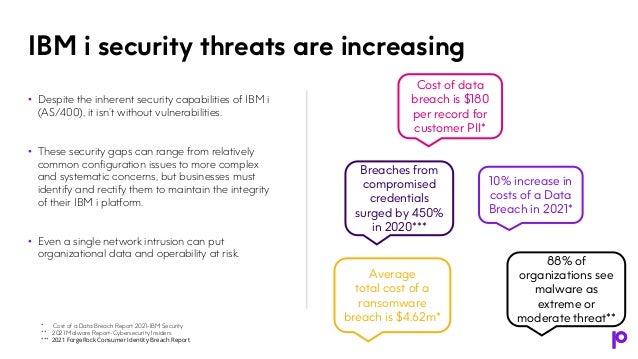
• Despite the inherent security capabilities of IBM i
(AS/400), it isn’t without vulnerabilities.
• These security gaps can range from relatively
common configuration issues to more complex
and systematic concerns, but businesses must
identify and rectify them to maintain the integrity
of their IBM i platform.
• Even a single network intrusion can put
organizational data and operability at risk.
IBM i security threats are increasing
10% increase in
costs of a Data
Breach in 2021*
Breaches from
compromised
credentials
surged by 450%
in 2020***
Cost of data
breach is $180
per record for
customer PII*
88% of
organizations see
malware as
extreme or
moderate threat**
Average
total cost of a
ransomware
breach is $4.62m*
* Cost of a Data Breach Report 2021-IBM Security
** 2021 Malware Report-Cybersecurity Insiders
*** 2021 ForgeRock Consumer Identity Breach Report
“Ransomware attacks against an organization rely
heavily on the scammer's ability to steal the credentials
of those accounts.
Because the attacks orchestrated require some degree
of access to a computer, account, or network system,
one of the best defense measures against ransomware
is multi-factor authentication (MFA).”*
*IS Decisions
5
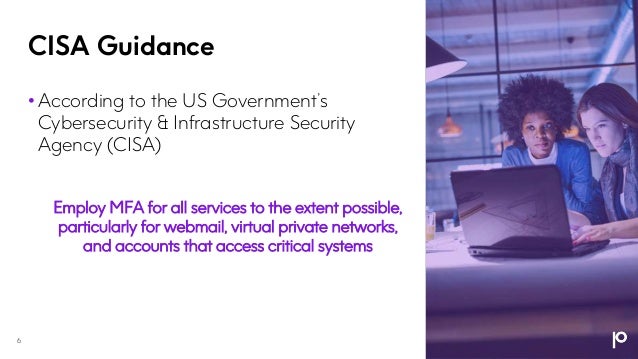
CISA Guidance
6
• According to the US Government’s
Cybersecurity & Infrastructure Security
Agency (CISA)
Employ MFA for all services to the extent possible,
particularly for webmail, virtual private networks,
and accounts that access critical systems
7
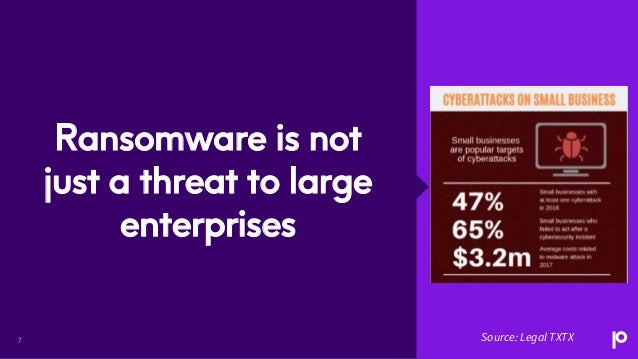
Ransomware is not
just a threat to large
enterprises
Source: Legal TXTX
Presentation name
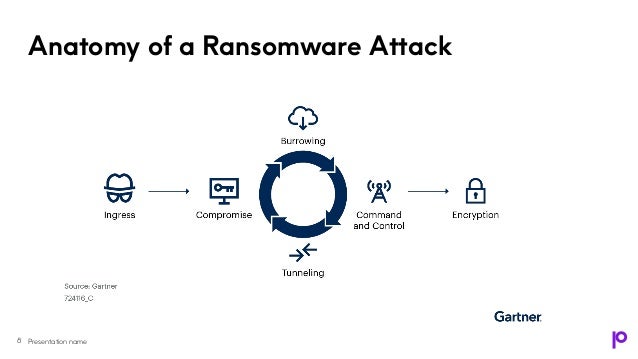
Anatomy of a Ransomware Attack
8
Defending against Credential
Theft
Why Do Organizations
Need to Control Privilege
User Access?
Credential theft is when a
bad actor obtains users’ user
ids and passwords (via theft
from another site, via
phishing, etc.) and uses them
to gain access to an
organization’s systems.
• When configured to require
an additional piece of
information besides user id
and passwords, i.e., multi-
factor authentication, having
a valid user id/password
combination is no longer
sufficient to gain access to
the systems.
• Think about it. Apple and
Google use MFA for phones.
How much more valuable is
data on an IBM i?
Malware on IBM i
• No (current) malware for IBM i ‘proper’
– that is, the operating system itself
• IBM i can be affected by malware in
the IFS in two ways
• An infected object is stored in the IFS
• Malware enters the system from an
infected workstation to a mapped drive
(that is, IBM i) via a file share
Multi-Factor
Authentication
Overview
Why Adopt Multi-Factor
Authentication?
• Regulations are evolving to require or recommend MFA. Consult
the latest documentation for the regulations that impact your
business!
• MFA avoids the risks and costs of:
• Weak passwords
• Complex passwords
• MFA is a good security measure when:
• It is customizable and simple to administer
• End users' adoption is easy
• MFA can support internal strategy and legal requirements
• BYOD (Bring Your Own Device) vs COPE (Corporate Owned,
Personally Enabled)
• Multi-Factor Authentication is the direction!
12
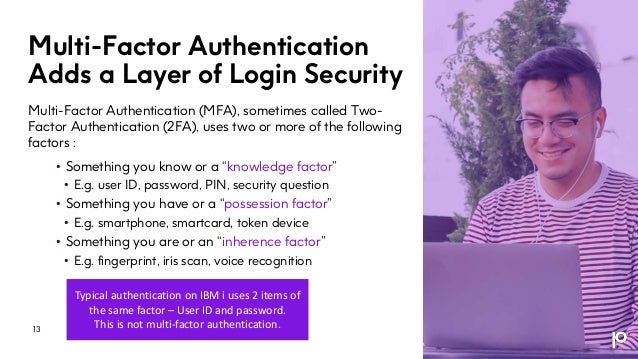
Multi-Factor Authentication
Adds a Layer of Login Security
Multi-Factor Authentication (MFA), sometimes called Two-
Factor Authentication (2FA), uses two or more of the following
factors :
• Something you know or a “knowledge factor”
• E.g. user ID, password, PIN, security question
• Something you have or a “possession factor”
• E.g. smartphone, smartcard, token device
• Something you are or an “inherence factor”
• E.g. fingerprint, iris scan, voice recognition
Typical authentication on IBM i uses 2 items of
the same factor – User ID and password.
This is not multi-factor authentication.
13
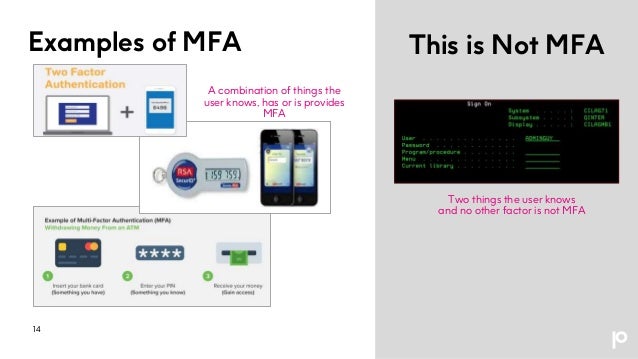
Examples of MFA
14
This is Not MFA
Two things the user knows
and no other factor is not MFA
A combination of things the
user knows, has or is provides
MFA
Why Is Multi-Factor
Authentication Required?
• MFA supports the requirements of numerous industry and
governmental regulations
• Multi-Factor Authentication is required by
• PCI-DSS 3.2
• 23 NYCRR 500
• FFIEC
• MFA is mentioned or the benefits of MFA are implied for:
• HIPAA
• Swift Alliance Access
• GDPR
• Selective use of MFA is a good Security practice. You may be
required to use it tomorrow, if you’re not already using it today.
15
• SOX
• GLBA
• And more
Multi-Factor
Authentication
Options
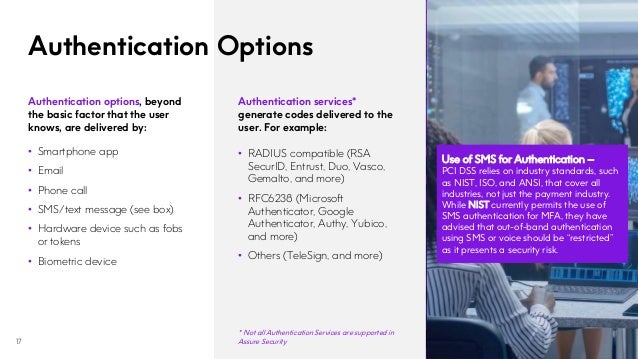
Authentication Options
17
Authentication services*
generate codes delivered to the
user. For example:
• RADIUS compatible (RSA
SecurID, Entrust, Duo, Vasco,
Gemalto, and more)
• RFC6238 (Microsoft
Authenticator, Google
Authenticator, Authy, Yubico,
and more)
• Others (TeleSign, and more)
Use of SMS for Authentication –
PCI DSS relies on industry standards, such
as NIST, ISO, and ANSI, that cover all
industries, not just the payment industry.
While NIST currently permits the use of
SMS authentication for MFA, they have
advised that out-of-band authentication
using SMS or voice should be “restricted”
as it presents a security risk.
Authentication options, beyond
the basic factor that the user
knows, are delivered by:
• Smartphone app
• Email
• Phone call
• SMS/text message (see box)
• Hardware device such as fobs
or tokens
• Biometric device
* Not all Authentication Services are supported in
Assure Security
Key Features to Look for in
an IBM i MFA Solution
• Option to integrate with IBM i signon screen
• Ability to integrate MFA with other IBM i applications or processes
• Multiple authentication options that align with your budget
and current authenticators
• Certification by a standards body (e.g. RSA, NIST)
• Rules that enable MFA to be invoked for specific situations
or user criteria such as:
• Group profiles, Special authorities
• IP addresses, Device types, Dates and times
• And more
• Real risk-based authentication policy (integrated with access
control and elevated authority management capabilities)
18
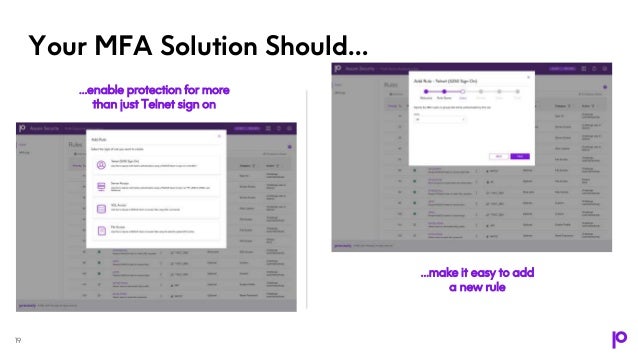
Your MFA Solution Should…
19
…enable protection for more
than just Telnet sign on
…make it easy to add
a new rule
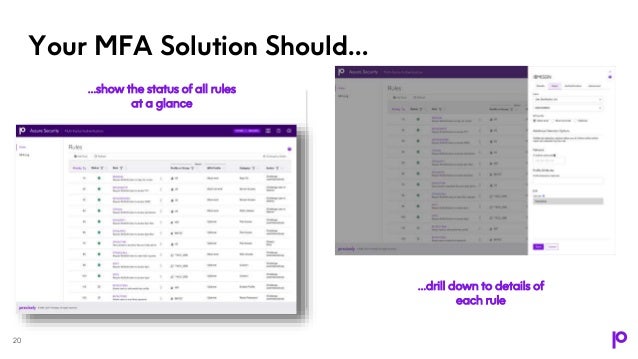
Your MFA Solution Should…
20
…show the status of all rules
at a glance
…drill down to details of
each rule
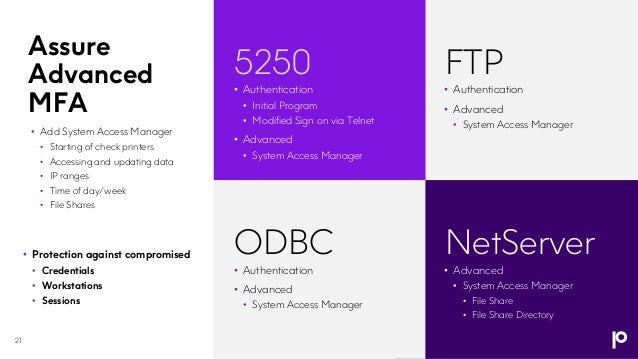
Assure
Advanced
MFA
5250 FTP
• Protection against compromised
• Credentials
• Workstations
• Sessions
• Add System Access Manager
• Starting of check printers
• Accessing and updating data
• IP ranges
• Time of day/week
• File Shares
• Authentication
• Initial Program
• Modified Sign on via Telnet
• Advanced
• System Access Manager
• Authentication
• Advanced
• System Access Manager
ODBC NetServer
• Authentication
• Advanced
• System Access Manager
• Advanced
• System Access Manager
• File Share
• File Share Directory
21
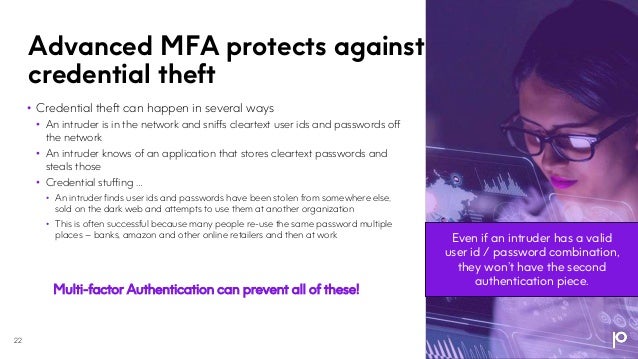
Advanced MFA protects against
credential theft
22
• Credential theft can happen in several ways
• An intruder is in the network and sniffs cleartext user ids and passwords off
the network
• An intruder knows of an application that stores cleartext passwords and
steals those
• Credential stuffing …
• An intruder finds user ids and passwords have been stolen from somewhere else,
sold on the dark web and attempts to use them at another organization
• This is often successful because many people re-use the same password multiple
places – banks, amazon and other online retailers and then at work
Multi-factor Authentication can prevent all of these!
Even if an intruder has a valid
user id / password combination,
they won’t have the second
authentication piece.
Multi-Factor
Authentication
Implementation
Tips
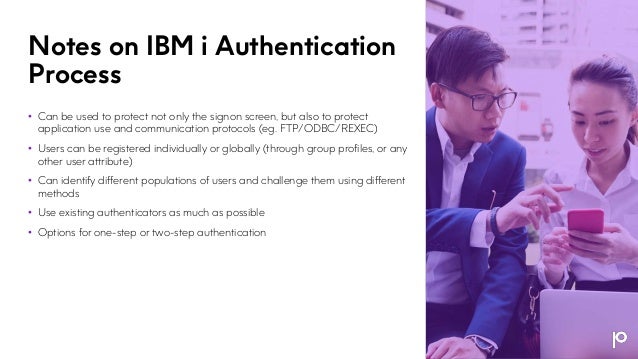
Notes on IBM i Authentication
Process
• Can be used to protect not only the signon screen, but also to protect
application use and communication protocols (eg. FTP/ODBC/REXEC)
• Users can be registered individually or globally (through group profiles, or any
other user attribute)
• Can identify different populations of users and challenge them using different
methods
• Use existing authenticators as much as possible
• Options for one-step or two-step authentication
More MFA
Implementation Tips
• The coding must be very robust in order to not let
users finding weaknesses.
• The coding must not leave any trace of the
process in the joblog or anywhere else.
• Access to journal(s) should be protected, but this is
true anyway for any security policies in place
• Changes to the MFA configuration need to be
strongly audited and access by administrators
should be prevented (using exit points)
25
Additional Uses for Multi-
Factor Authentication on IBM i
26
• Enables self-service profile re-enablement and self-service password
changes
• Supports the Four Eyes Principle for supervised changes
• Protects access to certain commands like DFU, STRSQL, STRSST,
etc…
• Real risk-based authentication policy (integrated with access control
and elevated authority management capabilities)
Assure Security for IBM i
• Defending against the increasing sophistication and complexity
of today’s security threats, including malware requires a
comprehensive, multi-layered approach.
• The key is to maximize the strength of each layer of your
defenses, and then ask:
“If this layer is breached, what do I have
in place to prevent further damage?”
• Assure Security delivers market-leading IBM i security
capabilities that help your organization successfully comply
with increasingly stringent cybersecurity regulations and
effectively address current and emerging security threats.
28
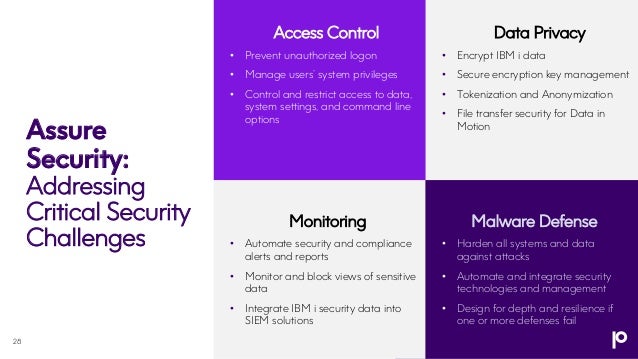
Access Control
• Prevent unauthorized logon
• Manage users’ system privileges
• Control and restrict access to data,
system settings, and command line
options
Monitoring
• Automate security and compliance
alerts and reports
• Monitor and block views of sensitive
data
• Integrate IBM i security data into
SIEM solutions
Malware Defense
• Harden all systems and data
against attacks
• Automate and integrate security
technologies and management
• Design for depth and resilience if
one or more defenses fail
Assure
Security:
Addressing
Critical Security
Challenges
Data Privacy
• Encrypt IBM i data
• Secure encryption key management
• Tokenization and Anonymization
• File transfer security for Data in
Motion
29
29
Assure Security
Data Privacy
Assure Encryption
Assure Secure File
Transfer
Assure Monitoring
and Reporting
Assure Db2 Data
Monitor
Access Control
Assure System
Access Manager
Assure Elevated
Authority Manager
Assure Multi-Factor
Authentication
Monitoring Malware Defense
Assure System
Access Manager
Assure Elevated
Authority Manager
Assure Multi-Factor
Authentication
Assure Monitoring
and Reporting
Assure Encryption
Assure
Security:
Addressing
Critical
Security
Challenges
Q&A
The Best Shield Against Ransomware for IBM i

The Best Shield Against Ransomware for IBM i

  • 1.
    The Best Shield AgainstRansomware for IBM i Bill Hammond | Director, Product Marketing
  • 2.
    Housekeeping Webinar Audio • Today’swebcast audio is streamed through your computer speakers • If you need technical assistance with the web interface or audio, please reach out to us using the Q&A box Questions Welcome • Submit your questions at any time during the presentation using the Q&A box. If we don't get to your question, we will follow-up via email Recording and slides • This webinar is being recorded. You will receive an email following the webinar with a link to the recording and slides
  • 3.
    Today’s Topics • IBMi security landscape • Authentication options and tradeoffs • Tips on implementing multi- factor authentication for IBM i 3
  • 4.
    • Despite theinherent security capabilities of IBM i (AS/400), it isn’t without vulnerabilities. • These security gaps can range from relatively common configuration issues to more complex and systematic concerns, but businesses must identify and rectify them to maintain the integrity of their IBM i platform. • Even a single network intrusion can put organizational data and operability at risk. IBM i security threats are increasing 10% increase in costs of a Data Breach in 2021* Breaches from compromised credentials surged by 450% in 2020*** Cost of data breach is $180 per record for customer PII* 88% of organizations see malware as extreme or moderate threat** Average total cost of a ransomware breach is $4.62m* * Cost of a Data Breach Report 2021-IBM Security ** 2021 Malware Report-Cybersecurity Insiders *** 2021 ForgeRock Consumer Identity Breach Report
  • 5.
    “Ransomware attacks againstan organization rely heavily on the scammer's ability to steal the credentials of those accounts. Because the attacks orchestrated require some degree of access to a computer, account, or network system, one of the best defense measures against ransomware is multi-factor authentication (MFA).”* *IS Decisions 5
  • 6.
    CISA Guidance 6 • Accordingto the US Government’s Cybersecurity & Infrastructure Security Agency (CISA) Employ MFA for all services to the extent possible, particularly for webmail, virtual private networks, and accounts that access critical systems
  • 7.
    7 Ransomware is not justa threat to large enterprises Source: Legal TXTX
  • 8.
    Presentation name Anatomy ofa Ransomware Attack 8
  • 9.
    Defending against Credential Theft WhyDo Organizations Need to Control Privilege User Access? Credential theft is when a bad actor obtains users’ user ids and passwords (via theft from another site, via phishing, etc.) and uses them to gain access to an organization’s systems. • When configured to require an additional piece of information besides user id and passwords, i.e., multi- factor authentication, having a valid user id/password combination is no longer sufficient to gain access to the systems. • Think about it. Apple and Google use MFA for phones. How much more valuable is data on an IBM i?
  • 10.
    Malware on IBMi • No (current) malware for IBM i ‘proper’ – that is, the operating system itself • IBM i can be affected by malware in the IFS in two ways • An infected object is stored in the IFS • Malware enters the system from an infected workstation to a mapped drive (that is, IBM i) via a file share
  • 11.
  • 12.
    Why Adopt Multi-Factor Authentication? •Regulations are evolving to require or recommend MFA. Consult the latest documentation for the regulations that impact your business! • MFA avoids the risks and costs of: • Weak passwords • Complex passwords • MFA is a good security measure when: • It is customizable and simple to administer • End users' adoption is easy • MFA can support internal strategy and legal requirements • BYOD (Bring Your Own Device) vs COPE (Corporate Owned, Personally Enabled) • Multi-Factor Authentication is the direction! 12
  • 13.
    Multi-Factor Authentication Adds aLayer of Login Security Multi-Factor Authentication (MFA), sometimes called Two- Factor Authentication (2FA), uses two or more of the following factors : • Something you know or a “knowledge factor” • E.g. user ID, password, PIN, security question • Something you have or a “possession factor” • E.g. smartphone, smartcard, token device • Something you are or an “inherence factor” • E.g. fingerprint, iris scan, voice recognition Typical authentication on IBM i uses 2 items of the same factor – User ID and password. This is not multi-factor authentication. 13
  • 14.
    Examples of MFA 14 Thisis Not MFA Two things the user knows and no other factor is not MFA A combination of things the user knows, has or is provides MFA
  • 15.
    Why Is Multi-Factor AuthenticationRequired? • MFA supports the requirements of numerous industry and governmental regulations • Multi-Factor Authentication is required by • PCI-DSS 3.2 • 23 NYCRR 500 • FFIEC • MFA is mentioned or the benefits of MFA are implied for: • HIPAA • Swift Alliance Access • GDPR • Selective use of MFA is a good Security practice. You may be required to use it tomorrow, if you’re not already using it today. 15 • SOX • GLBA • And more
  • 16.
  • 17.
    Authentication Options 17 Authentication services* generatecodes delivered to the user. For example: • RADIUS compatible (RSA SecurID, Entrust, Duo, Vasco, Gemalto, and more) • RFC6238 (Microsoft Authenticator, Google Authenticator, Authy, Yubico, and more) • Others (TeleSign, and more) Use of SMS for Authentication – PCI DSS relies on industry standards, such as NIST, ISO, and ANSI, that cover all industries, not just the payment industry. While NIST currently permits the use of SMS authentication for MFA, they have advised that out-of-band authentication using SMS or voice should be “restricted” as it presents a security risk. Authentication options, beyond the basic factor that the user knows, are delivered by: • Smartphone app • Email • Phone call • SMS/text message (see box) • Hardware device such as fobs or tokens • Biometric device * Not all Authentication Services are supported in Assure Security
  • 18.
    Key Features toLook for in an IBM i MFA Solution • Option to integrate with IBM i signon screen • Ability to integrate MFA with other IBM i applications or processes • Multiple authentication options that align with your budget and current authenticators • Certification by a standards body (e.g. RSA, NIST) • Rules that enable MFA to be invoked for specific situations or user criteria such as: • Group profiles, Special authorities • IP addresses, Device types, Dates and times • And more • Real risk-based authentication policy (integrated with access control and elevated authority management capabilities) 18
  • 19.
    Your MFA SolutionShould… 19 …enable protection for more than just Telnet sign on …make it easy to add a new rule
  • 20.
    Your MFA SolutionShould… 20 …show the status of all rules at a glance …drill down to details of each rule
  • 21.
    Assure Advanced MFA 5250 FTP • Protectionagainst compromised • Credentials • Workstations • Sessions • Add System Access Manager • Starting of check printers • Accessing and updating data • IP ranges • Time of day/week • File Shares • Authentication • Initial Program • Modified Sign on via Telnet • Advanced • System Access Manager • Authentication • Advanced • System Access Manager ODBC NetServer • Authentication • Advanced • System Access Manager • Advanced • System Access Manager • File Share • File Share Directory 21
  • 22.
    Advanced MFA protectsagainst credential theft 22 • Credential theft can happen in several ways • An intruder is in the network and sniffs cleartext user ids and passwords off the network • An intruder knows of an application that stores cleartext passwords and steals those • Credential stuffing … • An intruder finds user ids and passwords have been stolen from somewhere else, sold on the dark web and attempts to use them at another organization • This is often successful because many people re-use the same password multiple places – banks, amazon and other online retailers and then at work Multi-factor Authentication can prevent all of these! Even if an intruder has a valid user id / password combination, they won’t have the second authentication piece.
  • 23.
  • 24.
    Notes on IBMi Authentication Process • Can be used to protect not only the signon screen, but also to protect application use and communication protocols (eg. FTP/ODBC/REXEC) • Users can be registered individually or globally (through group profiles, or any other user attribute) • Can identify different populations of users and challenge them using different methods • Use existing authenticators as much as possible • Options for one-step or two-step authentication
  • 25.
    More MFA Implementation Tips •The coding must be very robust in order to not let users finding weaknesses. • The coding must not leave any trace of the process in the joblog or anywhere else. • Access to journal(s) should be protected, but this is true anyway for any security policies in place • Changes to the MFA configuration need to be strongly audited and access by administrators should be prevented (using exit points) 25
  • 26.
    Additional Uses forMulti- Factor Authentication on IBM i 26 • Enables self-service profile re-enablement and self-service password changes • Supports the Four Eyes Principle for supervised changes • Protects access to certain commands like DFU, STRSQL, STRSST, etc… • Real risk-based authentication policy (integrated with access control and elevated authority management capabilities)
  • 27.
    Assure Security forIBM i • Defending against the increasing sophistication and complexity of today’s security threats, including malware requires a comprehensive, multi-layered approach. • The key is to maximize the strength of each layer of your defenses, and then ask: “If this layer is breached, what do I have in place to prevent further damage?” • Assure Security delivers market-leading IBM i security capabilities that help your organization successfully comply with increasingly stringent cybersecurity regulations and effectively address current and emerging security threats.
  • 28.
    28 Access Control • Preventunauthorized logon • Manage users’ system privileges • Control and restrict access to data, system settings, and command line options Monitoring • Automate security and compliance alerts and reports • Monitor and block views of sensitive data • Integrate IBM i security data into SIEM solutions Malware Defense • Harden all systems and data against attacks • Automate and integrate security technologies and management • Design for depth and resilience if one or more defenses fail Assure Security: Addressing Critical Security Challenges Data Privacy • Encrypt IBM i data • Secure encryption key management • Tokenization and Anonymization • File transfer security for Data in Motion
  • 29.
    29 29 Assure Security Data Privacy AssureEncryption Assure Secure File Transfer Assure Monitoring and Reporting Assure Db2 Data Monitor Access Control Assure System Access Manager Assure Elevated Authority Manager Assure Multi-Factor Authentication Monitoring Malware Defense Assure System Access Manager Assure Elevated Authority Manager Assure Multi-Factor Authentication Assure Monitoring and Reporting Assure Encryption Assure Security: Addressing Critical Security Challenges
  • 30.

Editor's Notes

  • #13 To improve Security Passwords alone are insufficient to protect your systems from attack Multi-step is still better than just one step Verizon 2018 Data Breach Investigations Report : “Use two-factor authentication Phishing campaigns are still hugely effective. And employees make mistakes. Two-factor authentication can limit the damage that can be done if credentials are lost or stolen.” To comply with regulations and laws HIPAA doesn't explicitly mention MFA, but due to password expiration reinforcement and updates to NIST guidance (800-63), it becomes a very reasonable solution to meet something like section 164.312d Financial companies doing business in the state of New York have to comply with the New York Department of Financial Services Cybersecurity Regulation (23 NYCRR 500). Section 500.12 (b) states that “Multi-Factor Authentication shall be utilized for any individual accessing the Covered Entity’s internal networks from an external network, unless the Covered Entity’s CISO has approved in writing the use of reasonably equivalent or more secure access controls.” To comply with regulations and laws FFIEC recommends MFA: The agencies consider single-factor authentication, as the only control mechanism, to be inadequate for high-risk transactions involving access to customer information or the movement of funds to other parties. Account fraud and identity theft are frequently the result of single-factor (e.g., ID/password) authentication exploitation. PCI-DSS version 3.2 requires companies to secure all administrative access to the CDE (Cardholder Data Environment) using MFA by January 2018 - Check document « Multi-Factor Authentication » – February 2017 - Check Requirement 8.3.
  • #16 To improve Security Passwords alone are insufficient to protect your systems from attack Multi-step is still better than just one step Verizon 2018 Data Breach Investigations Report : “Use two-factor authentication Phishing campaigns are still hugely effective. And employees make mistakes. Two-factor authentication can limit the damage that can be done if credentials are lost or stolen.” To comply with regulations and laws HIPAA doesn't explicitly mention MFA, but due to password expiration reinforcement and updates to NIST guidance (800-63), it becomes a very reasonable solution to meet something like section 164.312d Financial companies doing business in the state of New York have to comply with the New York Department of Financial Services Cybersecurity Regulation (23 NYCRR 500). Section 500.12 (b) states that “Multi-Factor Authentication shall be utilized for any individual accessing the Covered Entity’s internal networks from an external network, unless the Covered Entity’s CISO has approved in writing the use of reasonably equivalent or more secure access controls.” To comply with regulations and laws FFIEC recommends MFA: The agencies consider single-factor authentication, as the only control mechanism, to be inadequate for high-risk transactions involving access to customer information or the movement of funds to other parties. Account fraud and identity theft are frequently the result of single-factor (e.g., ID/password) authentication exploitation. PCI-DSS version 3.2 requires companies to secure all administrative access to the CDE (Cardholder Data Environment) using MFA by January 2018 - Check document « Multi-Factor Authentication » – February 2017 - Check Requirement 8.3.