How to Set path  permanently .
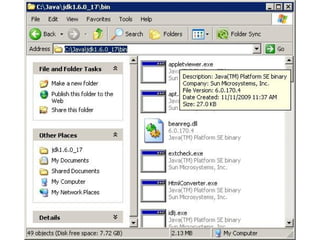
Step 1: Copy the path to the bin directory
 
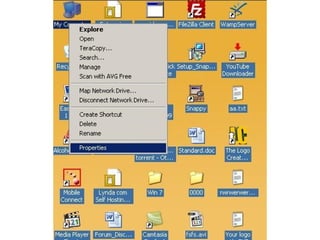
Step 2: Open the "System" option.  MyComputer->Right Click - >Properties
 
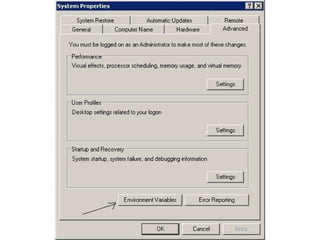
Step 3: Open the environmental variables menu. On the left hand side of the "System" page click on "Advanced System Settings" and press "Continue" when prompted for permission. When the "System Properties" dialog box opens, select the "Advanced" tab and then press the "Environment Variables" button at the bottom right. The "Environmental Variables" dialog box will appear.
 
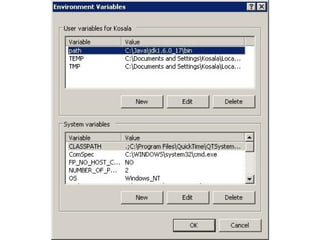
Step 4 Set the path variable. Press the "New" option at the bottom of the window and a "New User  Variable" dialog box will appear. In the "Variable Name" area type "path" and in the space for "Variable Value" past "C:\Java\jdk1.6.0_17\bin." Then press OK.
 

The Basics Of Java Programming

  • 1.
    How to Setpath permanently .
  • 2.
    Step 1: Copythe path to the bin directory
  • 3.
  • 4.
    Step 2: Openthe "System" option. MyComputer->Right Click - >Properties
  • 5.
  • 6.
    Step 3: Openthe environmental variables menu. On the left hand side of the "System" page click on "Advanced System Settings" and press "Continue" when prompted for permission. When the "System Properties" dialog box opens, select the "Advanced" tab and then press the "Environment Variables" button at the bottom right. The "Environmental Variables" dialog box will appear.
  • 7.
  • 8.
    Step 4 Setthe path variable. Press the "New" option at the bottom of the window and a "New User Variable" dialog box will appear. In the "Variable Name" area type "path" and in the space for "Variable Value" past "C:\Java\jdk1.6.0_17\bin." Then press OK.
  • 9.