

The Authenticated
Network Architecture
Table of Contents
Part One: 	Introduction, Background and
Marketing Dynamics ....................2
Section 1: 	 Introduction ..................................2
Section 2: 	 Caveats ..........................................2
Section 3: 	 Evolution of Network Security ... 2
Section 4: 	Today’s Threat and Regulatory
Reality .......................................... 6
Part Two: 	Best Practices and Considerations 	
	 ..................................................... 8
Section 5: 	The Industry’s Product Response 	
	 ..................................................... 8
Section 6: 	Evolved Designs, Not New
Products ....................................... 9
Section 7: 	 ANA Design Fundamentals ...... 13
Section 8: 	ANA Organizational Considerations 	
	 .................................................... 18
Section 9: 	 ANA Technical Considerations ...19
Part Three: 	 Deployment Phases ................... 31
Section 10: 	 ANA Topology and Rollout ...... 31
Section 11: 	 Summary .................................... 42
Appendix I: 	Legend of Symbols Used.......... 43
Network security has been evolving since its inception,
sometimes slowly, sometimes in larger increments.
As technology has shifted, best practices have slowly
matured. What was a good idea two years ago is still
likely a good idea today, with minor variations based
on the evolving threats and business requirements.
However, we are currently at an inflection point in
the use of network-based security controls. Where as
previous designs focused almost exclu­sively on static
policies, filter rules, and enforcement controls, a newer
approach has emerged that promises much more
dynamic options to address the increased mobility and
diversity of today’s network users.
This approach, called the Authenticated Network Architecture (ANA), is based
on the notion of authentication of all users on a network and the association
of each user with a particular set of network entitlements. For example, guests
are granted access only to the Internet, contractors only to discrete network
resources, employees only to the broader network as a whole, and privileged
employees only to isolated enclaves of highly secured resources. Most of the
capabilities described in the architecture have been available in shipping
network infrastructure for many years. However, while the architecture itself
does not mandate much in the way of equipment migration, it does require
organizations to think differently with re­gard to their overall security framework.
The cooperation of security and network architects with their more operationally
inclined counterparts in IT is critical to ensure that the designs contained in
this document evolve with the growing capabilities of your infrastructure.
This document outlines the ANA approach as a whole and describes how to
migrate exist­ing enterprise security designs to this more dynamic approach. In
particular, it discusses the best practices that are emerging in ANA as well as
the specific business requirements that influence deployment decisions.
1WHITE PAPER
avaya.com
2
avaya.com
PART ONE: INTRODUCTION, BACKGROUND AND MARKETING DYNAMICS
Section 1: Introduction
Network security, until recently, evolved as the silicon capabilities within security and network infrastructure grew.
Following the original development of the perim­eter firewall, a “cat-and-mouse” game ensued with the attackers
generally one step ahead of the defensive capabilities of deployed network enforcement devices. Security devices
began first as specific software prod­ucts, later became appliances, and finally were embed­ded in the network
infrastructure. Today, firewall, intru­sion detection, and VPN (mainstays of early 21st century network security) can
all be found embedded within a router, Ethernet switch, or other network de­vice. Advances in silicon now allow
network adminis­trators and security professionals to look deep inside a packet to determine its threat profile.
When integrated into an overall security design, these powerful capabilities can reduce an organiza­tion’s risk.
However, the emergence of mobility paired with a diversity of endpoint devices that allow net­work access have
created an environment where sim­ply looking deep into a packet is no longer sufficient. Organizations are
increasingly looking to define spe­cific rights not just for their own users but for guests and other short-term users
who require network ac­cess. Much like an orchestra without sheet music or a conductor, today’s network security
deployments of­ten involve little to no coordination of policies across the individual elements that make up the
network. The new ANA approach secures the network without relying on the creation of new instruments for the
orchestra. Instead, it gives the existing instruments the coordina­tion required to execute on the composer’s vision.
The so-called confidentiality, integrity, availabil­ity (CIA) model forms the foundation of information security, and
this paper does not challenge that model. Rather, it describes the role that user identity plays in establishing a
secure network. Identity is required in order to understand parties for which information should be confidential.
Similarly, integrity is impossible without understanding who is authorized to change any information.
At its core, ANA introduces a single new element to existing security designs: the authentication and autho­rization
of all network users, regardless of their connection method.
Section 2: Caveats
Because this document discusses both basic design principles and specific technical considerations, it as­sumes
the reader has a basic background in both net­work security and IP networking. Although portions of this paper can
be beneficial to all levels within an or­ganization’s IT staff, its content is intended primarily for the network and
security architect. Directors and CxOs are encouraged to explore the document with the assumption that certain
technical specifics will be too detailed.
Section 3: Evolution of Network Security
It is helpful when examining ANA to understand the evolution of network security and the impact that evo­lution has
had on current product offerings and design approaches. Understanding this evolution is important, because the
early architects of information security did not foresee (much less design for) the current state of enterprise network
security. As threats evolved, the IT response also evolved. As such, the approach an or­ganization might have taken
3
avaya.com
if confronted overnight with today’s entire security requirements landscape might have been very different from the
response that evolved organically. This section shows a representa­tive enterprise network topology and its evolution in
re­sponse to new security requirements.
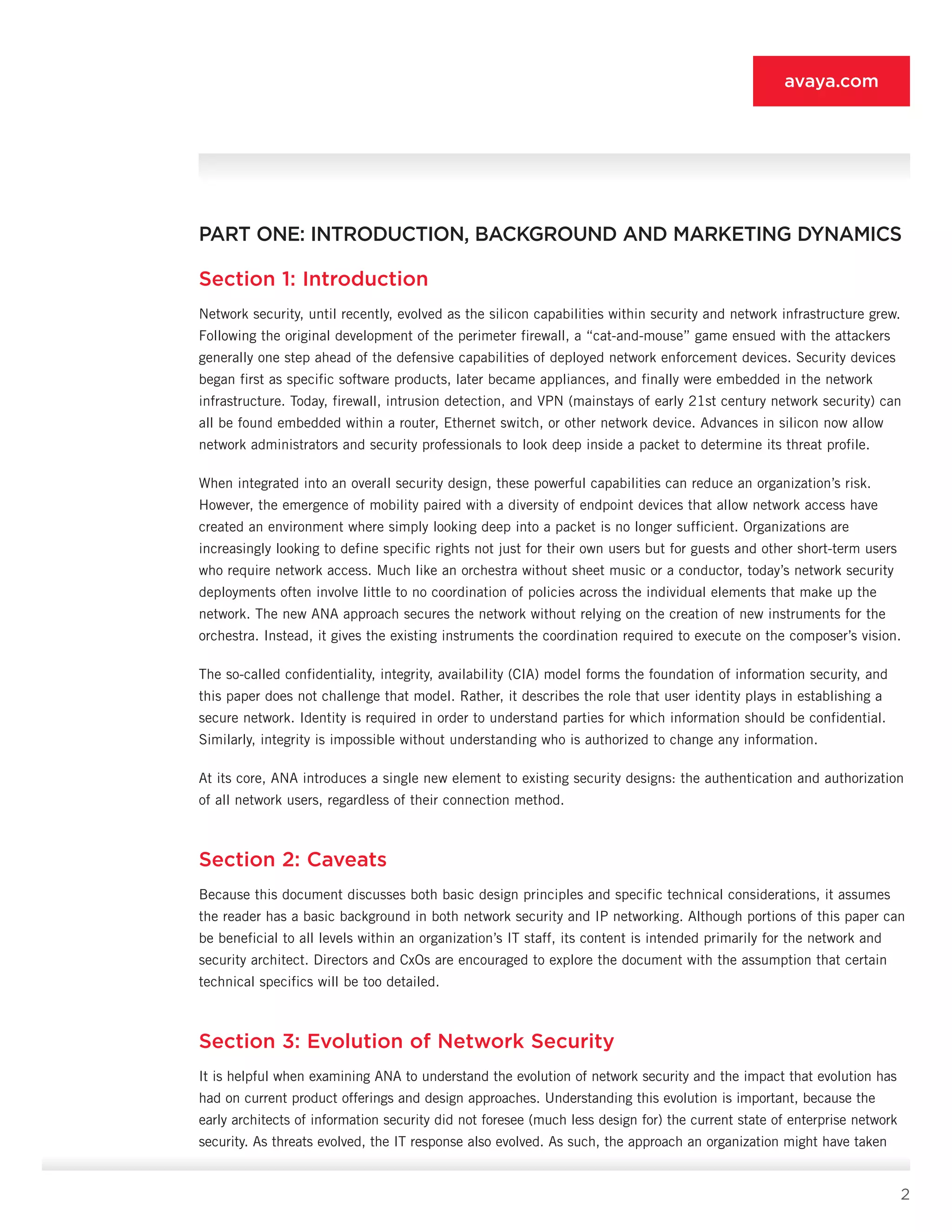
In the beginnings of enterprise network security, circa the
early 1990s, requirements were minimal. If an or­ganization
had more than one site, the sites were con­nected over a
WAN. Internet connectivity was almost nonexistent. As
Internet connections became more common, so did the
installation of perimeter firewalls. These firewalls operated
on a simple premise: devices on the inside are trusted, but
devices on the outside are not. The firewall, appropriately
enough, allowed al­most all communications from the inside
to the out­side, and almost no communications from the
outside to the inside. Figure 3-1 shows an example of these
early network topologies.
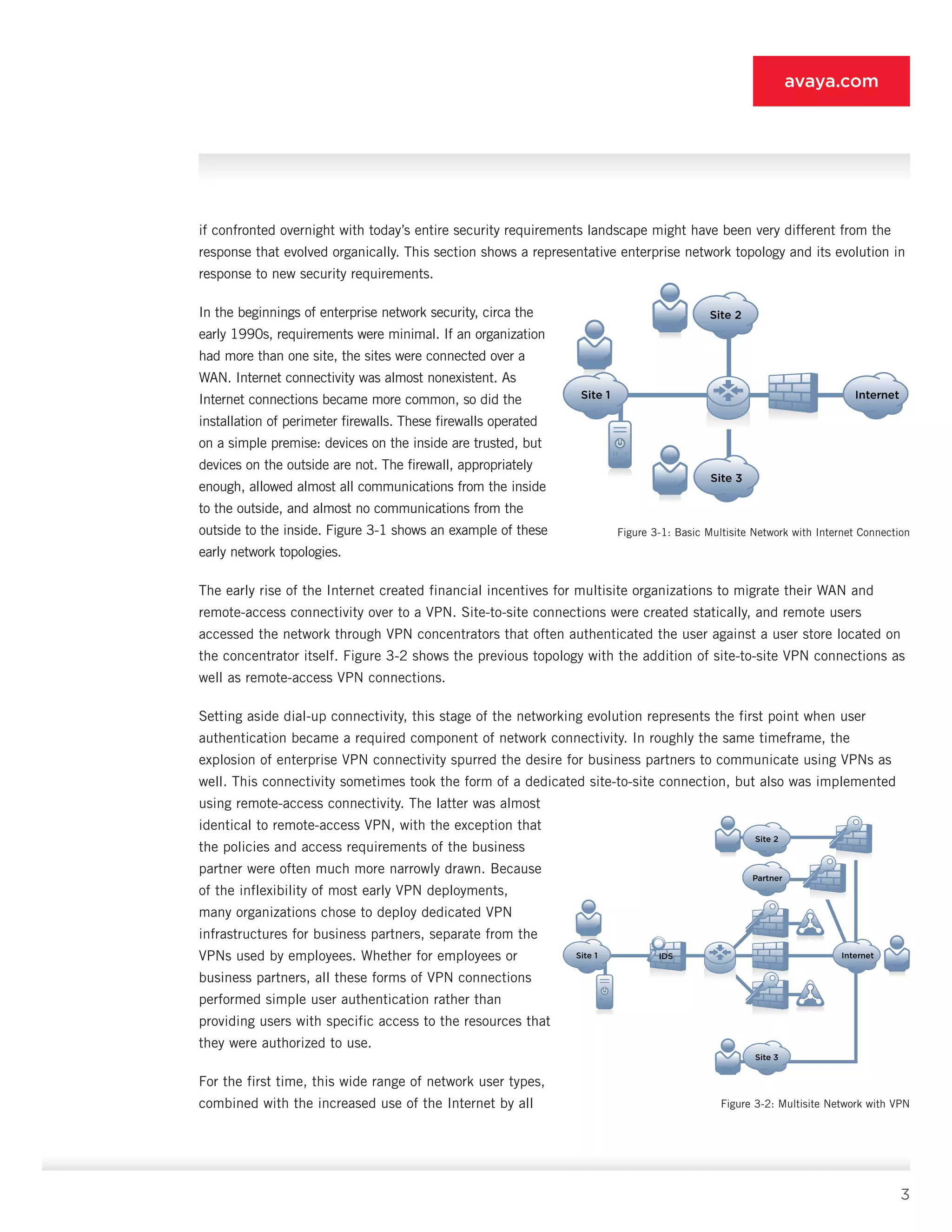
The early rise of the Internet created financial incen­tives for multisite organizations to migrate their WAN and
remote-access connectivity over to a VPN. Site-to-site connections were created statically, and remote users
accessed the network through VPN concentra­tors that often authenticated the user against a user store located on
the concentrator itself. Figure 3-2 shows the previous topology with the addition of site-to-site VPN connections as
well as remote-access VPN connections.
Setting aside dial-up connectivity, this stage of the networking evolution represents the first point when user
authentication became a required component of network connectivity. In roughly the same timeframe, the
explosion of enterprise VPN connectivity spurred the desire for business partners to communicate us­ing VPNs as
well. This connectivity sometimes took the form of a dedicated site-to-site connection, but also was implemented
using remote-access connectivity. The latter was almost
identical to remote-access VPN, with the exception that
the policies and access require­ments of the business
partner were often much more narrowly drawn. Because
of the inflexibility of most early VPN deployments,
many organizations chose to deploy dedicated VPN
infrastructures for business partners, separate from the
VPNs used by employees. Whether for employees or
business partners, all these forms of VPN connections
performed simple user authentica­tion rather than
providing users with specific access to the resources that
they were authorized to use.
For the first time, this wide range of network user types,
combined with the increased use of the Internet by all
Site 2
Site 3
InternetSite 1
Site 2
Site 3
Partner
InternetSite 1 IDS
Figure 3-1: Basic Multisite Network with Internet Connection
Figure 3-2: Multisite Network with VPN
4
avaya.com
facets of the organization, led to decreased trust of the internal network. In response, IT teams began to deploy
intrusion detection systems (IDSs) behind the perimeter access-control technology to further inspect traffic as it
entered the organization’s network, and they began to deploy it deeper in the internal network to inspect traffic
between different zones within the infra­structure.
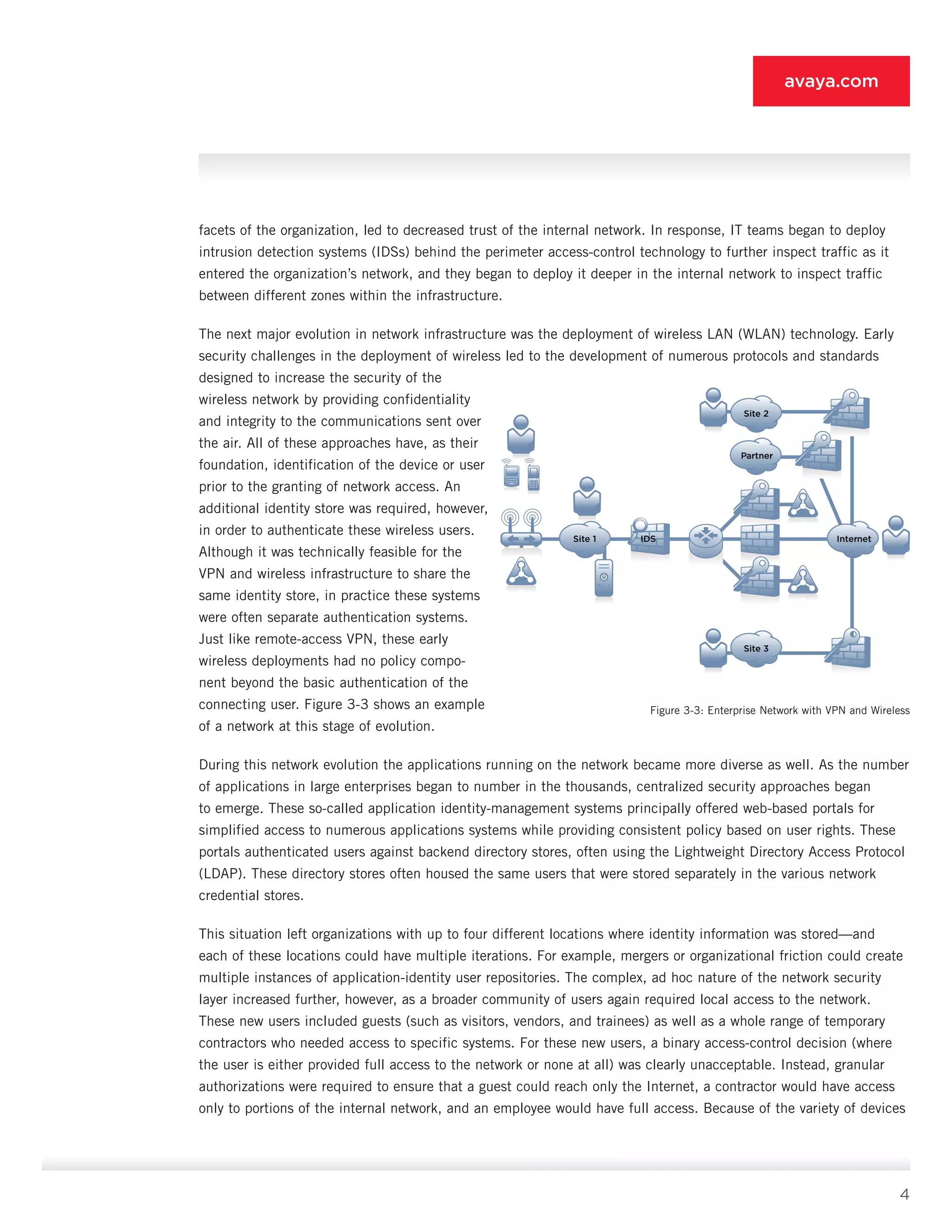
The next major evolution in network infrastructure was the deployment of wireless LAN (WLAN) technol­ogy. Early
security challenges in the deployment of wireless led to the development of numerous protocols and standards
designed to increase the security of the
wireless network by providing confidentiality
and integrity to the communications sent over
the air. All of these approaches have, as their
foundation, identifica­tion of the device or user
prior to the granting of net­work access. An
additional identity store was required, however,
in order to authenticate these wireless us­ers.
Although it was technically feasible for the
VPN and wireless infrastructure to share the
same identity store, in practice these systems
were often separate authentication systems.
Just like remote-access VPN, these early
wireless deployments had no policy compo­
nent beyond the basic authentication of the
connecting user. Figure 3-3 shows an example
of a network at this stage of evolution.
During this network evolution the applications run­ning on the network became more diverse as well. As the number
of applications in large enterprises began to number in the thousands, centralized security ap­proaches began
to emerge. These so-called applica­tion identity-management systems principally offered web-based portals for
simplified access to numerous applications systems while providing consistent policy based on user rights. These
portals authenticated us­ers against backend directory stores, often using the Lightweight Directory Access Protocol
(LDAP). These di­rectory stores often housed the same users that were stored separately in the various network
credential stores.
This situation left organizations with up to four differ­ent locations where identity information was stored—and
each of these locations could have multiple itera­tions. For example, mergers or organizational friction could create
multiple instances of application-identity user repositories. The complex, ad hoc nature of the network security
layer increased further, however, as a broader community of users again required local ac­cess to the network.
These new users included guests (such as visitors, vendors, and trainees) as well as a whole range of temporary
contractors who needed ac­cess to specific systems. For these new users, a binary access-control decision (where
the user is either provid­ed full access to the network or none at all) was clearly unacceptable. Instead, granular
authorizations were required to ensure that a guest could reach only the Internet, a contractor would have access
only to por­tions of the internal network, and an employee would have full access. Because of the variety of devices
Site 2
Site 3
Partner
InternetSite 1 IDS
Figure 3-3: Enterprise Network with VPN and Wireless
5
avaya.com
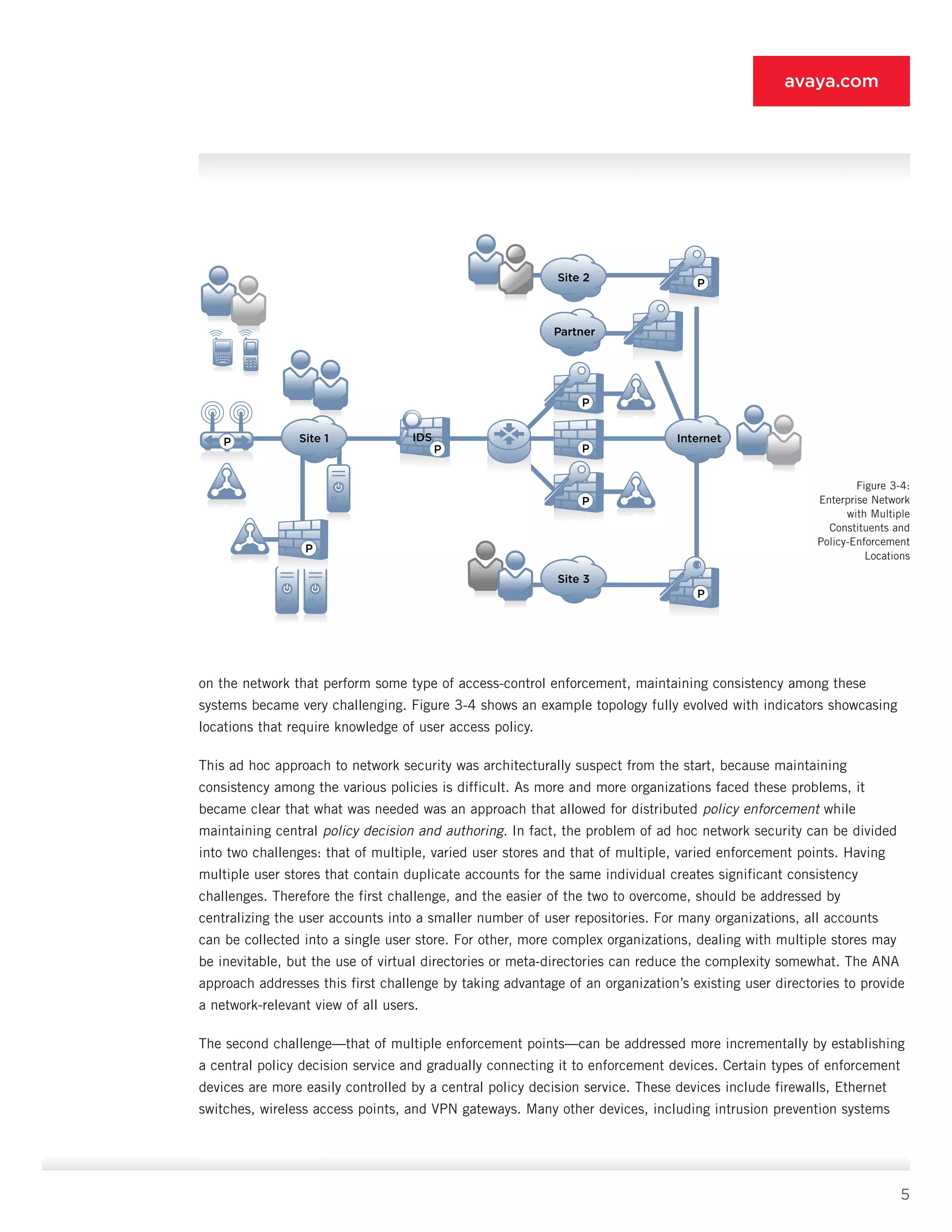
on the network that perform some type of access-control enforcement, maintaining consistency among these
systems became very challenging. Figure 3-4 shows an example topology fully evolved with indicators show­casing
locations that require knowledge of user access policy.
This ad hoc approach to network security was archi­tecturally suspect from the start, because maintaining
consistency among the various policies is difficult. As more and more organizations faced these problems, it
became clear that what was needed was an approach that allowed for distributed policy enforcement while
maintaining central policy decision and authoring. In fact, the problem of ad hoc network security can be divided
into two challenges: that of multiple, varied user stores and that of multiple, varied enforcement points. Having
multiple user stores that contain dupli­cate accounts for the same individual creates signifi­cant consistency
challenges. Therefore the first chal­lenge, and the easier of the two to overcome, should be addressed by
centralizing the user accounts into a smaller number of user repositories. For many organi­zations, all accounts
can be collected into a single user store. For other, more complex organizations, dealing with multiple stores may
be inevitable, but the use of virtual directories or meta-directories can reduce the complexity somewhat. The ANA
approach addresses this first challenge by taking advantage of an organi­zation’s existing user directories to provide
a network-relevant view of all users.
The second challenge—that of multiple enforcement points—can be addressed more incrementally by estab­lishing
a central policy decision service and gradually connecting it to enforcement devices. Certain types of enforcement
devices are more easily controlled by a central policy decision service. These devices include firewalls, Ethernet
switches, wireless access points, and VPN gateways. Many other devices, including intru­sion prevention systems
Site 2
Site 3
Partner
InternetSite 1
P
P
P
P
P
P
P
IDS
P
Figure 3-4:
Enterprise Network
with Multiple
Constituents and
Policy-Enforcement
Locations
6
avaya.com
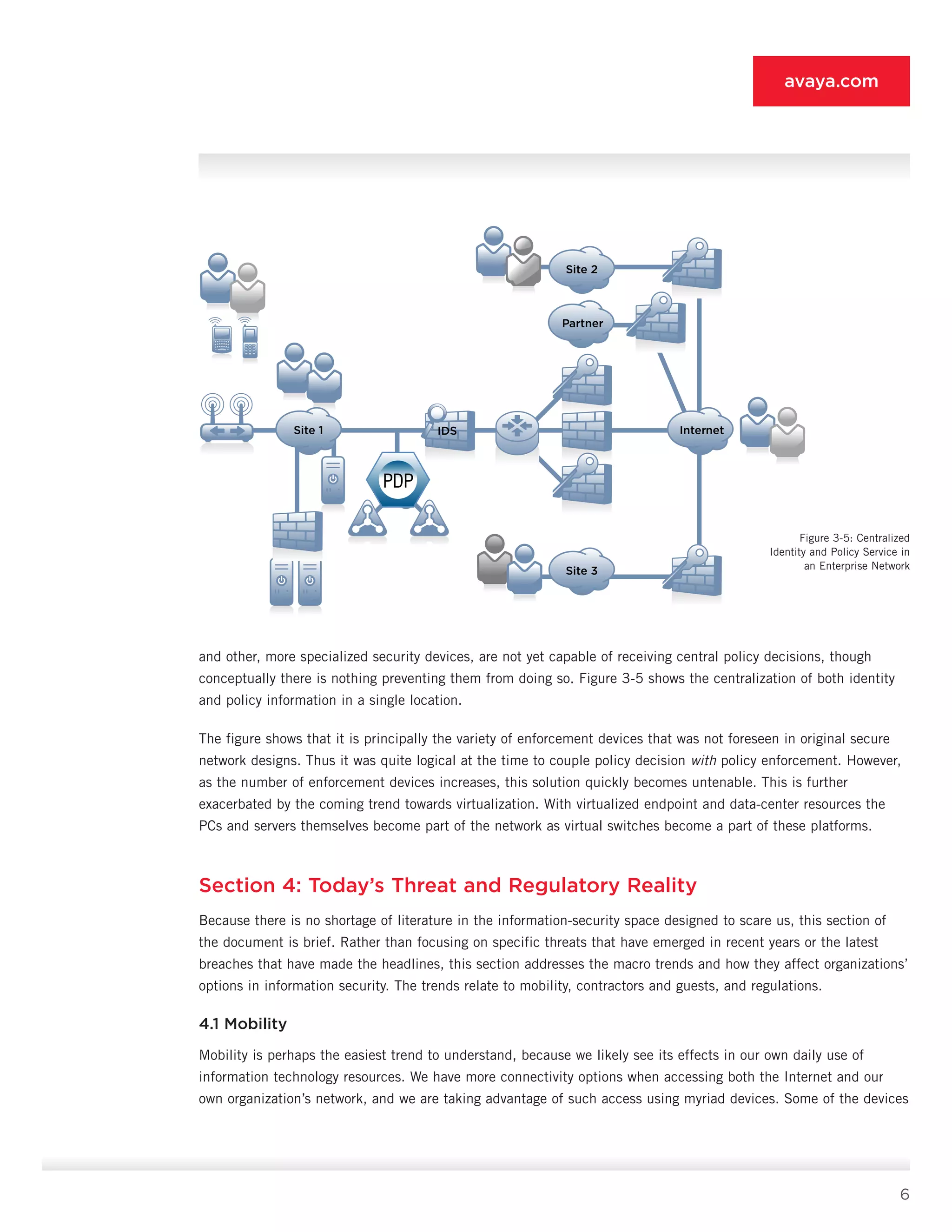
and other, more specialized security devices, are not yet capable of receiving cen­tral policy decisions, though
conceptually there is noth­ing preventing them from doing so. Figure 3-5 shows the centralization of both identity
and policy informa­tion in a single location.
The figure shows that it is principally the variety of enforcement devices that was not foreseen in original secure
network designs. Thus it was quite logical at the time to couple policy decision with policy enforcement. However,
as the number of enforcement devices in­creases, this solution quickly becomes untenable. This is further
exacerbated by the coming trend towards vir­tualization. With virtualized endpoint and data-center resources the
PCs and servers themselves become part of the network as virtual switches become a part of these platforms.
Section 4: Today’s Threat and Regulatory Reality
Because there is no shortage of literature in the information-security space designed to scare us, this section of
the document is brief. Rather than focusing on specific threats that have emerged in recent years or the latest
breaches that have made the headlines, this section addresses the macro trends and how they affect organizations’
options in information security. The trends relate to mobility, contractors and guests, and regulations.
4.1 Mobility
Mobility is perhaps the easiest trend to understand, because we likely see its effects in our own daily use of
information technology resources. We have more connectivity options when accessing both the Internet and our
own organization’s network, and we are taking advantage of such access using myriad devices. Some of the devices
Site 2
Site 3
Partner
InternetSite 1
P
IDS
Figure 3-5: Centralized
Identity and Policy Service in
an Enterprise Network
7
avaya.com
we attach to the network are owned by our organization, whereas others are personal devices such as mobile
phones and personal digital assistants (PDAs) that we have brought from home. Because of this increased access
to the Internet, we are using the Internet more and more for conducting the business of our lives. Increased
reliance on the Internet means that nearly everyone expects connectivity regardless of their location. This situation
has led to the creation of the now-clichéd term in the security industry: deperimiterization.
Increased mobility also means that IP addresses have become less useful as a means of identifying us­ers.
IP addresses were originally meant for routing, but along the way they became a security identifier as well. As we
roam the network and connect using different devices, our IP address changes constantly. Traditional firewalls,
which use IP addresses almost exclusively for rules, cannot make any intelligent identification of us­ers without the
additional authentication step that ANA brings. ANA limits the use of IP addresses as security identifiers whenever
possible while still using existing security equipment and techniques.
4.2 Contractors and Guests
Building on the mobility point discussed in the previ­ous section, contractors and guests connecting to your network
have the same expectations of connectivity that you have when connecting to theirs. As a result, the notion that all
users on a LAN are equal is quite out­moded. It is no longer a question of where you are con­nected to the network
but rather who you are and what rights you should be afforded based on your identity.
4.3 Regulations
Whether it be Sarbanes-Oxley Act (SOX), Health Insurance Portability and Accountability Act (HIPAA), Gramm-
Leach-Bliley Act (GLBA), Payment Card Industry Security Standards Council (PCI), Digital Millennium Copyright
Act (DMCA), Communications Assistance for Law Enforcement Act (CALEA), or Federal Information Security
Management Act (FISMA), chances are there is an acronym (or more) that spells out security guide­lines and
restrictions you must impose on your orga­nization and your network. The most common require­ment in these
regulations that relates to ANA is auditable network access. Some auditors interpret many of these regulations as
mandating authenticated net­works so that access can be traced based on time of day, user, and, in some cases,
network destination. The intention of this paper is not to lay out a specific path to compliance for any of these
specific security stan­dards. However, it is highly likely that you can address some of the regulations affecting your
organization through some of the best practices outlined herein.
8
avaya.com
PART TWO: BEST PRACTICES AND CONSIDERATIONS
Section 5: The Industry’s Product Response
Like any other aspect of networking, network security falls prey to the cult of the new as much as any other
segment. Trade publications, vendor pitches, and the analyst community all share the blame for encouraging the
notion that you can find the solution to your secure networking problem by deploying a new product (or products).
End users themselves are also somewhat culpable, because playing with a new “toy” is generally thought to be
more fun than fixing the old one.
As the trends outlined in the previous section emerged, numerous new product offerings and solution categories
were proffered as solutions. None of these components is fundamentally flawed, and all of them can be a part
of an overall network security system. But, like the tools that preceded them, they are merely an element in the
overall approach to secure network­ing rather than the sole means to achieving it.
Secure Socket Layer (SSL) VPNs, for example, are great at providing client-to-gateway confidentiality and
authentication, but this hub-and-spoke security model has its greatest utility in remote-access VPN connec­tions
rather than as a replacement for LAN security techniques. The reason is that no matter how central­ized data
centers become in the future, peer-to-peer communications is an intrinsic part of IP networking, and SSL VPNs
offer no solution for such communica­tion. Therefore, if SSL VPNs are to live side by side with other methods of
connectivity, it is important that any authorization policy be applicable across all access methods.
Intrusion prevention systems (IPSs) have also been presented as a foundation for solving today’s secure networking
problems. Although the intelligence and performance characteristics of IPS systems have im­proved, most
organizations still deploy them in a passive-only mode because they fear that false-positive matches will block
legitimate traffic. Increased use of encryption also poses a challenge. More and more ap­plications encrypt the data
they send, making payload inspection with an IPS impossible. SSL offload can ad­dress this encryption problem to
a degree, but SSL offload is not practical everywhere, nor is SSL/Transport Layer Security (TLS) the only form of
cryptography de­ployed.
There are also those in the industry who, upon see­ing the challenges in network security, suggest treating the
network as a whole and relying instead on endpoint security as the only solution. This scenario breaks the defense-
in-depth approach that is widely accepted in the industry as a best practice. It creates a single point of failure,
where the compro­mise of an endpoint security system could lead to the total compromise of the assets it is trying
to protect. There is no doubt that the improvements made in oper­ating system security and secure application
develop­ment practices have yielded benefits to the industry as a whole and to organizations’ security. But to
suggest that because of these improvements other, function­ing forms of information security should be abandoned
makes little sense.
Another approach, tied closely to the increasing role of endpoint security, is network access control (NAC).
Conceived originally to address the worm propagation problems from the early part of the 2000s, NAC provides
the means for a network to validate that a given endpoint device is running appropriate security software. This
9
avaya.com
approach is often called posture checking. This device-centric approach adds value to a network, but if deployed
without regard to the user behind the device, it winds up merely duplicating the update facilities already present in
many endpoint software solution offerings. Posture checking is discussed further in Section 9.5. NAC was a good
start and got the industry heading in the right direction; ANA is its logical evolution.
Section 6: Evolved Designs, Not New Products
As evidenced in the preceding section, there is no panacea for the challenges in network security. Instead, the
approach to secure network design must be updated to account for the reality of today’s comput­ing environments
and the multitude of security devices that are present throughout the network. This sec­tion describes several design
alternatives that address today’s deficiencies, including the benefits and draw­backs of each design alternative.
6.1 Gateway Concentrator Approach
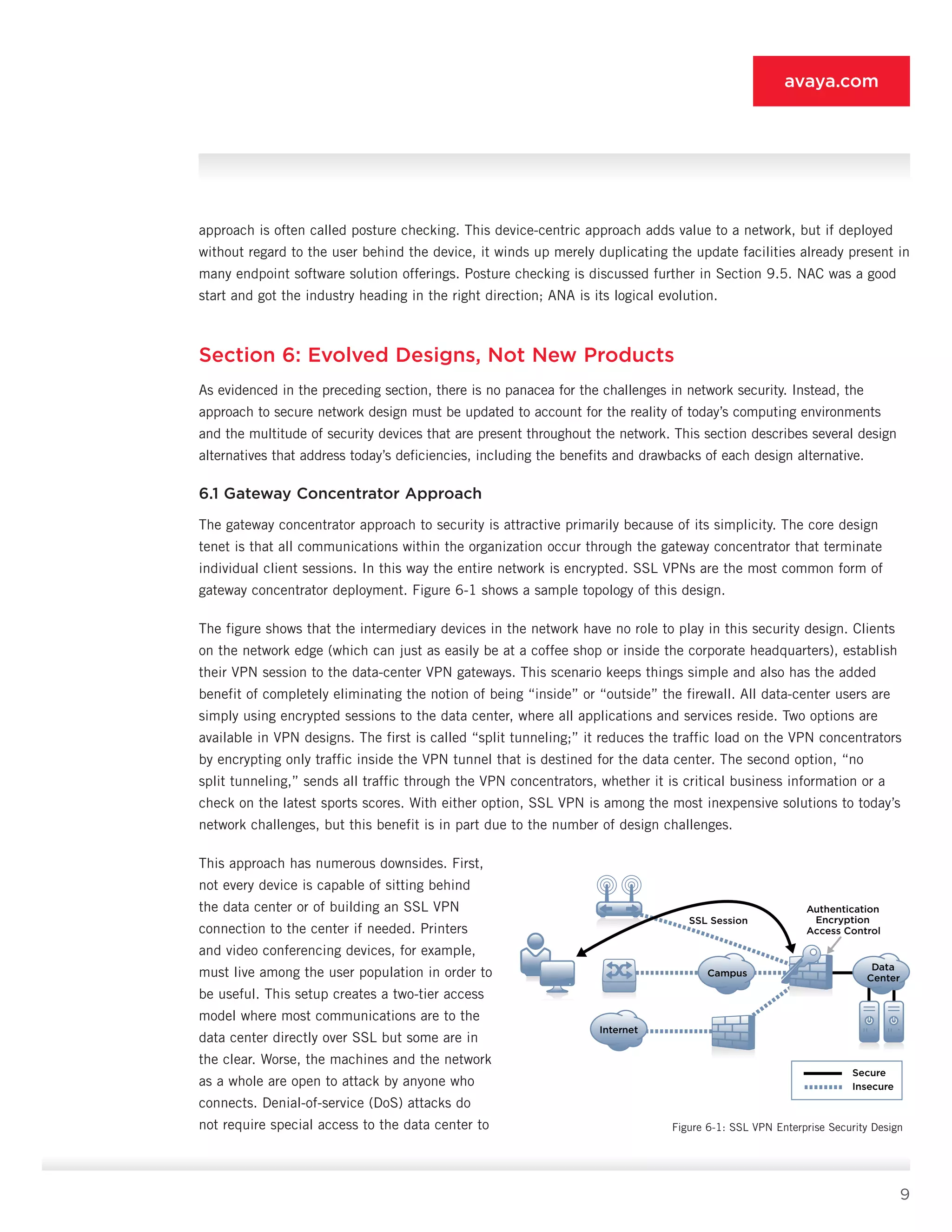
The gateway concentrator approach to security is at­tractive primarily because of its simplicity. The core de­sign
tenet is that all communications within the organi­zation occur through the gateway concentrator that ter­minate
individual client sessions. In this way the entire network is encrypted. SSL VPNs are the most common form of
gateway concentrator deployment. Figure 6-1 shows a sample topology of this design.
The figure shows that the intermediary devices in the network have no role to play in this security design. Clients
on the network edge (which can just as easily be at a coffee shop or inside the corporate head­quarters), establish
their VPN session to the data-center VPN gateways. This scenario keeps things simple and also has the added
benefit of completely eliminating the notion of being “inside” or “outside” the firewall. All data-center users are
simply using encrypted sessions to the data center, where all applications and services reside. Two options are
available in VPN designs. The first is called “split tunneling;” it reduces the traffic load on the VPN concentrators
by encrypting only traffic inside the VPN tunnel that is destined for the data center. The second option, “no
split tunneling,” sends all traffic through the VPN concentrators, whether it is critical business information or a
check on the latest sports scores. With either option, SSL VPN is among the most inexpensive solutions to today’s
network challenges, but this benefit is in part due to the number of design challenges.
This approach has numerous downsides. First,
not ev­ery device is capable of sitting behind
the data center or of building an SSL VPN
connection to the center if need­ed. Printers
and video conferencing devices, for example,
must live among the user population in order to
be use­ful. This setup creates a two-tier access
model where most communications are to the
data center directly over SSL but some are in
the clear. Worse, the machines and the network
as a whole are open to attack by anyone who
connects. Denial-of-service (DoS) attacks do
not require special access to the data center to
Authentication
Encryption
Access Control
SSL Session
Data
CenterCampus
Internet
Secure
Insecure
Figure 6-1: SSL VPN Enterprise Security Design
10
avaya.com
render systems inac­cessible. Client PCs can also be attacked prior to con­necting to the VPN or, in the case of split
tunneling, from all non-data-center systems throughout the duration of the client’s connection to the network.
Second, there is no ability to troubleshoot network traffic when it is all encrypted. Using a sniffer is a mainstay of
network troubleshooting, and if all your wires are painted black, there is not much you can do with a sniffer. Also, there
is an implicit assumption in this design that cryptography is the most important thing you can do to protect information.
However, a sys­tem can be compromised over an encrypted link just as easily as over a cleartext link. The only difference
is that the systems along the network traffic path can’t see it occurring. The SSL VPN design forces security to the
network edge, where end-user PCs are protected only by the endpoint security software installed on them, and where
server resourc­es are protected only by the security infrastructure de­ployed in the data center.
Third, as was mentioned in Section 5, peer-to-peer communications are increasingly popular, particularly voice
applications. With SSL VPN, either those com­munications are not secured in any way (as with split tunneling), or
all peer-to-peer communications are sent through the data-center VPN gateways, creating a brittle hub-and-spoke
topology even for local traffic. Finally, most organizations have invested considerable Secure Insecure capital and
manpower in their current network. That network has a breadth of capability that SSL VPN ren­ders irrelevant.
6.2 Overlay Approach
Although the SSL VPN approach is simple, the pre­vious section outlines its substantial limitations as a design
approach for securing an entire organization’s network. Newer network devices, built originally for the NAC market,
suggest a different approach. These de­vices sit inline and act as LAN security appliances, in much the same way
that traditional perimeter firewalls behaved. These devices typically offer access control and packet inspection
similar to an IDS, along with the ability to identify the endpoint device. Sometimes they offer access-layer Ethernet
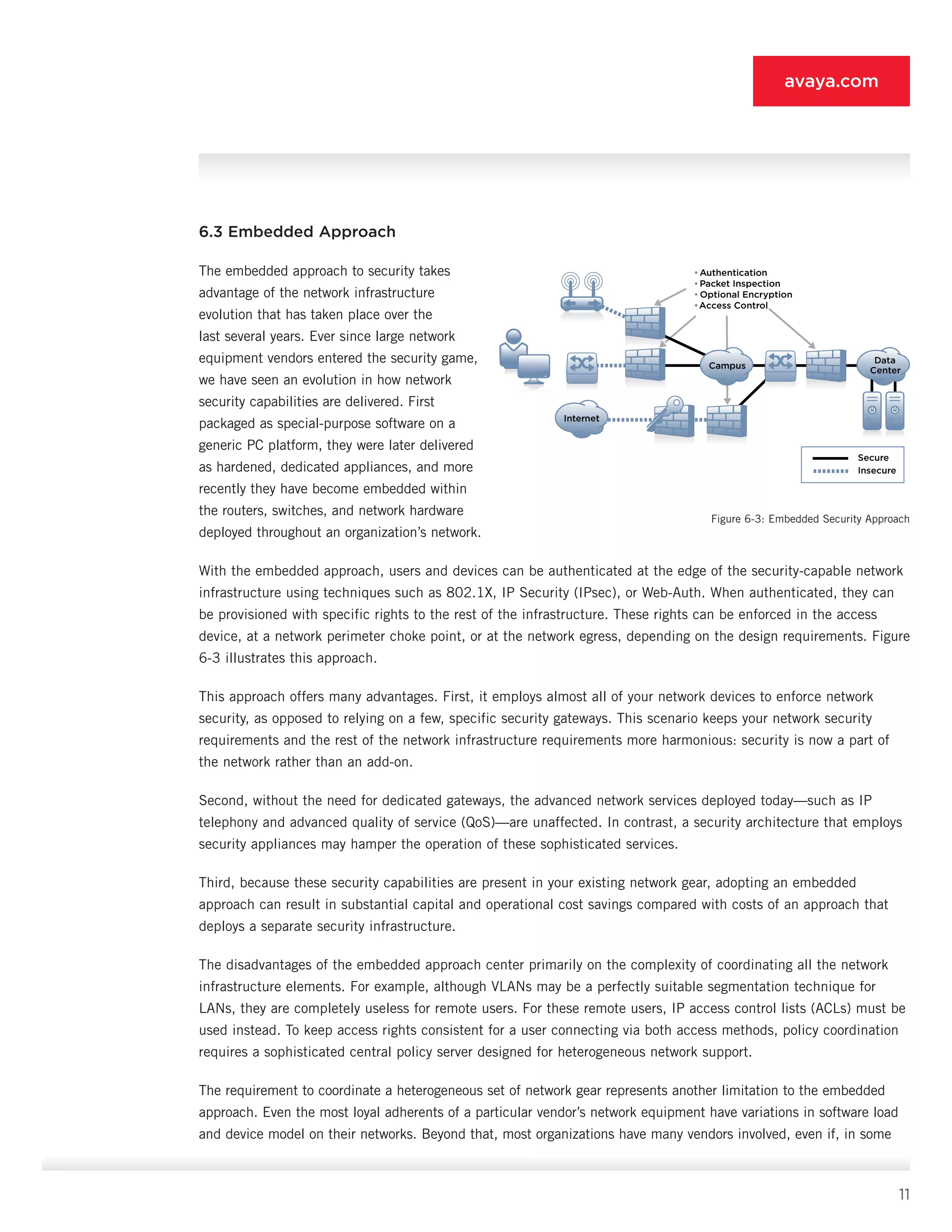
switching and can replace your existing wiring closet switch. Figure 6-2 showcas­es this design approach.
The main benefit of this overlay approach is also one of its main detractions. Like the SSL VPN design, there is
no need to rely on your existing network equipment to do anything security-related. All security decisions can be
left to these new inline gateways. The down­side is that you need to buy these new gateways for all your network
access points. For locations like remote-access, you are often replicating functionality already in your VPN gate­
ways. Additionally, you are placing new
inline devices directly into the flow of LAN
traffic on, presumably, a high-speed network
infrastructure. This scenario can cause
bottlenecks for the LAN traffic and also
compli­cate troubleshooting, given that, when
something goes wrong, you now must consider
more devices.
•Authentication
•Packet Inspection
• Optional Encryption
•Access Control
Data
Center
Campus
Internet
Secure
Insecure
Figure 6-2: Inline LAN Security Device Approach
11
avaya.com
6.3 Embedded Approach
The embedded approach to security takes
advan­tage of the network infrastructure
evolution that has taken place over the
last several years. Ever since large network
equipment vendors entered the security game,
we have seen an evolution in how network
security capabilities are deliv­ered. First
packaged as special-purpose software on a
generic PC platform, they were later delivered
as hard­ened, dedicated appliances, and more
recently they have become embedded within
the routers, switches, and network hardware
deployed throughout an organi­zation’s network.
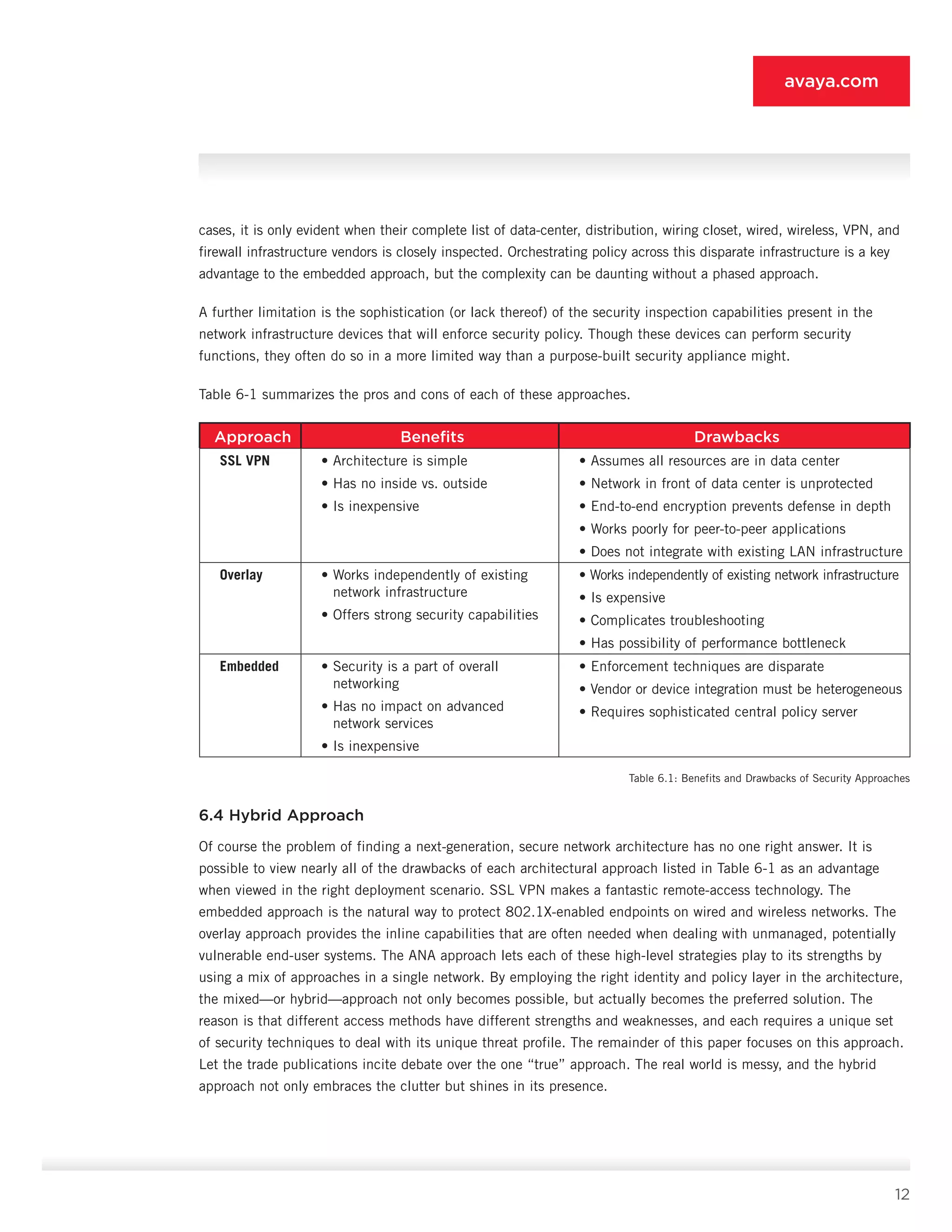
With the embedded approach, users and devices can be authenticated at the edge of the security-ca­pable network
infrastructure using techniques such as 802.1X, IP Security (IPsec), or Web-Auth. When authenticated, they can
be provisioned with specific rights to the rest of the infrastructure. These rights can be enforced in the access
device, at a network perimeter choke point, or at the network egress, depending on the design requirements. Figure
6-3 illustrates this approach.
This approach offers many advantages. First, it em­ploys almost all of your network devices to enforce net­work
security, as opposed to relying on a few, specific security gateways. This scenario keeps your network security
requirements and the rest of the network infrastructure requirements more harmonious: securi­ty is now a part of
the network rather than an add-on.
Second, without the need for dedicated gateways, the advanced network services deployed today—such as IP
telephony and advanced quality of service (QoS)—are unaffected. In contrast, a security architecture that em­ploys
security appliances may hamper the operation of these sophisticated services.
Third, because these security capabilities are pres­ent in your existing network gear, adopting an embed­ded
approach can result in substantial capital and op­erational cost savings compared with costs of an ap­proach that
deploys a separate security infrastructure.
The disadvantages of the embedded approach cen­ter primarily on the complexity of coordinating all the network
infrastructure elements. For example, although VLANs may be a perfectly suitable segmenta­tion technique for
LANs, they are completely useless for remote users. For these remote users, IP access control lists (ACLs) must be
used instead. To keep ac­cess rights consistent for a user connecting via both access methods, policy coordination
requires a sophisticated central policy server designed for het­erogeneous network support.
The requirement to coordinate a heterogeneous set of network gear represents another limitation to the embedded
approach. Even the most loyal adherents of a particular vendor’s network equipment have vari­ations in software load
and device model on their networks. Beyond that, most organizations have many vendors involved, even if, in some
•Authentication
•Packet Inspection
• Optional Encryption
•Access Control
Data
Center
Campus
Internet
Secure
Insecure
Figure 6-3: Embedded Security Approach
12
avaya.com
cases, it is only evident when their complete list of data-center, distribution, wiring closet, wired, wireless, VPN, and
firewall infrastructure vendors is closely inspected. Orchestrating policy across this disparate infrastructure is a key
advantage to the embedded approach, but the complexity can be daunting without a phased approach.
A further limitation is the sophistication (or lack thereof) of the security inspection capabilities present in the
network infrastructure devices that will enforce security policy. Though these devices can perform se­curity
functions, they often do so in a more limited way than a purpose-built security appliance might.
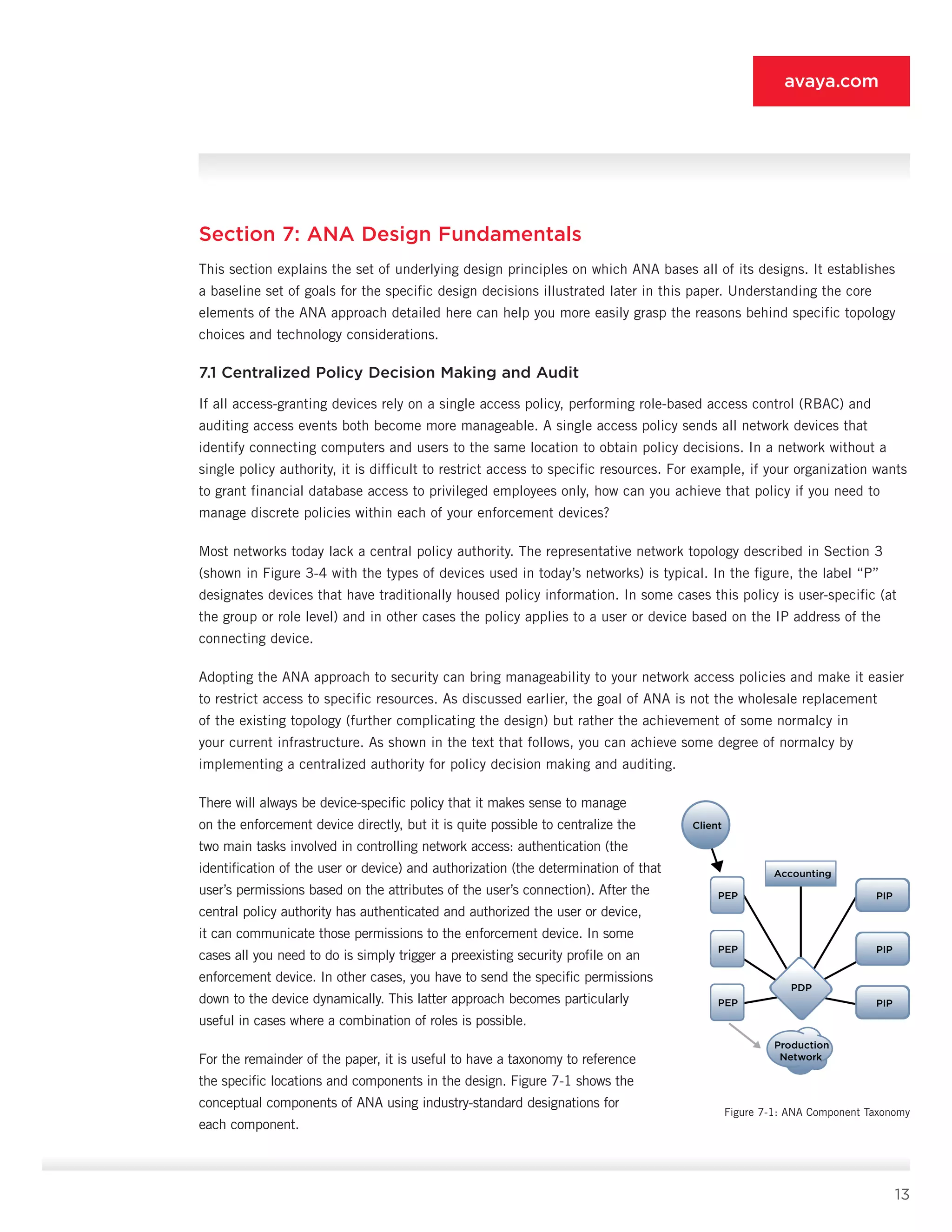
Table 6-1 summarizes the pros and cons of each of these approaches.
Approach Benefits Drawbacks
SSL VPN • Architecture is simple
• Has no inside vs. outside
• Is inexpensive
• Assumes all resources are in data center
• Network in front of data center is unprotected
• End-to-end encryption prevents defense in depth
• Works poorly for peer-to-peer applications
• Does not integrate with existing LAN infrastructure
Overlay • Works independently of existing
network infrastructure
• Offers strong security capabilities
• Works independently of existing network infrastructure
• Is expensive
• Complicates troubleshooting
• Has possibility of performance bottleneck
Embedded • Security is a part of overall
networking
• Has no impact on advanced
network services
• Is inexpensive
• Enforcement techniques are disparate
• Vendor or device integration must be heterogeneous
• Requires sophisticated central policy server
Table 6.1: Benefits and Drawbacks of Security Approaches
6.4 Hybrid Approach
Of course the problem of finding a next-generation, secure network architecture has no one right answer. It is
possible to view nearly all of the drawbacks of each architectural approach listed in Table 6-1 as an advantage
when viewed in the right deployment sce­nario. SSL VPN makes a fantastic remote-access tech­nology. The
embedded approach is the natural way to protect 802.1X-enabled endpoints on wired and wire­less networks. The
overlay approach provides the inline capabilities that are often needed when dealing with unmanaged, potentially
vulnerable end-user systems. The ANA approach lets each of these high-level strate­gies play to its strengths by
using a mix of approaches in a single network. By employing the right identity and policy layer in the architecture,
the mixed—or hy­brid—approach not only becomes possible, but actu­ally becomes the preferred solution. The
reason is that different access methods have different strengths and weaknesses, and each requires a unique set
of security techniques to deal with its unique threat profile. The remainder of this paper focuses on this approach.
Let the trade publications incite debate over the one “true” approach. The real world is messy, and the hybrid
approach not only embraces the clutter but shines in its presence.
13
avaya.com
Section 7: ANA Design Fundamentals
This section explains the set of underlying design principles on which ANA bases all of its designs. It es­tablishes
a baseline set of goals for the specific design decisions illustrated later in this paper. Understanding the core
elements of the ANA approach detailed here can help you more easily grasp the rea­sons behind specific topology
choices and technology considerations.
7.1 Centralized Policy Decision Making and Audit
If all access-granting devices rely on a single access policy, performing role-based access control (RBAC) and
au­diting access events both become more manageable. A single access policy sends all network devices that
identify connecting computers and users to the same loca­tion to obtain policy decisions. In a network without a
single policy authority, it is difficult to restrict access to specific resources. For example, if your organization wants
to grant financial database access to privileged employees only, how can you achieve that policy if you need to
manage discrete policies within each of your enforcement devices?
Most networks today lack a central policy author­ity. The representative network topology described in Section 3
(shown in Figure 3-4 with the types of de­vices used in today’s networks) is typical. In the figure, the label “P”
designates devices that have traditionally housed policy information. In some cases this policy is user-specific (at
the group or role level) and in other cases the policy applies to a user or device based on the IP address of the
connecting device.
Adopting the ANA approach to security can bring man­ageability to your network access policies and make it easier
to restrict access to specific resources. As discussed earlier, the goal of ANA is not the wholesale replacement
of the existing topology (further complicat­ing the design) but rather the achievement of some normalcy in
your current infrastructure. As shown in the text that follows, you can achieve some degree of normalcy by
implementing a centralized author­ity for policy decision making and auditing.
There will always be device-specific policy that it makes sense to manage
on the enforcement device di­rectly, but it is quite possible to centralize the
two main tasks involved in controlling network access: authentication (the
identification of the user or device) and authorization (the determination of that
user’s permis­sions based on the attributes of the user’s connection). After the
central policy authority has authenticated and authorized the user or device,
it can communicate those permissions to the enforcement device. In some
cases all you need to do is simply trigger a preexist­ing security profile on an
enforcement device. In other cases, you have to send the specific permissions
down to the device dynamically. This latter approach becomes particularly
useful in cases where a combina­tion of roles is possible.
For the remainder of the paper, it is useful to have a taxonomy to reference
the specific locations and com­ponents in the design. Figure 7-1 shows the
concep­tual components of ANA using industry-standard desig­nations for
each component.
Client
PEP
PDP
PIP
PEP PIP
PEP
Accounting
PIP
Production
Network
Figure 7-1: ANA Component Taxonomy
14
avaya.com
Client (Supplicant) - The client—sometimes called the supplicant—is the device attempting to access the net­work.
The client either authenticates itself as a device or the device acts as a proxy to authenticate the user.
Policy Enforcement Point (Authenticator) - The policy enforcement point (PEP) is sometimes called the authenticator
or network access server (NAS). The PEP is the network device that brokers the access request for the client. The
PEP may be a dial-in server, VPN concentrator, firewall, gateway GPRS support node, Ethernet switch, wireless
access point (AP), or an inline security gateway. The PEP is responsible for enforcing the terms of a client’s
access. This enforcement var­ies based on the capabilities of the device and is dis­cussed later in this paper.
Policy Information Point - The policy information point (PIP) is an information repository to help make the access
decision. It could be a database of device IDs, a user directory such as LDAP, a one-time password (OTP) token
server, or any other system which houses data relevant to a device or user access request.
Policy Decision Point (AAA Server) - The Policy Decision Point (PDP) is the brain of the AAA decision. It collects
the access request from the client via the PEP. It also queries any relevant PIPs to gather the informa­tion it needs
to make the access decision. The PDP, as its name implies, is the entity that makes the final deci­sion around
network access. It also can send specific authorizations back to the PEP that apply settings or constraints to the
client’s network traffic.
Accounting / Reporting System - Whether on a dedicated system or built as part of a PDP, tracking use of the
network via AAA is one of AAA’s best features. With all forms of network access now offering controlled access, the
AAA service can tell you who got on the network, from where, and to what they were granted access.
7.2 Authentication Everywhere with Authorization
The best centralized PDP cannot help very much if you are using it only with your remote-access infra­structure.
The value of the PDP in the ANA design is that it provides policy services for every type of ingress to your network,
and all devices and users that con­nect are authenticated. This is not to say that ANA is all or nothing; the later
sections of this paper specifically deal with phasing your rollout of ANA to help your network stay manageable and
limit the problems your IT support staff encounter as the transition occurs.
Like the need for authentication everywhere, using the PDP simply to check the validity of a user’s password
does not add much value. In fact, you may have added another point of failure to your architecture. The value of
the PDP lies in its ability to make so­phisticated policy decisions based on the identity of the connecting entity.
Authorization does not need to be complex in order to be sophisticated. Some examples of PDP authorization
policies include, for example:
•	 Guests can connect via any of the network switch­es or access points, but upon authentication they have access
only to the Internet via a small num­ber of allowed applications, and those applica­tions are bandwidth-limited.
•	 Contractors must connect through the VPN por­tal in order to access any internal resources, and their access is
specific to the project they are working on and valid only for the duration of that project.
15
avaya.com
•	 Outside technical support engineers can be granted temporary access to troubleshoot an internal routing
problem, but can connect only via the VPN and can use the Secure Shell (SSH) Protocol only to the IP ad­dress
of the one affected router.
•	 Students in classrooms where the instructor has decided Internet access is not allowed cannot au­thenticate to
the campus network from the lecture hall during class time.
As you can see, these policies are the commonsense sorts of policies that you may have intuitively wished to
deploy on your network but to date have been unable to implement. ANA provides the roadmap to build the
infrastructure that supports these kinds of policies and much more.
7.3 Start Small on User Roles
Organization architects that appreciate the capabili­ties that ANA provides often adopt a design that has many user
roles. Larger organizations might have hun­dreds or thousands of groups in their user directory, and the natural
conclusion is to define a network-ac­cess profile for each group. This approach, however, is problematic, primarily
because of the complexity involved in managing the large number of roles. In ad­dition, the goal of ANA is to
augment the applica­tion security infrastructure you have already built rather than supplant it. Instead of defining
hundreds of roles for the network, a smaller number—likely much fewer than a dozen—can provide a huge boost in
the sophistication of your network infrastructure, while remaining completely manageable.
If you think of your network now as essentially a net­work with one role (full access), you can rationalize adding
more roles by defining the high-level separation of rights that provides the most significant security im­provement
at the most operationally insignificant cost. Most organizations should consider the following roles, beginning with
the roles that should be created first. It is not important to deploy all the roles at once. Each additional role adds
another layer of delineation to the existing definitions already deployed.
•	 Standard access – Every user and device is currently a part of this role, whether through explicit authentication
or implicit network connectivity. As you roll out ANA, you will gradually assign each user to a more specific role.
Your goal is to minimize the number of users and devices in the standard access role.
•	 Guest access – This role is the most significant role you can add, because it enables any spon­sored visitor to
connect to your network and gain authenticated access to the Internet at large. By providing easy-to-use guest
access, you minimize occurrences of users trying to connect to your pri­vate internal network where they might
have full access. Most individuals are just trying to get their work done, and if you give them an easy way to get
to the Internet (and their home network location) everyone is better off. Section 10 details the specific design
considerations and policy trade-offs of guest access.
•	 Contractor access – Adding this role allows you to stop granting every contractor full access to your network.
You can send contractors through a contractor VPN portal where they have access only to the specific systems
that they need to fulfill their contract. This setup gives your organization the option to treat contractors more
like guests and less like employees. You can grant specific access for only the defined duration of the contract.
This solution also facilitates remote vendor troubleshooting or technical support in which an external support
engineer needs, for example, 30 minutes of access to one specific system on your network.
16
avaya.com
•	 Privileged access – When you introduce the privileged-access role, you curtail the rights of the standard-access
role to eliminate access to areas of the network deemed extremely sensitive, such as HR, finance, and RD
areas. Only the users who require access to such resources are placed in the privileged-access role.
In summary, with only four roles, you can significantly reduce unauthorized access to sensitive data. In most
organizations, approximately 50% of the user base is part of the standard-access role, 10% has guest ac­cess, 20%
has contractor access, and 20% has privi­leged access. With these four roles in place, sensitive systems remain
exposed to a mere 20% of the user community.
7.4 Enforcement Based on PEP Capabilities
As discussed in Section 6, a hybrid approach to security enforcement yields numerous benefits with limited
drawbacks. The design consideration in this section (building on the Section 6 overview) simply says that you
enforce access control based on the capabilities of the enforcement point a user is connecting through. Thus with
wireless and wired LAN access, a VLAN is sufficient (particularly with the recommended small set of roles). Each
VLAN can have a defined ACL that controls its connectivity elsewhere in the network. With VPN access, because
VLANs are not an option, you need IP pool assignment coupled with basic access control lists. For guest access,
you could use an inline se­curity gateway to provide tight restrictions on allowed traffic types.
7.5 Endpoint/Network Interaction Is Important but Not Sufficient
Much was made at the inception of the NAC buzzword about providing controls in the network that could account
for the capabilities and configuration of a given endpoint. The idea was that, when users connected, their system
would be actively interrogated for antivirus signatures, patch levels, firewall configuration, and so on. The desire
for this capability was a hasty reaction to the viruses and worms active between 2000 and 2003. Although
this capability is useful, most managed systems in an organization already have mechanisms to manage the
configuration and security profile of end­points without involving the network. The unmanaged systems that really
need the help do not have these same controls, and any network-initiated scan of these systems is unlikely to yield
enough information to make an accurate access decision.
The basic principle of ANA in this area, which varies based on the specific security policies of an organization
and its industry, is that the network should validate the endpoint compliance with a security policy through basic
checks prior to granting access to the standard access or privileged-access role. Access to the privileged role
may entail additional endpoint checks because of the access sensitivity. Access to the guest or contractor role
should not include end­point checks but should rather entail rigorous inline in­spection of network use to ensure
compliance with the acceptable use policy for these roles.
7.6 Assume No Greenfields; Build with What You Have
The single critical failing of nearly every “new” secu­rity architecture is its insistence on a radical change to the
existing network equipment. This “cult of the new” in information security goes back to the begin­ning of network
security and, at its core, believes that you can solve any problem by deploying an additional layer of security
infrastructure. It is easy to understand why this thinking arises; it makes for a very great technology demo and for
good copy in the trade press. However, as anyone who has worked for any length of time managing a mid-to large-
17
avaya.com
size network will tell you, nothing changes overnight. Any new security architecture needs to provide incremental
benefits as it is rolled out.
Section 10 shows that it is possible to build ANA using the enforcement infrastructure you have deployed today. It
is entirely possible that some out-of-date gear in the largest organizations cannot run the authentication process,
but even in those cases portal- or VPN-based solutions can augment the security in the older locations. Flexibility
is a core belief of the ANA approach, and it is in embracing an organization’s cur­rent network infrastructure that
this belief becomes most tangible.
7.7 Inventory and Topological Awareness
Many aspects of networking become easier when the infrastructure is aware of your assets and your network layout;
ANA is no exception. Just as the ac­curacy of an intrusion detection system increases when key resources and
associated software are located and identified, with ANA it is important to understand:
•	 The location of restricted access servers and nor­mal servers
•	 The access-control options on the path between your users and the restricted access servers
•	 The percentage of your access infrastructure that is ANA-ready (i.e., capable of authenticating endpoints and
enforcing their access at a coarse-grained level or at a more precise level)
•	 The profile (location and type) of each endpoint device that is located on premises but not in a data center; one
that operates without human intervention and cannot authenticate to the ANA network, such as printers, fax
machines, video cameras, and so on
•	 The location of the devices with the same characteristics as those identified in the previ­ous bullet; however,
these devices can authenticate to ANA using a device credential
•	 The location and type of end-user systems that are not 802.1X-capable
All the systems not accounted for in the preceding list should be 802.1X-capable endpoints. This under­standing
is important because we want to use the in­frastructure you currently have and not force several pricey upgrades.
Acquiring this information is not as difficult as it sounds. First, tools to help you retrieve this information are
available, such as traditional as­set-management systems or more network-focused endpoint profiling tools.
Additionally, full awareness is not required for phase one of your ANA rollout. Device awareness grows in
importance as your rollout advanc­es, providing a path for the natural evolution of this information set. For example,
rolling out guest access requires fairly little knowledge or integration with your existing systems, particularly if you
are deploying guest access via wireless.
7.8 Logging and Reporting Considerations
Security professionals tend, as a group, to be very fond of logging. They want everything logged and stored for
audit purposes. They like log analysis tools that can comb through logs from various devices to search for trends.
18
avaya.com
They even like logs from non-security devices because these devices can often provide interesting data to help
piece together the history of an incident when one occurs.
What most of the network-focused log data has lacked is user awareness. Just like security in general, log data has
focused on IP addresses and MAC ad­dresses. However, for reasons that should be clear by this point, that is no
longer a reasonable set of identifiers on which to base a security decision.
ANA requires, instead, the merging of traditional se­curity logs with the log data generated by your PDP. This device
can give you the binding of a user to a given IP or MAC address for a given period of time, allowing you to replace
instances of device identifiers in your logs with user identifiers. If you need to track down users at a given point in
time, the data is all there; you do not need to go through a convoluted process of tracing their access back through
all the systems they inter­acted with.
Section 8: ANA Organizational Considerations
Many larger organizations compartmentalize the technical proficiency associated with security and identity to a
significant degree. Although ANA places a much less onerous burden on your infrastruc­ture in terms of migrations,
it can demand a high de­gree of organizational cooperation among your teams. Smaller organizations can navigate
these complexities easier than large ones, but for all organizations it helps to be aware of what is to come. For
most organizations, the following groups play a role in the ANA rollout:
•	 Directory Services Team – Often associated with the application side of the organization, this team probably
does not know much about the net­work. Any ANA rollout needs to interface with this key group because it
controls the most authorita­tive source of identity information in your organi­zation. With ANA, you do not want
to replicate the directory services you already have deployed—you merely want to connect them to your PDP to
pro­vide all the necessary information needed to make your access decisions.
•	 Network Services Team – This group, along with the security group, includes the most likely readers of this ANA
approach. Prior to 2004, network teams were much more likely to have an acrimonious relationship with the
security team than they have today. The merging of many security functions with core networking functions has
created many more linkages between the two teams, and in many organizations has resulted in their merging.
•	 Security Services Team – The two most common approaches to security services are an operational approach or
a policy approach. In the operational approach the security team sets policy and also manages firewalls, IDS,
VPN, and other security-centric services. In the policy approach, it leaves the day-to-day management to the
network group and instead focuses on defining standards and policies that all other IT groups must adhere to.
•	 Endpoint Services Team – This team is some­times part of the application team, but we call it out here separately
because there are some im­portant considerations related to ANA. The biggest factor is the need for endpoints to
authenticate to the ANA-enabled network. Authentication often requires client configuration changes or possibly
new software to improve the security of the au­thenticated session or its manageability. The end-user help desk
is a key component of this team.
19
avaya.com
The political and structural reality of each organiza­tion is different, but the basic requirements for buy-in are the
same. When dealing with the directory services group, the important thing to remind the group is that, by rolling
out ANA, their directory services become more relevant to a new area of the IT infrastructure. It is also important
to point out that you do not need write access to the user information in the directory in order for ANA to work.
ANA needs only the ability to query the database about devices and users.
The interaction of the networking and security groups should be fairly straightforward: as mentioned earlier, the
groups have been headed together over the last several years. If you are a network professional trying to get buy-in
from a security group, it is important to ex­plain that ANA reorients your policies to focus on user identity, thereby
offering benefits in policy enforcement and audit. If you are a security professional trying to sell the networking
group on the ANA approach, you should focus on the merging of access control with ac­cess-layer networking and
the increasing importance this integration places on network devices. An ANA-enabled network is much more
useful to a security pro­fessional and—when deployed—far more manageable for the networking staff because of
the dynamic nature of network access.
You should engage the endpoint team in conversa­tions early to discuss the specific requirements that will result in
endpoint configuration changes or new client software. Technologies such as web authentication re­quire nothing
sophisticated on the endpoint, but more advanced technologies such as IPsec and 802.1X re­quire some planning
to ensure a successful rollout.
Section 9: ANA Technical Considerations
This section outlines some specific, high-level techni­cal considerations introduced by the technologies ANA uses
to deliver on its goals. It is not designed to sup­plant product documentation or detailed deployment guides for
specific facets of the technology that you may find elsewhere. The focus is on providing the tech­nical information
necessary to architect the system as a whole, before you move into specific phases of test­ing. It is easy to get
too excited by the options an ANA-enabled network provides, and in so doing the temp­tation is to activate every
advanced feature at once, but the result would be a failed rollout. Instead, focus on your specific business and
security requirements, and adopt the component that will yield the most ben­efit first. The following sections can
help you make the technology decisions.
9.1 IEEE 802.1X
Unlike in the early days of 802.1X in the marketplace, the technology is now ready for deployment in most
us­age scenarios. The key technical decisions with 802.1X are what Extensible Authentication Protocol (EAP)
au­thentication type to select, what supplicant to use, what relationship 802.1X authentication will have to MAC
authentication, how guest access will be provided, how other non-802.1X types of LAN access will be of­fered, and,
finally, how daisy-chained IP phones will be deployed.
9.1.1 EAP types
For an exhaustive discussion of the various EAP types, refer to the IPJ AAA article mentioned earlier. For all
practical purposes, in today’s 802.1X networks you have two options: Protected EAP (PEAP) or EAP-Tunneled
TLS (EAP-TTLS). Neither are IETF standards, so there are some small variations in implementation. All the
20
avaya.com
standardized EAP types are not tunneled, meaning that certain aspects of the conversation are exposed. More
importantly, they do not offer any “secure” option for deployment that does not depend on client-side certificates.
Because client-side certificates represent a substantial hurdle for most organizations, their use is not considered
for ANA, though they are an option for organizations that require them. One additional tun­neled EAP type, EAP-
Flexible Authentication via Secure Tunneling (FAST), seems to be on the decline in use. Thus the options are
the two EAP types originally men­tioned. In choosing an EAP type, the principal consid­erations are what types of
credentials your users cur­rently possess, and what EAP type requirements other aspects of your ANA rollout impose
(supplicant choice, posture validation technology, etc.). For the time be­ing, EAP-TTLS and PEAP are the two
options to consider for any ANA rollout. Careful consideration of the topics covered in the next several sections can
help your orga­nization make the right choice.
9.1.2 Supplicant
Your organization may support any of three classes of supplicant technology. In some cases you may wish to
support more than one, provided the selected options behave predictably with your chosen EAP type.
•	 Operating system native – Most organizations use Windows, though Mac OSX and Linux are grow­ing in popularity.
The Windows built-in supplicant offers adequate 802.1X support for Windows XP SP2 (and later) and for
Windows Vista. Computers running earlier versions of Windows probably should be considered non-802.1X
devices because of the limitations in their 802.1X implementation. Mac OSX has had a reasonable 802.1X
client since version 10.4. Although the Mac supplicant supports both the recommended EAP types defined
earlier, the Windows supplicant supports only PEAP. This fact alone is responsible for 95% of the decisions to
roll out PEAP among 802.1X adopters. The diagnostic information available to both supplicants is fairly lim­ited
and may require troubleshooting at the PDP and PEP levels to get sufficient understanding of what is going on.
Additionally, whereas the Mac supplicant is fairly intuitive to configure, the Windows supplicant is very difficult
for the average user to set up and for many use cases requires registry-only configuration changes. For this
reason, organizations choosing to roll out the Windows supplicant often use add-on management tools or AD
group policy to ensure a smooth rollout.
•	 Commercial add-ons – Both Juniper and Cisco have acquired 802.1X supplicant technology in the last several
years. These acquisitions are now the mainstay of each vendor’s 802.1X client strategy. Because networking
vendors have a vested interest in the success of 802.1X, these commercial suppli­cants can be among the
more mature and function­al supplicants available to an organization. In both cases however, these supplicants
have a per-seat cost. This cost, anywhere from $10 to $40 per seat, can be onerous to many organizations.
Additionally, each networking vendor has its own proprietary NAC strategy that depends on its own supplicant
technol­ogy. Coupled with the lack of standardization of EAP types, this situation means that you can count on
each such supplicant working well with its own ven­dor’s equipment, but in heterogeneous rollouts you should
test the supplicant’s interaction with other vendors’ equipment. Lastly, although commercial supplicants often
support more than one operating system, the re­lease dates of the non-Windows versions tend to lag behind the
release dates of the Windows version by some length of time.
•	 Open source – Although there is more than one open-source 802.1X supplicant, the client with clear industry
momentum is XSupplicant from the OpenSEA Alliance’s Open1X project. This supplicant was originally written for
Linux and has since been ported to Windows XP and is actively moving to other operating systems. The client is
21
avaya.com
high qual­ity and has been tested as interoperable with a wide variety of networking and security vendors. Because
of the lack of standardization of EAP types and the heterogeneous reality of nearly every 802.1X rollout, having an
open-source client on the desktop can be a real benefit from an interoperability perspective.
There is no one clear winner in terms of supplicant choice for a given organization. For organizations with relatively
simple end-point authentication requirements and an all-Windows workforce, using an operating system native
supplicant coupled with configuration management is probably the best and most mature option. Everyone else
should strongly consider the OpenSEA client, or a mix of OpenSEA and operating system native supplicants. You
should test your specif­ic use case in the lab of course, but the development resources and companies that are part
of the OpenSEA Alliance make XSupplicant a natural choice for het­erogeneous networks. Additionally, OpenSEA
has embraced the Trusted Computing Group / Trusted Network Connect (TCG/TNC) NAC standards, which now
encom­pass Microsoft Network Access Protection (NAP) as well. Having a free and interoperable client with a
consistent design across operating systems is a powerful aid to any 802.1X rollout.
9.1.3 Dealing with Guests and Other Non-802.1X-Capable Endpoints
Early deployments of 802.1X were all or nothing. If you did not authenticate successfully, you were not granted access.
This deployment scenario quickly imploded under the weight of its unrealistic assumptions around 802.1X adoption.
Today’s successful rollouts assume a mix of 802.1X and non-802.1X endpoints connecting to the wired and
wireless LAN. For WLANs, the natural solution is to have two (or more) Service Set Identifiers (SSIDs), one Wi-Fi
Protected Access (WPA) with 802.1X enabled and requir­ing a supplicant, and the other open and requiring
au­thentication of the endpoint through an inline gateway. The two principal means of providing this support in a
wired network are MAC authentication and guest VLANs.
•	 MAC authentication – If the connecting device fails to respond to the EAP-Request/Identity packet sent from
the PEP, the MAC authentication sends the device’s MAC address to the PDP. The PDP can then authenticate
and identify the MAC address in whatever manner it sees fit. This decision could be a basic yes/no decision
or a much more advanced policy decision where, for example, after the device’s MAC address identifies it
as an IT-managed printer, the PDP instructs the PEP to place it on the printer VLAN. The trick with MAC
authentication is generating the list of MAC addresses and defining the access rights, a process that can be very
labor-intensive, though some products offer assistance.
•	 Guest VLAN – If the device does not respond to an 802.1X query and the PDP does not authenticate the MAC
address, the device is placed into a guest VLAN. You can configure this VLAN to route through a captive portal
device where guests can authenticate using just a browser (no suppli­cant required) in order to gain access to
the net­work. Captive portals work by redirecting a user’s Domain Name System (DNS), HTTP, and Dynamic
Host Configuration Protocol (DHCP) requests to the portal itself. They are commonly used in hotel broadband
connections. Captive portals can also provide custom landing pages that can provide users instructions or terms
and conditions. These portals present a very effective tool for managing an 802.1X rollout and dealing with non-
802.1X­capable systems.
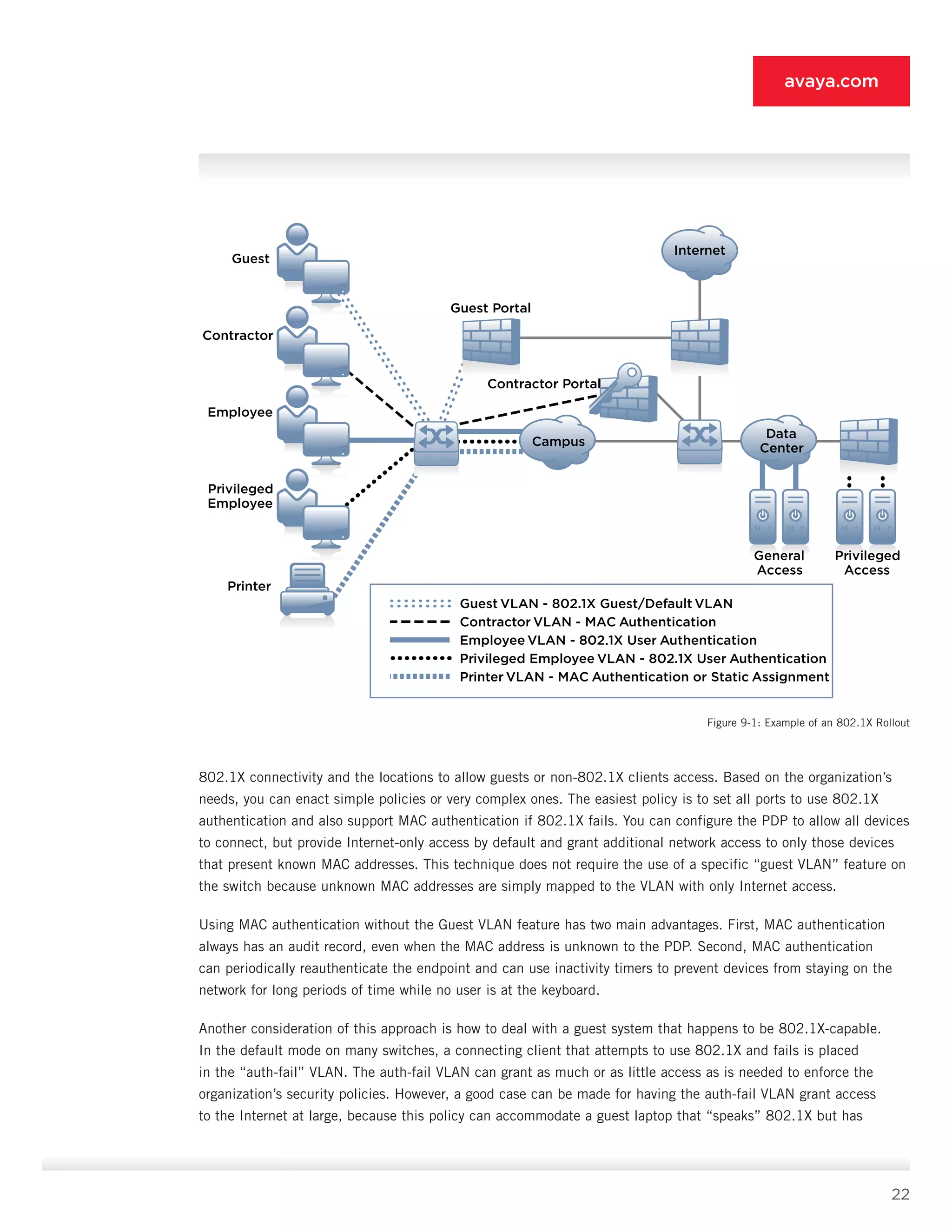
Figure 9-1 shows an example topology where a mix of guest users, non-802.1X-capable users, and 802.1X
endpoints are connecting to the same switch. The main consideration here is determining the locations to mandate
22
avaya.com
802.1X connectivity and the locations to allow guests or non-802.1X clients access. Based on the organization’s
needs, you can enact simple policies or very complex ones. The easiest policy is to set all ports to use 802.1X
authentication and also support MAC authentication if 802.1X fails. You can configure the PDP to allow all devices
to con­nect, but provide Internet-only access by default and grant additional network access to only those devices
that present known MAC addresses. This technique does not require the use of a specific “guest VLAN” fea­ture on
the switch because unknown MAC addresses are simply mapped to the VLAN with only Internet ac­cess.
Using MAC authentication without the Guest VLAN feature has two main advantages. First, MAC authenti­cation
always has an audit record, even when the MAC address is unknown to the PDP. Second, MAC authen­tication
can periodically reauthenticate the endpoint and can use inactivity timers to prevent devices from staying on the
network for long periods of time while no user is at the keyboard.
Another consideration of this approach is how to deal with a guest system that happens to be 802.1X-capable.
In the default mode on many switches, a connecting cli­ent that attempts to use 802.1X and fails is placed
in the “auth-fail” VLAN. The auth-fail VLAN can grant as much or as little access as is needed to enforce the
organization’s security policies. However, a good case can be made for having the auth-fail VLAN grant ac­cess
to the Internet at large, because this policy can accommodate a guest laptop that “speaks” 802.1X but has
Data
Center
Campus
Internet
Guest
Guest Portal
Contractor Portal
General
Access
Privileged
Access
Contractor
Employee
Privileged
Employee
Printer
Guest VLAN - 802.1X Guest/Default VLAN
Contractor VLAN - MAC Authentication
Employee VLAN - 802.1X User Authentication
Privileged Employee VLAN - 802.1X User Authentication
Printer VLAN - MAC Authentication or Static Assignment
Figure 9-1: Example of an 802.1X Rollout
23
avaya.com
no network login credentials. In this scenario, without the user’s knowledge, the net­work requests 802.1X
authentication, the laptop com­plies automatically, sending its usual credentials, and the authentication fails
because the guest’s creden­tials are unknown to the network. In such a case, it is typically better to grant Internet-
only access than to provide no access at all.
You can create sophisticated rollouts that have the auth-fail and the guest VLANs as two different VLANs with
two different portal landing pages. This setup enables the auth-fail VLAN to be somewhat more informative. It
could, for example, say, “If you reached this page, 802.1X authentication has failed. If you are a registered user,
click here to update your 802.1X configuration and receive additional troubleshooting steps. If you are a guest,
click here to au­thenticate using the username and password provided by your sponsor.” The auth-fail VLAN portal
is more oriented to helping the registered user that failed authentication than the guest VLAN, which simply
asks guests for their guest credentials. You can easily achieve this setup with one portal and one VLAN, but this
two-VLAN option provides the simplest user experience for different types of users whose initial authentication
attempts have failed.
9.1.4 IP Telephony
The 802.1X standard assumes one device per port. The most popular IP telephony deployments chain the PC
connection off the back of the phone to allow both devices to connect with just one switch port. Therein lies the
problem. This issue manifests itself most acutely in the lack of link-state changes that the switch fails to see as
devices connected behind the phone. Figure 9-2 show­cases this challenge.
As the figure shows, when a PC connects to the phone port or disconnects from the phone port, the switch is
un­able to detect a link-state change. This situation is prob­lematic because a link-state change is a critical event
in the 802.1X state machine. Specifically, the link-state change causes the 802.1X process to reinitialize. Such
in­stallations are further complicated by the VLAN segmen­tation typically performed in an IP telephony deployment.
Most IP phones are not 802.1X-capable or, if they are, in­stalling device credentials on each phone is challenging
from a management and operations perspective.
You can address this reality in numerous ways. First, your organization can use a dedicated port for PCs and phones.
Though this solution is often not cost-effective, it is the simplest. Second, you can use 802.1X-capable phones;
some of these devices support the PC au­thenticating behind the phone as well. Some switches support multiple
MAC addresses per port (even with 802.1X), making this option a viable one. Third, consid­er MAC authentication of
the phone, the PC, or both. And finally, Avaya
IP phone products support 802.1X-based
authentication for the phone and 802.1X
authentica­tion for the PC behind the phone.
Further details about deploying 802.1X with
your IP telephony solution are beyond the scope
of this paper and heavily dependant on the
model of your phones, switches, and call-man­
agement infrastructure.
Campus
1 2 3
X
Connected
802.1X
Client
Switch Sees No Link
Change and Considers
Client Still Connected
Client
Disconnects
From Phone
Figure 9-2: IP Telephony Challenges with 802.1X
24
avaya.com
9.2 VPN
VPN remote-access deployments must undergo a minor evolution to conform to ANA, but no substantial change
is required. Because VPNs are one of the ear­liest forms of authenticated network access, the goal when applying
ANA to a VPN is simply to make the iden­tity decision authorization-enabled. This technique en­sures that rather
than simply checking a password, the VPN can grant specific network rights based on the au­thentication event.
These rights can be provided in sev­eral ways. The first is to mimic the VLAN functionality in switches to associate
given user types with specific IP pools. These IP pools can then have specific access-control profiles configured on
the VPN gateway or on an upstream security gateway. Second, a role identifier can be sent from the PDP to trigger
a pre-existing secu­rity profile on the VPN gateway. This identifier is typi­cally something like the filter-ID RADIUS
attribute that points a user to a specific access list that the VPN gate­way has preconfigured. The third access
method is to provide the access control list from the PDP. Section 9.7 discusses this technique and its advantages
and considerations.
The decision to use SSL vs. IPsec VPN is immaterial to the ANA approach. Often IPsec can provide more
transparent network connectivity at the cost of more client configuration. SSL VPN is perfectly suitable for many
organizations and is particularly advantageous in providing the contractor access discussed in Section 7.3, because
it requires no client configuration for basic connectivity. More important than the SSL-vs.-IPsec debate is the
degree of configu­ration that the VPN device can receive from the PDP. Unsophisticated VPN gateways can only
ask the PDP for a yes/no decision on a given user, a situation that is problematic for ANA because one of the
architecture goals is to provide consistent, RBAC regardless of access method.
9.3 Inline Security Gateway
As is the case with VPN gateways, ANA offers a lot of flexibility with respect to the choice of an inline security
gateway (such as an IPS, firewall, captive portal, etc.). The two core requirements of these systems for ANA follow:
•	 The gateway must support user authentication prior to allowing traffic to flow through the device.
•	 The gateway must support at least a limited au­thorization conversation with the PDP, such as the filter-ID
RADIUS attribute mentioned in the VPN section.
With that capability as the minimum, there remains a lot of flexibility. A sophisticated next-generation se­curity
gateway may make perfect sense to police guest access to the Internet where endpoint security controls cannot
be relied on. Often for cost reasons it makes more sense to deploy a single inline gateway of this sort close to
the point of Internet access or connectivity to the internal network rather than using such systems at each point
of access-layer guest access. This scenario allows simple portals (such as you might see in a hotel broadband
connection) to provide the guest authentication services. The biggest capability that a portal would ideally provide
is the ability to segment access after the authentication event through similar methods as discussed in Section
9.2. In this respect, the guest portal behaves much like a VPN gateway, but without the encryption.
Traditional firewalls are often best deployed in the ANA approach in front of key data-center assets that require an
additional layer of security such as protect­ing access to the network segment that the “privileged-access” role has
rights to. You can use next-generation security gateways here if needed to augment inadequa­cies on the endpoint
security configuration of your or­ganization’s assets or simply to provide another layer of defense.
25
avaya.com
IPS and IDS systems have been derided more and more in the industry because of their tuning issues and the false
positives that result from the poor tuning. Traditional IPS/IDS systems have no options for au­thenticating users,
because that is not their role in the security system. However, as discussed in Section 7.8, having network-wide
authentication allows the alarms generated by an IDS to have identity information as­sociated with each event,
whereas before only an IP address or MAC address was provided. This correlation does nothing to address tuning
considerations, but in cases where IDS is required, it makes the data gener­ated by the system much more effective.
9.4 Asset Correlation (Device and User)
As discussed in Section 7.8, linking a machine to a user is a powerful capability. This section discuss­es the
technical considerations to consider while pur­suing this goal.
The first consideration is that MAC addresses and IP addresses can be spoofed, meaning that relying on the
binding provided by ANA for 100% of your security awareness is ill-advised. However, strong assurances can
be provided through the deployment of RFC 2827 ingress filtering and anti-spoofing measures present in most
modern access-layer devices. These measures include Address Resolution Protocol (ARP) inspection, DHCP
inspection, port security, and Unicast Reverse Path Forwarding. Assuming reasonable anti-spoofing measures are in
place, the correlated data for both the policy decision and the audit that results following the access request can
be provided in numerous ways.
To aid in policy decision making, the access request generally includes the client MAC address (for exam­ple,
with 802.1X). This data is often sent using the calling-station-ID RADIUS attribute, but may also be sent using a
vendor-specific attribute (VSA), and allows the PDP to check that a given user is connecting to the network from
an allowable endpoint. This data can be stored in a PIP and might define the assets associated with a given user.
If an unauthorized user connects to the network using the MAC address belonging to an­other user, access can
be denied. Another option is to use 802.1X machine authentication such as might be found in Windows Active
Directory environments. This machine authentication is different from MAC authen­tication and involves the client
PC performing 802.1X using only a device credential (Windows machine au­thentication occurs independent of
anyone sitting at the keyboard). Advanced PDPs can remember that this machine authentication has occurred
and require all 802.1X user access to come from PCs that have estab­lished current sessions using machine
authentication. Although both of these options are subject to spoofing attacks, they can still provide substantial
value as part of a broader ANA rollout.
The key ANA requirement that addresses audit require­ments is RADIUS accounting. With RADIUS accounting
enabled, the PEPs send start-and-stop messages when stations connect and then disconnect. This process al­lows
the PDP to track the state of a given endpoint and is key to following users through the network as they connect
and disconnect from different devices and ac­cess methods. Given the behavior of DHCP, it is quite likely that more
than one device may share an IP ad­dress over the course of a given day, making account­ing essential to support
the ANA goal of providing log­ging repositories with identity awareness. Additionally, because 802.1X occurs at
Layer 2, accounting is the only easy way to associate a given MAC address with an IP address without performing
secondary correla­tion with DHCP logs.
26
avaya.com
9.5 Posture (Endpoint Health)
As discussed in Section 5, posture checks were the raison d’etre for authenticated networks as the NAC market
moved through its nascent stages. By “posture check,” we mean assessing the security and health of the connecting
client, including checking for the pres­ence and readiness of firewall, antivirus, anti-spyware, and anti-phishing
software that the IT department deems necessary. This section discusses where pos­ture checks make sense and
where they are less use­ful. It also addresses emerging posture standards and how they may affect deployment.
Your managed end­points are the primary location at which it makes sense to deploy a posture-checking perimeter.
It is here that posture can be accurately measured through endpoint client software so that policy deci­sions can be
made. Guest systems, until posture stan­dards become more ubiquitous, represent a variety of operating systems
and software loads, meaning that they are very difficult to measure via posture check­ing, as described earlier.
Contractor systems can be measured more easily than guest systems, but that is predicated on the ability to install
endpoint software or mandate endpoint configuration changes (where standards are available) on the laptops
contractors use to connect to your network.
The paradox your organization faces when consider­ing deploying endpoint posture checking on its man­aged
systems is that these systems are the systems least in need of any measurement because of their existing endpoint-
management capabilities. For this reason alone, posture should not be the first step or primary goal of any ANA
deployment. The focus should be on identifying the user and associating that user with a specific set of rights.
This situation will change as the industry adopts de facto or de jure standards. Two major standards-based
initiatives are:
•	 Trusted Computing Group/Trusted Network Connect (TCG/TNC) – This initiative has pro­duced numerous standards
and claims a broad set of membership in the industry. The standard struggled without Cisco’s or Microsoft’s
participa­tion until early 2007, when it was announced that the Microsoft Network Access Protection (NAP)
core protocol is now a TNC standard. This announcement made broad interoperability between NAP and TNC
possible, making these two approaches the default choice for organizations considering posture checks.
•	 Microsoft Network Access Protection – NAP has yet to ship as of this writing, but because of its interoperability
with TNC and the broad set of partners Microsoft has attracted, NAP/TNC is a natural choice for performing
posture checks. Because Microsoft is licensing its full NAP implementation to third parties, it is possible for
other vendors to offer NAP capabilities to augment or replace the ones produced by Microsoft.
The end goal of posture checking is to ensure full in­teroperability in posture measurement so that a guest
computer can connect to a network and—using an indus­try-standard language to describe its posture—provide a
clean bill of health. With this approach the network ad­ministrator can deny access to any system that might pose
a risk to the network or the systems behind it. Until such time as standards are adopted, guest systems can be
in­terrogated through inline IPS-type devices, and managed end-user systems can be checked using client-side
software that enforces rules built on posture standards such as the TNC.
27
avaya.com
9.6 VLAN Challenges
VLANs offer the ability to segment a Layer
2 network by creating multiple networks
within a given Ethernet switch. They were
originally developed to limit the size of LAN
segments, thus reducing broadcast traffic
from interfering with network performance.
Each VLAN is its own broadcast domain, so
each VLAN requires its own IP subnet.
When deployed for security, VLANs are typically
used to separate specific user groups from one
another through ACLs deployed at the router
interface separat­ing the VLANs from each other.
In the days of static IP addresses and desktop
(rather than laptop) PCs, it was common to use
VLANs to separate departments from one another and locate servers so that they could be accessed only from specific
VLANs. The prolifera­tion of wireless, DHCP, and mobile devices has made static VLAN assignments nearly useless for
many or­ganizations. The ANA architecture allows dynamic VLAN assignments based on the identity of the connecting
station. This assignment can work with 802.1X on wired or wireless, or with MAC authentica­tion. For security architects,
this capability restores a powerful segmentation capability, but there are consid­erations around its use.
First, it is critical to understand that if you wish to create a VLAN for a specific role, you need that VLAN to exist
everywhere users may connect from that role. Because almost all network cores are routed at Layer 3 today, an IP subnet
is needed per VLAN and per broad­cast domain. End-to-end VLANs with Layer 2 cores are not a safe option here either
because of the numerous spanning-tree issues and broadcast problems. Figure 9-3 showcases this challenge.
When assigning VLANs, it is important to realize that unless you filter the traffic at each VLAN, there is really no
useful security provided. The filtering can occur in one of two places, and in many cases both are appro­priate. As
shown in Figure 9-4, filtering can be done at the access-layer switch and at the access-control point in the data
center (either a switch or dedicated security gateway).
Filtering at the access-layer device is very powerful because it stops unauthorized traffic very close to its point
of origin. However, filtering at this point can
re­quire an exhaustive filter list even if your
network is cleanly architected and segmented,
because the stan­dard security axiom of
“expressly permit, implicitly deny” mandates
that you build the ACL as a set of per­mit
statements with a catch-all deny at the end.
Section 9.8 discusses the repercussions of this
reality in more detail.
Site 2
Site 3
Site 1
Employee VLAN - Subnet 1
Guest VLAN - Subnet 2
Contractor VLAN - Subnet 3
Employee VLAN - Subnet 4
Guest VLAN - Subnet 5
Contractor VLAN - Subnet 6
Employee VLAN - Subnet 7
Guest VLAN - Subnet 8
Contractor VLAN - Subnet 9
Data
CenterCampus
Filtering Location Filtering Location
Figure 9-4: Filtering Location
Figure 9-3: Three-Building Campus with Three Roles
28
avaya.com
An alternative approach that may be suitable, depend­ing on your requirements, is to treat the access-layer filtering
as focused on stopping the obviously bad traf­fic before it gets into the network proper. Anti-spoofing filtering
can be done here, as well as denying access
to certain types of network traffic that an
organization might not allow. At the port level,
the filtering efforts at the data center can
focus on specifying which IP sub-nets are
allowed to access which sets of servers. As
discussed earlier, remember that you need
to list each IP subnet that is part of a given
role when writing this filter. Figure 9-5 shows
an example of this filtering done at the data
center and at the access layer.
Consideration of all these filtering and IP subnet requirements leads us to an important conclusion: VLANs have a
multiplicative relationship with IP subnets in multisite networks and should be limited based on the capacity of an
organization to manage the ensu­ing complexity. For most organizations, this limitation means no more than five,
and at most 10 roles.
Imagine a large enterprise with 20 sites, each site having three broadcast domains (floors, buildings, etc.), and
five roles. This setup will require 300 IP subnets to route and classify the five roles (not accounting for any
wireless or VPN infrastructure.)
To filter access to a server associated with a specific user role (role-specific server), that server’s IP address needs
to be added to an ACL at 60 locations to accommodate all the locations the user role can con­nect from. Or an
access control list needs to be placed in front of the role-specific server with 60 entries de­scribing the source
IP subnets for all the role-specific, access-layer IP subnets.
For all these reasons, organizations should start small on roles, as discussed in Section 7.3. You can add a guest
role without any of the ACL complexities dis­cussed previously, and you can integrate the contrac­tor role using
dedicated VPN infrastructure—thus also circumventing the multiplicative ACL problem. You can deploy guest,
contractor, and privileged-access roles in addition to the regular user role in a very manageable way, avoiding much
of the complexities listed previously. You can add more roles, but be aware of the repercus­sions of this choice.
9.7 Dynamic ACLs
Section 9.2 discussed how to trigger a preexisting ACL on a VPN gateway. You can accomplish this trigger on an
Ethernet switch or WLAN access point. Most or­ganizations choose instead to simply assign the VLAN and have the
VLAN be pre-associated with a static ACL on the network device (PEP). This section discusses dy­namic ACLs, or
ACLs generated on the PDP and sent to the PEP. This approach has its own challenges but offers a much more
scalable option for the number of supported roles. Figure 9-6 shows how to apply dynamic ACLs to a PEP based
on the identity of the individual.
Data
Center
Intranet Privileged
Campus
Deny any spoofed traffic
Deny black-listed locations
Deny forbidden applications
Permit all
Permit employee to intranet server
Permit privileged to restricted server
Deny all
Figure 9-5: Filtering Example
29
avaya.com
Here you can see that the ACL is built using the roles associated with the user and sent down to the PEP at
authentication time. This technique has three distinct advantages over static ACLs or VLANs alone.
First, VLANs are no longer necessary for security compartmentalization. If the set of destinations that must be
allowed results in an ACL of reasonable size, the ACL can enforce the rights at the edge without hav­ing to do
further filtering in the data center. The only reason for using IP subnets for different roles is so that a packet can
be identified elsewhere in the network. If instead you block and permit all the traffic at the edge, there is no need
to set up subnets per role.
Second, dynamic ACLs are supported across all ac­cess methods. Unlike when dealing with IP pool assign­ment
on a VPN device or VLAN assignment on a switch or access point, all access methods can have the same set of
dynamically assigned network rights. Although this approach takes more work to properly set up (and should not be
attempted in phase one of an ANA roll­out), it represents a sound architectural approach to unified access control.
Third, dynamic ACLs can easily deal with the combinatorial roles that result from individuals with more
complicated rights that cannot be modeled as one-to-­one role mappings. A university, for example, might choose to
restrict access to different departments based on a user’s affiliation with that college. However, if a given professor
is tenured in both the math and physics departments, you would need to create an ad­ditional role/ACL to define
the combined rights of these two departments. This situation can quickly become unmanageable because of the
“n-squared” problem. Dynamic ACLs solve this problem by defining the rights of each role and simply combining
them as needed. When setting up a policy that dynamically combines ACLs, you need to follow the “expressly
permit, implicitly deny” model. This consideration is important, because sending a mixed set of deny statements
Client PEP PDP PIP
PEP PIP
PEP PIP
Dynamic ACL
Client Permit to Subnet A
Client Permit to Subnet E
1. Client connects to PEP
2. PEP relays request to PDP
3. PDP looks up user in PIP
4. PIP returns auth success and groups Math and Physics
5. PDP makes policy decision and builds dynamic ACL
6. ACL and access success is sent to PEP
1
2
6
5
4
3
PDP Authorization Matrix
Math
Law
Business
Medicine
Physics
Permit Subnet A
Permit Subnet B
Permit Subnet C
Permit Subnet D
Permit Subnet E
Figure 9-6: Dynamic ACLs
30
avaya.com
and permit statements plays havoc with most PEPs. For example, one role might deny access to something that
another role permits. If a user is a member of both roles, an access-control conflict will occur. Ensuring that the
per­missions of each role contain only permit statements addresses this problem, because a member of both roles
should naturally get the combined set of permit statements from the two roles.
The dynamic ACL approach has several drawbacks. First, it is not commonly deployed because only recently
have PDPs with the sophistication to handle this com­plexity reached a state of maturity that makes them vi­able
deployment options. Second, not all PEPs support dynamic ACLs.
Another drawback is that the formatting of these ACLs varies from vendor to vendor. Recently published RFC
4849 specifies a standard for ACL description and trans­mission from a PDP to a PEP, but its use is not yet wide­
spread. This situation creates added complexity on the PDP to manage the translation of the ACLs into the formats
necessary for individual enforcement points. Finally, not all network devices can store the same amount of ACLs
in memory. If you attempt to support a large set of role combinations on a dense wiring closet switch, you may
exhaust the switch memory. You should carefully consider your specific PEPs when designing the scope of your
dynamic ACL rollout.
In summary, dynamic ACLs represent an advanced application of the ANA approach but one that scales very well
when the steep entrance requirements are met. Organizations new to authenticated networks should focus on a
smaller number of high-level roles to get experience before undertaking dynamic ACLs.
9.8 Coarse-Grained vs. Fine-Grained Authorization
The natural tendency in security is to be as detailed as possible with respect to the rights that a given user
should have on the network. After all, why filter just IP subnets when you can describe source and destina­tion
port numbers, or even the permissible payloads at the application layer of a packet? This level of detail can be
useful in very limited cases; however, such an access-control profile can quickly become unwieldy, hurting overall
manageability. The filtering that ANA provides is not meant to be the only layer of security in your network, and
treating it as such is a guaranteed way to cause troubleshooting difficulties.
Even if you are willing to address the challenges of setting up such fine-grained authorization, many groups in a
typical organization are unable to describe their specific connectivity needs. This situation can result in a constant
back and forth of ACL modification un­til many organizations either create something that is much more coarse-
grained or else prohibitively long.
A better approach—certainly to start with, and per­haps over the long term as well—is to focus at the IP subnet
level and ignore Layer 4 and above. Your goal for ANA should be that of a traffic cop, controlling who goes where
on the road but not stopping each car to look inside.
9.9 User Directories, Credential Selection, and Routing
This section outlines considerations in credential selection and your user directories. PEAP as an EAP type
is common in Microsoft environments. The most common credential supplied for the actual authentica­tion is
Microsoft Challenge Handshake Authentication Protocol version 2 (MSCHAPv2). Certificates are sup­ported as well,
31
avaya.com
but because of the standard limitations and challenges in public key infrastructure (PKI) man­agement, they are far
less common. Microsoft Active Directory natively supports MSCHAPv2. If you have a Microsoft client environment
but a non-Microsoft LDAP infrastructure, it is more difficult to perform MSCHAPv2 authentication because LDAP
directories typically do not store the password hash in the Message Digest Algorithm 4 (MD4) format necessary
for MSCHAPv2 to work. Novell E-Directory supports a “Universal Password” feature that provides this capability,
but for other LDAP directories some work is necessary to provide the hash in a format that can be used with
MSCHAPv2 authentication.
For most organizations, using EAP-TTLS authentica­tion that supports a Password Authentication Protocol (PAP)
cleartext password is a better option. Because the PAP lookup is protected by the TLS tunnel, it is not subject to
many of the cleartext password security weaknesses. Some modern PDPs offer the ability to per­form MSCHAPv2
authentication against any LDAP di­rectory with the proper extension.
You can use smart cards and tokens to increase se­curity; they work well with existing directories provided you have
some ability to route the request appropri­ately within your PDP. Modern PDPs can intelligently route requests to
potentially dozens of user directories based on the security requirements of the PEP relaying the request or other
factors. Although it is common for network staff to assume an organization has only one user directory, it is far
more common among mid-to large-size enterprises to have many distinct directories that must be integrated with.
PART THREE: DEPLOYMENT PHASES
Section 10: ANA Topology and Rollout
This section brings all the aspects of the ANA ap­proach together into a set of topologies that you can deploy
to address security goals. Rather than present­ing an all-in-one greenfield architecture that no orga­nization can
reasonably deploy, this section presents a set of evolving designs that can grow more complex and more capable
over time. Each phase builds on top of the previous phase.
The supplied topologies and phasing are meant to be conceptual models, not detailed design diagrams. As such
they can easily apply to smaller or larger rollouts.
10.1 Secure Wireless with Guest Access
For many organizations, the best place to start an ANA rollout is on its wireless network. By design, it is fully
802.1X-capable, and because of the security risks of cleartext transmissions over the air, securing the wireless
network with a key sent during the 802.1X handshake is a valuable function. Additionally, by broadcasting a
second, open SSID, guests can be eas­ily accommodated with the appropriate guest-manage­ment infrastructure on
the PDP. Figure 10-1 showcases the secure wireless phase of ANA.
Here you can see a standard two-SSID WLAN deployment with one SSID running 802.1X/WPA and an­other
completely open. To authenticate to the 802.1X SSID, the user needs a valid organization credential in the user
directory. The PDP brokers the authentication request to the LDAP directory and returns the authenti­cation result
32
avaya.com
to the access point. If policy dictates that only certain groups in the organization are allowed to use the wireless
network, enforcement can easily be accomplished by having the PDP base its policy deci­sions on the user’s group
and attribute values returned from the directory.
Users connecting to the open SSID are authenticated via a captive portal web login that can also contain a click-
through “terms and conditions” of use agreement. The captive portal can either be a separate device or in some
cases be integrated into the WLAN infrastruc­ture itself. The portal authenticates against the PDP, but instead of
contacting the user directory, it uses a separate guest repository housed within the PDP. These guest-specific user
databases are provisioned typically via simple web interfaces, and they have auto­matic expiry to ensure that a
given guest can connect to the network for only a defined period of time (hours, days, etc.).
The guest portal can also serve as a user-self-service location to aid in 802.1X configuration. Downloadable
supplicant installers and configuration tools are available to ensure that any organization user who winds up on the
open network (the limited-access network) understands how to get full access via the 802.1X-enabled SSID.
Data
CenterCampus
Internet
Guest Portal
• Performs captive portal web
authentication against PDP
WLAN AP
• 2 SSIDs
- One 802.1X for employees
- Another open for guests
Campus Switch
• No 802.1X configuration
• Static VLANs
• No ANA-specific ACLs General
Access
Servers
PDP
• Provides policy services to WLAN AP
via EAP/RADIUS and portal via RADIUS
• Looks up users via LDAP
• Provisions short-term guest accounts
Traditional Stateful
Perimeter Firewall
Employee
• 802.1X
(For wireless only)
Guest SSID - Open Broadcast SSID
Employee SSID - 802.1X User Authentication
Guest
• No 802.1X
Figure 10-1: Secure Wireless with Guest Access
33
avaya.com
10.2 Contractor Access
Contractor access is nothing more than guest access with an option to connect back into the organization’s network
to reach specific devices. Contractors can be located offsite and connect via the Internet, or they can be onsite
and connect through the guest WLAN net­work. Figure 10-2 shows contractor access overlaid on the previous
secure WLAN rollout.
Contractor access is provided by an SSL VPN de­vice set up to use ACLs to restrict the contractor’s set of allowed
destinations on the internal network. One accommodation to simplicity is made at this phase: Contractors must
authenticate through the guest portal before logging into the contractor VPN gateway when connecting onsite at
the organization. You can remove this restriction in a couple of ways. One is to configure the portal to allow SSL
requests to “contractor.organization.com” to bypass the portal, and the other is to configure the contractor’s MAC
address in the portal as a device that does not require portal authentication. The former is preferable because it is
much more se­cure. The contractors still need to authenticate at the contractor gateway.
The contractor VPN gateway can easily be the same device as your standard remote-access VPN device, or it can
be separate. Provided it is located on a DMZ accessible to the guest network and the Internet at large, it should be
relatively easy to set up. The only challenge is to ensure that the gateway supports ACL-based enforcement by user
or group. This VPN device can potentially host hundreds of different contractors, each with different rights based
on the project they are working on.
Data
Center
Campus
Internet
Contractor
• No 802.1X
Contractor
• No 802.1X
Guest Portal
• Performs captive portal web
authentication against PDP
General
Access
Servers
PDP
• Provides contractor accounts and associated rights
• Provides policy services to contractor
SSL VPN gateway and guest portal
Employee
• 802.1X
Contractor SSL VPN Gateway
• Sends access requests to PDP
• Enforces rights based on ACLs
Figure 10-2: Secure Contractor Access
34
avaya.com
When contractor access is deployed, the power and flexibility of ANA should be apparent. With the addition of
the intelligent PDP to the network and perhaps a por­tal or VPN gateway (if not already built into the existing
infrastructure), the organization has gone from support­ing one role to supporting three roles on the network. No
significant topology or routing changes were necessary, and 802.1X is being used only on the WLAN network—
where 802.1X support is most mature. SSL VPN provides a clientless secure connection for contractors, and the
PDP ensures that contractors can reach only those ser­vices they have rights to. Additionally, the organization—
through the guest-services module of the PDP—can allow short-term guests onto the network and ensure that those
guests can reach only the Internet and cannot access any internal resources.
10.3 Privileged-User Role
At this point in the ANA phased rollout, it is appropriate to start securing additional internal resources with the
ad­dition of the privileged-user role. As discussed earlier, de­fining roles for every function in an organization is
tedious and does not necessarily net benefits commensurate with the effort required. The privileged-user role
simply says that a small subset of your users has access to systems deemed highly sensitive by your security
policy. It is pos­sible to have more than one privileged-user role, but for simplicity, our description of this phase
shows only one. Depending on the type of organization, “highly sensitive” systems probably include financial
systems, HR systems, and perhaps research systems. Because these systems are likely spread around your
organization today, do not try to migrate everything all at once. Instead, as your or­ganization requires new servers
to support highly sensi­tive systems, you should deploy these servers behind the data-center access-control device.
As for existing servers that support highly sensitive systems, you should relocate each such server only after you
have evaluated the reper­cussions of assigning a new IP address to the server.
In implementing the privileged-user-role phase, we do not yet assume the task of enforcing wired authentica­tion,
so organizations at this phase of ANA restrict privileged system access to only users who are connected via VPN
or WLAN. Wired users can still get full access to all systems. If it is acceptable to block wired users from these
systems and mandate that they connect over VPN or WLAN, you can easily achieve that configuration through
static wired filters, but for most organizations this configuration is untenable. As such, this phase of ANA is an
interim one, and becomes truly useful only if later phases are eventually undertaken. Figure 10-3 shows the
integration of the privileged-user role into the ANA rollout. As with previous phases, only the components directly
rel­evant to this phase are shown.
To support the privileged-user role, the VPN infrastruc­ture that already supports contractors and employees is
extended to grant privileged employees specific ac­cess to the sensitive areas. This support is possible via ACLs
on the VPN device itself for the privileged users or through assignment of a specific IP subnet to which the data-
center firewall can then provide the elevated access. Because at this phase of ANA ACLs are already on the VPN
device to support contractors, setting up a specific ACL for all privileged users may be a relatively straightforward
task. Filtering can occur at the data­center device as well, if desired.
One change is required in the WLAN infrastructure to support the privileged-user role: you must set up the access
points to assign users to specific, wired VLANs based on information provided by the PDP. No new SSIDs are
needed; the PDP can simply begin to pass the VLAN assignment to the access point. The ac­cess point, through a
trunk port to the wired switch, can route traffic to any required VLAN.
35
avaya.com
An interesting byproduct of this ANA phase is the ability to support contractors and guests whose laptops
are 802.1X-capable. Now these short-term us­ers can avoid the captive portal and authenticate di­rectly to the
organization’s secure SSID. Their access remains restricted to the Internet (and, optionally, the contractor portal)
as dictated by the role assignment of the PDP.
10.4 Basic Wired Authentication
With the WLAN and VPN infrastructure successfully performing RBAC, it is now time to turn our attention to
the wired network. Most modern switch infrastructure supports 802.1X, but we assume in this section that your
organization has a mix of 802.1X-capable and non-802.1X-capable edge switches. The goal of this ANA phase
is not to add full RBAC capability to the wired network, but simply to require authentication in order to connect
to the network. At the end of this phase, guests and contractors will be able to connect via only the WLAN and
VPN infrastructures because only these infrastructures will perform role-based assignments. The wired network
will remain off limits to guests and contractors because during this phase it will be set to assign all users an all-
encompassing employee role. Later phases will add additional roles to the wired net­work. Figure 10-4 details the
wired rollout.
Data
CenterCampus
Internet Contractor
Employee
Privileged Employee
(VPN Session)
Data Center Firewall
• Restricts access to privileged
servers based on inbound IP
subnet of traffic
• Can be dedicated security
gateway or ACL feature
on switch
Campus Switch
• Provides static VLANs to
support each role
• No wired 802.1X yet
General
Access
Servers
Privileged
Access
PDP
• Provides RBAC policy services to WLAN and VPN
infrastructure with 4 main classes of roles
Guest/Contractor SSID - Open Broadcast SSID
Employee SSID/VLAN - 802.1X User Authentication
Privileged Employee VLAN - 802.1X User Authentication
VPN Gateway
• Provides differentiated access
based on role defined on PDP
WLAN AP
• 2 SSIDs
- One 802.1X for employees
- Another open for guests
• PDP determines which wired VLAN
user’s traffic is assigned to
Guest/
Contractor
Employee
Privileged
Employee
Figure 10-3: Privileged-User Role
36
avaya.com
Here you can see a mix of 802.1X-capable switches and endpoints as well as older equipment. A security gateway
provides authentication queries for the older entities. This gateway can also provide user self-service for supplicant
configuration if an 802.1X-capable endpoint fails its 802.1X authentication attempt.
In this rollout, the 802.1X-capable devices are con­figured for 802.1X authentication and MAC authenti­cation,
and they are assigned a default VLAN via the guest-VLAN feature on many switches. 802.1X-capable devices will
successfully authenticate and be placed on the employee VLAN. Non-802.1X user devices will fail 802.1X and be
sent to the gateway. The non-802.1X switch simply treats all users as if they were not 802.1X-capable and routes
them to the gateway.
You can configure non-user endpoints (such as print­ers) via MAC authentication on the 802.1X switches to be
assigned to their particular VLAN. You can also statically assign them to a given VLAN on a port-by-port basis.
Non-802.1X-capable switches should statically assign non-user endpoints to a VLAN that bypasses the gateway
(such as the employee VLAN).
Data
Center
Campus
General
Access
Servers
Employee
Printer Employee VLAN - 802.1X User Authentication
Standard Non-802.1X Ethernet Connection
Non-802.1X Switch
• Supports static VLAN assignment for
non-user devices
• User devices are routed to gateway
PDP
Authenticates non-802.1X
endpoints at gateway and 802.1X
endpoints at switch
Security Gateway
• Overlay security gateway authenticates non-802.1X
endpoints and users on non-802.1X switches
• Acquires policy from PDP
802.1X Switch
• Authenticates 802.1X capable endpoints
• Places employee on VLAN via info from PDP
• Non-802.1X endpoints are routed to gateway or
sent to appropriate VLAN via MAC authentication
or static assignment
Employee
(802.1X)
Employee
(No 802.1X)
Figure 10-4: Wired 802.1X Basic Rollout
37
avaya.com
The gateway can be the same device as the guest WLAN portal, provided it has sufficient bandwidth and feature
functionality, or it can be a dedicated device. The amount of sophistication this device needs de­pends heavily on
the amount of non-802.1X endpoints an organization has and the degree of security inspec­tion required. Typically
these devices can be fairly limit­ed in function because they need only to mimic the se­curity capabilities in the
802.1X-capable edge switches they are deployed with.
10.5 Comprehensive RBAC
Comprehensive RBAC is the culmination of the ANA evolution. At this phase, all forms of network access are
authenticated, and all forms of access support all de­sired roles. Roles are assigned via the PDP and are en­forced
equally across all access methods. Four roles are supported at this point of the ANA evolution: guest, con­tractor,
employee, and privileged employee. Figure 10-5 shows this design. Please note that some network links are
omitted from the diagram to maintain readability.
Because this phase represents the final topological ANA evolution, we offer more details about the com­ponents
and considerations of each functional entity on the network. The numbers in the diagram refer to the following
corresponding descriptions:
Data
Center
Campus
Internet
General
Access
Privileged
Access
Printer
Guest VLAN - 802.1X Guest/Default VLAN
MAC Authentication/Static VLAN Assignment
Employee VLAN - 802.1X User Authentication
Privileged Employee VLAN - 802.1X User Authentication
Standard Non-802.1X Ethernet Connection
1 2
3
4
8
5
6 7
All UserTypes
(VPN Session)
All UserTypes
(802.1X)
Employee
(Non 802.1X)
Privileged
Employee
9
Figure 10-5: Comprehensive RBAC
38
avaya.com
10.5.1 WLAN Access Point or Controller [1]
•	 Features: Features include 802.1X authentica­tion, dynamic VLAN assignment, MAC authentica­tion (optional),
multiple SSID capability, and web authentication (optional).
•	 Supported endpoints: If MAC authentication is deployed, all endpoints are supported. If no MAC authentication is
deployed, all but non-user, non-8021.X devices are supported, because these de­vices cannot authenticate at the
portal [2].
•	 Deployment role: The WLAN infrastructure [1] as described previously provides two SSIDs, one for
802.1X-capable systems and another for non-802.1X systems. 802.1X systems (employee, guest, or otherwise)
are authenticated at the ac­cess point or controller [1] and assigned to the VLAN associated with the user’s
network role. Non-802.1X-capable systems associated with the open SSID are routed to the portal [2] or
authenti­cated locally if web authentication is supported on the access point.
10.5.2 Guest WLAN Portal [2]
•	 Features: Features include captive portal (DNS, DHCP, and routing redirects), web authentication to PDP [9],
SSL encryption (optional), per-user ACL enforcement or VLAN, and IP pool assignment from PDP [9] (optional).
•	 Supported endpoints: All user systems are sup­ported, but non-guest and non-contractor systems are typically
not allowed to pass. Employees can be provided 802.1X setup instructions and/or routed to the LAN security
gateway [7].
•	 Deployment role: The guest WLAN portal [2] authenticates guests, allows contractors to bypass the device to
connect to the VPN gateway [3], and provides 802.1X deployment instructions or in­stallers to interested parties.
Although it does not need advanced functions such as SSL encryption, per-user ACL enforcement, or VLAN or
pool assign­ment, having those features makes it easier to merge the functionality of the guest portal [2] with
the LAN security gateway [7].
10.5.3 VPN Gateway [3]
•	 Features: Features include SSL VPN, IPsec VPN (optional), user authentication and ACL assign­ment from PDP
[9], dynamic ACLs, and IP pools from PDP [9] (optional).
•	 Supported endpoints: All user systems are sup­ported, but policy typically forbids guests from connecting remotely.
•	 Deployment role: The VPN gateway [3] is charged with providing encrypted and authenticat­ed access to the
internal network for authorized users. These users can be connecting locally (as in the case of contractors
connecting via wired or wireless) or remotely. Regardless of connection location, role-specific ACLs are triggered
on the VPN device by the PDP [9] to enforce the rights of a given user. Dynamic ACLs, although listed as
op­tional, are essential for organizations that support varied contractor roles. For such networks, using dynamic
ACLs lets the administrator avoid the onerous configuration of static ACLs on the VPN gateway.
39
avaya.com
10.5.4 Perimeter Firewall [4]
•	 Features: Features include stateful filtering, multiple interfaces, routing, Network Address Translation (NAT), user
authentication, and ACL assignment via PDP [9] (optional).
•	 Supported endpoints: All endpoints are sup­ported.
•	 Deployment role: Once the mainstay of an organization’s security system, the perimeter firewall in ANA simply
performs access control to static servers and defines specific rights allowed for Internet traffic. If your
organization wishes to limit access to areas of the Internet to specific user commu­nities, you can use a firewall
(or optionally proxy server or cache server) for authentication.
10.5.5 802.1X Ethernet Switch [5]
•	 Features: Features include 802.1X authentica­tion, dynamic VLAN assignment from PDP [9], guest VLAN, static
ACL support, MAC authentica­tion (optional), and web authentication (optional).
•	 Supported endpoints: All endpoints are sup­ported.
•	 Deployment role: The 802.1X switch [5] is tasked with authenticating 802.1X-capable endpoints and assigning
them to specific VLANs via the PDP [9]. Non-802.1X systems are routed to the guest VLAN, where they are
forced to the LAN security gateway [7] or WLAN guest portal [2] (if the functions of [7] and [2] are merged).
Specific systems can be authenticated by MAC address against the PDP [9] and assigned to specific VLANs
as a result. These systems can be user systems and non-user systems such as printers. Static ACLs restrict the
access of a given VLAN to the rest of the network prior to leaving the switch [5].
10.5.6 Older Ethernet Switch [6]
•	 Features: Features include VLANs.
•	 Supported endpoints: All endpoints are sup­ported.
•	 Deployment role: The older Ethernet switch [6] simply forwards traffic to the LAN security gateway [7] or to the
campus network as a whole, depending on whether the source of the traffic is a known, non-user device or a
user device. Non-user devices must be configured statically, so that they are placed on a VLAN that forwards
around the LAN security gateway [7].
10.5.7 LAN Security Gateway [7]
•	 Features: Features include user authentication and ACL and VLAN assignment via PDP [9], SSL encryption
(optional), and captive portal.
•	 Supported endpoints: All user devices are sup­ported.
•	 Deployment role: The LAN security gateway [7] is principally tasked with making up for the inadequacies of the
older Ethernet switch [6]. It provides authentication and role assignment via the PDP [9] and routes traffic
appropriately based on the permissions supplied. As stated earlier, you can merge it with the WLAN guest portal
or deploy it separately.
40
avaya.com
10.5.8 Data-center Firewall [8]
•	 Features: Features include access control lists, stateful filtering (optional), integration with LAN switching fabric
(optional), VLAN support (op­tional), SSL encryption, and user authentication or role assignment via PDP [9] (optional).
•	 Supported endpoints: All endpoints are sup­ported.
•	 Deployment role: The data-center firewall [8] is tasked with filtering access to the privileged serv­ers based on
the IP subnet of the connection sta­tion, the VLAN (not likely in a routed core), or the connecting user (if a
second layer of authentica­tion via the PDP [9] is deemed necessary). In the IP subnet case, it simply allows the
subnets asso­ciated with the privileged VLAN to connect to the servers it protects, and denies all other access. In
modern data-center switching infrastructure, you can merge this function with the switching fabric itself through
ACLs on the data-center switches.
10.5.9 Policy Decision Point [9]
•	 Features: Features include RADIUS support, LDAP user lookup support and routing, guest provision­ing, local user
database, dynamic ACL creation and provisioning (optional), token server support, PEAP and EAP-TTLS support,
high availability, VSA support, RADIUS attribute support (filter ID in par­ticular), and syslog and log export.
•	 Supported endpoints: All PEPs [1-8], all directo­ries, all asset repositories, and all token servers are supported.
•	 Deployment role: The PDP [9] is the brains of ANA. It provides all authentication services, all policy determination,
and all outbound role provi­sioning to the PEPs [1-8]. The security and avail­ability of this device is critical, as is its
ability to support the VSAs of multiple vendors to ensure heterogeneous interoperability. The PDP [9] intel­ligently
routes authentication requests to the cor­rect directory, and it can also manage the MAC authentication of all the non-
802.1X and non-user systems in the ANA deployment. It must be de­ployed in a high-availability mode to ensure non­
stop operation of ANA, and it should be deployed on a high-performance, hardened appliance to ensure security and
scalability, because all PEPs [1-8] point traffic at the PDP. The elegance of the PDP approach in ANA is that, when
authentication and role assignment are complete, the PDP logs a record of the access event and gets out of the way.
It is an out-of-band device integrated with the rest of the ANA fabric via the RADIUS and LDAP protocols. You should
deploy a PDP at each major site that requires ANA services to help ensure that an outage at one site does not interrupt
user and device authentication at other sites.
10.6 Posture Checking
Adding posture checking capability to ANA is the last phase because, as discussed earlier, it is currently the least
useful given the state of standards and endpoint capabilities. Because of the unique challenges posture introduces
into ANA, you should test it early in the ANA phased rollout; you should not put it into production until this phase.
Posture requires no further architectural changes to ANA; only feature and function evolutions are needed. One new
component is added at this phase, but you can integrate that component with other systems in many cases. Components
[2], [3], [7], [9], and the cli­ents themselves are the only systems that require a change to support posture.
41
avaya.com
First consider the clients. Client systems must sup­port the posture interrogation method your organiza­tion chooses
to deploy. As discussed in detail in Section 9.5, some variant of NAP or TNC is assumed for ANA given its wide
support and heterogeneous deployment option. Vista and Windows XP SP3 clients natively sup­port NAP, and
OpenSEA’s XSupplicant provides the nec­essary TNC capability for other systems.
With regard to the PDP [9], we see that it must sup­port the posture-checking method as well, because it is
responsible for validating the data supplied by the client. Alternatively, the PDP [9] can relay the posture data to
a separate posture system. Deployment this way imposes a limit on the sophistication of the policy decisions the
PDP [9] can make, so such deployments are not recommended.
The VPN gateway [3] needs to support posture as well. This support typically involves a downloadable SSL
VPN client on the desktop or some sort of capabil­ity within the IPsec client. The TNC/NAP/TNC approach
is 802.1X-focused at this point, so VPN posture vali­dation is best done separately in the VPN device [3].
Alternatively, you can place an inline security gateway or IPS behind the VPN gateway [3], focused on detecting
malicious traffic. You can use this gateway or IPS in lieu of posture capabilities embedded in the VPN session.
The WLAN guest portal [2] or LAN security gateway [7] also needs this inline malicious traffic detection capa­
bility. If neither has the capability, then you must place such a device upstream of [2] and [7]. As discussed
earlier, performing posture checks on guest and con­tractor systems is quite challenging and may not be worth
your organization’s efforts. Focusing instead on RBAC and traffic inspection provides greater function­ality at
substantially reduced deployment costs.
10.7 Extended Policies and Additional Roles
For ANA implementations that go beyond the fea­tures already discussed, the additional feature choices become
too varied to identify in a white paper such as this. Organizations typically will want to investigate pol­icy tuning
to better achieve its desired business goals. This investigation might involve evaluating any number of additional
user and device attributes to make ac­cess decisions. For example, an organization with an ANA-enabled network
might choose to restrict access to the privileged-employee role to users who are physi­cally in the building and who
have been authenticated via wired 802.1X. Likewise, an organization that en­forces posture checking might decide
to allow employ­ees with out-of-compliance machines (machines whose posture check failed) to connect to the
guest network only. Called role degradation, this capability gives out-­of-compliance users an opportunity to address
the pos­ture violation issue of their machines before they log a support ticket. Alternatively, an organization might
decide to allow all employees to connect to the internal network with basic employee rights, and require pos­ture
checks only for those users who wish to access restricted services.
Your policy flexibility is limited only by the sophistica­tion of your PDP [9]. Although you can also pursue addi­tional
roles, be aware of the VLAN limitations discussed in Section 9.6. Organizations seeking to go beyond five roles
should migrate their infrastructure to one that supports dynamic ACLs (Section 9.7).
10.8 ANA Futures
Organizations that have completed the ANA rollout and are looking to move into new areas should first congratulate
themselves on having come so far. Moving from a network where everyone has full access to an ANA-enabled
network to one where users have rights consistent with their roles is no easy task. Areas of fu­ture investigation for
ANA include:
42
avaya.com
•	 Application integration – Posture and role data can be provided to applications so that applica­tions can be aware
of the network context prior to authenticating users.
•	 SSO integration – The 802.1X and VPN login can be merged with application single sign-on (SSO) systems to
achieve true system-wide SSO.
•	 Identity-based anomaly detection – Unauthorized use or uncommon usage patterns can be identified by tracking
user and endpoint behavior over time. Similar to the way credit card companies identify unusual transactions
and then require subsequent authentications, ANA could flag a network-usage profile that is atypical for a given
user and subject that user to a one-time sec­ondary authentication challenge to ensure the use is legitimate.
Section 11: Summary
The Authentication Network Architecture (ANA) is the most fundamental re-imagining of networking and se­curity
since DHCP and perimeter firewalls became com­mon in the mid-to late 1990s. Designed as a dynamic approach
to identity and network rights, ANA allows your organization to centralize its policy decisions and dis­tribute policy
enforcement across a heterogeneous set of infrastructure elements. Unlike authenticated VPN or dial-up sessions
of the past, ANA authenticates all network access at the first point of network connection and authorizes the
connecting user or device to one of several roles. Each role has unique network rights. When combined, the set of
roles and associated rights represent a role-based access control (RBAC) solution that scales as your organization’s
needs evolve.
ANA achieves its goals by using standards such as RADIUS, EAP, 802.1X, LDAP, SSL, and IPsec to work with
the equipment your organization has today. Rather than being an ideological rearchitecting with its associated
six- or seven-digit rollout cost, ANA is built to be flexible enough to fit into even the oldest IT infrastruc­tures. This
document has offered design guidance, best practices, and details about security trade-offs that should enable
any organization to begin migrating to the intelligent security offered by ANA. Starting sim­ply with secure wireless
and guest access and grow­ing more capable over time, ANA is best implemented in phases. Each phase provides
incremental benefits; a wholesale deployment or “forklift upgrade” is not a precondition to achieving useful
network security from the ANA framework. ANA is nothing less than the fu­ture of network security, and its eventual
merger with application identity controls and single sign-on (SSO) frameworks will simply make ANA more capable
and manageable in the future.
To learn more about the Avaya authenticated network solution, contact your Avaya Account Manager or Avaya
Authorized Partner. Or, visit us online at avaya.com.
43
avaya.com
Appendix I: Legend of Symbols Used
Firewall/
Security Gateway
VPN
Concentrator
Intrusion
Detection System
PrinterTelephone
User Workstation
Wireless
Device
SwitchDirectory RouterWireless
Access Point
ServerNetwork Wireless
Telephone
Policy
Decision Point
IDS
© 2011 Avaya Inc. All Rights Reserved.
Avaya and the Avaya Logo are trademarks of Avaya Inc. and are registered in the United States and other countries. All trademarks
identified by ®, ™, or SM are registered marks, trademarks, and service marks, respectively, of Avaya Inc. All other trademarks
are the property of their respective owners. Avaya may also have trademark rights in other terms used herein. References to Avaya
include the Nortel Enterprise business, which was acquired as of December 18, 2009.
06/11 • DN5237-01
About Avaya
Avaya is a global provider of business collaboration and communications
solutions, providing unified communications, contact centers, data solutions
and related services to companies of all sizes around the world. For more
information please visit www.avaya.com.
avaya.com

The authenticated network architecture

  • 1.
    The Authenticated Network Architecture Tableof Contents Part One: Introduction, Background and Marketing Dynamics ....................2 Section 1: Introduction ..................................2 Section 2: Caveats ..........................................2 Section 3: Evolution of Network Security ... 2 Section 4: Today’s Threat and Regulatory Reality .......................................... 6 Part Two: Best Practices and Considerations ..................................................... 8 Section 5: The Industry’s Product Response ..................................................... 8 Section 6: Evolved Designs, Not New Products ....................................... 9 Section 7: ANA Design Fundamentals ...... 13 Section 8: ANA Organizational Considerations .................................................... 18 Section 9: ANA Technical Considerations ...19 Part Three: Deployment Phases ................... 31 Section 10: ANA Topology and Rollout ...... 31 Section 11: Summary .................................... 42 Appendix I: Legend of Symbols Used.......... 43 Network security has been evolving since its inception, sometimes slowly, sometimes in larger increments. As technology has shifted, best practices have slowly matured. What was a good idea two years ago is still likely a good idea today, with minor variations based on the evolving threats and business requirements. However, we are currently at an inflection point in the use of network-based security controls. Where as previous designs focused almost exclu­sively on static policies, filter rules, and enforcement controls, a newer approach has emerged that promises much more dynamic options to address the increased mobility and diversity of today’s network users. This approach, called the Authenticated Network Architecture (ANA), is based on the notion of authentication of all users on a network and the association of each user with a particular set of network entitlements. For example, guests are granted access only to the Internet, contractors only to discrete network resources, employees only to the broader network as a whole, and privileged employees only to isolated enclaves of highly secured resources. Most of the capabilities described in the architecture have been available in shipping network infrastructure for many years. However, while the architecture itself does not mandate much in the way of equipment migration, it does require organizations to think differently with re­gard to their overall security framework. The cooperation of security and network architects with their more operationally inclined counterparts in IT is critical to ensure that the designs contained in this document evolve with the growing capabilities of your infrastructure. This document outlines the ANA approach as a whole and describes how to migrate exist­ing enterprise security designs to this more dynamic approach. In particular, it discusses the best practices that are emerging in ANA as well as the specific business requirements that influence deployment decisions. 1WHITE PAPER avaya.com
  • 2.
    2 avaya.com PART ONE: INTRODUCTION,BACKGROUND AND MARKETING DYNAMICS Section 1: Introduction Network security, until recently, evolved as the silicon capabilities within security and network infrastructure grew. Following the original development of the perim­eter firewall, a “cat-and-mouse” game ensued with the attackers generally one step ahead of the defensive capabilities of deployed network enforcement devices. Security devices began first as specific software prod­ucts, later became appliances, and finally were embed­ded in the network infrastructure. Today, firewall, intru­sion detection, and VPN (mainstays of early 21st century network security) can all be found embedded within a router, Ethernet switch, or other network de­vice. Advances in silicon now allow network adminis­trators and security professionals to look deep inside a packet to determine its threat profile. When integrated into an overall security design, these powerful capabilities can reduce an organiza­tion’s risk. However, the emergence of mobility paired with a diversity of endpoint devices that allow net­work access have created an environment where sim­ply looking deep into a packet is no longer sufficient. Organizations are increasingly looking to define spe­cific rights not just for their own users but for guests and other short-term users who require network ac­cess. Much like an orchestra without sheet music or a conductor, today’s network security deployments of­ten involve little to no coordination of policies across the individual elements that make up the network. The new ANA approach secures the network without relying on the creation of new instruments for the orchestra. Instead, it gives the existing instruments the coordina­tion required to execute on the composer’s vision. The so-called confidentiality, integrity, availabil­ity (CIA) model forms the foundation of information security, and this paper does not challenge that model. Rather, it describes the role that user identity plays in establishing a secure network. Identity is required in order to understand parties for which information should be confidential. Similarly, integrity is impossible without understanding who is authorized to change any information. At its core, ANA introduces a single new element to existing security designs: the authentication and autho­rization of all network users, regardless of their connection method. Section 2: Caveats Because this document discusses both basic design principles and specific technical considerations, it as­sumes the reader has a basic background in both net­work security and IP networking. Although portions of this paper can be beneficial to all levels within an or­ganization’s IT staff, its content is intended primarily for the network and security architect. Directors and CxOs are encouraged to explore the document with the assumption that certain technical specifics will be too detailed. Section 3: Evolution of Network Security It is helpful when examining ANA to understand the evolution of network security and the impact that evo­lution has had on current product offerings and design approaches. Understanding this evolution is important, because the early architects of information security did not foresee (much less design for) the current state of enterprise network security. As threats evolved, the IT response also evolved. As such, the approach an or­ganization might have taken
  • 3.
    3 avaya.com if confronted overnightwith today’s entire security requirements landscape might have been very different from the response that evolved organically. This section shows a representa­tive enterprise network topology and its evolution in re­sponse to new security requirements. In the beginnings of enterprise network security, circa the early 1990s, requirements were minimal. If an or­ganization had more than one site, the sites were con­nected over a WAN. Internet connectivity was almost nonexistent. As Internet connections became more common, so did the installation of perimeter firewalls. These firewalls operated on a simple premise: devices on the inside are trusted, but devices on the outside are not. The firewall, appropriately enough, allowed al­most all communications from the inside to the out­side, and almost no communications from the outside to the inside. Figure 3-1 shows an example of these early network topologies. The early rise of the Internet created financial incen­tives for multisite organizations to migrate their WAN and remote-access connectivity over to a VPN. Site-to-site connections were created statically, and remote users accessed the network through VPN concentra­tors that often authenticated the user against a user store located on the concentrator itself. Figure 3-2 shows the previous topology with the addition of site-to-site VPN connections as well as remote-access VPN connections. Setting aside dial-up connectivity, this stage of the networking evolution represents the first point when user authentication became a required component of network connectivity. In roughly the same timeframe, the explosion of enterprise VPN connectivity spurred the desire for business partners to communicate us­ing VPNs as well. This connectivity sometimes took the form of a dedicated site-to-site connection, but also was implemented using remote-access connectivity. The latter was almost identical to remote-access VPN, with the exception that the policies and access require­ments of the business partner were often much more narrowly drawn. Because of the inflexibility of most early VPN deployments, many organizations chose to deploy dedicated VPN infrastructures for business partners, separate from the VPNs used by employees. Whether for employees or business partners, all these forms of VPN connections performed simple user authentica­tion rather than providing users with specific access to the resources that they were authorized to use. For the first time, this wide range of network user types, combined with the increased use of the Internet by all Site 2 Site 3 InternetSite 1 Site 2 Site 3 Partner InternetSite 1 IDS Figure 3-1: Basic Multisite Network with Internet Connection Figure 3-2: Multisite Network with VPN
  • 4.
    4 avaya.com facets of theorganization, led to decreased trust of the internal network. In response, IT teams began to deploy intrusion detection systems (IDSs) behind the perimeter access-control technology to further inspect traffic as it entered the organization’s network, and they began to deploy it deeper in the internal network to inspect traffic between different zones within the infra­structure. The next major evolution in network infrastructure was the deployment of wireless LAN (WLAN) technol­ogy. Early security challenges in the deployment of wireless led to the development of numerous protocols and standards designed to increase the security of the wireless network by providing confidentiality and integrity to the communications sent over the air. All of these approaches have, as their foundation, identifica­tion of the device or user prior to the granting of net­work access. An additional identity store was required, however, in order to authenticate these wireless us­ers. Although it was technically feasible for the VPN and wireless infrastructure to share the same identity store, in practice these systems were often separate authentication systems. Just like remote-access VPN, these early wireless deployments had no policy compo­ nent beyond the basic authentication of the connecting user. Figure 3-3 shows an example of a network at this stage of evolution. During this network evolution the applications run­ning on the network became more diverse as well. As the number of applications in large enterprises began to number in the thousands, centralized security ap­proaches began to emerge. These so-called applica­tion identity-management systems principally offered web-based portals for simplified access to numerous applications systems while providing consistent policy based on user rights. These portals authenticated us­ers against backend directory stores, often using the Lightweight Directory Access Protocol (LDAP). These di­rectory stores often housed the same users that were stored separately in the various network credential stores. This situation left organizations with up to four differ­ent locations where identity information was stored—and each of these locations could have multiple itera­tions. For example, mergers or organizational friction could create multiple instances of application-identity user repositories. The complex, ad hoc nature of the network security layer increased further, however, as a broader community of users again required local ac­cess to the network. These new users included guests (such as visitors, vendors, and trainees) as well as a whole range of temporary contractors who needed ac­cess to specific systems. For these new users, a binary access-control decision (where the user is either provid­ed full access to the network or none at all) was clearly unacceptable. Instead, granular authorizations were required to ensure that a guest could reach only the Internet, a contractor would have access only to por­tions of the internal network, and an employee would have full access. Because of the variety of devices Site 2 Site 3 Partner InternetSite 1 IDS Figure 3-3: Enterprise Network with VPN and Wireless
  • 5.
    5 avaya.com on the networkthat perform some type of access-control enforcement, maintaining consistency among these systems became very challenging. Figure 3-4 shows an example topology fully evolved with indicators show­casing locations that require knowledge of user access policy. This ad hoc approach to network security was archi­tecturally suspect from the start, because maintaining consistency among the various policies is difficult. As more and more organizations faced these problems, it became clear that what was needed was an approach that allowed for distributed policy enforcement while maintaining central policy decision and authoring. In fact, the problem of ad hoc network security can be divided into two challenges: that of multiple, varied user stores and that of multiple, varied enforcement points. Having multiple user stores that contain dupli­cate accounts for the same individual creates signifi­cant consistency challenges. Therefore the first chal­lenge, and the easier of the two to overcome, should be addressed by centralizing the user accounts into a smaller number of user repositories. For many organi­zations, all accounts can be collected into a single user store. For other, more complex organizations, dealing with multiple stores may be inevitable, but the use of virtual directories or meta-directories can reduce the complexity somewhat. The ANA approach addresses this first challenge by taking advantage of an organi­zation’s existing user directories to provide a network-relevant view of all users. The second challenge—that of multiple enforcement points—can be addressed more incrementally by estab­lishing a central policy decision service and gradually connecting it to enforcement devices. Certain types of enforcement devices are more easily controlled by a central policy decision service. These devices include firewalls, Ethernet switches, wireless access points, and VPN gateways. Many other devices, including intru­sion prevention systems Site 2 Site 3 Partner InternetSite 1 P P P P P P P IDS P Figure 3-4: Enterprise Network with Multiple Constituents and Policy-Enforcement Locations
  • 6.
    6 avaya.com and other, morespecialized security devices, are not yet capable of receiving cen­tral policy decisions, though conceptually there is noth­ing preventing them from doing so. Figure 3-5 shows the centralization of both identity and policy informa­tion in a single location. The figure shows that it is principally the variety of enforcement devices that was not foreseen in original secure network designs. Thus it was quite logical at the time to couple policy decision with policy enforcement. However, as the number of enforcement devices in­creases, this solution quickly becomes untenable. This is further exacerbated by the coming trend towards vir­tualization. With virtualized endpoint and data-center resources the PCs and servers themselves become part of the network as virtual switches become a part of these platforms. Section 4: Today’s Threat and Regulatory Reality Because there is no shortage of literature in the information-security space designed to scare us, this section of the document is brief. Rather than focusing on specific threats that have emerged in recent years or the latest breaches that have made the headlines, this section addresses the macro trends and how they affect organizations’ options in information security. The trends relate to mobility, contractors and guests, and regulations. 4.1 Mobility Mobility is perhaps the easiest trend to understand, because we likely see its effects in our own daily use of information technology resources. We have more connectivity options when accessing both the Internet and our own organization’s network, and we are taking advantage of such access using myriad devices. Some of the devices Site 2 Site 3 Partner InternetSite 1 P IDS Figure 3-5: Centralized Identity and Policy Service in an Enterprise Network
  • 7.
    7 avaya.com we attach tothe network are owned by our organization, whereas others are personal devices such as mobile phones and personal digital assistants (PDAs) that we have brought from home. Because of this increased access to the Internet, we are using the Internet more and more for conducting the business of our lives. Increased reliance on the Internet means that nearly everyone expects connectivity regardless of their location. This situation has led to the creation of the now-clichéd term in the security industry: deperimiterization. Increased mobility also means that IP addresses have become less useful as a means of identifying us­ers. IP addresses were originally meant for routing, but along the way they became a security identifier as well. As we roam the network and connect using different devices, our IP address changes constantly. Traditional firewalls, which use IP addresses almost exclusively for rules, cannot make any intelligent identification of us­ers without the additional authentication step that ANA brings. ANA limits the use of IP addresses as security identifiers whenever possible while still using existing security equipment and techniques. 4.2 Contractors and Guests Building on the mobility point discussed in the previ­ous section, contractors and guests connecting to your network have the same expectations of connectivity that you have when connecting to theirs. As a result, the notion that all users on a LAN are equal is quite out­moded. It is no longer a question of where you are con­nected to the network but rather who you are and what rights you should be afforded based on your identity. 4.3 Regulations Whether it be Sarbanes-Oxley Act (SOX), Health Insurance Portability and Accountability Act (HIPAA), Gramm- Leach-Bliley Act (GLBA), Payment Card Industry Security Standards Council (PCI), Digital Millennium Copyright Act (DMCA), Communications Assistance for Law Enforcement Act (CALEA), or Federal Information Security Management Act (FISMA), chances are there is an acronym (or more) that spells out security guide­lines and restrictions you must impose on your orga­nization and your network. The most common require­ment in these regulations that relates to ANA is auditable network access. Some auditors interpret many of these regulations as mandating authenticated net­works so that access can be traced based on time of day, user, and, in some cases, network destination. The intention of this paper is not to lay out a specific path to compliance for any of these specific security stan­dards. However, it is highly likely that you can address some of the regulations affecting your organization through some of the best practices outlined herein.
  • 8.
    8 avaya.com PART TWO: BESTPRACTICES AND CONSIDERATIONS Section 5: The Industry’s Product Response Like any other aspect of networking, network security falls prey to the cult of the new as much as any other segment. Trade publications, vendor pitches, and the analyst community all share the blame for encouraging the notion that you can find the solution to your secure networking problem by deploying a new product (or products). End users themselves are also somewhat culpable, because playing with a new “toy” is generally thought to be more fun than fixing the old one. As the trends outlined in the previous section emerged, numerous new product offerings and solution categories were proffered as solutions. None of these components is fundamentally flawed, and all of them can be a part of an overall network security system. But, like the tools that preceded them, they are merely an element in the overall approach to secure network­ing rather than the sole means to achieving it. Secure Socket Layer (SSL) VPNs, for example, are great at providing client-to-gateway confidentiality and authentication, but this hub-and-spoke security model has its greatest utility in remote-access VPN connec­tions rather than as a replacement for LAN security techniques. The reason is that no matter how central­ized data centers become in the future, peer-to-peer communications is an intrinsic part of IP networking, and SSL VPNs offer no solution for such communica­tion. Therefore, if SSL VPNs are to live side by side with other methods of connectivity, it is important that any authorization policy be applicable across all access methods. Intrusion prevention systems (IPSs) have also been presented as a foundation for solving today’s secure networking problems. Although the intelligence and performance characteristics of IPS systems have im­proved, most organizations still deploy them in a passive-only mode because they fear that false-positive matches will block legitimate traffic. Increased use of encryption also poses a challenge. More and more ap­plications encrypt the data they send, making payload inspection with an IPS impossible. SSL offload can ad­dress this encryption problem to a degree, but SSL offload is not practical everywhere, nor is SSL/Transport Layer Security (TLS) the only form of cryptography de­ployed. There are also those in the industry who, upon see­ing the challenges in network security, suggest treating the network as a whole and relying instead on endpoint security as the only solution. This scenario breaks the defense- in-depth approach that is widely accepted in the industry as a best practice. It creates a single point of failure, where the compro­mise of an endpoint security system could lead to the total compromise of the assets it is trying to protect. There is no doubt that the improvements made in oper­ating system security and secure application develop­ment practices have yielded benefits to the industry as a whole and to organizations’ security. But to suggest that because of these improvements other, function­ing forms of information security should be abandoned makes little sense. Another approach, tied closely to the increasing role of endpoint security, is network access control (NAC). Conceived originally to address the worm propagation problems from the early part of the 2000s, NAC provides the means for a network to validate that a given endpoint device is running appropriate security software. This
  • 9.
    9 avaya.com approach is oftencalled posture checking. This device-centric approach adds value to a network, but if deployed without regard to the user behind the device, it winds up merely duplicating the update facilities already present in many endpoint software solution offerings. Posture checking is discussed further in Section 9.5. NAC was a good start and got the industry heading in the right direction; ANA is its logical evolution. Section 6: Evolved Designs, Not New Products As evidenced in the preceding section, there is no panacea for the challenges in network security. Instead, the approach to secure network design must be updated to account for the reality of today’s comput­ing environments and the multitude of security devices that are present throughout the network. This sec­tion describes several design alternatives that address today’s deficiencies, including the benefits and draw­backs of each design alternative. 6.1 Gateway Concentrator Approach The gateway concentrator approach to security is at­tractive primarily because of its simplicity. The core de­sign tenet is that all communications within the organi­zation occur through the gateway concentrator that ter­minate individual client sessions. In this way the entire network is encrypted. SSL VPNs are the most common form of gateway concentrator deployment. Figure 6-1 shows a sample topology of this design. The figure shows that the intermediary devices in the network have no role to play in this security design. Clients on the network edge (which can just as easily be at a coffee shop or inside the corporate head­quarters), establish their VPN session to the data-center VPN gateways. This scenario keeps things simple and also has the added benefit of completely eliminating the notion of being “inside” or “outside” the firewall. All data-center users are simply using encrypted sessions to the data center, where all applications and services reside. Two options are available in VPN designs. The first is called “split tunneling;” it reduces the traffic load on the VPN concentrators by encrypting only traffic inside the VPN tunnel that is destined for the data center. The second option, “no split tunneling,” sends all traffic through the VPN concentrators, whether it is critical business information or a check on the latest sports scores. With either option, SSL VPN is among the most inexpensive solutions to today’s network challenges, but this benefit is in part due to the number of design challenges. This approach has numerous downsides. First, not ev­ery device is capable of sitting behind the data center or of building an SSL VPN connection to the center if need­ed. Printers and video conferencing devices, for example, must live among the user population in order to be use­ful. This setup creates a two-tier access model where most communications are to the data center directly over SSL but some are in the clear. Worse, the machines and the network as a whole are open to attack by anyone who connects. Denial-of-service (DoS) attacks do not require special access to the data center to Authentication Encryption Access Control SSL Session Data CenterCampus Internet Secure Insecure Figure 6-1: SSL VPN Enterprise Security Design
  • 10.
    10 avaya.com render systems inac­cessible.Client PCs can also be attacked prior to con­necting to the VPN or, in the case of split tunneling, from all non-data-center systems throughout the duration of the client’s connection to the network. Second, there is no ability to troubleshoot network traffic when it is all encrypted. Using a sniffer is a mainstay of network troubleshooting, and if all your wires are painted black, there is not much you can do with a sniffer. Also, there is an implicit assumption in this design that cryptography is the most important thing you can do to protect information. However, a sys­tem can be compromised over an encrypted link just as easily as over a cleartext link. The only difference is that the systems along the network traffic path can’t see it occurring. The SSL VPN design forces security to the network edge, where end-user PCs are protected only by the endpoint security software installed on them, and where server resourc­es are protected only by the security infrastructure de­ployed in the data center. Third, as was mentioned in Section 5, peer-to-peer communications are increasingly popular, particularly voice applications. With SSL VPN, either those com­munications are not secured in any way (as with split tunneling), or all peer-to-peer communications are sent through the data-center VPN gateways, creating a brittle hub-and-spoke topology even for local traffic. Finally, most organizations have invested considerable Secure Insecure capital and manpower in their current network. That network has a breadth of capability that SSL VPN ren­ders irrelevant. 6.2 Overlay Approach Although the SSL VPN approach is simple, the pre­vious section outlines its substantial limitations as a design approach for securing an entire organization’s network. Newer network devices, built originally for the NAC market, suggest a different approach. These de­vices sit inline and act as LAN security appliances, in much the same way that traditional perimeter firewalls behaved. These devices typically offer access control and packet inspection similar to an IDS, along with the ability to identify the endpoint device. Sometimes they offer access-layer Ethernet switching and can replace your existing wiring closet switch. Figure 6-2 showcas­es this design approach. The main benefit of this overlay approach is also one of its main detractions. Like the SSL VPN design, there is no need to rely on your existing network equipment to do anything security-related. All security decisions can be left to these new inline gateways. The down­side is that you need to buy these new gateways for all your network access points. For locations like remote-access, you are often replicating functionality already in your VPN gate­ ways. Additionally, you are placing new inline devices directly into the flow of LAN traffic on, presumably, a high-speed network infrastructure. This scenario can cause bottlenecks for the LAN traffic and also compli­cate troubleshooting, given that, when something goes wrong, you now must consider more devices. •Authentication •Packet Inspection • Optional Encryption •Access Control Data Center Campus Internet Secure Insecure Figure 6-2: Inline LAN Security Device Approach
  • 11.
    11 avaya.com 6.3 Embedded Approach Theembedded approach to security takes advan­tage of the network infrastructure evolution that has taken place over the last several years. Ever since large network equipment vendors entered the security game, we have seen an evolution in how network security capabilities are deliv­ered. First packaged as special-purpose software on a generic PC platform, they were later delivered as hard­ened, dedicated appliances, and more recently they have become embedded within the routers, switches, and network hardware deployed throughout an organi­zation’s network. With the embedded approach, users and devices can be authenticated at the edge of the security-ca­pable network infrastructure using techniques such as 802.1X, IP Security (IPsec), or Web-Auth. When authenticated, they can be provisioned with specific rights to the rest of the infrastructure. These rights can be enforced in the access device, at a network perimeter choke point, or at the network egress, depending on the design requirements. Figure 6-3 illustrates this approach. This approach offers many advantages. First, it em­ploys almost all of your network devices to enforce net­work security, as opposed to relying on a few, specific security gateways. This scenario keeps your network security requirements and the rest of the network infrastructure requirements more harmonious: securi­ty is now a part of the network rather than an add-on. Second, without the need for dedicated gateways, the advanced network services deployed today—such as IP telephony and advanced quality of service (QoS)—are unaffected. In contrast, a security architecture that em­ploys security appliances may hamper the operation of these sophisticated services. Third, because these security capabilities are pres­ent in your existing network gear, adopting an embed­ded approach can result in substantial capital and op­erational cost savings compared with costs of an ap­proach that deploys a separate security infrastructure. The disadvantages of the embedded approach cen­ter primarily on the complexity of coordinating all the network infrastructure elements. For example, although VLANs may be a perfectly suitable segmenta­tion technique for LANs, they are completely useless for remote users. For these remote users, IP access control lists (ACLs) must be used instead. To keep ac­cess rights consistent for a user connecting via both access methods, policy coordination requires a sophisticated central policy server designed for het­erogeneous network support. The requirement to coordinate a heterogeneous set of network gear represents another limitation to the embedded approach. Even the most loyal adherents of a particular vendor’s network equipment have vari­ations in software load and device model on their networks. Beyond that, most organizations have many vendors involved, even if, in some •Authentication •Packet Inspection • Optional Encryption •Access Control Data Center Campus Internet Secure Insecure Figure 6-3: Embedded Security Approach
  • 12.
    12 avaya.com cases, it isonly evident when their complete list of data-center, distribution, wiring closet, wired, wireless, VPN, and firewall infrastructure vendors is closely inspected. Orchestrating policy across this disparate infrastructure is a key advantage to the embedded approach, but the complexity can be daunting without a phased approach. A further limitation is the sophistication (or lack thereof) of the security inspection capabilities present in the network infrastructure devices that will enforce security policy. Though these devices can perform se­curity functions, they often do so in a more limited way than a purpose-built security appliance might. Table 6-1 summarizes the pros and cons of each of these approaches. Approach Benefits Drawbacks SSL VPN • Architecture is simple • Has no inside vs. outside • Is inexpensive • Assumes all resources are in data center • Network in front of data center is unprotected • End-to-end encryption prevents defense in depth • Works poorly for peer-to-peer applications • Does not integrate with existing LAN infrastructure Overlay • Works independently of existing network infrastructure • Offers strong security capabilities • Works independently of existing network infrastructure • Is expensive • Complicates troubleshooting • Has possibility of performance bottleneck Embedded • Security is a part of overall networking • Has no impact on advanced network services • Is inexpensive • Enforcement techniques are disparate • Vendor or device integration must be heterogeneous • Requires sophisticated central policy server Table 6.1: Benefits and Drawbacks of Security Approaches 6.4 Hybrid Approach Of course the problem of finding a next-generation, secure network architecture has no one right answer. It is possible to view nearly all of the drawbacks of each architectural approach listed in Table 6-1 as an advantage when viewed in the right deployment sce­nario. SSL VPN makes a fantastic remote-access tech­nology. The embedded approach is the natural way to protect 802.1X-enabled endpoints on wired and wire­less networks. The overlay approach provides the inline capabilities that are often needed when dealing with unmanaged, potentially vulnerable end-user systems. The ANA approach lets each of these high-level strate­gies play to its strengths by using a mix of approaches in a single network. By employing the right identity and policy layer in the architecture, the mixed—or hy­brid—approach not only becomes possible, but actu­ally becomes the preferred solution. The reason is that different access methods have different strengths and weaknesses, and each requires a unique set of security techniques to deal with its unique threat profile. The remainder of this paper focuses on this approach. Let the trade publications incite debate over the one “true” approach. The real world is messy, and the hybrid approach not only embraces the clutter but shines in its presence.
  • 13.
    13 avaya.com Section 7: ANADesign Fundamentals This section explains the set of underlying design principles on which ANA bases all of its designs. It es­tablishes a baseline set of goals for the specific design decisions illustrated later in this paper. Understanding the core elements of the ANA approach detailed here can help you more easily grasp the rea­sons behind specific topology choices and technology considerations. 7.1 Centralized Policy Decision Making and Audit If all access-granting devices rely on a single access policy, performing role-based access control (RBAC) and au­diting access events both become more manageable. A single access policy sends all network devices that identify connecting computers and users to the same loca­tion to obtain policy decisions. In a network without a single policy authority, it is difficult to restrict access to specific resources. For example, if your organization wants to grant financial database access to privileged employees only, how can you achieve that policy if you need to manage discrete policies within each of your enforcement devices? Most networks today lack a central policy author­ity. The representative network topology described in Section 3 (shown in Figure 3-4 with the types of de­vices used in today’s networks) is typical. In the figure, the label “P” designates devices that have traditionally housed policy information. In some cases this policy is user-specific (at the group or role level) and in other cases the policy applies to a user or device based on the IP address of the connecting device. Adopting the ANA approach to security can bring man­ageability to your network access policies and make it easier to restrict access to specific resources. As discussed earlier, the goal of ANA is not the wholesale replacement of the existing topology (further complicat­ing the design) but rather the achievement of some normalcy in your current infrastructure. As shown in the text that follows, you can achieve some degree of normalcy by implementing a centralized author­ity for policy decision making and auditing. There will always be device-specific policy that it makes sense to manage on the enforcement device di­rectly, but it is quite possible to centralize the two main tasks involved in controlling network access: authentication (the identification of the user or device) and authorization (the determination of that user’s permis­sions based on the attributes of the user’s connection). After the central policy authority has authenticated and authorized the user or device, it can communicate those permissions to the enforcement device. In some cases all you need to do is simply trigger a preexist­ing security profile on an enforcement device. In other cases, you have to send the specific permissions down to the device dynamically. This latter approach becomes particularly useful in cases where a combina­tion of roles is possible. For the remainder of the paper, it is useful to have a taxonomy to reference the specific locations and com­ponents in the design. Figure 7-1 shows the concep­tual components of ANA using industry-standard desig­nations for each component. Client PEP PDP PIP PEP PIP PEP Accounting PIP Production Network Figure 7-1: ANA Component Taxonomy
  • 14.
    14 avaya.com Client (Supplicant) -The client—sometimes called the supplicant—is the device attempting to access the net­work. The client either authenticates itself as a device or the device acts as a proxy to authenticate the user. Policy Enforcement Point (Authenticator) - The policy enforcement point (PEP) is sometimes called the authenticator or network access server (NAS). The PEP is the network device that brokers the access request for the client. The PEP may be a dial-in server, VPN concentrator, firewall, gateway GPRS support node, Ethernet switch, wireless access point (AP), or an inline security gateway. The PEP is responsible for enforcing the terms of a client’s access. This enforcement var­ies based on the capabilities of the device and is dis­cussed later in this paper. Policy Information Point - The policy information point (PIP) is an information repository to help make the access decision. It could be a database of device IDs, a user directory such as LDAP, a one-time password (OTP) token server, or any other system which houses data relevant to a device or user access request. Policy Decision Point (AAA Server) - The Policy Decision Point (PDP) is the brain of the AAA decision. It collects the access request from the client via the PEP. It also queries any relevant PIPs to gather the informa­tion it needs to make the access decision. The PDP, as its name implies, is the entity that makes the final deci­sion around network access. It also can send specific authorizations back to the PEP that apply settings or constraints to the client’s network traffic. Accounting / Reporting System - Whether on a dedicated system or built as part of a PDP, tracking use of the network via AAA is one of AAA’s best features. With all forms of network access now offering controlled access, the AAA service can tell you who got on the network, from where, and to what they were granted access. 7.2 Authentication Everywhere with Authorization The best centralized PDP cannot help very much if you are using it only with your remote-access infra­structure. The value of the PDP in the ANA design is that it provides policy services for every type of ingress to your network, and all devices and users that con­nect are authenticated. This is not to say that ANA is all or nothing; the later sections of this paper specifically deal with phasing your rollout of ANA to help your network stay manageable and limit the problems your IT support staff encounter as the transition occurs. Like the need for authentication everywhere, using the PDP simply to check the validity of a user’s password does not add much value. In fact, you may have added another point of failure to your architecture. The value of the PDP lies in its ability to make so­phisticated policy decisions based on the identity of the connecting entity. Authorization does not need to be complex in order to be sophisticated. Some examples of PDP authorization policies include, for example: • Guests can connect via any of the network switch­es or access points, but upon authentication they have access only to the Internet via a small num­ber of allowed applications, and those applica­tions are bandwidth-limited. • Contractors must connect through the VPN por­tal in order to access any internal resources, and their access is specific to the project they are working on and valid only for the duration of that project.
  • 15.
    15 avaya.com • Outside technicalsupport engineers can be granted temporary access to troubleshoot an internal routing problem, but can connect only via the VPN and can use the Secure Shell (SSH) Protocol only to the IP ad­dress of the one affected router. • Students in classrooms where the instructor has decided Internet access is not allowed cannot au­thenticate to the campus network from the lecture hall during class time. As you can see, these policies are the commonsense sorts of policies that you may have intuitively wished to deploy on your network but to date have been unable to implement. ANA provides the roadmap to build the infrastructure that supports these kinds of policies and much more. 7.3 Start Small on User Roles Organization architects that appreciate the capabili­ties that ANA provides often adopt a design that has many user roles. Larger organizations might have hun­dreds or thousands of groups in their user directory, and the natural conclusion is to define a network-ac­cess profile for each group. This approach, however, is problematic, primarily because of the complexity involved in managing the large number of roles. In ad­dition, the goal of ANA is to augment the applica­tion security infrastructure you have already built rather than supplant it. Instead of defining hundreds of roles for the network, a smaller number—likely much fewer than a dozen—can provide a huge boost in the sophistication of your network infrastructure, while remaining completely manageable. If you think of your network now as essentially a net­work with one role (full access), you can rationalize adding more roles by defining the high-level separation of rights that provides the most significant security im­provement at the most operationally insignificant cost. Most organizations should consider the following roles, beginning with the roles that should be created first. It is not important to deploy all the roles at once. Each additional role adds another layer of delineation to the existing definitions already deployed. • Standard access – Every user and device is currently a part of this role, whether through explicit authentication or implicit network connectivity. As you roll out ANA, you will gradually assign each user to a more specific role. Your goal is to minimize the number of users and devices in the standard access role. • Guest access – This role is the most significant role you can add, because it enables any spon­sored visitor to connect to your network and gain authenticated access to the Internet at large. By providing easy-to-use guest access, you minimize occurrences of users trying to connect to your pri­vate internal network where they might have full access. Most individuals are just trying to get their work done, and if you give them an easy way to get to the Internet (and their home network location) everyone is better off. Section 10 details the specific design considerations and policy trade-offs of guest access. • Contractor access – Adding this role allows you to stop granting every contractor full access to your network. You can send contractors through a contractor VPN portal where they have access only to the specific systems that they need to fulfill their contract. This setup gives your organization the option to treat contractors more like guests and less like employees. You can grant specific access for only the defined duration of the contract. This solution also facilitates remote vendor troubleshooting or technical support in which an external support engineer needs, for example, 30 minutes of access to one specific system on your network.
  • 16.
    16 avaya.com • Privileged access– When you introduce the privileged-access role, you curtail the rights of the standard-access role to eliminate access to areas of the network deemed extremely sensitive, such as HR, finance, and RD areas. Only the users who require access to such resources are placed in the privileged-access role. In summary, with only four roles, you can significantly reduce unauthorized access to sensitive data. In most organizations, approximately 50% of the user base is part of the standard-access role, 10% has guest ac­cess, 20% has contractor access, and 20% has privi­leged access. With these four roles in place, sensitive systems remain exposed to a mere 20% of the user community. 7.4 Enforcement Based on PEP Capabilities As discussed in Section 6, a hybrid approach to security enforcement yields numerous benefits with limited drawbacks. The design consideration in this section (building on the Section 6 overview) simply says that you enforce access control based on the capabilities of the enforcement point a user is connecting through. Thus with wireless and wired LAN access, a VLAN is sufficient (particularly with the recommended small set of roles). Each VLAN can have a defined ACL that controls its connectivity elsewhere in the network. With VPN access, because VLANs are not an option, you need IP pool assignment coupled with basic access control lists. For guest access, you could use an inline se­curity gateway to provide tight restrictions on allowed traffic types. 7.5 Endpoint/Network Interaction Is Important but Not Sufficient Much was made at the inception of the NAC buzzword about providing controls in the network that could account for the capabilities and configuration of a given endpoint. The idea was that, when users connected, their system would be actively interrogated for antivirus signatures, patch levels, firewall configuration, and so on. The desire for this capability was a hasty reaction to the viruses and worms active between 2000 and 2003. Although this capability is useful, most managed systems in an organization already have mechanisms to manage the configuration and security profile of end­points without involving the network. The unmanaged systems that really need the help do not have these same controls, and any network-initiated scan of these systems is unlikely to yield enough information to make an accurate access decision. The basic principle of ANA in this area, which varies based on the specific security policies of an organization and its industry, is that the network should validate the endpoint compliance with a security policy through basic checks prior to granting access to the standard access or privileged-access role. Access to the privileged role may entail additional endpoint checks because of the access sensitivity. Access to the guest or contractor role should not include end­point checks but should rather entail rigorous inline in­spection of network use to ensure compliance with the acceptable use policy for these roles. 7.6 Assume No Greenfields; Build with What You Have The single critical failing of nearly every “new” secu­rity architecture is its insistence on a radical change to the existing network equipment. This “cult of the new” in information security goes back to the begin­ning of network security and, at its core, believes that you can solve any problem by deploying an additional layer of security infrastructure. It is easy to understand why this thinking arises; it makes for a very great technology demo and for good copy in the trade press. However, as anyone who has worked for any length of time managing a mid-to large-
  • 17.
    17 avaya.com size network willtell you, nothing changes overnight. Any new security architecture needs to provide incremental benefits as it is rolled out. Section 10 shows that it is possible to build ANA using the enforcement infrastructure you have deployed today. It is entirely possible that some out-of-date gear in the largest organizations cannot run the authentication process, but even in those cases portal- or VPN-based solutions can augment the security in the older locations. Flexibility is a core belief of the ANA approach, and it is in embracing an organization’s cur­rent network infrastructure that this belief becomes most tangible. 7.7 Inventory and Topological Awareness Many aspects of networking become easier when the infrastructure is aware of your assets and your network layout; ANA is no exception. Just as the ac­curacy of an intrusion detection system increases when key resources and associated software are located and identified, with ANA it is important to understand: • The location of restricted access servers and nor­mal servers • The access-control options on the path between your users and the restricted access servers • The percentage of your access infrastructure that is ANA-ready (i.e., capable of authenticating endpoints and enforcing their access at a coarse-grained level or at a more precise level) • The profile (location and type) of each endpoint device that is located on premises but not in a data center; one that operates without human intervention and cannot authenticate to the ANA network, such as printers, fax machines, video cameras, and so on • The location of the devices with the same characteristics as those identified in the previ­ous bullet; however, these devices can authenticate to ANA using a device credential • The location and type of end-user systems that are not 802.1X-capable All the systems not accounted for in the preceding list should be 802.1X-capable endpoints. This under­standing is important because we want to use the in­frastructure you currently have and not force several pricey upgrades. Acquiring this information is not as difficult as it sounds. First, tools to help you retrieve this information are available, such as traditional as­set-management systems or more network-focused endpoint profiling tools. Additionally, full awareness is not required for phase one of your ANA rollout. Device awareness grows in importance as your rollout advanc­es, providing a path for the natural evolution of this information set. For example, rolling out guest access requires fairly little knowledge or integration with your existing systems, particularly if you are deploying guest access via wireless. 7.8 Logging and Reporting Considerations Security professionals tend, as a group, to be very fond of logging. They want everything logged and stored for audit purposes. They like log analysis tools that can comb through logs from various devices to search for trends.
  • 18.
    18 avaya.com They even likelogs from non-security devices because these devices can often provide interesting data to help piece together the history of an incident when one occurs. What most of the network-focused log data has lacked is user awareness. Just like security in general, log data has focused on IP addresses and MAC ad­dresses. However, for reasons that should be clear by this point, that is no longer a reasonable set of identifiers on which to base a security decision. ANA requires, instead, the merging of traditional se­curity logs with the log data generated by your PDP. This device can give you the binding of a user to a given IP or MAC address for a given period of time, allowing you to replace instances of device identifiers in your logs with user identifiers. If you need to track down users at a given point in time, the data is all there; you do not need to go through a convoluted process of tracing their access back through all the systems they inter­acted with. Section 8: ANA Organizational Considerations Many larger organizations compartmentalize the technical proficiency associated with security and identity to a significant degree. Although ANA places a much less onerous burden on your infrastruc­ture in terms of migrations, it can demand a high de­gree of organizational cooperation among your teams. Smaller organizations can navigate these complexities easier than large ones, but for all organizations it helps to be aware of what is to come. For most organizations, the following groups play a role in the ANA rollout: • Directory Services Team – Often associated with the application side of the organization, this team probably does not know much about the net­work. Any ANA rollout needs to interface with this key group because it controls the most authorita­tive source of identity information in your organi­zation. With ANA, you do not want to replicate the directory services you already have deployed—you merely want to connect them to your PDP to pro­vide all the necessary information needed to make your access decisions. • Network Services Team – This group, along with the security group, includes the most likely readers of this ANA approach. Prior to 2004, network teams were much more likely to have an acrimonious relationship with the security team than they have today. The merging of many security functions with core networking functions has created many more linkages between the two teams, and in many organizations has resulted in their merging. • Security Services Team – The two most common approaches to security services are an operational approach or a policy approach. In the operational approach the security team sets policy and also manages firewalls, IDS, VPN, and other security-centric services. In the policy approach, it leaves the day-to-day management to the network group and instead focuses on defining standards and policies that all other IT groups must adhere to. • Endpoint Services Team – This team is some­times part of the application team, but we call it out here separately because there are some im­portant considerations related to ANA. The biggest factor is the need for endpoints to authenticate to the ANA-enabled network. Authentication often requires client configuration changes or possibly new software to improve the security of the au­thenticated session or its manageability. The end-user help desk is a key component of this team.
  • 19.
    19 avaya.com The political andstructural reality of each organiza­tion is different, but the basic requirements for buy-in are the same. When dealing with the directory services group, the important thing to remind the group is that, by rolling out ANA, their directory services become more relevant to a new area of the IT infrastructure. It is also important to point out that you do not need write access to the user information in the directory in order for ANA to work. ANA needs only the ability to query the database about devices and users. The interaction of the networking and security groups should be fairly straightforward: as mentioned earlier, the groups have been headed together over the last several years. If you are a network professional trying to get buy-in from a security group, it is important to ex­plain that ANA reorients your policies to focus on user identity, thereby offering benefits in policy enforcement and audit. If you are a security professional trying to sell the networking group on the ANA approach, you should focus on the merging of access control with ac­cess-layer networking and the increasing importance this integration places on network devices. An ANA-enabled network is much more useful to a security pro­fessional and—when deployed—far more manageable for the networking staff because of the dynamic nature of network access. You should engage the endpoint team in conversa­tions early to discuss the specific requirements that will result in endpoint configuration changes or new client software. Technologies such as web authentication re­quire nothing sophisticated on the endpoint, but more advanced technologies such as IPsec and 802.1X re­quire some planning to ensure a successful rollout. Section 9: ANA Technical Considerations This section outlines some specific, high-level techni­cal considerations introduced by the technologies ANA uses to deliver on its goals. It is not designed to sup­plant product documentation or detailed deployment guides for specific facets of the technology that you may find elsewhere. The focus is on providing the tech­nical information necessary to architect the system as a whole, before you move into specific phases of test­ing. It is easy to get too excited by the options an ANA-enabled network provides, and in so doing the temp­tation is to activate every advanced feature at once, but the result would be a failed rollout. Instead, focus on your specific business and security requirements, and adopt the component that will yield the most ben­efit first. The following sections can help you make the technology decisions. 9.1 IEEE 802.1X Unlike in the early days of 802.1X in the marketplace, the technology is now ready for deployment in most us­age scenarios. The key technical decisions with 802.1X are what Extensible Authentication Protocol (EAP) au­thentication type to select, what supplicant to use, what relationship 802.1X authentication will have to MAC authentication, how guest access will be provided, how other non-802.1X types of LAN access will be of­fered, and, finally, how daisy-chained IP phones will be deployed. 9.1.1 EAP types For an exhaustive discussion of the various EAP types, refer to the IPJ AAA article mentioned earlier. For all practical purposes, in today’s 802.1X networks you have two options: Protected EAP (PEAP) or EAP-Tunneled TLS (EAP-TTLS). Neither are IETF standards, so there are some small variations in implementation. All the
  • 20.
    20 avaya.com standardized EAP typesare not tunneled, meaning that certain aspects of the conversation are exposed. More importantly, they do not offer any “secure” option for deployment that does not depend on client-side certificates. Because client-side certificates represent a substantial hurdle for most organizations, their use is not considered for ANA, though they are an option for organizations that require them. One additional tun­neled EAP type, EAP- Flexible Authentication via Secure Tunneling (FAST), seems to be on the decline in use. Thus the options are the two EAP types originally men­tioned. In choosing an EAP type, the principal consid­erations are what types of credentials your users cur­rently possess, and what EAP type requirements other aspects of your ANA rollout impose (supplicant choice, posture validation technology, etc.). For the time be­ing, EAP-TTLS and PEAP are the two options to consider for any ANA rollout. Careful consideration of the topics covered in the next several sections can help your orga­nization make the right choice. 9.1.2 Supplicant Your organization may support any of three classes of supplicant technology. In some cases you may wish to support more than one, provided the selected options behave predictably with your chosen EAP type. • Operating system native – Most organizations use Windows, though Mac OSX and Linux are grow­ing in popularity. The Windows built-in supplicant offers adequate 802.1X support for Windows XP SP2 (and later) and for Windows Vista. Computers running earlier versions of Windows probably should be considered non-802.1X devices because of the limitations in their 802.1X implementation. Mac OSX has had a reasonable 802.1X client since version 10.4. Although the Mac supplicant supports both the recommended EAP types defined earlier, the Windows supplicant supports only PEAP. This fact alone is responsible for 95% of the decisions to roll out PEAP among 802.1X adopters. The diagnostic information available to both supplicants is fairly lim­ited and may require troubleshooting at the PDP and PEP levels to get sufficient understanding of what is going on. Additionally, whereas the Mac supplicant is fairly intuitive to configure, the Windows supplicant is very difficult for the average user to set up and for many use cases requires registry-only configuration changes. For this reason, organizations choosing to roll out the Windows supplicant often use add-on management tools or AD group policy to ensure a smooth rollout. • Commercial add-ons – Both Juniper and Cisco have acquired 802.1X supplicant technology in the last several years. These acquisitions are now the mainstay of each vendor’s 802.1X client strategy. Because networking vendors have a vested interest in the success of 802.1X, these commercial suppli­cants can be among the more mature and function­al supplicants available to an organization. In both cases however, these supplicants have a per-seat cost. This cost, anywhere from $10 to $40 per seat, can be onerous to many organizations. Additionally, each networking vendor has its own proprietary NAC strategy that depends on its own supplicant technol­ogy. Coupled with the lack of standardization of EAP types, this situation means that you can count on each such supplicant working well with its own ven­dor’s equipment, but in heterogeneous rollouts you should test the supplicant’s interaction with other vendors’ equipment. Lastly, although commercial supplicants often support more than one operating system, the re­lease dates of the non-Windows versions tend to lag behind the release dates of the Windows version by some length of time. • Open source – Although there is more than one open-source 802.1X supplicant, the client with clear industry momentum is XSupplicant from the OpenSEA Alliance’s Open1X project. This supplicant was originally written for Linux and has since been ported to Windows XP and is actively moving to other operating systems. The client is
  • 21.
    21 avaya.com high qual­ity andhas been tested as interoperable with a wide variety of networking and security vendors. Because of the lack of standardization of EAP types and the heterogeneous reality of nearly every 802.1X rollout, having an open-source client on the desktop can be a real benefit from an interoperability perspective. There is no one clear winner in terms of supplicant choice for a given organization. For organizations with relatively simple end-point authentication requirements and an all-Windows workforce, using an operating system native supplicant coupled with configuration management is probably the best and most mature option. Everyone else should strongly consider the OpenSEA client, or a mix of OpenSEA and operating system native supplicants. You should test your specif­ic use case in the lab of course, but the development resources and companies that are part of the OpenSEA Alliance make XSupplicant a natural choice for het­erogeneous networks. Additionally, OpenSEA has embraced the Trusted Computing Group / Trusted Network Connect (TCG/TNC) NAC standards, which now encom­pass Microsoft Network Access Protection (NAP) as well. Having a free and interoperable client with a consistent design across operating systems is a powerful aid to any 802.1X rollout. 9.1.3 Dealing with Guests and Other Non-802.1X-Capable Endpoints Early deployments of 802.1X were all or nothing. If you did not authenticate successfully, you were not granted access. This deployment scenario quickly imploded under the weight of its unrealistic assumptions around 802.1X adoption. Today’s successful rollouts assume a mix of 802.1X and non-802.1X endpoints connecting to the wired and wireless LAN. For WLANs, the natural solution is to have two (or more) Service Set Identifiers (SSIDs), one Wi-Fi Protected Access (WPA) with 802.1X enabled and requir­ing a supplicant, and the other open and requiring au­thentication of the endpoint through an inline gateway. The two principal means of providing this support in a wired network are MAC authentication and guest VLANs. • MAC authentication – If the connecting device fails to respond to the EAP-Request/Identity packet sent from the PEP, the MAC authentication sends the device’s MAC address to the PDP. The PDP can then authenticate and identify the MAC address in whatever manner it sees fit. This decision could be a basic yes/no decision or a much more advanced policy decision where, for example, after the device’s MAC address identifies it as an IT-managed printer, the PDP instructs the PEP to place it on the printer VLAN. The trick with MAC authentication is generating the list of MAC addresses and defining the access rights, a process that can be very labor-intensive, though some products offer assistance. • Guest VLAN – If the device does not respond to an 802.1X query and the PDP does not authenticate the MAC address, the device is placed into a guest VLAN. You can configure this VLAN to route through a captive portal device where guests can authenticate using just a browser (no suppli­cant required) in order to gain access to the net­work. Captive portals work by redirecting a user’s Domain Name System (DNS), HTTP, and Dynamic Host Configuration Protocol (DHCP) requests to the portal itself. They are commonly used in hotel broadband connections. Captive portals can also provide custom landing pages that can provide users instructions or terms and conditions. These portals present a very effective tool for managing an 802.1X rollout and dealing with non- 802.1X­capable systems. Figure 9-1 shows an example topology where a mix of guest users, non-802.1X-capable users, and 802.1X endpoints are connecting to the same switch. The main consideration here is determining the locations to mandate
  • 22.
    22 avaya.com 802.1X connectivity andthe locations to allow guests or non-802.1X clients access. Based on the organization’s needs, you can enact simple policies or very complex ones. The easiest policy is to set all ports to use 802.1X authentication and also support MAC authentication if 802.1X fails. You can configure the PDP to allow all devices to con­nect, but provide Internet-only access by default and grant additional network access to only those devices that present known MAC addresses. This technique does not require the use of a specific “guest VLAN” fea­ture on the switch because unknown MAC addresses are simply mapped to the VLAN with only Internet ac­cess. Using MAC authentication without the Guest VLAN feature has two main advantages. First, MAC authenti­cation always has an audit record, even when the MAC address is unknown to the PDP. Second, MAC authen­tication can periodically reauthenticate the endpoint and can use inactivity timers to prevent devices from staying on the network for long periods of time while no user is at the keyboard. Another consideration of this approach is how to deal with a guest system that happens to be 802.1X-capable. In the default mode on many switches, a connecting cli­ent that attempts to use 802.1X and fails is placed in the “auth-fail” VLAN. The auth-fail VLAN can grant as much or as little access as is needed to enforce the organization’s security policies. However, a good case can be made for having the auth-fail VLAN grant ac­cess to the Internet at large, because this policy can accommodate a guest laptop that “speaks” 802.1X but has Data Center Campus Internet Guest Guest Portal Contractor Portal General Access Privileged Access Contractor Employee Privileged Employee Printer Guest VLAN - 802.1X Guest/Default VLAN Contractor VLAN - MAC Authentication Employee VLAN - 802.1X User Authentication Privileged Employee VLAN - 802.1X User Authentication Printer VLAN - MAC Authentication or Static Assignment Figure 9-1: Example of an 802.1X Rollout
  • 23.
    23 avaya.com no network logincredentials. In this scenario, without the user’s knowledge, the net­work requests 802.1X authentication, the laptop com­plies automatically, sending its usual credentials, and the authentication fails because the guest’s creden­tials are unknown to the network. In such a case, it is typically better to grant Internet- only access than to provide no access at all. You can create sophisticated rollouts that have the auth-fail and the guest VLANs as two different VLANs with two different portal landing pages. This setup enables the auth-fail VLAN to be somewhat more informative. It could, for example, say, “If you reached this page, 802.1X authentication has failed. If you are a registered user, click here to update your 802.1X configuration and receive additional troubleshooting steps. If you are a guest, click here to au­thenticate using the username and password provided by your sponsor.” The auth-fail VLAN portal is more oriented to helping the registered user that failed authentication than the guest VLAN, which simply asks guests for their guest credentials. You can easily achieve this setup with one portal and one VLAN, but this two-VLAN option provides the simplest user experience for different types of users whose initial authentication attempts have failed. 9.1.4 IP Telephony The 802.1X standard assumes one device per port. The most popular IP telephony deployments chain the PC connection off the back of the phone to allow both devices to connect with just one switch port. Therein lies the problem. This issue manifests itself most acutely in the lack of link-state changes that the switch fails to see as devices connected behind the phone. Figure 9-2 show­cases this challenge. As the figure shows, when a PC connects to the phone port or disconnects from the phone port, the switch is un­able to detect a link-state change. This situation is prob­lematic because a link-state change is a critical event in the 802.1X state machine. Specifically, the link-state change causes the 802.1X process to reinitialize. Such in­stallations are further complicated by the VLAN segmen­tation typically performed in an IP telephony deployment. Most IP phones are not 802.1X-capable or, if they are, in­stalling device credentials on each phone is challenging from a management and operations perspective. You can address this reality in numerous ways. First, your organization can use a dedicated port for PCs and phones. Though this solution is often not cost-effective, it is the simplest. Second, you can use 802.1X-capable phones; some of these devices support the PC au­thenticating behind the phone as well. Some switches support multiple MAC addresses per port (even with 802.1X), making this option a viable one. Third, consid­er MAC authentication of the phone, the PC, or both. And finally, Avaya IP phone products support 802.1X-based authentication for the phone and 802.1X authentica­tion for the PC behind the phone. Further details about deploying 802.1X with your IP telephony solution are beyond the scope of this paper and heavily dependant on the model of your phones, switches, and call-man­ agement infrastructure. Campus 1 2 3 X Connected 802.1X Client Switch Sees No Link Change and Considers Client Still Connected Client Disconnects From Phone Figure 9-2: IP Telephony Challenges with 802.1X
  • 24.
    24 avaya.com 9.2 VPN VPN remote-accessdeployments must undergo a minor evolution to conform to ANA, but no substantial change is required. Because VPNs are one of the ear­liest forms of authenticated network access, the goal when applying ANA to a VPN is simply to make the iden­tity decision authorization-enabled. This technique en­sures that rather than simply checking a password, the VPN can grant specific network rights based on the au­thentication event. These rights can be provided in sev­eral ways. The first is to mimic the VLAN functionality in switches to associate given user types with specific IP pools. These IP pools can then have specific access-control profiles configured on the VPN gateway or on an upstream security gateway. Second, a role identifier can be sent from the PDP to trigger a pre-existing secu­rity profile on the VPN gateway. This identifier is typi­cally something like the filter-ID RADIUS attribute that points a user to a specific access list that the VPN gate­way has preconfigured. The third access method is to provide the access control list from the PDP. Section 9.7 discusses this technique and its advantages and considerations. The decision to use SSL vs. IPsec VPN is immaterial to the ANA approach. Often IPsec can provide more transparent network connectivity at the cost of more client configuration. SSL VPN is perfectly suitable for many organizations and is particularly advantageous in providing the contractor access discussed in Section 7.3, because it requires no client configuration for basic connectivity. More important than the SSL-vs.-IPsec debate is the degree of configu­ration that the VPN device can receive from the PDP. Unsophisticated VPN gateways can only ask the PDP for a yes/no decision on a given user, a situation that is problematic for ANA because one of the architecture goals is to provide consistent, RBAC regardless of access method. 9.3 Inline Security Gateway As is the case with VPN gateways, ANA offers a lot of flexibility with respect to the choice of an inline security gateway (such as an IPS, firewall, captive portal, etc.). The two core requirements of these systems for ANA follow: • The gateway must support user authentication prior to allowing traffic to flow through the device. • The gateway must support at least a limited au­thorization conversation with the PDP, such as the filter-ID RADIUS attribute mentioned in the VPN section. With that capability as the minimum, there remains a lot of flexibility. A sophisticated next-generation se­curity gateway may make perfect sense to police guest access to the Internet where endpoint security controls cannot be relied on. Often for cost reasons it makes more sense to deploy a single inline gateway of this sort close to the point of Internet access or connectivity to the internal network rather than using such systems at each point of access-layer guest access. This scenario allows simple portals (such as you might see in a hotel broadband connection) to provide the guest authentication services. The biggest capability that a portal would ideally provide is the ability to segment access after the authentication event through similar methods as discussed in Section 9.2. In this respect, the guest portal behaves much like a VPN gateway, but without the encryption. Traditional firewalls are often best deployed in the ANA approach in front of key data-center assets that require an additional layer of security such as protect­ing access to the network segment that the “privileged-access” role has rights to. You can use next-generation security gateways here if needed to augment inadequa­cies on the endpoint security configuration of your or­ganization’s assets or simply to provide another layer of defense.
  • 25.
    25 avaya.com IPS and IDSsystems have been derided more and more in the industry because of their tuning issues and the false positives that result from the poor tuning. Traditional IPS/IDS systems have no options for au­thenticating users, because that is not their role in the security system. However, as discussed in Section 7.8, having network-wide authentication allows the alarms generated by an IDS to have identity information as­sociated with each event, whereas before only an IP address or MAC address was provided. This correlation does nothing to address tuning considerations, but in cases where IDS is required, it makes the data gener­ated by the system much more effective. 9.4 Asset Correlation (Device and User) As discussed in Section 7.8, linking a machine to a user is a powerful capability. This section discuss­es the technical considerations to consider while pur­suing this goal. The first consideration is that MAC addresses and IP addresses can be spoofed, meaning that relying on the binding provided by ANA for 100% of your security awareness is ill-advised. However, strong assurances can be provided through the deployment of RFC 2827 ingress filtering and anti-spoofing measures present in most modern access-layer devices. These measures include Address Resolution Protocol (ARP) inspection, DHCP inspection, port security, and Unicast Reverse Path Forwarding. Assuming reasonable anti-spoofing measures are in place, the correlated data for both the policy decision and the audit that results following the access request can be provided in numerous ways. To aid in policy decision making, the access request generally includes the client MAC address (for exam­ple, with 802.1X). This data is often sent using the calling-station-ID RADIUS attribute, but may also be sent using a vendor-specific attribute (VSA), and allows the PDP to check that a given user is connecting to the network from an allowable endpoint. This data can be stored in a PIP and might define the assets associated with a given user. If an unauthorized user connects to the network using the MAC address belonging to an­other user, access can be denied. Another option is to use 802.1X machine authentication such as might be found in Windows Active Directory environments. This machine authentication is different from MAC authen­tication and involves the client PC performing 802.1X using only a device credential (Windows machine au­thentication occurs independent of anyone sitting at the keyboard). Advanced PDPs can remember that this machine authentication has occurred and require all 802.1X user access to come from PCs that have estab­lished current sessions using machine authentication. Although both of these options are subject to spoofing attacks, they can still provide substantial value as part of a broader ANA rollout. The key ANA requirement that addresses audit require­ments is RADIUS accounting. With RADIUS accounting enabled, the PEPs send start-and-stop messages when stations connect and then disconnect. This process al­lows the PDP to track the state of a given endpoint and is key to following users through the network as they connect and disconnect from different devices and ac­cess methods. Given the behavior of DHCP, it is quite likely that more than one device may share an IP ad­dress over the course of a given day, making account­ing essential to support the ANA goal of providing log­ging repositories with identity awareness. Additionally, because 802.1X occurs at Layer 2, accounting is the only easy way to associate a given MAC address with an IP address without performing secondary correla­tion with DHCP logs.
  • 26.
    26 avaya.com 9.5 Posture (EndpointHealth) As discussed in Section 5, posture checks were the raison d’etre for authenticated networks as the NAC market moved through its nascent stages. By “posture check,” we mean assessing the security and health of the connecting client, including checking for the pres­ence and readiness of firewall, antivirus, anti-spyware, and anti-phishing software that the IT department deems necessary. This section discusses where pos­ture checks make sense and where they are less use­ful. It also addresses emerging posture standards and how they may affect deployment. Your managed end­points are the primary location at which it makes sense to deploy a posture-checking perimeter. It is here that posture can be accurately measured through endpoint client software so that policy deci­sions can be made. Guest systems, until posture stan­dards become more ubiquitous, represent a variety of operating systems and software loads, meaning that they are very difficult to measure via posture check­ing, as described earlier. Contractor systems can be measured more easily than guest systems, but that is predicated on the ability to install endpoint software or mandate endpoint configuration changes (where standards are available) on the laptops contractors use to connect to your network. The paradox your organization faces when consider­ing deploying endpoint posture checking on its man­aged systems is that these systems are the systems least in need of any measurement because of their existing endpoint- management capabilities. For this reason alone, posture should not be the first step or primary goal of any ANA deployment. The focus should be on identifying the user and associating that user with a specific set of rights. This situation will change as the industry adopts de facto or de jure standards. Two major standards-based initiatives are: • Trusted Computing Group/Trusted Network Connect (TCG/TNC) – This initiative has pro­duced numerous standards and claims a broad set of membership in the industry. The standard struggled without Cisco’s or Microsoft’s participa­tion until early 2007, when it was announced that the Microsoft Network Access Protection (NAP) core protocol is now a TNC standard. This announcement made broad interoperability between NAP and TNC possible, making these two approaches the default choice for organizations considering posture checks. • Microsoft Network Access Protection – NAP has yet to ship as of this writing, but because of its interoperability with TNC and the broad set of partners Microsoft has attracted, NAP/TNC is a natural choice for performing posture checks. Because Microsoft is licensing its full NAP implementation to third parties, it is possible for other vendors to offer NAP capabilities to augment or replace the ones produced by Microsoft. The end goal of posture checking is to ensure full in­teroperability in posture measurement so that a guest computer can connect to a network and—using an indus­try-standard language to describe its posture—provide a clean bill of health. With this approach the network ad­ministrator can deny access to any system that might pose a risk to the network or the systems behind it. Until such time as standards are adopted, guest systems can be in­terrogated through inline IPS-type devices, and managed end-user systems can be checked using client-side software that enforces rules built on posture standards such as the TNC.
  • 27.
    27 avaya.com 9.6 VLAN Challenges VLANsoffer the ability to segment a Layer 2 network by creating multiple networks within a given Ethernet switch. They were originally developed to limit the size of LAN segments, thus reducing broadcast traffic from interfering with network performance. Each VLAN is its own broadcast domain, so each VLAN requires its own IP subnet. When deployed for security, VLANs are typically used to separate specific user groups from one another through ACLs deployed at the router interface separat­ing the VLANs from each other. In the days of static IP addresses and desktop (rather than laptop) PCs, it was common to use VLANs to separate departments from one another and locate servers so that they could be accessed only from specific VLANs. The prolifera­tion of wireless, DHCP, and mobile devices has made static VLAN assignments nearly useless for many or­ganizations. The ANA architecture allows dynamic VLAN assignments based on the identity of the connecting station. This assignment can work with 802.1X on wired or wireless, or with MAC authentica­tion. For security architects, this capability restores a powerful segmentation capability, but there are consid­erations around its use. First, it is critical to understand that if you wish to create a VLAN for a specific role, you need that VLAN to exist everywhere users may connect from that role. Because almost all network cores are routed at Layer 3 today, an IP subnet is needed per VLAN and per broad­cast domain. End-to-end VLANs with Layer 2 cores are not a safe option here either because of the numerous spanning-tree issues and broadcast problems. Figure 9-3 showcases this challenge. When assigning VLANs, it is important to realize that unless you filter the traffic at each VLAN, there is really no useful security provided. The filtering can occur in one of two places, and in many cases both are appro­priate. As shown in Figure 9-4, filtering can be done at the access-layer switch and at the access-control point in the data center (either a switch or dedicated security gateway). Filtering at the access-layer device is very powerful because it stops unauthorized traffic very close to its point of origin. However, filtering at this point can re­quire an exhaustive filter list even if your network is cleanly architected and segmented, because the stan­dard security axiom of “expressly permit, implicitly deny” mandates that you build the ACL as a set of per­mit statements with a catch-all deny at the end. Section 9.8 discusses the repercussions of this reality in more detail. Site 2 Site 3 Site 1 Employee VLAN - Subnet 1 Guest VLAN - Subnet 2 Contractor VLAN - Subnet 3 Employee VLAN - Subnet 4 Guest VLAN - Subnet 5 Contractor VLAN - Subnet 6 Employee VLAN - Subnet 7 Guest VLAN - Subnet 8 Contractor VLAN - Subnet 9 Data CenterCampus Filtering Location Filtering Location Figure 9-4: Filtering Location Figure 9-3: Three-Building Campus with Three Roles
  • 28.
    28 avaya.com An alternative approachthat may be suitable, depend­ing on your requirements, is to treat the access-layer filtering as focused on stopping the obviously bad traf­fic before it gets into the network proper. Anti-spoofing filtering can be done here, as well as denying access to certain types of network traffic that an organization might not allow. At the port level, the filtering efforts at the data center can focus on specifying which IP sub-nets are allowed to access which sets of servers. As discussed earlier, remember that you need to list each IP subnet that is part of a given role when writing this filter. Figure 9-5 shows an example of this filtering done at the data center and at the access layer. Consideration of all these filtering and IP subnet requirements leads us to an important conclusion: VLANs have a multiplicative relationship with IP subnets in multisite networks and should be limited based on the capacity of an organization to manage the ensu­ing complexity. For most organizations, this limitation means no more than five, and at most 10 roles. Imagine a large enterprise with 20 sites, each site having three broadcast domains (floors, buildings, etc.), and five roles. This setup will require 300 IP subnets to route and classify the five roles (not accounting for any wireless or VPN infrastructure.) To filter access to a server associated with a specific user role (role-specific server), that server’s IP address needs to be added to an ACL at 60 locations to accommodate all the locations the user role can con­nect from. Or an access control list needs to be placed in front of the role-specific server with 60 entries de­scribing the source IP subnets for all the role-specific, access-layer IP subnets. For all these reasons, organizations should start small on roles, as discussed in Section 7.3. You can add a guest role without any of the ACL complexities dis­cussed previously, and you can integrate the contrac­tor role using dedicated VPN infrastructure—thus also circumventing the multiplicative ACL problem. You can deploy guest, contractor, and privileged-access roles in addition to the regular user role in a very manageable way, avoiding much of the complexities listed previously. You can add more roles, but be aware of the repercus­sions of this choice. 9.7 Dynamic ACLs Section 9.2 discussed how to trigger a preexisting ACL on a VPN gateway. You can accomplish this trigger on an Ethernet switch or WLAN access point. Most or­ganizations choose instead to simply assign the VLAN and have the VLAN be pre-associated with a static ACL on the network device (PEP). This section discusses dy­namic ACLs, or ACLs generated on the PDP and sent to the PEP. This approach has its own challenges but offers a much more scalable option for the number of supported roles. Figure 9-6 shows how to apply dynamic ACLs to a PEP based on the identity of the individual. Data Center Intranet Privileged Campus Deny any spoofed traffic Deny black-listed locations Deny forbidden applications Permit all Permit employee to intranet server Permit privileged to restricted server Deny all Figure 9-5: Filtering Example
  • 29.
    29 avaya.com Here you cansee that the ACL is built using the roles associated with the user and sent down to the PEP at authentication time. This technique has three distinct advantages over static ACLs or VLANs alone. First, VLANs are no longer necessary for security compartmentalization. If the set of destinations that must be allowed results in an ACL of reasonable size, the ACL can enforce the rights at the edge without hav­ing to do further filtering in the data center. The only reason for using IP subnets for different roles is so that a packet can be identified elsewhere in the network. If instead you block and permit all the traffic at the edge, there is no need to set up subnets per role. Second, dynamic ACLs are supported across all ac­cess methods. Unlike when dealing with IP pool assign­ment on a VPN device or VLAN assignment on a switch or access point, all access methods can have the same set of dynamically assigned network rights. Although this approach takes more work to properly set up (and should not be attempted in phase one of an ANA roll­out), it represents a sound architectural approach to unified access control. Third, dynamic ACLs can easily deal with the combinatorial roles that result from individuals with more complicated rights that cannot be modeled as one-to-­one role mappings. A university, for example, might choose to restrict access to different departments based on a user’s affiliation with that college. However, if a given professor is tenured in both the math and physics departments, you would need to create an ad­ditional role/ACL to define the combined rights of these two departments. This situation can quickly become unmanageable because of the “n-squared” problem. Dynamic ACLs solve this problem by defining the rights of each role and simply combining them as needed. When setting up a policy that dynamically combines ACLs, you need to follow the “expressly permit, implicitly deny” model. This consideration is important, because sending a mixed set of deny statements Client PEP PDP PIP PEP PIP PEP PIP Dynamic ACL Client Permit to Subnet A Client Permit to Subnet E 1. Client connects to PEP 2. PEP relays request to PDP 3. PDP looks up user in PIP 4. PIP returns auth success and groups Math and Physics 5. PDP makes policy decision and builds dynamic ACL 6. ACL and access success is sent to PEP 1 2 6 5 4 3 PDP Authorization Matrix Math Law Business Medicine Physics Permit Subnet A Permit Subnet B Permit Subnet C Permit Subnet D Permit Subnet E Figure 9-6: Dynamic ACLs
  • 30.
    30 avaya.com and permit statementsplays havoc with most PEPs. For example, one role might deny access to something that another role permits. If a user is a member of both roles, an access-control conflict will occur. Ensuring that the per­missions of each role contain only permit statements addresses this problem, because a member of both roles should naturally get the combined set of permit statements from the two roles. The dynamic ACL approach has several drawbacks. First, it is not commonly deployed because only recently have PDPs with the sophistication to handle this com­plexity reached a state of maturity that makes them vi­able deployment options. Second, not all PEPs support dynamic ACLs. Another drawback is that the formatting of these ACLs varies from vendor to vendor. Recently published RFC 4849 specifies a standard for ACL description and trans­mission from a PDP to a PEP, but its use is not yet wide­ spread. This situation creates added complexity on the PDP to manage the translation of the ACLs into the formats necessary for individual enforcement points. Finally, not all network devices can store the same amount of ACLs in memory. If you attempt to support a large set of role combinations on a dense wiring closet switch, you may exhaust the switch memory. You should carefully consider your specific PEPs when designing the scope of your dynamic ACL rollout. In summary, dynamic ACLs represent an advanced application of the ANA approach but one that scales very well when the steep entrance requirements are met. Organizations new to authenticated networks should focus on a smaller number of high-level roles to get experience before undertaking dynamic ACLs. 9.8 Coarse-Grained vs. Fine-Grained Authorization The natural tendency in security is to be as detailed as possible with respect to the rights that a given user should have on the network. After all, why filter just IP subnets when you can describe source and destina­tion port numbers, or even the permissible payloads at the application layer of a packet? This level of detail can be useful in very limited cases; however, such an access-control profile can quickly become unwieldy, hurting overall manageability. The filtering that ANA provides is not meant to be the only layer of security in your network, and treating it as such is a guaranteed way to cause troubleshooting difficulties. Even if you are willing to address the challenges of setting up such fine-grained authorization, many groups in a typical organization are unable to describe their specific connectivity needs. This situation can result in a constant back and forth of ACL modification un­til many organizations either create something that is much more coarse- grained or else prohibitively long. A better approach—certainly to start with, and per­haps over the long term as well—is to focus at the IP subnet level and ignore Layer 4 and above. Your goal for ANA should be that of a traffic cop, controlling who goes where on the road but not stopping each car to look inside. 9.9 User Directories, Credential Selection, and Routing This section outlines considerations in credential selection and your user directories. PEAP as an EAP type is common in Microsoft environments. The most common credential supplied for the actual authentica­tion is Microsoft Challenge Handshake Authentication Protocol version 2 (MSCHAPv2). Certificates are sup­ported as well,
  • 31.
    31 avaya.com but because ofthe standard limitations and challenges in public key infrastructure (PKI) man­agement, they are far less common. Microsoft Active Directory natively supports MSCHAPv2. If you have a Microsoft client environment but a non-Microsoft LDAP infrastructure, it is more difficult to perform MSCHAPv2 authentication because LDAP directories typically do not store the password hash in the Message Digest Algorithm 4 (MD4) format necessary for MSCHAPv2 to work. Novell E-Directory supports a “Universal Password” feature that provides this capability, but for other LDAP directories some work is necessary to provide the hash in a format that can be used with MSCHAPv2 authentication. For most organizations, using EAP-TTLS authentica­tion that supports a Password Authentication Protocol (PAP) cleartext password is a better option. Because the PAP lookup is protected by the TLS tunnel, it is not subject to many of the cleartext password security weaknesses. Some modern PDPs offer the ability to per­form MSCHAPv2 authentication against any LDAP di­rectory with the proper extension. You can use smart cards and tokens to increase se­curity; they work well with existing directories provided you have some ability to route the request appropri­ately within your PDP. Modern PDPs can intelligently route requests to potentially dozens of user directories based on the security requirements of the PEP relaying the request or other factors. Although it is common for network staff to assume an organization has only one user directory, it is far more common among mid-to large-size enterprises to have many distinct directories that must be integrated with. PART THREE: DEPLOYMENT PHASES Section 10: ANA Topology and Rollout This section brings all the aspects of the ANA ap­proach together into a set of topologies that you can deploy to address security goals. Rather than present­ing an all-in-one greenfield architecture that no orga­nization can reasonably deploy, this section presents a set of evolving designs that can grow more complex and more capable over time. Each phase builds on top of the previous phase. The supplied topologies and phasing are meant to be conceptual models, not detailed design diagrams. As such they can easily apply to smaller or larger rollouts. 10.1 Secure Wireless with Guest Access For many organizations, the best place to start an ANA rollout is on its wireless network. By design, it is fully 802.1X-capable, and because of the security risks of cleartext transmissions over the air, securing the wireless network with a key sent during the 802.1X handshake is a valuable function. Additionally, by broadcasting a second, open SSID, guests can be eas­ily accommodated with the appropriate guest-manage­ment infrastructure on the PDP. Figure 10-1 showcases the secure wireless phase of ANA. Here you can see a standard two-SSID WLAN deployment with one SSID running 802.1X/WPA and an­other completely open. To authenticate to the 802.1X SSID, the user needs a valid organization credential in the user directory. The PDP brokers the authentication request to the LDAP directory and returns the authenti­cation result
  • 32.
    32 avaya.com to the accesspoint. If policy dictates that only certain groups in the organization are allowed to use the wireless network, enforcement can easily be accomplished by having the PDP base its policy deci­sions on the user’s group and attribute values returned from the directory. Users connecting to the open SSID are authenticated via a captive portal web login that can also contain a click- through “terms and conditions” of use agreement. The captive portal can either be a separate device or in some cases be integrated into the WLAN infrastruc­ture itself. The portal authenticates against the PDP, but instead of contacting the user directory, it uses a separate guest repository housed within the PDP. These guest-specific user databases are provisioned typically via simple web interfaces, and they have auto­matic expiry to ensure that a given guest can connect to the network for only a defined period of time (hours, days, etc.). The guest portal can also serve as a user-self-service location to aid in 802.1X configuration. Downloadable supplicant installers and configuration tools are available to ensure that any organization user who winds up on the open network (the limited-access network) understands how to get full access via the 802.1X-enabled SSID. Data CenterCampus Internet Guest Portal • Performs captive portal web authentication against PDP WLAN AP • 2 SSIDs - One 802.1X for employees - Another open for guests Campus Switch • No 802.1X configuration • Static VLANs • No ANA-specific ACLs General Access Servers PDP • Provides policy services to WLAN AP via EAP/RADIUS and portal via RADIUS • Looks up users via LDAP • Provisions short-term guest accounts Traditional Stateful Perimeter Firewall Employee • 802.1X (For wireless only) Guest SSID - Open Broadcast SSID Employee SSID - 802.1X User Authentication Guest • No 802.1X Figure 10-1: Secure Wireless with Guest Access
  • 33.
    33 avaya.com 10.2 Contractor Access Contractoraccess is nothing more than guest access with an option to connect back into the organization’s network to reach specific devices. Contractors can be located offsite and connect via the Internet, or they can be onsite and connect through the guest WLAN net­work. Figure 10-2 shows contractor access overlaid on the previous secure WLAN rollout. Contractor access is provided by an SSL VPN de­vice set up to use ACLs to restrict the contractor’s set of allowed destinations on the internal network. One accommodation to simplicity is made at this phase: Contractors must authenticate through the guest portal before logging into the contractor VPN gateway when connecting onsite at the organization. You can remove this restriction in a couple of ways. One is to configure the portal to allow SSL requests to “contractor.organization.com” to bypass the portal, and the other is to configure the contractor’s MAC address in the portal as a device that does not require portal authentication. The former is preferable because it is much more se­cure. The contractors still need to authenticate at the contractor gateway. The contractor VPN gateway can easily be the same device as your standard remote-access VPN device, or it can be separate. Provided it is located on a DMZ accessible to the guest network and the Internet at large, it should be relatively easy to set up. The only challenge is to ensure that the gateway supports ACL-based enforcement by user or group. This VPN device can potentially host hundreds of different contractors, each with different rights based on the project they are working on. Data Center Campus Internet Contractor • No 802.1X Contractor • No 802.1X Guest Portal • Performs captive portal web authentication against PDP General Access Servers PDP • Provides contractor accounts and associated rights • Provides policy services to contractor SSL VPN gateway and guest portal Employee • 802.1X Contractor SSL VPN Gateway • Sends access requests to PDP • Enforces rights based on ACLs Figure 10-2: Secure Contractor Access
  • 34.
    34 avaya.com When contractor accessis deployed, the power and flexibility of ANA should be apparent. With the addition of the intelligent PDP to the network and perhaps a por­tal or VPN gateway (if not already built into the existing infrastructure), the organization has gone from support­ing one role to supporting three roles on the network. No significant topology or routing changes were necessary, and 802.1X is being used only on the WLAN network— where 802.1X support is most mature. SSL VPN provides a clientless secure connection for contractors, and the PDP ensures that contractors can reach only those ser­vices they have rights to. Additionally, the organization— through the guest-services module of the PDP—can allow short-term guests onto the network and ensure that those guests can reach only the Internet and cannot access any internal resources. 10.3 Privileged-User Role At this point in the ANA phased rollout, it is appropriate to start securing additional internal resources with the ad­dition of the privileged-user role. As discussed earlier, de­fining roles for every function in an organization is tedious and does not necessarily net benefits commensurate with the effort required. The privileged-user role simply says that a small subset of your users has access to systems deemed highly sensitive by your security policy. It is pos­sible to have more than one privileged-user role, but for simplicity, our description of this phase shows only one. Depending on the type of organization, “highly sensitive” systems probably include financial systems, HR systems, and perhaps research systems. Because these systems are likely spread around your organization today, do not try to migrate everything all at once. Instead, as your or­ganization requires new servers to support highly sensi­tive systems, you should deploy these servers behind the data-center access-control device. As for existing servers that support highly sensitive systems, you should relocate each such server only after you have evaluated the reper­cussions of assigning a new IP address to the server. In implementing the privileged-user-role phase, we do not yet assume the task of enforcing wired authentica­tion, so organizations at this phase of ANA restrict privileged system access to only users who are connected via VPN or WLAN. Wired users can still get full access to all systems. If it is acceptable to block wired users from these systems and mandate that they connect over VPN or WLAN, you can easily achieve that configuration through static wired filters, but for most organizations this configuration is untenable. As such, this phase of ANA is an interim one, and becomes truly useful only if later phases are eventually undertaken. Figure 10-3 shows the integration of the privileged-user role into the ANA rollout. As with previous phases, only the components directly rel­evant to this phase are shown. To support the privileged-user role, the VPN infrastruc­ture that already supports contractors and employees is extended to grant privileged employees specific ac­cess to the sensitive areas. This support is possible via ACLs on the VPN device itself for the privileged users or through assignment of a specific IP subnet to which the data- center firewall can then provide the elevated access. Because at this phase of ANA ACLs are already on the VPN device to support contractors, setting up a specific ACL for all privileged users may be a relatively straightforward task. Filtering can occur at the data­center device as well, if desired. One change is required in the WLAN infrastructure to support the privileged-user role: you must set up the access points to assign users to specific, wired VLANs based on information provided by the PDP. No new SSIDs are needed; the PDP can simply begin to pass the VLAN assignment to the access point. The ac­cess point, through a trunk port to the wired switch, can route traffic to any required VLAN.
  • 35.
    35 avaya.com An interesting byproductof this ANA phase is the ability to support contractors and guests whose laptops are 802.1X-capable. Now these short-term us­ers can avoid the captive portal and authenticate di­rectly to the organization’s secure SSID. Their access remains restricted to the Internet (and, optionally, the contractor portal) as dictated by the role assignment of the PDP. 10.4 Basic Wired Authentication With the WLAN and VPN infrastructure successfully performing RBAC, it is now time to turn our attention to the wired network. Most modern switch infrastructure supports 802.1X, but we assume in this section that your organization has a mix of 802.1X-capable and non-802.1X-capable edge switches. The goal of this ANA phase is not to add full RBAC capability to the wired network, but simply to require authentication in order to connect to the network. At the end of this phase, guests and contractors will be able to connect via only the WLAN and VPN infrastructures because only these infrastructures will perform role-based assignments. The wired network will remain off limits to guests and contractors because during this phase it will be set to assign all users an all- encompassing employee role. Later phases will add additional roles to the wired net­work. Figure 10-4 details the wired rollout. Data CenterCampus Internet Contractor Employee Privileged Employee (VPN Session) Data Center Firewall • Restricts access to privileged servers based on inbound IP subnet of traffic • Can be dedicated security gateway or ACL feature on switch Campus Switch • Provides static VLANs to support each role • No wired 802.1X yet General Access Servers Privileged Access PDP • Provides RBAC policy services to WLAN and VPN infrastructure with 4 main classes of roles Guest/Contractor SSID - Open Broadcast SSID Employee SSID/VLAN - 802.1X User Authentication Privileged Employee VLAN - 802.1X User Authentication VPN Gateway • Provides differentiated access based on role defined on PDP WLAN AP • 2 SSIDs - One 802.1X for employees - Another open for guests • PDP determines which wired VLAN user’s traffic is assigned to Guest/ Contractor Employee Privileged Employee Figure 10-3: Privileged-User Role
  • 36.
    36 avaya.com Here you cansee a mix of 802.1X-capable switches and endpoints as well as older equipment. A security gateway provides authentication queries for the older entities. This gateway can also provide user self-service for supplicant configuration if an 802.1X-capable endpoint fails its 802.1X authentication attempt. In this rollout, the 802.1X-capable devices are con­figured for 802.1X authentication and MAC authenti­cation, and they are assigned a default VLAN via the guest-VLAN feature on many switches. 802.1X-capable devices will successfully authenticate and be placed on the employee VLAN. Non-802.1X user devices will fail 802.1X and be sent to the gateway. The non-802.1X switch simply treats all users as if they were not 802.1X-capable and routes them to the gateway. You can configure non-user endpoints (such as print­ers) via MAC authentication on the 802.1X switches to be assigned to their particular VLAN. You can also statically assign them to a given VLAN on a port-by-port basis. Non-802.1X-capable switches should statically assign non-user endpoints to a VLAN that bypasses the gateway (such as the employee VLAN). Data Center Campus General Access Servers Employee Printer Employee VLAN - 802.1X User Authentication Standard Non-802.1X Ethernet Connection Non-802.1X Switch • Supports static VLAN assignment for non-user devices • User devices are routed to gateway PDP Authenticates non-802.1X endpoints at gateway and 802.1X endpoints at switch Security Gateway • Overlay security gateway authenticates non-802.1X endpoints and users on non-802.1X switches • Acquires policy from PDP 802.1X Switch • Authenticates 802.1X capable endpoints • Places employee on VLAN via info from PDP • Non-802.1X endpoints are routed to gateway or sent to appropriate VLAN via MAC authentication or static assignment Employee (802.1X) Employee (No 802.1X) Figure 10-4: Wired 802.1X Basic Rollout
  • 37.
    37 avaya.com The gateway canbe the same device as the guest WLAN portal, provided it has sufficient bandwidth and feature functionality, or it can be a dedicated device. The amount of sophistication this device needs de­pends heavily on the amount of non-802.1X endpoints an organization has and the degree of security inspec­tion required. Typically these devices can be fairly limit­ed in function because they need only to mimic the se­curity capabilities in the 802.1X-capable edge switches they are deployed with. 10.5 Comprehensive RBAC Comprehensive RBAC is the culmination of the ANA evolution. At this phase, all forms of network access are authenticated, and all forms of access support all de­sired roles. Roles are assigned via the PDP and are en­forced equally across all access methods. Four roles are supported at this point of the ANA evolution: guest, con­tractor, employee, and privileged employee. Figure 10-5 shows this design. Please note that some network links are omitted from the diagram to maintain readability. Because this phase represents the final topological ANA evolution, we offer more details about the com­ponents and considerations of each functional entity on the network. The numbers in the diagram refer to the following corresponding descriptions: Data Center Campus Internet General Access Privileged Access Printer Guest VLAN - 802.1X Guest/Default VLAN MAC Authentication/Static VLAN Assignment Employee VLAN - 802.1X User Authentication Privileged Employee VLAN - 802.1X User Authentication Standard Non-802.1X Ethernet Connection 1 2 3 4 8 5 6 7 All UserTypes (VPN Session) All UserTypes (802.1X) Employee (Non 802.1X) Privileged Employee 9 Figure 10-5: Comprehensive RBAC
  • 38.
    38 avaya.com 10.5.1 WLAN AccessPoint or Controller [1] • Features: Features include 802.1X authentica­tion, dynamic VLAN assignment, MAC authentica­tion (optional), multiple SSID capability, and web authentication (optional). • Supported endpoints: If MAC authentication is deployed, all endpoints are supported. If no MAC authentication is deployed, all but non-user, non-8021.X devices are supported, because these de­vices cannot authenticate at the portal [2]. • Deployment role: The WLAN infrastructure [1] as described previously provides two SSIDs, one for 802.1X-capable systems and another for non-802.1X systems. 802.1X systems (employee, guest, or otherwise) are authenticated at the ac­cess point or controller [1] and assigned to the VLAN associated with the user’s network role. Non-802.1X-capable systems associated with the open SSID are routed to the portal [2] or authenti­cated locally if web authentication is supported on the access point. 10.5.2 Guest WLAN Portal [2] • Features: Features include captive portal (DNS, DHCP, and routing redirects), web authentication to PDP [9], SSL encryption (optional), per-user ACL enforcement or VLAN, and IP pool assignment from PDP [9] (optional). • Supported endpoints: All user systems are sup­ported, but non-guest and non-contractor systems are typically not allowed to pass. Employees can be provided 802.1X setup instructions and/or routed to the LAN security gateway [7]. • Deployment role: The guest WLAN portal [2] authenticates guests, allows contractors to bypass the device to connect to the VPN gateway [3], and provides 802.1X deployment instructions or in­stallers to interested parties. Although it does not need advanced functions such as SSL encryption, per-user ACL enforcement, or VLAN or pool assign­ment, having those features makes it easier to merge the functionality of the guest portal [2] with the LAN security gateway [7]. 10.5.3 VPN Gateway [3] • Features: Features include SSL VPN, IPsec VPN (optional), user authentication and ACL assign­ment from PDP [9], dynamic ACLs, and IP pools from PDP [9] (optional). • Supported endpoints: All user systems are sup­ported, but policy typically forbids guests from connecting remotely. • Deployment role: The VPN gateway [3] is charged with providing encrypted and authenticat­ed access to the internal network for authorized users. These users can be connecting locally (as in the case of contractors connecting via wired or wireless) or remotely. Regardless of connection location, role-specific ACLs are triggered on the VPN device by the PDP [9] to enforce the rights of a given user. Dynamic ACLs, although listed as op­tional, are essential for organizations that support varied contractor roles. For such networks, using dynamic ACLs lets the administrator avoid the onerous configuration of static ACLs on the VPN gateway.
  • 39.
    39 avaya.com 10.5.4 Perimeter Firewall[4] • Features: Features include stateful filtering, multiple interfaces, routing, Network Address Translation (NAT), user authentication, and ACL assignment via PDP [9] (optional). • Supported endpoints: All endpoints are sup­ported. • Deployment role: Once the mainstay of an organization’s security system, the perimeter firewall in ANA simply performs access control to static servers and defines specific rights allowed for Internet traffic. If your organization wishes to limit access to areas of the Internet to specific user commu­nities, you can use a firewall (or optionally proxy server or cache server) for authentication. 10.5.5 802.1X Ethernet Switch [5] • Features: Features include 802.1X authentica­tion, dynamic VLAN assignment from PDP [9], guest VLAN, static ACL support, MAC authentica­tion (optional), and web authentication (optional). • Supported endpoints: All endpoints are sup­ported. • Deployment role: The 802.1X switch [5] is tasked with authenticating 802.1X-capable endpoints and assigning them to specific VLANs via the PDP [9]. Non-802.1X systems are routed to the guest VLAN, where they are forced to the LAN security gateway [7] or WLAN guest portal [2] (if the functions of [7] and [2] are merged). Specific systems can be authenticated by MAC address against the PDP [9] and assigned to specific VLANs as a result. These systems can be user systems and non-user systems such as printers. Static ACLs restrict the access of a given VLAN to the rest of the network prior to leaving the switch [5]. 10.5.6 Older Ethernet Switch [6] • Features: Features include VLANs. • Supported endpoints: All endpoints are sup­ported. • Deployment role: The older Ethernet switch [6] simply forwards traffic to the LAN security gateway [7] or to the campus network as a whole, depending on whether the source of the traffic is a known, non-user device or a user device. Non-user devices must be configured statically, so that they are placed on a VLAN that forwards around the LAN security gateway [7]. 10.5.7 LAN Security Gateway [7] • Features: Features include user authentication and ACL and VLAN assignment via PDP [9], SSL encryption (optional), and captive portal. • Supported endpoints: All user devices are sup­ported. • Deployment role: The LAN security gateway [7] is principally tasked with making up for the inadequacies of the older Ethernet switch [6]. It provides authentication and role assignment via the PDP [9] and routes traffic appropriately based on the permissions supplied. As stated earlier, you can merge it with the WLAN guest portal or deploy it separately.
  • 40.
    40 avaya.com 10.5.8 Data-center Firewall[8] • Features: Features include access control lists, stateful filtering (optional), integration with LAN switching fabric (optional), VLAN support (op­tional), SSL encryption, and user authentication or role assignment via PDP [9] (optional). • Supported endpoints: All endpoints are sup­ported. • Deployment role: The data-center firewall [8] is tasked with filtering access to the privileged serv­ers based on the IP subnet of the connection sta­tion, the VLAN (not likely in a routed core), or the connecting user (if a second layer of authentica­tion via the PDP [9] is deemed necessary). In the IP subnet case, it simply allows the subnets asso­ciated with the privileged VLAN to connect to the servers it protects, and denies all other access. In modern data-center switching infrastructure, you can merge this function with the switching fabric itself through ACLs on the data-center switches. 10.5.9 Policy Decision Point [9] • Features: Features include RADIUS support, LDAP user lookup support and routing, guest provision­ing, local user database, dynamic ACL creation and provisioning (optional), token server support, PEAP and EAP-TTLS support, high availability, VSA support, RADIUS attribute support (filter ID in par­ticular), and syslog and log export. • Supported endpoints: All PEPs [1-8], all directo­ries, all asset repositories, and all token servers are supported. • Deployment role: The PDP [9] is the brains of ANA. It provides all authentication services, all policy determination, and all outbound role provi­sioning to the PEPs [1-8]. The security and avail­ability of this device is critical, as is its ability to support the VSAs of multiple vendors to ensure heterogeneous interoperability. The PDP [9] intel­ligently routes authentication requests to the cor­rect directory, and it can also manage the MAC authentication of all the non- 802.1X and non-user systems in the ANA deployment. It must be de­ployed in a high-availability mode to ensure non­ stop operation of ANA, and it should be deployed on a high-performance, hardened appliance to ensure security and scalability, because all PEPs [1-8] point traffic at the PDP. The elegance of the PDP approach in ANA is that, when authentication and role assignment are complete, the PDP logs a record of the access event and gets out of the way. It is an out-of-band device integrated with the rest of the ANA fabric via the RADIUS and LDAP protocols. You should deploy a PDP at each major site that requires ANA services to help ensure that an outage at one site does not interrupt user and device authentication at other sites. 10.6 Posture Checking Adding posture checking capability to ANA is the last phase because, as discussed earlier, it is currently the least useful given the state of standards and endpoint capabilities. Because of the unique challenges posture introduces into ANA, you should test it early in the ANA phased rollout; you should not put it into production until this phase. Posture requires no further architectural changes to ANA; only feature and function evolutions are needed. One new component is added at this phase, but you can integrate that component with other systems in many cases. Components [2], [3], [7], [9], and the cli­ents themselves are the only systems that require a change to support posture.
  • 41.
    41 avaya.com First consider theclients. Client systems must sup­port the posture interrogation method your organiza­tion chooses to deploy. As discussed in detail in Section 9.5, some variant of NAP or TNC is assumed for ANA given its wide support and heterogeneous deployment option. Vista and Windows XP SP3 clients natively sup­port NAP, and OpenSEA’s XSupplicant provides the nec­essary TNC capability for other systems. With regard to the PDP [9], we see that it must sup­port the posture-checking method as well, because it is responsible for validating the data supplied by the client. Alternatively, the PDP [9] can relay the posture data to a separate posture system. Deployment this way imposes a limit on the sophistication of the policy decisions the PDP [9] can make, so such deployments are not recommended. The VPN gateway [3] needs to support posture as well. This support typically involves a downloadable SSL VPN client on the desktop or some sort of capabil­ity within the IPsec client. The TNC/NAP/TNC approach is 802.1X-focused at this point, so VPN posture vali­dation is best done separately in the VPN device [3]. Alternatively, you can place an inline security gateway or IPS behind the VPN gateway [3], focused on detecting malicious traffic. You can use this gateway or IPS in lieu of posture capabilities embedded in the VPN session. The WLAN guest portal [2] or LAN security gateway [7] also needs this inline malicious traffic detection capa­ bility. If neither has the capability, then you must place such a device upstream of [2] and [7]. As discussed earlier, performing posture checks on guest and con­tractor systems is quite challenging and may not be worth your organization’s efforts. Focusing instead on RBAC and traffic inspection provides greater function­ality at substantially reduced deployment costs. 10.7 Extended Policies and Additional Roles For ANA implementations that go beyond the fea­tures already discussed, the additional feature choices become too varied to identify in a white paper such as this. Organizations typically will want to investigate pol­icy tuning to better achieve its desired business goals. This investigation might involve evaluating any number of additional user and device attributes to make ac­cess decisions. For example, an organization with an ANA-enabled network might choose to restrict access to the privileged-employee role to users who are physi­cally in the building and who have been authenticated via wired 802.1X. Likewise, an organization that en­forces posture checking might decide to allow employ­ees with out-of-compliance machines (machines whose posture check failed) to connect to the guest network only. Called role degradation, this capability gives out-­of-compliance users an opportunity to address the pos­ture violation issue of their machines before they log a support ticket. Alternatively, an organization might decide to allow all employees to connect to the internal network with basic employee rights, and require pos­ture checks only for those users who wish to access restricted services. Your policy flexibility is limited only by the sophistica­tion of your PDP [9]. Although you can also pursue addi­tional roles, be aware of the VLAN limitations discussed in Section 9.6. Organizations seeking to go beyond five roles should migrate their infrastructure to one that supports dynamic ACLs (Section 9.7). 10.8 ANA Futures Organizations that have completed the ANA rollout and are looking to move into new areas should first congratulate themselves on having come so far. Moving from a network where everyone has full access to an ANA-enabled network to one where users have rights consistent with their roles is no easy task. Areas of fu­ture investigation for ANA include:
  • 42.
    42 avaya.com • Application integration– Posture and role data can be provided to applications so that applica­tions can be aware of the network context prior to authenticating users. • SSO integration – The 802.1X and VPN login can be merged with application single sign-on (SSO) systems to achieve true system-wide SSO. • Identity-based anomaly detection – Unauthorized use or uncommon usage patterns can be identified by tracking user and endpoint behavior over time. Similar to the way credit card companies identify unusual transactions and then require subsequent authentications, ANA could flag a network-usage profile that is atypical for a given user and subject that user to a one-time sec­ondary authentication challenge to ensure the use is legitimate. Section 11: Summary The Authentication Network Architecture (ANA) is the most fundamental re-imagining of networking and se­curity since DHCP and perimeter firewalls became com­mon in the mid-to late 1990s. Designed as a dynamic approach to identity and network rights, ANA allows your organization to centralize its policy decisions and dis­tribute policy enforcement across a heterogeneous set of infrastructure elements. Unlike authenticated VPN or dial-up sessions of the past, ANA authenticates all network access at the first point of network connection and authorizes the connecting user or device to one of several roles. Each role has unique network rights. When combined, the set of roles and associated rights represent a role-based access control (RBAC) solution that scales as your organization’s needs evolve. ANA achieves its goals by using standards such as RADIUS, EAP, 802.1X, LDAP, SSL, and IPsec to work with the equipment your organization has today. Rather than being an ideological rearchitecting with its associated six- or seven-digit rollout cost, ANA is built to be flexible enough to fit into even the oldest IT infrastruc­tures. This document has offered design guidance, best practices, and details about security trade-offs that should enable any organization to begin migrating to the intelligent security offered by ANA. Starting sim­ply with secure wireless and guest access and grow­ing more capable over time, ANA is best implemented in phases. Each phase provides incremental benefits; a wholesale deployment or “forklift upgrade” is not a precondition to achieving useful network security from the ANA framework. ANA is nothing less than the fu­ture of network security, and its eventual merger with application identity controls and single sign-on (SSO) frameworks will simply make ANA more capable and manageable in the future. To learn more about the Avaya authenticated network solution, contact your Avaya Account Manager or Avaya Authorized Partner. Or, visit us online at avaya.com.
  • 43.
    43 avaya.com Appendix I: Legendof Symbols Used Firewall/ Security Gateway VPN Concentrator Intrusion Detection System PrinterTelephone User Workstation Wireless Device SwitchDirectory RouterWireless Access Point ServerNetwork Wireless Telephone Policy Decision Point IDS
  • 44.
    © 2011 AvayaInc. All Rights Reserved. Avaya and the Avaya Logo are trademarks of Avaya Inc. and are registered in the United States and other countries. All trademarks identified by ®, ™, or SM are registered marks, trademarks, and service marks, respectively, of Avaya Inc. All other trademarks are the property of their respective owners. Avaya may also have trademark rights in other terms used herein. References to Avaya include the Nortel Enterprise business, which was acquired as of December 18, 2009. 06/11 • DN5237-01 About Avaya Avaya is a global provider of business collaboration and communications solutions, providing unified communications, contact centers, data solutions and related services to companies of all sizes around the world. For more information please visit www.avaya.com. avaya.com