TEKIZMA
Where Quality is Customer’s right, not a privilege!
Tekizma Enterprise
Monitoring Solution
(TEMS)
A Must Have System for Your Enterprise
Balance & Control
 Balance & Control is an essential functionality to maintain the integrity of
any system
 It generates daily report for various vital counters
 It generates daily reports for vital money
 It ensures that all transactions are accounted for
 It ensures that all money are accounted for
 It ensures that all inter system transfer are accounted for
Why Tekizma Balance & Control Tool
 Designed and architected by experts in IRS processing. IRS enforces one of
the most stringent balancing and control
 Validated against Health Exchange use cases
 Easily Configurable
 New Balancing Point can be added with configuration
MA Health Exchange
hCentive
System A
System B
System C
Issuer 1
Issuer -n
Balance & Control for MA Health
Exchange
 Tekizma B&C can be configured to Count any counters and money.
 For example in the hCentive System it can count for following counters – daily
and cumulatively
 Number of application – daily and cumulatively
 Number of applying members
 Number of member submitted eligibility
 Number of member has not submitted eligibility
 Number of members eligible for Medicaid
 Number of member eligible for Connector Care
 Number of member eligible for APTC
 Number of member eligible for Unsubsidized QHP. eligibility
 Number of
Balance & Control for MA Health
Exchange
 Tekizma B&C can be configured to Balance Between:
 Balancing within hCentive System
 Balancing within Dell System
 Balancing between hCentive and Dell
 Balancing between hCentive and MMIS
 Balancing between hCentive and MA-21
 Balancing between Dell and Issuer
 And so on – as long you have a file, you have a counter
Sample Balancing Rules
 Tekizma B&C can be configured to Balance Between:
 Balancing within hCentive System
 Balancing within Dell System
 Balancing between hCentive and Dell
 Balancing between hCentive and MMIS
 Balancing between hCentive and MA-21
 Balancing between Dell and Issuer
 And so on – as long you have a file, you have a counter
Mode of Operation: Real Time Mode
 Tekizma B&C can be configured to Balance Between:
 Balancing within hCentive System
 Balancing within Dell System
 Balancing between hCentive and Dell
 Balancing between hCentive and MMIS
 Balancing between hCentive and MA-21
 Balancing between Dell and Issuer
 And so on – as long you have a file, you have a counter
Dashboard
 Tekizma B&C can be configured to Balance Between:
 Balancing within hCentive System
 Balancing within Dell System
 Balancing between hCentive and Dell
 Balancing between hCentive and MMIS
 Balancing between hCentive and MA-21
 Balancing between Dell and Issuer
 And so on – as long you have a file, you have a counter
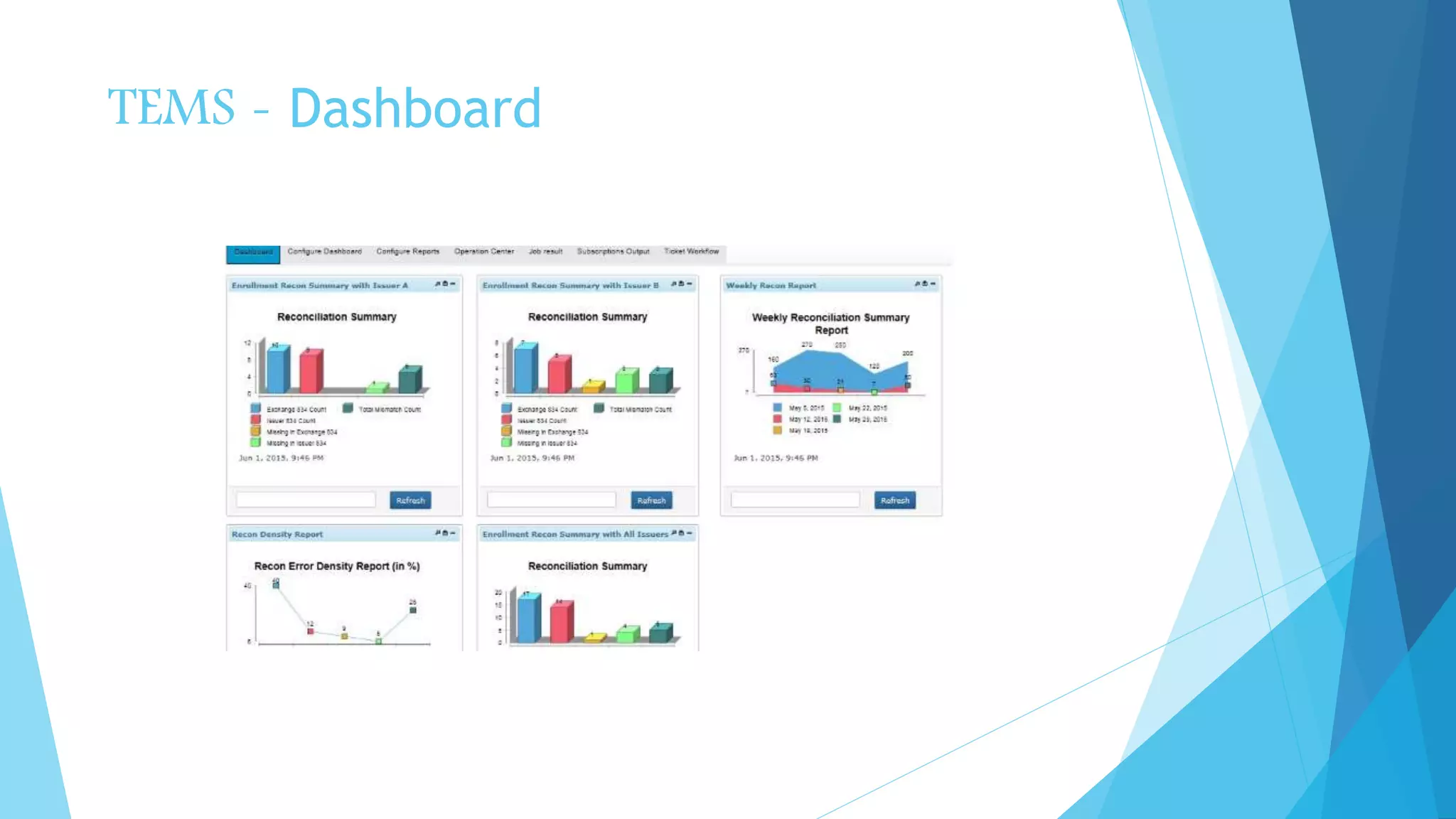
TEMS – Dashboard
Interested?
 Contact for free demo. Please drop an email to sales@tekizma.com
© Tekizma Inc 12

TEMS Balanceit

  • 1.
    TEKIZMA Where Quality isCustomer’s right, not a privilege!
  • 2.
    Tekizma Enterprise Monitoring Solution (TEMS) AMust Have System for Your Enterprise
  • 3.
    Balance & Control Balance & Control is an essential functionality to maintain the integrity of any system  It generates daily report for various vital counters  It generates daily reports for vital money  It ensures that all transactions are accounted for  It ensures that all money are accounted for  It ensures that all inter system transfer are accounted for
  • 4.
    Why Tekizma Balance& Control Tool  Designed and architected by experts in IRS processing. IRS enforces one of the most stringent balancing and control  Validated against Health Exchange use cases  Easily Configurable  New Balancing Point can be added with configuration
  • 5.
    MA Health Exchange hCentive SystemA System B System C Issuer 1 Issuer -n
  • 6.
    Balance & Controlfor MA Health Exchange  Tekizma B&C can be configured to Count any counters and money.  For example in the hCentive System it can count for following counters – daily and cumulatively  Number of application – daily and cumulatively  Number of applying members  Number of member submitted eligibility  Number of member has not submitted eligibility  Number of members eligible for Medicaid  Number of member eligible for Connector Care  Number of member eligible for APTC  Number of member eligible for Unsubsidized QHP. eligibility  Number of
  • 7.
    Balance & Controlfor MA Health Exchange  Tekizma B&C can be configured to Balance Between:  Balancing within hCentive System  Balancing within Dell System  Balancing between hCentive and Dell  Balancing between hCentive and MMIS  Balancing between hCentive and MA-21  Balancing between Dell and Issuer  And so on – as long you have a file, you have a counter
  • 8.
    Sample Balancing Rules Tekizma B&C can be configured to Balance Between:  Balancing within hCentive System  Balancing within Dell System  Balancing between hCentive and Dell  Balancing between hCentive and MMIS  Balancing between hCentive and MA-21  Balancing between Dell and Issuer  And so on – as long you have a file, you have a counter
  • 9.
    Mode of Operation:Real Time Mode  Tekizma B&C can be configured to Balance Between:  Balancing within hCentive System  Balancing within Dell System  Balancing between hCentive and Dell  Balancing between hCentive and MMIS  Balancing between hCentive and MA-21  Balancing between Dell and Issuer  And so on – as long you have a file, you have a counter
  • 10.
    Dashboard  Tekizma B&Ccan be configured to Balance Between:  Balancing within hCentive System  Balancing within Dell System  Balancing between hCentive and Dell  Balancing between hCentive and MMIS  Balancing between hCentive and MA-21  Balancing between Dell and Issuer  And so on – as long you have a file, you have a counter
  • 11.
  • 12.
    Interested?  Contact forfree demo. Please drop an email to sales@tekizma.com © Tekizma Inc 12