Download to read offline

![{ FIXED [Category] : SUM([Sales])}
3 TYPES OF LOD
01 02 03
FIXED INCLUDE EXCLUDE
This expression can
compute values
using specified
dimensions without
reference to any
other dimensions
present in the view.
This expression
computes values
using specified
dimensions along
with the dimensions
that are in the view.
These expressions
are designed to
remove dimensions
from an expression](https://image.slidesharecdn.com/lod-231212131828-daa7a2e8/85/Tableau-training-for-Beginners-Tableau-LOD-Expressions-4-320.jpg)
![Syntax : { FIXED [Category] :
SUM([Sales])}
FIXED LOD](https://image.slidesharecdn.com/lod-231212131828-daa7a2e8/85/Tableau-training-for-Beginners-Tableau-LOD-Expressions-5-320.jpg)
![Syntax : { EXCLUDE [Sub-Category] :
Sum(Sales) }
EXCLUDE LOD](https://image.slidesharecdn.com/lod-231212131828-daa7a2e8/85/Tableau-training-for-Beginners-Tableau-LOD-Expressions-6-320.jpg)
![Syntax : { INCLUDE [Sub-Category] :
Sum(Sales) }
INCLUDE LOD](https://image.slidesharecdn.com/lod-231212131828-daa7a2e8/85/Tableau-training-for-Beginners-Tableau-LOD-Expressions-7-320.jpg)

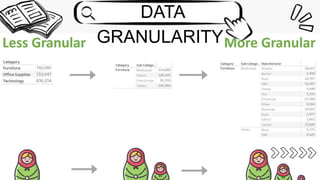
LOD expressions in Tableau allow users to control the level of data granularity in calculations and visualizations. There are three types of LOD expressions: fixed LOD computes values using only specified dimensions; include LOD computes values using specified dimensions and any other dimensions present in the view; exclude LOD is designed to remove dimensions from calculations. The document provides examples of syntax for each type of LOD expression and explains how and when to use fixed, include, and exclude LOD.


