‭
RORBits.- Top Ruby on Rails Development Company‬
‭
Swagger Rails: The Right Guide For You‬
‭
In the world of web development, staying organized and ensuring seamless‬
‭
collaboration among team members is essential. One tool that has gained popularity‬
‭
for its role in achieving this is Swagger Rails.‬
‭
If you're a Ruby on Rails developer looking for the right guide on how to integrate‬
‭
Swagger into your development process, you've come to the right place.‬
‭
In this article, we'll explore the ins and outs of Swagger for Ruby on Rails, discussing‬
‭
its benefits, installation, best practices, and more.‬
‭
Let's dive in!‬
‭
What Is Ruby on Rails?‬
‭
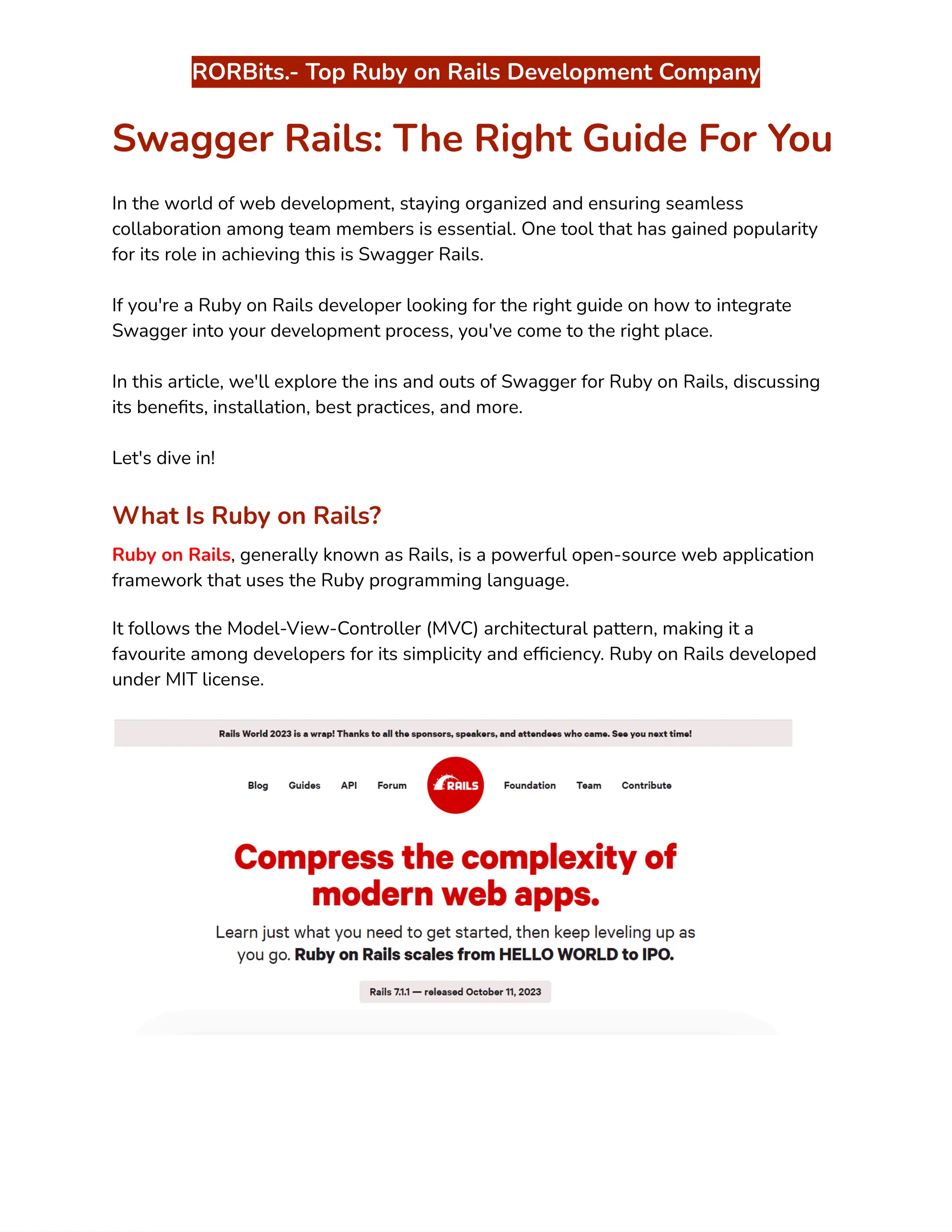
Ruby on Rails‬
‭
, generally known as Rails, is a powerful open-source web application‬
‭
framework that uses the Ruby programming language.‬
‭
It follows the Model-View-Controller (MVC) architectural pattern, making it a‬
‭
favourite among developers for its simplicity and efficiency. Ruby on Rails developed‬
‭
under MIT license.‬
‭
RORBits.- Top Ruby on Rails Development Company‬
‭
Rails web app development emerged in 2005 due to its innovative features which‬
‭
includes smooth database table creations, migrations, and scaffolding of views to‬
‭
enable robust and fast application development.‬
‭
The philosophy on which Ruby on Rails works is Convention over Configuration (CoC),‬
‭
and the Don't Repeat Yourself (DRY) principle.‬
‭
"Convention over Configuration" says that the developer has to specify only‬
‭
unconventional characteristics of the application.‬
‭
For instance, if the model contains the class Sale, the database table corresponding to‬
‭
it will by default be called sales. Developers only need to write code for these names if‬
‭
one deviates from this practice, let say by calling the table "products sold." In general,‬
‭
Ruby on Rails conventions result in fewer repetition of code.‬
‭
The phrase "Don't Repeat Yourself" refers to information that is contained in a single,‬
‭
clear location.‬
‭
For instance, the developer need not include database column names in class‬
‭
definitions when utilizing Rails' ActiveRecord module. Instead, Ruby on Rails can use‬
‭
the class name to access this data from the database.‬
‭
There are numerous popular sites that use Ruby on Rails for web development. Airbnb,‬
‭
Dribbble, Shopify, Crunchbase, GitHub, and Twitch are some examples of well-known‬
‭
sites developed with Ruby on Rails. Connect with the best‬‭
Ruby on Rails‬
‭
Development Agency‬‭
like RORBits to get successful outcomes on Rails web app‬
‭
development.‬
‭
Why Choose Ruby on Rails for Web Development?‬
‭
Ruby on Rails offers several advantages for web developers, including rapid‬
‭
development, scalability, and a vast community of developers.‬
‭
Its conventions over configuration (CoC) and don't repeat yourself (DRY) principles‬
‭
contribute to writing clean and maintainable code.‬
‭
Let’s see some major reasons to choose Ruby on Rails for web development:‬
‭
RORBits.- Top Ruby on Rails Development Company‬
‭
●‬ ‭
Productivity and Speed‬
‭
●‬ ‭
Mature Ecosystem‬
‭
●‬ ‭
Developer-Friendly‬
‭
●‬ ‭
Active Community‬
‭
●‬ ‭
Scalability‬
‭
●‬ ‭
Security‬
‭
●‬ ‭
Databases and ORM‬
‭
●‬ ‭
Testing and TDD‬
‭
●‬ ‭
Community Packages‬
‭
●‬ ‭
Cross-Platform Compatibility‬
‭
●‬ ‭
RESTful Architecture‬
‭
●‬ ‭
Cost-Effective‬
‭
While Ruby on Rails is an excellent choice for web development, the choice of‬
‭
framework should also depend on your specific project requirements, team expertise,‬
‭
and long-term goals.‬
‭
However, for many developers and businesses, Ruby on Rails remains a popular and‬
‭
reliable option for building web applications.‬
‭
Similarly, let’s understand Swagger and its benefits in the next section!‬
‭
What Is Swagger?‬
‭
Swagger‬
‭
, now known as the OpenAPI Specification, is a set of rules and specifications‬
‭
for building and documenting RESTful APIs.‬
‭
RORBits.- Top Ruby on Rails Development Company‬
‭
It provides a standardized way to describe the structure of an API, making it easier for‬
‭
both developers and non-developers to understand and use the API. The primary‬
‭
components of Swagger include:‬
‭
●‬ ‭
API Documentation‬
‭
●‬ ‭
API Design‬
‭
●‬ ‭
API Testing‬
‭
●‬ ‭
Code Generation‬
‭
●‬ ‭
Interactive API Exploration‬
‭
Swagger simplifies the process of API development by improving communication‬
‭
between developers and API consumers.‬
‭
It ensures that everyone has access to clear, up-to-date documentation, reducing‬
‭
misunderstandings and speeding up the integration of APIs into applications.‬
‭
It's widely used in the software development industry to enhance the usability and‬
‭
accessibility of APIs.‬
‭
Benefits of Using Swagger‬
‭
Swagger offers numerous benefits to developers and organizations:‬
‭
Improved Documentation‬
‭
RORBits.- Top Ruby on Rails Development Company‬
‭
Swagger generates interactive and detailed documentation automatically, saving time‬
‭
and effort.‬
‭
Enhanced Collaboration‬
‭
Team members can collaborate more efficiently with a standardized API description.‬
‭
Automated Testing‬
‭
Swagger simplifies the process of testing APIs, ensuring reliability.‬
‭
Enhanced User Experience‬
‭
Well-documented APIs lead to better user experiences, attracting and retaining users.‬
‭
Now, let’s understand the major advantage of using Swagger for Ruby on Rails.‬
‭
How Swagger Benefits Ruby on Rails Development‬
‭
Let’s explore all the core advantages of using Swagger for the seamless‬‭
Ruby on Rails‬
‭
API Development‬
‭
:‬
‭
Seamless API Documentation‬
‭
Integrating Swagger with Ruby on Rails ensures that your API is documented‬
‭
seamlessly. With Swagger, your API documentation is always up-to-date, reflecting‬
‭
the actual endpoints and data models.‬
‭
Improved Collaboration‬
‭
Collaborating with fellow developers, testers, and stakeholders becomes more‬
‭
accessible with Swagger. Everyone can refer to the same documentation, eliminating‬
‭
confusion and ensuring that all team members are on the same page.‬
‭
Automated Testing‬
‭
RORBits.- Top Ruby on Rails Development Company‬
‭
Automated testing is a breeze with Swagger. You can use Swagger's API descriptions‬
‭
to generate test cases, reducing the time spent on manual testing and increasing the‬
‭
reliability of your API.‬
‭
Enhanced User Experience‬
‭
Well-documented APIs lead to a better user experience. Users, whether internal or‬
‭
external, can easily understand how to interact with your API, resulting in more‬
‭
satisfied customers.‬
‭
If you want to embrace all the Swagger Rails benefits for your API Documentation,‬
‭
then you should‬‭
Hire Ruby on Rails Developer‬‭
from RORBits on a monthly or hourly‬
‭
basis as per your requirement. They have vast experience in ROR development.‬
‭
Getting Started with Swagger for Ruby on Rails‬
‭
Installation and Setup‬
‭
To get started with Swagger in Ruby on Rails, you need to install the necessary gems‬
‭
and configure your application. Follow these simple steps to set up Swagger:‬
‭
●‬ ‭
Install the‬‭
'swagger-blocks'‬‭
gem by adding it to your Gemfile and running‬
‭
bundle install.‬
‭
●‬ ‭
Create a Swagger documentation file (e.g.,‬‭
swagger_docs.rb‬
‭
) to define your API‬
‭
documentation structure.‬
‭
●‬ ‭
Configure your application to use Swagger UI for interactive API documentation.‬
‭
●‬ ‭
Creating API Endpoints‬
‭
●‬ ‭
Once you've set up Swagger, start creating your API endpoints. Define your‬
‭
endpoints in the Swagger documentation file, specifying the request and‬
‭
response formats, data types, and authentication requirements.‬
‭
Documenting Your API‬
‭
RORBits.- Top Ruby on Rails Development Company‬
‭
Swagger provides a clean and structured way to document your API. Use the Swagger‬
‭
DSL to add descriptions, examples, and other relevant information to your endpoints,‬
‭
making it easier for others to understand your API's functionality.‬
‭
Swagger UI‬
‭
Swagger UI is a user-friendly interface that automatically generates documentation‬
‭
based on your Swagger specifications.‬
‭
It allows you to interact with your API directly from the documentation, simplifying the‬
‭
testing and validation process.‬
‭
Now, follow the following steps for the documentation of a Ruby On Rails API with‬
‭
Swagger UI.‬
‭
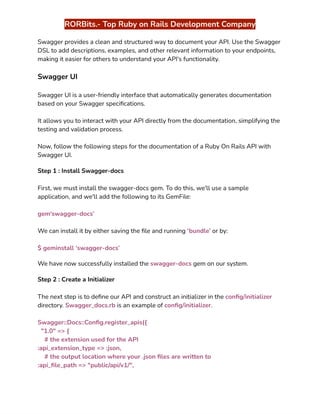
Step 1 : Install Swagger-docs‬
‭
First, we must install the swagger-docs gem. To do this, we'll use a sample‬
‭
application, and we'll add the following to its GemFile:‬
‭
gem‘swagger-docs’‬
‭
We can install it by either saving the file and running‬‭
‘bundle’‬‭
or by:‬
‭
$ geminstall ‘swagger-docs’‬
‭
We have now successfully installed the‬‭
swagger-docs‬‭
gem on our system.‬
‭
Step 2 : Create a Initializer‬
‭
The next step is to define our API and construct an initializer in the‬‭
config/initializer‬
‭
directory.‬‭
Swagger_docs.rb‬‭
is an example of‬‭
config/initializer‬
‭
.‬
‭
Swagger::Docs::Config.register_apis({‬
‭
"1.0" => {‬
‭
# the extension used for the API‬
‭
:api_extension_type => :json,‬
‭
# the output location where your .json files are written to‬
‭
:api_file_path => "public/api/v1/",‬
‭
RORBits.- Top Ruby on Rails Development Company‬
‭
# the URL base path to your API‬
‭
:base_path => "http://api.somedomain.com",‬
‭
# if you want to delete all .json files at each generation‬
‭
:clean_directory => false,‬
‭
# Ability to setup base controller for each api version. Api::V1::SomeController‬
‭
for example.‬
‭
:parent_controller =>Api::V1::SomeController,‬
‭
# add custom attributes to api-docs‬
‭
:attributes => {‬
‭
:info => {‬
‭
"title" => "Swagger Sample App",‬
‭
"description" => "This is a sample description.",‬
‭
"termsOfServiceUrl" => "http://agiratech.com/",‬
‭
"contact" => "contact@agiratech.com",‬
‭
}‬
‭
}‬
‭
}‬
‭
})‬
‭
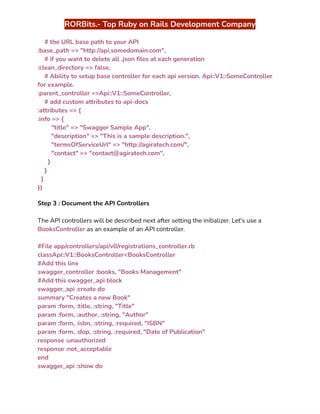
Step 3 : Document the API Controllers‬
‭
The API controllers will be described next after setting the initializer. Let's use a‬
‭
BooksController‬‭
as an example of an API controller.‬
‭
#File app/controllers/api/v0/registrations_controller.rb‬
‭
classApi::V1::BooksController<BooksController‬
‭
#Add this line‬
‭
swagger_controller :books, "Books Management"‬
‭
#Add this swagger_api block‬
‭
swagger_api :create do‬
‭
summary "Creates a new Book"‬
‭
param :form, :title, :string, "Title"‬
‭
param :form, :author, :string, "Author"‬
‭
param :form, :isbn, :string, :required, "ISBN"‬
‭
param :form, :dop, :string, :required, "Date of Publication"‬
‭
response :unauthorized‬
‭
response :not_acceptable‬
‭
end‬
‭
swagger_api :show do‬
‭
RORBits.- Top Ruby on Rails Development Company‬
‭
summary "Fetches a single Book"‬
‭
param :path, :id, :integer, :optional, "Book Id"‬
‭
response :ok, "Success", :Book‬
‭
response :unauthorized‬
‭
response :not_acceptable‬
‭
response :not_found‬
‭
end‬
‭
.‬
‭
.‬
‭
.‬
‭
end‬
‭
Step 4: Generate json file‬
‭
Run Rake and use the following command to create json files:‬
‭
rakeswagger:docs‬
‭
from the root directory of Rails. Yes, it's quite easy. This command examines every‬
‭
controller and identifies which ones require documentation.‬
‭
Since all of the API methods have already been configured, the Swagger UI json files‬
‭
will be generated and made available under your‬‭
api_file_path‬‭
(for‬
‭
example,./public/api/v1‬
‭
).‬
‭
The path specified in the‬‭
config/initializers/swagger_docs.rb‬‭
file is the one mentioned‬
‭
above.‬
‭
Step 5: Integrate the Swagger UI‬
‭
Finally, we'll link the public directory of the Rails application with the Swagger UI‬
‭
index view. This is a good technique to improve the project's readability. This is another‬
‭
straightforward process.‬
‭
Place the directory in the rails project's‬‭
"public/api/api"‬‭
directory after copying all the‬
‭
Swagger UI-related files from the GitHub repository. Put the‬‭
index.html‬‭
file in the‬
‭
"public/api"‬‭
directory.‬
‭
This indicates that the swagger ui home page is located under‬‭
"public/api"‬‭
and that all‬
‭
of the swagger ui resource files are located under‬‭
"public/api/api"‬
‭
.‬
‭
RORBits.- Top Ruby on Rails Development Company‬
‭
The Swagger UI documentation for the sample Rails application is finally ready for‬
‭
viewing. If the Rails server is already running, restart it before navigating to the‬
‭
application's index file in the browser.‬
‭
Let’s see the best practices used for Swagger in Ruby on Rails to get best outcomes‬
‭
.‬
‭
Best Practices for Swagger in Ruby on Rails‬
‭
Keeping Your Documentation Updated‬
‭
To harness the full power of Swagger, ensure that your documentation is always‬
‭
up-to-date. As your API evolves, make corresponding updates to your Swagger‬
‭
documentation to reflect any changes.‬
‭
Utilizing Annotations‬
‭
Take advantage of Swagger annotations within your Ruby on Rails code. Annotations‬
‭
allow you to specify additional information about your API, such as response codes and‬
‭
parameter details, directly within your codebase.‬
‭
Versioning Your API‬
‭
When developing APIs, versioning is crucial to maintaining backward compatibility.‬
‭
Swagger makes it easy to document and manage different API versions, ensuring a‬
‭
smooth transition for clients.‬
‭
Security Considerations‬
‭
Security is paramount when working with APIs. Use Swagger to specify security‬
‭
requirements, such as API key or OAuth token authentication, to protect your‬
‭
endpoints.‬
‭
Swagger Documentation Tools for a Rails API Application‬
‭
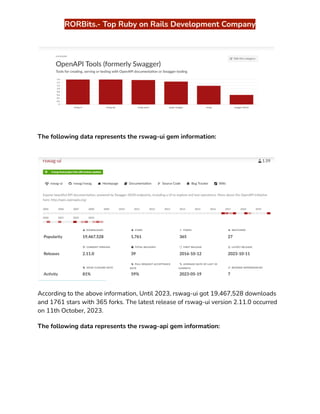
The following data has been gathered from The Ruby Toolbox official site. You can visit‬
‭
their site for other swagger gem data. It is a bar graph representation of tools for‬
‭
creating, serving, or testing with OpenAPI documentation or Swagger tooling.‬
‭
RORBits.- Top Ruby on Rails Development Company‬
‭
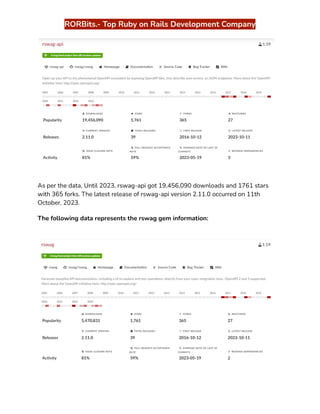
The following data represents the rswag-ui gem information:‬
‭
According to the above information, Until 2023, rswag-ui got 19,467,528 downloads‬
‭
and 1761 stars with 365 forks. The latest release of rswag-ui version 2.11.0 occurred‬
‭
on 11th October, 2023.‬
‭
The following data represents the rswag-api gem information:‬
‭
RORBits.- Top Ruby on Rails Development Company‬
‭
As per the data, Until 2023, rswag-api got 19,456,090 downloads and 1761 stars‬
‭
with 365 forks. The latest release of rswag-api version 2.11.0 occurred on 11th‬
‭
October, 2023.‬
‭
The following data represents the rswag gem information:‬
‭
RORBits.- Top Ruby on Rails Development Company‬
‭
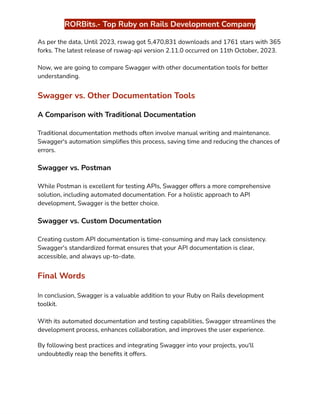
As per the data, Until 2023, rswag got 5,470,831 downloads and 1761 stars with 365‬
‭
forks. The latest release of rswag-api version 2.11.0 occurred on 11th October, 2023.‬
‭
Now, we are going to compare Swagger with other documentation tools for better‬
‭
understanding.‬
‭
Swagger vs. Other Documentation Tools‬
‭
A Comparison with Traditional Documentation‬
‭
Traditional documentation methods often involve manual writing and maintenance.‬
‭
Swagger's automation simplifies this process, saving time and reducing the chances of‬
‭
errors.‬
‭
Swagger vs. Postman‬
‭
While Postman is excellent for testing APIs, Swagger offers a more comprehensive‬
‭
solution, including automated documentation. For a holistic approach to API‬
‭
development, Swagger is the better choice.‬
‭
Swagger vs. Custom Documentation‬
‭
Creating custom API documentation is time-consuming and may lack consistency.‬
‭
Swagger's standardized format ensures that your API documentation is clear,‬
‭
accessible, and always up-to-date.‬
‭
Final Words‬
‭
In conclusion, Swagger is a valuable addition to your Ruby on Rails development‬
‭
toolkit.‬
‭
With its automated documentation and testing capabilities, Swagger streamlines the‬
‭
development process, enhances collaboration, and improves the user experience.‬
‭
By following best practices and integrating Swagger into your projects, you'll‬
‭
undoubtedly reap the benefits it offers.‬
‭
RORBits.- Top Ruby on Rails Development Company‬
‭
Ready to get started with Swagger for Ruby on Rails? Follow the steps outlined in this‬
‭
guide, and you'll be well on your way to creating well-documented, efficient APIs.‬
‭
To get better guidance and support, connect with the leading‬‭
Ruby on Rails‬
‭
Development Service‬‭
Provider such as RORBits. You will get positive outcomes for‬
‭
your Rails Project.‬
‭
HAPPY SWAGGER RAILS!!‬
‭
Source:‬‭
https://www.rorbits.com/swagger-rails/‬
‭
Contact us:‬‭
+1-347-708-0071‬ ‭
|‬ ‭
Gmail:‬‭
hello@rorbits.com‬

Swagger Rails: The Right Guide For You..

  • 1.
    ‭ RORBits.- Top Rubyon Rails Development Company‬ ‭ Swagger Rails: The Right Guide For You‬ ‭ In the world of web development, staying organized and ensuring seamless‬ ‭ collaboration among team members is essential. One tool that has gained popularity‬ ‭ for its role in achieving this is Swagger Rails.‬ ‭ If you're a Ruby on Rails developer looking for the right guide on how to integrate‬ ‭ Swagger into your development process, you've come to the right place.‬ ‭ In this article, we'll explore the ins and outs of Swagger for Ruby on Rails, discussing‬ ‭ its benefits, installation, best practices, and more.‬ ‭ Let's dive in!‬ ‭ What Is Ruby on Rails?‬ ‭ Ruby on Rails‬ ‭ , generally known as Rails, is a powerful open-source web application‬ ‭ framework that uses the Ruby programming language.‬ ‭ It follows the Model-View-Controller (MVC) architectural pattern, making it a‬ ‭ favourite among developers for its simplicity and efficiency. Ruby on Rails developed‬ ‭ under MIT license.‬
  • 2.
    ‭ RORBits.- Top Rubyon Rails Development Company‬ ‭ Rails web app development emerged in 2005 due to its innovative features which‬ ‭ includes smooth database table creations, migrations, and scaffolding of views to‬ ‭ enable robust and fast application development.‬ ‭ The philosophy on which Ruby on Rails works is Convention over Configuration (CoC),‬ ‭ and the Don't Repeat Yourself (DRY) principle.‬ ‭ "Convention over Configuration" says that the developer has to specify only‬ ‭ unconventional characteristics of the application.‬ ‭ For instance, if the model contains the class Sale, the database table corresponding to‬ ‭ it will by default be called sales. Developers only need to write code for these names if‬ ‭ one deviates from this practice, let say by calling the table "products sold." In general,‬ ‭ Ruby on Rails conventions result in fewer repetition of code.‬ ‭ The phrase "Don't Repeat Yourself" refers to information that is contained in a single,‬ ‭ clear location.‬ ‭ For instance, the developer need not include database column names in class‬ ‭ definitions when utilizing Rails' ActiveRecord module. Instead, Ruby on Rails can use‬ ‭ the class name to access this data from the database.‬ ‭ There are numerous popular sites that use Ruby on Rails for web development. Airbnb,‬ ‭ Dribbble, Shopify, Crunchbase, GitHub, and Twitch are some examples of well-known‬ ‭ sites developed with Ruby on Rails. Connect with the best‬‭ Ruby on Rails‬ ‭ Development Agency‬‭ like RORBits to get successful outcomes on Rails web app‬ ‭ development.‬ ‭ Why Choose Ruby on Rails for Web Development?‬ ‭ Ruby on Rails offers several advantages for web developers, including rapid‬ ‭ development, scalability, and a vast community of developers.‬ ‭ Its conventions over configuration (CoC) and don't repeat yourself (DRY) principles‬ ‭ contribute to writing clean and maintainable code.‬ ‭ Let’s see some major reasons to choose Ruby on Rails for web development:‬
  • 3.
    ‭ RORBits.- Top Rubyon Rails Development Company‬ ‭ ●‬ ‭ Productivity and Speed‬ ‭ ●‬ ‭ Mature Ecosystem‬ ‭ ●‬ ‭ Developer-Friendly‬ ‭ ●‬ ‭ Active Community‬ ‭ ●‬ ‭ Scalability‬ ‭ ●‬ ‭ Security‬ ‭ ●‬ ‭ Databases and ORM‬ ‭ ●‬ ‭ Testing and TDD‬ ‭ ●‬ ‭ Community Packages‬ ‭ ●‬ ‭ Cross-Platform Compatibility‬ ‭ ●‬ ‭ RESTful Architecture‬ ‭ ●‬ ‭ Cost-Effective‬ ‭ While Ruby on Rails is an excellent choice for web development, the choice of‬ ‭ framework should also depend on your specific project requirements, team expertise,‬ ‭ and long-term goals.‬ ‭ However, for many developers and businesses, Ruby on Rails remains a popular and‬ ‭ reliable option for building web applications.‬ ‭ Similarly, let’s understand Swagger and its benefits in the next section!‬ ‭ What Is Swagger?‬ ‭ Swagger‬ ‭ , now known as the OpenAPI Specification, is a set of rules and specifications‬ ‭ for building and documenting RESTful APIs.‬
  • 4.
    ‭ RORBits.- Top Rubyon Rails Development Company‬ ‭ It provides a standardized way to describe the structure of an API, making it easier for‬ ‭ both developers and non-developers to understand and use the API. The primary‬ ‭ components of Swagger include:‬ ‭ ●‬ ‭ API Documentation‬ ‭ ●‬ ‭ API Design‬ ‭ ●‬ ‭ API Testing‬ ‭ ●‬ ‭ Code Generation‬ ‭ ●‬ ‭ Interactive API Exploration‬ ‭ Swagger simplifies the process of API development by improving communication‬ ‭ between developers and API consumers.‬ ‭ It ensures that everyone has access to clear, up-to-date documentation, reducing‬ ‭ misunderstandings and speeding up the integration of APIs into applications.‬ ‭ It's widely used in the software development industry to enhance the usability and‬ ‭ accessibility of APIs.‬ ‭ Benefits of Using Swagger‬ ‭ Swagger offers numerous benefits to developers and organizations:‬ ‭ Improved Documentation‬
  • 5.
    ‭ RORBits.- Top Rubyon Rails Development Company‬ ‭ Swagger generates interactive and detailed documentation automatically, saving time‬ ‭ and effort.‬ ‭ Enhanced Collaboration‬ ‭ Team members can collaborate more efficiently with a standardized API description.‬ ‭ Automated Testing‬ ‭ Swagger simplifies the process of testing APIs, ensuring reliability.‬ ‭ Enhanced User Experience‬ ‭ Well-documented APIs lead to better user experiences, attracting and retaining users.‬ ‭ Now, let’s understand the major advantage of using Swagger for Ruby on Rails.‬ ‭ How Swagger Benefits Ruby on Rails Development‬ ‭ Let’s explore all the core advantages of using Swagger for the seamless‬‭ Ruby on Rails‬ ‭ API Development‬ ‭ :‬ ‭ Seamless API Documentation‬ ‭ Integrating Swagger with Ruby on Rails ensures that your API is documented‬ ‭ seamlessly. With Swagger, your API documentation is always up-to-date, reflecting‬ ‭ the actual endpoints and data models.‬ ‭ Improved Collaboration‬ ‭ Collaborating with fellow developers, testers, and stakeholders becomes more‬ ‭ accessible with Swagger. Everyone can refer to the same documentation, eliminating‬ ‭ confusion and ensuring that all team members are on the same page.‬ ‭ Automated Testing‬
  • 6.
    ‭ RORBits.- Top Rubyon Rails Development Company‬ ‭ Automated testing is a breeze with Swagger. You can use Swagger's API descriptions‬ ‭ to generate test cases, reducing the time spent on manual testing and increasing the‬ ‭ reliability of your API.‬ ‭ Enhanced User Experience‬ ‭ Well-documented APIs lead to a better user experience. Users, whether internal or‬ ‭ external, can easily understand how to interact with your API, resulting in more‬ ‭ satisfied customers.‬ ‭ If you want to embrace all the Swagger Rails benefits for your API Documentation,‬ ‭ then you should‬‭ Hire Ruby on Rails Developer‬‭ from RORBits on a monthly or hourly‬ ‭ basis as per your requirement. They have vast experience in ROR development.‬ ‭ Getting Started with Swagger for Ruby on Rails‬ ‭ Installation and Setup‬ ‭ To get started with Swagger in Ruby on Rails, you need to install the necessary gems‬ ‭ and configure your application. Follow these simple steps to set up Swagger:‬ ‭ ●‬ ‭ Install the‬‭ 'swagger-blocks'‬‭ gem by adding it to your Gemfile and running‬ ‭ bundle install.‬ ‭ ●‬ ‭ Create a Swagger documentation file (e.g.,‬‭ swagger_docs.rb‬ ‭ ) to define your API‬ ‭ documentation structure.‬ ‭ ●‬ ‭ Configure your application to use Swagger UI for interactive API documentation.‬ ‭ ●‬ ‭ Creating API Endpoints‬ ‭ ●‬ ‭ Once you've set up Swagger, start creating your API endpoints. Define your‬ ‭ endpoints in the Swagger documentation file, specifying the request and‬ ‭ response formats, data types, and authentication requirements.‬ ‭ Documenting Your API‬
  • 7.
    ‭ RORBits.- Top Rubyon Rails Development Company‬ ‭ Swagger provides a clean and structured way to document your API. Use the Swagger‬ ‭ DSL to add descriptions, examples, and other relevant information to your endpoints,‬ ‭ making it easier for others to understand your API's functionality.‬ ‭ Swagger UI‬ ‭ Swagger UI is a user-friendly interface that automatically generates documentation‬ ‭ based on your Swagger specifications.‬ ‭ It allows you to interact with your API directly from the documentation, simplifying the‬ ‭ testing and validation process.‬ ‭ Now, follow the following steps for the documentation of a Ruby On Rails API with‬ ‭ Swagger UI.‬ ‭ Step 1 : Install Swagger-docs‬ ‭ First, we must install the swagger-docs gem. To do this, we'll use a sample‬ ‭ application, and we'll add the following to its GemFile:‬ ‭ gem‘swagger-docs’‬ ‭ We can install it by either saving the file and running‬‭ ‘bundle’‬‭ or by:‬ ‭ $ geminstall ‘swagger-docs’‬ ‭ We have now successfully installed the‬‭ swagger-docs‬‭ gem on our system.‬ ‭ Step 2 : Create a Initializer‬ ‭ The next step is to define our API and construct an initializer in the‬‭ config/initializer‬ ‭ directory.‬‭ Swagger_docs.rb‬‭ is an example of‬‭ config/initializer‬ ‭ .‬ ‭ Swagger::Docs::Config.register_apis({‬ ‭ "1.0" => {‬ ‭ # the extension used for the API‬ ‭ :api_extension_type => :json,‬ ‭ # the output location where your .json files are written to‬ ‭ :api_file_path => "public/api/v1/",‬
  • 8.
    ‭ RORBits.- Top Rubyon Rails Development Company‬ ‭ # the URL base path to your API‬ ‭ :base_path => "http://api.somedomain.com",‬ ‭ # if you want to delete all .json files at each generation‬ ‭ :clean_directory => false,‬ ‭ # Ability to setup base controller for each api version. Api::V1::SomeController‬ ‭ for example.‬ ‭ :parent_controller =>Api::V1::SomeController,‬ ‭ # add custom attributes to api-docs‬ ‭ :attributes => {‬ ‭ :info => {‬ ‭ "title" => "Swagger Sample App",‬ ‭ "description" => "This is a sample description.",‬ ‭ "termsOfServiceUrl" => "http://agiratech.com/",‬ ‭ "contact" => "contact@agiratech.com",‬ ‭ }‬ ‭ }‬ ‭ }‬ ‭ })‬ ‭ Step 3 : Document the API Controllers‬ ‭ The API controllers will be described next after setting the initializer. Let's use a‬ ‭ BooksController‬‭ as an example of an API controller.‬ ‭ #File app/controllers/api/v0/registrations_controller.rb‬ ‭ classApi::V1::BooksController<BooksController‬ ‭ #Add this line‬ ‭ swagger_controller :books, "Books Management"‬ ‭ #Add this swagger_api block‬ ‭ swagger_api :create do‬ ‭ summary "Creates a new Book"‬ ‭ param :form, :title, :string, "Title"‬ ‭ param :form, :author, :string, "Author"‬ ‭ param :form, :isbn, :string, :required, "ISBN"‬ ‭ param :form, :dop, :string, :required, "Date of Publication"‬ ‭ response :unauthorized‬ ‭ response :not_acceptable‬ ‭ end‬ ‭ swagger_api :show do‬
  • 9.
    ‭ RORBits.- Top Rubyon Rails Development Company‬ ‭ summary "Fetches a single Book"‬ ‭ param :path, :id, :integer, :optional, "Book Id"‬ ‭ response :ok, "Success", :Book‬ ‭ response :unauthorized‬ ‭ response :not_acceptable‬ ‭ response :not_found‬ ‭ end‬ ‭ .‬ ‭ .‬ ‭ .‬ ‭ end‬ ‭ Step 4: Generate json file‬ ‭ Run Rake and use the following command to create json files:‬ ‭ rakeswagger:docs‬ ‭ from the root directory of Rails. Yes, it's quite easy. This command examines every‬ ‭ controller and identifies which ones require documentation.‬ ‭ Since all of the API methods have already been configured, the Swagger UI json files‬ ‭ will be generated and made available under your‬‭ api_file_path‬‭ (for‬ ‭ example,./public/api/v1‬ ‭ ).‬ ‭ The path specified in the‬‭ config/initializers/swagger_docs.rb‬‭ file is the one mentioned‬ ‭ above.‬ ‭ Step 5: Integrate the Swagger UI‬ ‭ Finally, we'll link the public directory of the Rails application with the Swagger UI‬ ‭ index view. This is a good technique to improve the project's readability. This is another‬ ‭ straightforward process.‬ ‭ Place the directory in the rails project's‬‭ "public/api/api"‬‭ directory after copying all the‬ ‭ Swagger UI-related files from the GitHub repository. Put the‬‭ index.html‬‭ file in the‬ ‭ "public/api"‬‭ directory.‬ ‭ This indicates that the swagger ui home page is located under‬‭ "public/api"‬‭ and that all‬ ‭ of the swagger ui resource files are located under‬‭ "public/api/api"‬ ‭ .‬
  • 10.
    ‭ RORBits.- Top Rubyon Rails Development Company‬ ‭ The Swagger UI documentation for the sample Rails application is finally ready for‬ ‭ viewing. If the Rails server is already running, restart it before navigating to the‬ ‭ application's index file in the browser.‬ ‭ Let’s see the best practices used for Swagger in Ruby on Rails to get best outcomes‬ ‭ .‬ ‭ Best Practices for Swagger in Ruby on Rails‬ ‭ Keeping Your Documentation Updated‬ ‭ To harness the full power of Swagger, ensure that your documentation is always‬ ‭ up-to-date. As your API evolves, make corresponding updates to your Swagger‬ ‭ documentation to reflect any changes.‬ ‭ Utilizing Annotations‬ ‭ Take advantage of Swagger annotations within your Ruby on Rails code. Annotations‬ ‭ allow you to specify additional information about your API, such as response codes and‬ ‭ parameter details, directly within your codebase.‬ ‭ Versioning Your API‬ ‭ When developing APIs, versioning is crucial to maintaining backward compatibility.‬ ‭ Swagger makes it easy to document and manage different API versions, ensuring a‬ ‭ smooth transition for clients.‬ ‭ Security Considerations‬ ‭ Security is paramount when working with APIs. Use Swagger to specify security‬ ‭ requirements, such as API key or OAuth token authentication, to protect your‬ ‭ endpoints.‬ ‭ Swagger Documentation Tools for a Rails API Application‬ ‭ The following data has been gathered from The Ruby Toolbox official site. You can visit‬ ‭ their site for other swagger gem data. It is a bar graph representation of tools for‬ ‭ creating, serving, or testing with OpenAPI documentation or Swagger tooling.‬
  • 11.
    ‭ RORBits.- Top Rubyon Rails Development Company‬ ‭ The following data represents the rswag-ui gem information:‬ ‭ According to the above information, Until 2023, rswag-ui got 19,467,528 downloads‬ ‭ and 1761 stars with 365 forks. The latest release of rswag-ui version 2.11.0 occurred‬ ‭ on 11th October, 2023.‬ ‭ The following data represents the rswag-api gem information:‬
  • 12.
    ‭ RORBits.- Top Rubyon Rails Development Company‬ ‭ As per the data, Until 2023, rswag-api got 19,456,090 downloads and 1761 stars‬ ‭ with 365 forks. The latest release of rswag-api version 2.11.0 occurred on 11th‬ ‭ October, 2023.‬ ‭ The following data represents the rswag gem information:‬
  • 13.
    ‭ RORBits.- Top Rubyon Rails Development Company‬ ‭ As per the data, Until 2023, rswag got 5,470,831 downloads and 1761 stars with 365‬ ‭ forks. The latest release of rswag-api version 2.11.0 occurred on 11th October, 2023.‬ ‭ Now, we are going to compare Swagger with other documentation tools for better‬ ‭ understanding.‬ ‭ Swagger vs. Other Documentation Tools‬ ‭ A Comparison with Traditional Documentation‬ ‭ Traditional documentation methods often involve manual writing and maintenance.‬ ‭ Swagger's automation simplifies this process, saving time and reducing the chances of‬ ‭ errors.‬ ‭ Swagger vs. Postman‬ ‭ While Postman is excellent for testing APIs, Swagger offers a more comprehensive‬ ‭ solution, including automated documentation. For a holistic approach to API‬ ‭ development, Swagger is the better choice.‬ ‭ Swagger vs. Custom Documentation‬ ‭ Creating custom API documentation is time-consuming and may lack consistency.‬ ‭ Swagger's standardized format ensures that your API documentation is clear,‬ ‭ accessible, and always up-to-date.‬ ‭ Final Words‬ ‭ In conclusion, Swagger is a valuable addition to your Ruby on Rails development‬ ‭ toolkit.‬ ‭ With its automated documentation and testing capabilities, Swagger streamlines the‬ ‭ development process, enhances collaboration, and improves the user experience.‬ ‭ By following best practices and integrating Swagger into your projects, you'll‬ ‭ undoubtedly reap the benefits it offers.‬
  • 14.
    ‭ RORBits.- Top Rubyon Rails Development Company‬ ‭ Ready to get started with Swagger for Ruby on Rails? Follow the steps outlined in this‬ ‭ guide, and you'll be well on your way to creating well-documented, efficient APIs.‬ ‭ To get better guidance and support, connect with the leading‬‭ Ruby on Rails‬ ‭ Development Service‬‭ Provider such as RORBits. You will get positive outcomes for‬ ‭ your Rails Project.‬ ‭ HAPPY SWAGGER RAILS!!‬ ‭ Source:‬‭ https://www.rorbits.com/swagger-rails/‬ ‭ Contact us:‬‭ +1-347-708-0071‬ ‭ |‬ ‭ Gmail:‬‭ hello@rorbits.com‬