Strong Authentication  & OpenID Using YUBICO & Clavid 17-2-2009 Sylvain Maret
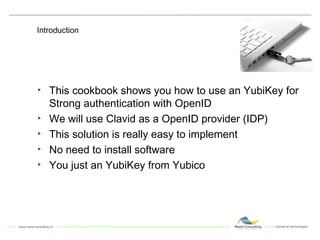
Introduction This cookbook shows you how to use an YubiKey for Strong authentication with OpenID We will use Clavid as a OpenID provider (IDP) This solution is really easy to implement No need to install software You just an YubiKey from Yubico
About Yubico Provide a USB Device for Strong Authentication Use AES Standard No need to install software (driver) Not a expensive solution Provide a One Time Password event based For more information:  http://www.yubico.com
About Clavid A Swiss company providing OpenID based on: Swiss Post Digital Certificate All SSL Client Digital Certificate X509 Yubikey Axsionics And Username & Password (no Strong Authentication……) And Soon more !
Let’s define the scenario Use a Strong Authentication PIN Code and an Yubikey Use OpenID Clavid.ch http://www.clavid.ch/ Use Plaxo to test this example
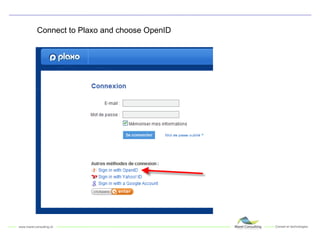
Connect to Plaxo and choose OpenID
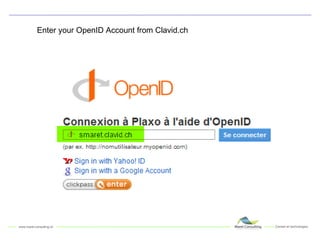
Enter your OpenID Account from Clavid.ch
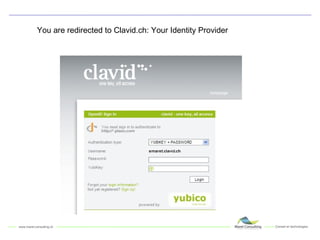
You are redirected to Clavid.ch: Your Identity Provider
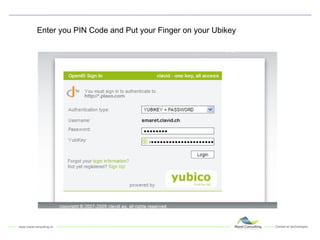
Enter you PIN Code and Put your Finger on your Ubikey
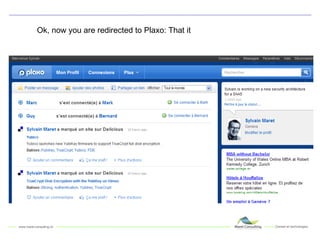
Ok, now you are redirected to Plaxo: That it
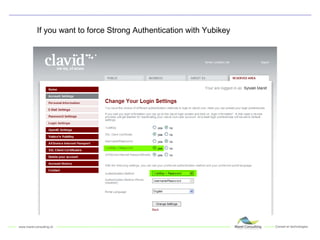
If you want to force Strong Authentication with Yubikey
"Le conseil et l'expertise pour le choix et la mise  en oeuvre des technologies innovantes dans la sécurité des systèmes d'information et de l'identité numérique"

Strong Authentication OpenID & Yubico

  • 1.
    Strong Authentication & OpenID Using YUBICO & Clavid 17-2-2009 Sylvain Maret
  • 2.
    Introduction This cookbookshows you how to use an YubiKey for Strong authentication with OpenID We will use Clavid as a OpenID provider (IDP) This solution is really easy to implement No need to install software You just an YubiKey from Yubico
  • 3.
    About Yubico Providea USB Device for Strong Authentication Use AES Standard No need to install software (driver) Not a expensive solution Provide a One Time Password event based For more information: http://www.yubico.com
  • 4.
    About Clavid ASwiss company providing OpenID based on: Swiss Post Digital Certificate All SSL Client Digital Certificate X509 Yubikey Axsionics And Username & Password (no Strong Authentication……) And Soon more !
  • 5.
    Let’s define thescenario Use a Strong Authentication PIN Code and an Yubikey Use OpenID Clavid.ch http://www.clavid.ch/ Use Plaxo to test this example
  • 6.
    Connect to Plaxoand choose OpenID
  • 7.
    Enter your OpenIDAccount from Clavid.ch
  • 8.
    You are redirectedto Clavid.ch: Your Identity Provider
  • 9.
    Enter you PINCode and Put your Finger on your Ubikey
  • 10.
    Ok, now youare redirected to Plaxo: That it
  • 11.
    If you wantto force Strong Authentication with Yubikey
  • 12.
    "Le conseil etl'expertise pour le choix et la mise en oeuvre des technologies innovantes dans la sécurité des systèmes d'information et de l'identité numérique"