Strings in Python
What are Strings?
• A consecutive sequence of characters
enclosed by single/double quotes.
• Triple quotes are for strings that span multiple
lines
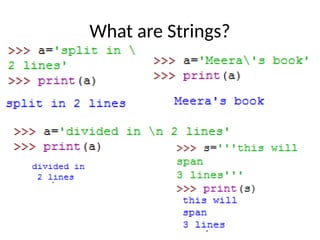
What are Strings?
Empty string
• A string without any characters inside
• Length is zero
Traversing a String
• To access all the elements of the string one by
one
• Each character has an index value
• Starts from 0 from left
• Starts from -1 from right
Traversing a String
str H e l l o W o r l d !
Pos
index
0 1 2 3 4 5 6 7 8 9 10 11
Neg
index
-12 -11 -10 -9 -8 -7 -6 -5 -4 -3 -2 -1
Traversing a String
str H e l l o W o r l d !
Pos
index
0 1 2 3 4 5 6 7 8 9 10 11
Neg
index
-12 -11 -10 -9 -8 -7 -6 -5 -4 -3 -2 -1
How to get output in one line?
Special String Operations
• Concatenate: string1 + string2
• Replicate: 3*str1
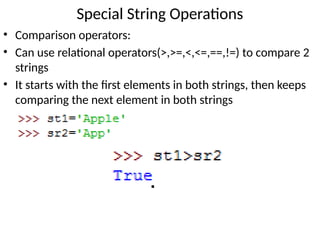
• Comparison operators:
• Can use relational operators(>,>=,<,<=,==,!=) to compare 2
strings
• It starts with the first elements in both strings, then keeps
comparing the next element in both strings
Special String Operations
• Check out the functions: ascii() , ord() and chr()
• Find out what type of values they work on.
• What kind of outputs do you get?
• Some examples to get you started:
Special String Operations
• Can you find something interesting to share with the
class?
• String Slicing
• Slicing is done to extract a substring/character from the
string
• The slice operator is two indices in square brackets
separated by a colon
• Syntax: string_name[start:end] with end index not
included
Special String Operations
str H e l l o W o r l d !
Pos
index
0 1 2 3 4 5 6 7 8 9 10 11
Neg
index
-12 -11 -10 -9 -8 -7 -6 -5 -4 -3 -2 -1
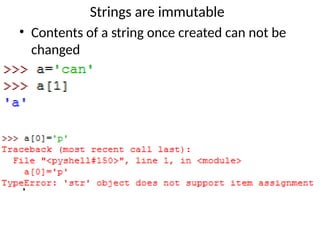
Strings are immutable
• Contents of a string once created can not be
changed
String methods & built-in functions
str1=‘ALL is well’
• str1.upper()
• str1.lower()
• str1.casefold()
String methods & built-in functions
• len( ) – returns the length of the string
• capitalize( ) – returns the exact copy but with the first
letter capitalized
String methods & built-in functions
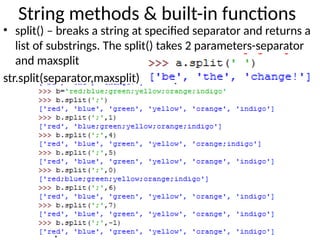
• split() – breaks a string at specified separator and returns a
list of substrings. The split() takes 2 parameters-separator
and maxsplit
str.split(separator,maxsplit)
String methods & built-in functions
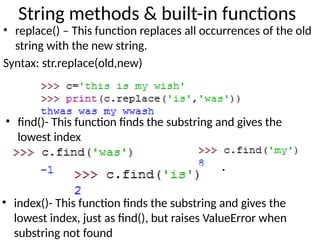
• replace() – This function replaces all occurrences of the old
string with the new string.
Syntax: str.replace(old,new)
• find()- This function finds the substring and gives the
lowest index
• index()- This function finds the substring and gives the
lowest index, just as find(), but raises ValueError when
substring not found
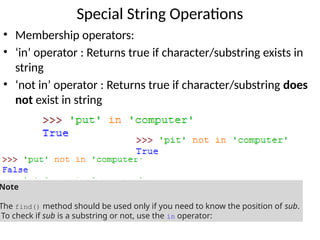
• Membership operators:
• ‘in’ operator : Returns true if character/substring exists in
string
• ‘not in’ operator : Returns true if character/substring does
not exist in string
Special String Operations
Note
The find() method should be used only if you need to know the position of sub.
To check if sub is a substring or not, use the in operator:
String methods & built-in functions
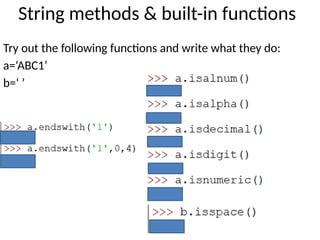
Try out the following functions and write what they do:
a=‘ABC1’
b=‘ ’
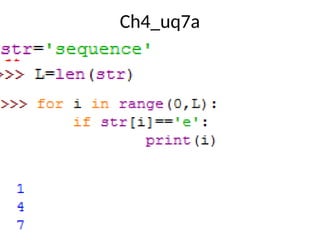
Ch4_uq7a
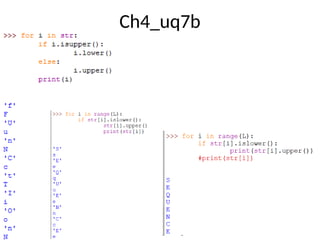
Ch4_uq7b
Ch4_uq7b

"Strings in Python - Presentation Slide"

  • 1.
  • 2.
    What are Strings? •A consecutive sequence of characters enclosed by single/double quotes. • Triple quotes are for strings that span multiple lines
  • 3.
  • 4.
    Empty string • Astring without any characters inside • Length is zero
  • 5.
    Traversing a String •To access all the elements of the string one by one • Each character has an index value • Starts from 0 from left • Starts from -1 from right
  • 6.
    Traversing a String strH e l l o W o r l d ! Pos index 0 1 2 3 4 5 6 7 8 9 10 11 Neg index -12 -11 -10 -9 -8 -7 -6 -5 -4 -3 -2 -1
  • 7.
    Traversing a String strH e l l o W o r l d ! Pos index 0 1 2 3 4 5 6 7 8 9 10 11 Neg index -12 -11 -10 -9 -8 -7 -6 -5 -4 -3 -2 -1 How to get output in one line?
  • 8.
    Special String Operations •Concatenate: string1 + string2 • Replicate: 3*str1
  • 9.
    • Comparison operators: •Can use relational operators(>,>=,<,<=,==,!=) to compare 2 strings • It starts with the first elements in both strings, then keeps comparing the next element in both strings Special String Operations
  • 10.
    • Check outthe functions: ascii() , ord() and chr() • Find out what type of values they work on. • What kind of outputs do you get? • Some examples to get you started: Special String Operations • Can you find something interesting to share with the class?
  • 11.
    • String Slicing •Slicing is done to extract a substring/character from the string • The slice operator is two indices in square brackets separated by a colon • Syntax: string_name[start:end] with end index not included Special String Operations str H e l l o W o r l d ! Pos index 0 1 2 3 4 5 6 7 8 9 10 11 Neg index -12 -11 -10 -9 -8 -7 -6 -5 -4 -3 -2 -1
  • 12.
    Strings are immutable •Contents of a string once created can not be changed
  • 13.
    String methods &built-in functions str1=‘ALL is well’ • str1.upper() • str1.lower() • str1.casefold()
  • 14.
    String methods &built-in functions • len( ) – returns the length of the string • capitalize( ) – returns the exact copy but with the first letter capitalized
  • 15.
    String methods &built-in functions • split() – breaks a string at specified separator and returns a list of substrings. The split() takes 2 parameters-separator and maxsplit str.split(separator,maxsplit)
  • 16.
    String methods &built-in functions • replace() – This function replaces all occurrences of the old string with the new string. Syntax: str.replace(old,new) • find()- This function finds the substring and gives the lowest index • index()- This function finds the substring and gives the lowest index, just as find(), but raises ValueError when substring not found
  • 17.
    • Membership operators: •‘in’ operator : Returns true if character/substring exists in string • ‘not in’ operator : Returns true if character/substring does not exist in string Special String Operations Note The find() method should be used only if you need to know the position of sub. To check if sub is a substring or not, use the in operator:
  • 18.
    String methods &built-in functions Try out the following functions and write what they do: a=‘ABC1’ b=‘ ’
  • 19.
  • 20.
  • 21.