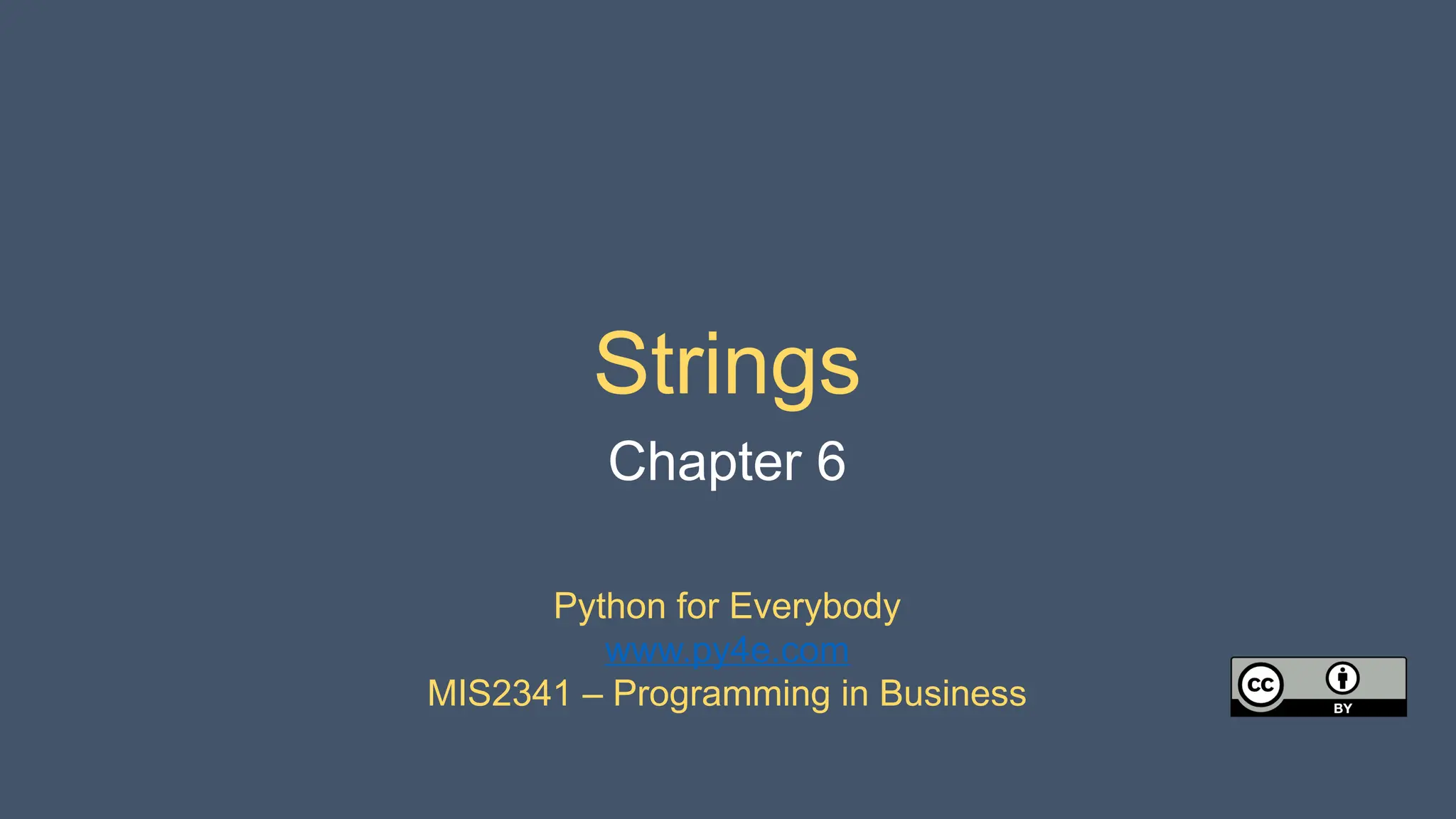
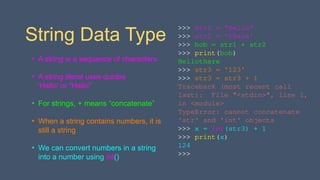
String Data Type
•A string is a sequence of characters
• A string literal uses quotes
'Hello' or "Hello"
• For strings, + means “concatenate”
• When a string contains numbers, it is
still a string
• We can convert numbers in a string
into a number using int()
>>> str1 = "Hello"
>>> str2 = 'there'
>>> bob = str1 + str2
>>> print(bob)
Hellothere
>>> str3 = '123'
>>> str3 = str3 + 1
Traceback (most recent call
last): File "<stdin>", line 1,
in <module>
TypeError: cannot concatenate
'str' and 'int' objects
>>> x = int(str3) + 1
>>> print(x)
124
>>>
3.
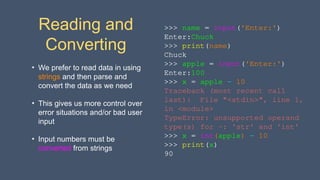
Reading and
Converting
• Weprefer to read data in using
strings and then parse and
convert the data as we need
• This gives us more control over
error situations and/or bad user
input
• Input numbers must be
converted from strings
>>> name = input('Enter:')
Enter:Chuck
>>> print(name)
Chuck
>>> apple = input('Enter:')
Enter:100
>>> x = apple – 10
Traceback (most recent call
last): File "<stdin>", line 1,
in <module>
TypeError: unsupported operand
type(s) for -: 'str' and 'int'
>>> x = int(apple) – 10
>>> print(x)
90
4.
Looking Inside Strings
•We can get at any single character in a
string using an index specified in
square brackets
• The index value must be an integer
and starts at zero
• The index value can be an expression
that is computed
>>> fruit = 'banana'
>>> letter = fruit[1]
>>> print(letter)
a
>>> x = 3
>>> w = fruit[x - 1]
>>> print(w)
n
0
b
1
a
2
n
3
a
4
n
5
a
5.
A Character TooFar
• You will get a python error
if you attempt to index
beyond the end of a string
• So be careful when
constructing index values
and slices
>>> zot = 'abc'
>>> print(zot[5])
Traceback (most recent call
last): File "<stdin>", line
1, in <module>
IndexError: string index out
of range
>>>
6.
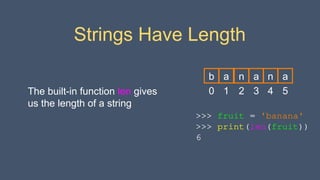
Strings Have Length
Thebuilt-in function len gives
us the length of a string
>>> fruit = 'banana'
>>> print(len(fruit))
6
0
b
1
a
2
n
3
a
4
n
5
a
7.
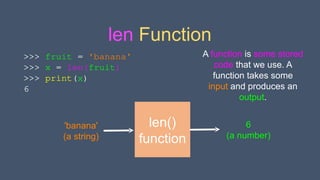
len Function
>>> fruit= 'banana'
>>> x = len(fruit)
>>> print(x)
6
len()
function
'banana'
(a string)
6
(a number)
A function is some stored
code that we use. A
function takes some
input and produces an
output.
8.
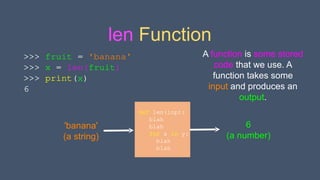
len Function
def len(inp):
blah
blah
forx in y:
blah
blah
'banana'
(a string)
6
(a number)
A function is some stored
code that we use. A
function takes some
input and produces an
output.
>>> fruit = 'banana'
>>> x = len(fruit)
>>> print(x)
6
9.
Looping Through Strings
Usinga while statement,
an iteration variable, and
the len function, we can
construct a loop to look at
each of the letters in a
string individually
fruit = 'banana'
index = 0
while index < len(fruit):
letter = fruit[index]
print(index, letter)
index = index + 1
0 b
1 a
2 n
3 a
4 n
5 a
10.
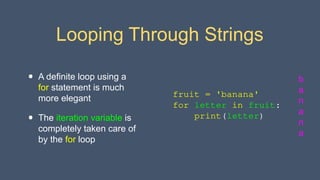
Looping Through Strings
•A definite loop using a
for statement is much
more elegant
• The iteration variable is
completely taken care of
by the for loop
b
a
n
a
n
a
fruit = 'banana'
for letter in fruit:
print(letter)
11.
Looping Through Strings
•A definite loop using a
for statement is much
more elegant
• The iteration variable is
completely taken care of
by the for loop
index = 0
while index < len(fruit) :
letter = fruit[index]
print(letter)
index = index + 1
fruit = 'banana'
for letter in fruit :
print(letter)
b
a
n
a
n
a
12.
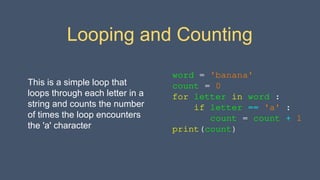
Looping and Counting
Thisis a simple loop that
loops through each letter in a
string and counts the number
of times the loop encounters
the 'a' character
word = 'banana'
count = 0
for letter in word :
if letter == 'a' :
count = count + 1
print(count)
13.
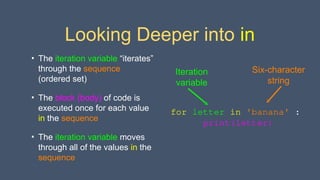
Looking Deeper intoin
• The iteration variable “iterates”
through the sequence
(ordered set)
• The block (body) of code is
executed once for each value
in the sequence
• The iteration variable moves
through all of the values in the
sequence
for letter in 'banana' :
print(letter)
Iteration
variable
Six-character
string
14.
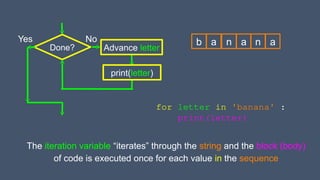
Done?
Yes
print(letter)
Advance letter
for letterin 'banana' :
print(letter)
b a n a n a
The iteration variable “iterates” through the string and the block (body)
of code is executed once for each value in the sequence
No
Slicing Strings
• Wecan also look at any
continuous section of a string
using a colon operator
• The second number is one
beyond the end of the slice -
“up to but not including”
• If the second number is
beyond the end of the string,
it stops at the end
>>> s = 'Monty Python'
>>> print(s[0:4])
Mont
>>> print(s[6:7])
P
>>> print(s[6:20])
Python
0
M
1
o
2
n
3
t
4
y
5 6
P
7
y
8
t
9
h
10
o
11
n
17.
>>> s ='Monty Python'
>>> print(s[:2])
Mo
>>> print(s[8:])
thon
>>> print(s[:])
Monty Python
Slicing Strings
If we leave off the first number
or the last number of the slice,
it is assumed to be the
beginning or end of the string
respectively
0
M
1
o
2
n
3
t
4
y
5 6
P
7
y
8
t
9
h
10
o
11
n
18.
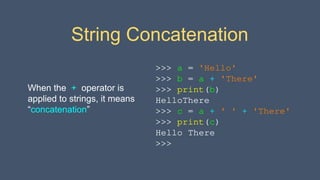
String Concatenation
When the+ operator is
applied to strings, it means
“concatenation”
>>> a = 'Hello'
>>> b = a + 'There'
>>> print(b)
HelloThere
>>> c = a + ' ' + 'There'
>>> print(c)
Hello There
>>>
19.
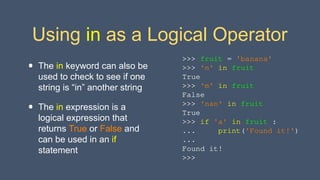
Using in asa Logical Operator
• The in keyword can also be
used to check to see if one
string is “in” another string
• The in expression is a
logical expression that
returns True or False and
can be used in an if
statement
>>> fruit = 'banana'
>>> 'n' in fruit
True
>>> 'm' in fruit
False
>>> 'nan' in fruit
True
>>> if 'a' in fruit :
... print('Found it!')
...
Found it!
>>>
20.
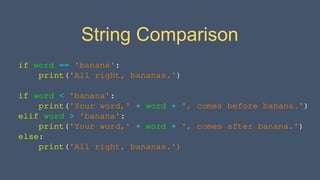
String Comparison
if word== 'banana':
print('All right, bananas.')
if word < 'banana':
print('Your word,' + word + ', comes before banana.')
elif word > 'banana':
print('Your word,' + word + ', comes after banana.')
else:
print('All right, bananas.')
21.
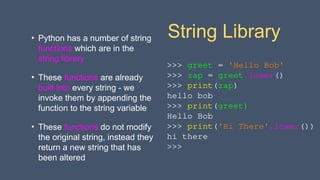
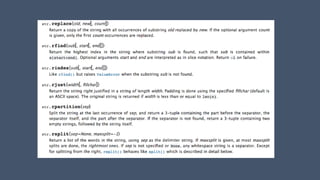
String Library
• Pythonhas a number of string
functions which are in the
string library
• These functions are already
built into every string - we
invoke them by appending the
function to the string variable
• These functions do not modify
the original string, instead they
return a new string that has
been altered
>>> greet = 'Hello Bob'
>>> zap = greet.lower()
>>> print(zap)
hello bob
>>> print(greet)
Hello Bob
>>> print('Hi There'.lower())
hi there
>>>
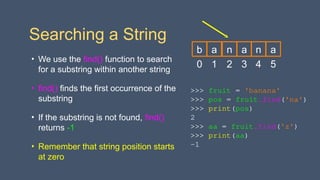
Searching a String
•We use the find() function to search
for a substring within another string
• find() finds the first occurrence of the
substring
• If the substring is not found, find()
returns -1
• Remember that string position starts
at zero
>>> fruit = 'banana'
>>> pos = fruit.find('na')
>>> print(pos)
2
>>> aa = fruit.find('z')
>>> print(aa)
-1
0
b
1
a
2
n
3
a
4
n
5
a
26.
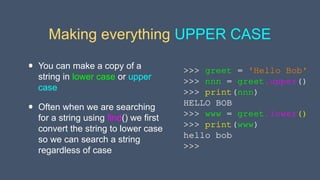
Making everything UPPERCASE
• You can make a copy of a
string in lower case or upper
case
• Often when we are searching
for a string using find() we first
convert the string to lower case
so we can search a string
regardless of case
>>> greet = 'Hello Bob'
>>> nnn = greet.upper()
>>> print(nnn)
HELLO BOB
>>> www = greet.lower()
>>> print(www)
hello bob
>>>
27.
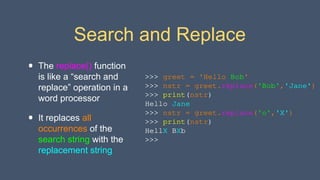
Search and Replace
•The replace() function
is like a “search and
replace” operation in a
word processor
• It replaces all
occurrences of the
search string with the
replacement string
>>> greet = 'Hello Bob'
>>> nstr = greet.replace('Bob','Jane')
>>> print(nstr)
Hello Jane
>>> nstr = greet.replace('o','X')
>>> print(nstr)
HellX BXb
>>>
28.
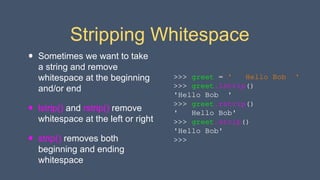
Stripping Whitespace
• Sometimeswe want to take
a string and remove
whitespace at the beginning
and/or end
• lstrip() and rstrip() remove
whitespace at the left or right
• strip() removes both
beginning and ending
whitespace
>>> greet = ' Hello Bob '
>>> greet.lstrip()
'Hello Bob '
>>> greet.rstrip()
' Hello Bob'
>>> greet.strip()
'Hello Bob'
>>>
29.
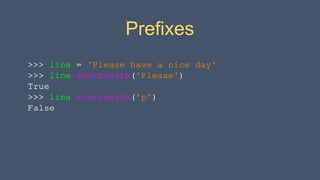
>>> line ='Please have a nice day'
>>> line.startswith('Please')
True
>>> line.startswith('p')
False
Prefixes
30.
>>> data ='From stephen.marquard@uct.ac.za Sat Jan 5 09:14:16 2008'
>>> atpos = data.find('@')
>>> print(atpos)
21
>>> sppos = data.find(' ',atpos)
>>> print(sppos)
31
>>> host = data[atpos+1 : sppos]
>>> print(host)
uct.ac.za
From stephen.marquard@uct.ac.za Sat Jan 5 09:14:16 2008
21 31
Parsing and
Extracting
31.
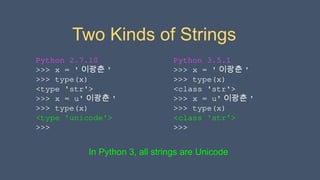
Two Kinds ofStrings
Python 3.5.1
>>> x = ' 이광춘 '
>>> type(x)
<class 'str'>
>>> x = u' 이광춘 '
>>> type(x)
<class 'str'>
>>>
Python 2.7.10
>>> x = ' 이광춘 '
>>> type(x)
<type 'str'>
>>> x = u' 이광춘 '
>>> type(x)
<type 'unicode'>
>>>
In Python 3, all strings are Unicode
32.
Summary
• String type
•Read/Convert
• Indexing strings []
• Slicing strings [2:4]
• Looping through strings
with for and while
• Concatenating strings with +
• String operations
• String library
• String comparisons
• Searching in strings
• Replacing text
• Stripping white space
33.
Acknowledgements / Contributions
Theseslides are Copyright 2010- Charles R. Severance (
www.dr-chuck.com) of the University of Michigan School of
Information and open.umich.edu and made available under a
Creative Commons Attribution 4.0 License. Please maintain this
last slide in all copies of the document to comply with the
attribution requirements of the license. If you make a change,
feel free to add your name and organization to the list of
contributors on this page as you republish the materials.
Initial Development: Charles Severance, University of Michigan
School of Information
… Insert new Contributors and Translators here
...
Editor's Notes
#1 Note from Chuck. If you are using these materials, you can remove the UM logo and replace it with your own, but please retain the CC-BY logo on the first page as well as retain the acknowledgement page(s) at the end.

![Looking Inside Strings
• We can get at any single character in a
string using an index specified in
square brackets
• The index value must be an integer
and starts at zero
• The index value can be an expression
that is computed
>>> fruit = 'banana'
>>> letter = fruit[1]
>>> print(letter)
a
>>> x = 3
>>> w = fruit[x - 1]
>>> print(w)
n
0
b
1
a
2
n
3
a
4
n
5
a](https://image.slidesharecdn.com/pythonlearn-06-strings-250917233852-203f3e18/85/Pythonlearn-06-Stryxkyxkyxkyxkyitsod6ings-pptx-4-320.jpg)
![A Character Too Far
• You will get a python error
if you attempt to index
beyond the end of a string
• So be careful when
constructing index values
and slices
>>> zot = 'abc'
>>> print(zot[5])
Traceback (most recent call
last): File "<stdin>", line
1, in <module>
IndexError: string index out
of range
>>>](https://image.slidesharecdn.com/pythonlearn-06-strings-250917233852-203f3e18/85/Pythonlearn-06-Stryxkyxkyxkyxkyitsod6ings-pptx-5-320.jpg)
![Looping Through Strings
Using a while statement,
an iteration variable, and
the len function, we can
construct a loop to look at
each of the letters in a
string individually
fruit = 'banana'
index = 0
while index < len(fruit):
letter = fruit[index]
print(index, letter)
index = index + 1
0 b
1 a
2 n
3 a
4 n
5 a](https://image.slidesharecdn.com/pythonlearn-06-strings-250917233852-203f3e18/85/Pythonlearn-06-Stryxkyxkyxkyxkyitsod6ings-pptx-9-320.jpg)
![Looping Through Strings
• A definite loop using a
for statement is much
more elegant
• The iteration variable is
completely taken care of
by the for loop
index = 0
while index < len(fruit) :
letter = fruit[index]
print(letter)
index = index + 1
fruit = 'banana'
for letter in fruit :
print(letter)
b
a
n
a
n
a](https://image.slidesharecdn.com/pythonlearn-06-strings-250917233852-203f3e18/85/Pythonlearn-06-Stryxkyxkyxkyxkyitsod6ings-pptx-11-320.jpg)
![Slicing Strings
• We can also look at any
continuous section of a string
using a colon operator
• The second number is one
beyond the end of the slice -
“up to but not including”
• If the second number is
beyond the end of the string,
it stops at the end
>>> s = 'Monty Python'
>>> print(s[0:4])
Mont
>>> print(s[6:7])
P
>>> print(s[6:20])
Python
0
M
1
o
2
n
3
t
4
y
5 6
P
7
y
8
t
9
h
10
o
11
n](https://image.slidesharecdn.com/pythonlearn-06-strings-250917233852-203f3e18/85/Pythonlearn-06-Stryxkyxkyxkyxkyitsod6ings-pptx-16-320.jpg)
![>>> s = 'Monty Python'
>>> print(s[:2])
Mo
>>> print(s[8:])
thon
>>> print(s[:])
Monty Python
Slicing Strings
If we leave off the first number
or the last number of the slice,
it is assumed to be the
beginning or end of the string
respectively
0
M
1
o
2
n
3
t
4
y
5 6
P
7
y
8
t
9
h
10
o
11
n](https://image.slidesharecdn.com/pythonlearn-06-strings-250917233852-203f3e18/85/Pythonlearn-06-Stryxkyxkyxkyxkyitsod6ings-pptx-17-320.jpg)
![>>> stuff = 'Hello world'
>>> type(stuff)
<class 'str'>
>>> dir(stuff)
['capitalize', 'casefold', 'center', 'count', 'encode',
'endswith', 'expandtabs', 'find', 'format', 'format_map',
'index', 'isalnum', 'isalpha', 'isdecimal', 'isdigit',
'isidentifier', 'islower', 'isnumeric', 'isprintable', 'isspace',
'istitle', 'isupper', 'join', 'ljust', 'lower', 'lstrip',
'maketrans', 'partition', 'replace', 'rfind', 'rindex', 'rjust',
'rpartition', 'rsplit', 'rstrip', 'split', 'splitlines',
'startswith', 'strip', 'swapcase', 'title', 'translate', 'upper',
'zfill']
https://docs.python.org/3/library/stdtypes.html#string-methods](https://image.slidesharecdn.com/pythonlearn-06-strings-250917233852-203f3e18/85/Pythonlearn-06-Stryxkyxkyxkyxkyitsod6ings-pptx-22-320.jpg)
![str.capitalize()
str.center(width[, fillchar])
str.endswith(suffix[, start[, end]])
str.find(sub[, start[, end]])
str.lstrip([chars])
str.replace(old, new[, count])
str.lower()
str.rstrip([chars])
str.strip([chars])
str.upper()
String Library](https://image.slidesharecdn.com/pythonlearn-06-strings-250917233852-203f3e18/85/Pythonlearn-06-Stryxkyxkyxkyxkyitsod6ings-pptx-24-320.jpg)
![>>> data = 'From stephen.marquard@uct.ac.za Sat Jan 5 09:14:16 2008'
>>> atpos = data.find('@')
>>> print(atpos)
21
>>> sppos = data.find(' ',atpos)
>>> print(sppos)
31
>>> host = data[atpos+1 : sppos]
>>> print(host)
uct.ac.za
From stephen.marquard@uct.ac.za Sat Jan 5 09:14:16 2008
21 31
Parsing and
Extracting](https://image.slidesharecdn.com/pythonlearn-06-strings-250917233852-203f3e18/85/Pythonlearn-06-Stryxkyxkyxkyxkyitsod6ings-pptx-30-320.jpg)
![Summary
• String type
• Read/Convert
• Indexing strings []
• Slicing strings [2:4]
• Looping through strings
with for and while
• Concatenating strings with +
• String operations
• String library
• String comparisons
• Searching in strings
• Replacing text
• Stripping white space](https://image.slidesharecdn.com/pythonlearn-06-strings-250917233852-203f3e18/85/Pythonlearn-06-Stryxkyxkyxkyxkyitsod6ings-pptx-32-320.jpg)