Straight Cut
BPM Mix
•
•

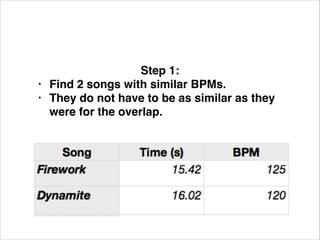
Step 1: !
Find 2 songs with similar BPMs. !
They do not have to be as similar as they
were for the overlap.
•
•

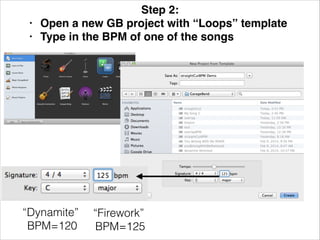
Step 2: !
Open a new GB project with “Loops” template!
Type in the BPM of one of the songs!

“Dynamite”
BPM=120

“Firework”
BPM=125
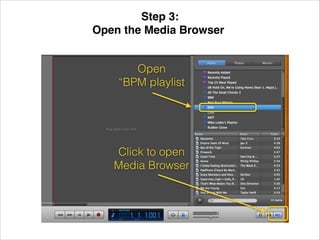
Step 3: !
Open the Media Browser!
Open
“BPM playlist

Click to open
Media Browser
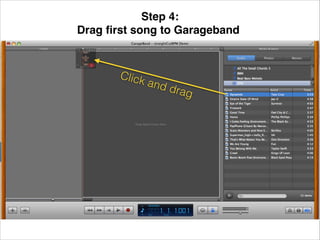
Step 4: !
Drag first song to Garageband!

Click

and

drag
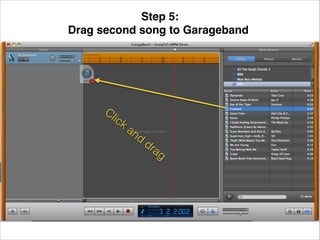
Step 5: !
Drag second song to Garageband!

Cl

ick

an

d

dr
a

g
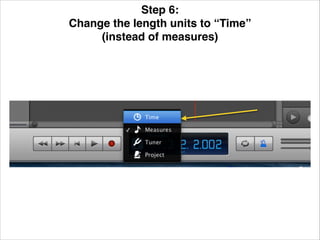
Step 6: !
Change the length units to “Time” !
(instead of measures)!
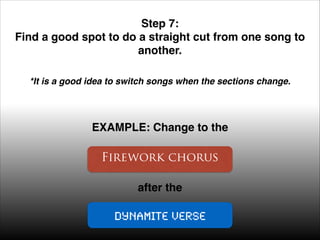
Step 7: !
Find a good spot to do a straight cut from one song to
another. !
*It is a good idea to switch songs when the sections change. !

EXAMPLE: Change to the

Firework chorus
after the

Dynamite verse
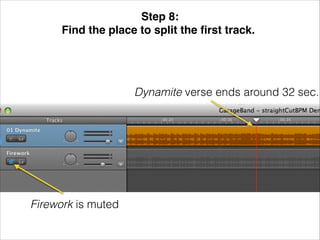
Step 8: !
Find the place to split the first track.!

Dynamite verse ends around 32 sec.

Firework is muted
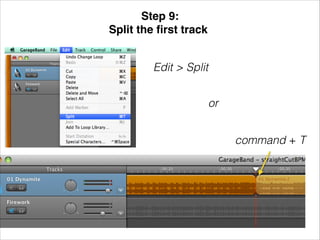
Step 9: !
Split the first track!
Edit > Split
or
command + T
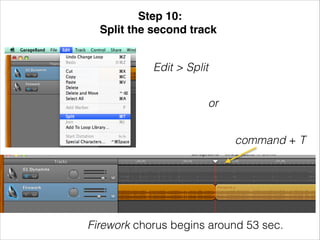
Step 10: !
Split the second track!
Edit > Split
or
command + T

Firework chorus begins around 53 sec.
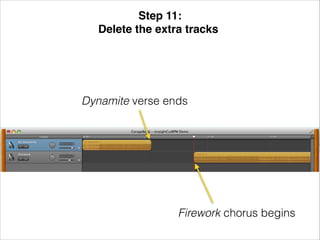
Step 11: !
Delete the extra tracks!

Dynamite verse ends

Firework chorus begins
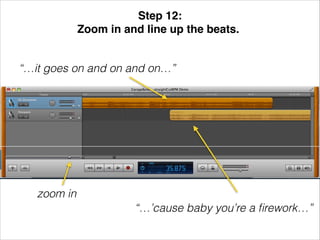
Step 12: !
Zoom in and line up the beats.!
“…it goes on and on and on…”

zoom in
“…’cause baby you’re a firework…”
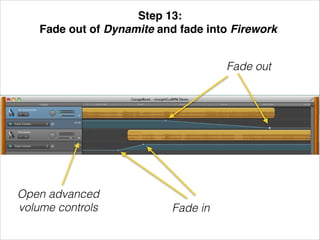
Step 13: !
Fade out of Dynamite and fade into Firework!
Fade out

Open advanced
volume controls

Fade in

Straight Cut

  • 1.
  • 2.
    • • Step 1: ! Find2 songs with similar BPMs. ! They do not have to be as similar as they were for the overlap.
  • 3.
    • • Step 2: ! Opena new GB project with “Loops” template! Type in the BPM of one of the songs! “Dynamite” BPM=120 “Firework” BPM=125
  • 4.
    Step 3: ! Openthe Media Browser! Open “BPM playlist Click to open Media Browser
  • 5.
    Step 4: ! Dragfirst song to Garageband! Click and drag
  • 6.
    Step 5: ! Dragsecond song to Garageband! Cl ick an d dr a g
  • 7.
    Step 6: ! Changethe length units to “Time” ! (instead of measures)!
  • 8.
    Step 7: ! Finda good spot to do a straight cut from one song to another. ! *It is a good idea to switch songs when the sections change. ! EXAMPLE: Change to the Firework chorus after the Dynamite verse
  • 9.
    Step 8: ! Findthe place to split the first track.! Dynamite verse ends around 32 sec. Firework is muted
  • 10.
    Step 9: ! Splitthe first track! Edit > Split or command + T
  • 11.
    Step 10: ! Splitthe second track! Edit > Split or command + T Firework chorus begins around 53 sec.
  • 12.
    Step 11: ! Deletethe extra tracks! Dynamite verse ends Firework chorus begins
  • 13.
    Step 12: ! Zoomin and line up the beats.! “…it goes on and on and on…” zoom in “…’cause baby you’re a firework…”
  • 14.
    Step 13: ! Fadeout of Dynamite and fade into Firework! Fade out Open advanced volume controls Fade in