SQL Select
SQL Select
 The SELECT statement is used to pull information from a
table.
 SELECT retrieves rows, columns, and derived values
from one or more tables.
 The general format is:
Syntax:
SELECT column(s)
FROM table(s)
[JOIN join(s)]
[WHERE search_condition(s)]
[GROUPBY grouping_column(s)]
[HAVING search_condition(s)]
[ORDERBY sort_column(s)];
Selecting All Data
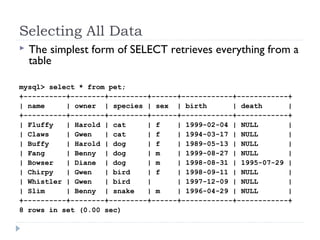
 The simplest form of SELECT retrieves everything from a
table
mysql> select * from pet;
+----------+--------+---------+------+------------+------------+
| name | owner | species | sex | birth | death |
+----------+--------+---------+------+------------+------------+
| Fluffy | Harold | cat | f | 1999-02-04 | NULL |
| Claws | Gwen | cat | f | 1994-03-17 | NULL |
| Buffy | Harold | dog | f | 1989-05-13 | NULL |
| Fang | Benny | dog | m | 1999-08-27 | NULL |
| Bowser | Diane | dog | m | 1998-08-31 | 1995-07-29 |
| Chirpy | Gwen | bird | f | 1998-09-11 | NULL |
| Whistler | Gwen | bird | | 1997-12-09 | NULL |
| Slim | Benny | snake | m | 1996-04-29 | NULL |
+----------+--------+---------+------+------------+------------+
8 rows in set (0.00 sec)
Selecting Particular Rows
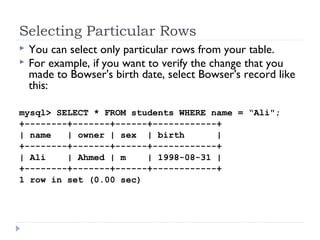
 You can select only particular rows from your table.
 For example, if you want to verify the change that you
made to Bowser's birth date, select Bowser's record like
this:
mysql> SELECT * FROM students WHERE name = “Ali";
+--------+-------+------+------------+
| name | owner | sex | birth |
+--------+-------+------+------------+
| Ali | Ahmed | m | 1998-08-31 |
+--------+-------+------+------------+
1 row in set (0.00 sec)
Selecting Particular Rows
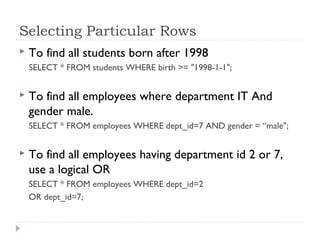
 To find all students born after 1998
SELECT * FROM students WHERE birth >= "1998-1-1";
 To find all employees where department IT And
gender male.
SELECT * FROM employees WHERE dept_id=7 AND gender = “male";
 To find all employees having department id 2 or 7,
use a logical OR
SELECT * FROM employees WHERE dept_id=2
OR dept_id=7;
Selecting Particular Columns
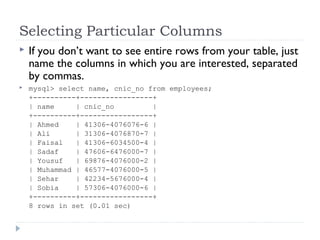
 If you don’t want to see entire rows from your table, just
name the columns in which you are interested, separated
by commas.
 mysql> select name, cnic_no from employees;
+----------+-----------------+
| name | cnic_no |
+----------+-----------------+
| Ahmed | 41306-4076076-6 |
| Ali | 31306-4076870-7 |
| Faisal | 41306-6034500-4 |
| Sadaf | 47606-6476000-7 |
| Yousuf | 69876-4076000-2 |
| Muhammad | 46577-4076000-5 |
| Sehar | 42234-5676000-4 |
| Sobia | 57306-4076000-6 |
+----------+-----------------+
8 rows in set (0.01 sec)
AS
 The AS statement can be used to create a column alias
(an alternative name/identifier) that you specify to
control how column headings are displayed in a result.
 Syntax:
 SELECT column1 AS alias1,
 column2 AS alias2,
 ...
 columnN ASaliasN
 FROMtable;
AS Example
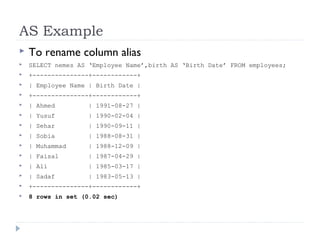
 To rename column alias
 SELECT nemes AS ‘Employee Name’,birth AS ‘Birth Date’ FROM employees;
 +---------------+------------+
 | Employee Name | Birth Date |
 +---------------+------------+
 | Ahmed | 1991-08-27 |
 | Yusuf | 1990-02-04 |
 | Sehar | 1990-09-11 |
 | Sobia | 1988-08-31 |
 | Muhammad | 1988-12-09 |
 | Faisal | 1987-04-29 |
 | Ali | 1985-03-17 |
 | Sadaf | 1983-05-13 |
 +---------------+------------+
 8 rows in set (0.02 sec)
DISTINCT
 Results of queries oftentimes contain duplicate values for
a particular column.
 The DISTINCT keyword eliminates duplicate rows from
a result.
 Syntax:
 SELECT DISTINCT column(s)
 FROM table(s);
DISTINCT Example
 SELECT DISTINCT dept_id
 FROM employees;
Where
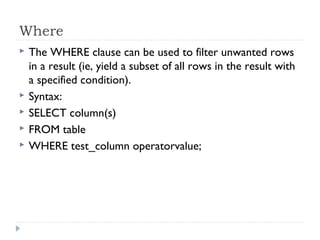
 The WHERE clause can be used to filter unwanted rows
in a result (ie, yield a subset of all rows in the result with
a specified condition).
 Syntax:
 SELECT column(s)
 FROM table
 WHERE test_column operatorvalue;
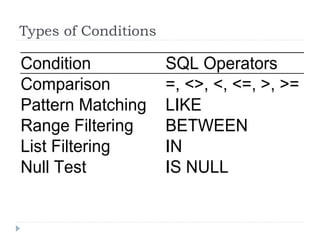
Types of Conditions
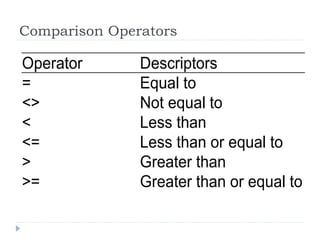
Comparison Operators
Notes on WHERE
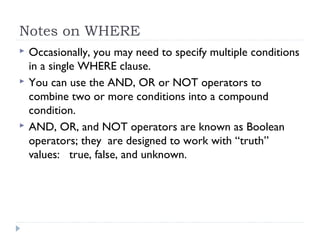
 Occasionally, you may need to specify multiple conditions
in a single WHERE clause.
 You can use the AND, OR or NOT operators to
combine two or more conditions into a compound
condition.
 AND, OR, and NOT operators are known as Boolean
operators; they are designed to work with “truth”
values: true, false, and unknown.
LIKE
 You can use the LIKE operator to retrieve partial
information for a character string (not numbers or
date/times) rather than an exact value.
 LIKE uses a pattern that values are matched against.
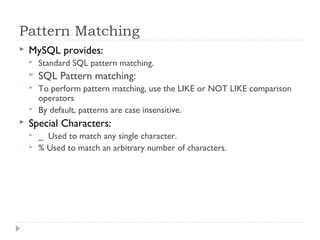
Pattern Matching
 MySQL provides:
 Standard SQL pattern matching.
 SQL Pattern matching:
 To perform pattern matching, use the LIKE or NOT LIKE comparison
operators
 By default, patterns are case insensitive.
 Special Characters:
 _ Used to match any single character.
 % Used to match an arbitrary number of characters.
Pattern Matching Example
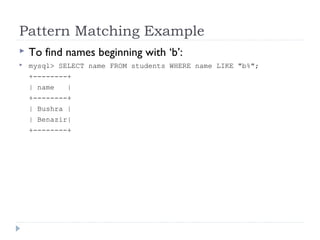
 To find names beginning with ‘b’:
 mysql> SELECT name FROM students WHERE name LIKE "b%";
+--------+
| name |
+--------+
| Bushra |
| Benazir|
+--------+
Pattern Matching Example
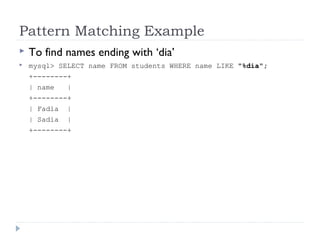
 To find names ending with ‘dia’
 mysql> SELECT name FROM students WHERE name LIKE "%dia";
+--------+
| name |
+--------+
| Fadia |
| Sadia |
+--------+
Pattern Matching Example
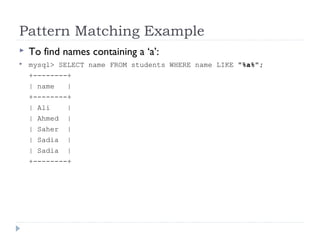
 To find names containing a ‘a’:
 mysql> SELECT name FROM students WHERE name LIKE "%a%";
+--------+
| name |
+--------+
| Ali |
| Ahmed |
| Saher |
| Sadia |
| Sadia |
+--------+
Pattern Matching Example
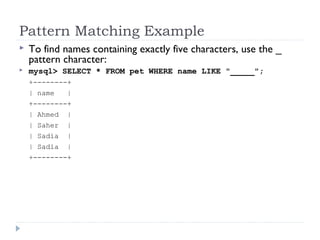
 To find names containing exactly five characters, use the _
pattern character:
 mysql> SELECT * FROM pet WHERE name LIKE "_____";
+--------+
| name |
+--------+
| Ahmed |
| Saher |
| Sadia |
| Sadia |
+--------+
Regular Expression Matching
 The other type of pattern matching provided by MySQL
uses extended regular expressions.
 When you test for a match for this type of pattern, use
the REGEXP and NOT REGEXP operators (or RLIKE
and NOT RLIKE, which are synonyms).
Regular Expression Example
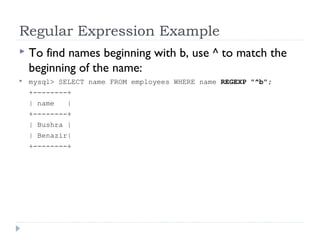
 To find names beginning with b, use ^ to match the
beginning of the name:
 mysql> SELECT name FROM employees WHERE name REGEXP "^b";
+--------+
| name |
+--------+
| Bushra |
| Benazir|
+--------+
Regular Expression Example
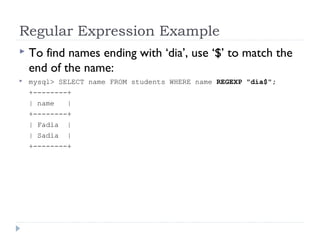
 To find names ending with ‘dia’, use ‘$’ to match the
end of the name:
 mysql> SELECT name FROM students WHERE name REGEXP "dia$";
+--------+
| name |
+--------+
| Fadia |
| Sadia |
+--------+
Working with NULLs
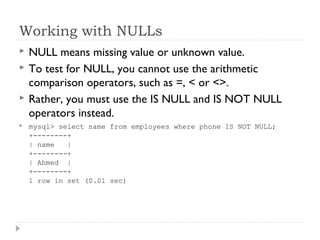
 NULL means missing value or unknown value.
 To test for NULL, you cannot use the arithmetic
comparison operators, such as =, < or <>.
 Rather, you must use the IS NULL and IS NOT NULL
operators instead.
 mysql> select name from employees where phone IS NOT NULL;
+--------+
| name |
+--------+
| Ahmed |
+--------+
1 row in set (0.01 sec)
BETWEEN
 Use the BETWEEN clause to determine whether a given value
falls within a specified range.
 BETWEEN works with character strings, numbers, and
date/times.
 The range contains a low and high value, separated by AND
(inclusive).
 You can negate a BETWEEN condition with NOT BETWEEN.
 Syntax:
 SELECT columns
 FROM table
 WHERE test_column BETWEEN
 low_value AND high value;
BETWEEN Example
 SELECT name
 FROM employees
 WHERE salary BETWEEN 30000 AND 50000

Sql select

  • 1.
  • 2.
    SQL Select  TheSELECT statement is used to pull information from a table.  SELECT retrieves rows, columns, and derived values from one or more tables.  The general format is: Syntax: SELECT column(s) FROM table(s) [JOIN join(s)] [WHERE search_condition(s)] [GROUPBY grouping_column(s)] [HAVING search_condition(s)] [ORDERBY sort_column(s)];
  • 3.
    Selecting All Data The simplest form of SELECT retrieves everything from a table mysql> select * from pet; +----------+--------+---------+------+------------+------------+ | name | owner | species | sex | birth | death | +----------+--------+---------+------+------------+------------+ | Fluffy | Harold | cat | f | 1999-02-04 | NULL | | Claws | Gwen | cat | f | 1994-03-17 | NULL | | Buffy | Harold | dog | f | 1989-05-13 | NULL | | Fang | Benny | dog | m | 1999-08-27 | NULL | | Bowser | Diane | dog | m | 1998-08-31 | 1995-07-29 | | Chirpy | Gwen | bird | f | 1998-09-11 | NULL | | Whistler | Gwen | bird | | 1997-12-09 | NULL | | Slim | Benny | snake | m | 1996-04-29 | NULL | +----------+--------+---------+------+------------+------------+ 8 rows in set (0.00 sec)
  • 4.
    Selecting Particular Rows You can select only particular rows from your table.  For example, if you want to verify the change that you made to Bowser's birth date, select Bowser's record like this: mysql> SELECT * FROM students WHERE name = “Ali"; +--------+-------+------+------------+ | name | owner | sex | birth | +--------+-------+------+------------+ | Ali | Ahmed | m | 1998-08-31 | +--------+-------+------+------------+ 1 row in set (0.00 sec)
  • 5.
    Selecting Particular Rows To find all students born after 1998 SELECT * FROM students WHERE birth >= "1998-1-1";  To find all employees where department IT And gender male. SELECT * FROM employees WHERE dept_id=7 AND gender = “male";  To find all employees having department id 2 or 7, use a logical OR SELECT * FROM employees WHERE dept_id=2 OR dept_id=7;
  • 6.
    Selecting Particular Columns If you don’t want to see entire rows from your table, just name the columns in which you are interested, separated by commas.  mysql> select name, cnic_no from employees; +----------+-----------------+ | name | cnic_no | +----------+-----------------+ | Ahmed | 41306-4076076-6 | | Ali | 31306-4076870-7 | | Faisal | 41306-6034500-4 | | Sadaf | 47606-6476000-7 | | Yousuf | 69876-4076000-2 | | Muhammad | 46577-4076000-5 | | Sehar | 42234-5676000-4 | | Sobia | 57306-4076000-6 | +----------+-----------------+ 8 rows in set (0.01 sec)
  • 7.
    AS  The ASstatement can be used to create a column alias (an alternative name/identifier) that you specify to control how column headings are displayed in a result.  Syntax:  SELECT column1 AS alias1,  column2 AS alias2,  ...  columnN ASaliasN  FROMtable;
  • 8.
    AS Example  Torename column alias  SELECT nemes AS ‘Employee Name’,birth AS ‘Birth Date’ FROM employees;  +---------------+------------+  | Employee Name | Birth Date |  +---------------+------------+  | Ahmed | 1991-08-27 |  | Yusuf | 1990-02-04 |  | Sehar | 1990-09-11 |  | Sobia | 1988-08-31 |  | Muhammad | 1988-12-09 |  | Faisal | 1987-04-29 |  | Ali | 1985-03-17 |  | Sadaf | 1983-05-13 |  +---------------+------------+  8 rows in set (0.02 sec)
  • 9.
    DISTINCT  Results ofqueries oftentimes contain duplicate values for a particular column.  The DISTINCT keyword eliminates duplicate rows from a result.  Syntax:  SELECT DISTINCT column(s)  FROM table(s);
  • 10.
    DISTINCT Example  SELECTDISTINCT dept_id  FROM employees;
  • 11.
    Where  The WHEREclause can be used to filter unwanted rows in a result (ie, yield a subset of all rows in the result with a specified condition).  Syntax:  SELECT column(s)  FROM table  WHERE test_column operatorvalue;
  • 12.
  • 13.
  • 14.
    Notes on WHERE Occasionally, you may need to specify multiple conditions in a single WHERE clause.  You can use the AND, OR or NOT operators to combine two or more conditions into a compound condition.  AND, OR, and NOT operators are known as Boolean operators; they are designed to work with “truth” values: true, false, and unknown.
  • 15.
    LIKE  You canuse the LIKE operator to retrieve partial information for a character string (not numbers or date/times) rather than an exact value.  LIKE uses a pattern that values are matched against.
  • 16.
    Pattern Matching  MySQLprovides:  Standard SQL pattern matching.  SQL Pattern matching:  To perform pattern matching, use the LIKE or NOT LIKE comparison operators  By default, patterns are case insensitive.  Special Characters:  _ Used to match any single character.  % Used to match an arbitrary number of characters.
  • 17.
    Pattern Matching Example To find names beginning with ‘b’:  mysql> SELECT name FROM students WHERE name LIKE "b%"; +--------+ | name | +--------+ | Bushra | | Benazir| +--------+
  • 18.
    Pattern Matching Example To find names ending with ‘dia’  mysql> SELECT name FROM students WHERE name LIKE "%dia"; +--------+ | name | +--------+ | Fadia | | Sadia | +--------+
  • 19.
    Pattern Matching Example To find names containing a ‘a’:  mysql> SELECT name FROM students WHERE name LIKE "%a%"; +--------+ | name | +--------+ | Ali | | Ahmed | | Saher | | Sadia | | Sadia | +--------+
  • 20.
    Pattern Matching Example To find names containing exactly five characters, use the _ pattern character:  mysql> SELECT * FROM pet WHERE name LIKE "_____"; +--------+ | name | +--------+ | Ahmed | | Saher | | Sadia | | Sadia | +--------+
  • 21.
    Regular Expression Matching The other type of pattern matching provided by MySQL uses extended regular expressions.  When you test for a match for this type of pattern, use the REGEXP and NOT REGEXP operators (or RLIKE and NOT RLIKE, which are synonyms).
  • 22.
    Regular Expression Example To find names beginning with b, use ^ to match the beginning of the name:  mysql> SELECT name FROM employees WHERE name REGEXP "^b"; +--------+ | name | +--------+ | Bushra | | Benazir| +--------+
  • 23.
    Regular Expression Example To find names ending with ‘dia’, use ‘$’ to match the end of the name:  mysql> SELECT name FROM students WHERE name REGEXP "dia$"; +--------+ | name | +--------+ | Fadia | | Sadia | +--------+
  • 24.
    Working with NULLs NULL means missing value or unknown value.  To test for NULL, you cannot use the arithmetic comparison operators, such as =, < or <>.  Rather, you must use the IS NULL and IS NOT NULL operators instead.  mysql> select name from employees where phone IS NOT NULL; +--------+ | name | +--------+ | Ahmed | +--------+ 1 row in set (0.01 sec)
  • 25.
    BETWEEN  Use theBETWEEN clause to determine whether a given value falls within a specified range.  BETWEEN works with character strings, numbers, and date/times.  The range contains a low and high value, separated by AND (inclusive).  You can negate a BETWEEN condition with NOT BETWEEN.  Syntax:  SELECT columns  FROM table  WHERE test_column BETWEEN  low_value AND high value;
  • 26.
    BETWEEN Example  SELECTname  FROM employees  WHERE salary BETWEEN 30000 AND 50000