RajaRajeswari College of Engineering
DEPARTMENT OF COMPUTER SCIENCE AND ENGINEERING
Affiliated to Visvesvaraya Technological University “Jnana
Sangama”, Belgaum – 560 018
Department of MCA
Prof. Shreedhar Kumbhar
Subject Name: “Software Engineering”
Subject Code: “22MCA23”
“Module-2”
Semester: II
Chapter 3 – Agile Software Development
Topics covered
 Agile methods
 Plan-driven and agile development
 Extreme programming
 Agile project management
 Scaling agile methods
2
Chapter 3 Agile software development
Agile methods
 Agile methods focus attention on iterative progress,
collaboration, and flexibility in responding to changes.
 Common frameworks within agile include Scrum and
Extreme Programming (XP).
 These methods are often utilized to improve efficiency
and adaptability in projects, ensuring that teams can
quickly respond to feedback and evolving requirements.
3
Chapter 3 Agile software development
Agile methods
 include:
1. Ensuring customer satisfaction through the early
delivery of software.
2. Being open to changing requirements in the stages
of the development.
3. Frequently delivering working software with a main
focus on preference for timeframes.
4
Chapter 3 Agile software development
Agile methods
4. Promoting collaboration between business
stakeholders and developers as an element.
5. Structuring the projects around individuals. Providing
them with the necessary environment and support.
6. Prioritizing face to face communication whenever
needed.
5
Chapter 3 Agile software development
Rapid software development
 Rapid development and delivery is now often the most
important requirement for software systems
 Businesses operate in a fast –changing requirement and it is
practically impossible to produce a set of stable software
requirements
 Software has to evolve quickly to reflect changing business
needs.
 Rapid software development
 Specification, design and implementation are inter-leaved
 System is developed as a series of versions with stakeholders
involved in version evaluation
 User interfaces are often developed using an IDE and graphical
toolset.
6
Chapter 3 Agile software development
Agile methods
7
Chapter 3 Agile software development
Agile manifesto
 We are uncovering better ways of developing software
by doing it and helping others do it. Through this work
we have come to value:
 Individuals and interactions over processes and tools
Working software over comprehensive documentation
Customer collaboration over contract negotiation
Responding to change over following a plan
 That is, while there is value in the items on the right, we
value the items on the left more.
Chapter 3 Agile software development 8
The principles of agile methods
Principle Description
Customer involvement Customers should be closely involved throughout the
development process. Their role is provide and prioritize new
system requirements and to evaluate the iterations of the
system.
Incremental delivery The software is developed in increments with the customer
specifying the requirements to be included in each increment.
People not process The skills of the development team should be recognized and
exploited. Team members should be left to develop their own
ways of working without prescriptive processes.
Embrace change Expect the system requirements to change and so design the
system to accommodate these changes.
Maintain simplicity Focus on simplicity in both the software being developed and
in the development process. Wherever possible, actively work
to eliminate complexity from the system.
9
Chapter 3 Agile software development
Agile method applicability
 Product development where a software company is
developing a small or medium-sized product for sale.
 Custom system development within an organization,
where there is a clear commitment from the customer to
become involved in the development process and where
there are not a lot of external rules and regulations that
affect the software.
 Because of their focus on small, tightly-integrated teams,
there are problems in scaling agile methods to large
systems.
Chapter 3 Agile software development 10
Problems with agile methods
11
Chapter 3 Agile software development
Agile methods and software maintenance
 Most organizations spend more on maintaining existing
software than they do on new software development. So,
if agile methods are to be successful, they have to
support maintenance as well as original development.
 Two key issues:
 Are systems that are developed using an agile approach
maintainable, given the emphasis in the development process of
minimizing formal documentation?
 Can agile methods be used effectively for evolving a system in
response to customer change requests?
 Problems may arise if original development team cannot
be maintained.
Chapter 3 Agile software development 12
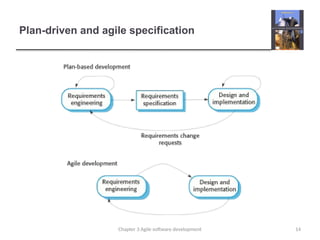
Plan-driven and agile development
 Plan-driven development
 A plan-driven approach to software engineering is based around
separate development stages with the outputs to be produced at
each of these stages planned in advance.
 Not necessarily waterfall model – plan-driven, incremental
development is possible
 Iteration occurs within activities.
 Agile development
 Specification, design, implementation and testing are inter-
leaved and the outputs from the development process are
decided through a process of negotiation during the software
development process.
13
Chapter 3 Agile software development
Plan-driven and agile specification
14
Chapter 3 Agile software development
Technical, human, organizational issues
 Most projects include elements of plan-driven and agile
processes. Deciding on the balance depends on:
 Is it important to have a very detailed specification and design
before moving to implementation? If so, you probably need to use
a plan-driven approach.
 Is an incremental delivery strategy, where you deliver the software
to customers and get rapid feedback from them, realistic? If so,
consider using agile methods.
 How large is the system that is being developed? Agile methods
are most effective when the system can be developed with a small
co-located team who can communicate informally. This may not
be possible for large systems that require larger development
teams so a plan-driven approach may have to be used.
15
Chapter 3 Agile software development
Technical, human, organizational issues
 What type of system is being developed?
• Plan-driven approaches may be required for systems that require a lot
of analysis before implementation (e.g. real-time system with complex
timing requirements).
 What is the expected system lifetime?
• Long-lifetime systems may require more design documentation to
communicate the original intentions of the system developers to the
support team.
 What technologies are available to support system development?
• Agile methods rely on good tools to keep track of an evolving design
 How is the development team organized?
• If the development team is distributed or if part of the development is
being outsourced, then you may need to develop design documents to
communicate across the development teams.
16
Chapter 3 Agile software development
Technical, human, organizational issues
 Are there cultural or organizational issues that may affect the
system development?
• Traditional engineering organizations have a culture of plan-based
development, as this is the norm in engineering.
 How good are the designers and programmers in the
development team?
• It is sometimes argued that agile methods require higher skill levels
than plan-based approaches in which programmers simply translate
a detailed design into code
 Is the system subject to external regulation?
• If a system has to be approved by an external regulator (e.g. the
FAA approve software that is critical to the operation of an aircraft)
then you will probably be required to produce detailed
documentation as part of the system safety case.
Chapter 3 Agile software development 17
Extreme programming
18
Chapter 3 Agile software development
Extreme programming
19
Chapter 3 Agile software development
XP and agile principles
20
Chapter 3 Agile software development
The extreme programming release cycle
21
Chapter 3 Agile software development
Extreme programming practices (a)
Principle or practice Description
Incremental planning Requirements are recorded on story cards and the stories to be
included in a release are determined by the time available and
their relative priority. The developers break these stories into
development ‘Tasks’. See Figures 3.5 and 3.6.
Small releases The minimal useful set of functionality that provides business
value is developed first. Releases of the system are frequent
and incrementally add functionality to the first release.
Simple design Enough design is carried out to meet the current requirements
and no more.
Test-first development An automated unit test framework is used to write tests for a
new piece of functionality before that functionality itself is
implemented.
Refactoring All developers are expected to refactor the code continuously as
soon as possible code improvements are found. This keeps the
code simple and maintainable.
22
Chapter 3 Agile software development
Extreme programming practices (b)
Pair programming Developers work in pairs, checking each other’s work and
providing the support to always do a good job.
Collective ownership The pairs of developers work on all areas of the system, so that
no islands of expertise develop and all the developers take
responsibility for all of the code. Anyone can change anything.
Continuous integration As soon as the work on a task is complete, it is integrated into
the whole system. After any such integration, all the unit tests in
the system must pass.
Sustainable pace Large amounts of overtime are not considered acceptable as
the net effect is often to reduce code quality and medium term
productivity
On-site customer A representative of the end-user of the system (the customer)
should be available full time for the use of the XP team. In an
extreme programming process, the customer is a member of the
development team and is responsible for bringing system
requirements to the team for implementation.
23
Chapter 3 Agile software development
Requirements scenarios
24
Chapter 3 Agile software development
A ‘prescribing medication’ story
25
Chapter 3 Agile software development
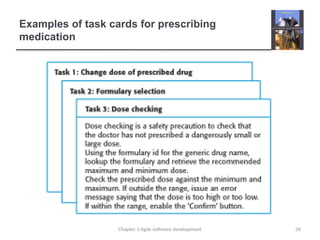
Examples of task cards for prescribing
medication
26
Chapter 3 Agile software development
XP and change
27
Chapter 3 Agile software development
Refactoring
 Programming team look for possible software
improvements and make these improvements even
where there is no immediate need for them.
 This improves the understandability of the software and
so reduces the need for documentation.
 Changes are easier to make because the code is well-
structured and clear.
 However, some changes requires architecture
refactoring and this is much more expensive.
Chapter 3 Agile software development 28
Examples of refactoring
 Re-organization of a class hierarchy to remove duplicate
code.
 Tidying up and renaming attributes and methods to make
them easier to understand.
 The replacement of inline code with calls to methods that
have been included in a program library.
Chapter 3 Agile software development 29
Key points
 Agile methods are incremental development methods that focus on
rapid development, frequent releases of the software, reducing
process overheads and producing high-quality code. They involve
the customer directly in the development process.
 The decision on whether to use an agile or a plan-driven approach
to development should depend on the type of software being
developed, the capabilities of the development team and the culture
of the company developing the system.
 Extreme programming is a well-known agile method that integrates
a range of good programming practices such as frequent releases
of the software, continuous software improvement and customer
participation in the development team.
Chapter 3 Agile software development 30
Chapter 3 – Agile Software Development
Lecture 2
31
Chapter 3 Agile software development
Testing in XP
32
Chapter 3 Agile software development
Test-first development
33
Chapter 3 Agile software development
Customer involvement
 The role of the customer in the testing process is to help
develop acceptance tests for the stories that are to be
implemented in the next release of the system.
 The customer who is part of the team writes tests as
development proceeds. All new code is therefore
validated to ensure that it is what the customer needs.
 However, people adopting the customer role have limited
time available and so cannot work full-time with the
development team. They may feel that providing the
requirements was enough of a contribution and so may
be reluctant to get involved in the testing process.
Chapter 3 Agile software development 34
Test case description for dose checking
35
Chapter 3 Agile software development
Test automation
 Test automation means that tests are written as
executable components before the task is implemented
 These testing components should be stand-alone, should
simulate the submission of input to be tested and should check
that the result meets the output specification. An automated test
framework (e.g. Junit) is a system that makes it easy to write
executable tests and submit a set of tests for execution.
 As testing is automated, there is always a set of tests
that can be quickly and easily executed
 Whenever any functionality is added to the system, the tests can
be run and problems that the new code has introduced can be
caught immediately.
Chapter 3 Agile software development 36
XP testing difficulties
 Programmers prefer programming to testing and
sometimes they take short cuts when writing tests. For
example, they may write incomplete tests that do not
check for all possible exceptions that may occur.
 Some tests can be very difficult to write incrementally.
For example, in a complex user interface, it is often
difficult to write unit tests for the code that implements
the ‘display logic’ and workflow between screens.
 It difficult to judge the completeness of a set of tests.
Although you may have a lot of system tests, your test
set may not provide complete coverage.
Chapter 3 Agile software development 37
Pair programming (EXTRA)
38
Chapter 3 Agile software development
Pair programming (EXTRA)
 In pair programming, programmers sit together at the
same workstation to develop the software.
 Pairs are created dynamically so that all team members
work with each other during the development process.
 The sharing of knowledge that happens during pair
programming is very important as it reduces the overall
risks to a project when team members leave.
 Pair programming is not necessarily inefficient and there
is evidence that a pair working together is more efficient
than 2 programmers working separately.
39
Chapter 3 Agile software development
Advantages of pair programming (EXTRA)
 It supports the idea of collective ownership and
responsibility for the system.
 Individuals are not held responsible for problems with the code.
Instead, the team has collective responsibility for resolving these
problems.
 It acts as an informal review process because each line
of code is looked at by at least two people.
 It helps support refactoring, which is a process of
software improvement.
 Where pair programming and collective ownership are used,
others benefit immediately from the refactoring so they are likely
to support the process.
Chapter 3 Agile software development 40
Agile project management
 The principal responsibility of software project managers
is to manage the project so that the software is delivered
on time and within the planned budget for the project.
 The standard approach to project management is plan-
driven. Managers draw up a plan for the project showing
what should be delivered, when it should be delivered
and who will work on the development of the project
deliverables.
 Agile project management requires a different approach,
which is adapted to incremental development and the
particular strengths of agile methods.
41
Chapter 3 Agile software development
Scrum
 The Scrum approach is a general agile method but its
focus is on managing iterative development rather than
specific agile practices.
 There are three phases in Scrum.
 The initial phase is an outline planning phase where you
establish the general objectives for the project and design the
software architecture.
 This is followed by a series of sprint cycles, where each cycle
develops an increment of the system.
 The project closure phase wraps up the project, completes
required documentation such as system help frames and user
manuals and assesses the lessons learned from the project.

Chapter 3 Agile software development 42
The Scrum process
43
Chapter 3 Agile software development
The Sprint cycle
 Sprints are fixed length, normally 2–4 weeks. They
correspond to the development of a release of the
system in XP.
 The starting point for planning is the product backlog,
which is the list of work to be done on the project.
 The selection phase involves all of the project team who
work with the customer to select the features and
functionality to be developed during the sprint.
44
Chapter 3 Agile software development
The Sprint cycle
 Once these are agreed, the team organize themselves to
develop the software. During this stage the team is
isolated from the customer and the organization, with all
communications channelled through the so-called
‘Scrum master’.
 The role of the Scrum master is to protect the
development team from external distractions.
 At the end of the sprint, the work done is reviewed and
presented to stakeholders. The next sprint cycle then
begins.
45
Chapter 3 Agile software development
Teamwork in Scrum
 The ‘Scrum master’ is a facilitator who arranges daily
meetings, tracks the backlog of work to be done, records
decisions, measures progress against the backlog and
communicates with customers and management outside
of the team.
 The whole team attends short daily meetings where all
team members share information, describe their
progress since the last meeting, problems that have
arisen and what is planned for the following day.
 This means that everyone on the team knows what is going on
and, if problems arise, can re-plan short-term work to cope with
them.
Chapter 3 Agile software development 46
Scrum benefits
 The product is broken down into a set of manageable
and understandable chunks.
 Unstable requirements do not hold up progress.
 The whole team have visibility of everything and
consequently team communication is improved.
 Customers see on-time delivery of increments and gain
feedback on how the product works.
 Trust between customers and developers is established
and a positive culture is created in which everyone
expects the project to succeed.
Chapter 3 Agile software development 47
Scaling agile methods
 Agile methods have proved to be successful for small
and medium sized projects that can be developed by a
small co-located team.
 It is sometimes argued that the success of these
methods comes because of improved communications
which is possible when everyone is working together.
 Scaling up agile methods involves changing these to
cope with larger, longer projects where there are multiple
development teams, perhaps working in different
locations.
48
Chapter 3 Agile software development
Large systems development
 Large systems are usually collections of separate,
communicating systems, where separate teams develop each
system. Frequently, these teams are working in different
places, sometimes in different time zones.
 Large systems are ‘brownfield systems’, that is they include
and interact with a number of existing systems. Many of the
system requirements are concerned with this interaction and
so don’t really lend themselves to flexibility and incremental
development.
 Where several systems are integrated to create a system, a
significant fraction of the development is concerned with
system configuration rather than original code development.
49
Chapter 3 Agile software development
Large system development
 Large systems and their development processes are
often constrained by external rules and regulations
limiting the way that they can be developed.
 Large systems have a long procurement and
development time. It is difficult to maintain coherent
teams who know about the system over that period as,
inevitably, people move on to other jobs and projects.
 Large systems usually have a diverse set of
stakeholders. It is practically impossible to involve all of
these different stakeholders in the development process.
50
Chapter 3 Agile software development
Scaling out and scaling up
 ‘Scaling up’ is concerned with using agile methods for
developing large software systems that cannot be
developed by a small team.
 ‘Scaling out’ is concerned with how agile methods can be
introduced across a large organization with many years
of software development experience.
 When scaling agile methods it is essential to maintain
agile fundamentals
 Flexible planning, frequent system releases, continuous
integration, test-driven development and good team
communications.
Chapter 3 Agile software development 51
Scaling up to large systems
 For large systems development, it is not possible to focus only
on the code of the system. You need to do more up-front
design and system documentation
 Cross-team communication mechanisms have to be designed
and used. This should involve regular phone and video
conferences between team members and frequent, short
electronic meetings where teams update each other on
progress.
 Continuous integration, where the whole system is built every
time any developer checks in a change, is practically
impossible. However, it is essential to maintain frequent
system builds and regular releases of the system.
52
Chapter 3 Agile software development
Scaling out to large companies
 Project managers who do not have experience of agile
methods may be reluctant to accept the risk of a new approach.
 Large organizations often have quality procedures and
standards that all projects are expected to follow and, because
of their bureaucratic nature, these are likely to be incompatible
with agile methods.
 Agile methods seem to work best when team members have a
relatively high skill level. However, within large organizations,
there are likely to be a wide range of skills and abilities.
 There may be cultural resistance to agile methods, especially in
those organizations that have a long history of using
conventional systems engineering processes.
53
Chapter 3 Agile software development
Key points
 A particular strength of extreme programming is the
development of automated tests before a program
feature is created. All tests must successfully execute
when an increment is integrated into a system.
 The Scrum method is an agile method that provides a
project management framework. It is centred round a set
of sprints, which are fixed time periods when a system
increment is developed.
 Scaling agile methods for large systems is difficult. Large
systems need up-front design and some documentation.
54
Chapter 3 Agile software development
Chapter 4 – Requirements Engineering
Topics covered
 Functional and non-functional requirements
 The software requirements document
 Requirements specification
 Requirements engineering processes
 Requirements elicitation and analysis
 Requirements validation
 Requirements management
55
Chapter 4 Requirements engineering
Requirements engineering
 The process of establishing the services that the
customer requires from a system and the constraints
under which it operates and is developed.
 The requirements themselves are the descriptions of the
system services and constraints that are generated
during the requirements engineering process.
56
Chapter 4 Requirements engineering
What is a requirement?
 It may range from a high-level abstract statement of a
service or of a system constraint to a detailed
mathematical functional specification.
 This is inevitable as requirements may serve a dual
function
 May be the basis for a bid for a contract - therefore must be
open to interpretation;
 May be the basis for the contract itself - therefore must be
defined in detail;
 Both these statements may be called requirements.
57
Chapter 4 Requirements engineering
Requirements abstraction (Davis)
“If a company wishes to let a contract for a large software development
project, it must define its needs in a sufficiently abstract way that a
solution is not pre-defined. The requirements must be written so that
several contractors can bid for the contract, offering, perhaps, different
ways of meeting the client organization’s needs. Once a contract has
been awarded, the contractor must write a system definition for the
client in more detail so that the client understands and can validate what
the software will do. Both of these documents may be called the
requirements document for the system.”
58
Chapter 4 Requirements engineering
Types of requirement
 User requirements
 Statements in natural language plus diagrams of the services
the system provides and its operational constraints. Written for
customers.
 System requirements
 A structured document setting out detailed descriptions of the
system’s functions, services and operational constraints. Defines
what should be implemented so may be part of a contract
between client and contractor.
59
Chapter 4 Requirements engineering
User and system requirements
60
Chapter 4 Requirements engineering
Readers of different types of requirements
specification
61
Chapter 4 Requirements engineering
Functional and non-functional requirements
 Functional requirements
 Statements of services the system should provide, how the
system should react to particular inputs and how the system
should behave in particular situations.
 May state what the system should not do.
 Non-functional requirements
 Constraints on the services or functions offered by the system
such as timing constraints, constraints on the development
process, standards, etc.
 Often apply to the system as a whole rather than individual
features or services.
 Domain requirements
 Constraints on the system from the domain of operation
62
Chapter 4 Requirements engineering
Functional requirements
 Describe functionality or system services.
 Depend on the type of software, expected users and the
type of system where the software is used.
 Functional user requirements may be high-level
statements of what the system should do.
 Functional system requirements should describe the
system services in detail.
63
Chapter 4 Requirements engineering
Functional requirements for the MHC-PMS
 A user shall be able to search the appointments lists for
all clinics.
 The system shall generate each day, for each clinic, a list
of patients who are expected to attend appointments that
day.
 Each staff member using the system shall be uniquely
identified by his or her 8-digit employee number.
64
Chapter 4 Requirements engineering
Requirements imprecision
 Problems arise when requirements are not precisely
stated.
 Ambiguous requirements may be interpreted in different
ways by developers and users.
 Consider the term ‘search’ in requirement 1
 User intention – search for a patient name across all
appointments in all clinics;
 Developer interpretation – search for a patient name in an
individual clinic. User chooses clinic then search.
65
Chapter 4 Requirements engineering
Requirements completeness and consistency
 In principle, requirements should be both complete and
consistent.
 Complete
 They should include descriptions of all facilities required.
 Consistent
 There should be no conflicts or contradictions in the descriptions
of the system facilities.
 In practice, it is impossible to produce a complete and
consistent requirements document.
66
Chapter 4 Requirements engineering
Non-functional requirements
 These define system properties and constraints e.g.
reliability, response time and storage requirements.
Constraints are I/O device capability, system
representations, etc.
 Process requirements may also be specified mandating
a particular IDE, programming language or development
method.
 Non-functional requirements may be more critical than
functional requirements. If these are not met, the system
may be useless.
67
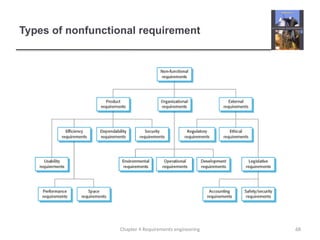
Chapter 4 Requirements engineering
Types of nonfunctional requirement
68
Chapter 4 Requirements engineering
Non-functional requirements implementation
 Non-functional requirements may affect the overall
architecture of a system rather than the individual
components.
 For example, to ensure that performance requirements are met,
you may have to organize the system to minimize
communications between components.
 A single non-functional requirement, such as a security
requirement, may generate a number of related
functional requirements that define system services that
are required.
 It may also generate requirements that restrict existing
requirements.
69
Chapter 4 Requirements engineering
Non-functional classifications
 Product requirements
 Requirements which specify that the delivered product must
behave in a particular way e.g. execution speed, reliability, etc.
 Organisational requirements
 Requirements which are a consequence of organisational
policies and procedures e.g. process standards used,
implementation requirements, etc.
 External requirements
 Requirements which arise from factors which are external to the
system and its development process e.g. interoperability
requirements, legislative requirements, etc.
70
Chapter 4 Requirements engineering
Examples of nonfunctional requirements in the
MHC-PMS
Product requirement
The MHC-PMS shall be available to all clinics during normal working
hours (Mon–Fri, 0830–17.30). Downtime within normal working hours
shall not exceed five seconds in any one day.
Organizational requirement
Users of the MHC-PMS system shall authenticate themselves using
their health authority identity card.
External requirement
The system shall implement patient privacy provisions as set out in
HStan-03-2006-priv.
71
Chapter 4 Requirements engineering
Goals and requirements
72
Chapter 4 Requirements engineering
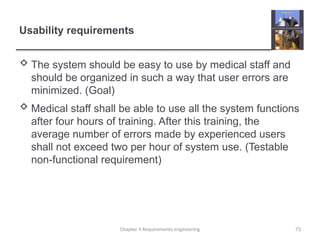
Usability requirements
 The system should be easy to use by medical staff and
should be organized in such a way that user errors are
minimized. (Goal)
 Medical staff shall be able to use all the system functions
after four hours of training. After this training, the
average number of errors made by experienced users
shall not exceed two per hour of system use. (Testable
non-functional requirement)
73
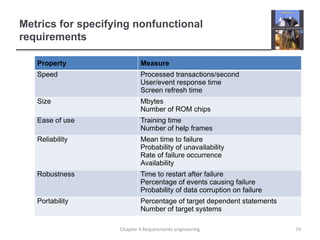
Chapter 4 Requirements engineering
Metrics for specifying nonfunctional
requirements
Property Measure
Speed Processed transactions/second
User/event response time
Screen refresh time
Size Mbytes
Number of ROM chips
Ease of use Training time
Number of help frames
Reliability Mean time to failure
Probability of unavailability
Rate of failure occurrence
Availability
Robustness Time to restart after failure
Percentage of events causing failure
Probability of data corruption on failure
Portability Percentage of target dependent statements
Number of target systems
74
Chapter 4 Requirements engineering
Domain requirements
75
Chapter 4 Requirements engineering
Train protection system
76
Chapter 4 Requirements engineering
Domain requirements problems
77
Chapter 4 Requirements engineering
Key points
 Requirements for a software system set out what the
system should do and define constraints on its operation
and implementation.
 Functional requirements are statements of the services
that the system must provide or are descriptions of how
some computations must be carried out.
 Non-functional requirements often constrain the system
being developed and the development process being
used.
 They often relate to the emergent properties of the
system and therefore apply to the system as a whole.
78
Chapter 4 Requirements engineering
Chapter 4 – Requirements Engineering
Lecture 2
79
Chapter 4 Requirements engineering
The software requirements document
80
Chapter 4 Requirements engineering
Agile methods and requirements
 Many agile methods argue that producing a
requirements document is a waste of time as
requirements change so quickly.
 The document is therefore always out of date.
 Methods such as XP use incremental requirements
engineering and express requirements as ‘user stories’
(discussed in Chapter 3).
 This is practical for business systems but problematic for
systems that require a lot of pre-delivery analysis (e.g.
critical systems) or systems developed by several teams.
81
Chapter 4 Requirements engineering
Users of a requirements document
82
Chapter 4 Requirements engineering
Requirements document variability
 Information in requirements document depends on type
of system and the approach to development used.
 Systems developed incrementally will, typically, have
less detail in the requirements document.
 Requirements documents standards have been
designed e.g. IEEE standard. These are mostly
applicable to the requirements for large systems
engineering projects.
Chapter 4 Requirements engineering 83
The structure of a requirements document
Chapter Description
Preface This should define the expected readership of the document and describe
its version history, including a rationale for the creation of a new version
and a summary of the changes made in each version.
Introduction This should describe the need for the system. It should briefly describe the
system’s functions and explain how it will work with other systems. It
should also describe how the system fits into the overall business or
strategic objectives of the organization commissioning the software.
Glossary This should define the technical terms used in the document. You should
not make assumptions about the experience or expertise of the reader.
User requirements
definition
Here, you describe the services provided for the user. The nonfunctional
system requirements should also be described in this section. This
description may use natural language, diagrams, or other notations that
are understandable to customers. Product and process standards that
must be followed should be specified.
System architecture This chapter should present a high-level overview of the anticipated
system architecture, showing the distribution of functions across system
modules. Architectural components that are reused should be highlighted.
84
Chapter 4 Requirements engineering
The structure of a requirements document
Chapter Description
System
requirements
specification
This should describe the functional and nonfunctional requirements in more
detail. If necessary, further detail may also be added to the nonfunctional
requirements. Interfaces to other systems may be defined.
System models This might include graphical system models showing the relationships between
the system components and the system and its environment. Examples of
possible models are object models, data-flow models, or semantic data models.
System evolution This should describe the fundamental assumptions on which the system is
based, and any anticipated changes due to hardware evolution, changing user
needs, and so on. This section is useful for system designers as it may help them
avoid design decisions that would constrain likely future changes to the system.
Appendices These should provide detailed, specific information that is related to the
application being developed; for example, hardware and database descriptions.
Hardware requirements define the minimal and optimal configurations for the
system. Database requirements define the logical organization of the data used
by the system and the relationships between data.
Index Several indexes to the document may be included. As well as a normal
alphabetic index, there may be an index of diagrams, an index of functions, and
so on.
85
Chapter 4 Requirements engineering
Requirements specification
 The process of writing don the user and system
requirements in a requirements document.
 User requirements have to be understandable by end-
users and customers who do not have a technical
background.
 System requirements are more detailed requirements
and may include more technical information.
 The requirements may be part of a contract for the
system development
 It is therefore important that these are as complete as possible.
Chapter 4 Requirements engineering 86
Ways of writing a system requirements
specification
Notation Description
Natural language The requirements are written using numbered sentences in natural
language. Each sentence should express one requirement.
Structured natural
language
The requirements are written in natural language on a standard form or
template. Each field provides information about an aspect of the
requirement.
Design description
languages
This approach uses a language like a programming language, but with more
abstract features to specify the requirements by defining an operational
model of the system. This approach is now rarely used although it can be
useful for interface specifications.
Graphical notations Graphical models, supplemented by text annotations, are used to define the
functional requirements for the system; UML use case and sequence
diagrams are commonly used.
Mathematical
specifications
These notations are based on mathematical concepts such as finite-state
machines or sets. Although these unambiguous specifications can reduce
the ambiguity in a requirements document, most customers don’t
understand a formal specification. They cannot check that it represents what
they want and are reluctant to accept it as a system contract
87
Chapter 4 Requirements engineering
Requirements and design
Natural language specification
 Requirements are written as natural language sentences
supplemented by diagrams and tables.
 Used for writing requirements because it is expressive,
intuitive and universal. This means that the requirements
can be understood by users and customers.
Chapter 4 Requirements engineering 89
Guidelines for writing requirements
Problems with natural language
Example requirements for the insulin pump
software system
3.2 The system shall measure the blood sugar and deliver
insulin, if required, every 10 minutes. (Changes in blood sugar
are relatively slow so more frequent measurement is
unnecessary; less frequent measurement could lead to
unnecessarily high sugar levels.)
3.6 The system shall run a self-test routine every minute with
the conditions to be tested and the associated actions defined
in Table 1. (A self-test routine can discover hardware and
software problems and alert the user to the fact the normal
operation may be impossible.)
92
Chapter 4 Requirements engineering
Structured specifications
 An approach to writing requirements where the freedom
of the requirements writer is limited and requirements
are written in a standard way.
 This works well for some types of requirements e.g.
requirements for embedded control system but is
sometimes too rigid for writing business system
requirements.
Chapter 4 Requirements engineering 93
Form-based specifications
A structured specification of a requirement for
an insulin pump
95
Chapter 4 Requirements engineering
A structured specification of a requirement for
an insulin pump
96
Chapter 4 Requirements engineering
Tabular specification
Tabular specification of computation for an
insulin pump
Condition Action
Sugar level falling (r2 < r1) CompDose = 0
Sugar level stable (r2 = r1) CompDose = 0
Sugar level increasing and rate of
increase decreasing
((r2 – r1) < (r1 – r0))
CompDose = 0
Sugar level increasing and rate of
increase stable or increasing
((r2 – r1) ≥ (r1 – r0))
CompDose =
round ((r2 – r1)/4)
If rounded result = 0 then
CompDose =
MinimumDose
98
Chapter 4 Requirements engineering
Requirements engineering processes
99
Chapter 4 Requirements engineering
A spiral view of the requirements engineering
process
100
Chapter 4 Requirements engineering
Requirements elicitation and analysis
101
Chapter 4 Requirements engineering
Problems of requirements analysis
102
Chapter 4 Requirements engineering
Requirements elicitation and analysis
 Software engineers work with a range of system
stakeholders to find out about the application domain,
the services that the system should provide, the required
system performance, hardware constraints, other
systems, etc.
 Stages include:
 Requirements discovery,
 Requirements classification and organization,
 Requirements prioritization and negotiation,
 Requirements specification.
Chapter 4 Requirements engineering 103
The requirements elicitation and analysis
process
104
Chapter 4 Requirements engineering
Process activities
Problems of requirements elicitation
Key points
 The software requirements document is an agreed
statement of the system requirements. It should be
organized so that both system customers and software
developers can use it.
 The requirements engineering process is an iterative
process including requirements elicitation, specification
and validation.
 Requirements elicitation and analysis is an iterative
process that can be represented as a spiral of activities –
requirements discovery, requirements classification and
organization, requirements negotiation and requirements
documentation.
Chapter 4 Requirements engineering 107
Chapter 4 – Requirements Engineering
Lecture 3
108
Chapter 4 Requirements engineering
Requirements discovery
 The process of gathering information about the required
and existing systems and distilling the user and system
requirements from this information.
 Interaction is with system stakeholders from managers to
external regulators.
 Systems normally have a range of stakeholders.
Chapter 4 Requirements engineering 109
Stakeholders in the MHC-PMS
 Patients whose information is recorded in the system.
 Doctors who are responsible for assessing and treating
patients.
 Nurses who coordinate the consultations with doctors
and administer some treatments.
 Medical receptionists who manage patients’
appointments.
 IT staff who are responsible for installing and maintaining
the system.
Chapter 4 Requirements engineering 110
Stakeholders in the MHC-PMS
 A medical ethics manager who must ensure that the
system meets current ethical guidelines for patient care.
 Health care managers who obtain management
information from the system.
 Medical records staff who are responsible for ensuring
that system information can be maintained and
preserved, and that record keeping procedures have
been properly implemented.
Chapter 4 Requirements engineering 111
Interviewing
 Formal or informal interviews with stakeholders are part
of most RE processes.
 Types of interview
 Closed interviews based on pre-determined list of questions
 Open interviews where various issues are explored with
stakeholders.
 Effective interviewing
 Be open-minded, avoid pre-conceived ideas about the
requirements and are willing to listen to stakeholders.
 Prompt the interviewee to get discussions going using a
springboard question, a requirements proposal, or by working
together on a prototype system.
Chapter 4 Requirements engineering 112
Interviews in practice
Scenarios
Scenario for collecting medical history in MHC-
PMS
115
Chapter 4 Requirements engineering
Scenario for collecting medical history in MHC-
PMS
116
Chapter 4 Requirements engineering
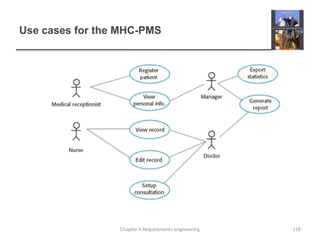
Use cases
117
Chapter 4 Requirements engineering
Use cases for the MHC-PMS
118
Chapter 4 Requirements engineering
Ethnography
119
Chapter 4 Requirements engineering
Scope of ethnography
120
Chapter 4 Requirements engineering
Focused ethnography
121
Chapter 4 Requirements engineering
Ethnography and prototyping for requirements
analysis
122
Chapter 4 Requirements engineering
Requirements validation
123
Chapter 4 Requirements engineering
Requirements checking
124
Chapter 4 Requirements engineering
Requirements validation techniques
125
Chapter 4 Requirements engineering
Requirements reviews
126
Chapter 4 Requirements engineering
Review checks
127
Chapter 4 Requirements engineering
Requirements management
128
Chapter 4 Requirements engineering
Changing requirements
 The business and technical environment of the system
always changes after installation.
 New hardware may be introduced, it may be necessary to
interface the system with other systems, business priorities may
change (with consequent changes in the system support
required), and new legislation and regulations may be introduced
that the system must necessarily abide by.
 The people who pay for a system and the users of that
system are rarely the same people.
 System customers impose requirements because of
organizational and budgetary constraints. These may conflict
with end-user requirements and, after delivery, new features
may have to be added for user support if the system is to meet
its goals.
Chapter 4 Requirements engineering 129
Changing requirements
 Large systems usually have a diverse user community,
with many users having different requirements and
priorities that may be conflicting or contradictory.
 The final system requirements are inevitably a compromise
between them and, with experience, it is often discovered that
the balance of support given to different users has to be
changed.
Chapter 4 Requirements engineering 130
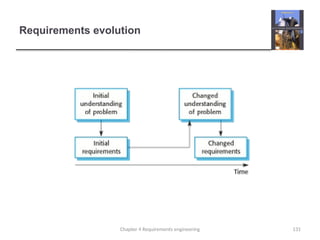
Requirements evolution
131
Chapter 4 Requirements engineering
Requirements management planning
 Establishes the level of requirements management detail
that is required.
 Requirements management decisions:
 Requirements identification Each requirement must be uniquely
identified so that it can be cross-referenced with other requirements.
 A change management process This is the set of activities that
assess the impact and cost of changes. I discuss this process in
more detail in the following section.
 Traceability policies These policies define the relationships between
each requirement and between the requirements and the system
design that should be recorded.
 Tool support Tools that may be used range from specialist
requirements management systems to spreadsheets and simple
database systems.
Chapter 4 Requirements engineering 132
Requirements change management
 Deciding if a requirements change should be accepted
 Problem analysis and change specification
• During this stage, the problem or the change proposal is analyzed to
check that it is valid. This analysis is fed back to the change
requestor who may respond with a more specific requirements
change proposal, or decide to withdraw the request.
 Change analysis and costing
• The effect of the proposed change is assessed using traceability
information and general knowledge of the system requirements.
Once this analysis is completed, a decision is made whether or not
to proceed with the requirements change.
 Change implementation
• The requirements document and, where necessary, the system
design and implementation, are modified. Ideally, the document
should be organized so that changes can be easily implemented.
Chapter 4 Requirements engineering 133
Requirements change management
134
Chapter 4 Requirements engineering
Chapter 4 Requirements engineering 135
Key points
 You can use a range of techniques for requirements
elicitation including interviews, scenarios, use-cases and
ethnography.
 Requirements validation is the process of checking the
requirements for validity, consistency, completeness,
realism and verifiability.
 Business, organizational and technical changes
inevitably lead to changes to the requirements for a
software system. Requirements management is the
process of managing and controlling these changes.

Software EngineeringModule 2 (Complete).pptx

  • 1.
    RajaRajeswari College ofEngineering DEPARTMENT OF COMPUTER SCIENCE AND ENGINEERING Affiliated to Visvesvaraya Technological University “Jnana Sangama”, Belgaum – 560 018 Department of MCA Prof. Shreedhar Kumbhar Subject Name: “Software Engineering” Subject Code: “22MCA23” “Module-2” Semester: II
  • 2.
    Chapter 3 –Agile Software Development Topics covered  Agile methods  Plan-driven and agile development  Extreme programming  Agile project management  Scaling agile methods 2 Chapter 3 Agile software development
  • 3.
    Agile methods  Agilemethods focus attention on iterative progress, collaboration, and flexibility in responding to changes.  Common frameworks within agile include Scrum and Extreme Programming (XP).  These methods are often utilized to improve efficiency and adaptability in projects, ensuring that teams can quickly respond to feedback and evolving requirements. 3 Chapter 3 Agile software development
  • 4.
    Agile methods  include: 1.Ensuring customer satisfaction through the early delivery of software. 2. Being open to changing requirements in the stages of the development. 3. Frequently delivering working software with a main focus on preference for timeframes. 4 Chapter 3 Agile software development
  • 5.
    Agile methods 4. Promotingcollaboration between business stakeholders and developers as an element. 5. Structuring the projects around individuals. Providing them with the necessary environment and support. 6. Prioritizing face to face communication whenever needed. 5 Chapter 3 Agile software development
  • 6.
    Rapid software development Rapid development and delivery is now often the most important requirement for software systems  Businesses operate in a fast –changing requirement and it is practically impossible to produce a set of stable software requirements  Software has to evolve quickly to reflect changing business needs.  Rapid software development  Specification, design and implementation are inter-leaved  System is developed as a series of versions with stakeholders involved in version evaluation  User interfaces are often developed using an IDE and graphical toolset. 6 Chapter 3 Agile software development
  • 7.
    Agile methods 7 Chapter 3Agile software development
  • 8.
    Agile manifesto  Weare uncovering better ways of developing software by doing it and helping others do it. Through this work we have come to value:  Individuals and interactions over processes and tools Working software over comprehensive documentation Customer collaboration over contract negotiation Responding to change over following a plan  That is, while there is value in the items on the right, we value the items on the left more. Chapter 3 Agile software development 8
  • 9.
    The principles ofagile methods Principle Description Customer involvement Customers should be closely involved throughout the development process. Their role is provide and prioritize new system requirements and to evaluate the iterations of the system. Incremental delivery The software is developed in increments with the customer specifying the requirements to be included in each increment. People not process The skills of the development team should be recognized and exploited. Team members should be left to develop their own ways of working without prescriptive processes. Embrace change Expect the system requirements to change and so design the system to accommodate these changes. Maintain simplicity Focus on simplicity in both the software being developed and in the development process. Wherever possible, actively work to eliminate complexity from the system. 9 Chapter 3 Agile software development
  • 10.
    Agile method applicability Product development where a software company is developing a small or medium-sized product for sale.  Custom system development within an organization, where there is a clear commitment from the customer to become involved in the development process and where there are not a lot of external rules and regulations that affect the software.  Because of their focus on small, tightly-integrated teams, there are problems in scaling agile methods to large systems. Chapter 3 Agile software development 10
  • 11.
    Problems with agilemethods 11 Chapter 3 Agile software development
  • 12.
    Agile methods andsoftware maintenance  Most organizations spend more on maintaining existing software than they do on new software development. So, if agile methods are to be successful, they have to support maintenance as well as original development.  Two key issues:  Are systems that are developed using an agile approach maintainable, given the emphasis in the development process of minimizing formal documentation?  Can agile methods be used effectively for evolving a system in response to customer change requests?  Problems may arise if original development team cannot be maintained. Chapter 3 Agile software development 12
  • 13.
    Plan-driven and agiledevelopment  Plan-driven development  A plan-driven approach to software engineering is based around separate development stages with the outputs to be produced at each of these stages planned in advance.  Not necessarily waterfall model – plan-driven, incremental development is possible  Iteration occurs within activities.  Agile development  Specification, design, implementation and testing are inter- leaved and the outputs from the development process are decided through a process of negotiation during the software development process. 13 Chapter 3 Agile software development
  • 14.
    Plan-driven and agilespecification 14 Chapter 3 Agile software development
  • 15.
    Technical, human, organizationalissues  Most projects include elements of plan-driven and agile processes. Deciding on the balance depends on:  Is it important to have a very detailed specification and design before moving to implementation? If so, you probably need to use a plan-driven approach.  Is an incremental delivery strategy, where you deliver the software to customers and get rapid feedback from them, realistic? If so, consider using agile methods.  How large is the system that is being developed? Agile methods are most effective when the system can be developed with a small co-located team who can communicate informally. This may not be possible for large systems that require larger development teams so a plan-driven approach may have to be used. 15 Chapter 3 Agile software development
  • 16.
    Technical, human, organizationalissues  What type of system is being developed? • Plan-driven approaches may be required for systems that require a lot of analysis before implementation (e.g. real-time system with complex timing requirements).  What is the expected system lifetime? • Long-lifetime systems may require more design documentation to communicate the original intentions of the system developers to the support team.  What technologies are available to support system development? • Agile methods rely on good tools to keep track of an evolving design  How is the development team organized? • If the development team is distributed or if part of the development is being outsourced, then you may need to develop design documents to communicate across the development teams. 16 Chapter 3 Agile software development
  • 17.
    Technical, human, organizationalissues  Are there cultural or organizational issues that may affect the system development? • Traditional engineering organizations have a culture of plan-based development, as this is the norm in engineering.  How good are the designers and programmers in the development team? • It is sometimes argued that agile methods require higher skill levels than plan-based approaches in which programmers simply translate a detailed design into code  Is the system subject to external regulation? • If a system has to be approved by an external regulator (e.g. the FAA approve software that is critical to the operation of an aircraft) then you will probably be required to produce detailed documentation as part of the system safety case. Chapter 3 Agile software development 17
  • 18.
    Extreme programming 18 Chapter 3Agile software development
  • 19.
    Extreme programming 19 Chapter 3Agile software development
  • 20.
    XP and agileprinciples 20 Chapter 3 Agile software development
  • 21.
    The extreme programmingrelease cycle 21 Chapter 3 Agile software development
  • 22.
    Extreme programming practices(a) Principle or practice Description Incremental planning Requirements are recorded on story cards and the stories to be included in a release are determined by the time available and their relative priority. The developers break these stories into development ‘Tasks’. See Figures 3.5 and 3.6. Small releases The minimal useful set of functionality that provides business value is developed first. Releases of the system are frequent and incrementally add functionality to the first release. Simple design Enough design is carried out to meet the current requirements and no more. Test-first development An automated unit test framework is used to write tests for a new piece of functionality before that functionality itself is implemented. Refactoring All developers are expected to refactor the code continuously as soon as possible code improvements are found. This keeps the code simple and maintainable. 22 Chapter 3 Agile software development
  • 23.
    Extreme programming practices(b) Pair programming Developers work in pairs, checking each other’s work and providing the support to always do a good job. Collective ownership The pairs of developers work on all areas of the system, so that no islands of expertise develop and all the developers take responsibility for all of the code. Anyone can change anything. Continuous integration As soon as the work on a task is complete, it is integrated into the whole system. After any such integration, all the unit tests in the system must pass. Sustainable pace Large amounts of overtime are not considered acceptable as the net effect is often to reduce code quality and medium term productivity On-site customer A representative of the end-user of the system (the customer) should be available full time for the use of the XP team. In an extreme programming process, the customer is a member of the development team and is responsible for bringing system requirements to the team for implementation. 23 Chapter 3 Agile software development
  • 24.
    Requirements scenarios 24 Chapter 3Agile software development
  • 25.
    A ‘prescribing medication’story 25 Chapter 3 Agile software development
  • 26.
    Examples of taskcards for prescribing medication 26 Chapter 3 Agile software development
  • 27.
    XP and change 27 Chapter3 Agile software development
  • 28.
    Refactoring  Programming teamlook for possible software improvements and make these improvements even where there is no immediate need for them.  This improves the understandability of the software and so reduces the need for documentation.  Changes are easier to make because the code is well- structured and clear.  However, some changes requires architecture refactoring and this is much more expensive. Chapter 3 Agile software development 28
  • 29.
    Examples of refactoring Re-organization of a class hierarchy to remove duplicate code.  Tidying up and renaming attributes and methods to make them easier to understand.  The replacement of inline code with calls to methods that have been included in a program library. Chapter 3 Agile software development 29
  • 30.
    Key points  Agilemethods are incremental development methods that focus on rapid development, frequent releases of the software, reducing process overheads and producing high-quality code. They involve the customer directly in the development process.  The decision on whether to use an agile or a plan-driven approach to development should depend on the type of software being developed, the capabilities of the development team and the culture of the company developing the system.  Extreme programming is a well-known agile method that integrates a range of good programming practices such as frequent releases of the software, continuous software improvement and customer participation in the development team. Chapter 3 Agile software development 30
  • 31.
    Chapter 3 –Agile Software Development Lecture 2 31 Chapter 3 Agile software development
  • 32.
    Testing in XP 32 Chapter3 Agile software development
  • 33.
    Test-first development 33 Chapter 3Agile software development
  • 34.
    Customer involvement  Therole of the customer in the testing process is to help develop acceptance tests for the stories that are to be implemented in the next release of the system.  The customer who is part of the team writes tests as development proceeds. All new code is therefore validated to ensure that it is what the customer needs.  However, people adopting the customer role have limited time available and so cannot work full-time with the development team. They may feel that providing the requirements was enough of a contribution and so may be reluctant to get involved in the testing process. Chapter 3 Agile software development 34
  • 35.
    Test case descriptionfor dose checking 35 Chapter 3 Agile software development
  • 36.
    Test automation  Testautomation means that tests are written as executable components before the task is implemented  These testing components should be stand-alone, should simulate the submission of input to be tested and should check that the result meets the output specification. An automated test framework (e.g. Junit) is a system that makes it easy to write executable tests and submit a set of tests for execution.  As testing is automated, there is always a set of tests that can be quickly and easily executed  Whenever any functionality is added to the system, the tests can be run and problems that the new code has introduced can be caught immediately. Chapter 3 Agile software development 36
  • 37.
    XP testing difficulties Programmers prefer programming to testing and sometimes they take short cuts when writing tests. For example, they may write incomplete tests that do not check for all possible exceptions that may occur.  Some tests can be very difficult to write incrementally. For example, in a complex user interface, it is often difficult to write unit tests for the code that implements the ‘display logic’ and workflow between screens.  It difficult to judge the completeness of a set of tests. Although you may have a lot of system tests, your test set may not provide complete coverage. Chapter 3 Agile software development 37
  • 38.
    Pair programming (EXTRA) 38 Chapter3 Agile software development
  • 39.
    Pair programming (EXTRA) In pair programming, programmers sit together at the same workstation to develop the software.  Pairs are created dynamically so that all team members work with each other during the development process.  The sharing of knowledge that happens during pair programming is very important as it reduces the overall risks to a project when team members leave.  Pair programming is not necessarily inefficient and there is evidence that a pair working together is more efficient than 2 programmers working separately. 39 Chapter 3 Agile software development
  • 40.
    Advantages of pairprogramming (EXTRA)  It supports the idea of collective ownership and responsibility for the system.  Individuals are not held responsible for problems with the code. Instead, the team has collective responsibility for resolving these problems.  It acts as an informal review process because each line of code is looked at by at least two people.  It helps support refactoring, which is a process of software improvement.  Where pair programming and collective ownership are used, others benefit immediately from the refactoring so they are likely to support the process. Chapter 3 Agile software development 40
  • 41.
    Agile project management The principal responsibility of software project managers is to manage the project so that the software is delivered on time and within the planned budget for the project.  The standard approach to project management is plan- driven. Managers draw up a plan for the project showing what should be delivered, when it should be delivered and who will work on the development of the project deliverables.  Agile project management requires a different approach, which is adapted to incremental development and the particular strengths of agile methods. 41 Chapter 3 Agile software development
  • 42.
    Scrum  The Scrumapproach is a general agile method but its focus is on managing iterative development rather than specific agile practices.  There are three phases in Scrum.  The initial phase is an outline planning phase where you establish the general objectives for the project and design the software architecture.  This is followed by a series of sprint cycles, where each cycle develops an increment of the system.  The project closure phase wraps up the project, completes required documentation such as system help frames and user manuals and assesses the lessons learned from the project.  Chapter 3 Agile software development 42
  • 43.
    The Scrum process 43 Chapter3 Agile software development
  • 44.
    The Sprint cycle Sprints are fixed length, normally 2–4 weeks. They correspond to the development of a release of the system in XP.  The starting point for planning is the product backlog, which is the list of work to be done on the project.  The selection phase involves all of the project team who work with the customer to select the features and functionality to be developed during the sprint. 44 Chapter 3 Agile software development
  • 45.
    The Sprint cycle Once these are agreed, the team organize themselves to develop the software. During this stage the team is isolated from the customer and the organization, with all communications channelled through the so-called ‘Scrum master’.  The role of the Scrum master is to protect the development team from external distractions.  At the end of the sprint, the work done is reviewed and presented to stakeholders. The next sprint cycle then begins. 45 Chapter 3 Agile software development
  • 46.
    Teamwork in Scrum The ‘Scrum master’ is a facilitator who arranges daily meetings, tracks the backlog of work to be done, records decisions, measures progress against the backlog and communicates with customers and management outside of the team.  The whole team attends short daily meetings where all team members share information, describe their progress since the last meeting, problems that have arisen and what is planned for the following day.  This means that everyone on the team knows what is going on and, if problems arise, can re-plan short-term work to cope with them. Chapter 3 Agile software development 46
  • 47.
    Scrum benefits  Theproduct is broken down into a set of manageable and understandable chunks.  Unstable requirements do not hold up progress.  The whole team have visibility of everything and consequently team communication is improved.  Customers see on-time delivery of increments and gain feedback on how the product works.  Trust between customers and developers is established and a positive culture is created in which everyone expects the project to succeed. Chapter 3 Agile software development 47
  • 48.
    Scaling agile methods Agile methods have proved to be successful for small and medium sized projects that can be developed by a small co-located team.  It is sometimes argued that the success of these methods comes because of improved communications which is possible when everyone is working together.  Scaling up agile methods involves changing these to cope with larger, longer projects where there are multiple development teams, perhaps working in different locations. 48 Chapter 3 Agile software development
  • 49.
    Large systems development Large systems are usually collections of separate, communicating systems, where separate teams develop each system. Frequently, these teams are working in different places, sometimes in different time zones.  Large systems are ‘brownfield systems’, that is they include and interact with a number of existing systems. Many of the system requirements are concerned with this interaction and so don’t really lend themselves to flexibility and incremental development.  Where several systems are integrated to create a system, a significant fraction of the development is concerned with system configuration rather than original code development. 49 Chapter 3 Agile software development
  • 50.
    Large system development Large systems and their development processes are often constrained by external rules and regulations limiting the way that they can be developed.  Large systems have a long procurement and development time. It is difficult to maintain coherent teams who know about the system over that period as, inevitably, people move on to other jobs and projects.  Large systems usually have a diverse set of stakeholders. It is practically impossible to involve all of these different stakeholders in the development process. 50 Chapter 3 Agile software development
  • 51.
    Scaling out andscaling up  ‘Scaling up’ is concerned with using agile methods for developing large software systems that cannot be developed by a small team.  ‘Scaling out’ is concerned with how agile methods can be introduced across a large organization with many years of software development experience.  When scaling agile methods it is essential to maintain agile fundamentals  Flexible planning, frequent system releases, continuous integration, test-driven development and good team communications. Chapter 3 Agile software development 51
  • 52.
    Scaling up tolarge systems  For large systems development, it is not possible to focus only on the code of the system. You need to do more up-front design and system documentation  Cross-team communication mechanisms have to be designed and used. This should involve regular phone and video conferences between team members and frequent, short electronic meetings where teams update each other on progress.  Continuous integration, where the whole system is built every time any developer checks in a change, is practically impossible. However, it is essential to maintain frequent system builds and regular releases of the system. 52 Chapter 3 Agile software development
  • 53.
    Scaling out tolarge companies  Project managers who do not have experience of agile methods may be reluctant to accept the risk of a new approach.  Large organizations often have quality procedures and standards that all projects are expected to follow and, because of their bureaucratic nature, these are likely to be incompatible with agile methods.  Agile methods seem to work best when team members have a relatively high skill level. However, within large organizations, there are likely to be a wide range of skills and abilities.  There may be cultural resistance to agile methods, especially in those organizations that have a long history of using conventional systems engineering processes. 53 Chapter 3 Agile software development
  • 54.
    Key points  Aparticular strength of extreme programming is the development of automated tests before a program feature is created. All tests must successfully execute when an increment is integrated into a system.  The Scrum method is an agile method that provides a project management framework. It is centred round a set of sprints, which are fixed time periods when a system increment is developed.  Scaling agile methods for large systems is difficult. Large systems need up-front design and some documentation. 54 Chapter 3 Agile software development
  • 55.
    Chapter 4 –Requirements Engineering Topics covered  Functional and non-functional requirements  The software requirements document  Requirements specification  Requirements engineering processes  Requirements elicitation and analysis  Requirements validation  Requirements management 55 Chapter 4 Requirements engineering
  • 56.
    Requirements engineering  Theprocess of establishing the services that the customer requires from a system and the constraints under which it operates and is developed.  The requirements themselves are the descriptions of the system services and constraints that are generated during the requirements engineering process. 56 Chapter 4 Requirements engineering
  • 57.
    What is arequirement?  It may range from a high-level abstract statement of a service or of a system constraint to a detailed mathematical functional specification.  This is inevitable as requirements may serve a dual function  May be the basis for a bid for a contract - therefore must be open to interpretation;  May be the basis for the contract itself - therefore must be defined in detail;  Both these statements may be called requirements. 57 Chapter 4 Requirements engineering
  • 58.
    Requirements abstraction (Davis) “Ifa company wishes to let a contract for a large software development project, it must define its needs in a sufficiently abstract way that a solution is not pre-defined. The requirements must be written so that several contractors can bid for the contract, offering, perhaps, different ways of meeting the client organization’s needs. Once a contract has been awarded, the contractor must write a system definition for the client in more detail so that the client understands and can validate what the software will do. Both of these documents may be called the requirements document for the system.” 58 Chapter 4 Requirements engineering
  • 59.
    Types of requirement User requirements  Statements in natural language plus diagrams of the services the system provides and its operational constraints. Written for customers.  System requirements  A structured document setting out detailed descriptions of the system’s functions, services and operational constraints. Defines what should be implemented so may be part of a contract between client and contractor. 59 Chapter 4 Requirements engineering
  • 60.
    User and systemrequirements 60 Chapter 4 Requirements engineering
  • 61.
    Readers of differenttypes of requirements specification 61 Chapter 4 Requirements engineering
  • 62.
    Functional and non-functionalrequirements  Functional requirements  Statements of services the system should provide, how the system should react to particular inputs and how the system should behave in particular situations.  May state what the system should not do.  Non-functional requirements  Constraints on the services or functions offered by the system such as timing constraints, constraints on the development process, standards, etc.  Often apply to the system as a whole rather than individual features or services.  Domain requirements  Constraints on the system from the domain of operation 62 Chapter 4 Requirements engineering
  • 63.
    Functional requirements  Describefunctionality or system services.  Depend on the type of software, expected users and the type of system where the software is used.  Functional user requirements may be high-level statements of what the system should do.  Functional system requirements should describe the system services in detail. 63 Chapter 4 Requirements engineering
  • 64.
    Functional requirements forthe MHC-PMS  A user shall be able to search the appointments lists for all clinics.  The system shall generate each day, for each clinic, a list of patients who are expected to attend appointments that day.  Each staff member using the system shall be uniquely identified by his or her 8-digit employee number. 64 Chapter 4 Requirements engineering
  • 65.
    Requirements imprecision  Problemsarise when requirements are not precisely stated.  Ambiguous requirements may be interpreted in different ways by developers and users.  Consider the term ‘search’ in requirement 1  User intention – search for a patient name across all appointments in all clinics;  Developer interpretation – search for a patient name in an individual clinic. User chooses clinic then search. 65 Chapter 4 Requirements engineering
  • 66.
    Requirements completeness andconsistency  In principle, requirements should be both complete and consistent.  Complete  They should include descriptions of all facilities required.  Consistent  There should be no conflicts or contradictions in the descriptions of the system facilities.  In practice, it is impossible to produce a complete and consistent requirements document. 66 Chapter 4 Requirements engineering
  • 67.
    Non-functional requirements  Thesedefine system properties and constraints e.g. reliability, response time and storage requirements. Constraints are I/O device capability, system representations, etc.  Process requirements may also be specified mandating a particular IDE, programming language or development method.  Non-functional requirements may be more critical than functional requirements. If these are not met, the system may be useless. 67 Chapter 4 Requirements engineering
  • 68.
    Types of nonfunctionalrequirement 68 Chapter 4 Requirements engineering
  • 69.
    Non-functional requirements implementation Non-functional requirements may affect the overall architecture of a system rather than the individual components.  For example, to ensure that performance requirements are met, you may have to organize the system to minimize communications between components.  A single non-functional requirement, such as a security requirement, may generate a number of related functional requirements that define system services that are required.  It may also generate requirements that restrict existing requirements. 69 Chapter 4 Requirements engineering
  • 70.
    Non-functional classifications  Productrequirements  Requirements which specify that the delivered product must behave in a particular way e.g. execution speed, reliability, etc.  Organisational requirements  Requirements which are a consequence of organisational policies and procedures e.g. process standards used, implementation requirements, etc.  External requirements  Requirements which arise from factors which are external to the system and its development process e.g. interoperability requirements, legislative requirements, etc. 70 Chapter 4 Requirements engineering
  • 71.
    Examples of nonfunctionalrequirements in the MHC-PMS Product requirement The MHC-PMS shall be available to all clinics during normal working hours (Mon–Fri, 0830–17.30). Downtime within normal working hours shall not exceed five seconds in any one day. Organizational requirement Users of the MHC-PMS system shall authenticate themselves using their health authority identity card. External requirement The system shall implement patient privacy provisions as set out in HStan-03-2006-priv. 71 Chapter 4 Requirements engineering
  • 72.
    Goals and requirements 72 Chapter4 Requirements engineering
  • 73.
    Usability requirements  Thesystem should be easy to use by medical staff and should be organized in such a way that user errors are minimized. (Goal)  Medical staff shall be able to use all the system functions after four hours of training. After this training, the average number of errors made by experienced users shall not exceed two per hour of system use. (Testable non-functional requirement) 73 Chapter 4 Requirements engineering
  • 74.
    Metrics for specifyingnonfunctional requirements Property Measure Speed Processed transactions/second User/event response time Screen refresh time Size Mbytes Number of ROM chips Ease of use Training time Number of help frames Reliability Mean time to failure Probability of unavailability Rate of failure occurrence Availability Robustness Time to restart after failure Percentage of events causing failure Probability of data corruption on failure Portability Percentage of target dependent statements Number of target systems 74 Chapter 4 Requirements engineering
  • 75.
    Domain requirements 75 Chapter 4Requirements engineering
  • 76.
    Train protection system 76 Chapter4 Requirements engineering
  • 77.
    Domain requirements problems 77 Chapter4 Requirements engineering
  • 78.
    Key points  Requirementsfor a software system set out what the system should do and define constraints on its operation and implementation.  Functional requirements are statements of the services that the system must provide or are descriptions of how some computations must be carried out.  Non-functional requirements often constrain the system being developed and the development process being used.  They often relate to the emergent properties of the system and therefore apply to the system as a whole. 78 Chapter 4 Requirements engineering
  • 79.
    Chapter 4 –Requirements Engineering Lecture 2 79 Chapter 4 Requirements engineering
  • 80.
    The software requirementsdocument 80 Chapter 4 Requirements engineering
  • 81.
    Agile methods andrequirements  Many agile methods argue that producing a requirements document is a waste of time as requirements change so quickly.  The document is therefore always out of date.  Methods such as XP use incremental requirements engineering and express requirements as ‘user stories’ (discussed in Chapter 3).  This is practical for business systems but problematic for systems that require a lot of pre-delivery analysis (e.g. critical systems) or systems developed by several teams. 81 Chapter 4 Requirements engineering
  • 82.
    Users of arequirements document 82 Chapter 4 Requirements engineering
  • 83.
    Requirements document variability Information in requirements document depends on type of system and the approach to development used.  Systems developed incrementally will, typically, have less detail in the requirements document.  Requirements documents standards have been designed e.g. IEEE standard. These are mostly applicable to the requirements for large systems engineering projects. Chapter 4 Requirements engineering 83
  • 84.
    The structure ofa requirements document Chapter Description Preface This should define the expected readership of the document and describe its version history, including a rationale for the creation of a new version and a summary of the changes made in each version. Introduction This should describe the need for the system. It should briefly describe the system’s functions and explain how it will work with other systems. It should also describe how the system fits into the overall business or strategic objectives of the organization commissioning the software. Glossary This should define the technical terms used in the document. You should not make assumptions about the experience or expertise of the reader. User requirements definition Here, you describe the services provided for the user. The nonfunctional system requirements should also be described in this section. This description may use natural language, diagrams, or other notations that are understandable to customers. Product and process standards that must be followed should be specified. System architecture This chapter should present a high-level overview of the anticipated system architecture, showing the distribution of functions across system modules. Architectural components that are reused should be highlighted. 84 Chapter 4 Requirements engineering
  • 85.
    The structure ofa requirements document Chapter Description System requirements specification This should describe the functional and nonfunctional requirements in more detail. If necessary, further detail may also be added to the nonfunctional requirements. Interfaces to other systems may be defined. System models This might include graphical system models showing the relationships between the system components and the system and its environment. Examples of possible models are object models, data-flow models, or semantic data models. System evolution This should describe the fundamental assumptions on which the system is based, and any anticipated changes due to hardware evolution, changing user needs, and so on. This section is useful for system designers as it may help them avoid design decisions that would constrain likely future changes to the system. Appendices These should provide detailed, specific information that is related to the application being developed; for example, hardware and database descriptions. Hardware requirements define the minimal and optimal configurations for the system. Database requirements define the logical organization of the data used by the system and the relationships between data. Index Several indexes to the document may be included. As well as a normal alphabetic index, there may be an index of diagrams, an index of functions, and so on. 85 Chapter 4 Requirements engineering
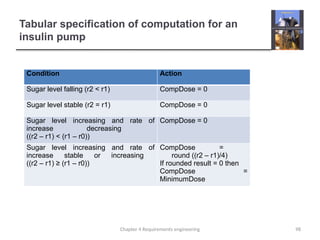
  • 86.
    Requirements specification  Theprocess of writing don the user and system requirements in a requirements document.  User requirements have to be understandable by end- users and customers who do not have a technical background.  System requirements are more detailed requirements and may include more technical information.  The requirements may be part of a contract for the system development  It is therefore important that these are as complete as possible. Chapter 4 Requirements engineering 86
  • 87.
    Ways of writinga system requirements specification Notation Description Natural language The requirements are written using numbered sentences in natural language. Each sentence should express one requirement. Structured natural language The requirements are written in natural language on a standard form or template. Each field provides information about an aspect of the requirement. Design description languages This approach uses a language like a programming language, but with more abstract features to specify the requirements by defining an operational model of the system. This approach is now rarely used although it can be useful for interface specifications. Graphical notations Graphical models, supplemented by text annotations, are used to define the functional requirements for the system; UML use case and sequence diagrams are commonly used. Mathematical specifications These notations are based on mathematical concepts such as finite-state machines or sets. Although these unambiguous specifications can reduce the ambiguity in a requirements document, most customers don’t understand a formal specification. They cannot check that it represents what they want and are reluctant to accept it as a system contract 87 Chapter 4 Requirements engineering
  • 88.
  • 89.
    Natural language specification Requirements are written as natural language sentences supplemented by diagrams and tables.  Used for writing requirements because it is expressive, intuitive and universal. This means that the requirements can be understood by users and customers. Chapter 4 Requirements engineering 89
  • 90.
  • 91.
  • 92.
    Example requirements forthe insulin pump software system 3.2 The system shall measure the blood sugar and deliver insulin, if required, every 10 minutes. (Changes in blood sugar are relatively slow so more frequent measurement is unnecessary; less frequent measurement could lead to unnecessarily high sugar levels.) 3.6 The system shall run a self-test routine every minute with the conditions to be tested and the associated actions defined in Table 1. (A self-test routine can discover hardware and software problems and alert the user to the fact the normal operation may be impossible.) 92 Chapter 4 Requirements engineering
  • 93.
    Structured specifications  Anapproach to writing requirements where the freedom of the requirements writer is limited and requirements are written in a standard way.  This works well for some types of requirements e.g. requirements for embedded control system but is sometimes too rigid for writing business system requirements. Chapter 4 Requirements engineering 93
  • 94.
  • 95.
    A structured specificationof a requirement for an insulin pump 95 Chapter 4 Requirements engineering
  • 96.
    A structured specificationof a requirement for an insulin pump 96 Chapter 4 Requirements engineering
  • 97.
  • 98.
    Tabular specification ofcomputation for an insulin pump Condition Action Sugar level falling (r2 < r1) CompDose = 0 Sugar level stable (r2 = r1) CompDose = 0 Sugar level increasing and rate of increase decreasing ((r2 – r1) < (r1 – r0)) CompDose = 0 Sugar level increasing and rate of increase stable or increasing ((r2 – r1) ≥ (r1 – r0)) CompDose = round ((r2 – r1)/4) If rounded result = 0 then CompDose = MinimumDose 98 Chapter 4 Requirements engineering
  • 99.
  • 100.
    A spiral viewof the requirements engineering process 100 Chapter 4 Requirements engineering
  • 101.
    Requirements elicitation andanalysis 101 Chapter 4 Requirements engineering
  • 102.
    Problems of requirementsanalysis 102 Chapter 4 Requirements engineering
  • 103.
    Requirements elicitation andanalysis  Software engineers work with a range of system stakeholders to find out about the application domain, the services that the system should provide, the required system performance, hardware constraints, other systems, etc.  Stages include:  Requirements discovery,  Requirements classification and organization,  Requirements prioritization and negotiation,  Requirements specification. Chapter 4 Requirements engineering 103
  • 104.
    The requirements elicitationand analysis process 104 Chapter 4 Requirements engineering
  • 105.
  • 106.
  • 107.
    Key points  Thesoftware requirements document is an agreed statement of the system requirements. It should be organized so that both system customers and software developers can use it.  The requirements engineering process is an iterative process including requirements elicitation, specification and validation.  Requirements elicitation and analysis is an iterative process that can be represented as a spiral of activities – requirements discovery, requirements classification and organization, requirements negotiation and requirements documentation. Chapter 4 Requirements engineering 107
  • 108.
    Chapter 4 –Requirements Engineering Lecture 3 108 Chapter 4 Requirements engineering
  • 109.
    Requirements discovery  Theprocess of gathering information about the required and existing systems and distilling the user and system requirements from this information.  Interaction is with system stakeholders from managers to external regulators.  Systems normally have a range of stakeholders. Chapter 4 Requirements engineering 109
  • 110.
    Stakeholders in theMHC-PMS  Patients whose information is recorded in the system.  Doctors who are responsible for assessing and treating patients.  Nurses who coordinate the consultations with doctors and administer some treatments.  Medical receptionists who manage patients’ appointments.  IT staff who are responsible for installing and maintaining the system. Chapter 4 Requirements engineering 110
  • 111.
    Stakeholders in theMHC-PMS  A medical ethics manager who must ensure that the system meets current ethical guidelines for patient care.  Health care managers who obtain management information from the system.  Medical records staff who are responsible for ensuring that system information can be maintained and preserved, and that record keeping procedures have been properly implemented. Chapter 4 Requirements engineering 111
  • 112.
    Interviewing  Formal orinformal interviews with stakeholders are part of most RE processes.  Types of interview  Closed interviews based on pre-determined list of questions  Open interviews where various issues are explored with stakeholders.  Effective interviewing  Be open-minded, avoid pre-conceived ideas about the requirements and are willing to listen to stakeholders.  Prompt the interviewee to get discussions going using a springboard question, a requirements proposal, or by working together on a prototype system. Chapter 4 Requirements engineering 112
  • 113.
  • 114.
  • 115.
    Scenario for collectingmedical history in MHC- PMS 115 Chapter 4 Requirements engineering
  • 116.
    Scenario for collectingmedical history in MHC- PMS 116 Chapter 4 Requirements engineering
  • 117.
    Use cases 117 Chapter 4Requirements engineering
  • 118.
    Use cases forthe MHC-PMS 118 Chapter 4 Requirements engineering
  • 119.
  • 120.
    Scope of ethnography 120 Chapter4 Requirements engineering
  • 121.
    Focused ethnography 121 Chapter 4Requirements engineering
  • 122.
    Ethnography and prototypingfor requirements analysis 122 Chapter 4 Requirements engineering
  • 123.
    Requirements validation 123 Chapter 4Requirements engineering
  • 124.
    Requirements checking 124 Chapter 4Requirements engineering
  • 125.
  • 126.
    Requirements reviews 126 Chapter 4Requirements engineering
  • 127.
    Review checks 127 Chapter 4Requirements engineering
  • 128.
    Requirements management 128 Chapter 4Requirements engineering
  • 129.
    Changing requirements  Thebusiness and technical environment of the system always changes after installation.  New hardware may be introduced, it may be necessary to interface the system with other systems, business priorities may change (with consequent changes in the system support required), and new legislation and regulations may be introduced that the system must necessarily abide by.  The people who pay for a system and the users of that system are rarely the same people.  System customers impose requirements because of organizational and budgetary constraints. These may conflict with end-user requirements and, after delivery, new features may have to be added for user support if the system is to meet its goals. Chapter 4 Requirements engineering 129
  • 130.
    Changing requirements  Largesystems usually have a diverse user community, with many users having different requirements and priorities that may be conflicting or contradictory.  The final system requirements are inevitably a compromise between them and, with experience, it is often discovered that the balance of support given to different users has to be changed. Chapter 4 Requirements engineering 130
  • 131.
    Requirements evolution 131 Chapter 4Requirements engineering
  • 132.
    Requirements management planning Establishes the level of requirements management detail that is required.  Requirements management decisions:  Requirements identification Each requirement must be uniquely identified so that it can be cross-referenced with other requirements.  A change management process This is the set of activities that assess the impact and cost of changes. I discuss this process in more detail in the following section.  Traceability policies These policies define the relationships between each requirement and between the requirements and the system design that should be recorded.  Tool support Tools that may be used range from specialist requirements management systems to spreadsheets and simple database systems. Chapter 4 Requirements engineering 132
  • 133.
    Requirements change management Deciding if a requirements change should be accepted  Problem analysis and change specification • During this stage, the problem or the change proposal is analyzed to check that it is valid. This analysis is fed back to the change requestor who may respond with a more specific requirements change proposal, or decide to withdraw the request.  Change analysis and costing • The effect of the proposed change is assessed using traceability information and general knowledge of the system requirements. Once this analysis is completed, a decision is made whether or not to proceed with the requirements change.  Change implementation • The requirements document and, where necessary, the system design and implementation, are modified. Ideally, the document should be organized so that changes can be easily implemented. Chapter 4 Requirements engineering 133
  • 134.
  • 135.
    Chapter 4 Requirementsengineering 135 Key points  You can use a range of techniques for requirements elicitation including interviews, scenarios, use-cases and ethnography.  Requirements validation is the process of checking the requirements for validity, consistency, completeness, realism and verifiability.  Business, organizational and technical changes inevitably lead to changes to the requirements for a software system. Requirements management is the process of managing and controlling these changes.