Week 2: Cascading Style Sheets
(CSS)
Dr. Maaz Rehan
About W3Schools
• A web developers site, with tutorials & references on web development
languages such as HTML, CSS, JavaScript, PHP, SQL, Python, jQuery, Java,
W3.CSS, and Bootstrap
• The site derives its name from the World Wide Web Consortium (W3C),
but is not affiliated with the W3C
• Created in 1998 by Refsnes Data, a Norwegian software development and
consulting company
• Link to online CSS resource: https://www.w3schools.com/css/default.asp
• Online Exercises can be performed at:
• https://www.w3schools.com/css/exercise.asp
Web Engineering, Fall'19, COMSATS University Islamabad, Wah Campus 2
What is a CSS?
• According to W3Schools
– CSS is a language that describes the style of an
HTML document
– CSS describes how HTML elements are to be
displayed on screen, paper, or in other media
– CSS saves a lot of work. It can control the layout
of multiple web pages all at once
– External stylesheets are stored in CSS files
Web Engineering, Fall'19, COMSATS University Islamabad, Wah Campus 3
Why use CSS?
• HTML only describes the content of a web page, like:
– <h1>This is a heading</h1>
– <p>This is a paragraph.</p>
• When tags like <font>, and color attributes were added to
the HTML 3.2 specification, it started a nightmare for web
developers. Development of large websites, where fonts
and color information were added to every single page,
became a long and expensive process.
• To solve this problem, the World Wide Web Consortium
(W3C) created CSS.
• CSS removed the style formatting from the HTML page
• CSS Saves a Lot of Work. Just one change in style, can
change style of the whole website.
Web Engineering, Fall'19, COMSATS University Islamabad, Wah Campus 4
CSS Syntax
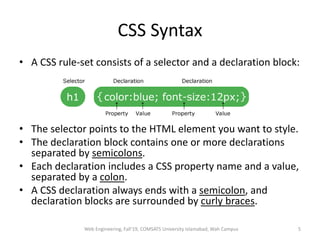
• A CSS rule-set consists of a selector and a declaration block:
• The selector points to the HTML element you want to style.
• The declaration block contains one or more declarations
separated by semicolons.
• Each declaration includes a CSS property name and a value,
separated by a colon.
• A CSS declaration always ends with a semicolon, and
declaration blocks are surrounded by curly braces.
Web Engineering, Fall'19, COMSATS University Islamabad, Wah Campus 5
HTML style Tag
• The <style> tag is used to define style
information for an HTML document
• Inside the <style> element you specify how
HTML elements should render in a browser
• Each HTML document can contain multiple
<style> tags
Web Engineering, Fall'19, COMSATS University Islamabad, Wah Campus 6
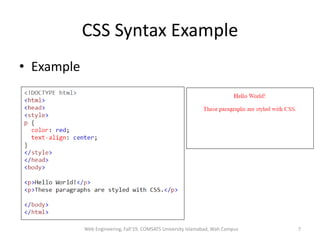
CSS Syntax Example
• Example
Web Engineering, Fall'19, COMSATS University Islamabad, Wah Campus 7
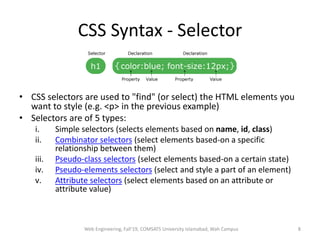
CSS Syntax - Selector
• CSS selectors are used to "find" (or select) the HTML elements you
want to style (e.g. <p> in the previous example)
• Selectors are of 5 types:
i. Simple selectors (selects elements based on name, id, class)
ii. Combinator selectors (select elements based-on a specific
relationship between them)
iii. Pseudo-class selectors (select elements based-on a certain state)
iv. Pseudo-elements selectors (select and style a part of an element)
v. Attribute selectors (select elements based on an attribute or
attribute value)
Web Engineering, Fall'19, COMSATS University Islamabad, Wah Campus 8
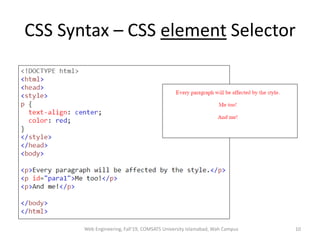
CSS Syntax – CSS element Selector
• The element selector selects HTML elements
based on the element name.
– Example
• For the following code, all <p> elements on the page
will be center-aligned, with a red text color
• p {
text-align: center;
color: red;
}
Web Engineering, Fall'19, COMSATS University Islamabad, Wah Campus 9
CSS Syntax – CSS element Selector
Web Engineering, Fall'19, COMSATS University Islamabad, Wah Campus 10
CSS Syntax – CSS id Selector
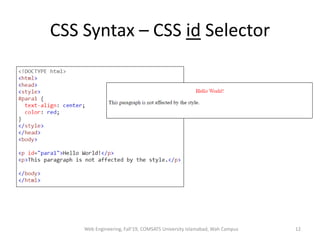
• The id selector uses the id attribute of an HTML
element to select a specific element
• If id of an element is unique within a page, the id
selector is used to select one unique element!
• To select an element with a specific id, write a hash (#)
character, followed by the id of the element
– Example
• The CSS rule below will be applied to the HTML element having
id="para1":
• #para1 {
text-align: center;
color: red;
}
• id name cannot start with a number (#1para is incorrect)
Web Engineering, Fall'19, COMSATS University Islamabad, Wah Campus 11
CSS Syntax – CSS id Selector
Web Engineering, Fall'19, COMSATS University Islamabad, Wah Campus 12
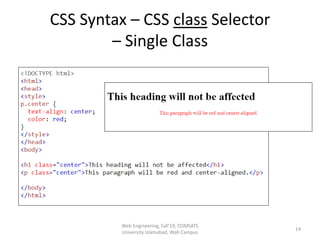
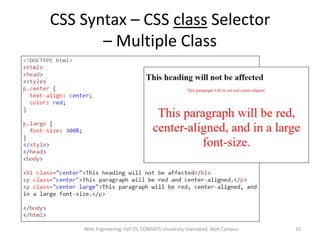
CSS Syntax – CSS class Selector
• The class selector selects HTML elements with a
specific class attribute.
• To select elements with a specific class, write a
period (.) character, followed by the class name.
– Example 1
• All HTML elements with class="center" will be red and
center-aligned:
• .center {
text-align: center;
color: red;
}
Web Engineering, Fall'19, COMSATS University Islamabad, Wah Campus 13
CSS Syntax – CSS class Selector
– Single Class
Web Engineering, Fall'19, COMSATS
University Islamabad, Wah Campus
14
CSS Syntax – CSS class Selector
– Multiple Class
Web Engineering, Fall'19, COMSATS University Islamabad, Wah Campus 15
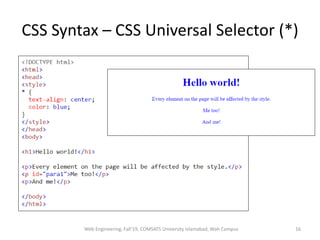
CSS Syntax – CSS Universal Selector (*)
Web Engineering, Fall'19, COMSATS University Islamabad, Wah Campus 16
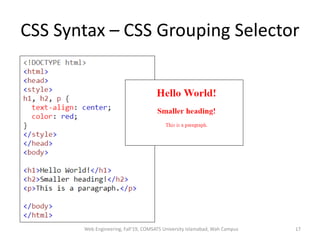
CSS Syntax – CSS Grouping Selector
Web Engineering, Fall'19, COMSATS University Islamabad, Wah Campus 17
Online Examples
• Do all examples given at the url:
https://www.w3schools.com/css/css_selectors
.asp
Web Engineering, Fall'19, COMSATS University Islamabad, Wah Campus 18
How to add CSS?
• There are three ways of inserting a style sheet:
1. Inline CSS
2. Internal CSS
3. External CSS
Web Engineering, Fall'19, COMSATS University Islamabad, Wah Campus 19
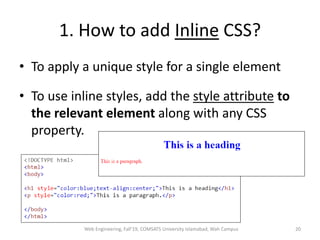
1. How to add Inline CSS?
• To apply a unique style for a single element
• To use inline styles, add the style attribute to
the relevant element along with any CSS
property.
Web Engineering, Fall'19, COMSATS University Islamabad, Wah Campus 20
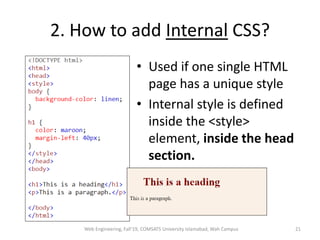
2. How to add Internal CSS?
• Used if one single HTML
page has a unique style
• Internal style is defined
inside the <style>
element, inside the head
section.
Web Engineering, Fall'19, COMSATS University Islamabad, Wah Campus 21
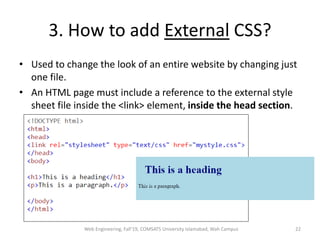
3. How to add External CSS?
• Used to change the look of an entire website by changing just
one file.
• An HTML page must include a reference to the external style
sheet file inside the <link> element, inside the head section.
Web Engineering, Fall'19, COMSATS University Islamabad, Wah Campus 22
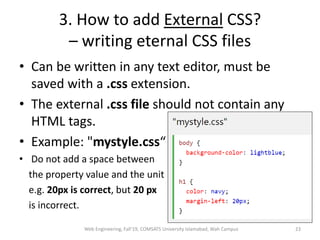
3. How to add External CSS?
– writing eternal CSS files
• Can be written in any text editor, must be
saved with a .css extension.
• The external .css file should not contain any
HTML tags.
• Example: "mystyle.css“
• Do not add a space between
the property value and the unit
e.g. 20px is correct, but 20 px
is incorrect.
Web Engineering, Fall'19, COMSATS University Islamabad, Wah Campus 23
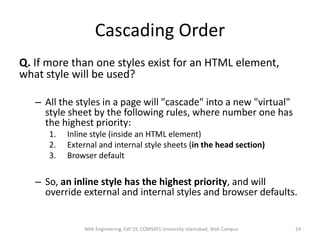
Cascading Order
Q. If more than one styles exist for an HTML element,
what style will be used?
– All the styles in a page will "cascade" into a new "virtual"
style sheet by the following rules, where number one has
the highest priority:
1. Inline style (inside an HTML element)
2. External and internal style sheets (in the head section)
3. Browser default
– So, an inline style has the highest priority, and will
override external and internal styles and browser defaults.
Web Engineering, Fall'19, COMSATS University Islamabad, Wah Campus 24
Lecture 3 - Ends
Web Engineering, Fall'19, COMSATS
University Islamabad, Wah Campus
25
Lecture 4
Web Engineering, Fall'19, COMSATS
University Islamabad, Wah Campus
26
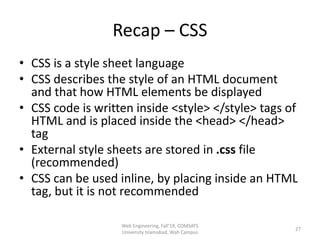
Recap – CSS
• CSS is a style sheet language
• CSS describes the style of an HTML document
and that how HTML elements be displayed
• CSS code is written inside <style> </style> tags of
HTML and is placed inside the <head> </head>
tag
• External style sheets are stored in .css file
(recommended)
• CSS can be used inline, by placing inside an HTML
tag, but it is not recommended
Web Engineering, Fall'19, COMSATS
University Islamabad, Wah Campus
27
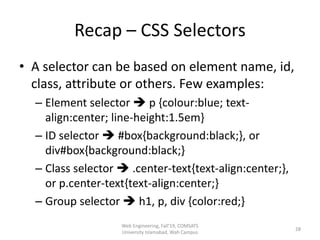
Recap – CSS Selectors
• A selector can be based on element name, id,
class, attribute or others. Few examples:
– Element selector  p {colour:blue; text-
align:center; line-height:1.5em}
– ID selector  #box{background:black;}, or
div#box{background:black;}
– Class selector  .center-text{text-align:center;},
or p.center-text{text-align:center;}
– Group selector  h1, p, div {color:red;}
Web Engineering, Fall'19, COMSATS
University Islamabad, Wah Campus
28
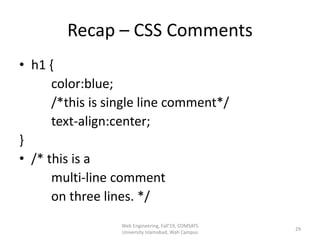
Recap – CSS Comments
• h1 {
color:blue;
/*this is single line comment*/
text-align:center;
}
• /* this is a
multi-line comment
on three lines. */
Web Engineering, Fall'19, COMSATS
University Islamabad, Wah Campus
29
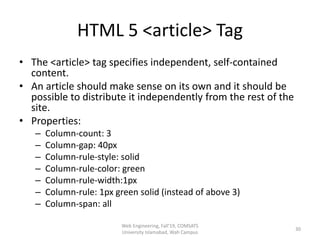
HTML 5 <article> Tag
• The <article> tag specifies independent, self-contained
content.
• An article should make sense on its own and it should be
possible to distribute it independently from the rest of the
site.
• Properties:
– Column-count: 3
– Column-gap: 40px
– Column-rule-style: solid
– Column-rule-color: green
– Column-rule-width:1px
– Column-rule: 1px green solid (instead of above 3)
– Column-span: all
Web Engineering, Fall'19, COMSATS
University Islamabad, Wah Campus
30
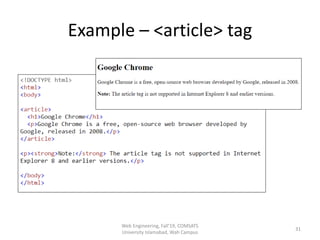
Example – <article> tag
Web Engineering, Fall'19, COMSATS
University Islamabad, Wah Campus
31
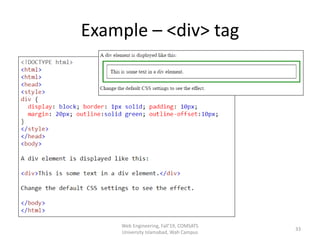
HTML <div> Tag
• It defines a division or a section in an HTML
document.
• The <div> element is often used as a container
for other HTML elements to style them with
CSS or to perform certain tasks with
JavaScript.
Web Engineering, Fall'19, COMSATS
University Islamabad, Wah Campus
32
Example – <div> tag
Web Engineering, Fall'19, COMSATS
University Islamabad, Wah Campus
33
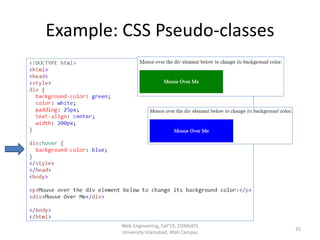
CSS Pseudo-classes
• A pseudo-class defines a special state of an
element.
– For example, it can be used to:
• Style an element when a user hovers mouse over it
• Style visited and unvisited links differently
• Style an element when it gets focus
• Syntax
– selector:pseudo-class { property: value; }
Web Engineering, Fall'19, COMSATS
University Islamabad, Wah Campus
34
Example: CSS Pseudo-classes
Web Engineering, Fall'19, COMSATS
University Islamabad, Wah Campus
35
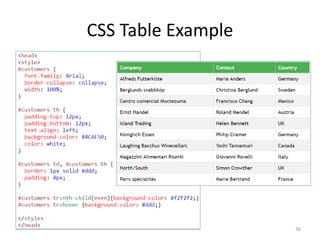
CSS Table Example
36
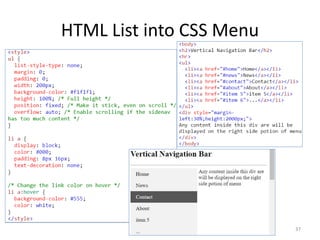
HTML List into CSS Menu
37

Slides-Online-Week2-Website-Frontend-CSS.pptx

  • 1.
    Week 2: CascadingStyle Sheets (CSS) Dr. Maaz Rehan
  • 2.
    About W3Schools • Aweb developers site, with tutorials & references on web development languages such as HTML, CSS, JavaScript, PHP, SQL, Python, jQuery, Java, W3.CSS, and Bootstrap • The site derives its name from the World Wide Web Consortium (W3C), but is not affiliated with the W3C • Created in 1998 by Refsnes Data, a Norwegian software development and consulting company • Link to online CSS resource: https://www.w3schools.com/css/default.asp • Online Exercises can be performed at: • https://www.w3schools.com/css/exercise.asp Web Engineering, Fall'19, COMSATS University Islamabad, Wah Campus 2
  • 3.
    What is aCSS? • According to W3Schools – CSS is a language that describes the style of an HTML document – CSS describes how HTML elements are to be displayed on screen, paper, or in other media – CSS saves a lot of work. It can control the layout of multiple web pages all at once – External stylesheets are stored in CSS files Web Engineering, Fall'19, COMSATS University Islamabad, Wah Campus 3
  • 4.
    Why use CSS? •HTML only describes the content of a web page, like: – <h1>This is a heading</h1> – <p>This is a paragraph.</p> • When tags like <font>, and color attributes were added to the HTML 3.2 specification, it started a nightmare for web developers. Development of large websites, where fonts and color information were added to every single page, became a long and expensive process. • To solve this problem, the World Wide Web Consortium (W3C) created CSS. • CSS removed the style formatting from the HTML page • CSS Saves a Lot of Work. Just one change in style, can change style of the whole website. Web Engineering, Fall'19, COMSATS University Islamabad, Wah Campus 4
  • 5.
    CSS Syntax • ACSS rule-set consists of a selector and a declaration block: • The selector points to the HTML element you want to style. • The declaration block contains one or more declarations separated by semicolons. • Each declaration includes a CSS property name and a value, separated by a colon. • A CSS declaration always ends with a semicolon, and declaration blocks are surrounded by curly braces. Web Engineering, Fall'19, COMSATS University Islamabad, Wah Campus 5
  • 6.
    HTML style Tag •The <style> tag is used to define style information for an HTML document • Inside the <style> element you specify how HTML elements should render in a browser • Each HTML document can contain multiple <style> tags Web Engineering, Fall'19, COMSATS University Islamabad, Wah Campus 6
  • 7.
    CSS Syntax Example •Example Web Engineering, Fall'19, COMSATS University Islamabad, Wah Campus 7
  • 8.
    CSS Syntax -Selector • CSS selectors are used to "find" (or select) the HTML elements you want to style (e.g. <p> in the previous example) • Selectors are of 5 types: i. Simple selectors (selects elements based on name, id, class) ii. Combinator selectors (select elements based-on a specific relationship between them) iii. Pseudo-class selectors (select elements based-on a certain state) iv. Pseudo-elements selectors (select and style a part of an element) v. Attribute selectors (select elements based on an attribute or attribute value) Web Engineering, Fall'19, COMSATS University Islamabad, Wah Campus 8
  • 9.
    CSS Syntax –CSS element Selector • The element selector selects HTML elements based on the element name. – Example • For the following code, all <p> elements on the page will be center-aligned, with a red text color • p { text-align: center; color: red; } Web Engineering, Fall'19, COMSATS University Islamabad, Wah Campus 9
  • 10.
    CSS Syntax –CSS element Selector Web Engineering, Fall'19, COMSATS University Islamabad, Wah Campus 10
  • 11.
    CSS Syntax –CSS id Selector • The id selector uses the id attribute of an HTML element to select a specific element • If id of an element is unique within a page, the id selector is used to select one unique element! • To select an element with a specific id, write a hash (#) character, followed by the id of the element – Example • The CSS rule below will be applied to the HTML element having id="para1": • #para1 { text-align: center; color: red; } • id name cannot start with a number (#1para is incorrect) Web Engineering, Fall'19, COMSATS University Islamabad, Wah Campus 11
  • 12.
    CSS Syntax –CSS id Selector Web Engineering, Fall'19, COMSATS University Islamabad, Wah Campus 12
  • 13.
    CSS Syntax –CSS class Selector • The class selector selects HTML elements with a specific class attribute. • To select elements with a specific class, write a period (.) character, followed by the class name. – Example 1 • All HTML elements with class="center" will be red and center-aligned: • .center { text-align: center; color: red; } Web Engineering, Fall'19, COMSATS University Islamabad, Wah Campus 13
  • 14.
    CSS Syntax –CSS class Selector – Single Class Web Engineering, Fall'19, COMSATS University Islamabad, Wah Campus 14
  • 15.
    CSS Syntax –CSS class Selector – Multiple Class Web Engineering, Fall'19, COMSATS University Islamabad, Wah Campus 15
  • 16.
    CSS Syntax –CSS Universal Selector (*) Web Engineering, Fall'19, COMSATS University Islamabad, Wah Campus 16
  • 17.
    CSS Syntax –CSS Grouping Selector Web Engineering, Fall'19, COMSATS University Islamabad, Wah Campus 17
  • 18.
    Online Examples • Doall examples given at the url: https://www.w3schools.com/css/css_selectors .asp Web Engineering, Fall'19, COMSATS University Islamabad, Wah Campus 18
  • 19.
    How to addCSS? • There are three ways of inserting a style sheet: 1. Inline CSS 2. Internal CSS 3. External CSS Web Engineering, Fall'19, COMSATS University Islamabad, Wah Campus 19
  • 20.
    1. How toadd Inline CSS? • To apply a unique style for a single element • To use inline styles, add the style attribute to the relevant element along with any CSS property. Web Engineering, Fall'19, COMSATS University Islamabad, Wah Campus 20
  • 21.
    2. How toadd Internal CSS? • Used if one single HTML page has a unique style • Internal style is defined inside the <style> element, inside the head section. Web Engineering, Fall'19, COMSATS University Islamabad, Wah Campus 21
  • 22.
    3. How toadd External CSS? • Used to change the look of an entire website by changing just one file. • An HTML page must include a reference to the external style sheet file inside the <link> element, inside the head section. Web Engineering, Fall'19, COMSATS University Islamabad, Wah Campus 22
  • 23.
    3. How toadd External CSS? – writing eternal CSS files • Can be written in any text editor, must be saved with a .css extension. • The external .css file should not contain any HTML tags. • Example: "mystyle.css“ • Do not add a space between the property value and the unit e.g. 20px is correct, but 20 px is incorrect. Web Engineering, Fall'19, COMSATS University Islamabad, Wah Campus 23
  • 24.
    Cascading Order Q. Ifmore than one styles exist for an HTML element, what style will be used? – All the styles in a page will "cascade" into a new "virtual" style sheet by the following rules, where number one has the highest priority: 1. Inline style (inside an HTML element) 2. External and internal style sheets (in the head section) 3. Browser default – So, an inline style has the highest priority, and will override external and internal styles and browser defaults. Web Engineering, Fall'19, COMSATS University Islamabad, Wah Campus 24
  • 25.
    Lecture 3 -Ends Web Engineering, Fall'19, COMSATS University Islamabad, Wah Campus 25
  • 26.
    Lecture 4 Web Engineering,Fall'19, COMSATS University Islamabad, Wah Campus 26
  • 27.
    Recap – CSS •CSS is a style sheet language • CSS describes the style of an HTML document and that how HTML elements be displayed • CSS code is written inside <style> </style> tags of HTML and is placed inside the <head> </head> tag • External style sheets are stored in .css file (recommended) • CSS can be used inline, by placing inside an HTML tag, but it is not recommended Web Engineering, Fall'19, COMSATS University Islamabad, Wah Campus 27
  • 28.
    Recap – CSSSelectors • A selector can be based on element name, id, class, attribute or others. Few examples: – Element selector  p {colour:blue; text- align:center; line-height:1.5em} – ID selector  #box{background:black;}, or div#box{background:black;} – Class selector  .center-text{text-align:center;}, or p.center-text{text-align:center;} – Group selector  h1, p, div {color:red;} Web Engineering, Fall'19, COMSATS University Islamabad, Wah Campus 28
  • 29.
    Recap – CSSComments • h1 { color:blue; /*this is single line comment*/ text-align:center; } • /* this is a multi-line comment on three lines. */ Web Engineering, Fall'19, COMSATS University Islamabad, Wah Campus 29
  • 30.
    HTML 5 <article>Tag • The <article> tag specifies independent, self-contained content. • An article should make sense on its own and it should be possible to distribute it independently from the rest of the site. • Properties: – Column-count: 3 – Column-gap: 40px – Column-rule-style: solid – Column-rule-color: green – Column-rule-width:1px – Column-rule: 1px green solid (instead of above 3) – Column-span: all Web Engineering, Fall'19, COMSATS University Islamabad, Wah Campus 30
  • 31.
    Example – <article>tag Web Engineering, Fall'19, COMSATS University Islamabad, Wah Campus 31
  • 32.
    HTML <div> Tag •It defines a division or a section in an HTML document. • The <div> element is often used as a container for other HTML elements to style them with CSS or to perform certain tasks with JavaScript. Web Engineering, Fall'19, COMSATS University Islamabad, Wah Campus 32
  • 33.
    Example – <div>tag Web Engineering, Fall'19, COMSATS University Islamabad, Wah Campus 33
  • 34.
    CSS Pseudo-classes • Apseudo-class defines a special state of an element. – For example, it can be used to: • Style an element when a user hovers mouse over it • Style visited and unvisited links differently • Style an element when it gets focus • Syntax – selector:pseudo-class { property: value; } Web Engineering, Fall'19, COMSATS University Islamabad, Wah Campus 34
  • 35.
    Example: CSS Pseudo-classes WebEngineering, Fall'19, COMSATS University Islamabad, Wah Campus 35
  • 36.
  • 37.
    HTML List intoCSS Menu 37