CLTL Python Course 
Object Oriented Programming in Python 
2nd session 
May 1st 2013
Reminder session 1 
● What is Object Oriented Programming 
● Classes, objects, methods, properties... 
● How to define classes, with methods and attributes 
● How to create objects 
● The __init__ method 
● Basic inheritance
Session 2 
● How organize and reuse our code 
– Scripts 
– Classes 
– Modules 
– Packages 
● How to use eclipse with python 
– Creating projects, modules 
– Example
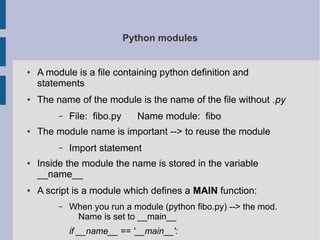
Python modules 
● A module is a file containing python definition and 
statements 
● The name of the module is the name of the file without .py 
– File: fibo.py Name module: fibo 
● The module name is important --> to reuse the module 
– Import statement 
● Inside the module the name is stored in the variable 
__name__ 
● A script is a module which defines a MAIN function: 
– When you run a module (python fibo.py) --> the mod. 
Name is set to __main__ 
if __name__ == '__main__':
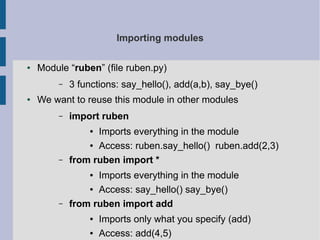
Importing modules 
● Module “ruben” (file ruben.py) 
– 3 functions: say_hello(), add(a,b), say_bye() 
● We want to reuse this module in other modules 
– import ruben 
● Imports everything in the module 
● Access: ruben.say_hello() ruben.add(2,3) 
– from ruben import * 
● Imports everything in the module 
● Access: say_hello() say_bye() 
– from ruben import add 
● Imports only what you specify (add) 
● Access: add(4,5)
More on modules 
● Function dir(module) --> gives you all the content of the mod 
– Import ruben 
– dir(ruben) --> [...,'say_hello', 'add', 'say_bye'] 
● Module search path: (where python looks when “import”) 
1. Current directory 
2. PYTHONPATH environment variable 
3. Default location in your installation 
● You can modify inside your script the variable sys.path (list) 
to modify the PYTHONPATH 
● Import sys 
● Sys.path.append('C:/ruben/example/my_code)
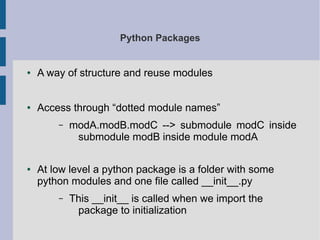
Python Packages 
● A way of structure and reuse modules 
● Access through “dotted module names” 
– modA.modB.modC --> submodule modC inside 
submodule modB inside module modA 
● At low level a python package is a folder with some 
python modules and one file called __init__.py 
– This __init__ is called when we import the 
package to initialization
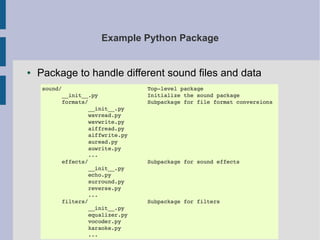
Example Python Package 
● Package to handle different sound files and data
Example Python Package 
● Package to handle different sound files and data 
DIFFERENT WAYS OF IMPORTING / USING 
Import sounds.effects.echo 
--> sunfs.effects.echo.echofilter(....) 
From sound.effects import echo 
--> echo.echofilter(....) 
From sound.effects.echo import echofilter 
--> echofilter(...) 
From sound.effects import * 
--> depends on the __all__ defined in 
sound.effects.__init__ 
__all__ = ['echo','surround']
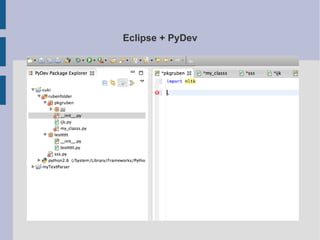
Eclipse + PyDev

CLTL python course: Object Oriented Programming (2/3)

  • 1.
    CLTL Python Course Object Oriented Programming in Python 2nd session May 1st 2013
  • 2.
    Reminder session 1 ● What is Object Oriented Programming ● Classes, objects, methods, properties... ● How to define classes, with methods and attributes ● How to create objects ● The __init__ method ● Basic inheritance
  • 3.
    Session 2 ●How organize and reuse our code – Scripts – Classes – Modules – Packages ● How to use eclipse with python – Creating projects, modules – Example
  • 4.
    Python modules ●A module is a file containing python definition and statements ● The name of the module is the name of the file without .py – File: fibo.py Name module: fibo ● The module name is important --> to reuse the module – Import statement ● Inside the module the name is stored in the variable __name__ ● A script is a module which defines a MAIN function: – When you run a module (python fibo.py) --> the mod. Name is set to __main__ if __name__ == '__main__':
  • 5.
    Importing modules ●Module “ruben” (file ruben.py) – 3 functions: say_hello(), add(a,b), say_bye() ● We want to reuse this module in other modules – import ruben ● Imports everything in the module ● Access: ruben.say_hello() ruben.add(2,3) – from ruben import * ● Imports everything in the module ● Access: say_hello() say_bye() – from ruben import add ● Imports only what you specify (add) ● Access: add(4,5)
  • 6.
    More on modules ● Function dir(module) --> gives you all the content of the mod – Import ruben – dir(ruben) --> [...,'say_hello', 'add', 'say_bye'] ● Module search path: (where python looks when “import”) 1. Current directory 2. PYTHONPATH environment variable 3. Default location in your installation ● You can modify inside your script the variable sys.path (list) to modify the PYTHONPATH ● Import sys ● Sys.path.append('C:/ruben/example/my_code)
  • 7.
    Python Packages ●A way of structure and reuse modules ● Access through “dotted module names” – modA.modB.modC --> submodule modC inside submodule modB inside module modA ● At low level a python package is a folder with some python modules and one file called __init__.py – This __init__ is called when we import the package to initialization
  • 8.
    Example Python Package ● Package to handle different sound files and data
  • 9.
    Example Python Package ● Package to handle different sound files and data DIFFERENT WAYS OF IMPORTING / USING Import sounds.effects.echo --> sunfs.effects.echo.echofilter(....) From sound.effects import echo --> echo.echofilter(....) From sound.effects.echo import echofilter --> echofilter(...) From sound.effects import * --> depends on the __all__ defined in sound.effects.__init__ __all__ = ['echo','surround']
  • 10.