



Introduction to E-Learning
www.Skillshare.com
Objectives
• This chapter contains information on understanding the
fundamental concepts of e-learning.
• In this chapter, e-learning is defined and the advantages and
disadvantages of use are discussed.
• This chapter also describes corporate as well as the
elementary and secondary use of e-learning and explores the
impact of e-learning on the traditional school infrastructure.
Traditional Learning
• Traditional Learning vs E-Learning
Discussion Class
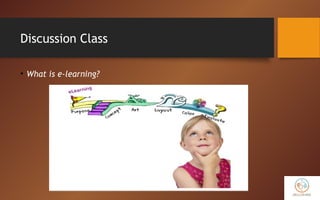
• What is e-learning?
What is E-Learning?
• E-learning is a means of education that incorporates self-
motivation, communication, efficiency, and technology.
• Because there is limited social interaction, students must keep
themselves motivated.
• The isolation intrinsic to e-learning requires students to communicate
with each other and the instructor frequently to accomplish their
assigned tasks.
What is E-Learning? (cont’d)
• E-learning is efficient as it eliminates distances and subsequent
commutes.
• Distance is eliminated because the e-learning content is designed with
media that can be accessed from properly equipped computer
terminals, and other means of Internet accessible technology.
• E-learning is a flexible term used to describing a means of
teaching through technology.
Different Types of E-Learning
• The different types of e-learning are based on:
• Means of communication
• Schedule
• E-learning class structure
• Technologies used .
Discussion Class
• Implementation of e-learning in Indonesia?
Means of Communication
• There are several different means for individuals to
communicate with each other and their instructor.
• E-learning can be conducted solely through on-line
applications. In other cases, if distance is not a factor, some
face-to-face communication can be included to create blended
e-learning.
Discussion Class
• What is blended e-learning?
Means of Communication (cont’d)
• Blended e-learning includes elements of web interaction and
in-person interaction.
• Technology broadens the definition of face-to-face as there
can be the use of two way video, and two way audio.
Introducing these elements of participation create a blended
e-learning experience.
Schedule
• E-learning can either be Synchronous or Asynchronous.
• Synchronous means that real-time communication is
implemented, such as video conferencing, teleconferencing,
and on-line chat programs.
• Asynchronous indicates that other means of communication are
utilized that do not require real time responses.
• Examples of asynchronous e-learning include; e-mail, list serves,
threaded discussions, blogs, and on-line forums.
E-Learning Class Structure
• E-learning class structure addresses how the instruction is
administered. E-learning can be self-paced, instructor-led, or
self-study with an expert.
• Self-paced instruction is administered by giving the learner the
materials: needs to complete the training/instruction.
• Instructor-led training affords the learner a guide to implement the
instruction.
• Self-study with an expert is a combination of self-paced and instructor-
led.
E-Learning Class Structure (cont’d)
• As in self-paced, the learner is responsible for staying on task
and on schedule, however as in instructor-led, there is
interaction with an authority figure that checks the learners'
progress.
Technology
• Technology used to implement instruction is not limited to
web-based materials.
• E-learning can be achieved by utilizing any form of technology
that sustains information yielding media.
• Technology is the most variable element in e-learning. The
more advanced the technology becomes, the more options
there are to further e-learning.
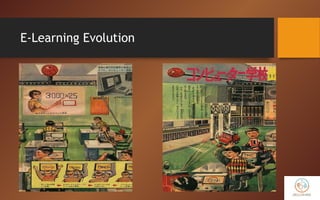
E-Learning Evolution
The E-Learning Evolution
• In the early 1990s, many companies were using videotape-based
training for their employees.
• Since it was obvious that video was not the best solution, a new form
of training evolved, CBT or Computer Based Training.
• Windows 3.1, Macintosh, CD-ROMs, PowerPoint marked the technological
advancement of the Multimedia Era.
• Although the CD-ROM Computer-Based Training made advances toward
the better, it still lacked the ability to track employees' performance
in a central database and was also not as easy to upgrade.
The E-Learning Evolution (cont’d)
• All these problems would disappear with the use of the
Internet as a means of delivering content.
• The problem was, when the content was placed on the web, it was
simply text to begin with and maybe a few graphics.
• People in the field of e-learning began to realize that you
simply can not put information on the web without a learning
strategy for the users.
• One of the first innovations in actual e-learning was the LMS.
Discussion Class
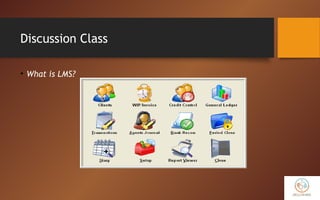
• What is LMS?
The E-Learning Evolution (cont’d)
• One of the first innovations in actual e-learning was the LMS or
Learning Management System.
• This enabled schools and companies to place courses online and be able to
track students' progress, communicate with students effectively and
provide a place for real-time discussions.
• The eClassroom evolved shortly after, which are “...web-based
synchronous events with integrated CBT and simulations.”
• E-learning has come a very long way since its early days of being
text-based via the Web or CD-ROM. So what does the future hold?
Discussion Class
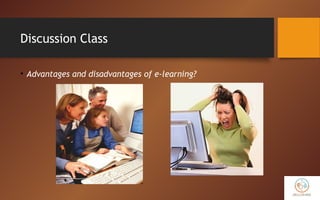
• Advantages and disadvantages of e-learning?
Advantages of E-Learning
• E-learning is beneficial to education, corporations and to all types of
learners.
• It is affordable, saves time, and produces measurable results.
• E-learning is more cost effective than traditional learning because less time
and money is spent traveling.
• Flexibility is a major benefit of e-learning.
• E-learning has the advantage of taking class anytime anywhere.
• Students like e-learning because it accommodates different types of
learning styles.
Advantages of E-Learning (cont’d)
• Learners can fit e-learning into their busy schedule. If they
hold a job, they can still be working with e-learning.
• E-learning encourages students to peruse through information
by using hyperlinks and sites on the worldwide Web.
• E-learning helps students develop knowledge of the Internet.
• E-learning is flexible and can be customized to meet the
individual needs of the learners.
Disadvantages of E-Learning
• One disadvantage of e-learning is that learners need to have
access to a computer as well as the Internet.
• They also need to have computer skills with programs such as word
processing, Internet browsers, and e-mail.
• Without these skills and software it is not possible for the student to
succeed in e-learning.
• Slow Internet connections or older computers may make accessing
course materials difficult.
Disadvantages of E-Learning (cont’d)
• E-learning also requires just as much time for attending class
and completing assignments as any traditional classroom
course.
• Another disadvantage of e-learning is that students may feel
isolated from the instructor.
E-Learning Characteristics
• Self-Managing
• Feedback-Interactivity
• Multimedia-Learners Style
• Just in Time
• Dynamic Updating
• Easy Accessibility / Access Ease
• Collaborative Learning.
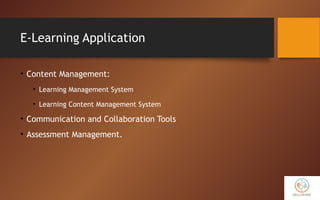
E-Learning Application
• Content Management:
• Learning Management System
• Learning Content Management System
• Communication and Collaboration Tools
• Assessment Management.
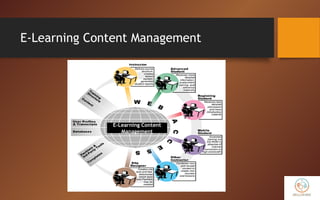
E-Learning Content Management
E-Learning Content
Management
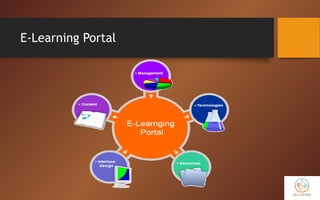
E-Learning Portal
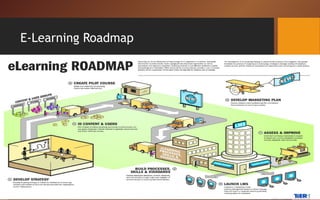
E-Learning Roadmap
Thank You

Skillshare Review | A complete Introduction about E-learning

  • 1.
  • 2.
    Objectives • This chaptercontains information on understanding the fundamental concepts of e-learning. • In this chapter, e-learning is defined and the advantages and disadvantages of use are discussed. • This chapter also describes corporate as well as the elementary and secondary use of e-learning and explores the impact of e-learning on the traditional school infrastructure.
  • 3.
  • 4.
  • 5.
    What is E-Learning? •E-learning is a means of education that incorporates self- motivation, communication, efficiency, and technology. • Because there is limited social interaction, students must keep themselves motivated. • The isolation intrinsic to e-learning requires students to communicate with each other and the instructor frequently to accomplish their assigned tasks.
  • 6.
    What is E-Learning?(cont’d) • E-learning is efficient as it eliminates distances and subsequent commutes. • Distance is eliminated because the e-learning content is designed with media that can be accessed from properly equipped computer terminals, and other means of Internet accessible technology. • E-learning is a flexible term used to describing a means of teaching through technology.
  • 7.
    Different Types ofE-Learning • The different types of e-learning are based on: • Means of communication • Schedule • E-learning class structure • Technologies used .
  • 8.
    Discussion Class • Implementationof e-learning in Indonesia?
  • 9.
    Means of Communication •There are several different means for individuals to communicate with each other and their instructor. • E-learning can be conducted solely through on-line applications. In other cases, if distance is not a factor, some face-to-face communication can be included to create blended e-learning.
  • 10.
    Discussion Class • Whatis blended e-learning?
  • 11.
    Means of Communication(cont’d) • Blended e-learning includes elements of web interaction and in-person interaction. • Technology broadens the definition of face-to-face as there can be the use of two way video, and two way audio. Introducing these elements of participation create a blended e-learning experience.
  • 12.
    Schedule • E-learning caneither be Synchronous or Asynchronous. • Synchronous means that real-time communication is implemented, such as video conferencing, teleconferencing, and on-line chat programs. • Asynchronous indicates that other means of communication are utilized that do not require real time responses. • Examples of asynchronous e-learning include; e-mail, list serves, threaded discussions, blogs, and on-line forums.
  • 13.
    E-Learning Class Structure •E-learning class structure addresses how the instruction is administered. E-learning can be self-paced, instructor-led, or self-study with an expert. • Self-paced instruction is administered by giving the learner the materials: needs to complete the training/instruction. • Instructor-led training affords the learner a guide to implement the instruction. • Self-study with an expert is a combination of self-paced and instructor- led.
  • 14.
    E-Learning Class Structure(cont’d) • As in self-paced, the learner is responsible for staying on task and on schedule, however as in instructor-led, there is interaction with an authority figure that checks the learners' progress.
  • 15.
    Technology • Technology usedto implement instruction is not limited to web-based materials. • E-learning can be achieved by utilizing any form of technology that sustains information yielding media. • Technology is the most variable element in e-learning. The more advanced the technology becomes, the more options there are to further e-learning.
  • 16.
  • 17.
    The E-Learning Evolution •In the early 1990s, many companies were using videotape-based training for their employees. • Since it was obvious that video was not the best solution, a new form of training evolved, CBT or Computer Based Training. • Windows 3.1, Macintosh, CD-ROMs, PowerPoint marked the technological advancement of the Multimedia Era. • Although the CD-ROM Computer-Based Training made advances toward the better, it still lacked the ability to track employees' performance in a central database and was also not as easy to upgrade.
  • 18.
    The E-Learning Evolution(cont’d) • All these problems would disappear with the use of the Internet as a means of delivering content. • The problem was, when the content was placed on the web, it was simply text to begin with and maybe a few graphics. • People in the field of e-learning began to realize that you simply can not put information on the web without a learning strategy for the users. • One of the first innovations in actual e-learning was the LMS.
  • 19.
  • 20.
    The E-Learning Evolution(cont’d) • One of the first innovations in actual e-learning was the LMS or Learning Management System. • This enabled schools and companies to place courses online and be able to track students' progress, communicate with students effectively and provide a place for real-time discussions. • The eClassroom evolved shortly after, which are “...web-based synchronous events with integrated CBT and simulations.” • E-learning has come a very long way since its early days of being text-based via the Web or CD-ROM. So what does the future hold?
  • 21.
    Discussion Class • Advantagesand disadvantages of e-learning?
  • 22.
    Advantages of E-Learning •E-learning is beneficial to education, corporations and to all types of learners. • It is affordable, saves time, and produces measurable results. • E-learning is more cost effective than traditional learning because less time and money is spent traveling. • Flexibility is a major benefit of e-learning. • E-learning has the advantage of taking class anytime anywhere. • Students like e-learning because it accommodates different types of learning styles.
  • 23.
    Advantages of E-Learning(cont’d) • Learners can fit e-learning into their busy schedule. If they hold a job, they can still be working with e-learning. • E-learning encourages students to peruse through information by using hyperlinks and sites on the worldwide Web. • E-learning helps students develop knowledge of the Internet. • E-learning is flexible and can be customized to meet the individual needs of the learners.
  • 24.
    Disadvantages of E-Learning •One disadvantage of e-learning is that learners need to have access to a computer as well as the Internet. • They also need to have computer skills with programs such as word processing, Internet browsers, and e-mail. • Without these skills and software it is not possible for the student to succeed in e-learning. • Slow Internet connections or older computers may make accessing course materials difficult.
  • 25.
    Disadvantages of E-Learning(cont’d) • E-learning also requires just as much time for attending class and completing assignments as any traditional classroom course. • Another disadvantage of e-learning is that students may feel isolated from the instructor.
  • 26.
    E-Learning Characteristics • Self-Managing •Feedback-Interactivity • Multimedia-Learners Style • Just in Time • Dynamic Updating • Easy Accessibility / Access Ease • Collaborative Learning.
  • 27.
    E-Learning Application • ContentManagement: • Learning Management System • Learning Content Management System • Communication and Collaboration Tools • Assessment Management.
  • 28.
  • 29.
  • 30.
  • 31.