E-Learning Tools
- an overview
David Jeckells
elearning: JISC’s Definition
• eLearning can cover a spectrum of activities:
– supporting learning
– blended learning (the combination of traditional and eLearning
practices)
– learning that is delivered entirely online.
• Whatever the technology, however, learning is the vital element.
• Defined as 'learning facilitated and supported through the use
of information and communications technology', eLearning
may involve the use of a range of technologies.
(JISC: Joint Information Systems Committee)
Attributes of eLearning
JISC identifies benefits to learners in six key dimensions:
1. Connectivity - access to information is available on a global scale.
2. Flexibility - learning can take place any time, any place.
3. Interactivity - assessment of learning can be immediate and
autonomous.
4. Collaboration - use of discussion tools can support collaborative
learning beyond the classroom.
5. Extended opportunities - eContent can reinforce and extend
classroom-based learning.
6. Motivation (?) - multimedia resources can make learning
engaging, participative, fun.
7th? Personalisation - Adaptable Learning Pathways
Learning or e-learning?
• The first five of these dimensions can be considered as attributes of
eLearning
• Motivation is a quality of good educational design what ever mode
of delivery is selected.
• Key difference between eLearning and traditional learning using
other forms of information technologies:
– the distributed network (mobile or computer) that
eLearning is conducted on.
• In accepting this, eLearning as a method of learning, can be
distinguished from learning conducted on stand-alone systems.
Tools & Resources
eLearning is a method of learning delivered on a distributed or mobile
tele/communication technology platform and conducted using:
•information technologies
•eTools/services
•eResources
for learning purposes.
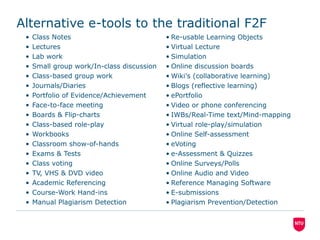
Alternative e-tools to the traditional F2F
• Class Notes
• Lectures
• Lab work
• Small group work/In-class discussion
• Class-based group work
• Journals/Diaries
• Portfolio of Evidence/Achievement
• Face-to-face meeting
• Boards & Flip-charts
• Class-based role-play
• Workbooks
• Classroom show-of-hands
• Exams & Tests
• Class voting
• TV, VHS & DVD video
• Academic Referencing
• Course-Work Hand-ins
• Manual Plagiarism Detection
• Re-usable Learning Objects
• Virtual Lecture
• Simulation
• Online discussion boards
• Wiki’s (collaborative learning)
• Blogs (reflective learning)
• ePortfolio
• Video or phone conferencing
• IWBs/Real-Time text/Mind-mapping
• Virtual role-play/simulation
• Online Self-assessment
• eVoting
• e-Assessment & Quizzes
• Online Surveys/Polls
• Online Audio and Video
• Reference Managing Software
• E-submissions
• Plagiarism Prevention/Detection
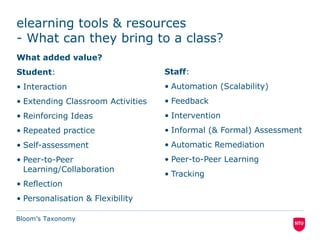
elearning tools & resources
- What can they bring to a class?
What added value?
Student:
• Interaction
• Extending Classroom Activities
• Reinforcing Ideas
• Repeated practice
• Self-assessment
• Peer-to-Peer
Learning/Collaboration
• Reflection
• Personalisation & Flexibility
Staff:
• Automation (Scalability)
• Feedback
• Intervention
• Informal (& Formal) Assessment
• Automatic Remediation
• Peer-to-Peer Learning
• Tracking
Bloom’s Taxonomy
The eLearning Big Questions
• Will e-learning take more of my time?
• Will students stop attending lectures?
• How do I manage/choose the technology?
– JISC: Pedagogy Case Studies Templates – Mapping Specific Activities to
appropriate tools & techniques Technologies (doc)
(LTSN Generic Centre, 2003)
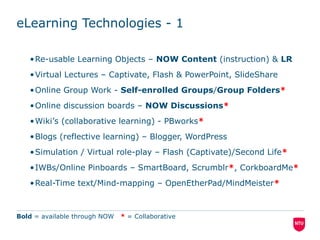
eLearning Technologies - 1
•Re-usable Learning Objects – NOW Content (instruction) & LR
•Virtual Lectures – Captivate, Flash & PowerPoint, SlideShare
•Online Group Work - Self-enrolled Groups/Group Folders*
•Online discussion boards – NOW Discussions*
•Wiki’s (collaborative learning) - PBworks*
•Blogs (reflective learning) – Blogger, WordPress
•Simulation / Virtual role-play – Flash (Captivate)/Second Life*
•IWBs/Online Pinboards – SmartBoard, Scrumblr*, CorkboardMe*
•Real-Time text/Mind-mapping – OpenEtherPad/MindMeister*
•Social Resource Sharing/Curation – Twitter* Pinterest*
Bold = available through NOW * = Collaborative
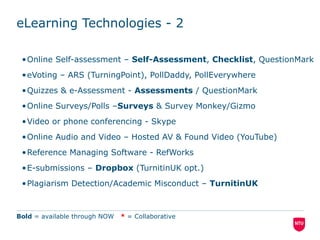
eLearning Technologies - 2
•Online Self-assessment – Self-Assessment, Checklist, QuestionMark
•eVoting – ARS (TurningPoint), PollDaddy, PollEverywhere
•Quizzes & e-Assessment - Assessments / QuestionMark
•Online Surveys/Polls –Surveys & Survey Monkey/Gizmo
•Video or phone conferencing - Skype
•Online Audio and Video – Hosted AV & Found Video (YouTube)
•Reference Managing Software - RefWorks
•E-submissions – Dropbox (TurnitinUK opt.)
•Plagiarism Detection/Academic Misconduct – TurnitinUK
Bold = available through NOW * = Collaborative
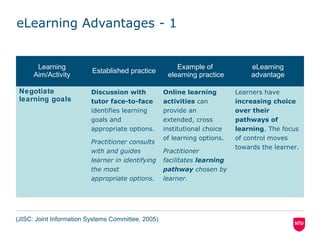
eLearning Advantages – 1
Learning
Aim/Activity
Established practice
Example of
elearning practice
eLearning
advantage
Negotiate
learning goals
Discussion with
tutor face-to-face
identifies learning
goals and
appropriate options.
Practitioner consults
with and guides
learner in identifying
the most
appropriate options.
Online learning
activities can
provide an
extended, cross
institutional choice
of learning options.
Practitioner
facilitates learning
pathway chosen by
learner.
Learners have
increasing choice
over their
pathways of
learning. The focus
of control moves
towards the learner.
(JISC: Joint Information Systems Committee, 2005)
JISC: Pedagogy Case Studies Templates – Mapping Specific Activities
to Technologies (doc)
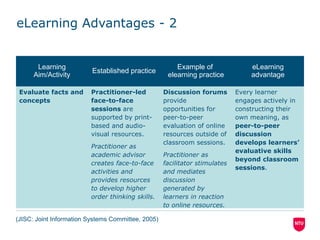
eLearning Advantages - 2
Learning
Aim/Activity
Established practice
Example of
elearning practice
eLearning
advantage
Evaluate facts and
concepts
Practitioner-led
face-to-face
sessions are
supported by print-
based and audio-
visual resources.
Practitioner as
academic advisor
creates face-to-face
activities and
provides resources
to develop higher
order thinking skills.
Discussion forums
provide
opportunities for
peer-to-peer
evaluation of online
resources outside of
classroom sessions.
Practitioner as
facilitator stimulates
and mediates
discussion
generated by
learners in reaction
to online resources.
Every learner
engages actively in
constructing their
own meaning, as
peer-to-peer
discussion
develops learners’
evaluative skills
beyond classroom
sessions.
(JISC: Joint Information Systems Committee, 2005)
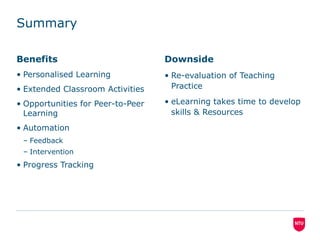
Summary
Benefits
• Personalised Learning
• Extended Classroom Activities
• Opportunities for Peer-to-Peer
Learning
• Automation
– Feedback
– Intervention
• Progress Tracking
Downside
• Re-evaluation of Teaching
Practice
• eLearning takes time to develop
skills & Resources
Elearning Tool Survey
Poll.fm/48kbh

E learning tools - an overview

  • 1.
    E-Learning Tools - anoverview David Jeckells
  • 2.
    elearning: JISC’s Definition •eLearning can cover a spectrum of activities: – supporting learning – blended learning (the combination of traditional and eLearning practices) – learning that is delivered entirely online. • Whatever the technology, however, learning is the vital element. • Defined as 'learning facilitated and supported through the use of information and communications technology', eLearning may involve the use of a range of technologies. (JISC: Joint Information Systems Committee)
  • 3.
    Attributes of eLearning JISCidentifies benefits to learners in six key dimensions: 1. Connectivity - access to information is available on a global scale. 2. Flexibility - learning can take place any time, any place. 3. Interactivity - assessment of learning can be immediate and autonomous. 4. Collaboration - use of discussion tools can support collaborative learning beyond the classroom. 5. Extended opportunities - eContent can reinforce and extend classroom-based learning. 6. Motivation (?) - multimedia resources can make learning engaging, participative, fun. 7th? Personalisation - Adaptable Learning Pathways
  • 4.
    Learning or e-learning? •The first five of these dimensions can be considered as attributes of eLearning • Motivation is a quality of good educational design what ever mode of delivery is selected. • Key difference between eLearning and traditional learning using other forms of information technologies: – the distributed network (mobile or computer) that eLearning is conducted on. • In accepting this, eLearning as a method of learning, can be distinguished from learning conducted on stand-alone systems.
  • 5.
    Tools & Resources eLearningis a method of learning delivered on a distributed or mobile tele/communication technology platform and conducted using: •information technologies •eTools/services •eResources for learning purposes.
  • 6.
    Alternative e-tools tothe traditional F2F • Class Notes • Lectures • Lab work • Small group work/In-class discussion • Class-based group work • Journals/Diaries • Portfolio of Evidence/Achievement • Face-to-face meeting • Boards & Flip-charts • Class-based role-play • Workbooks • Classroom show-of-hands • Exams & Tests • Class voting • TV, VHS & DVD video • Academic Referencing • Course-Work Hand-ins • Manual Plagiarism Detection • Re-usable Learning Objects • Virtual Lecture • Simulation • Online discussion boards • Wiki’s (collaborative learning) • Blogs (reflective learning) • ePortfolio • Video or phone conferencing • IWBs/Real-Time text/Mind-mapping • Virtual role-play/simulation • Online Self-assessment • eVoting • e-Assessment & Quizzes • Online Surveys/Polls • Online Audio and Video • Reference Managing Software • E-submissions • Plagiarism Prevention/Detection
  • 7.
    elearning tools &resources - What can they bring to a class? What added value? Student: • Interaction • Extending Classroom Activities • Reinforcing Ideas • Repeated practice • Self-assessment • Peer-to-Peer Learning/Collaboration • Reflection • Personalisation & Flexibility Staff: • Automation (Scalability) • Feedback • Intervention • Informal (& Formal) Assessment • Automatic Remediation • Peer-to-Peer Learning • Tracking Bloom’s Taxonomy
  • 8.
    The eLearning BigQuestions • Will e-learning take more of my time? • Will students stop attending lectures? • How do I manage/choose the technology? – JISC: Pedagogy Case Studies Templates – Mapping Specific Activities to appropriate tools & techniques Technologies (doc) (LTSN Generic Centre, 2003)
  • 9.
    eLearning Technologies -1 •Re-usable Learning Objects – NOW Content (instruction) & LR •Virtual Lectures – Captivate, Flash & PowerPoint, SlideShare •Online Group Work - Self-enrolled Groups/Group Folders* •Online discussion boards – NOW Discussions* •Wiki’s (collaborative learning) - PBworks* •Blogs (reflective learning) – Blogger, WordPress •Simulation / Virtual role-play – Flash (Captivate)/Second Life* •IWBs/Online Pinboards – SmartBoard, Scrumblr*, CorkboardMe* •Real-Time text/Mind-mapping – OpenEtherPad/MindMeister* •Social Resource Sharing/Curation – Twitter* Pinterest* Bold = available through NOW * = Collaborative
  • 10.
    eLearning Technologies -2 •Online Self-assessment – Self-Assessment, Checklist, QuestionMark •eVoting – ARS (TurningPoint), PollDaddy, PollEverywhere •Quizzes & e-Assessment - Assessments / QuestionMark •Online Surveys/Polls –Surveys & Survey Monkey/Gizmo •Video or phone conferencing - Skype •Online Audio and Video – Hosted AV & Found Video (YouTube) •Reference Managing Software - RefWorks •E-submissions – Dropbox (TurnitinUK opt.) •Plagiarism Detection/Academic Misconduct – TurnitinUK Bold = available through NOW * = Collaborative
  • 11.
    eLearning Advantages –1 Learning Aim/Activity Established practice Example of elearning practice eLearning advantage Negotiate learning goals Discussion with tutor face-to-face identifies learning goals and appropriate options. Practitioner consults with and guides learner in identifying the most appropriate options. Online learning activities can provide an extended, cross institutional choice of learning options. Practitioner facilitates learning pathway chosen by learner. Learners have increasing choice over their pathways of learning. The focus of control moves towards the learner. (JISC: Joint Information Systems Committee, 2005) JISC: Pedagogy Case Studies Templates – Mapping Specific Activities to Technologies (doc)
  • 12.
    eLearning Advantages -2 Learning Aim/Activity Established practice Example of elearning practice eLearning advantage Evaluate facts and concepts Practitioner-led face-to-face sessions are supported by print- based and audio- visual resources. Practitioner as academic advisor creates face-to-face activities and provides resources to develop higher order thinking skills. Discussion forums provide opportunities for peer-to-peer evaluation of online resources outside of classroom sessions. Practitioner as facilitator stimulates and mediates discussion generated by learners in reaction to online resources. Every learner engages actively in constructing their own meaning, as peer-to-peer discussion develops learners’ evaluative skills beyond classroom sessions. (JISC: Joint Information Systems Committee, 2005)
  • 13.
    Summary Benefits • Personalised Learning •Extended Classroom Activities • Opportunities for Peer-to-Peer Learning • Automation – Feedback – Intervention • Progress Tracking Downside • Re-evaluation of Teaching Practice • eLearning takes time to develop skills & Resources
  • 14.