At Google’s developer conference , CEO Sundar
Pichai announced a new technology called Google
Lens.
Google lens is an app announced by Google during
Google I/O 2017,designed to bringing up relevant
information using visual analysis.
Google Lens will attempt to identify the objectand
show relevant search results and information.
The idea with the product is to leverage Google’s
computer vision and AI technology in order tobring
smarts directly to your phone’scamera.
The smartphone camera will no longer just see what you
see, but will also understand what you see to help you
take action.
Lens is also integrated with the GooglePhotos and
Google Assistant apps.
The service is similar to Google Goggles, aprevious
app that functioned similarly but with lesser capability.
Lens uses more advanced deep learning routines, similar to
other apps like Bixby Vision (integrated in the newer
Samsung smartphones) and ImageAnalysis Toolset
(available on Google Play); artificial neural networks are
used to detect and identify objects, landmarks and to
improve optical character recognition(OCR) accuracy.
Google officially launched Google Lens on October 4,
with app previews pre-installed into the GooglePixel2.
In November 2017,the feature began rolling out into the
Google Assistant for Pixel and Pixel 2phones.
A preview of Lens has also been implemented into the
Google Photos app for Pixel phones.
On March 5, 2018Google officially released Google
Lens to Google Photos on non-Pixelphones.
Support for Lens in the IOS version of Google Photos
was made on March 15, 2018.
Lens used for the operating system is Android and IOS
devices.
It is the brilliant camera application which can
interpret, figure out and communicate withthe
information within yourpictures.
It can also remove the obstructions in the image for a
clearer and better view of theobjects.
There are so many ways to use Google lens butmainly
using Google photos app is the easiestway.
Steps for using Google photosapp:
I. If we have Google lens in Google photos appthen
directly you may click on the desired picture on
which you require information.
II. If we didn’t have Google lens in Google photos app
then you may update the Google photos app so that you
may get required information on clicking the
desired picture.
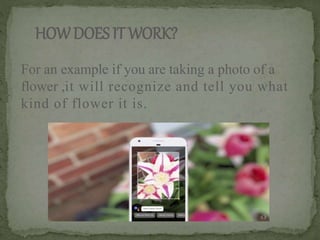
HOWDOESITWORK?
For an example if you are taking a photo of a
flower ,it will recognize and tell you what
kind of flower it is.
Google lens service is similar to Google Goggles butit is
with lessercapability.
Earlier Google lens is only supported for latest
samsung smartphones but after sometime it was
supported for Google pixel phones.
This was the main disadvantage of the existingsystem as it
is not supported for all kinds of mobiles so later on we
developed a newversion.
Becoming too dependent ontechnology.
By uploading personal photos to the GoogleAssistant app
, it could violate onesprivacy.
It has lesser capability compare to Googlelens.
By overcoming the existing system disadvantagehere
we updated our service which may be supported for
every kind of mobile so that you can get relevant
information regarding that desired picture from any
where not only getting desired information about the
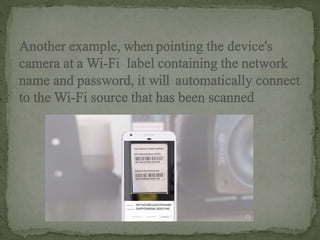
picture but also you can access WI-FI by capturing of the
label of the WI-FI router without using any password.
It can help and act as atranslator.
If you are trying to get a good photo, and there is a chain
link fence, Lens could remove the fence fromthe photo
automatically.
Google lens can also enhance a photo you took to
make it less pixelated and blurry.
 It is fast and convenient.
 Educate.
Now a days everyone is interested in technology and they
adopted themselves for upcoming technology. In that way
only so many people are using Google photos app by using
this technology here we are getting required information
regarding to the desired picture. By doing so we can acquire
information if we didn’t have any knowledge about that one
.So that it will be helpful to us in useful way.
SHIVANGI_26_10A.pptx

SHIVANGI_26_10A.pptx

  • 3.
    At Google’s developerconference , CEO Sundar Pichai announced a new technology called Google Lens. Google lens is an app announced by Google during Google I/O 2017,designed to bringing up relevant information using visual analysis. Google Lens will attempt to identify the objectand show relevant search results and information.
  • 4.
    The idea withthe product is to leverage Google’s computer vision and AI technology in order tobring smarts directly to your phone’scamera. The smartphone camera will no longer just see what you see, but will also understand what you see to help you take action. Lens is also integrated with the GooglePhotos and Google Assistant apps.
  • 5.
    The service issimilar to Google Goggles, aprevious app that functioned similarly but with lesser capability. Lens uses more advanced deep learning routines, similar to other apps like Bixby Vision (integrated in the newer Samsung smartphones) and ImageAnalysis Toolset (available on Google Play); artificial neural networks are used to detect and identify objects, landmarks and to improve optical character recognition(OCR) accuracy.
  • 6.
    Google officially launchedGoogle Lens on October 4, with app previews pre-installed into the GooglePixel2. In November 2017,the feature began rolling out into the Google Assistant for Pixel and Pixel 2phones. A preview of Lens has also been implemented into the Google Photos app for Pixel phones. On March 5, 2018Google officially released Google Lens to Google Photos on non-Pixelphones.
  • 7.
    Support for Lensin the IOS version of Google Photos was made on March 15, 2018. Lens used for the operating system is Android and IOS devices. It is the brilliant camera application which can interpret, figure out and communicate withthe information within yourpictures. It can also remove the obstructions in the image for a clearer and better view of theobjects.
  • 8.
    There are somany ways to use Google lens butmainly using Google photos app is the easiestway. Steps for using Google photosapp: I. If we have Google lens in Google photos appthen directly you may click on the desired picture on which you require information. II. If we didn’t have Google lens in Google photos app then you may update the Google photos app so that you may get required information on clicking the desired picture.
  • 9.
    HOWDOESITWORK? For an exampleif you are taking a photo of a flower ,it will recognize and tell you what kind of flower it is.
  • 13.
    Google lens serviceis similar to Google Goggles butit is with lessercapability. Earlier Google lens is only supported for latest samsung smartphones but after sometime it was supported for Google pixel phones.
  • 14.
    This was themain disadvantage of the existingsystem as it is not supported for all kinds of mobiles so later on we developed a newversion. Becoming too dependent ontechnology. By uploading personal photos to the GoogleAssistant app , it could violate onesprivacy. It has lesser capability compare to Googlelens.
  • 15.
    By overcoming theexisting system disadvantagehere we updated our service which may be supported for every kind of mobile so that you can get relevant information regarding that desired picture from any where not only getting desired information about the picture but also you can access WI-FI by capturing of the label of the WI-FI router without using any password.
  • 16.
    It can helpand act as atranslator. If you are trying to get a good photo, and there is a chain link fence, Lens could remove the fence fromthe photo automatically. Google lens can also enhance a photo you took to make it less pixelated and blurry.  It is fast and convenient.  Educate.
  • 17.
    Now a dayseveryone is interested in technology and they adopted themselves for upcoming technology. In that way only so many people are using Google photos app by using this technology here we are getting required information regarding to the desired picture. By doing so we can acquire information if we didn’t have any knowledge about that one .So that it will be helpful to us in useful way.