SFSU Background Number of Databases? Number of E-journals? E-resources budget Member of the CSU consortium, which negotiates contracts for e-resources and for products such as SFX
Our Dilemma – Torn between two Vendors; Don’t know what to do Our ERM and ILS software is produced by Innovative Interfaces Our OpenURL and Knowldgebase software is produced by Ex Libris and purchased through a consortium III’s ERM and Ex Libris’s SFX don’t play well together
Our Options for getting coverage data into our ERM system. Manually create a coverage file using data provided by our database vendors Use a third party provider such as Serials Solutions, CASE, or TDNet Figure out a way to get Coverage data out of SFX so that we can import it into ERM
Third Party Option – PROs and CONs PRO Serials Solutions, CASE, and TDNet provide data files that are ready-made for loading into ERM CONs We would be paying twice for the same data We would be maintaining the same data in two different databases
Using SFX for Coverage data – Pros and Cons PROs Efficiently reuse data in SFX knowledgebase Not paying twice for the same data Free MARC records (through our CSU contract) Better ERM matching using the SFX object ID CON No easy way to get the data out of SFX in the right format for ERM
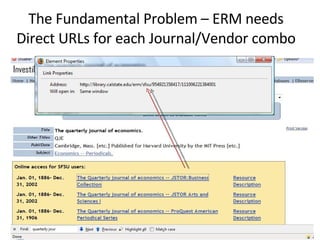
The Fundamental Problem – ERM needs Direct URLs for each Journal/Vendor combo
The Fundamental Problem – no direct URLs in SFX Databases OpenURL
A Solution – The SFX API Show a URL that calls the API Show some XML that gets returned
Two Iterations 1. Saskatchewan Script Written by Darryl Friesen at the University of Saskatchewan Just in case solution (gathers all of the direct URLs in one session) 2. CSU Script Adapted from the Saskatchewan script by David Walker (California State University) Just in time solution (creates a direct URL when you ask for it) Used by SFSU, Chico, Sonoma?
Saskatchewan Script – Pros and Cons Pros Easier to implement for non-technical staff Saskatchewan allows other libraries to use the script housed on its server Innovative Interfaces developed a simple GUI interface to the script: see http://saskscript.usask.ca/ Cons It takes a looong time to run the script It can put a heavy load on the SFX server CSU doesn’t want us to use it
CSU Script – Pros and Cons Pros Script runs quickly and provides data about the SFX knowledgebase Smaller load on the SFX server Cons Harder to implement for non-technical staff Currently, you need to be able to run Perl script locally Also requires a server to run the “resolver script”
“Hybrid” URL Object ID Target ID

Sfx Erm

  • 1.
    SFSU Background Numberof Databases? Number of E-journals? E-resources budget Member of the CSU consortium, which negotiates contracts for e-resources and for products such as SFX
  • 2.
    Our Dilemma –Torn between two Vendors; Don’t know what to do Our ERM and ILS software is produced by Innovative Interfaces Our OpenURL and Knowldgebase software is produced by Ex Libris and purchased through a consortium III’s ERM and Ex Libris’s SFX don’t play well together
  • 3.
    Our Options forgetting coverage data into our ERM system. Manually create a coverage file using data provided by our database vendors Use a third party provider such as Serials Solutions, CASE, or TDNet Figure out a way to get Coverage data out of SFX so that we can import it into ERM
  • 4.
    Third Party Option– PROs and CONs PRO Serials Solutions, CASE, and TDNet provide data files that are ready-made for loading into ERM CONs We would be paying twice for the same data We would be maintaining the same data in two different databases
  • 5.
    Using SFX forCoverage data – Pros and Cons PROs Efficiently reuse data in SFX knowledgebase Not paying twice for the same data Free MARC records (through our CSU contract) Better ERM matching using the SFX object ID CON No easy way to get the data out of SFX in the right format for ERM
  • 6.
    The Fundamental Problem– ERM needs Direct URLs for each Journal/Vendor combo
  • 7.
    The Fundamental Problem– no direct URLs in SFX Databases OpenURL
  • 8.
    A Solution –The SFX API Show a URL that calls the API Show some XML that gets returned
  • 9.
    Two Iterations 1.Saskatchewan Script Written by Darryl Friesen at the University of Saskatchewan Just in case solution (gathers all of the direct URLs in one session) 2. CSU Script Adapted from the Saskatchewan script by David Walker (California State University) Just in time solution (creates a direct URL when you ask for it) Used by SFSU, Chico, Sonoma?
  • 10.
    Saskatchewan Script –Pros and Cons Pros Easier to implement for non-technical staff Saskatchewan allows other libraries to use the script housed on its server Innovative Interfaces developed a simple GUI interface to the script: see http://saskscript.usask.ca/ Cons It takes a looong time to run the script It can put a heavy load on the SFX server CSU doesn’t want us to use it
  • 11.
    CSU Script –Pros and Cons Pros Script runs quickly and provides data about the SFX knowledgebase Smaller load on the SFX server Cons Harder to implement for non-technical staff Currently, you need to be able to run Perl script locally Also requires a server to run the “resolver script”
  • 12.