Session 4
System Calls
RECAP
In the previous session we studied the following
topics:
• Operating System Services: Key functionalities provided
by the OS to manage hardware, software, and user
interactions.
• User Interfaces: Various methods through which users
interact with the operating system, including CLI, GUI, and
touchscreen interfaces.
• File-System Manipulation: Operations related to file and
directory management.
• Program Execution: Loading, executing, and managing
processes.
RECAP
In the previous session we studied the following
topics:
• I/O Operations and Communications: Managing
input/output devices and facilitating inter-process
communication.
• Error Detection and Resource Allocation: Monitoring
system errors and managing system resources.
• Protection and Security: Ensuring system security through
authentication, authorization, and encrypting.
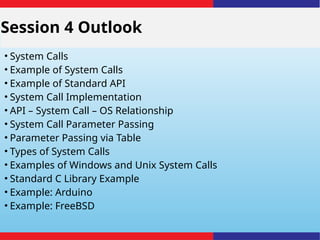
Session 4 Outlook
• System Calls
• Example of System Calls
• Example of Standard API
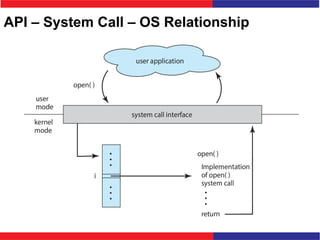
• System Call Implementation
• API – System Call – OS Relationship
• System Call Parameter Passing
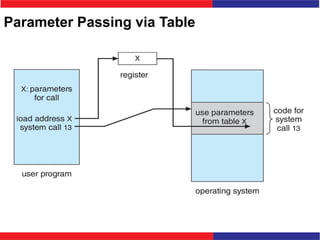
• Parameter Passing via Table
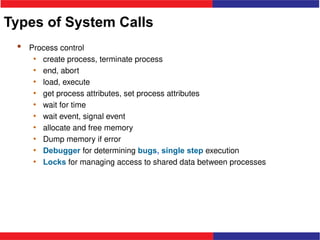
• Types of System Calls
• Examples of Windows and Unix System Calls
• Standard C Library Example
• Example: Arduino
• Example: FreeBSD
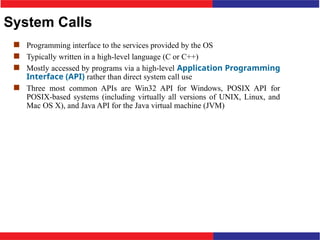
System Calls
 Programming interface to the services provided by the OS
 Typically written in a high-level language (C or C++)
 Mostly accessed by programs via a high-level Application Programming
Interface (API) rather than direct system call use
 Three most common APIs are Win32 API for Windows, POSIX API for
POSIX-based systems (including virtually all versions of UNIX, Linux, and
Mac OS X), and Java API for the Java virtual machine (JVM)
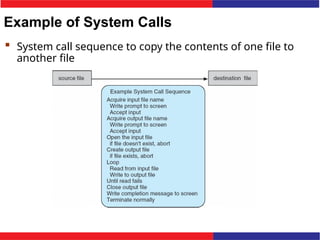
Example of System Calls
 System call sequence to copy the contents of one file to
another file
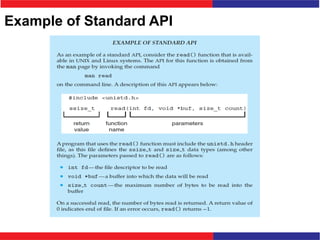
Example of Standard API
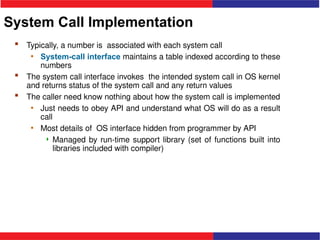
System Call Implementation
 Typically, a number is associated with each system call
• System-call interface maintains a table indexed according to these
numbers
 The system call interface invokes the intended system call in OS kernel
and returns status of the system call and any return values
 The caller need know nothing about how the system call is implemented
• Just needs to obey API and understand what OS will do as a result
call
• Most details of OS interface hidden from programmer by API
 Managed by run-time support library (set of functions built into
libraries included with compiler)
API – System Call – OS Relationship
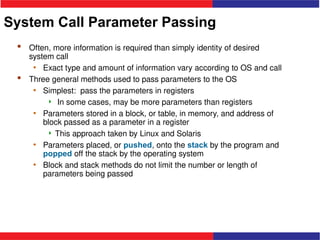
System Call Parameter Passing
 Often, more information is required than simply identity of desired
system call
• Exact type and amount of information vary according to OS and call
 Three general methods used to pass parameters to the OS
• Simplest: pass the parameters in registers
 In some cases, may be more parameters than registers
• Parameters stored in a block, or table, in memory, and address of
block passed as a parameter in a register
 This approach taken by Linux and Solaris
• Parameters placed, or pushed, onto the stack by the program and
popped off the stack by the operating system
• Block and stack methods do not limit the number or length of
parameters being passed
Parameter Passing via Table
Types of System Calls
 Process control
• create process, terminate process
• end, abort
• load, execute
• get process attributes, set process attributes
• wait for time
• wait event, signal event
• allocate and free memory
• Dump memory if error
• Debugger for determining bugs, single step execution
• Locks for managing access to shared data between processes
Types of System Calls (Cont.)
 File management
• create file, delete file
• open, close file
• read, write, reposition
• get and set file attributes
 Device management
• request device, release device
• read, write, reposition
• get device attributes, set device attributes
• logically attach or detach devices
Types of System Calls (Cont.)
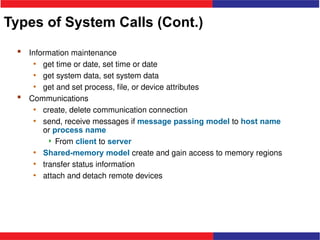
 Information maintenance
• get time or date, set time or date
• get system data, set system data
• get and set process, file, or device attributes
 Communications
• create, delete communication connection
• send, receive messages if message passing model to host name
or process name
 From client to server
• Shared-memory model create and gain access to memory regions
• transfer status information
• attach and detach remote devices
Types of System Calls (Cont.)
 Protection
• Control access to resources
• Get and set permissions
• Allow and deny user access
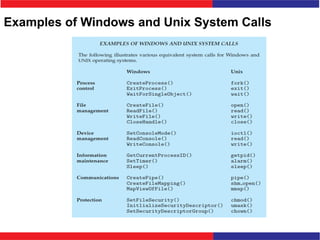
Examples of Windows and Unix System Calls
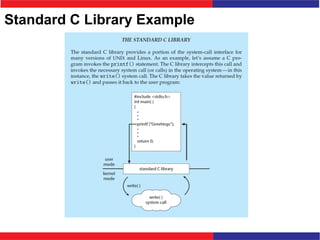
Standard C Library Example
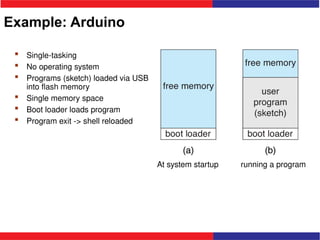
Example: Arduino
 Single-tasking
 No operating system
 Programs (sketch) loaded via USB
into flash memory
 Single memory space
 Boot loader loads program
 Program exit -> shell reloaded
At system startup running a program
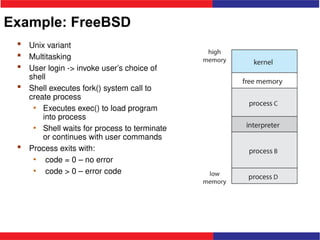
Example: FreeBSD
 Unix variant
 Multitasking
 User login -> invoke user’s choice of
shell
 Shell executes fork() system call to
create process
• Executes exec() to load program
into process
• Shell waits for process to terminate
or continues with user commands
 Process exits with:
• code = 0 – no error
• code > 0 – error code
Session- 4:Test Your Knowledge
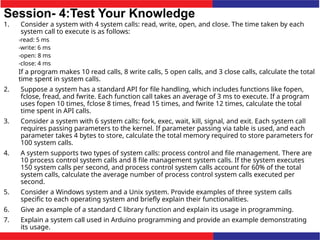
1. Consider a system with 4 system calls: read, write, open, and close. The time taken by each
system call to execute is as follows:
-read: 5 ms
-write: 6 ms
-open: 8 ms
-close: 4 ms
If a program makes 10 read calls, 8 write calls, 5 open calls, and 3 close calls, calculate the total
time spent in system calls.
2. Suppose a system has a standard API for file handling, which includes functions like fopen,
fclose, fread, and fwrite. Each function call takes an average of 3 ms to execute. If a program
uses fopen 10 times, fclose 8 times, fread 15 times, and fwrite 12 times, calculate the total
time spent in API calls.
3. Consider a system with 6 system calls: fork, exec, wait, kill, signal, and exit. Each system call
requires passing parameters to the kernel. If parameter passing via table is used, and each
parameter takes 4 bytes to store, calculate the total memory required to store parameters for
100 system calls.
4. A system supports two types of system calls: process control and file management. There are
10 process control system calls and 8 file management system calls. If the system executes
150 system calls per second, and process control system calls account for 60% of the total
system calls, calculate the average number of process control system calls executed per
second.
5. Consider a Windows system and a Unix system. Provide examples of three system calls
specific to each operating system and briefly explain their functionalities.
6. Give an example of a standard C library function and explain its usage in programming.
7. Explain a system call used in Arduino programming and provide an example demonstrating
its usage.
Session-4:Test Your Knowledge
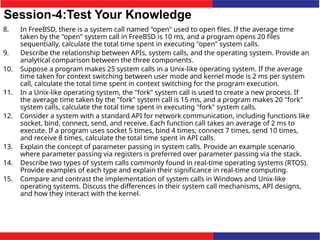
8. In FreeBSD, there is a system call named "open" used to open files. If the average time
taken by the "open" system call in FreeBSD is 10 ms, and a program opens 20 files
sequentially, calculate the total time spent in executing "open" system calls.
9. Describe the relationship between APIs, system calls, and the operating system. Provide an
analytical comparison between the three components.
10. Suppose a program makes 25 system calls in a Unix-like operating system. If the average
time taken for context switching between user mode and kernel mode is 2 ms per system
call, calculate the total time spent in context switching for the program execution.
11. In a Unix-like operating system, the "fork" system call is used to create a new process. If
the average time taken by the "fork" system call is 15 ms, and a program makes 20 "fork"
system calls, calculate the total time spent in executing "fork" system calls.
12. Consider a system with a standard API for network communication, including functions like
socket, bind, connect, send, and receive. Each function call takes an average of 2 ms to
execute. If a program uses socket 5 times, bind 4 times, connect 7 times, send 10 times,
and receive 8 times, calculate the total time spent in API calls.
13. Explain the concept of parameter passing in system calls. Provide an example scenario
where parameter passing via registers is preferred over parameter passing via the stack.
14. Describe two types of system calls commonly found in real-time operating systems (RTOS).
Provide examples of each type and explain their significance in real-time computing.
15. Compare and contrast the implementation of system calls in Windows and Unix-like
operating systems. Discuss the differences in their system call mechanisms, API designs,
and how they interact with the kernel.
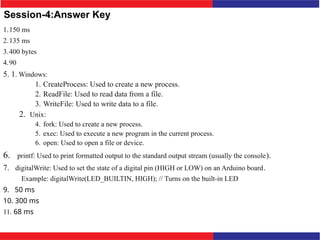
Session-4:Answer Key
1.150 ms
2.135 ms
3.400 bytes
4.90
5. 1. Windows:
1. CreateProcess: Used to create a new process.
2. ReadFile: Used to read data from a file.
3. WriteFile: Used to write data to a file.
2. Unix:
4. fork: Used to create a new process.
5. exec: Used to execute a new program in the current process.
6. open: Used to open a file or device.
6. printf: Used to print formatted output to the standard output stream (usually the console).
7. digitalWrite: Used to set the state of a digital pin (HIGH or LOW) on an Arduino board.
Example: digitalWrite(LED_BUILTIN, HIGH); // Turns on the built-in LED
9. 50 ms
10. 300 ms
11. 68 ms

session 4(system calls).pptxsession 4(system calls).pptx

  • 1.
  • 2.
    RECAP In the previoussession we studied the following topics: • Operating System Services: Key functionalities provided by the OS to manage hardware, software, and user interactions. • User Interfaces: Various methods through which users interact with the operating system, including CLI, GUI, and touchscreen interfaces. • File-System Manipulation: Operations related to file and directory management. • Program Execution: Loading, executing, and managing processes.
  • 3.
    RECAP In the previoussession we studied the following topics: • I/O Operations and Communications: Managing input/output devices and facilitating inter-process communication. • Error Detection and Resource Allocation: Monitoring system errors and managing system resources. • Protection and Security: Ensuring system security through authentication, authorization, and encrypting.
  • 4.
    Session 4 Outlook •System Calls • Example of System Calls • Example of Standard API • System Call Implementation • API – System Call – OS Relationship • System Call Parameter Passing • Parameter Passing via Table • Types of System Calls • Examples of Windows and Unix System Calls • Standard C Library Example • Example: Arduino • Example: FreeBSD
  • 5.
    System Calls  Programminginterface to the services provided by the OS  Typically written in a high-level language (C or C++)  Mostly accessed by programs via a high-level Application Programming Interface (API) rather than direct system call use  Three most common APIs are Win32 API for Windows, POSIX API for POSIX-based systems (including virtually all versions of UNIX, Linux, and Mac OS X), and Java API for the Java virtual machine (JVM)
  • 6.
    Example of SystemCalls  System call sequence to copy the contents of one file to another file
  • 7.
  • 8.
    System Call Implementation Typically, a number is associated with each system call • System-call interface maintains a table indexed according to these numbers  The system call interface invokes the intended system call in OS kernel and returns status of the system call and any return values  The caller need know nothing about how the system call is implemented • Just needs to obey API and understand what OS will do as a result call • Most details of OS interface hidden from programmer by API  Managed by run-time support library (set of functions built into libraries included with compiler)
  • 9.
    API – SystemCall – OS Relationship
  • 10.
    System Call ParameterPassing  Often, more information is required than simply identity of desired system call • Exact type and amount of information vary according to OS and call  Three general methods used to pass parameters to the OS • Simplest: pass the parameters in registers  In some cases, may be more parameters than registers • Parameters stored in a block, or table, in memory, and address of block passed as a parameter in a register  This approach taken by Linux and Solaris • Parameters placed, or pushed, onto the stack by the program and popped off the stack by the operating system • Block and stack methods do not limit the number or length of parameters being passed
  • 11.
  • 12.
    Types of SystemCalls  Process control • create process, terminate process • end, abort • load, execute • get process attributes, set process attributes • wait for time • wait event, signal event • allocate and free memory • Dump memory if error • Debugger for determining bugs, single step execution • Locks for managing access to shared data between processes
  • 13.
    Types of SystemCalls (Cont.)  File management • create file, delete file • open, close file • read, write, reposition • get and set file attributes  Device management • request device, release device • read, write, reposition • get device attributes, set device attributes • logically attach or detach devices
  • 14.
    Types of SystemCalls (Cont.)  Information maintenance • get time or date, set time or date • get system data, set system data • get and set process, file, or device attributes  Communications • create, delete communication connection • send, receive messages if message passing model to host name or process name  From client to server • Shared-memory model create and gain access to memory regions • transfer status information • attach and detach remote devices
  • 15.
    Types of SystemCalls (Cont.)  Protection • Control access to resources • Get and set permissions • Allow and deny user access
  • 16.
    Examples of Windowsand Unix System Calls
  • 17.
  • 18.
    Example: Arduino  Single-tasking No operating system  Programs (sketch) loaded via USB into flash memory  Single memory space  Boot loader loads program  Program exit -> shell reloaded At system startup running a program
  • 19.
    Example: FreeBSD  Unixvariant  Multitasking  User login -> invoke user’s choice of shell  Shell executes fork() system call to create process • Executes exec() to load program into process • Shell waits for process to terminate or continues with user commands  Process exits with: • code = 0 – no error • code > 0 – error code
  • 20.
    Session- 4:Test YourKnowledge 1. Consider a system with 4 system calls: read, write, open, and close. The time taken by each system call to execute is as follows: -read: 5 ms -write: 6 ms -open: 8 ms -close: 4 ms If a program makes 10 read calls, 8 write calls, 5 open calls, and 3 close calls, calculate the total time spent in system calls. 2. Suppose a system has a standard API for file handling, which includes functions like fopen, fclose, fread, and fwrite. Each function call takes an average of 3 ms to execute. If a program uses fopen 10 times, fclose 8 times, fread 15 times, and fwrite 12 times, calculate the total time spent in API calls. 3. Consider a system with 6 system calls: fork, exec, wait, kill, signal, and exit. Each system call requires passing parameters to the kernel. If parameter passing via table is used, and each parameter takes 4 bytes to store, calculate the total memory required to store parameters for 100 system calls. 4. A system supports two types of system calls: process control and file management. There are 10 process control system calls and 8 file management system calls. If the system executes 150 system calls per second, and process control system calls account for 60% of the total system calls, calculate the average number of process control system calls executed per second. 5. Consider a Windows system and a Unix system. Provide examples of three system calls specific to each operating system and briefly explain their functionalities. 6. Give an example of a standard C library function and explain its usage in programming. 7. Explain a system call used in Arduino programming and provide an example demonstrating its usage.
  • 21.
    Session-4:Test Your Knowledge 8.In FreeBSD, there is a system call named "open" used to open files. If the average time taken by the "open" system call in FreeBSD is 10 ms, and a program opens 20 files sequentially, calculate the total time spent in executing "open" system calls. 9. Describe the relationship between APIs, system calls, and the operating system. Provide an analytical comparison between the three components. 10. Suppose a program makes 25 system calls in a Unix-like operating system. If the average time taken for context switching between user mode and kernel mode is 2 ms per system call, calculate the total time spent in context switching for the program execution. 11. In a Unix-like operating system, the "fork" system call is used to create a new process. If the average time taken by the "fork" system call is 15 ms, and a program makes 20 "fork" system calls, calculate the total time spent in executing "fork" system calls. 12. Consider a system with a standard API for network communication, including functions like socket, bind, connect, send, and receive. Each function call takes an average of 2 ms to execute. If a program uses socket 5 times, bind 4 times, connect 7 times, send 10 times, and receive 8 times, calculate the total time spent in API calls. 13. Explain the concept of parameter passing in system calls. Provide an example scenario where parameter passing via registers is preferred over parameter passing via the stack. 14. Describe two types of system calls commonly found in real-time operating systems (RTOS). Provide examples of each type and explain their significance in real-time computing. 15. Compare and contrast the implementation of system calls in Windows and Unix-like operating systems. Discuss the differences in their system call mechanisms, API designs, and how they interact with the kernel.
  • 22.
    Session-4:Answer Key 1.150 ms 2.135ms 3.400 bytes 4.90 5. 1. Windows: 1. CreateProcess: Used to create a new process. 2. ReadFile: Used to read data from a file. 3. WriteFile: Used to write data to a file. 2. Unix: 4. fork: Used to create a new process. 5. exec: Used to execute a new program in the current process. 6. open: Used to open a file or device. 6. printf: Used to print formatted output to the standard output stream (usually the console). 7. digitalWrite: Used to set the state of a digital pin (HIGH or LOW) on an Arduino board. Example: digitalWrite(LED_BUILTIN, HIGH); // Turns on the built-in LED 9. 50 ms 10. 300 ms 11. 68 ms