SIMPLE
START
Use this guide and all our online resources to
find everything you need to know about
shipping with FedEx
Welcome to FedEx!
We’re glad you chose FedEx. This FedEx Service Guide provides information and resources to
help you manage your FedEx shipping efficiently. You can also visit FedEx New Customer Center at
fedex.com to get all the information you need to get started with FedEx, including this
downloadable version of the FedEx Service Guide.
Your Fedex 	 3
Services 	 5
Shipping	 6
	 • Get Shipping rates and Transit Times 	 6
	 • Packing 	 7
	 • Online Shipping with FedEx Express   	10
	 • Documentation required for international shipments 	 11
	 • Schedule a Pickup 	 14
Tracking 	 15
Payment 	 16
Resources 	 17
Contents
3
YOUR FEDEX
Get started fast
Welcome to the New Customer Center
Go to the New Customer Center at fedex.com/ph/newcustomer/ to learn how to manage your FedEx
shipping efficiently and to find out more about FedEx services and shipping tools.
Get a fedex.com Login
Create a fedex.com user ID and password for immediate access to a full array of online services. Simply
save time and ship smarter by using an address book to auto-fill shipping labels, view your entire shipping
history and track packages all the time. Go to fedex.com/ph/login/index.html to learn more.
4
YOUR FEDEX
Find what you need
at fedex.com
FedEx Home Page
Get a fedex.com Login
Get Started
Go to the New Customer Center
Our Service
Ship packages and freight around the world
Get Shipping rates and Transit Times
Download FedEx rates and get tool to compare rates and transit times
Packing
Access packing services, supplies and shipping guides
Shipping
Learn about on-line shipping tool, labels, dropoff and pickup
Tracking
Track shipments status
fedex.com/ph
fedex.com/ph/login/index.html
fedex.com/ph/newcustomer/
fedex.com/ph/services/wwservices.html
fedex.com/ph/rates/index.html
fedex.com/ph/quote/
https://www.fedex.com/ph/supplies/index.html
fedex.com/ph/tools/index.html
fedex.com/ph/fsm/guide.html
https://www.fedex.com/GTM?cntry_code=ph
fedex.com/ph/dropoff/
fedex.com/ph/pickup/index.html
fedex.com/ph/tracking
5
SERVICES
You have several choices when
shipping around the world
Choose the best FedEx Services for your needs, whenever you have a document, small package or heavy
freight to send.
1
International Services : Go to fedex.com/ph/services/wwservices.html for detailed information
2
Check shipping rates and transit times at fedex.com/ph/quote/
Best Choice for urgent shipments. Time-definite, customs-cleared, door-to-door
delivery to more than 200 countries, typically in 1, 2 or 3 business days, and next-
business-day to thousands of U.S. destinations.
Cost-effective Option for less urgent shipments. This economic day-definite service typically
delivers in 2-4 business days to major business centers. Please click : fedex.com/ph/services/
IE/iedestinations.html for service coverage.
*Please call our Customer Service Team for call-in cutoff time and exact delivery commitment.
Less than 68kg
Weight Our Services1,2
FedEx International Priority®
FedEx International Economy®
Time-definite, premium airfreight service for international shipments containing
unitized, forkliftable single pieces or skids above 68kg, delivery typically in 1, 2 or 3
business days.
Economical, day-definite, customs-cleared, door-to-door service for shipments greater
than 68kg destined to major markets in Asia, U.S., Canada and Mexico. Transit times
are typically 2-4 business days. Advance booking required.
Above 68kg
FedEx International Priority®
Freight
FedEx International Economy®
Freight
Choose services by your shipping needs
6
SHIPPING
Get Shipping Rates and
Transit Times
Calculate your rates and estimated transit time
at fedex.com
You can view and download FedEx rates from fedex.com/ph/rates/index.html. To find the rates and transit times
for your particular shipments, you can use the Get Rates & Transit Times tool. Go to fedex.com/ph/quote/
and follow three easy steps to get a specific rate quote:
1. Enter your shipping information, including origin destination and scheduled shipping date
2. Enter the package information and select additional shipment options, if applicable
3. Get your rate quote
You can get Step-by-Step Guide of this tool from fedex.com/ph/quote/guide.html
7
SHIPPING
Packing
Pack Your Shipments by using FedEx packaging
We provide tough, easy to use packaging at no cost.
Four ways to get free supplies for your FedEx Express shipments
1. Order online at fedex.com: https://www.fedex.com/ph/supplies/index.html
2. Pick up supplies at a nearby FedEx drop-off location: http://www.fedex.com/ph/dropoff/index.html
3. Ask your FedEx couriers
4. Contact Customer Service
8
96.5cm
15.2cm
15.2cm
SHIPPING
FedEx packaging
· Designed for soft, light and bulky shipment
· DIM charges will apply if the dimension
exceeds 15,400cm3
· Total weight for Pak should not exceed
2.5kgs
· Self-sealing triangular package for plans,
posters, fabric rolls, charts, blueprints, etc
· Total weight should not exceed 9.07kg
Pak for heavier
documents
Packaging for posters,
fabric rolls, or
blueprints, etc
· Holds up to approximately 60 pages,
· Total weight (including envelope) should
not exceed 500g
· Tough cardboard boxes in three sizes.
· Total weight should not exceed 9.07kg
· Big enough for most bulky items
· FedEx 10kg and 25kg Box packaging offers
you low flat rate. To qualify for the flat rate,
weight cannot exceed 10kg for the 10kg
Box, and 25kg for the 25kg Box
Packaging for
standard-size
documents
Boxes in a variety of
sizes
A sturdy and durable
box for fast delivery
FedEx®
Pak
FedEx®
Extra Large Pak
Your Shipping Need Our solution
FedEx®
Envelope
FedEx®
Box[1]
FedEx®
Tube[2]
FedEx®
10kg and 25kg Box
Detalis
23.5cm
33.5cm
30.5cm
39.5cm
44.5cm
52.7cm
27.5cm
3.8cm
31.1cm
29.2cm
33.7cm
6cm
31.4cm
45.4cm
7.cm
Medium Large
[1]
Effective January 21, 2013, the minimum billable weight for FedEx Small Box, Medium Box and Large Box will be 1 kg per package. The actual package weight will apply only if it is
larger than the minimum billable weight.
[2]
Effective January 21, 2013, the minimum billable weight for FedEx Tube will be 4 kg per package. The actual package weight will apply only if it is larger than the minimum billable
weight.
9
SHIPPING
Packing
Pack Your Shipments in your own packaging
You may choose to use your own packaging with reference to the following guidelines.
• Weight per package up to 68kg/150lb+
• Length per package up to 274cm+
• Length + Girth up to 330cm+
(Girth = twice the height + twice the width)
• Maximum Declared Value for Carriage Up to US$50,000*
+ May vary by destination
* Conditions apply
For tips and tools on proper packing, sealing and labeling practices, please visit “How to Pack” on http://www.fedex.com/
ph/tools/packagingtips.html
Dimensional Weight (Volumetric Weight)
For large-sized lightweight shipments, the greater of either the dimensional weight (volumetric weight) or actual
weight will be charged. The dimensional weight (volumetric weight) (in kg) of a shipment is calculated as:
Length x Width x Height (cm or inches)
(then divided by 5,000 for “cm” or divided by 305 for “inches”)
Dimensional-weight pricing is applicable on a per-package basis to all shipments in customer’s own packaging and
FedEx Pak shipments exceeding 940 cubic inches or 15,403 cubic centimeters. Size and weight restrictions may vary
depending on country and destination.
10
Online Shipping with
FedEx Express
Ship with FedEx Ship Manager™ at fedex.com
All your shipping documentation can be completed online including your International Air Waybill and
Commercial Invoice using the automated shipping tools provided by FedEx Express: FedEx Ship Manager™
at fedex.com helps and makes shipping faster and easier. With this tool, you can:
• Create International Air Waybill and Commercial Invoice from your desktop
• Store frequently used addresses and commodities in an Address Book and Commodity Database for 	
future shipments
• Get estimated Rate Quotes, Duties  Taxes
• Schedule a Courier Pickup
• Notify related parties once the shipment is on its way and safely delivered, or if there is any exception
updates via FedEx Shipment Notification
• Track your shipments
• Create standard and customized Shipment Reports
Technical Support Hotline Service Hours: 24 hours, 7 days a week.
For enquiries on FedEx automation products and applications, you can call
PLDT toll free: 1 800 1441 0830
Globe toll free: 1 800 8908 6579
Email: fdxhelpdesk@fedex.com
Work Hours: Monday – Friday: 0800H – 1945H
Download FedEx Ship Manager at fedex.com User Guide: fedex.com/ph/fsm/guide.html
11
A
B
C
D
E
F
G1
H
I
G2
Documentation required for
international shipments
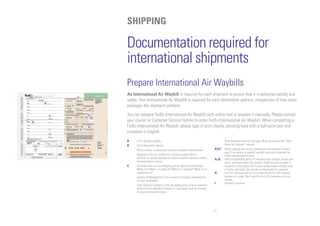
Prepare International Air Waybills
An International Air Waybill is required for each shipment to ensure that it is delivered quickly and
safely. One International Air Waybill is required for each destination address, irrespective of how many
packages the shipment contains.
You can prepare FedEx International Air Waybill with online tool or prepare it manually. Please contact
your courier or Customer Service Hotline to order FedEx International Air Waybill. When completing a
FedEx International Air Waybill, please type or print clearly, pressing hard with a ball-point pen and
complete in English.
A	 Fill in Sender’s details.
B	 Fill in Recipient’s details.
	Phone number is necessary to locate recipient when needed.
	 Recipient’s Tax I.D. number for customs purpose field is
optional. It may be required by import customs clearance within
the destination country.
C	Describe what you are shipping and be specific and detailed.
What is it? What is it made of? What is it used for? What is it a
component of?
	Country of Manufacture: Enter country of original manufacturer
of each commodity.
	 Total Value for Customs: Enter the selling price of your shipment
contents with specified currency. It must agree with the number
on your commercial invoice.
	Total declared value for Carriage: Must not exceed the “Total
Value for Customs” amount.
D,E,F	Select appropriate service, packaging and handling if neces-
sary. If no service is marked, we will send your shipment via
FedEx International Priority.
G1,G2	Select responsible party for transportation charges, duties and
taxes, and write down the relevant FedEx account number. If
recipient or third party fails to pay transportation charges and/
or duties and taxes, the sender is responsible for payment.
H	Use this optional area for your internal record with shipping
numbers or codes. We’ll print the first 24 characters on your
invoice.
I	 Sender’s signature.
SHIPPING
12
SHIPPING
Documentation required for
international shipments
Prepare Commercial Invoice
The Commercial Invoice is required by customs authorities to allow for import clearance of certain
non-document shipments. Requirements vary from country to country and depend on the commodity type,
value and quantity. To complete the Commercial Invoice, simply follow the steps below and you can
download a blank form at fedex.com/ph/tools/
C
E
A
B C
D
G
E F
Below is a common commodity sample of a full description that lists what the item is, what the item is
made of and what is the item made for on the Air Waybill  Commercial Invoice. It is important to write a
consistent and clear description of the item on the Air Waybill  Commercial Invoice.
Commodity Description
REQUIRED
FULL DESCRIPTION HS CODE
OF GOODS
[Air Waybill] [Commercial Invoice]
ALUMINUM steel plate
for use in semiconductor
manutacturing machine
ALUMINUM steel plate
for use in semiconductor
manutacturing machine
What is it?
What is it made of?
What is it used for?
What is it a component of?
e.g.) Ladies’ 100% Silk Knitted Blouse.
Hamonized Code HS CODEA	 Fill in FedEx International Air Waybill number
B	Fill in complete name, address, telephone, Business Registration No./ Customs /
Tax ID No. e.g. GST / RFC / VAT / IN / EIN / ABN / SSN, or as locally required
C	Fill in complete name, address, telephone, Business Registration No./ Customs /
Tax ID No. e.g. GST / RFC / VAT / IN / EIN / ABN / SSN, or as locally required
D	The country where the merchandise was grown, mined or manufactured, in
accordance with Customs Regulations
E	Complete details of the items (s) being shipped, including name, part numbers,
serial numbers, and H.S. numbers, if available.
	 To expedite clearance, the description should answer:
	What is it? What is it made of? What is it used for? What is it a component of?
	 e.g. Ladies’ 100% Silk Knitted Blouse
F	Please declare one currency type only
G	Sign your name and date
13
SHIPPING
Documentation required for
international shipments
Prepare Customs Declaration Documentation
When shipping to some destinations such as U.S. and China, you may be required to complete additional
documentation, which is required under destination country law. Accurate completion of the documentation
will assist the customs authorities in processing your shipment more efficiently. FedEx®
Global Trade
Manager at fedex.com gives you access to detailed commodity and country-specific information, details of
local customs regulation and a currency converter. It will even give you an estimate of your shipping duties
and taxes. This tool will indicate whether or not you require a Commercial Invoice. Access FedEx Global Trade
Manager: https://www.fedex.com/GTM?cntry_code=ph and enjoy benefits of using it:
• Find the proper documents required for international shipping with FedEx Express
• Complete the required documentation
• View advisory concerning your shipments
• Calculate pre-shipment duty and tax cost estimates
• Research country profiles
• Search the up-to-date international Denied Part Screening database
• Prepare, store and reuse customs documents online with the Document Preparation Center
Download overview of FedEx®
Global Trade Manager: fedex.com/us/demo/gtm/start.html
14
SHIPPING
Schedule a Pickup
When you have completed your packaging and documentation and the shipment is ready to go, you can
schedule a pickup directly online or by calling Customer Service. You can also pre-arrange for a pick-up
later in the week or the month.
Schedule a pickup online
It's fast, convenient and you can keep records of all your online shipment pickup. With the “Schedule a
Pickup” tool, you can quickly and conveniently arrange for a FedEx®
pickup of your shipments. Plus, you
can access the “My Pickups” tool to view the records of your online pickup history, edit or cancel your
pickup. This is speed at your fingertips. Learn more information from http://www.fedex.com/ph/pickup/
index.html
Schedule a pickup by shipping with FedEx Ship Manager™ at fedex.com
15
TRACKING
You have several options
to track shipments
Quickly find information about your shipments.
Track at fedex.com
Obtain information 24 hours per day, 7 days per week about your shipments. Visit fedex.com/ph/tracking
to track up 30 FedEx Express Shipments at a time.
Track using FedEx Desktop
Monitor the status of your shipments and receive proactive notifications right to your desktop. Go to fedex.
com/ph/desktop/ to get details.
Track by FedEx mobile
Access up-to-date tracking details directly from your mobile devices. Learn more information from fedex.
com/ph/mobile/
Track using FedEx Ship Manager™ at fedex.com
With FedEx Ship ManagerTM
at fedex.com, once you have scheduled your pick-up online, your shipment is
automatically entered into the FedEx Express system. You can check the status of your shipments across
the world in real time, stage by stage, through to delivery.
16
PAYMENT
Manage your account with
invoicing and payment resources
FedEx Billing
When making payment, it is important to provide us with your remittance advice. It is also essential that
you provide us with the following information:
• Your account number;
• Invoice / air waybill number and their individual amounts;
• When the payment was made; and,
• Your contact details in case we need to reach you.
By providing sufficient and accurate information, you’ll ensure that your bill is processed quickly and smoothly.
17
RESOURCES
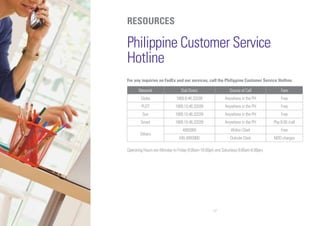
Philippine Customer Service
Hotline
For any inquiries on FedEx and our services, call the Philippine Customer Service Hotline.
Network Dial Direct Source of Call Fare
Globe 1800.8.46.33339 Anywhere in the PH Free
PLDT 1800.10.46.33339 Anywhere in the PH Free
Sun 1800.10.46.33339 Anywhere in the PH Free
Smart 1800.10.46.33339 Anywhere in the PH Php 8.00 /call
Others
4993900 Within Clark Free
045.4993900 Outside Clark NDD charges
Operating Hours are Monday to Friday 8:00am-10:00pm and Saturdays 8:00am-6:00pm.
18
RESOURCES
Drop off Locations
FedEx World Service Centers
Location Address Hours of Operation
Pasay
CBW # 31 International Cargo Terminal, Ninoy Aquino
International Airport, Pasay City, Metro Manila
9:00am – 6:00pm
(Mon-Fri)
Cebu
Galco Building, Cargo Complex, Mactan Cebu International
Airport, Lapu-Lapu City, Cebu
9:00am – 6:00pm
(Mon-Fri)
FedEx Authorized Ship Centers
Visit http://www.fedex.com/ph/dropoff/ for more information.
08/2013

SERVICE GUIDE

  • 1.
    SIMPLE START Use this guideand all our online resources to find everything you need to know about shipping with FedEx
  • 2.
    Welcome to FedEx! We’reglad you chose FedEx. This FedEx Service Guide provides information and resources to help you manage your FedEx shipping efficiently. You can also visit FedEx New Customer Center at fedex.com to get all the information you need to get started with FedEx, including this downloadable version of the FedEx Service Guide. Your Fedex 3 Services 5 Shipping 6 • Get Shipping rates and Transit Times 6 • Packing 7 • Online Shipping with FedEx Express 10 • Documentation required for international shipments 11 • Schedule a Pickup 14 Tracking 15 Payment 16 Resources 17 Contents
  • 3.
    3 YOUR FEDEX Get startedfast Welcome to the New Customer Center Go to the New Customer Center at fedex.com/ph/newcustomer/ to learn how to manage your FedEx shipping efficiently and to find out more about FedEx services and shipping tools. Get a fedex.com Login Create a fedex.com user ID and password for immediate access to a full array of online services. Simply save time and ship smarter by using an address book to auto-fill shipping labels, view your entire shipping history and track packages all the time. Go to fedex.com/ph/login/index.html to learn more.
  • 4.
    4 YOUR FEDEX Find whatyou need at fedex.com FedEx Home Page Get a fedex.com Login Get Started Go to the New Customer Center Our Service Ship packages and freight around the world Get Shipping rates and Transit Times Download FedEx rates and get tool to compare rates and transit times Packing Access packing services, supplies and shipping guides Shipping Learn about on-line shipping tool, labels, dropoff and pickup Tracking Track shipments status fedex.com/ph fedex.com/ph/login/index.html fedex.com/ph/newcustomer/ fedex.com/ph/services/wwservices.html fedex.com/ph/rates/index.html fedex.com/ph/quote/ https://www.fedex.com/ph/supplies/index.html fedex.com/ph/tools/index.html fedex.com/ph/fsm/guide.html https://www.fedex.com/GTM?cntry_code=ph fedex.com/ph/dropoff/ fedex.com/ph/pickup/index.html fedex.com/ph/tracking
  • 5.
    5 SERVICES You have severalchoices when shipping around the world Choose the best FedEx Services for your needs, whenever you have a document, small package or heavy freight to send. 1 International Services : Go to fedex.com/ph/services/wwservices.html for detailed information 2 Check shipping rates and transit times at fedex.com/ph/quote/ Best Choice for urgent shipments. Time-definite, customs-cleared, door-to-door delivery to more than 200 countries, typically in 1, 2 or 3 business days, and next- business-day to thousands of U.S. destinations. Cost-effective Option for less urgent shipments. This economic day-definite service typically delivers in 2-4 business days to major business centers. Please click : fedex.com/ph/services/ IE/iedestinations.html for service coverage. *Please call our Customer Service Team for call-in cutoff time and exact delivery commitment. Less than 68kg Weight Our Services1,2 FedEx International Priority® FedEx International Economy® Time-definite, premium airfreight service for international shipments containing unitized, forkliftable single pieces or skids above 68kg, delivery typically in 1, 2 or 3 business days. Economical, day-definite, customs-cleared, door-to-door service for shipments greater than 68kg destined to major markets in Asia, U.S., Canada and Mexico. Transit times are typically 2-4 business days. Advance booking required. Above 68kg FedEx International Priority® Freight FedEx International Economy® Freight Choose services by your shipping needs
  • 6.
    6 SHIPPING Get Shipping Ratesand Transit Times Calculate your rates and estimated transit time at fedex.com You can view and download FedEx rates from fedex.com/ph/rates/index.html. To find the rates and transit times for your particular shipments, you can use the Get Rates & Transit Times tool. Go to fedex.com/ph/quote/ and follow three easy steps to get a specific rate quote: 1. Enter your shipping information, including origin destination and scheduled shipping date 2. Enter the package information and select additional shipment options, if applicable 3. Get your rate quote You can get Step-by-Step Guide of this tool from fedex.com/ph/quote/guide.html
  • 7.
    7 SHIPPING Packing Pack Your Shipmentsby using FedEx packaging We provide tough, easy to use packaging at no cost. Four ways to get free supplies for your FedEx Express shipments 1. Order online at fedex.com: https://www.fedex.com/ph/supplies/index.html 2. Pick up supplies at a nearby FedEx drop-off location: http://www.fedex.com/ph/dropoff/index.html 3. Ask your FedEx couriers 4. Contact Customer Service
  • 8.
    8 96.5cm 15.2cm 15.2cm SHIPPING FedEx packaging · Designedfor soft, light and bulky shipment · DIM charges will apply if the dimension exceeds 15,400cm3 · Total weight for Pak should not exceed 2.5kgs · Self-sealing triangular package for plans, posters, fabric rolls, charts, blueprints, etc · Total weight should not exceed 9.07kg Pak for heavier documents Packaging for posters, fabric rolls, or blueprints, etc · Holds up to approximately 60 pages, · Total weight (including envelope) should not exceed 500g · Tough cardboard boxes in three sizes. · Total weight should not exceed 9.07kg · Big enough for most bulky items · FedEx 10kg and 25kg Box packaging offers you low flat rate. To qualify for the flat rate, weight cannot exceed 10kg for the 10kg Box, and 25kg for the 25kg Box Packaging for standard-size documents Boxes in a variety of sizes A sturdy and durable box for fast delivery FedEx® Pak FedEx® Extra Large Pak Your Shipping Need Our solution FedEx® Envelope FedEx® Box[1] FedEx® Tube[2] FedEx® 10kg and 25kg Box Detalis 23.5cm 33.5cm 30.5cm 39.5cm 44.5cm 52.7cm 27.5cm 3.8cm 31.1cm 29.2cm 33.7cm 6cm 31.4cm 45.4cm 7.cm Medium Large [1] Effective January 21, 2013, the minimum billable weight for FedEx Small Box, Medium Box and Large Box will be 1 kg per package. The actual package weight will apply only if it is larger than the minimum billable weight. [2] Effective January 21, 2013, the minimum billable weight for FedEx Tube will be 4 kg per package. The actual package weight will apply only if it is larger than the minimum billable weight.
  • 9.
    9 SHIPPING Packing Pack Your Shipmentsin your own packaging You may choose to use your own packaging with reference to the following guidelines. • Weight per package up to 68kg/150lb+ • Length per package up to 274cm+ • Length + Girth up to 330cm+ (Girth = twice the height + twice the width) • Maximum Declared Value for Carriage Up to US$50,000* + May vary by destination * Conditions apply For tips and tools on proper packing, sealing and labeling practices, please visit “How to Pack” on http://www.fedex.com/ ph/tools/packagingtips.html Dimensional Weight (Volumetric Weight) For large-sized lightweight shipments, the greater of either the dimensional weight (volumetric weight) or actual weight will be charged. The dimensional weight (volumetric weight) (in kg) of a shipment is calculated as: Length x Width x Height (cm or inches) (then divided by 5,000 for “cm” or divided by 305 for “inches”) Dimensional-weight pricing is applicable on a per-package basis to all shipments in customer’s own packaging and FedEx Pak shipments exceeding 940 cubic inches or 15,403 cubic centimeters. Size and weight restrictions may vary depending on country and destination.
  • 10.
    10 Online Shipping with FedExExpress Ship with FedEx Ship Manager™ at fedex.com All your shipping documentation can be completed online including your International Air Waybill and Commercial Invoice using the automated shipping tools provided by FedEx Express: FedEx Ship Manager™ at fedex.com helps and makes shipping faster and easier. With this tool, you can: • Create International Air Waybill and Commercial Invoice from your desktop • Store frequently used addresses and commodities in an Address Book and Commodity Database for future shipments • Get estimated Rate Quotes, Duties Taxes • Schedule a Courier Pickup • Notify related parties once the shipment is on its way and safely delivered, or if there is any exception updates via FedEx Shipment Notification • Track your shipments • Create standard and customized Shipment Reports Technical Support Hotline Service Hours: 24 hours, 7 days a week. For enquiries on FedEx automation products and applications, you can call PLDT toll free: 1 800 1441 0830 Globe toll free: 1 800 8908 6579 Email: fdxhelpdesk@fedex.com Work Hours: Monday – Friday: 0800H – 1945H Download FedEx Ship Manager at fedex.com User Guide: fedex.com/ph/fsm/guide.html
  • 11.
    11 A B C D E F G1 H I G2 Documentation required for internationalshipments Prepare International Air Waybills An International Air Waybill is required for each shipment to ensure that it is delivered quickly and safely. One International Air Waybill is required for each destination address, irrespective of how many packages the shipment contains. You can prepare FedEx International Air Waybill with online tool or prepare it manually. Please contact your courier or Customer Service Hotline to order FedEx International Air Waybill. When completing a FedEx International Air Waybill, please type or print clearly, pressing hard with a ball-point pen and complete in English. A Fill in Sender’s details. B Fill in Recipient’s details. Phone number is necessary to locate recipient when needed. Recipient’s Tax I.D. number for customs purpose field is optional. It may be required by import customs clearance within the destination country. C Describe what you are shipping and be specific and detailed. What is it? What is it made of? What is it used for? What is it a component of? Country of Manufacture: Enter country of original manufacturer of each commodity. Total Value for Customs: Enter the selling price of your shipment contents with specified currency. It must agree with the number on your commercial invoice. Total declared value for Carriage: Must not exceed the “Total Value for Customs” amount. D,E,F Select appropriate service, packaging and handling if neces- sary. If no service is marked, we will send your shipment via FedEx International Priority. G1,G2 Select responsible party for transportation charges, duties and taxes, and write down the relevant FedEx account number. If recipient or third party fails to pay transportation charges and/ or duties and taxes, the sender is responsible for payment. H Use this optional area for your internal record with shipping numbers or codes. We’ll print the first 24 characters on your invoice. I Sender’s signature. SHIPPING
  • 12.
    12 SHIPPING Documentation required for internationalshipments Prepare Commercial Invoice The Commercial Invoice is required by customs authorities to allow for import clearance of certain non-document shipments. Requirements vary from country to country and depend on the commodity type, value and quantity. To complete the Commercial Invoice, simply follow the steps below and you can download a blank form at fedex.com/ph/tools/ C E A B C D G E F Below is a common commodity sample of a full description that lists what the item is, what the item is made of and what is the item made for on the Air Waybill Commercial Invoice. It is important to write a consistent and clear description of the item on the Air Waybill Commercial Invoice. Commodity Description REQUIRED FULL DESCRIPTION HS CODE OF GOODS [Air Waybill] [Commercial Invoice] ALUMINUM steel plate for use in semiconductor manutacturing machine ALUMINUM steel plate for use in semiconductor manutacturing machine What is it? What is it made of? What is it used for? What is it a component of? e.g.) Ladies’ 100% Silk Knitted Blouse. Hamonized Code HS CODEA Fill in FedEx International Air Waybill number B Fill in complete name, address, telephone, Business Registration No./ Customs / Tax ID No. e.g. GST / RFC / VAT / IN / EIN / ABN / SSN, or as locally required C Fill in complete name, address, telephone, Business Registration No./ Customs / Tax ID No. e.g. GST / RFC / VAT / IN / EIN / ABN / SSN, or as locally required D The country where the merchandise was grown, mined or manufactured, in accordance with Customs Regulations E Complete details of the items (s) being shipped, including name, part numbers, serial numbers, and H.S. numbers, if available. To expedite clearance, the description should answer: What is it? What is it made of? What is it used for? What is it a component of? e.g. Ladies’ 100% Silk Knitted Blouse F Please declare one currency type only G Sign your name and date
  • 13.
    13 SHIPPING Documentation required for internationalshipments Prepare Customs Declaration Documentation When shipping to some destinations such as U.S. and China, you may be required to complete additional documentation, which is required under destination country law. Accurate completion of the documentation will assist the customs authorities in processing your shipment more efficiently. FedEx® Global Trade Manager at fedex.com gives you access to detailed commodity and country-specific information, details of local customs regulation and a currency converter. It will even give you an estimate of your shipping duties and taxes. This tool will indicate whether or not you require a Commercial Invoice. Access FedEx Global Trade Manager: https://www.fedex.com/GTM?cntry_code=ph and enjoy benefits of using it: • Find the proper documents required for international shipping with FedEx Express • Complete the required documentation • View advisory concerning your shipments • Calculate pre-shipment duty and tax cost estimates • Research country profiles • Search the up-to-date international Denied Part Screening database • Prepare, store and reuse customs documents online with the Document Preparation Center Download overview of FedEx® Global Trade Manager: fedex.com/us/demo/gtm/start.html
  • 14.
    14 SHIPPING Schedule a Pickup Whenyou have completed your packaging and documentation and the shipment is ready to go, you can schedule a pickup directly online or by calling Customer Service. You can also pre-arrange for a pick-up later in the week or the month. Schedule a pickup online It's fast, convenient and you can keep records of all your online shipment pickup. With the “Schedule a Pickup” tool, you can quickly and conveniently arrange for a FedEx® pickup of your shipments. Plus, you can access the “My Pickups” tool to view the records of your online pickup history, edit or cancel your pickup. This is speed at your fingertips. Learn more information from http://www.fedex.com/ph/pickup/ index.html Schedule a pickup by shipping with FedEx Ship Manager™ at fedex.com
  • 15.
    15 TRACKING You have severaloptions to track shipments Quickly find information about your shipments. Track at fedex.com Obtain information 24 hours per day, 7 days per week about your shipments. Visit fedex.com/ph/tracking to track up 30 FedEx Express Shipments at a time. Track using FedEx Desktop Monitor the status of your shipments and receive proactive notifications right to your desktop. Go to fedex. com/ph/desktop/ to get details. Track by FedEx mobile Access up-to-date tracking details directly from your mobile devices. Learn more information from fedex. com/ph/mobile/ Track using FedEx Ship Manager™ at fedex.com With FedEx Ship ManagerTM at fedex.com, once you have scheduled your pick-up online, your shipment is automatically entered into the FedEx Express system. You can check the status of your shipments across the world in real time, stage by stage, through to delivery.
  • 16.
    16 PAYMENT Manage your accountwith invoicing and payment resources FedEx Billing When making payment, it is important to provide us with your remittance advice. It is also essential that you provide us with the following information: • Your account number; • Invoice / air waybill number and their individual amounts; • When the payment was made; and, • Your contact details in case we need to reach you. By providing sufficient and accurate information, you’ll ensure that your bill is processed quickly and smoothly.
  • 17.
    17 RESOURCES Philippine Customer Service Hotline Forany inquiries on FedEx and our services, call the Philippine Customer Service Hotline. Network Dial Direct Source of Call Fare Globe 1800.8.46.33339 Anywhere in the PH Free PLDT 1800.10.46.33339 Anywhere in the PH Free Sun 1800.10.46.33339 Anywhere in the PH Free Smart 1800.10.46.33339 Anywhere in the PH Php 8.00 /call Others 4993900 Within Clark Free 045.4993900 Outside Clark NDD charges Operating Hours are Monday to Friday 8:00am-10:00pm and Saturdays 8:00am-6:00pm.
  • 18.
    18 RESOURCES Drop off Locations FedExWorld Service Centers Location Address Hours of Operation Pasay CBW # 31 International Cargo Terminal, Ninoy Aquino International Airport, Pasay City, Metro Manila 9:00am – 6:00pm (Mon-Fri) Cebu Galco Building, Cargo Complex, Mactan Cebu International Airport, Lapu-Lapu City, Cebu 9:00am – 6:00pm (Mon-Fri) FedEx Authorized Ship Centers Visit http://www.fedex.com/ph/dropoff/ for more information.
  • 19.