Serverless Computing
With AWS
01/03/2018
By Timothee
What is serverless
computing?
Definition
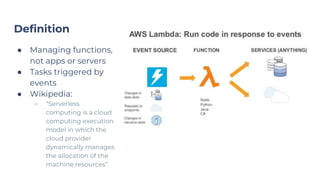
● Managing functions,
not apps or servers
● Tasks triggered by
events
● Wikipedia:
○ “Serverless
computing is a cloud
computing execution
model in which the
cloud provider
dynamically manages
the allocation of the
machine resources”.
Comparison of the main cloud providers
● AWS Lambda: Built-in versioning with traffic split,
staging environments, good online IDE
● Azure Functions: A few advantages over AWS Lambda
like support of F# and PowerShell but more limited for
C# (single file) and Java (preview)
● Google Cloud Functions: Only Node.js and still in beta
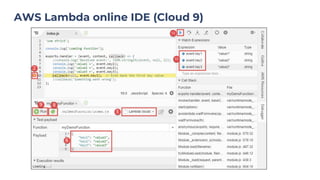
AWS Lambda online IDE (Cloud 9)
Why should we care
about serverless
computing?
“Let’s build Craigslist!”
Let’s build
Craigslist!
Designing with and without
serverless computing
● Marketplace to buy and sell
second-hand items
● 100+ million unique visitors
per month
● Simple website with login
● No need to create an
account or to share an
email address to contact
someone
○ Two-way anonymous email
system
Anonymous email system without serverless
● What do we need?
● Setting up email system (on-premise or hosted)
● Database to know which emails have been processed
● Distributed fault-tolerant job that regularly reads the inbox, check
the database, and send emails
● Setting up the database and backend servers (deployment,
monitoring, load balancing, security).
● Estimated implementation time?
● What is a two-way anonymous email system?
● A@gmail.com sends an email to
{encrypt(“B@gmail.com”)}@craigslist.com
● The system should send the same email from
{encrypt(“A@gmail.com”)}@craiglist.com to B@gmail.com
Anonymous email system with serverless
● What do we need?
● Configuring AWS Simple Email Server (SES) to receive emails
● One AWS Lambda function!
● Event: Email received by AWS SES
● Action:
○ Encrypt and decrypt email addresses
○ Create new email with the same body and attachments
○ Send the email
● Estimated implementation time?
● Less than one day!
Advantages of serverless computing
● Integrated cloud services
● Automatic scaling
● Built-in fault tolerance
● Built-in security
● Built-in monitoring/alerts
● Built-in logging per execution (easier to read logs)
● Fast and easy deployment
● Isolated sandbox environment (less issues with CPU,
memory and thread resources)
● Don’t pay for idle time
Limitations of
AWS Lambda
3 years ago and now
AWS Lambda in its early days
AWS Lambda launched in November 2014 and had a fair
amount of limitations:
● High latency (~1 second)
● Supports only Node.js
● Everything in a single file
● No staging environment, no versioning
● API endpoints always returning 202
● Hard to write AWS Lambda functions outside the
online editor (no local emulator).
AWS Lambda today
● Lower latency (~100 ms)
● Support for multiple files
● More languages: Node.js, Python, Java 8, C# and Go
● Java: upload your jar file. Convenient for unit testing,
Git, continuous delivery.
● Better online IDE (Cloud9)
● Versioning with traffic split (e.g 99% on v1.2, 1% on v1.3)
● API endpoints with custom HTTP responses and
staging environments thanks to AWS API Gateway
Remaining limitations
● Latency is not negligible and not predictable (~100ms)
● Short actions (less than 5 minutes)
● Less than 250MB of uncompressed code
● Not easy to manage hundreds of AWS Lambda
functions
● Not good for local caches
Summary
When is serverless computing useful?
● Good for short background independent tasks,
triggered with timers or HTTP calls
● Not always good for Web API endpoints (extra latency,
dependencies between CRUD operations)
Questions
Sources
● Images:
○ https://www.slideshare.net/AmazonWebServices/getting-started-
with-aws-lambda-and-serverless-computing-79032206
○ https://docs.aws.amazon.com/cloud9/latest/user-guide/lambda-fu
nctions.html

Serverless Computing with AWS

  • 1.
  • 2.
  • 3.
    Definition ● Managing functions, notapps or servers ● Tasks triggered by events ● Wikipedia: ○ “Serverless computing is a cloud computing execution model in which the cloud provider dynamically manages the allocation of the machine resources”.
  • 4.
    Comparison of themain cloud providers ● AWS Lambda: Built-in versioning with traffic split, staging environments, good online IDE ● Azure Functions: A few advantages over AWS Lambda like support of F# and PowerShell but more limited for C# (single file) and Java (preview) ● Google Cloud Functions: Only Node.js and still in beta
  • 5.
    AWS Lambda onlineIDE (Cloud 9)
  • 6.
    Why should wecare about serverless computing?
  • 7.
  • 8.
    Let’s build Craigslist! Designing withand without serverless computing ● Marketplace to buy and sell second-hand items ● 100+ million unique visitors per month ● Simple website with login ● No need to create an account or to share an email address to contact someone ○ Two-way anonymous email system
  • 9.
    Anonymous email systemwithout serverless ● What do we need? ● Setting up email system (on-premise or hosted) ● Database to know which emails have been processed ● Distributed fault-tolerant job that regularly reads the inbox, check the database, and send emails ● Setting up the database and backend servers (deployment, monitoring, load balancing, security). ● Estimated implementation time? ● What is a two-way anonymous email system? ● A@gmail.com sends an email to {encrypt(“B@gmail.com”)}@craigslist.com ● The system should send the same email from {encrypt(“A@gmail.com”)}@craiglist.com to B@gmail.com
  • 10.
    Anonymous email systemwith serverless ● What do we need? ● Configuring AWS Simple Email Server (SES) to receive emails ● One AWS Lambda function! ● Event: Email received by AWS SES ● Action: ○ Encrypt and decrypt email addresses ○ Create new email with the same body and attachments ○ Send the email ● Estimated implementation time? ● Less than one day!
  • 11.
    Advantages of serverlesscomputing ● Integrated cloud services ● Automatic scaling ● Built-in fault tolerance ● Built-in security ● Built-in monitoring/alerts ● Built-in logging per execution (easier to read logs) ● Fast and easy deployment ● Isolated sandbox environment (less issues with CPU, memory and thread resources) ● Don’t pay for idle time
  • 12.
    Limitations of AWS Lambda 3years ago and now
  • 13.
    AWS Lambda inits early days AWS Lambda launched in November 2014 and had a fair amount of limitations: ● High latency (~1 second) ● Supports only Node.js ● Everything in a single file ● No staging environment, no versioning ● API endpoints always returning 202 ● Hard to write AWS Lambda functions outside the online editor (no local emulator).
  • 14.
    AWS Lambda today ●Lower latency (~100 ms) ● Support for multiple files ● More languages: Node.js, Python, Java 8, C# and Go ● Java: upload your jar file. Convenient for unit testing, Git, continuous delivery. ● Better online IDE (Cloud9) ● Versioning with traffic split (e.g 99% on v1.2, 1% on v1.3) ● API endpoints with custom HTTP responses and staging environments thanks to AWS API Gateway
  • 15.
    Remaining limitations ● Latencyis not negligible and not predictable (~100ms) ● Short actions (less than 5 minutes) ● Less than 250MB of uncompressed code ● Not easy to manage hundreds of AWS Lambda functions ● Not good for local caches
  • 16.
  • 17.
    When is serverlesscomputing useful? ● Good for short background independent tasks, triggered with timers or HTTP calls ● Not always good for Web API endpoints (extra latency, dependencies between CRUD operations)
  • 18.
  • 19.