Server Sidework Inspection with
eAuditor
Server Sidework refers to essential non-customer-facing tasks that restaurant servers
perform before, during, or after shifts to maintain smooth front-of-house operations.
These duties ensure the dining area is clean, stocked, and ready to serve guests
efficiently.
Purpose of Digital Sidework
Inspection
Verify Task Completion
Digitally verify server readiness tasks for opening, shift, and closing periods
Maintain Standards
Ensure stock levels, cleanliness, and prep tasks are completed without shortcuts
Staff Accountability
Hold staff accountable through digital checklists and sign-offs
Consistency & Documentation
Maintain shift consistency in high-turnover teams and document inspections for
training, performance tracking, or quality audits
Structure of eAuditor Sidework Checklist
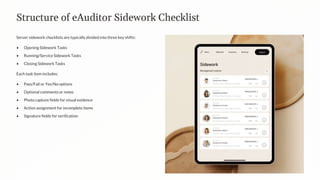
Server sidework checklists are typically divided into three key shifts:
• Opening Sidework Tasks
• Running/Service Sidework Tasks
• Closing Sidework Tasks
Each task item includes:
• Pass/Fail or Yes/No options
• Optional comments or notes
• Photo capture fields for visual evidence
• Action assignment for incomplete items
• Signature fields for verification
Opening Sidework Inspection
Dining Area Prep
Staff clean the dining area, set tables,
and prepare supplies with proper
placement of silverware, glassware, and
napkins
Beverage Station
Coffee station and drink dispensers
prepped, ice bins filled, and water
pitchers ready for service
Service Items
Silverware rolled or polished and
stocked, bread baskets, condiments,
and other pre-shift items set out
In eAuditor: Tick each completed task, add comments if stock is low or unavailable, and capture photos of fully set stations or flagged deficiencies
Running Sidework Inspection
Checklist Focus:
• Beverage stations stocked (cups, straws, napkins)
• Servers assist with bussing as needed
• Side stations remain clean and organized
• Condiment stations topped off
• Trash cans monitored and replaced when needed
In eAuditor:
• Note any mid-shift replenishment
• Take photos if items are consistently running low
• Assign tasks to specific staff if support is needed
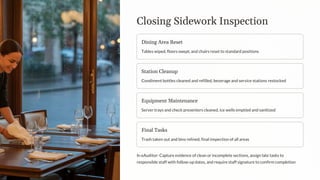
Closing Sidework Inspection
Dining Area Reset
Tables wiped, floors swept, and chairs reset to standard positions
Station Cleanup
Condiment bottles cleaned and refilled, beverage and service stations restocked
Equipment Maintenance
Server trays and check presenters cleaned, ice wells emptied and sanitized
Final Tasks
Trash taken out and bins relined, final inspection of all areas
In eAuditor: Capture evidence of clean or incomplete sections, assign late tasks to
responsible staff with follow-up dates, and require staff signature to confirm completion
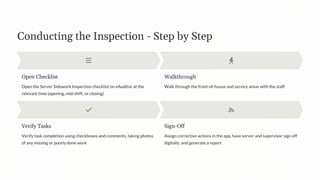
Conducting the Inspection - Step by Step
Open Checklist
Open the Server Sidework Inspection checklist on eAuditor at the
relevant time (opening, mid-shift, or closing)
Walkthrough
Walk through the front-of-house and service areas with the staff
Verify Tasks
Verify task completion using checkboxes and comments, taking photos
of any missing or poorly done work
Sign-Off
Assign corrective actions in the app, have server and supervisor sign off
digitally, and generate a report
Benefits & Reporting
Post-Inspection Reporting
• Reports auto-generated and saved in eAuditor's cloud
• Dashboards show compliance scores, repeat violations, and staff performance trends
• Reports can be exported for HR documentation or training reviews
Key Benefits
• Reinforces accountability and task ownership
• Ensures consistency across all shifts and locations
• Allows real-time monitoring (even remotely)
• Builds training data for new hires
• Reduces guest complaints due to incomplete prep
eAuditor provides a reliable, structured method to ensure all sidework duties are completed

Server Sidework Inspection with eAuditor Audits & Inspections

  • 1.
    Server Sidework Inspectionwith eAuditor Server Sidework refers to essential non-customer-facing tasks that restaurant servers perform before, during, or after shifts to maintain smooth front-of-house operations. These duties ensure the dining area is clean, stocked, and ready to serve guests efficiently.
  • 2.
    Purpose of DigitalSidework Inspection Verify Task Completion Digitally verify server readiness tasks for opening, shift, and closing periods Maintain Standards Ensure stock levels, cleanliness, and prep tasks are completed without shortcuts Staff Accountability Hold staff accountable through digital checklists and sign-offs Consistency & Documentation Maintain shift consistency in high-turnover teams and document inspections for training, performance tracking, or quality audits
  • 3.
    Structure of eAuditorSidework Checklist Server sidework checklists are typically divided into three key shifts: • Opening Sidework Tasks • Running/Service Sidework Tasks • Closing Sidework Tasks Each task item includes: • Pass/Fail or Yes/No options • Optional comments or notes • Photo capture fields for visual evidence • Action assignment for incomplete items • Signature fields for verification
  • 4.
    Opening Sidework Inspection DiningArea Prep Staff clean the dining area, set tables, and prepare supplies with proper placement of silverware, glassware, and napkins Beverage Station Coffee station and drink dispensers prepped, ice bins filled, and water pitchers ready for service Service Items Silverware rolled or polished and stocked, bread baskets, condiments, and other pre-shift items set out In eAuditor: Tick each completed task, add comments if stock is low or unavailable, and capture photos of fully set stations or flagged deficiencies
  • 5.
    Running Sidework Inspection ChecklistFocus: • Beverage stations stocked (cups, straws, napkins) • Servers assist with bussing as needed • Side stations remain clean and organized • Condiment stations topped off • Trash cans monitored and replaced when needed In eAuditor: • Note any mid-shift replenishment • Take photos if items are consistently running low • Assign tasks to specific staff if support is needed
  • 6.
    Closing Sidework Inspection DiningArea Reset Tables wiped, floors swept, and chairs reset to standard positions Station Cleanup Condiment bottles cleaned and refilled, beverage and service stations restocked Equipment Maintenance Server trays and check presenters cleaned, ice wells emptied and sanitized Final Tasks Trash taken out and bins relined, final inspection of all areas In eAuditor: Capture evidence of clean or incomplete sections, assign late tasks to responsible staff with follow-up dates, and require staff signature to confirm completion
  • 7.
    Conducting the Inspection- Step by Step Open Checklist Open the Server Sidework Inspection checklist on eAuditor at the relevant time (opening, mid-shift, or closing) Walkthrough Walk through the front-of-house and service areas with the staff Verify Tasks Verify task completion using checkboxes and comments, taking photos of any missing or poorly done work Sign-Off Assign corrective actions in the app, have server and supervisor sign off digitally, and generate a report
  • 8.
    Benefits & Reporting Post-InspectionReporting • Reports auto-generated and saved in eAuditor's cloud • Dashboards show compliance scores, repeat violations, and staff performance trends • Reports can be exported for HR documentation or training reviews Key Benefits • Reinforces accountability and task ownership • Ensures consistency across all shifts and locations • Allows real-time monitoring (even remotely) • Builds training data for new hires • Reduces guest complaints due to incomplete prep eAuditor provides a reliable, structured method to ensure all sidework duties are completed