OpsMgr Tips and Tricks
Christian Heitkamp, NiCE IT Management Solutions
Agenda
Linux/UNIX Security Insights and hints
Windows Security
Ignite Highlights….
Performance / Windows
Performance / UNIX
UNIX/Linux Workflow analysis
NiCE Product Offering
On Microsoft System Center Application Monitoring On Micro Focus /
Hewlett Packaged Enterprise
Active O365 MP Microsoft Office 365 Planned
Oracle MP Oracle Database -
DB2 MP IBM DB2 LUW DB2 SPI / MP
BES and BBMP BES 10 & BES 12 BES SPI
Domino MP IBM Domino Domino SPI
z/OS MP IBM Mainframe (z/OS) EView/390z
IBM i MP IBM iSeries (AS/400, IBM i) EView/400i
SAP MP, SAP HANA MP by OZSoft SAP -
zLinux MP Linux on IBM System z -
LogFile MP Log File monitoring -
PowerHA MP / Veritas PowerHA / Veritas -
UNIX/Linux
Security for OpsMgr
Privileged Account Password
Retrieval
DISCLAIMER:
Shown demos and examples are for training and demo purpose only!
DEMO
WinRM & OMI Agent Security
Provider
omiserverWinRM /
WSMan API
Provider
omiagent
omiagent
Port 1270
UNIX/Linux
Accounts
RunAs Profiles
Database
MMA
Username and password
in clear text passed to
ProbeAction in task workflow
Risk Mitigation
 By design, the password is passed in clear text
 Review permissions of unix/linux accounts with care
Privileged Account Permissions
 https://technet.microsoft.com/en-us/library/hh230690(v=sc.12).aspx
Life is not fair, but the root password
helps
DEMO
DISCLAIMER:
Shown demos and examples are for training and demo purpose only!
Privileged Account Permissions
 https://technet.microsoft.com/en-us/library/hh230690(v=sc.12).aspx
Do not follow this
Technet Article!
Security risk!!
Sudoers File recommendations
 Best: No sudoers entries at all
 Minimal:
 opsuser ALL=(root) NOPASSWD: /opt/microsoft/scx/bin/tools/scxadmin
Agent stop, start, restart
 opsuser ALL=(root) NOPASSWD: /opt/microsoft/scx/bin/scxlogfilereader
Log file monitoring
 OK for 2016:
https://social.technet.microsoft.com/wiki/contents/articles/7375.scom-2016-
and-2012-configuring-sudo-elevation-for-unix-and-linux-monitoring.aspx
OMI Agent & Provider Security
omiserver [root] omiagent [HOSTING]
.cert file
.reg file
„pam“ file
MMA
omiagent [HOSTING]
.reg file
Port 1270
OMI Provider permissions
DEMO
DISCLAIMER:
Shown demos and examples are for training and demo purpose only!
Agent Security
 Do not change standard file and directory permissions
 Do not allow Agent installation by the
“Discovery Wizard”
 Scripts run by the Agent or agent processes must not be changeable by
SCOM User Accounts
Windows Security for OpsMgr
Create Domain Admin without
Domain Account
DEMO
DISCLAIMER:
Shown demos and examples are for training and demo purpose only!
Default Action Account
 Don’t use Local System on Domain Controllers or other Application
Servers with similar Security concepts
 File Servers
 DHCP / DNS
 etc
Default Action Account
 Use low-privileged account whenever it makes sense
Low-privileged Account – minimum privileges
 Member of the local Users group
 Member of the local Performance Monitor Users group
 Allow log-on-locally permission (SetInteractiveLogonRight)
What about deployments/upgrades
in low privilege scenarios
 Working solution
 External deployment tools like SCCM for SCOM Agent deployment and
upgrades
Links to more Resources
 http://tinyurl.com/scomsecurity
 http://tinyurl.com/scomagentlowprivilige
Ignite Highlights
SYSTEM
CENTER 2016
UPDATE
ROLLUP 3
SYSTEM
CENTER 1801
SYSTEM
CENTER
180X
PREVIEW
SYSTEM
CENTER
180X
LONG-
TERM
SERVICING
CHANNEL
• Introducing semi-annual feature release cadence this fiscal year
• Semester planning
• Aligned with WS releases
• Access to semi-annual channel will require active Software Assurance
SYSTEM
CENTER
1801
PREVIEW
Infrastructure of GM SCOM
Ops AG
DW AG
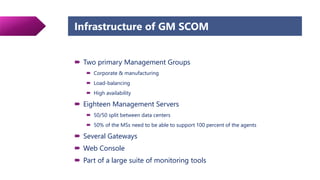
Infrastructure of GM SCOM
 Two primary Management Groups
 Corporate & manufacturing
 Load-balancing
 High availability
 Eighteen Management Servers
 50/50 split between data centers
 50% of the MSs need to be able to support 100 percent of the agents
 Several Gateways
 Web Console
 Part of a large suite of monitoring tools
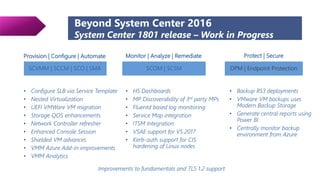
Beyond System Center 2016
System Center 1801 release – Work in Progress
Monitor | Analyze | Remediate
SCOM | SCSM
• H5 Dashboards
• MP Discoverability of 3rd party MPs
• Fluentd based log monitoring
• Service Map integration
• ITSM Integration
• VSAE support for VS 2017
• Kerb-auth support for CIS
hardening of Linux nodes
Provision | Configure | Automate
SCVMM | SCCM | SCO | SMA
• Configure SLB via Service Template
• Nested Virtualization
• UEFI VMWare VM migration
• Storage QOS enhancements
• Network Controller refresher
• Enhanced Console Session
• Shielded VM advances
• VMM Azure Add-in improvements
• VMM Analytics
Protect | Secure
DPM | Endpoint Protection
• Backup RS3 deployments
• VMware VM backups uses
Modern Backup Storage
• Generate central reports using
Power BI
• Centrally monitor backup
environment from Azure
Improvements to fundamentals and TLS 1.2 support
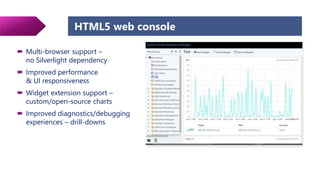
HTML5 web console
 Multi-browser support –
no Silverlight dependency
 Improved performance
& UI responsiveness
 Widget extension support –
custom/open-source charts
 Improved diagnostics/debugging
experiences – drill-downs
Log file monitoring
 Common agent
platform for
monitoring & analytics
 Extensible log file
monitoring
(leveraging Fluentd & the eco-system)
 Granular log file
monitoring capability
for Linux, on par with
Windows
Linux OS Version Supported
RHEL 5,6,7 (x86/x64)
Cent OS 5,6 (x86/x64) and 7 (x64)
Ubuntu 12.04 LTS, 16.04, 14.04 (x86/x64)
Debian 6,7,8 (x86/x64)
Oracle Linux 5,6 (x86/x64) and 7 (x64)
SLES 11 (x86/x64) and 12 (x64)
Event data
Event data
Fluentd Plugins Plugin Description Usage
“Exclusive Match” filter
plugin.
On match of Pattern A and absence of
Pattern B in the same log record an event
would be sent.
Apache HTTP URL monitoring. Example URL to be monitored:
http://scomdemo.com/ignite
Log name : /var/log/apache2/access.log
Pattern A : “GET /ignite HTTP/1.1“,
Pattern B : 200
Absence of success code “200” results in event beingsent
“Repeated correlation” filter
plugin
If Pattern A occurs N number of times
within T seconds then event would be
sent.
Authentication failure/Intrusion detection
Log name : /var/log/auth.log
Pattern : Failed password for <username>
Timer : 10 seconds, Number of occurrences : 5
Administrator alerted if user accesses machine with incorrect credentials 5 times
in 10 seconds
“Correlated match” filter
plugin
If there is a match for pattern A, and if
pattern B occurs within time T then an
event would be sent.
Package installation failure
Log name : /var/log/syslog
Pattern A : Reading package lists… Done
Pattern B : Failed to fetch <package information>
Timer : 5 seconds
Log file monitoring – User scenarios
Fluentd Plugins Plugin Description Usage
Any Fluentd source plugin Rotating file paths:
Users can use wild card character in the log file name or path in the source
directive of the Fluentd
“Exclusive correlation match”
filter plugin
If there is a match for pattern A and
pattern B does not occur within time T
then an event would be sent.
Failed to start Mongo DB:
Log name : /var/log/mongodb/mongodb.log
Pattern A : MongoDB starting, Pattern B :Connection accepted
Timer : 5 seconds
Log file monitoring – User scenarios
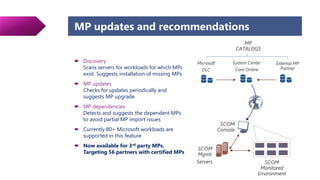
MP updates and recommendations
 Discovery
Scans servers for workloads for which MPs
exist. Suggests installation of missing MPs
 MP updates
Checks for updates periodically and
suggests MP upgrade
 MP dependencies
Detects and suggests the dependent MPs
to avoid partial MP import issues
 Currently 80+ Microsoft workloads are
supported in this feature
 Now available for 3rd party MPs.
Targeting 56 partners with certified MPs
Enhanced Windows
Server & Linux support
• Log file monitoring support for Linux at par
with Windows
• Setup improvement for the Linux agent
• Linux Kerberos support
• Improvements to Linux MPs
• Improvements to Windows Server OS MP
Fundamentals Better with Azure
SCOM summary
• HTML5 dashboards
• Improved UI responsiveness with
large number MPs
• 3rd party MP update and
recommendation
VS2017 support in VSAE
• Service Map integration
Performance for OpsMgr
UNIX/Linux Performance
 All workflows run at the Mgmt Servers
 Mgmt Group Sizing is key
 Cookdown essential, especially for Script Probes and Log Files
Workflow analysis
 WinRM Logging
 WinRM/WSMan Tracing (EnableOpsMgrModuleLogging)
 https://technet.microsoft.com/en-us/library/hh212862(v=sc.12).aspx
 Manual execution of winrm
UNIX/Linux for OpsMgr / Workflow
Analysis
DEMO
SCOM performance - basics
 Choose applicable Management Packs to install
Don’t install the whole MP catalog
 Configure the installed Management Packs
RTFM
 Check for failing or misconfigured Discoveries
Configchurn
 Check for failing or misconfigured Monitors / Alert-Rules
Statechanges, Alerts
 Choose Performance Data (Rules) wisely
Enabling/Disabling via Overrides
 Check Database Retention Settings
Database Grooming
How to check for basic performance
considerations
DEMO
How to check Configchurn
-- statistics for discoveries (Configchurn)
select
cast(ecl.lastmodified as date) as [LastModifiedDate],
datepart(hour, ecl.lastmodified),
d.DiscoveryName,
lt.LTValue as [DisplayName],
min(ecl.lastmodified) as [MINLastModifiedDate],
max(ecl.lastmodified) as [MAXLastModifiedDate],
count(distinct etl.EntityTransactionLogId) as [TranCount],
count(*) as [ChangesCount]
from EntityTransactionLog etl
inner join EntityChangeLog ecl on etl.EntityTransactionLogId = ecl.EntityTransactionLogId
inner join discoverysource ds on etl.DiscoverySourceId = ds.DiscoverySourceId
inner join discovery d on ds.DiscoveryRuleId = d.DiscoveryId
inner join LocalizedText lt on d.DiscoveryId = lt.LTStringId
where lt.LanguageCode = 'ENU' and lt.LTStringType = 1
group by d.DiscoveryName, lt.LTValue, cast(ecl.lastmodified as date), datepart(hour, ecl.lastmodified)
order by count(*) desc, datepart(hour, ecl.lastmodified) desc
How to check Statechanges
-- statistics monitor (top 50) state changes
select
distinct top 50 count(sce.StateId) as NumStateChanges,
m.MonitorName,
lt.LTValue as [DisplayName],
mt.typename AS TargetClass
from StateChangeEvent sce with (nolock)
join state s with (nolock) on sce.StateId = s.StateId
join monitor m with (nolock) on s.MonitorId = m.MonitorId
join LocalizedText lt with (nolock) on lt.LTStringId = m.MonitorId
join managedtype mt with (nolock) on m.TargetManagedEntityType = mt.ManagedTypeId
where m.IsUnitMonitor = 1 and lt.LanguageCode = 'ENU' and lt.LTStringType = 1
group by m.MonitorName, lt.LTValue, mt.typename
order by NumStateChanges desc
How to check Alerts
-- Top 20 Alerts in an Operational Database, by Alert Count
SELECT TOP 20 SUM(1) AS AlertCount, AlertStringName, AlertStringDescription,
MonitoringRuleId, Name
FROM Alertview WITH (NOLOCK)
WHERE TimeRaised is not NULL
GROUP BY AlertStringName, AlertStringDescription, MonitoringRuleId, Name
ORDER BY AlertCount DESC
-- Top 20 Alerts in an Operational Database, by Repeat Count
SELECT TOP 20 SUM(RepeatCount+1) AS RepeatCount, AlertStringName,
AlertStringDescription, MonitoringRuleId, Name
FROM Alertview WITH (NOLOCK)
WHERE Timeraised is not NULL
GROUP BY AlertStringName, AlertStringDescription, MonitoringRuleId, Name
ORDER BY RepeatCount DESC
How to check Performance Data
-- Performance insertions per day
SELECT CASE WHEN(GROUPING(CONVERT(VARCHAR(20), TimeSampled, 102)) = 1)
THEN 'All Days' ELSE CONVERT(VARCHAR(20), TimeSampled, 102)
END AS DaySampled, COUNT(*) AS PerfInsertPerDay
FROM PerformanceDataAllView with (NOLOCK)
GROUP BY CONVERT(VARCHAR(20), TimeSampled, 102) WITH ROLLUP
ORDER BY DaySampled DESC
-- Top 30 performance insertions by perf object and counter name
SELECT TOP 30
rv.DisplayName,
rv.Name,
rv.Description,
pcv.ObjectName,
pcv.CounterName,
count (pcv.countername) AS Total
FROM PerformanceDataAllView AS pdv WITH (nolock) INNER JOIN
PerformanceCounterView AS pcv WITH (nolock) ON pdv.PerformanceSourceInternalId = pcv.PerformanceSourceInternalId INNER JOIN
RuleView AS rv WITH (nolock) ON rv.Id = pcv.RuleId
GROUP BY rv.DisplayName, rv.Name, rv.Description, pcv.ObjectName, pcv.CounterName
ORDER BY count (pcv.countername) DESC
Links to more Resources
 http://tinyurl.com/scomqueries
 http://tinyurl.com/scomtuningmonitors
Summary / Wrap Up
UNIX/Linux security check
What is the name of utility to configure elevation on UNIX/Linux?
• sudo
How many UNIX/Linux users should be setup at least ?
• One (1)
Should the have sudo elevation assigned?
• No, or only minimal!
Which user should own the Agent binary and configuration files?
• Root only!
What is the good practice to install Linux/UNIX Agents?
• Manually. Discovery Wizard should not be used for deployment
Thank you for your attention
Contact
Smart Application Monitoring Solutions You Can Rely On
Global
NiCE IT Management Solutions GmbH
Liebigstrasse 9, 71229 Leonberg
Germany
Phone.: +49 7152 939 82 0
E-Mail: solutions@nice.de
Americas
NiCE IT Management Solutions Corporation
3478 Buskirk Avenue, Suite 1000,
Pleasant Hill, California 94523, USA
Toll-free Phone: +1-877-778-3730
E-Mail: sales@nice.us.com

SCOM Tips and Tricks

  • 1.
    OpsMgr Tips andTricks Christian Heitkamp, NiCE IT Management Solutions
  • 2.
    Agenda Linux/UNIX Security Insightsand hints Windows Security Ignite Highlights…. Performance / Windows Performance / UNIX UNIX/Linux Workflow analysis
  • 3.
    NiCE Product Offering OnMicrosoft System Center Application Monitoring On Micro Focus / Hewlett Packaged Enterprise Active O365 MP Microsoft Office 365 Planned Oracle MP Oracle Database - DB2 MP IBM DB2 LUW DB2 SPI / MP BES and BBMP BES 10 & BES 12 BES SPI Domino MP IBM Domino Domino SPI z/OS MP IBM Mainframe (z/OS) EView/390z IBM i MP IBM iSeries (AS/400, IBM i) EView/400i SAP MP, SAP HANA MP by OZSoft SAP - zLinux MP Linux on IBM System z - LogFile MP Log File monitoring - PowerHA MP / Veritas PowerHA / Veritas -
  • 4.
  • 5.
    Privileged Account Password Retrieval DISCLAIMER: Showndemos and examples are for training and demo purpose only! DEMO
  • 6.
    WinRM & OMIAgent Security Provider omiserverWinRM / WSMan API Provider omiagent omiagent Port 1270 UNIX/Linux Accounts RunAs Profiles Database MMA Username and password in clear text passed to ProbeAction in task workflow
  • 7.
    Risk Mitigation  Bydesign, the password is passed in clear text  Review permissions of unix/linux accounts with care
  • 8.
    Privileged Account Permissions https://technet.microsoft.com/en-us/library/hh230690(v=sc.12).aspx
  • 9.
    Life is notfair, but the root password helps DEMO DISCLAIMER: Shown demos and examples are for training and demo purpose only!
  • 10.
    Privileged Account Permissions https://technet.microsoft.com/en-us/library/hh230690(v=sc.12).aspx Do not follow this Technet Article! Security risk!!
  • 11.
    Sudoers File recommendations Best: No sudoers entries at all  Minimal:  opsuser ALL=(root) NOPASSWD: /opt/microsoft/scx/bin/tools/scxadmin Agent stop, start, restart  opsuser ALL=(root) NOPASSWD: /opt/microsoft/scx/bin/scxlogfilereader Log file monitoring  OK for 2016: https://social.technet.microsoft.com/wiki/contents/articles/7375.scom-2016- and-2012-configuring-sudo-elevation-for-unix-and-linux-monitoring.aspx
  • 12.
    OMI Agent &Provider Security omiserver [root] omiagent [HOSTING] .cert file .reg file „pam“ file MMA omiagent [HOSTING] .reg file Port 1270
  • 13.
    OMI Provider permissions DEMO DISCLAIMER: Showndemos and examples are for training and demo purpose only!
  • 14.
    Agent Security  Donot change standard file and directory permissions  Do not allow Agent installation by the “Discovery Wizard”  Scripts run by the Agent or agent processes must not be changeable by SCOM User Accounts
  • 15.
  • 16.
    Create Domain Adminwithout Domain Account DEMO DISCLAIMER: Shown demos and examples are for training and demo purpose only!
  • 17.
    Default Action Account Don’t use Local System on Domain Controllers or other Application Servers with similar Security concepts  File Servers  DHCP / DNS  etc
  • 18.
    Default Action Account Use low-privileged account whenever it makes sense
  • 19.
    Low-privileged Account –minimum privileges  Member of the local Users group  Member of the local Performance Monitor Users group  Allow log-on-locally permission (SetInteractiveLogonRight)
  • 20.
    What about deployments/upgrades inlow privilege scenarios  Working solution  External deployment tools like SCCM for SCOM Agent deployment and upgrades
  • 21.
    Links to moreResources  http://tinyurl.com/scomsecurity  http://tinyurl.com/scomagentlowprivilige
  • 22.
  • 25.
    SYSTEM CENTER 2016 UPDATE ROLLUP 3 SYSTEM CENTER1801 SYSTEM CENTER 180X PREVIEW SYSTEM CENTER 180X LONG- TERM SERVICING CHANNEL • Introducing semi-annual feature release cadence this fiscal year • Semester planning • Aligned with WS releases • Access to semi-annual channel will require active Software Assurance SYSTEM CENTER 1801 PREVIEW
  • 27.
    Infrastructure of GMSCOM Ops AG DW AG
  • 28.
    Infrastructure of GMSCOM  Two primary Management Groups  Corporate & manufacturing  Load-balancing  High availability  Eighteen Management Servers  50/50 split between data centers  50% of the MSs need to be able to support 100 percent of the agents  Several Gateways  Web Console  Part of a large suite of monitoring tools
  • 29.
    Beyond System Center2016 System Center 1801 release – Work in Progress Monitor | Analyze | Remediate SCOM | SCSM • H5 Dashboards • MP Discoverability of 3rd party MPs • Fluentd based log monitoring • Service Map integration • ITSM Integration • VSAE support for VS 2017 • Kerb-auth support for CIS hardening of Linux nodes Provision | Configure | Automate SCVMM | SCCM | SCO | SMA • Configure SLB via Service Template • Nested Virtualization • UEFI VMWare VM migration • Storage QOS enhancements • Network Controller refresher • Enhanced Console Session • Shielded VM advances • VMM Azure Add-in improvements • VMM Analytics Protect | Secure DPM | Endpoint Protection • Backup RS3 deployments • VMware VM backups uses Modern Backup Storage • Generate central reports using Power BI • Centrally monitor backup environment from Azure Improvements to fundamentals and TLS 1.2 support
  • 30.
    HTML5 web console Multi-browser support – no Silverlight dependency  Improved performance & UI responsiveness  Widget extension support – custom/open-source charts  Improved diagnostics/debugging experiences – drill-downs
  • 31.
    Log file monitoring Common agent platform for monitoring & analytics  Extensible log file monitoring (leveraging Fluentd & the eco-system)  Granular log file monitoring capability for Linux, on par with Windows Linux OS Version Supported RHEL 5,6,7 (x86/x64) Cent OS 5,6 (x86/x64) and 7 (x64) Ubuntu 12.04 LTS, 16.04, 14.04 (x86/x64) Debian 6,7,8 (x86/x64) Oracle Linux 5,6 (x86/x64) and 7 (x64) SLES 11 (x86/x64) and 12 (x64) Event data Event data
  • 32.
    Fluentd Plugins PluginDescription Usage “Exclusive Match” filter plugin. On match of Pattern A and absence of Pattern B in the same log record an event would be sent. Apache HTTP URL monitoring. Example URL to be monitored: http://scomdemo.com/ignite Log name : /var/log/apache2/access.log Pattern A : “GET /ignite HTTP/1.1“, Pattern B : 200 Absence of success code “200” results in event beingsent “Repeated correlation” filter plugin If Pattern A occurs N number of times within T seconds then event would be sent. Authentication failure/Intrusion detection Log name : /var/log/auth.log Pattern : Failed password for <username> Timer : 10 seconds, Number of occurrences : 5 Administrator alerted if user accesses machine with incorrect credentials 5 times in 10 seconds “Correlated match” filter plugin If there is a match for pattern A, and if pattern B occurs within time T then an event would be sent. Package installation failure Log name : /var/log/syslog Pattern A : Reading package lists… Done Pattern B : Failed to fetch <package information> Timer : 5 seconds Log file monitoring – User scenarios
  • 33.
    Fluentd Plugins PluginDescription Usage Any Fluentd source plugin Rotating file paths: Users can use wild card character in the log file name or path in the source directive of the Fluentd “Exclusive correlation match” filter plugin If there is a match for pattern A and pattern B does not occur within time T then an event would be sent. Failed to start Mongo DB: Log name : /var/log/mongodb/mongodb.log Pattern A : MongoDB starting, Pattern B :Connection accepted Timer : 5 seconds Log file monitoring – User scenarios
  • 34.
    MP updates andrecommendations  Discovery Scans servers for workloads for which MPs exist. Suggests installation of missing MPs  MP updates Checks for updates periodically and suggests MP upgrade  MP dependencies Detects and suggests the dependent MPs to avoid partial MP import issues  Currently 80+ Microsoft workloads are supported in this feature  Now available for 3rd party MPs. Targeting 56 partners with certified MPs
  • 35.
    Enhanced Windows Server &Linux support • Log file monitoring support for Linux at par with Windows • Setup improvement for the Linux agent • Linux Kerberos support • Improvements to Linux MPs • Improvements to Windows Server OS MP Fundamentals Better with Azure SCOM summary • HTML5 dashboards • Improved UI responsiveness with large number MPs • 3rd party MP update and recommendation VS2017 support in VSAE • Service Map integration
  • 36.
  • 37.
    UNIX/Linux Performance  Allworkflows run at the Mgmt Servers  Mgmt Group Sizing is key  Cookdown essential, especially for Script Probes and Log Files
  • 38.
    Workflow analysis  WinRMLogging  WinRM/WSMan Tracing (EnableOpsMgrModuleLogging)  https://technet.microsoft.com/en-us/library/hh212862(v=sc.12).aspx  Manual execution of winrm
  • 39.
    UNIX/Linux for OpsMgr/ Workflow Analysis DEMO
  • 40.
    SCOM performance -basics  Choose applicable Management Packs to install Don’t install the whole MP catalog  Configure the installed Management Packs RTFM  Check for failing or misconfigured Discoveries Configchurn  Check for failing or misconfigured Monitors / Alert-Rules Statechanges, Alerts  Choose Performance Data (Rules) wisely Enabling/Disabling via Overrides  Check Database Retention Settings Database Grooming
  • 41.
    How to checkfor basic performance considerations DEMO
  • 42.
    How to checkConfigchurn -- statistics for discoveries (Configchurn) select cast(ecl.lastmodified as date) as [LastModifiedDate], datepart(hour, ecl.lastmodified), d.DiscoveryName, lt.LTValue as [DisplayName], min(ecl.lastmodified) as [MINLastModifiedDate], max(ecl.lastmodified) as [MAXLastModifiedDate], count(distinct etl.EntityTransactionLogId) as [TranCount], count(*) as [ChangesCount] from EntityTransactionLog etl inner join EntityChangeLog ecl on etl.EntityTransactionLogId = ecl.EntityTransactionLogId inner join discoverysource ds on etl.DiscoverySourceId = ds.DiscoverySourceId inner join discovery d on ds.DiscoveryRuleId = d.DiscoveryId inner join LocalizedText lt on d.DiscoveryId = lt.LTStringId where lt.LanguageCode = 'ENU' and lt.LTStringType = 1 group by d.DiscoveryName, lt.LTValue, cast(ecl.lastmodified as date), datepart(hour, ecl.lastmodified) order by count(*) desc, datepart(hour, ecl.lastmodified) desc
  • 43.
    How to checkStatechanges -- statistics monitor (top 50) state changes select distinct top 50 count(sce.StateId) as NumStateChanges, m.MonitorName, lt.LTValue as [DisplayName], mt.typename AS TargetClass from StateChangeEvent sce with (nolock) join state s with (nolock) on sce.StateId = s.StateId join monitor m with (nolock) on s.MonitorId = m.MonitorId join LocalizedText lt with (nolock) on lt.LTStringId = m.MonitorId join managedtype mt with (nolock) on m.TargetManagedEntityType = mt.ManagedTypeId where m.IsUnitMonitor = 1 and lt.LanguageCode = 'ENU' and lt.LTStringType = 1 group by m.MonitorName, lt.LTValue, mt.typename order by NumStateChanges desc
  • 44.
    How to checkAlerts -- Top 20 Alerts in an Operational Database, by Alert Count SELECT TOP 20 SUM(1) AS AlertCount, AlertStringName, AlertStringDescription, MonitoringRuleId, Name FROM Alertview WITH (NOLOCK) WHERE TimeRaised is not NULL GROUP BY AlertStringName, AlertStringDescription, MonitoringRuleId, Name ORDER BY AlertCount DESC -- Top 20 Alerts in an Operational Database, by Repeat Count SELECT TOP 20 SUM(RepeatCount+1) AS RepeatCount, AlertStringName, AlertStringDescription, MonitoringRuleId, Name FROM Alertview WITH (NOLOCK) WHERE Timeraised is not NULL GROUP BY AlertStringName, AlertStringDescription, MonitoringRuleId, Name ORDER BY RepeatCount DESC
  • 45.
    How to checkPerformance Data -- Performance insertions per day SELECT CASE WHEN(GROUPING(CONVERT(VARCHAR(20), TimeSampled, 102)) = 1) THEN 'All Days' ELSE CONVERT(VARCHAR(20), TimeSampled, 102) END AS DaySampled, COUNT(*) AS PerfInsertPerDay FROM PerformanceDataAllView with (NOLOCK) GROUP BY CONVERT(VARCHAR(20), TimeSampled, 102) WITH ROLLUP ORDER BY DaySampled DESC -- Top 30 performance insertions by perf object and counter name SELECT TOP 30 rv.DisplayName, rv.Name, rv.Description, pcv.ObjectName, pcv.CounterName, count (pcv.countername) AS Total FROM PerformanceDataAllView AS pdv WITH (nolock) INNER JOIN PerformanceCounterView AS pcv WITH (nolock) ON pdv.PerformanceSourceInternalId = pcv.PerformanceSourceInternalId INNER JOIN RuleView AS rv WITH (nolock) ON rv.Id = pcv.RuleId GROUP BY rv.DisplayName, rv.Name, rv.Description, pcv.ObjectName, pcv.CounterName ORDER BY count (pcv.countername) DESC
  • 46.
    Links to moreResources  http://tinyurl.com/scomqueries  http://tinyurl.com/scomtuningmonitors
  • 47.
  • 48.
    UNIX/Linux security check Whatis the name of utility to configure elevation on UNIX/Linux? • sudo How many UNIX/Linux users should be setup at least ? • One (1) Should the have sudo elevation assigned? • No, or only minimal! Which user should own the Agent binary and configuration files? • Root only! What is the good practice to install Linux/UNIX Agents? • Manually. Discovery Wizard should not be used for deployment
  • 49.
    Thank you foryour attention
  • 50.
    Contact Smart Application MonitoringSolutions You Can Rely On Global NiCE IT Management Solutions GmbH Liebigstrasse 9, 71229 Leonberg Germany Phone.: +49 7152 939 82 0 E-Mail: solutions@nice.de Americas NiCE IT Management Solutions Corporation 3478 Buskirk Avenue, Suite 1000, Pleasant Hill, California 94523, USA Toll-free Phone: +1-877-778-3730 E-Mail: sales@nice.us.com

Editor's Notes

  • #7  WinRM: Windows Remote Management WSMan: WS-Management (Web Services-Management) SCXCoreProviderModule
  • #10 Demo flow: Login to Linux systems with credentials retrieved in first demo. Use sudo su – to become super use. If the technet articel is followed, an operator can elevate to super user, even if not being an administrator for SCOM.
  • #12 Issue with 2012: monuser ALL=(root) NOPASSWD: /bin/sh -c sh /tmp/scx-*/GetOSVersion.sh
  • #13  WinRM: Windows Remote Management WSMan: WS-Management (Web Services-Management) SCXCoreProviderModule
  • #19 LSA = Local Security Authority LSASS = Local Security Authority Subsystem Service -> In Memory Cache of Authenticators
  • #21 https://technet.microsoft.com/en-us/library/hh457003(v=sc.12).aspx
  • #22 https://technet.microsoft.com/en-us/library/hh457003(v=sc.12).aspx
  • #23 https://technet.microsoft.com/en-us/library/hh457003(v=sc.12).aspx
  • #48 https://technet.microsoft.com/en-us/library/hh457003(v=sc.12).aspx
  • #50 CHECK: