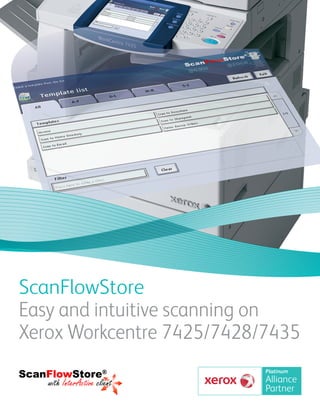
ScanFlowStore
Easy and intuitive scanning on
Xerox Workcentre 7425/7428/7435
                           Platinum
                           Alliance
                           Partner
Easy and intuitive scanning with ScanFlowStore on a Xerox Workcentre 7425/7428/7435
Digital archiving with ScanFlowStore is just as easy as making a copy. With one press of a button, a Xerox Workcentre 7425/7428/7435 creates
a digital copy which is stored anywhere. ScanFlowStore ensures that the document is stored in the proper folder as a text searchable document.
With ScanFlowStore InterActive client it is possible to have real time bi-directional communication with your network, meaning that it is now
even easier to specify the repository for a scanned document, directly from your Xerox Workcentre 7425/7428/7435.

Scenarios of how to use ScanFlowStore
Scan directly into Windows file structure                                           Scan to anywhere                                                                       Scanning with barcodes
For scanning a document, simply put it on                                           When using a business application, like                                                ScanFlowStore has the possibility to read
the Xerox MFP and enter the destination of                                          Microsoft SharePoint, Xerox DocuShare or any                                           and interpret many standard barcode
the document on the display of the MFP.                                             other business applications, all information                                           fonts. Use this for batch scanning and to
It’s even possible to browse through your                                           about business relations, invoices and projects                                        eliminate manual user data entry at the
Windows file structure directly from the                                            is listed in the database of the application.                                          MFP. With a barcode separation sheet,
MFP and easily select the folder to store a                                         ScanFlowStore can store documents directly in                                          batch scanning (high volumes) becomes
document in. New folders can also be created                                        the right location in your business application,                                       possible. When scanning batches, all of these
directly on the display of the MFP. After                                           by answering one or two questions on the                                               will be separated into multiple documents.
pressing the start button, the document is                                          MFP. Create a connector between many                                                   Each document can then be routed to a
stored as a text searchable PDF, Word, Excel,                                       applications or databases with a little                                                destination and/or uniquely named based on
Tiff, OpenOffice or Jpeg file in the selected                                       customisation. For more information about                                              the value of the barcode.
location.                                                                           connectors, please check our website: www.
                                                                                    scanflowstore.com.

Example features of ScanFlowStore
Personalized templates                                                              Interactive communication                                                                  ScanFlowStore
           ScanFlowStore can integrate with                                                    The InterActive Client uses bi-
           authentication applications, like                                                   directional communication to allow                                              ScanFlowStore gives the ability to
           Xerox Secure Access, Equitrac                                                       real time access to any database                                                create archives in just three easy
           or SafeCom to identify the MFP                                                      from the MFP user interface.                                                    steps by scanning directly from your
user. Users can log on to the device by                                             From this database users may select the                                                    Xerox multifunction printer into your
swiping a smart card or entering a pin code,                                        appropriate customer, creditor or any other                                                Windows file structure, Microsoft
which allows access to all personalized scan                                        variable that is specified. This can be a                                                  SharePoint or any other business
templates like their email address or home                                          database from a Windows file structure or                                                  application.
directory, without the need of entering extra                                       any database from your business application.
information on the MFP.                                                                                                                                                        User benefits
                                                                                    No client application                                                                      • Save time and money
Intelligent filing                                                                             ScanFlowStore resides on one                                                    • Optimize efficiency
          ScanFlowStore can store                                                              centralized server from which                                                   • Enhancing sharing and security
          documents in the correct folder                                                      all templates can be managed                                                    • User friendly solution
          if it already exists. Otherwise,                                                     and is only accessed by the IT                                                  • Text searchable PDF Files
          folder & file names are created                                           administrator. It requires no software to be                                               • Multiple output formats
automatically based on date, time, data, etc.                                       installed on individual user workstations. This                                            • Active Directory Synchronization
                                                                                    allows for easy installation and eliminates the                                            • Advanced image processing
                                                                                    need for end user training. In the end, this will                                            (Deskew, Despeckle, Auto Rotate)
                                                                                    result in minimal need of IT management to                                                 • Xerox Secure Access Integration
                                                                                    keep it up and running.

X-Solutions® Europe                                                           X-Solutions® NA Inc.                                                           Supported Xerox devices
Amersfoortseweg 12                                                            18805 W. Catawba Ave                                                           For more information about supported Xerox devices,
3751 LK Bunschoten                                                            Suite 102                                                                      please contact your Xerox representative or visit www.
The Netherlands                                                               Cornelius, NC 28031                                                            scanflowstore.com.
Tel. +31 (0)33 4225800                                                        Tel. (704) 899-9931
Fax +31 (0)33 2994329                                                         Fax (704) 892-8669
www.scanflowstore.com                                                         www.scanflowstore.com
info@scanflowstore.com                                                        info@scanflowstore.com


  ScanFlowStore
                                                                                                                                                                                                      Platinum
                                                                                                             ®
                                                                                                                                                                                                      Alliance
    POWERED                                            BY                X-Solutions®                                                                                                                 Partner
© 2008 X-Solutions®. XEROX®, The Document Company®, Xerox Alliance PartnerTM, Xerox Business PartnerTM, the digital X, DocumentCentre® and the identifying product names
and numbers herein are trademarks of XEROX CORPORATION. All non-Xerox brands and product names are trademarks or registered trademarks of their respective companies.
Product appearance, build status and/or specifications are subject to change without notice. X-Solutions® and ScanFlowStore® are trademarks of X-SolutionsTM.                                          ScanFlowStore-us-7400-2.2

Scan Flow Store Us 7400 2.2

  • 1.
    ScanFlowStore Easy and intuitivescanning on Xerox Workcentre 7425/7428/7435 Platinum Alliance Partner
  • 2.
    Easy and intuitivescanning with ScanFlowStore on a Xerox Workcentre 7425/7428/7435 Digital archiving with ScanFlowStore is just as easy as making a copy. With one press of a button, a Xerox Workcentre 7425/7428/7435 creates a digital copy which is stored anywhere. ScanFlowStore ensures that the document is stored in the proper folder as a text searchable document. With ScanFlowStore InterActive client it is possible to have real time bi-directional communication with your network, meaning that it is now even easier to specify the repository for a scanned document, directly from your Xerox Workcentre 7425/7428/7435. Scenarios of how to use ScanFlowStore Scan directly into Windows file structure Scan to anywhere Scanning with barcodes For scanning a document, simply put it on When using a business application, like ScanFlowStore has the possibility to read the Xerox MFP and enter the destination of Microsoft SharePoint, Xerox DocuShare or any and interpret many standard barcode the document on the display of the MFP. other business applications, all information fonts. Use this for batch scanning and to It’s even possible to browse through your about business relations, invoices and projects eliminate manual user data entry at the Windows file structure directly from the is listed in the database of the application. MFP. With a barcode separation sheet, MFP and easily select the folder to store a ScanFlowStore can store documents directly in batch scanning (high volumes) becomes document in. New folders can also be created the right location in your business application, possible. When scanning batches, all of these directly on the display of the MFP. After by answering one or two questions on the will be separated into multiple documents. pressing the start button, the document is MFP. Create a connector between many Each document can then be routed to a stored as a text searchable PDF, Word, Excel, applications or databases with a little destination and/or uniquely named based on Tiff, OpenOffice or Jpeg file in the selected customisation. For more information about the value of the barcode. location. connectors, please check our website: www. scanflowstore.com. Example features of ScanFlowStore Personalized templates Interactive communication ScanFlowStore ScanFlowStore can integrate with The InterActive Client uses bi- authentication applications, like directional communication to allow ScanFlowStore gives the ability to Xerox Secure Access, Equitrac real time access to any database create archives in just three easy or SafeCom to identify the MFP from the MFP user interface. steps by scanning directly from your user. Users can log on to the device by From this database users may select the Xerox multifunction printer into your swiping a smart card or entering a pin code, appropriate customer, creditor or any other Windows file structure, Microsoft which allows access to all personalized scan variable that is specified. This can be a SharePoint or any other business templates like their email address or home database from a Windows file structure or application. directory, without the need of entering extra any database from your business application. information on the MFP. User benefits No client application • Save time and money Intelligent filing ScanFlowStore resides on one • Optimize efficiency ScanFlowStore can store centralized server from which • Enhancing sharing and security documents in the correct folder all templates can be managed • User friendly solution if it already exists. Otherwise, and is only accessed by the IT • Text searchable PDF Files folder & file names are created administrator. It requires no software to be • Multiple output formats automatically based on date, time, data, etc. installed on individual user workstations. This • Active Directory Synchronization allows for easy installation and eliminates the • Advanced image processing need for end user training. In the end, this will (Deskew, Despeckle, Auto Rotate) result in minimal need of IT management to • Xerox Secure Access Integration keep it up and running. X-Solutions® Europe X-Solutions® NA Inc. Supported Xerox devices Amersfoortseweg 12 18805 W. Catawba Ave For more information about supported Xerox devices, 3751 LK Bunschoten Suite 102 please contact your Xerox representative or visit www. The Netherlands Cornelius, NC 28031 scanflowstore.com. Tel. +31 (0)33 4225800 Tel. (704) 899-9931 Fax +31 (0)33 2994329 Fax (704) 892-8669 www.scanflowstore.com www.scanflowstore.com info@scanflowstore.com info@scanflowstore.com ScanFlowStore Platinum ® Alliance POWERED BY X-Solutions® Partner © 2008 X-Solutions®. XEROX®, The Document Company®, Xerox Alliance PartnerTM, Xerox Business PartnerTM, the digital X, DocumentCentre® and the identifying product names and numbers herein are trademarks of XEROX CORPORATION. All non-Xerox brands and product names are trademarks or registered trademarks of their respective companies. Product appearance, build status and/or specifications are subject to change without notice. X-Solutions® and ScanFlowStore® are trademarks of X-SolutionsTM. ScanFlowStore-us-7400-2.2