SAAS & DEVELOPMENT
LIFECYCLE
WHAT IS SAAS?
Software that is owned, delivered and managed
remotely by one or more providers.
 SaaS is a leased software maintained by its
creator
SaaS apps run in the cloud.
 The service can be typically accessed by users
using a thin client via a web browser.
WHO USES SAAS?
 Mostly in human resource management (HRM),
customer relationship management (CRM),SaaS
CRM, collaboration software (e.g., email), and
procurement solutions are based on SaaS apps,
but is poised to widen.
Sales is going SaaS too, with apps available to
order management, compensation, price, quoting,
etc
BENEFITS OF SAAS OVER ON-
PREMISE
Low cost than traditional on-premise
Reduced time for prototyping
Pay as much you use
Vendor responsible for upgrades, patching,
uptime and security
Higher adoption rates
Work flexibility
SAAS DEVELOPMENT
LIFECYCLE (SAASDLC)
.
SAAS DEVELOPMENT
LIFECYCLE (SAASDLC)
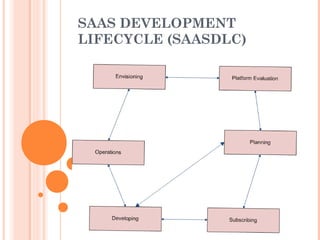
Envisioning – Identify business opportunities
Platform Evaluation - Areas like performance,
scalability, reliability and disaster recovery,
security and privacy, which need to be properly
evaluated.
Planning - Decisions regarding staff, project plan
and functional specifications
Subscribing - All the major decisions regarding
architecture and pricing should be finalized
during this phase
SAAS DEVELOPMENT
LIFECYCLE (SAASDLC)
 Developing - Setting up development
environment followed by developing and various
forms of testing
Operations - Service should be deployed and
maintained, the phase begins with finalizing
support plan and training teams
LIFE CYCLE MANAGEMENT –
PACTHING (SAASDLC)
Any major defects that are detected into
deployed services are fixed immediately by
providing patches
Patches are usually designed in such a way that
there is zero downtime
In rare cases, applying patches may need
downtime
LIFE CYCLE MANAGEMENT–
UPGRADE (SAASDLC)
During major version releases, cloud services
need to be upgraded
It involves upgrading binaries, configuration,
applying patches, upgrading DB schemas etc.
Upgrades are scheduled during downtime,
mostly planned over weekend
 Upgrades are done with high quality “lights out”
automation. Small team of dev-ops people fire off
and monitor 1000s of SaaS pod upgrades each
time
LIFE CYCLE MANAGEMENT–
UPGRADE (SAASDLC)
Upgrades on SaaS are fully automated ( e.g.,
multiple steps including configurtations, binary
updates, server restarts etc to JUST 1 automated
step)
 Direct Upgrades – cloud service is directly
upgraded to latest release
Indirect Direct Upgrades – cloud service is
upgraded to each release step by step and finally
to the latest release
Direct Upgrades are more common unless there
is a customer requirement for any upgraded
release version
FUTURE OF SAAS
Gartner projects global spending on SaaS to rise
each year
SaaS cloud applications are becoming preferred
model for delivering software for both enterprise
customers and SMB
 SaaS will help companies to save money by
finding a way around the need to buy hardware
or software and even to have staff for maintaining
the systems

Saas development lifecycle

  • 1.
  • 2.
    WHAT IS SAAS? Softwarethat is owned, delivered and managed remotely by one or more providers.  SaaS is a leased software maintained by its creator SaaS apps run in the cloud.  The service can be typically accessed by users using a thin client via a web browser.
  • 3.
    WHO USES SAAS? Mostly in human resource management (HRM), customer relationship management (CRM),SaaS CRM, collaboration software (e.g., email), and procurement solutions are based on SaaS apps, but is poised to widen. Sales is going SaaS too, with apps available to order management, compensation, price, quoting, etc
  • 4.
    BENEFITS OF SAASOVER ON- PREMISE Low cost than traditional on-premise Reduced time for prototyping Pay as much you use Vendor responsible for upgrades, patching, uptime and security Higher adoption rates Work flexibility
  • 5.
  • 6.
    SAAS DEVELOPMENT LIFECYCLE (SAASDLC) Envisioning– Identify business opportunities Platform Evaluation - Areas like performance, scalability, reliability and disaster recovery, security and privacy, which need to be properly evaluated. Planning - Decisions regarding staff, project plan and functional specifications Subscribing - All the major decisions regarding architecture and pricing should be finalized during this phase
  • 7.
    SAAS DEVELOPMENT LIFECYCLE (SAASDLC) Developing - Setting up development environment followed by developing and various forms of testing Operations - Service should be deployed and maintained, the phase begins with finalizing support plan and training teams
  • 8.
    LIFE CYCLE MANAGEMENT– PACTHING (SAASDLC) Any major defects that are detected into deployed services are fixed immediately by providing patches Patches are usually designed in such a way that there is zero downtime In rare cases, applying patches may need downtime
  • 9.
    LIFE CYCLE MANAGEMENT– UPGRADE(SAASDLC) During major version releases, cloud services need to be upgraded It involves upgrading binaries, configuration, applying patches, upgrading DB schemas etc. Upgrades are scheduled during downtime, mostly planned over weekend  Upgrades are done with high quality “lights out” automation. Small team of dev-ops people fire off and monitor 1000s of SaaS pod upgrades each time
  • 10.
    LIFE CYCLE MANAGEMENT– UPGRADE(SAASDLC) Upgrades on SaaS are fully automated ( e.g., multiple steps including configurtations, binary updates, server restarts etc to JUST 1 automated step)  Direct Upgrades – cloud service is directly upgraded to latest release Indirect Direct Upgrades – cloud service is upgraded to each release step by step and finally to the latest release Direct Upgrades are more common unless there is a customer requirement for any upgraded release version
  • 11.
    FUTURE OF SAAS Gartnerprojects global spending on SaaS to rise each year SaaS cloud applications are becoming preferred model for delivering software for both enterprise customers and SMB  SaaS will help companies to save money by finding a way around the need to buy hardware or software and even to have staff for maintaining the systems