Understanding IBM Rational Method Composer David Trent Market Manager, Best Practices Segment for Rational Software [email_address]
Intended Audience Ideal attendee Previous exposure to IBM Rational Method Composer (RMC): none to moderate May or may not have heard about “practices”… and wants to better understand what they are  Wants to better understand RMC’s role in supporting the IBM Measured Capability Improvement Framework (MCIF) Would like to receive an overview of RMC’s Method content and see a demo of the Rational Unified Process (RUP) & IBM Practices and learn about the similarities and differences between them Tooling and better understand what it does and why and the value that provides Would like to learn more about the last release of RMC (v7.5 in October 2008) in the context of RMC as a whole – doesn’t want a “feature dump” of the last release
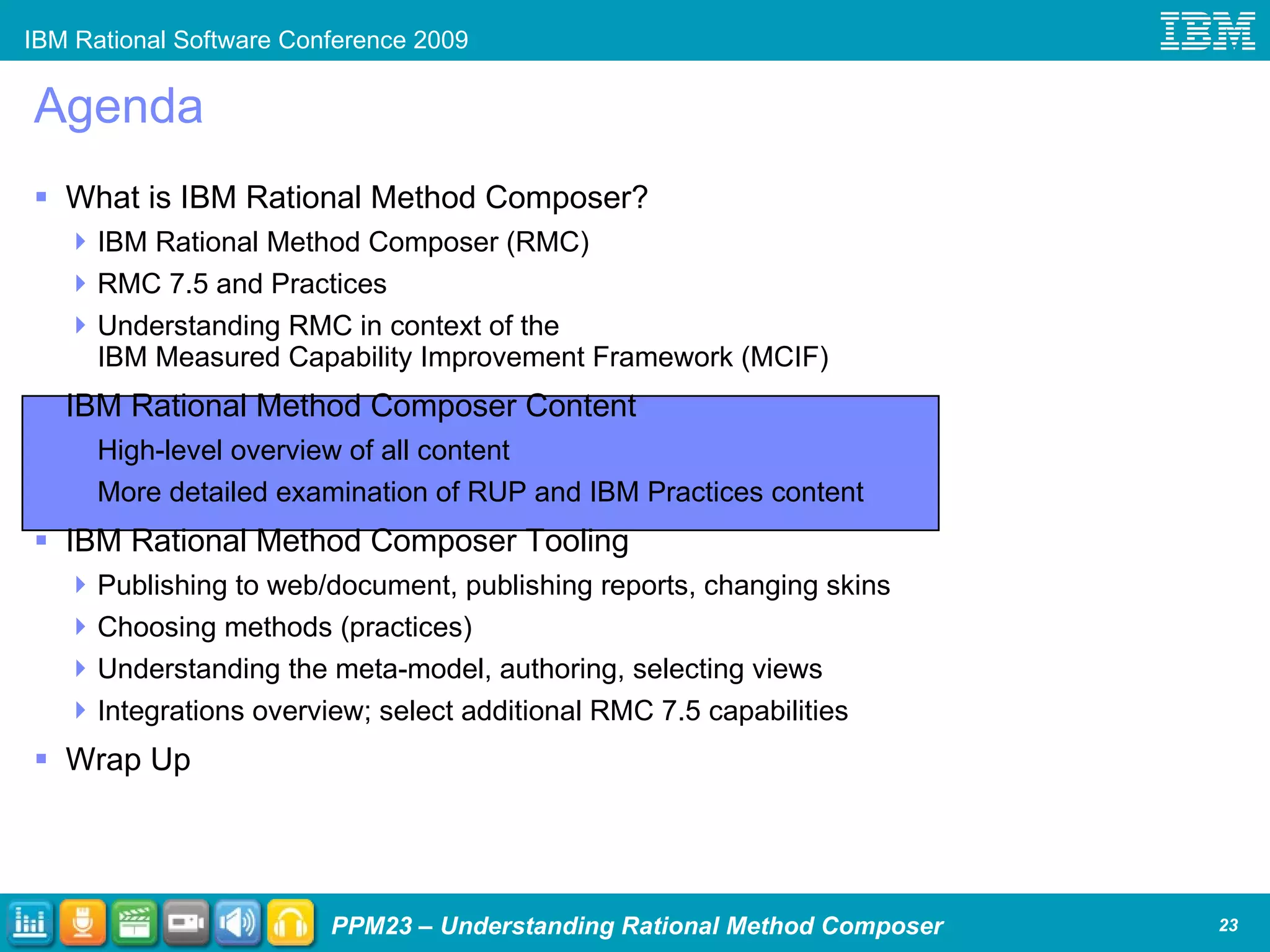
Agenda Process Management: Its Challenges and Importance What is IBM Rational Method Composer? IBM Rational Method Composer (RMC) RMC 7.5 and Practices Understanding RMC in context of the IBM Measured Capability Improvement Framework (MCIF) IBM Rational Method Composer Content High-level overview of all content More detailed examination of RUP and IBM Practices content IBM Rational Method Composer Tooling Publishing to web/document, publishing reports, changing skins Choosing methods (practices) Understanding the meta-model, authoring, selecting views Integrations overview; select additional RMC 7.5 capabilities Wrap Up
Agenda Process Management: Its Challenges and Importance  What is IBM Rational Method Composer? IBM Rational Method Composer (RMC) RMC 7.5 and Practices Understanding RMC in context of the IBM Measured Capability Improvement Framework (MCIF) IBM Rational Method Composer Content High-level overview of all content More detailed examination of RUP and IBM Practices content IBM Rational Method Composer Tooling Publishing to web/document, publishing reports, changing skins Choosing methods (practices) Understanding the meta-model, authoring, selecting views Integrations overview; select additional RMC 7.5 capabilities Wrap Up
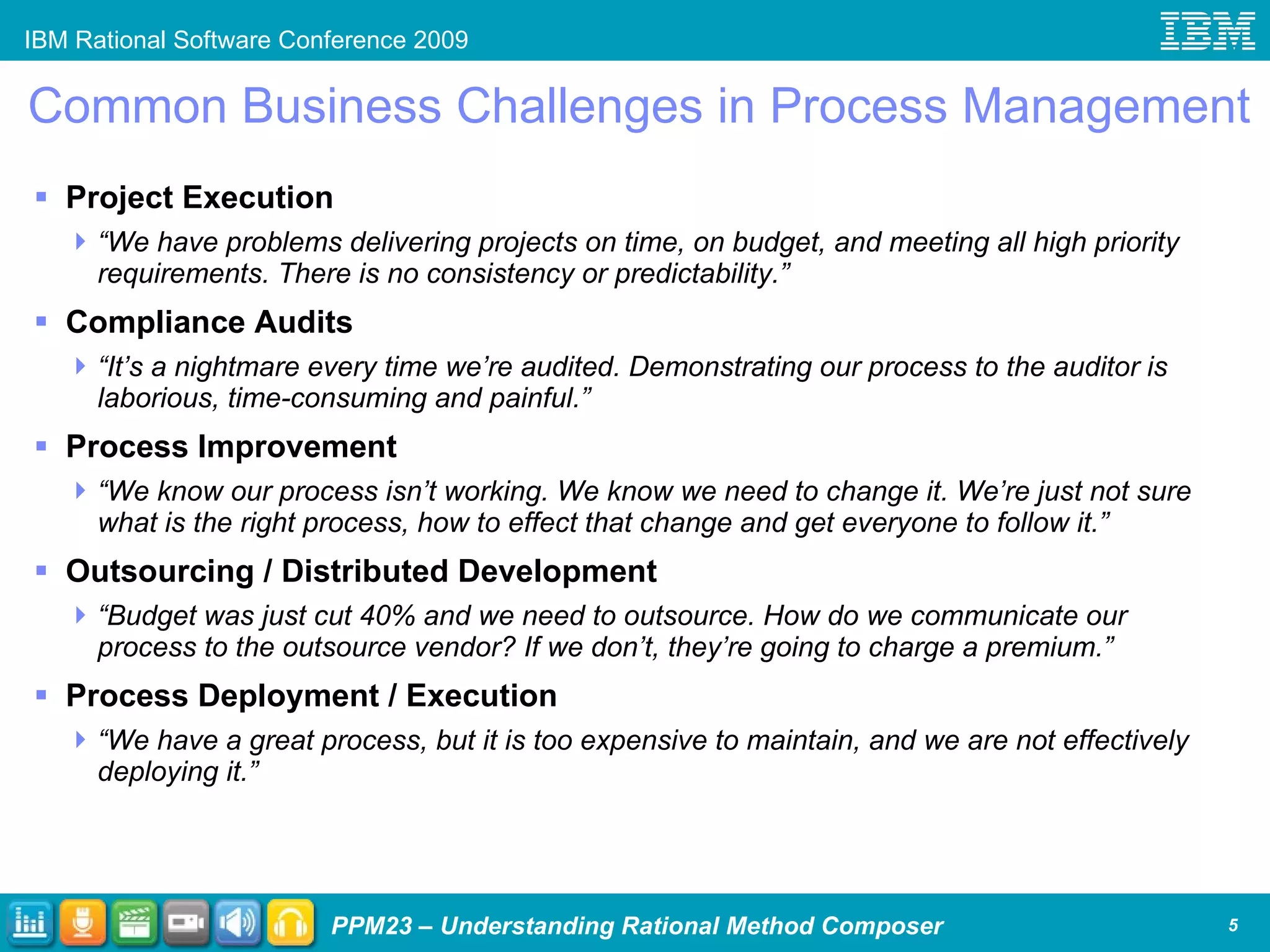
Common Business Challenges in Process Management Project Execution  “ We have problems delivering projects on time, on budget, and meeting all high priority requirements. There is no consistency or predictability.” Compliance Audits  “ It’s a nightmare every time we’re audited. Demonstrating our process to the auditor is laborious, time-consuming and painful.” Process Improvement “ We know our process isn’t working. We know we need to change it. We’re just not sure what is the right process, how to effect that change and get everyone to follow it.” Outsourcing / Distributed Development “ Budget was just cut 40% and we need to outsource. How do we communicate our process to the outsource vendor? If we don’t, they’re going to charge a premium.” Process Deployment / Execution “ We have a great process, but it is too expensive to maintain, and we are not effectively deploying it.”
Why Is Process Management Important? Without general concurrence in the organization about what your processes are how can anyone in the organization… Agree that ‘what is supposed to be done, isn’t being done’? Qualitatively or quantitatively measure project performance? Improve how are things are done? Globally distributed development, outsourcing, and so forth implies that the team working together now likely hasn’t worked together before A common process provides all team members a reference point from which to anchor their responsibilities to the team It also provides the project manager and all other team leads a reference from which to have a conversation about the big picture and the immediate tasks at hand Without a defined process and its associated governance project teams can make locally optimized decisions that are not optimal for the organization e.g.  “We can do it quicker without requirements, version control, quality gates, …”
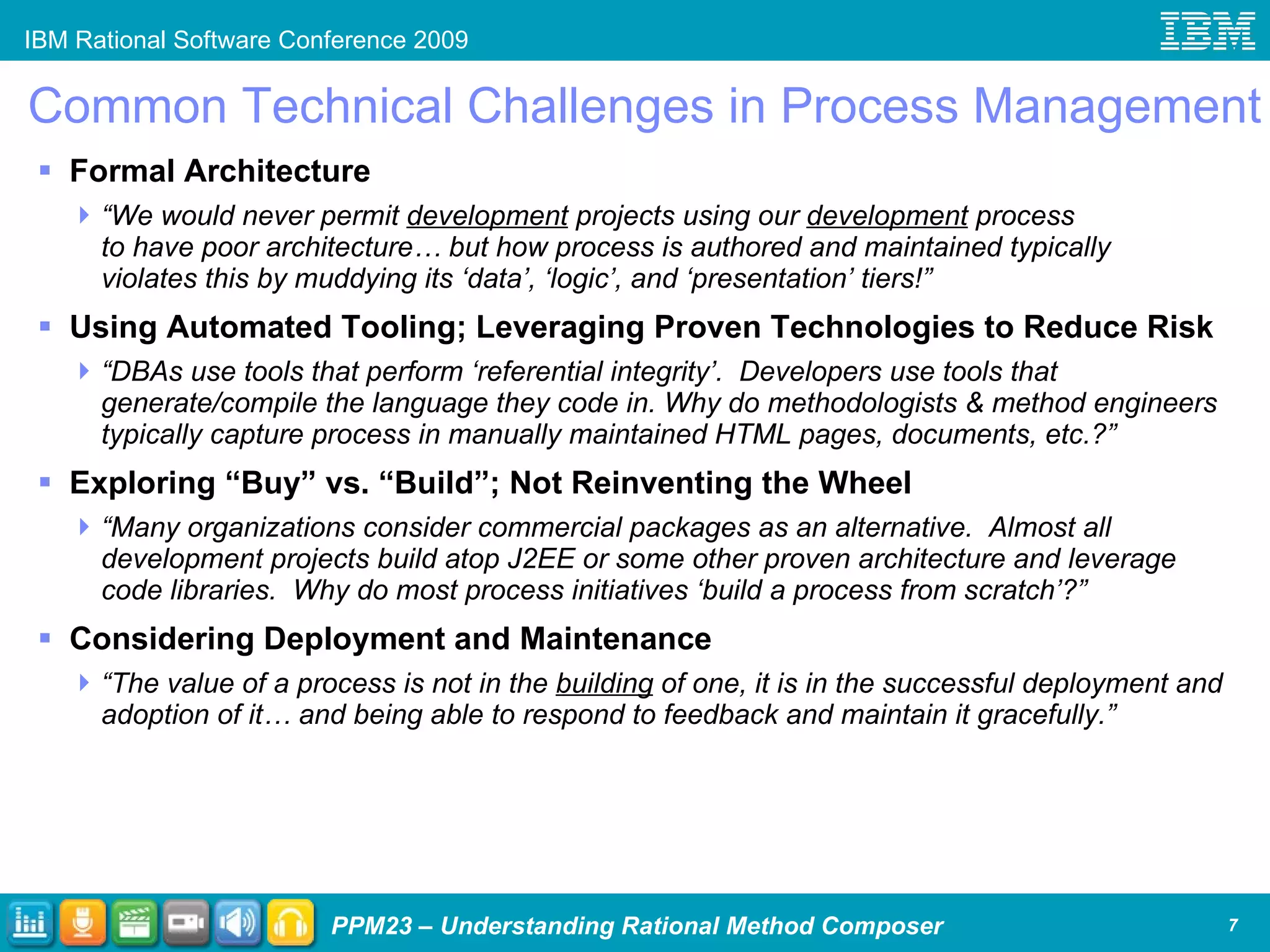
Common Technical Challenges in Process Management Formal Architecture  “ We would never permit  development  projects using our  development  process to have poor architecture… but how process is authored and maintained typically violates this by muddying its ‘data’, ‘logic’, and ‘presentation’ tiers!” Using Automated Tooling; Leveraging Proven Technologies to Reduce Risk “ DBAs use tools that perform ‘referential integrity’.  Developers use tools that generate/compile the language they code in. Why do methodologists & method engineers typically capture process in manually maintained HTML pages, documents, etc.?” Exploring “Buy” vs. “Build”; Not Reinventing the Wheel “ Many organizations consider commercial packages as an alternative.  Almost all development projects build atop J2EE or some other proven architecture and leverage code libraries.  Why do most process initiatives ‘build a process from scratch’?” Considering Deployment and Maintenance “ The value of a process is not in the  building  of one, it is in the successful deployment and adoption of it… and being able to respond to feedback and maintain it gracefully.”
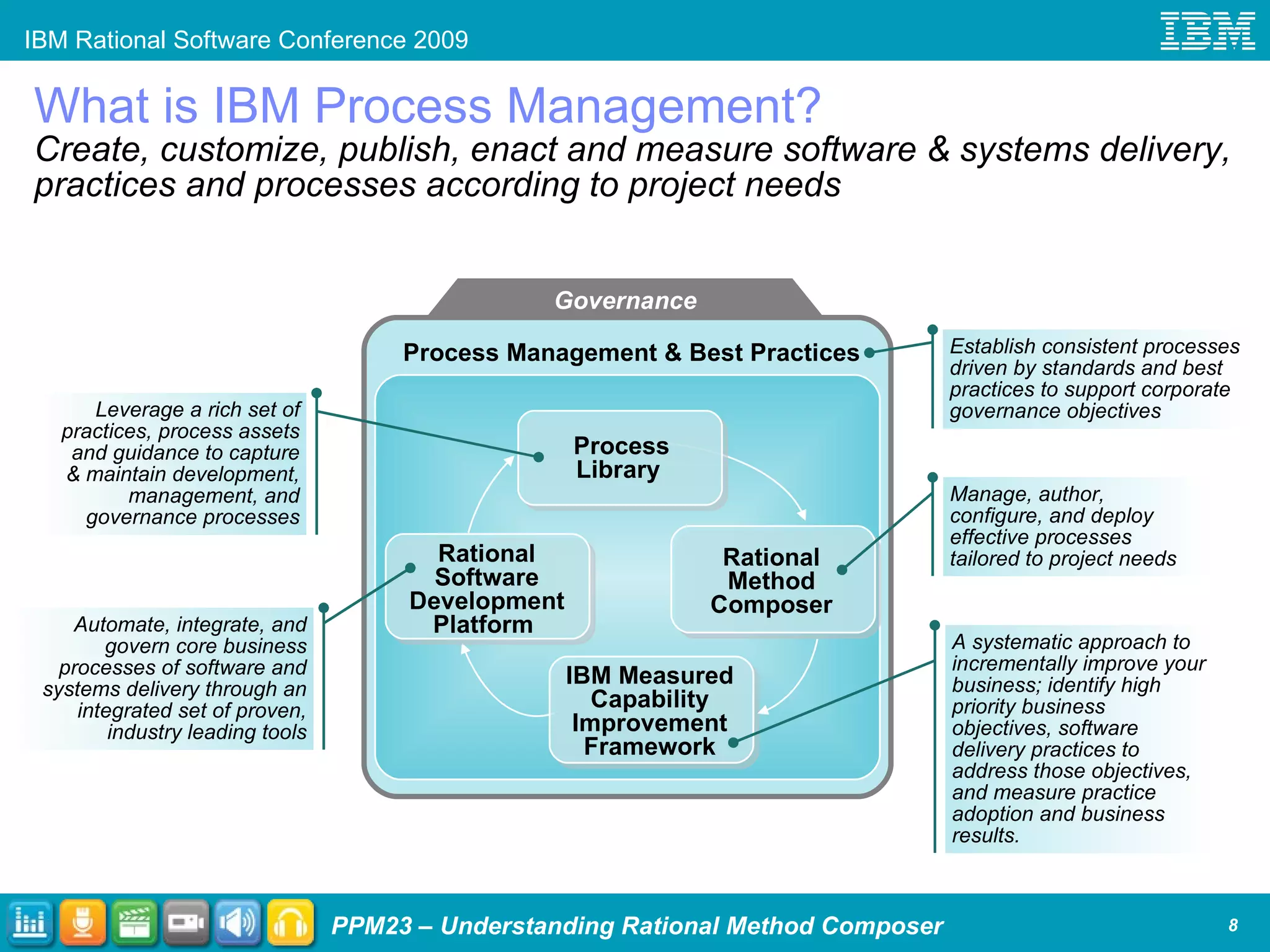
What is IBM Process Management? Create, customize, publish, enact and measure software & systems delivery, practices and processes according to project needs Governance Rational Software Development Platform  Process Library  Process Management & Best Practices Leverage a rich set of practices, process assets and guidance to capture & maintain development, management, and governance processes Automate, integrate, and govern core business processes of software and systems delivery through an integrated set of proven, industry leading tools Manage, author, configure, and deploy effective processes tailored to project needs Establish consistent processes driven by standards and best practices to support corporate governance objectives IBM Measured Capability Improvement Framework A systematic approach to incrementally improve your business; identify high priority business objectives, software delivery practices to address those objectives, and measure practice adoption and business results. Rational Method Composer
Agenda Process Management: Its Challenges and Importance  What is IBM Rational Method Composer? IBM Rational Method Composer (RMC) RMC 7.5 and Practices Understanding RMC in context of the IBM Measured Capability Improvement Framework (MCIF) IBM Rational Method Composer Content High-level overview of all content More detailed examination of RUP and IBM Practices content IBM Rational Method Composer Tooling Publishing to web/document, publishing reports, changing skins Choosing methods (practices) Understanding the meta-model, authoring, selecting views Integrations overview; select additional RMC 7.5 capabilities Wrap Up
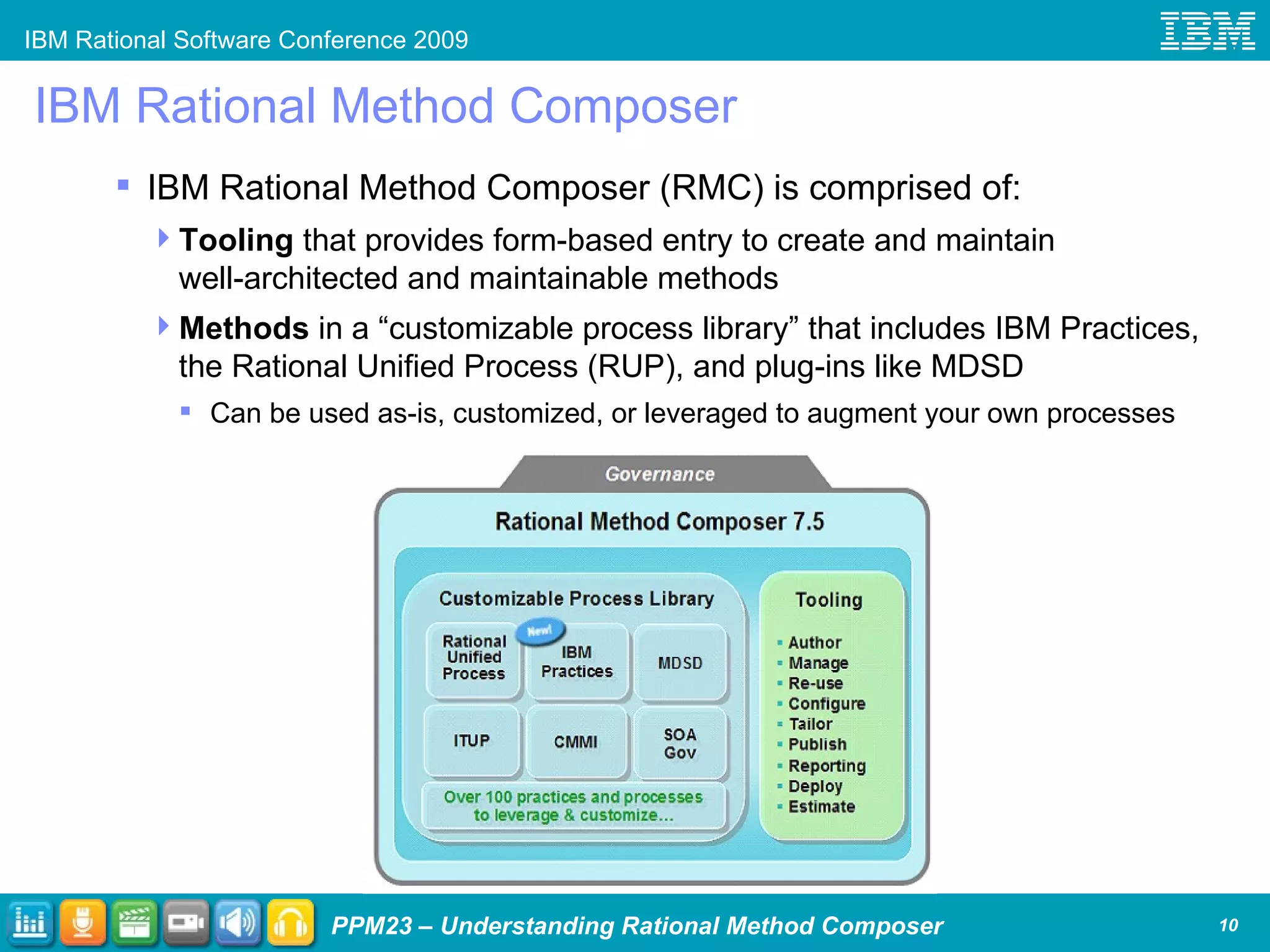
IBM Rational Method Composer IBM Rational Method Composer (RMC) is comprised of: Tooling  that provides form-based entry to create and maintain well-architected and maintainable methods Methods  in a “customizable process library” that includes IBM Practices, the Rational Unified Process (RUP), and plug-ins like MDSD Can be used as-is, customized, or leveraged to augment your own processes
Rational Method Composer - Tooling
Rational Method Composer - Methods
Agenda Process Management: Its Challenges and Importance  What is IBM Rational Method Composer? IBM Rational Method Composer (RMC) RMC 7.5 and Practices Understanding RMC in context of the IBM Measured Capability Improvement Framework (MCIF) IBM Rational Method Composer Content High-level overview of all content More detailed examination of RUP and IBM Practices content IBM Rational Method Composer Tooling Publishing to web/document, publishing reports, changing skins Choosing methods (practices) Understanding the meta-model, authoring, selecting views Integrations overview; select additional RMC 7.5 capabilities Wrap Up
Result :  Easier, more effective deployment of customized and adaptable practices and processes Agile Core Governance and Compliance Quality Management Requirements Management  Change & Release Management Architecture Management Tooling Enhancements New IBM Practices in Key Solution Areas Share, manage, and download practices as assets with Rational Asset Manager (RAM) integration Browse, select, and preview content more simply and intuitively Simply customize loosely coupled and alternative practices Jump start creating and extending content with plug-in templates and wizards Configure content in a more flexible way using tags, queries and wizards Provide simple update and feedback mechanisms IBM Rational Method Composer v7.5 Create, customize, publish, enact and measure iterative and incremental practices according to project needs
Advantages of a Practice-Based Approach Guidance for software and systems development, management,  governance, and more Applies the concepts of “components” or “services” to process management! Addresses one aspect of the software lifecycle e.g., continuous integration, use-case driven development, performance testing, etc. Can be incrementally and independently adopted Can be mapped to operational objectives and development pain points Adoption can be measured Results: Avoids self-inflicting too much process Faster and more predictable results
Agenda Process Management: Its Challenges and Importance  What is IBM Rational Method Composer? IBM Rational Method Composer (RMC) RMC 7.5 and Practices Understanding RMC in context of the IBM Measured Capability Improvement Framework (MCIF) IBM Rational Method Composer Content High-level overview of all content More detailed examination of RUP and IBM Practices content IBM Rational Method Composer Tooling Publishing to web/document, publishing reports, changing skins Choosing methods (practices) Understanding the meta-model, authoring, selecting views Integrations overview; select additional RMC 7.5 capabilities Wrap Up
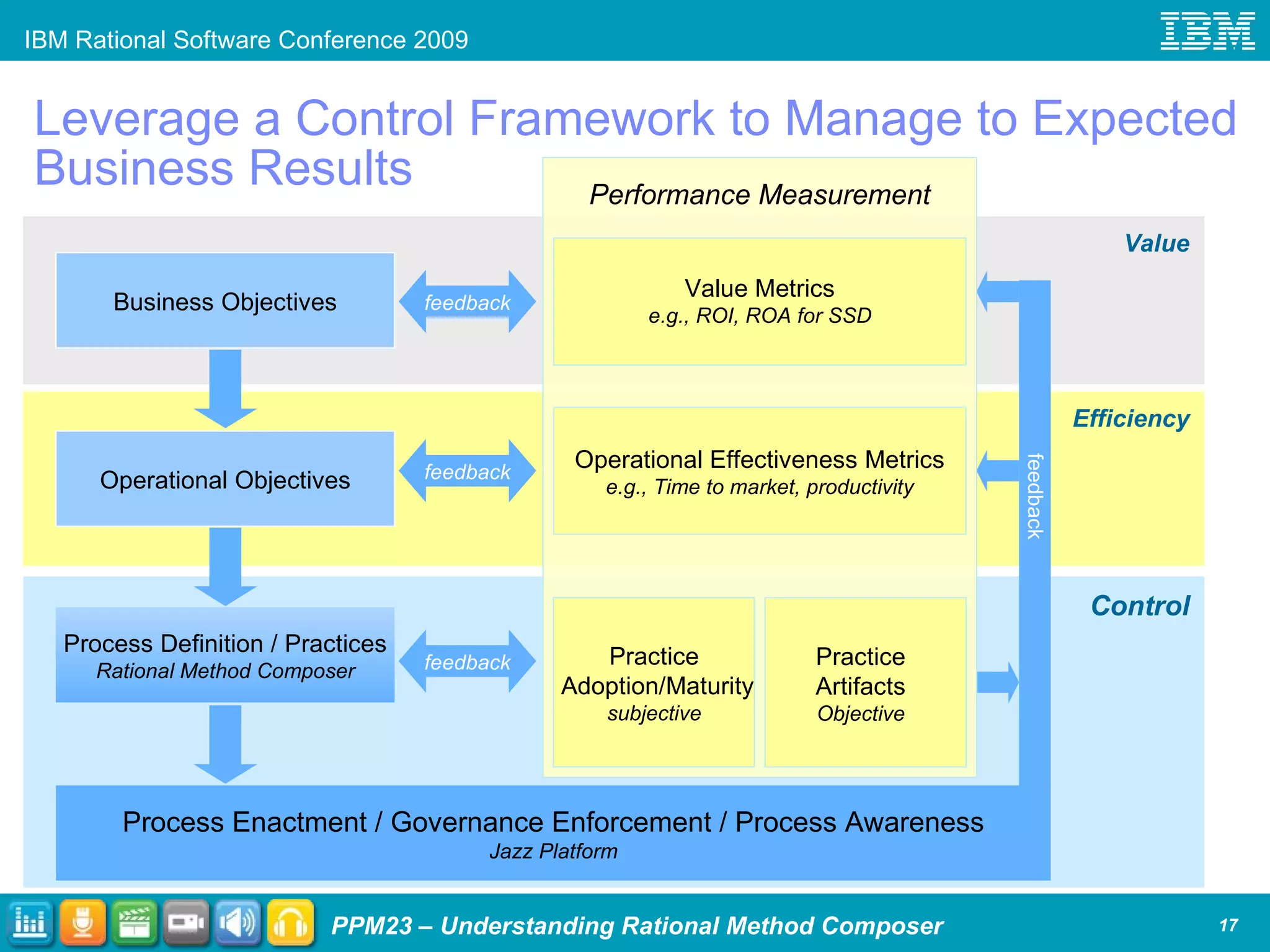
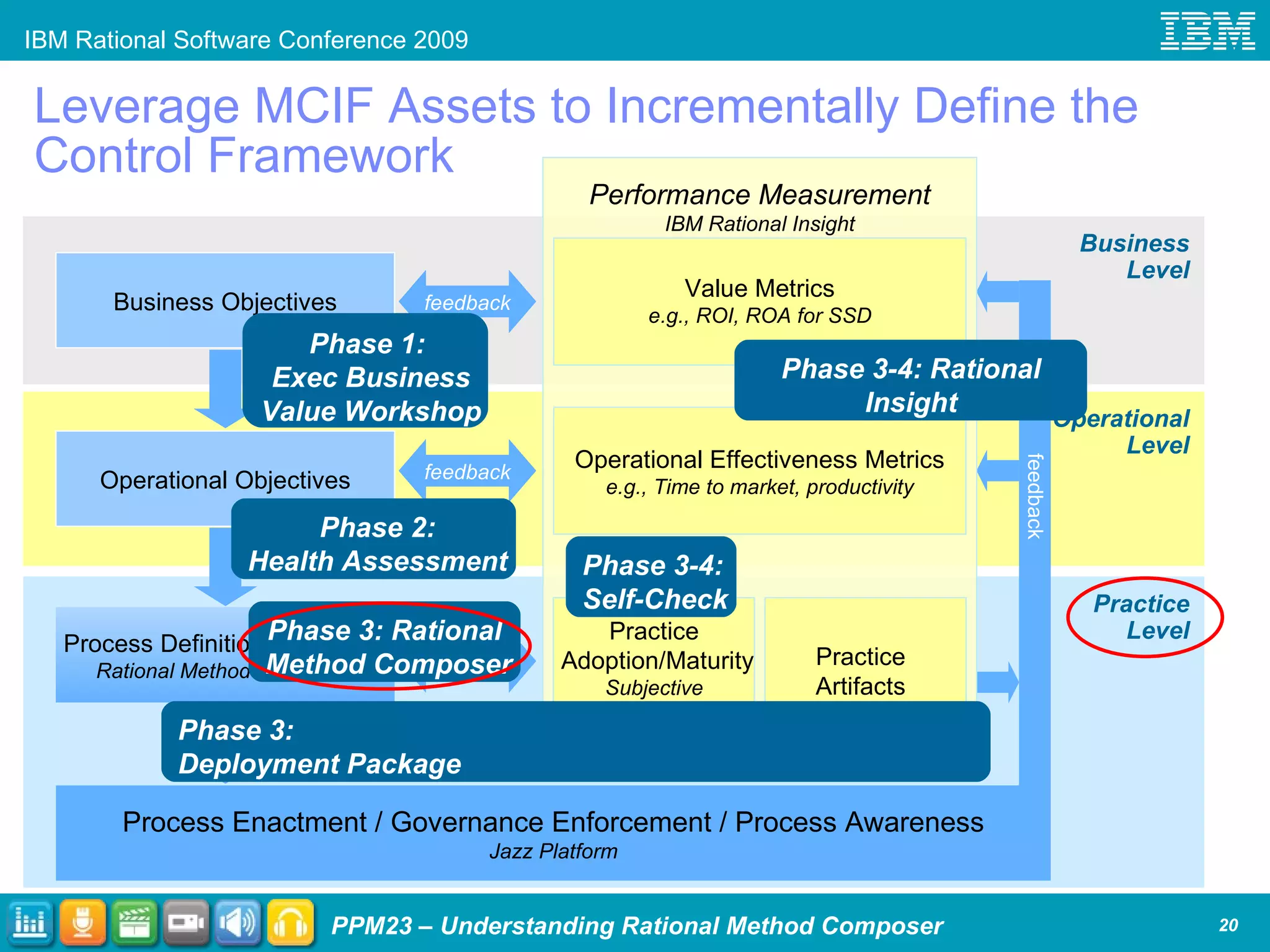
Leverage a Control Framework to Manage to Expected Business Results Efficiency Control Value Process Enactment / Governance Enforcement / Process Awareness Jazz Platform Business Objectives Process Definition / Practices Rational Method Composer Operational Objectives feedback feedback feedback feedback Performance Measurement Value Metrics e.g., ROI, ROA for SSD Operational Effectiveness Metrics e.g., Time to market, productivity Practice Adoption/Maturity subjective Practice  Artifacts Objective
IBM Measured Capability Improvement Framework A systematic approach to software excellence A phased approach that helps teams Adopt an incremental, measured approach to transformation  Focus on the core practices that matter most Accelerate adoption through out-of-the-box assets Articulate capability improvements in terms of business value Support any method Optimized for Agile practices Empower teams to measure, manage and incrementally improve their software delivery capability.  Establish business and operational objectives Prioritize practices and define roadmap Accelerate adoption with tools and services Report, analyze and  act on results Phase 1 Phase 2 Phase 3 Phase 4 Start next incremental improvement
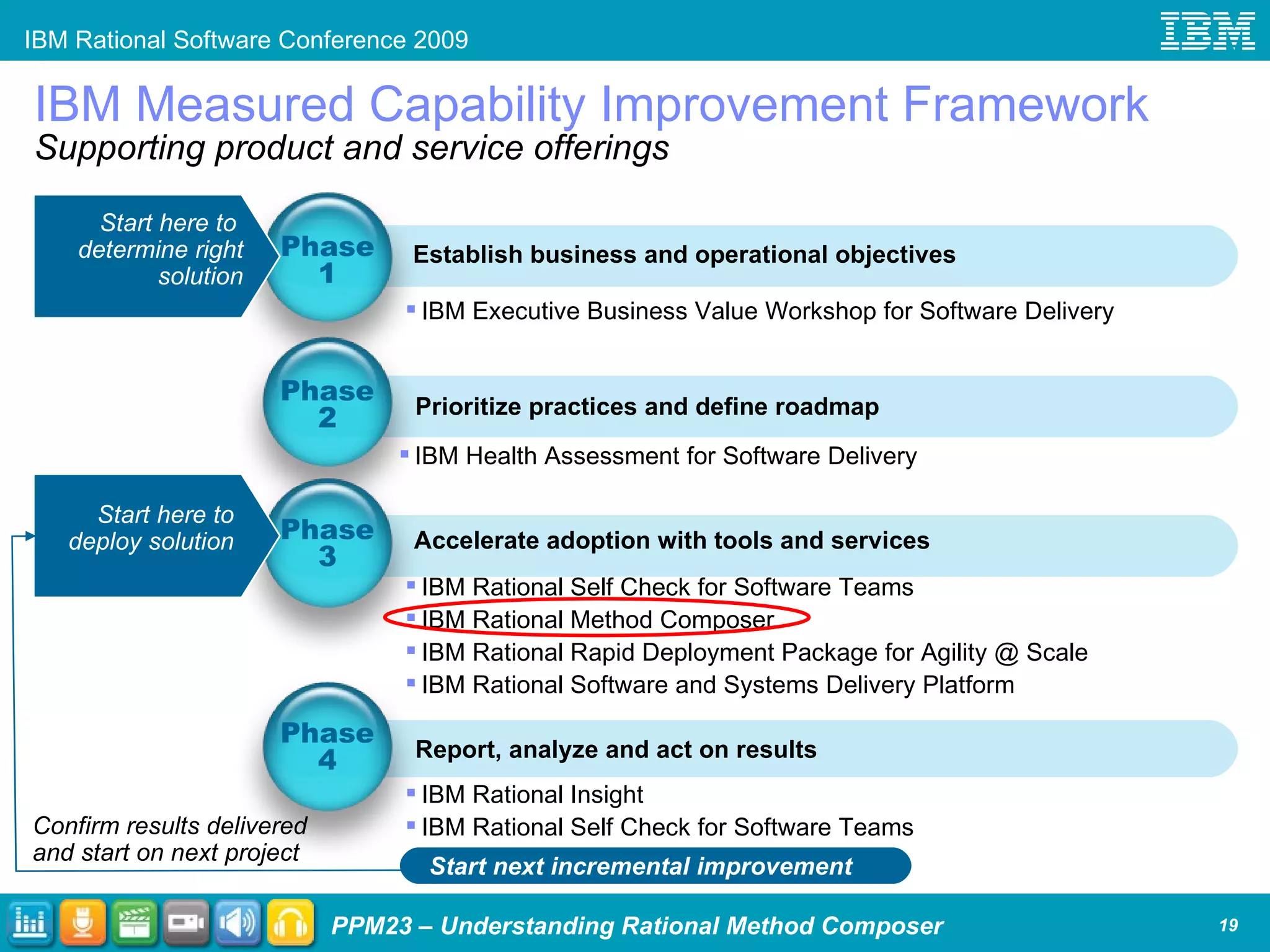
IBM Measured Capability Improvement Framework Supporting product and service offerings Establish business and operational objectives Prioritize practices and define roadmap Accelerate adoption with tools and services Report, analyze and act on results Phase 1 Phase 2 Phase 3 Phase 4 IBM Executive Business Value Workshop for Software Delivery IBM Health Assessment for Software Delivery IBM Rational Self Check for Software Teams IBM Rational Method Composer IBM Rational Rapid Deployment Package for Agility @ Scale IBM Rational Software and Systems Delivery Platform IBM Rational Insight IBM Rational Self Check for Software Teams Start here to  deploy solution  Start here to  determine right solution Confirm results delivered and start on next project Start next incremental improvement
Leverage MCIF Assets to Incrementally Define the  Control Framework Operational Level Practice Level Business Level Process Enactment / Governance Enforcement / Process Awareness Jazz Platform Business Objectives Process Definition / Practices Rational Method Composer Operational Objectives Phase 3-4: Rational Insight Phase 3-4: Self-Check Phase 3: Rational  Method Composer Phase 2: Health Assessment Phase 1:  Exec Business Value Workshop Phase 3: Deployment Package feedback feedback feedback feedback Performance Measurement IBM Rational Insight Value Metrics e.g., ROI, ROA for SSD Operational Effectiveness Metrics e.g., Time to market, productivity Practice Adoption/Maturity Subjective IBM Rational  Self-Check Practice  Artifacts Objective
Selected Presentations at RSC IBM Measured Capability Improvement Framework (MCIF) PPM21  – “Speeding Process Adoption through IBM Rational Self Check for Software Teams”, Mon 4:15-5:45p in Southern Hemisphere V by P. Kroll PPM06  – “Measure Your Results by Applying Measured Capability Improvement Framework and Rational Insight”, Tues 10:00-11:00a in Southern Hemisphere IV by P. Kroll and E. Larsen PPM08  – “From Measure to Measure: Managing Performance with Metrics-driven Process Improvements”, Tues 2:15-3:15p in Southern Hemisphere V by K. Fryer & B. Reed PPM25  – “IT Delivery in Challenging Times”, Tues 3:30-5:00p in Southern Hemisphere V by P. Kroll   PPM10  – “Using MCIF to implement IBM Rational Unified Process in a Microsoft Environment”, Wed 10:00-11:00a in Southern Hemisphere IV by A. Zachariah PPM15  – “New IBM Practices in Practice - Integrating Measured Capability Improvement Framework with CMMI”, Thur 9:45-10:45a in Southern Hemisphere IV by J. Nordlund
 
Agenda What is IBM Rational Method Composer? IBM Rational Method Composer (RMC) RMC 7.5 and Practices Understanding RMC in context of the IBM Measured Capability Improvement Framework (MCIF) IBM Rational Method Composer Content High-level overview of all content More detailed examination of RUP and IBM Practices content IBM Rational Method Composer Tooling Publishing to web/document, publishing reports, changing skins Choosing methods (practices) Understanding the meta-model, authoring, selecting views Integrations overview; select additional RMC 7.5 capabilities Wrap Up
Rational Method Composer - Methods
Methods: Build vs. Buy Decision When a company decides to build its own process it is: an extended period between when the decision is made and the process is ready the longer a project goes without demonstratable results, the more likely it is to be stopped an uphill battle to get stakeholders to accept every aspect of the process lacking existing a base of additional documentation, training materials, and experts already knowledgeable about the process When a company uses existing methods: the process can receive some initial customization very quickly… and be piloted on projects to enable further customization through real field use and demonstrate success and value… which gives credibility to the project and helps ensure funding isn’t cut the value of process is in the successful implementation of it,  not  in having created it those who would have  built  the homegrown process can now instead help others  do  one it provides an established and proven process that reduces “will it work” discussions mitigates defensive postures caused by feeling of ownership and pride found in a homegrown process; as a result the adoption team often partners better with projects it benefits from the scores of books and whitepapers, evolved and proven training materials, and an existing community of established and credentialed practitioners
Methods – Available before (and in) v7.5 Enterprise plug-ins IBM Rational Unified Process, or RUP  IBM Rational Method for Portfolio Management (for Initiatives) IBM Rational Method for Program Mobilization IBM Tivoli Unified Process (ITUP)  RUP for Asset-Based Development RUP with ITSM/ITUP Connection RUP for Global Development and Delivery (GDD) RUP for GDD Maintenance Solution-specific plug-ins SOA RUP for Service-Oriented Modeling and Architecture Governance SOA Governance Asset-Based Governance RUP for Practical Software & Systems Measurement (PSM)  Compliance RUP for CMMI® Project-specific plug-ins RUP for System z RUP for Legacy Evolution RUP for Maintenance Projects RUP for COTS Package Delivery  RUP for Model-Driven Systems Development (MDSD) Technology/tool-specific plug-ins RUP for Rational Application Development RUP for Rational Software Architect RUP for WebSphere ®  Business Modeler (beta) RUP for Automated Software Quality (Rational Performance Tester, Functional Tester, and Manual Tester) Standard-specific plug-ins RUP for Department of Defense Architecture Framework (DoDAF) A collection of out-of-the-box method content and processes that you can customize to address a diverse set of enterprise and project needs and development styles
Methods – New for v7.5 Method Authoring Method (MAM) Three key method authoring work products: Method Sketch Draft of the method (RMC)  Method Definition Formal definition of the method Method Web Site Published web site Derivation Automatic Generation The method constituents (drafted in  Method Sketch , formally defined in  Method Definition , published in  Method Web Site )   are the  Method Elements . Follow an iterative RMC-published process to create new processes
Methods – New for v7.5 IBM Practices A collection of out-of-the-box method content and processes that you can customize to address a diverse set of enterprise and project needs and development styles
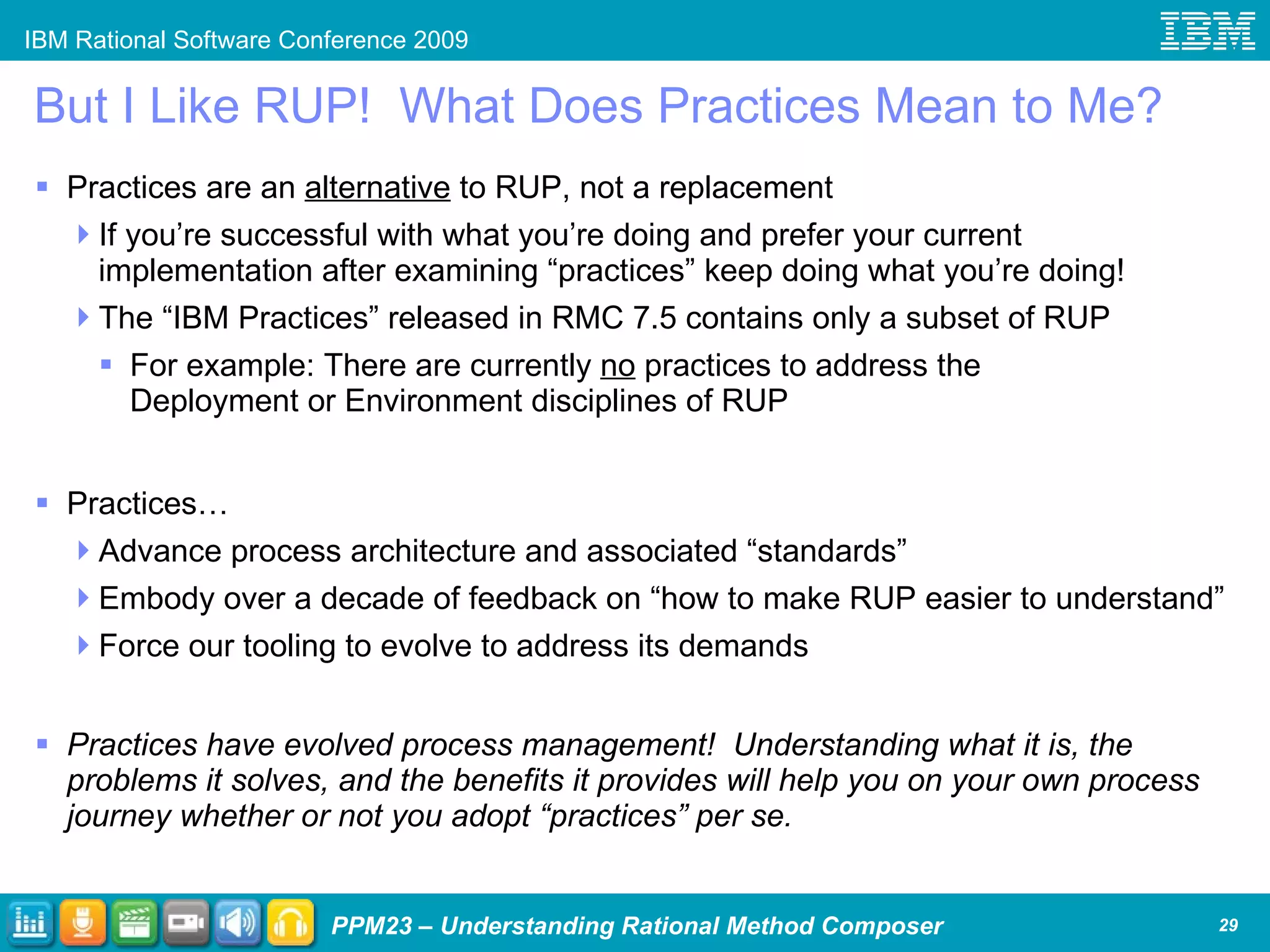
But I Like RUP!  What Does Practices Mean to Me? Practices are an  alternative  to RUP, not a replacement If you’re successful with what you’re doing and prefer your current implementation after examining “practices” keep doing what you’re doing! The “IBM Practices” released in RMC 7.5 contains only a subset of RUP For example: There are currently  no  practices to address the Deployment or Environment disciplines of RUP Practices… Advance process architecture and associated “standards” Embody over a decade of feedback on “how to make RUP easier to understand” Force our tooling to evolve to address its demands Practices have evolved process management!  Understanding what it is, the problems it solves, and the benefits it provides will help you on your own process journey whether or not you adopt “practices” per se.
Examine Published IBM Practices
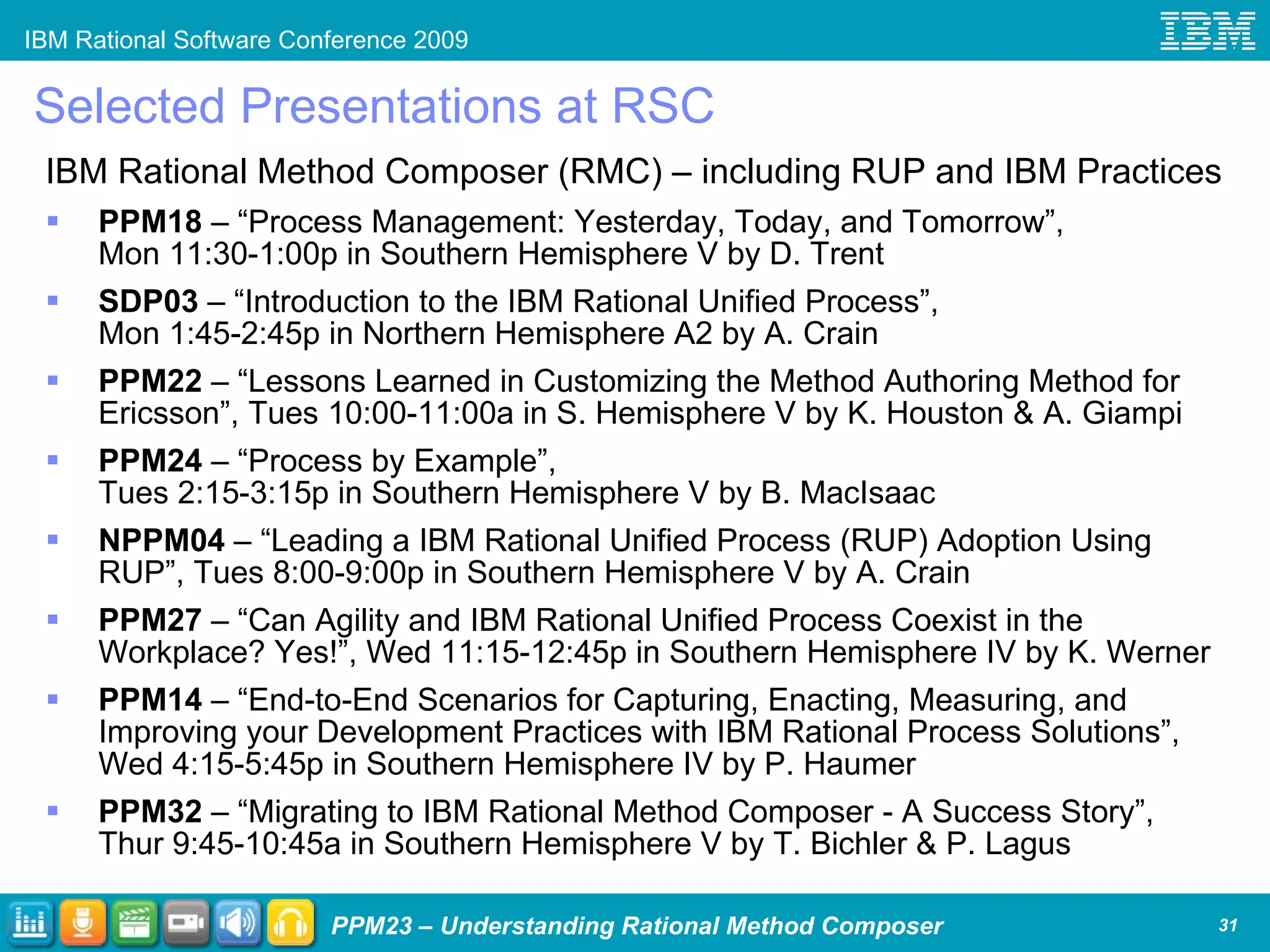
Selected Presentations at RSC IBM Rational Method Composer (RMC) – including RUP and IBM Practices PPM18  – “Process Management: Yesterday, Today, and Tomorrow”, Mon 11:30-1:00p in Southern Hemisphere V by D. Trent SDP03  – “Introduction to the IBM Rational Unified Process”, Mon 1:45-2:45p in Northern Hemisphere A2 by A. Crain PPM22  – “Lessons Learned in Customizing the Method Authoring Method for Ericsson”, Tues 10:00-11:00a in S. Hemisphere V by K. Houston & A. Giampi PPM24  – “Process by Example”, Tues 2:15-3:15p in Southern Hemisphere V by B. MacIsaac NPPM04  – “Leading a IBM Rational Unified Process (RUP) Adoption Using RUP”, Tues 8:00-9:00p in Southern Hemisphere V by A. Crain PPM27  – “Can Agility and IBM Rational Unified Process Coexist in the Workplace? Yes!”, Wed 11:15-12:45p in Southern Hemisphere IV by K. Werner PPM14  – “End-to-End Scenarios for Capturing, Enacting, Measuring, and Improving your Development Practices with IBM Rational Process Solutions”, Wed 4:15-5:45p in Southern Hemisphere IV by P. Haumer PPM32  – “Migrating to IBM Rational Method Composer - A Success Story”, Thur 9:45-10:45a in Southern Hemisphere V by T. Bichler & P. Lagus
 
Agenda What is IBM Rational Method Composer? IBM Rational Method Composer (RMC) RMC 7.5 and Practices Understanding RMC in context of the IBM Measured Capability Improvement Framework (MCIF) IBM Rational Method Composer Content High-level overview of all content More detailed examination of RUP and IBM Practices content IBM Rational Method Composer Tooling Publishing to web/document, publishing reports, changing skins Choosing methods (practices) Understanding the meta-model, authoring, selecting views Integrations overview; select additional RMC 7.5 capabilities Wrap Up
Rational Method Composer - Tooling
How Is RMC Tooling Used to Create and Publish Process? Choose Methods (Practices) Create Method Content Build Processes Customize the User Experience Publish to Document or Web… and Deploy
Using Views View – what can  you  define? Default drawer and item (page) Drawers Order and Names Treebrowser view structure Package structure (can be nested) Individual Items RMC enables view and publish decisions to be made  independent  of method decisions
How to publish? Select Configuration | Publish Choose to Publish to Web or Document Choose a Configuration Publishing to Web / Document
Publishing options Choose between creating a static site or a dynamic one using WAR files that can be run by J2EE web server Set HTML Title Bar Send feedback to… Glossary?  Index? Skin Use your own banner Validate external hyperlinks and repair Diagram defaults  Navigation tree options and content generation layouts Set activity page default Publishing to Web (HTML)
Publishing to Web (HTML) – Example of Impact Treebrowser Integrated Search as Applet (static) or Servlet (dynamic) Breadcrumbs Virtual “frames” using Dojo Where used in process Feedback “ Find page” Publish as static HTML or “dynamic” J2EE web application via WAR
Publishing to Web (HTML) – Example of Impact Process: Publish option for no “descriptors” Process Breakdown in Navigation Tree Show / Hide / Navigate “tabs” Glossary & Index
RMC Architecture – Web Publish High-level interpretation in “student notes”
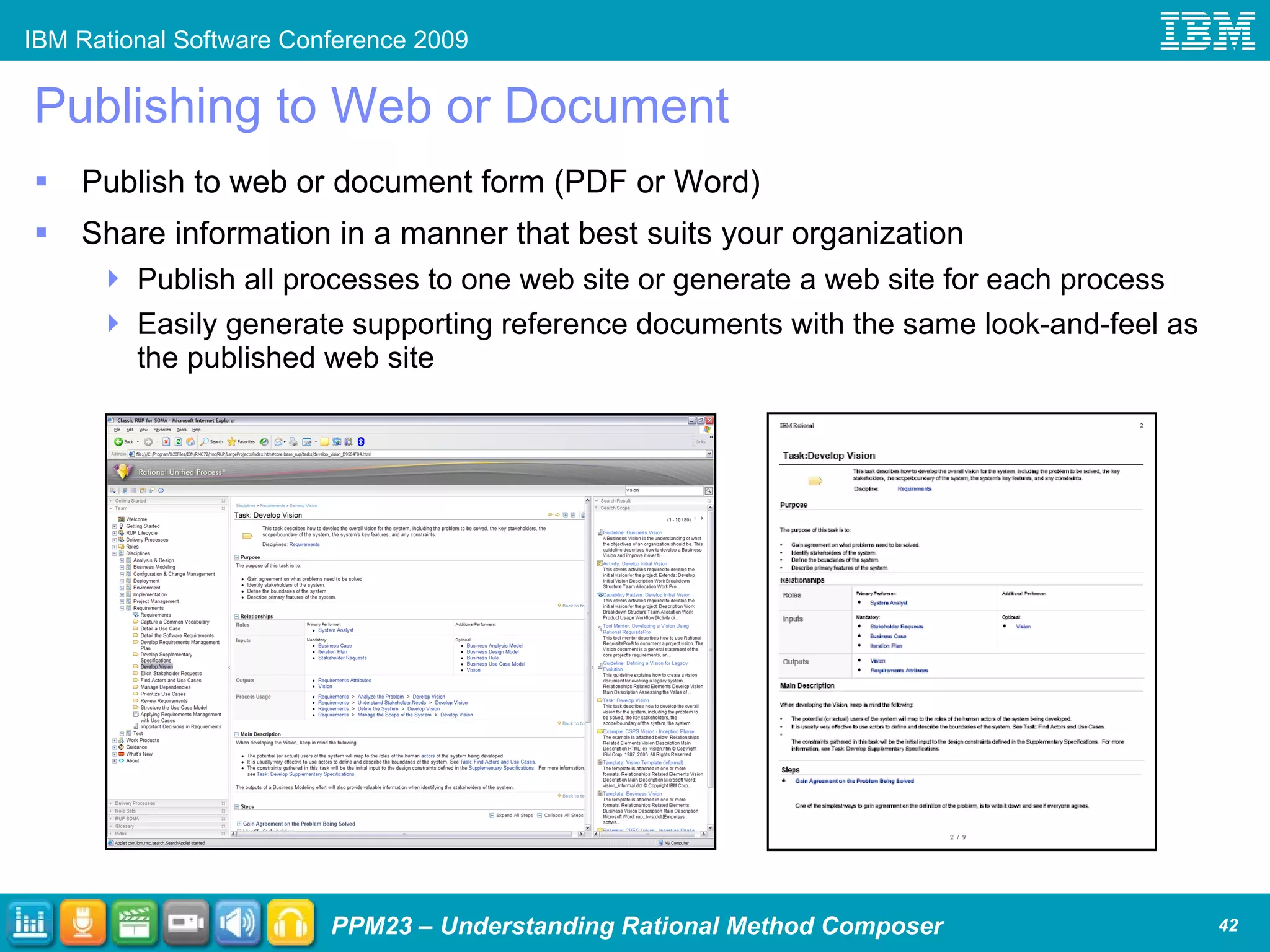
Publishing to Web or Document Publish to web or document form (PDF or Word) Share information in a manner that best suits your organization Publish all processes to one web site or generate a web site for each process Easily generate supporting reference documents with the same look-and-feel as the published web site
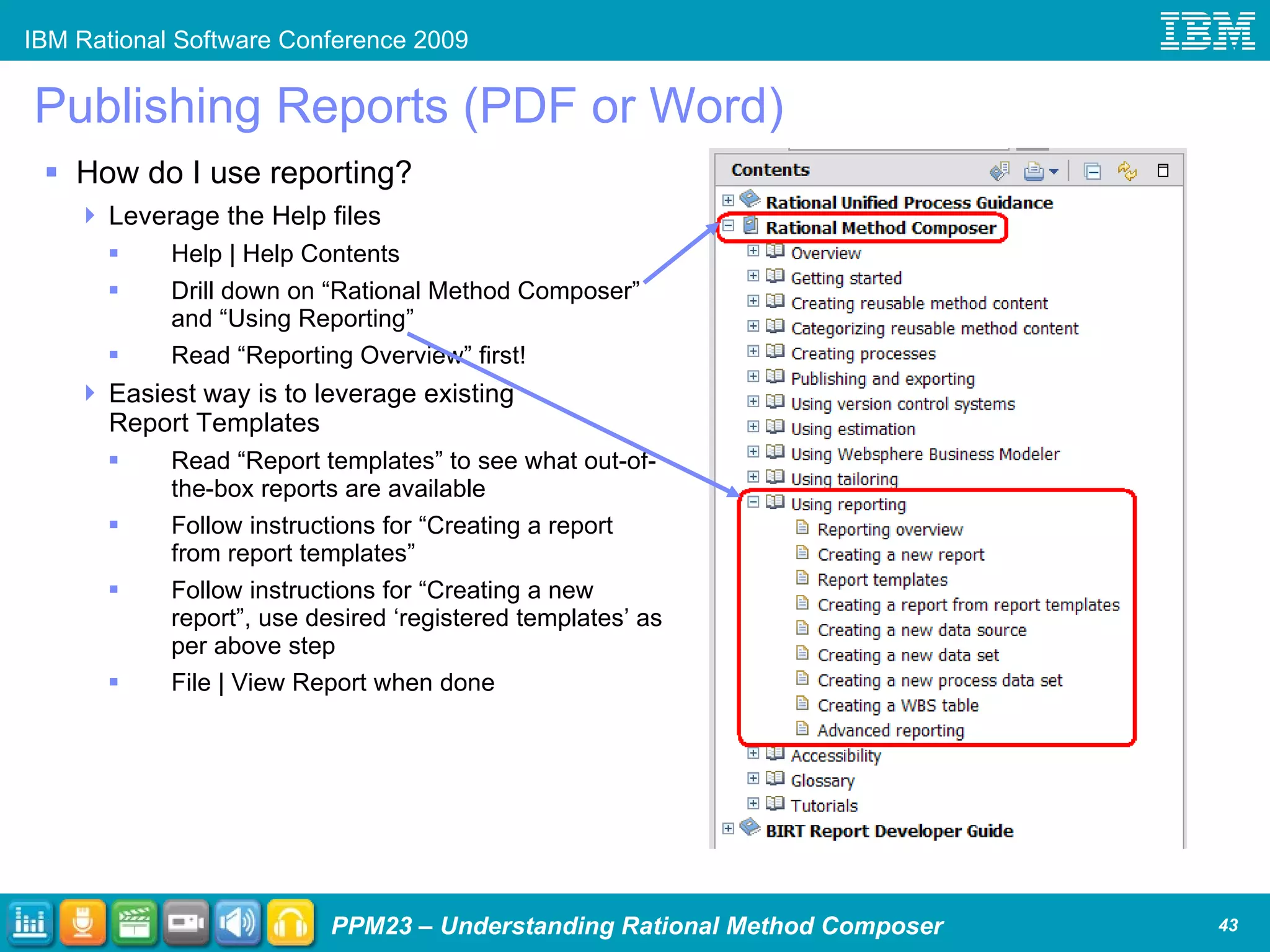
Publishing Reports (PDF or Word) How do I use reporting? Leverage the Help files Help | Help Contents Drill down on “Rational Method Composer” and “Using Reporting” Read “Reporting Overview” first! Easiest way is to leverage existing Report Templates Read “Report templates” to see what out-of-the-box reports are available Follow instructions for “Creating a report from report templates” Follow instructions for “Creating a new report”, use desired ‘registered templates’ as per above step File | View Report when done
Publishing to Web or Document Publish to web or document form (PDF or Word) Share information in a manner that best suits your organization Publish all processes to one web site or generate a web site for each process Easily generate supporting reference documents with the same look-and-feel as the published web site
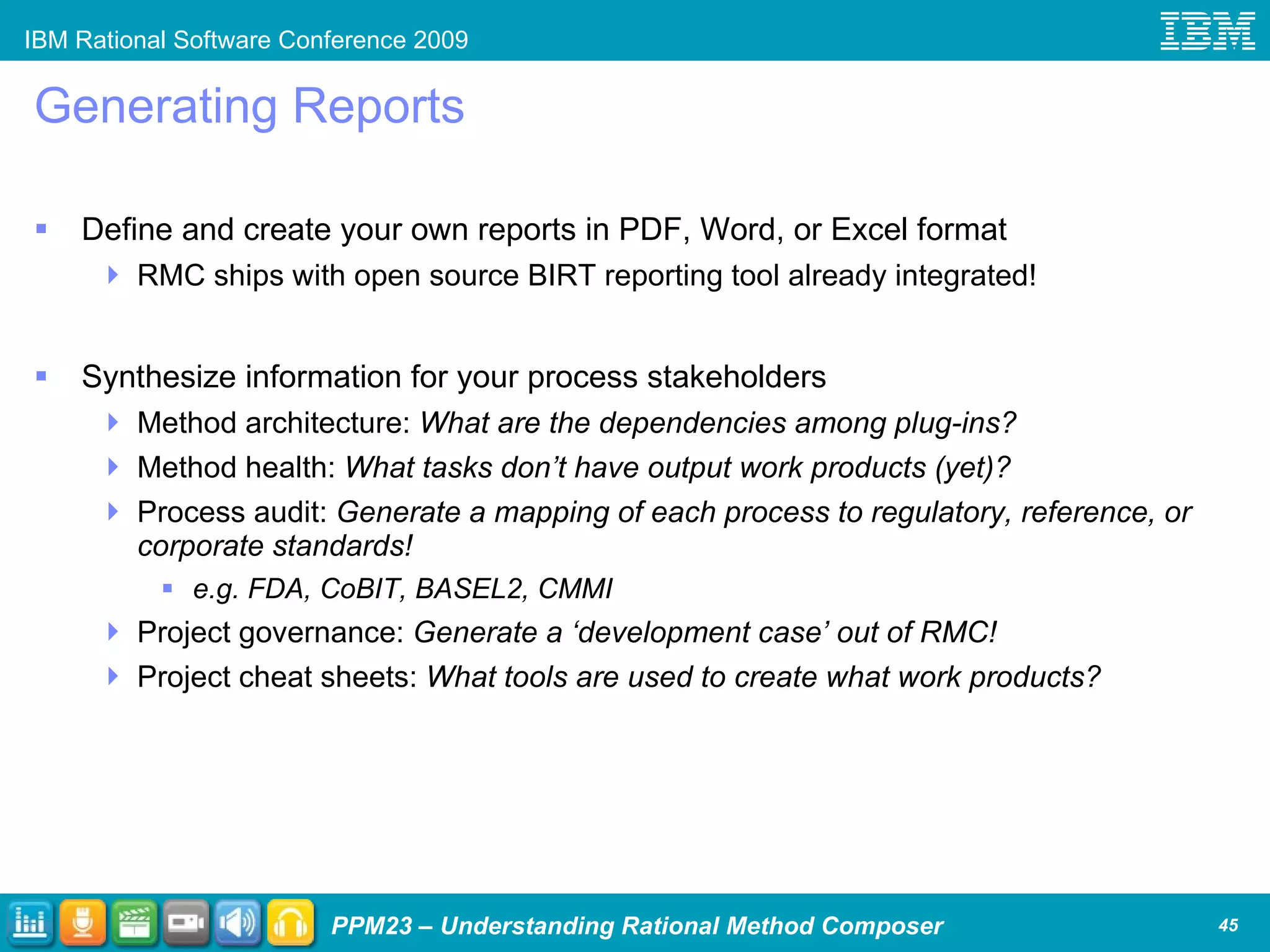
Generating Reports Define and create your own reports in PDF, Word, or Excel format RMC ships with open source BIRT reporting tool already integrated! Synthesize information for your process stakeholders Method architecture:  What are the dependencies among plug-ins?  Method health:  What tasks don’t have output work products (yet)? Process audit:  Generate a mapping of each process to regulatory, reference, or corporate standards! e.g. FDA, CoBIT, BASEL2, CMMI Project governance:  Generate a ‘development case’ out of RMC! Project cheat sheets:  What tools are used to create what work products?
Further Customize Look-and-Feel via Skins RMC allows for style sheet selection at publish time Define a skin before publishing and use it to publish Skin definition requires manual CSS and XSL manipulation What does can be controlled by skins?  Any style sheet used in the main view! Page Layout Background color, font, etc. Rearrange/remove sections Hide/display attributes … User interface text Standard default text strings
What and Where are Skins? What are “skins”? Files that contain the CSS and XSL definitions Published web site: define look-and-feel Report and document: some aspects Where are they stored? In the user’s home directory Typically: C:\Documents and  Settings\<user>\RMC\Skins What skins ship with RMC? Two: “RMC” and “RMC Compact” How can I learn more about skins? http://www.ibm.com/developerworks/rational/library/08/0708_gangavaram-haumer/index.html Be aware though that they are “unsupported” as changing skins is akin to manually editing code! Note: RUP uses “RMC” skin and IBM Practices uses “RMC Compact”
How Is RMC Tooling Used to Create and Publish Process? Choose Methods (Practices) Create Method Content Build Processes Customize the User Experience Publish to Document or Web… and Deploy
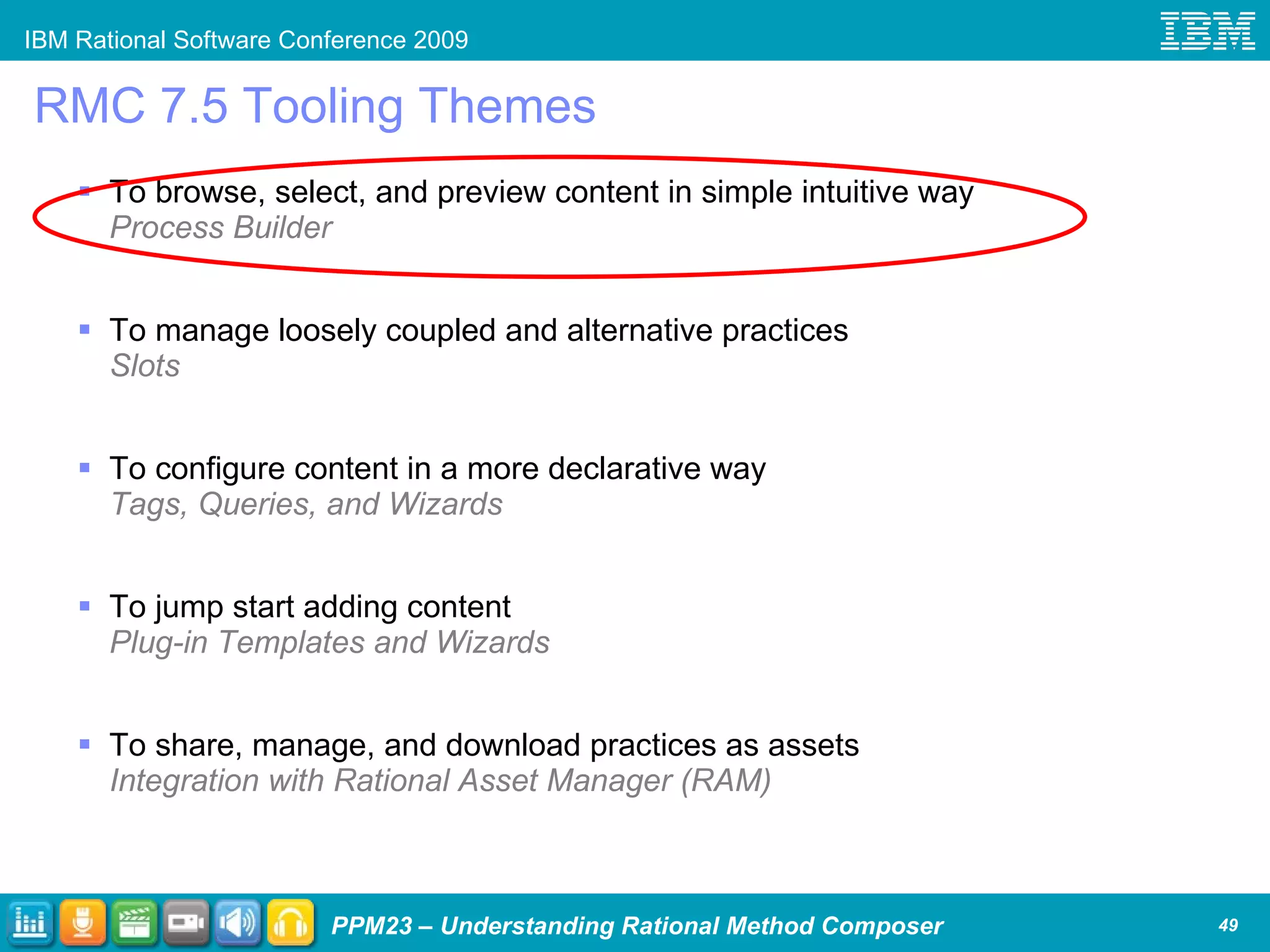
RMC 7.5 Tooling Themes To browse, select, and preview content in simple intuitive way Process Builder To manage loosely coupled and alternative practices Slots To configure content in a more declarative way Tags, Queries, and Wizards To jump start adding content Plug-in Templates and Wizards To share, manage, and download practices as assets Integration with Rational Asset Manager (RAM)
Process Builder – Simplifying Content Selection Design goals for using practices in RMC 7.5 Make selecting and combing practices a simple and intuitive experience Provide a guiding wizard-like UI experience to assemble a web site with practices Support browsing of practices and instant previewing of the integrated results  Seamlessly and automatically integrate customer generated content and practices without the need to update the selection wizards Provide flexibility to allow alternative wizards and customer generated wizards Needs to work with any kind of content and not only practices Result shall be a normal RMC method configuration that can be further refined using the standard RMC editing tools
View RMC Process Builder Capability
How Is RMC Tooling Used to Create and Publish Process? Choose Methods (Practices) Create Method Content Build Processes Customize the User Experience Publish to Document or Web… and Deploy
Separating Method Content and Process METHOD =   METHOD CONTENT  +  PROCESS Method content  is the description of work that can be reused as key building blocks. Method content describes tasks, roles, work products, guidelines, and so on, that are involved in completing work. Processes  are the order of doing work. They provide the order for the method content. Processes will differ depending on project type, size, or other characteristic. A  Method  provides both the descriptions of work and the order of work. A method is end-to-end and is usable on a project. An example of a method is IBM Rational Unified Process (RUP).
Depicting Method Content and Process Elements Examples of Guidance : Concept, Example, Template, Tool Mentor, Whitepaper, Roadmap, etc. A method is defined in terms of  Method Elements . Method Element Process Element Content Element Role Work Product Guidance Capability Pattern Task Activity Delivery Process
Defining Method Content Element Relationships
Standard Structure RMC leverages basic structural units and SPEM core concepts Library Plug-in
Template Approachability Simplicity in data entry through use of templates Task template Attributes Template tabs
So How Is RMC Used to Create and Publish Process?  Lets focus on how this occurs  conceptually  using a basic case rather than on the mechanics of it or in more complicated scenarios Lets present this in the easiest way to  understand  the tool rather than complicate comprehension by trying to dive into how tends to be actually done Lets introduce and use tool terminology to teach about the tool without teaching how to use it As we step through how RMC is used in these next few slides we’ll keep terminology clarification in black and use  blue for what we would do
Step 1: Define Method Architecture The base unit of architecture is the plug-in Plug-ins can stand alone or they can be dependent on one or more other plug-ins Note that plug-ins are organized such that they leverage the “key concept” presented earlier Method = Method Content + Process Plug-ins are organized in a library Configurations define what set of plug-ins are being used together Using one set of plug-ins in the library Classic RUP is created, using another set RUP for SOMA Determine what existing plug-ins to leverage Determine what new plug-ins we need Create a configuration that includes all plug-ins being used
Step 2: Create Method Content Method Content is organized into packages that contain tasks, roles, work products, and guidance As depicted on “key concept” slide Each method content element, such as a task, allows for form based entry for attributes of that element as well as relationships it has to other elements (e.g. tasks have performing roles) Guidance exemplified: Templates, checklists, key concepts, and tool mentors Create desired new tasks, roles, work products, and guidance Use RMC design mechanism (“variability type”) to customize existing content instead of directly editing that content
Step 3: Build Processes There are two types of processes: Capability Patterns and Delivery Processes As depicted on “key concept” slide Think of Capability Patterns as “process patterns” as they are typically used to build Delivery Processes (think “complete processes”) Processes built by constructing WBS that includes predecessors, etc. Configuration selected drives process construction Build / modify Capability Patterns using Method Content or other CPs adding phase, iteration, and activity hierarchies Build / modify Delivery Process in similar fashion
Step 4: Define Views Configurations also define what views to publish What’s a view?  What you see in the treebrowser portion of RUP for navigation purposes Define “tabs” and content of tabs in view; set one tab as default
Step 5: Publish to Web or Document Publish to web creates static HTML or a “dynamic” version (WAR file) Publish to document creates a PDF or Word document Using the publishing wizard select desired options and “publish”
Configurations A base task and two adjustments to that task are defined.  How does RMC know which task(s) to leverage in creating processes and publishing? Use Plug-in A? Use Plug-in A and Plug-in B? Use Plug-in A and Plug-in C? Use all three plug-ins? Use none of these plug-ins?!? A  configuration  defines the plug-ins to use Note that a layered plug-in architecture is needed to prevent “circular references” If Plug-in B is dependent on Plug-in A, RMC will not allow Plug-in A to be dependent on Plug-in B
Other RMC Capabilities - Diagrams Diagrams Use RMC generated-diagrams and tweak if desired… or import diagrams from elsewhere Types: Activity, Activity Detail, and Work Product Dependency
Agenda What is IBM Rational Method Composer? IBM Rational Method Composer (RMC) RMC 7.5 and Practices Understanding RMC in context of the IBM Measured Capability Improvement Framework (MCIF) IBM Rational Method Composer Content High-level overview of all content More detailed examination of RUP and IBM Practices content IBM Rational Method Composer Tooling Publishing to web/document, publishing reports, changing skins Choosing methods (practices) Understanding the meta-model, authoring, selecting views Integrations overview; select additional RMC 7.5 capabilities Wrap Up
Query-Based Custom Categories Tags can be used to allow for dynamic assignment to custom categories Usage example: Published web site treebrowser views Extended Milestone Concept Milestones can now be associated with work products Horizontal Layout of Activity Diagrams Previously only vertical layout was possible Graphical Image Map Editor for the Rich Text Editor Include your own images and draw hotspots on those images Usage example: Quickly enabling custom graphic drill-down Spell Checker for Rich Text Editor Reduce spellnig erorrs! Publish HTML in RMC as a Batch Command Simplify your build management environment Usage example: “RMC.exe –rmcsilent publish” with additional parameters Online Help Updated, Tutorials Rewritten RMC v7.5 Capabilities of Interest
RMC Integrations Perform version control on RMC libraries Integrates with  ClearCase ,  Subversion , or  CVS Model your business then jump start your process definition Analyze your process definition via business modeling Integrates with  WebSphere Business Modeler Project manage using a project template generated from your process Integrates with  MS Project Estimate using projects using your process Integrates via MS Project to:  SEER  by Galorath,  SLIM  by QSM Easily find what new / updated Rational methods are available Manage your process assets like other IT assets Integrates with  Rational Asset Manager
Selected Presentations at RSC IBM Rational Method Composer (RMC) – including RUP and IBM Practices PPM18  – “Process Management: Yesterday, Today, and Tomorrow”, Mon 11:30-1:00p in Southern Hemisphere V by D. Trent SDP03  – “Introduction to the IBM Rational Unified Process”, Mon 1:45-2:45p in Northern Hemisphere A2 by A. Crain PPM22  – “Lessons Learned in Customizing the Method Authoring Method for Ericsson”, Tues 10:00-11:00a in S. Hemisphere V by K. Houston & A. Giampi PPM23  – “Understanding IBM Rational Method Composer”, Tues 11:30-1:00p in Southern Hemisphere V by D. Trent   PPM24  – “Process by Example”, Tues 2:15-3:15p in Southern Hemisphere V by B. MacIsaac NPPM04  – “Leading a IBM Rational Unified Process (RUP) Adoption Using RUP”, Tues 8:00-9:00p in Southern Hemisphere V by A. Crain PPM27  – “Can Agility and IBM Rational Unified Process Coexist in the Workplace? Yes!”, Wed 11:15-12:45p in Southern Hemisphere IV by K. Werner PPM14  – “End-to-End Scenarios for Capturing, Enacting, Measuring, and Improving your Development Practices with IBM Rational Process Solutions”, Wed 4:15-5:45p in Southern Hemisphere IV by P. Haumer PPM32  – “Migrating to IBM Rational Method Composer - A Success Story”, Thur 9:45-10:45a in Southern Hemisphere V by T. Bichler & P. Lagus
Agenda Process Management: Its Challenges and Importance  What is IBM Rational Method Composer? IBM Rational Method Composer (RMC) RMC 7.5 and Practices Understanding RMC in context of the IBM Measured Capability Improvement Framework (MCIF) IBM Rational Method Composer Content High-level overview of all content More detailed examination of RUP and IBM Practices content IBM Rational Method Composer Tooling Understanding what makes it different Capability overviews and the issues of process mgmt it addresses Integrations overview Wrap Up
 
© Copyright IBM Corporation 2009.  All rights reserved.  The information contained in these materials is provided for informational purposes only, and is provided AS IS without warranty of any kind, express or implied.  IBM shall not be responsible for any damages arising out of the use of, or otherwise related to, these materials.  Nothing contained in these materials is intended to, nor shall have the effect of, creating any warranties or representations from IBM or its suppliers or licensors, or altering the terms and conditions of the applicable license agreement  governing the use of IBM software. References in these materials to IBM products, programs, or services do not imply that they will be available in all countries in which IBM operates.  Product release dates and/or capabilities referenced in these materials may change at any time at IBM’s sole discretion based on market opportunities or other factors, and are not intended to be a commitment to future product or feature availability in any way.  IBM, the IBM logo, Rational, the Rational logo, Telelogic, the Telelogic logo, and other IBM products and services are trademarks of the International Business Machines Corporation, in the United States, other countries or both. Other company, product, or service names may be trademarks or service marks of others.
BACKUP
What is a Practice? A practice is an approach to solving one or several commonly occurring problems Practices are intended as &quot;chunks&quot; of process for adoption, enablement, and configuration Practices enable a compositional approach to building methods that offers the following benefits:  Adaptability and scalability  Incremental adoption  Easy to configure and use  Enable community development In effect, practices apply the concepts of “components” or “services” to process management
Practices Library Organization Core Framework and shared content plug-ins Practice Organized by context (management, technical) Process Reusable processes built from practices Publish Content specific to a configuration Dependency Most practices depend only on “core” plug-ins.  Exceptions: 2 level project planning depends on iterative development Risk-value lifecycle depends on 2 level project planning
RMC-RAM Integration
Deploy and share practices within an organization Motivation: Teams capturing their practices want to make these available to other teams Organizations want to govern and deploy libraries of practices as reusable assets Practice ‘users’ want to get help or provide feedback on practices Rational wants to provide additional practices as downloads from within RMC Solution: Bundle IBM® Rational® Asset Manager with RMC Browse and search for practices within RMC Rank, comment, or discuss on practice assets Govern asset management and define submission and approval lifecycles  Create assets with practices or any other content  (e.g. collections of tailored document templates or real-life examples)
Utilizing IBM Rational Asset Manager (RAM) Govern Create/ Modify Assets Team Lead / Process Engineer  Asset Management Lifecycle A collaborative software development  asset management solution  that gives organizations the ability  to identify, manage and govern the:  Definition  Development Consumption of development process assets as well as many other development assets. Search/ Retrieve Assets Team Lead / Project Manager/ Practitioner Process Engineer/ PMO/PMC/ CIO/CTO Process Engineer Define Measure Project Manager/ Reviewer/ Approver
Provide, search, use, and evaluate process assets Easily locate existing reusable assets Search using categories, facets, keywords Indexed for fast retrieval Rich client integration inserts assets  directly inside Method Composer for download with 1-click Evaluate Ratings, feedback, and discussions Statistics help in asset evaluation Create and package assets Supports reuse of process assets Govern practice deployment with approval workflows, user commun- ities, and access rights
Define and describe your practice as an asset
Upload your practice to RAM server directly from RMC
Search for assets, provide feedback, discuss in forums
Download and install a practice asset with one right-click

Rsc 2009 Understanding Ibm Rational Method Composer

  • 1.
    Understanding IBM RationalMethod Composer David Trent Market Manager, Best Practices Segment for Rational Software [email_address]
  • 2.
    Intended Audience Idealattendee Previous exposure to IBM Rational Method Composer (RMC): none to moderate May or may not have heard about “practices”… and wants to better understand what they are Wants to better understand RMC’s role in supporting the IBM Measured Capability Improvement Framework (MCIF) Would like to receive an overview of RMC’s Method content and see a demo of the Rational Unified Process (RUP) & IBM Practices and learn about the similarities and differences between them Tooling and better understand what it does and why and the value that provides Would like to learn more about the last release of RMC (v7.5 in October 2008) in the context of RMC as a whole – doesn’t want a “feature dump” of the last release
  • 3.
    Agenda Process Management:Its Challenges and Importance What is IBM Rational Method Composer? IBM Rational Method Composer (RMC) RMC 7.5 and Practices Understanding RMC in context of the IBM Measured Capability Improvement Framework (MCIF) IBM Rational Method Composer Content High-level overview of all content More detailed examination of RUP and IBM Practices content IBM Rational Method Composer Tooling Publishing to web/document, publishing reports, changing skins Choosing methods (practices) Understanding the meta-model, authoring, selecting views Integrations overview; select additional RMC 7.5 capabilities Wrap Up
  • 4.
    Agenda Process Management:Its Challenges and Importance What is IBM Rational Method Composer? IBM Rational Method Composer (RMC) RMC 7.5 and Practices Understanding RMC in context of the IBM Measured Capability Improvement Framework (MCIF) IBM Rational Method Composer Content High-level overview of all content More detailed examination of RUP and IBM Practices content IBM Rational Method Composer Tooling Publishing to web/document, publishing reports, changing skins Choosing methods (practices) Understanding the meta-model, authoring, selecting views Integrations overview; select additional RMC 7.5 capabilities Wrap Up
  • 5.
    Common Business Challengesin Process Management Project Execution “ We have problems delivering projects on time, on budget, and meeting all high priority requirements. There is no consistency or predictability.” Compliance Audits “ It’s a nightmare every time we’re audited. Demonstrating our process to the auditor is laborious, time-consuming and painful.” Process Improvement “ We know our process isn’t working. We know we need to change it. We’re just not sure what is the right process, how to effect that change and get everyone to follow it.” Outsourcing / Distributed Development “ Budget was just cut 40% and we need to outsource. How do we communicate our process to the outsource vendor? If we don’t, they’re going to charge a premium.” Process Deployment / Execution “ We have a great process, but it is too expensive to maintain, and we are not effectively deploying it.”
  • 6.
    Why Is ProcessManagement Important? Without general concurrence in the organization about what your processes are how can anyone in the organization… Agree that ‘what is supposed to be done, isn’t being done’? Qualitatively or quantitatively measure project performance? Improve how are things are done? Globally distributed development, outsourcing, and so forth implies that the team working together now likely hasn’t worked together before A common process provides all team members a reference point from which to anchor their responsibilities to the team It also provides the project manager and all other team leads a reference from which to have a conversation about the big picture and the immediate tasks at hand Without a defined process and its associated governance project teams can make locally optimized decisions that are not optimal for the organization e.g. “We can do it quicker without requirements, version control, quality gates, …”
  • 7.
    Common Technical Challengesin Process Management Formal Architecture “ We would never permit development projects using our development process to have poor architecture… but how process is authored and maintained typically violates this by muddying its ‘data’, ‘logic’, and ‘presentation’ tiers!” Using Automated Tooling; Leveraging Proven Technologies to Reduce Risk “ DBAs use tools that perform ‘referential integrity’. Developers use tools that generate/compile the language they code in. Why do methodologists & method engineers typically capture process in manually maintained HTML pages, documents, etc.?” Exploring “Buy” vs. “Build”; Not Reinventing the Wheel “ Many organizations consider commercial packages as an alternative. Almost all development projects build atop J2EE or some other proven architecture and leverage code libraries. Why do most process initiatives ‘build a process from scratch’?” Considering Deployment and Maintenance “ The value of a process is not in the building of one, it is in the successful deployment and adoption of it… and being able to respond to feedback and maintain it gracefully.”
  • 8.
    What is IBMProcess Management? Create, customize, publish, enact and measure software & systems delivery, practices and processes according to project needs Governance Rational Software Development Platform Process Library Process Management & Best Practices Leverage a rich set of practices, process assets and guidance to capture & maintain development, management, and governance processes Automate, integrate, and govern core business processes of software and systems delivery through an integrated set of proven, industry leading tools Manage, author, configure, and deploy effective processes tailored to project needs Establish consistent processes driven by standards and best practices to support corporate governance objectives IBM Measured Capability Improvement Framework A systematic approach to incrementally improve your business; identify high priority business objectives, software delivery practices to address those objectives, and measure practice adoption and business results. Rational Method Composer
  • 9.
    Agenda Process Management:Its Challenges and Importance What is IBM Rational Method Composer? IBM Rational Method Composer (RMC) RMC 7.5 and Practices Understanding RMC in context of the IBM Measured Capability Improvement Framework (MCIF) IBM Rational Method Composer Content High-level overview of all content More detailed examination of RUP and IBM Practices content IBM Rational Method Composer Tooling Publishing to web/document, publishing reports, changing skins Choosing methods (practices) Understanding the meta-model, authoring, selecting views Integrations overview; select additional RMC 7.5 capabilities Wrap Up
  • 10.
    IBM Rational MethodComposer IBM Rational Method Composer (RMC) is comprised of: Tooling that provides form-based entry to create and maintain well-architected and maintainable methods Methods in a “customizable process library” that includes IBM Practices, the Rational Unified Process (RUP), and plug-ins like MDSD Can be used as-is, customized, or leveraged to augment your own processes
  • 11.
  • 12.
  • 13.
    Agenda Process Management:Its Challenges and Importance What is IBM Rational Method Composer? IBM Rational Method Composer (RMC) RMC 7.5 and Practices Understanding RMC in context of the IBM Measured Capability Improvement Framework (MCIF) IBM Rational Method Composer Content High-level overview of all content More detailed examination of RUP and IBM Practices content IBM Rational Method Composer Tooling Publishing to web/document, publishing reports, changing skins Choosing methods (practices) Understanding the meta-model, authoring, selecting views Integrations overview; select additional RMC 7.5 capabilities Wrap Up
  • 14.
    Result : Easier, more effective deployment of customized and adaptable practices and processes Agile Core Governance and Compliance Quality Management Requirements Management Change & Release Management Architecture Management Tooling Enhancements New IBM Practices in Key Solution Areas Share, manage, and download practices as assets with Rational Asset Manager (RAM) integration Browse, select, and preview content more simply and intuitively Simply customize loosely coupled and alternative practices Jump start creating and extending content with plug-in templates and wizards Configure content in a more flexible way using tags, queries and wizards Provide simple update and feedback mechanisms IBM Rational Method Composer v7.5 Create, customize, publish, enact and measure iterative and incremental practices according to project needs
  • 15.
    Advantages of aPractice-Based Approach Guidance for software and systems development, management, governance, and more Applies the concepts of “components” or “services” to process management! Addresses one aspect of the software lifecycle e.g., continuous integration, use-case driven development, performance testing, etc. Can be incrementally and independently adopted Can be mapped to operational objectives and development pain points Adoption can be measured Results: Avoids self-inflicting too much process Faster and more predictable results
  • 16.
    Agenda Process Management:Its Challenges and Importance What is IBM Rational Method Composer? IBM Rational Method Composer (RMC) RMC 7.5 and Practices Understanding RMC in context of the IBM Measured Capability Improvement Framework (MCIF) IBM Rational Method Composer Content High-level overview of all content More detailed examination of RUP and IBM Practices content IBM Rational Method Composer Tooling Publishing to web/document, publishing reports, changing skins Choosing methods (practices) Understanding the meta-model, authoring, selecting views Integrations overview; select additional RMC 7.5 capabilities Wrap Up
  • 17.
    Leverage a ControlFramework to Manage to Expected Business Results Efficiency Control Value Process Enactment / Governance Enforcement / Process Awareness Jazz Platform Business Objectives Process Definition / Practices Rational Method Composer Operational Objectives feedback feedback feedback feedback Performance Measurement Value Metrics e.g., ROI, ROA for SSD Operational Effectiveness Metrics e.g., Time to market, productivity Practice Adoption/Maturity subjective Practice Artifacts Objective
  • 18.
    IBM Measured CapabilityImprovement Framework A systematic approach to software excellence A phased approach that helps teams Adopt an incremental, measured approach to transformation Focus on the core practices that matter most Accelerate adoption through out-of-the-box assets Articulate capability improvements in terms of business value Support any method Optimized for Agile practices Empower teams to measure, manage and incrementally improve their software delivery capability. Establish business and operational objectives Prioritize practices and define roadmap Accelerate adoption with tools and services Report, analyze and act on results Phase 1 Phase 2 Phase 3 Phase 4 Start next incremental improvement
  • 19.
    IBM Measured CapabilityImprovement Framework Supporting product and service offerings Establish business and operational objectives Prioritize practices and define roadmap Accelerate adoption with tools and services Report, analyze and act on results Phase 1 Phase 2 Phase 3 Phase 4 IBM Executive Business Value Workshop for Software Delivery IBM Health Assessment for Software Delivery IBM Rational Self Check for Software Teams IBM Rational Method Composer IBM Rational Rapid Deployment Package for Agility @ Scale IBM Rational Software and Systems Delivery Platform IBM Rational Insight IBM Rational Self Check for Software Teams Start here to deploy solution Start here to determine right solution Confirm results delivered and start on next project Start next incremental improvement
  • 20.
    Leverage MCIF Assetsto Incrementally Define the Control Framework Operational Level Practice Level Business Level Process Enactment / Governance Enforcement / Process Awareness Jazz Platform Business Objectives Process Definition / Practices Rational Method Composer Operational Objectives Phase 3-4: Rational Insight Phase 3-4: Self-Check Phase 3: Rational Method Composer Phase 2: Health Assessment Phase 1: Exec Business Value Workshop Phase 3: Deployment Package feedback feedback feedback feedback Performance Measurement IBM Rational Insight Value Metrics e.g., ROI, ROA for SSD Operational Effectiveness Metrics e.g., Time to market, productivity Practice Adoption/Maturity Subjective IBM Rational Self-Check Practice Artifacts Objective
  • 21.
    Selected Presentations atRSC IBM Measured Capability Improvement Framework (MCIF) PPM21 – “Speeding Process Adoption through IBM Rational Self Check for Software Teams”, Mon 4:15-5:45p in Southern Hemisphere V by P. Kroll PPM06 – “Measure Your Results by Applying Measured Capability Improvement Framework and Rational Insight”, Tues 10:00-11:00a in Southern Hemisphere IV by P. Kroll and E. Larsen PPM08 – “From Measure to Measure: Managing Performance with Metrics-driven Process Improvements”, Tues 2:15-3:15p in Southern Hemisphere V by K. Fryer & B. Reed PPM25 – “IT Delivery in Challenging Times”, Tues 3:30-5:00p in Southern Hemisphere V by P. Kroll PPM10 – “Using MCIF to implement IBM Rational Unified Process in a Microsoft Environment”, Wed 10:00-11:00a in Southern Hemisphere IV by A. Zachariah PPM15 – “New IBM Practices in Practice - Integrating Measured Capability Improvement Framework with CMMI”, Thur 9:45-10:45a in Southern Hemisphere IV by J. Nordlund
  • 22.
  • 23.
    Agenda What isIBM Rational Method Composer? IBM Rational Method Composer (RMC) RMC 7.5 and Practices Understanding RMC in context of the IBM Measured Capability Improvement Framework (MCIF) IBM Rational Method Composer Content High-level overview of all content More detailed examination of RUP and IBM Practices content IBM Rational Method Composer Tooling Publishing to web/document, publishing reports, changing skins Choosing methods (practices) Understanding the meta-model, authoring, selecting views Integrations overview; select additional RMC 7.5 capabilities Wrap Up
  • 24.
  • 25.
    Methods: Build vs.Buy Decision When a company decides to build its own process it is: an extended period between when the decision is made and the process is ready the longer a project goes without demonstratable results, the more likely it is to be stopped an uphill battle to get stakeholders to accept every aspect of the process lacking existing a base of additional documentation, training materials, and experts already knowledgeable about the process When a company uses existing methods: the process can receive some initial customization very quickly… and be piloted on projects to enable further customization through real field use and demonstrate success and value… which gives credibility to the project and helps ensure funding isn’t cut the value of process is in the successful implementation of it, not in having created it those who would have built the homegrown process can now instead help others do one it provides an established and proven process that reduces “will it work” discussions mitigates defensive postures caused by feeling of ownership and pride found in a homegrown process; as a result the adoption team often partners better with projects it benefits from the scores of books and whitepapers, evolved and proven training materials, and an existing community of established and credentialed practitioners
  • 26.
    Methods – Availablebefore (and in) v7.5 Enterprise plug-ins IBM Rational Unified Process, or RUP IBM Rational Method for Portfolio Management (for Initiatives) IBM Rational Method for Program Mobilization IBM Tivoli Unified Process (ITUP) RUP for Asset-Based Development RUP with ITSM/ITUP Connection RUP for Global Development and Delivery (GDD) RUP for GDD Maintenance Solution-specific plug-ins SOA RUP for Service-Oriented Modeling and Architecture Governance SOA Governance Asset-Based Governance RUP for Practical Software & Systems Measurement (PSM) Compliance RUP for CMMI® Project-specific plug-ins RUP for System z RUP for Legacy Evolution RUP for Maintenance Projects RUP for COTS Package Delivery RUP for Model-Driven Systems Development (MDSD) Technology/tool-specific plug-ins RUP for Rational Application Development RUP for Rational Software Architect RUP for WebSphere ® Business Modeler (beta) RUP for Automated Software Quality (Rational Performance Tester, Functional Tester, and Manual Tester) Standard-specific plug-ins RUP for Department of Defense Architecture Framework (DoDAF) A collection of out-of-the-box method content and processes that you can customize to address a diverse set of enterprise and project needs and development styles
  • 27.
    Methods – Newfor v7.5 Method Authoring Method (MAM) Three key method authoring work products: Method Sketch Draft of the method (RMC) Method Definition Formal definition of the method Method Web Site Published web site Derivation Automatic Generation The method constituents (drafted in Method Sketch , formally defined in Method Definition , published in Method Web Site ) are the Method Elements . Follow an iterative RMC-published process to create new processes
  • 28.
    Methods – Newfor v7.5 IBM Practices A collection of out-of-the-box method content and processes that you can customize to address a diverse set of enterprise and project needs and development styles
  • 29.
    But I LikeRUP! What Does Practices Mean to Me? Practices are an alternative to RUP, not a replacement If you’re successful with what you’re doing and prefer your current implementation after examining “practices” keep doing what you’re doing! The “IBM Practices” released in RMC 7.5 contains only a subset of RUP For example: There are currently no practices to address the Deployment or Environment disciplines of RUP Practices… Advance process architecture and associated “standards” Embody over a decade of feedback on “how to make RUP easier to understand” Force our tooling to evolve to address its demands Practices have evolved process management! Understanding what it is, the problems it solves, and the benefits it provides will help you on your own process journey whether or not you adopt “practices” per se.
  • 30.
  • 31.
    Selected Presentations atRSC IBM Rational Method Composer (RMC) – including RUP and IBM Practices PPM18 – “Process Management: Yesterday, Today, and Tomorrow”, Mon 11:30-1:00p in Southern Hemisphere V by D. Trent SDP03 – “Introduction to the IBM Rational Unified Process”, Mon 1:45-2:45p in Northern Hemisphere A2 by A. Crain PPM22 – “Lessons Learned in Customizing the Method Authoring Method for Ericsson”, Tues 10:00-11:00a in S. Hemisphere V by K. Houston & A. Giampi PPM24 – “Process by Example”, Tues 2:15-3:15p in Southern Hemisphere V by B. MacIsaac NPPM04 – “Leading a IBM Rational Unified Process (RUP) Adoption Using RUP”, Tues 8:00-9:00p in Southern Hemisphere V by A. Crain PPM27 – “Can Agility and IBM Rational Unified Process Coexist in the Workplace? Yes!”, Wed 11:15-12:45p in Southern Hemisphere IV by K. Werner PPM14 – “End-to-End Scenarios for Capturing, Enacting, Measuring, and Improving your Development Practices with IBM Rational Process Solutions”, Wed 4:15-5:45p in Southern Hemisphere IV by P. Haumer PPM32 – “Migrating to IBM Rational Method Composer - A Success Story”, Thur 9:45-10:45a in Southern Hemisphere V by T. Bichler & P. Lagus
  • 32.
  • 33.
    Agenda What isIBM Rational Method Composer? IBM Rational Method Composer (RMC) RMC 7.5 and Practices Understanding RMC in context of the IBM Measured Capability Improvement Framework (MCIF) IBM Rational Method Composer Content High-level overview of all content More detailed examination of RUP and IBM Practices content IBM Rational Method Composer Tooling Publishing to web/document, publishing reports, changing skins Choosing methods (practices) Understanding the meta-model, authoring, selecting views Integrations overview; select additional RMC 7.5 capabilities Wrap Up
  • 34.
  • 35.
    How Is RMCTooling Used to Create and Publish Process? Choose Methods (Practices) Create Method Content Build Processes Customize the User Experience Publish to Document or Web… and Deploy
  • 36.
    Using Views View– what can you define? Default drawer and item (page) Drawers Order and Names Treebrowser view structure Package structure (can be nested) Individual Items RMC enables view and publish decisions to be made independent of method decisions
  • 37.
    How to publish?Select Configuration | Publish Choose to Publish to Web or Document Choose a Configuration Publishing to Web / Document
  • 38.
    Publishing options Choosebetween creating a static site or a dynamic one using WAR files that can be run by J2EE web server Set HTML Title Bar Send feedback to… Glossary? Index? Skin Use your own banner Validate external hyperlinks and repair Diagram defaults Navigation tree options and content generation layouts Set activity page default Publishing to Web (HTML)
  • 39.
    Publishing to Web(HTML) – Example of Impact Treebrowser Integrated Search as Applet (static) or Servlet (dynamic) Breadcrumbs Virtual “frames” using Dojo Where used in process Feedback “ Find page” Publish as static HTML or “dynamic” J2EE web application via WAR
  • 40.
    Publishing to Web(HTML) – Example of Impact Process: Publish option for no “descriptors” Process Breakdown in Navigation Tree Show / Hide / Navigate “tabs” Glossary & Index
  • 41.
    RMC Architecture –Web Publish High-level interpretation in “student notes”
  • 42.
    Publishing to Webor Document Publish to web or document form (PDF or Word) Share information in a manner that best suits your organization Publish all processes to one web site or generate a web site for each process Easily generate supporting reference documents with the same look-and-feel as the published web site
  • 43.
    Publishing Reports (PDFor Word) How do I use reporting? Leverage the Help files Help | Help Contents Drill down on “Rational Method Composer” and “Using Reporting” Read “Reporting Overview” first! Easiest way is to leverage existing Report Templates Read “Report templates” to see what out-of-the-box reports are available Follow instructions for “Creating a report from report templates” Follow instructions for “Creating a new report”, use desired ‘registered templates’ as per above step File | View Report when done
  • 44.
    Publishing to Webor Document Publish to web or document form (PDF or Word) Share information in a manner that best suits your organization Publish all processes to one web site or generate a web site for each process Easily generate supporting reference documents with the same look-and-feel as the published web site
  • 45.
    Generating Reports Defineand create your own reports in PDF, Word, or Excel format RMC ships with open source BIRT reporting tool already integrated! Synthesize information for your process stakeholders Method architecture: What are the dependencies among plug-ins? Method health: What tasks don’t have output work products (yet)? Process audit: Generate a mapping of each process to regulatory, reference, or corporate standards! e.g. FDA, CoBIT, BASEL2, CMMI Project governance: Generate a ‘development case’ out of RMC! Project cheat sheets: What tools are used to create what work products?
  • 46.
    Further Customize Look-and-Feelvia Skins RMC allows for style sheet selection at publish time Define a skin before publishing and use it to publish Skin definition requires manual CSS and XSL manipulation What does can be controlled by skins? Any style sheet used in the main view! Page Layout Background color, font, etc. Rearrange/remove sections Hide/display attributes … User interface text Standard default text strings
  • 47.
    What and Whereare Skins? What are “skins”? Files that contain the CSS and XSL definitions Published web site: define look-and-feel Report and document: some aspects Where are they stored? In the user’s home directory Typically: C:\Documents and Settings\<user>\RMC\Skins What skins ship with RMC? Two: “RMC” and “RMC Compact” How can I learn more about skins? http://www.ibm.com/developerworks/rational/library/08/0708_gangavaram-haumer/index.html Be aware though that they are “unsupported” as changing skins is akin to manually editing code! Note: RUP uses “RMC” skin and IBM Practices uses “RMC Compact”
  • 48.
    How Is RMCTooling Used to Create and Publish Process? Choose Methods (Practices) Create Method Content Build Processes Customize the User Experience Publish to Document or Web… and Deploy
  • 49.
    RMC 7.5 ToolingThemes To browse, select, and preview content in simple intuitive way Process Builder To manage loosely coupled and alternative practices Slots To configure content in a more declarative way Tags, Queries, and Wizards To jump start adding content Plug-in Templates and Wizards To share, manage, and download practices as assets Integration with Rational Asset Manager (RAM)
  • 50.
    Process Builder –Simplifying Content Selection Design goals for using practices in RMC 7.5 Make selecting and combing practices a simple and intuitive experience Provide a guiding wizard-like UI experience to assemble a web site with practices Support browsing of practices and instant previewing of the integrated results Seamlessly and automatically integrate customer generated content and practices without the need to update the selection wizards Provide flexibility to allow alternative wizards and customer generated wizards Needs to work with any kind of content and not only practices Result shall be a normal RMC method configuration that can be further refined using the standard RMC editing tools
  • 51.
    View RMC ProcessBuilder Capability
  • 52.
    How Is RMCTooling Used to Create and Publish Process? Choose Methods (Practices) Create Method Content Build Processes Customize the User Experience Publish to Document or Web… and Deploy
  • 53.
    Separating Method Contentand Process METHOD = METHOD CONTENT + PROCESS Method content is the description of work that can be reused as key building blocks. Method content describes tasks, roles, work products, guidelines, and so on, that are involved in completing work. Processes are the order of doing work. They provide the order for the method content. Processes will differ depending on project type, size, or other characteristic. A Method provides both the descriptions of work and the order of work. A method is end-to-end and is usable on a project. An example of a method is IBM Rational Unified Process (RUP).
  • 54.
    Depicting Method Contentand Process Elements Examples of Guidance : Concept, Example, Template, Tool Mentor, Whitepaper, Roadmap, etc. A method is defined in terms of Method Elements . Method Element Process Element Content Element Role Work Product Guidance Capability Pattern Task Activity Delivery Process
  • 55.
    Defining Method ContentElement Relationships
  • 56.
    Standard Structure RMCleverages basic structural units and SPEM core concepts Library Plug-in
  • 57.
    Template Approachability Simplicityin data entry through use of templates Task template Attributes Template tabs
  • 58.
    So How IsRMC Used to Create and Publish Process? Lets focus on how this occurs conceptually using a basic case rather than on the mechanics of it or in more complicated scenarios Lets present this in the easiest way to understand the tool rather than complicate comprehension by trying to dive into how tends to be actually done Lets introduce and use tool terminology to teach about the tool without teaching how to use it As we step through how RMC is used in these next few slides we’ll keep terminology clarification in black and use blue for what we would do
  • 59.
    Step 1: DefineMethod Architecture The base unit of architecture is the plug-in Plug-ins can stand alone or they can be dependent on one or more other plug-ins Note that plug-ins are organized such that they leverage the “key concept” presented earlier Method = Method Content + Process Plug-ins are organized in a library Configurations define what set of plug-ins are being used together Using one set of plug-ins in the library Classic RUP is created, using another set RUP for SOMA Determine what existing plug-ins to leverage Determine what new plug-ins we need Create a configuration that includes all plug-ins being used
  • 60.
    Step 2: CreateMethod Content Method Content is organized into packages that contain tasks, roles, work products, and guidance As depicted on “key concept” slide Each method content element, such as a task, allows for form based entry for attributes of that element as well as relationships it has to other elements (e.g. tasks have performing roles) Guidance exemplified: Templates, checklists, key concepts, and tool mentors Create desired new tasks, roles, work products, and guidance Use RMC design mechanism (“variability type”) to customize existing content instead of directly editing that content
  • 61.
    Step 3: BuildProcesses There are two types of processes: Capability Patterns and Delivery Processes As depicted on “key concept” slide Think of Capability Patterns as “process patterns” as they are typically used to build Delivery Processes (think “complete processes”) Processes built by constructing WBS that includes predecessors, etc. Configuration selected drives process construction Build / modify Capability Patterns using Method Content or other CPs adding phase, iteration, and activity hierarchies Build / modify Delivery Process in similar fashion
  • 62.
    Step 4: DefineViews Configurations also define what views to publish What’s a view? What you see in the treebrowser portion of RUP for navigation purposes Define “tabs” and content of tabs in view; set one tab as default
  • 63.
    Step 5: Publishto Web or Document Publish to web creates static HTML or a “dynamic” version (WAR file) Publish to document creates a PDF or Word document Using the publishing wizard select desired options and “publish”
  • 64.
    Configurations A basetask and two adjustments to that task are defined. How does RMC know which task(s) to leverage in creating processes and publishing? Use Plug-in A? Use Plug-in A and Plug-in B? Use Plug-in A and Plug-in C? Use all three plug-ins? Use none of these plug-ins?!? A configuration defines the plug-ins to use Note that a layered plug-in architecture is needed to prevent “circular references” If Plug-in B is dependent on Plug-in A, RMC will not allow Plug-in A to be dependent on Plug-in B
  • 65.
    Other RMC Capabilities- Diagrams Diagrams Use RMC generated-diagrams and tweak if desired… or import diagrams from elsewhere Types: Activity, Activity Detail, and Work Product Dependency
  • 66.
    Agenda What isIBM Rational Method Composer? IBM Rational Method Composer (RMC) RMC 7.5 and Practices Understanding RMC in context of the IBM Measured Capability Improvement Framework (MCIF) IBM Rational Method Composer Content High-level overview of all content More detailed examination of RUP and IBM Practices content IBM Rational Method Composer Tooling Publishing to web/document, publishing reports, changing skins Choosing methods (practices) Understanding the meta-model, authoring, selecting views Integrations overview; select additional RMC 7.5 capabilities Wrap Up
  • 67.
    Query-Based Custom CategoriesTags can be used to allow for dynamic assignment to custom categories Usage example: Published web site treebrowser views Extended Milestone Concept Milestones can now be associated with work products Horizontal Layout of Activity Diagrams Previously only vertical layout was possible Graphical Image Map Editor for the Rich Text Editor Include your own images and draw hotspots on those images Usage example: Quickly enabling custom graphic drill-down Spell Checker for Rich Text Editor Reduce spellnig erorrs! Publish HTML in RMC as a Batch Command Simplify your build management environment Usage example: “RMC.exe –rmcsilent publish” with additional parameters Online Help Updated, Tutorials Rewritten RMC v7.5 Capabilities of Interest
  • 68.
    RMC Integrations Performversion control on RMC libraries Integrates with ClearCase , Subversion , or CVS Model your business then jump start your process definition Analyze your process definition via business modeling Integrates with WebSphere Business Modeler Project manage using a project template generated from your process Integrates with MS Project Estimate using projects using your process Integrates via MS Project to: SEER by Galorath, SLIM by QSM Easily find what new / updated Rational methods are available Manage your process assets like other IT assets Integrates with Rational Asset Manager
  • 69.
    Selected Presentations atRSC IBM Rational Method Composer (RMC) – including RUP and IBM Practices PPM18 – “Process Management: Yesterday, Today, and Tomorrow”, Mon 11:30-1:00p in Southern Hemisphere V by D. Trent SDP03 – “Introduction to the IBM Rational Unified Process”, Mon 1:45-2:45p in Northern Hemisphere A2 by A. Crain PPM22 – “Lessons Learned in Customizing the Method Authoring Method for Ericsson”, Tues 10:00-11:00a in S. Hemisphere V by K. Houston & A. Giampi PPM23 – “Understanding IBM Rational Method Composer”, Tues 11:30-1:00p in Southern Hemisphere V by D. Trent PPM24 – “Process by Example”, Tues 2:15-3:15p in Southern Hemisphere V by B. MacIsaac NPPM04 – “Leading a IBM Rational Unified Process (RUP) Adoption Using RUP”, Tues 8:00-9:00p in Southern Hemisphere V by A. Crain PPM27 – “Can Agility and IBM Rational Unified Process Coexist in the Workplace? Yes!”, Wed 11:15-12:45p in Southern Hemisphere IV by K. Werner PPM14 – “End-to-End Scenarios for Capturing, Enacting, Measuring, and Improving your Development Practices with IBM Rational Process Solutions”, Wed 4:15-5:45p in Southern Hemisphere IV by P. Haumer PPM32 – “Migrating to IBM Rational Method Composer - A Success Story”, Thur 9:45-10:45a in Southern Hemisphere V by T. Bichler & P. Lagus
  • 70.
    Agenda Process Management:Its Challenges and Importance What is IBM Rational Method Composer? IBM Rational Method Composer (RMC) RMC 7.5 and Practices Understanding RMC in context of the IBM Measured Capability Improvement Framework (MCIF) IBM Rational Method Composer Content High-level overview of all content More detailed examination of RUP and IBM Practices content IBM Rational Method Composer Tooling Understanding what makes it different Capability overviews and the issues of process mgmt it addresses Integrations overview Wrap Up
  • 71.
  • 72.
    © Copyright IBMCorporation 2009. All rights reserved. The information contained in these materials is provided for informational purposes only, and is provided AS IS without warranty of any kind, express or implied. IBM shall not be responsible for any damages arising out of the use of, or otherwise related to, these materials. Nothing contained in these materials is intended to, nor shall have the effect of, creating any warranties or representations from IBM or its suppliers or licensors, or altering the terms and conditions of the applicable license agreement governing the use of IBM software. References in these materials to IBM products, programs, or services do not imply that they will be available in all countries in which IBM operates. Product release dates and/or capabilities referenced in these materials may change at any time at IBM’s sole discretion based on market opportunities or other factors, and are not intended to be a commitment to future product or feature availability in any way. IBM, the IBM logo, Rational, the Rational logo, Telelogic, the Telelogic logo, and other IBM products and services are trademarks of the International Business Machines Corporation, in the United States, other countries or both. Other company, product, or service names may be trademarks or service marks of others.
  • 73.
  • 74.
    What is aPractice? A practice is an approach to solving one or several commonly occurring problems Practices are intended as &quot;chunks&quot; of process for adoption, enablement, and configuration Practices enable a compositional approach to building methods that offers the following benefits: Adaptability and scalability Incremental adoption Easy to configure and use Enable community development In effect, practices apply the concepts of “components” or “services” to process management
  • 75.
    Practices Library OrganizationCore Framework and shared content plug-ins Practice Organized by context (management, technical) Process Reusable processes built from practices Publish Content specific to a configuration Dependency Most practices depend only on “core” plug-ins. Exceptions: 2 level project planning depends on iterative development Risk-value lifecycle depends on 2 level project planning
  • 76.
  • 77.
    Deploy and sharepractices within an organization Motivation: Teams capturing their practices want to make these available to other teams Organizations want to govern and deploy libraries of practices as reusable assets Practice ‘users’ want to get help or provide feedback on practices Rational wants to provide additional practices as downloads from within RMC Solution: Bundle IBM® Rational® Asset Manager with RMC Browse and search for practices within RMC Rank, comment, or discuss on practice assets Govern asset management and define submission and approval lifecycles Create assets with practices or any other content (e.g. collections of tailored document templates or real-life examples)
  • 78.
    Utilizing IBM RationalAsset Manager (RAM) Govern Create/ Modify Assets Team Lead / Process Engineer Asset Management Lifecycle A collaborative software development asset management solution that gives organizations the ability to identify, manage and govern the: Definition Development Consumption of development process assets as well as many other development assets. Search/ Retrieve Assets Team Lead / Project Manager/ Practitioner Process Engineer/ PMO/PMC/ CIO/CTO Process Engineer Define Measure Project Manager/ Reviewer/ Approver
  • 79.
    Provide, search, use,and evaluate process assets Easily locate existing reusable assets Search using categories, facets, keywords Indexed for fast retrieval Rich client integration inserts assets directly inside Method Composer for download with 1-click Evaluate Ratings, feedback, and discussions Statistics help in asset evaluation Create and package assets Supports reuse of process assets Govern practice deployment with approval workflows, user commun- ities, and access rights
  • 80.
    Define and describeyour practice as an asset
  • 81.
    Upload your practiceto RAM server directly from RMC
  • 82.
    Search for assets,provide feedback, discuss in forums
  • 83.
    Download and installa practice asset with one right-click

Editor's Notes

  • #6 These are challenges we find our customers having with process management, the interesting story about IBM Rational Method Composer is that IBM had similar challenges… and RMC was created to help IBM address some of its own process challenges as well!
  • #7 “ That begs the question though… what is the value of process and why do companies need it?” Expound on this to the breadth or specific areas of interest as time permits – some people may not understand why having process is important. Possible examples include: * “Without understanding what you are doing and having general concurrence on it how do you know if you are ‘not doing what you are supposed to’, ‘what to measure to understand how a project is performing’, or ‘even how to improve what or how you are doing things’?!?” * “A defined process provides every manager with an opportunity to put the contributions of every team member in context to their responsibilities to the organization and project.” * turnover in workforce * trying to do “more with less” * introducing technology but not understanding how it changes the workflow * not communicating (or enforcing) quality gates * not communicating handoffs among people / organizations * etc.
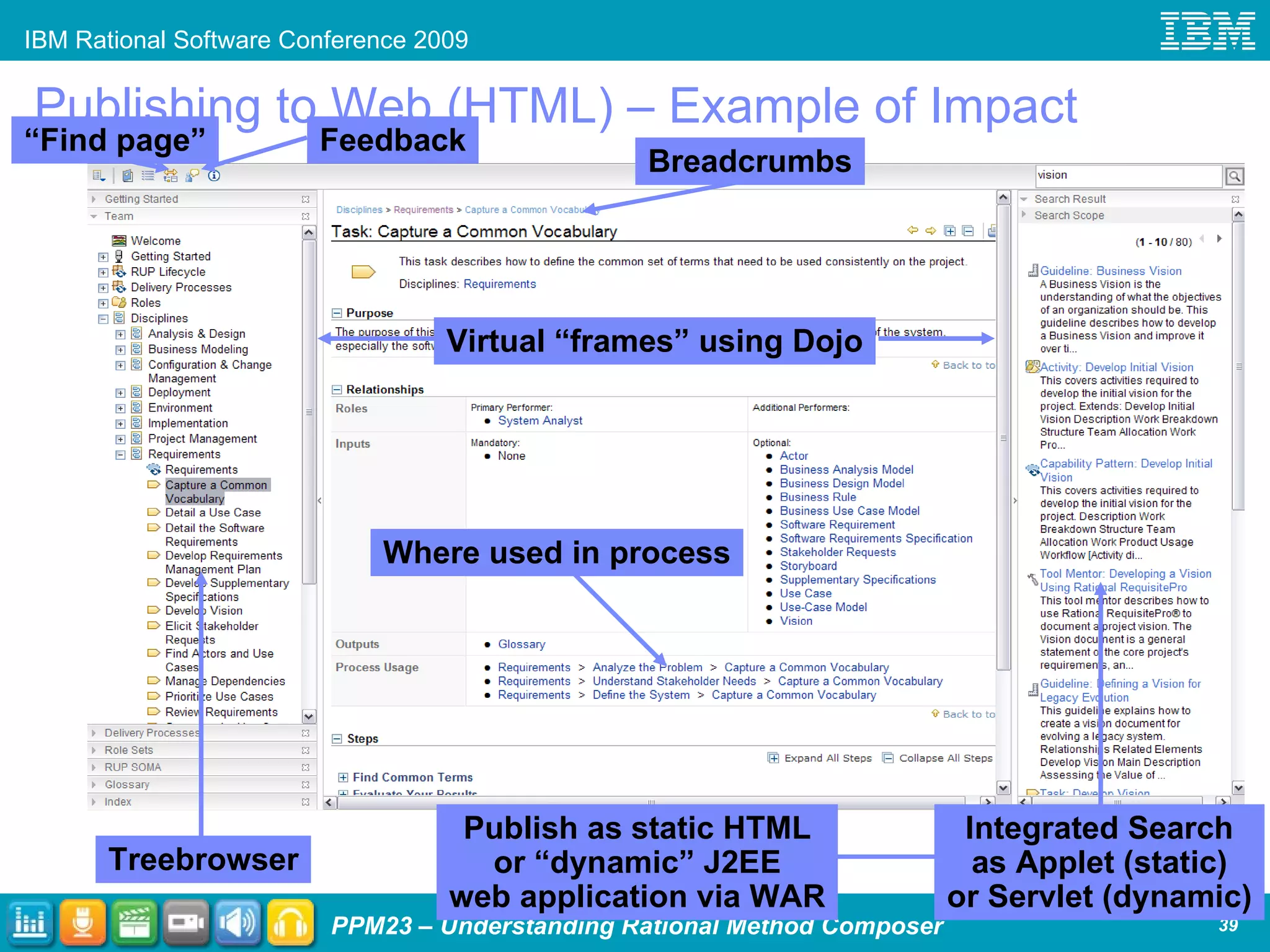
  • #8 These are challenges we find our customers having with process management, the interesting story about IBM Rational Method Composer is that IBM had similar challenges… and RMC was created to help IBM address some of its own process challenges as well!
  • #11 Introduce this slide in the context of “we used to sell RUP prior to RMC…” Very, very high-level overview of RMC to level set in case some in audience aren’t familiar with RMC. We will speak to both “Tooling” and “Methods” (content) updates in this presentation for RMC 7.5.
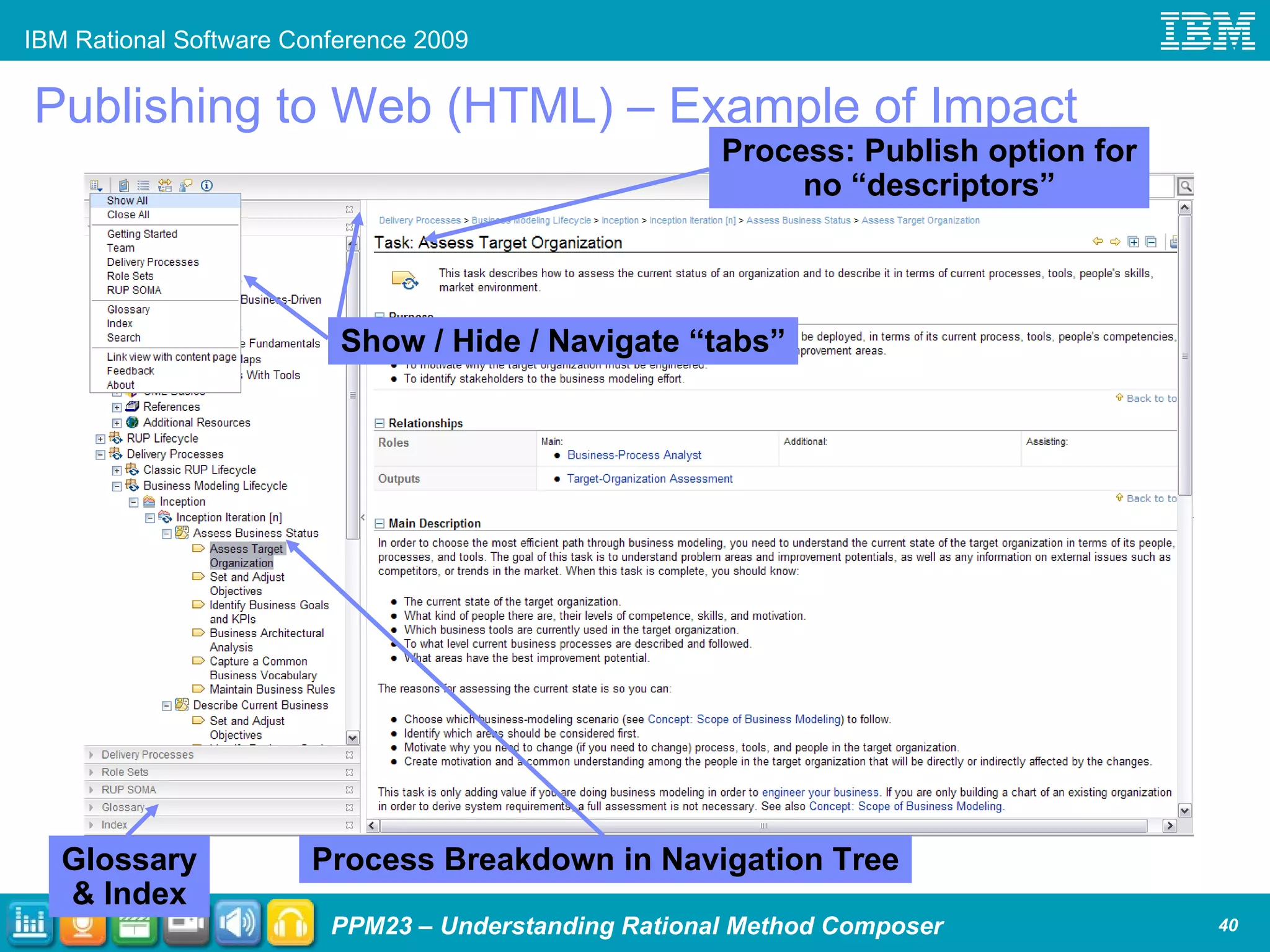
  • #13 To really help tie things together call out the practices diagram in the published web site as that diagram is reused when we have a few slides about practices.
  • #15 Don’t go into detail about 7.5 content or capabilities – relate to the audience you’ll cover that later in the presentation. Now though draw the attention to the word “practices” in the sub-title as that sets up the next few slides…
  • #16 To avoid a common failure pattern of self-inflicting too much process, and to ensure faster and more predictable results, we need to be very focused in our change effort. Practices is a key concept that helps us achieve just that: Addresses one aspect of the software lifecycle e.g., continuous integration, use-case driven development, performance testing, etc. Can be incrementally and independently adopted Can be mapped to operational objectives and development pain points Adoption can be measured, and we will look at two complementary approaches for measuring practice adoption
  • #18 MCIF provides a framework for 3-tiered performance management – with the measurement aspect provided by Rational Insight. Business Objectives provide the context for establishing Operational objectives, which help determine choices of practices/process elements. We enact the process into the Jazz platform – and into other non-Jazz tools. As we continue to evolve the Jazz platform, we will increase capabilities for specifying and automatically enacting process as well as governance elements within that process. The goal is for the tools to guide practitioners through the process steps as defined, increasing compliance, enforcing decision points and rights, and streamlining execution. Measurement is key at all three levels. Automated data collection via Insight to provide objective data so we can gauge progress and make informed decisions based on what we see.
  • #19 The Measured Capability Improvement Framework (MCIF) is a measurable approach to continuous capability improvement Captures +10 years of Rational experiences in incremental adoption Key aspects have been used in agile transformation’s of +80 IBM internal projects Process independent – used in conjunction with RUP, XP, Scrum and other processes A systematic approach for improving your business using four phases: Phase 1: Elicit and set business value objectives Reduce Time-to-Market, Improve Quality, Increase Innovation, …) Phase 2: Determine the right set of practices and tooling to drive desired business objectives Leverage assessments and out-of-the-box business objectives to practices mappings Phase 3: Accelerate and monitor the adoption of the technology Effectively deploy well-governed practices Understand what aspects of which tools to adopt to effectively adopt practices Process guidance, training courses. enablement material, etc Phase 4: Measure the business results realized Understand whether target practices are successfully adopted Understand whether desired business outcomes are achieved or not Take corrective actions
  • #21 Draw the attention to the red ovals: we invested in the last few slides to set this up… that RMC is not only directly involved, but as the level based upon “practices” the IBM Practices content in RMC which is leveraged by Self Check, able to be manually configured with RTC, etc. is key here.
  • #23 Optional IBM Rational “Questions” Breaker Slide
  • #25 To really help tie things together call out the practices diagram in the published web site as that diagram is reused when we have a few slides about practices.
  • #27 BENEFIT – verbal (so as not to be a “sales pitch”) Build your own content is nice… but it takes forever. Many company’s efforts are often de-funded before they have had an opportunity to demonstrate success. We’ve found that companies leveraging our methods enjoy several advantages including: (1) ability to hit the ground running and demonstrate immediate pilot project impact in adopting process; (2) removing the argument about “what process” – too often there are ‘sense of ownership’ issues, turn the process implementation team into advocates for implementing the process not ivory towers of process makers; (3) a wealth of knowledgeable resources, associated books/whitepapers/training materials/etc.
  • #28 The MAM is literally our method (process) on how to do process! We harvested / are harvesting how the RUP content team does process and are making it available as another method – it is currently in EARLY ALPHA. So “process isn’t what other people do”! The method engineers using RMC can now subject themselves to the same rigor they expect of others in following process… the upshot of “drinking your own kool-aid” is the marketing aspect of it, that it truly captures our best practices in how to do RMC “development”, and that (hopefully) by using it the method engineers will also have a better understanding of the level-of-process that people actually use and help them appreciate where they get the bang for the buck for time invested in process.
  • #29 The key point of this slide (emphasize!) is that our broad content is the biggest value we provide to you! No other process framework solution can provide you with the breadth and depth in process that IBM can provide. No other company can provide you with the experience that IBM has in working with customers in software and systems development, portfolio management, and IT service management. Please visit our process library website for more details: http://www-306.ibm.com/software/awdtools/rmc/library/ Open source: Open source is only a subset of RUP (5%-10%).
  • #31 Optional IBM Rational “Demo” Breaker Slide
  • #33 Optional IBM Rational “Questions” Breaker Slide
  • #36 Early in the preso we discussed how RMC: “ was designed to purposefully separate as much as possible the layers of (method) content, processes, and look-and-feel of the published result”. We’ll leverage these 5 steps and all the paradigm shifting key concepts in this demo.
  • #37 BENEFIT – verbal (so as not to be a “sales pitch”) “Change these options without impacting your underlying methods!”
  • #42 RMC 7.2 uses Dojo to stop using frames and render the new treebrowser. RMC 7.2 also leverages the “skin” Cascading Style Sheets (CSS) to allow for more end-user control over the published look and feel. At this point in time “skin” manipulation is formally unsupported, though we can provide some rough guidance as to where some things are – expect this will have more support/documentation over time. RMC Site Generator optionally provides “search” capability depending upon chosen publishing options. Static web site uses search applet, if selected. Dynamic web site, which is a WAR file that must be deployed to an app server, uses a search servlet.
  • #43 BENEFIT – verbal (so as not to be a “sales pitch”) Do the brain work to build the process once. Publish it in multiple different formats multiple different ways without minimal additional overhead!
  • #45 BENEFIT – verbal (so as not to be a “sales pitch”) Do the brain work to build the process once. Publish it in multiple different formats multiple different ways without minimal additional overhead!
  • #46 BENEFIT – verbal (so as not to be a “sales pitch”) Again, you invest much in the process. Allow the tool to maximize your realized benefit from that investment while minimizing additional overhead!
  • #47 “Just because you can do it, doesn’t mean you should go crazy doing it… but know that it can be done!”
  • #49 Early in the preso we discussed how RMC: “ was designed to purposefully separate as much as possible the layers of (method) content, processes, and look-and-feel of the published result”. We’ll leverage these 5 steps and all the paradigm shifting key concepts in this demo.
  • #50 These are the five themes called out in Peter’s powerpoint (and whitepaper) that well capture the main thrusts of our investment. In the interest of time we will only investigate Process Builder and Slots in greater detail to exemplify the impact of practices upon tooling capabilities.
  • #52 Optional IBM Rational “Demo” Breaker Slide
  • #53 Early in the preso we discussed how RMC: “ was designed to purposefully separate as much as possible the layers of (method) content, processes, and look-and-feel of the published result”. We’ll leverage these 5 steps and all the paradigm shifting key concepts in this demo.
  • #54 BENEFIT – verbal (so as not to be a “sales pitch”) Separating method content and process enables content to be defined once to be used and reused across processes to reduce the complexity (and cost!) of maintaining processes and make it easier for those exposed to the process to learn processes (what they learn from one process may be reused in another!) “You’ll shortly see the separation of methods into ‘method content’ and ‘process’ as the way the tool is organized.”
  • #55 “Content Elements are the building blocks that we typically think of as ‘process’. Note that instead content elements are like an artist’s easel from which to paint the process canvas. You’ll shortly see these elements as the way the tool is organized.”
  • #56 “ If you understand the modeling notation here, great. If not, that’s OK. The important thing to glean from this is the uni-directional (one-way) relationship between the elements. Note how Tasks ‘own’ the relationships with Role and Work product and how Role ‘owns’ the relationship with Work Products. It isn’t depicted to keep the diagram simple, but every element also ‘owns’ a relationship with Guidance.”
  • #57 &lt;Add animation to show orange text only first, then first picture with red circles, then second picture with red circles&gt;
  • #58 &lt;Add animation to show orange text only first, then first picture with red circle, then blue circle&gt;
  • #65 A configuration lets you tell the tool what set of things from the library you want to use to build a process and publish.
  • #66 BENEFIT – verbal (so as not to be a “sales pitch”) You can draw your own diagrams, but the tool can save you time (and ensure they are synched!) by generating it for you.
  • #68 An assortment of other capabilities that may be of interest. All the capabilities called out here are equally applicable to practice-based and non practice-based authoring approaches!
  • #72 Optional IBM Rational “Questions” Breaker Slide
  • #73 Mandatory IBM Rational standard closing slide to be included in all external presentations. Learn more links: IBM Rational software: www.ibm.com/software/rational Rational launch announcements: www.ibm.com/software/rational/announce/ Rational Software Delivery Platform: www.ibm.com/software/info/developer Accelerate change and delivery: www.ibm.com/software/rational/offerings/scm.html Deliver enduring quality: www.ibm.com/software/rational/offerings/testing.html Enable enterprise modernization: www.ibm.com/software/info/developer/solutions/em/index.jsp Ensure Web site security and compliance: www.ibm.com/software/rational/offerings/websecurity/ Improve project success: www.ibm.com/software/rational/offerings/lifecycle.html Manage architecture: www.ibm.com/software/rational/offerings/design.html Manage evolving requirements: www.ibm.com/software/rational/offerings/irm/ Small and midsized business: www.ibm.com/software/rational/smb/ Targeted solutions: www.ibm.com/software/info/developer/solutions/index.jsp Rational trial downloads: www.ibm.com/developerworks/rational/downloads Leading Innovation Web site: www.ibm.com/software/rational/leadership developerWorks Rational: www.ibm.com/developerworks/rational IBM Rational TV: www.ibm.com/software/info/television/index.jsp?cat=rational&amp;media=video&amp;item=en_us/rational/xml/M259765N40519Z80.xml IBM Rational Business Partners: www.ibm.com/partnerworld/pwhome.nsf/weblook/index.html IBM Rational Case Studies: www.ibm.com/software/success/cssdb.nsf/topstoriesFM?OpenForm&amp;Site=rational
  • #75 At its simplest, a practice is nothing more than a “component” / “service” of process. This “chunking” serves many purposes: architectural, customization, maintenance, better segments ownership of content, implementation / adoption clarity, etc. Practices is not just a technical thing; its something that impacts all roles: process engineers, process SMEs, project team members using process, etc. What is the history of practices? Practices is not a new concept; how Rational has engineered “practices” in RMC though contains many new thoughts on the topic. To start… Rational has been talking about (best) practices for well over a decade. “Best practices” are not unique to Rational or to software – many people talk about them. Generically, a “best practice” is a “best” way of doing something. However, since Rational is providing various industry-acceptable options they truly become just “practices” (as not all ways of doing the same thing can be “best”). There are many instances of “practices” when it comes to process among them is Ivar Jacobsen’s work a few years back.
  • #76 Practices library organization 101: the four main packages and their associated dependencies. The circle calls out the deeper dive on the next slide.
  • #79 Identify reusable assets that bring value to your business Ensure assets are easily located and are consumed effectively within IT Measure utilization and asset usage to ensure architectural integrity and compliance Govern Asset Based Development