Downloaded 164 times
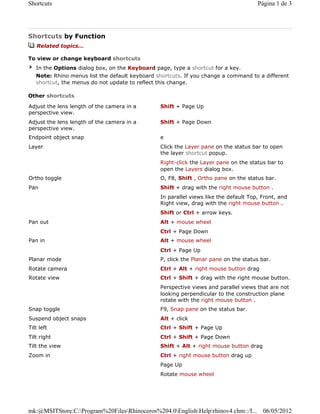


This document lists keyboard shortcuts in Rhino for navigating 3D views, adjusting the camera, and accessing commands. Shortcuts are organized by function and by key. To customize shortcuts, users can access the Keyboard page in the Options dialog box. Certain view navigation shortcuts like pan, rotate, zoom can be used with specific mouse buttons and keyboard modifiers like Shift, Ctrl, and Alt.


![ceramic-art-and-pottery [Autosaved].pptx](https://cdn.slidesharecdn.com/ss_thumbnails/ceramic-art-and-potteryautosaved-260113113456-35c55ddb-thumbnail.jpg?width=640&height=640&fit=bounds)


