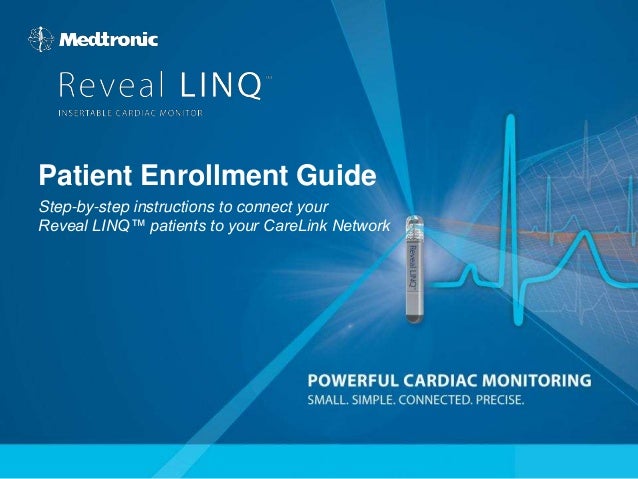
Patient Enrollment Guide
Step-by-step instructions to connect your
Reveal LINQ™ patients to your CareLink Network
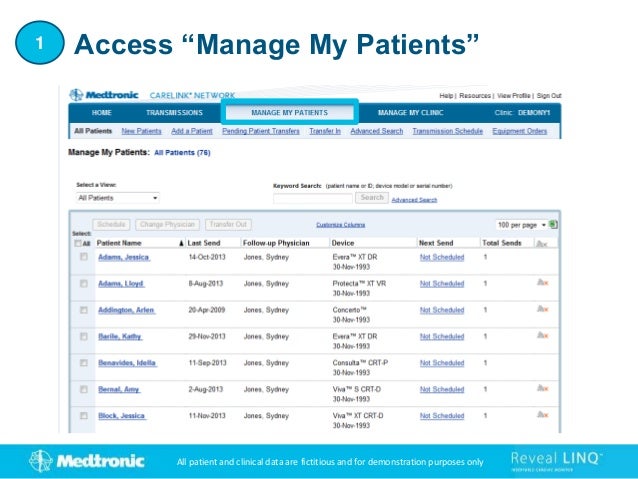
Access “Manage My Patients”
1
All patient and clinical data are fictitious and for demonstration purposes only
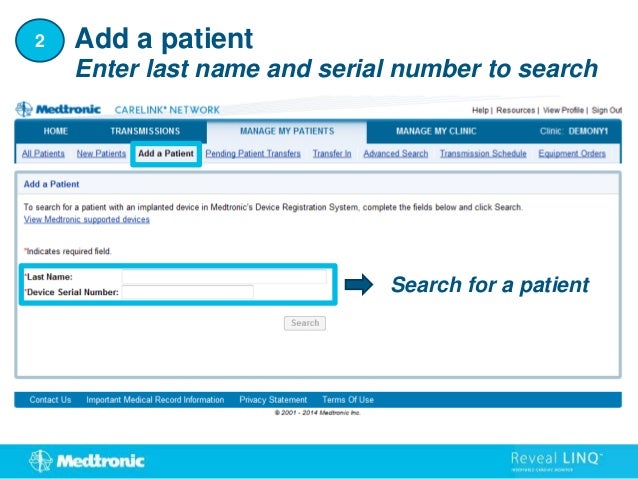
Add a patient
Search for a patient
2
Enter last name and serial number to search
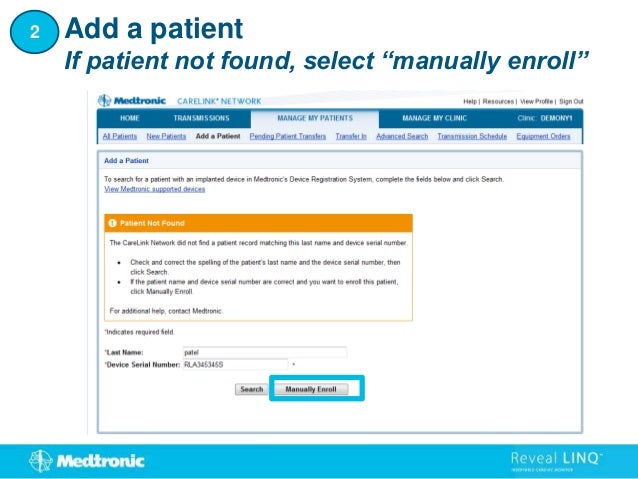
If patient not found, select “manually enroll”
Add a patient
2
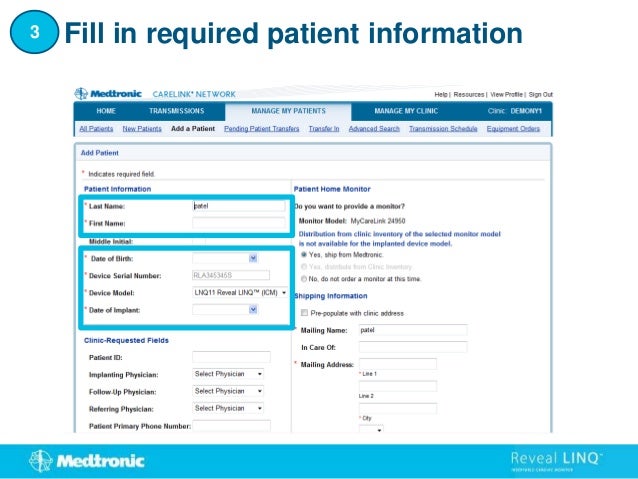
Fill in required patient information
3
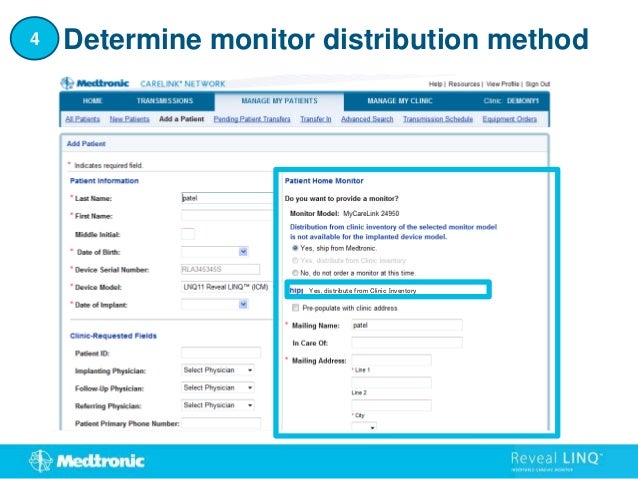
Yes, distribute from Clinic Inventory
Determine monitor distribution method
4
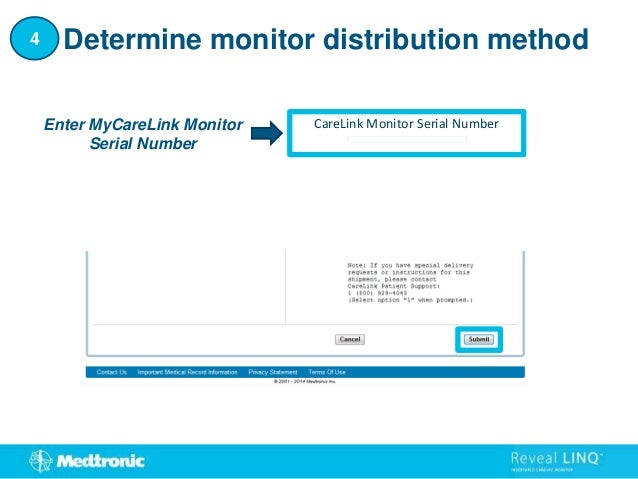
CareLink Monitor Serial Number
Enter MyCareLink Monitor
Serial Number
Determine monitor distribution method
4
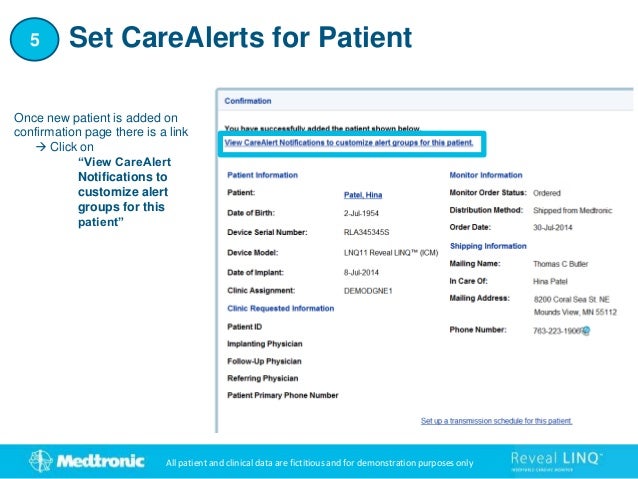
Once new patient is added on
confirmation page there is a link
 Click on
“View CareAlert
Notifications to
customize alert
groups for this
patient”
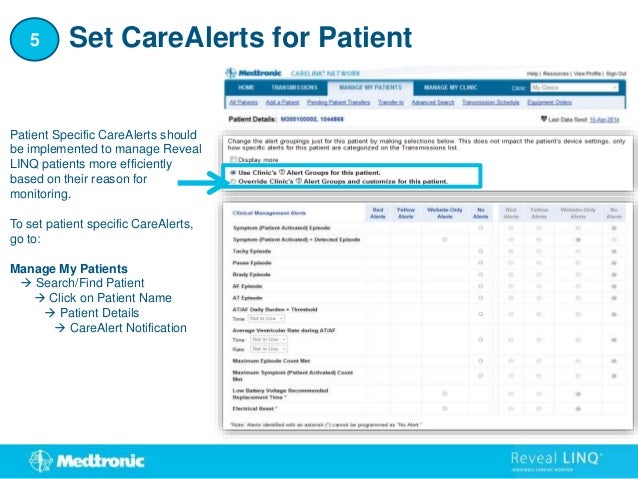
Set CareAlerts for Patient
5
All patient and clinical data are fictitious and for demonstration purposes only
Patient Specific CareAlerts should
be implemented to manage Reveal
LINQ patients more efficiently
based on their reason for
monitoring.
To set patient specific CareAlerts,
go to:
Manage My Patients
 Search/Find Patient
 Click on Patient Name
 Patient Details
 CareAlert Notification
Set CareAlerts for Patient
5
The Medtronic MyCareLink Patient Monitor and the Medtronic CareLink Network are indicated for use in the transfer of patient data
from Medtronic implantable cardiac devices. These products are not a substitute for appropriate medical attention in the event of an
emergency. Data availability and alert notifications are subject to Internet connectivity and access, and service availability. The
MyCareLink Patient Monitor must be on and in range of the device. Alert notifications are not intended to be used as the sole basis for
making decisions about patient medical care.
Intended Use
The Medtronic MyCareLink Patient Monitor and CareLink® Network are indicated for use in the transfer of patient data from some
Medtronic implantable cardiac devices based on physician instructions and as described in the product manual. The CareLink Mobile
Application is intended to provide current CareLink Network customers access to CareLink Network data via a mobile device for their
convenience. The CareLink Mobile Application is not replacing the full workstation, but can be used to review patient data when a
physician does not have access to a workstation. These products are not a substitute for appropriate medical attention in the event of an
emergency and should only be used as directed by a physician. CareLink Network availability and mobile device accessibility may be
unavailable at times due to maintenance or updates, or due to coverage being unavailable in your area. Mobile device access to the
Internet is required and subject to coverage availability. Standard text message rates apply.
Contraindications
There are no known contraindications.
Warnings and Precautions
The MyCareLink Patient Monitor must only be used for interrogating compatible Medtronic implantable devices.
See the device manual for detailed information regarding the implant procedure, indications, contraindications, warnings, precautions,
and potential complications/adverse events. For further information, please call Medtronic at 1 (800) 328-2518 and/or consult
Medtronic’s website at www.medtronic.com.
Caution: Federal law (USA) restricts this device to sale by or on the order of a physician.
Medtronic MyCareLink™ Patient Monitor, Medtronic CareLink®
Network and CareLink™ Mobile Application
Indications
REVEAL LINQ™ LNQ11 Insertable Cardiac Monitor
The Reveal LINQ Insertable Cardiac Monitor is an implantable
patient-activated and automatically-activated monitoring system
that records subcutaneous ECG and is indicated in the following
cases: patients with clinical syndromes or situations at increased
risk of cardiac arrhythmias patients who experience transient
symptoms such as dizziness, palpitation, syncope and chest pain,
that may suggest a cardiac arrhythmia.
Patient Assistant
The Patient Assistant is intended for unsupervised patient use
away from a hospital or clinic. The Patient Assistant activates one
or more of the data management features in the Reveal
Insertable Cardiac Monitor:
To initiate recording of cardiac event data in the implanted device
memory. Indicates if its battery voltage is low and if telemetry
with the implanted device was successful.
Contraindications
There are no known contraindications for the implant of the
Reveal LINQ Insertable Cardiac Monitor. However, the patient’s
particular medical condition may dictate whether or not a
subcutaneous, chronically implanted device can be tolerated.
Brief Statement: REVEAL LINQ™ LNQ11 Insertable Cardiac Monitor and Patient Assistant
Warnings/Precautions
REVEAL LINQ™ LNQ11 Insertable Cardiac Monitor
Patients with the Reveal LINQ Insertable Cardiac Monitor should avoid sources of
diathermy, high sources of radiation, electrosurgical cautery, external
defibrillation, lithotripsy, therapeutic ultrasound and radiofrequency ablation to
avoid electrical reset of the device, and/or inappropriate sensing as described in
the Medical procedure and EMI precautions manual. MRI scans should be
performed only in a specified MR environment under specified conditions as
described in the Reveal LINQ MRI Technical Manual.
Patient Assistant
Operation of the Patient Assistant near sources of electromagnetic interference,
such as cellular phones, computer monitors, etc., may adversely affect the
performance of this device.
Potential Complications
Potential complications include, but are not limited to, device rejection
phenomena (including local tissue reaction), device migration, infection, and
erosion through the skin.
See the device manual for detailed information regarding the implant procedure,
indications, contraindications, warnings, precautions, and potential
complications/adverse events. For further information, please
call Medtronic at 1 (800) 328-2518 and/or consult Medtronic’s website at
www.medtronic.com.
Caution: Federal law (USA) restricts this device to sale by or on the
order of a physician.
World Headquarters
Medtronic, Inc.
710 Medtronic Parkway
Minneapolis, MN 55432-5604
USA
Tel: (763) 514-4000
Fax: (763) 514-4879
Medtronic USA, Inc.
Toll-free: 1 (800) 328-2518
(24-hour technical support for
physicians and medical
professionals)
UC201504205
EN
Medtronic,
Inc.
2014.
All
Rights
Reserved.
01/2014
www.medtronic.com

Reveal-LINQ-Patient-Enrollment-Guide.ppt

  • 1.
    Patient Enrollment Guide Step-by-stepinstructions to connect your Reveal LINQ™ patients to your CareLink Network
  • 2.
    Access “Manage MyPatients” 1 All patient and clinical data are fictitious and for demonstration purposes only
  • 3.
    Add a patient Searchfor a patient 2 Enter last name and serial number to search
  • 4.
    If patient notfound, select “manually enroll” Add a patient 2
  • 5.
    Fill in requiredpatient information 3
  • 6.
    Yes, distribute fromClinic Inventory Determine monitor distribution method 4
  • 7.
    CareLink Monitor SerialNumber Enter MyCareLink Monitor Serial Number Determine monitor distribution method 4
  • 8.
    Once new patientis added on confirmation page there is a link  Click on “View CareAlert Notifications to customize alert groups for this patient” Set CareAlerts for Patient 5 All patient and clinical data are fictitious and for demonstration purposes only
  • 9.
    Patient Specific CareAlertsshould be implemented to manage Reveal LINQ patients more efficiently based on their reason for monitoring. To set patient specific CareAlerts, go to: Manage My Patients  Search/Find Patient  Click on Patient Name  Patient Details  CareAlert Notification Set CareAlerts for Patient 5
  • 10.
    The Medtronic MyCareLinkPatient Monitor and the Medtronic CareLink Network are indicated for use in the transfer of patient data from Medtronic implantable cardiac devices. These products are not a substitute for appropriate medical attention in the event of an emergency. Data availability and alert notifications are subject to Internet connectivity and access, and service availability. The MyCareLink Patient Monitor must be on and in range of the device. Alert notifications are not intended to be used as the sole basis for making decisions about patient medical care. Intended Use The Medtronic MyCareLink Patient Monitor and CareLink® Network are indicated for use in the transfer of patient data from some Medtronic implantable cardiac devices based on physician instructions and as described in the product manual. The CareLink Mobile Application is intended to provide current CareLink Network customers access to CareLink Network data via a mobile device for their convenience. The CareLink Mobile Application is not replacing the full workstation, but can be used to review patient data when a physician does not have access to a workstation. These products are not a substitute for appropriate medical attention in the event of an emergency and should only be used as directed by a physician. CareLink Network availability and mobile device accessibility may be unavailable at times due to maintenance or updates, or due to coverage being unavailable in your area. Mobile device access to the Internet is required and subject to coverage availability. Standard text message rates apply. Contraindications There are no known contraindications. Warnings and Precautions The MyCareLink Patient Monitor must only be used for interrogating compatible Medtronic implantable devices. See the device manual for detailed information regarding the implant procedure, indications, contraindications, warnings, precautions, and potential complications/adverse events. For further information, please call Medtronic at 1 (800) 328-2518 and/or consult Medtronic’s website at www.medtronic.com. Caution: Federal law (USA) restricts this device to sale by or on the order of a physician. Medtronic MyCareLink™ Patient Monitor, Medtronic CareLink® Network and CareLink™ Mobile Application
  • 11.
    Indications REVEAL LINQ™ LNQ11Insertable Cardiac Monitor The Reveal LINQ Insertable Cardiac Monitor is an implantable patient-activated and automatically-activated monitoring system that records subcutaneous ECG and is indicated in the following cases: patients with clinical syndromes or situations at increased risk of cardiac arrhythmias patients who experience transient symptoms such as dizziness, palpitation, syncope and chest pain, that may suggest a cardiac arrhythmia. Patient Assistant The Patient Assistant is intended for unsupervised patient use away from a hospital or clinic. The Patient Assistant activates one or more of the data management features in the Reveal Insertable Cardiac Monitor: To initiate recording of cardiac event data in the implanted device memory. Indicates if its battery voltage is low and if telemetry with the implanted device was successful. Contraindications There are no known contraindications for the implant of the Reveal LINQ Insertable Cardiac Monitor. However, the patient’s particular medical condition may dictate whether or not a subcutaneous, chronically implanted device can be tolerated. Brief Statement: REVEAL LINQ™ LNQ11 Insertable Cardiac Monitor and Patient Assistant Warnings/Precautions REVEAL LINQ™ LNQ11 Insertable Cardiac Monitor Patients with the Reveal LINQ Insertable Cardiac Monitor should avoid sources of diathermy, high sources of radiation, electrosurgical cautery, external defibrillation, lithotripsy, therapeutic ultrasound and radiofrequency ablation to avoid electrical reset of the device, and/or inappropriate sensing as described in the Medical procedure and EMI precautions manual. MRI scans should be performed only in a specified MR environment under specified conditions as described in the Reveal LINQ MRI Technical Manual. Patient Assistant Operation of the Patient Assistant near sources of electromagnetic interference, such as cellular phones, computer monitors, etc., may adversely affect the performance of this device. Potential Complications Potential complications include, but are not limited to, device rejection phenomena (including local tissue reaction), device migration, infection, and erosion through the skin. See the device manual for detailed information regarding the implant procedure, indications, contraindications, warnings, precautions, and potential complications/adverse events. For further information, please call Medtronic at 1 (800) 328-2518 and/or consult Medtronic’s website at www.medtronic.com. Caution: Federal law (USA) restricts this device to sale by or on the order of a physician. World Headquarters Medtronic, Inc. 710 Medtronic Parkway Minneapolis, MN 55432-5604 USA Tel: (763) 514-4000 Fax: (763) 514-4879 Medtronic USA, Inc. Toll-free: 1 (800) 328-2518 (24-hour technical support for physicians and medical professionals) UC201504205 EN Medtronic, Inc. 2014. All Rights Reserved. 01/2014 www.medtronic.com