Spring 3 MVC Rest  (3.0.5 기준)김용환Knight76 at gmail.comKnight76.tistory.com맛보기
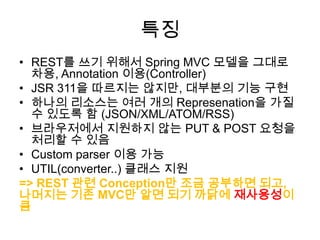
특징REST를 쓰기 위해서 Spring MVC 모델을 그대로 차용, Annotation 이용(Controller)JSR 311을 따르지는 않지만, 대부분의 기능 구현하나의 리소스는 여러 개의 Represenation을 가질 수있도록함 (JSON/XML/ATOM/RSS)브라우저에서 지원하지 않는 PUT & POST 요청을 처리할 수 있음Custom parser 이용 가능UTIL(converter..) 클래스 지원=> REST 관련 Conception만 조금 공부하면 되고, 나머지는 기존 MVC만 알면 되기 까닭에재사용성이 큼
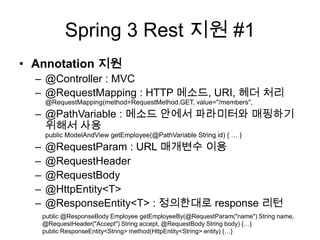
Spring 3 Rest 지원#1Annotation 지원 @Controller : MVC@RequestMapping : HTTP 메소드, URI, 헤더 처리@RequestMapping(method=RequestMethod.GET, value="/members", @PathVariable: 메소드 안에서 파라미터와매핑하기 위해서 사용public ModelAndViewgetEmployee(@PathVariable String id) { … } @RequestParam : URL 매개변수 이용@RequestHeader@RequestBody@HttpEntity<T>@ResponseEntity<T> : 정의한대로 response 리턴public @ResponseBody Employee getEmployeeBy(@RequestParam("name") String name, @RequestHeader("Accept") String accept, @RequestBody String body) {…} public ResponseEntity<String> method(HttpEntity<String> entity) {…}
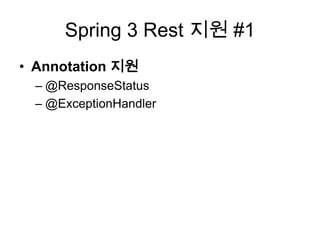
Spring 3 Rest 지원 #1Annotation 지원@ResponseStatus@ExceptionHandler
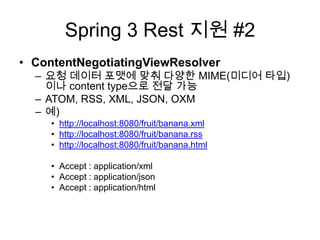
Spring 3 Rest 지원 #2ContentNegotiatingViewResolver요청 데이터 포맷에 맞춰 다양한 MIME(미디어 타입) 이나 content type으로 전달 가능ATOM, RSS, XML, JSON, OXM예)http://localhost:8080/fruit/banana.xmlhttp://localhost:8080/fruit/banana.rsshttp://localhost:8080/fruit/banana.htmlAccept : application/xmlAccept : application/jsonAccept : application/html
좋은자료http://static.springsource.org/spring/docs/3.0.x/spring-framework-reference/html/mvc.htmlhttp://dev.anyframejava.org/docs/anyframe/plugin/restweb/1.0.1/reference/html/index.htmlhttp://www.mkyong.com/spring-mvc/spring-3-mvc-contentnegotiatingviewresolver-example/http://www.ibm.com/developerworks/web/library/wa-spring3webserv/index.htmlhttp://blog.springsource.com/2010/01/25/ajax-simplifications-in-spring-3-0/
개념 살펴보기
@Controller@Controller@RequestMapping("/restful")public class RestfulController {@RequestMapping(value = "/message/{name}", method = RequestMethod.GET)	public String getMessage(@PathVariable String name, ModelMap model) {model.addAttribute("message", name);		return "list";	}…}
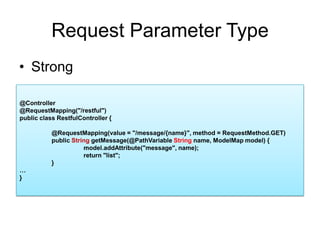
Request Parameter TypeStrong@Controller@RequestMapping("/restful")public class RestfulController {	@RequestMapping(value = "/message/{name}", method = RequestMethod.GET)	public String getMessage(@PathVariableString name, ModelMap model) {model.addAttribute("message", name);		return "list";	}…}
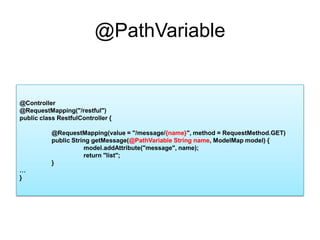
@PathVariable@Controller@RequestMapping("/restful")public class RestfulController {	@RequestMapping(value = "/message/{name}", method = RequestMethod.GET)	public String getMessage(@PathVariable String name, ModelMap model) {model.addAttribute("message", name);		return "list";	}…}
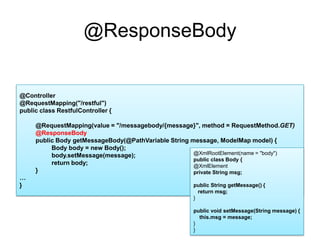
@ResponseBody@Controller@RequestMapping("/restful")public class RestfulController {@RequestMapping(value = "/messagebody/{message}", method = RequestMethod.GET)@ResponseBodypublic Body getMessageBody(@PathVariable String message, ModelMap model) {Body body = new Body();body.setMessage(message);return body;}…}@XmlRootElement(name = "body")public class Body {@XmlElementprivate String msg;public String getMessage() {   return msg;}public void setMessage(String message) {    this.msg = message;}}
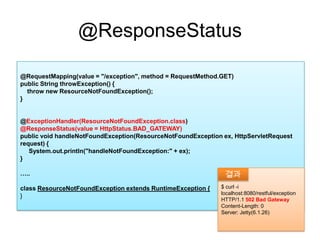
@ResponseStatus@RequestMapping(value = "/exception", method = RequestMethod.GET)public String throwException() {    throw new ResourceNotFoundException();}@ExceptionHandler(ResourceNotFoundException.class)@ResponseStatus(value = HttpStatus.BAD_GATEWAY) public void handleNotFoundException(ResourceNotFoundException ex, HttpServletRequest request) {System.out.println("handleNotFoundException:" + ex);}…..class ResourceNotFoundException extends RuntimeException { } $ curl -i  localhost:8080/restful/exceptionHTTP/1.1 502 Bad GatewayContent-Length: 0Server: Jetty(6.1.26)결과
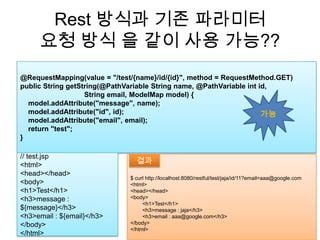
Rest 방식과 기존 파라미터요청 방식 을 같이 사용가능??@RequestMapping(value = "/test/{name}/id/{id}", method = RequestMethod.GET)public String getString(@PathVariable String name, @PathVariableint id,                                 String email, ModelMap model) {model.addAttribute("message", name);model.addAttribute("id", id);model.addAttribute("email", email);    return "test";}가능// test.jsp<html><head></head><body><h1>Test</h1><h3>message : ${message}</h3><h3>email : ${email}</h3></body></html>$ curl http://localhost:8080/restful/test/jaja/id/11?email=aaa@google.com<html><head></head><body>        <h1>Test</h1>        <h3>message : jaja</h3>        <h3>email : aaa@google.com</h3></body></html>결과
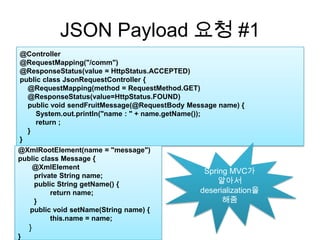
JSON Payload 요청 #1@Controller@RequestMapping("/comm")@ResponseStatus(value = HttpStatus.ACCEPTED)public class JsonRequestController {    @RequestMapping(method = RequestMethod.GET)     @ResponseStatus(value=HttpStatus.FOUND)    public void sendFruitMessage(@RequestBody Message name) {System.out.println("name : " + name.getName());        return ;    }}Spring MVC가 알아서 deserialization을 해줌@XmlRootElement(name = "message")public class Message {@XmlElementprivate String name;public String getName() {return name;}      public void setName(String name) {	this.name = name;     }}
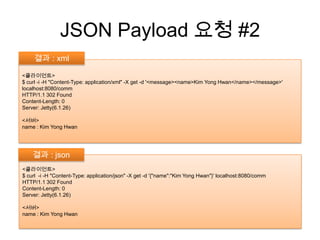
JSON Payload 요청 #2결과 : xml <클라이언트>$ curl -i -H "Content-Type: application/xml" -X get -d '<message><name>Kim Yong Hwan</name></message>' localhost:8080/commHTTP/1.1 302 FoundContent-Length: 0Server: Jetty(6.1.26)<서버>name : Kim Yong Hwan결과 : json<클라이언트>$ curl  -i -H "Content-Type: application/json" -X get -d '{"name":"Kim Yong Hwan"}' localhost:8080/commHTTP/1.1 302 FoundContent-Length: 0Server: Jetty(6.1.26)<서버>name : Kim Yong Hwan
DEMO
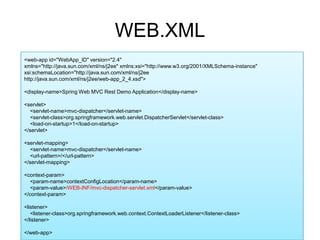
WEB.XML<web-app id="WebApp_ID" version="2.4"xmlns="http://java.sun.com/xml/ns/j2ee" xmlns:xsi="http://www.w3.org/2001/XMLSchema-instance"xsi:schemaLocation="http://java.sun.com/xml/ns/j2ee http://java.sun.com/xml/ns/j2ee/web-app_2_4.xsd"><display-name>Spring Web MVC Rest Demo Application</display-name><servlet>    <servlet-name>mvc-dispatcher</servlet-name>    <servlet-class>org.springframework.web.servlet.DispatcherServlet</servlet-class>    <load-on-startup>1</load-on-startup></servlet><servlet-mapping>    <servlet-name>mvc-dispatcher</servlet-name>    <url-pattern>/</url-pattern></servlet-mapping><context-param>    <param-name>contextConfigLocation</param-name>    <param-value>/WEB-INF/mvc-dispatcher-servlet.xml</param-value></context-param><listener>    <listener-class>org.springframework.web.context.ContextLoaderListener</listener-class></listener></web-app>
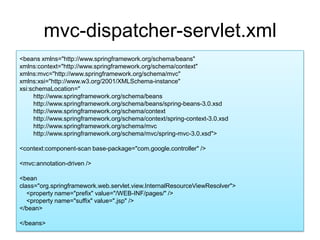
mvc-dispatcher-servlet.xml<beans xmlns="http://www.springframework.org/schema/beans"xmlns:context="http://www.springframework.org/schema/context"xmlns:mvc="http://www.springframework.org/schema/mvc" xmlns:xsi="http://www.w3.org/2001/XMLSchema-instance"xsi:schemaLocation="        http://www.springframework.org/schema/beans             http://www.springframework.org/schema/beans/spring-beans-3.0.xsd        http://www.springframework.org/schema/context         http://www.springframework.org/schema/context/spring-context-3.0.xsd        http://www.springframework.org/schema/mvc        http://www.springframework.org/schema/mvc/spring-mvc-3.0.xsd"><context:component-scan base-package="com.google.controller" /><mvc:annotation-driven /><beanclass="org.springframework.web.servlet.view.InternalResourceViewResolver">    <property name="prefix" value="/WEB-INF/pages/" />    <property name="suffix" value=".jsp" /></bean></beans>
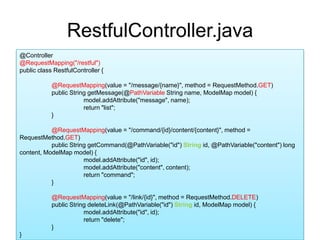
RestfulController.java@Controller@RequestMapping("/restful")public class RestfulController {@RequestMapping(value = "/message/{name}", method = RequestMethod.GET)	public String getMessage(@PathVariable String name, ModelMap model) {model.addAttribute("message", name);		return "list";	}@RequestMapping(value = "/command/{id}/content/{content}", method = RequestMethod.GET)	public String getCommand(@PathVariable("id") String id, @PathVariable("content") long content, ModelMap model) {model.addAttribute("id", id);model.addAttribute("content", content);		return "command";	}@RequestMapping(value = "/link/{id}", method = RequestMethod.DELETE)	public String deleteLink(@PathVariable("id") String id, ModelMap model) {model.addAttribute("id", id);		return "delete";	}}
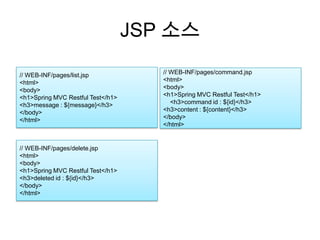
JSP 소스// WEB-INF/pages/list.jsp<html><body><h1>Spring MVC Restful Test</h1><h3>message : ${message}</h3></body></html>// WEB-INF/pages/command.jsp<html><body><h1>Spring MVC Restful Test</h1>    <h3>command id : ${id}</h3><h3>content : ${content}</h3></body></html>// WEB-INF/pages/delete.jsp<html><body><h1>Spring MVC Restful Test</h1><h3>deleted id : ${id}</h3></body></html>
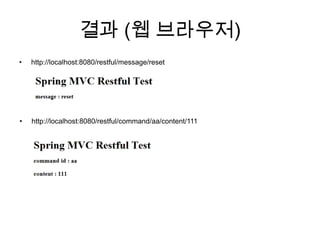
결과 (웹 브라우저)http://localhost:8080/restful/message/resethttp://localhost:8080/restful/command/aa/content/111
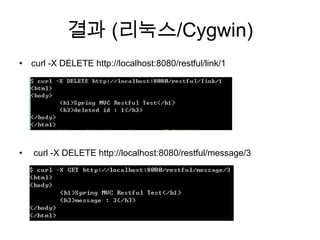
결과 (리눅스/Cygwin)curl -X DELETE http://localhost:8080/restful/link/1 curl -X DELETE http://localhost:8080/restful/message/3
Content Negotiation
Content NegotiationHTTP 1.1 스펙에서 정의의미media type, 언어, 문자집합, 인코딩 등에 대해 브라우저가 제공한 선호도에 따라 자원의 가장 적합한 표현을 선택. 불완전한 협상 정보를 보내는 브라우저의 요청을 지능적으로 처리하는 기능일반적으로 다른 프로토콜을 쓰려면, request의 “type” 파라미터를 확인하고, 이에 맞는 marshalling정보를 전달해야 한다.트위터API가 이렇게 사용되고 있음Spring MVC에서는 한번에 해결해주는 클래스 사용 ContentNegotiatingViewResolver
DEMO
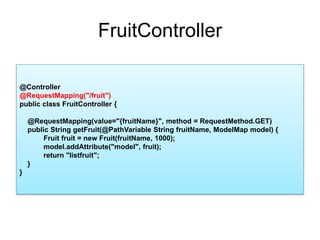
FruitController@Controller@RequestMapping("/fruit")public class FruitController{    @RequestMapping(value="{fruitName}", method = RequestMethod.GET)    public String getFruit(@PathVariable String fruitName, ModelMap model) {    Fruit fruit = new Fruit(fruitName, 1000);model.addAttribute("model", fruit);    return "listfruit";    }}
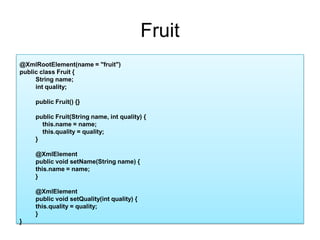
Fruit@XmlRootElement(name = "fruit")public class Fruit {String name;intquality;public Fruit() {}public Fruit(String name, int quality) {    this.name = name;this.quality = quality;}@XmlElementpublic void setName(String name) {this.name = name;}@XmlElementpublic void setQuality(int quality) {this.quality = quality;}}
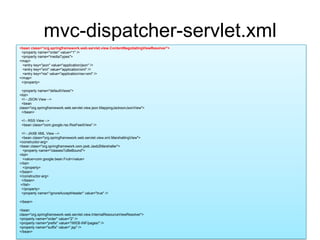
mvc-dispatcher-servlet.xml<bean class="org.springframework.web.servlet.view.ContentNegotiatingViewResolver">  <property name="order" value="1" />  <property name="mediaTypes"><map>   <entry key="json" value="application/json" />   <entry key="xml" value="application/xml" />   <entry key="rss" value="application/rss+xml" /></map>  </property>  <property name="defaultViews"><list>  <!-- JSON View -->  <beanclass="org.springframework.web.servlet.view.json.MappingJacksonJsonView">  </bean>  <!-- RSS View -->  <bean class="com.google.rss.RssFeedView" />  <!-- JAXB XML View -->  <bean class="org.springframework.web.servlet.view.xml.MarshallingView"><constructor-arg><bean class="org.springframework.oxm.jaxb.Jaxb2Marshaller">   <property name="classesToBeBound"><list>   <value>com.google.bean.Fruit</value></list>   </property></bean></constructor-arg>  </bean> </list>  </property>  <property name="ignoreAcceptHeader" value="true" /></bean><beanclass="org.springframework.web.servlet.view.InternalResourceViewResolver"><property name="order" value="2" /><property name="prefix" value="/WEB-INF/pages/" /><property name="suffix" value=".jsp" /></bean>
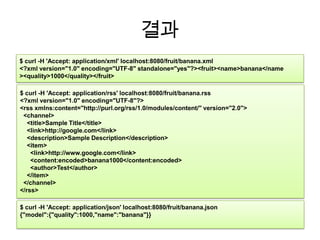
결과$ curl -H 'Accept: application/xml' localhost:8080/fruit/banana.xml<?xml version="1.0" encoding="UTF-8" standalone="yes"?><fruit><name>banana</name><quality>1000</quality></fruit>$ curl -H 'Accept: application/rss'localhost:8080/fruit/banana.rss<?xml version="1.0" encoding="UTF-8"?><rssxmlns:content="http://purl.org/rss/1.0/modules/content/" version="2.0">  <channel>    <title>Sample Title</title>    <link>http://google.com</link>    <description>Sample Description</description>    <item>      <link>http://www.google.com</link>      <content:encoded>banana1000</content:encoded>      <author>Test</author>    </item>  </channel></rss>$ curl -H 'Accept: application/json' localhost:8080/fruit/banana.json{"model":{"quality":1000,"name":"banana"}}
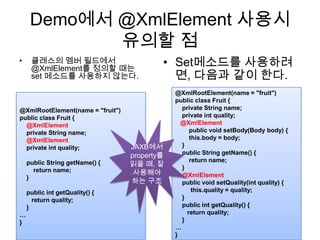
Demo에서 @XmlElement사용시 유의할 점Set메소드를 사용하려면, 다음과 같이 한다.  클래스의 멤버 필드에서 @XmlElement를 정의할 때는 set 메소드를 사용하지 않는다. @XmlRootElement(name = "fruit")public class Fruit {    private String name;    private int quality;@XmlElement        public void setBody(Body body) {this.body= body;    }    public String getName() {        return name;    }@XmlElement    public void setQuality(int quality) {this.quality= quality;    }    public intgetQuality() {       return quality;    }…}@XmlRootElement(name = "fruit")public class Fruit {@XmlElement    private String name;@XmlElement    private int quality;    public String getName() {        return name;    }    public intgetQuality() {       return quality;    }…}JAXB에서 property를 읽을 때, 잘 사용해야 하는 구조
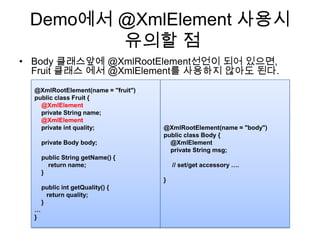
Demo에서 @XmlElement사용시유의할 점Body 클래스앞에@XmlRootElement선언이 되어 있으면, Fruit 클래스 에서 @XmlElement를 사용하지 않아도 된다.@XmlRootElement(name = "body")public class Body {    @XmlElement    private String msg;     // set/get accessory ….}@XmlRootElement(name = "fruit")public class Fruit {@XmlElement    private String name;@XmlElement    private int quality;    private Body body;    public String getName() {        return name;    }    public intgetQuality() {       return quality;    }…}
웹 브라우져에서의PUT/DELETE의 제약
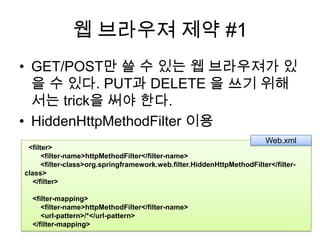
웹 브라우져 제약 #1GET/POST만 쓸 수 있는 웹 브라우져가 있을 수 있다. PUT과 DELETE 을 쓰기 위해서는 trick을 써야 한다.HiddenHttpMethodFilter이용Web.xml  <filter>        <filter-name>httpMethodFilter</filter-name>        <filter-class>org.springframework.web.filter.HiddenHttpMethodFilter</filter-class>    </filter>        <filter-mapping>        <filter-name>httpMethodFilter</filter-name>        <url-pattern>/*</url-pattern>    </filter-mapping>
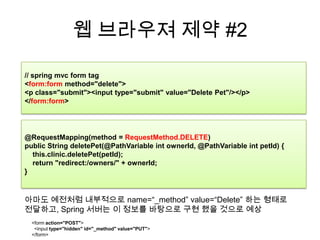
웹 브라우져 제약 #2// spring mvc form tag<form:form method="delete"> <p class="submit"><input type="submit" value="Delete Pet"/></p> </form:form>@RequestMapping(method = RequestMethod.DELETE)public String deletePet(@PathVariableintownerId, @PathVariableintpetId) {this.clinic.deletePet(petId);    return "redirect:/owners/" + ownerId;}아마도 예전처럼 내부적으로 name=“_method” value=“Delete” 하는 형태로 전달하고, Spring 서버는 이 정보를 바탕으로 구현 했을 것으로 예상<form action="POST">  <input type="hidden" id="_method" value="PUT"></form>
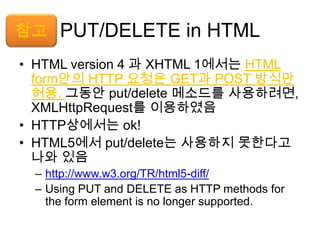
PUT/DELETE in HTMLHTML version 4 과 XHTML 1에서는 HTML  form안의 HTTP 요청은 GET과 POST 방식만 허용. 그동안put/delete 메소드를 사용하려면, XMLHttpRequest를 이용하였음HTTP상에서는 ok!HTML5에서 put/delete는 사용하지 못한다고 나와 있음http://www.w3.org/TR/html5-diff/Using PUT and DELETE as HTTP methods for the form element is no longer supported.참고
클라이언트 API : RestTemplate
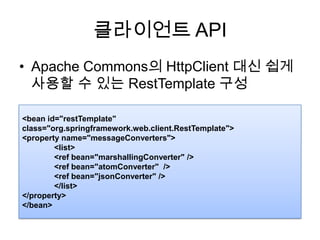
클라이언트 APIApache Commons의 HttpClient대신 쉽게 사용할 수 있는 RestTemplate구성<bean id="restTemplate" class="org.springframework.web.client.RestTemplate"><property name="messageConverters">	<list>	<ref bean="marshallingConverter" />	<ref bean="atomConverter"  />	<ref bean="jsonConverter" />	</list></property></bean>
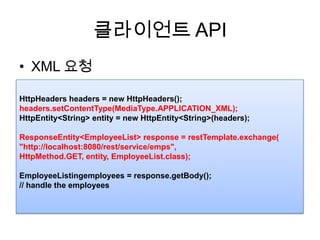
클라이언트 APIXML 요청HttpHeaders headers = new HttpHeaders();headers.setContentType(MediaType.APPLICATION_XML);HttpEntity<String> entity = new HttpEntity<String>(headers);ResponseEntity<EmployeeList> response = restTemplate.exchange("http://localhost:8080/rest/service/emps", HttpMethod.GET, entity, EmployeeList.class);EmployeeListingemployees = response.getBody();// handle the employees
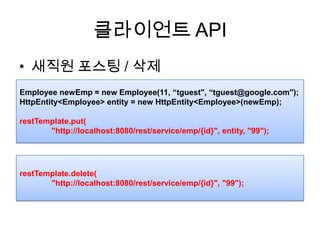
클라이언트 API새직원포스팅/ 삭제Employee newEmp = new Employee(11, “tguest", “tguest@google.com");HttpEntity<Employee> entity = new HttpEntity<Employee>(newEmp);restTemplate.put(	"http://localhost:8080/rest/service/emp/{id}", entity, "99");restTemplate.delete(	"http://localhost:8080/rest/service/emp/{id}", "99");
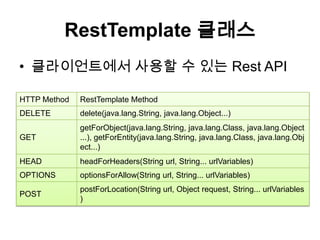
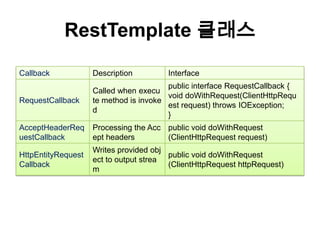
RestTemplate클래스클라이언트에서 사용할 수 있는 Rest API
RestTemplate클래스
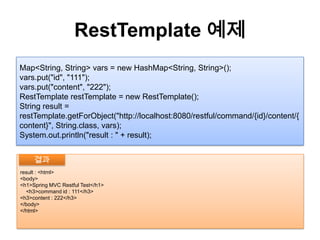
RestTemplate예제Map<String, String> vars = new HashMap<String, String>();vars.put("id", "111");vars.put("content", "222");RestTemplaterestTemplate = new RestTemplate();String result = restTemplate.getForObject("http://localhost:8080/restful/command/{id}/content/{content}", String.class, vars);System.out.println("result : " + result);result : <html><body><h1>Spring MVC Restful Test</h1>    <h3>command id : 111</h3><h3>content : 222</h3></body></html>결과
ExampleCodeKnight76.tistory.com에서 ‘spring mvc restful’ 검색
End of Document

Spring MVC 3 Restful

  • 1.
    Spring 3 MVCRest (3.0.5 기준)김용환Knight76 at gmail.comKnight76.tistory.com맛보기
  • 2.
    특징REST를 쓰기 위해서Spring MVC 모델을 그대로 차용, Annotation 이용(Controller)JSR 311을 따르지는 않지만, 대부분의 기능 구현하나의 리소스는 여러 개의 Represenation을 가질 수있도록함 (JSON/XML/ATOM/RSS)브라우저에서 지원하지 않는 PUT & POST 요청을 처리할 수 있음Custom parser 이용 가능UTIL(converter..) 클래스 지원=> REST 관련 Conception만 조금 공부하면 되고, 나머지는 기존 MVC만 알면 되기 까닭에재사용성이 큼
  • 3.
    Spring 3 Rest지원#1Annotation 지원 @Controller : MVC@RequestMapping : HTTP 메소드, URI, 헤더 처리@RequestMapping(method=RequestMethod.GET, value="/members", @PathVariable: 메소드 안에서 파라미터와매핑하기 위해서 사용public ModelAndViewgetEmployee(@PathVariable String id) { … } @RequestParam : URL 매개변수 이용@RequestHeader@RequestBody@HttpEntity<T>@ResponseEntity<T> : 정의한대로 response 리턴public @ResponseBody Employee getEmployeeBy(@RequestParam("name") String name, @RequestHeader("Accept") String accept, @RequestBody String body) {…} public ResponseEntity<String> method(HttpEntity<String> entity) {…}
  • 4.
    Spring 3 Rest지원 #1Annotation 지원@ResponseStatus@ExceptionHandler
  • 5.
    Spring 3 Rest지원 #2ContentNegotiatingViewResolver요청 데이터 포맷에 맞춰 다양한 MIME(미디어 타입) 이나 content type으로 전달 가능ATOM, RSS, XML, JSON, OXM예)http://localhost:8080/fruit/banana.xmlhttp://localhost:8080/fruit/banana.rsshttp://localhost:8080/fruit/banana.htmlAccept : application/xmlAccept : application/jsonAccept : application/html
  • 6.
  • 7.
  • 8.
    @Controller@Controller@RequestMapping("/restful")public class RestfulController{@RequestMapping(value = "/message/{name}", method = RequestMethod.GET) public String getMessage(@PathVariable String name, ModelMap model) {model.addAttribute("message", name); return "list"; }…}
  • 9.
    Request Parameter TypeStrong@Controller@RequestMapping("/restful")publicclass RestfulController { @RequestMapping(value = "/message/{name}", method = RequestMethod.GET) public String getMessage(@PathVariableString name, ModelMap model) {model.addAttribute("message", name); return "list"; }…}
  • 10.
    @PathVariable@Controller@RequestMapping("/restful")public class RestfulController{ @RequestMapping(value = "/message/{name}", method = RequestMethod.GET) public String getMessage(@PathVariable String name, ModelMap model) {model.addAttribute("message", name); return "list"; }…}
  • 11.
    @ResponseBody@Controller@RequestMapping("/restful")public class RestfulController{@RequestMapping(value = "/messagebody/{message}", method = RequestMethod.GET)@ResponseBodypublic Body getMessageBody(@PathVariable String message, ModelMap model) {Body body = new Body();body.setMessage(message);return body;}…}@XmlRootElement(name = "body")public class Body {@XmlElementprivate String msg;public String getMessage() { return msg;}public void setMessage(String message) { this.msg = message;}}
  • 12.
    @ResponseStatus@RequestMapping(value = "/exception",method = RequestMethod.GET)public String throwException() { throw new ResourceNotFoundException();}@ExceptionHandler(ResourceNotFoundException.class)@ResponseStatus(value = HttpStatus.BAD_GATEWAY) public void handleNotFoundException(ResourceNotFoundException ex, HttpServletRequest request) {System.out.println("handleNotFoundException:" + ex);}…..class ResourceNotFoundException extends RuntimeException { } $ curl -i localhost:8080/restful/exceptionHTTP/1.1 502 Bad GatewayContent-Length: 0Server: Jetty(6.1.26)결과
  • 13.
    Rest 방식과 기존파라미터요청 방식 을 같이 사용가능??@RequestMapping(value = "/test/{name}/id/{id}", method = RequestMethod.GET)public String getString(@PathVariable String name, @PathVariableint id, String email, ModelMap model) {model.addAttribute("message", name);model.addAttribute("id", id);model.addAttribute("email", email); return "test";}가능// test.jsp<html><head></head><body><h1>Test</h1><h3>message : ${message}</h3><h3>email : ${email}</h3></body></html>$ curl http://localhost:8080/restful/test/jaja/id/11?email=aaa@google.com<html><head></head><body> <h1>Test</h1> <h3>message : jaja</h3> <h3>email : aaa@google.com</h3></body></html>결과
  • 14.
    JSON Payload 요청#1@Controller@RequestMapping("/comm")@ResponseStatus(value = HttpStatus.ACCEPTED)public class JsonRequestController { @RequestMapping(method = RequestMethod.GET) @ResponseStatus(value=HttpStatus.FOUND) public void sendFruitMessage(@RequestBody Message name) {System.out.println("name : " + name.getName()); return ; }}Spring MVC가 알아서 deserialization을 해줌@XmlRootElement(name = "message")public class Message {@XmlElementprivate String name;public String getName() {return name;} public void setName(String name) { this.name = name; }}
  • 15.
    JSON Payload 요청#2결과 : xml <클라이언트>$ curl -i -H "Content-Type: application/xml" -X get -d '<message><name>Kim Yong Hwan</name></message>' localhost:8080/commHTTP/1.1 302 FoundContent-Length: 0Server: Jetty(6.1.26)<서버>name : Kim Yong Hwan결과 : json<클라이언트>$ curl -i -H "Content-Type: application/json" -X get -d '{"name":"Kim Yong Hwan"}' localhost:8080/commHTTP/1.1 302 FoundContent-Length: 0Server: Jetty(6.1.26)<서버>name : Kim Yong Hwan
  • 16.
  • 17.
    WEB.XML<web-app id="WebApp_ID" version="2.4"xmlns="http://java.sun.com/xml/ns/j2ee"xmlns:xsi="http://www.w3.org/2001/XMLSchema-instance"xsi:schemaLocation="http://java.sun.com/xml/ns/j2ee http://java.sun.com/xml/ns/j2ee/web-app_2_4.xsd"><display-name>Spring Web MVC Rest Demo Application</display-name><servlet> <servlet-name>mvc-dispatcher</servlet-name> <servlet-class>org.springframework.web.servlet.DispatcherServlet</servlet-class> <load-on-startup>1</load-on-startup></servlet><servlet-mapping> <servlet-name>mvc-dispatcher</servlet-name> <url-pattern>/</url-pattern></servlet-mapping><context-param> <param-name>contextConfigLocation</param-name> <param-value>/WEB-INF/mvc-dispatcher-servlet.xml</param-value></context-param><listener> <listener-class>org.springframework.web.context.ContextLoaderListener</listener-class></listener></web-app>
  • 18.
    mvc-dispatcher-servlet.xml<beans xmlns="http://www.springframework.org/schema/beans"xmlns:context="http://www.springframework.org/schema/context"xmlns:mvc="http://www.springframework.org/schema/mvc" xmlns:xsi="http://www.w3.org/2001/XMLSchema-instance"xsi:schemaLocation=" http://www.springframework.org/schema/beans http://www.springframework.org/schema/beans/spring-beans-3.0.xsd http://www.springframework.org/schema/context http://www.springframework.org/schema/context/spring-context-3.0.xsd http://www.springframework.org/schema/mvc http://www.springframework.org/schema/mvc/spring-mvc-3.0.xsd"><context:component-scan base-package="com.google.controller" /><mvc:annotation-driven /><beanclass="org.springframework.web.servlet.view.InternalResourceViewResolver"> <property name="prefix" value="/WEB-INF/pages/" /> <property name="suffix" value=".jsp" /></bean></beans>
  • 19.
    RestfulController.java@Controller@RequestMapping("/restful")public class RestfulController{@RequestMapping(value = "/message/{name}", method = RequestMethod.GET) public String getMessage(@PathVariable String name, ModelMap model) {model.addAttribute("message", name); return "list"; }@RequestMapping(value = "/command/{id}/content/{content}", method = RequestMethod.GET) public String getCommand(@PathVariable("id") String id, @PathVariable("content") long content, ModelMap model) {model.addAttribute("id", id);model.addAttribute("content", content); return "command"; }@RequestMapping(value = "/link/{id}", method = RequestMethod.DELETE) public String deleteLink(@PathVariable("id") String id, ModelMap model) {model.addAttribute("id", id); return "delete"; }}
  • 20.
    JSP 소스// WEB-INF/pages/list.jsp<html><body><h1>SpringMVC Restful Test</h1><h3>message : ${message}</h3></body></html>// WEB-INF/pages/command.jsp<html><body><h1>Spring MVC Restful Test</h1> <h3>command id : ${id}</h3><h3>content : ${content}</h3></body></html>// WEB-INF/pages/delete.jsp<html><body><h1>Spring MVC Restful Test</h1><h3>deleted id : ${id}</h3></body></html>
  • 21.
  • 22.
    결과 (리눅스/Cygwin)curl -XDELETE http://localhost:8080/restful/link/1 curl -X DELETE http://localhost:8080/restful/message/3
  • 23.
  • 24.
    Content NegotiationHTTP 1.1스펙에서 정의의미media type, 언어, 문자집합, 인코딩 등에 대해 브라우저가 제공한 선호도에 따라 자원의 가장 적합한 표현을 선택. 불완전한 협상 정보를 보내는 브라우저의 요청을 지능적으로 처리하는 기능일반적으로 다른 프로토콜을 쓰려면, request의 “type” 파라미터를 확인하고, 이에 맞는 marshalling정보를 전달해야 한다.트위터API가 이렇게 사용되고 있음Spring MVC에서는 한번에 해결해주는 클래스 사용 ContentNegotiatingViewResolver
  • 25.
  • 26.
    FruitController@Controller@RequestMapping("/fruit")public class FruitController{ @RequestMapping(value="{fruitName}", method = RequestMethod.GET) public String getFruit(@PathVariable String fruitName, ModelMap model) { Fruit fruit = new Fruit(fruitName, 1000);model.addAttribute("model", fruit); return "listfruit"; }}
  • 27.
    Fruit@XmlRootElement(name = "fruit")publicclass Fruit {String name;intquality;public Fruit() {}public Fruit(String name, int quality) { this.name = name;this.quality = quality;}@XmlElementpublic void setName(String name) {this.name = name;}@XmlElementpublic void setQuality(int quality) {this.quality = quality;}}
  • 28.
    mvc-dispatcher-servlet.xml<bean class="org.springframework.web.servlet.view.ContentNegotiatingViewResolver"> <property name="order" value="1" /> <property name="mediaTypes"><map> <entry key="json" value="application/json" /> <entry key="xml" value="application/xml" /> <entry key="rss" value="application/rss+xml" /></map> </property> <property name="defaultViews"><list> <!-- JSON View --> <beanclass="org.springframework.web.servlet.view.json.MappingJacksonJsonView"> </bean> <!-- RSS View --> <bean class="com.google.rss.RssFeedView" /> <!-- JAXB XML View --> <bean class="org.springframework.web.servlet.view.xml.MarshallingView"><constructor-arg><bean class="org.springframework.oxm.jaxb.Jaxb2Marshaller"> <property name="classesToBeBound"><list> <value>com.google.bean.Fruit</value></list> </property></bean></constructor-arg> </bean> </list> </property> <property name="ignoreAcceptHeader" value="true" /></bean><beanclass="org.springframework.web.servlet.view.InternalResourceViewResolver"><property name="order" value="2" /><property name="prefix" value="/WEB-INF/pages/" /><property name="suffix" value=".jsp" /></bean>
  • 29.
    결과$ curl -H'Accept: application/xml' localhost:8080/fruit/banana.xml<?xml version="1.0" encoding="UTF-8" standalone="yes"?><fruit><name>banana</name><quality>1000</quality></fruit>$ curl -H 'Accept: application/rss'localhost:8080/fruit/banana.rss<?xml version="1.0" encoding="UTF-8"?><rssxmlns:content="http://purl.org/rss/1.0/modules/content/" version="2.0"> <channel> <title>Sample Title</title> <link>http://google.com</link> <description>Sample Description</description> <item> <link>http://www.google.com</link> <content:encoded>banana1000</content:encoded> <author>Test</author> </item> </channel></rss>$ curl -H 'Accept: application/json' localhost:8080/fruit/banana.json{"model":{"quality":1000,"name":"banana"}}
  • 30.
    Demo에서 @XmlElement사용시 유의할점Set메소드를 사용하려면, 다음과 같이 한다. 클래스의 멤버 필드에서 @XmlElement를 정의할 때는 set 메소드를 사용하지 않는다. @XmlRootElement(name = "fruit")public class Fruit { private String name; private int quality;@XmlElement public void setBody(Body body) {this.body= body; } public String getName() { return name; }@XmlElement public void setQuality(int quality) {this.quality= quality; } public intgetQuality() { return quality; }…}@XmlRootElement(name = "fruit")public class Fruit {@XmlElement private String name;@XmlElement private int quality; public String getName() { return name; } public intgetQuality() { return quality; }…}JAXB에서 property를 읽을 때, 잘 사용해야 하는 구조
  • 31.
    Demo에서 @XmlElement사용시유의할 점Body클래스앞에@XmlRootElement선언이 되어 있으면, Fruit 클래스 에서 @XmlElement를 사용하지 않아도 된다.@XmlRootElement(name = "body")public class Body { @XmlElement private String msg; // set/get accessory ….}@XmlRootElement(name = "fruit")public class Fruit {@XmlElement private String name;@XmlElement private int quality; private Body body; public String getName() { return name; } public intgetQuality() { return quality; }…}
  • 32.
  • 33.
    웹 브라우져 제약#1GET/POST만 쓸 수 있는 웹 브라우져가 있을 수 있다. PUT과 DELETE 을 쓰기 위해서는 trick을 써야 한다.HiddenHttpMethodFilter이용Web.xml  <filter>        <filter-name>httpMethodFilter</filter-name>        <filter-class>org.springframework.web.filter.HiddenHttpMethodFilter</filter-class>    </filter>        <filter-mapping>        <filter-name>httpMethodFilter</filter-name>        <url-pattern>/*</url-pattern>    </filter-mapping>
  • 34.
    웹 브라우져 제약#2// spring mvc form tag<form:form method="delete"> <p class="submit"><input type="submit" value="Delete Pet"/></p> </form:form>@RequestMapping(method = RequestMethod.DELETE)public String deletePet(@PathVariableintownerId, @PathVariableintpetId) {this.clinic.deletePet(petId); return "redirect:/owners/" + ownerId;}아마도 예전처럼 내부적으로 name=“_method” value=“Delete” 하는 형태로 전달하고, Spring 서버는 이 정보를 바탕으로 구현 했을 것으로 예상<form action="POST">  <input type="hidden" id="_method" value="PUT"></form>
  • 35.
    PUT/DELETE in HTMLHTMLversion 4 과 XHTML 1에서는 HTML form안의 HTTP 요청은 GET과 POST 방식만 허용. 그동안put/delete 메소드를 사용하려면, XMLHttpRequest를 이용하였음HTTP상에서는 ok!HTML5에서 put/delete는 사용하지 못한다고 나와 있음http://www.w3.org/TR/html5-diff/Using PUT and DELETE as HTTP methods for the form element is no longer supported.참고
  • 36.
  • 37.
    클라이언트 APIApache Commons의HttpClient대신 쉽게 사용할 수 있는 RestTemplate구성<bean id="restTemplate" class="org.springframework.web.client.RestTemplate"><property name="messageConverters"> <list> <ref bean="marshallingConverter" /> <ref bean="atomConverter" /> <ref bean="jsonConverter" /> </list></property></bean>
  • 38.
    클라이언트 APIXML 요청HttpHeadersheaders = new HttpHeaders();headers.setContentType(MediaType.APPLICATION_XML);HttpEntity<String> entity = new HttpEntity<String>(headers);ResponseEntity<EmployeeList> response = restTemplate.exchange("http://localhost:8080/rest/service/emps", HttpMethod.GET, entity, EmployeeList.class);EmployeeListingemployees = response.getBody();// handle the employees
  • 39.
    클라이언트 API새직원포스팅/ 삭제EmployeenewEmp = new Employee(11, “tguest", “tguest@google.com");HttpEntity<Employee> entity = new HttpEntity<Employee>(newEmp);restTemplate.put( "http://localhost:8080/rest/service/emp/{id}", entity, "99");restTemplate.delete( "http://localhost:8080/rest/service/emp/{id}", "99");
  • 40.
  • 41.
  • 42.
    RestTemplate예제Map<String, String> vars= new HashMap<String, String>();vars.put("id", "111");vars.put("content", "222");RestTemplaterestTemplate = new RestTemplate();String result = restTemplate.getForObject("http://localhost:8080/restful/command/{id}/content/{content}", String.class, vars);System.out.println("result : " + result);result : <html><body><h1>Spring MVC Restful Test</h1> <h3>command id : 111</h3><h3>content : 222</h3></body></html>결과
  • 43.
  • 44.