Reliable, Fast, Engaging Offline-First
Architecture for JavaScript Applications
Andrejus Baranovskis, CEO andTechnical Expert, Red Samurai Consulting
Oracle ACE Director and Oracle Groundbreaker Ambassador
Florin Marcus,Technical Expert, Red Samurai Consulting
Oracle ExpertsTeam
ADF, JET, ORACLE FUSION, ORACLE CLOUD, MACHINE LEARNING
Oracle PaaS Partner Community Award for Outstanding Java Cloud
Service Contribution 2017
AGENDA
• Offline-First Architecture Why and How
• Technical Implementation
• Solution WalkThrough
• Offline PersistenceToolkit Config for JavaScript (Oracle JET)
OFFLINE-FIRST ARCHITECTURE
WHY AND HOW
No Wi-Fi?
No Problem
Build web/mobile applications that can work great,
whatever the connection
TECHNICAL IMPLEMENTATION
Oracle JET
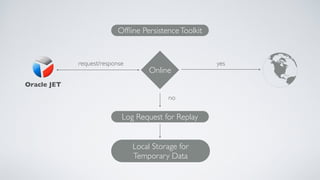
Offline PersistenceToolkit
Online
Log Request for Replay
Local Storage for
Temporary Data
request/response yes
no
KEY POINTS
• Business logic code stays the same, simple for developers, no code
intrusion with offline toolkit API
• API is very rich, many options to override and control
• Configurable and flexible, e.g. store factory can be changed
• API is heavily based on JS Promise - represents the eventual completion
(or failure) of an asynchronous operation, and its resulting value
KEY POINTS
• Offline:
• Request is logged and inserted into replay queue automatically
• If user is changing data, developer must implement request update logic - in custom
handlePatch or handlePost methods
• Online:
• Possible to define before and after synch listeners.This helps to control request data
• Can control request synchronisation queue execution
SOLUTION WALKTHROUGH
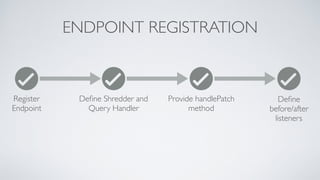
ENDPOINT REGISTRATION
Register
Endpoint
Define Shredder and
Query Handler
Provide handlePatch
method
Define
before/after
listeners
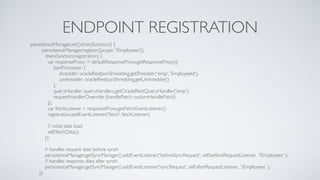
ENDPOINT REGISTRATION
persistenceManager.init().then(function() {
persistenceManager.register({scope: '/Employees'})
.then(function(registration) {
var responseProxy = defaultResponseProxy.getResponseProxy({
jsonProcessor: {
shredder: oracleRestJsonShredding.getShredder('emp', 'EmployeeId'),
unshredder: oracleRestJsonShredding.getUnshredder()
},
queryHandler: queryHandlers.getOracleRestQueryHandler('emp'),
requestHandlerOverride: {handlePatch: customHandlePatch}
});
var fetchListener = responseProxy.getFetchEventListener();
registration.addEventListener('fetch', fetchListener);
// initial data load
self.fetchData();
});
// handles request data before synch
persistenceManager.getSyncManager().addEventListener('beforeSyncRequest', self.beforeRequestListener, '/Employees' );
// handles response data after synch
persistenceManager.getSyncManager().addEventListener('syncRequest', self.afterRequestListener, '/Employees' );
});
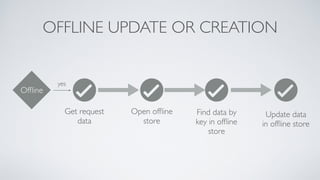
OFFLINE UPDATE OR CREATION
Offline
yes
Get request
data
Open offline
store
Find data by
key in offline
store
Update data
in offline store
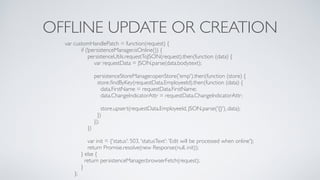
OFFLINE UPDATE OR CREATION
var customHandlePatch = function(request) {
if (!persistenceManager.isOnline()) {
persistenceUtils.requestToJSON(request).then(function (data) {
var requestData = JSON.parse(data.body.text);
persistenceStoreManager.openStore('emp').then(function (store) {
store.findByKey(requestData.EmployeeId).then(function (data) {
data.FirstName = requestData.FirstName;
data.ChangeIndicatorAttr = requestData.ChangeIndicatorAttr;
store.upsert(requestData.EmployeeId, JSON.parse('{}'), data);
})
});
})
var init = {'status': 503, 'statusText': 'Edit will be processed when online'};
return Promise.resolve(new Response(null, init));
} else {
return persistenceManager.browserFetch(request);
}
};
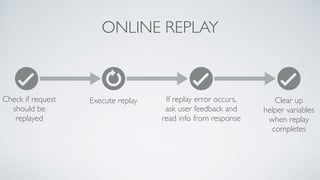
ONLINE REPLAY
Check if request
should be
replayed
Execute replay If replay error occurs,
ask user feedback and
read info from response
Clear up
helper variables
when replay
completes
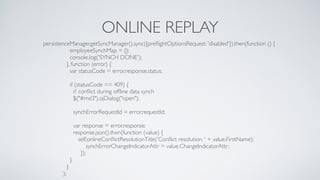
ONLINE REPLAY
persistenceManager.getSyncManager().sync({preflightOptionsRequest: 'disabled'}).then(function () {
employeeSynchMap = {};
console.log('SYNCH DONE');
}, function (error) {
var statusCode = error.response.status;
if (statusCode == 409) {
// conflict during offline data synch
$("#md3").ojDialog("open");
synchErrorRequestId = error.requestId;
var response = error.response;
response.json().then(function (value) {
self.onlineConflictResolutionTitle('Conflict resolution: ' + value.FirstName);
synchErrorChangeIndicatorAttr = value.ChangeIndicatorAttr;
});
}
}
);
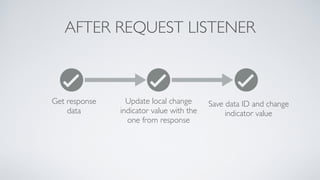
AFTER REQUEST LISTENER
Get response
data
Update local change
indicator value with the
one from response
Save data ID and change
indicator value
AFTER REQUEST LISTENER
self.afterRequestListener = function (event) {
// invoked if offline synch for request was success, to bring back values updated in backend
var statusCode = event.response.status;
if (statusCode == 200) {
event.response.json().then(function(response) {
var id = response.EmployeeId;
var changeIndicatorAttr = response.ChangeIndicatorAttr;
for (var i = 0; i < self.allItems().length; i++) {
if (self.allItems()[i].id === id) {
self.allItems.splice(i, 1, {"id": self.allItems()[i].id, "firstName": self.allItems()[i].firstName,
"lastName": self.allItems()[i].lastName, "email": self.allItems()[i].email,
"phoneNumber": self.allItems()[i].phoneNumber,
"changeIndicatorAttr": changeIndicatorAttr});
employeeSynchMap[id] = changeIndicatorAttr;
console.log('UPDATE SUCCESS IN SYNCH FOR: ' + id + ',WITH NEW CHANGE INDICATOR: ' + changeIndicatorAttr);
break;
}
}
});
}
return Promise.resolve({action: 'continue'});
}
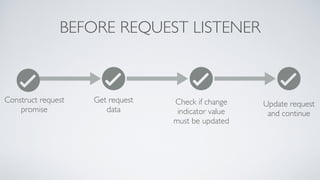
BEFORE REQUEST LISTENER
Construct request
promise
Get request
data
Check if change
indicator value
must be updated
Update request
and continue
BEFORE REQUEST LISTENER
self.beforeRequestListener = function (event) {
var request = event.request;
return new Promise(function (resolve, reject) {
persistenceUtils.requestToJSON(request).then(function (data) {
var empl = JSON.parse(data.body.text);
var employeeId = empl.EmployeeId;
var updateRequest = false;
for (var i in employeeSynchMap) {
if (parseInt(i) === parseInt(employeeId)) {
updateRequest = true;
var changeIndicatorVal = employeeSynchMap[i];
empl.ChangeIndicatorAttr = changeIndicatorVal;
data.body.text = JSON.stringify(empl);
persistenceUtils.requestFromJSON(data).then(function (updatedRequest) {
resolve({action: 'replay', request: updatedRequest});
});
break;
}}
if (!updateRequest) {
resolve({action: 'continue'});
}
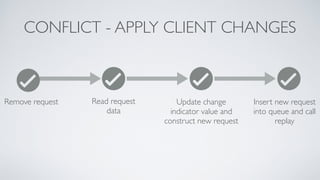
CONFLICT - APPLY CLIENT CHANGES
Remove request Read request
data
Update change
indicator value and
construct new request
Insert new request
into queue and call
replay
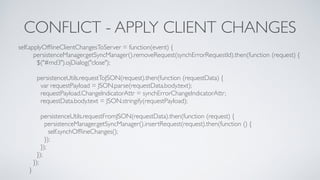
CONFLICT - APPLY CLIENT CHANGES
self.applyOfflineClientChangesToServer = function(event) {
persistenceManager.getSyncManager().removeRequest(synchErrorRequestId).then(function (request) {
$("#md3").ojDialog("close");
persistenceUtils.requestToJSON(request).then(function (requestData) {
var requestPayload = JSON.parse(requestData.body.text);
requestPayload.ChangeIndicatorAttr = synchErrorChangeIndicatorAttr;
requestData.body.text = JSON.stringify(requestPayload);
persistenceUtils.requestFromJSON(requestData).then(function (request) {
persistenceManager.getSyncManager().insertRequest(request).then(function () {
self.synchOfflineChanges();
});
});
});
});
}
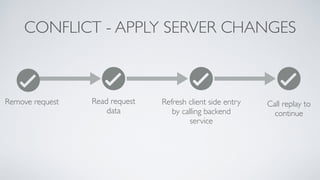
CONFLICT - APPLY SERVER CHANGES
Refresh client side entry
by calling backend
service
Call replay to
continue
Remove request Read request
data
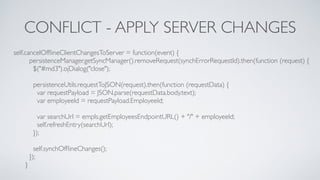
CONFLICT - APPLY SERVER CHANGES
self.cancelOfflineClientChangesToServer = function(event) {
persistenceManager.getSyncManager().removeRequest(synchErrorRequestId).then(function (request) {
$("#md3").ojDialog("close");
persistenceUtils.requestToJSON(request).then(function (requestData) {
var requestPayload = JSON.parse(requestData.body.text);
var employeeId = requestPayload.EmployeeId;
var searchUrl = empls.getEmployeesEndpointURL() + "/" + employeeId;
self.refreshEntry(searchUrl);
});
self.synchOfflineChanges();
});
}
OFFLINE PERSISTENCETOOLKIT CONFIG
FOR JAVASCRIPT (ORACLE JET)
PATH MAPPING: OFFLINETOOLKIT
"offline": {
"cdn": "",
"cwd": "node_modules/@oracle/offline-persistence-toolkit/dist/debug",
"debug": {
"src": ["*.js", "impl/*.js"],
"path": "libs/offline-persistence-toolkit/v1.1.5/dist",
"cdnPath": ""
}
}
PATH MAPPING: POUCH DB
"pouchdb": {
"cdn": "",
"cwd": "node_modules/pouchdb/dist",
"debug": {
"src": ["*.js"],
"path": "libs/pouchdb/v6.3.4/dist/pouchdb.js",
"cdnPath": ""
}
}
require(['pouchdb'], function (pouchdb) {
window.PouchDB = pouchdb;
});
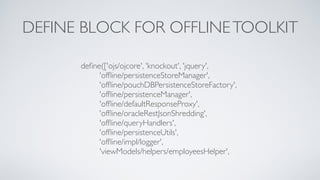
DEFINE BLOCK FOR OFFLINETOOLKIT
define(['ojs/ojcore', 'knockout', 'jquery',
'offline/persistenceStoreManager',
'offline/pouchDBPersistenceStoreFactory',
'offline/persistenceManager',
'offline/defaultResponseProxy',
'offline/oracleRestJsonShredding',
'offline/queryHandlers',
'offline/persistenceUtils',
'offline/impl/logger',
'viewModels/helpers/employeesHelper',
QUESTIONS
CONTACTS
• Andrejus Baranovskis (https://andrejusb.blogspot.com)
• Email: abaranovskis@redsamuraiconsulting.com
• Twitter: @andrejusb
• LinkedIn: https://www.linkedin.com/in/andrejus-baranovskis-251b392
• Web: http://redsamuraiconsulting.com
REFERENCES
• Source Code on GitHub - https://bit.ly/2PU4iaw
• Oracle OfflineToolkit on GitHub - https://bit.ly/2I7Nr11
• Oracle JET - https://bit.ly/2O21GtS

Reliable, Fast, Engaging Offline-First Architecture for JavaScript Applications

  • 1.
    Reliable, Fast, EngagingOffline-First Architecture for JavaScript Applications Andrejus Baranovskis, CEO andTechnical Expert, Red Samurai Consulting Oracle ACE Director and Oracle Groundbreaker Ambassador Florin Marcus,Technical Expert, Red Samurai Consulting
  • 2.
    Oracle ExpertsTeam ADF, JET,ORACLE FUSION, ORACLE CLOUD, MACHINE LEARNING Oracle PaaS Partner Community Award for Outstanding Java Cloud Service Contribution 2017
  • 3.
    AGENDA • Offline-First ArchitectureWhy and How • Technical Implementation • Solution WalkThrough • Offline PersistenceToolkit Config for JavaScript (Oracle JET)
  • 4.
  • 5.
    No Wi-Fi? No Problem Buildweb/mobile applications that can work great, whatever the connection
  • 6.
  • 7.
    Oracle JET Offline PersistenceToolkit Online LogRequest for Replay Local Storage for Temporary Data request/response yes no
  • 8.
    KEY POINTS • Businesslogic code stays the same, simple for developers, no code intrusion with offline toolkit API • API is very rich, many options to override and control • Configurable and flexible, e.g. store factory can be changed • API is heavily based on JS Promise - represents the eventual completion (or failure) of an asynchronous operation, and its resulting value
  • 9.
    KEY POINTS • Offline: •Request is logged and inserted into replay queue automatically • If user is changing data, developer must implement request update logic - in custom handlePatch or handlePost methods • Online: • Possible to define before and after synch listeners.This helps to control request data • Can control request synchronisation queue execution
  • 10.
  • 11.
    ENDPOINT REGISTRATION Register Endpoint Define Shredderand Query Handler Provide handlePatch method Define before/after listeners
  • 12.
    ENDPOINT REGISTRATION persistenceManager.init().then(function() { persistenceManager.register({scope:'/Employees'}) .then(function(registration) { var responseProxy = defaultResponseProxy.getResponseProxy({ jsonProcessor: { shredder: oracleRestJsonShredding.getShredder('emp', 'EmployeeId'), unshredder: oracleRestJsonShredding.getUnshredder() }, queryHandler: queryHandlers.getOracleRestQueryHandler('emp'), requestHandlerOverride: {handlePatch: customHandlePatch} }); var fetchListener = responseProxy.getFetchEventListener(); registration.addEventListener('fetch', fetchListener); // initial data load self.fetchData(); }); // handles request data before synch persistenceManager.getSyncManager().addEventListener('beforeSyncRequest', self.beforeRequestListener, '/Employees' ); // handles response data after synch persistenceManager.getSyncManager().addEventListener('syncRequest', self.afterRequestListener, '/Employees' ); });
  • 13.
    OFFLINE UPDATE ORCREATION Offline yes Get request data Open offline store Find data by key in offline store Update data in offline store
  • 14.
    OFFLINE UPDATE ORCREATION var customHandlePatch = function(request) { if (!persistenceManager.isOnline()) { persistenceUtils.requestToJSON(request).then(function (data) { var requestData = JSON.parse(data.body.text); persistenceStoreManager.openStore('emp').then(function (store) { store.findByKey(requestData.EmployeeId).then(function (data) { data.FirstName = requestData.FirstName; data.ChangeIndicatorAttr = requestData.ChangeIndicatorAttr; store.upsert(requestData.EmployeeId, JSON.parse('{}'), data); }) }); }) var init = {'status': 503, 'statusText': 'Edit will be processed when online'}; return Promise.resolve(new Response(null, init)); } else { return persistenceManager.browserFetch(request); } };
  • 15.
    ONLINE REPLAY Check ifrequest should be replayed Execute replay If replay error occurs, ask user feedback and read info from response Clear up helper variables when replay completes
  • 16.
    ONLINE REPLAY persistenceManager.getSyncManager().sync({preflightOptionsRequest: 'disabled'}).then(function() { employeeSynchMap = {}; console.log('SYNCH DONE'); }, function (error) { var statusCode = error.response.status; if (statusCode == 409) { // conflict during offline data synch $("#md3").ojDialog("open"); synchErrorRequestId = error.requestId; var response = error.response; response.json().then(function (value) { self.onlineConflictResolutionTitle('Conflict resolution: ' + value.FirstName); synchErrorChangeIndicatorAttr = value.ChangeIndicatorAttr; }); } } );
  • 17.
    AFTER REQUEST LISTENER Getresponse data Update local change indicator value with the one from response Save data ID and change indicator value
  • 18.
    AFTER REQUEST LISTENER self.afterRequestListener= function (event) { // invoked if offline synch for request was success, to bring back values updated in backend var statusCode = event.response.status; if (statusCode == 200) { event.response.json().then(function(response) { var id = response.EmployeeId; var changeIndicatorAttr = response.ChangeIndicatorAttr; for (var i = 0; i < self.allItems().length; i++) { if (self.allItems()[i].id === id) { self.allItems.splice(i, 1, {"id": self.allItems()[i].id, "firstName": self.allItems()[i].firstName, "lastName": self.allItems()[i].lastName, "email": self.allItems()[i].email, "phoneNumber": self.allItems()[i].phoneNumber, "changeIndicatorAttr": changeIndicatorAttr}); employeeSynchMap[id] = changeIndicatorAttr; console.log('UPDATE SUCCESS IN SYNCH FOR: ' + id + ',WITH NEW CHANGE INDICATOR: ' + changeIndicatorAttr); break; } } }); } return Promise.resolve({action: 'continue'}); }
  • 19.
    BEFORE REQUEST LISTENER Constructrequest promise Get request data Check if change indicator value must be updated Update request and continue
  • 20.
    BEFORE REQUEST LISTENER self.beforeRequestListener= function (event) { var request = event.request; return new Promise(function (resolve, reject) { persistenceUtils.requestToJSON(request).then(function (data) { var empl = JSON.parse(data.body.text); var employeeId = empl.EmployeeId; var updateRequest = false; for (var i in employeeSynchMap) { if (parseInt(i) === parseInt(employeeId)) { updateRequest = true; var changeIndicatorVal = employeeSynchMap[i]; empl.ChangeIndicatorAttr = changeIndicatorVal; data.body.text = JSON.stringify(empl); persistenceUtils.requestFromJSON(data).then(function (updatedRequest) { resolve({action: 'replay', request: updatedRequest}); }); break; }} if (!updateRequest) { resolve({action: 'continue'}); }
  • 21.
    CONFLICT - APPLYCLIENT CHANGES Remove request Read request data Update change indicator value and construct new request Insert new request into queue and call replay
  • 22.
    CONFLICT - APPLYCLIENT CHANGES self.applyOfflineClientChangesToServer = function(event) { persistenceManager.getSyncManager().removeRequest(synchErrorRequestId).then(function (request) { $("#md3").ojDialog("close"); persistenceUtils.requestToJSON(request).then(function (requestData) { var requestPayload = JSON.parse(requestData.body.text); requestPayload.ChangeIndicatorAttr = synchErrorChangeIndicatorAttr; requestData.body.text = JSON.stringify(requestPayload); persistenceUtils.requestFromJSON(requestData).then(function (request) { persistenceManager.getSyncManager().insertRequest(request).then(function () { self.synchOfflineChanges(); }); }); }); }); }
  • 23.
    CONFLICT - APPLYSERVER CHANGES Refresh client side entry by calling backend service Call replay to continue Remove request Read request data
  • 24.
    CONFLICT - APPLYSERVER CHANGES self.cancelOfflineClientChangesToServer = function(event) { persistenceManager.getSyncManager().removeRequest(synchErrorRequestId).then(function (request) { $("#md3").ojDialog("close"); persistenceUtils.requestToJSON(request).then(function (requestData) { var requestPayload = JSON.parse(requestData.body.text); var employeeId = requestPayload.EmployeeId; var searchUrl = empls.getEmployeesEndpointURL() + "/" + employeeId; self.refreshEntry(searchUrl); }); self.synchOfflineChanges(); }); }
  • 25.
  • 26.
    PATH MAPPING: OFFLINETOOLKIT "offline":{ "cdn": "", "cwd": "node_modules/@oracle/offline-persistence-toolkit/dist/debug", "debug": { "src": ["*.js", "impl/*.js"], "path": "libs/offline-persistence-toolkit/v1.1.5/dist", "cdnPath": "" } }
  • 27.
    PATH MAPPING: POUCHDB "pouchdb": { "cdn": "", "cwd": "node_modules/pouchdb/dist", "debug": { "src": ["*.js"], "path": "libs/pouchdb/v6.3.4/dist/pouchdb.js", "cdnPath": "" } } require(['pouchdb'], function (pouchdb) { window.PouchDB = pouchdb; });
  • 28.
    DEFINE BLOCK FOROFFLINETOOLKIT define(['ojs/ojcore', 'knockout', 'jquery', 'offline/persistenceStoreManager', 'offline/pouchDBPersistenceStoreFactory', 'offline/persistenceManager', 'offline/defaultResponseProxy', 'offline/oracleRestJsonShredding', 'offline/queryHandlers', 'offline/persistenceUtils', 'offline/impl/logger', 'viewModels/helpers/employeesHelper',
  • 29.
  • 30.
    CONTACTS • Andrejus Baranovskis(https://andrejusb.blogspot.com) • Email: abaranovskis@redsamuraiconsulting.com • Twitter: @andrejusb • LinkedIn: https://www.linkedin.com/in/andrejus-baranovskis-251b392 • Web: http://redsamuraiconsulting.com
  • 31.
    REFERENCES • Source Codeon GitHub - https://bit.ly/2PU4iaw • Oracle OfflineToolkit on GitHub - https://bit.ly/2I7Nr11 • Oracle JET - https://bit.ly/2O21GtS