Regular expressions (regex) are used to validate patterns in text strings. The document discusses regex patterns for common validations like names, phone numbers, emails, and zip codes. It provides examples of regex syntax like anchors, character classes, quantifiers, and groups. The document also includes a demo of using a regex in Apex code to format phone numbers on records inserted via an API.
![Starting Simple
Let’s say we want to validate that any input is only a text character and is only one word.
Easy enough:
^[A-Za-z]*$ OR ^(?i)[a-z]*$
•^ and $ are anchors. They indicate the beginning and end of the string respectively.
• * is a quantifier. It says that it can be 0 or more (thus the reason why we won’t need ISBLANK
in our Salesforce formula).
•[A-Za-z] is a range. It states that we must have a range of characters from a-z or A-Z.
•(?i) is a modifier. It states that the REGEX is case insensitive.](https://image.slidesharecdn.com/regexpresentation-220822072905-8d76e7ea/75/regex_presentation-pptx-3-2048.jpg)
![Starting Simple Continued
Let’s say we only want to allow four digits to be entered in a string.
^[0-9]{4}$ or ^d{4}$
What about allowing 1-4 digits to be entered?
^[0-9]{1, 4}$ or ^d{1,4}$
For this one and the one below, you would need !ISBLANK for the field unless you
want to effectively make the field required through the standard interface.
***NOTE*** Flows only pass validations if and only if there is input in the field! So ISBLANK
is not needed (but for consistency, adding it won’t hurt anything)!
What about 1 or more digits?
^[0-9]+$ or ^d+$
!](https://image.slidesharecdn.com/regexpresentation-220822072905-8d76e7ea/75/regex_presentation-pptx-4-2048.jpg)
![What the heck is this?
(+[0-9]{1,4}[-. ])?(()?[0-9]{3}())?[ -.]?[0-9]{3}[-. ]?[0-9]{4}
OR
(+d{1,4}[ -.])?(?d{3})?[ -.]?d{3}[ -.]?d{4}
This validates a phone number to match any of the below formats:
+1 5555555555
+1 (555 555-5555
+1 555) 555-5555
+1-(555) 555-5555
+1 555.555.5555
You could choose to be more restrictive stating that a phone number must follow the format
+1 (XXX) XXX-XXXX but there’s a better (& more user friendly way) if you have triggers!](https://image.slidesharecdn.com/regexpresentation-220822072905-8d76e7ea/75/regex_presentation-pptx-5-2048.jpg)
![Breaking it down
•() is a capturing group. This is used to say that anything inside of the parentheses is grouped.
•[0-9] is also a range. This can also be expressed as d, a character class. Both of these will match any
digit 0 through 9.
•{1,4} means that there must be at least one character but no more than 4. This also is a
quantifier.
•[ .-] means that there can either be a space, a period or a hyphen. This is called a character set.
•? Means that it is optional and that there can be no more than one.
•A backslash indicates that the character is escaped if it is not a character class. An example would
be $ to indicate a dollar sign.
In salesforce you must use a double backslash to escape any characters that start with
a slash. For example, d becomes d.
!](https://image.slidesharecdn.com/regexpresentation-220822072905-8d76e7ea/75/regex_presentation-pptx-6-2048.jpg)
![However…
Salesforce phone number fields are automatically formatted if they are 10 digit format, but what
if you include the country code?
No dice!
A better way of writing our REGEX for our trigger would be:
+[1][D]?(?[d]{3})?[D]?[d]{3}[D]?[d]{4}
(Exclusively for US numbers, since other phone formats are different)](https://image.slidesharecdn.com/regexpresentation-220822072905-8d76e7ea/75/regex_presentation-pptx-7-2048.jpg)
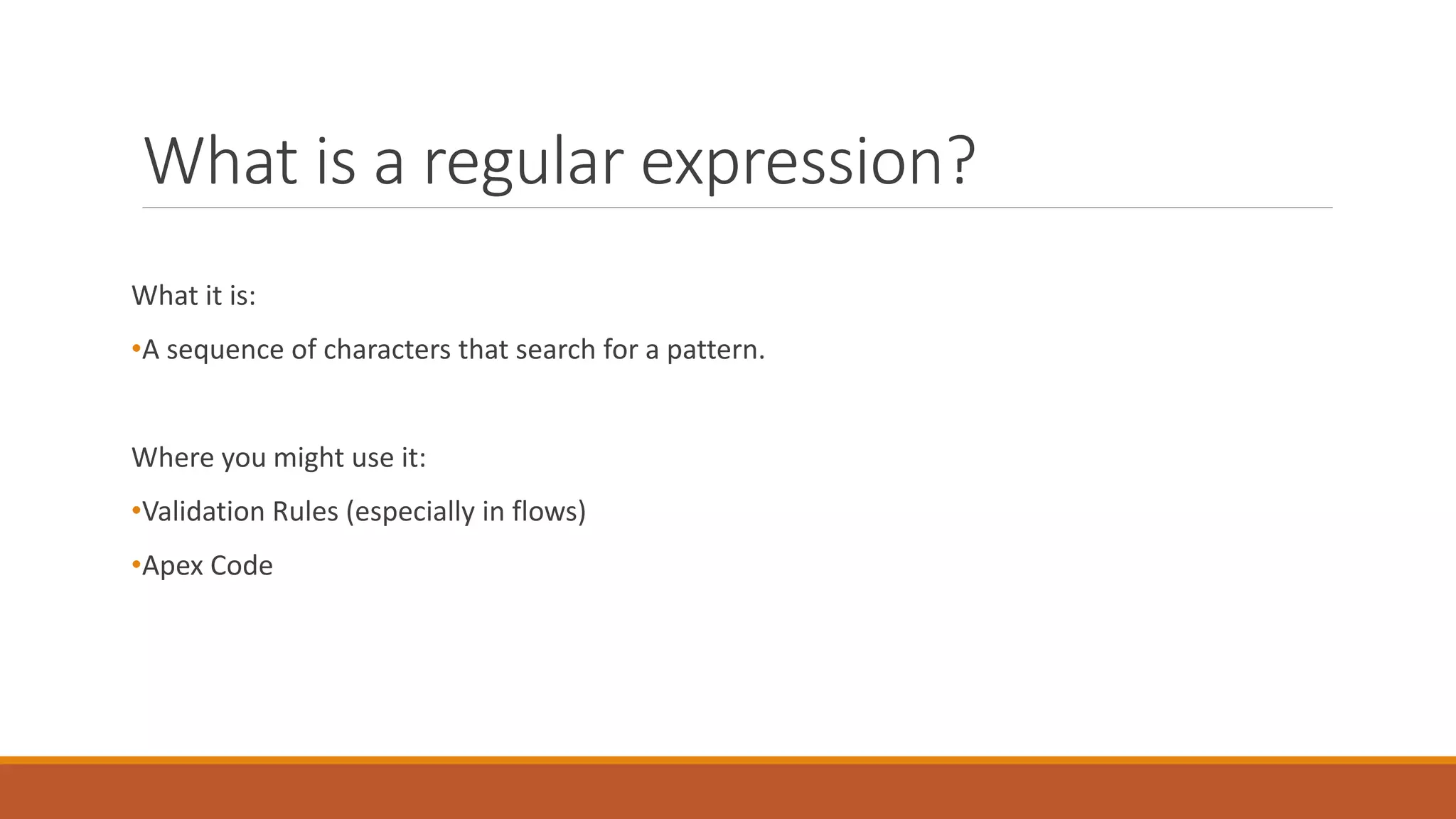
![Sample Trigger Continued
If(c.Phone != null) {
// Check to see if the phone is not empty and that it matches the pattern
// Begins with a plus sign, followed by a 1 and something that is NOT a digit [^0-9] OR D
// And that it has the proper length and some of the other optional characters
if(pattern.matches('+[1][D]?(?[d]{3})?[D]?[d]{3}[D]?[d]{4}', c.Phone) == true){
// Remove all non-digits
String Phone = phonePattern.matcher(c.Phone).replaceAll('');
// Format the phone number to match the NA standard +1 (XXX) XXX-XXXX
c.Phone = '+' + Phone.left(1) + ' (' + Phone.mid(1, 3) + ') ' + Phone.mid(4, 3) + '-' + Phone.right(4);
}](https://image.slidesharecdn.com/regexpresentation-220822072905-8d76e7ea/75/regex_presentation-pptx-9-2048.jpg)
![Sample Trigger Continued
// Check to see if the phone has an "extension"
} else if(pattern.matches('(+[1]{1,4}D)(?d{3})?D?d{3}D?d{4}(
?(x|ext)?D?d{1,10})?', c.Phone) == true){
// Remove all non-digits
String Phone = phonePattern.matcher(c.Phone).replaceAll('');
// Standardize the format
c.Phone = '+' + Phone.left(1) + ' (' + Phone.mid(1, 3) + ') ' + Phone.mid(4, 3) + '-' + Phone.Mid(7,
4) + ' ext.' + Phone.Mid(11, 10);](https://image.slidesharecdn.com/regexpresentation-220822072905-8d76e7ea/75/regex_presentation-pptx-10-2048.jpg)
![If..
If you wanted to assume (you probably shouldn’t) that everyone with a US mailing address has a phone that is a US phone (which will
most often be the case, though I’m sure there are exceptions):
} else if (pattern.matches('(?[d]{3})?[D]?[d]{3}[D]?[d]{4}', c.Phone) == true
&& pattern.matches('(?i)(US(A)?)|(United States (of America)?)', c.MailingCountry) == true && c.MailingCountry!=null){
// Remove all non-digits
String Phone = phonePattern.matcher(c.Phone).replaceAll('');
// Format the phone number to match the NA standard +1 (XXX) XXX-XXXX
c.Phone = '+1 (' + Phone.left(3) + ') ' + Phone.mid(3, 3) + '-' + Phone.right(4);
}](https://image.slidesharecdn.com/regexpresentation-220822072905-8d76e7ea/75/regex_presentation-pptx-11-2048.jpg)

![Other examples
Social Security Numbers:
^(?!000|666)[0-8][0-9]{2}-(?!00)[0-9]{2}-(?!0000)[0-9]{4}$
The first three digits cannot be 000 or 666 and cannot be between 900 and 999. All numbers in
the subsequent groups must not be 0 (O’Reilly 290).
Please see encrypted fields overview for more information on sensitive information such as social security
numbers in salesforce:
https://help.salesforce.com/apex/HTViewHelpDoc?id=fields_about_encrypted_fields.htm
This example may be useful in places other than your salesforce instance and is only intended to show you
the power of regular expressions.
!](https://image.slidesharecdn.com/regexpresentation-220822072905-8d76e7ea/75/regex_presentation-pptx-14-2048.jpg)
![Other Examples
Simple email validation:
!ISBLANK(Email) && !REGEX(Email, “^[A-Za-z0-9+_.-]+@[A-Za-z0-9-]+[.][A-Za-z-]+(?:[.][A-Za-z-])?$”)
•Use this example in flow. Salesforce performs a similar validation on custom email fields.
•Allows for two level domains.
•A valid email by this standard or SF custom email fields is a@a.a or a@a.a.a (SF fields allow for an “infinite”
number of “a.” groups following the @ sign. The above regex restricts it to three groups).
Zip Codes:
REGEX(MailingCountry, "(?i)(US(A)?)|(United States (of America)?)") &&
!REGEX(MailingPostalCode, "^[0-9]{5}(?:-[0-9]{4})?$") &&
!ISBLANK(MailingCountry) &&
!ISBLANK(MailingPostalCode)
•If the mailing country is US/A or United States (of America) and the field is not blank, then assert that the postal
code field contains 5 digits and optionally a hyphen plus 4 digits.](https://image.slidesharecdn.com/regexpresentation-220822072905-8d76e7ea/75/regex_presentation-pptx-15-2048.jpg)
![Cheat Sheet
Character Classes
Character Meaning
. Any Character
w Any word [A-Za-z0-9_]
W (capital W) Not a word [^A-Za-z0-9_]
d Digit [0-9]
D Not a digit [^0-9]
s Whitespace (includes spaces, tabs and line breaks)
S (capital S) Not whitespace
[ABC] character set, matches character within [], in this case A, B or C
[^ABC] Negated character set, does not match A, B or C
[A-Za-z] Matches a range of characters, in this case A-Z or a-z
Anchors
Character Meaning
^ matches beginning of string
$ matches end of string
b matches a position on the boundary of a word - matches a position, NOT a character
B matches characters within words - matches a position, NOT a character](https://image.slidesharecdn.com/regexpresentation-220822072905-8d76e7ea/75/regex_presentation-pptx-16-2048.jpg)
![Cheat Sheet (Cont.)
Quantifiers
Character Meaning
* 0 or More
+ 1 or More
? 0 or 1
{2} Exactly 2 characters
{2,} 2 or more characters
{1, 4} 1 through 4 characters
Modifiers
Character Meaning
(?i) case insensitive
(?m) evaluate multiple lines
Groups and Ranges
Character Meaning
[ABC] character set, matches character within [], in this case A, B or C
[^ABC] Negated character set, does not match A, B or C
[A-Za-z] Matches a range of characters, in this case A-Z or a-z
(a|b) a or b
. Any Character
(?:1245) does not require digits 1245, but will accept if they are included](https://image.slidesharecdn.com/regexpresentation-220822072905-8d76e7ea/75/regex_presentation-pptx-17-2048.jpg)