Rearchitecting Storage for Server VirtualizationStephen FoskettOct 21, 2010
This is Not a Rah-Rah Session
AgendaFirst 45 minutesImpact of hypervisors on I/OVM storage approachesVM connectivity optionsBreakSecond 45 minutesStorage features for VMQuestions and comments
Introducing Virtualization
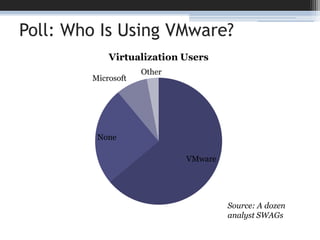
Poll: Who Is Using VMware?Source: A dozen analyst SWAGs
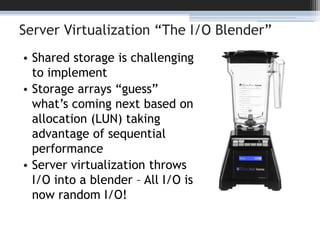
Server Virtualization “The I/O Blender”Shared storage is challenging to implementStorage arrays “guess” what’s coming next based on allocation (LUN) taking advantage of sequential performanceServer virtualization throws I/O into a blender – All I/O is now random I/O!
Server Virtualization requires SAN and NASServer virtualization has transformed the data center and storage requirementsVMware is the #1 driver of SAN adoption today!60% of virtual server storage is on SAN or NAS86% have implemented some server virtualizationServer virtualization has enabled and demanded centralization and sharing of storage on arrays like never before!
Server Virtualization RecoilDramatically increased I/O“Detrimental” to storage utilizationPatchwork of support, few standards“VMware mode” on storage arraysVirtual HBA/N_Port ID Virtualization (NPIV)Everyone is qualifying everyone and jockeying for positionBefuddled traditional backup, replication, reporting
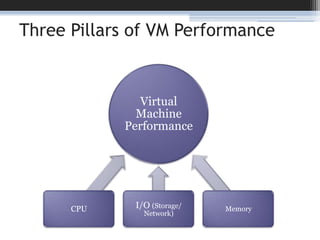
Three Pillars of VM Performance
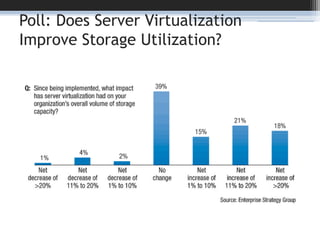
Poll: Does Server Virtualization Improve Storage Utilization?
Hypervisor Storage Approaches
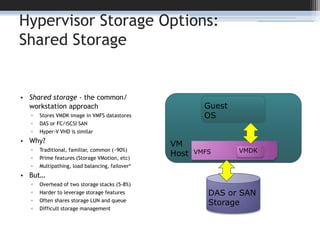
Hypervisor Storage Options:Shared StorageShared storage - the common/ workstation approachStores VMDK image in VMFS datastoresDAS or FC/iSCSI SANHyper-V VHD is similarWhy?Traditional, familiar, common (~90%)Prime features (Storage VMotion, etc)Multipathing, load balancing, failover*But…Overhead of two storage stacks (5-8%)Harder to leverage storage featuresOften shares storage LUN and queueDifficult storage managementVMHostGuestOSVMFSVMDKDAS or SANStorage
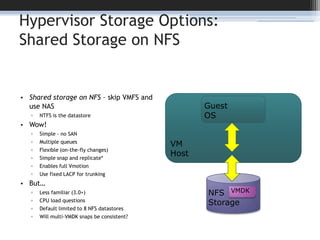
Hypervisor Storage Options:Shared Storage on NFSShared storage on NFS – skip VMFS and use NASNTFS is the datastoreWow!Simple – no SANMultiple queuesFlexible (on-the-fly changes)Simple snap and replicate*Enables full VmotionUse fixed LACP for trunkingBut…Less familiar (3.0+)CPU load questionsDefault limited to 8 NFS datastoresWill multi-VMDK snaps be consistent?VMHostGuestOSNFSStorageVMDK
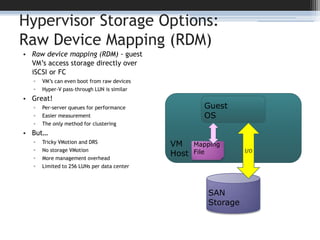
Hypervisor Storage Options:Raw Device Mapping (RDM)Raw device mapping (RDM) - guest VM’s access storage directly over iSCSI or FCVM’s can even boot from raw devicesHyper-V pass-through LUN is similarGreat!Per-server queues for performanceEasier measurementThe only method for clusteringBut…Tricky VMotion and DRSNo storage VMotionMore management overheadLimited to 256 LUNs per data centerVMHostGuestOSI/OMapping FileSAN Storage
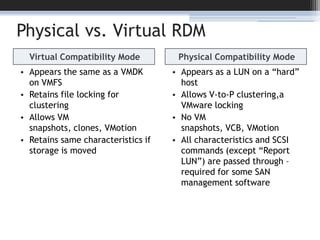
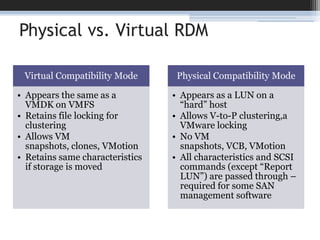
Physical vs. Virtual RDMVirtual Compatibility ModeAppears the same as a VMDK on VMFSRetains file locking for clusteringAllows VM snapshots, clones, VMotionRetains same characteristics if storage is movedPhysical Compatibility ModeAppears as a LUN on a “hard” hostAllows V-to-P clustering,a VMware lockingNo VM snapshots, VCB, VMotionAll characteristics and SCSI commands (except “Report LUN”) are passed through – required for some SAN management software
Physical vs. Virtual RDM
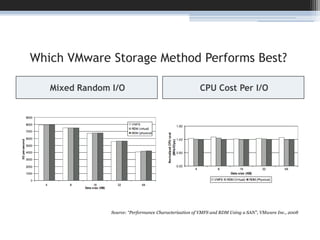
Which VMware Storage Method Performs Best?Mixed Random I/OCPU Cost Per I/OVMFS,RDM (p), or RDM (v)Source: “Performance Characterization of VMFS and RDM Using a SAN”, VMware Inc., 2008
Storage Connectivity Options
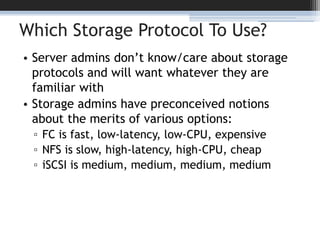
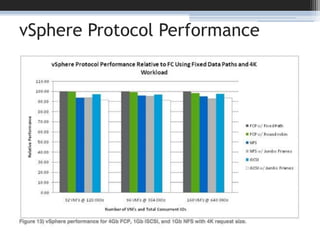
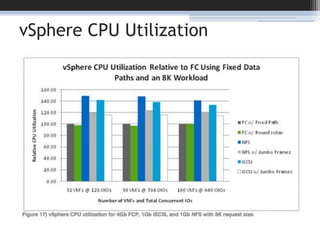
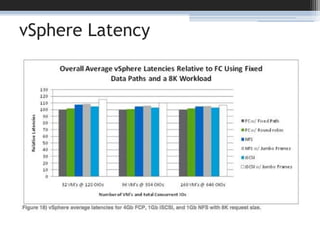
Which Storage Protocol To Use?Server admins don’t know/care about storage protocols and will want whatever they are familiar withStorage admins have preconceived notions about the merits of various options:FC is fast, low-latency, low-CPU, expensiveNFS is slow, high-latency, high-CPU, cheapiSCSI is medium, medium, medium, medium
vSphere Protocol Performance
vSphere CPU Utilization
vSphere Latency
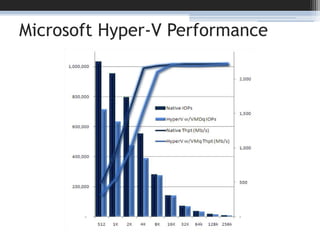
Microsoft Hyper-V Performance
The Upshot: It Doesn’t MatterUse what you have and are familiar with!FC, iSCSI, NFS all work wellMost enterprise production VM data is on FC, many smaller shops using iSCSI or NFSEither/or? - 50% use a combinationFor IP storageNetwork hardware and config matters more than protocol (NFS, iSCSI, FC)Use a separate network or VLANUse a fast switch and consider jumbo framesFor FC storage8Gb FC/FCoE is awesome for VM’sLook into NPIVLook for VAAI
Break Time!Stephen Foskettstephen@fosketts.nettwitter.com/sfoskett+1(508)451-9532FoskettServices.comblog.fosketts.netGestaltIT.com25
VMware Storage Features
What’s New in vSphere 4VMware vSphere 4 (AKA ESX/ESXi 4) is a major upgrade for storageLots of new features like thin provisioning, PSA, Any-to-any Storage VMotion, PVSCSIMassive performance upgrade (400k IOPS!)vSphere 4.1 is equally huge for storageBoot from SANvStorage APIs for Array Integration (VAAI)Storage I/O Control (SIOC) aka DRS for Storage
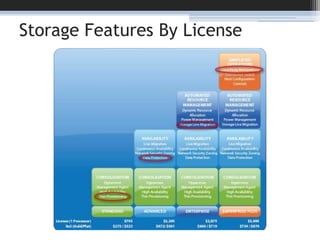
Storage Features By License
Native VMware Thin ProvisioningVMware ESX 4 allocates storage in 1 MB chunks as capacity is usedSimilar support enabled for virtual disks on NFS in VI 3Thin provisioning existed for block, could be enabled on the command line in VI 3Present in VMware desktop productsvSphere4 fully supports and integrates thin provisioningEvery version/license includes thin provisioningAllows thick-to-thin conversion during Storage VmotionIn-array thin provisioning also supported (we’ll get to that…)
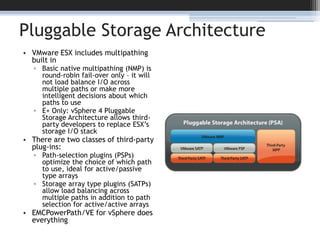
Pluggable Storage ArchitectureVMware ESX includes multipathing built inBasic native multipathing (NMP) is round-robin fail-over only – it will not load balance I/O across multiple paths or make more intelligent decisions about which paths to useE+ Only: vSphere 4 Pluggable Storage Architecture allows third-party developers to replace ESX’s storage I/O stackThere are two classes of third-party plug-ins:Path-selection plugins (PSPs) optimize the choice of which path to use, ideal for active/passive type arraysStorage array type plugins (SATPs) allow load balancing across multiple paths in addition to path selection for active/active arraysEMCPowerPath/VE for vSphere does everything
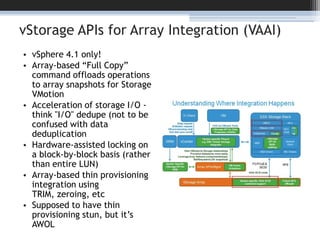
vStorage APIs for Array Integration (VAAI)vSphere 4.1 only!Array-based “Full Copy” command offloads operations to array snapshots for Storage VMotionAcceleration of storage I/O - think "I/O" dedupe (not to be confused with data deduplicationHardware-assisted locking on a block-by-block basis (rather than entire LUN)Array-based thin provisioning integration using TRIM, zeroing, etcSupposed to have thin provisioning stun, but it’s AWOL
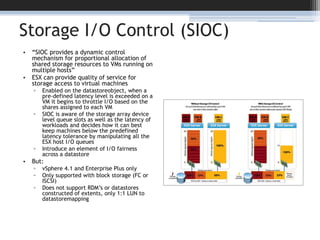
Storage I/O Control (SIOC)“SIOC provides a dynamic control mechanism for proportional allocation of shared storage resources to VMs running on multiple hosts”ESX can provide quality of service for storage access to virtual machinesEnabled on the datastoreobject, when a pre-defined latency level is exceeded on a VM it begins to throttle I/O based on the shares assigned to each VMSIOC is aware of the storage array device level queue slots as well as the latency of workloads and decides how it can best keep machines below the predefined latency tolerance by manipulating all the ESX host I/O queues Introduce an element of I/O fairness across a datastoreBut:vSphere 4.1 and Enterprise Plus onlyOnly supported with block storage (FC or ISCSI)Does not support RDM’s or datastores constructed of extents, only 1:1 LUN to datastoremapping
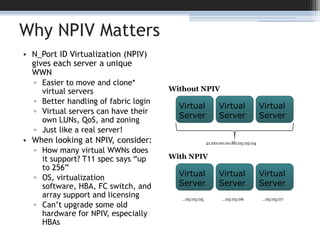
Why NPIV MattersN_Port ID Virtualization (NPIV) gives each server a unique WWNEasier to move and clone* virtual servers Better handling of fabric loginVirtual servers can have their own LUNs, QoS, and zoningJust like a real server!When looking at NPIV, consider:How many virtual WWNs does it support? T11 spec says “up to 256”OS, virtualization software, HBA, FC switch, and array support and licensingCan’t upgrade some old hardware for NPIV, especially HBAsWithout NPIVVirtual ServerVirtual ServerVirtual Server21:00:00:e0:8b:05:05:04With NPIVVirtual ServerVirtual ServerVirtual Server…05:05:05…05:05:06…05:05:07
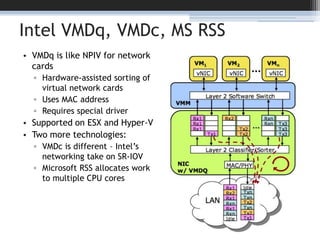
Intel VMDq, VMDc, MS RSSVMDq is like NPIV for network cardsHardware-assisted sorting of virtual network cardsUses MAC addressRequires special driverSupported on ESX and Hyper-VTwo more technologies:VMDc is different – Intel’s networking take on SR-IOVMicrosoft RSS allocates work to multiple CPU cores
And Then There’s VDI…Desktop Virtualization (VDI) takes everything we just worried about and amplifies itMassive I/O crunchesHuge duplication of dataMore wasted capacityMore user visibilityMore backup trouble
Thank You!Stephen Foskettstephen@fosketts.nettwitter.com/sfoskett+1(508)451-9532FoskettServices.comblog.fosketts.netGestaltIT.com36

Rearchitecting Storage for Server Virtualization

  • 1.
    Rearchitecting Storage forServer VirtualizationStephen FoskettOct 21, 2010
  • 2.
    This is Nota Rah-Rah Session
  • 3.
    AgendaFirst 45 minutesImpactof hypervisors on I/OVM storage approachesVM connectivity optionsBreakSecond 45 minutesStorage features for VMQuestions and comments
  • 4.
  • 5.
    Poll: Who IsUsing VMware?Source: A dozen analyst SWAGs
  • 6.
    Server Virtualization “TheI/O Blender”Shared storage is challenging to implementStorage arrays “guess” what’s coming next based on allocation (LUN) taking advantage of sequential performanceServer virtualization throws I/O into a blender – All I/O is now random I/O!
  • 7.
    Server Virtualization requiresSAN and NASServer virtualization has transformed the data center and storage requirementsVMware is the #1 driver of SAN adoption today!60% of virtual server storage is on SAN or NAS86% have implemented some server virtualizationServer virtualization has enabled and demanded centralization and sharing of storage on arrays like never before!
  • 8.
    Server Virtualization RecoilDramaticallyincreased I/O“Detrimental” to storage utilizationPatchwork of support, few standards“VMware mode” on storage arraysVirtual HBA/N_Port ID Virtualization (NPIV)Everyone is qualifying everyone and jockeying for positionBefuddled traditional backup, replication, reporting
  • 9.
    Three Pillars ofVM Performance
  • 10.
    Poll: Does ServerVirtualization Improve Storage Utilization?
  • 11.
  • 12.
    Hypervisor Storage Options:SharedStorageShared storage - the common/ workstation approachStores VMDK image in VMFS datastoresDAS or FC/iSCSI SANHyper-V VHD is similarWhy?Traditional, familiar, common (~90%)Prime features (Storage VMotion, etc)Multipathing, load balancing, failover*But…Overhead of two storage stacks (5-8%)Harder to leverage storage featuresOften shares storage LUN and queueDifficult storage managementVMHostGuestOSVMFSVMDKDAS or SANStorage
  • 13.
    Hypervisor Storage Options:SharedStorage on NFSShared storage on NFS – skip VMFS and use NASNTFS is the datastoreWow!Simple – no SANMultiple queuesFlexible (on-the-fly changes)Simple snap and replicate*Enables full VmotionUse fixed LACP for trunkingBut…Less familiar (3.0+)CPU load questionsDefault limited to 8 NFS datastoresWill multi-VMDK snaps be consistent?VMHostGuestOSNFSStorageVMDK
  • 14.
    Hypervisor Storage Options:RawDevice Mapping (RDM)Raw device mapping (RDM) - guest VM’s access storage directly over iSCSI or FCVM’s can even boot from raw devicesHyper-V pass-through LUN is similarGreat!Per-server queues for performanceEasier measurementThe only method for clusteringBut…Tricky VMotion and DRSNo storage VMotionMore management overheadLimited to 256 LUNs per data centerVMHostGuestOSI/OMapping FileSAN Storage
  • 15.
    Physical vs. VirtualRDMVirtual Compatibility ModeAppears the same as a VMDK on VMFSRetains file locking for clusteringAllows VM snapshots, clones, VMotionRetains same characteristics if storage is movedPhysical Compatibility ModeAppears as a LUN on a “hard” hostAllows V-to-P clustering,a VMware lockingNo VM snapshots, VCB, VMotionAll characteristics and SCSI commands (except “Report LUN”) are passed through – required for some SAN management software
  • 16.
  • 17.
    Which VMware StorageMethod Performs Best?Mixed Random I/OCPU Cost Per I/OVMFS,RDM (p), or RDM (v)Source: “Performance Characterization of VMFS and RDM Using a SAN”, VMware Inc., 2008
  • 18.
  • 19.
    Which Storage ProtocolTo Use?Server admins don’t know/care about storage protocols and will want whatever they are familiar withStorage admins have preconceived notions about the merits of various options:FC is fast, low-latency, low-CPU, expensiveNFS is slow, high-latency, high-CPU, cheapiSCSI is medium, medium, medium, medium
  • 20.
  • 21.
  • 22.
  • 23.
  • 24.
    The Upshot: ItDoesn’t MatterUse what you have and are familiar with!FC, iSCSI, NFS all work wellMost enterprise production VM data is on FC, many smaller shops using iSCSI or NFSEither/or? - 50% use a combinationFor IP storageNetwork hardware and config matters more than protocol (NFS, iSCSI, FC)Use a separate network or VLANUse a fast switch and consider jumbo framesFor FC storage8Gb FC/FCoE is awesome for VM’sLook into NPIVLook for VAAI
  • 25.
  • 26.
  • 27.
    What’s New invSphere 4VMware vSphere 4 (AKA ESX/ESXi 4) is a major upgrade for storageLots of new features like thin provisioning, PSA, Any-to-any Storage VMotion, PVSCSIMassive performance upgrade (400k IOPS!)vSphere 4.1 is equally huge for storageBoot from SANvStorage APIs for Array Integration (VAAI)Storage I/O Control (SIOC) aka DRS for Storage
  • 28.
  • 29.
    Native VMware ThinProvisioningVMware ESX 4 allocates storage in 1 MB chunks as capacity is usedSimilar support enabled for virtual disks on NFS in VI 3Thin provisioning existed for block, could be enabled on the command line in VI 3Present in VMware desktop productsvSphere4 fully supports and integrates thin provisioningEvery version/license includes thin provisioningAllows thick-to-thin conversion during Storage VmotionIn-array thin provisioning also supported (we’ll get to that…)
  • 30.
    Pluggable Storage ArchitectureVMwareESX includes multipathing built inBasic native multipathing (NMP) is round-robin fail-over only – it will not load balance I/O across multiple paths or make more intelligent decisions about which paths to useE+ Only: vSphere 4 Pluggable Storage Architecture allows third-party developers to replace ESX’s storage I/O stackThere are two classes of third-party plug-ins:Path-selection plugins (PSPs) optimize the choice of which path to use, ideal for active/passive type arraysStorage array type plugins (SATPs) allow load balancing across multiple paths in addition to path selection for active/active arraysEMCPowerPath/VE for vSphere does everything
  • 31.
    vStorage APIs forArray Integration (VAAI)vSphere 4.1 only!Array-based “Full Copy” command offloads operations to array snapshots for Storage VMotionAcceleration of storage I/O - think "I/O" dedupe (not to be confused with data deduplicationHardware-assisted locking on a block-by-block basis (rather than entire LUN)Array-based thin provisioning integration using TRIM, zeroing, etcSupposed to have thin provisioning stun, but it’s AWOL
  • 32.
    Storage I/O Control(SIOC)“SIOC provides a dynamic control mechanism for proportional allocation of shared storage resources to VMs running on multiple hosts”ESX can provide quality of service for storage access to virtual machinesEnabled on the datastoreobject, when a pre-defined latency level is exceeded on a VM it begins to throttle I/O based on the shares assigned to each VMSIOC is aware of the storage array device level queue slots as well as the latency of workloads and decides how it can best keep machines below the predefined latency tolerance by manipulating all the ESX host I/O queues Introduce an element of I/O fairness across a datastoreBut:vSphere 4.1 and Enterprise Plus onlyOnly supported with block storage (FC or ISCSI)Does not support RDM’s or datastores constructed of extents, only 1:1 LUN to datastoremapping
  • 33.
    Why NPIV MattersN_PortID Virtualization (NPIV) gives each server a unique WWNEasier to move and clone* virtual servers Better handling of fabric loginVirtual servers can have their own LUNs, QoS, and zoningJust like a real server!When looking at NPIV, consider:How many virtual WWNs does it support? T11 spec says “up to 256”OS, virtualization software, HBA, FC switch, and array support and licensingCan’t upgrade some old hardware for NPIV, especially HBAsWithout NPIVVirtual ServerVirtual ServerVirtual Server21:00:00:e0:8b:05:05:04With NPIVVirtual ServerVirtual ServerVirtual Server…05:05:05…05:05:06…05:05:07
  • 34.
    Intel VMDq, VMDc,MS RSSVMDq is like NPIV for network cardsHardware-assisted sorting of virtual network cardsUses MAC addressRequires special driverSupported on ESX and Hyper-VTwo more technologies:VMDc is different – Intel’s networking take on SR-IOVMicrosoft RSS allocates work to multiple CPU cores
  • 35.
    And Then There’sVDI…Desktop Virtualization (VDI) takes everything we just worried about and amplifies itMassive I/O crunchesHuge duplication of dataMore wasted capacityMore user visibilityMore backup trouble
  • 36.

Editor's Notes

  • #13 Up to 256 FC or iSCSI LUNsESX multipathingLoad balancingFailoverFailover between FC and iSCSI*Beware of block sizes greater than 256 KB!If you want virtual disks greater than 256 GB, you must use a VMFS block size larger than 1 MBAlign your virtual disk starting offset to your array (by booting the VM and using diskpart, Windows PE, or UNIX fdisk)*
  • #14 Link Aggregate Control Protocol (LACP) for trunking/EtherChannel - Use “fixed” path policy, not LRUUp to 8 (or 32) NFS mount pointsTurn off access time updatesThin provisioning? Turn on AutoSize and watch out