Windows Server 2012 introduces technologies at the
storage layer that can replace traditional SAN
• Storage Spaces
• SMB 3.0
• Scale-Out File Server
When leveraged together, these enable high
performance, ease administration and lower cost
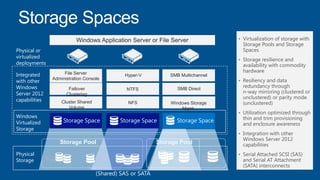
• Virtualization of storage with
Storage Pools and Storage
Spaces
• Storage resilience and
availability with commodity
hardware
• Resiliency and data
redundancy through
n-way mirroring (clustered or
unclustered) or parity mode
(unclustered)
• Utilization optimized through
thin and trim provisioning
and enclosure awareness
• Integration with other
Windows Server 2012
capabilities
• Serial Attached SCSI (SAS)
and Serial AT Attachment
(SATA) interconnects
Windows
Virtualized
Storage
Windows Application Server or File Server
Physical or
virtualized
deployments
Physical
Storage
(Shared) SAS or SATA
Integrated
with other
Windows
Server 2012
capabilities
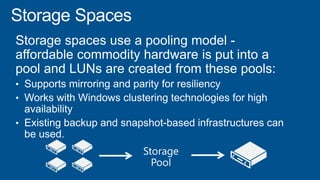
Storage PoolStorage Pool
File Server
Administration Console
Hyper-V
Cluster Shared
Volume
Failover
Clustering
SMB Multichannel
NFS Windows Storage
Mgmt.
NTFS SMB Direct
Storage Space Storage Space Storage Space
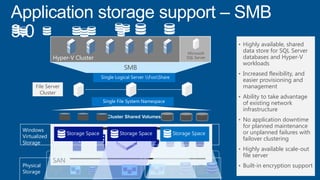
• Highly available, shared
data store for SQL Server
databases and Hyper-V
workloads
• Increased flexibility, and
easier provisioning and
management
• Ability to take advantage
of existing network
infrastructure
• No application downtime
for planned maintenance
or unplanned failures with
failover clustering
• Highly available scale-out
file server
• Built-in encryption support
File Server
Cluster
Cluster Shared Volumes
Single File System Namespace
SMB
Single Logical Server FooShare
RAID
Array
RAID
Array
RAID
Array
SAN
Windows
Virtualized
Storage
Physical
Storage
Storage PoolStorage Pool
Storage Space Storage Space Storage Space
Hyper-V Cluster
Microsoft
SQL Server
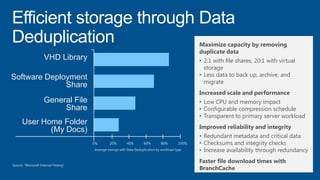
VHD Library
Software Deployment
Share
General File
Share
User Home Folder
(My Docs)
0% 20% 40% 60% 80% 100%
Average savings with Data Deduplication by workload type
Maximize capacity by removing
duplicate data
• 2:1 with file shares, 20:1 with virtual
storage
• Less data to back up, archive, and
migrate
Increased scale and performance
• Low CPU and memory impact
• Configurable compression schedule
• Transparent to primary server workload
Improved reliability and integrity
• Redundant metadata and critical data
• Checksums and integrity checks
• Increase availability through redundancy
Faster file download times with
BranchCache
Source: “Microsoft Internal Testing"
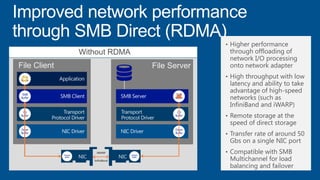
File Client
SMB
Buffer
File Server
With RDMAWithout RDMA
App
Buffer
SMB
Buffer
OS
Buffer
Driver
Buffer
SMB
Buffer
OS
Buffer
Driver
Buffer
App
Buffer
SMB
Buffer
rNICrNIC NIC Adapter
BufferNICAdapter
Buffer
Adapter
Buffer
Adapter
Buffer
iWARP
InfiniBand
• Higher performance
through offloading of
network I/O processing
onto network adapter
• High throughput with low
latency and ability to take
advantage of high-speed
networks (such as
InfiniBand and iWARP)
• Remote storage at the
speed of direct storage
• Transfer rate of around 50
Gbs on a single NIC port
• Compatible with SMB
Multichannel for load
balancing and failover
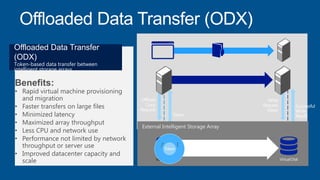
External Intelligent Storage Array
Virtual Disk Virtual Disk
Token
Benefits:
• Rapid virtual machine provisioning
and migration
• Faster transfers on large files
• Minimized latency
• Maximized array throughput
• Less CPU and network use
• Performance not limited by network
throughput or server use
• Improved datacenter capacity and
scale
Offloaded Data Transfer
(ODX)
Token-based data transfer between
intelligent storage arrays
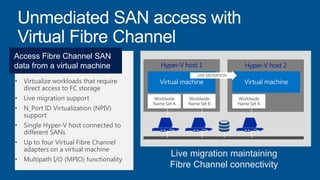
Live migration maintaining
Fibre Channel connectivity
Hyper-V host 1 Hyper-V host 2
Worldwide
Name Set B
Worldwide
Name Set A
Worldwide
Name Set A
LIVE MIGRATION
• Virtualize workloads that require
direct access to FC storage
• Live migration support
• N_Port ID Virtualization (NPIV)
support
• Single Hyper-V host connected to
different SANs
• Up to four Virtual Fibre Channel
adapters on a virtual machine
• Multipath I/O (MPIO) functionality
Access Fibre Channel SAN
data from a virtual machine
Shared Nothing Live Migration
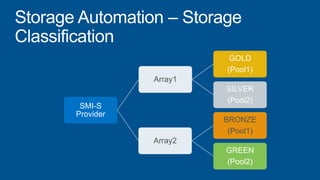
SMI-S
Provider
Array1
GOLD
(Pool1)
SILVER
(Pool2)
Array2
BRONZE
(Pool1)
GREEN
(Pool2)
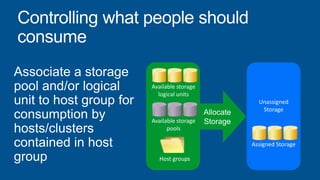
Available storage
logical units
Available storage
pools
Host groups
Unassigned
Storage
Assigned Storage
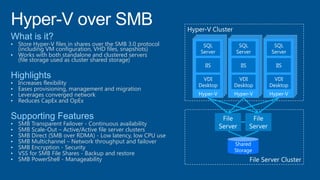
• Store Hyper-V files in shares over the SMB 3.0 protocol
(including VM configuration, VHD files, snapshots)
• Works with both standalone and clustered servers
(file storage used as cluster shared storage)
• Increases flexibility
• Eases provisioning, management and migration
• Leverages converged network
• Reduces CapEx and OpEx
• SMB Transparent Failover - Continuous availability
• SMB Scale-Out – Active/Active file server clusters
• SMB Direct (SMB over RDMA) - Low latency, low CPU use
• SMB Multichannel – Network throughput and failover
• SMB Encryption - Security
• VSS for SMB File Shares - Backup and restore
• SMB PowerShell - Manageability
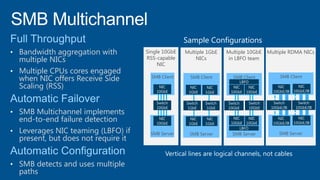
Multiple RDMA NICsMultiple 1GbE
NICs
Single 10GbE
RSS-capable
NIC
SMB Server
SMB Client
• Bandwidth aggregation with
multiple NICs
• Multiple CPUs cores engaged
when NIC offers Receive Side
Scaling (RSS)
• SMB Multichannel implements
end-to-end failure detection
• Leverages NIC teaming (LBFO) if
present, but does not require it
• SMB detects and uses multiple
paths
SMB Server
SMB Client
SMB Server
SMB Client
Sample Configurations
Multiple 10GbE
in LBFO team
SMB Server
SMB Client
Scale-Out File Share
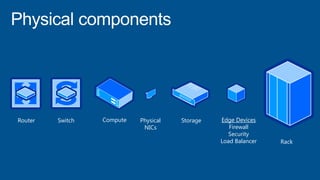
Router Switch Compute Storage Edge Devices
Firewall
Security
Load Balancer
Physical
NICs
Rack
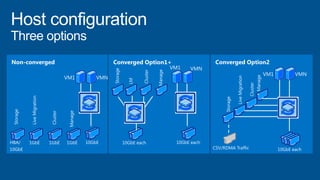
Converged Option1Converged Option1+Non-converged Converged Option2
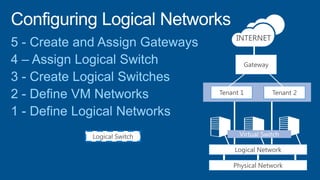
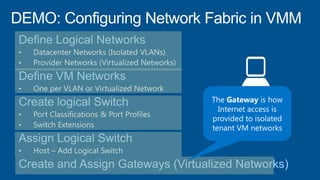
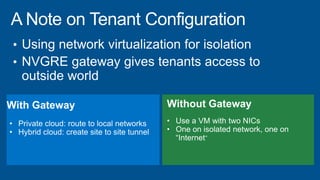
Gateway
Tenant 1 Tenant 2
Physical Network
INTERNET
Logical Network
Logical Switch
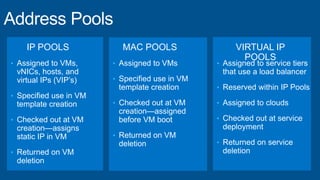
IP POOLS
• Assigned to VMs,
vNICs, hosts, and
virtual IPs (VIP’s)
• Specified use in VM
template creation
• Checked out at VM
creation—assigns
static IP in VM
• Returned on VM
deletion
MAC POOLS VIRTUAL IP
POOLS
• Assigned to VMs
• Specified use in VM
template creation
• Checked out at VM
creation—assigned
before VM boot
• Returned on VM
deletion
• Assigned to service tiers
that use a load balancer
• Reserved within IP Pools
• Assigned to clouds
• Checked out at service
deployment
• Returned on service
deletion
Configuring Virtual Networking in VMM
©2013 Microsoft Corporation. All rights reserved. Microsoft, Windows, Office, Azure, System Center, Dynamics and other product names are or may be registered trademarks and/or
trademarks in the U.S. and/or other countries. The information herein is for informational purposes only and represents the current view of Microsoft Corporation as of the date of this
presentation. Because Microsoft must respond to changing market conditions, it should not be interpreted to be a commitment on the part of Microsoft, and Microsoft cannot guarantee
the accuracy of any information provided after the date of this presentation. MICROSOFT MAKES NO WARRANTIES, EXPRESS, IMPLIED OR STATUTORY, AS TO THE INFORMATION IN
THIS PRESENTATION.

1.2 build cloud_fabric_final

  • 4.
    Windows Server 2012introduces technologies at the storage layer that can replace traditional SAN • Storage Spaces • SMB 3.0 • Scale-Out File Server When leveraged together, these enable high performance, ease administration and lower cost
  • 6.
    • Virtualization ofstorage with Storage Pools and Storage Spaces • Storage resilience and availability with commodity hardware • Resiliency and data redundancy through n-way mirroring (clustered or unclustered) or parity mode (unclustered) • Utilization optimized through thin and trim provisioning and enclosure awareness • Integration with other Windows Server 2012 capabilities • Serial Attached SCSI (SAS) and Serial AT Attachment (SATA) interconnects Windows Virtualized Storage Windows Application Server or File Server Physical or virtualized deployments Physical Storage (Shared) SAS or SATA Integrated with other Windows Server 2012 capabilities Storage PoolStorage Pool File Server Administration Console Hyper-V Cluster Shared Volume Failover Clustering SMB Multichannel NFS Windows Storage Mgmt. NTFS SMB Direct Storage Space Storage Space Storage Space
  • 7.
    • Highly available,shared data store for SQL Server databases and Hyper-V workloads • Increased flexibility, and easier provisioning and management • Ability to take advantage of existing network infrastructure • No application downtime for planned maintenance or unplanned failures with failover clustering • Highly available scale-out file server • Built-in encryption support File Server Cluster Cluster Shared Volumes Single File System Namespace SMB Single Logical Server FooShare RAID Array RAID Array RAID Array SAN Windows Virtualized Storage Physical Storage Storage PoolStorage Pool Storage Space Storage Space Storage Space Hyper-V Cluster Microsoft SQL Server
  • 8.
    VHD Library Software Deployment Share GeneralFile Share User Home Folder (My Docs) 0% 20% 40% 60% 80% 100% Average savings with Data Deduplication by workload type Maximize capacity by removing duplicate data • 2:1 with file shares, 20:1 with virtual storage • Less data to back up, archive, and migrate Increased scale and performance • Low CPU and memory impact • Configurable compression schedule • Transparent to primary server workload Improved reliability and integrity • Redundant metadata and critical data • Checksums and integrity checks • Increase availability through redundancy Faster file download times with BranchCache Source: “Microsoft Internal Testing"
  • 9.
    File Client SMB Buffer File Server WithRDMAWithout RDMA App Buffer SMB Buffer OS Buffer Driver Buffer SMB Buffer OS Buffer Driver Buffer App Buffer SMB Buffer rNICrNIC NIC Adapter BufferNICAdapter Buffer Adapter Buffer Adapter Buffer iWARP InfiniBand • Higher performance through offloading of network I/O processing onto network adapter • High throughput with low latency and ability to take advantage of high-speed networks (such as InfiniBand and iWARP) • Remote storage at the speed of direct storage • Transfer rate of around 50 Gbs on a single NIC port • Compatible with SMB Multichannel for load balancing and failover
  • 10.
    External Intelligent StorageArray Virtual Disk Virtual Disk Token Benefits: • Rapid virtual machine provisioning and migration • Faster transfers on large files • Minimized latency • Maximized array throughput • Less CPU and network use • Performance not limited by network throughput or server use • Improved datacenter capacity and scale Offloaded Data Transfer (ODX) Token-based data transfer between intelligent storage arrays
  • 11.
    Live migration maintaining FibreChannel connectivity Hyper-V host 1 Hyper-V host 2 Worldwide Name Set B Worldwide Name Set A Worldwide Name Set A LIVE MIGRATION • Virtualize workloads that require direct access to FC storage • Live migration support • N_Port ID Virtualization (NPIV) support • Single Hyper-V host connected to different SANs • Up to four Virtual Fibre Channel adapters on a virtual machine • Multipath I/O (MPIO) functionality Access Fibre Channel SAN data from a virtual machine
  • 12.
  • 13.
  • 14.
    Available storage logical units Availablestorage pools Host groups Unassigned Storage Assigned Storage
  • 16.
    • Store Hyper-Vfiles in shares over the SMB 3.0 protocol (including VM configuration, VHD files, snapshots) • Works with both standalone and clustered servers (file storage used as cluster shared storage) • Increases flexibility • Eases provisioning, management and migration • Leverages converged network • Reduces CapEx and OpEx • SMB Transparent Failover - Continuous availability • SMB Scale-Out – Active/Active file server clusters • SMB Direct (SMB over RDMA) - Low latency, low CPU use • SMB Multichannel – Network throughput and failover • SMB Encryption - Security • VSS for SMB File Shares - Backup and restore • SMB PowerShell - Manageability
  • 17.
    Multiple RDMA NICsMultiple1GbE NICs Single 10GbE RSS-capable NIC SMB Server SMB Client • Bandwidth aggregation with multiple NICs • Multiple CPUs cores engaged when NIC offers Receive Side Scaling (RSS) • SMB Multichannel implements end-to-end failure detection • Leverages NIC teaming (LBFO) if present, but does not require it • SMB detects and uses multiple paths SMB Server SMB Client SMB Server SMB Client Sample Configurations Multiple 10GbE in LBFO team SMB Server SMB Client
  • 18.
  • 20.
    Router Switch ComputeStorage Edge Devices Firewall Security Load Balancer Physical NICs Rack
  • 22.
  • 25.
    Gateway Tenant 1 Tenant2 Physical Network INTERNET Logical Network Logical Switch
  • 26.
    IP POOLS • Assignedto VMs, vNICs, hosts, and virtual IPs (VIP’s) • Specified use in VM template creation • Checked out at VM creation—assigns static IP in VM • Returned on VM deletion MAC POOLS VIRTUAL IP POOLS • Assigned to VMs • Specified use in VM template creation • Checked out at VM creation—assigned before VM boot • Returned on VM deletion • Assigned to service tiers that use a load balancer • Reserved within IP Pools • Assigned to clouds • Checked out at service deployment • Returned on service deletion
  • 27.
  • 35.
    ©2013 Microsoft Corporation.All rights reserved. Microsoft, Windows, Office, Azure, System Center, Dynamics and other product names are or may be registered trademarks and/or trademarks in the U.S. and/or other countries. The information herein is for informational purposes only and represents the current view of Microsoft Corporation as of the date of this presentation. Because Microsoft must respond to changing market conditions, it should not be interpreted to be a commitment on the part of Microsoft, and Microsoft cannot guarantee the accuracy of any information provided after the date of this presentation. MICROSOFT MAKES NO WARRANTIES, EXPRESS, IMPLIED OR STATUTORY, AS TO THE INFORMATION IN THIS PRESENTATION.